seats AUDI A3 SEDAN 2017 User Guide
[x] Cancel search | Manufacturer: AUDI, Model Year: 2017, Model line: A3 SEDAN, Model: AUDI A3 SEDAN 2017Pages: 400, PDF Size: 67.32 MB
Page 113 of 400
a, a, ..... N
" N ..... 0 N > 00
Removing the charging syst em from the
charging clip
• Remove the power cable connector from the
socket @.
• Unwind the cable from the charging connector
mount (D.
• To loosen the control unit from the bracket,
push the lock ing mechan ism @ upward
9fig. 119.
Transport ing
App lies to: veh icles with plug-in hybrid drive
Fig. 1 20 Storage bag
• Store the charg ing system and the special
charg ing cable* in the bag befo re transport ing .
• Secure the bag using the tie-downs ¢ page 66.
The flat hook must be secured to the left side
of the tie-downs.
_& WARNING
- If the vehicle charging cab le is not secured
or pos itioned correct ly, it can slide out of
place and endanger vehicle occupants when
brak ing, when changing directions, or in an
acc ident.
- Never transport the Audi e-tron charging system or the special charg ing cable" unse
cured.
- Store the Audi e-tron charging system or the spec ial charging cable* in the storage
bag in the luggage compartment.
- Always transport the storage bag in the lug
gage compartment and never i n the passen
ger compartment (for example the seats or
in front of them) .
e-tron
Charging overview
Applies to: vehicles with pl ug-in hybrid drive
Fig. 121 Charging system : control unit
Fi g. 122 Rad iator grille: veh icle charg ing port and bu tton
module
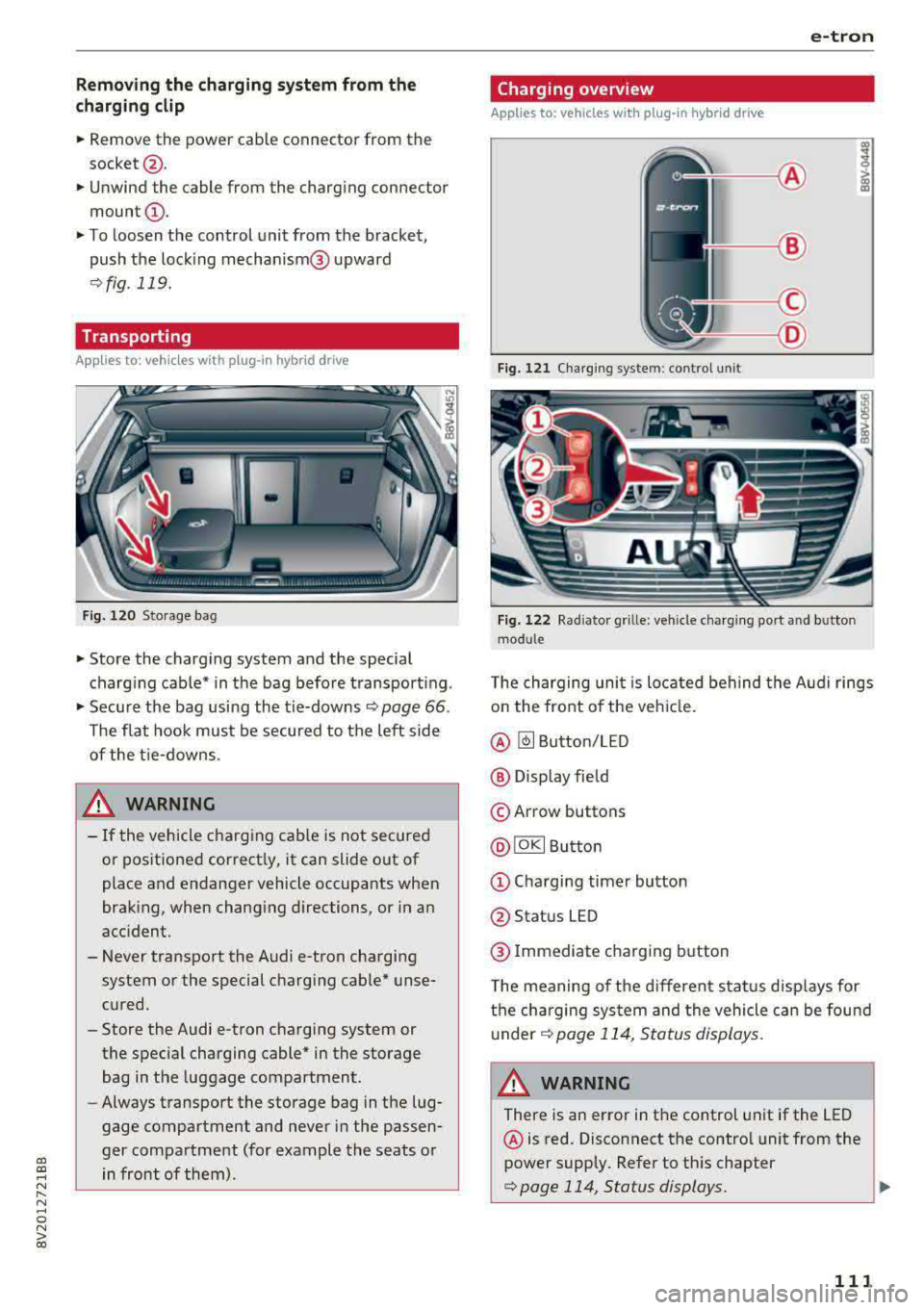
T he charging uni t is located behind the Audi rings
o n the front of the vehicle .
@ ~ Button/LED
@ Display field
© Arrow buttons
@IOKI Butto n
(D Chargi ng timer button
@ Status LED
@ Immediate charging button
T he meaning of the d ifferent status displays for
the cha rging sys tem and the vehicle can be found
u nder
9 page 114, S tatus displays.
A WARNING
There is an error in the control unit if the LED
@ is red. Disconnect the contro l unit from the
power supply. Refer to th is chapter
¢page 114, Status displays. ..,
111
Page 195 of 400
CXl CXl .... N r--N .... 0 N > 00
Different functions are available depending on
the Twitter category you have selected:
- New twe et: you can post a new tweet using
pre-made temp lates or using myAudi tem
plates that you have created yourse lf .
- Refr es h: the selected Tw itter function is re
freshed.
- Favori te: mark a Tweet as favo rite to show you
l ik ed it.
- Retw eet: you can quote a Tweet to share it with
others.
(j) Tips
- Other settings such as account, language,
Tweet security and location settings
cannot
be changed in the MMI. These changes must
be made on the Twitter website .
- You can only connect
one Twitter account
wi th you r myAudi account.
- Audi connect (Infotainment) makes it possi
ble to access Tw itter. Permanen t ava ilability
cannot be guaranteed, because that de
pends on Twitter.
Travel (travel guide)
Applies to: vehicles with Audi connect (Infotainmen t)
You can use the Audi MMI connect opp to store
points of interest on your mobile device (such as
a smartphone) and then use them for route
guidance in the MMI .
Requirement:
The
A udi MM I connect app must be installed and
open on your mobile device .
You must be logged i nto your myAud i account in
the
A udi MMI conn ect app and you must have se
l ected your vehicle.
The Wi-Fi funct ion on your mobile device and on
the MMI must be switched on.
The MMI must be connected to the network.
.,. Press: I MENU I button > Audi conne ct > left con-
t ro l button
> Inf ormati on category > Tra ve l.
Afte r opening the travel guide, travel tips in yo ur
a rea will be displayed incl uding c urrent rat ings as
well as the correspond ing category.
Audi c onn ect ( Inf ota inm ent )
.,. Press the le ft control button to change the cat
egory (such as bars nearby) .
A WARNING
= -
-It is only safe to use tablets, laptops, mo
b ile dev ices and other similar devices when
the vehicle is stationary because, like all loose objects, they co uld be thrown around
the inside of the vehicle in a crash and cause
serious inju ries. Store these types of devices
securely while d riving.
- Do not use any wireless devices on the front
seats within range of the airbags while dr iv
ing. Also read the warnings in the chapte r
¢ page 271, Front airbags.
(D Tips
-Units of measurement, language settings
and time are shown in the Infotainment sys
tem display based on how they were set in
the system settings
¢ page 241.
Audi connect (Infotainment) in navigation
Applies to: vehicles with navigation system and Audi connect
(Infotainment)
.,. Select : !MENUI button> A udi conn ect > left
control button >
Na vig atio n.
The following Audi connect Infotainment services
are currently ava ilable:
- Navigation with
online m ap vie w and Street
Vi ew
¢ page 212.
- Point of Intere st (POI) on line sea rch with
v oi ce re cognit ion
(such as restaurants): plan
route guidance using the MMI contro l pane l
¢ page 203 and the voice recogn ition system
¢ page 170 .
-Set up destinations in your MMI using your
myAu di account or onl in e map vie w
¢page 212 .
-On line traff ic informat ion : receive up-to-the
m inute traffic informat ion about acc idents,
road construction and other inc idents
¢ page 215 .
-Map update: import navigation map updates
direct ly to your veh icle using an SD card or as
an online update
¢ page 213.
193
Page 197 of 400
CXl CXl .... N r--N .... 0 N > 00
Wi-Fi hotspot
Applies to: vehicles with Wi-Fi hotspot
You con use the MMI as a Wi-Fi hotspot to con
nect up to eight Wi-Fi devices to the Internet. While driving, restricted use of unsecured, light,
small wireless devices is only possible from the
rear of the vehicle.
Requirement: the ignition must be switched on.
• Select: I MENU I button > Tele ph one> right con-
trol button >
Wi -F i s ettin gs.
The follow ing settings can be modified:
Wi-Fi
The MMI Wi-F i hotspot is deactivated at the fac
tory . Switch the Wi-Fi hotspot to
H otsp ot before
establishing a connection between your vehicle
and your W i- Fi dev ice.
- On : the MMI Wi-Fi hotspot is active and visible
to other devices . You can connect your Wi-Fi
device with the MMI.
- Off: the MMI W i-F i hotspot is deactivated . An
I n ternet connection fo r Wi-Fi devices is not
poss ible.
_& WARNING
- T o reduce the risk of an accident, use the
Audi connect In fotainment services with a
Wi-Fi hotspot only in the rear seat when the
vehicle is in motion, or on ly when the vehi
cle is stationary.
- It is only safe to use tab lets, laptops, mo
bile devices and other similar devices when
the vehicle is stationary because, like all loose objects, they could be thrown around
the ins ide of the vehicle in a crash and cause
serious injur ies. Store these types of devices
securely while driving.
- Do not use any w ireless devices on the front
seats w ith in range of the a irbags while driv
ing. Also read the warn ings in the chapter
~page 271, Front airbags.
- As the driver, do not allow usage of the Wi
Fi hotspot to dist ract you from driving, as
this could increase the risk of an accident .
-
Audi conn ect ( Inf ota inm ent )
(D Note
-Under some conditions, certain mobile devi
ces and operating systems may automati
cally switch from your vehicle's Wi-Fi hot
spot to the device's mobile data connection.
In that event , standard text and data usage
rates would apply wh ile the device's mobile
data connection is in use. Please refer to
documentation provided by your mobile de
vice's manufacture and your data carrier for details, related terms and privacy state
ment.
- You a re responsib le for all precautions tak
en for data protection, anti -virus protection
and protection against loss of data on mo
bile devices that are used to access the In
ternet through the Wi-Fi hotspot.
(D Tips
- In vehicles without Audi connect (Infotain
ment)*, the use of the Wi-Fi hotspot is only
possible for the W i-Fi audio player*. A data
connect ion to the Internet cannot be estab
lished.
- For add itional information about the Audi
connect Infotainment services, visit
ww w.a udiusa.c o m /aud iconn ect .
Configuring the data
connection
Applies to: vehicles with Audi connect (Infotainment)
The data connection for Audi connect Infotain
ment services is pre-configured at the factory.
However, if a configuration should be necessary,
you con adjust the following settings.
• Select: ! MENU I button> right control button>
Connecti on manag er.
• Select: right control button > Online setti ngs >
Data c onnec tion setting s.
Using the Data co nnection settin gs menu, you
can set when an Internet connection should be
made . T he Internet connection disconnects auto
matically once the requested Audi connect Info
tainment service no longer requires any data.
The following options can be selected:
195
Page 198 of 400
Audi connect (Infotainm ent )
Aud i conn ect (MMI)
W ith the Audi c onn ect (MMI) function, yo u can
Allo w or Deny the use of A udi connect Infotain
m ent services if the connection is set to
N o re
q uest
or With reque st .
Wi-Fi devic es*
Using the Wi-Fi de vic e s function, you can All ow
or D eny a connection to the Interne t.
A WARNING
- As the driver, do not allow usage of the Wi
Fi hotspot to distract you from driving, as
this could increase the risk of an accident.
- It is only safe to use tab lets, laptops, mo
bile devices and other similar devices when
the vehicle is stationary because, like all
loose objects, they could be thrown around
the inside of the vehicle in a crash and cause
serious injur ies. Store these types of devices
securely whi le driving .
- Do not use any w ireless devices on the front
seats w ith in range of the a irbags while driv
ing . Also read the warnings in the chapter
q page 2 71, Front airbags.
Audi connect
(Infotainment) general
information
Audi connect Infotainment services
Applies to: vehicles with Audi connect (Infotainment)
@ Tips
- You can on ly use services supported by Audi
connect (Infotainment) if you have the op
tiona l MMI Navigation plus equipment with
MMI touch* and Audi connect (Infotain
ment) .
- Use of the LTE* mob ile network standard is
not available in every country . Contact an
authorized Audi dealer or authorized Audi
Service Fac ility or your cell phone serv ice
provider for additional informat ion .
- Usage of Audi connect Infotainment serv
ices depends on the availability of services
through th ird party prov iders .
196
- Audi connect Infotainment services are on ly
available within the cell phone network cov
erage from your cell phone service provider.
- Audi connect Infotainment services are
available in the USA. Audi connect Infotain
ment services are currently not availab le in
Canada or in Mexico.
- Also read the information in the chapter
q page 177, Telephone.
-Availability, scope, prov iders, screen display
and costs of services may vary depending on
the country, model, mode l year, end device
and rates. Additional information can be
found under
www .audiu sa .com /aud icon
nect
- An initial registration/act ivat ion on the
myAudi platform at
www .audiusa .com /
m yaudi
is requ ired to use individual serv
ices. You can contact an author ized Audi
dealer or Aud i connect (Infotainmen t) cus
tomer service at (877) SOS -AUDI (2834) to
rece ive information on options for expand
ing your usage and any costs that may re
sult.
- The Audi connect Infotainment services are
a Wi-Fi/lnternet-based system . If the sys
tem does not function correct ly even
though all of the requirements are met,
please try again later or contact Audi con
nect (Infotainment) customer service at
(877) SOS-AUDI (2834).
- For detailed information on Aud i connect
(Infota inment) and the Terms of Use, refer
to
www .audiusa.com /aud iconnect .
Data protection
Applies to: vehicles with Aud i connect (Infotainment)
(D Tips
- Your pr ivacy is important to us.
- AUDI AG colle cts, processes, s hares and
t ransmits your personal info rmation in a c
c o rdance w ith legal reg ulations in order to
ensure p roper function and availability of
the individua l Audi connect Infotainment
serv ices. You can view the complete, current
and valid Audi connect (Infotainment) data
protection policy in your MMI. The myAud i
..,.
Page 228 of 400
Media
(D Tips
-Check for any connection requests on your
Bluetooth dev ice .
- Mult iple Bluetooth audio players can be
connected to the MMI, but only one mobile
device can be active.
- Bluetooth protocols AVRCP ( 1.0/1.3/1.4)
and A2DP are suppo rted.
- Note the volume setting on your Bluetooth device. A ud i recommends setting your mo
bile device to the maxim um vo lume when
us ing it as a Bluetooth audio player.
- The supported media functions (such as
sh uffle) depend on the Bluetooth device be
i ng used.
- For more information on the supported de
v ices, visit
www.aud iusa.com /bluetooth or
contact an author ized Audi dealer or author
i zed Audi Service Facility.
Wi-Fi audio player
A ppl ies to: ve hicles w ith Wi-F i
Using the Wi-Fi audio player media source on the
MMI, you can connect and operate your Wi-Fi-ca
pable media player (such as a smartphone) to wirelessly play music from your media player
li
brary. The media player is connected through the
vehicle's Wi -Fi hotspot. A UPnP Server opp or an
integrated UPnPIDLNA server on your media
player is required to access your media player
li
brary.
Requirement: the Wi-Fi function on your media
p layer must be sw itched on. The
Aud i MMI con
n ect
app or a UPnP server app must be installed
on your med ia p layer .
Or: you must be us ing a
media player with an integrated UPnP/DLNA
server.
- Connecting a medi a playe r: press the I MEDIA !
button. Press the left control button unti l the
sources
overview ¢ page 230 is displayed . Se
lect and co nfirm
W i-Fi audio play er 0
¢ page 230, fig . 214 .
- If necessary, select and confirm Wi-F i turn ed
off > Turn on Wi-Fi
to activate Wi-Fi in the
MMI. Select
Wi-Fi s etti ng s, if necessa ry . Se lect
226
the same settings on the wireless media player
that are used for the Wi- Fi hotspot .
-Starting the Wi-Fi audio pla yer : start the Audi
MMI connect
app or a UPnP server app, or set
media permissions on your media player.
Operating the medi a pl ayer : the med ia p layer is
operated through the MM I.
- Press the left control button repeatedly until
the
Folders menu item appears. Select and con
firm
Folder s.
- Playing music from the medi a pla yer:
select
and confirm
M edia cent er.
Web r adio :
see ¢ page 22 7.
A WARNING
-As the d river, do not allow usage of the Wi
Fi hotspot to distract you from driving, as
this could increase the r isk of an accident.
- It is on ly safe to use tablets, laptops, mo
bi le devices and other similar dev ices when
the vehicle is stat ionary because, like all
loose objects, they co uld be thrown around
the inside of the ve hicle in a c rash and ca use
serio us inju ries . Store these types of devices
secure ly while driving.
- Do not use any wire less devices on the front
seats wi thin range of the airbags while dr iv
ing . Also read and follow the warn ings in
¢ page 271, Front airbags.
(D Note
A lways fo llow the information fo und in ¢ (!) in
Wi -Fi hotspo t on page 195.
(D Tips
- Always read the chapter¢ page 196, Audi
connect (Infotainment) general informa
tion.
- Please note that a Wi-F i connection does
not automatically make it possible to use
the Interne t. For addit io nal info rm ation,
see
¢ page 190 .
- To avoid interr upt ions du ring playback, de
act ivate the powe r saving function on the
media player or connect it to a charger.
Page 230 of 400
Media
-Do not u se any wireless devices on the fro nt
seats within range of the airba gs w hile driv
ing. Also read and follow the warnings in
r=> page 271, Fro nt airbags.
CD Note
- Always follow the information found in ¢ 0
in Wi-Fi hotspot on page 195 .
-Please note that there generally are add i
tiona l costs when using an online media
service account, especially when it is used i nternationally.
{!) Tips
-Depending on the Internet connection and
network traff ic, a connection loss can occur
during p layback of on line media serv ices.
-Online media and Internet radio usage de
pends on the serv ice avai lability of the third
party provider.
- Audi AG simply makes the access to on line
media serv ices possible t hrough the MMI
and does not take any respons ibility for the
contents of the onli ne med ia serv ices .
-Always read the chapter r:> page 196, Audi
connect (Infotainment) general informa tion.
-Depending on the mobile device used, the re
may be interr uptions du ring media playback
and when using the
Audi MMI connect app.
T o avoi d inter ruption s when usi ng a mob ile
device, do no t loc k t he s creen on you r mo
bi le dev ice a nd keep the
Audi MMI connect
app in the foreground .
- Co ntact an a utho rized Audi dea le r or a u
thorized Audi Service Facili ty for additional
informat ion about on line media .
228
Multimedia connections
USB adapter for Audi music interface
You can connect your mobile devices (such as a
smartphone or
MP3 player) to the Audi music in
terface and charge them using a special USB
adapter .
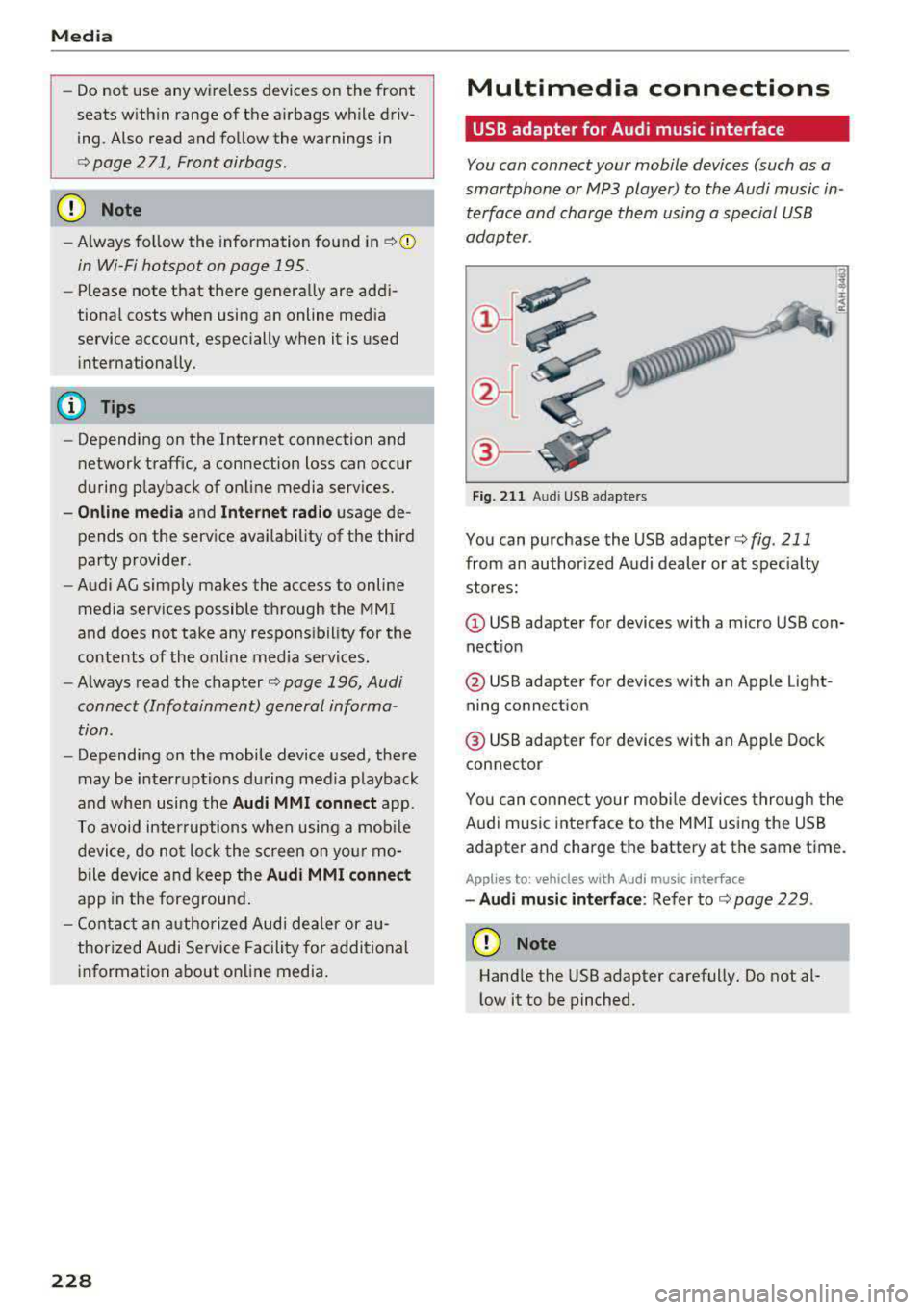
®-
Fig. 2 11 Audi USB adapters
You can purchase the USB adapter ¢ fig . 211
from an author ized Audi dealer or at spec ia lty
stores:
Q) USB adapter for devices with a micro USB con
nect ion
@ USB adapter for devices with an Apple Light
ning connect ion
@ USB adapte r for devices with an Apple Dock
connector
You can conne ct your mob ile dev ices throug h the
Audi music interface to the MM I using the USB
adapter and charge the battery at the same time.
Applies to: vehicles wit h Aud i music interface
-Audi musi c interface : Refer to¢ page 229.
CD Note
Handle the USB adapter carefully. Do not al
l ow it to be pinched .
Page 249 of 400
CXl CXl .... N ,.__
N .... 0 N > 00
Driving safety
Basics
Safe driving habits
Please remember -safety first!
This chapter contains important information,
tips, instructions and warnings that you need to
read and observe for your own safety, the safety
of your passengers and others . We have summar
ized here what you need to know about safety
belts, airbags, child restraints as well as child
safety. Your safety is for us
priority number 1. Al
ways observe the information and warnings in
this section - for your own safety as well as that
of your passengers.
The information in this section applies to all
model versions of your vehicle. Some of the fea
tures descr ibed in this sections may be standard
equipment on some models, or may be optional
equipment on others. If you are not sure, ask
your authorized Audi dealer.
A WARNING
- Always make sure that you follow the in
structions and heed the WARNINGS in this
Manual. It is in your interest and in the in
terest of your passengers .
-
-Always keep the complete Owner's Litera
ture in your Audi when you lend or sell your
vehicle so that this important information
will always be available to the driver and
passengers.
- Always keep the Owner's literature handy so
that you can find it easily if you have ques
tions.
Safety equipment
The safety features are part of the occupant re
straint system and work together to help reduce the risk of injury in a wide variety of accident sit
uations.
Your safety and the safety of your passengers
should not be left to chance. Advances in tech
nology have made a var iety of features available
to help reduce the risk of injury in an accident.
Driving safety
The following is a list of just a few of the safety
features in your Audi:
- sophisticated safety belts for driver and all pas
senger seat ing pos itions,
- safety belt pretensioners,
- safety belt height adjustment systems for the
front seats*,
- front airbags,
- knee airbags for the front seats*
- side airbags in the front seats and outer rear seats*,
- side curtain airbags with ejection mitigation features*,
- special LATCH anchorages for child restraints,
- head restraints for each seating position,
- adjustable steering column.
- pre sense* (preventat ive passenger protection)
These individual safety features, can work to gether as a system to help protect you and your
passengers in a wide range of accidents . These
features cannot work as a system if they are not
always correctly adjusted and correctly used.
Safety is everybody's responsibility!
Important things to do before driving
Safety is everybody 's job! Vehicle and occupant
safety always depends on the informed and care
ful driver .
For your safety and the safety of your passen
gers,
before driving always:
.,. Make sure that all lights and signals are operat
ing correctly .
.,. Make sure that the tire pressure is correct.
.,. Make sure that all windows are clean and afford
good visibility to the outside .
.,. Secure all luggage and other items carefully
¢ page 66, ¢ page 65.
.,. Make sure that nothing can interfere with the
pedals.
.,. Adjust front seat, head restraint and mirrors correctly for your height .
.,. Instruct passengers to adjust the head re
straints according to their height .
247
Page 250 of 400
Driving safety
• Make sure to use the right child restraint cor
rectly to protect children
c::> page 292, Child
saf ety .
• Sit properly in your seat and make sure that
your passengers do the same
c::> page 61, Fron t
seats .
• Fasten your safety belt and wear it properly . Al
so instruct your passengers to fasten their safe
ty belts properly
c::> page 258 .
What impairs driving safety?
Safe driving is directly related to the condition of
the vehicle, the driver as well as the driver 's abili
ty to concentrate on the road without being dis
tracted .
The driver is responsible for the safety of the ve
hicle and all of its occupants. If your ability to
drive is impaired, safety risks for everybody in the
veh icle increase and you also become a hazard to
everyone else on the road
c::> ,&. . Therefore :
• Do not let yourself be distracted by passengers
or by using a cellular telephone .
• NEVER drive when your driv ing ability is im
pa ired (by med ications, alcohol, drugs, etc .).
• Observ e all traffic laws, rules of the road and
speed limits and plain common sense .
• ALWAYS adjust your speed to road, traffic and
weather conditions .
• Take frequent breaks on long trips . Do not drive
for more than two hours at a stretch .
• Do NOT drive when you are tired, under pres
sure or when you are stressed .
.&, WARNING
Impaired driving safety increases the risk of
serious personal injury and death whenever a
vehicle is being used.
248
.
Correct passenger
seating positions
Proper seating position for the driver
The proper driver seating position is important
for safe, relaxed driving.
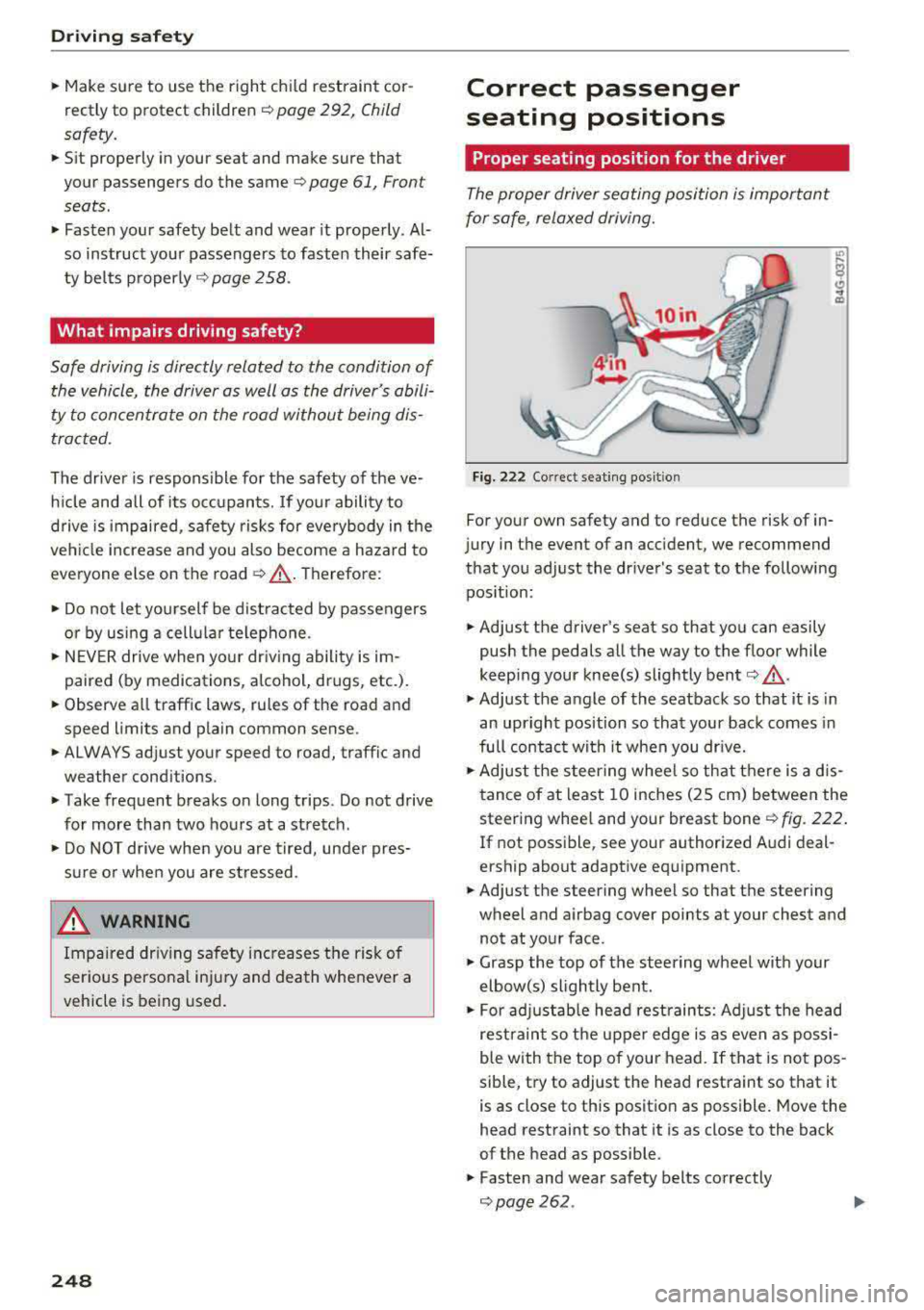
Fig. 222 Correct seating pos it ion
For your own safety and to reduce the risk of in
jury in the event of an ac cident, we recommend
that you adjust the driver's seat to the following position :
• Adjust the driver's seat so that you can easily
push the pedals all the way to the floo r while
keeping your knee(s) slightly bent
c:> .&_ .
• Adjust the angle of the seatback so that it is in
an upright position so that your back comes in
full contact with it when you dr ive.
• Adjust the steering wheel so that there is a d is
tance of at least 10 inches (25 cm) between the
steering wheel and your breast bone
r::!) fig. 222.
If not possible, see your authorized Audi deal
e rship about adaptive equipment.
• Adjust the steering wheel so that the steering
wheel and airbag cover points at your chest and
not at your face .
• Grasp the top of the steering wheel with your
elbow(s) slightly bent.
• For adjustable head restraints: Adjust the head
restraint so the upper edge is as even as possi
ble with the top of your head. If that is not pos
sible, try to adjust the head restraint so that it
is as close to this position as possible. Move the
head restraint so that it is as close to the back
of the head as possible .
• Fasten and wear safety belts correctly
c::> page 262 . .,.
Page 251 of 400
CXl CXl .... N ,.__
N .... 0 N > 00
~ Always keep both feet in the footwell so that
you are in control of the vehicle at all times.
F or detailed information on how to adjust the
driver's seat, see
¢ page 61.
A WARNING
Drivers who are unbelted, out of position or
too close to the airbag can be seriously in
jured by an airbag as it unfolds. To help re
duce the risk of serious personal injury:
-Always adjust the driver's seat and the
steering wheel so that there are at least
10 inches (25 cm) between your breastbone
and the steering wheel.
-Always adjust the driver's seat and the
steering wheel so that there are at least
4 inches (10 cm) between the knees and the
lower part of the instrument panel.
-Always hold the steering wheel on the out
side of the steering wheel rim with your
hands at the 9 o'clock and 3 o'clock posi
tions to help reduce the risk of personal in
jury if the driver's airbag inflates.
-Never hold the steer ing wheel at the
12 o'clock posit ion or with your hands at
other positions inside the steering wheel
rim or on the steering wheel hub. Holding
the steering wheel the wrong way can cause
serious injuries to the hands, arms and head if the driver 's airbag inflates.
-Pointing the steering wheel toward your
face decreases the ability of the supplemen
tal driver's airbag to protect you in a colli sion.
-Always sit in an upright position and never lean against or place any part of your body
too close to the area where the airbags are
located.
-Before driving, always adjust the front seats
properly and make sure that all passengers
are properly restrained.
-For adjustable head restraints: before driv
ing, always also adjust the head restraints
properly .
-Never adjust the seats while the vehicle is
moving. Your seat may move unexpectedly
and you could lose control of the vehicle.
-
Driving safety
-Never drive with the backrest reclined or
tilted far back! The farther the backrests are
tilted back, the greater the risk of injury due
to incorrect positioning of the safety belt
and improper seating position.
-Children must always ride in child safety
seats
c::;, page 292. Special precautions ap
ply when installing a child safety seat on the
front passenger seat
c::;, page 267.
Proper seating position for the front
passenger
The proper front passenger seating position is
important for safe, relaxed driving.
For your own safety and to reduce the risk of in
jury in the event of an accident, we recommend
that you adjust the seat for the front passenger
to the fol lowing position:
~ Adjust the angle of the seatback so that it is in
an upright position and your back comes in full
contact with it whenever the vehicle is moving.
~ For adjustable head restraints: adjust the head
restraint so the upper edge is as even as possi
ble with the top of your head. If that is not pos
sible, try to adjust the head restraint so that it is as close to this position as possible
c::;, page 63. Move the head restraint so that it is
as close to the back of the head as possible .
~ Keep both feet flat on the floor in front of the
front passenger seat.
~ Fasten and wear safety belts correctly
c::;, page 2 62 .
For detailed information on how to adjust the
front passenger's seat, see
c::;, page 61 .
A WARNING
Front seat passengers who are unbe lted, out
of position or too close to the airbag can be
seriously injured or killed by the airbag as it
unfolds . To help reduce the risk of serious
personal injury:
-Passengers must always sit in an upright po
sition and never lean against or place any pa rt of their body too close to the area
where the airbags are located.
.,,.
249
Page 252 of 400
Driving safety
-Passengers who are unbelted , out of posi
tion or too close to the airbag can be seri
ously injured by an airbag as it unfolds with
great force in the blink of an eye .
-Always make sure that there are at least
10 inches (25 cm) between the front pas
senger 's breastbone and the instrument
panel.
-Always make sure that there are at least
4 inches (10 cm) between the front passen ger's knees and the lower part of the instru
ment panel.
-Each passenger must always sit on a seat of
their own and properly fasten and wear the
safety belt belonging to that seat.
-Before dr iving, always adjust the front pas
senger seat properly .
-For adjustable head restraints: before driv
ing, always also adjust the head restraints
properly .
- Always keep your feet on the floor in front
of the seat. Never rest them on the seat, in
strument pane l, out of the window, etc. The
airbag system and safety be lt will not be
able to protect you properly and can even in
crease the risk of injury in a crash .
-Never dr ive with the backrest reclined or
ti lted far back! The farther the backrests are
ti lted back , the greater the risk of injury due
to incorrect positioning of the safety belt
and improper seating position.
-Children must always ride in child safety
seats
c::> page 292 . Special precautions ap
ply when installing a child safety seat on the
front passenger seat
c::> page 267 .
Proper seating positions for passengers in
rear seats
Rear seat passengers must sit upright with both
feet on the floor consistent with their physical
size and be properly restrained whenever the ve
hicle is in use.
To reduce the r isk of injury caused by an incorrect
seating position in the event of a sudden braking
maneuver or an accident, you r passengers on the
rear bench seat must always observe the follow
ing:
250
.,. For adjustab le head restraints: adjust the head
restraint so the upper edge is as even as possi
ble with the top of your head. If that is not pos
sible, try to adjust the head restraint so that it
is as close to this position as possible
c::> page 63.
.,. Keep both feet flat in the footwell in front of
the rear seat .
.,. Fasten and wear safety belts properly
c::> page 2 62.
.,. Make sure that children are always properly re
strained in a child restraint that is appropriate
for their size and age
c::> page 292.
A WARNING
Passengers who are improperly seated on the
rear seat can be seriously injured in a crash.
-E ach passenger must always sit on a seat of
their own and properly fasten and wear the safety belt belonging to that seat .
-Safety belts only offer maximum protection
when the safety belts are properly posi
tioned on the body and securely latched . By
not sitting upright, a rear seat passenger in
creases the risk of personal injury from im
properly positioned safety belts!
-For adjustable head restraints: always ad
just the head restraint properly so that it
can give maximum protection.
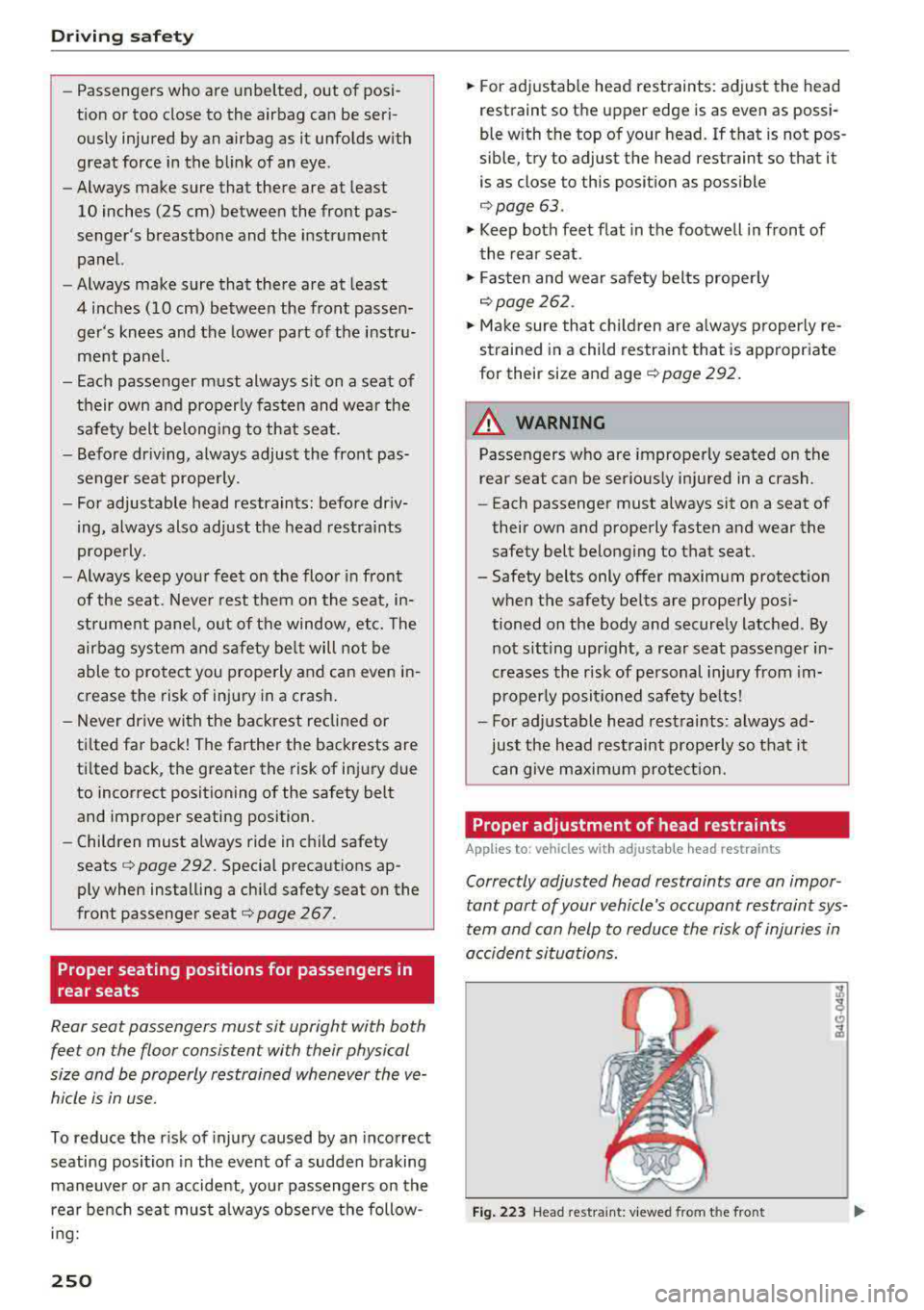
Proper adjustment of head restraints
Applies to: vehicles with adjustable head restraints
Correctly adjusted head restraints ore on impor
tant port of your
vehicle's occupant restraint sys
tem and con help to reduce the risk of injuries in
occident situations.
Fig. 223 Head restraint : viewed from t he front