change time AUDI A3 SEDAN 2017 Owner's Manual
[x] Cancel search | Manufacturer: AUDI, Model Year: 2017, Model line: A3 SEDAN, Model: AUDI A3 SEDAN 2017Pages: 400, PDF Size: 67.32 MB
Page 233 of 400
a, a, ..... N
" N ..... 0 N > 00
MMI control panel to the left l
a longer time.
-Pausing or resuming playback: press the On/
Off knob on the MMI control panel briefly.
@ Tips
- You can scroll through long lists quickly by
turning the control knob quickly. The
scroll
ing speed depends on the number of list en
tries.
- For safety reasons, the video image is only
displayed when the vehicle is stationary.
On·
Ly the sound from the video plays while driv
ing.
Media center
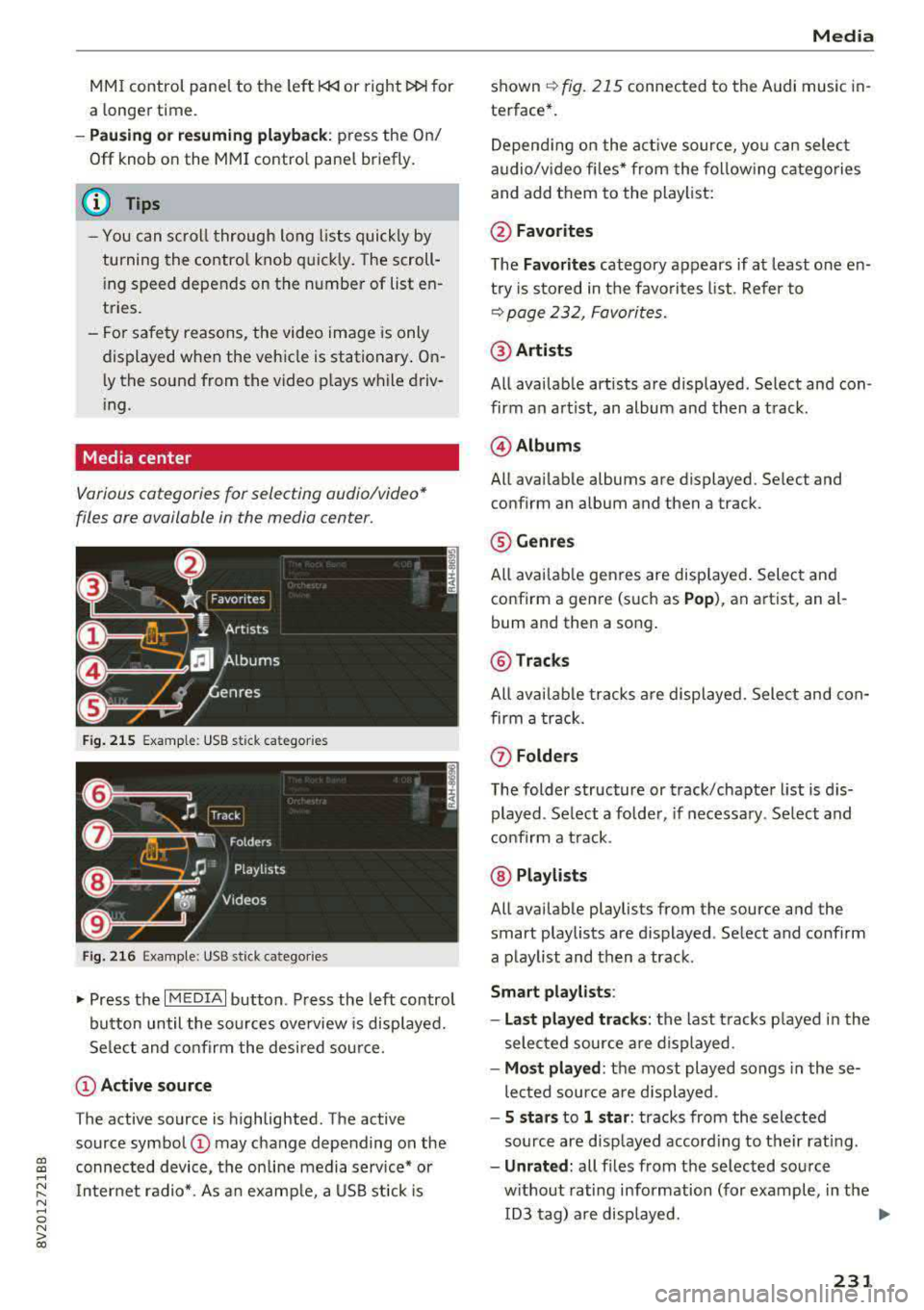
Various cat egori es for s electing audio/vid eo*
files ore available in the media center .
Fig. 215 Example: USB stick ca te gori es
Fig. 216 Example: USB stick ca tegorie s
"'Press the I MEDIAi button . Press the left control
button until the sources overview is displayed.
Select and confirm the desired source.
(D Active source
The active source is highlighted. The active
source symbol
(D may change depending on the
connected device, the on line media service* or
Internet radio*. As an example, a USB stick is
Media
shown ~ fig. 215 connected to th e Audi music in·
terfac e*.
Depending on the active source , you can select
audio/video files* from the following categories
and add them to the playlist:
@Favorites
The Favorites category appears if at least one en·
try is stored in the favorites list. Refer to
~ page 232, Favorites.
@Artists
All available artists are displayed . Select and con ·
firm an artist, an album and then a track.
@ Albums
All available albums are displ ayed . Select and
c onfirm an album and then a tra ck .
® Genres
All available genres are displayed. Select and
confirm a genre (such as
Pop), an artist, an al·
bum and th en a song.
@ Tracks
All available tracks are displayed. Select and con
firm a track.
(f) Folders
The folder structure or track/chapter list is dis
played . Select a folder, if necessary. Select and
confirm a track .
@ Playlists
All available playlists from the source and the
smart playlists are di splayed . Select and confirm
a playlist and then a track .
Smart playlists :
- Last played tracks:
the last tracks played in the
selected source are displayed .
-Most played : the most played songs in these
lected source are displayed .
-5 stars to 1 star: tracks from the selected
source are displayed according to their rating.
- Unrated: all files from the selected source
without rating information (for example, in the ID3 tag) are displayed.
.,.
231
Page 235 of 400
CXl CXl .... N ,.__
N .... 0 N > 00
When you store a track as a favo rite, the assoc i
ated album will appear in t he favo rites list as an
entry.
R eq uiremen t: at least one e ntry m ust be stored
in the favor ites list .
Displaying the favorites list : press the I MEDIA !
butt o n . Pr ess the left contro l bu tt on until the
sources overv iew¢
page 230 is displ ayed. Sele ct
the so urce that conta ins the
categories
¢ page 231 (for example, SD car d). Select the Fa
vorites category .
Req uiremen t: the f avor ites lis t m ust be dis
p layed .
-Listening to a preset : select and confirm a pre
set from the list.
- Move favorite : select a favorite from the list>
rig ht cont rol button> Move favorite . Select
and co nfirm the locat ion of the selected preset .
-Deleting a favorite : select a favorite from the
list>
r ight co ntro l butto n > Delete favorite >
Delete th is favorite or Delete all favorit es.
Additional settings
Options menu
Context-specific functions and settings are ava il
ab le depending on the se lected so urce .
.. Press t he right contro l bu tton .
Sound settings
Refer to ¢page 245.
Input level
Req uirement: a mob ile dev ice m ust be co nnected
to the AUX co nnect ion cable o r to a USB adapter
¢ page 228, Multimedia connections .
The volume of the mobi le device is adapted to
the MMI. A udi recommends adjusting the vo lume
on the mobile device to 70% of the max imum
volume output .
Bluetooth settings
R efer to ¢ page 244.
l) The fun ctio n automa tica lly sw itc hes off w he n th e source
i s c hange d.
Media
Wi-Fi settings*
Refer to ¢ page 195, W i-Fi h otspot.
Connection manager
Refer to ¢ pag e 242.
Additional track information
With the function switched on ~ and a playlist
open, va rious in format ion about the current t rack
(such as artist, a lbum and alb um cove r*) as well
as the playing time and the remaini ng play ing
t ime are display ed .
Jukebox memory capacity*
Info rmation on the J ukebox memo ry ca pac ity and
t h e number of sto red t racks in the Jukebox is dis
played .
Change playing position
Turn the cont rol knob to the left or to the right .
Or: move you r finger across the M MI touch con
tro l pad * from left to right.
Shuffle1>
W ith t he fu nction swi tched on~, all files in the
playlist are p layed and s hown in random ord er.
Repeat track1>
When th e funct io n is swi tched on~ , the curre nt
t rack repea ts .
Back to 'Playback'
The options menu is closed. The t rack cur rently
playing appea rs in the p laylist .
Play similar music*
The track cu rre ntly playing is quick ly ana lyzed
(s uch as artists, ge nres, mood, beat) an d a sma rt
playlist w ith sim ila r tracks is s hown.
Play more .. .
A smart playlist is shown based on the tra ck cu r
r ently playing. Yo u can select between a p lay list
with more tracks
by this artist , from this album
o r of this genre .
233
Page 239 of 400
CXl CXl .... N r--N .... 0 N > 00
Media
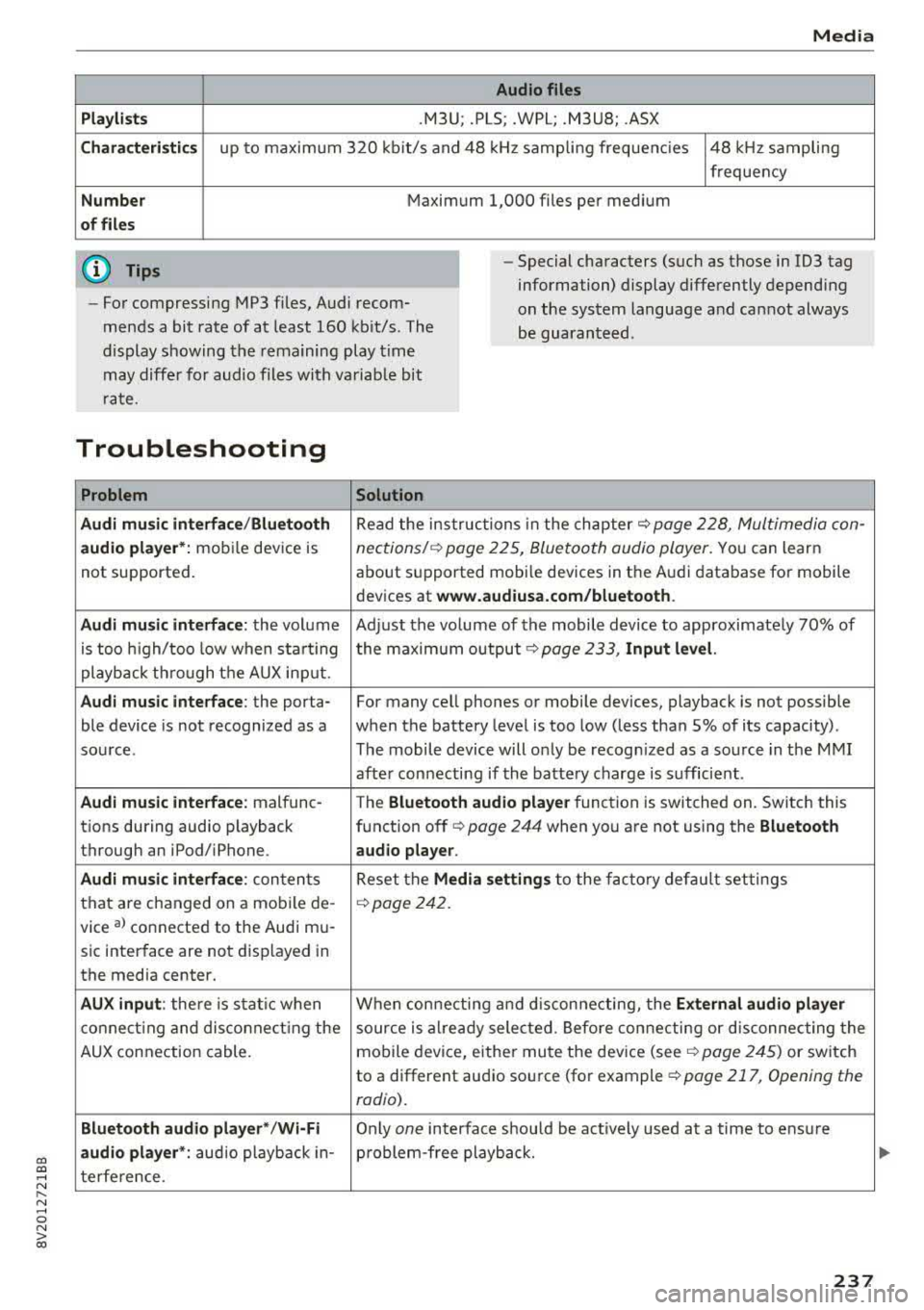
Audio files
Pla ylists
.M3U; .PLS; .WPL; .M3U8; .ASX
Chara cter istic s up to maxim um 320 kb it/s and 48 kHz samp ling freque ncies 48 kHz sampling
frequency
N umber Maximum 1,000 files per medium
of fil es
(D Tips
- For compressing MP3 files, Audi recom
mends a bit rate of at least 160 kb it/s. The
display s howing the remaining play t ime
may diffe r for audio files with va riab le bit
r ate. -
Special characters (such as those in 1D3 tag
information) display differently depend ing
on the system language a nd can not always
be guaran teed .
Troubleshooting
Problem Solution
Audi music interface /Bluetooth
Read the in struc tions in the chapter c::> page 228, Multimedia con-
audio player* :
mobile dev ice is nections/ c::> page 225, Bluetoo th audio player. Yo u can learn
not supported . about s
upported mobi le devices in the A udi database fo r mobile
devices at
www.audiusa.com /bluetooth .
Audi music interface :
the volum e Adjust the volume of the mobile device to approximate ly 70% of
is too high/too low when sta rt ing the maximu m output
9 page 233, Input level.
playb ack th rough t he AUX inp ut.
Audi music interface : the porta- For many cell phones or mobile devices, playback is not possible
ble device is not recognized as a when the battery level is too low (less than 5% of its capacity) .
sou rce. The mobile de·vice will o nly be recogn ized as a so urce in the M MI
afte r con necting if the batte ry charge is sufficient .
Audi music interface : malfunc-
The Bluetooth audio playe r function is switched on. Switch this
t ions during audio playback function off
c> page 244 when you are not using the Bluetooth
through an iPod/ iPhone. audio player .
Audi music interface :
conten ts Reset the M edia setting s to the f acto ry de fau lt set tings
that are changed on a mobile de -
c::>page 242.
vice al connected to the Aud i m u-
sic inter face are not d isplayed in
the media center.
AUX input : there is s tat ic when W hen con necting and disconnec ting, the External audio player
co nne ct ing and dis co nne ct ing the source is alr e a dy sele cted. Befo re con necting or d isconnecting the
AUX connection cable. mo
bile device, either mu te the dev ice (see
c::> page 245) or switch
to a different audio so urce (fo r example
c::> page 217, Opening the
radio) .
Bluetooth audio player* /Wi-Fi
Only on e interface s hou ld be act ively used at a time to ens ure
audio player *: audio playback in- p roblem-free playback.
t e rfe re n ce .
237
Page 241 of 400
CXl CXl .... N ,.__
Audi smartphone interface
Setup
App lies to: ve hicles with Audi smartpho ne interface
You can connect your smartphone to the MMI us
ing the Audi smartphone interface . Certain con
tent on your smartphone is adapted to the Info
tainment system display while driving and can
be operated through the
MMI control panel.
R equirement:
The vehicle must be stationary and the ignition
must be switched on.
iPhone generation 5 or higher with Lightning
connector and iOS 7.1.2 operating system or
h igher.
O r:
Smartphone with Android Auto app and Android
5 .0 Loll ipop operating system or higher.
.,. Connect your smar tphone to the Audi music in
te rface
c:> page 229 using a USB adapter
c:> page 228, fig. 211 .
.. Select and confirm A cti va te Apple CarPl ay or
Acti vate And roid Auto no w.
.. Follow the system instruct ions.
.,. Pay attention to any add itional system prompts
on your smartphone if applicable.
If you chose not to use Apple CarPlay or Android
Auto when connecting your smartphone for the
first time, you can start the Audi smartphone in
terface later on using the
Connection m an ager .
.. Select: I MENU I button > Audi smartphone in ·
terfa ce
> Change to connecti on manager .
.. Connect your smar tphone to the Audi music in
terface using a USB adapter
c:> page 228,
fig .211.
.. Se lect and confirm Audi smartphone : in the
Connection manager c:> page 242. You can se
lect your smartphone in the list of devices that
are already paired
c:> page 243.
.,. Follow the system instruct ions.
N .... 0 N iii l) In preparat io n at t he t ime of pr inting.
Aud i smartphon e int erfac e
(D Note
Always fo llow the information found in c:> @ in
Wi-Fi hotspot on page 195.
(D Tips
-The functions that can be used depen d on
the fo llowing factors, among others:
- the brand of your smartphone
- the vers ion of the operating system in
your smartphone
- the software version of the app used
- the USB adapter cab le and correct connec-
tion
- your cell phone service provider
- the customized se ttings on your sma rt-
phone
- O ne of the factors
above or a comb ina tion
o f any of them could cause your sma rtphone
to be incompatib le with the Audi smart
phone interface. Compatibility cannot be
guaranteed for all types of smartphones.
For more informat ion and assistance, refe r
to the user guide and the ma nufacturer of
your smartphone.
- If the connected smartphone has voice con
trol, you can operate you r smartpho ne usi ng
t he exter nal voice recognition system
c:> page 175.
- The menu language shown in the MMI is
based on the sett ings in you r smartphone.
- The time d isplayed in the MMI is based o n
the settings in yo ur smartphone .
- Severa l MMI functions are not avai lab le
when Apple CarPlay or Andro id Auto is ac
t ive.
- You cannot co nnect any mob ile dev ices
via
Bluetooth when an App le CarPlay connec
tion is act ive.
- Whe n the Apple CarPlay connection is ac
t ive,
Tag this song for iTunes*1> is not ava il
able
c:>page 218 .
239
Page 243 of 400
CXl CXl .... N r--N .... 0 N > 00
System settings
Setting the date and
time
You can set the clock time manually or using the
CPS*.
.,. Select : I MENU I button> Settings> left control
button >
MMI settings> Date & time .
.,. Or: select : IMENUI button> Vehicle > left con-
trol button >
Vehicle settings> Date & time.
Automatic setting
When this function is switched on g, the time
and date are automatically set.
Time
Requirement: the Automatic setting must be
switched
off .
Press the control knob. You can set the Time
manually by turning and pressing the control
knob.
Date
Requirement: the Automatic setting must be
switched
off.
Press the control knob . You can set the Date
manually by turning and press ing the cont rol
knob.
Time zone
When selecting the appropriate time zone, a
sampling of countr ies in this zone will be listed .
Automatic time zone*
When this function is switched on g, the time
will automatically adjust to the corresponding
time zone.
Automatic daylight saving time*
When this function is switched on g, the time
will automatically switch to daylight saving time .
Time format
If you select 24h, the clock will disp lay, for ex
ample ,
13:00 . If you se lect AM/PM , the clock
will disp lay, for example,
1:00 PM .
System settings
Date format
If you select DD.MM .YYYY , the date display will
show, for example,
31.08.2017. If you select
MM/DD/YYYY , the date display will show, for ex
ample,
08/31/2017. If you select YYYY-MM
DD ,
the date display will show, for example,
2017-08-31 .
MMI settings
.,. Select: !MENUI button> Settings> left control
button >
MMI settings .
Language
You can change the display language as well as
the language for the voice guidance* and voice
recognition system*.
T he number of languages available depends on
the market.
Measurement units
The following units can be selected:
-Speed (mph or km/h)
- Distance (miles or kilometers)
-Temperature (°For 0
()
-Fuel consumption (L/100km, mpg (US), mpg
(UK) or km/l)
- Volume (liters , gallons)
Tool tips
When this function is switched on g, your MMI
shows you tips for input. The frequency of how
often it displays decreases with time.
Speech dialog system
Applies to : vehicles wi th voice recog nitio n system
Depend ing on vehicle equipment, the following
functions may be ava ilable:
Command display : when this function is switch
ed on
g, the MMI will show you the possible
commands for voice input in the respective
menu.
Short dialog : when this function is switched on
g, a shorter form of the prompts is used .
Command during voice output*: this function is
switched on at the factory . When this function is
II>-
241
Page 246 of 400
System settings
Show Bluetooth profiles*
You can Connect or Disconnect the Handsfree ,
Messages *, Directory/contacts
and Bluetooth
audio player
profiles separately.
Bluetooth settings*
- Bluetooth :
select and confirm a setting for the
Bluetooth connection v is ibility. Select
Visible
for the MMI to be v isib le to other dev ices. Se
lect
Inv isible for the MMI to not be visible to
other devices. However, it is still possib le to es
tablis h a Bl uetooth connection with paired de
vices when the v is ibility is switched off. Select
Off to turn visibility off. Then a B luetooth con
nect ion is not possible .
-Bluetooth audio player : when this function is
switched
on~, the Bluetooth audio player is
available as a source in the
Media menu .
-Bluetooth name : the MMI Bluetooth name (for
example ,,AUDI MMI 2017") is displayed and
can be changed .
Online settings*
- Data usage counter :
the amount of data pack
ets that are sent and received through the MMI
is d isplayed. You can reset the data usage infor
mation to zero using the
Reset data counter
option.
-Network status : the mobile network provider
for data service as well as the network status
are displayed .
Wi-Fi settings*
Refer to<=> page 195, Wi-Fi hotspot.
Storing as a default telephone
Applies to: vehicles with telephone
Req uiremen t: a cell phone must be connected to
the MMI
¢page 177 .
As soon as th e cell phone is i n range and the
Bluetooth function on the cell phone and in the
MMI is swi tched on, this cell phone is given prior
ity over the other Bluetooth devices and is con
nected direct ly to the MMI. The connected cell
phone is displayed first in the device list.
244
Network settings*
- Login :
you can chose an automatic log in to
your cell phone service provider's network, or
you can choose a
manual l ogin from the list of
avai lab le networks .
-Network selection: available networks in the
present location can be selected under network
selection. This function is on ly availab le for the
Manual l ogin setting .
Apple CarPlay sound settings/ Android Auto
sound settings
Applies to: vehicles with Audi smartphone interface
Refer to ¢ page 245.
About Apple CarPlay/ About Android Auto
Applies to: vehicles with Audi smartphone interface
Here you w ill find legal information regarding
the use of Apple CarPlay or Andro id Aut o and in
formation about device -specific data exchange.
Delete CarPlay device/Delete Android Auto
device
Applies to: vehicles with Audi smartphone interface
Requirement: your cell phone must not be cona
nected to the Audi m usic interface with a USB
adapter .
To remove your cell phon e from the list of all cell
phones that are already paired, select and con
firm
Delete CarPlay device or Delete Android Au
to device .
(D Tips
Some SIM cards do not allow the SIM PIN
queries to be switched off.
System update
.,. Select: !MENUI button> Settings> left control
button >
System maintenance.
- System update :
slide the storage device with
t he update data into the appropriate drive
¢page 223. Select and confirm the drive>
Start update. The length of the process de
pends on the size of the update.
-Reset driver installation: the selected media
driver package is reset to the settings at the
time of delivery .
Page 247 of 400
-Version information : information on the MMI
software version and the navigation database *
software version is displayed . The
Software in
format ion
function a lso provides information
on the software contained in the MMI and the
licensing agreement .
Sound settings
The sound distribution and volume of the MMI
can be adjusted individually . The settings depend
on vehicle equipment.
---- 1
J .-.6 ...
I
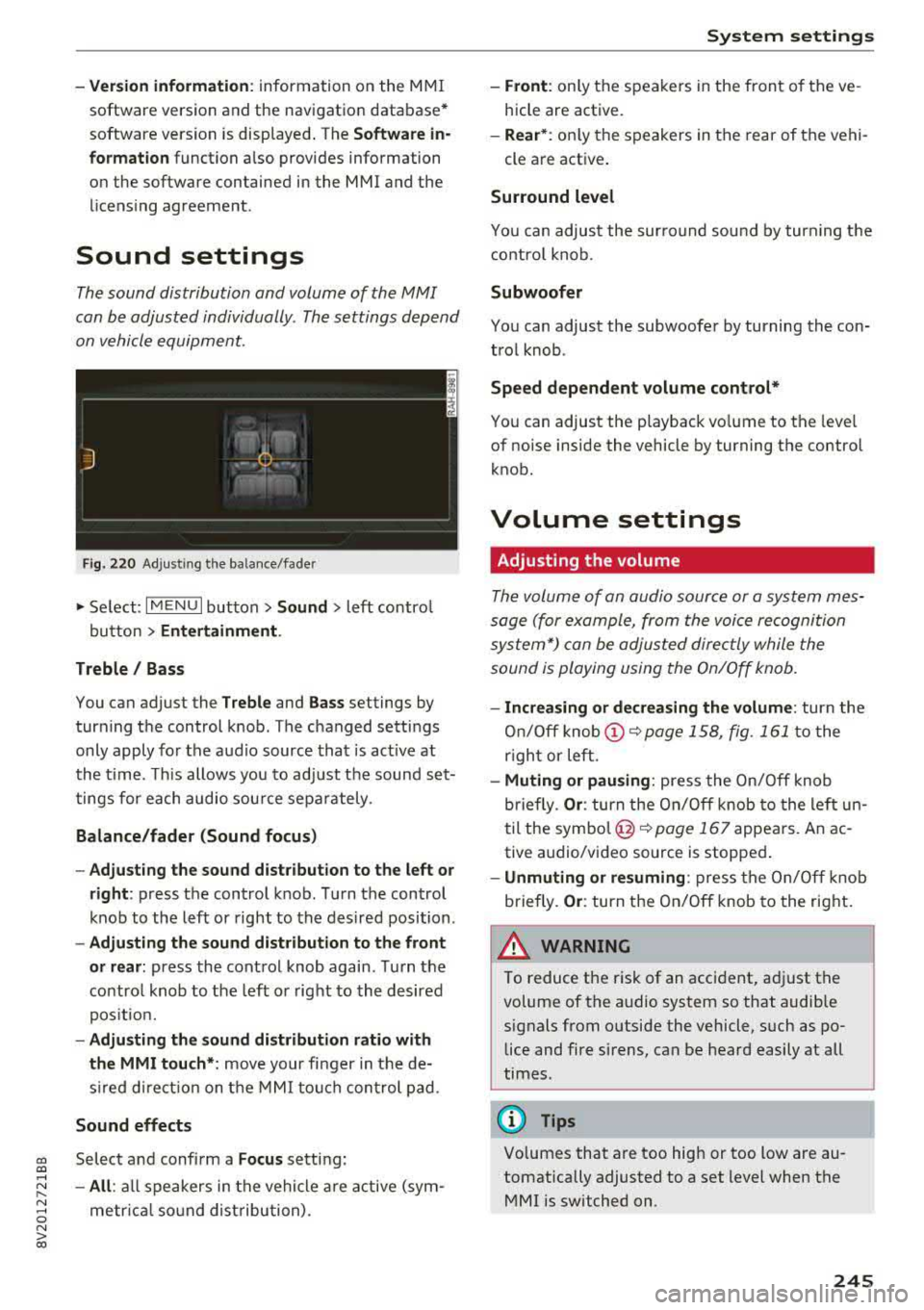
Fig. 220 Adjusti ng the balance/fader
" Se lect: I MENU I button> Sound > left contro l
button
> Entertainment .
Treble / Bass
You can adjust the Treble and Bass settings by
turning the control knob. The changed settings
only apply fo r the audio source that is act ive at
the time. This allows you to adjust the sound set
tings for each audio source separately .
Balance/fader (Sound focus)
-Adjusting the sound distribution to the left or
right :
press the control knob. Turn the control
knob to the left or right to the desired position .
-Adjusting the sound distribution to the front
or rear:
press the control knob again. Turn the
contro l knob to the left o r right to the desired
position.
-Adjusting the sound distribution ratio with
the MMI touch* :
move your finger in the de
s ir ed direct ion on the MMI touch control pad.
Sound effects
cc Select and confirm a Focus setting: CXl ....
~ -All: all speakers in the vehicle are active (sym-
~ metr ical sound distribution) . 0 N > 00
System settings
-Front: only the speakers in the front of the ve
hicle are active.
-Rear* : only the speakers in the rear of the vehi-
cle are active .
Surround level
You can adjust the surround sound by turn ing the
control knob.
Subwoofer
You can adjust the subwoofer by turning the con
trol knob .
Speed dependent volume control*
You can adjust the playback vo lume to the leve l
of noise inside the vehicle by turning the control
knob.
Volume settings
Adjusting the volume
The volume of an audio source or a system mes
sage (for example, from the voice recognition
system*) can be adjusted directly while the
sound is playing using the On/Off knob.
-Increasing or decreasing the volume: turn the
On/Off
knob (!) ~page 158, fig. 161 to the
r ight or left.
-Muting or pausing: press the On/Off knob
briefly.
Or : turn the On/Off knob to the left un
til the
symbol @~ page 167 appears. An ac
tive a udio/video source is stopped .
-Unmuting or resuming: press the On/Off knob
briefly .
Or: turn the On/Off knob to the right.
A WARNING ~ .
To reduce the risk of an accident, adj ust the
volume of the a udio system so that audible
signals from outside the vehicle, such as po lice and fire sirens, can be heard easily at all
times .
Q) Tips
Volumes that are too high or too tow are au
tomatically adjusted to a set level when the MMI is switched on.
245
Page 284 of 400
Airbag syste m
seat into its rearmost position in the seat's
fore and aft adjustment range, as far away
from the airbag as possible. The backrest must be adjusted to an upright position.
Make sure that the
PA SSEN GER AIR BAG
OFF
light comes on and stays on all the time
whenever the ignition is switched on.
,& WARNING
- If the PA SSENGER AIR BAG OFF light does
not go out when an ad ult is sitting on the
front passenger seat after taking the steps
described above, make sure the adu lt is
properly seated and restrained at one of the
rear seat ing positions.
- Have the airbag system inspected by your
Audi dealer before transporting anyone on
the front passenger seat.
(D Tips
If the capacitive passenger detection system
determines that the front passenger seat is
empty, the fronta l airbag on the passenger
side will be turned off, and the
P ASSE NGER
A IR BAG OFF light will stay on.
Repair , care and disposal of the airbags
Parts of the airbag system are installed at many
d ifferent places on your Aud i. Install ing, remov
ing, servic ing or repa iring a part in an area of the
veh icle can damage a pa rt of an airbag system
and prevent that system from working properly
in a co llision.
There are some important things you have to
know to make sure that the effectiveness of the
system w ill not be impaired and that discarded
components do not cause injury or pollute the
environment .
,& WARNING
Improper care, servicing and repair proce
dures can increase the r isk of personal injury
and death by preventing an airbag from de
ploying when needed or deploying an airbag
unexpectedly:
282
- Never cover, obstruct, or change the steer
ing wheel horn pad or airbag cover or the in
strument panel or modify them in any way.
- Never attach any objects such as cup holders
or telephone mountings to the surfaces cov
ering the a irbag un its.
- For cleaning the horn pad or instrument
panel, use only a soft, dry cloth or one mois
tened w ith plain water. Solvents or cleaners
could damage the airbag cover or change
the st iffness or strength of the material so
that the airbag cannot deploy and protect properly.
- Never repair, adjust, or change any parts of
the airbag system.
- All work on the steering wheel, inst rument
panel, front seats or e lectr ica l system ( in
cluding the instal lation of a udio eq uipment,
cellular telephones and CB radios, etc.)
m ust be performed by a qualified technician
who has the training and specia l equipment
necessary.
- For any work on the airbag system, we strong ly recommend that you see your au
thorized Audi dealer or qualified workshop.
- Never modify the front bumper or parts of
the vehicle body.
-Always make sure that the side airbag can inflate without interference:
- Never install seat covers or replacement upholstery over the front seatbacks that
have not been specif ica lly approved by
A udi.
- Never use additional seat c ushions that
cover the areas where the side airbags in
flate.
- Damage to the orig inal seat cove rs or to
the seam in the area of the s ide airbag
module mus t always be repai red immedi
ate ly by an authorized Audi dealer.
- The a irbag sys tem can deploy on ly once. Af
ter an airbag has been deployed, it m ust be
replaced with new replacement parts de
signed and approved especia lly for your
Audi model version . Replacement of com
plete airbag systems or airbag components
must be performed by qua lified workshops
only . Make sure that any airbag service
Page 296 of 400
Child safety
-Always make sure that the PASSENGER
AIR BAG OFF
light comes on and stays on
all the time whenever the ignition is
switched on .
-If the PASSENGER AIR BAG OFF light
does not come on and stay on, immediate
ly install the forward-facing child safety
seat in a rear seating position and have
the airbag system inspected by your au
thorized Audi dealer.
- Always buckle the child safety seat firmly
in place even if a child is not sitting in it. A
loose child safety seat can fly around dur
ing a sudden stop or in a collision .
-Always read and heed all WARNINGS
whenever using a child restraint in a vehi
cle ¢
page 258, Safety belts,~ page 267,
Airbag system and ~ page 292, Impor
tant information.
(D Tips
Always replace child restraints that were in
stalled in a vehicle during a crash. Damage to
a child restraint that is not visible could cause
it to fail in another collision situation.
Advanced front airbag system and children
Your vehicle is equipped with a front "Advanced
Airbag System" in compliance with United States Federal Motor Vehicle Safety Standard (FMVSS)
208, as well as Canada Motor Vehicle Safety
Standard (CMVSS) 208 as applicable at the time
your vehicle was manufactured.
The Advanced Airbag system in your vehicle has
been certified to meet the "low-risk " require
ments for 3- and 6-year old children on the pas
senger side and small adults on the driver side.
The low risk deployment criteria are intended to
reduce the risk of injury through interaction with
the airbag that can occur, for example, by being
too close to the steering wheel and instrument
panel when the airbag inflates. In addition, the
system has been certified to comply with the
"suppression" requirements of the Safety Stand
ard, to turn off the front airbag for infants up to 12 months who are restrained on the front pas-
294
senger seat in child restraints that are listed in
the Standard.
Even though your vehicle is equipped with an Ad
vanced Airbag system, all children, especially
those 12 years and younger, should always ride
in the back seat properly restrained for their age
and size. The airbag on the passenger side makes
the front seat a potentially dangerous place for a child to ride. The front seat is not the safest place
for a child in a forward-facing child safety seat. It
can be a very dangerous place for an infant or a
larger child in a rearward-facing seat.
The vehicle's Advanced Airbag System has a ca pacitive passenger detection system in the front
passenger seat cushion that can detect the pres
ence of a baby or a child in a child restraint sys
tem on this seat.
The capacitive passenger detection system regis
ters the changes that result in an electrical field
when a child, a child restraint , and a baby blanket
are on the front passenger seat. The change in
the measured capacitance due to the presence of
a child, a child restraint, and a baby blanket on
the front passenger seat is related to the child
restraint system resting on the seat. The meas
ured capacitance of a child restraint system var
ies depending on the type of system and specific
make and model.
The electrical capacitance of the various types, makes, and models of child restraints specified
by the U.S.National Highway Traffic Safety Ad
ministration (NHTSA) in the relevant safety
standard are stored in the Advanced Airbag Sys
tem control unit together with the capacitances
typical of infants and a 1-year old child. When a
child restraint is used on the front passenger
seat with a typical 1 year-old infant, the Ad
vanced Airbag System compares the capacitance
measured by the capacitive passenger detection
system with the data stored in the electronic con
trol unit .
Page 321 of 400
a, a, ..... N
" N ..... 0 N > 00
Checking and Filling
Engine compartment overview
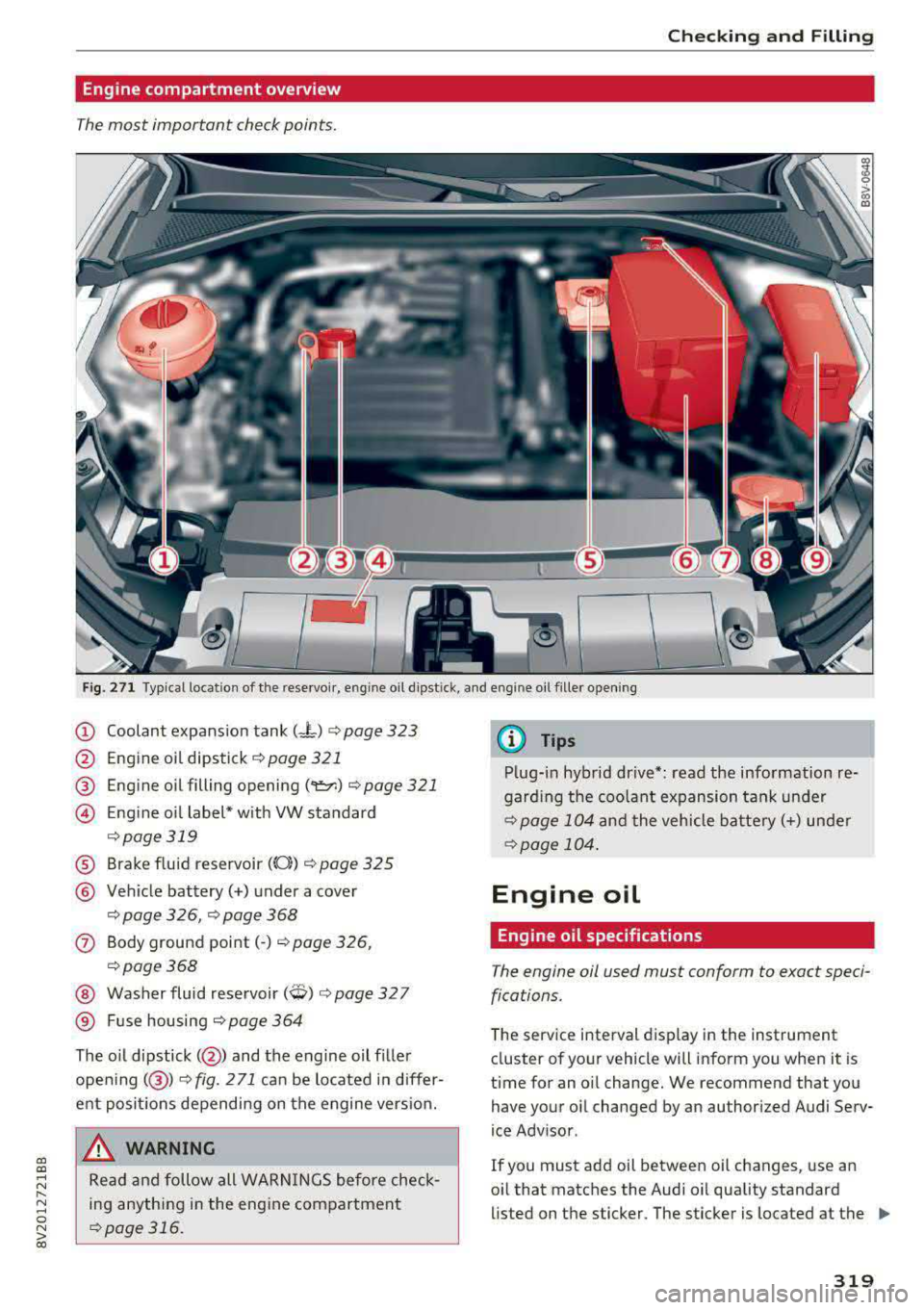
The most important check points .
-
Fig. 271 Typical location of the reservoir , engine oil dipst ick, and eng ine oil filler opening
(D Coolant expansion tank (-"-) ¢ page 323
@ Engine oil dipstick¢ page 321
® Eng ine oil filling opening ('er.) ¢page 321
@ E ng ine o il label* w ith VW standard
¢ page 319
® Brake fluid reservoir ((0}) ¢ page 325
@ Vehicle battery(+) under a cover
¢ page 326, ¢ page 368
0 Body ground point(-) ¢page 326,
¢page 368
@ Washer fluid reservoir (W) ¢ page 32 7
® Fuse housing ¢ page 364
The o il dipstick( @) and the engine oil f iller
opening( @)
¢fig. 271 can be located in differ
ent posit ions depending on the engine vers ion.
A WARNING
Read and follow all WARN INGS before check
ing anything in the engine compartment
¢page 316.
(D Tips
Plug-in hybrid drive*: read the information re
garding the coolant expansion tank under
¢page 104 and the vehicle battery(+) under
¢page 104 .
Engine oil
Engine oil specifications
The engine oil used must conform to exact speci
fications.
The service interval display in the instrument
cluster of your vehicle will inform you when it is
time for an oil change . We recommend that you
have your oil changed by an authorized Audi Serv
ice Advisor .
If you must add oil between oil changes , use an
oil that matches the Audi oil quality standard
li sted on the sticker. The sticker is located at the
Ill>
319