warning light AUDI A3 SEDAN 2017 Owner's Guide
[x] Cancel search | Manufacturer: AUDI, Model Year: 2017, Model line: A3 SEDAN, Model: AUDI A3 SEDAN 2017Pages: 400, PDF Size: 67.32 MB
Page 85 of 400
a, a, ..... N
" N ..... 0 N > 00
If the Start/Stop system has not turned off the
engine or if you have switched the Start/Stop sys
tem off manually, the ignition will not be auto
mat ically switched off and the engine w ill contin
ue to run
c:> ,& .
A WARNING
To reduce the risk of poisoning, never allow
the engine to run in confined spaces.
{!) Tips
If you select the D or N se lector lever position
in a vehicle with an automat ic transmission
after sh ift ing into reverse, the vehicle m ust
be driven fas ter than 6 m ph (10 km/h) in or
de r fo r the e ngine to switch off again.
Manually switching the Start/Stop system
on/off
Applies to: vehicles with Sta rt/Stop system
If you do not wish to use the system, you can
switch it off manually.
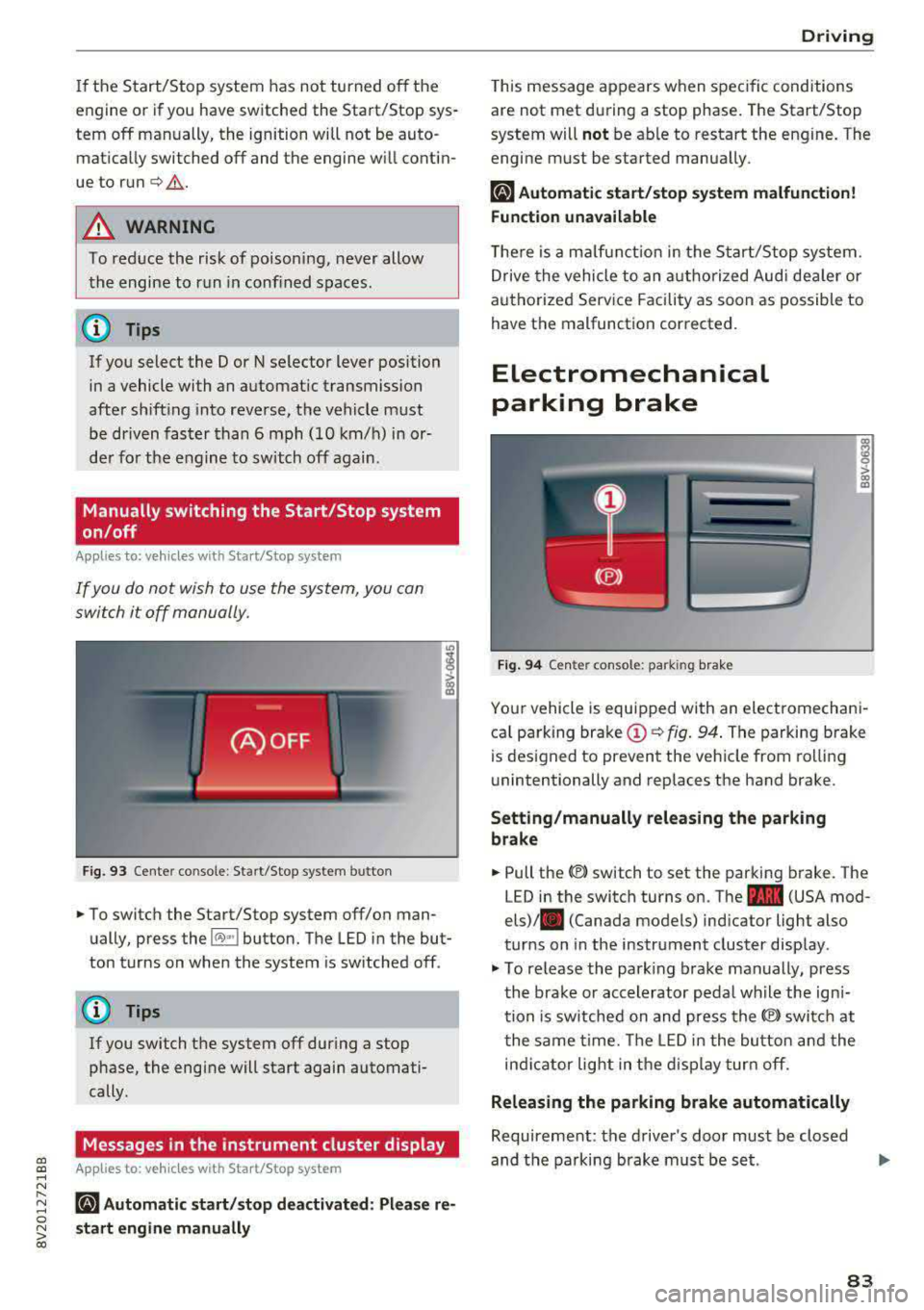
F ig . 93 Cen ter co nsole: Start/S top system button
-
"' To switch the Start/Stop system off/on man
ually, press the
l (A) ~I button. The LED in the but
ton turns on when the system is sw itched off .
@ Tips
If you switch the system off during a stop
phase, the engine will start again automati
cally.
Messages in the instrument cluster display
Applies to: veh icles with Start/Stop system
ml Automatic start /stop deactivated : Please re
s tart engine manually
D rivi ng
This message appears when spec ific conditions
are not met du ring a stop phase . The Start/Stop
system will
not be ab le to restart the engine. The
engi ne must be started manua lly .
ml Automati c start /stop system malfun ction!
Function unavailable
T he re is a m alfu nction in the S tart/Stop system.
Drive the vehicle to an a uth orized Aud i dea ler or
a uthori zed Serv ice Facility as soon as possible to
have the malfunction corrected.
Electromechanical
parking brake
F ig . 94 Cen ter console : park ing bra ke
ra 0 > co m
Yo ur vehicle is equipped with an electromechani
ca l parking brake
(D c:> fig. 94 . The parking brake
is des igned to prevent the veh icle from rol lin g
unintentionally and replaces the hand brake.
Setting /manually releasing the parking
brake
"' Pull the(®) switch to set the parking b rake. The
LED in the switch turns on. The
-(USA mod
els)/ . (Canada models) ind icator light also
turns on in the instrument cluster disp lay .
"'To re lease the park ing brake man ually, press
th e bra ke or accelerator peda l wh ile the ign i
tion is sw itched on and press the
(®) switc h at
t he same time. The LED i n the bu tton and the
in di cator light in the d isp lay turn off.
Releasing the parking brake automatically
Requireme nt: the driver's door must be closed
and the parking brake must be s et.
83
Page 90 of 400
Driving
Driving tips
Applies to: ve hicles w ith a utomat ic tra nsm iss io ns
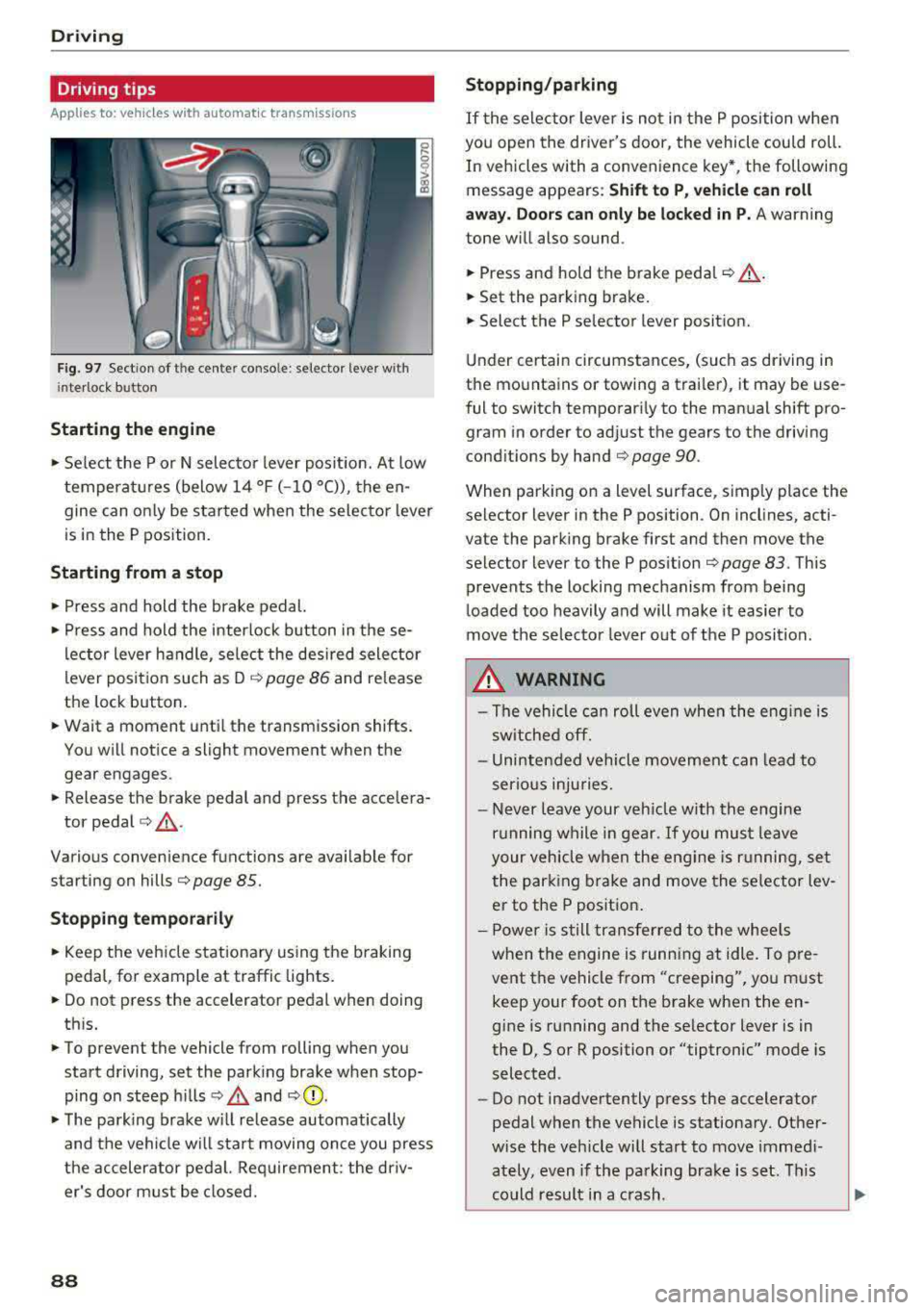
Fig. 97 Sect ion of the cente r conso le : se lector lever w ith
i nte rlock button
Starting the engine
• Se lect the P or N selec to r l ever posit ion. At low
temperat ures (below
14 °F (- 10 °C)), the en
gine can on ly be star ted when the selector lever
is in the P position.
Starting from a stop
• Press and hold the brake pedal.
• Press and hold the interlock button in these
l ector lever handle, se lect the des ired selector
lever posit io n such as D
c::> page 86 and release
the lock button.
• Wait a moment unti l the transmission shifts.
You w ill notice a slight movement when the
gear engages.
• Release the brake pedal and press the accelera-
tor pedal
c::> ,& .
Various convenience functions are ava ilab le for
starting on hills
c:::> page 85.
Stopping temporarily
• Keep the veh icle stationary using the b raking
peda l, for example at traffic lights.
• Do not press the accelerator pedal when doing
th is.
• To prevent the vehicle from rolling when you
start driving, set the park ing brake when stop
ping on steep hills
c::> .& and c::> 0.
• The park ing brake w ill release automatically
and t he veh icle wi ll sta rt moving on ce you press
the accelerator pedal. Req uirement: the driv
er's door m ust be closed.
88
Stopping/parking
If the sele ctor lever is not in the P position w hen
you open the driver's door, the vehicle cou ld roll.
In vehicles with a conven ience key *, the following
message appears:
Shift to P , vehicle can roll
away . Doors can only be locked in P.
A warning
tone w ill also sound.
• Press and hold the brake peda l c::> A.
• Set the parking brake.
• Select the P selector lever posit ion.
U nder certai n circumstances, (such as driving in
t h e mountains or towing a trai ler), it may be use
ful to switch temporar ily to the manual shift pro
gram in order to ad just the gears to the driving
cond it ions by hand
c:::> page 90.
When park ing o n a level sur face, s imply place the
se lector lever in the P position . On inclines, acti
vate the parking brake first and then move the
selector lever to the P pos ition
c:::> page 83 . This
prevents the locking mechanism from being
loaded too heavily and will make it easier to
move the selec tor lever o ut of the P posi tion.
.&_ WARNING
- The vehicle can ro ll even whe n the engi ne is
sw itche d off.
- Unin ten ded vehicle movement can lead to
s e rio us inju ries.
- Never leav e your ve hicle w ith th e engine
r u nning w hile in gear.
If you mus t leave
your veh icle when the eng ine is r unning, se t
the par king brake and move the se lector lev
er to the P position .
- P owe r is s till tran sfer red to the whee ls
when t he engine is runn ing at idle. To pre
vent the vehicle f rom "creeping", yo u m ust
keep your foot on t he brake when the en
gine is running and the se lector lever is in
the D, So r R position or "tiptronic" mode is
selected.
- Do not inadvertently press the accelerator
pedal when the vehicle is stationa ry. Ot her
w ise the veh icle will start to move immed i
ately, even if the parking b ra ke is set. T his
c o uld result in a c rash.
Page 93 of 400
CXl CXl .... N ,.__
N
Requirement: the engine must be at operating
temperature and the steering whee l must not be
turned.
.,. Deact ivate ll the Start/Stop system*
¢ page 83. The LED in the ~ button turns on.
.,. With the engine running, press the l.t, O FFj but
ton briefly one time .
.,. Pull the selector lever back out of the D/S posi
t ion briefly to select the S posit ion, or press it
toward the right into the tiptronic pos ition or
select the
D ynamic driving mode in drive se
lect*
¢ page 143 .
.,. Press the b rake peda l firmly with you r left foot
and hold it all the way down for at least one
second .
.,. At the same time, press the gas pedal all the
way down with your right foot unti l the engine
reaches and stays at a high RPM level.
.,. Remove your left foot from the brake.
A WARNING
- Always adapt yo ur driv ing to the traffic flow .
- Only use Launch Control when road and traf-
fic cond itions allow it and other dr ivers will
not be endangered or impacted by your driv
ing and the vehicle's acceleration .
- Please note that the drive whee ls can sp in
and the vehicle can break away when sport
mode is switched on, especially when the
road is s lippery.
- Once the vehicle has started moving, press
the
I ~ OFF j button briefly to tu rn the sport
mode off.
@ Tips
-The transmiss ion temperature may increase
s ignificantly after us ing the launch cont rol
program.
If that happens, the program may
not be available for a few m inutes. It w ill be
available again after a cool-down pe riod.
-When accelerating using the la unch control
program, all veh icle parts are subject to
heavy loads. Th is can lead to increased
wear .
8 1
> It is not pos sib le to deact iv a te t he system w it h all vers io n s N iii of th e tran sm is s ion.
D riv ing
Emergency mode
Applies to: vehicles with automatic transmissions
In the event of a system malfunction, there is an
emergency program .
If all of the selector lever positions are highlight
ed with a light background in the instrument
cluster display, there is a system malfunct ion and
the transmission is running i n the emergency
program. The veh icle can sti ll be driven in emer
gency mode, but only with red uced speed and
not in all gears . In some cases, the vehicle
can
not d riv e in revers e .
([) Note
If the transm ission runs in eme rgency mode,
drive to a n author ized A udi dealer or author
i zed Audi Se rvice Facility immed iate ly to have
the malfunction corrected .
Transmission malfunction
Applies to: vehicles with automatic transmissions
• Tran smission: malfunction! Please stop ve
hicle and shift t o P
There is a ma lfunction in the transm ission. Park
the vehicle secure ly and do not continue driving.
See an author ized Audi dealer or authorized Audi
Service Facility for assistance .
• Transmis sion overheat ing! Plea se stop the
ve hicle!
The tra nsmission is too hot and can become dam
aged. Stop and le t the transmiss ion cool w ith the
engine r unning (at idle) in the P se lector lever po
sition . Then the indicator light and the message
turn off, drive to an authorized A udi dealer or au
thori zed Audi Serv ice Facility immediately to have
the malfunction corrected. If the indicator light
and the driver message do not turn off, do not
continue driving . See an authorized Aud i dealer
or authorized Audi Serv ice Facility for ass istance.
[!l Tran smiss ion malfunction : you can continu e
driving
.,,.
91
Page 98 of 400
e-tron
for the high-voltage battery can lead to serious damage and/or a decrease of the capacity
void coverage under the New Vehicle Limited
Warranty.
Starting/driving the vehicle
Applies to: ve hicles w ith plug -in hybrid drive
The vehicle is started and stopped with the
I START STOP I button. Please also read the in
formation under
c::> page 78, Starting the engine .
Establishing drive ready mode
See c::> A in Introduction on page 94.
Requirement: a charging cable must not be con
nected to the vehicle
c::> page 117 and the selec
tor lever must be in the P or N position.
- Press the brake pedal.
- Press the
I STAR T STOPI button .
When the vehicle enters drive ready mode, the
status message
e-tron READY appears briefly in
the instrument cluster display and the needle in
the power meter points to
READY c::> page 97.
Driving
The vehicle starts with the electric motor after
establishing the dr ive ready mode and if the con
ditions for electric drive mode have been met
c::> page 100.
The conditions to drive are essentially the same
as for the automatic transmission
c::> page 85 .
You and your passengers should anticipate the
possibility of a sporty acce leration.
Ending drive ready mode
- Place the selector lever in the P position.
- Switch the ignition off with the
I STAR T STOPI
button.
Vehicle sound
The vehicle generates an electronic engine sound
so that your vehicle can be heard from the out
side when in electr ic drive mode. The veh icle
sound automatically fades out at higher speeds
when the sounds from the tires and wind start in
creasing.
96
Switching the ignition on/off
You can switch the ignition on without establish
ing drive ready mode.
- Press the
I START STOP ! button to switch the
ign ition on and off. Do not press the brake ped
al whi le doing this.
When the ignition is sw itched on, the needle
points at
OFF @c::>page 97, fig. 103 or OFF is
displayed @c::>page97, fig .103.
No indicator lights stay turned on when the igni
tion is switched off .
Ignition is switched off automatically
To prevent the vehicle battery from draining, the
ignition will switch off automatically under the
follow ing cond it ions:
- The vehicle must have already been driven.
- The vehicle is stationary.
- The gasoline engine must not be runn ing .
- The driver's door must be open.
- The driver's safety belt must be unbuckled .
- The brake pedal must not be pressed.
In this case, the activated low beam is replaced
by the parking light. The message
Side marker
lights automatically shut off in
30 minutes. See
owner's manual
appears in the instrument clus
ter display . The parking lights w ill switch off af
ter approx imately 30 minutes or when you lock
the veh icle.
If the gasoline engine was not stopped, the mo
tor continues runn ing and the ignit ion does not
automat ica lly switch off
c::> A .
A WARNING
To reduce the risk of poisoning, never allow
the eng ine to run in confined spaces.
(D Tips
The vehicle cannot start when outs ide tem
peratures are below-18 °F (-28 °C)
c::> page 98.
-
Page 100 of 400
e-tron
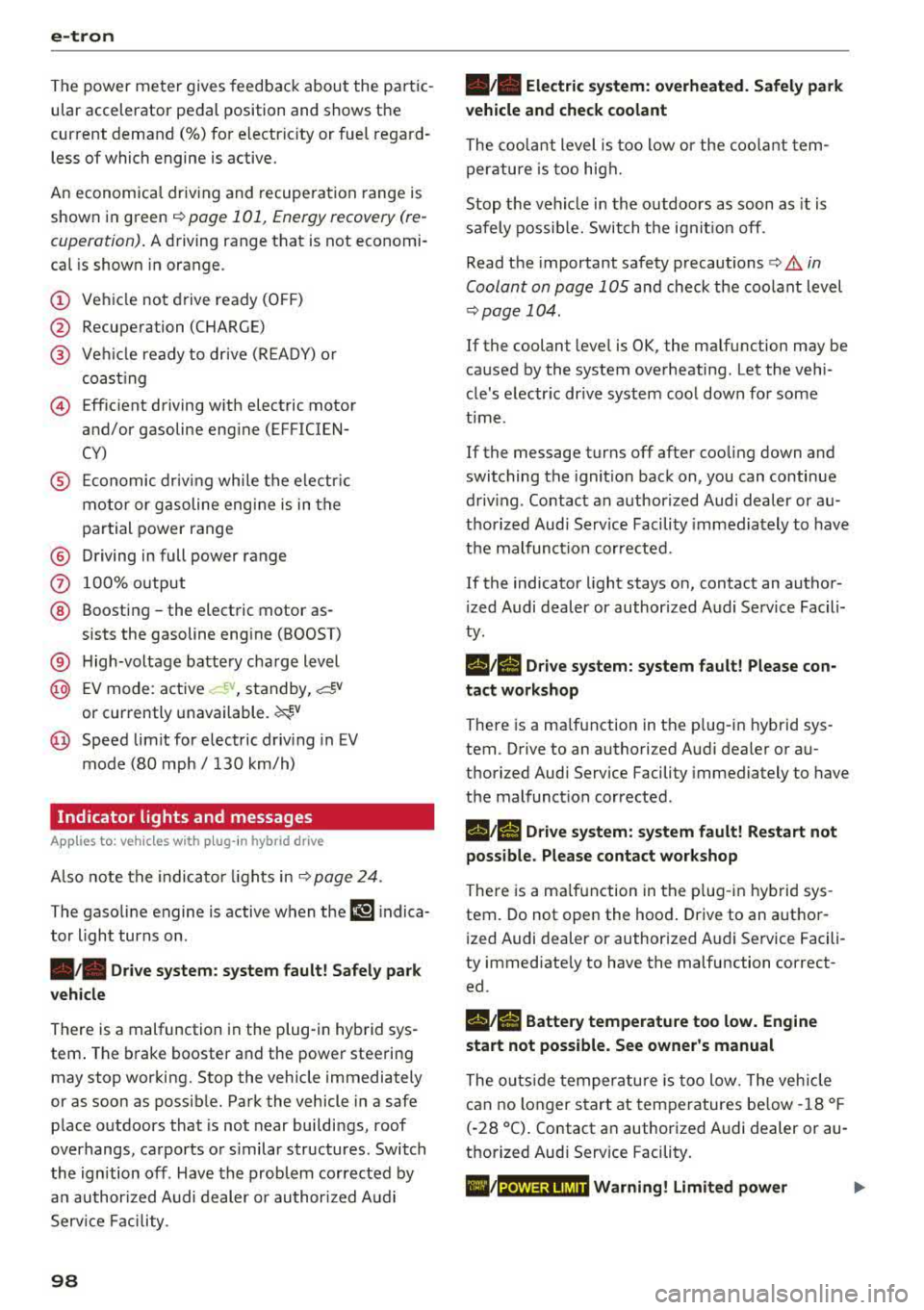
The power meter gives feedback about the pa rt ic
ular accelerator pedal position and shows the
cur rent demand
(%) fo r electric ity or fuel rega rd
less of which engine is active.
An economica l driv ing and recupe ra tion range is
shown i n green
r:!> page 101, Energy recovery (re
cuperation). A driving range that is not economi
cal is shown in orange.
CD Ve hicl e no t drive ready (O FF)
@ Recuperation (CHARGE)
® Ve hicl e ready to d rive ( READY) o r
c oastin g
@ Effic ient driving w ith electric moto r
and/or gasoline eng ine (EFFICIEN-
CY)
® Ec onomic driv ing while t he e lectr ic
mot or or g asoline e ng in e is i n th e
p a rt ial power range
® D riving in full power range
0 100 % outp ut
® Boosting -the elect ric motor as-
sists the gasoline engine (BOOST)
® H igh-voltage battery cha rge level
@ EV mo de: a ct ive av , standby, c::§V
or cur rently unavailable. ~v
@ Speed limit for elect ric driv ing in EV
m ode (80 mph/ 130 km/h)
Indicator lights and messages
A pp lies to: ve hicles w ith p lug -in hybr id drive
A lso note the in dica to r li ghts in r:!> page 24.
The gaso line engine is active when the
111 indica
to r ligh t turns o n.
./. Drive system: system fault! Safely park
vehicle
There is a malfunction in the plug-in hybrid sys
tem . T he br ake booster and the powe r steering
may stop wor king. Stop the veh icle immediately
or as soon as possib le . Park the vehicle in a safe
p lace o utdoors that is not near buildi ngs, roof
overhangs, carports o r similar structures . Sw itch
the ig nition off . Have the problem cor rected by
an a uthor ized A udi dealer or au thor ized A udi
S erv ice Facil it y .
98
•• Electric system: overheated. Safely park
vehicle and check coolant
The coolant level is too lo w or the coo lan t tem
p er at ure is too hig h.
Stop t he vehi cle in the o utdoors as soon as it is
safely possib le. Swi tch t he ig nitio n off.
Read the important safety precautions
r:!> .& in
Coolant on page 105 and check the coolant level
r:!> page 104.
If the coolant level is OK, the malfunction may be
ca used by the system ove rheating . Let the vehi
cle's e lectr ic dr ive system coo l dow n for so me
t im e.
If the message turns off after coo ling down and
switching the ignition back on, you can continue
driv ing . Co ntac t an author ized Audi dealer or au
t h orized Audi Serv ice Facili ty immedia tely to have
t h e malfunct io n co rrecte d.
If the indicato r light stays on , contact an autho r
i zed Audi dealer or author ized A udi Se rvice Facili
ty.
11;11 D rive system: system fault! Please con
tact workshop
There is a ma lf u nction in t he p lug -in hy brid sys
tem. D rive to an authorized Aud i deale r or au
thorized Aud i Serv ice Facility immediately to have
the malfunct ion co rrected.
11;11 Drive system: system fault! Restart not
possible. Please contact workshop
There is a ma lf u nction in the plug-in hybrid sys
tem. Do not ope n the hoo d. Drive to an a uth o r
i zed Audi dealer or author ized A udi Se rvice Facili
ty immediate ly to have the malfuncti on correct
ed.
11;11 Battery temperature too low. Engine
start not possible . See owner's manual
The o utsid e tem per atur e is too low. The veh icle
can no longer s tart at tem peratures be low -18 °F
(-28 ° C). Contact an author ized A udi dea ler or au
thorized Audi Serv ice Facility.
•
POWER LIMIT Warning! Limited power
Page 108 of 400
e-tron
The gasoline engine is no longer available be
cause th ere is not enough fuel. Drive immediately
to a gas station.
Fuel filler door emergency release
A pp lies to: ve hicles w ith plug- in hy brid drive
You must use the emergency release to open the
fuel filler door when there is a malfunction
c::> page315 .
The tank is not vented. You can only fill a small
amount of fuel in the tank.
~ Fill only until the automatic fuel pump nozzle
turns off for the first time when it is operated
correctly.
Drive to an authorized Audi dealer or authorized
Audi Service Facility immediately to have the
malfunction corrected.
(D Tips
Pressure can escape if you open the tank cap
after using the emergency release. This can
create noises.
Charging
General information
A pp lies to: ve hicles w ith p lug -in hybrid drive
Two options are available for charging the vehi
cle:
- Charge at a public charging station with a spe
cial charging cable*
c::> page 108.
- Charge with household and industrial power
sockets using the Audi e-tron charging system
c::> page 108.
Environmental conditions when using the
Audi e-tron charging system
-Operating temperature : -13 °F (-2 5 °C) to 9 5 °F
(+35 °C)
- Humidity: S% to 95%, non-condensing
- 13,000 feet (4,000 meters) maximum above
sea level
- Protected against dust and spray (IP54 (USA:
enclosure 3 R))
106
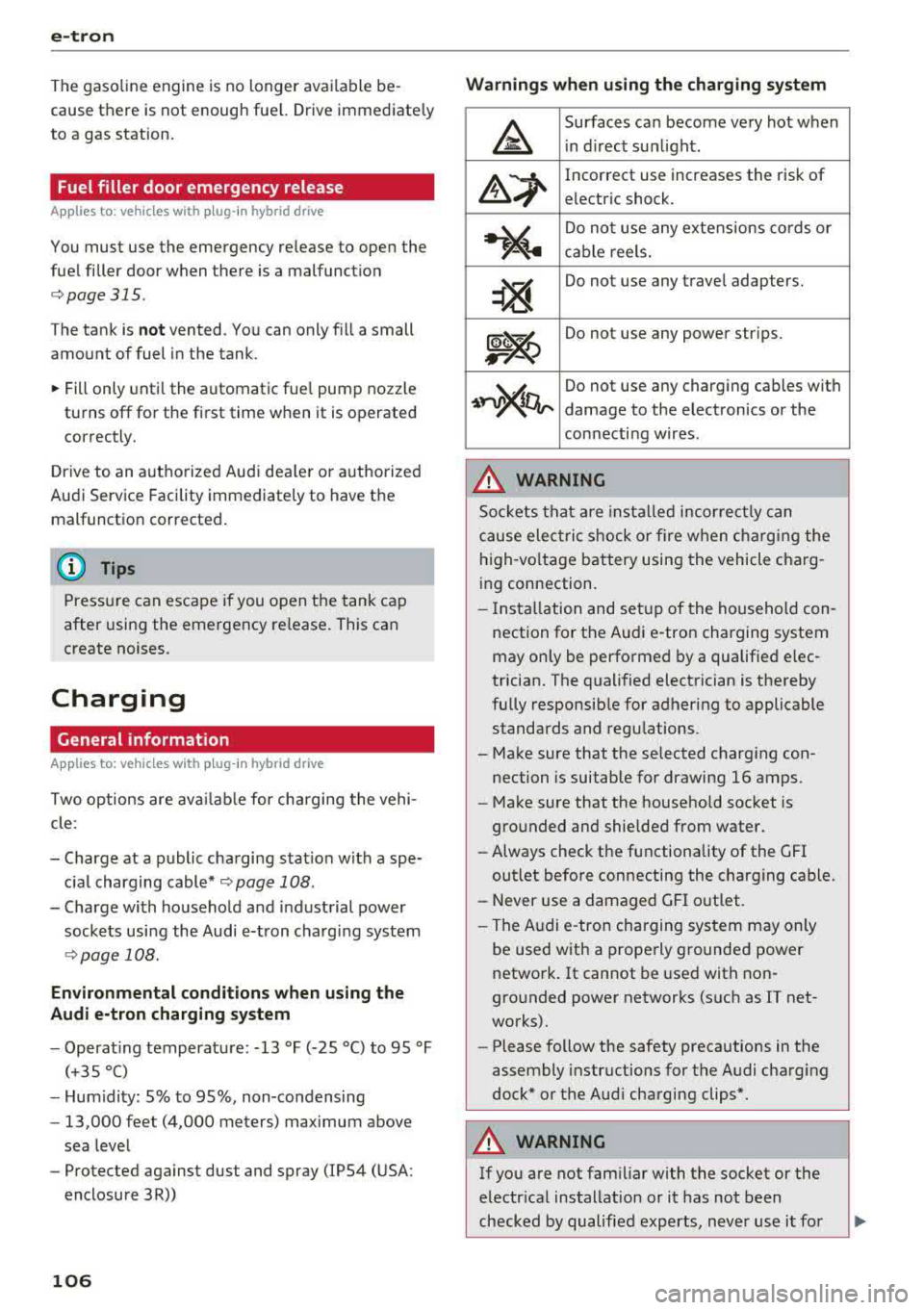
Warnings when using the charging system
&
Surfaces can become very hot when
in direct sunlight.
&~
Incorrect use increases the risk of
electric shock.
~"4
Do not use any extensions cords or
cable reels.
~
Do not use any travel adapters.
~~
Do not use any power strips.
~~~
Do not use any charging cables with
damage to the electronics or the
connecting wires.
.&_ WARNING
-
Sockets that are installed incorrectly can
cause electric shock or fire when charging the
high-voltage battery using the vehicle charg
ing connection.
- Installation and setup of the household con
nection for the Audi e-tron charging system
may only be performed by a qualified elec
trician. The qualified electrician is thereby
fully responsible for adhering to applicable
standards and regulations.
- Make sure that the selected charging con nection is suitable for drawing 16 amps .
- Make sure that the household socket is
grounded and shielded from water.
- Always check the functionality of the GFI
outlet before connecting the charging cable.
- Never use a damaged GFI outlet.
- The Audi e-tron charging system may only
be used with a properly grounded power
network. It cannot be used with non
grounded power networks (such as IT net
works).
- Please follow the safety precautions in the
assembly instructions for the Audi charging
dock* or the Audi charging clips*.
.&_ WARNING
If you are not familiar with the socket or the
electrical installation or it has not been
checked by qualified experts, never use it for
Page 111 of 400
a, a, ..... N
" N ..... 0 N > 00
-Using the control unit while operating the
charging dock*
c!;> page 110 or charging
clip*
c!;> page 110 is recommended .
-Do not immerse the control un it in water or
cover with snow or ice.
@ Tips
-Always place the Audi e-tron charging sys
tem on a secure surface when charg ing.
-To reduce the risk of over heat ing during op
eration, do not place the Audi e -t ron cha rg
i ng system in direct sunlight for long per i
ods of time.
-If the temperature inside the control unit r ises above 176 °F (80 °C), the charging
process will stop automatically unt il the
temperature decreases back down to the normal range.
Attaching/changing the power/vehicle cable
A pp lies to: ve hicles with p lug -in hybrid dr ive
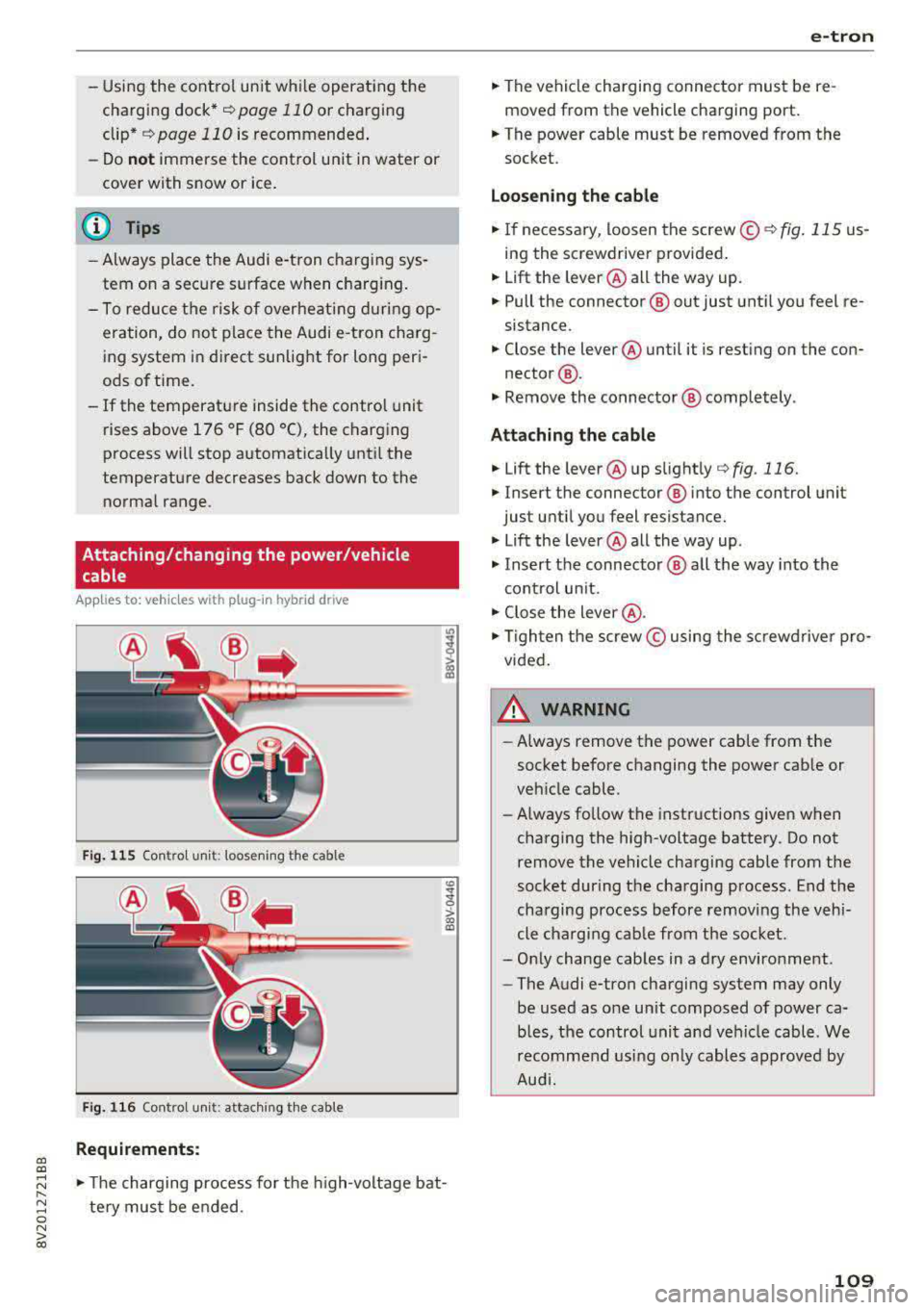
Fi g. 11 5 Contro l u ni t: loose nin g the cable
Fig. 116 Co ntro l u ni t: attach ing t he cable
Requirements:
co
~
> ex, a,
.,. The charging process for the high -voltage bat
te ry mus t be e nded .
e-tron
.,. The vehicle charging connector must be re
moved from the vehicle charging port.
.,. The power cable must be removed from the
socket.
Loosening th e cable
.,. If ne cessary, loosen the screw © r::!:>fig . 115 us
ing the screwdriver provided .
.,. Lift the lever@all the way up.
.,. Pull the connector @out just unt il you feel re
sistance.
.,. Close the lever @until it is rest ing on the con-
nector @.
.,. Remove the connector @ completely .
Attaching the cable
.,. Lift the lever @up slight ly c!;> fig. 116.
.,. Insert the connector ® into the control unit
just until you feel resistance .
.,. Lift the lever @all the way up .
.,. Insert the connector @ all t he way into the
cont rol un it.
.,. Close the lever @ .
.,. Tigh ten the screw © using the sc rewdrive r pro
vided .
A WARNING
-
-Always remove the power cable from the
socket before changing the power cab le or
veh icle cable.
- Always follow the instructions given when
charging the high-voltage battery. Do not
remove the vehicle charging cable from the
socket during the charging p rocess . End the
charging process before removing the vehi
cle charging cab le from the socket.
-Only change cab les in a dry enviro nment .
-The Audi e-tron charging system may only
be used as one un it composed of power ca
b les, the control unit and vehicle cable . We
recomme nd usi ng only cables approved by
Aud i.
109
Page 122 of 400
Trailer towing
Trailer towing
Driving with a trailer
General information
Your Audi was designed primarily for passenger
transportation.
If you plan to tow a trailer, please remember that
the additional load will affect durability, econo
my and performance.
Trailer towing not on ly places more stress on the
ve hicle, it also ca lls for more concentration from
the dr iver.
F or this reason, always follow the operating and
driving instructions provided and use common
sense.
Technical requirements
Trailer hitch
Use a weight-carrying hitch conforming to the
gross tra iler weight. The hitch must be suitab le
for your veh icle and tra iler and must be mounted
securely on the vehicle's chassis at a technically
sound
locat ion . Use on ly a trailer hitch with a re
movable ba ll mount . Always che ck with the t rail
er hitch man ufac tur er to make s ure t hat you are
using the co rrect hi tc h.
Do not use a bumper hitch.
The hitch must be installed in such a way that it
does not interfere with the impact -absorbing
bumper system. No mod ificat ions should be
made to the vehicle exhaust and b rake systems .
Fr om t ime to t ime, che ck tha t all hitch mo unti ng
bol ts rem ain securely f aste ned.
W hen you are not tow ing a tra iler, remove the
tra ile r hitc h ba ll mount . This prevents the hit ch
from caus ing damage s hou ld your veh icle be
s truck from be hind
c> ,&. .
Trailer brakes
If your trailer is equipped with a brak ing system,
check to be su re that it conforms to all regula
tions .
120
The t rai ler hydraulic bra ke system must not be
directly connected to the vehicle's hydraulic
bra ke system.
Safety chains
A lways use s afety chains between you r vehi cle
and t he tra ile r.
Trailer lights
Traile r lights must meet all regula tions . B e s ure
to check w ith your Aud i dea le r fo r cor rect wir ing,
switches and relays .
Mirrors
If you are unable to see t he traffic behind you us
i ng t he regular outs ide mir rors, then yo u
must in
stall extended mirro rs . It is impo rtant that you
always have clear vision to the rear.
&, WARNING
Afte r remov ing the tr ailer hi tch, do not s to re
i t i n yo ur vehicle. In case o f su d den braking,
the hitch could fly fo rwa rd and injure you or
your passengers .
Operating instructions
Maximum trailer weight
A tra iler f or yo ur vehicle is lim ite d to a typical
class 1 or class 2 trailer.
Trailer load distribution
Be sure the load in the t rai le r i s he ld se curely in
pla ce to p revent i t from shi fting forward, bac k
ward or si deways.
Never allow a passenger to ride in a trailer c> &.
in Driving instructions on page 121.
Engine cooling system
Towing a tra iler makes the engine work harder. It
is important that the cooling system's perform
ance is up to the additional load . Make sure tha t
the coo ling system has enoug h flu id.
Tire pressure
When towing a trailer, inf late the tires of your
vehicle to the tire pressure listed under "Full load" on the label
c> page 336. Inflate trailer
Page 123 of 400
CXl CXl .... N ,.__
N .... 0 N > 00
tires to trailer and tire manufacturers' specifica
tions.
Lights
Check to make sure both vehicle and trailer lights
are working p roperly.
Safety chains
Be sure trailer safety chains are properly connect
ed from the tra iler to the hitch on the vehicle.
Leave enough slack in the chains to permit turn
in g corners . When you install safety cha ins, ma ke
sure they w ill not drag on the road when yo u are
driving .
The chains shou ld cross under the trailer tongue
to prevent it from dropping in case of separat ion
from the hitch.
Driving instructions
Driving with a trailer always requires extra care
and consideration.
Weight distribution
Towing a loaded trailer w ith an empty car results
in a highly unstable distribution of weight . If this
cannot be avo ided, drive at very low speeds only
to avoid the risk of losing steering control.
A "balanced" rig is easier to operate and control.
This means that the tow vehicle should be loaded
to the extent possible and permissible, while
keep ing the tra iler as light as possib le under the
circumstances. Whenever possib le, t ransfer
some cargo to the luggage compartment of the
tow vehicle whi le observing tongue load require
ments and vehicle loading considerations .
Speed
The higher the speed, the more difficult it be
comes for the driver to control the rig. Do not
drive at the maximum permissible speed. Reduce
your speed even more if load, weather or wind
conditions are unfavorable
-particu larly when
going downhill.
Reduce vehicle speed
immediately if the trailer
shows the s lightest sign of swaying .
Do not try
to stop the swaying by accelerating.
Tra iler towing
Observe speed limits. In some a reas, speeds for
vehicles towing trailers are lower than for regular
vehicles .
Always apply brakes early. When driving down
hill, shift into a lower gear to use the engine
braking effect to slow the vehicle. Use of the
brakes alone can cause them to overheat and fa il.
Coolant temperature
T he coo lant tempe rature gauge ~ page 11 must
be observed carefully . The coolant temperature
can increase if you drive on long inclines in a low
gear at high engine speeds. Reduce your speed
immediately if the LEDs in the top part of the dis
play turn on.
For more information about indicator lights, re
fer
to . ~page 28.
A WARNING ,-
Anyone not properly restrained in a moving
vehicle is at a much greater risk in an acci
dent. Never let anyone ride in your car who is
not properly wearing the restraints provided
by Aud i.
Trailer towing
information
Important to know
Your vehicle handles differently when towing a
trailer because of the addit ional weight and dif
ferent weight distribution . Safety, performance
and economy will g reatly depend on how careful
ly you load your trailer and operate yo ur rig.
Before you actually tow your trailer, pract ice
turning, stopping and backing up in an area away
from traffic. Keep practic ing until you have be
come complete ly familiar w ith the way your vehi
cle-trailer combination behaves and responds.
Backing up is difficult and requires practice.
Backing up with a t railer genera lly requires steer
i ng action opposite to that when backing up your
vehicle without a tra iler.
Maintain a greater distance between your vehicle
and the one in front of you. You will need more
.,,.
121
Page 125 of 400
a, a, ..... N
" N ..... 0 N > 00
Assistance systems Electronic speed limiter
Applies to: vehicles with electronic speed lim iter
Your vehicle may be factory equipped with tires
that are rated for a maximum speed of 130 mph
(210 km/h). This is less than the maximum speed
of your vehicle. To reduce the risk of sudden tire
failure and loss of control if the vehicle is operat
ed at excessive speeds, your vehicle also has an
electronic speed lim iter . The electronic speed
limiter prevents your vehicle from going faster
than the tir e speed rating. For more information
¢page 335.
If the engine control unit receives faulty vehicle
road speed s ignals, the Malfunction Indicator
L amp (MIL)
II! will illuminate . If this occurs,
contact the nearest authorized Audi dealer for
assistance .
& WARNING
Always observe the posted speed limits and
adjust your speed to suit prevailing road, traf
fic and weather conditions. Never drive your
vehicle faster than the max imum speed rat ing
of the tires installed.
Speed warning system
Applies to: vehicles with speed warning system
The speed warning system helps you to stay be
low a specified maximum speed that can be set,
changed or deleted in the Infotainment system .
The speed warning system warns you if you are
exceeding the maximum speed that you have set.
A warning tone will sound as soon as your speed
exceeds the stored value slightly . The
101 (USA
models) /
[01 (Canada mode ls) indicator light
and the corresponding message appear in the in
strument cluster display at the same time. The
[OJ (USA models)/ (•j (Canada models) indicato r
light and the message turn
off when the vehicle
speed drops below the stored maximum speed.
Setting a threshold is recommended if you would
like to be reminded when you reach a certain
maximum speed. Situations where you may want
to do so include driving in a country with a gener-
Assistance systems
al speed limit or if there is a specified maximum
speed for winter tires.
Setting the warning threshold
• Select in the Infotainment system: I MENU ! but
ton
> Vehicle > left control b utton > Driver as
sistance
> Speed warning > Manual.
(0 Tips
Regardless of the speed warning system, you
shou ld always monitor your speed using the
speedometer and make sure you are following
the lega l speed limit.
Cruise control system
Switching on
Applies to: vehicles wit h cruise control system
The cruise control system makes it possible to
drive at a constant speed starting at 15 mph (20kmlh) .
0
f
~
0
Fig. 127 Operat ing lever: cruise control system
i;:i N 0 > ... m
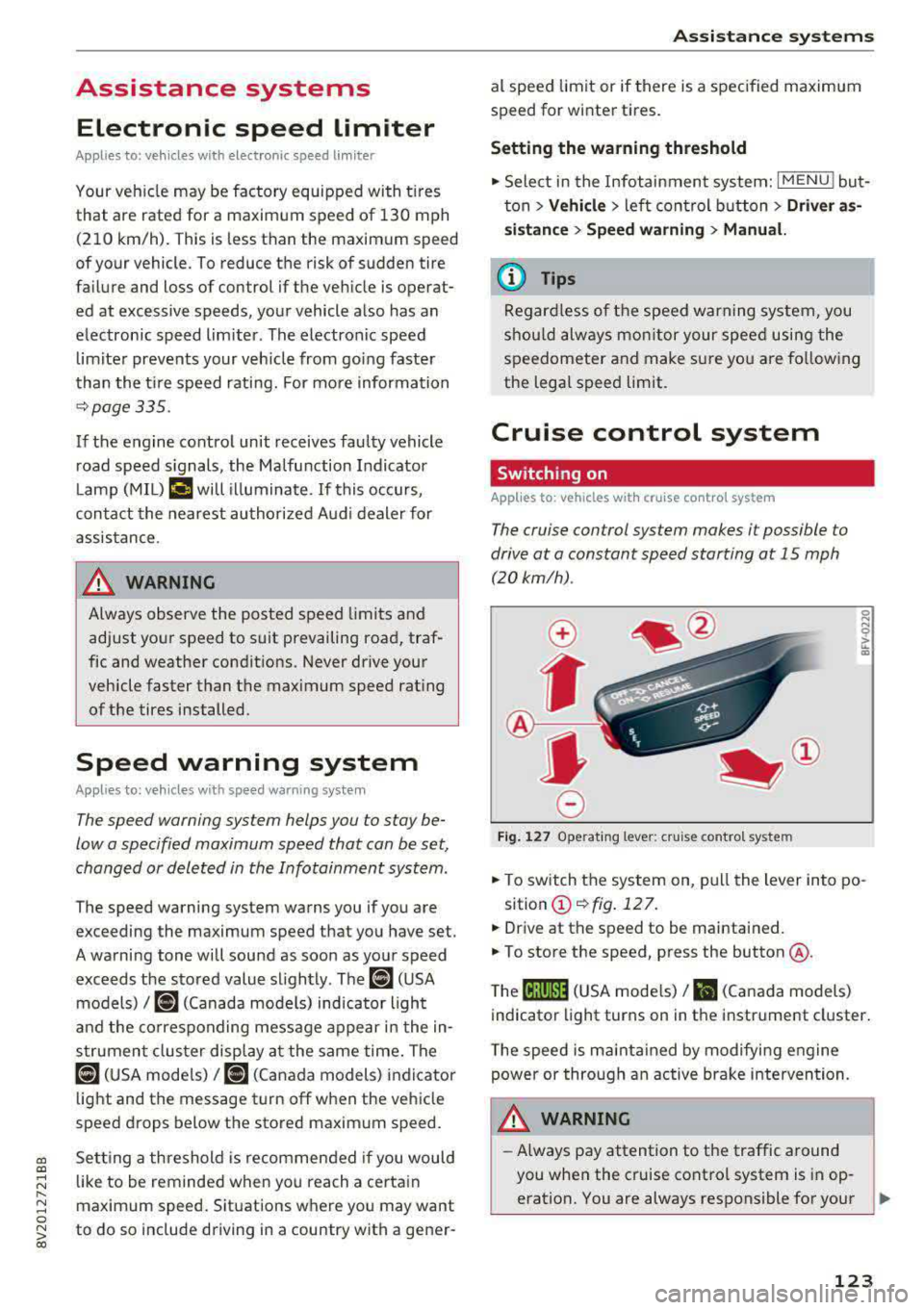
• To switch the system on, pull the lever into po-
sition
(D ¢fig . 127.
• Drive at the speed to be maintained.
.. To store the speed, press the button @.
T he
(ij;jl)~1i (USA mode ls)/ Bl (Canada models)
indicator light turns on in the instrument cluster.
T he speed is maintained by modifying engine
power or through an active brake intervention.
.i\, WARNING
-Always pay attention to the traffic around
-
you when the cruise control system is in op
eration. You are always responsible for your
..,
123