warning light AUDI A3 SEDAN 2017 Workshop Manual
[x] Cancel search | Manufacturer: AUDI, Model Year: 2017, Model line: A3 SEDAN, Model: AUDI A3 SEDAN 2017Pages: 400, PDF Size: 67.32 MB
Page 153 of 400
CXl CXl .... N ,.__
N .... 0 N > 00
Intelligent Technology Electronic Stabilization
Control (ESC)
Description
Electronic Stabilization Control ( ESC) supports
driver safety . It reduces the risk of slipping and
improves dr iving stability. ESC detects critica l sit
uations such as the vehicle oversteering and un
dersteer ing or the wheels are spinning. The vehi
cle is stabilized by apply ing the brakes or reduc
ing engine torque . When the ESC engages, the
G1 indicato r light b links in the instrume nt clus
ter.
The follow ing systems are integrated in the ESC:
Anti-loc k bra king system (ABS)
ABS prevents the whee ls from locking when brak
ing. The vehicle can still be steered even during
hard brak ing. Apply steady pressure to the brake
pedal. Do not pump the pedal. A pulsing in the
b rake pedal indicates that the system is act ing to
stabilize the vehicle .
Brake a ssist system
The brake assist system can decrease braking dis
tance. It increases brak ing power when the driver
presses the brake pedal quick ly in emergency sit
uations . You must press and hold the brake pedal
u nti l the dangerous sit uat io n is ove r. In veh icles
with adaptive cr uise contro l*, the bra ke assist
s ys tem is more sensitive if t he d istance detec ted
to the veh icle dr iv ing ahe ad is too small.
Anti -slip regulation (ASR)
ASR reduces eng ine power when the drive wheels
begin spinning and adapts the force to the road
conditions . This makes i t eas ie r to sta rt, acceler
ate and dr ive up hill s.
Electronic differential lock (EDL )
The EDL applies the brakes to a wheel that starts
spinning and transfers t he drive power to the
other driving wheel or wheels ( if the veh icle is
eq uipped w ith all whee l dr ive*) . T his function is
n o t available at higher speeds.
Intellig ent Technology
In extreme cases, ED L automat ica lly switches off
to keep the brake o n the braked whee l from over
heating. The veh icle is still working correct ly. EDL
will switch on again automatically when condi
t ions have returned to normal.
Ste ering recommendation
The ESC he lps to s tabilize the vehicle by changing
the steering torque.
Select ive wheel torque control
Se lective wheel to rque cont rol is used w hen driv
i ng on curves. The fron t whee l on the inside of
the curve or bo th wheels on the i nside of the
c u rve are braked se lective ly as needed . This al
l ows more precise driving in c urves.
Automatic post-collision braking system
T he "automat ic pos t-collision braking system"
c an help to reduce the risk of sliding an d of addi
tiona l co llisions a fter an acciden t. If the ai rbag
contro l modu le detects a co llision above a certain
vehicle speed, the veh icle is bra ked by the ESC.
T he vehicle does not bra ke autorn,;1tically if;
- t he dr ive r presses the acce le rator pedal, or
- the ESC, the brake system or the veh icle elect ri-
cal system are not functioning .
A WARNING
-The ESC and its integ rated systems cannot
overcome the lim its imposed by natura l
phys ic al laws. This is especially important
on sli ppery or wet roads . If the sy stems be
gin acting to stabilize your vehicle, you
should immediately alter your speed to
match the road and traffic conditions. Do
not let the inc reased safety provided tempt
you into taking risks. This could increase
your r isk of a coll is ion.
- Please n ote the r isk of a coll is ion increases
when dr iv ing fast, especially t hrough curves
a nd on slippery or wet roads, and when dr iv
ing too close to objects ahead. The ESC and
its integrated systems ca nnot always pre
vent collisions
-there is st ill a ris k of ac ci-
dents!
..,.
151
Page 154 of 400
Intelligent Technology
- Press the accelerator pedal carefully when
acce le rating on even, slippery surfaces such
as ice and snow. The drive wheels can spin
even when these control systems are instal
led and th is can affect driving stability and
increase the risk of a co llision . condition
. Different tire sizes can lead to a
reduction in engine power.
- You may hear noises when the systems de
scribed are working .
@ Tips
-The ABS and ASR only function correctly
when all four whee ls have a s imilar wear
Switching on/off
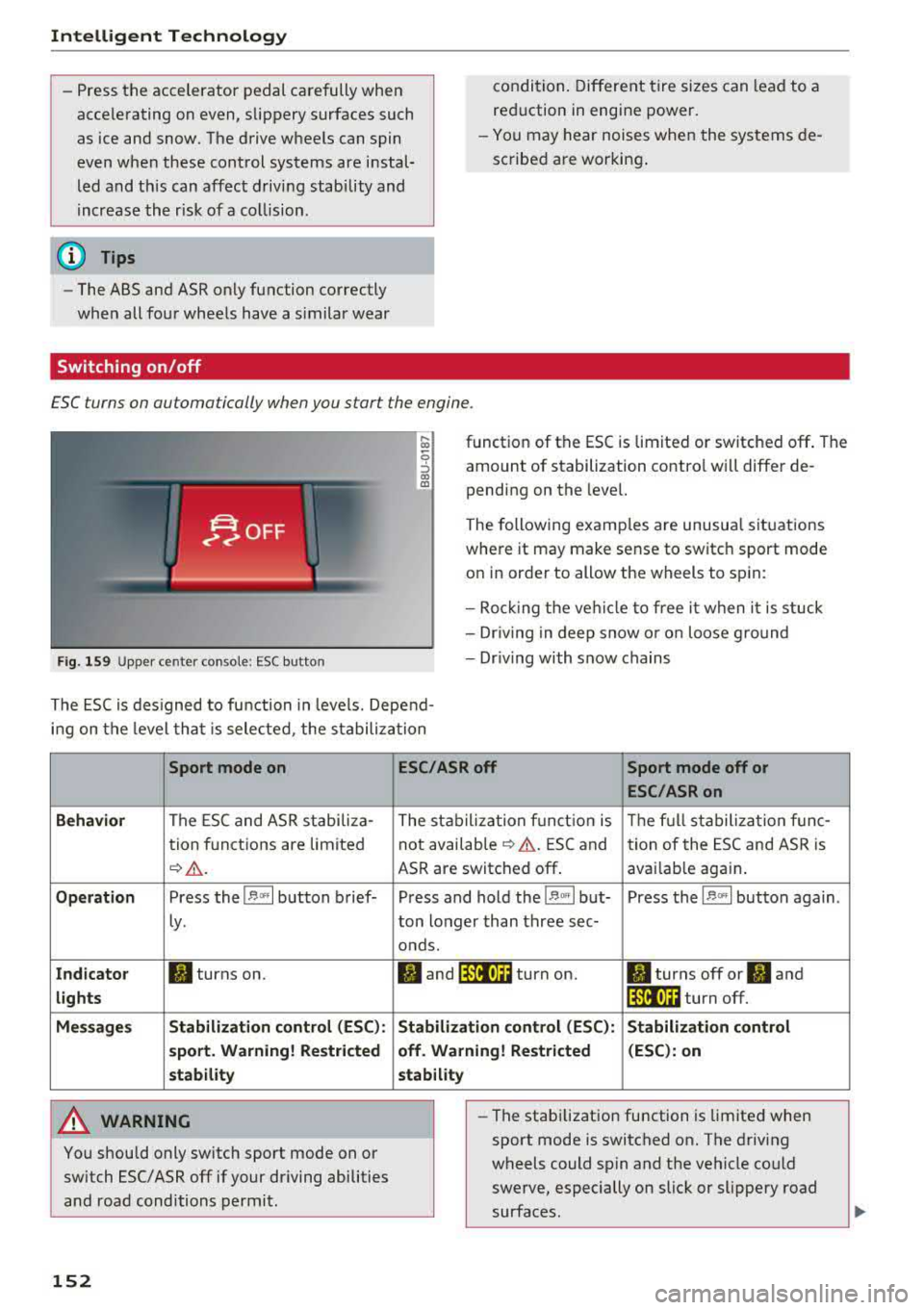
ESC turns on automatically when you start the engine .
Fig . 1 59 Upper ce nter console: ESC butto n
function of the ESC is limited or switched off . The
amount of stabilization contro l will differ de
pending on the level.
The following examp les are unusua l situations
where it may make sense to switch sport mode
on in order to allow the wheels to sp in:
- Roc king the ve hicle to free it when it is stuck
- Dr iv ing in deep snow o r o n loose g round
- Dr iv ing with snow chains
The ESC is des igned to fu nction in levels. Depend
i n g on the level tha t is sele cted , the stabilization
Sport mode on
Behavior
The ESC and ASR stabiliza-
tion f unctions are limited
¢ .&. .
Op eration Press the l.$ ,., I button brief-
Ly .
Ind icator II turns on.
lights
Me ssage s Stabilizati
on cont rol (ESC ):
s port . Warning! Re st ric ted
s tability
A WARNING
You should only switch sport mode on or
switch ESC/ ASR
off if your driving abilities
and road conditions permit.
152
ESC /ASR off Sport mode off or
ESC /ASRon
The stabiliza tion f unct ion is The f ull stabiliza tion f unc-
not availab le
¢ .&. . ESC and
tion of the ESC and ASR is
ASR are switched
off . avai lab le again .
Press and hold the
1 .$ .. , I but- Press the l.$ ,., I button again .
ton longer than three sec-
onds.
fl and 14il•U~ turn on. II turns off or II and
1 4il•U~ turn off.
Stabi lization control (ESC): S tabilization control
off. Warning! Re stricted (
ESC ): on
stability
-
- The stabi lization function is limited when
sport mode is switched on. The driving
wheels could spin and the vehicle could
swerve, especially on slick or slippery road
surfaces.
Page 155 of 400
CXl CXl .... N ,.__
N .... 0 N > 00
-There is no vehicle stabilization when ESC/
ASR are switched off.
(D Tips
-ESC/ASR cannot be switched off or sport
mode cannot be switched on if the cruise
control system * or the adaptive cruise con
tro l* is sw itched on.
-Malfunctions in the Audi magnetic ride *
may make it imposs ible to switch the ESC/
ASR off or to switch sport mode on.
Brakes
New brak e pad s
New brake pads do not achieve their full braking
effect during the first 2S0 mi (400 km) . They
must be "broken in" f irst. However, you can com
pensate for the slightly reduced braking force by
pressing firmly on the brake pedal. Avoid heavy
braking during the break-in per iod.
Wear
B rake pad
wear depends largely on the way the
veh icle is driven and on operat ing cond itions.
This is especially true if you are driving frequently
in the c ity and on curves or with a sporty driving
style.
Operat ing no ise
Noises may occur when braking depending on the
speed, braking force and outs ide cond itions such
as temperature and humidity .
Effect of wat er and road salt
In certain situations, for example after driving
through water, in heavy rain, after overnight con
densation or after washing your car, the braking
effect can be reduced by moisture or ice on the brake rotors and brake pads . The brakes must be
"dr ied" first w ith a few careful brake applica
tions .
At higher speeds and with the windsh ield wipers
turned on, the brake pads press against the brake
rotors for a short amount of time. Th is action,
which is not felt by the d river , happens at regular
Intellig ent Technology
interva ls and ensures a better reaction time for
the brakes in wet weather.
T he brak ing effect ca n also be reduced if yo u are
driv ing on sal ted roads and yo u do not app ly the
brakes for long per iods o f time. The layer o f salt
on the brake rotors and pads must be worn off
first when the brakes are applied.
Corrosion
Leav ing the veh icle pa rked for long periods of
time, low mileage and avoiding heavy b raking
can contribute to corrosion on the brake roto rs
and to dirty brake pads .
If you usua lly avoid heavy bra king or if there is
corrosion present, occasiona l heavy brak ing at
high speeds is recommended to clean the brake
rotors and
pads ¢,& .
Brake system malfunction
If you notice that the bra ke pedal travel has sud
denly inc re ased, then a br ake circuit in the dua l
c ircuit b rake system may have malfunctioned.
Drive to an authorized Audi dealer or authorized
Audi Service Facility immediate ly to have the
problem corrected. On the way there, drive with
reduced speed and keep in mind that you will
need a longer distance to stop and you will need
to press the brake pedal harder.
L o w bra ke fluid le ve l
When the brake fluid level is low, malfunctions in
the brake system may occur. The brake fluid level is electronically monitored.
Brake bo oster
The brake boos ter amplifies the p ressure you ap
ply to the brake pedal. It on ly operates whi le the
engine is running or when the ignition is switched
on (p lug-in hybrid dr ive*) .
A WARNING
-Only app ly the brakes for the purpose of
cleaning the brake system when road and
traffic cond itions permit. You must not en
danger other road users. This increases the
risk of an accident.
153
Page 157 of 400
CXl CXl .... N ,.__
N .... 0 N > 00
Offroad vehicle?
Your Audi is not an offroad vehicle -th ere is not
enough ground clearance . For this reason, avoid
d ifficult terrain.
& WARNING
- Also, in vehicles with all wheel drive, adapt
your driv ing style to the current road and
traff ic conditions. Do not let the increased
safety provided tempt you into taking risks,
because th is increases the r isk of an acci
dent .
-The braking ability of your veh icle is limited
to the tract ion of the wheels . In this way, it
is not diffe rent from a two whee l dr ive vehi
cl e. Do not be tempted to accelerate to a
high speed when the road is slippe ry, be
cause this increases the risk of an accident.
-Note that on wet streets, the front wheels
c an "hyd roplane" if dr iving at speeds that
are too high . Unlike front whee l drive
vehicles, the eng ine does not rev higher su d
denly when the vehicle begins hyd roplaning .
For this reason, adapt your speed to the
road conditions to reduce the risk of an acc i
dent .
Energy management
The starting ability is optimized
The energy management system manages the
electrical energy distribution and optimizes the
availability of electrical energy for starting the
engine .
When a ve hicl e w ith a co nventional energy sys
tem is not d riven for a long time, the vehicle bat
tery is dra ined by equipment (for example, the
immobilizer). In certain circumstances, there
could may not be enough energy to start the en
g ine.
Your veh icle is equipped with an inte lligent ene r
gy managemen t system for d istr ibuting electrici
ty. This significantly improves the starting ability
and inc reases t he vehicle battery life.
Intellig ent Technology
The ene rgy management system Is made up o f
battery diagnosi s, idling cu rrent management ,
and dynamic energy management .
Battery diagnosis
T he battery diagnos is determines the vehicle ba t
te ry c harge level. The sensors de termine the bat
te ry vo ltage, the batte ry cu rrent, and the batte ry
temperat ure. The cur rent charge level and the
performa nee of the vehicle battery a re deter
mined based on this.
Idling current management
T he idling cur rent management decreases the
energy used while parked . With the engine
switched off, it ma nages the energy distribution
to the d ifferent e lectr ica l components . Data from
the battery d iagnosis is taken into account for
th is.
Depending on the vehicle battery charge level,
electr ical eq uipment is switched
off one item af
ter the other to prevent the vehicle battery from dra ining and to ma intain the starting ab ility .
Dynamic energy manag ement
While driving, dynamic ene rgy management dis
t ributes the appropr iate amo unt of energy to the
electrical eq uipment. It contro ls the battery
charge level so that the amount of energy is not
greater than the amount being generated in or
der to maintain an optimal vehicle battery charge
level.
(D Tips
-Energy management cannot overcome the
laws of physics . Note that the charge level
and length of the veh icle bat tery life are
li m ited.
-Whe n the sta rting ability is endangered, the
i•) i n dicator light t urns on r=v pag e 29.
What you should know
Maintaining the starting ability is the highest
priority .
A lot of stress is placed on the veh icle battery
whe n driving short distances, during city driving,
..,.
155
Page 172 of 400
Voice recognition system
Voice recognition system Operating
Applies to: vehicles with vo ice recognition system
You con operate many Infotainment functions
conveniently by speaking.
Requirements: the ignition and the MM I must be
sw itched
on~ page 158, the re must not be any
phone call in progress and the parking system
m ust not be active.
.. Switching on : press the~ button @
¢ page 15, fig. 11 or@ ~ page 16, fig . 13
briefly on the multifunct ion steer ing whee l and
say the desired command after the
Beep.
.. Switching off : press and hold the~ button.
Or : press the l2l butto n.
.,. Pausing : say the command Pause. To resume,
press
the~ button.
.,. Corre cting : say the command Correction .
Input assistance
The system guides you through the input with
visua l and audio feedback.
- Visual input as sistance : after switching on
vo ice recognit ion, a display with a selection of
poss ible commands appears. This command
display can be sw itched on or off . Se lect:
IMENU I button> Settings > left control button
> MMI settings > Speech dialog sy stem .
- Audio input as sis tance :
to have the poss ible
commands read, turn the voice recognition sys
tem on and say
Help .
For the system to understand you:
Speak clearly and distinct ly at a normal volume.
Speak louder when driving faster.
Emphasize the words in the commands even ly
and do not leave long pauses.
Close the doors, the windows and the sunroof* to
reduce background noise. Make sure th at passen
gers are not speaking when you are giving a voice
command.
D o not direct the air vents toward the hands-free
microphone, whic h is on the roof head liner near
the front interior lights.
170
Only use the system from the dr iver's seat be
cause the hands-free microphone is directed to
ward that seat.
Additional sett ings
Refer to~ page 246.
_&. WARNING
- Direct your full attention to dr iv ing. As the
driver, you have complete responsibility fo r
safety in t raffic. Only use the functions in
such a way that you a lways maintain com
plete contro l over your vehicle in all traffic
situations.
-
- Do not use the voice recognition system in
emergencies because your voice may change
in stressful s ituations.
It may take longer to
dial the numbe r or the system may not be
ab le to dia l it at all. Dial the emergency
number manually .
(D Tips
- The d ia log pauses when the re is an incom
ing phone call a nd will continue i f you ig
nore the cal l. The dia log ends if you answer
the ca ll.
- There are no vo ice gu idance* prompts when
a dialog is act ive.
- You can select an item in the list using ei
ther the vo ice recognit ion system or the
cont rol knob.
Command overview
information
Applies to: vehicles with voice recognition system
The following overv iews des cribe the commands
that can be used to operate the MMI using the
vo ice recog nit ion system.
Alte rnative commands are separated using a"/",
for example say:
Telephone / (or) Navigation /
(or) Radio.
Sequences of com mands used to perform an a c
tion are iden tified w ith a
">", fo r example say:
Ente r addre ss > (then) Enter country /state. IJ,,
Page 197 of 400
CXl CXl .... N r--N .... 0 N > 00
Wi-Fi hotspot
Applies to: vehicles with Wi-Fi hotspot
You con use the MMI as a Wi-Fi hotspot to con
nect up to eight Wi-Fi devices to the Internet. While driving, restricted use of unsecured, light,
small wireless devices is only possible from the
rear of the vehicle.
Requirement: the ignition must be switched on.
• Select: I MENU I button > Tele ph one> right con-
trol button >
Wi -F i s ettin gs.
The follow ing settings can be modified:
Wi-Fi
The MMI Wi-F i hotspot is deactivated at the fac
tory . Switch the Wi-Fi hotspot to
H otsp ot before
establishing a connection between your vehicle
and your W i- Fi dev ice.
- On : the MMI Wi-Fi hotspot is active and visible
to other devices . You can connect your Wi-Fi
device with the MMI.
- Off: the MMI W i-F i hotspot is deactivated . An
I n ternet connection fo r Wi-Fi devices is not
poss ible.
_& WARNING
- T o reduce the risk of an accident, use the
Audi connect In fotainment services with a
Wi-Fi hotspot only in the rear seat when the
vehicle is in motion, or on ly when the vehi
cle is stationary.
- It is only safe to use tab lets, laptops, mo
bile devices and other similar devices when
the vehicle is stationary because, like all loose objects, they could be thrown around
the ins ide of the vehicle in a crash and cause
serious injur ies. Store these types of devices
securely while driving.
- Do not use any w ireless devices on the front
seats w ith in range of the a irbags while driv
ing. Also read the warn ings in the chapter
~page 271, Front airbags.
- As the driver, do not allow usage of the Wi
Fi hotspot to dist ract you from driving, as
this could increase the risk of an accident .
-
Audi conn ect ( Inf ota inm ent )
(D Note
-Under some conditions, certain mobile devi
ces and operating systems may automati
cally switch from your vehicle's Wi-Fi hot
spot to the device's mobile data connection.
In that event , standard text and data usage
rates would apply wh ile the device's mobile
data connection is in use. Please refer to
documentation provided by your mobile de
vice's manufacture and your data carrier for details, related terms and privacy state
ment.
- You a re responsib le for all precautions tak
en for data protection, anti -virus protection
and protection against loss of data on mo
bile devices that are used to access the In
ternet through the Wi-Fi hotspot.
(D Tips
- In vehicles without Audi connect (Infotain
ment)*, the use of the Wi-Fi hotspot is only
possible for the W i-Fi audio player*. A data
connect ion to the Internet cannot be estab
lished.
- For add itional information about the Audi
connect Infotainment services, visit
ww w.a udiusa.c o m /aud iconn ect .
Configuring the data
connection
Applies to: vehicles with Audi connect (Infotainment)
The data connection for Audi connect Infotain
ment services is pre-configured at the factory.
However, if a configuration should be necessary,
you con adjust the following settings.
• Select: ! MENU I button> right control button>
Connecti on manag er.
• Select: right control button > Online setti ngs >
Data c onnec tion setting s.
Using the Data co nnection settin gs menu, you
can set when an Internet connection should be
made . T he Internet connection disconnects auto
matically once the requested Audi connect Info
tainment service no longer requires any data.
The following options can be selected:
195
Page 200 of 400
Audi connect e-tron ser vic es
Audi connect e-tron
services
Introduction
A pp lies to: ve hicles w ith Audi co nnect e-tro n se rv ic es
With Audi connect e-tron services l), you can ac
cess various information or control individual
functions remotely using mobile dev ices (such as
a smartphone) or a web portal.
- Trip
data¢ page 198.
- Doors and lights ¢ page 198.
-Vehicle status report ¢page 199.
-Car Finder¢ page 199.
- Charging ¢ page 199.
-Climate control ¢page 199.
A WARNING
Also read and follow the instructions regard
ing traffic
safety¢ page 158.
Setup
A pp lies to: ve hicles w ith Audi co nn ect e -tro n serv ices
To use Audi connect e-tron services 1), p lease
note the following:
R equi rements
-An authorized Audi dealer must complete a
one-time activation of Audi connect e-tron serv
ices for your veh icle before you can reg ister on
l ine .
- Then register at
etro n .a udiu sa.com. You can
use and manage the Audi co nnect e-tron serv
ices there .
- If you require ass istance w ith the Audi connect
e-tron services, you can call customer service at
( 844 ) 57 3-8 76 6.
-Your mobile devices must be compatible.
l) The mob ile netwo rk service is offe red by a service provid·
er . You can obtain more infor mation about your mobile
network provider from an authorized Aud i dealer or by
ca ll ing
(877) 505-2834. Connected devices are not al
w ays 4G-comp atible. The availability of a high-speed net
wor k m ay be reduced during peak usage or by your loca
tio n, the reception, and other factors . Network coverage
cannot be guaranteed everyw here. Fo r more informa tion
o n mob ile coverage , see the Audi co nnect overv iew fro m
yo ur mob ile netwo rk prov ider.
19 8
Trip data
App lies to : vehicles wi th Audi connect e -tr on services
The Driver Information System collects data un
der certain conditions and sends it to a server.
When data is stored, you can access va lues such
as these using the service:
- driving durat ion,
- average speed driven,
- distance driven,
- average electric consumption.
For additional information on the Driver Informa
tion System, refer to
¢ page 17, Driver informa
tion system.
Doors and lights
App lies to : vehicles wi th Audi connect e- tron services
You can access and disp lay the current status of
the following vehicle data on your mobile devices
without having to be inside the vehicle.
- If the veh icle doors and lids a re open/closed,
- Park ing lights are on/off.
For additional information on opening and clos
i ng the doors or for the vehicle light ing, refer to
¢ page 34, Opening and closing or to ¢ page 51,
Exterior lighting.
(D Tips
- If the high-voltage battery is not charged,
the amount of access requests is limited to
l S after switch ing off the ign ition. This
helps conse rve the 12 vo lt vehicle battery.
You cannot contro l functions or access in
formation if the charge leve l of the 12 volt
vehicle battery is too low.
Page 201 of 400
CXl CXl .... N r--N .... 0 N > 00
-If a t least two minutes have passed after
the last time the ignition was switched
off,
you can reset the access counter back to "O" as needed after switching the ignition on/
off again .
Vehicle status report
Applies to: veh icles with Audi connect e·tron services
You can access various vehicle statuses using the
services, such as:
- high-voltage battery charge level,
- electri c range,
- mileage,
- next inspection .
For addit ional information,
see ¢ page 97, Power
meter overview
and ¢ page 99, Range display .
A WARNING
Do not ignore messages and warning or indi
cator lights that turn on in the vehicle
be
cause of the information in the status report.
T his could le a d to b reak downs in on the ro ad,
ac cidents and serious injuries .
Car Finder
Applies to: vehicles with Audi connect e-tron services
The vehicle collects data under certa in conditions
a n d se nds it to a se rver.
When data is stored, you can access values such
as these us ing the service :
- Vehicle location d isplay,
- Display of one's own locat ion,
- Ro ute to your vehicle.
I f yo ur mobile device also has a navigation f unc
tion, yo u can navigate to your last know n pa rking
l ocat ion .
(D Tips
-The new pa rking location canno t be dete r
mined with this service if the vehicle is
moved after shutt ing the ve hicle
off and
without switching the ignition on and
off
again, for example when being towed o r if
the veh icle is stolen.
Audi connect e-tron s erv ic es
- If the vehicle is moved and shut off again
using the second key, for example, t he new
park ing location is transmitted to the server
after sw itching the ign ition
off.
Charging
Applies to: vehicles with Audi connect e-t ron services
You can contro l and access the hig h-voltage bat
tery charging process remotely using these serv ices. You have the followi ng options:
- check the battery charge level,
- start/end the cha rging p rocess,
- program the charging t imer with/wit hout cl i-
mate con trol,
- deactivate/activate the cha rg ing timer.
Fo r additional information,
see ¢ page 108,
Charging the battery with the Audi e-tron charg
ing system .
A WARNING
Only perform c harg ing f unct io ns on t he h igh
vol tage battery if t he ve hicl e is shut
off co r
r e ct ly, is con nected to a suitable socket an d if
the ignition is switched
off.
Temperature control
Applies to: vehicles with Audi connect e-tron services
You can co ntro l the clima te control in your vehi
cl e remo tely using these serv ices:
- start/end climate control,
- program the timer,
- deactivate/activate the timer.
For additional information,
see ¢ page 118 , Cli
mate control.
A WARNING "---
Only perform the climate cont rol functions i f
your vehicle was shut
off cor rectly and the ig
ni tion is switched off .
199
Page 202 of 400
Navigation
Navigation
Opening navigation
Applies to: veh icles w ith navigation system
The navigation system directs you to your desti
nation , around traffic incidents and on alterna
tive routes, if desired .
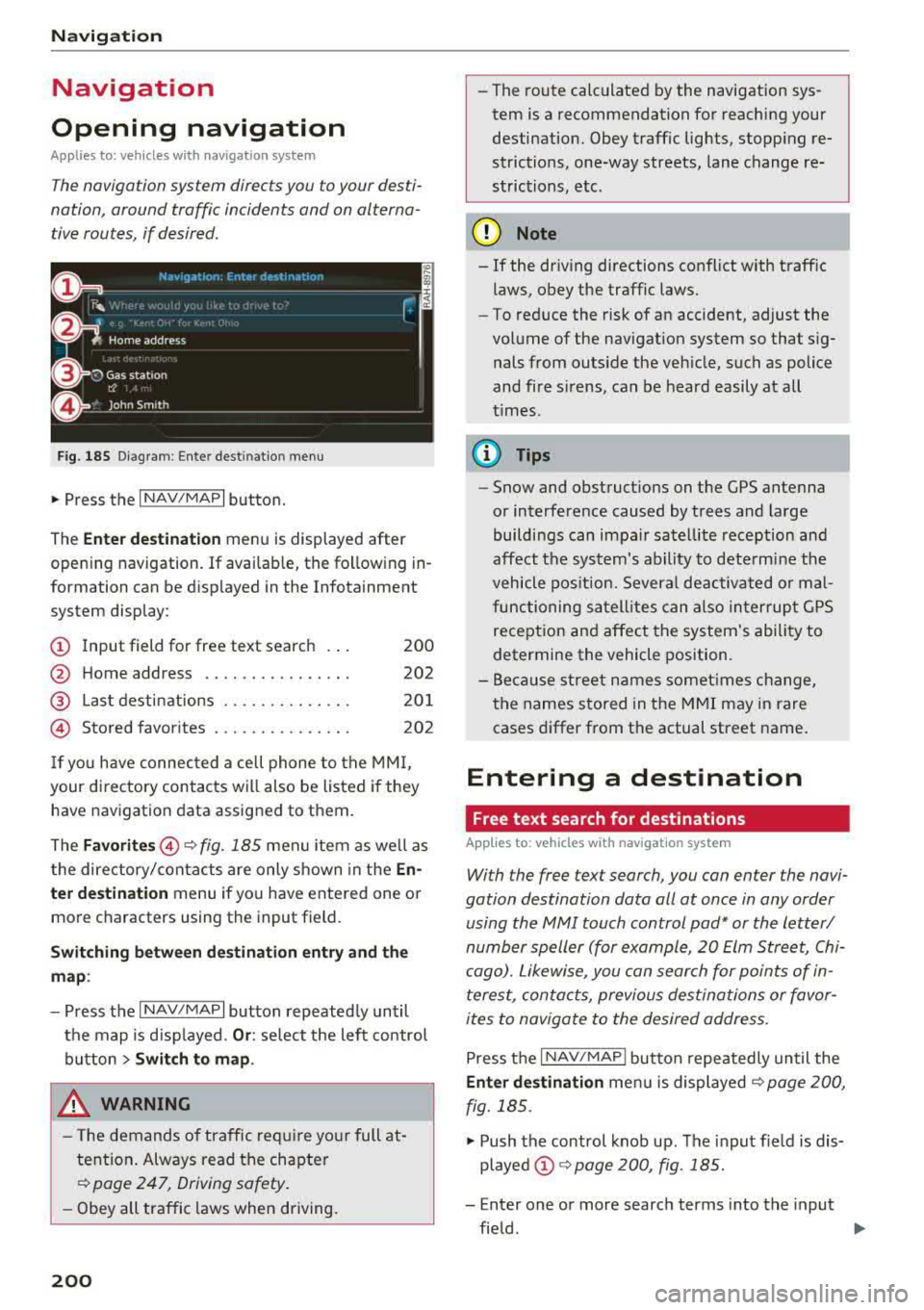
Fig. 185 Diagram : Ente r dest inatio n menu
"'Press the I NAV/MAPI button.
The
Enter destination menu is displayed after
opening navigation. If availab le, the following in
formation can be d isplayed in the Infotainment
system display:
@ Input field for free text search 200
@ Home address . . . . . . . . . . . . . . . . 202
@ Last destinations . . . . . . . . . . . . . . 201
© Stored favorites . . . . . . . . . . . . . . . 202
If you have connected a cell phone to the MMI,
your directory contacts will also be listed if they
have navigation data assigned to them.
The
Favorites @¢ fig. 185 men u item as well as
the directory/contacts are only shown in the
En·
ter destination
menu if you have entered one o r
more characters using the input field.
Switching between destination entry and the
map :
-Press the I NAV/MAPI button repeated ly until
the map is d isp layed.
Or : select the left contro l
button
> Switch to map.
_& WARNING
- The demands of traffic require yo ur full at
tention . Always read the chapter
~ page 247, Driving safety.
-Obey all traffic laws when driving.
200
.
- The route calculated by the navigation sys
tem is a recommendation for reaching your
destination. Obey traffic lights, stopping re
strictions, one-way streets, lane change re
strictions, etc .
(D Note
- If
the dr iv ing directions conflict with traffic
laws, obey the traffic laws.
- To reduce the risk of an accident, adjust the
volume of the navigat ion system so that s ig
nals from outs ide the veh icle, such as police
and fire s irens, can be heard easily at all
t imes.
(D Tips
- Snow and obstruct ions on the GPS antenna
or interference caused by trees and large
buildings can impair satellite reception and
affect the system's ability to determine the
vehicle position. Several deactivated or mal
functioning satellites can also interrupt GPS
reception and affect the system's ability to
determine the vehicle position.
-Because street names somet imes change,
the names stored in the MMI may in rare
cases differ from the actual street name.
Entering a destination
Free text search for destinations
Applies to: vehicles with navigation system
With the free text search, you con enter the navi
gation destination data all at once in any order using the MMI touch control
pad* or the letter/
number speller (for example, 20 Elm Street, Chi
cago). Likewise, you can search for points of in
terest, contacts, previous destinations or favor
ites to navigate to the desired address.
Press the I NAV/MAPI button repeatedly until the
Enter destination menu is displayed~ page 200,
fig. 185 .
"' Push the control knob up. The input fie ld is dis
played @¢ page 200, fig. 185.
- Enter one or more search terms into the input
field .
""
Page 230 of 400
Media
-Do not u se any wireless devices on the fro nt
seats within range of the airba gs w hile driv
ing. Also read and follow the warnings in
r=> page 271, Fro nt airbags.
CD Note
- Always follow the information found in ¢ 0
in Wi-Fi hotspot on page 195 .
-Please note that there generally are add i
tiona l costs when using an online media
service account, especially when it is used i nternationally.
{!) Tips
-Depending on the Internet connection and
network traff ic, a connection loss can occur
during p layback of on line media serv ices.
-Online media and Internet radio usage de
pends on the serv ice avai lability of the third
party provider.
- Audi AG simply makes the access to on line
media serv ices possible t hrough the MMI
and does not take any respons ibility for the
contents of the onli ne med ia serv ices .
-Always read the chapter r:> page 196, Audi
connect (Infotainment) general informa tion.
-Depending on the mobile device used, the re
may be interr uptions du ring media playback
and when using the
Audi MMI connect app.
T o avoi d inter ruption s when usi ng a mob ile
device, do no t loc k t he s creen on you r mo
bi le dev ice a nd keep the
Audi MMI connect
app in the foreground .
- Co ntact an a utho rized Audi dea le r or a u
thorized Audi Service Facili ty for additional
informat ion about on line media .
228
Multimedia connections
USB adapter for Audi music interface
You can connect your mobile devices (such as a
smartphone or
MP3 player) to the Audi music in
terface and charge them using a special USB
adapter .
®-
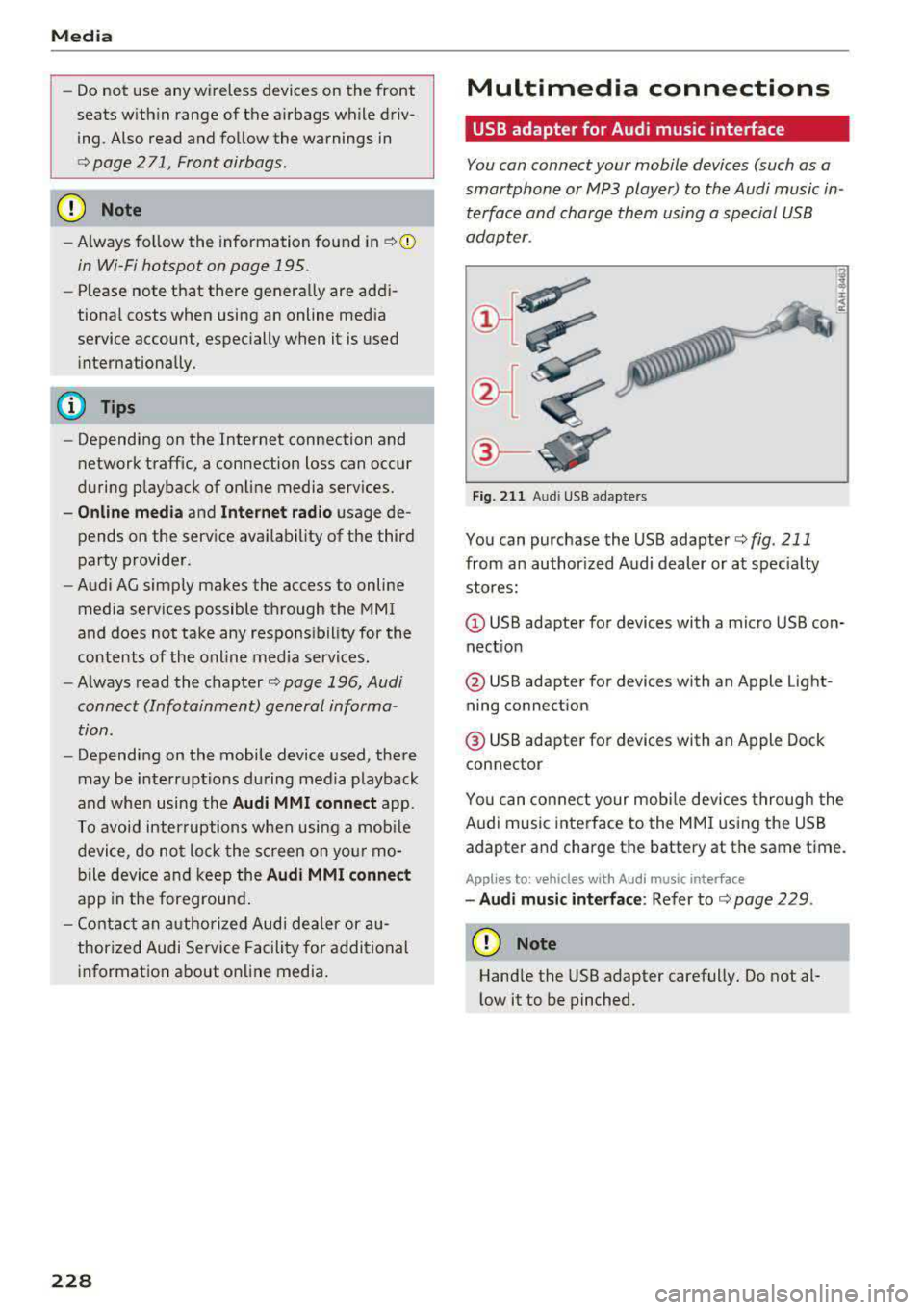
Fig. 2 11 Audi USB adapters
You can purchase the USB adapter ¢ fig . 211
from an author ized Audi dealer or at spec ia lty
stores:
Q) USB adapter for devices with a micro USB con
nect ion
@ USB adapter for devices with an Apple Light
ning connect ion
@ USB adapte r for devices with an Apple Dock
connector
You can conne ct your mob ile dev ices throug h the
Audi music interface to the MM I using the USB
adapter and charge the battery at the same time.
Applies to: vehicles wit h Aud i music interface
-Audi musi c interface : Refer to¢ page 229.
CD Note
Handle the USB adapter carefully. Do not al
l ow it to be pinched .