tow AUDI A3 SEDAN 2017 Owner's Manual
[x] Cancel search | Manufacturer: AUDI, Model Year: 2017, Model line: A3 SEDAN, Model: AUDI A3 SEDAN 2017Pages: 400, PDF Size: 67.32 MB
Page 130 of 400
Assistance systems
In curves
Applies to: vehicles with Audi adaptive cruise contro l/Audi pre
sense front
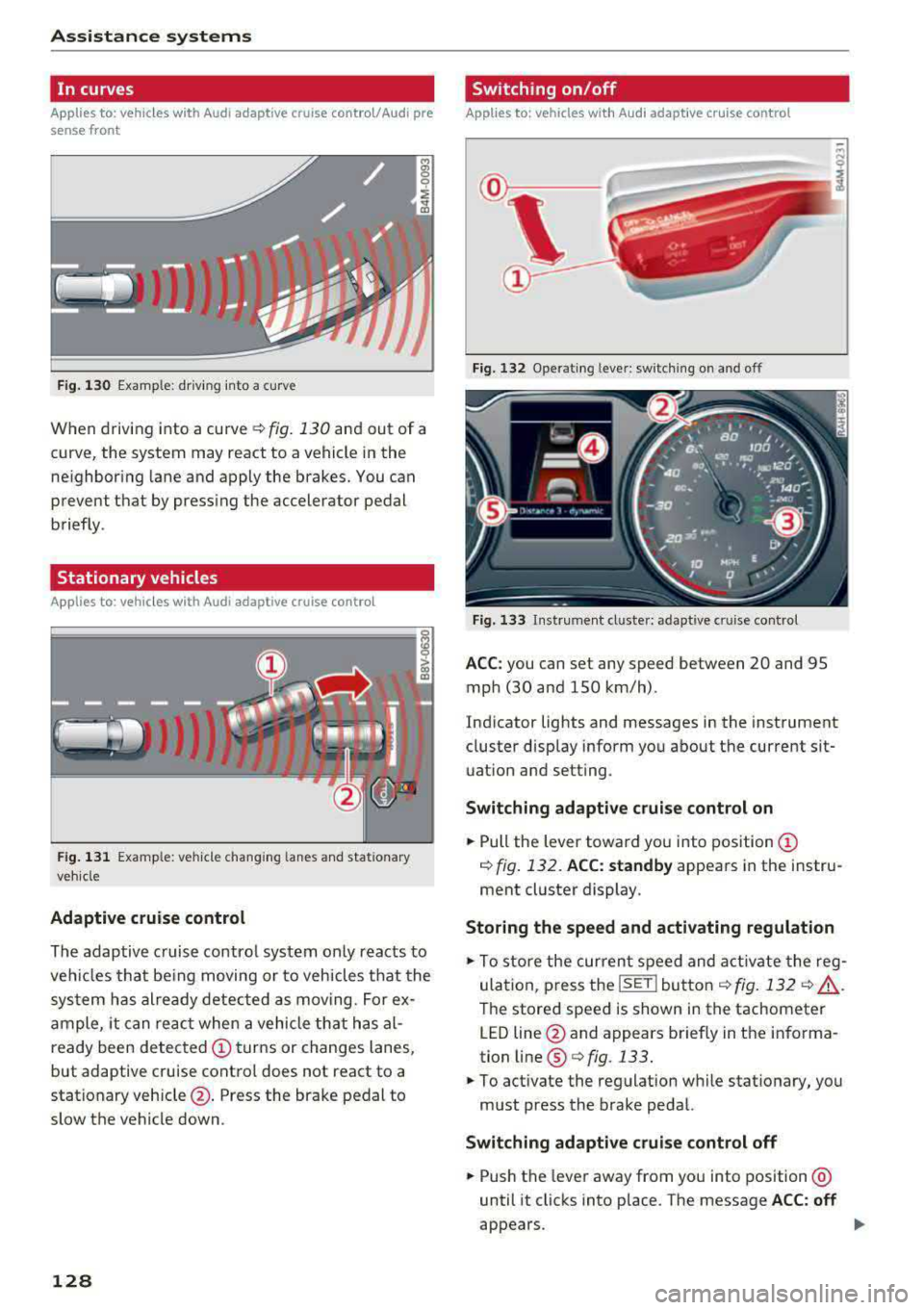
Fig . 130 Example: dr iv ing into a curve
When driving into a curve r:!;> fig. 130 and out of a
curve, the system may react to a vehicle in the
ne ighbor ing lane and apply the brakes. You can
prevent that by pressing the accelerator pedal briefly .
Stationary vehicles
Applies to: vehicles with Audi adaptive cruise control
))))
Fig. 131 Example: veh icle changing lanes and stationary
veh icle
Adaptive cruise control
The adaptive cruise control system only reacts to
ve hicl es that being moving or to vehicles that the
system has already detected as moving. For ex
ample, it can reac t when a vehicle that has al
ready been detected
@turns or changes lanes,
but adaptive cruise control does not react to a
stationary vehicle @. Press the brake pedal to
slow the vehicle down.
128
Switch ing on /off
Applies to: vehicles with Audi adaptive cruise control
Fig. 132 Ope rating leve r: sw itching on and o ff
Fig. 133 Instrument cl uste r: ad apt ive c ruise contro l
ACC: you can set any speed between 20 and 95
mph (30 and 150 km/h) .
Indicator lights and messages in the instrument
cluster disp lay inform you about the current sit
uation and setting .
Switching adaptive cruise control on
.,. Pull the lever toward you into position@
¢ fig. 132. ACC: standby appears in the instru
ment cluster display.
Storing the speed and activating regulation
.,. To store the current speed and activate the reg
ulation, p ress the
ISE TI button ¢ fig. 132 r:!;> .&,.
The stored speed is shown in the tachometer
LED line @and appears briefly in the informa
tion line ®
Q fig. 133.
.,. To activate the regulation while stationary, you
must press the brake pedal.
Switching adaptive cruise control off
.,. Push the lever away from you into position @
until it clicks into place . The message ACC: off
appears .
Page 131 of 400
a, a, ..... N
" N ..... 0 N > 00
The stored speed in the LED line is erased.
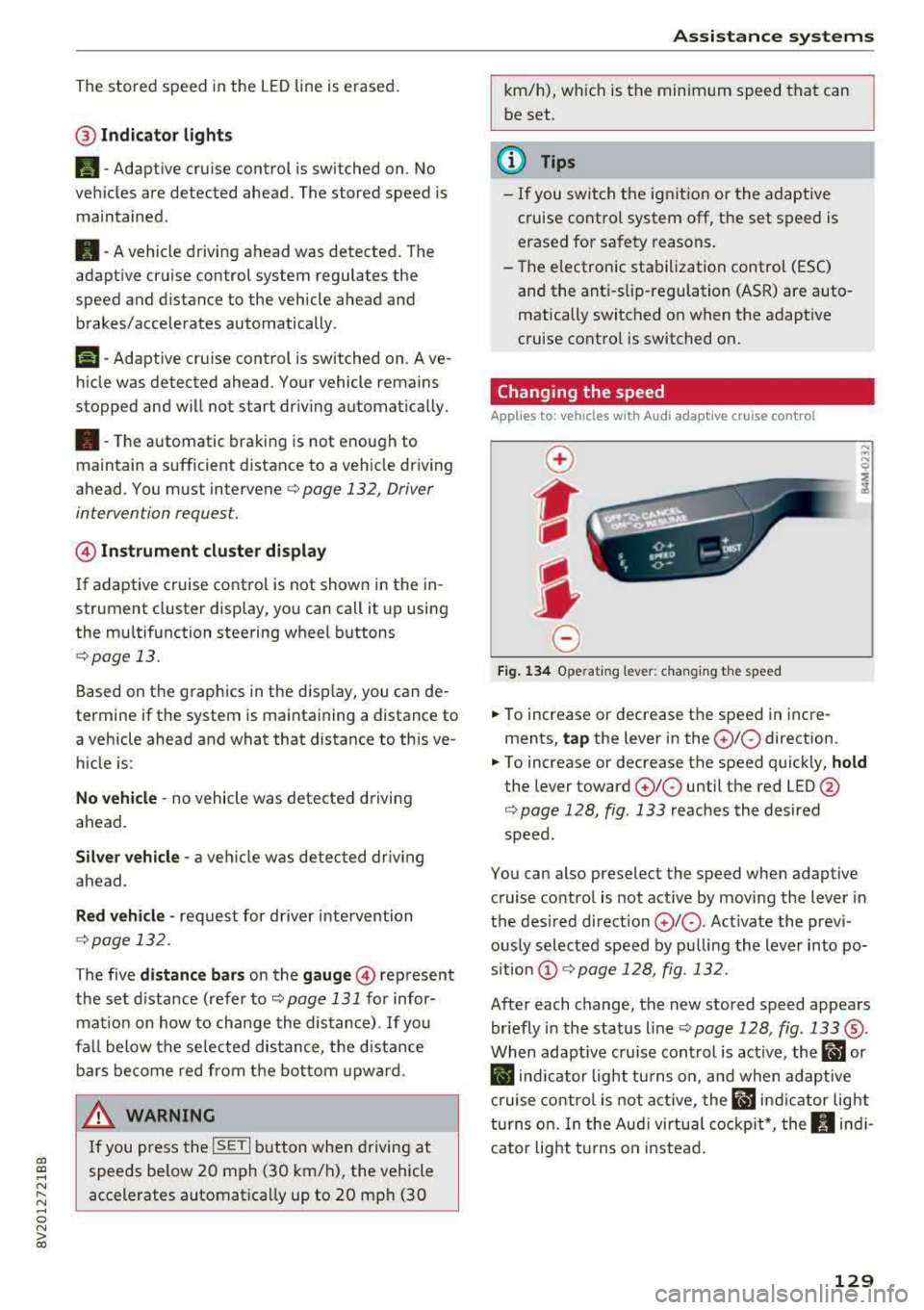
@ Indicator lights
It -Adaptive cruise control is switched on. No
vehicles are detected ahead. The stored speed is
maintained .
B-A vehicle driving ahead was detected. The
adaptive cruise control system regulates the
speed and distance to the vehicle ahead and
brakes/accelerates automatically.
r51 -Adaptive cruise control is switched on. Ave
hicle was detected ahead. Your vehicle remains
stopped and will not start driv ing automat ically.
•-The automatic braking is not enough to
maintain a sufficient distance to a veh icle driving
ahead. You must intervene
c::> page 132, Driver
intervention request.
@ Instrument cluster display
I f adaptive cruise control is not shown in the in
strument cluster display, yo u can call it up using
the mu ltifunction steering wheel buttons
c::> page 13.
Based on the g raphics in the disp lay, you can de
termine if the system is maintaining a distance to
a vehicle ahead and what that distance to th is ve
hicle is:
No vehicle -no vehicle was detected driving
ahead.
Silver vehicle -a veh icle was detec ted dr iv in g
ahead .
Red vehicle -request for driver intervention
<=:>page 132 .
The five distance bars on the gauge © represent
the set d istance (refer to
c::> page 131 for infor
mat ion on how to change the distance) .
If you
fal l below the selected distance, the distance
bars become red from the bottom upward.
A WARNING
If you press the !SETI button when driving at
speeds below 20 mph (30 km/h), the vehicle
accelerates automatically up to 20 mph (30
Assistance systems
km/h), which is the minimum speed that can
be set.
(D Tips
-If you switch the ignition or the adaptive
cruise control system off, the set speed is
erased for safety reasons .
-The e lectronic stabilization control (ESC)
and the anti-slip -regulation (ASR) are auto
matically switched on when the adaptive
cruise control is switched on.
Changing the speed
Applies to: vehicles with Audi adaptive cruise control
0
f
J
0
Fig. 134 Operat ing lever: changing the speed
.. To increase or decrease the speed in incre
ments,
tap the lever in the 0 10 direction .
.. To increase or decrease the speed quickly, hold
the lever toward 010 until the red LED @
c::> page 128, fig. 133 reaches the desired
speed.
You can also preselect the speed when adaptive cruise control is not active by moving the lever in
the desired direction
0 10 . Act ivate the previ
ously selected speed by pulling the lever into po
s ition
@ c::> page 128, fig . 132.
After each change, the new stored speed appears
briefly in the status line
c::> page 128, fig. 133 ®·
When adaptive cru ise control is active, the ill or
• indicator light turns on, and when adaptive
cruise control is not active, the
ill ind icator light
turns on. In the Audi virtual cockpit*, the
II indi
cator light t urns on instead.
129
Page 132 of 400
Assistance systems
Driving in stop-and-go traffic
Applies to: vehicles with Audi adaptive cruise contro l
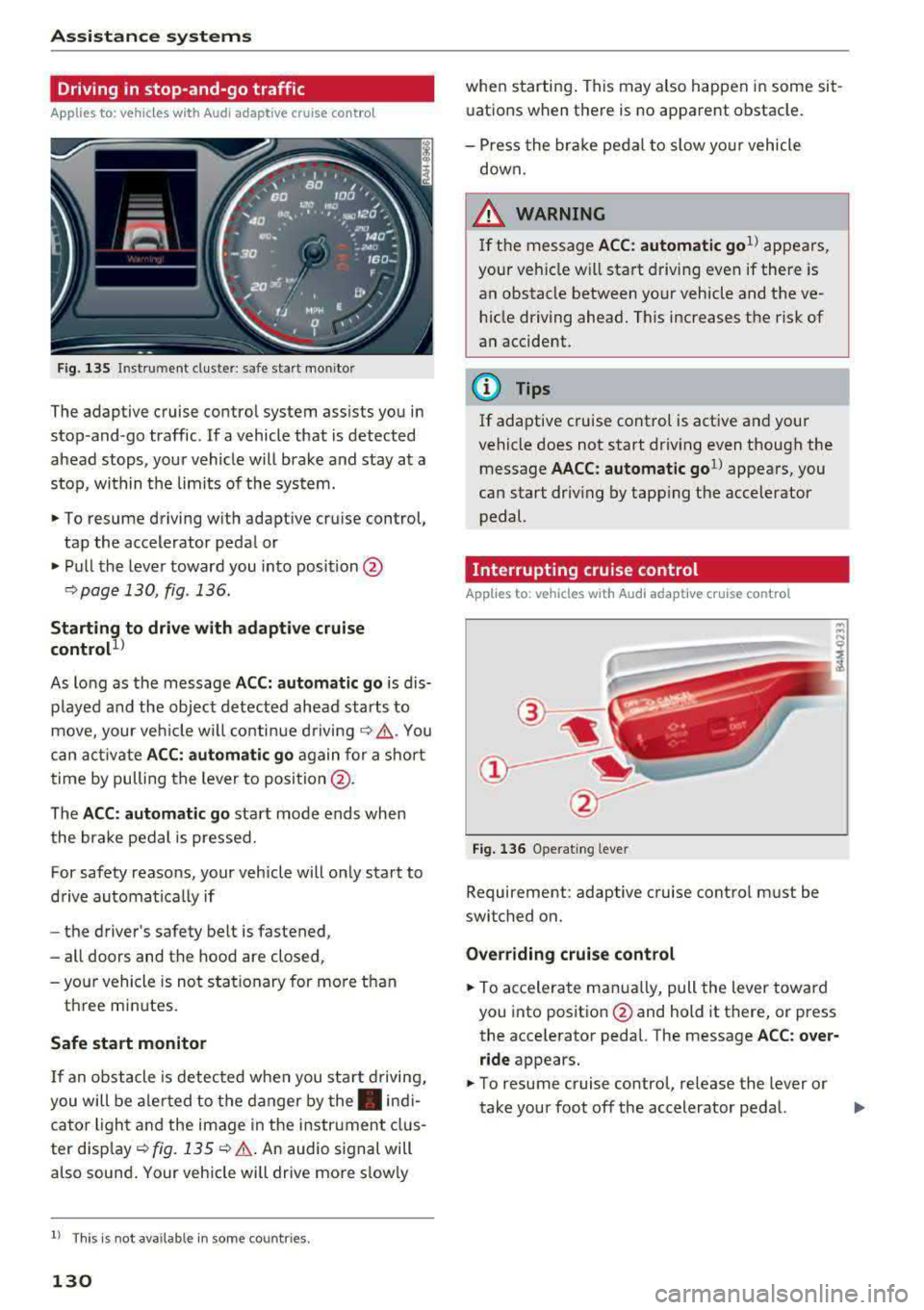
Fig. 135 In str um ent cluster : sa fe sta rt mo nitor
The adaptive cruise control system assists you in
stop -and -go traffic . If a vehicle that is detected
ahead stops, your vehicle will brake and stay at a
stop , within the limits of the system.
.,. To resume driving with adaptive cruise control,
tap the accelerator pedal or
... Pull the lever toward you into position @
9 page 130, fig. 136.
Starting to drive with adaptive cruise
control
1 )
As lo ng as the message ACC: automatic go is dis
p layed and the object detected ahead starts to
move, your veh icle will continue driving
9 ,1.. You
can activate
ACC: automatic go again for a short
time by pulling the lever to position @.
The
ACC : automatic go sta rt mode ends when
the brake pedal is pressed.
For safety reasons, your vehicle will only start to
drive automatical ly if
- the driver's safety belt is fastened ,
- all doors and the hood are closed ,
-your vehicle is not stationary for more than
three minutes.
Safe start monitor
If an obstacle is detected when you sta rt driving,
you will be alerted to the danger by
the. indi
cator light and the image in the instrument clus
ter disp lay
9 fig. 135 9 &. . An audio signal will
also sound . Your vehicle will drive more s low ly
l) Thi s is not a vailable in som e coun trie s.
130
when starting . This may also happen in some sit
uations when there is no apparent obstacle.
- Press the brake pedal to slow yo ur vehicle
down.
&_ WARNING
If the message ACC : automatic go 1
l appears,
your vehicle w ill start driving even if there is
an obstacle between your vehicle and the ve
hicle driving ahead. This increases the risk of
an accident.
(D Tips
If adaptive cruise control is active and your
vehicle does not start driving even though the
message
AACC: automatic go1l appears, you
can start driving by tapp ing the accelerator
pedal.
Interrupting cruise control
Applies to: vehicles with Audi adaptive cruise control
Fig. 136 Operating leve r
Requirement: adaptive cruise control must be
switched on.
Overriding cruise control
... To accelerate manua lly, pull the lever toward
you into posit ion @ and hold it there, or press
the accelerator pedal. The message
ACC: over
ride
appears.
.,. To resume cruise control, release the lever or
take your foot off the accelerator pedal.
.,.
Page 133 of 400
a, a, ..... N
" N ..... 0 N > 00
Inte rr upting crui se control while driving
• Move the lever into posit ion @. The message
AC C: standb y appears. Or
• press the brake pedal.
• To resume the stored speed, move the lever in
to position
@ .
In te rrupting crui se contr ol when stopped
• Push the lever away from you into position @.
The message
A CC: sta ndb y appears.
• To resume cruise control, press the brake pedal
and pull the lever toward you into position @.
A WARNING
It is dangerous to activate cruise control and
resume the stored speed when the current
road, traffic or weather conditions do not per
m it this . This inc reases the risk of an acc ident.
Setting the distance
Applies to: vehicles with Audi adaptive cruise contro l
,
0
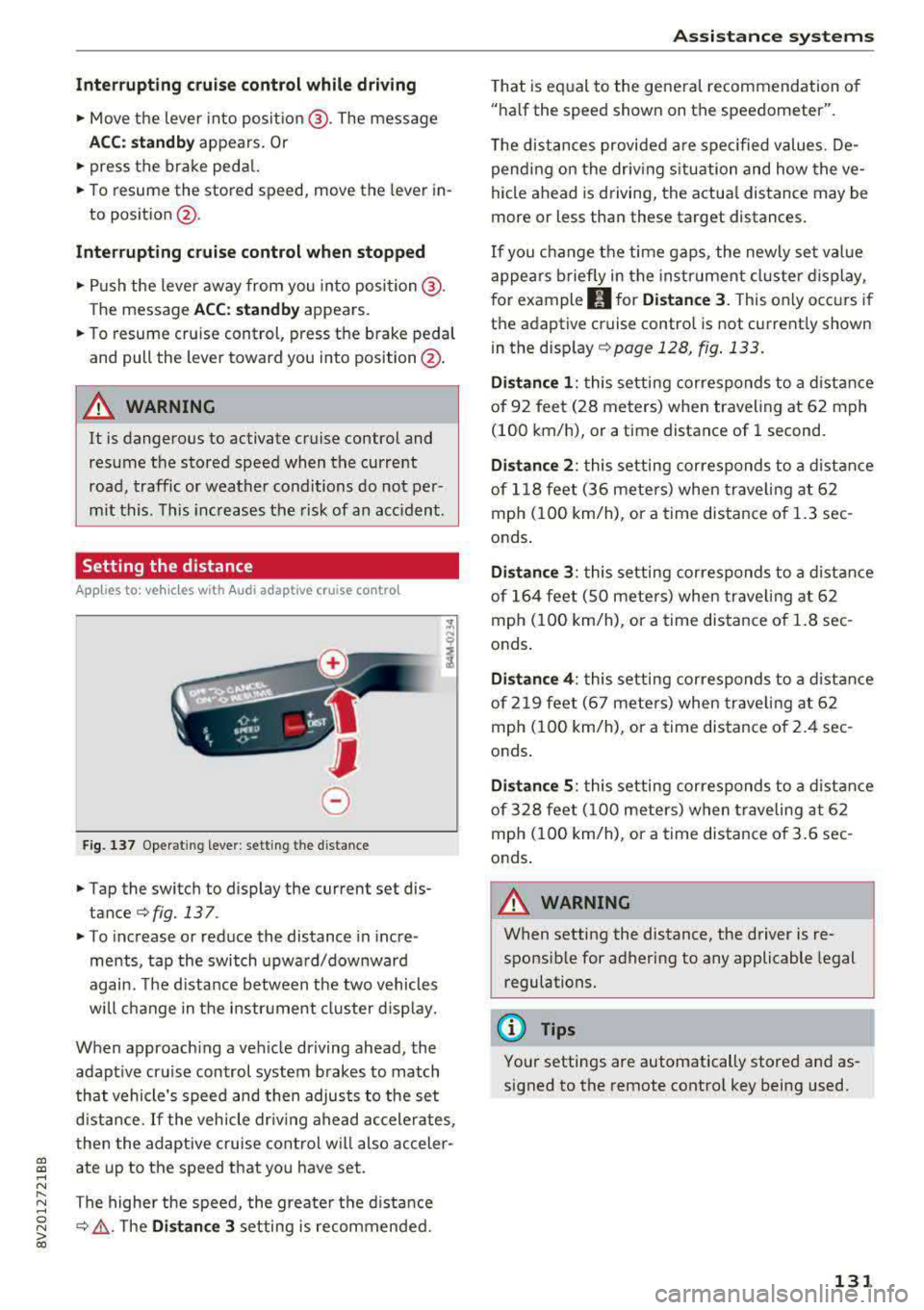
Fig. 137 Operat ing lever : setting the d istance
• Tap the switch to display the current set dis
tance
¢fig. 137 .
• To increase or reduce the distance in incre
ments, tap the switch upward/downward
again. The d istance between the two vehicles
wi ll change in the instr ument cluster d isp lay.
When approach ing a vehicle driving ahead, the
adapt ive cruise control system brakes to match
that vehicle's speed and then adjusts to the set
d istance.
If the vehicle dr iv ing ahead ac celerates,
then the adaptive cruise control wi ll also acceler
ate up to the speed that you have set.
The higher the speed, the greate r the d ista nce
¢ &, .T he Di stan ce 3 setting is recommended.
A ss is ta nce syst ems
That is equal to the general recommendation of
"ha lf the speed shown on the speedometer".
T he distances provided a re specified values. De
pend ing on the driv ing s ituation and how the ve
hicle ahead is d riving, the actua l distance may be
more or less than these target distances.
If you change the time gaps, the newly set value
appea rs briefly in the instrument cl uster d isplay,
f or example
II for Di stan ce 3 . This only occurs if
the adaptive cruise contro l is not current ly shown
i n the display ¢
page 128, fig. 133.
Dista nce 1 : this setting corresponds to a distance
of 92 feet (28 meters) when traveling at 62 mph
(100 km/h), or a time distance of 1 second.
Di stance 2 : this setting corresponds to a dist ance
of 118 feet (36 mete rs) when traveling at 62
mph (100 km/h), or a time distance of 1.3 sec
onds .
Distance 3: this setting corresponds to a distance
of 164 feet (SO mete rs) when traveling at 62
mph (100 km/h), or a time distance of 1.8 sec
onds .
Distance 4 : this setting corresponds to a dist ance
of 219 feet (67 mete rs) when traveling at 62
mph (100 km/h), or a time distance of 2.4 sec
onds .
Distance 5 : this setting corresponds to a distance
of 328 feet (100 meters) when traveling at 62
mph (100 km/h), or a time distance of 3.6 sec
onds .
A WARNING
-
When setting the distance, the driver is re -
sponsible for adhering to any applicable legal
regulations.
(D Tips
Your settings are automatically stored and as
signed to the remote control key being used.
131
Page 137 of 400
CXl CXl .... N r--N .... 0 N > 00
Ea rl y warning /a cut e warning
The system can prov ide v is u al and aud ible warn
ings when dangerous situations are detected.
The
earl y wa rning may occur if:
- a vehicle d riving ahead brakes strongly,
- your vehicle is traveling at speeds between ap-
prox imately 20 to 50 mph (30 to 85 km/h) and
it approaches a stationary veh icle.
- your vehicle is trave ling at speeds between ap
prox imately 20 to 155 mph (30 to 250 km/h)
and it approaches a vehicle that is clearly t rav
eling more slowly o r a veh icle in your direction
of travel that is stopped.
When t his warning occurs, it may on ly be poss i
b le to avoid a collision by swerv ing or b raking
strong ly. The message
Aud i pre sens e.
¢ fig . 140 and a warning tone will warn you
about the danger .
If there is an impending collision with vehicles,
there will a lso be an
acute warning in the form of
sharp braking. If you do not react to the acute
warn ing, pre sense front can brake with increas
ing force within the limits of the system. This re
duces the vehicle speed in the event of a coll i
sion.
Automatic d ecel erati on
Depending on the speed , pre sense front can de
c elerate automat ically
shortly before a collision:
- i f there are s tat ionary vehicles whe n you are
traveling at speeds up to approximately 28 mph (45 km/h).
- if there are vehicles driving or stopped ahead
when you are traveling at speeds up to approxi
mately 155 mph (250 km/h) .
Automatic braking force inc rease
I f pre sense front determines that you are no t
b raking st rongly enough when a collision is imm i
nent, it can increase the b raking force, depending
on the situation and speed.
- i f there are stationary vehicles whe n you are
t raveling at speeds up to approximately 50
mph (85 km/h) .
A ss ista nce sys te m s
- if there are vehicles d riving or stopped ahead
when you are traveling at speeds up to approxi mate ly 155 mph (250 km/h).
A WARNING "--
Pre sense front cannot overcome the laws of
physics. It is a system designed to ass ist and
i t cannot prevent a collision in every c ircum
stance. The driver must always intervene. The
d river is always respons ible for braking at the
cor rect time. Do not let the increased safety
p rovided tempt you into ta king risks. This
could increase your risk of a collis ion .
- Keep in mind th at pre sense front can pro
vide warn ings or b rake unexpected ly. Al
ways secure any cargo or objects that yo u
are transporting to reduce the risk of dam
age or injury.
- The system can dep loy incorrectly due to
system-specific limits.
- Please note that the sensor does not a lways
detect a ll objects . T hi s increases the risk of
a co llision.
- Pre sense front does not react to vehicles traveling toward you in the same lane, to peop le, groups of people, anima ls, objects
that are crossing the road, or objects that are difficult to
detect¢ &. in General infor
mation on page 12
7.
A WARNING
"---
Pre sense front may be restricted or not avail
able i n the follow ing example s ituations:
- if there a re other ref lective objects nearby,
such as guard ra ils or vehicles.
- when dr iv ing into a tunnel.
- in heavy fog, ra in, spray or snow.
- if the radar sensor is di rty, covered in ice,
damaged, or covered .
- in curves .
- if the ESC was restri cted or sw itched off.
(£) Note
The sensor can be displaced by impacts or
damage to the bumper, wheel housing and u nderbody. Pre sense front ca n be impaired
135
Page 141 of 400
a, a, ... N
" N ..... 0 N > 00
This message appears if you are not steering by
yourself . Active lane assist is activated, but is not
ready to give warning
Setting the vibration warning
Ap plies to: ve hicles with Audi active lane assist
You con adjust individual Audi active lone assist
settings in the Infotainment system .
.,. Select in the Infotainment system: !MENUI but
ton
> Vehicle > left control button > Driver a s
sistance > Audi active lane assist.
Vibration warning
You can switch the additional vibration warning
in the steering wheel on or off.
_& WARNING ,..__
With the vibration warning switched off,
there will also be no visual warning in the in
strument cluster display when crossing a lane
marker line.
(D Tips
Your settings are automatically sto red and as
signed to the remote contro l key being used.
Audi side assist
Description
Applies to: vehicles with Audi side assist
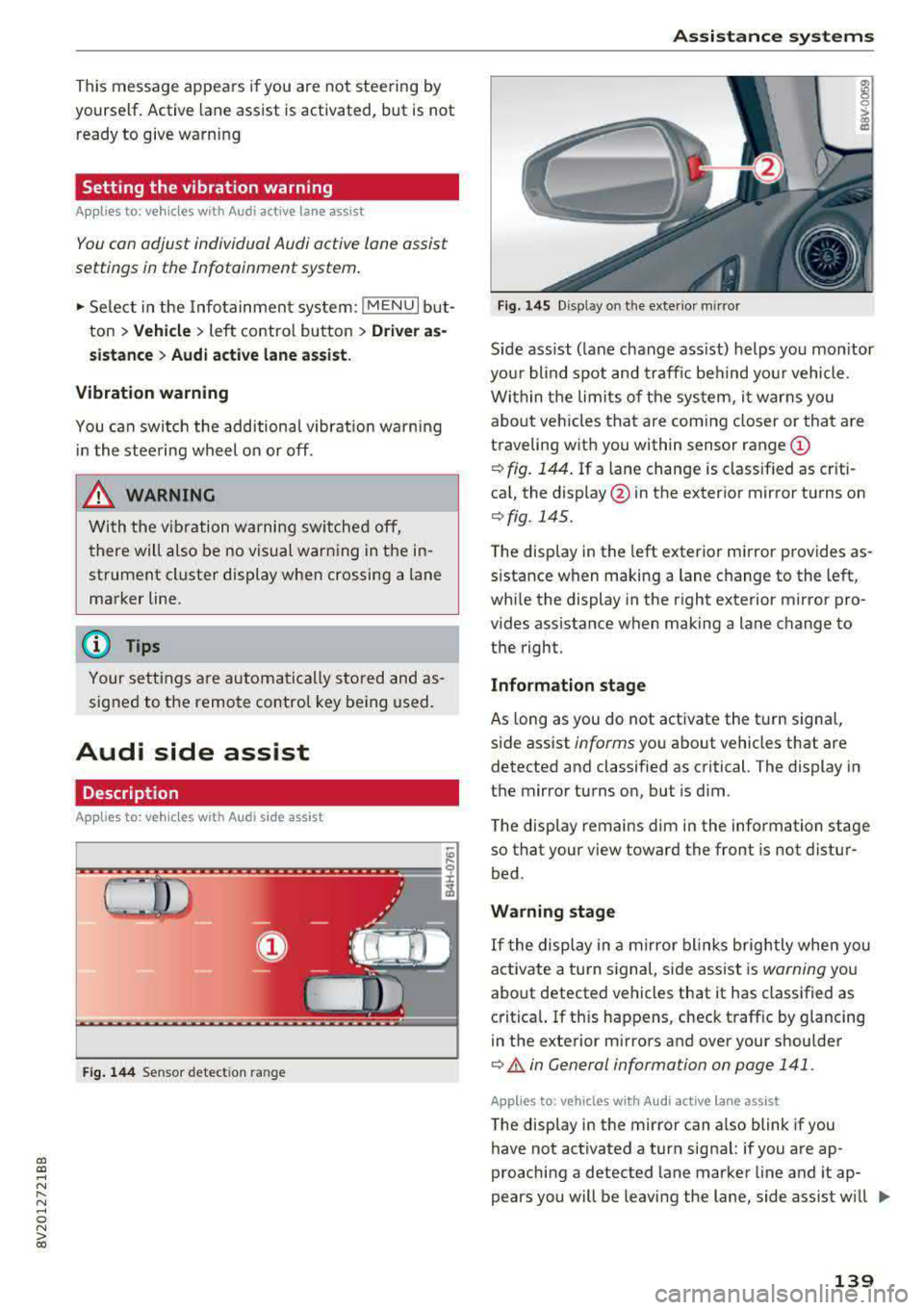
Fig. 144 Sensor detect ion ran ge
Assistance systems
Fig. 145 Disp lay on t he exterio r m irr or
ffl 0 0
> (X)
"'
Sid e assist (lane change ass ist) helps you mon itor
your blind spot and traffic behind yo ur vehicle .
Within the limits of the system, it warns you
about vehicles that are com ing closer or that are
traveling with you within sensor range
(D
¢ fig. 144. If a lane change is classified as criti
cal, the display @in the exterior mirror turns on
¢ fig . 145.
The display in the left exterior mirror provides as
s istance when making a lane change to the left,
while the display in the right exterio r mir ror pro
vides assistan ce when making a lane change to
the righ t.
Information stage
As long as you do not activate the tu rn signal,
side assist
informs yo u about vehicles that are
detected and classified as critical. The display in
the mirror turns on, but is dim .
The display remains dim in the information stage
so that your view toward the front is not distur
bed.
Warning stage
If the display in a mirror blinks brightly when you
activate a turn signal, side assist is
warning you
about detected vehicles that it has classified as
critical. If this happens, check traff ic by glancing
in the exterior m irrors and over your shoulder
¢ & in General information on page 141 .
Applies to: vehicles with Audi act ive lane ass ist
The display in the mirror can also blink if you
have not activated a turn signal: if you are ap
proaching a detected lane marker line and it ap
pears you will be leaving the lane, side assist w ill
liJl,,
139
Page 142 of 400
Assistance systems
warn you about detected vehicles that it has clas
sified as critical.
@ Tips
You can adjust the brightness on of the dis
play on the rearview mirror¢
page 141.
General information
App lies to: ve hicles w ith Audi side assist
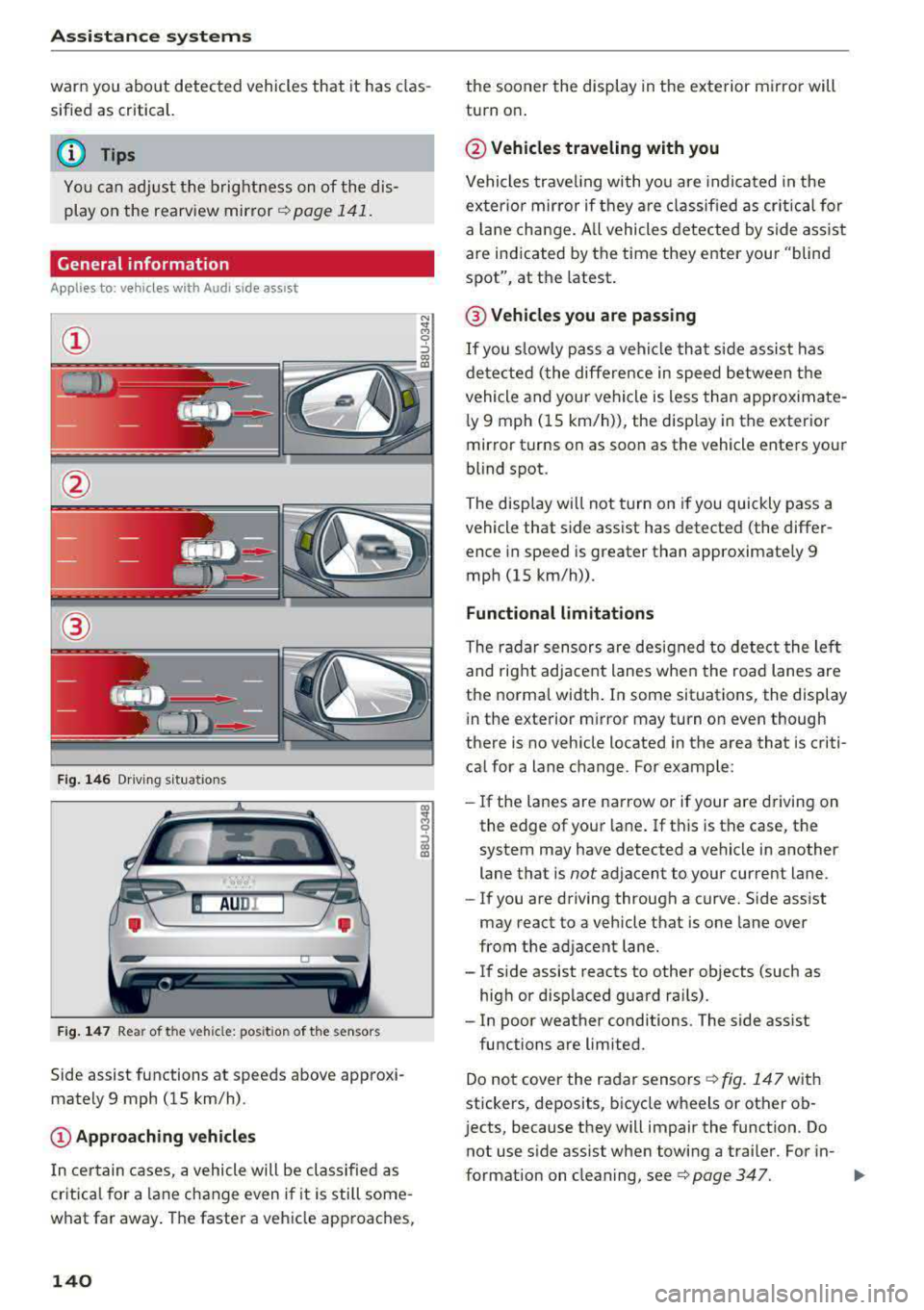
@
Fig. 146 Driving s it u ations
Fig. 147 Rear of the veh icle: pos it ion of the sensors
Side assist functions at speeds above approxi
mately 9 mph (15 km/h) .
@Approaching vehicles
In certain cases, a vehicle will be classified as
critical for a lane change even i f it is still some
what far away. The faster a vehicle approaches,
140
the sooner the display in the exterior mirror will
turn on .
@Vehicles traveling with you
Vehicles traveling with you are indicated in the
exter ior mirror if they are classified as critical for
a lan e change . All vehicles detected by side assist
are indicated by the time they enter your "blind
spot", at the latest .
@ Vehicles you are passing
If you slow ly pass a vehi cle that side assist has
detected (the differe nce in speed between the
vehicle and your vehicle is less than approximate
l y 9 mph (15 km/h)), the disp lay in the exterior
mirror turns on as soon as the vehicle enters your
blind spot.
The display wi ll not turn on if you quickly pass a
vehicle that side assist has detected (the differ ence in speed is greater than approximate ly 9
mph (15 km/h)) .
Functional limitations
The radar sensors are designed to detect the lef t
and right adjacent lanes when the road lanes are
the normal width . In some situations, the display
in the exterior m irror may turn on even though
there is no vehicle located in the area that is criti
ca l for a lane change. For example:
- If the lanes are narrow or if your
are dr ivin g on
the edge of your lane. If this is the case, the
system may have detected a vehicle in another
lane that is
not adjacent to your cur rent lane.
- If you are driving through a curve. Side ass ist
may react to a vehicle that is one lane over
from the adjacent lane.
- If side assist reacts to other objects (such as
high or displaced guard ra ils).
- In poor weather conditions. The side ass ist
functions are limited.
Do not cover the radar
sensors ¢ fig. 147 with
stickers, deposits, bicycle wheels or other ob
j ects, because they will impair the function. Do
not use s ide assist when towing a trai ler. For in-
format ion on cleaning,
see ¢ page 347. .,..
Page 145 of 400
@ Tips
-You can cance l the automatic brake activa
tion w ith increasing bra king fo rce if you ap
ply the brakes y ourse lf or accelerate cons id
erab ly.
- In some sit uations, rea r cross-traffic assist
may warn yo u even if there is no cross traffic
i n a cr itical a rea , for examp le w hen back ing
i nto a parki ng space or ma neuver ing.
- The rea r cross-traffic ass ist also switches off
whe n you switch off the ESC.
- The rea r cross traffic assist switches on and
off thro ugh the pa rking aid
qpage 146.
- The system is not available when towin g a
trailer.
Messages
A ppl ies to: ve hicles with Audi side assist
If t he side assist switches off automatically, a
message appea rs in the ins trumen t clus ter dis
pl ay.
@j Aud i side assist: System fault!
The system can not guarantee that it wi ll detect
ve hicles co rrectly and it has switched off. The
sensors have been moved o r are faulty. Have t he
system checked by an authorized Audi dea ler or
author ized Audi Service Facility soon .
@j Audi side assist: currently unavailable. No
sensor vision
@j Audi side assist: currently unavailable. Sen
sor vision restricted due to surroundings . See
owner 's manual
The radar senso r vis io n i s im paire d. Do not cove r
the area i n front of t he senso rs with bike wheels,
stickers, dirt o r othe r objects. C lean the area in
fron t of t he senso rs, if necessary
q page 140,
fig. 147.
@j Audi side assist: currently unavailable
S ide assis t cann ot be swi tched o n at thi s time be
c a use t here is a mal func tion (fo r ex amp le, the
~ ba ttery ch arge level may be too low) .
....
~ @j Audi side assist: unavailable in towing mode
....
~ @j Audi side assist: unavailable in towing mode
00
Assistance systems
Sid e ass ist swi tches off automatically a fter a
s h ort time when a factory -insta lled tra ile r h itch
i s connected to the e lectrica l connecto r on the
t railer . T here is no gua rantee the system will
switch off when using a retrofitted trailer h itch.
Do not use side assist when tow ing a trailer .
Ill Rear parking aid : obstacle detection restrict
ed
T he rea r cross -tra ffic ass is t is not available. Ei
t h er th e ESC is sw itched off, or the rada r senso rs
may be cove red by a bike rack, st icke rs, leaves,
snow o r other objects. Switch the ESC on, or
clean the area in front of the senso rs if necessa ry
q page 140, fig . 147. If t his message continues
to be displayed , dr ive immed ia tely to a n author
iz ed Audi dea ler or author ized Audi S ervic e Facili
ty to ha ve the m alfunc tion re paire d.
Audi drive select
Introduction
Applies to : vehicles wit h Audi drive se lec t
Audi dr ive select makes it poss ible to experience
diffe rent types of vehicle settings in one vehicle.
T he dr iver can select from three modes,
Comfort ,
Auto
and Dynamic , using t he r:;~, bu tton in the
c en te r c onsole o r by usin g the Info ta in m ent sys
te m. T hi s a llow s yo u t o swi tch between a sporty
and a com fo rt ab le driv ing mode, fo r ex am ple. In
t h e
Individual* mode , the settin gs ca n be adjus t
ed to yo ur persona l preferences . T his makes it
p oss ible to com bine settings such as a spo rty en
gine setting with light steer ing.
Description
App lies to : vehicles wi th Audi drive se lect
The veh icle set up i n eac h mode depends on the
vehicle's features. However, the eng ine a nd
stee ring are always affec ted .
Engine and automatic transmission
Depend ing on the mode, the engine an d auto
matic transm ission* respond more q uickly o r in a
more ba la nced manner to acce lerato r pedal
movements . In the sporty dynam ic mode, th e
t ransm iss io n shifts at higher spe ed ranges .
..,.
143
Page 151 of 400
a, a, ..... N
" N ..... 0 N > 00
-Only use the rearview camera to assist you if
it shows a good, clear p icture. For examp le,
the image may be affected by the sun sh in
ing into the lens, dirt on the lens, or if there
is a malfunction.
- Use the rearview camera only if the luggage
compartment lid is completely closed . If the
luggage compartment l id is open the orien
tation lines and blue su rfaces are hidden .
Make su re any objects you may have mount
ed on the luggage compar tme nt lid do not
block the rearview camera.
- T he came ra lens enlarges and distorts the
field of v is ion. The object appea rs both al
tered and inaccurate on the screen.
- In cert ain situations, people or objec ts in
the display appear closer or farther away:
- For objects that do not touch the ground,
such as the bumper of a parked vehicle, a
tra iler hitch or the rear of a truck . Do not
use the orientation lines in this case.
- If driven from a level surface onto an in
cline , or a downward slope.
- If driven toward protrud ing objects .
- If the veh icle is carry ing too much load in
the rear.
(D Note
- Always read and follow the applicable warn
i ngs
<* 0 in General information on
page 146 .
-The orange-colored orientatio n lines in the
Infotainment display show the veh icle path
based on the steering wheel angle. The
front of the vehicle swings out more than
the rear of the veh icle. Ma inta in p lenty of
distance so that an exterio r mirror or a cor
ner of the veh icle does not co llide with any
obstacles.
Switching on /off
Appl ies to: ve hicles with rearv iew camera
Switching on
• S hift into reverse , or
• Press the P' 1! bu tton in the center console
~ page 147 , fig. 152 . A short confirmat ion
Parking systems
tone sounds and the LED in the button turns
on.
Switching off
• Dr ive faste r th an 6 mp h (10 km/h), o r
• Press the p, q! button, or
• Switch t he ignit ion off .
(0 Tips
- The visu al display in the righ t part of the
display sho uld help you de te ct the c riti cal
vehicle area .
- Yo u can ch ange the vol ume o f the signa ls
and the display ¢
page 150.
Perpendicular par king
Applies to: veh icles w ith rearv iew camera
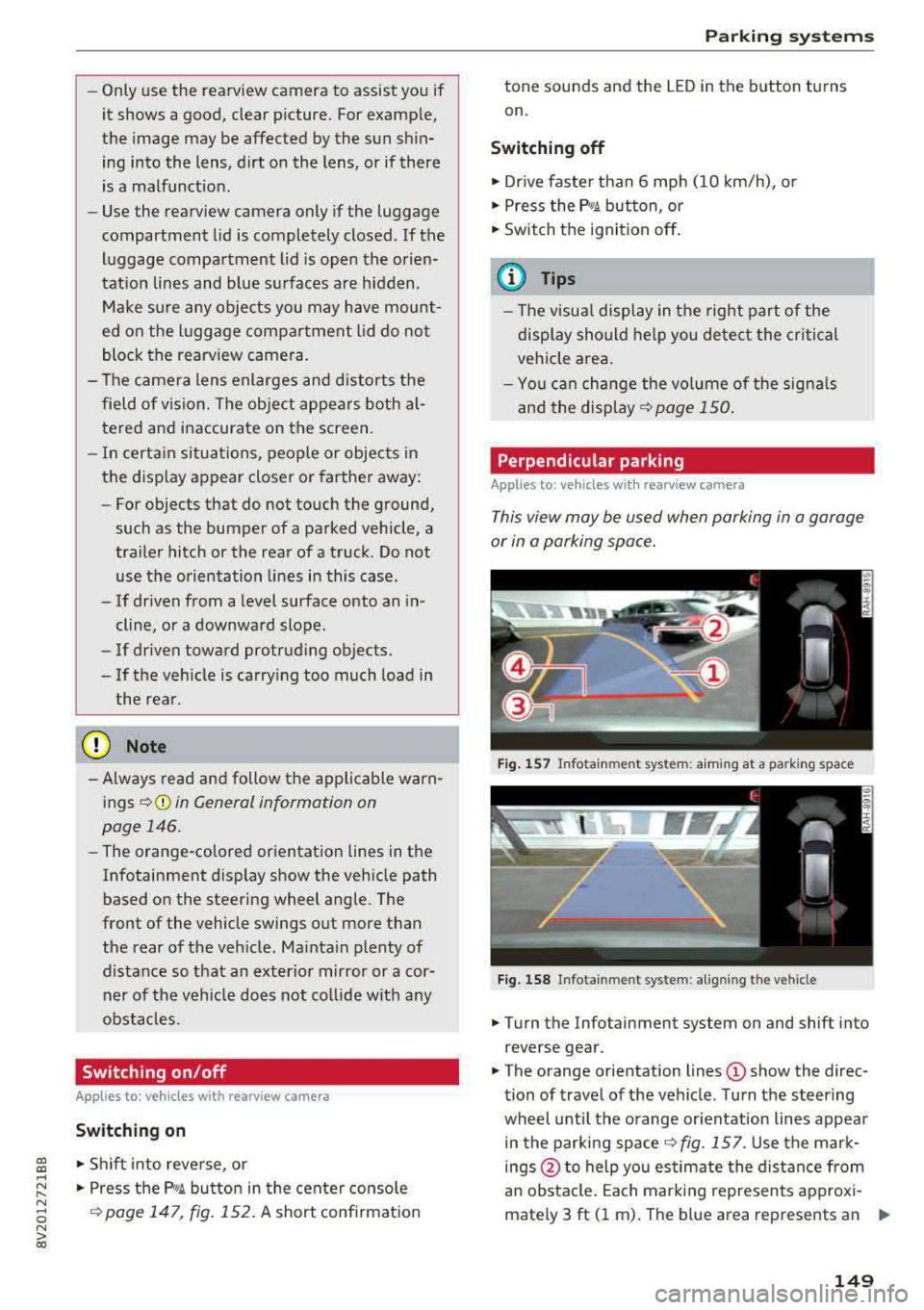
This view may be used when parking in a garage
or in a parking space.
Fi g. 157 In fota inme nt sys tem: a im ing at a par king space
Fig . 1 58 In fotai nment syste m: alig ning t he vehicl e
.. Turn the Infotainment system on and shift into
reverse gear .
• The orange orientation lines (D show the direc
tion of travel of the vehicle . Turn the steering
wheel unti l the orange or ientation lines appea r
in the parking
space ~ fig. 157. Use the mar k
ings @to help you es timate the distance from
an obsta cle. Each marking represents approxi
mately 3 ft (1 m) . The b lue area represents an
.,..
149
Page 160 of 400
Multi Media Interface
Multi Media Interface
Traffic safety information
Aud i recommends performing certa in Infotain
ment system functions, such as entering a desti
nation, only when the vehicle is stationary . Al
ways be p repared to stop opera ting the Info tain
ment system i n the interest of your safety and
t he safe ty of other road users.
_& WARNING
Only use the In fotain ment sys tem w hen tra f
fic con ditions permit and always in a way that
allows you to ma inta in complete control ove r
your vehicle.
@ Tips
Cer tain functi ons are no t avail ab le wh ile driv
ing .
Introduction
The Multi Media Interface , or MMI for short,
combines various
systems for communication ,
navigation* and entertainment in your Audi . You
can operate the MMI using the MMI control pan
el, the multifunction steering wheel or the voice
recognition system* .
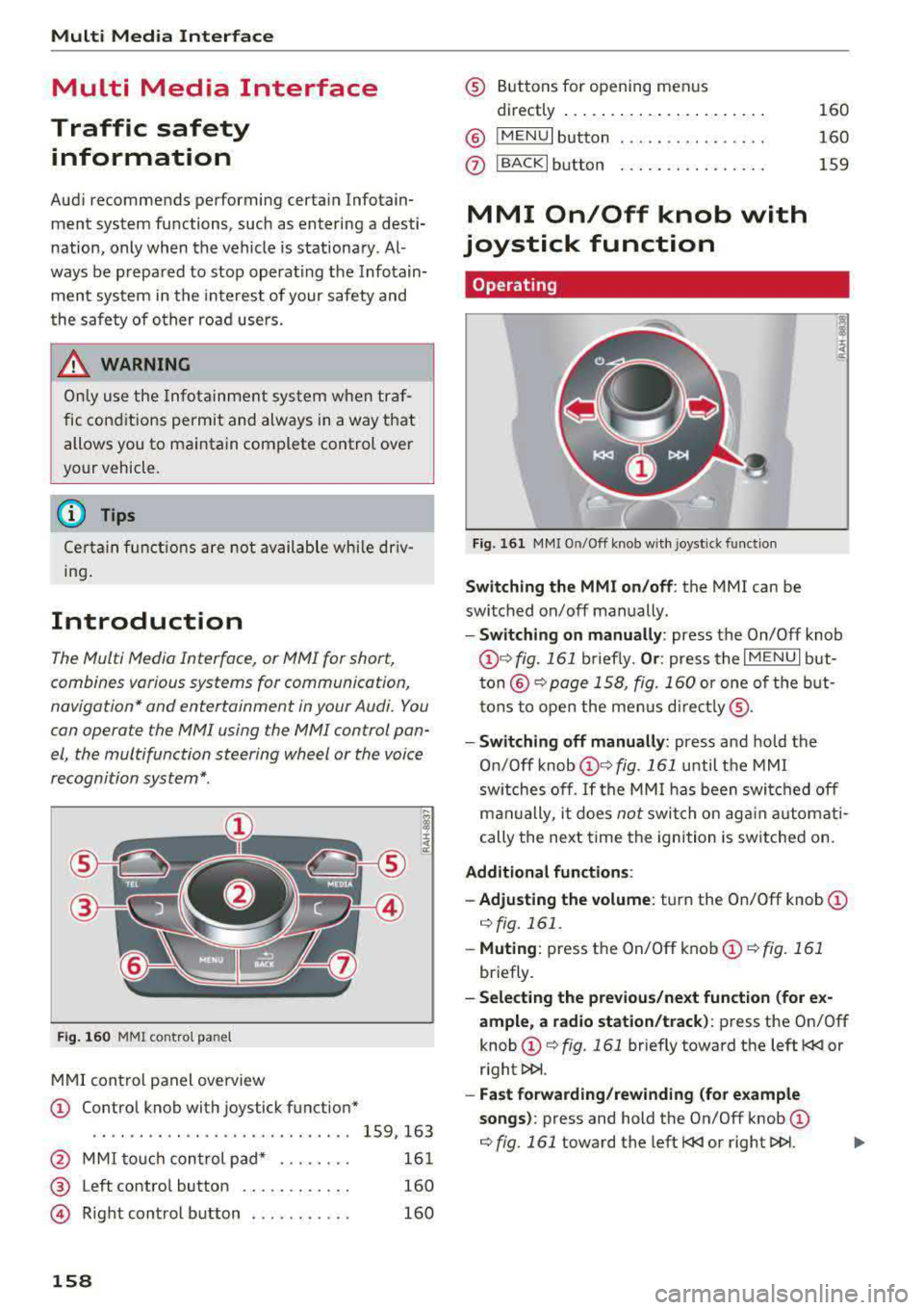
Fig. 16 0 MMI co ntro l panel
M MI cont rol panel overview
CD Contro l knob with joystick function"
. . . . . . . . . . . . . . . . . . . . . . . . . . . . 159, 163
@ MMI to uch con trol pad * . . . . . . . . 161
@ Left contro l button . . . . . . . . . . . . 160
@ R ight cont rol b utton . . . . . . . . . . . 160
158
® Buttons fo r opening men us
directly .... . .. .. .. .... .. .... .
@ IMENU I button
(J) I BACK I button . .. .. .... .. ... . .
MMI On/Off knob with
joystick function
Operating
Fig . 161 MM I On/Off k nob w ith joys tick f unctio n
Switching the MMI on /off : the MMI can be
swi tched on/off man ually. 160
160
159
- Switching on manually : press the On/Off knob
CD ¢ fig. 161 briefly. Or : press the I M ENU I but
ton @ ¢ page 1 58, fig. 160 or one of t he bu t
t ons to ope n the me nus d irectl y® ·
-Switch ing off manually : press and hold the
O n/Off knob
CD ¢ fig. 161 until t he M MI
sw itches off .
If the MM I has been swi tch ed off
m an ually, i t does
not swi tch on ag ai n au tomati
cally the ne xt time the ignition is sw itched on.
Additional function s:
- Adjusting the volume :
turn the On/Off knob CD
¢fig. 161 .
-Muting : press the On/Off knob CD¢ fig. 1 61
briefly.
- Selecting the previous/ne xt function (for ex
ample , a r adio station/t rack) :
press the On/Off
knob
CD ¢ fig. 161 briefly toward the left l
l>!>i .
-Fast forwarding /rewinding (fo r example
songs) :
press and hold the On/Off knob CD
¢ fig. 161 toward the left l