warning AUDI A3 SEDAN 2018 Owners Manual
[x] Cancel search | Manufacturer: AUDI, Model Year: 2018, Model line: A3 SEDAN, Model: AUDI A3 SEDAN 2018Pages: 404, PDF Size: 62.3 MB
Page 145 of 404
LL co .... N
" N .... 0 N > co
Parking aid
General information
Ap plies to: vehicles with pa rk in g system plus/rearview cam
era
Depending on your vehicle's equipment, various
parking aids will help you when parking and ma
neuvering.
The
parking system plus assists you when park
in g by aud ibly and visua lly indicating objects de
tected
in front of and behind the veh icle
¢ page 143.
The rearview camera shows the area beh ind the
veh icle in the Infotainment system d isplay. The
l ines in the rearview camera image help you to
park or
maneuver ¢ page 145.
& WARNING
-Always look for traffic and check the area
around your vehicle by looking at it directly
as well. The parking system cannot replace
the driver's attent ion. The driver is always
responsible when enter ing or leaving a park
ing space and during similar maneuvers.
-Please note that some surfaces, such as
clothing, are not detected by the system.
-Sensors and cameras have blind spots in
which people and objects cannot be detect
ed . Be especially cautious of small children
and animals.
- Always pay attention to the area around the
vehicle -using the rearview mirror, too .
-The sensors can be displaced by impacts or
damage to the radiator gr ille, bumper,
wheel housing and the underbody . The park
ing system may be impa ired as a result.
Have an authorized Audi dealer or author
ized Audi Serv ice Facility check their func
tion.
(D Note
-Some objects are not detected or displayed by the system under certain circumstances:
-objects such as barrier chains, trailer draw
bars, vert ical poles or fences
-objects above the sensors such as wall ex
tensions
Parking aid
-objects with certain s urfaces or structures
such as chain link fences or powder snow
-If you continue driving closer to a low ob
ject, it may disappear from the sensor
range . Note that you will no longer be
warned about th is obstacle.
-Keep enough distance from the curb to re
duce the risk of damage to th e rims.
(I} Tips
-The system may provide a warning even
though there are no obstacles in the cover
age area in some situations, such as:
-certa in road surfaces or when there is tall
grass
- external ultrasonic sources such as from clean ing vehicles
-in heavy rain, snow, or thick vehicle ex
haust
-We recommend that you practice parking in
a traff ic -free location or parking lot to be
come fam iliar with the system . When doing
this , there shou ld be good light and weath
er conditions .
-You can change the volume and pitch of the
signa ls as well as the display ¢
page 147.
-What appears in the infotainment display is
somewhat time-delayed .
-The sensors must be kept clean and free of
snow and ice for the parking aid to operate .
Parking system plus
Description
Applies to : vehicles wit h parking system plus
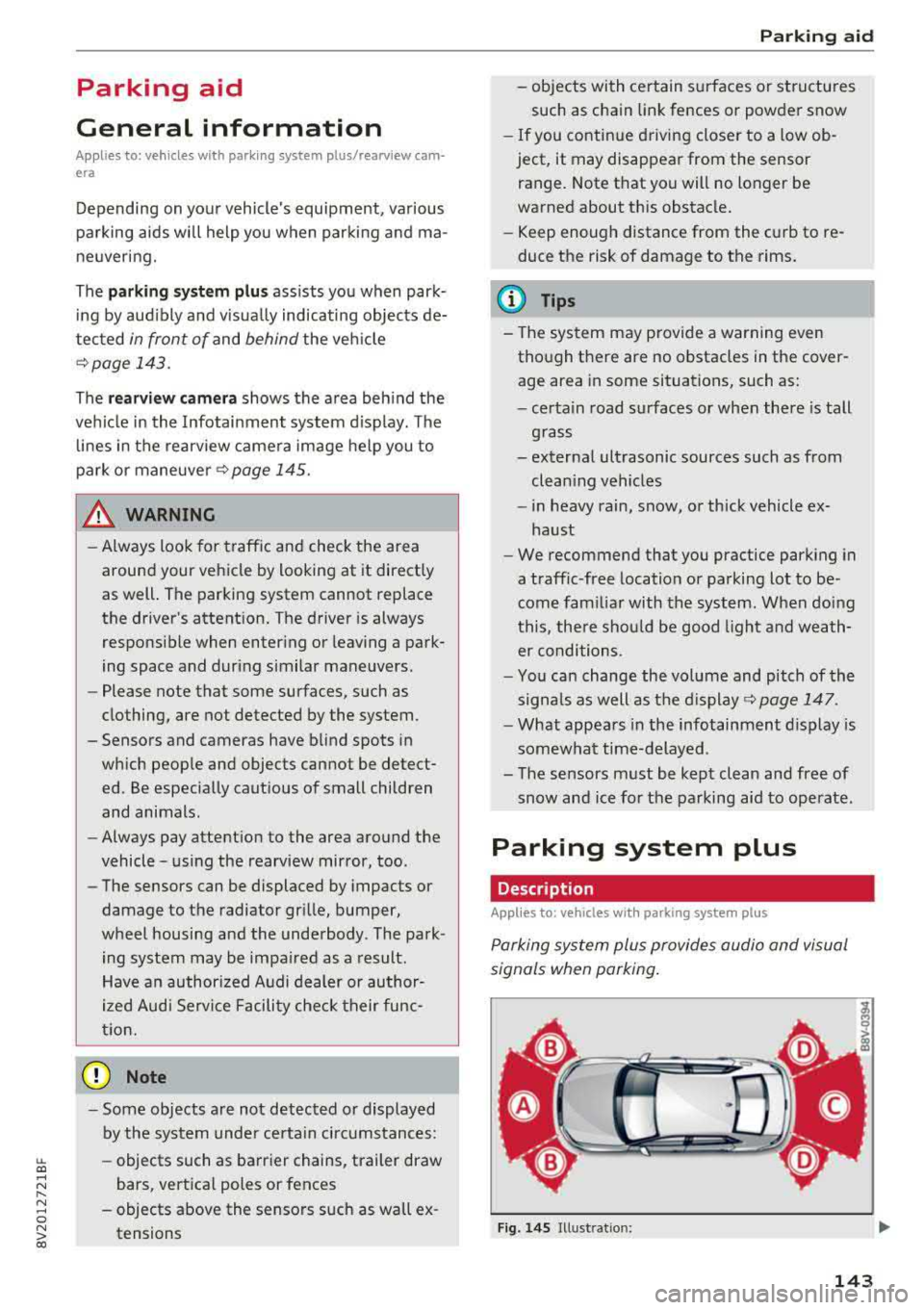
Parking system plus provides audio and visual
s ignals when parking .
Fig. 14S Illust ratio n:
143
Page 146 of 404
Parking aid
Sensors are located in the front and rear bump
ers . If these detect an obstacle, audible and visu
al signals warn you.
M ake sure the sensors are not covered by stick
ers, deposits or any other obstructions as it may
impair the function of the system. For informa
tion on cleaning, see
~ page 354.
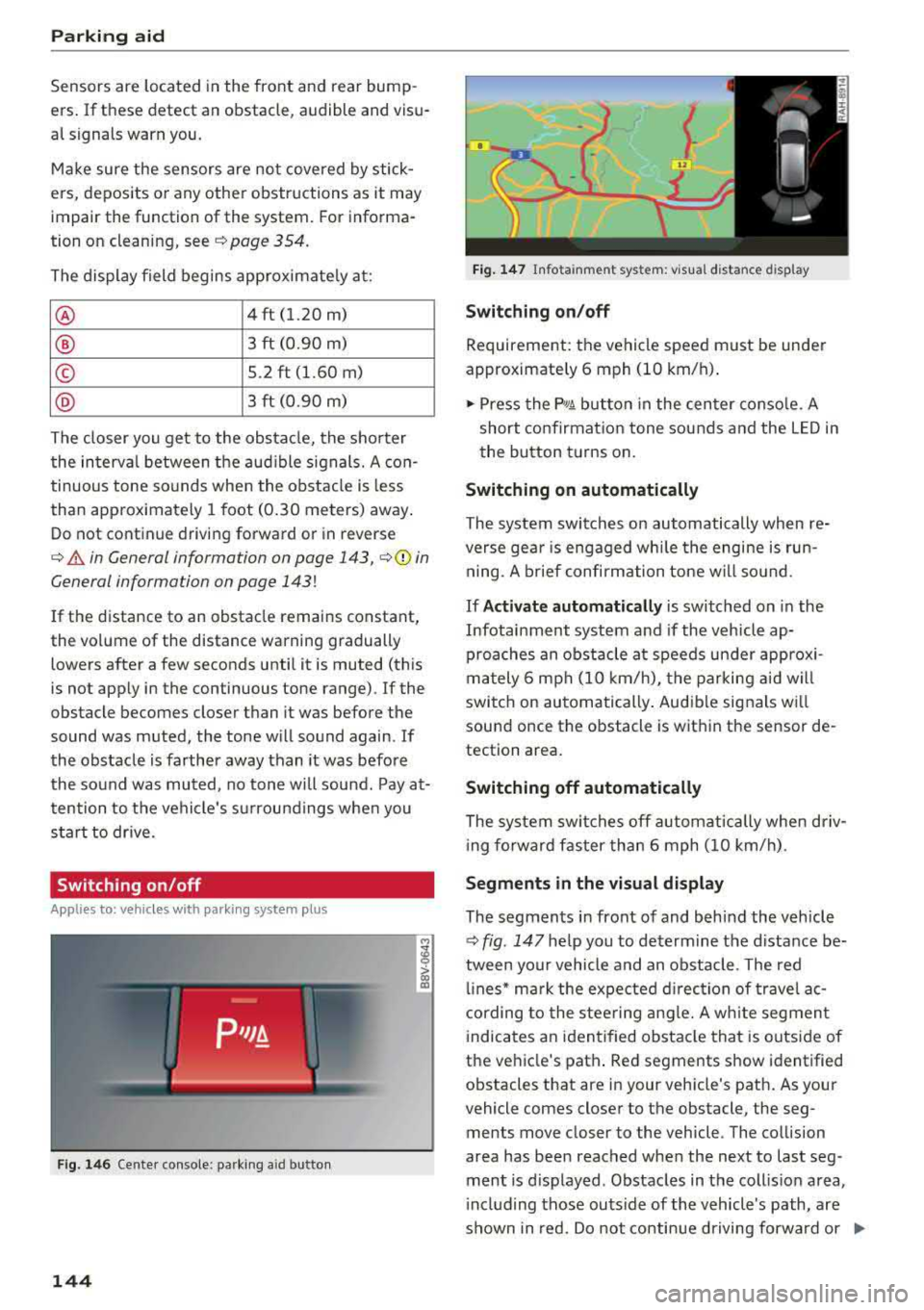
The display field begins approximate ly a t:
® 4 ft (1.20 m)
® 3 ft (0.90 m)
© S.2 ft (l.60 m)
@ 3 ft (0.90 m)
The closer you get to the obstacle, the shorter
the interva l between the audible signals. A con
tinuous tone sounds when the obstacle is less
than approximately 1 foot (0.30 meters) away .
Do not continue driving forward or in reverse
¢.&. in General information on page 143, ¢0 in
General information on page
143!
If the distance to an obstacle remains constant,
the vol ume of the distance warning gradually
lowers after a few seconds until it is muted (this
is not apply in the continuous tone range).
If the
obstacle becomes closer than it was before the
sound was muted, the tone w ill sound again. If
the obstacle is farther away than it was before
the sound was muted, no tone will sound. Pay at
tention to the vehicle's su rroundings whe n you
start to drive.
Switching on /off
A pplies to: ve hicles w ith pa rking system p lus
F ig. 146 Center console: p-.irk in g aid button
144
M ;g 0
> co ID
l
Fig. 147 Infota inment system: v isua l distance d isplay
Switching on/off
Requirement: the vehicle speed must be under
approximately 6 mph (10 km/h) .
.. Press the p,q~ button in the center console. A
short confirmation tone sounds and the LED in
the button turns on.
Switching on automatically
The system switches on automatically when re
verse gea r is engaged wh ile the engine is run
ning. A brief confirmation tone will so und .
If Activate automatically is switched on in the
Infotainment system and if the vehicle ap
proaches an obstacle at speeds under approxi
mately 6 mph (10 km/h), the parking aid will
switch on automatically . Audible signals wi ll
sound once the obstacle is within the sensor de
tection area.
Switching off automatically
The system switches off automatically when driv
i ng fo rward faster than 6 mph (10 km/h).
Segments in the visual display
The segments in front of and behind the vehicle
~ fig. 147 he lp you to determine the distance be
tween yo ur vehicle and an obstacle . The red
lin es* mark the expected direction of travel ac
cording to the steering angle. A white segment
indicates an identified obstacle that is outside of
the vehicle's path . Red segments show identified
obstacles that are in your veh icle's path. As your
vehicle comes closer to the obstacle, the seg
ments move closer to the vehicle . The collision
area has been reached when the ne xt to last seg
ment is d isplayed . Obstacles in the coll is ion area,
i nclud ing those outside of the vehicle's path, are
shown in red. Do not continue driving forward or
..,.
Page 147 of 404
LL co .... N
" N .... 0 N > co
in reverse q .&. in General information on
page 143,
~ 0 in General information on
page
143!
(D Tips
If you press the P, Y! button to switch the park
ing aid off, it can only be reactivated auto
mat ically when one of the following condi
tions is met:
- The vehicle speed exceeds 6 mph (10 km/
h).
-The ignition is switched off and back on
again.
- The parking brake is set and then re leased .
- The "P" selector lever position is engaged
and released aga in.
Rearview camera
Introduction
App lies to: veh icles with rearview camera
Fig . 14 8 Illustrat ion: c ro ss park ing
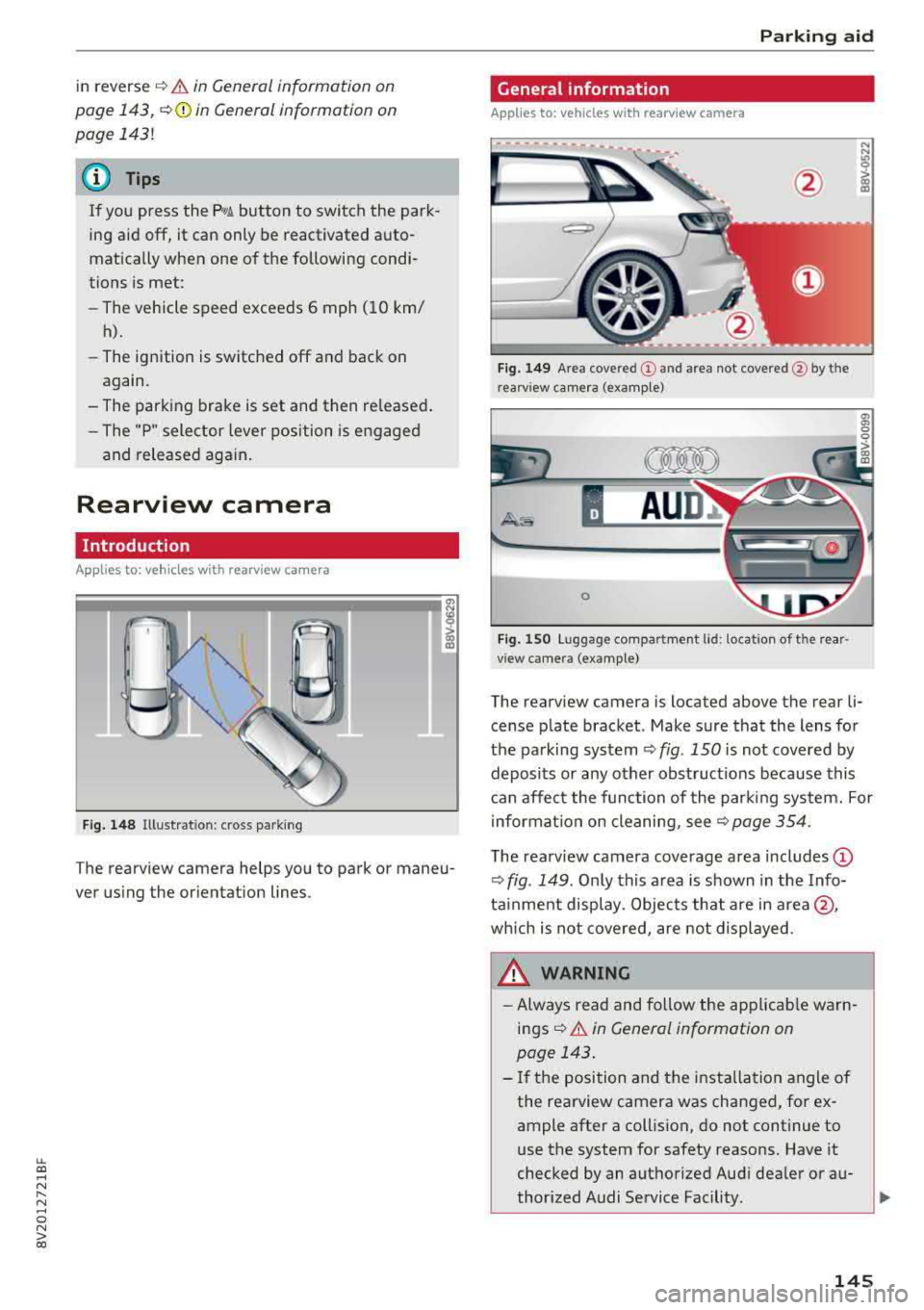
T he rearview camera helps you to park or maneu
ver us ing the or ientation lines .
Park ing aid
General information
Applies to: vehicles with rearview camera
-----.---
Fig. 149 Area co vere d (D and area not cove red @ by th e
r earv iew ca mera (examp le)
0
F ig . 1 50 Lu ggage compartmen t lid : locat io n of t he rear
v iew came ra (example)
The rearview camera is located above the rear li·
cense plate bracket . Make sure that the lens for
the parking system
¢ fig . 150 is not covered by
deposits or any other obst ruct ions because this
can affect the function of the parking system. For
information on cleaning, see
¢ page 354.
T he rearview camera coverage area includes (D
¢ fig . 149 . Onl y this a rea is s hown in the Info
ta inment display . Objects that are in
area @,
wh ich is not covered, are not displayed .
WARNING
-Always read and follow the applicab le warn
ings ¢.&. in General information on
page 143 .
-If the position and the installa tion angle of
the rearview camera was changed , for ex
ample after a collision, do not continue to
use the system for safety reasons. Have it
checked by an authorized Aud i dealer or a u-
thor ized Audi Service Facility.
~
145
Page 150 of 404
Intelligent Technology
Intelligent Technology Electronic Stabilization
Control (ESC)
Description
Elect ronic stabili zation control ( ESC) supports
driver safety. It red uces the risk of slipping and
improves dr iving stabi lity. ESC detects crit ica l sit
uations such as the vehicle overstee ring and un
dersteeri ng or the w heels are sp inning. The vehi
cle is stabilized by app lying the brakes or reduc
i n g e ngine torque . When the ESC engages, the
G1 indicato r light bli nks in t he instr ument clus
t er.
The fo llow ing systems are in tegrated in the ESC:
Anti-lock braking system (ABS)
ABS p reve nts the whee ls from lock ing whe n brak
ing. The vehicle can st ill be steered even d uring
hard brak ing. Apply steady press ure to the bra ke
pedal. Do not pump the pedal. A puls ing in t he
b rake pedal indicates that the system is act ing to
s tabili ze the vehicle .
Brake assist system
The brake assist system can decrease brak ing dis
tance . It inc reases brak ing power when the d river
presses the brake pedal q uick ly in eme rgency sit
uations . You must press and hold t he b rake pedal
until the dangerous si tuatio n is ove r. In veh icles
w ith adapt ive c ruise con trol*, the bra ke assist
sys te m is more sensitive if t he di stan ce detec ted
t o the veh icle dr iv ing ahead is too small.
Anti-Slip Regulation (ASR)
ASR reduces eng ine power when the drive wheels
beg in s pinning a nd adapts the force to the road
conditions . T his makes it easie r to sta rt, acceler
a te and dr ive u p hill s.
Electronic differential lock (EDL)
The EDL applies the brakes to a whee l t h at starts
sp inning and transfe rs t he d rive power to t he
other d riving wheel or wh eels ( if the veh icle is
eq uipped w ith all whee l dr ive*) . T his func tion is
no t a vailable at hig her s pee ds .
148
In extreme cases, ED L automat ica lly swi tches off
to keep the b rake o n the bra ked whee l from over
h eating. The ve hicle is still wo rking co rrect ly. ED L
will switc h on again automatically when condi
tions have returned to normal.
Power steering
The ESC can also support veh icle sta bility
th ro ugh stee ring .
Selective wheel torque control
Selective w heel to rque cont rol is used when driv
in g on curves. The fron t whee l on the in side of
t h e curve or both whee ls on t he i nsid e of the
cu rve are braked se lective ly as needed. This al
l ows mo re precise driving in cu rves .
Automatic post-collision braking system
The "automat ic pos t-coll is io n braking syste m"
c a n help t o reduce t he risk of sliding and of addi
tion al collisions a fter an acc iden t. If the a irbag
contro l modu le detects a collision above a certa in
vehicle speed, the ve hicle is braked by the ESC.
The
ve hicle does not br ak e automatically if;
- t he dr ive r presses the acce lerato r pedal, or
- the ESC, the b ra ke system or the ve hicle elect ri-
cal sys tem are not func tioning .
A WARNING
-The ES C and i ts in tegra ted systems can not
over co m e the li mits im posed by n atural
p hy sical laws. T h is is es peci ally i mpo rtan t
on s lippery or we t ro ad s. If the sy stem s be
gi n acting to stabilize yo ur vehicle, you
should immediately a lter your speed to
match the road and t raffic conditions. Do
not let the increased safety provi ded tempt
you into tak ing risks. This could increase
your r is k of a coll is io n.
- Please note the r is k of a coll is io n increases
when dr iv in g fast , especially t hrough c urves
and on s lippery or wet roads, and when dr iv
ing too close to obj ects ahead . T he ESC and
i t s in teg rated sys tems c annot alw ays pre
ve nt col lisio ns
-th ere i s still a r is k of acci-
d en ts!
..,.
Page 151 of 404
u. 00 .-< N l' N .-< 0 N > 00
Intelligent Technology
-Press the accelerator pedal carefully when
accelerating on even, slippery surfaces such
as ice and snow. The drive wheels can spin
even when these control systems are instal
led and this can affect dr iv in g stab ility and
increase the risk of a collision. condition. Different tire
sizes can lead to a
reduction in engine power.
- You may hear noises when the systems de
scribed are working .
(D Tips
-The ABS and ASR only function correctly
when all four wheels have a s imilar wear
Switching on/off
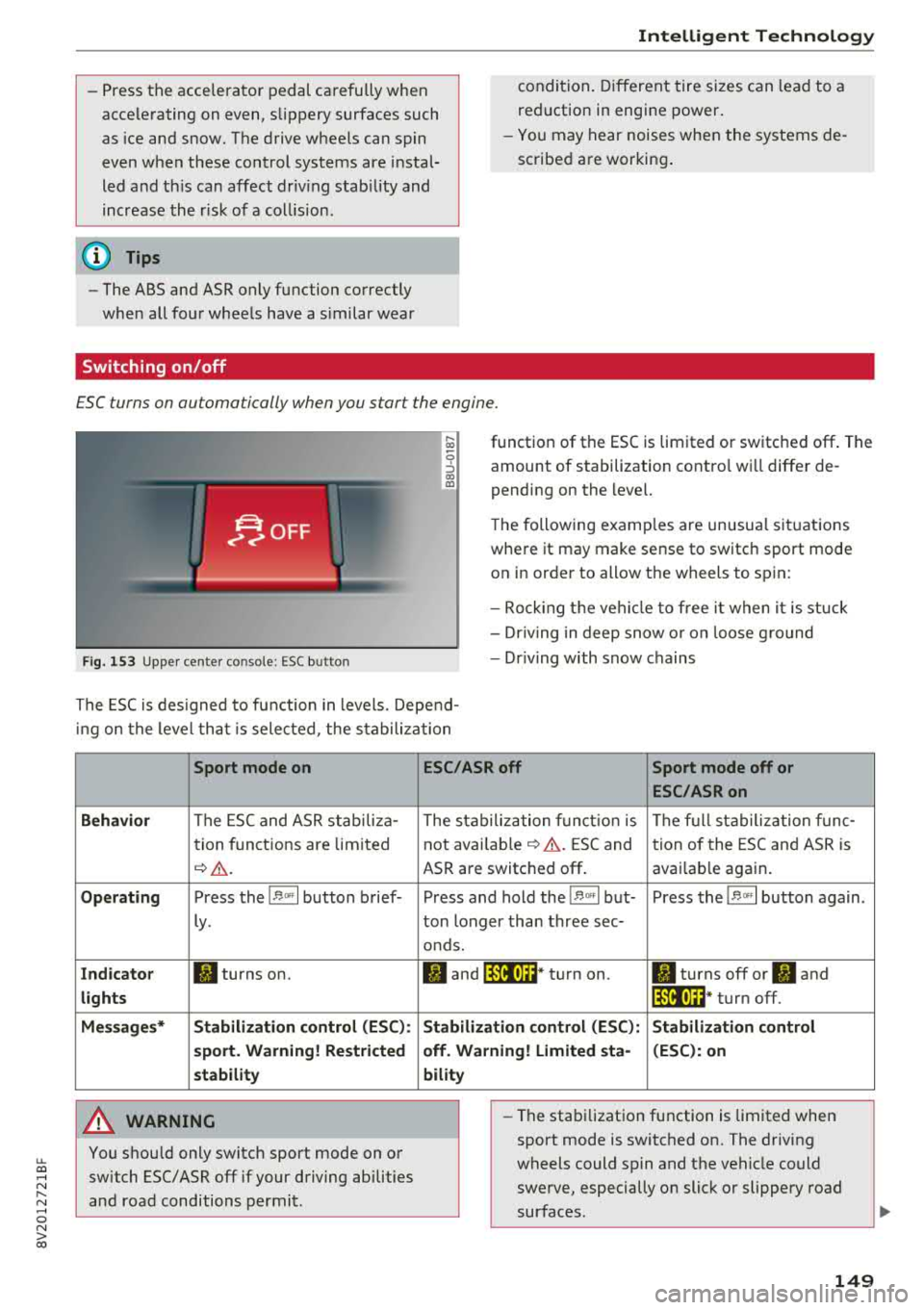
ESC turns on automatically when you start the engine.
F ig. 153 Upper center console: ESC button
function of the ESC is limited or switched off. The
amount of stabilization contro l wi ll differ de
pending on the level.
The following examp les are unusua l situations
where it may make sense to switch sport mode on in order to allow the wheels to spin:
- Rocking the vehicle to free it when it is stuck
- Dr iving in deep snow o r on loose g round
- Dr iving with snow chains
The ESC is designed to function in levels. Depend
ing on the level that is selected , the stabilization
Sport mode on
Behavior
The ESC and ASR stab iliza-
tion functions are limited
~ &..
Operating Press the 11> .. , I button brief-
ly .
Indicator II turns on.
lights
Messages* Stabilization control (ESC):
sport. Warning! Restricted
stability
A WARNING
You should only switch sport mode on or switch ESC/ ASR
off if your driving abilities
and road conditions permit.
ESC/ASR off Sport mode off or
ESC/ASRon
The stabilization function is The full stabilization func-
not
avai lab le~ A . ESC and tion of the ESC and ASR is
ASR are switched off . availab le again.
Press and hold the
! 1> °',1 but- Press the 11> .. , I button again .
ton longer than three sec-
onds.
II and lfil•)~~* turn on. II turns off or II and
lfil•)~~ * turn off.
Stabilization control (ESC): Stabilization control
off. Warning! Limited sta- (ESC): on
bility
-
- The stabilization function is limited when
sport mode is switched on. The driving
wheels could spin and the vehicle could swerve, especially on slick or slippery road
surfaces .
149
Page 153 of 404
u. 00 .-< N l' N .-< 0 N > 00
Brake booster
The brake booster amplifies the pressu re yo u ap
p ly to the brake pedal. It only operates while the
engine is running or when the ignition is switched
on (plug-in hybrid drive*) .
A WARNING
- Only apply the brakes for the purpose of
cleaning the brake system when road and
traff ic conditions permit. You must not en
danger other road users. This increases the
r isk of an accident .
-
-Never let the vehicle roll while the engine is
stopped because this increases the risk of an
acc ident.
- Depend ing on the veh icle equipment, the
brake pedal may be pulled downward when
the vehicle automatically initiates b rak ing.
- Never place objects in the driver's footwell.
An object could end up in the area around
the pedals and prevent you from using
them. You wo uld not be able to use the ped
als if sudden driving or braking mane uvers
were needed, which increases the risk of an
accident.
- Only use floor mats that do not obstruct the
area around the pedals and that can be se
curely fastened in the footwe lls.
- T o reduce the risk of injury, do not place
your foot under the brake pedal.
(Llj) Note
-Never let the brakes "rub" by pressing the
pedal lightly when braking is not actually
necessary. This causes the brakes to over
heat and increases braking distance and
causes wear.
- Before driving on a long stretch with steep
slopes, reduce your speed and shift to the
next lower gear This makes use of the en
gine braking effect and relieves the brakes.
If you need to brake add it ionally, brake in
i ntervals and not cont inuously.
Intelligent Technology
(D Tips
- If the brake booster is not working, you
must press the brake pedal with much more
force than normal.
- If you retrofit your vehicle with a front spoi l
er, wheel covers or simi lar items, make sure
that the air flow to the front wheels is not
interrupted. Otherwise the brake system
can become too hot.
Electromechanical
steering
The electromechanical steering supports the
driver's steering movements.
Power steering adapts electronically based on
the ve hicle speed.
Indicator lights and messages
• Do not drive vehicle: steering defective
If this indicator light turns on and stays on and
th is message appears, the power steering may
have failed .
Stop the vehicle in a safe location as soon as pos
s ible. Do
not cont inue driving. See an authorized
Audi dealer or authorized Audi Service Fac ility for
ass istance .
l;r-ij Steering: system fault! You can continue
driving
If the indicator light turns on, the steering wheel
may be more difficult to move or more sensitive
than usual. The steering whee l may also be at an
angle when driving straight.
Drive slowly to an authorized Audi dea ler or au
thorized Audi Service Facility to have the mal
function corrected.
(D Tips
If the. or 'Tij indicator light on ly stays on
for a short time, you may continue driving .
151
Page 154 of 404
Intelligent Technology
All wheel drive (quattro)
Applies to: vehicles with all wheel drive
In oil wheel drive, oil four wheels ore powered.
General information
In all wheel drive, the driving power is divided be
tween all four wheels. This happens automatical
ly depending on your driving behavior as well as
the current road conditions. Also see
c:> page 148, Electronic Stabilization Control
(ESC) .
The a ll wheel drive concept is designed for high
engine power. Your vehicle is exceptionally pow
erful and has excellent driving characteristics
both under normal driving conditions and on
snow and ice. Always read and follow safety pre
cautions
c:> & .
Winter tires
By using all wheel drive, your vehicle has good
forward motion with standard tires in winter con
ditions. However, using winter or all season tires
on
oil four wheels in the winter is recommended,
because this will improve the
broking effect.
Snow chains
If there are snow chain laws, snow chains must
also be used on vehicles with all wheel drive
c:> page 346, Snow chains.
Replacing tires
For vehicles with all wheel drive, only whee ls with
the same rolling circumference shou ld be used.
Avoid using tires with different tread depths
c:> page 33 7, New tires or wheels.
Offroad vehicle?
Your Audi is not an offroad vehicle -there is not
enough ground clearance. For this reason, avoid
difficult terrain.
A WARNING
-Also, in vehicles with a ll wheel drive, adapt
your driv ing style to the current road and
traff ic conditions. Do not let the increased
safety provided tempt you into taking risks,
152
because this increases the risk of an acci
dent.
- The braking ability of your vehicle is limited
to the traction of the whee ls. In this way, it
is not different from a two wheel drive vehi
cle. Do not be tempted to accelerate to a high speed when the road is slippery, be
cause this increases the risk of an accident.
- Note that on wet streets, the front wheels
can "hydroplane" if driv ing at speeds that
are too high . Unlike front wheel drive
vehicles, the engine does not rev higher sud
denly when the vehicle begins hydrop laning .
Fo r this reason, adapt your speed to the
road conditions to reduce the risk of an acci
dent.
Energy management
Your vehicle is equipped with an intelligent ener
gy management system for distributing electrici
ty. Thi s significantly improves the starting ability
and increases the vehicle battery life.
(D Tips
-If you drive short distances frequently, the
vehicle battery may not charge enough
whi le driving. As a result, convenience func
t ions for electrical equipment may be tem
porarily unavailable.
- The vehicle battery w ill gradually drain if
the vehicle is not driven for long per iods of
t ime, or if electrical equipmen t is used
when the engine is not running. To ensure
that the vehicle can still be started, the
electrical equipment will be reduced or
switched off.
Notice about data
recorded by the Event
Data Recorder and
vehicle control modules
Event Data Recorder
This vehicle is equipped with an Event Data Re-
corder (EDR). The ma in purpose of an EDR is to
.,.
Page 156 of 404
Multi Media Interface
Multi Media Interface
Traffic safety information
Aud i recommends performing certain Infotain
ment system functions, such as entering a desti
nation, only when the vehicle is stationary . Al
ways be prepared to stop operat ing the Infotain
ment system in the interest of your safety and
the safety of other road users.
_& WARNING
Only use the Infotainment system when traf
fic cond itions permit and always in a way that
allows you to maintain complete control over
your vehicle .
@ Tips
Certain functions are not available whi le driv
ing .
Introduction
The Multi Media Interface , or MMI for short,
combines various systems for communication ,
navigation* and entertainment in your Audi. You
can operate the MMI using the MMI control pan
el, the multifunction steering wheel or the voice
recognition system* .
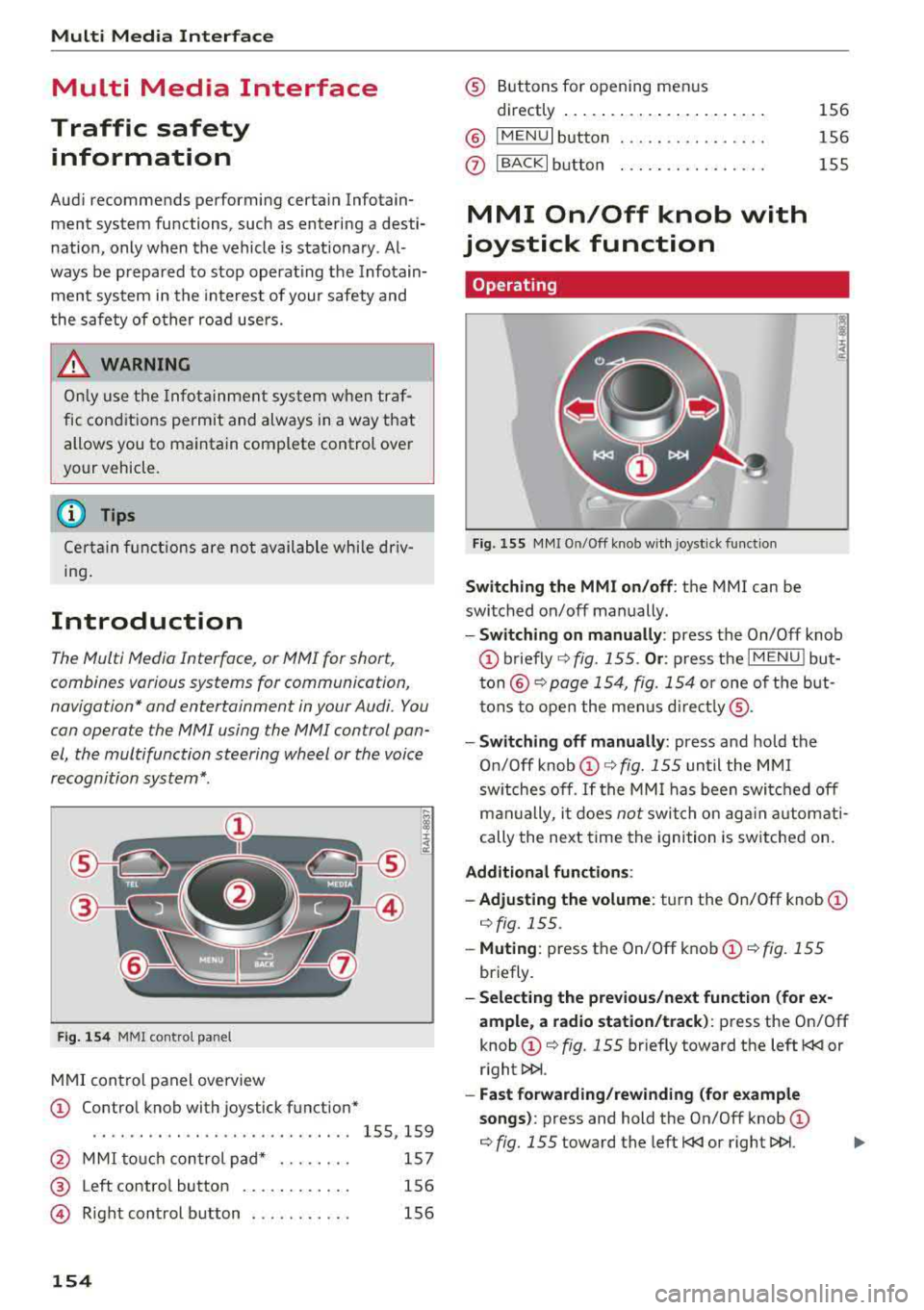
Fig. 154 MMI control panel
MMI control panel overview
CD Control knob with joystick function*
....... .... ........... ...... 155, 159
@ MMI touch control pad* . . . . . . . . 157
® Left contro l button . . . . . . . . . . . . 156
@ R ight control b utton . . . . . . . . . . . 156
154
® Buttons for opening men us
directly ......... .. .......... .
® IMENUI button
0 I BACK I button .. . .. ...... .... .
MMI On/Off knob with
joystick function
Operating
Fig . 155 MMI On/Off knob w ith joystick function
Switching the MMI on /off : the MMI can be
switched on/off manually. 156
156
155
- Switching on manually : press the On/Off knob
CD briefly c:::> fig. 155 . Or: press the I MENU ! but
ton@ c:::> page 154, fig. 154 or one of the but
tons to open the menus directly ®·
-Switching off manually: press and hold the
O n/Off knob
CD c:::> fig. 155 until the MMI
switches off .
If the MMI has been switched off
manually, it does
not switch on again automati
cally the next time the ignition is switched on.
Additional function s:
- Adjusting the volume:
turn the On/Off knob CD
c:::> fig. 155.
-Muting : press the On/Off knob CD c:::> fig. 155
briefly.
-Selecting the previous/next function (for ex
ample , a radio station/track):
press the On/Off
knob
CD c:::> fig. 155 briefly toward the left l
l>l>i .
-Fast forwarding/rewinding (for example
songs) :
press and hold the On/Off knob CD
c:::> fig. 155 toward the left l
Page 157 of 404
LL co .... N
" N .... 0 N > co
A WARNING
Adjust the volume of the audio system so that signals from outside the vehicle, such as po
lice and fire sirens, can be heard easily at all
times.
@ Tips
The MMI switches off automatically if the en
gine is not running and the vehicle battery is
low .
Infotainment system
display
Switching on /off
.,. Press the l c,J or C:,I button to switch the Info -
ta inment system on and off .
When the MMI is switched on and the display is
switched off, you can operate certain functions
using the On/Off knob with the MMI joystick
function
¢ page 154.
(D Tips
There may be delays when switching on the
display.
Multi Media Inte rface
MMI operation
Selecting and confirming a function
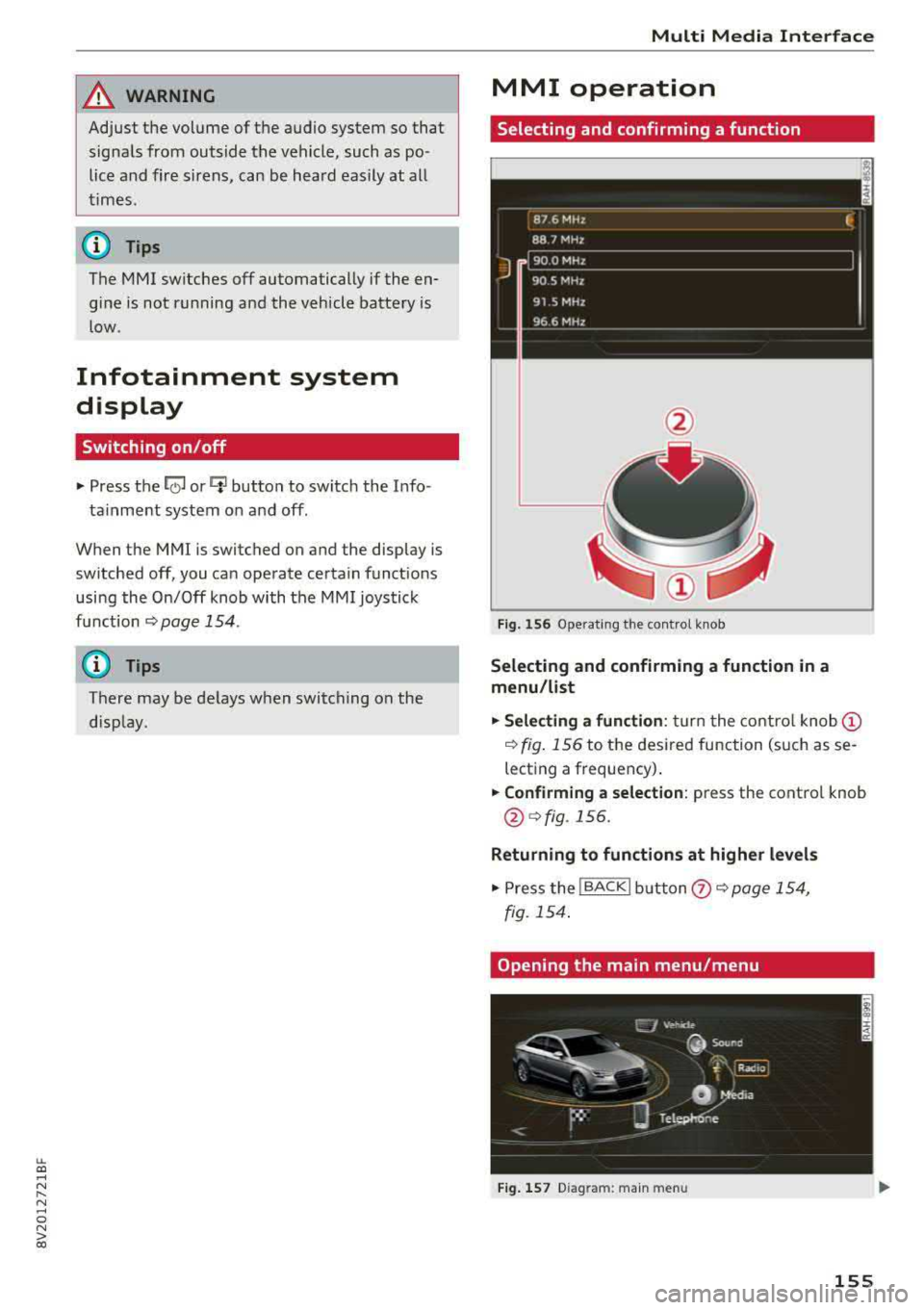
Fig. 156 Operating the control knob
Selecting and confirming a function in a
menu /list
.,. Selecting a function: turn the control knob@
¢ fig. 156 to the desired function (such as se
lecting a frequency) .
.,. Confirming a selection: press the control knob
@¢fig.156.
Returning to functions at higher levels
.,. Press the !BACKI button (?) ¢page 154,
fig. 154 .
Opening the main menu /menu
Fig. 157 D iag ra m : main menu
155
Page 167 of 404
u. 00 .-< N l' N .-< 0 N > 00
Multifunction steering
wheel
Introduction
Applies to: vehicles with multifunction steering wheel
In the driver information system display, you can
control numerous Infotainment functions using
the multifunction steering wheel plus*
<=:> page 13 or the multifunct ion steering wheel*
c> page 16.
You can control additional Infotainment func
tions us ing the MMI control panel
c> page 154 in
the Infota inment system display .
A WARNING
Direct your full attention to dr iv ing. As the
dr iver, yo u have complete respons ibility fo r
safety in t raffic. Only use the functions in
-
such a way that you a lways maintain com
plete control over yo ur vehicle in a ll traffic sit-
uations.
Radio
Applies to: vehicles with multifunction steering wheel and ra
dio
Requ irement: radio mode must be started
c> page 218 and the rad io/med ia tab m ust be
d isp layed.
.,. Press either the El butto n or the left control
button
<=:> page 14, depend ing on veh icle equ ip
ment.
Depending on vehicle equipment, the following
functions may be availab le in the driver informa
tion system.
- Se lecting th e fr equ ency band : select and con
firm a frequency band .
-Se lecting a station from th e pr esets li st *: se
lect :
Preset s> the desired radio station .
-Selecting a station from the sta tion list *: se
lect and confirm a radio station .
-Selecting a station from the presets li st : se
lect :
Preset s> the desired radio station .
-Opening a med ia source : select and confirm
Sw itch to medi a. Multifunction
ste ering wheel
Additional settings
Applies to: vehicles with Audi virtual cockpit
- Select: r ight cont rol b utton > desired entry.
Depend ing on the funct ion selected, the follow
i ng additional settings may be possible:
- Sho w "Now Pla ying" screen : see c>page 222.
Media
Applies to: vehicles with multifunction steering wheel and
media
Requirement: a media drive must contain audio/
video files
c> page 224 and the radio/media tab
must be disp layed.
.,. Press eithe r the @Jbutton o r the left contro l
button
c> page 14, depending on vehicle equip
ment .
Depend ing on ve hicle equ ipment, t he following
f unct ions may be ava ilable in the dr iver informa
tion system.
- Sele cting a media sourc e: select and confirm a
so urce su ch as the
"SD ca rd".
- Playing an audio /vid eo fil e: select and confirm
a t rack/fi le.
- Pau sing /resuming pla yback : press the right
t humbwhee l@ c> page 15, fig. 11 . To resume
p layback, press the rig ht th umbwhee l again.
Applies to: vehicles with analog instrument cluster
-Sw itching to radio : select and confirm a fre
quency band (such as
FM ).
Applies to: vehicles with Audi virtual cockpit
-Swit ching to the radio : select and confirm
Swit ch to radio .
- Opening additional tra ck information :
select :
r igh t con trol button
> Show "Now Playing "
sc reen.
For additional information, see
c> page235 .
(D Tips
- The media dr ives do not p lay fi les t hat are
protected by ORM and t hat are iden tified
with the symbol
{n .
- Ple ase note th at within a med ia so urce in
t he drive r informa tion system, only p lay lists
that were selected through the MMI control
pane l can be played
ca:> page 233 . ..,.
165