warning AUDI A3 SEDAN 2018 Owners Manual
[x] Cancel search | Manufacturer: AUDI, Model Year: 2018, Model line: A3 SEDAN, Model: AUDI A3 SEDAN 2018Pages: 404, PDF Size: 62.3 MB
Page 170 of 404
Multifunction steering wheel
Street view with route guidance started
Applies to: vehicles with navigation system and analog instru
ment cluster
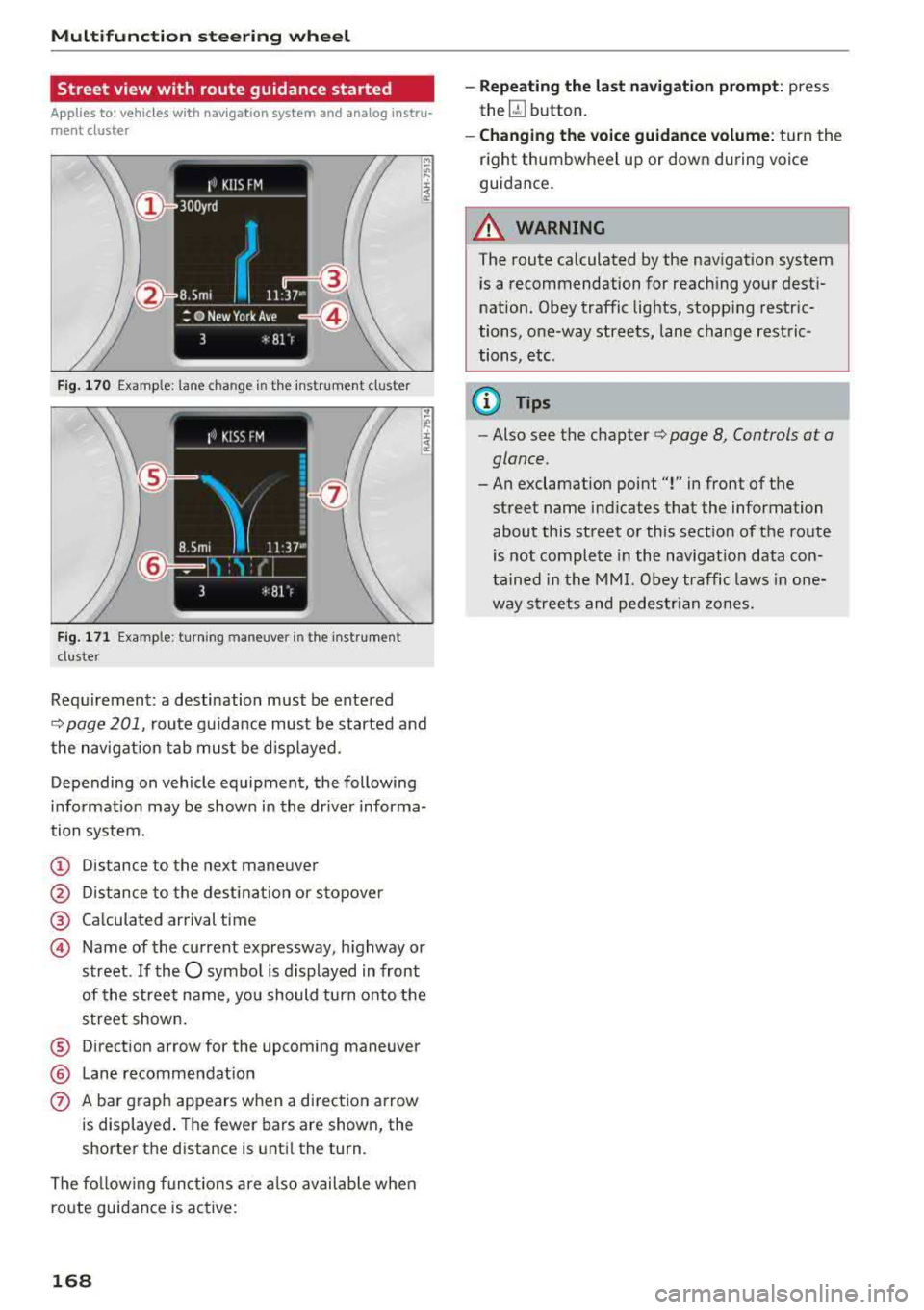
F ig . 170 Example: lane change in the instrum en t cluster
F ig. 171 Example: turning maneuver in the instrumen t
duster
Requi rement: a destination must be ente red
Q page 201, route guidance must be started and
the navigation tab mus t be disp layed.
Depending on vehicle equipment, the following
i n formation may be shown in the dr iver informa
tion system.
(D Distance to the next maneuver
@ Distance to the destinat ion or stopover
® Calculated arrival time
@ Name of the current expressway, highway or
street.
If the O symbo l is displayed in front
of the street name, you should tu rn onto the
street shown.
® Direction arrow for the upcoming maneuver
® Lane recommendat ion
0 A bar graph appears when a direction arrow
is displayed . The fewer bars are shown, the
shorter the distance is until the turn.
The following functions are also available when
route guidance is active:
168
-Repeating the last navigation prompt: press
the
QJ button.
- Changing the voice guidance volume: turn the
right thumbwheel up or down during voice
guidance.
A WARNING
The route calculated by the navigation system
is a recommendation for reaching your desti
nation. Obey traffic lights, stopping restric
tions, one-way streets, lane change restric
tions, etc.
@ Tips
-Also see the chapter Q page 8, Controls at a
glance.
-An exclamation point "!" in front of the
street name ind icates that the information
about this street or this sect ion of the route
is not complete in the navigat ion data con
tained in the MMI. Obey traffic laws in one
way streets and pedestrian zones.
Page 172 of 404
Voice recognition s ystem
Voice recognition system
Operating
A pplies to: ve hicles w ith vo ice recognition system
You con operate many Infotainment functions
conveniently by speaking.
R equirements: the ignition and the MMI must be
switched
on <=> page 154, there must not be any
phone call in progress and the parking system
must not be active .
~ Switching on: press the~ button @
<=> page 15, fig. 11 or@ <=> page 16, fig . 13
briefly on the mult ifunct ion steer ing whee l and
say the desired command after the
Beep .
~ Sw itching off : press and hold the~ button.
Or: press the [21 butto n.
~ Pausing : say the command Pau se . To res ume,
press
the~ button .
~ Correcting : say the command Corre ction .
Input assis tance
The system gu ides you through the input with
visual and audio feedback .
-Visual input a ssistance : after switching on
vo ice recognit ion, a display with a se lection of
poss ible commands appears . This command
display can be sw itched on or off . Select:
IMENU I button> Settings> left control button
> MMI settings > Sp eech dialog system .
- Audio input a ssis tance :
to have the poss ible
commands read, turn the voice recogn ition sys
tem o n and say
Help .
For the s ystem to under stand you:
Speak clearly and dist inct ly at a normal volume.
Speak louder when driving faster .
E mphasi ze the words in the commands even ly
and do not leave long pauses.
Close the doors, the windows and the sunroof* to reduce background noise . Make sure t hat passen
gers are not speaking when you are giving a voice
command.
Do not direct the vents toward the hands -free mi
crophone, which is in the roof headliner near the
front interior lights.
170
Only use the system from the dr iver's seat be
ca use the hands -free microphone is directed to
ward that seat .
Additional settings
See<=> page 248.
_8. WARNING
- Direct yo ur full attention to dr iv ing. As the
d river, you have complete responsibility fo r
safety in t raffic. On ly use the functions in
such a way that you a lways maintain com
plete contro l over your vehicle in a ll traffic
situations.
- Do not use the voice recognition system in
emergencies because your voice may change
in s tressful s ituations .
It may take longer to
d ia l the numbe r or th e system may not be
ab le to d ia l it at all. Dial the emergency
number manually.
(D Tips
- The d ia log pauses when there is a n incom
ing phone call a nd will cont inue if you ig
nore the ca ll. The d ia log ends if yo u answer
t h e ca ll.
- Th ere are no vo ice gu idance* prompts when
a dialog is act ive.
- You can select an i tem in the list using ei
ther the vo ice recognit ion system o r the
cont ro l knob .
Command overview
information
App lies to : vehicles wi th voice recog nitio n system
The following overv iews describe the commands
that can be used to operate the MMI using the
voice recog nition system.
Alte rnative commands a re separ ated using a"/ ",
for example say:
Telephone / (or) Navigati on /
(or) Radio .
Sequences of commands used to perform an ac
t ion are iden tified w ith a
"> ", fo r example say:
Enter addre ss > (t hen) Enter country /state. .,..
Page 179 of 404
u. 00 .-< N l' N .-< 0 N > 00
Telephone Introduction
Applies to: vehicles with telephone
To make phone coils in your vehicle using the
MMI, connect your cell phone to the MMI via
Bluetooth.
Handsfree
After you have connected your ce ll phone to the
MMI via Bluetooth, you can use the handsfree
system and operate telephone functions through
your MMI. You can make calls using the antenna
on your cell phone.
A WARNING
-Medical experts warn that cell phones can
interfere w ith the funct ion of pacemakers .
Always ma inta in a m inimum distance of
about 8 inches (20 cm) between the cell
phone antenna and the pacemake r.
-Do not carry the cell phone in a pocket di
rectly over the pacemaker when the phone
is switched on.
-Sw itch the cell phone off immediately if
you suspect it may be interfering w ith the
pacemaker.
-Do not use the voice recognition system*
¢ page 170 in emergencies because your
voice may change in stressful situations. It
may take longer to dial the number or the
system may not be able to dial it at all. Dial
the emergency number manually.
-Switch your cell phone off in areas where
there is a risk of an exp losion. These loca
t ions are not always clearly marked. This
may include gas stations, fuel and chemical
storage facilities or transport vehicles, or lo
cations where fue l vapors (such as propane
or gasoline vapor in vehicles or bui ldings),
chem icals or large quantities of dust parti
cles (such as flour, sawdust or metal) may
be present in the air. Th is also applies to all
ot her locations where you would normally
turn your vehicle engine off.
-The demands of traffic require your full at
tention. Always read the chapter
¢ page 154, Traffic safety information.
-
Telephone
@ Note
Always fo llow the information found in Q@ in
Wi -Fi hotspot on page 195.
(D Tips
-The Bluetooth connection range is limited
to inside the vehicle . It can a lso be affected
by loca l conditions and interference with
other devices.
-T o learn which Bluetooth connections and
which of the functions in your cell phone are
supported, check with your cell phone serv
ice provider or the database for mobile devi
ces at www .aud iusa .com/bluetooth.
Setup
Connecting a cell phone using Bluetooth
Applies to: vehicles with telephone
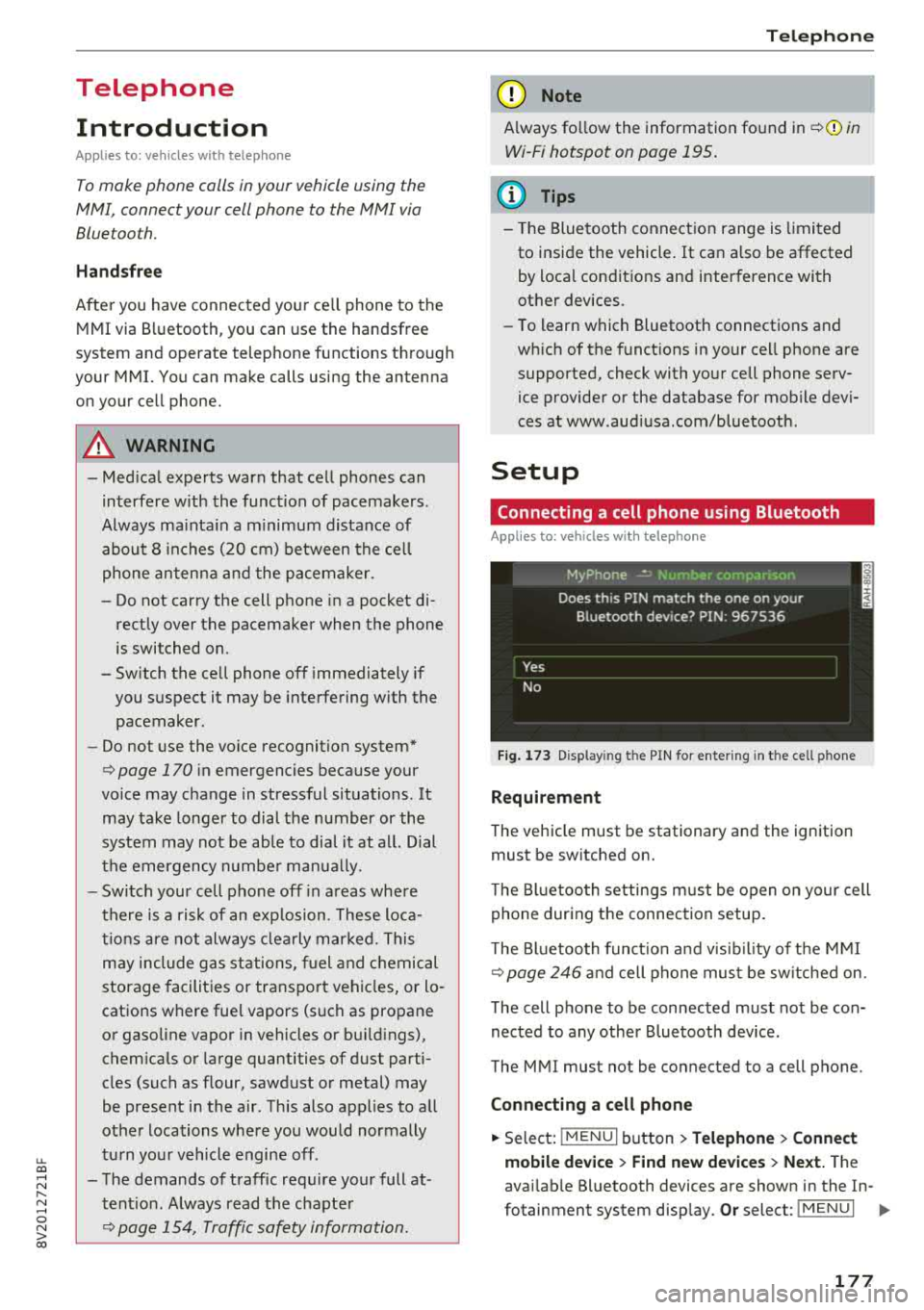
Fig. 173 Display in g t he PIN for enter ing in t he cell p hone
Requirement
T he vehicle must be stationary and the ignition
must be switched on.
T he Bl uetoo th settings must be open on your cell
phone during the connection setup .
T he Bluetooth funct io n and v is ibilit y of the MMI
Q page 246 and cell phone must be switched on.
The cell phone to be connected must not be con
nected to any other Bluetooth device.
The MMI must not be connected to a cell phone.
Connecting a cell phone
.,. Select: IMENU I button> Telephone> Connect
mobile device > Find new devices > Next.
The
avai lab le Bluetooth devices are shown in the In-
fotainment system display.
Or select: I MENU I II>-
177
Page 184 of 404
Tele phone
- Muting the incoming ca ll: select and confirm
Mut e.
- Additi onal c all :
se lect: Find c onta ct > Call li st/
Di rector y/Fa vo rites
> an entry from the list.
M ute: if you se lect and co nfirm th is function , the
other pe rson on the phone cannot hea r yo u. You
can hear the other person . To turn the micro
phone back on, se lect and confirm
Unmute.
Hold call /R es um e held call:
you can p lace the ex
isting call on hold and resume i t again. To re
sume the call, select and confirm the ca ll you
wou ld like to resume.
Tran sfe r ca ll to m obile d evic e*: select and con
fi rm
Tr ansfe r call to mobil e devic e to transfer
the existing call from the MM I to your cell phone.
Switch to hands -fr ee mod e*: Requirement: you
must have a phone ca ll in prog ress o n your cell
p hone. Select and confirm
Swit ch to hand s-free
mode
to transfer the call from your ce ll phone
back to the MMI.
Swap call : alternate between two phone ca lls
while one of the ca lls is on hold. Select ing
End
c a ll
wi ll end the active phone call. A p hone call on
hold can be resumed using the right control but
ton >
Resume .
Co nne cti on manag er:
see ~ page 244.
Telephone sett ings : see ~ page 187 .
(D Tips
-To be notified of an incoming call during a
phone call, the
call waiting function in your
cell phone must be switched on when using
the
Handsfre e profile .
- You can obta in more information from your
ce ll phone serv ice prov ider or from your cell
phone use r guide.
- When leaving the vehicle, the Bluetooth
con nection to the ce ll phone w ill automat i
ca lly dis co nne ct. Depending on you r cell
phone, phone ca lls in p rogress may be auto
matically redirected from t he M MI to your
ce ll phone and you can continue t he call on
your phone.
- The display of an incoming phone ca ll in the
Infotainment system disp lay may still be
182
visible for a few seconds after a call is an
swered/ignored depending on the ce ll
phone in use.
Making an emergency call
Applies to: vehicles with telephone
.,. Select: ! MENU I button> Telephone > left con
trol button >
Enter n umber > Enter emergency
call number (for example, 911) >
OK .
A WARNING
-
-Because you r phone works with rad io sig
na ls, a connection canno t be gua ran teed un
de r all ci rcumsta nces. Do not rely o n only
your phone when it comes to essential com
munication (such as a medical emergency) .
- Always follow the instr uct ions given by the
emergen cy personne l dur ing an emergency
call and on ly end the ca ll when they instruct
you to do so.
(D Tips
E mergency numbe rs a re not the s ame every
whe re. Find out wh ic h emergency n umber is
u sed in your current location.
Favorites
Applies to: vehicles with telephone
Up to 50 contacts , in addition to the voicemail
number, can be stored in any order in the favor
ites lis t.
.,. Select: !MENU I button> Telephone > left con-
trol b utton .
Storing an e xis ting phone number as a
fa vorit e:
-Select and confirm Call list /Director y.
- Select a contact or phone n umbe r from the list.
- Select: r ight cont rol b utton>
S tor e as favorite .
-Enter a name for the favor ite or select a sug-
gestion .
- Select and confirm
Save .
Ren aming stored fa vorite s
- Select: Favo rite s > a favorite from the list.
Page 192 of 404
Audi conn ect (Infotainment)
Audi connect
(Infotainment)
Introduction
Applies to vehicles with Audi connect (Infotainment)
With Audi connect Infotainment services, online information is transmitted directly to the vehicle
and then integrated .
A WARNING
To reduce the risk of an accident, only use
Audi connect Infotainment services when
road and traffic cond itions permit. A lways
read and fo llow the notes
in~ page 154,
Traffic safety information.
Setup
Requirements for Audi connect (Infotainment)
Applies to vehicles with Audi connect (Infotainment)
-
The data connection fo r A udi connect Infota in
ment services is made thro ugh an embedded SIM
card (eS IM card) that is equipped in the veh icle.
The fo llow ing requ irements must be met to use
the embedded SI M card:
- You have already reg istered at
www .aud iusa.com/myaud i and ass igned a vehi
cle.
- You have also already logged in to your myAud i
account under Audi connect plan for the em
bedded SIM card and accepted the terms of use
given there. For add it io na l information, co ntact
an a uth orized Aud i de aler o r au th orized Audi
Service Facility .
Then you r Audi connect Infota inment serv ices are
activated and can be used in your ve hicle.
(D Tips
- After the free subscription has ended or the
data volume has been used up, data pac kets
can be purchased for the use of Audi con nect Infot ainment serv ices. You can find a d
dit ional info rmation about fees and pur
chasing at www .audiusa .com/myaudi.
190
- Read this chapter before operating
~ page 196, Audi connect (Infotainment)
general information.
Configuration through myAudi
Audi connect (Infotainment) configuration
Applies to vehicles with Audi connect (Infotainment)
Some A udi connect Infotainment services must
be conf igured through your personal myAud i ac
count before using them for the first time.
- If you do not have a persona l myAudi account
yet, you can register on line at
www.a udiusa.com/myaudi.
- Add your vehicle to your myAudi account.
- Ac tivate/config ure the A ud i connect (Infotain -
ment) services you would like for your veh icle in
your myA udi account.
- For some Audi connect Infotainment services,
you may also have to enter your myAudi user
data or your myAudi PIN when accessing serv ices in the MMI to connect your veh icle to
myAudi.
For detailed information on configuration, visit
www.audiusa .com/mya udi .
Logging into myAudi in the vehicle
Applies to vehicles with Audi connect (Infotainment)
To use some Audi connect Infotainment services
(such as Twitter*), you must first connect your
vehicle to myAudi to transfer your personal set
tings from your myAudi account.
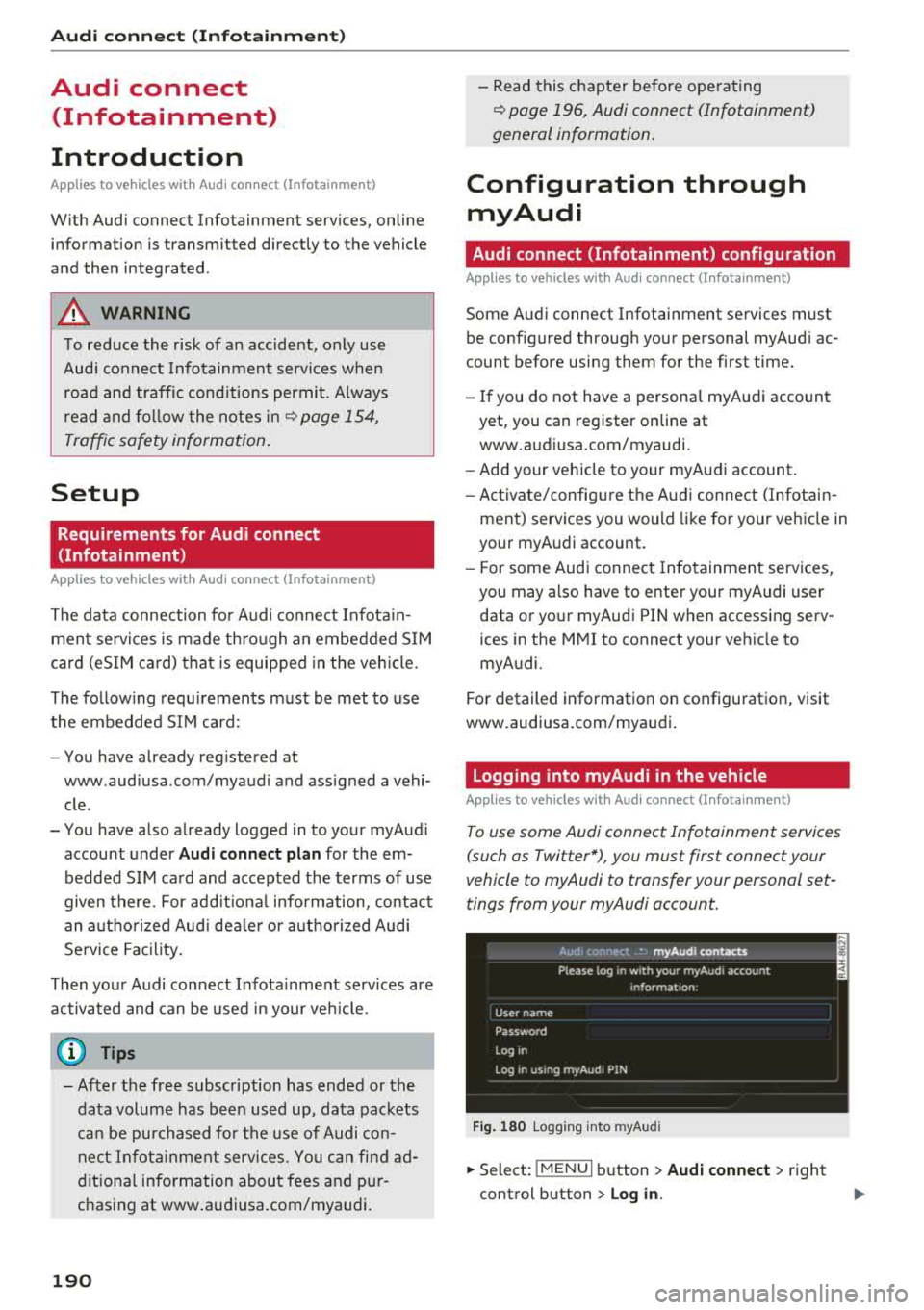
Fig . 180 Logging into myA udi
.,.. Select: !MENUI b utton> Audi conne ct > right
control button > Log in.
Page 195 of 404
u. 00 .-< N l' N .-< 0 N > 00
The following categories can be selected in the
Twitter menu:
-My tw eets: News Feed and the Tweets you have
posted are listed.
- Home: the Tweets for everyone you follow are
displayed.
- Trends : topics on Twitte r that are cur rently
popular w ithin a country .
D ifferent functions are available depending on
the Twitter category you have selected:
- New tweet : you can post a new tweet using
pre-made templates or using myAudi tem
plates that you have created yourself .
-Refresh : the selected Tw itter function is re
freshed .
-Favorite : mark a Tweet as favorite to show you
liked it .
-Retweet: you can quote a Tweet to share it with
others.
(D Tips
- Other settings such as account, language,
Tweet security and location settings
cannot
be changed in the MMI. These changes must
be made on the Twitter webs ite.
- You can only connect
one Twitter account
with your myAudi account.
- Audi connect (Infotainment) makes it possi ble to access Tw itter. Permanent ava ilability
cannot be guaranteed, because that de pends on Twitter.
Travel (travel guide)
Applies to: ve hicles with Trave l (travel guide)
You can use the Audi MMI connect opp to store
points of interest on your mobile device (such as a smartphone) and then use them for route
guidance in the
MMI.
Requirement:
The
Audi MMI connect app must be insta lled and
open on your mobile device.
Audi connect (Infotainment)
You must be logged into your myAudi account in
the
Audi MMI connect app and you must have se
l ected your vehicle.
T he Wi-Fi function on your mobile device and on
the MMI must be switched on.
T he M MI must be connected to the network.
.. Press: !MENU ! button> Audi connect> left con-
trol button >
Information category> Travel.
After opening the trave l guide, trave l tips in your
area w ill be displayed including current ratings as
well as the corresponding category .
.. Press the left control button to change the cat
egory (such as bars nearby).
,&. WARNING
- It is only safe to use tablets, laptops, mo
bile devices and other similar devices when
the vehicle is sta tionary because, like all
loose objects, they co uld be thrown around
the inside of the ve hicle in a crash and cause
serious inj uries. Store these types of devices
securely while driving.
- Do not use any wireless devices on the front
seats within range of the airbags while dr iv
ing. Also read the warnings in the chapter
¢ page 2 73, Front airbags .
(D Tips
-Units of measurement, language settings
and time are shown in the Infotainment sys
tem display based on how they were set in
the MMI system sett ings
¢ page 243.
Audi connect (Infotainment) in navigation
App lies to : vehicles wit h a navigat ion syste m and Audi co n
nect (Infota inment)
.. Select: IMENU! button> Audi connect> left
control button>
Navigation.
-
T he following Audi connect Infotainment services
are currently available:
..,.
193
Page 196 of 404
Audi conn ect (Infotainment)
- Navigation with satellite map1> r::!>page 213.
- Po in t o f Inter est (PO I) online se a rc h with
v o ic e re co gni tion
(such as restaurants): plan
route g uidance using the MMI control panel
¢ page 204 and the voice recognition system
¢page 170.
-Set up destinations in your MMI using your
m yAudi acco unt or the sa tellite m ap vie w l)
¢ page 213.
- Online traffic informat ion : receive up-to-the
minute traffic information about accidents,
road construction and other incidents
¢page 216.
- Map updat e: import navigat ion map updates
directly to your vehicle using an SD card or as
an online update
¢page 214.
(D Tips
-For the map update Audi connect Infotain
ment service via SD card, check the current
software vers ion in your vehicle and then
check www.aud iusa .com/myaudi to see if a
newer ve rsion is ava ilable. You can a lso have
the new navigation data insta lled by an A udi
dealer, w hich can be done for an add itional
cha rge.
- You can find add itiona l information abo ut
the
map upda te on line a t
www.audiusa.com/myaud i.
Audi connect (Infotainment) in Media
menu
Applies to vehicles with Audi connect (Infotainment)
.,. Se lect : IMENUI button> Audi connect > right
control button >
Ente rtainment .
- Online medi a and Internet r adio :
offers access
to different online media services as well as In
ternet rad io and operat ion through the MMI us
ing the
Audi MMI conne ct app.
Applies to: vehicles with Wi-Fi audio player
-Wi-Fi audi o player : you can access t he media
center through a Wi -Fi connected media player
(such as a smartphone)
¢ page 22 7.
ll AU DI AG provides access to services fro m third party pro
v iders . Pe rma nent availabil ity can not be guaran teed , be
c a use that depen ds on the th ird party provider.
194
A WARNING
It is only safe to use tablets, laptops, mobile
devices and other similar devices whe n the ve
hi cle is stationary because, like all loose ob
jects, they could be thrown around the inside of the vehicle in a cras h and cause se rious in
j ur ies . Store these types of devices sec urely
while driv ing.
((D} Note
A lways fo llow the information found in r::!> 0 in
Wi -Fi hotspot on page 195.
(D Tips
- Also see the chapter r::!> page 196, Audi con
nect (Infotainment) general information.
- For more informat ion on the W i-F i aud io
player and suppo rted devices, contact an
autho rized A ud i dealer o r autho riz ed Aud i
Serv ice Facility.
Additional options
Applies to vehicles with Audi connect (Infotainment)
.,. Select: IMENUI b utton> Audi conn ect > right
control button.
The following opt ions are available in the Aud i
connect I nfota inment serv ices overv iew :
About Audi conn ect
Here you w ill find legal information for Audi con
nect (Infota inment) usage .
Lo g in *
See ¢ page 190, Logging into myAudi in the vehi
cle.
Connection manager
Seer::!> page 244.
Licens e subscription
The validity and exp iration date of your licenses
a re disp layed. W hen the fu nction is sw itched on
1111-
Page 197 of 404
u. 00 .-< N l' N .-< 0 N > 00
10, the message Warning befo re sub scripti on
e x pire s
will display to warn you that your license
is about to expire.
Refresh
The content of the selected A udi connect Info
tainment service o r the entire Audi connect (Info
tainment) list is updated .
Data privacy
Requirement: the ign it ion must be switched on.
Locat ion and personal data are transmitted when
using Aud i connect Infotainment services . If you
do not want this information to be transm itted,
activate data p rivacy .
-Acti vate pri vacy: the data connection is switch
ed off. Some Audi connect Infotainment serv
ices are not available.
- Deacti vate data priv acy : if the data connection
is switched off, you can switch on the data con
nect ion for the use of all Audi connect Infota in
ment services. Select and confirm
A cti vate d ata
conn ection.
Wi-Fi hotspot
A ppl ies to: ve hicles with Wi-F i hotspot
You can use the MMI as a Wi-Fi hotspot to con
nect up to eight Wi-Fi devices to the Internet.
While driving, restricted use of unsecured, light,
small wireless devi ces is only possible from the
rear of the vehicle.
Requirement: the ign ition must be switched on.
"' Select : I MENU I button> Telephone > right con-
trol button >
W i-Fi settings.
The fo llow ing settings can be selected:
Wi-Fi
The MM I Wi -Fi hotspot is deactivated at the fac
tory. Switch the Wi-Fi hotspot to
Hot spot before
establishing a connection between your vehicle
and your Wi -Fi device.
- On : the MMI Wi -Fi hotspot is active and visib le
to ot her devices. You can connect your Wi -Fi
device to the MMI and use the Internet connec
t ion if necessary.
Audi conn ect (Inf otainment )
-Off : the M MI Wi-Fi hotspot is deactivated. An
Internet connection for Wi -Fi devices is not
possible .
A WARNING
= -
- To reduce the r isk of an accident, use the
Aud i connect Infotainment services with a
W i- F i hotspot only in the rear seat when the
ve hicle is in mot io n, or only when the vehi
cle is stat ionary .
- It is o nly safe to use tablets, laptops, mo
b ile dev ices and other sim ilar devices when
the vehicle is stat ionary because, li ke all
loose objects, they co uld b e thrown around
t he inside o f th e ve hicl e in a c rash and ca use
serio us inj uries . Store these types of devices
secure ly while driving .
- D o not use any wireless dev ices on the front
seats within range of the airbags whi le driv
ing . A lso read the warnings in the chapter
¢ page 2 73, Front airbags .
-As the driver, do not allow usage of the Wi
F i hotspot to distract yo u from driving, as
this cou ld increase the r isk of an accident.
@ Note
- Under some conditions, ce rtain mobile devi
ces and operating systems may automati
cally switch from your vehicle's Wi -Fi hot
spot to the device's mobi le data connection.
In that event, standa rd text and data usage
rates would apply wh ile the device's mobile
data connect ion is in use. Please refer to
documentation prov ided by your mob ile de
vice's manufacture a nd you r data carrier for
details , rela ted te rms an d pr iva cy sta te
ment.
- Yo u ar e respons ib le for all precautions ta k
en for d ata prote ct io n, a nti -vir us p rotec tion
and protec tion agains t loss of data on mo
bile devices t hat are used to access the In
ternet through the Wi -Fi hotspot.
(D Tips
- In ve hicl es w it h out Audi con nect (I nfota in
ment)*, the use of the Wi -Fi hotspot is on ly
possible fo r the Wi -Fi audio player *. A data
.,.
195
Page 198 of 404
Audi conn ect (Infotainment)
connection to the Internet cannot be
established.
- F or additional in format io n about t he Aud i
connect Infotainment services, visit
www.audiusa.com/myaudi .
Configuring the data
connection
A pp lies to ve hicles wi th A ud i co nn ect (I nfotainment)
The data connection for Audi connect Infotain
ment services is pre-configured at the factory .
However, if a configuration should be necessary,
you can adjust the following settings.
.,.. Select: IMENUI button> right control button>
Conn ection man ager.
.,.. Se lect : rig ht contro l butto n > Online se tt ing s>
Da ta co nn ection setting s.
Using the D ata c onnection settings menu, you
can set when an Internet con nection should be
made . T he Inte rnet connect ion disconnects auto
matica lly once the requested Audi connect Info
tainment service no longer requires any data .
The fo llow ing settings can be selected:
Audi connect (MMI )
With the Audi conn ect ( MMI) function, you can
Allo w or Deny the use of Audi connect Infota in
ment services if the connect io n is set to
No re
quest or With reque st .
Wi-Fi de vices*
Using the Wi-Fi d evices function, you can Allo w
or Deny a connection to the Internet.
A WARNING
- As the dr iver, do not allow usage of the Wi
Fi hotspot to distract you from d riving, as
t hi s could inc rease the risk of an acc ident.
- It is only safe to use tablets, laptops, mo
bile devices and other s imilar dev ices when
the veh icle is stationa ry because, like all
loose objects, they could be th row n aro u nd
the inside of the vehicle in a crash an d cause
serious injuries . Store t hese types of devices
sec urely whi le driving.
196
- Do not use any wire less devices on the front
seats within range of the airbags while dr iv
ing. Also read the warnings in the chapter
¢ page 2 73 , Front airbags .
@ Note
Always fo llow the information fo und in¢(!) in
Wi -Fi hotspot on page 195.
Audi connect
(Infotainment) general
information
Audi connect Infotainment services
App lies to vehicles w it h Audi connect (I nfotai nme nt)
(D Tips
- You can only use serv ices supported by Aud i
connect (Infota inment) if yo u have the op
t ional MMI Navigation plus eq uipment w it h
M MI touch* and A udi connect (Infotai n
ment).
- Use of the LT E* mobile ne twork standard is
not ava ilab le i n every country . Contact an
authorized A udi dealer or authorized Audi
Service Facility or your cell phone service
prov ider for add itiona l information .
- Usage of Audi connect Infotainment serv
ices depends on the avai labi lity of services
through third party providers.
- Audi connect Infotainment services are on ly
availab le w ith in the cell phone network cov
erage from your cell phone service provider.
- Audi connect Infotainment services are
available in the USA . Audi connect Infota in
ment serv ices are currently not availab le in
Canada or in Mexico.
- Also read the info rmation in the chapter
¢page 177, Telephone.
- Availability, scope, prov iders, screen display
and costs of services may vary depending on
the country, model, model year, end device
and rates . For add itiona l information, v is it
www .aud iusa .com .
- An initial registration/act ivat ion on the
myAud i platform at www .audiusa .com/
Page 201 of 404
u. 00 .-< N l' N .-< 0 N > 00
Audi connect e-tron services
Introduction
Applies to: vehicles with Audi connect e-tron services
With Audi connect e-tron services l), you can ac
cess various information or control individual
functions remotely using mob ile dev ices (such as
a smartphone) or a web portal.
- Trip
data¢ page 199.
- Doors and lights ¢page 199.
-Vehicle status report ¢ page 200.
- Car
Finder ¢ page 200.
- Charging
¢ page 200.
- Climate
control¢ page 200 .
A WARNING
Also read and follow the instructions regard
ing traffic safety
¢ page 154.
Setup
Applies to: vehicles with Audi connect e-tron services
To use Audi connect e-tron services 1), please
note the following:
Requirements
-An authorized Audi dealer must complete a
one-time activation of Audi connect e-tron serv
i ces for your veh icle before you can reg ister on
line .
- Then register at etron.audiusa .com . You can
use and manage the Audi connect e-tron serv
ices there .
- If you require assistance w ith your Aud i connect
e-tron services, please contact an authorized
Audi dealer or authorized Audi Service Facility.
- Your mobile devices must be compatible .
1> The mob ile network service is offered by a serv ice provid
e r. Yo u can obtain more informa tion abou t your mobile
network provider at an au th or ized Aud i dealer. Connected
dev ices are not always 4G-compatible. Th e ava ilability o f a
high -speed network may be red uced dur ing pea k usage or
b y your location, the reception, and other factors . Ne t
wo rk coverage ca nnot be guaranteed everywhere. Fo r
mo re info rmation on mobile cove rage, see the Audi con
n ect overv iew from your mobile network provider.
Audi connect e-tron services
Trip data
Applies to: vehicles with Audi connect e-tron services
The Driver Information System collects data un
der certain conditions and sends it to a server.
When data is stored, you can access values such
as these using the service:
- driving durat ion,
- average speed driven,
- distance driven,
- average electric consumption.
Doors and lights
Applies to: vehicles with Audi connect e-tron services
You can access and disp lay the current status of
the following vehicle data on your mobile devices
without having to be inside the vehicle.
- If the vehicle doors and lids are open/closed,
- Parking lights are on/off.
For additional information on opening and clos
i ng the doors or for the vehicle lighting, refer to
¢ page 31, Opening and closing or to ¢ page 49,
Exterior lighting.
(D Tips
-If the high-voltage battery is not charged,
the amount of access requests is limited to
15 after switching off the ignition. This
helps conserve the 12 vo lt vehicle battery.
You cannot contro l functions or access in
formation if the charge leve l of the 12 volt
vehicle battery is too low.
- If at least two minutes have passed after
the last time the ignition was switched off,
you can reset the access counter back to "O" as needed after switch ing the ignit ion on/
off again.
199