ECU AUDI A3 SEDAN 2018 User Guide
[x] Cancel search | Manufacturer: AUDI, Model Year: 2018, Model line: A3 SEDAN, Model: AUDI A3 SEDAN 2018Pages: 404, PDF Size: 62.3 MB
Page 62 of 404
Seats and stor age
A WARNING
- To reduce the risk of an accident, on ly adjust
the front seats when the vehicle is station
ary.
- The power adjustment for the front seats al
so works w ith the ignition switched off or
with the ignition key removed . T o reduce
the risk of injury, chi ld ren should never be
left unattended in the vehicle for this rea
son.
- Exercise caution when adjusting the seat
height. Uns uperv ised or careless seat ad
justment can p inch f ingers or hands, wh ich
increases the risk of injury.
- T he front seat backres ts m ust not be re
clined too far back when driving, because
this impairs the effectiveness of the safety
belts and airbag system, which increases
the risk of injury.
(D Tips
The massage function* switches off a utomat i
cally after approximately 10 min utes.
Easy seat entry
Applies to: veh icles with entry assistance
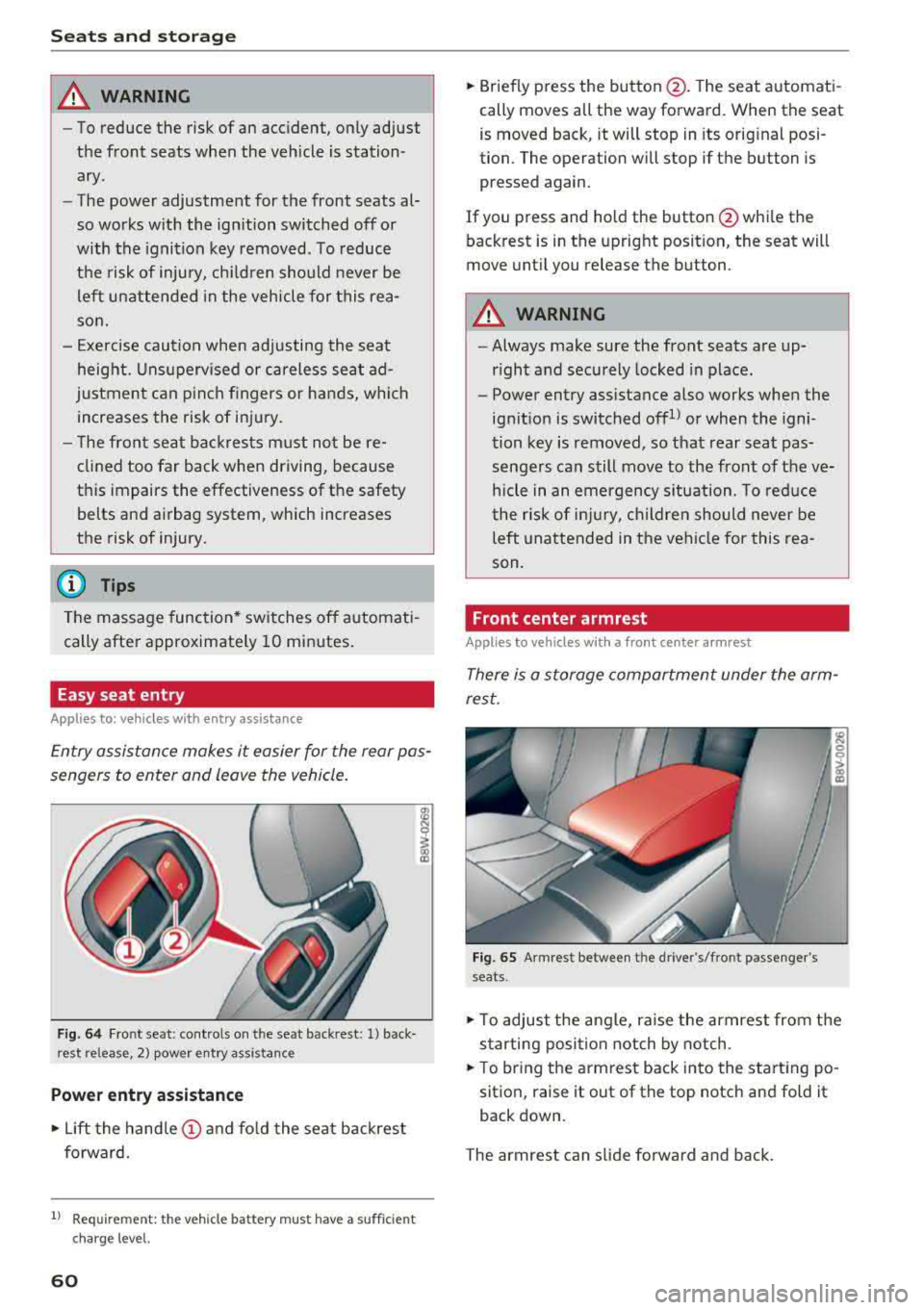
En try assistance makes it easier for the rear pas
sengers to enter and leave the vehicle.
F ig . 64 Fr ont se at: cont ro ls on t he sea t back res t: 1) back
rest release , 2) power entry a ssistance
Power entry assistance
.,. Lift the hand le (!) and fo ld the seat backrest
forward.
1) Requ irem en t: the ve hicle battery m ust have a suff ic ie n t
c ha rg e le v e l.
60
.,. Briefly p ress the button @. T he seat a utomati
cally moves all the way forward. When the seat
is moved back, it will stop in its orig inal posi
tion. The operation will stop if the button is
pressed again .
If you press and ho ld the button @whi le the
back rest is in the upright posit ion, the seat will
move unt il you release the button .
A WARNING
-Always make sure the front seats are up
r ight and securely locked in place.
-
- Power entry assistance also works when the
ign it ion is switched offll or when the igni
tion key is removed , so that rear seat pas
senge rs can still move to the front of the ve
hicle in an emergency s ituation. To reduce
the r isk of injury, childre n should never be
left unattended in the vehi cle for this rea
son.
Front center armrest
Applies to vehicles with a front center armrest
There is a storage compartment under the arm
rest.
Fig. 65 Armrest between t he dr ive r's/fro nt passenger 's
seats .
.,. To adjust the angle, raise the armrest from the
s tarting posi tion notch by notch .
.,. To br ing the armrest back in to the start ing po
sition, raise it out of the top notch and fold it
back down .
The armrest can slide forwa rd and ba ck .
Page 63 of 404
LL co .... N
" N .... 0 N > co
Head restraints
Front head restraints
Applies to: vehicles with adjustable head restraints
Applies to: version 1
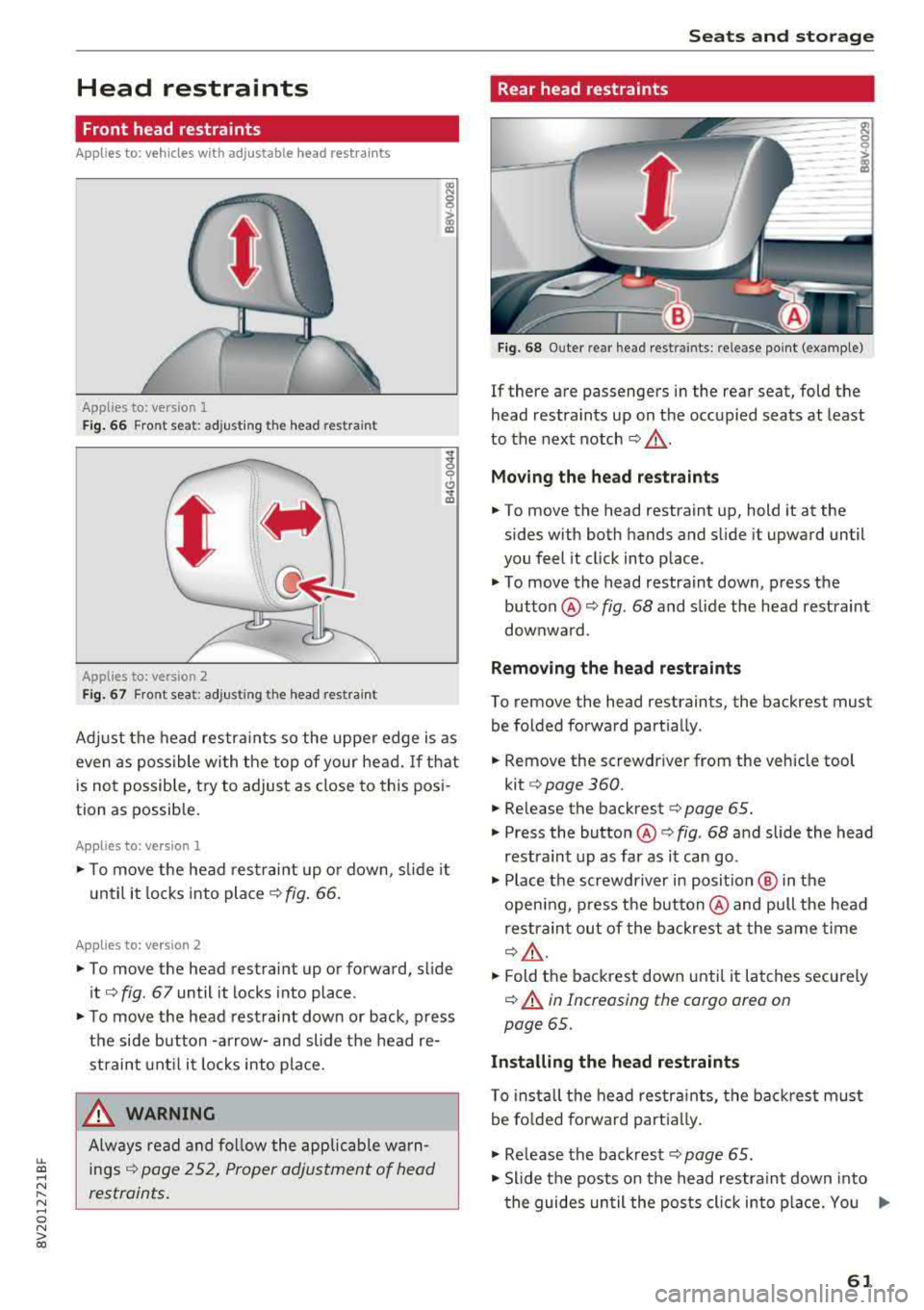
Fig . 66 Front seat: adjusting the head res train t
Applies to: version 2
Fig. 67 Front seat: adjusting the head restrain t
Adjust the head restra ints so the upper edge is as
even as possible wi th the top of your head.
If that
is not possible, t ry to adjust as close to this posi
tion as possible.
Applies to: version l
... To move the head restraint up or down, s lide it
until it locks into
place ¢ fig. 66.
App lies to: version 2
... To move the head restraint up or forward, slide
it¢ fig . 67 until it locks into place .
... To move the head restraint down or back, press
the side button -arrow-and slide the head re
straint unt il it locks into place.
_& WARNING
Always read and follow the applicable warn
ings
~ page 2 52, Proper adjustment of head
restraints.
-
S eats and storag e
Rear head restraints
~ -0 -c;>
18
Fig. 68 O uter rear head restraints: release point (example)
If there are passengers in the rear seat, fold the
head restraints up on the occupied seats at least
to the next notch
~ .&_ .
Mo ving the head r estraint s
... To move the head restraint up, hold it at the
sides with both hands and slide it upward until
you feel it cl ick into place .
.,. To move the head restraint down, press the
button@~ fig. 68 and slide the head restraint
downward .
Removing the he ad re straint s
To remove the head restraints, the backrest must
be folded forward partially .
... Remove the screwdriver from the vehicle tool
kit¢ page 360.
.,. Release the backrest ¢ page 65.
... Press the button @¢ fig. 68 and slide the head
restraint up as far as it can go .
.,. Place the screwdriver in posit ion @ in the
open ing , press the button @and pull the head
restraint out of the backrest at the same time
¢ A .
... Fold the backrest down until it latches securely
~.&. in Increasing the cargo area on
page 65.
In stalling the head r estraint s
To insta ll the head restra ints, the back rest must
be fo lded forward part ia lly.
.,. Re lease the backrest ¢ page 65.
.,. Slide the posts on the head restraint down into
t he guides un til the posts click into place. You
.,.
61
Page 64 of 404
Seats and stor age
shou ld not be able to pu ll the head restraint
out of the backrest.
~ Fo ld the backrest down until it latches securely
c:> .& in Increasing the cargo area on
page 65.
.,&. WARNING
-Always read and fo llow the applicable warn
ings
c:> page 252, Proper adjustment of
head restraints .
-Only remove the rear seat head restraints
when necessary in order to install a child
sa fety seat ¢
page 294, Child safety. In
stall t he head res tra int aga in immed iately
once the child safe ty seat is removed . Dr iv
ing with the head restraints removed or not
in the upright position increases the risk of
serious injury.
Power sources
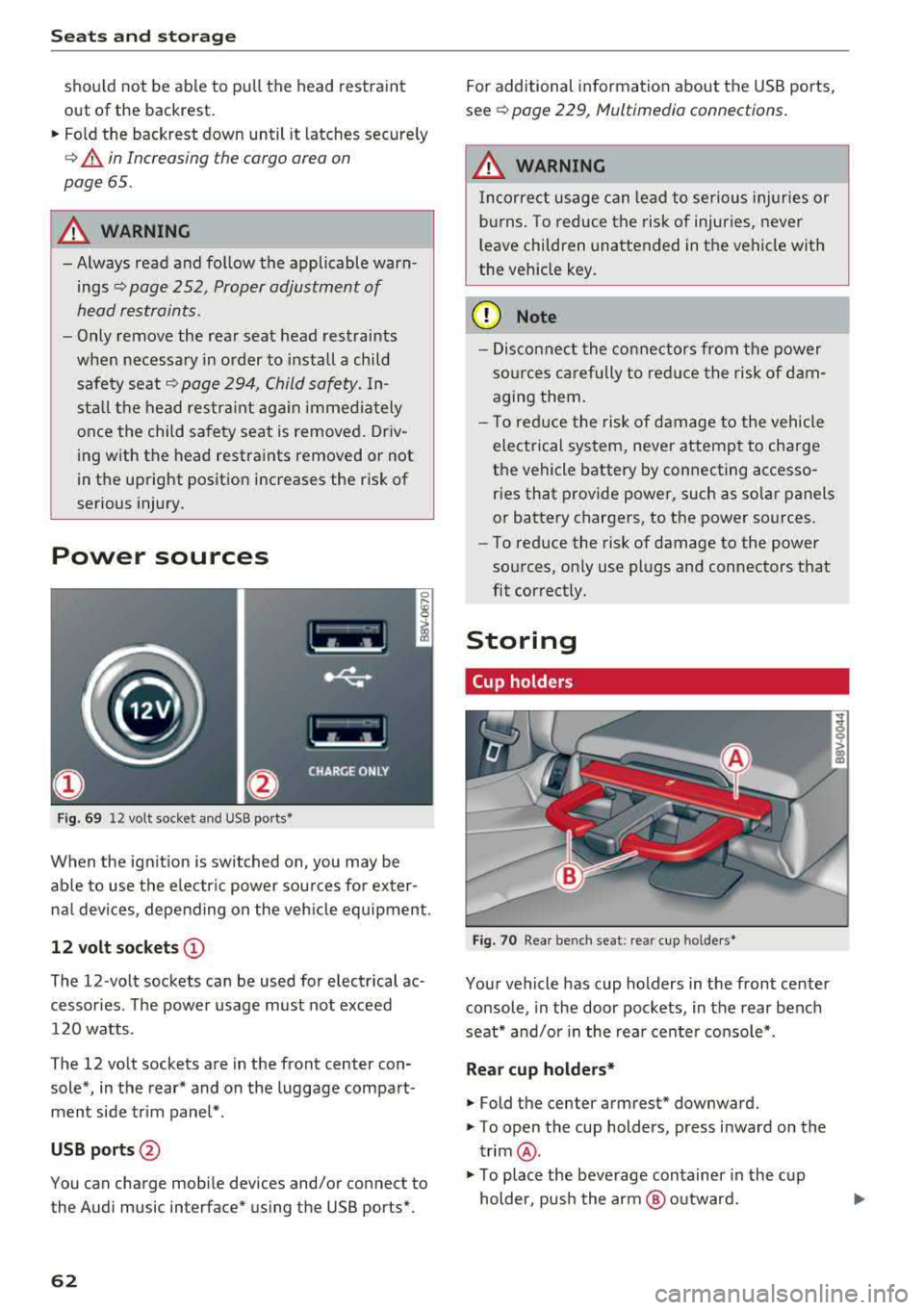
F ig . 69 12 volt socket and USB ports•
When the ign it ion is swit ched on , you may be
ab le to use the e lectr ic power sou rces for exter
nal devices, depending on the veh icle equipment .
12 volt sockets(!)
The 12-volt sockets can be used for electrical ac
cessories . The power usage must not exceed
120 watts .
The 12 volt sockets are in the front center con sole*, in the rear* and on the luggage compart
men t side tr im panel* .
USB ports @
You can charge mobile devices and/or connect to
the Audi music interface* us ing the USB ports*.
62 For additional information about the USB ports,
se e¢
page 229, Multimedia connections .
.,&. WARNING
Incorrect usage can lead to se rious injuries or
b ur ns. To reduce the risk of injuries, never
l eave children una ttended in the vehicle with
the vehicle key .
(D Note
-Disconnect the connectors from t he power
so urces carefully to reduce the risk of dam
agi ng them .
- T o red uce the risk of damage to the vehicle
electrical system, never attempt to charge
the vehicle battery by connecting accesso
ries that provide power, such as solar panels
or battery chargers , to the power sources.
- To reduce the risk of damage to the power
so urces, on ly use plugs and connectors that
fit correctly.
Storing
Cup holders
Fig . 70 Rear benc h seat : rea r cup holder s•
Your vehicle has cup holders in the front center
console, in the door pockets, in the rear bench
seat* and/or in the rea r cente r console*.
Rear cup holders*
~ Fold the center armrest* downward.
~ T o open the cup holders, press inward on the
trim @.
~ To place the beverage container in the c up
holder, pus h the arm @ outward.
Page 65 of 404
~ Then push the arm against the beverage con
tainer so that the arm lies closely against it.
~ To close the cup holders, push them back into
the slot.
A WARNING
-
- Do not put any hot beverages in the cup
holder while the vehicle is moving . Hot bev
erages could spill, wh ic h increases the risk
of injury.
- Do not use any breakable beverage contain
ers (for example, made out of glass or por celain). You cou ld be injured by them in the
event of an accident .
CD Note
Beverage containers in the cup holders should
always have a lid. If not, beverages could sp ill
and cause damage to vehicle equipment, such
electronics or seat covers.
Other storage
Applies to: sedan
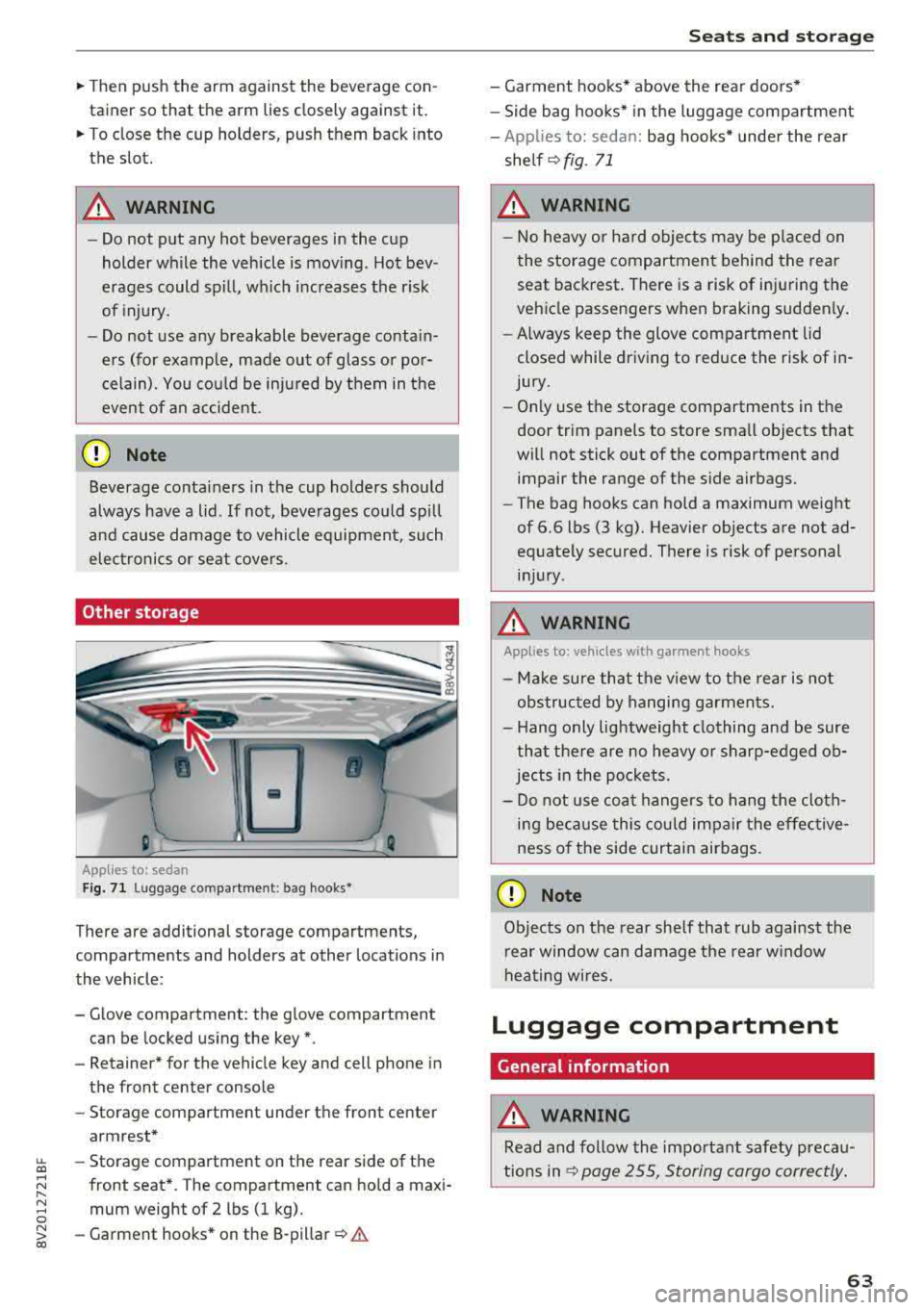
F ig. 7 1 Lugg age comp artment : bag hooks*
There are additional storage compartments,
compartments and holders at other locations in
the vehicle :
- Glove compartment : the glove compartment
can be locked us ing the key*.
- Retaine r* for the vehicle key and cell phone in
the front center console
- Storag e compartment under th e front center
armrest*
~ - Storage compartment on the rear side of the
.... ~ front seat* . The compartment can hold a maxi -
8 mum weight of 2 lbs (1 kg).
~ -Garment hooks * on the 8-pillar ¢ .& co
S eats and storag e
- Garment hooks* above the rea r doo rs *
- Side bag hooks* in the luggage compartment
- App lies to: sedan: bag hooks* unde r the rear
shelf ¢
fig. 71
A WARNING
-No heavy or hard objec ts may be p laced on
the storage compartment behind the rear seat backrest . There is a risk of injuring the
veh icle passengers when braking sudden ly .
- Always keep the glove compartment lid
closed while dr iv ing to red uce the risk of in
jury.
- On ly use the storage compartments in the
door trim panels to store sma ll objects that
will not stick out of the compartment and impair the range of the side airbags.
- The bag hooks can ho ld a maximum weight
of 6.6 lbs (3 kg). Heavier objects are not ad
equate ly secured. There is risk of personal
in jur y.
A WARNING ,_
Applies to: vehicles with garment hooks
- Ma ke sure that t he view to the rear is not
obs truc ted by hanging ga rments.
- H ang only lightweight clothing and be sure
that the re are no heavy o r sharp-edged ob
jec ts in the po ckets.
- Do not use coat hangers to hang t he cloth
i n g beca use this could impair the effective
ness o f the side curtain airbags .
CD Note
Objects on the rear she lf that rub against the
r ear window can d amage the rear w indow
hea ting wires.
Luggage compartment
General information
.&, WARNING
Read and follow the impo rtant s afety preca u
tions in
~ page 255, Storing cargo correctly .
63
Page 66 of 404
Seats and stor age
Luggage compartment cover
App lies to: ve hicles w ith luggage co mpartme nt cover
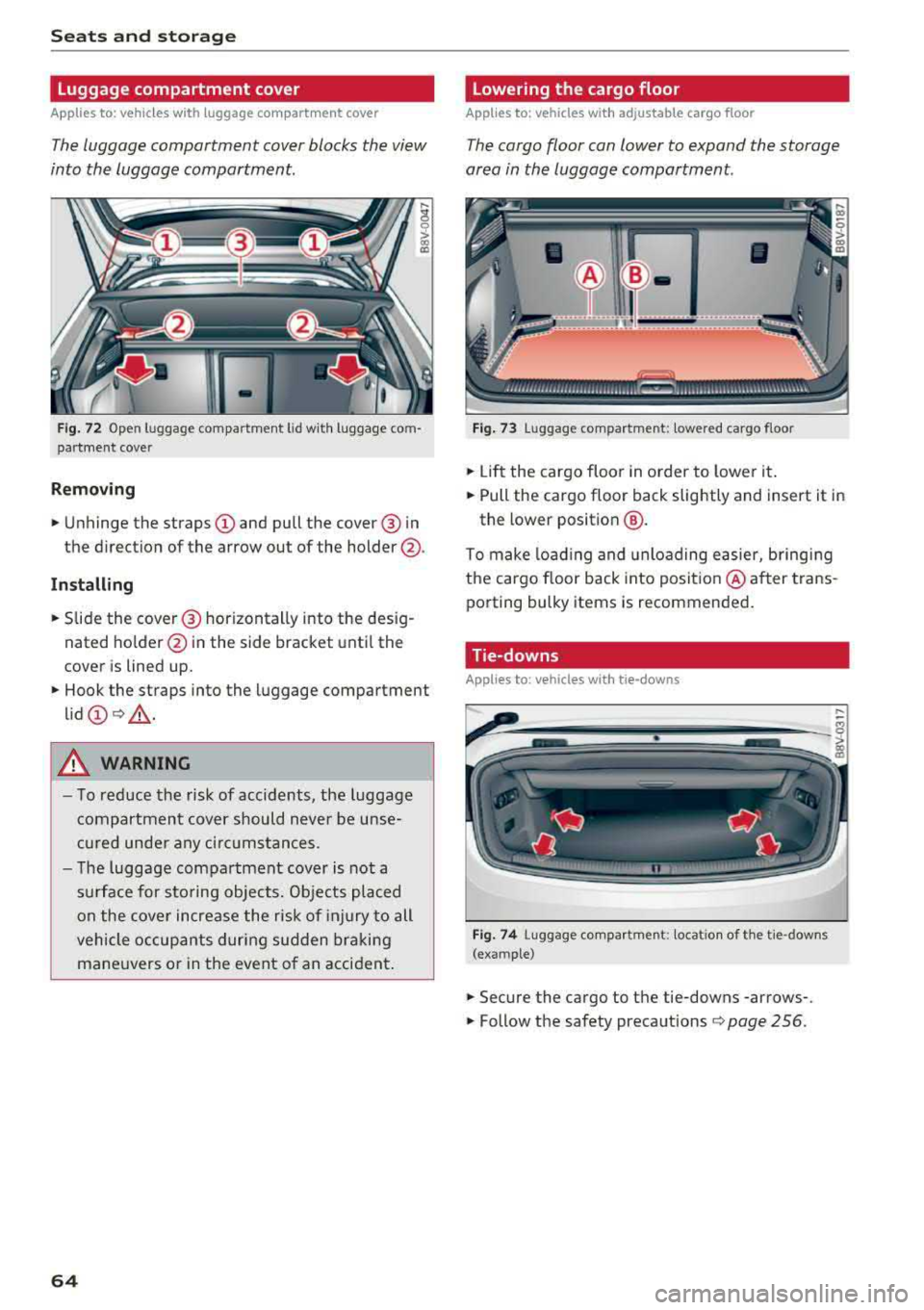
The luggage compartment cover blocks the view
into the luggage compartment.
F ig. 72 Open luggage compartment lid wit h luggage com
par tme nt cover
Remo ving
.. Unhinge the straps CD and pull the cover @ in
the direction of the arrow out of the holder @.
Install ing
.. S lide the cover @ horizontally into the des ig
nated ho lder @in the side bracket unt il the
cover is lined up.
.. Hook the straps into the luggage compartment
lid
CD Q _A .
A WARNING
- To reduce the risk of accidents, the luggage
compartmen t cover should never be unse
cu red unde r any ci rc u mstances.
- The luggage compartment cover is not a
s u rface for sto ring objects. Objects placed
on the cover increase the risk of injury to all
vehicle occupants during sudden bra king
mane uvers o r in the event o f an accident .
64
Lowering the cargo floor
Applies to : vehicles with adjustable cargo floor
The cargo floor can lower to expand the storage
area in the luggage compartment.
Fig . 73 Luggage compartment: lowered cargo floor
.. Li ft the cargo floor in order to lower it .
.. Pull the cargo floor back slightly and insert it in
the lower position
@ .
To make load ing and unloading easier, bringing
the cargo floor back into posit io n @ after trans
porting bulky items is recommended .
Tie-downs
App lies to : vehicles wi th tie- downs
Fig . 74 Luggage compartment: locat io n of th e tie -downs
(example)
.. Secure the cargo to the tie-downs -arrows-.
.. Follow the safety precautions Q page 256.
Page 67 of 404
LL co .... N
" N .... 0 N > co
Luggage compartment net/cargo bag
Applies to: vehicles with luggage compartment cargo net/car
go bag
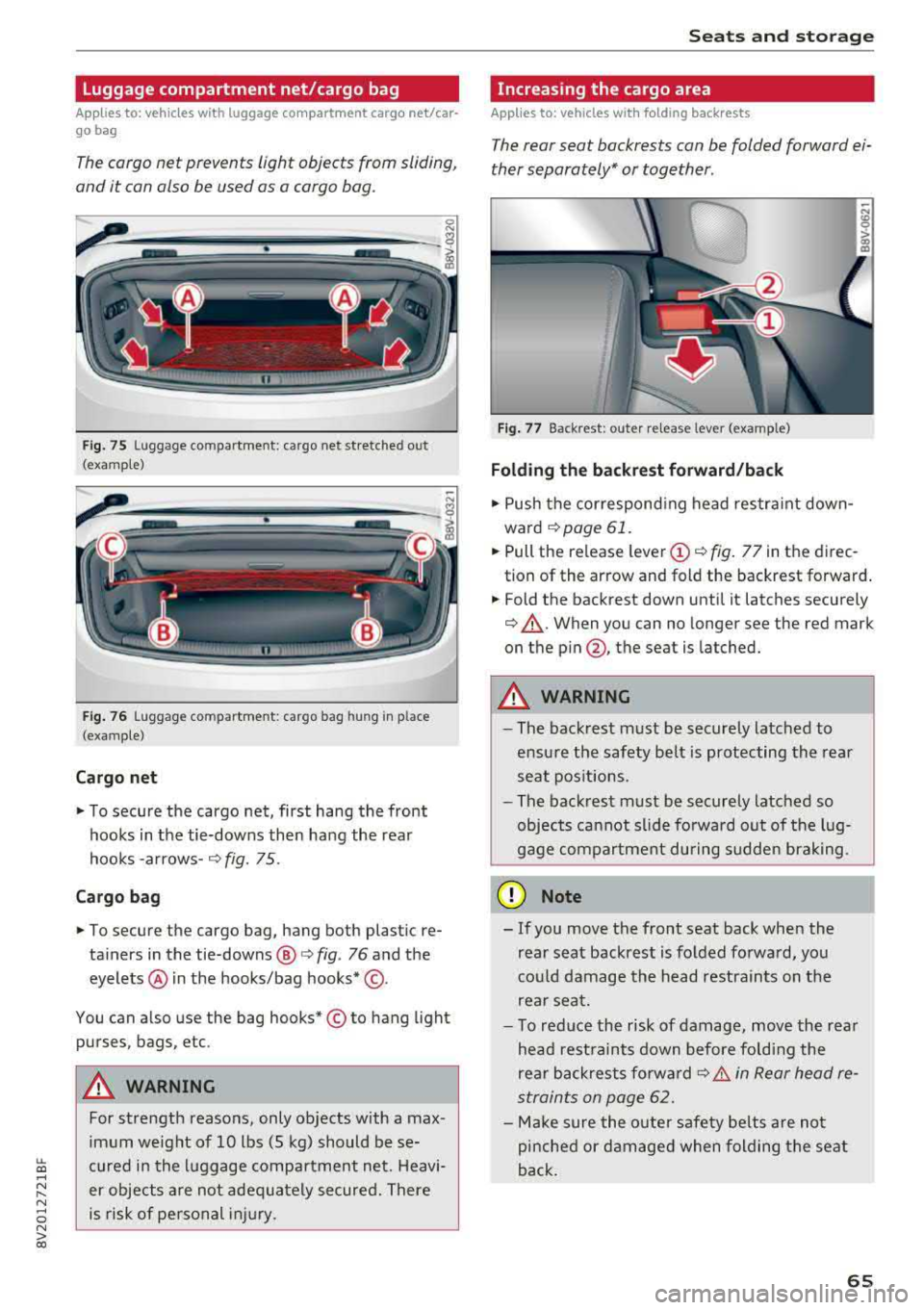
The cargo net prevents light objects from sliding,
and it can also be used as a cargo bog.
Fig. 75 Luggage compartment: cargo net stretched out
(examp le)
F ig . 76 Luggage compartment: cargo bag hung in place
(examp le)
Cargo net
" To secure the cargo net, first hang the front
hooks in the tie-downs then hang the rear
hooks
-arrows- ¢ fig. 75.
Cargo bag
" To secure the cargo bag, hang both plastic re
ta iners in the tie-downs @
c> fig. 76 and the
eyelets @ in the hooks/bag hooks* ©-
You can also use the bag hooks* © to hang light
purses, bags, etc .
A WARNING
For strength reasons, only objects with a max
imum weight of 10 lbs (5 kg) should be se
cured in the luggage compartment net. Heavi
er objects are not adeq uately secured. There
is risk of personal injury .
Seats and storag e
Increasing the cargo area
Applies to: vehicles with folding backrests
The rear seat backrests con be folded forward ei
ther separately* or together .
Fig. 77 Backrest: outer re lease lever (example)
Folding th e backr est forward /back
" Push the correspond ing head restra int down
ward
¢page 61.
" Pull the release leve r (D ¢ fig. 77 in the direc
tion of the arrow and fold the backrest forward .
.. Fold the backrest down until it latches securely
¢ &_. When you can no longer see the red mark
on the
p in @ , the seat is latched.
A WARNING ~ -
- The backrest must be securely latched to
ensu re the safety belt is protecting the rear
seat pos itions.
- The backrest must be securely latched so
objects cannot slide fo rwa rd out of the lug
gage compartment during sudden brak ing.
@ Note
- If you move the front seat back when the
rear seat backrest is folded forwa rd, yo u
cou ld damage the head restrain ts on the
rear seat.
- To red uce the risk of damage, move the rea r
head rest raints down before fo ld ing the
rear backrests fo rwa rd
¢ &. in Rear head re
straints on page
62.
- Make sure the oute r safety be lts are not
pinche d or damaged when folding the seat
back.
65
Page 68 of 404
Seats and storage
Pass-through
Applies to: vehicles with pass-through
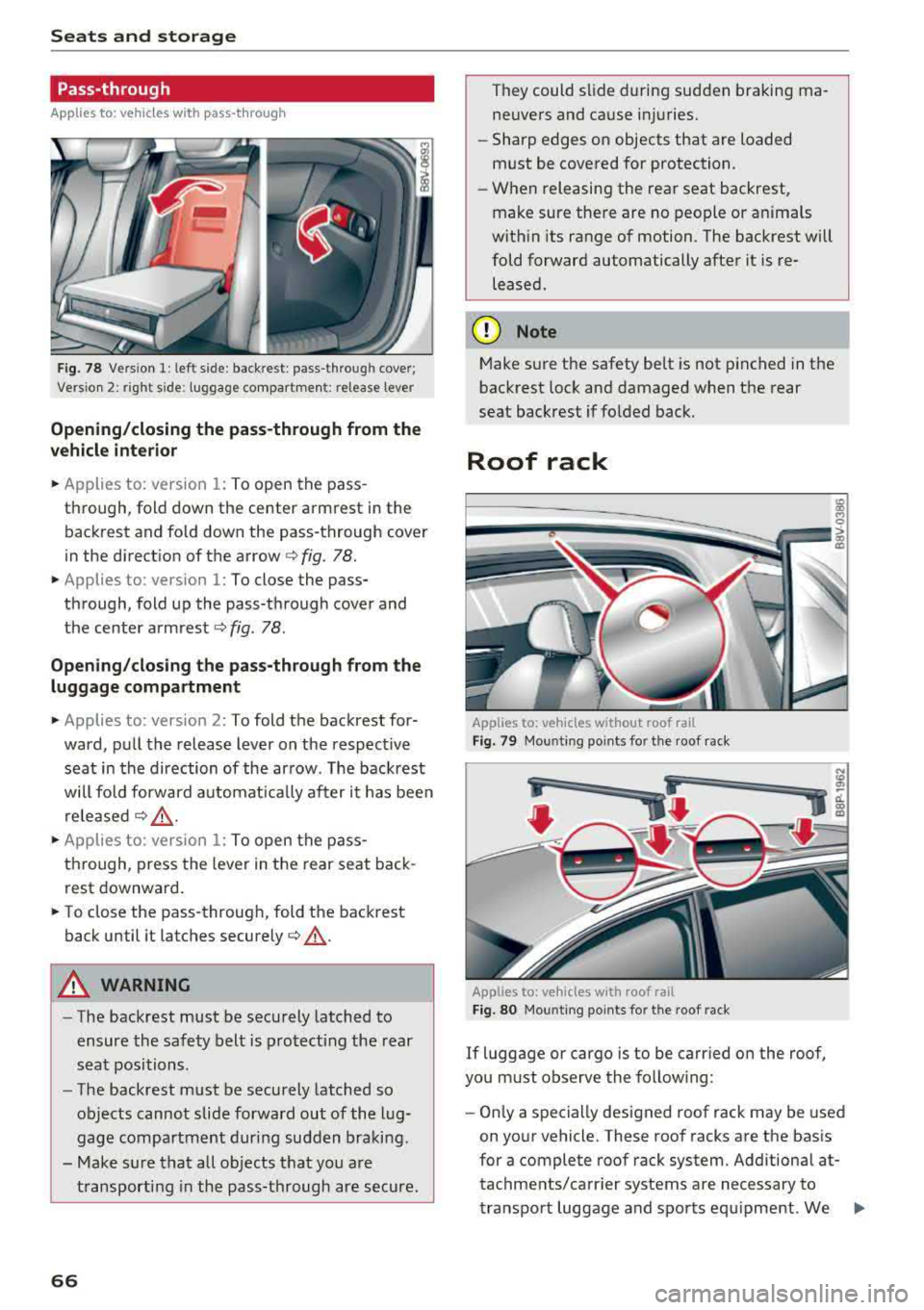
Fig. 78 Vers ion 1: left side: backrest: pass-through cover;
Vers io n 2: right side : luggage co mpartment: relea se lever
Opening/closing the pass-through from the
vehicle interior
.,. Applies to: version 1: To open the pass
through, fold down the center armrest in the backrest and fo ld down the pass-through cover
in the direct ion of the arrow
c:> fig. 78 .
.,. Applies to: version 1: To close the pass
through, fold up the pass-through cover and
the center
armrest¢ fig. 78.
Opening/closing the pass-through from the luggage compartment
.,. Applies to: version 2: To fold the backrest for
ward, pull the release lever on the respect ive
seat in the direction of the arrow. The backrest
will fo ld forward automat ically after it has been
released
¢ &_ .
.,. Applies to: version 1: To open the pass
through, press the lever in the rear seat back
rest downward .
.,. To close the pass-through, fold the backrest
back until it latches
securely¢ &_.
A WARNING
-The backrest must be securely latched to
ensure the safety belt is protecting the rear
seat positions .
- The backrest must be securely latched so
objects cannot slide forward out of the lug
gage compartment during sudden braking .
- Make sure that all objects that you are
transporting in the pass-through are secure.
66
They could slide during sudden braking ma
neuvers and cause injuries.
- Sharp edges on objects that are loaded
must be covered for protection.
- When releasing the rear seat backrest,
make sure there are no people or anima ls
with in its range of motion. The backrest will
fold forward automatically after it is re leased.
(D Note
Make sure the safety belt is not pinched in the
backrest lock and damaged when the rear
seat backrest if folded back.
Roof rack
Applies to: vehicles without roof rail
Fig. 79 Mounting po ints for the roof rack
Applies to: vehicles with roof rail
Fig. 80 Moun ting points fo r the roof rack
If luggage or cargo is to be carried on the roof,
you must observe the following:
- Only a specially designed roof rack may be used
on your vehicle. These roof racks are the basis
for a complete roof rack system. Additional at
tachments/carr ier systems are necessary to
transport luggage and sports equipment. We
..,.
Page 76 of 404
Driving
When not being used, a roof rack should be re
moved to decrease the wind resistance of the ve
hicle. This will save you approximately 12% fuel
at speeds from 62
-75 mph (100 -120 km/h).
Save energy
The engine drives the generator, which generates
electricity; the fuel consumption also increases
with the demand for electricity. Therefore, switch
electrical equipment
off when you no longer
need it. Examples of equipment that uses a lot of
energy are air blowers at a high setting, the rear
window defogger and seat heating* .
(D Note
-Do not leave engine idling unattended after
starting. If warning lights should come on
to indicate improper operation, they would
go unheeded. Extended idling also produces
heat, which could result in overheating or
other damage to the vehicle or other prop erty.
- Have your vehicle maintained properly and
in accordance with the service recommenda
tions in your Warranty
& Maintenance book
let . Lack of proper maintenance as well as
improper use of the vehicle will impair the
function of the emission control system and
could lead to damage.
- Do not alter or remove any component of
the Emission Control System unless ap
proved by the manufacturer.
- Do not alter or remove any device, such as
heat shields, switches, ignition wires,
valves, which are designed to protect your
vehicle's Emission Control System and other
important vehicle components.
@ Tips
The consumpt ion estimates as published by
ENVIRONMENTAL PROTECTION AGENCY
(EPA) and Transport Canada may not corre
spond to your actual consumption on the
road, which will vary depending upon vehicle
load and speed, road and weather conditions,
trip length, etc.
74
Steering
Adjusting the steering wheel position
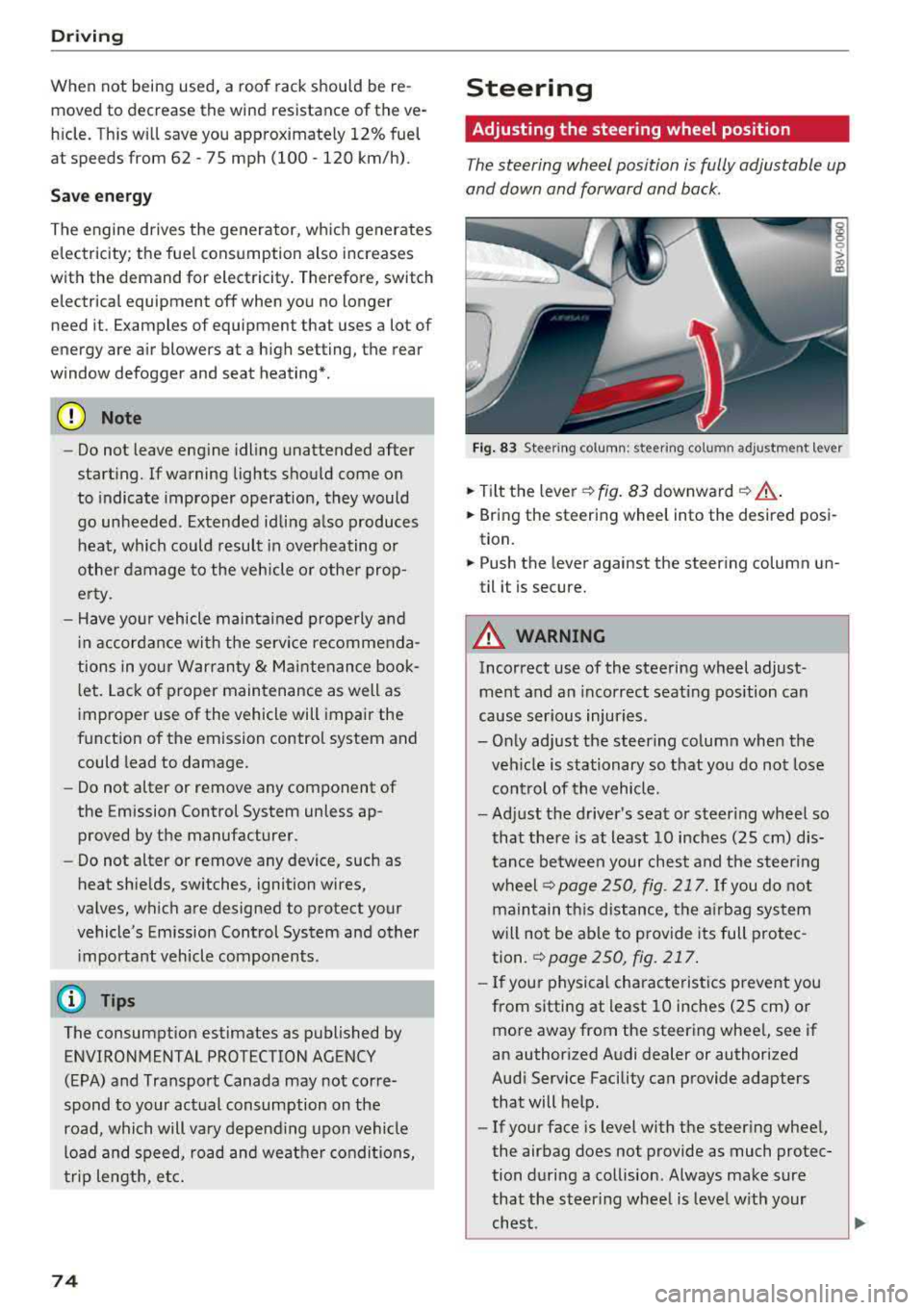
The steering wheel position is fully adjustable up
and down and forward and back.
Fig . 83 Steering column : steering column adjustment lever
.. Tilt the lever -c> fig. 83 downward¢ ,&..
.. Bring the steering wheel into the desired posi
tion.
.. Push the lever against the steering column un
til it is secure.
A WARNING
Incorrect use of the steering wheel adjust
ment and an incorrect seating position can
cause serious injuries.
- Only adjust the steering column when the veh icle is stationary so that you do not lose
control of the vehicle.
-
-Adjust the driver's seat or steer ing wheel so
that there is at least 10 inches
(25 cm) dis
tance between your chest and the steering
wheelr::!>page250, fig. 217. If you do not
maintain this distance, the airbag system
will not be able to provide its full protec tion.
c:> page 250, fig. 217.
- If your physical characteristics prevent you
from sitting at least 10 inches
(25 cm) or
more away from the steering wheel, see if
an authorized Audi dealer or authorized
Audi Service Facility can provide adapters that will help.
- If your face is level with the steering wheel,
the airbag does not provide as much protec
tion during a collision. Always make sure
that the steering wheel is level with your
chest.
Page 84 of 404
Drivin g
~ To start driving and re lease the parking brake
automatica lly, press the acce lerator pedal as
usua l.
I n addition to re leasing the par king brake auto
matica lly, other convenience and sa fety functions
are available when you start driving
r=;, poge 83,
Starting from a stop.
Pre venting th e automatic parking bra ke
r el eas e
The vehicle could begin ro lling unintentiona lly,
dep ending on the hill or if towing a trailer .
~ To preve nt the parking b rake from releasing au
tomatica lly, pull and hold the
®l switch and
press the acce lerator pedal. The parking brake
remains set and pr events the vehicle from ro ll
ing backward.
~ You can re lease the(®) switch again once you
are sure that you are g iv ing enough dr iv ing
force to the wheels by pressing the accelerator pedal.
Emergenc y bra king function
You can use the emergency brak ing funct ion in an
emergency situation, or if the standard brake op
eration malfunctions or is disabled .
~ Pull and hold the(®) switch.
~ As soon as you release the (®) switch or acceler-
ate, the brak ing stops .
Pu lling and holding
the(®) switch while driving
the vehicle activates the emergency braking f unc
tion . The vehicle is braked at all four wheels by
activating the hydraulic brake system. The brak
ing effect is s imilar to heavy braking
r=;, .,&. .
To reduce the risk of activating the emergency
braking by mistake, a warn ing tone (bu zzer)
sounds when the
®l swi tch is pulled. Emergency
braking stops as soon as the
®l switch is released
or the accelerato r pedal is pressed .
Parking
~ Press the brake peda l to stop the vehicle.
~ Pull the C® switch to set the parking brake.
~ Place the selector lever in the P pos ition.
~ T urn the eng ine off r=;, .,&. .
82
~ Turn the steering w hee l when parking on in
clines so that the w heels wi ll roll into the curb
if the vehicle starts moving .
A WARNING
- Do not press the acce lerator pedal inadver
tently if a gear is selected when the vehicle
is stationary and the eng ine is running . Oth
erwise, the vehicle will start to move imme
d iate ly and this could resul t in an accident.
- Emerge ncy brak ing should only be used in
a n emergency, when the norma l bra ke pedal
has fa iled or the bra ke peda l is obstr ucted.
D ur ing eme rgency bra king, you r vehicle w ill
brake s imilar to he avy braking. ESC and the
associated components (ABS, AS R, EDL)
cannot overcome the laws of physics.
Around curves and when road or weather
conditions a re bad, a full brake applicat ion
can cause the veh icle to skid or the rear end
to swerve, wh ich increases the risk of an ac
cide nt.
- If the power supply fails, you cannot set the
parking brake if it is released. In this case,
pa rk the veh icle on leve l ground and secure
it by p lac ing the sele cto r leve r in the P pos i
tion. See an au thor ized A udi dealer or au
thor ized A udi Se rvi ce Fa cility for assis tan ce.
- I f you leave the vehi cle, sw itch the ignition
off and take the veh icle key wi th yo u. Thi s
app lies pa rticular ly when children remain in
the vehicle. Otherwise, chi ld ren co uld start
the engine, release the parking brake or op
erate e lectr ica l equipment s uch as power
w indows, wh ich increases the r isk of an acci
dent.
- No one, especially c hildren, should rema in
in the vehicle when it is locked. Locked
doors make it more difficu lt for emergency
workers to get into the vehicle, which puts
lives at ris k.
(D Tips
When stopp ing at a traff ic signa l or stopp ing
i n city traffic, you can set the park ing brake
manually . The veh icle does not have to be
h eld with the brake pedal. The par king b rake
e liminates t he tendency to creep when a
Page 91 of 404
u. co ... N l' N
A WARNING
Please note that the wheels could spin on
slick or slippery roads when kick-down is ac
tive .
Launch control program
App lies to: ve hicles with S tro nic tra nsm issio n an d La unch
Co ntrol P rogram
-
The launch control program provides the best
possible acceleration when starting from a stop .
Requirement: the eng ine must be at operating
temperature and t he steer ing whee l must not be
turned.
.,. Deact ivate l) the S tart/Stop system*
~ page 81. The L ED in the ~ button turns on .
.,. Wi th the engine runn ing, p ress the I.!, O FF ! but
ton briefly one time . The
11 indicator light
turns on and the message
Stabili zation control
( ESC ): s port. W arning! Rest ricted st a bilit y
ap
pears in the instrument cluster display.
.,. Pull the selector lever back out of the "D/S" po
s it ion br iefly to select the S pos it ion, or press it
toward the right into the t iptronic pos ition or
select the
Dynamic d riving mode in d rive se
lect* ~ page 140.
.,. Press t he b rake peda l firmly with you r left foot
and hold it all the way down for at least one
second .
.,. At the same time, press the gas pedal a ll the
way down with your right foot unt il the engine
reaches and stays at a high RPM level.
.,. Remove your left foot from the brake pedal
within five
seconds ~,&. .
A WARNING
-Always adapt yo ur driv ing to the traffic flow.
- Only use Launch Control when road and traf-
fic cond itions allow it and other dr ivers will
not be endangered or impacted by you r driv
ing and the vehicle 's accele ration.
- Please note tha t the drive whee ls can sp in
and the vehicle can break away when sport
8 l ) It is n ot poss ib le to deac tiv ate t he system wit h all ve rs io n s N &j of th e tran sm iss ion.
Driving
mode is switched on, especially when the
road is slippery.
- Once the vehicle has started moving, press
the !.!> OFF I button briefly to turn the sport
mode off.
(D Tips
- The transmission temperat ure may increase
significant ly after using the launch control
program. If that happens, the program may
not be ava ilable for a few minutes. It will be
availab le aga in after a cool-down period.
- When accelerating using the launch contro l
program, all vehicle parts are subject to
heavy loads . This can lead to increased
wear .
Transmission malfunction
Applies to: vehicles wit h automatic transmissions
• Transmis sion : malfunction! Pl eas e s top ve
hicle and shift to P
There is a malfunction in the transmission . Park
the vehicle securely and do not cont inue driv ing .
See an author ized Audi dealer or author ized Audi
Se rvice Facility for assistance .
• Transmission o verhe ating! Plea se stop th e
vehicle!
The transmission is too hot and can become dam
aged. Stop and let the transmiss ion cool w ith the
engine running (at idle) i n the "P" selector lever
pos ition . T hen the ind icator light and the mes
sage turn off, d rive to an authorized Aud i dealer
o r auth o rized Aud i Serv ice Facility immediately to
have t he malfunct ion cor rected . If the indicato r
light and the driver message do not turn off, do
not continue driving . See an authorized Audi
dealer or authorized Audi Service Facility for as
s istance.
[O] Tran smission: malfunction! You can contin-
u e dri ving. See owne r's manual
.,.
89