USB AUDI A3 SEDAN 2018 User Guide
[x] Cancel search | Manufacturer: AUDI, Model Year: 2018, Model line: A3 SEDAN, Model: AUDI A3 SEDAN 2018Pages: 404, PDF Size: 62.3 MB
Page 239 of 404
u. 00 ... N l' N ... 0 N > 00
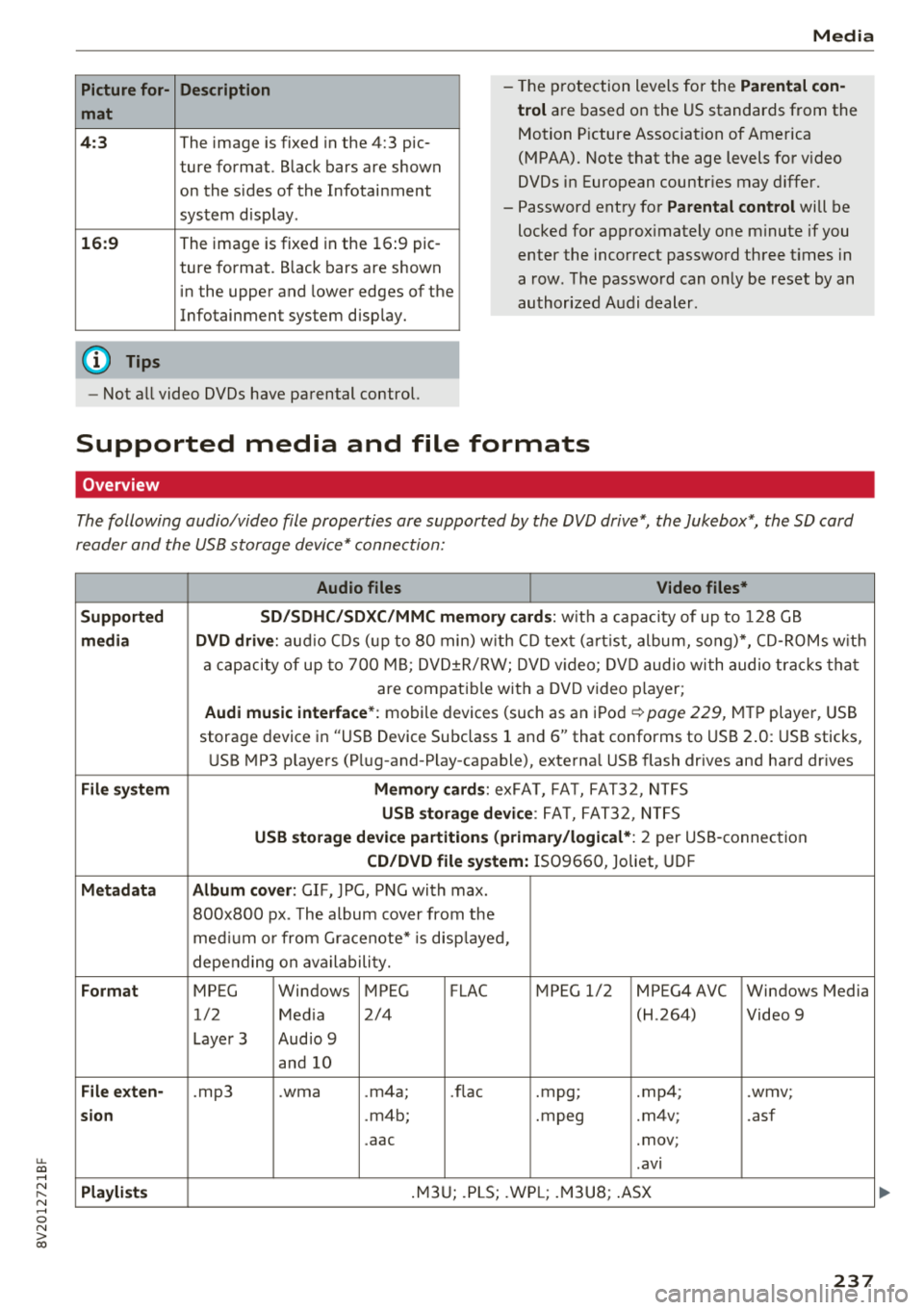
Picture for-
mat
4: 3
16 :9
(D Tips Description
The image is fixed
in the 4:3 pie-
ture format. Black bars are shown
on the sides of the Infotainment
system d isplay.
The image is fixed in the 16 :9 pie -
ture format . B lack bars are shown
in the upper and lower edges of the
Infotainment system disp lay.
Media
-T he p rotection levels for the Parental con
t rol
are based on the US standards from the
Motion P icture Associat ion of America
(MPAA). Note that the age levels fo r video
DVDs in European countr ies may differ.
-Password ent ry fo r Parental control will be
locked for approx imately one m inute if you
enter the incorrect password three t imes in
a row. The password can o nly be reset by an
au thori zed A udi dealer.
-Not a ll video DVDs have parental control.
Supported media and file formats
Overview
The following audio/video file properties are supported by the DVD drive*, the Jukebox*, the SD card
reader and the USB storage device* connection:
Audio files Video files*
Supported SD/SDHC /SDXC /MMC m emory cards :
with a capacity of up to 128 GB
media DVD drive : audi o CDs ( up to 80 min) w ith CD tex t (a rt ist, album, so ng)*, CD -R O Ms w ith
a ca pacity of up to 70 0 M B; D V D± R/RW; DVD video; DV D audio wi th audio t ra ck s tha t
are compatible with a DVD video p layer;
Audi music interface *: mobile devices (such as an i Pod i::> page 229, M TP playe r, USB
storage device in "USB Device Subclass 1 and
6" that conforms to USB 2 .0: USB sticks,
U SB MP3 p laye rs (P lug-and-P lay-capable), external USB flash drives and ha rd dr ives
File system Memory cards : exFA T, FA T, FAT32, NTFS
USB storage device : FA T, FA T32 , NTFS
USB storage device partition s (primary/logical* : 2 per USS-connec tion
CD/DVD file sy stem: IS09660, Joliet, UDF
Metadata Album cover : GIF, )PG, P NG with max.
800x800 px . The album cover from the
me diu m o r from Gracenote* is disp layed,
depe nding on ava ilabili ty.
Format MPEG Windows MPEG FLAC MPEG 1/2 MPEG4 AVC Windows Media
1/2 Med ia 2/4 (H
.264)
Video 9
Laye r 3 Aud io 9
and 10
File e xten-.mp3 .wma .m4a; .nae .mpg; .mp4; .wmv;
sion .m4b; .mpeg .m4v; .asf
.aac .mov;
.avi
Pla ylists .M3 U; .PLS; .WP L; .M3 U8; .ASX
237
Page 240 of 404
Media
Audio files Video files*
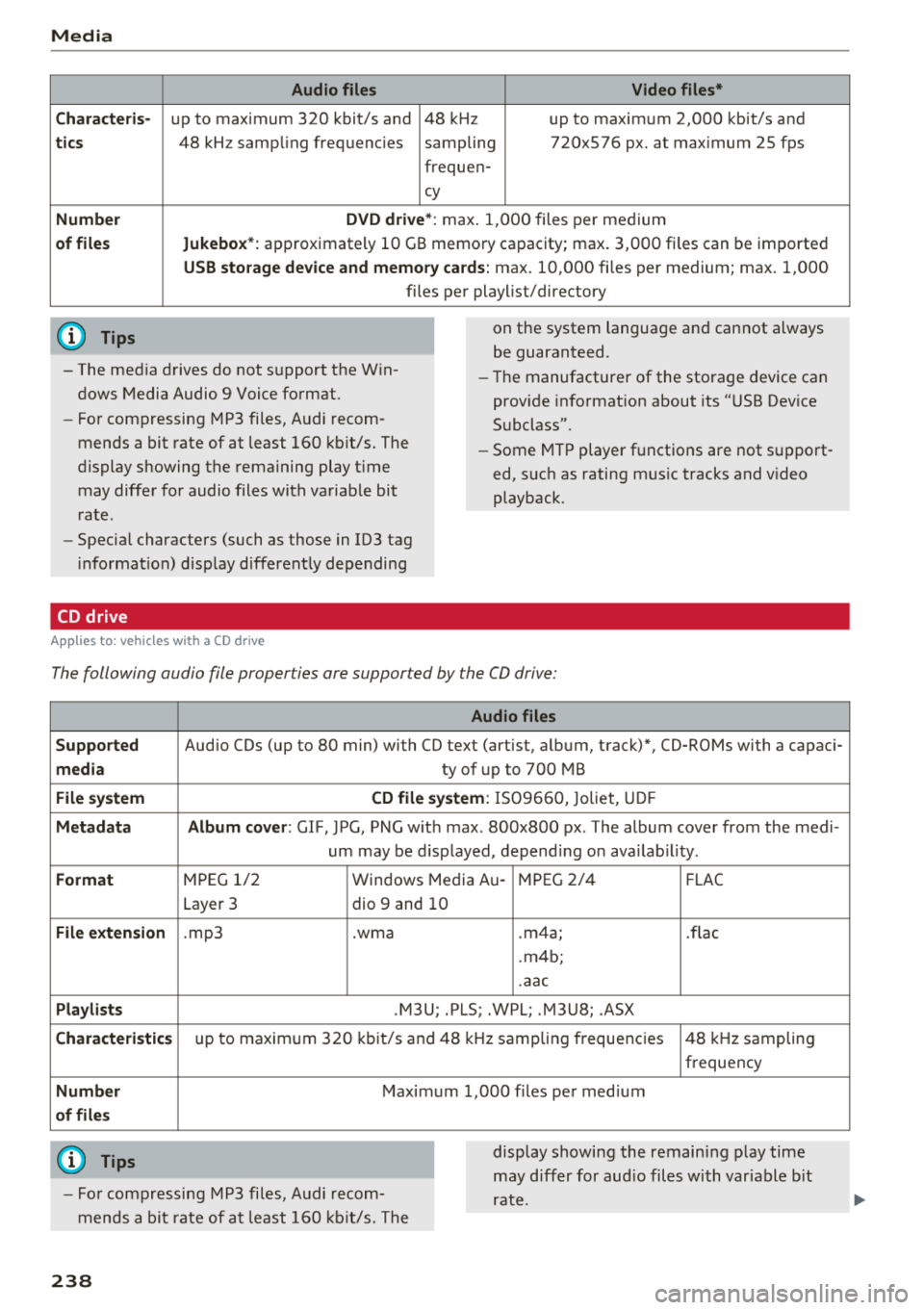
C ha rac te ris-
up to maximum 320 kbit/s and 48 kHz up to maximum 2,000 kbit/s and
tic s 48 kHz samp ling frequencies sampling 720x576 px. at max imum 25 fps
frequen-
cy
Numbe r DVD driv e *: m ax. 1,000 files per medium
of fil es Jukebox*: approximately 10 GB memory capacity; max. 3,000 fi les can be imported
USB stor age de vice and memor y cards: max . 10,000 fi les per medium; max. 1,000
files pe r playlist/directory
(D Tips
- The med ia drives do not support the W in
dows Media Audio 9 Voice format.
- Fo r compressing MP3 fi les, Audi recom
mends a bit rate of at least 160 kb it/s. The
display showing the remaining play t ime
may differ for audio files with variable bit
rate.
- Specia l characters (such as those in 103 tag
i nformat ion) d isplay d ifferent ly depending
CD drive
A pp lies to: ve hicles w it h a CD drive
on the system language and cannot always
be guaranteed.
- The manufacturer of the storage device can
prov ide informat ion about its "USB Dev ice
Subclass".
- Some M TP player functions are not s upport
ed, such as rating mus ic tracks and v ideo
playback.
The following audio file properties are supported by the CO drive:
Audio files
Supp orted
Audio CDs (up to 80 min) with CO text (artist, album, track)*, CO-ROMs with a capaci-
m edia ty of up to 700 MB
File system CD file sy ste m : IS09660, Joliet, UD F
M eta d ata Album co ver : GIF, )PG, PNG w it h max . 800x800 px . The album cover from the medi-
um may be d isplayed, depend ing on ava ilab il ity.
Format M PEG 1/2 Windows Media Au -MPEG 2/4
FLAC
Layer 3 dio 9 and 10
File exte nsion .mp3 .wma .m4a; .flac
. m4b;
.aac
Pla ylis ts .M3U; .PLS; .WPL; .M3U8; .ASX
Chara cte ris tic s up to maxim um 320 kbit/s and 48 k Hz sampling frequencies 48 k Hz sampling
frequency
Numb er Maximum 1,000 f iles per med ium
o f fil es
(D Tips
- Fo r compressing MP3 files, Audi recom
mends a bit rate of at least 160 kb it/s. The display showing the remain
ing play time
may differ for aud io files with var iable b it
rate.
23 8
Page 242 of 404
Media
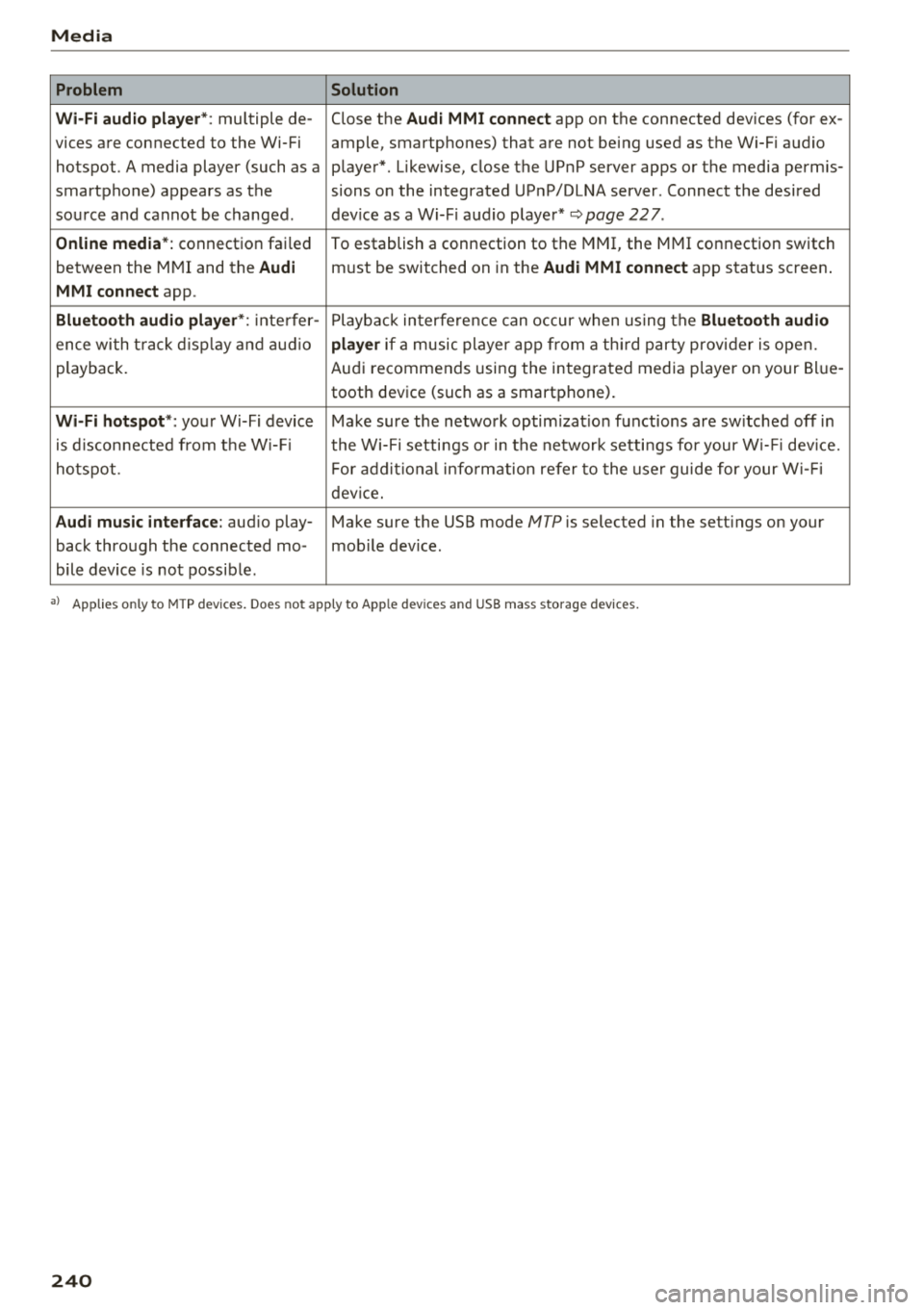
Problem Solution
Wi-Fi audio playe r*:
multiple de- Close the Audi MMI connect app on the connected devices (for ex -
vices are connected to the Wi-Fi ample, smartphones) that are not being used as the Wi-Fi audio
hotspot. A media player (such as a player*. Likewise, close the UPnP server apps or the media permis-
smartphone) appears as the sions on the integrated UPnP/DLNA server. Connect the desired
source and cannot be changed. dev ice as a Wi-F i aud io player*
~page 227.
Online media*: connection failed
To establish a connection to the MMI, the MMI connection switch
between the MMI and the
Audi must be switched on in the Audi MMI connect app status screen .
MMI connect app.
Bluetooth audio player *: inte rfer -Playback interfere nce can occur when us ing the Bluetooth audio
ence wi th t rack d isp lay and audio player if a music player app from a third party provider is open.
playback. Audi recommends using the integrated media p layer on your Bl ue-
tooth device (such as a smartphone).
Wi-Fi hotspot *: your Wi-Fi device Make sure the network optim izat ion functions are sw itched off in
is disconnected from the W i- Fi the Wi-Fi setti ngs or in the network settings for your W i- Fi dev ice.
ho tspot. For additional information refer to the user guide for your Wi-Fi
device.
Audi music interface: aud io play- Make sure the USB mode MTP is selected in the sett ings on your
back through the connected mo- mob ile device.
bile device is not possible .
a) Applies only to MTP devices. Does not app ly to Apple dev ices and USB m ass storage dev ices.
240
Page 243 of 404
u. 00 ... N l' N ... 0 N > 00
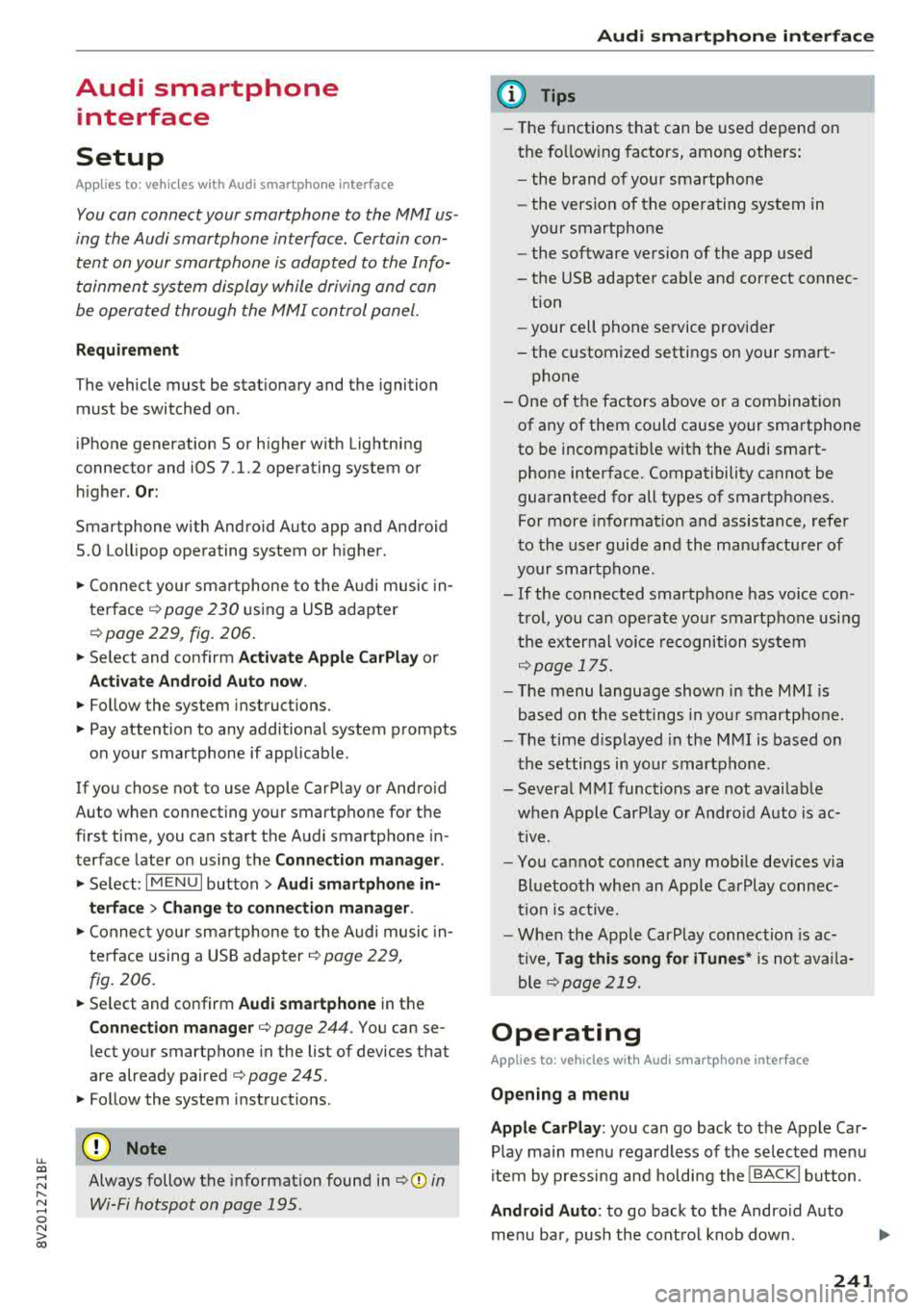
Audi smartphone interface
Setup
A ppl ies to : ve hicles w ith Audi smartpho ne inte rfa ce
You con conn ect your smortphone to the MM I us
ing the Audi smortphon e int erfac e. Certain con
t e n t on you r sm ortphone is ado pted to th e Info
tainme nt system d is p lay while driving and con
be operated through the
MMI control panel .
Requirement
The vehicle must be stat ionary and the ignition
must be switched on .
iPhone generation 5 or h igher w ith Lightning
connector and iOS 7 .1.2 operating system or h igher.
O r:
Smartphone with Android Auto app and Android
5 .0 Loll ipop operating system or higher.
.,. Connec t your sma rtphone to the Audi music in
terface ¢ page 230 using a USB adapte r
¢ page 229, fig. 206.
.. Select and confirm A ctivate Apple CarPlay or
Acti vate And roid Auto now .
.. Follow the system instruct ions.
.. Pay attention to any additiona l system prompts
on your smartphone if applicable .
If yo u chose not to use Apple CarP lay or Android
Auto when connecting your smartphone for the
first time, you can start the Audi smartphone in
terface later on using the
Connection manager.
.,. Se lect : I MENU I button > Audi smartphone in-
terfa ce
> Change to connection manager .
.. Connect your sma rtphone to the A udi music in
terface using a USB
ad apter ¢ page 229,
fig. 206.
.. Select and confirm Audi smartphone in t he
Connection manager ¢ page 244. You can se
l ect your smartphone in the list of devices that
are already
paired¢ page 245.
.,. Follow the system instruct ions .
@ Note
Always follow the i nformat ion found in¢ @) in
Wi-Fi hotspot on page 195 .
Audi smartph one interfac e
(D Tips
-The functions that can be used depen d on
the fo llow ing factors, among others:
- the brand of your smartphone
- the vers io n of the ope rating system in
your smartphone
- the software ve rsion of the app used
- the USB adapter cab le and correct connec-
tion
- your cell phone se rvice provide r
- the customized settings on yo ur sma rt -
phone
- One of the factors above o r a com bina tion
of any of them could cause your sma rtphone
to be incompatib le wit h the Audi smart
phone inter face. Compatibility cannot be
guaranteed for all types of smartp hones.
For more informat io n and assistance, refer
t o the user guide and the man ufactu rer of
yo ur sma rtphone .
- If the connected smartphone has voice con
tr ol, you can ope rate yo ur smartp hon e usi ng
the ex ter nal voic e recognition system
¢page 175.
- Th e menu language show n in t he MMI is
based on t he sett ings in you r smartp ho ne .
- Th e time d is p layed in the M MI is based o n
the settings in yo ur sma rtphone .
- Severa l M MI functions a re not avai lab le
when Apple Car Play o r Andro id A uto is ac
t ive.
- Yo u ca nnot co nnect any mob ile dev ices via
B lu etooth whe n an App le CarPlay connec
tion is a ctive .
- Whe n the App le CarPlay connection is ac
t ive,
Tag this song for iTunes* is not av aila
ble
¢p age 219 .
Operating
A pp lies to: vehicles wit h Audi sm artph one interface
Opening a menu
Apple CarPlay :
you can go back to the Apple Ca r
Play main me nu regardless of the se lected me nu
i tem by p ressing and holdi ng the
I BACKI button .
Android Auto : to go back to the Andro id Auto
menu bar , push the control knob down .
241
Page 244 of 404
Audi smartphone interface
Opening a menu item
Select and confirm a menu item using the MMI
control panel.
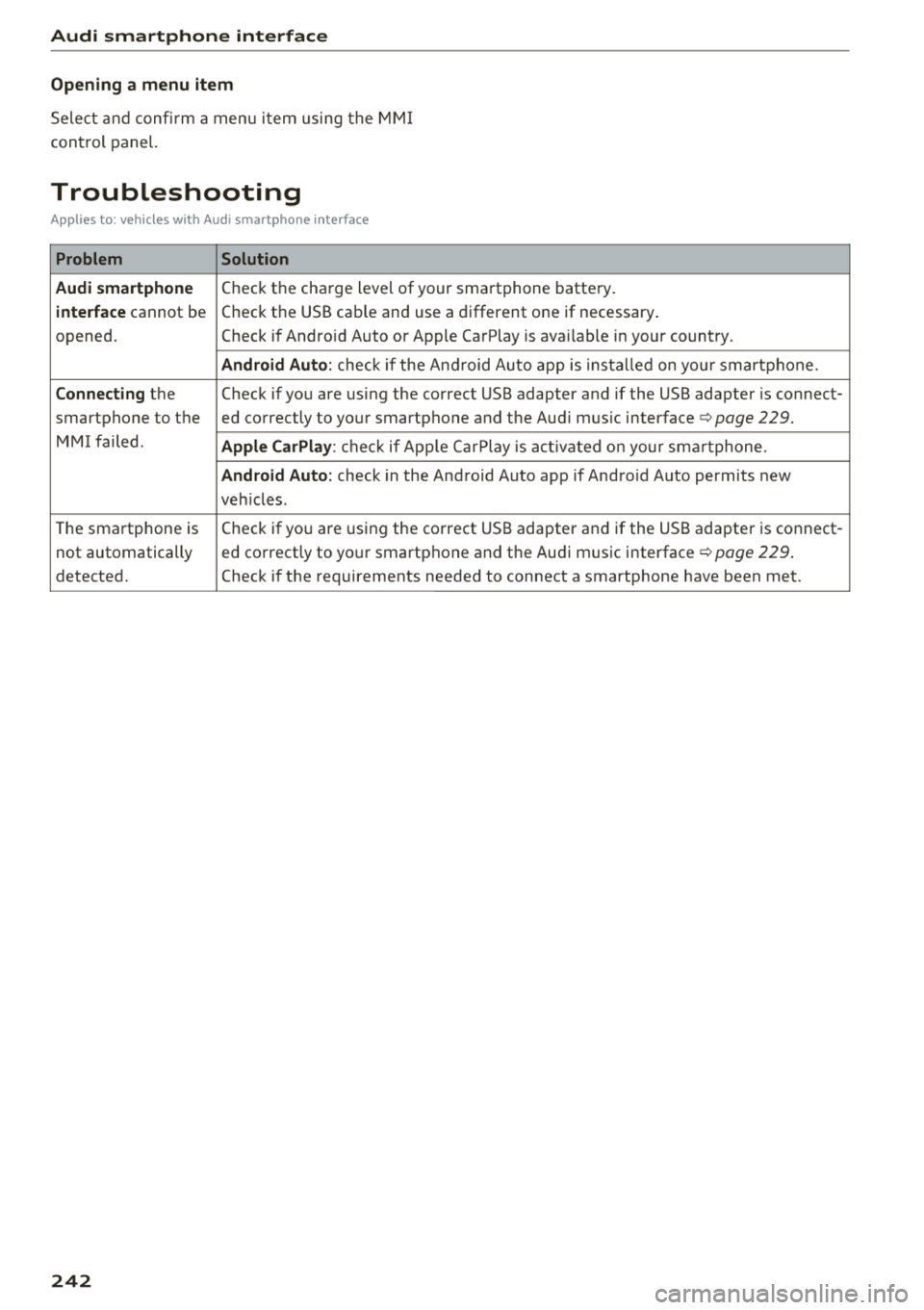
Troubleshooting
Applies to: vehicles with Audi smartphone interface
Problem Solution
Audi smartphone
Check the charge level of your smartphone battery.
interface cannot be Check the USB cable and use a different one if necessary
.
opened. Check if Android Auto or Apple CarPlay is available in your country.
Android Auto : check if the Android Auto app is installed on you r smartphone .
Connecting the Check if you are using the correct USB adapter and if the USB adapter is connect-
smartphone to the ed correctly to your smartphone and the Aud i mus ic
interface ¢ page 229.
MMI failed . Apple CarPlay: check if App le CarPlay is activated on your sma rtphone .
Android Auto: check in the And raid Auto app if Android Auto permits new
veh icles .
T he smartphone is Check if you are using the correct USB adapter and
if the USB adapter is connect -
not automatically ed correctly to your smartphone and the Audi music
interface
¢ page 229.
detected. Check if the requirements needed to connect a smartphone have been met.
242
Page 247 of 404
u. 00 ... N l' N ... 0 N > 00
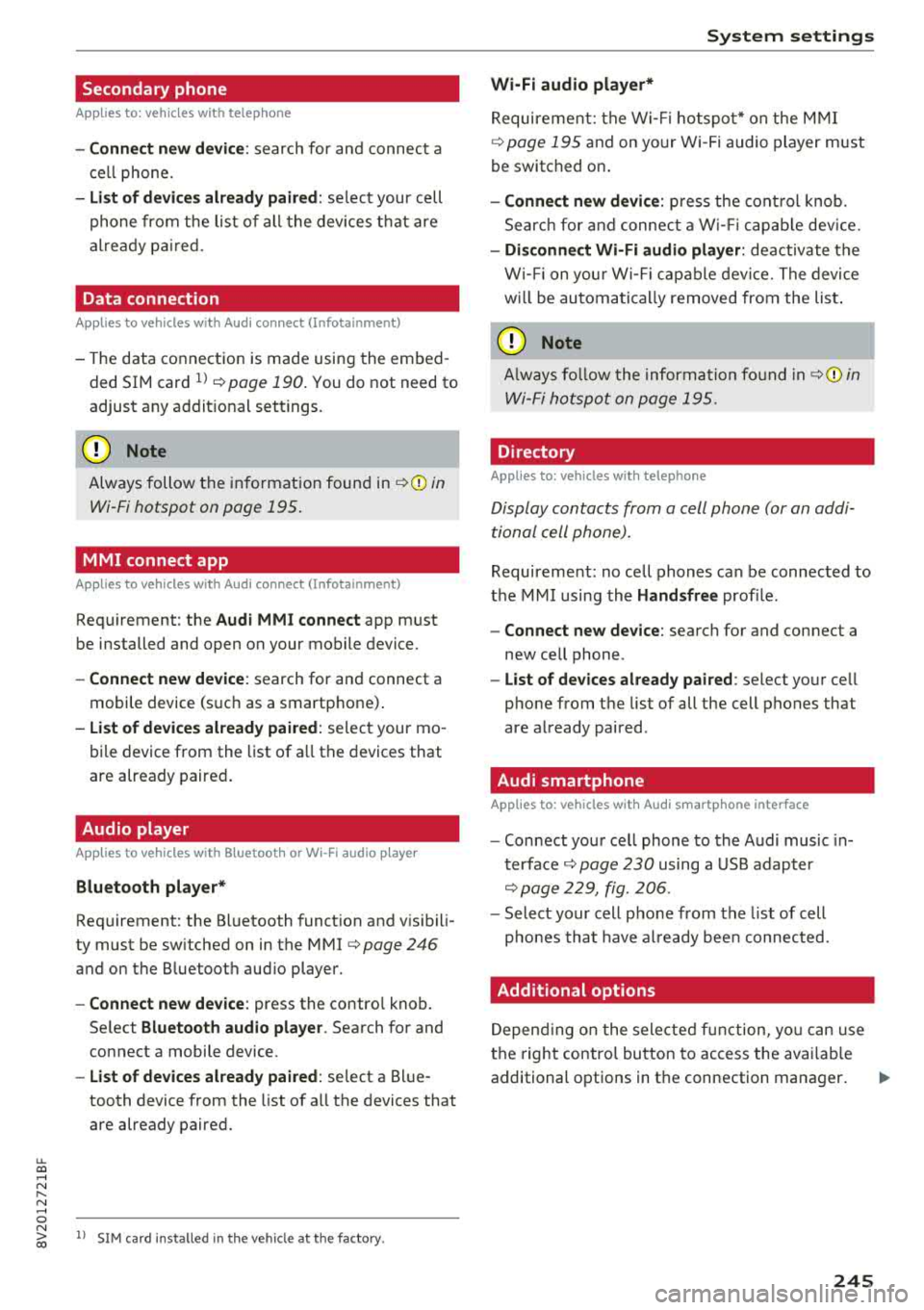
Secondary phone
Applies to: vehicles with telephone
-Connect new device : search for and connec t a
c e ll phone.
- List of devices already paired : selec t your cell
p hone fro m the lis t of all the devices t hat are
al re ad y p aired.
Data connection
Applies to vehicles with Audi connect (Infotainment)
- T he data conne ct ion is made using the em bed
ded SIM car d
ll i=>page 190. You do not need to
adjust a ny a ddit io n al sett ings.
{Ll) Note
Always follow t he inf ormat ion foun d in i=> @ in
Wi-Fi hotspot on page 195 .
MMI connect app
Applies to vehicles with Audi connect (Infotainment)
Requirement: the Audi MMI connect app m ust
be installed and open on your mobile device.
- Connect new device : search for and connect a
mobile device (s uch as a smartp hone) .
-List of devices already paired : selec t your mo
bile device from the list of a ll the devices that
are already paire d.
Audio player
Applies to vehicles with Bluetooth or Wi-Fi audio player
Bluetooth player*
Requirement: the Bluetooth funct ion and v is ibili
ty must be sw itched on in the MMI
i=> page 246
and on the B luetoot h aud io player.
- Connect new device : press the control knob.
Se lect
Bluetooth audio player . Search fo r and
connect a mobile device .
-List of devices already paired : select a Bl ue
tooth device from the list of a ll the devices that
are already paire d.
ll SIM card inst alle d in t he v eh icle at the fa ctory.
System settings
Wi-Fi audio player*
R eq uiremen t: th e W i-Fi h otspo t* on the M MI
i=> page 195 an d on yo ur Wi -Fi audio playe r must
be switched o n.
-Connect new device: press the co ntrol knob.
Se arch for and conne ct a W i-Fi ca pabl e dev ice.
- Disconnect Wi-Fi audio player: de activate t he
W i-Fi on you r W i-Fi capa ble dev ice. The devi ce
w ill be au tom atic a lly removed from the lis t.
@ Note
Alway s follo w the inf ormat ion foun d in i=> @ in
W i-F i h ots pot on p age 195.
Directory
Applies to: vehicles with telephone
Display contacts from a cell phone (or an addi
tiona l cell phone).
Requirement: no ce ll phones can be connec ted to
the MMI using the
Handsfree pro file.
- Connect new device: search for and connect a
new ce ll phone .
-List of devices already paired : select yo ur cell
phone from t he list of all the cell phones that
are a lready paired .
Audi smartphone
Applies to: vehicles with Audi smartphone interface
-Connect yo ur cell phone to the A udi music in
t erface
i=> page 230 using a USB adap ter
i=> page 22 9, fig. 2 06.
- Sel ect your cell p ho ne from t he list of cell
p ho nes th at h ave already bee n con nec ted.
Additional options
D epen ding on the sele cted fun ct ion, yo u ca n use
t h e righ t contro l bu tton to access the ava ila bl e
additional options in t he connection mana ger .
.,.
245
Page 248 of 404
System settings
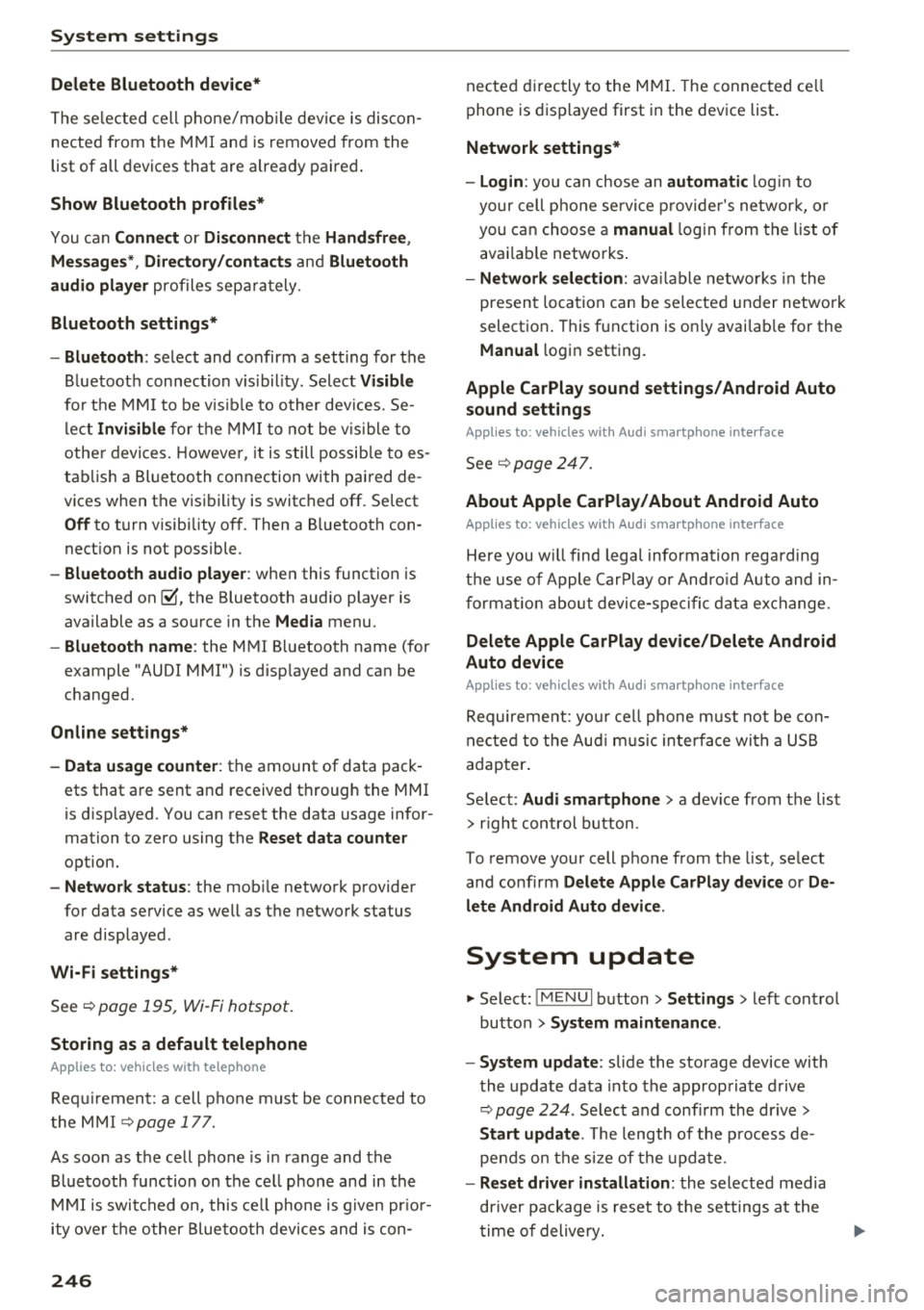
Delete Bluetooth device*
The se lecte d cell p ho ne/mo bile dev ice is dis con
nected from t he M MI and is removed from the
list of all devices that are alrea dy paire d.
Show Bluetooth profiles*
You can Connect or Disconnect the Handsfree ,
Me ssages *, Dire ctory /contacts
an d Bluetooth
audio player
pro files sep arately.
Bluetooth settings*
- Bluetooth :
select and confirm a set ting for the
B luetoot h connec tion v is ibility . Select
Visible
fo r th e MM I to be vis ib le to o ther dev ices. Se
l ec t
Invisible fo r th e M MI to not be v is ible t o
othe r devi ce s. H oweve r, it is still possib le to es
tab lish a Bl uetoo th con nection with pai red de
vices when the v is ibi lity is switched off. Se lect
Off to t urn visibi lity off . Then a B luetooth con
nect ion is not possible .
-Bluetooth audio player : when this function is
switc hed
on ~' the Bluetooth audio player is
available as a so urce in t he
Media menu .
-Bluetooth name : the MMI B luetooth name (for
example "AUDI MMI") is d isp layed and ca n be
c h anged.
Online settings*
- Data usage counter :
the amount of data pack
ets that a re sent a nd received throug h the MMI
is d isp layed. You can reset the data usage infor
mation to zero using the
Reset data counter
option.
- Network status : the mobile netwo rk p rovider
fo r data se rvice as well as the netwo rk status
are disp layed .
Wi-Fi settings*
See ¢ page 195, Wi -Fi hotspot.
Storing as a default telephone
Applies to: vehicles with telephone
Requir emen t: a cell phone must be connected to
t he MM I
¢page 17 7.
As soon as t he cell phone is i n range and the
B lue tooth func tion on the ce ll phone and in the
MM I is swi tched o n, this ce ll phone is g iven pr io r
ity ove r th e ot her Blue tooth devices and is c on-
246
necte d dir ectly to the M MI. The connec ted ce ll
p hone is d is pl ayed first in t he dev ice li st .
Network settings*
- Login :
you can chose an automatic log in to
your cell p ho ne servi ce pro vider 's ne twor k, or
you can ch oose a
manual log in from t he list of
avai la bl e netwo rks .
-Network selection : availabl e netwo rks in t he
presen t loca tion can be sele cte d unde r network
select io n. This f unction is on ly avai la bl e for the
Manual log in setting.
Apple CarPlay sound settings/ Android Auto
sound settings
Applies to: vehicles with Audi smartphone interface
See q page 24 7.
About Apple CarPlay/ About Android Auto
Applies to: vehicles with Audi smartphone interface
Here you w ill find l ega l informa tion regarding
t h e use o f A pple Car Play o r And ro id Aut o and in
fo rmat ion a bout device -s p eci fic d ata exch ange.
Delete Apple CarPlay device/Delete Android
Auto device
Applies to: vehicles with Audi smartphone interface
Require ment: yo ur cell phone must not be con
n ect ed to the Au di music interf ace wi th a USB
adap ter.
Se lec t:
Audi smartphone > a dev ice from t he lis t
> r igh t con trol b utto n.
To remove your cell p ho ne from the list, se lect
and co nfirm
Delete Apple CarPlay device or De
lete Android Auto device .
System update
"'Select : !ME NUI bu tton> Settings > left control
bu tton >
System maintenance.
- System update :
slide the storage device with
t he update da ta into the a pprop ria te drive
¢ page 224 . Selec t and conf irm the dr ive>
Start update . The length of the p rocess de
pe nds on the s ize of the upd ate.
- Reset driver installation: the selected media
dr iver p ackage is rese t to t he se ttings a t the
t im e of delivery .
Page 390 of 404
Index
Audi pre sense . . . . . . . . . . . . . . . . . . . . . . . 130
Messages . . . . . . . . . . . . . . . . . . . . . . 130, 133
Aud i Service Repair Manuals and Literature 383
Audi side assist . . . . . . . . . . . . . . . . . . . . . . . 136
Cleaning the sensors . . . . . . . . . . . . . . . . . 355
Messages . . . . . . . . . . . . . . . . . . . . . . . . . . 140
Rear cross-traffic assist . . . . . . . . . . . . . . . 139
Audi smartphone interface . . . . . . . . . 241, 245
Aud i virtual cockp it
refer to Instrument cluster . . . . . . . . . . . . . 10
AUTO
Automatic climate control system . . . . . . .
69
Automatic headlights . . . . . . . . . . . . . . . . . 49
Auto Lock (centr al locking system) . . . . . . . . 31
Automatic belt retractor . . . . . . . . . . . . . . . 264
Automatic climate control system
refer to Climate control system
(automatic) . . . . . . . . . . . . . . . . . . . . . .
68, 69
Automatic power top
refer to Power top . . . . . . . . . . . . . . . . . . . . 42
Automatic transmission . . . . . . . . . . . . . . . . . 83
Driving tips . . . . . . . . . . . . . . . . . . . . . . . . . . 86
Emergency mode . . . . . . . . . . . . . . . . . . . . . 89
Hill descent control . . . . . . . . . . . . . . . . . . . 87
Kick -down . . . . . . . . . . . . . . . . . . . . . . . . . . .
88
Launch control program . . . . . . . . . . . . . . . 89
Malfunction . . . . . . . . . . . . . . . . . . . . . . . . . 84
Manual shift ing (tiptronic mode) . . . . . . . . 88
Selector lever . . . . . . . . . . . . . . . . . . . . . . . . 86
Selector lever emergency re lease . . . . . . . . 90
Selector lever lock . . . . . . . . . . . . . . . . . . . . 84
Selector lever positions . . . . . . . . . . . . . . . . 84
Shift padd les . . . . . . . . . . . . . . . . . . . . . . . . 88
Automatic wipe/wash system . . . . . . . . . . . . 55
Auto Safety Hotline . . . . . . . . . . . . . . . . . . .
258
Auxiliary climate contro l . . . . . . . . . . . . . . . 116
AUX input . . . . . . . . . . . . . . . . . . . . . . . . . . . 230
Average consumption ........... .... . 17, 18
Average speed . . . . . . . . . . . . . . . . . . . . . 17, 18
B
BACK button . . . . . . . . . . . . . . . . . . . . . . . . . 154
Bag hooks . . . . . . . . . . . . . . . . . . . . . . . . .
63, 65
Balance (sound) . . . . . . . . . . . . . . . . . . . . . . 247
Bass (sound) . . . . . . . . . . . . . . . . . . . . . . . . . 247
388
Battery
In the key . . . . . . . . . . . . . . . . . . . . . . . . . . .
32
also refer to High-voltage battery . . . . . . . 92
also refer to Vehicle battery . . . . . . . . . . . 326
Before driv ing . . . . . . . . . . . . . . . . . . . . . . . . 249
Belt tensioners . . . . . . . . . . . . . . . . . . . . . . . 267
Blended gasoline . . . . . . . . . . . . . . . . . . . . . 314
Blower
Automat ic climate control system . . . . . . .
70
Bluetooth
Audio player . . . . . . . . . . . . . . . . . . . . . . . .
226
Connecting a cell phone . . . . . . . . . . . . . . 177
Settings . . . . . . . . . . . . . . . . . . . . . . . . . . . 246
Boost . . . . . . . . . . . . . . . . . . . . . . . . . . . . . . . . 19
Booster seats . . . . . . . . . . . . . . . . . . . . . . . . 304
Boost pressure indicator . . . . . . . . . . . . . . . . 19
Brakes . . . . . . . . . . . . . . . . . . . . . . . . . . . . . . 150
Brake assist . . . . . . . . . . . . . . . . . . . . . . . . 148
Brake fluid . . . . . . . . . . . . . . . . . . . . . . . . . 326
Electromechanical parking brake . . . . . . . . 81
Emergency braking function . . . . . . . . . . . . 82
New brake pads . . . . . . . . . . . . . . . . . . . . . 150
Break-in security feature . . . . . . . . . . . . . . . . 36
Breaking in
New brake pads . . . . . . . . . . . . . . . . . . . . .
150
New engine . . . . . . . . . . . . . . . . . . . . . . . . . 72
New tires . .... .. .. .. ............. .. 337
Browser
refer to Media center . . . . . . . . . . . . . . . . . 233
Bulbs . . . . . . . . . . . . . . . . . . . . . . . . . . . . . . . 373
Buttons
Control panel (MMI) . . . . . . . . . . . . . . . . .
154
Multifunction steering wheel . . . . . . . . 13, 16
Programming (multifunction steering
wheel) . . . . . . . . . . . . . . . . . . . . . . . . . . . . . . 15
Switching the Infotainment system display
on/off . . . . . . . . . . . . . . . . . . . . . . . . . . . . .
155
C
Cable (USB adapter/AUX connector cable) 229
California Proposition 65 Warning . . . . . . . 319
Battery specific . . . . . . . . . . . . . . . . . . . . . 327
Call list . . . . . . . . . . . . . . . . . . . . . . . . . . . . . 180
Call options . . . . . . . . . . . . . . . . . . . . . . . . . . 188