ad blue AUDI A3 SEDAN 2018 User Guide
[x] Cancel search | Manufacturer: AUDI, Model Year: 2018, Model line: A3 SEDAN, Model: AUDI A3 SEDAN 2018Pages: 404, PDF Size: 62.3 MB
Page 184 of 404
Tele phone
- Muting the incoming ca ll: select and confirm
Mut e.
- Additi onal c all :
se lect: Find c onta ct > Call li st/
Di rector y/Fa vo rites
> an entry from the list.
M ute: if you se lect and co nfirm th is function , the
other pe rson on the phone cannot hea r yo u. You
can hear the other person . To turn the micro
phone back on, se lect and confirm
Unmute.
Hold call /R es um e held call:
you can p lace the ex
isting call on hold and resume i t again. To re
sume the call, select and confirm the ca ll you
wou ld like to resume.
Tran sfe r ca ll to m obile d evic e*: select and con
fi rm
Tr ansfe r call to mobil e devic e to transfer
the existing call from the MM I to your cell phone.
Switch to hands -fr ee mod e*: Requirement: you
must have a phone ca ll in prog ress o n your cell
p hone. Select and confirm
Swit ch to hand s-free
mode
to transfer the call from your ce ll phone
back to the MMI.
Swap call : alternate between two phone ca lls
while one of the ca lls is on hold. Select ing
End
c a ll
wi ll end the active phone call. A p hone call on
hold can be resumed using the right control but
ton >
Resume .
Co nne cti on manag er:
see ~ page 244.
Telephone sett ings : see ~ page 187 .
(D Tips
-To be notified of an incoming call during a
phone call, the
call waiting function in your
cell phone must be switched on when using
the
Handsfre e profile .
- You can obta in more information from your
ce ll phone serv ice prov ider or from your cell
phone use r guide.
- When leaving the vehicle, the Bluetooth
con nection to the ce ll phone w ill automat i
ca lly dis co nne ct. Depending on you r cell
phone, phone ca lls in p rogress may be auto
matically redirected from t he M MI to your
ce ll phone and you can continue t he call on
your phone.
- The display of an incoming phone ca ll in the
Infotainment system disp lay may still be
182
visible for a few seconds after a call is an
swered/ignored depending on the ce ll
phone in use.
Making an emergency call
Applies to: vehicles with telephone
.,. Select: ! MENU I button> Telephone > left con
trol button >
Enter n umber > Enter emergency
call number (for example, 911) >
OK .
A WARNING
-
-Because you r phone works with rad io sig
na ls, a connection canno t be gua ran teed un
de r all ci rcumsta nces. Do not rely o n only
your phone when it comes to essential com
munication (such as a medical emergency) .
- Always follow the instr uct ions given by the
emergen cy personne l dur ing an emergency
call and on ly end the ca ll when they instruct
you to do so.
(D Tips
E mergency numbe rs a re not the s ame every
whe re. Find out wh ic h emergency n umber is
u sed in your current location.
Favorites
Applies to: vehicles with telephone
Up to 50 contacts , in addition to the voicemail
number, can be stored in any order in the favor
ites lis t.
.,. Select: !MENU I button> Telephone > left con-
trol b utton .
Storing an e xis ting phone number as a
fa vorit e:
-Select and confirm Call list /Director y.
- Select a contact or phone n umbe r from the list.
- Select: r ight cont rol b utton>
S tor e as favorite .
-Enter a name for the favor ite or select a sug-
gestion .
- Select and confirm
Save .
Ren aming stored fa vorite s
- Select: Favo rite s > a favorite from the list.
Page 185 of 404
u. 00 .-< N l' N .-< 0 N > 00
-Se lect the right control bu tton > Rename fa-
vorite.
Moving stored favorites
- Se lect : Favorites > a favorite from the list.
-Select the right control button > Move favorite .
-Se lect and confirm the location of t he selected
favor ite .
Deleting a stored favorite
-Se lect : Favorites > a favorite from the list.
-Se lect the right control button > Delete favor-
ite > Delete this favorite or Delete all favor
ites .
Messages
Text messages
Applies to: cell phones with Blue tooth Message Access Profile
(MAP)
Depending on the cell phone being used and the
cell phone ne twork contract, you can receive and
send text messages using the MMI.
Requirement
A cell p hone m ust be co n ne cted to the MM I via
B lue tooth MA P (M essage Access Profile)
~page 177 .
.,. Select : I MENU I butto n> Telephone > left co n
t ro l bu tton >
text message (myPhone) /text
message (secondary phone)*.
Write new text message
S elec t and confi rm Write new text message .
- Using a template :
select and confi rm the de
s ired temp late from the list .
-Writing your own te xt*: select and confirm Do
not use template .
Enter text using the M MI
touch co ntro l pad* o r the lette r speller .
- Ente r one or mo re recip ients.
- Se lect and confirm
Send .
Inbox
Dis pla ys a ll re ceived tex t m essages .
Sent
Disp lays all se nt tex t messages .
Telephone
Outbox
Disp lays all tex t messages to be sen t.
Drafts
Displays a ll tex t messages that have no t yet been
sent a nd sto red text messages .
(D Tips
-Please note that you may have to activate
t he rece ivi ng a nd send ing of t ext m essages
in yo ur cell pho ne depending on the SI M
c ar d be ing use d (fo r ex ampl e, when u sing a
M ult i-SIM ). You can obta in mo re informa
t ion fr om yo ur ce ll ph one servi ce pr ovider or
from you r ce ll p hone user guide .
- Fo r m ore inf orma tion on sup po rt e d c ell
ph ones, vi sit www .audiu sa.co m/ blu etoo th
o r contact a n auth o rized Aud i dea le r or a u
t h orize d Audi Serv ice Fac ility.
- Yo u n eed a ce ll phone wi th Messa ge A ccess
Profi le that a lso s upports the sen ding func
tion to be a ble to se nd text messa ges
throug h the MMI.
Message options
Applies to: cell phones with Bluetooth Message Access Profile
(MAP)
.,. Select: I TE L! b utton > left co ntro l butto n > text
message (myPhone) /text message (secondary
phone )* > lnbo x/Sent /Outbo x
> right control
button.
T he following options may be availa ble depen d
ing on the selected menu.
Storing a text message as a template
T en text mess age temp lates are s to red in the
MM I. You can s ave up to ten a ddition al tem
p lates .
- Crea te a t ext message .
- Select and confirm
Store as template .
Resume last te xt message
The last ed ited text message can be resumed .
Reply*
A reply c an be sen t for t he se le ct ed mess age in
t h e
Inbox.
183
Page 186 of 404
Telephone
Forward
The selected text message can be forwarded to a
different recipient.
Send again*
The selected text message can be resent.
Delete this text me ssage*
The se lected text message can be deleted .
Read out1
)
You can have the MMI read an open text mes
sage .
Text messaging settings*
To disp lay when a new text message is received,
e na ble the
Text message notifications . New text
messages are indicated w ith an enve lope
121 in
the Infotainment system display status line.
Connection manager
See ¢ page 244 .
Wi-Fi settings
See ¢page 195.
Telephone settings
See ¢page 187.
(D Tips
Messages that are deleted in the MMI are also
deleted in the cell phone automatically.
E-mail*
Applies to: cell phones with Bluetooth Message Access Profile
(MAP)
Depending on the type of cell phone being used,
you can receive and send e-mails through the
MMI.
Requirement: a cell phone must be connected to
the MMI via Bluetooth MAP (Message Access Pro
file)
¢ page 177 . You can find out in your cell
phone owner's manual if your cell phone sup
ports this function.
1) Not availa ble in all l an guage s.
184
.. Select: IMENUI button> Telephone > left con
trol button >
e-mail (myPhone) /e-mail (secon
dary phone )*.
Write new e-mail
Select and confirm Write new e-mail.
- Using a template :
select and confirm the de
sired template from the list.
-Writing your own text* : select and confirm Do
not use template .
Enter text using the MMI
touch control pad* or the letter speller.
- Enter one or more rec ipients .
- Select and confirm
Send.
Inbox
A ll received e -mails are displayed .
Sent
All sent e-mails are displayed.
Outbox
All e-ma ils that will be sent are displayed.
Drafts
A ll saved e-mails that have not been sent yet are
displayed.
(@ Note
A lways follow the informa tion found in ¢Cl) in
Wi-Fi hotspot on page
195.
(D Tips
-For more information on supported cell
phones, visit www.a udiusa. com/bl uetoo th
or contact an authorized Audi dealer or au
thorized Audi Service Facility .
- To ensure that your sent e -mails are re
ceived, connect your cell phone to the Wi-Fi
hotspot* in the vehicle so that the e-mai l
app on your ce ll phone continues to have In
ternet access. If you are still not receiving e
ma ils even though you have a successfu l
connect ion, then contact your e-mail service
prov ider or you r cell phone service provider.
Page 187 of 404
u. 00 ... N l' N ... 0 N > 00
Message options
Applies to: cell phones with Blue toot h Message Access Profile
(MAP)
"' Select: I MENU I button >Telephone > left con
trol button >
e-mail (myPhone)/e-mail (secon
dary phone}* > Inbox /Sent /Outbox
> right
control button.
The following options may be available depend
i ng on the selected menu.
Store as template
Ten e-mail templates are stored in the MMI. You
can save up to ten addit ional templates.
- Create an e-mail.
- Select and confirm
Store as template.
Resume last edited e-mail
The last e-mail in progress can be resumed .
Reply*
A reply can be sent for the selected e -mail in the
Inbox .
Reply to all*
A reply can be sent for the selected e-mail in the
Inbox and it will be sent to all of the entered re
cipients.
Forward
The selected e -mail can be forwarded to a differ
ent rec ipient.
Delete this message*
The selected e-ma il can be deleted .
Read out1
)
You can have the MMI read an open e-mail.
E-mail settings*
To disp lay when a new e-mai l is received, activate
the
E-mail notifications . New e-mails are ind icat
ed with an envelope
[gJ in the Infotainment sys
tem disp lay stat us line.
ll Not availab le in all la nguages .
Connection manager
See~ page 244.
Wi-Fi settings
See ~page 195.
Telephone settings
See ~ page 187.
(D Tips
Telephone
-Messages that are deleted in th e MMI are
also automatically deleted in the connected
cell phone .
- You cannot read any messages whi le driv
ing .
Listening to voicemail
Applies to: vehicles with telephone
"'Select: IMENUI button> Telephone> left con
trol button. Select and confirm
Call list /Direc
tory /Favorites > Voicemail.
- Entering the voicemail number:
enter the de
sired number. Select and confirm
OK.
- Dialing the voicemail number: select and con
firm
Voicemail.
(D Tips
- This service must be set up and activated in
advance by the cell phone service provider.
You can obtain more information from your
cell phone service provider.
- Th e voicemail number depends on the cell
phone service provider .
185
Page 188 of 404
Telephone
Directory
Opening the directory
Applies to: vehicles w ith telep hone
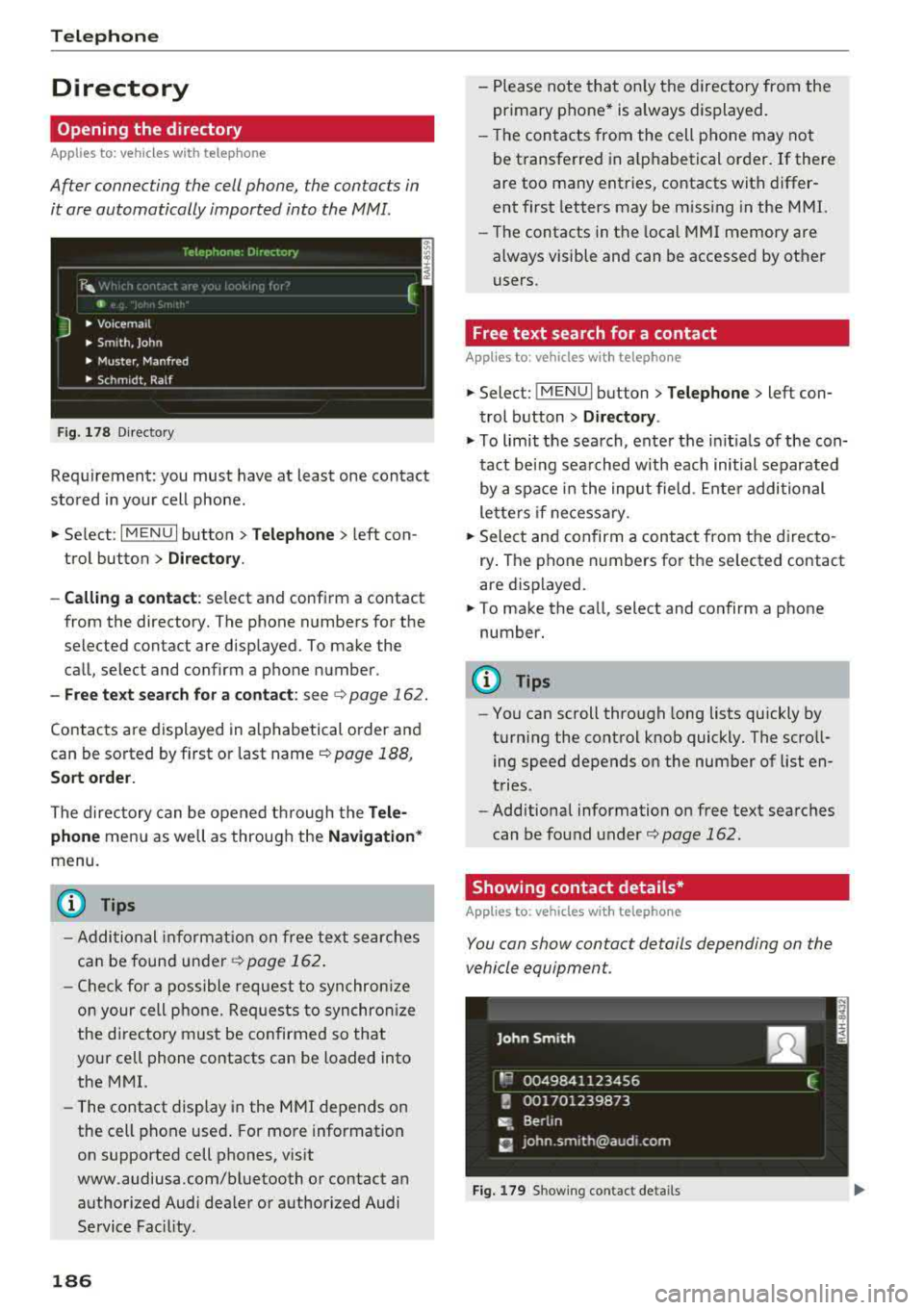
After connecting the cell phone, the contacts in
it are automatically imported into the
MMI.
Fig. 178 Directory
Requirement: you must have at least one contact
stored in your cell phone .
.. Select: I MENU I button >Telephone > left con
trol button >
Directory .
- Calling a contact:
select and confirm a contact
from the directory. The phone numbers for the
selected contact are displayed. To make the call, select and confirm a phone number.
- Free text search for a contact: see ¢ page 162.
Contacts are displayed in alphabetical order and
can be sorted by first or last name ¢
page 188,
Sort order.
The directory can be opened through the Tele
phone
menu as well as through the Navigation *
menu.
(D Tips
-Additional information on free text searches
can be found under
¢ page 162.
-Check for a possible request to synchronize
on your cell phone. Requests to synchronize
the directory must be confirmed so that
your cell phone contacts can be loaded into
the MMI.
- The contact display in the MMI depends on
the cell phone used . For more information
on supported cell phones, visit
www.audiusa .com/bluetooth or contact an
authorized Audi dea ler or authorized Audi
Service Fac ility.
186
- Please note that only the directory from the
primary phone* is always displayed.
- Th e contacts from the cell phone may not
be transferred in alphabetical order. If there
are too many entries, contacts with differ
ent first letters may be miss ing in the MMI.
- The contacts in the local MMI memory are
always visible and can be accessed by other
users.
' Free text search for a contact
App lies to: vehicles wit h telepho ne
.. Select: !MENUI button> Telephone> left con
trol button >
Directory .
.,,. To limit the search, enter the initials of the con
tact being searched with each initial separated
by a space in the input field . Enter additional
letters if necessary .
.. Select and confirm a contact from the directo
ry . The phone numbers for the se lected contact
are displayed.
.. To make the call, select and confirm a phone
number.
(D Tips
- You can scroll through long lists quickly by
turning the control knob quickly. The scroll ing speed depends on the number of list en
tries.
- Additional information on free text searches
can be found under¢
page 162.
Showing contact details*
Applies to: vehicles with telephone
You can show contact details depending on the
vehicle equipment.
Fig. 179 Sh owing contact detail s
Page 190 of 404
Telephone
Call options*
Call forwarding :
you can switch the fo rwa rd ing
of incoming calls to you r voic email or to anothe r
p hone numbe r on and off. Yo u can check if the
function is activated o r deactivat ed with
Check
status .
Call waiting :
you are ale rted to an incoming call
du ring a phone ca ll w hen t he function is switc hed
on ~-You can chec k if the f unction is activated
or deactivated w ith
Check status .
Send own telephone number :
send ing you r
p hone numbe r with an outgoing call can be acti
vated and deactivated . With the
Network -de·
pendent
setting, the setting listed in the co n
t ract with the cell phone se rvice prov ide r is used .
The settings only apply to the
Telephone menu in
the MMI. Please note tha t the settings on yo ur
cell phone will a pply afte r d isco nnecti ng the
B luetooth co nne ct io n. Y ou ca n check if the fu nc
tion is activ at ed or dea ct ivate d wi th
Check sta
tus.
Ringtone and volume settings
1 )
Using the Mute telephone func tion, you can
sw itch th e r ingtone playback t hrough the MMI
spea ke r o n and off. You ca n play t he ringtones
using the
Ringtone fu n ct ion. Sele ct an d confirm
a n entry from t he list. Fo r th e
Ringtone volume /
Message volume
se tt ings, see i:::> page 248 . The
Microphone input level can be ad justed during a
phone call using the cont rol knob.
(D Tips
- Seve ra l cell phones can be paire d to the
MM I, but only two* cell phones can be ac
tive ly connected.
- To delete all paire d Bluetooth devices, the
Bluetooth funct ion can be reset to the fac
tory default sett ings
i:::> page 244.
Additional options
"' Se lect : I MENU I button> Telephone > right co n
tro l button .
1> Dep en ds on the conn ecte d cell pho n e.
188
Connection manager
See c::> page 244.
Bluetooth settings*
See i:::> page 246 .
Online settings*
Se e i:::> pag e 246.
Wi-Fi settings*
See i:::> page 19 5, Wi -Fi h otsp ot.
Directory settings
Applies to: vehicles with telephone
"'Sele ct: IME NUI button> Telephone > left con
trol button >
Directory > right control button >
Directory settings.
Memory capacity
S ho ws the Memory capacity for t he director y.
Yo u can ma nage up to 17,000 co ntacts with the
directory . Yo u can load up to 4,000 con tacts
fro m your cell phon e into each directory. Y ou can
a lso im po rt up to 1,00 0 con ta cts fr om a st ora ge
d evi ce .
Sort order
You can so rt the contacts in your d irec to ry alpha
be tica lly acco rding to
Last name or First name .
Import contacts /Export contacts
See i:::> page 187.
Download directory
To update the con ta cts in t he MMI , you can man
u ally down loa d your cell p hone contacts . De
p endin g on t he ce ll phone, t he Bluetoot h connec
tion may need to be disconnecte d and reconnect
ed to upda te t he contacts.
Hide contacts without phone number
When this f unct ion is swi tched o n, g rayed -ou t
contacts that have no p hone numbers sto re d for
t h em wi ll b e hidden in t he directory .
Page 191 of 404
u. 00 .-< N l' N .-< 0 N > 00
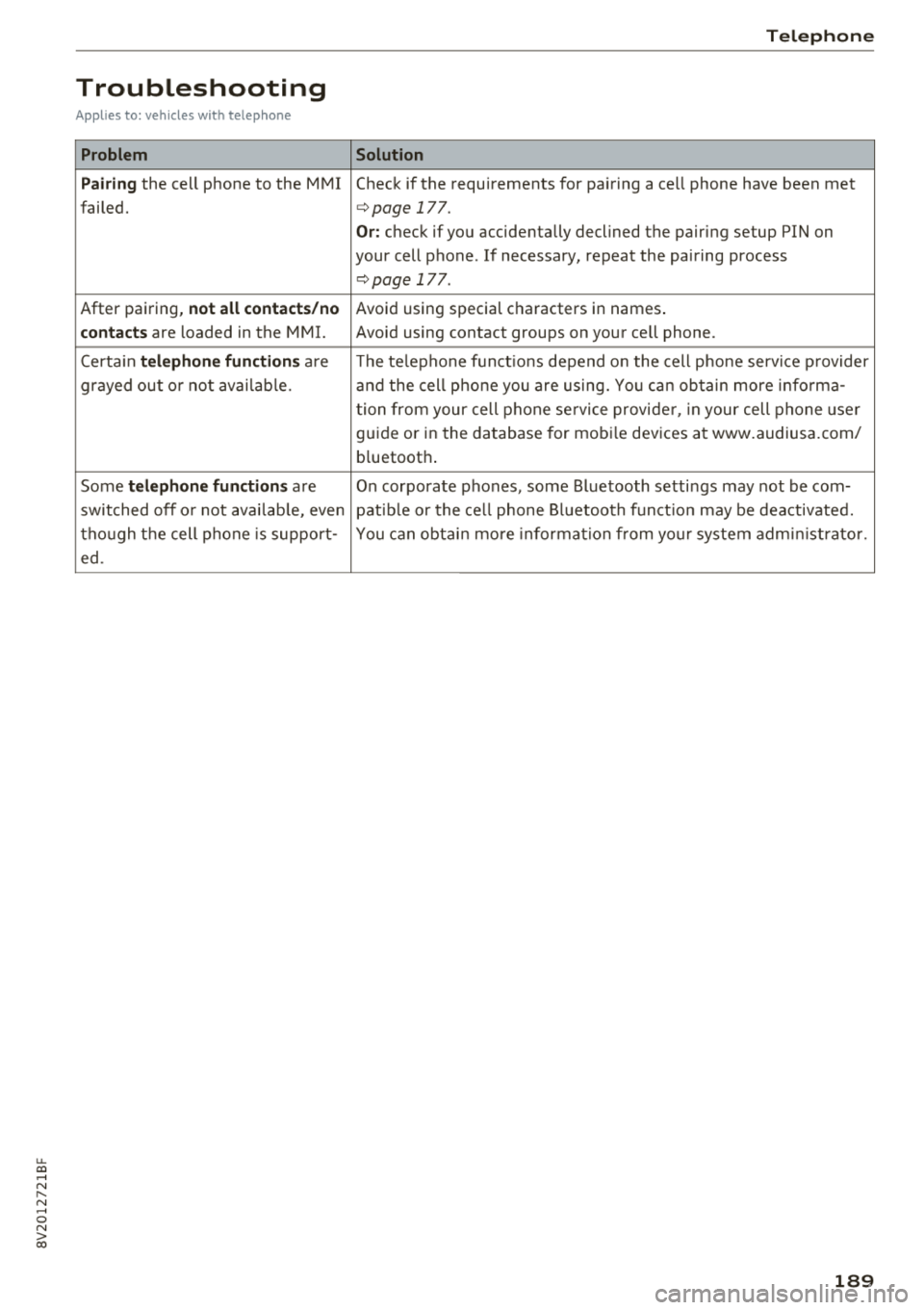
Troubleshooting
Applies to: vehicles with telephone
Problem
Pairing
the cell phone to the MMI
failed.
After pairing,
not all contacts/no
contacts
are loaded in the MMI.
Certa in
telephone functions are
grayed out o r not avai lab le.
Some
telephone functions are
switched off o r not avai lab le, even
though the cell phone is support-
ed.
Telephone
Solution
Check if the requirements for pairing a cell phone have been met
c>page 177.
Or: check if you accidentally declined the pairing setup PIN on
your cell phone. If necessary, repeat the pairing process
c>page 177 .
Avoid using special characters in names .
Avoid using contact groups on your cell phone.
The te lephone funct ions depend o n the cell phone service p rovider
and the cell phone you are using. You can obtain more informa-
tion from your cell phone se rvice provider, in your cell phone user
guide or in the database for mobi le devices at www.audiusa.com/
b luetooth .
On corporate
phones, some Bluetooth settings may not be com-
patib le or the cell phone Bluetooth function may be deactivated.
You can obtain more information from yo ur system administrator.
189
Page 228 of 404
Media
When importing, the audio files a re au tomatica l
ly sorted into the media center categories based
on the stored addit iona l info rmation
¢ page 233. The copied video files a re stored in
the media center under the
Videos category.
Playing the Jukebo x
Req uiremen t: the J ukebox must con tain audio/
video
fi les ¢ page 225, Adding files to the Juke
box.
T he Jukebox is accessed an d ope ra ted t hrough
the
MMI (D ¢ page 232, fig . 2 08.
Displaying Jukebox memory capacity
Select : righ t control button > Juk ebo x memory
capacity .
Info rmation abou t the J ukebo x memo ry
c a pacity and the numbe r of s to red tracks is dis
p layed .
Deleting tracks from the Jukebox1
)
Req uiremen t: the Jukebox must contain audio/
video fi les.
- Delet ing an ent ry : se lect an e ntry from the
Jukebox media center . Se lect: rig ht contro l but
ton
> Delete from jukebox > Thi s entry or En
tire list .
- The status of t he de leti ng p rocess is shown in
the MMI. J ukebox playback s tops d uring the de
l et ing p ro cess a nd s tarts again au toma tically
o nce the dele tion is comp lete .
(D) Note
Do not import aud io/video files when the en
gi ne is t urne d off because this will drain the
veh icle b attery.
(D Tips
- Tracks fro m audio C Ds cannot be im port ed
t o t he Ju ke box for legal reasons .
- Fil es that have a lready been importe d are
a utomat ica lly recogn ized and cannot be
cop ie d to the J ukebo x again.
- It i s no t possib le to play audio/v ideo* files
i n the C D/DVD* dr ive while importi ng the m.
1> Not i n the Pl ayba ck view .
226
- Th e Juk eb ox does not provi de a n ex port
function due to legal reasons .
- Files o r tra cks w ithou t addi tional store d in
formation a re listed as
Unknown. A ud i rec
ommends adding a dditiona l info rmation
(such as ID3 tags) to a udio f iles.
- Reset the
Jukebox to the facto ry defa ult
settings when sel ling yo ur vehicle
¢ page 244.
Bluetooth audio player
Appl ies to: vehicles with Bluetooth audio player
With the Bluetooth audio player, you can play
music wirelessly from your Bluetooth-capable
device (such as a cell phone) through the MMI.
Requirement: the vehicle must be stationary and
the ignit io n m ust be switched on. The B luetooth
settings w ill open on your mob ile dev ice d uring
t h e connection setup . The Blue tooth function
and vis ibili ty of the
MM I ¢ pag e 246 and mob ile
device must be sw itched on. The
Bluetooth audio
player ¢ page 246 must be switched on in t he
MM I.
-Connecting a Bluetooth player : press the
!MEDIA ! butto n. Press the left con trol b utton
un til the sources ove rview is d isp layed. Selec t
and confirm
Bluetooth audio player ®
¢page 232, fig . 209 .
-If n ecess ary, se lect and co nf ir m Not connected
> Connect Bluetooth audio player . The Bl ue
tooth device search starts. Follow the instruc
tions in the MMI.
- Select and confirm t he des ired Bl uetooth de
vice from the list . The
MMI generates a PIN fo r
the connection.
- Select and confirm
Yes.
- En ter the PI N for conne ct in g on your Bluetoo th
dev ice .
Or : if the P IN is already dis played on
your Bl uetooth device, confi rm it in the Bl ue
tooth device and in the
M MI. The time a llowed
for entering the PI N is lim ited to approx imately
30 seconds .
IJIJ,
Page 229 of 404
u. 00 ... N l' N ... 0 N > 00
The media is started and operated through the
mobile device or the
MMI, depending on the de
vice being used.
(D Tips
-Check for any connection requests on your
Bluetooth device.
-Multiple Bluetooth audio players can be
connected to the
MMI, but only one mobile
device can be active.
-Bluetooth protocols AVRCP (1.0/1.3/1.4)
and A2DP are supported.
-Note the volume setting on your Bluetooth
device. Audi recommends setting your mo
bile device to the maximum volume when
using it as a Bluetooth audio player.
-The supported media functions (such as
shuffle) depend on the Bluetooth device be
ing used.
-For more information on the supported de
vices, visit www.audiusa.com/bluetooth or
contact an authorized Audi dealer or author ized Audi Service Facility.
Wi-Fi audio player
Appl ies to: ve hicles with Wi-F i audio playe r
Using the Wi -Fi audio player media source on the
MMI, you can connect and operate your Wi-Fi-ca
pable media player (such as a smartphone) to
wirelessly play music from your media player
li
brary. The media player is connected through the
vehicle's Wi-Fi hotspot. A UPnP Server opp or an
integrated UPnPIDLNA server on your media
player is required to access your media player
li
brary.
Requirement: the Wi-Fi function on your media
player must be switched on. The
Audi MMI con
nect
app or a UPnP server app must be installed
on your media player .
Or: you must be using a
media player with an integrated UPnP/DLNA
server.
-Connecting a media player: press the I MEDIA !
button. Press the left control button until the
sources overview
c::;, page 232 is displayed. Se
lect and confirm
Wi-Fi audio player 0
c::;,page 232, fig . 209 .
Media
-If necessary, select and confirm Wi-Fi turned
off> Turn on Wi-Fi
to activate Wi-Fi in the
MMI. Select
Wi-Fi settings, if necessary. Select
the same settings on the wireless media player
that are used for the Wi-Fi hotspot.
-Starting the Wi-Fi audio player: start the Audi
MMI connect
app or a UPnP server app, or set
media permissions on your media player.
Operating the media player: the media player is
operated through the MMI.
-Press the left control button repeatedly until
the
Folders menu item appears. Select and con
firm
Folders.
-Playing music from the media player: select
and confirm
Media center .
Web radio:
see c::;, page 228 .
A WARNING
-
-As the driver, do not allow usage of the Wi
Fi hotspot to distract you from driving, as
this could increase the risk of an accident.
-It is only safe to use tablets, laptops, mo
bile devices and other similar devices when
the vehicle is stationary because, like all
loose objects, they could be thrown around
the inside of the vehicle in a crash and cause
serious injuries. Store these types of devices
securely while driving.
-Do not use any wireless devices on the front
seats within range of the airbags while driv
ing. Also read and follow the warnings in
c::;, page 2 73, Front airbags.
@ Note
Always follow the information found in ¢@ in
Wi-Fi hotspot on page 195.
(D Tips
-Always read the chapter c::;, page 196, Audi
connect (Infotainment) general informa
tion.
-Please note that a Wi-Fi connection does
not automatically make it possible to use
the Internet. For additional information,
see
c::;, page 190.
227
Page 234 of 404
Media
been connected by a USB adapter . They may
impair the functionality.
- USB hubs a re not supported .
- Refer to the man ufactu rer's operating man-
ua l for important informat ion regarding the
ope ration of your mob ile dev ice .
- Co rrect funct ion of all mobile devices can
not be guaranteed .
- The vehicle ba tte ry dra ins when mobile de
v ices are turned on b ut the engine is off.
Playing media
Accessing media
You con start and op erat e various med ia
t hrough the
MM I control panel.
F ig . 208 Diagram : poss ible so ur ces in the Medi a men u
Fi g. 209 Diag ram : p ossible s our ces in the M ed ia m enu
Req uirement: a media sou rce must contain au
d io/video* fi les
9 page 224 .
• Press the I MEDIAi button. Press the left control
button until the sources overview is disp layed.
• Se lect and confirm the desired source. Or :
press the I MEDI Ai button repeatedly until t he
desired source is selected.
Depending on the vehi cle equ ipment, the follow
ing sources may be disp layed in the
Media men u:
1) Depe ndin g o n th e DVD , th is m ay not be poss ib le dur ing
p la y ba ck.
232
(D Jukebo x* ... .. .. .. ... .. ..... .
@ DVD/CD drive * ... .. ...... .... .
@ SD card re ader .. .. .. .... .... .
@) Audi music interface * .. .. ..... .
su ch as an iPhone, USB stick
® External audio p la y er ......... .
such as an MP3 pl ayer connected to
the AUX input
@ Bluetooth audio player * ...... .
(J) Wi-Fi audio pl ayer* ... .. ..... .
@ Online m edia * and Internet radio *
225
224,225
224
230
230
226
227
228
- Playi ng audio /video files : select a source in the
Media menu> ca tegory (such a s art ists> al
bum> track) .
-Moving one level up in the folder structure :
press the I BACKI button. Or: selec t and confirm
Folder up .
- Selec ting the p re v ious or ne xt track /chapter*
1>: press the On/Off knob on the MMI control
panel briefly to the left
l
- Fa st-for warding and rew inding audio /video *
fil es :
press and hold the On/Off knob on the
MMI control pa nel to the left
l
a longer time .
-Paus ing or re suming pla yback : press the On/
Off knob on the MMI control panel b riefly .
(@ Tips
-You can scroll through long lis ts quickly by
turning the cont rol knob quickly . The scroll
ing speed depends on the number of list en
t ries .
- For safety reasons, the video image is only
displayed when t he vehicle is stationary. On
ly the so und from the video plays while driv
ing.