cruise control AUDI A3 SEDAN 2018 User Guide
[x] Cancel search | Manufacturer: AUDI, Model Year: 2018, Model line: A3 SEDAN, Model: AUDI A3 SEDAN 2018Pages: 404, PDF Size: 62.3 MB
Page 128 of 404
Ass is tance sy stem s
@Indicator lights
Ill-Adaptive cruise control is switched on . No
veh icles are detected ahead . The stored speed is
maintained.
• -A vehicle driving ahead was detected. The
adapt ive cruise control system regulates the
speed and d istance to the vehicle ahead and
brakes/accelerates automatically.
(-) -Adaptive cruise control is switched on. Ave
h icle was detected ahead . Yo ur vehicle remains
stopped and w ill not start driv ing automat ica lly .
• -The automatic braking is not enough to
maintain a sufficient distance to a vehicle dr iv ing
ahead . You must intervene
r:::;, page 129, Driver
intervention request .
© Instrument clu ster di splay
If adaptive cruise contro l is not shown in the in
strument cluster display, you can call i t up using
the multifunction steering wheel buttons
r:::;, page 13 .
Based on the graphics in the d isp lay, you can de
termine if the system is mainta ining a distance to
a vehicle ahead and what that distance to this ve
h icle is:
No vehicle -no vehicle was detected driving
ahead.
Sil ver vehicle -a vehicle was detected driving
ahead.
Red vehicle -request for driver intervention
r:::;, page 129.
The five distance bar s on the gauge@ represent
the set d istance (refer
to r:::;, page 128 for infor
mat io n on how to change the distance). If yo u
fa ll below the se lected distance, the distance
bars become red from the bottom upward.
A WARNING
If you press the ISE TI b utton when driving at
speeds below 20 mph (30 km/h), the vehicle
accelerates automat ica lly up to 20 mph (30
km/h), which is the m inimum speed that can
be set.
126
@ Tips
- If you switch the ignition or the adaptive
cruise control system off, the set speed is
erased for safety reasons.
- The electronic stabilization control (ESC)
and the anti-slip-regulation (ASR) are auto
matically switc hed on when the adaptive
cruise control is switched on.
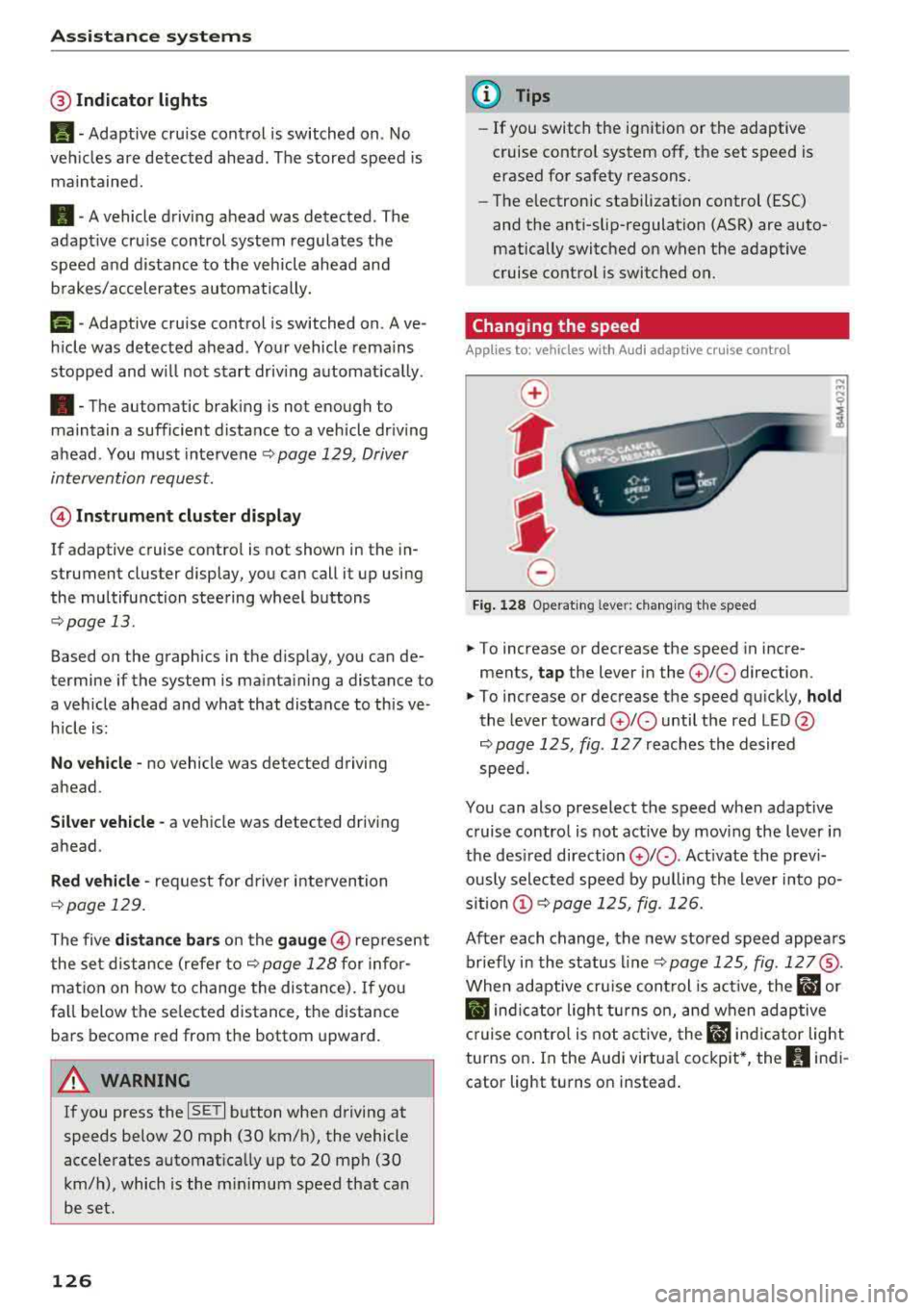
Changing the speed
Applies to: vehicles with Audi adaptive cruise control
0
f
I
0
Fig . 12 8 Ope rat ing leve r: chang ing the speed
.. To increase or decrease the speed in incre
ments,
tap the lever in the 0 10 direction.
,... ... ,...
i
.. To increase or decrease the speed qu ick ly, hold
the lever toward 0 10 until the red LED @
r:::;,page 125, fig . 127 reaches the desired
speed.
You can also preselect the speed when adapt ive
c ruise control is not active by moving the lever in
the des ired direction
0 10 . Act ivate the prev i
ous ly selected speed by pulling the lever into po
s ition
(D r:::;, page 125, fig. 126.
After each change, the new stored speed appea rs
br iefly in the status l ine
r:::;, page 125, fig . 127@.
When adaptive cru ise cont rol is act ive , the flJ or
• ind icator light turns o n, and when adaptive
c ruise contro l is not a ctive, the
IIJ ind icator light
turns on . In the Audi virtua l cockpit*, the
II indi
cator light turns o n instead .
Page 129 of 404
LL co .... N
" N .... 0 N > co
Driving in stop-and-go traffic
A pplies to: ve hicles with Audi adaptive cruise co ntro l
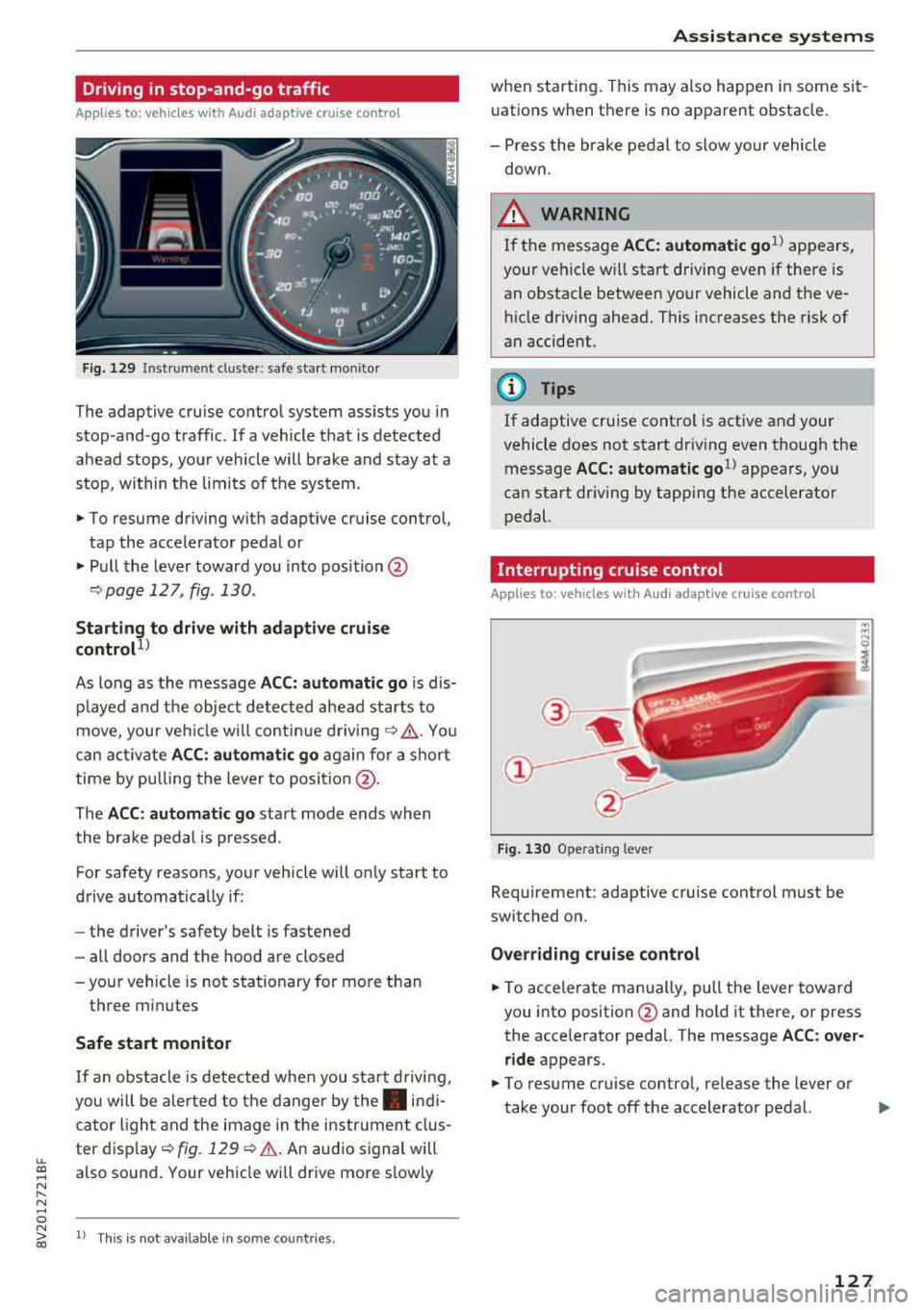
Fig. 12 9 In str ument clust er: s afe star t mo nito r
The adaptive cruise control system assists you in
stop -and -go traffic . If a vehicle that is detected
ahead stops, your vehicle will brake and stay at a
stop , within the lim its of the system.
.,. To resume driving w ith adapt ive cruise control,
tap the accelerator pedal or
.,. P ull the lever toward you into position @
¢page 127 , fig. 130.
Starting to drive with adapti ve cruise
controt
1>
As long as the message ACC: a utomatic go is dis
p layed and the objec t detected ahead starts to
move, your veh icle w ill contin ue
d riving ~.&. . You
can act iva te
A CC: automatic go again for a sho rt
time by pu lling the lever to position @.
The
AC C: autom ati c go sta rt mode ends whe n
the brake pedal is pressed.
For safety reasons, your vehicle will o nly start to
d rive automatically if:
- the driver 's safety belt is fastened
- all doors and the hood are closed
-your vehicle is no t stationary for mo re than
t h ree m inutes
Safe start monitor
I f an obstacle is detec ted when you sta rt drivi ng,
you will be a le rted to the danger by
the . indi
cator ligh t and the image in the instr ument clus
ter
d isp lay ~ fig. 129 ¢.&. .An aud io signal will
also sound . Your veh icle wi ll drive more s lowly
l) Th is is no t av aila ble in so m e co untries.
A ssi st a nce systems
when starting . This may also happen in some sit
uations when there is no apparent obstacle.
- Press the br ake pedal to slow yo ur vehicle
down.
_& WARNING ~
If the message ACC: automatic go1> appears,
your vehicle w ill start driving even if there is
an obstacle between your vehicle and the ve
hicle driving ahead. This increases the risk of
an accident.
(D Tips
If adaptive cruise control is active and your
vehicle does not start dr iving even though the
message
ACC: automatic go1> appears, yo u
can start driving by tapping the accelerator
pedal.
Interrupting cruise control
Applies to : vehicles wit h Audi ada ptive cr uise control
Fig . 130 Opera ting leve r
Requirement: adaptive cruise control must be
switched on.
Overr iding cruise control
.,. To accelerate man ua lly, pull the lever toward
you into position @and hold it there, or press
the acce lerator pedal. The message
A CC: over
ride
appears.
.,. To resume cruise contro l, re lease the lever or
take your foot off the accelerator pedal.
.,..
127
Page 130 of 404
Ass is tance sy stem s
Interrupting cruise contr ol while driving
• Move the leve r into position @. The message
AC C: s tandb y appears . Or
• Press the brake pedal.
• To resume th e stor ed speed, move the lever in
to position
@ .
Inter rupt ing crui se contr ol when stopped
• Push the lever away from you into position @.
The message
A CC : s tandb y appears.
• To resume cruise control , press the brake pedal
and pull the l ev er toward you into position @.
A WARNING
It is dangerous to activate cruise control and
resume the stored speed when the current
road, traffic or weather conditions do not per
mit this. This increases the risk of an accident.
Setting the distance
App lies to: vehicles with Audi adaptive cruise contro l
,
0
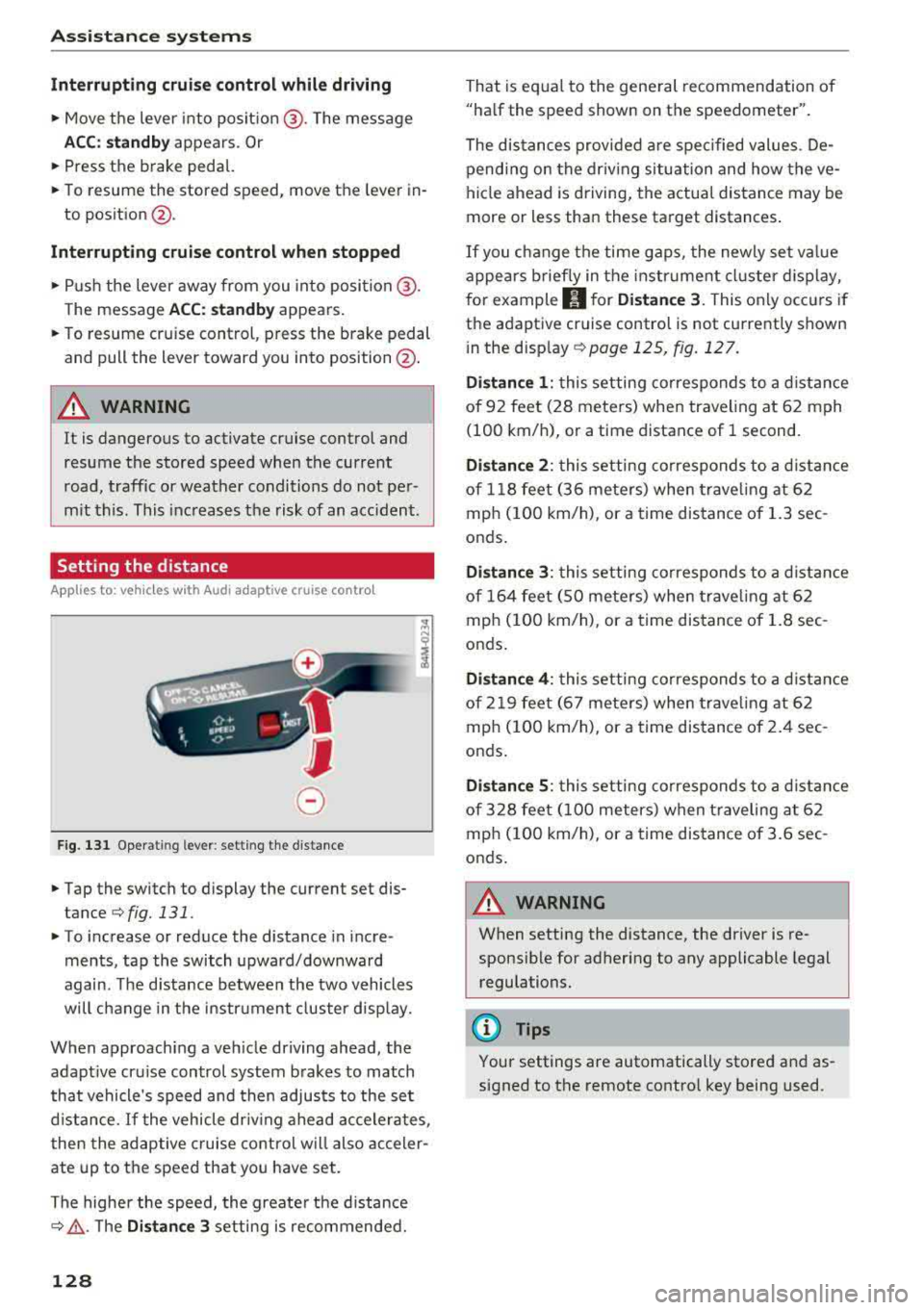
Fig. 131 Oper ating lever: setting the distance
• Tap the switch to display the current set dis
tance
¢fig. 131.
• T o increase or reduce the distance in incre
ments, tap the switch upward/downward
again. The d istance between the two vehicles
will change in the instr ument cluster disp lay.
When approaching a veh icle driving ahead, the
adaptive cru ise control system brakes to match
that vehicle's speed and then adjusts to the set
d istance.
If the vehicle dr iv ing ahead accelerates ,
then the adaptive cruise control will also acceler
ate up to the speed that you have set.
The higher the speed, the greate r the d istance
c::;, ,&. . The Di stan ce 3 setting is recommended.
128
That is equa l to the general recommendation of
"ha lf the speed shown on the spe edometer".
The distances provided a re spec ified values . De
pending on the dr iv ing situation and how the
ve
hicle ahead is driving, the actual distance may be
more or less than these target distances .
If you c hange the time gaps, the newly set va lue
appears b rief ly in the instrument cl uster d isplay,
for example
II for Di stan ce 3. This on ly occurs if
the adaptive cruise control is not currently shown
i n the display
c::;, page 125, fig. 127.
Di stance 1 : this setting corresponds to a d istance
of 92 feet (28 meters) when traveling at 62 mph
(100 km/h), or a time distance of 1 second.
Di stanc e 2: this setting corresponds to a d istance
of 118 feet (36 meters) when trave ling at 62
mph (100 km/h), or a time distance of 1.3 sec
onds.
Di stanc e 3: this setting corresponds to a d istance
of 164 feet ( SO meters) when trave ling at 62
mph ( 100 km/h), or a time distance of 1.8 sec
onds .
Distanc e 4: this setting corresponds to a d istance
of 219 feet (67 meters) when trave ling at 62
mph ( 100 km/h), or a time distance of 2 .4 sec
onds .
Distance 5 : this setting corresponds to a d istance
of 328 feet ( 100 meters) when t raveling a t 62
mph ( 100 km/h), or a time distance of 3 .6 sec
onds .
A WARNING
When setting the distance, the driver is re
sponsible for adhering to any applicable legal
regulations.
(D Tips
-
Your settings are automatically stored and as
signed to the remote contro l key being used.
Page 131 of 404
LL co ..... N
" N ..... 0 N > co
Setting the driving program
Applies to: vehicles with Audi adaptive cruise contro l
Depending on the se lected dr iv ing program and
d istance, dr iv ing behav ior when ac celerating w ill
va ry from dy namic to comfortab le.
Setting the driving program on vehicles
w ithout drive sele ct*
• Se lect in the Infotainment sys tem: IM ENUI but
ton
> Vehicle > left contro l bu tto n > Dri ver a s·
si stan ce
> Audi adapt ive crui se contr ol > Dri v
ing p rogram
> Comfort , Standard or D yn am ic.
Setting the driving mode on vehicles with
d rive s elect *
See i::!) page 141.
@ Tips
Your sett ings are automa tic ally sto red and as
signed to the remote control key being used.
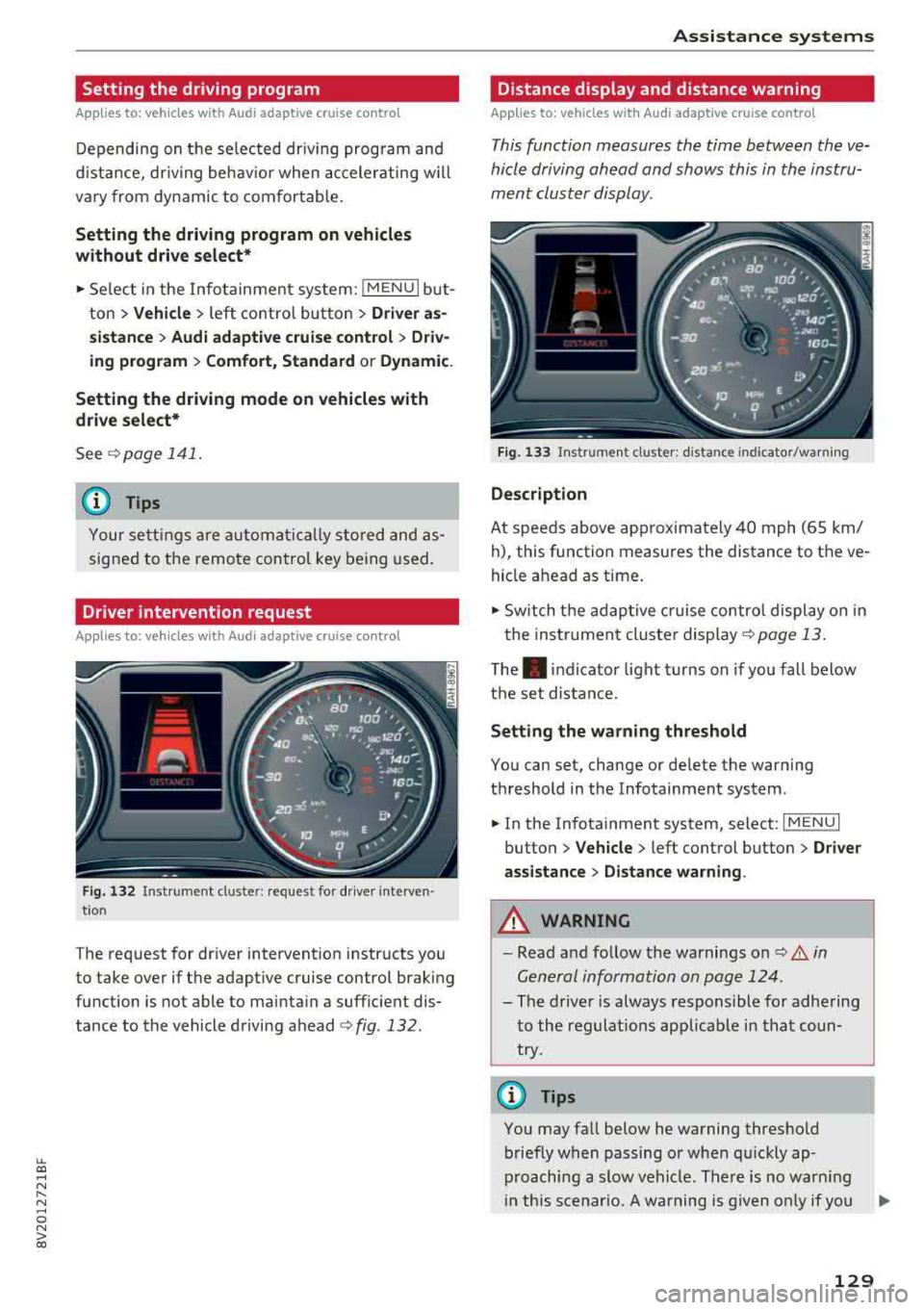
Driver intervention request
Applies to: vehicles with Audi adaptive cruise control
F ig . 132 Ins tru ment clust er: reques t for dr iver in ter ven
tio n
The request for driver intervention instructs you
to take over if the adaptive cruise control brak ing
function is not able to mainta in a suff icient dis
tance to the vehicle driving ahead
¢ fig . 132 .
Assi st a nce systems
Distance display and distance warning
Applies to: vehicles with Audi adaptive cruise control
This function measures the time between the ve
hicle driving ahead and shows this in the instru
ment cluster display.
F ig. 13 3 Instrumen t cluster : dista nce in dicato r/warn ing
D escription
At speeds above app roximately 40 mph (65 km/
h), this function measures the distance to the ve
hicle ahead as time .
• Switch the adaptive cruise contro l display on in
the instrument cluster
display ¢ page 13.
The. indicator light turns on if you fall below
the set distance.
Setting the wa rning threshold
You can set, change or de lete the warning
threshold in the Infotainment system .
• In the Infotainment system, select: I MENU I
button > Vehicle > left control button > Dri ver
assistance
> D istance warning .
A WARNING
-Read and follow the warnings on i::!) A in
Gen eral information on page 124 .
-
- The driver is always responsible for adhering
to the regulat ions applicab le in that coun
try.
(D Tips
You may fall below he warning threshold briefly when passing or when qu ickly ap
proaching a slow vehicle . There is no warn ing
i n th is scenar io. A warning is given only if you
..,.
129
Page 132 of 404
Assistance systems
fal l below the warn ing th reshold for an ex
tende d pe rio d of time .
Messages
Applies to: veh icles w ith Audi adaptive cruise control
II ACC: unavailable
T he system cannot guar antee that it w ill detec t
ve hicl es co rrectly and it has switched
off. T he
sensor was moved or is fau lty . D rive to an aut hor
ized A udi dealer or autho rized Au di Service Faci li
ty immediately to have the malfunct ion correct
ed .
IIJ ACC: currently unavailable. No sensor view
II ACC: currently unavailable . Sensor vision re
stricted due to surroundings. See owner's man
ual
T his message appea rs if the sensor view is ob
s truc ted, fo r ex am ple by le aves, snow, he avy
sp ray o r dir t. C le a n the sensor
q page 12 4,
fig. 123 .
II ACC: currently unavailable . Incline too steep
The road exceeds the ma ximum possib le ang le
for safe a dapt ive cr uise control o peration . T he
a d ap tive cr uise con trol cannot be switched on .
II ACC: only available in D, Sor M
Select the "D/S" o r "M" selector leve r position .
II ACC: parking brake applied
The adaptive c ruise contro l sys tem swi tches off
automatically if the park ing bra ke is set . Th e
a da pti ve cr uise co ntrol is av ailab le ag ain a fter re
le asi ng t he p arki ng brak e.
II ACC: currently unavailable . Stabilization
control input
This message appea rs if the elect ronic stab iliza
tion contro l (ESC) is taki ng action to stab ilize t he
ve hicle. In this case, a dap tive cr uise control
sw itch es off au toma tically.
II ACC: Please take over!
This message appea rs if the veh icle rolls bac k
when sta rting on a slight incl ine, even thoug h
130
ACC i s active. Press t he b rake pedal to preven t
t h e ve hicle from rol ling o r start ing to move.
Distance warning: malfunction! Please contact
Service
The sys tem canno t gua ran tee that it will detect
vehicles corre ctly an d it h as sw itched off . T he ra
d ar sen sor w as mo ved or is faulty . D rive to a n au
th ori ze d Aud i de aler o r aut horized Audi Se rvice
F aci lity imme diate ly to h ave the mal function co r
r ected .
Distance warning: currently unavailable. Sensor
view limited due to surroundings .
This message appears if the sensor v iew is ob
str uct ed , for e xam ple by leaves, s now , heavy
s pra y or dirt. C lean t he se nsor
q poge 124 ,
fig. 12 3 .
Distance warning: currently unavailable. See
owner's manual
This message appears if the system has a tempo
r ary fa ilure. If this occurs m ultip le times, drive to
an a uthorized Au di dea le r or a uthor ized Audi
Se rvice Fa cility i mmediat ely to ha ve the malf unc
t ion co rre cted.
Fasten seat belt
The system is not com plete ly ava ila bl e if the dr iv
e r's seat belt is unfastened .
Stat. obj. ahead
T his mes sage app ears if yo u w ould like to swi tch
th e sys tem on a nd th ere is a station ary objec t di
r ec tly in front o f yo ur vehicle .
Door open
The system is not available whe n the vehicle is
stationary a nd the driver's door is open .
Audi pre sense
Introduction
Applies to: vehicles with Aud i pre sense
Wit hin t he limits o f th e system , th e pr e sense
funct ions can initiate measures i n pa rtic ularly
dange rous situations to p rotect the vehicle pas-
sengers and other road users.
IJIJ,
Page 143 of 404
u. 00 .-< N l' N .-< 0 N > 00
Engine and automatic transmission
D epending on the mode, the eng ine and auto
mat ic transmission * respond more quickly or in a
more balanced manner to accelerator pedal
movements . In the sporty dynamic mode, the
transmission shifts at higher speed ranges.
Suspen sion control (Audi magnetic ride) *
The s uspension contro l uses sensors to reco rd in
formation regarding steering movements, brak
ing and acce leration operations by the driver, as
well as information abo ut th e road s urface, driv
ing speed, and load. With Audi dr ive select you
can adjust the suspens ion control to sporty (dy
namic), comfortable (comfort) or balanced (au
to) .
Steering
T he steering adapts in terms of steering assis
tance. There are different modes
¢ page 142 .
Indirect steering that moves easily as in comfort
mode is especia lly su ited to long drives on a high
way . The dynam ic mode p rovides sporty, d irect
steer ing .
For vehicles w ith progressive steering* the steer
in g performance is more ag ile .
Audi adapt ive light *
The i llumination on curves in adaptive light is
adapted to the se lected mode.
Audi adaptive cruise control*
The behav ior when a cce le ra ting can be adjus ted
from com fortab le to sporty, depending on the
drive select mode . Adaptive cr uise control a lso
r e sponds to the driving behavior of the ve hicle
ahead in a more conservative or sporty manner.
(D Tips
- In some models, the maximum vehicle
speed can only be reached in the auto and
dynam ic modes.
A ss istance systems
- The "S " sele ctor leve r position au tomatically
engages if the dynamic mode is selected.
Selecting the driving mode
Applies to: vehicles with Audi drive select
You con choose between comfort, auto, dynamic
and individual* .
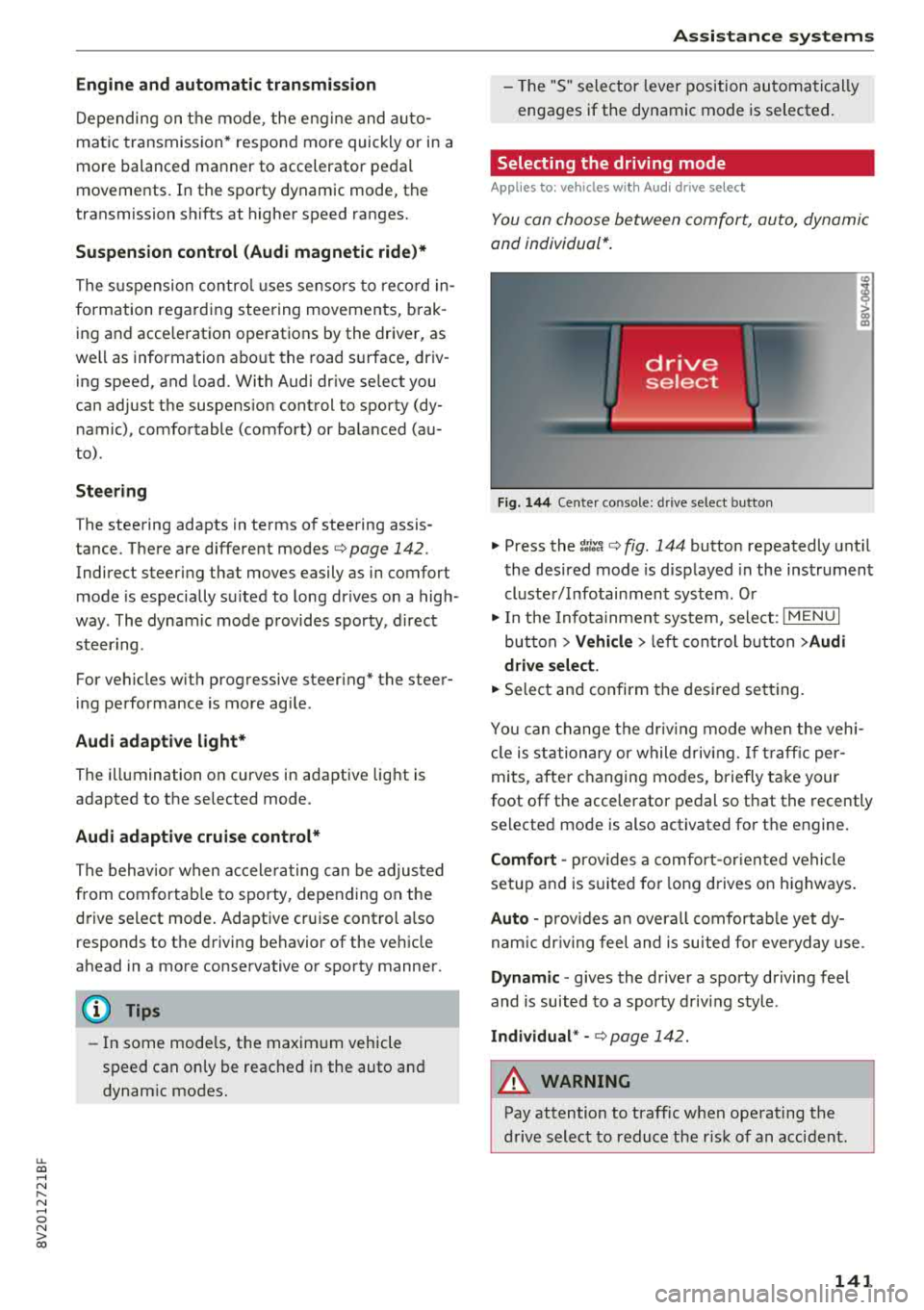
Fig. 144 Ce nter co nso le: dri ve se lect button
"' Press the ~:i;~ ¢ fig . 144 button repeatedly unt il
the desired mode is d isp layed in the instrument
cluste r/ Infotainment system . Or
"' In the Infota inment system, selec t: I M ENU I
bu tton > Vehicl e > left cont rol b utt on > Audi
dri ve select .
"'Select and confirm the desired se tting.
Yo u can change the dr iv ing mode when the veh i
cl e is stationary or while drivin g. If t raff ic per
mi ts, after c hanging mo des, briefly ta ke your
foot off t he accelerator pedal so that the recently
selected mode is also activated fo r th e engine.
Comfort -prov ides a co mfort -or iented vehicle
setup a nd is s uited for long d rives on h ighways .
Auto -provides a n overa ll comfortab le yet dy
nam ic dr iv ing feel and is suited for eve ryday use.
Dynamic
-g ives the drive r a sporty driving fee l
and is suited to a spo rty d riving style .
Individual * -¢ page 142.
A WARNING
--
Pay attention to traffic when ope rating the
drive select to reduce the r is k of an accident .
141
Page 144 of 404
Assistance systems
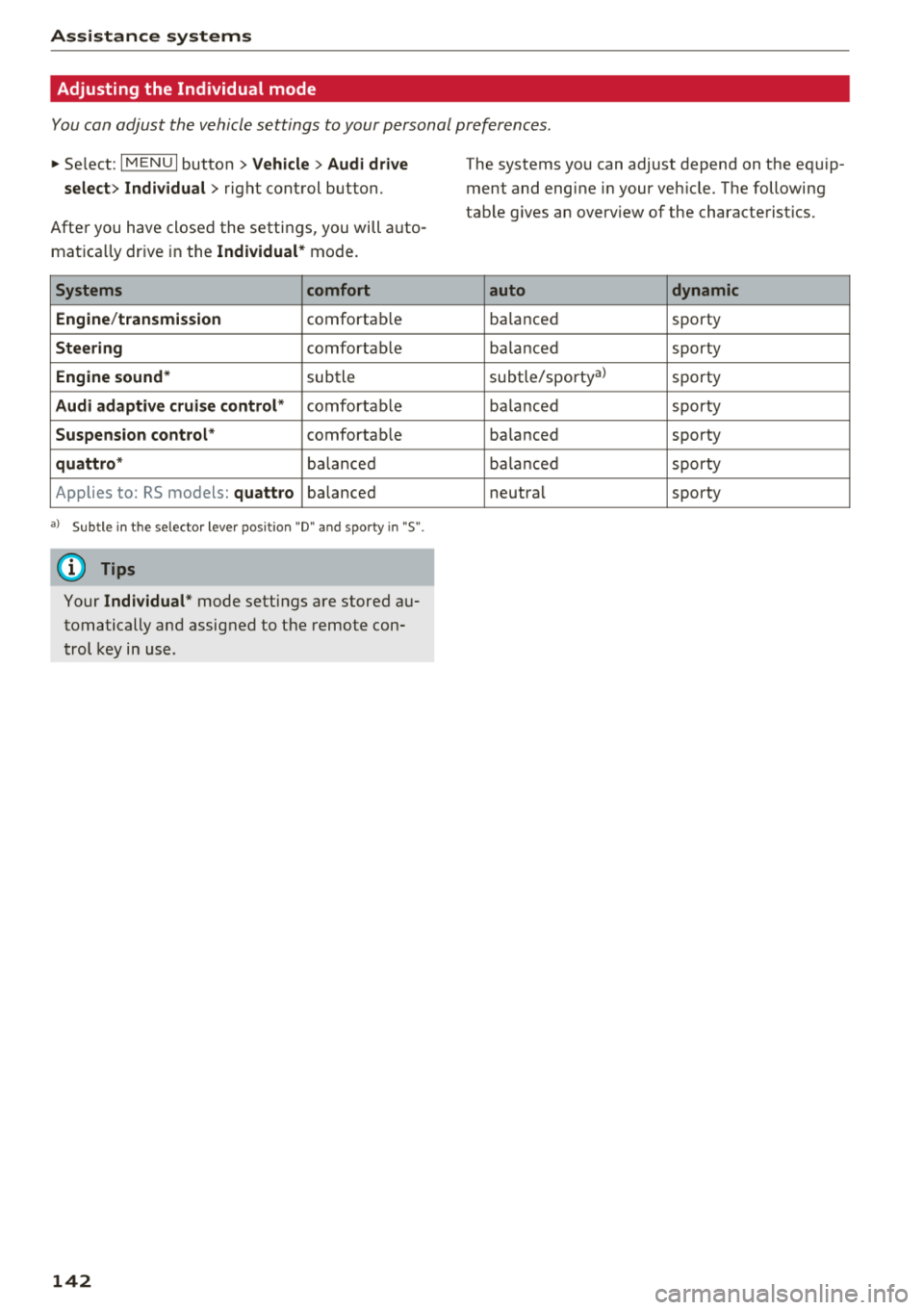
Adjusting the Individual mode
You can adjust the vehicle settings to your personal preferences.
~ Select: I MENU I button >Vehicle> Audi drive
select> Individual >
right control button.
After you have closed the settings, you will auto
mat ica lly dr ive in the
Individual * mode.
Systems comfort
Engine /transmission
comfortab le
Steering comfortab le
Engine sound* subtle
Audi adaptive cruise control* comfortable
Suspension control* comfortable
quattro * balanced
Applies to: RS models:
quattro balanced
a) Subtle in t he selector lever position "D" and sporty in "S".
(0 Tips
Your Individual * mode settings are stored au
tomatically and assigned to the remote con
trol key in use.
142
The systems you can adjust depend on the equip
ment and engine in your veh icle. The following
table g ives an overview of the characterist ics.
auto dynamic
ba
lanced sporty
ba lanced sporty
subtle/sportyal sporty
ba lanced sporty
ba lanced sporty
ba lanc ed sporty
neutral sporty
Page 152 of 404
Intelligent Technology
-There is no vehicle stabilization when ESC/
ASR are switched off.
(D Tips
- ESC/ ASR cannot be switched off or sport
mode cannot be switched on if the cruise
control system * or the adaptive cruise con
tro l* is switched on.
- Malfunctions in the Audi magnetic ride*
may make it impossible to switch the ESC/
ASR off or to switch sport mode on.
Brakes
New brake pads
New brake pads do not achieve their full braking
effect during the first 250 mi (400 km). They
must be "broken in" first. However, you can com
pensate for the slightly reduced braking force by
pressing firmly on the brake pedal. Avoid heavy
braking dur ing the break-in per iod .
The break-in period can be considerably longer
for vehicles with ceramic brake rotors*. However,
you can compensate for the slightly reduced
braking force by pressing f irmly on the brake
pedal. Avoid heavy brak ing dur ing the break- in
pe riod .
Wear
Brake pad
wear depends largely on the way the
veh icle is driven and on operat ing cond itions .
This is especially true if you are driving frequently
in the city and on curves or with a sporty driving
style.
Operating noise
Noises may occur when braking depend ing on the
speed, braking force and outs ide cond itions such
as temperature and humidity.
Noises may become more apparent at lower
speeds due to the nature of the materials in the
ceramic brake rotors*.
Effect of water and road salt
In certain situations, for example after driving
through water, in heavy rain, after overnight con
densat ion or after washing your car, the braking
150
effect can be reduced by moisture or ice on the
brake rotors and brake pads . The brakes must be
"dried" first with a few carefu l brake applica
tions.
At higher speeds and with the windshield wipe rs
turned on, the brake pads press against the brake
rotors for a short amount of time . This action,
which is not felt by the dr iver, happens at regular
i ntervals and ensures a better reaction t ime for
the brakes in wet weather .
The brak ing effect can also be reduced if you are
driv ing on salted roads and you do not app ly the
brakes for long periods of time. The layer of salt
on the brake rotors and pads must be worn off
first whe n the brakes are applied .
Due to its surface, the ceram ic brake rotor* ab
sorbs moisture in certain s ituations . Therefore,
there will temporarily be less braking force than
when the brakes are dry . You can compensate for
th is by press ing the brake pedal harder.
Corrosion
Leaving the vehicle parked for long periods of
time, low mileage and avoiding heavy braking
can contribute to corros ion on the brake rotors
and to dirty brake pads.
If you usually avoid heavy braking or if there is
corrosion present, occasional heavy brak ing at
high speeds is recommended to clean the brake
rotors and
pads~.& .
Brake system malfunction
If you notice that the brake pedal travel has sud
denly
i ncreased, then a brake circuit in the dua l
c ir cuit brake system may have malfunctioned.
Drive to an authorized Audi dealer or authorized
Audi Service Fac il ity immed iately to have the
problem corrected. On the way there, drive with
r educed speed and keep in mind that you will
need a longer distance to stop and you will need
to press the brake pedal harder.
Low brake fluid level
When the brake fluid level is low, malfunctions in
t h e b rake system may occur. The b rake flu id level
is electronically monitored.
II>-
Page 389 of 404
u. 00 .-< N l' N .-< 0 N > 00
A
A/C (automatic climate control system)
Accessories
. . .. ................ ...
Active lane assist ..
.. 69
62 ,385
refer to Audi active lane assist . . . . . . . . . 133
Active rollover protection system . . . . . . . . 257
Retracting rollover protection . . . . . . . . . . 257
Adapt ive cruise control
refer to Audi adaptive cruise control . . . . 123
Adaptive light
refer to Audi adaptive light . . . . . . . . . . . . . 49
Adjusting the additiona l display . . . . . . . . . . 15
Adjusting the air d istr ibut ion
Automatic climate control system . . . . . . . 70
Adjusting the air vents . . . . . . . . . . . . . . . . . . 71
Automatic climate control system . . . . . . . 70
Adjusting the sound . . . . . . . . . . . . . . . . . . . 247
Advanced key
refer to Convenience key . . . . . . . . . . . . . . . 76
Airbag .. .. .. .. ............... .. .. .. . 269
Airbag system . . . . . . . . . . . . . . . . . . . . 269, 289
Advanced Airbag System components . . . 276
Care . . . . . . . . . . . . . . . . . . . . . . . . . . . . . . 284
Children
Child restraints 296
297
Components (front airbags) . . . . . . . . . . . 276
Danger of fitting a child seat on the front
passenger seat . . . . . . . . . . . . . . . . . . . . . .
2 70
Disposal . . . . . . . . . . . . . . . . . . . . . . . . . . . 284
Fr ont airbags . . . . . . . . . . . . . . . . . . . . . . . 274
How do the front airbags work? . . . . . . . . 279
How many airbags does my vehicle have? 276
How the Advanc ed Airbag System compo-
nents wo rk together . . . . . . . . . . . . . . . . . 278
Important safety instructions on the knee
airbag system . . . . . . . . . . . . . . . . . . . . . . . 287
Knee airbags . . . . . . . . . . . . . . . . . . . . . . . . 285
Monitoring . . . . . . . . . . . . . . . . . . . . . . . . . 281
PASSENGER AIR BAG OFF light . . . . . . . . . 281
Repairs . . . . . . . . . . . . . . . . . . . . . . . . . . . . 284
Safety instructions . . . . . . . . . . . . . . . . . . . 283
Side airbags . . . . . . . . . . . . . . . . . . . . . . . . 287
Warning/Indicator lights . . . . . . . . . . . . . 281
Wh en must the system be inspected? . . . 281
Air pressure
Tire Pressure Monitoring System indicator 348
Index
Alarm system
refer to Anti-theft alarm system . . . . . . . . . 36
Al ignment pin (tire change) . . . . . . . . . . . . . 360
All-weather lights . . . . . . . . . . . . . . . . . . . . . . 49
All season tires . . . . . . . . . . . . . . . . . . . . . . . 346
All wheel drive
refer to quattro (all wheel drive) . . . . . . . 152
AMI
refer to Audi music interface . . . . . . . 229, 230
Android Auto
refer to Audi smartphone interface 241
Anti-freeze Windshield washer system . . . . . . . . . . . . 328
Anti-Lock Braking Sys tem (ABS) . . . . . . . . . 148
Anti-Slip Regu lation (ASR) . . . . . . . . . . . . . . 148
Anti-theft alarm system . . . . . . . . . . . . . . . . . 36
Apple CarP lay
refer to Audi sm artphone interface . . . . . 241
ASR
refer to Anti-Slip Regulation (ASR) . . . . . . 148
Audi active lane assist Cleaning the camera area
Messages ... .. .. .. ............... . .
Audi adaptive cruise control ............ .
Cleaning the sensor ................. .
Distance display, distance warning .. .. . .
Messages ... .. .. .. ............. .. . .
Audi adap tive light ... ............... . .
Audi connect e-tron services
............
Doors and lights .... ................ . 133
355
135
123
355 129
130
140
199
199
Audi connect (Infotainment) ........ 190, 196
Data protection . . . . . . . . . . . . . . . . . . . . . 197
Services overview . . . . . . . . . . . . . . . . . . . . 191
Starting . . . . . . . . . . . . . . . . . . . . . . . . . . . 191
Audi drive select . . . . . . . . . . . . . . . . . . . . . . 140
Audi magnetic ride
refer to Suspension control . . . . . . . . . . . . 140
Audi music interface . . . . . . . . . . . . . . . . . . . 229
Audi music stream
refer to Wi-Fi . . . . . . . . . . . . . . . . . . . . . . . 227
Audio files . . . . . . . . . . . . . . . . . . . . . . . . . . . 232
Audio player
Bluetooth audio player . . . . . . . . . . . . . . . 226
Wi-Fi audio p lay er . . . . . . . . . . . . . . . . . . . 227
Audio track 235
387