ECO mode AUDI A3 SEDAN 2018 Owners Manual
[x] Cancel search | Manufacturer: AUDI, Model Year: 2018, Model line: A3 SEDAN, Model: AUDI A3 SEDAN 2018Pages: 404, PDF Size: 62.3 MB
Page 11 of 404
u. 00 .-< N l' N .-< 0 N > 00
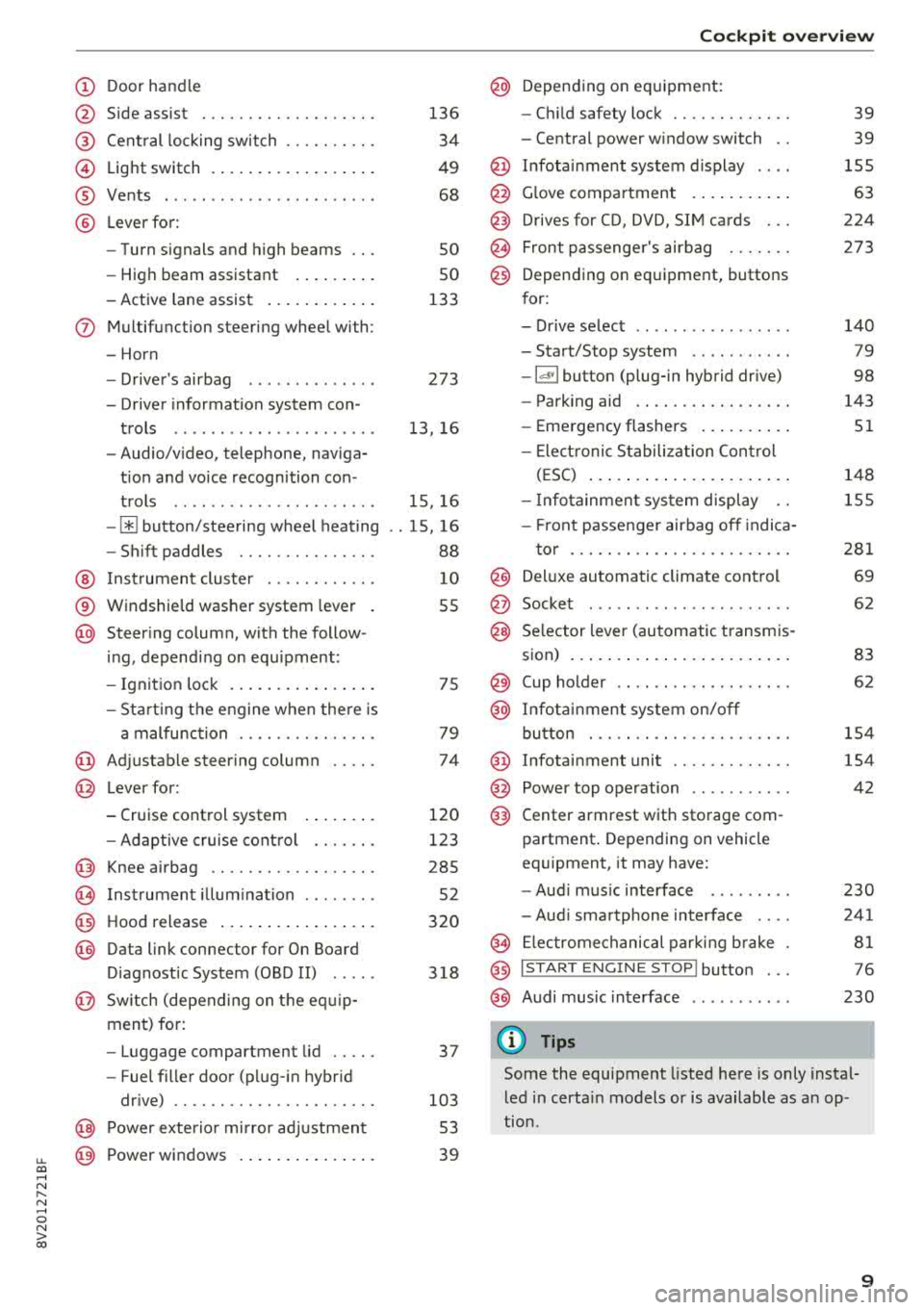
(D Door handle
@ Side assist ................ .. .
@ Central locking switch ......... .
@ Light switch ................ . .
® Vents ... .. ................ . .
@ Lever for:
- Turn signals and high beams
- High beam assistant ....... . .
- Active lane assist .......... . .
(J) Multifunction steering wheel with:
- Horn
- Driver 's airbag ............ . .
- Driver information system con-
trols .. .. ................ . .
- Audio/video, telephone, naviga
tion and voice recognition con -
trols .. .. ................ . .
-[ii button/steering wheel heating
- Shift paddles ............ .. .
@ Instrument cluster ........... .
® Windshield washer system lever
@ Steering column , with the follow -
ing , depending on equipment:
- Ignition lock .............. . .
- Start ing the engine when there is
a malfunction ............ .. .
@ Adjustable steering column
@ Lever for:
- Cruise control system
- Adaptive cruise control ...... .
@ Knee airbag ................. .
(8) Instrument illumination ....... .
@ Hood release ................ .
@) Data link connector for On Board
Diagnostic System (OBD II) .....
@ Sw itch (depending on the equ ip
ment) for:
- Luggage compartment lid .... .
- Fuel filler door (plug-in hybrid
drive) ................... .. .
@ Power exterior mirror adjustment
@ Power windows .............. .
136
34
49
68
so
so
133
273
13, 16
15, 16
. . 15, 16
88
10
55
75
79
74
120
123
285 52
320
318
37
103 53
39
Cockpit overview
@ Depending on equipment:
- Child safety lock ............ .
- Central power window switch ..
@ Infotainment system display ... .
@ Glove compartment .......... .
@) Drives for CD, DVD, SIM cards .. .
@ Front passenger 's airbag ...... .
@) Depending on equipment, buttons
for:
- Drive select .. .. ............ .
- Start/Stop system .......... .
-l<'l"I button (plug- in hybrid drive)
- Parking aid .... ............ .
- Emergency flashers ......... .
- Elect ronic Stabilization Control
(ESC) ..................... .
- Infotainment system display ..
- Front passenger airbag off indica-
tor ... .. .. ................ .
@ Deluxe automatic climate control
@ Socket ..... .. .. ............ .
@ Selector lever (automatic transmis-
sion) ....................... .
@ Cup holder .. .. ...... ........ .
@ Infotainment system on/off
button ... .. ................ .
@ Infotainment unit ............ .
@ Power top operation .......... .
@) Center armrest with storage com-
partment. Depending on vehicle
equipment, it may have:
-Audi music interface ........ .
- Audi smartphone interface ... .
@ Electromechanical parking brake
@ I START ENGINE STOP I button ...
@ Audi music interface
(D Tips
39
39
155
63
224
273
140
79
98
143
51
148
155
281
69
62
83
62
154
154
42
230
241
81
76
230
Some the equipment listed here is only instal
led in certain models or is available as an op
tion .
9
Page 22 of 404
Cockpit overv ie w
Shift light indicator
Applies to: vehicles with shift light indicator
The s hift lig ht ind icator informs t he d river when
t he rpm limit is reached .
Accessing the shift light indicator
Requirement: tiptron ic mode must be act ivated
c:> page88 .
.-Se lect the sport view c:> page 14. The sh ift light
indicator is d ispl ayed with green , yellow and
red ranges in the upper areas of the tachome
ter .
The s hift lig ht indicator w ill blink red when ap
proaching the engine speed lim it. Shift to the
next h ighest gear at the right time .
Sport displays
Applies to: vehicles with Audi virtual cockpit and sport dis
plays
Depending on the vehicle equ ipment, the sport
d isp lays may i nclude the G-meter, the engine da
ta and the tire p ressure mo nitoring system .
Accessing the sport displays
.-Open the first vehicle functions tab using the
I 4 1>1 button on the multifunction steering
whee l.
.- Se lect o n the multifunction stee ring wheel: left
contro l butto n >
Sport display s .
.- T urn the left thumbwheel on the mult ifunct ion
stee ring wheel u ntil the des ired sport display
appea rs in the ins trumen t cluste r.
G meter*
The G meter displays the longitudina l and latera l
acceleration . Th e max imum values that are
reached are sto red and d isp layed when the vehi
cle is s tat io nary.
.- To reset the stored values, se lect on the multi
funct io n steer ing wheel: r ight control b utton>
Reset value s.
Engine data*
The engine data displays the cur rent power and
torque.
20
Tire Pressure Monitoring System*
The tire press ure monitor ing sys tem d isp lays the
cu rrent tire press ures and tempe ra tu re. Also see
c:> page 350 , Tire pressure monitoring system.
Indicator lights
Description
The ind icator lights in the instrument clus ter
blink or tur n on. They ind icate fu nctions or mal
func tions.
Messages may appear w ith some indicator ligh ts .
A war ning s ignal will sound at the same time .
The ind icator lights and messages in the inst ru
ment clus ter d isp lay can be cove red by ot he r dis
plays . You can have these d isp laye d again in the
driver information system by opening the second
Vehicle tab (messages) using the
14 1>I b utton o n
the m ultif unction steering whee l. If there a re
severa l ma lfunctions, you can display them one
at a t ime us ing the thumbw heel.
Some indicator lights in the display can disp lay in
severa l co lors.
Lt Central indicator light
If the . or Q indicator light turns on, check
the instr ument cluster d isp lay for more informa
tion .
Applies to: vehicles with monoch rome display
If a message appears toget her with a central in
dicator light . or
d. the cen tra l ind icator light
will indicate the priority of the warning . If a
wh ite ind icator light also appea rs , the cen tra l in
dica tor light w ill have its ow n colo r. Fo r example ,
if ll appea rs togethe r with . , read the descr ip
t ion
for • .
Overview
Some indicator lights t urn on briefly as a f unction
c h eck w hen you switch the ignition on. These sys
tems a re marked with a ./ in the fo llow ing tab les.
If one of these ind icator lights does not turn on,
there is a malfunct io n in that sys tem.
IIJJ,,
Page 57 of 404
LL co .... N
" N .... 0 N > co
Windshield wipers
Switching the windshield wipers on
Fig. S6 Windshield wiper lever
Fig. S7 Rear window wiper• operatio n
t® I
a @
lll ®
Iii @
•®
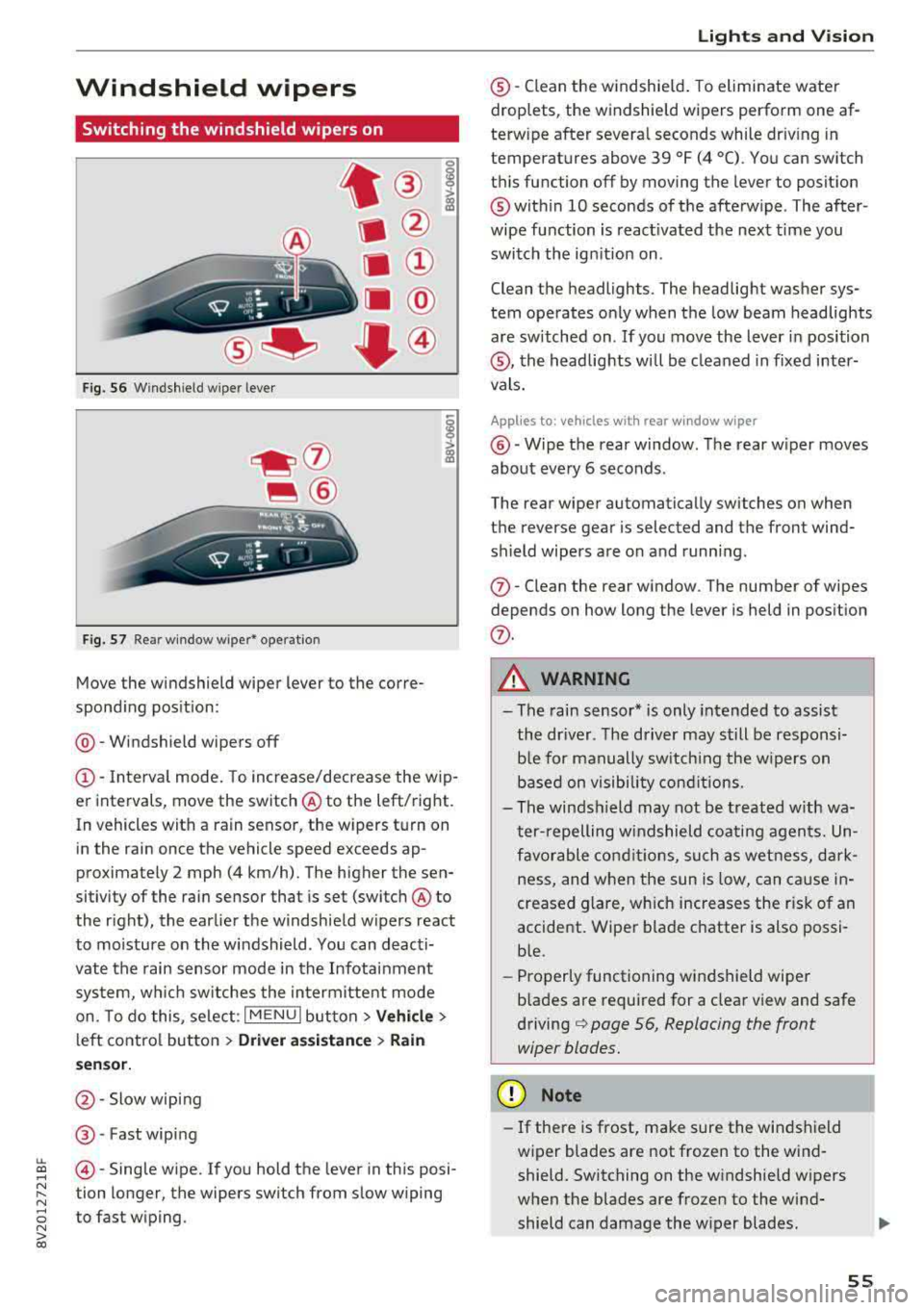
Move the windshield wiper lever to the corre
spond ing pos ition:
@ -Windshield wipers off
(D-Interval mode. To increase/decrease the wip
er intervals, move the switch
@ to the left/right.
In vehicles with a rain sensor, the wipers turn on in the rain once the vehicle speed exceeds ap
proximately 2 mph (4 km/h). The higher the sen
sitivity of the rain sensor that is set (switch
@ to
the right), the earlier the w indshield w ipers react
to moisture on the windshield . You can deacti
vate the rain sensor mode in the Infotainment
system, wh ich switches the intermittent mode
on. To do this, select :
I MENU I button> Vehicle>
left control button > Driver a ssistance > Rain
se nsor.
@ -Slow wiping
@ -Fast wiping
@-Single wipe. If you hold the lever in this posi
tion longer, the wipers switch from slow wiping
to fast wiping.
Lights and Vision
®-Clean the windshield. To eliminate water
droplets, the windshield wipers perform one af
terw ipe after several seconds while dr iv ing in
temperatures above 39 °F (4 °C). You can switch
this function off by moving the lever to position
@within 10 seconds of the afterwipe . The after
wipe function is react ivated the next time you
switch the ignition on .
Clean the headlights. The headlight washer sys
tem operates only when the low beam headlights
are sw itched on . If you move the lever in position
®, the headlights will be cleaned in fixed inter
vals.
Applies to: vehicles wi th rear window wiper
@ -Wipe the rear window. The rear wiper moves
about every 6 seconds .
The rear wiper automatically switches on when
the reverse gear is selected and the front wind
sh ield wipers are on and running.
(j)-Clean the rear window . The number of wipes
depends on how long the lever is held in position
(j) .
A WARNING
-The rain sensor* is only intended to assist
the driver. The driver may still be responsi
ble for manually switch ing the w ipers on
based on visibility conditions.
-The windsh ield may not be treated w ith wa
ter-repelling windshield coating agents. Un
favorable conditions, such as wetness, dark
ness and when the sun is low, can cause in-
'
creased glare, which increases the r isk of an
accident. Wiper blade chatter is also possi
ble.
-Properly functioning windshield wiper
b lades are required for a clear view and safe
driving¢ page 56, Replacing the front
wiper blades.
(D Note
- If there is frost, make sure the windshield
wiper blades are not frozen to the wind
shield. Switching on the windshield wipers
when the blades are frozen to the wind
shield can damage the wiper blades .
-
55
Page 60 of 404
Lights and Vision
Adjusting the magnetic zone
Applies to: ve hicles w ith d ig ital compass
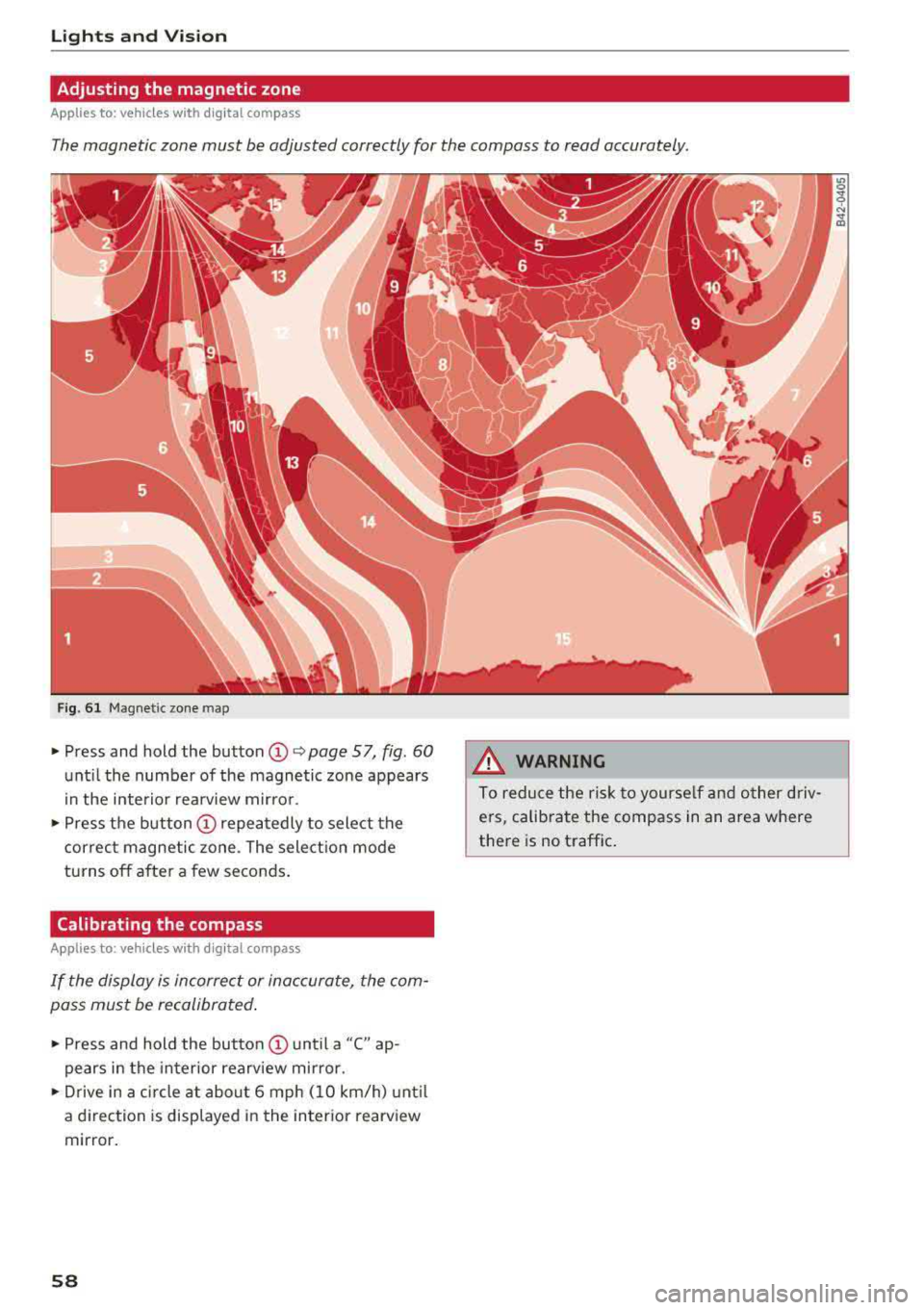
The magnetic zone must be adjusted correctly for the compass to read accurately.
Fig. 61 Magnetic zone map
~ Press and hold the button CD~ page 57, fig . 60
until the number of the magnetic zone appears
in the interior rearview mirror.
~ Press the button CD repeatedly to select the
correct magnetic zone . The selection mode
turns off after a few seconds.
Calibrating the compass
A pp lies to: ve hicles w ith d ig ital compass
If the display is incorrect or inaccurate, the com
pass must be recalibrated.
~ Press and hold the button CD until a "C" ap
pears in the interior rearview mirror.
~ Drive in a circle at about 6 mph (10 km/h) until
a dir ection is displayed in the in terior rearview
mirror.
58
A WARNING
To reduce the risk to yourself and other driv·
ers, calibrate the compass in an area where
there is no traffic.
Page 70 of 404
Warm and cold
Warm and cold Climate control system
Description
The climate control system circulates , warms or
coo ls, and removes humid ity from the air in the
veh icle interior . It is the most effective when the
windows and panorama g lass roof* or power top*
are closed. If there is a build-up of heat inside
the vehicle, ventilation can help to speed up the
coo ling process.
Pollutant filter
The pollutant filter removes pollutants such as
dust and po llen from the air.
Key recognition
Various sett ings are stored and ass igned to the
remote control key being used.
These settings are different when the power top* is open or closed .
Presetting
Several functions can be preset in the Infotain
ment system.
Select in the Infotainment system:
IMENU ! but
ton
> Vehicle > left control button > Air condi
tioning
A WARNING
Poor visibility can lead to accidents.
- For safer driving, keep all windows free of
ice, snow and fog.
- Become familiar with the correct use and
function of the climate control system as
quickly as poss ible, espec ia lly with the de
frosting and defogging functions.
- When the temperature is below freezing, only use the windsh ield washer system after
68
the windshield has been warmed by the cli
mate control system. The washer fluid could
freeze on the windshie ld and impair visib ili
ty .
@ Note
-If you suspect that the climate contro l sys
tem is damaged, switch the system off to
prevent further damage and have it checked
by an authorized Aud i dealer or authorized
Audi Serv ice Facility.
- Repa irs to the Aud i climate control system
require special technical knowledge and
special tools . See an authorized Aud i dealer
o r authorized Aud i Serv ice Facility .
@ For the sake of the environment
-To save fuel, turn off the climate control
system cooling mode by press ing the A/C
button. This w ill also reduce emissions . The
climate control system is off when the LED
in the button turns off.
- In vehicl es w ith the efficie ncy prog ram*,
yo u can find other consumpt ion information
and more economy tips ¢ page 19.
© Tips
- To prevent int erference with the heat ing
and cooling output and to prevent the win
dows from fogging over, the air intake in
front of the windshie ld must be free of ice,
snow or leaves.
- Condensation from the cooling system* can
drip and form a pudd le of water under the
vehicle . This is normal and does not mean
there is a leak.
- Th e energy management system may tem
porarily switc h off certain functions, such as
the seat heating* or rear window defogger.
These systems are ava ilable again as soon
as the energy supply has been restored.
Page 71 of 404
Warm and cold
Automatic climate control system
Applies to: ve hicles with a utomat ic climate contro l system
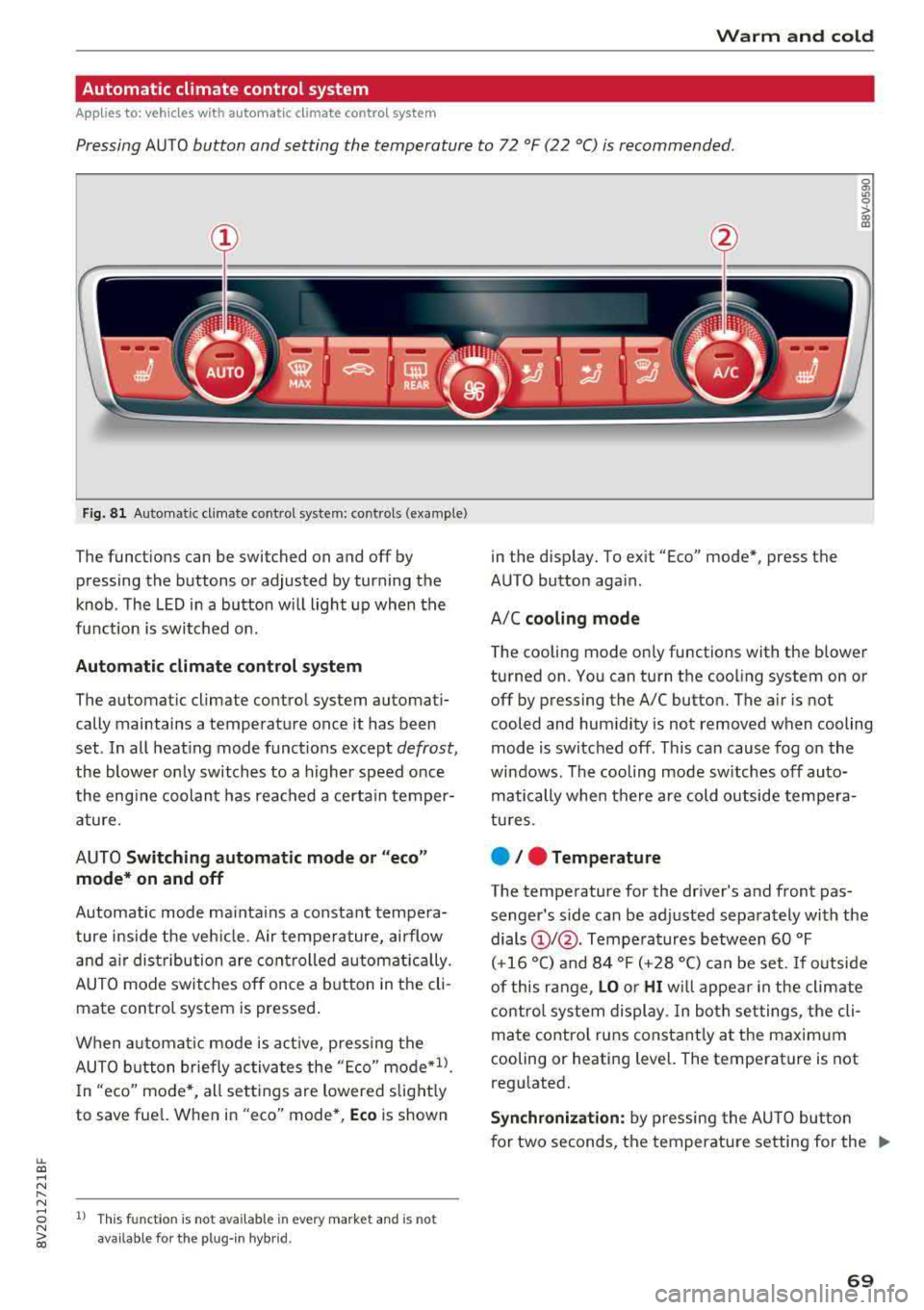
Pressing AUTO button and setting the temperature to 72 °F (22 °C) is recommended.
LL co .... N
" N
Fig. 8 1 Automatic climate control system: controls (example)
The funct ions can be switched on and off by
pressing the buttons or adjusted by turning the
knob. The LED in a button w ill light up when the
f u nction is switched on.
Automatic climate cont rol system
The automat ic climate control system automati
cally maintains a temperature once it has been
set . In all heat ing mode funct ions except
defrost,
the blower on ly switches to a higher speed once
the eng ine coolant has reached a certain temper
ature.
AUTO
Switching aut omatic mode or "ec o"
mode * on and off
Automatic mode ma inta ins a constant tempera
ture ins ide the veh icle. Air tempe rature, airflow
and a ir distribution are controlled a utomatically.
AUTO mode switches off once a b utton in the cli
mate control system is pressed.
When a utomat ic mode is act ive, pressing the
AUTO b utton briefly activa tes the
" E co" mode*1l.
In "eco" mode *, all sett ings are lowered slight ly
to save fuel. When in
"eco" mode*, Eco is shown
8 1l This fu nct ion is not available in every market and is not N ii'i available for the plug- in hybr id.
in the display. To ex it "Eco" mode*, press the
AUTO button aga in.
A/C
cooling mod e
The cooling mode on ly functions with the blower
turned on. You can turn the cooling system on or
off by pressing the A/C button. The air is not
cooled and humidity is not removed when cooling
mode is switched off. This can cause fog on the
windows . The cooling mode sw itches off auto
matically when there are cold outside tempera
tu res.
e / e Temperature
The temperature for the driver's and front pas
senger's s ide can be adjusted separately with the
dials
(D I@ . Tempera tures between 60 °F
(+16 °() and 84 °F (+28 °() ca n be set. If outside
of this range,
LO or HI w ill appea r in the climate
contro l system display. In both settings, the cli
mate contro l runs constant ly at the maxim um
cooling or heating level. The temperature is not
regulated.
S ynchr oniza tion : by pressing the AU TO butto n
for two seconds, the temperature setting for the
..,.
69
Page 72 of 404
Warm and cold
driver 's side is transferred to the front passeng
er's side. This applies a temperature change to
the front passenger 's side .
8/r Blower
Using the regu lator 8f?, you ca n manually adjust
the vo lume of a ir generated by the blower to your
p reference . The blowe r shou ld always run at a
low setting to prevent the windows from fogging
and to ensure a continuous exchange of air inside
t he vehicle . To h ave the blower regu lated au to
mat ically , press the AUTO button.
~/ :01 ~ Air distribution
The air distribution can adjusted with t he but
tons. To have the air distribution regulated auto matica lly, press the AU TO button.
The round air vents in t he cockpit are adjustable
q page 71 .
To keep the front s ide windows from fogging up
in damp weathe r, we recommend opening the
side air vents and tilting them to the side .
Foot vents are located under the front seats and
adjustab le vents o n the end of t he center console
t o heat the re ar of the vehicle .
3fx Defrosting
The windshield and s ide windows are defrosted
or cleared of condensation as qu ickly as possible .
The max imum amo unt of air flows ma inly from
the vents below the w indshield. Recircu lation
mode switches off. The temper ature s hou ld be
set at +72°F (22°() or higher. The temperat ure is
controlled automatica lly. In the
;Ix setting, the
A/C cooling mode switches on a utomatically , de
pending on the outside air temperature.
The A UTO button switches the defroster off.
~ Recirculation mode
The recircu lation mode can be turned on manua l
ly or automat ica lly*.
- Swi tc h ing man ua l rec irculat ion mode on and
off: press
t h e ~ button .
70
-Automatic * reci rcu lat ion mode : auto recircula
tion needs to be activated in the Infotainment
system. Se lect in the Infotainment system:
I MENU I button > Veh icle > left control button >
Air cond itioning > Aut o recircul ation
The air
quality sensor that is designed for d iesel and
gasoline exhaust automatically sw itches the re
circulation mode on or off depending on the level of pollutants in the o utside air.
In rec irculat ion mode, the air inside the vehicle is
c ir culated and filte red . T his prevents the unfil
te red air outs ide t he ve hicle from enteri ng the
vehicle inte rior. Switching rec irculat io n mode on
whe n driving throug h a tu nnel o r whe n sitting in
traffic is recommended
q & .
Pressing the~ button, A UTO o r the ;Ix button
switches recirculation mode off .
T he system switches to recirculation mode when
driv ing in reverse when the engine is cold .
SP. Rear window defogger
If the rear window defogger is act ivated when
the ignit ion is swi tched on, the battery manage
ment determines based on the battery charge if
i t is possible to turn on . Otherwise, the rear w in
dow defogger funct ions w it h the eng ine runni ng
and switches off automat ically after approxi
mately 1 0 - 20 m inutes, depending on the out
s ide temperat ure.
To p reve nt the rear window defogger from
switching off automat ica lly, press and hold the
!fP. button for more tha n two seconds. This re
mai ns sto red up to approxim ate ly lS m in utes af
te r turning off the ignition.
J Seat heating*
P ressing the J button switches the seat heat ing
o n at t he hi ghest sett ing (level 3) . The L EDs ind i
c a te the temperat ure level. To reduce the tem
per atu re , press t he button again . T o swi tc h t he
seat heating off, press the bu tton repeatedly un
ti l the LED turns off .
After approximate ly 10 m inu tes, the sea t heat ing
a utomat ic all y switches from leve l 3 to leve l 2.
..,_
Page 74 of 404
Drivin g
Driving
General information
Breaking in
A new vehicle must be broken in for the first 1,000 mi les (1,500 km). Do not dr ive at speeds
t hat will exceed 2/3 of the max imum pe rm itted
engine speed (RPM) for the first 600 miles
(1,000 km), and avoid fu ll acceleration during
this period . You may gradually start increasing
the RPM and the speed between 600 miles (1,000 km) and 1,000 miles (1,500 km) .
During the first hours of use, the engine has a
higher internal friction than later on when all
moving parts have settled into place with each
other.
How the vehicle is driven d uring the first 1,000
miles (1 ,500 km) a lso affects the engine quality .
Drive at moderate engine speeds after the initial
break-in per iod, part icu larly when running a cold
eng ine . Th is will reduce eng ine wear and improve
the m ileage .
Do not drive at too
low of an engine speed (RPM).
Shift down if the engine stops running "smooth ly". Extremely high eng ine speeds are automati
cally reduced .
Reducing the risk of vehicle damage
@ Note
When driving on poo r roads, by cu rbs and on
s teep ramps, make su re t hat low-hang ing
compone nts such as the spo ile r and exha ust
system do not come into contact with these
or they could be damaged. This especially ap
plies to vehicles with low ground clearance
and veh icles that are heavily loaded.
Warming up/cooling down
Applies to: RS models
By warming up/cooling down the engine carefu l
ly, you can help reduce unnecessary stra in o n
your veh icle when driving in a sporty sty le .
72
The tires only reach t heir full road ho ld ing capa
bility once they have warmed up under load.
Yo ur vehicle also has an afte r-run cooli ng fea
tu re . Howeve r, cooling down is st ill import ant.
The eng ine and t he brakes as we ll as the exhaust
system and the transmission become very hot
when driving in a sporty style. Before you shut
the veh icle off, you should cool down the vehicle
by driving a few miles at low speeds with light ac
ce leration .
Driving through water on roads
Note the following to reduce the risk of veh icle
damage when dr iving throug h wate r, fo r example
o n flooded roads:
-The water must not be any higher than the bot
tom of the vehicle body .
-Do not drive faster than walk ing speed .
A WARNING
After driving thro ugh water or m ud, the effec
tiveness of t he b rakes may be reduced due to
mo istu re o n the bra ke rotors and brake pads.
A few ca reful br ake app lica tions sho uld d ry
off the bra kes and restore the fu ll b raking ef
fect.
@ Note
-Vehicle components such as the e ng ine,
t ra nsmiss ion, sus pens io n or elect rical sys
tem can be severely damaged by d riving
throug h water.
-Alw ays sw itch the S tart/Stop system* o ff
when driving thro ugh wa ter
r=;, page 79.
(j) Tips
-De ter mine the dep th before dr iving throug h
w ate r.
-Do not stop the vehi cle, d rive in reverse or
switch t he e ngine off whe n driving through
water .
-Keep in mind that o ncom ing vehicles may
c re ate w aves th at r aise the wa ter level and
make i t too deep for yo ur vehicle to drive
throug h safe ly.
Page 81 of 404
LL co .... N
" N .... 0 N > co
Starting the engine
when there is a
malfunction
Applies to: vehicles with conven ience key
It may not be possible to start the engine under
certain circumstances, for example, if the bat
tery in the vehicle key is drained, if interference is
affecting the key or if there is o system mo/func
tion.
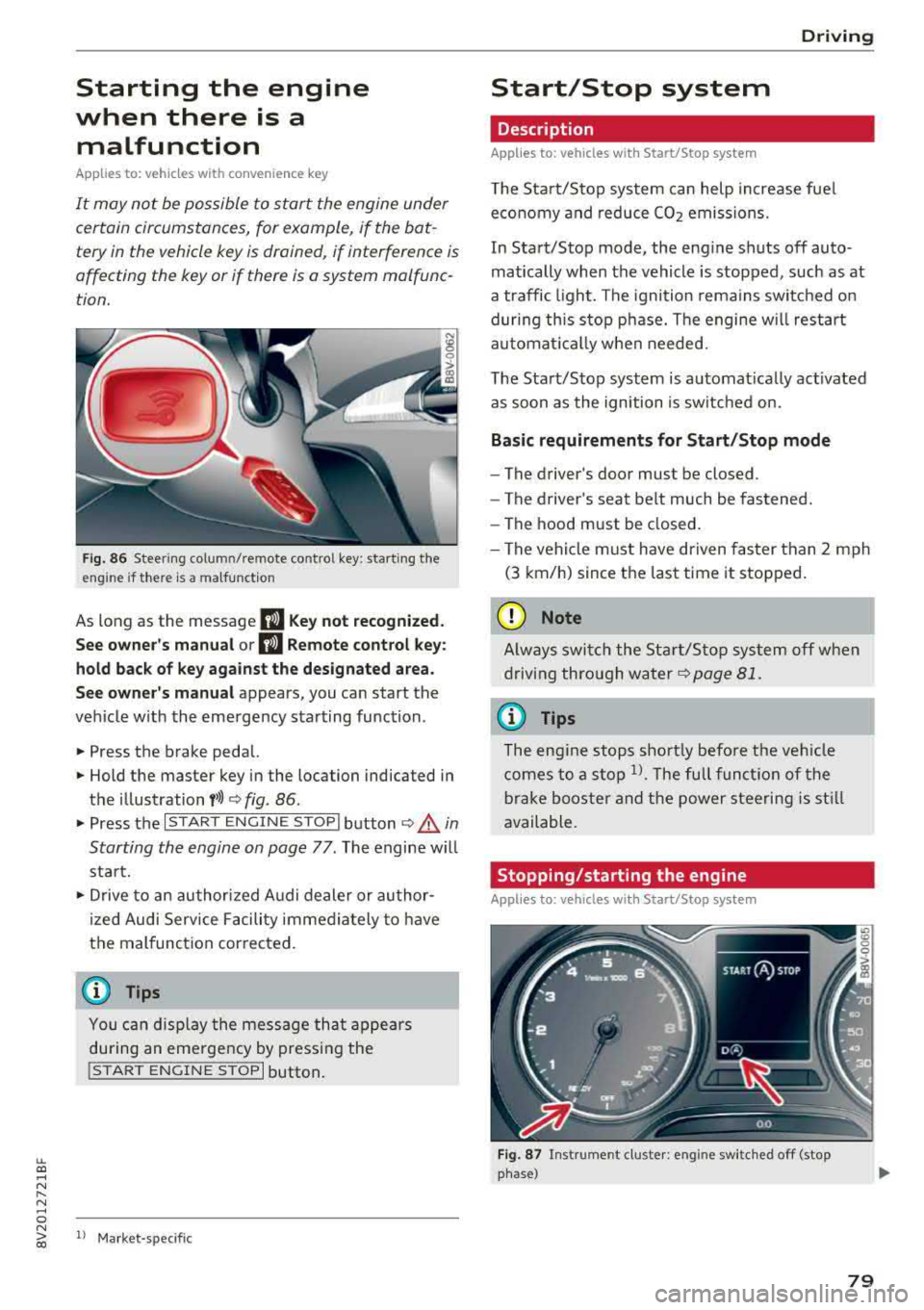
Fig. 86 Steering col umn/remote co ntro l key: starting the
eng ine if there is
a malfunction
As long as the message II Key not recognized.
See owner's manual or
II Remote control key:
hold back of key against the designated area.
See owner's manual
appears, you can start the
vehicle with the emergency starting function .
.. Press the brake pedal.
.. Hold the master key in the location indicated in
the illustration
y>l) c> fig. 86.
.. Press the I START ENGINE STOPI button c> .& in
Starting the engine on page
77 . The engine will
start.
.,. Drive to an authorized Audi dealer or author
ized Audi Service Facility immediately to have
the malfunction corrected.
@ Tips
You can display the message that appears
during an emergency by pressing the
!START ENGINE STOPI button.
l) Market -spe cific
Driving
Start/Stop system
Description
Applies to: vehicles wit h Start/Stop system
The Start/Stop system can help increase fuel
economy and reduce CO2 emissions.
In Start/Stop mode, the engine shuts off auto
matically when the vehicle is stopped, such as at
a traffic light. The ignition remains switched on
during this stop phase. The engine w ill restart
automat ically when needed.
The Start/Stop system is automatically activated
as soon as the ignition is switched on.
Basic requirements for Start/Stop mode
-The driver's door must be closed .
- The driver's seat belt much be fastened.
- The hood must be closed.
- The vehicle must have driven faster than
2 mph
(3 km/h) since the last time it stopped.
(D Note
Always switch the Start/Stop system off when
driving through water
c> page 81.
(D Tips
The engine stops shortly before the vehicle
comes to a stop
ll. The full function of the
brake booster and the power steering is still
available.
Stopping/starting the engine
Applies to: vehicles with Start/Stop system
Fig. 87 Instrument cluster: eng ine switched off (stop
phase)
79
Page 85 of 404
selector lever position is engaged. As soon as
you press the accelerator pedal, the parking brake releases automatically and your vehicle
starts to move
¢ page 83.
(D Tips
- Occasional noises when the parking brake is
set and re leased are normal and are not a
cause for concern.
- The parking brake goes through a self-test
cycle at regular intervals when the vehicle is
stopped. Any noises associated with this are normal.
- If there is a power failure, the parking brake will not set if it is released, and it will not
release if it is
set¢&. See an authorized
Audi dealer or authorized Audi Service Fa
cility for assistance .
Starting from a stop
Various convenience and safety functions may be
available when the vehicle begins driving, de
pending on vehicle equipment.
Starting on hills with the parking brake set
Requirement: the driver's door must be closed.
~ To start driving comfortably when on a hill, set
the parking brake and begin driving as usual.
The braking force of the parking brake does not release automatically until the wheels build up
enough driving force .
Starting on hills with hill hold assist
Hill hold assist makes it easier to start on hills.
Requirement: the driver's door must be closed
and the engine must be running.
~ To activate hill hold assist, press and hold the
brake pedal for several seconds. The vehicle
must be in an uphill direction of travel.
After releasing the brake pedal, the braking pow
er is maintained for a brief
moment ¢.&. to pre
vent the vehicle from rolling back when starting.
::li During this time, you can eas ily beg in to move .-<
~ your vehicle.
N .-< 0 N > 00
Driving
A WARNING ,-
Applies to: ve hicles with h ill ho ld assist
- If you do not begin driving immediately or
the engine stalls after releasing the brake
pedal, your veh icle may begin to roll back
ward. Press the brake pedal or set the park
ing brake immediately.
- The intelligent technology of hill hold assist
cannot overcome the limitations imposed by
natural physical laws. The increased comfort
offered by hill hold assist should not cause
you to take safety risks.
- Hill hold assist cannot hold the vehicle in
place on all hills (for example, if the ground
is slippery or icy).
- To reduce the risk of an accident, always
make sure the vehicle is situated safely
while stationary.
Automatic transmission
Introduction
Applies to: vehicles with automatic transmiss ions
T he automatic transmission is controlled elec
tronically . Upshifting and downshifting occur au
tomatically.
When a
moderate driving style is used, the
transm ission selects the most economica l dr iv ing
mode. The transmission upshifts at a lower RPM
and downshifts at a higher RPM to improve fuel
efficiency.
In the "S" selector lever position, the transm is
sion switches to a sporty mode after a kick-down
or when the driver uses a
sporty driving style
characterized by quick accelerator pedal move
ments, heavy acce leration, frequent changes in
speed and traveling at the maximum speed.
If desired, the driver can also select the gears
manually (tiptronic mode) ¢ page 88, Manual
shifting (tiptronic mode).
The S tronic is a dual-clutch transmission. Power
is transferred using two clutches that work inde
pendently from one another. They replace the
torque converter used in conventional automatic
.,.
83