display AUDI A3 SEDAN 2018 User Guide
[x] Cancel search | Manufacturer: AUDI, Model Year: 2018, Model line: A3 SEDAN, Model: AUDI A3 SEDAN 2018Pages: 404, PDF Size: 62.3 MB
Page 20 of 404
Cockpit overview
Resetting values to zero
Requirement: the Fuel consumption, Short-term
memory or Long-term memory
display must be
selected.
.,. T o reset the values in t he respect ive memory to
zero, press and hold the left thumbwheel on
the multif unction steering whee l for one sec
ond. Or
.,. On the multifunction steering whee l, select:
the right control button
> Reset values* .
The following displays are available, depending
on vehicle equipment:
- Date and
time r=> page 243
-Plug-in hybr id drive : range r=> page 97
-Average consumpt io n
- Short-term memory overview
- Long-term memory overview
- Energy consumers
r=> page 18
-Driver assistance r=> page 120
The sh o rt -term memo ry collects driving informa
tion from the time the ignit ion is switched on un
t il it is switched off. If yo u continue driv in g with
in two hours aft er switching the ignition off, the
new values are included when calcu lating the cur
rent trip information.
Unlike the short-term memory , the long-term
memory is not erased automatica lly. Yo u can se
lect the time period for evaluating trip informa
tion yourself.
Fuel consumption
The current fuel consumpt ion can be shown us
ing a bar graph
r=> fig. 14. The average consump
tion stored in the short-term memory is also dis
p layed . If the bar is green, your vehicle is saving
fue l through the following function:
-Recuperation : electrical energy can be stored in
the vehicle battery when the vehicle is coasting
or driving downhill. The bar will move toward
0.
Energy consumers*
The Energy consumers view lists other equip
men t that is currently affecting fuel consump
tion. The display shows up to t hree energy con -
18
sumers. The eq uipment using the most power is
li sted first . If more than three items using power
are switched on, the eq uipment that is c urrent ly
using the most power is displayed. A chart also
shows you the current tota l of a ll other consum
ers .
Q) Tips
The date, time of day and time and date for
mat can be set in the Infota inment system
r=> page 2 43.
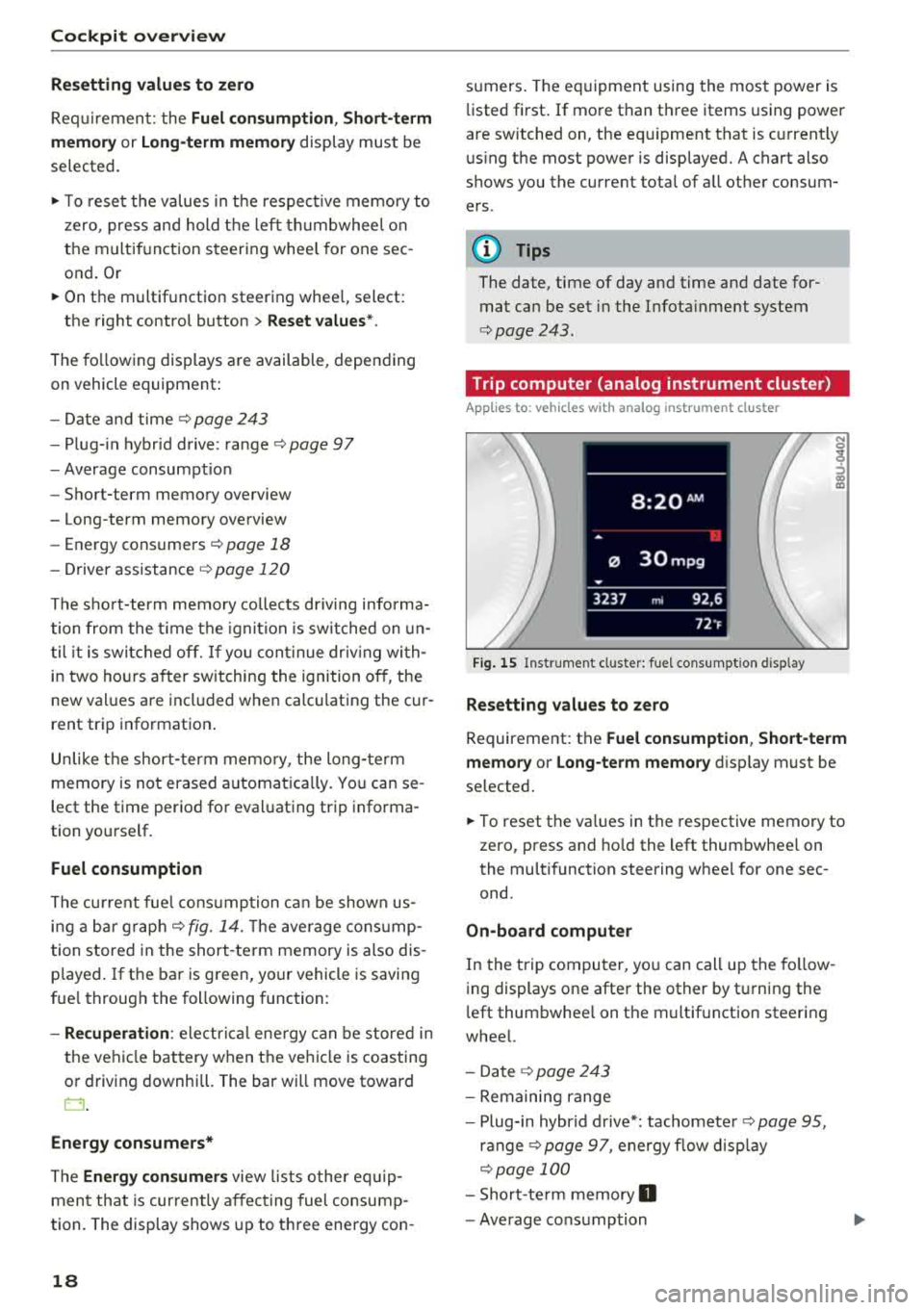
Trip computer (analog instrument cluster)
Applies to: vehicles wit h analog inst rument cl uster
Fig. 15 Instrument cl uster: fuel consumpt ion d isp lay
Resetting values to zero
N 0
9
ffl
Requirement: the Fuel consumption , Short-term
memory or Long-term memory
display must be
selected.
.,. To reset the va lues in the respective memory to
zero, press and hold the left thumbwheel on
the multifunction steering wheel for one sec
ond.
On-board computer
In the trip computer, you can call up the follow
ing displays one after the other by t urning the
l eft thumbwhee l on the multifunction steering
wheel.
- Date
r=> page 243
-Remaining range
- Plug-in hybr id drive*: tachomete r
r=> page 95,
ranger=> page 97, energy flow display
r=>page 100
-Short-te rm memory 0
-Average consumption
Page 21 of 404
u. 00 .-< N l' N .-< 0 N > 00
-Lon g-term memory fJ
- En gine o il temper ature*
The sho rt-term memo ry co llects driving informa
tion from the t ime the ignition is sw itched on un
til it is switched off. If yo u cont inue dr iv ing wi th
in two ho urs after sw itching the ign ition off, t he
new val ues a re in clu ded when calculat ing the cur
rent trip information .
Unlike the s hort-term memo ry , the long -te rm
memory is not e rased a utoma tically. Yo u ca n se
l ect the time period fo r eval uat ing trip informa
tion yo urself .
(D Tips
The date, time of d ay and time and d ate fo r
mat can be set in the Infotainment system
r::!) page 2 43 .
Efficiency program
Applies to: vehicles with efficiency program
Resetting values to zero
~ T o reset the va lues in t he respective memory to
zero, press and hold the left thumbwhee l on
the m ultif unct ion steer ing whee l for one sec
ond.
The efficiency program can help you to use less
f u el. It evaluates driving informat ion in reference
to fuel consumption and shows other equipment i n fluencing consumption. Economy t ips provide
adv ice for efficient driving .
T he efficiency program receives distance and con
sumpt ion data from the short-term memory. If
the data in the effic iency program is deleted, the
va lues in the s hort -term memory are also reset .
T he fo llow ing additional displays may be availa
b le in the efficiency program, depending on vehi
cle equipment:
- Other equipment : other equipment that is cur
rently affecting fue l consumption is listed in
the efficiency program. The d isp lay shows up to
t h ree other equipment items. The equipmen t
us ing the most power is listed first . If more
than three items us ing power are switched on,
the equ ipment that is currently using the most
Coc kpit o ver view
powe r is d isp layed. A chart also shows you the
current total of all other consumers.
- Economy tip s: in ce rtain s ituations, economy
tips appea r automatically for a s hort time in
the efficiency prog ram . If you follow these
economy tips, you can reduce yo ur vehicle's fue l
consumption. To turn an economy message off immed iate ly after it appears, press any button
on the multifunct io n steer ing wheel.
Engine oil temperature display and boost
indicator
Applies to: vehicles with engine oil temperature display/boost
indicator
Engine oil temperature ind icator
Applies to: vehicles with analog instrumen t cl uste r
The eng ine o il temperature is o nly show n in the
lap timer display
<:!) page 122 .
Applies to: vehicles with Audi virtual cockpit
The engine oi l temperat ure is on ly shown i n the
enhanced view or in the sport
view* ¢ page 14.
When eng ine o il temperatures are low, the dis
play--- °F (--- °C) appea rs in the instr ument clus
te r.
The eng ine has reached its operating tempera
ture whe n the eng ine oil temperat ure is between
176 °F (80 °C) and 248 °F (120 °C) unde r no rma l
driv ing cond it ions. The e ng in e o il tempe rature
may be hig he r i f t here is heavy engine load and
high tempe ra tures o utsid e. This is no t a cause fo r
conce rn as long as
the .¢ page 25 or Ell
¢ page 28 indicator lights do not t urn on.
Boost indicator
Applies to: vehicles with Audi virtual cockpit
The boost ind ic a tor is o nly show n in t he en
hanced view or in the spo rt view*
r::!) page 14.
The current engine load (meaning the current
boost pressure) is ind icated by a bar.
19
Page 22 of 404
Cockpit overv ie w
Shift light indicator
Applies to: vehicles with shift light indicator
The s hift lig ht ind icator informs t he d river when
t he rpm limit is reached .
Accessing the shift light indicator
Requirement: tiptron ic mode must be act ivated
c:> page88 .
.-Se lect the sport view c:> page 14. The sh ift light
indicator is d ispl ayed with green , yellow and
red ranges in the upper areas of the tachome
ter .
The s hift lig ht indicator w ill blink red when ap
proaching the engine speed lim it. Shift to the
next h ighest gear at the right time .
Sport displays
Applies to: vehicles with Audi virtual cockpit and sport dis
plays
Depending on the vehicle equ ipment, the sport
d isp lays may i nclude the G-meter, the engine da
ta and the tire p ressure mo nitoring system .
Accessing the sport displays
.-Open the first vehicle functions tab using the
I 4 1>1 button on the multifunction steering
whee l.
.- Se lect o n the multifunction stee ring wheel: left
contro l butto n >
Sport display s .
.- T urn the left thumbwheel on the mult ifunct ion
stee ring wheel u ntil the des ired sport display
appea rs in the ins trumen t cluste r.
G meter*
The G meter displays the longitudina l and latera l
acceleration . Th e max imum values that are
reached are sto red and d isp layed when the vehi
cle is s tat io nary.
.- To reset the stored values, se lect on the multi
funct io n steer ing wheel: r ight control b utton>
Reset value s.
Engine data*
The engine data displays the cur rent power and
torque.
20
Tire Pressure Monitoring System*
The tire press ure monitor ing sys tem d isp lays the
cu rrent tire press ures and tempe ra tu re. Also see
c:> page 350 , Tire pressure monitoring system.
Indicator lights
Description
The ind icator lights in the instrument clus ter
blink or tur n on. They ind icate fu nctions or mal
func tions.
Messages may appear w ith some indicator ligh ts .
A war ning s ignal will sound at the same time .
The ind icator lights and messages in the inst ru
ment clus ter d isp lay can be cove red by ot he r dis
plays . You can have these d isp laye d again in the
driver information system by opening the second
Vehicle tab (messages) using the
14 1>I b utton o n
the m ultif unction steering whee l. If there a re
severa l ma lfunctions, you can display them one
at a t ime us ing the thumbw heel.
Some indicator lights in the display can disp lay in
severa l co lors.
Lt Central indicator light
If the . or Q indicator light turns on, check
the instr ument cluster d isp lay for more informa
tion .
Applies to: vehicles with monoch rome display
If a message appears toget her with a central in
dicator light . or
d. the cen tra l ind icator light
will indicate the priority of the warning . If a
wh ite ind icator light also appea rs , the cen tra l in
dica tor light w ill have its ow n colo r. Fo r example ,
if ll appea rs togethe r with . , read the descr ip
t ion
for • .
Overview
Some indicator lights t urn on briefly as a f unction
c h eck w hen you switch the ignition on. These sys
tems a re marked with a ./ in the fo llow ing tab les.
If one of these ind icator lights does not turn on,
there is a malfunct io n in that sys tem.
IIJJ,,
Page 30 of 404
Cockpit overv ie w
Drive s low ly to an authorized A udi dealer or au
thorized Audi Service Facility to have the engine
checked.
EPC Engine control
Applies to: vehicles with gasoline engines
If the ~ indicator light turns on if there is a
malfunct io n in the engine control.
Drive s low ly to an authorized Audi dealer or au
thor ized Audi Service Facility to have the engine
checked.
! ?' Engine speed limitation
Applies to: vehicles with engine speed limitation
(II M ax imum engine sp eed: XXXX rpm
The engine speed is automatica lly limited to the
speed d isplayed in the instrument cluster. Th is
protects the engine from overheating.
The engine speed limitation deactivates once the
engine is no longer in the critical temperature range and you have released the acce lerator ped
al once.
If the engine speed limitation was activated by
an engine contro l ma lfunction, the
II or ~ in
d icator light also turns on. Make sure the eng ine
speed does not go above the speed displayed, for
example when downsh ift ing . Drive to an author
ized Aud i dealer or authorized Aud i Serv ice Fac ili
ty immediately to have t he malfunct ion correct
ed.
'!=:?' ., Engine oil level (MIN)
Applies to: vehicles with oil level warning
Ill Check oil level
You may continue d riving for the t ime be ing .
C heck the engine oil leve l as soon as possib le
¢ page 321.
-If the engine oil level is too low, add engine o il
¢ page 322 , Checking the engine oil level .
-If the engine oil level is correct and the indica
tor light st ill turns on, drive at low eng ine
speed to an authorized Aud i dealer o r autho r
ized Audi Se rvice Facility.
28
tact Service
The sensor to check the eng ine o il level has
failed . D rive to an author ized Audi dealer or au
t h orized Aud i Serv ice Facility immediately to have
t h e malfunct ion cor re cted.
(Llj) Note
Refer to the descr ipt ion in the Owne r's Man
u a l
¢ page 322, Checking the engine oil lev
el.
ju Tank system
Vehicles with p lug -in hybrid dr ive *: ¢ page 103.
ll'J Pleas e refuel
The first t ime the indicator light turns on and the
message appears, there are approx imately 1.8
gallons
(7 liters) of fuel in the tank o n front
whee l dr ive vehicles, or app roxi mately
2. 2 ga l
l ons
(8.5 lite rs) of f uel in the ta nk on a ll wheel
d rive ve hicles.
ll') Please refuel immediatel y
If the indicato r light turns on the message ap
pears, the fuel tank is a lmost empty . Refue l the
vehicle immediately .
ll') Tank system: malfunction! Please cont act
Ser vice
There is a ma lfunction in the f uel tank system .
D rive to an au thor ized A udi dealer or au tho riz ed
Audi Se rvice Fa cility immed iate ly to have the
malfunction correc ted.
(D Tips
F o r more info rmation on f ueli ng, see
¢ page 315.
,. Washer fluid level
If the C·w$ indicator light turns on, the washer flu
id is almost out. Fill the washer fl uid for the
winds hield washer system and the headlight
..,.
Page 44 of 404
Power top
Power top
Automatic power top
General information
A pp lies to: ve hicles w ith power top
The power top opens and closes automatically .
When open, the power top is stored completely in the power top compartment. The power top
can be opened or closed at speeds up to 30 mph
(SO km/h).
Under normal conditions, the power top is wind
and waterproof. In rare cases, small droplets of
water may form under extreme weather condi
tions such as torrential or prolonged rain. That is
normal and no cause for concern.
Follow the care instructions to keep the power
top free of leaks and to maintain its appearance
c:::> page 354, Care and cleaning. Also observe the
following:
- Open and stow the power top only when it is
clean and dry. Stowing the power top when it is
damp can create imprints in it, and if it is left
that way for long periods of time, mildew and
other damage can form. To prevent scratching
or damaging the power top, do not use any
sharp-edged objects to remove ice and snow.
The rear window may be cleared with a stand
ard ice scraper .
- Do not leave the power top open for several
weeks or the creases in it may become discol
ored .
- Do not open the power top when the tempera
ture is be low 32 °F
(0 °() . The fabric in the
power top loses elasticity in sub-zero tempera
tures.
42
Opening/closing the power top
App lies to : vehicles with power top
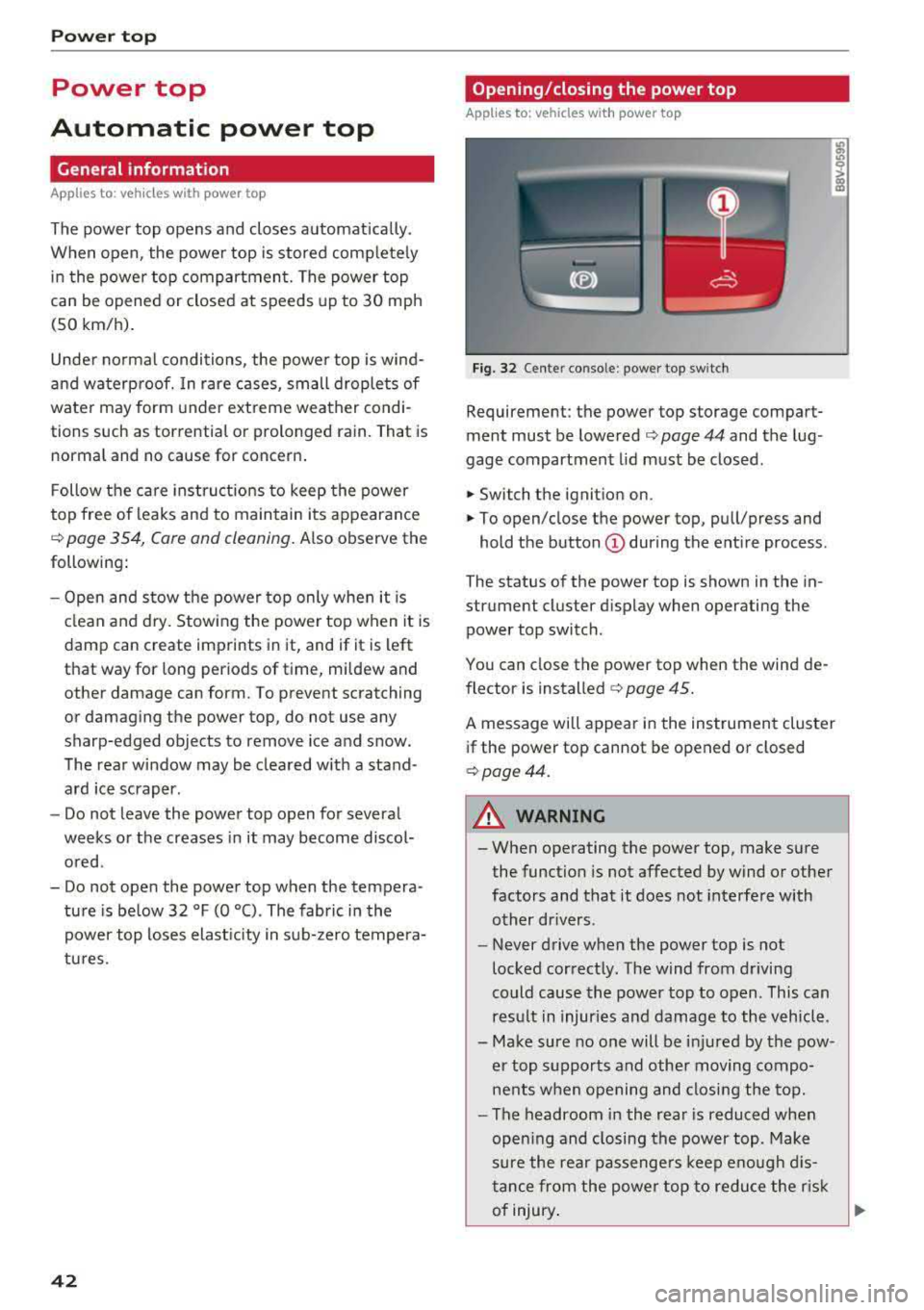
Fig. 32 Cente r conso le : power top sw itch
Requirement: the power top storage compart
ment must be lowered
c:::> page 44 and the lug
gage compartment lid must be closed .
.,. Switch the ignition on .
.,. To open/close the power top , pull/press and
hold the button
(D during the entire process .
The status of the power top is shown in the in
strument cluster display when operating the power top switch.
You can close the power top when the wind de
flector is installed
c:::> page 45.
A message will appear in the instrument cluster
if the power top cannot be opened or closed
c:::>page44.
A WARNING
-- When operating the power top, make sure
the function is not affected by wind or other
factors and that it does not interfere with
other drivers .
- Never drive when the power top is not
locked correctly. The wind from driving
could cause the power top to open . This can
result in injuries and damage to the vehicle .
- Make sure no one will be injured by the pow
er top supports and other moving compo
nents when opening and closing the top.
- The headroom in the rear is reduced when
opening and closing the power top . Make
sure the rear passengers keep enough dis
tance from the power top to reduce the risk
of injury .
..,.
Page 46 of 404
Power top
Power top storage compartment
Applies to: vehicles with power top
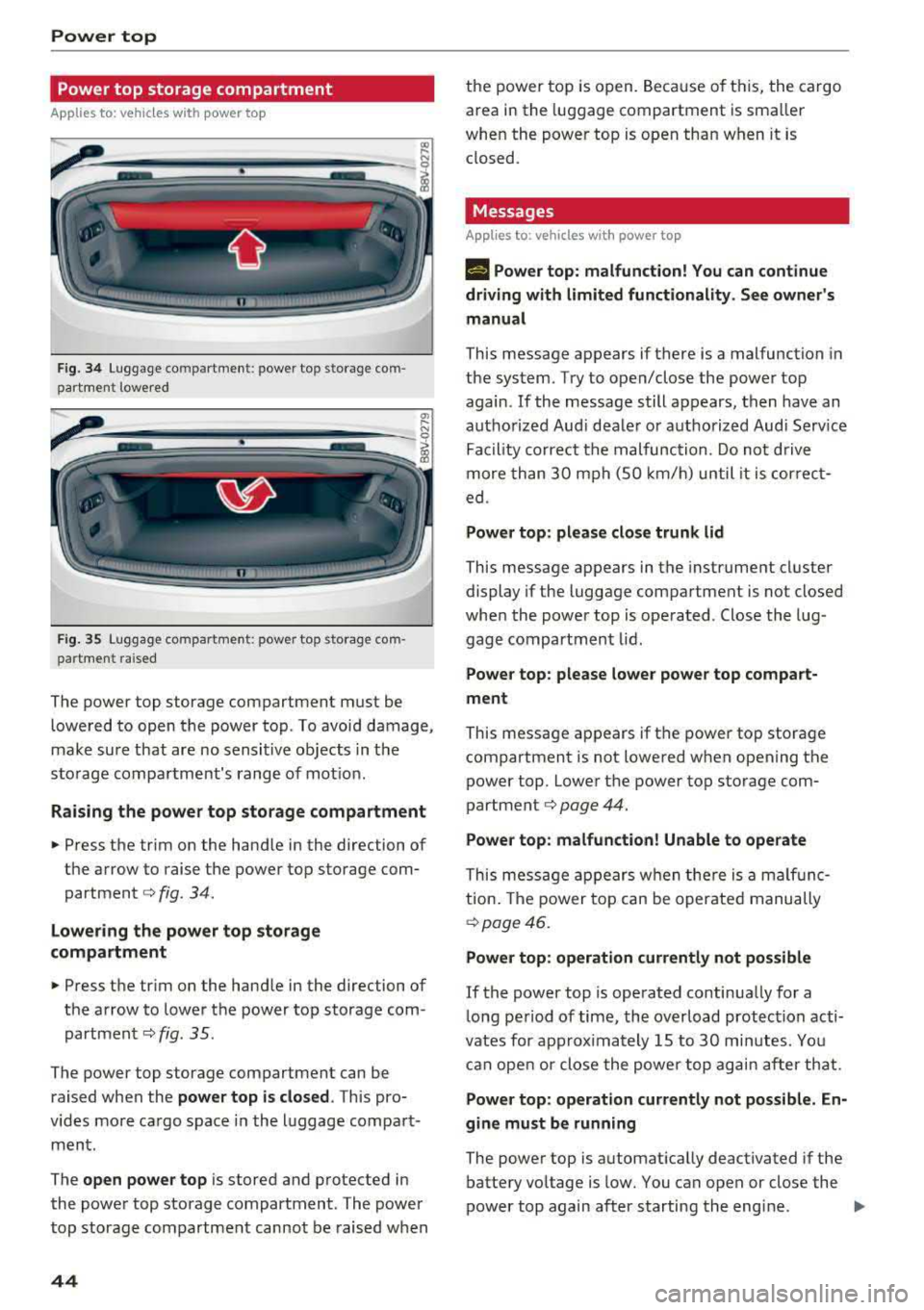
Fig . 3 4 Lug gage compartme nt: power top storage com
part ment lowered
----------------
F ig. 35 Luggage compartme nt: power top storage com
par tment raised
The power top storage compartment must be
lowe red to open the power top . To avoi d damage,
make su re that are no sensi tive ob jects in t he
s to rage compa rtment's range of mot ion.
Raising the power top storage compartment
• Press the trim on the hand le in the direction of
the arrow to raise the power top sto rage com
partment
c::> fig . 34.
Lowering the power top storage
compartment
• Press the tr im on the hand le in the direction of
the arrow to lower t he power top storage com
partmen t
c::> fig. 35.
The power top storage compartment can be
raised when the
power top is closed . This pro
v ides mo re ca rgo space in the l uggage compa rt
ment.
The
open power top is stored and p rotected in
the powe r top storage compart ment. The power
top storage compartment cannot be raised w hen
44
th e power to p is o pen. Because of t his, the cargo
area in the luggage compartment is sma ller
whe n the powe r top is open tha n w hen it is
closed.
Messages
Applies to : vehicles with power top
II Power top : malfunction! You can continue
driving with limited functionality. See owner's
manual
This message appears if there is a malfunction in
the system. Try to open/close the power top
again.
If the message still appears, then have an
aut ho rize d Aud i dea le r o r au thori zed Aud i Serv ice
Fa cility co rrect the malfunc tion. Do no t driv e
more th an 30 mph (S O km/h) until it is cor rec t
ed .
Power top: please close trunk lid
This message appears in the instrume nt cl uster
display if the luggage compartment is not closed
whe n the power top is ope rated. Close the lug
gage compartment lid.
Power top : please lower power top compart
ment
This message ap pears if t he power top storage
compartment is not lowered when opening the
power top. Lowe r th e power top storage com
partment
c::> page 44.
Power top: malfunction! Unable to operate
Thi s mess age appears w hen the re i s a mal fu nc
tion . The powe r top ca n be operate d manually
c::> page 46.
Power top: operation currently not possible
If the power top is opera ted continua lly for a
l ong pe riod of time, the over load protec tion acti
vates for approx ima tely 15 to 30 min utes. Yo u
can ope n or close the powe r to p ag ain a fter th at.
Power top : operation currently not possible. En
gine must be running
The powe r top is a utomat ically deactivated if the
battery vo ltage is low. You can open or close the
power top again after starting the eng ine.
""
Page 52 of 404
Lights and Vi sion
Turn signal and high beam lever
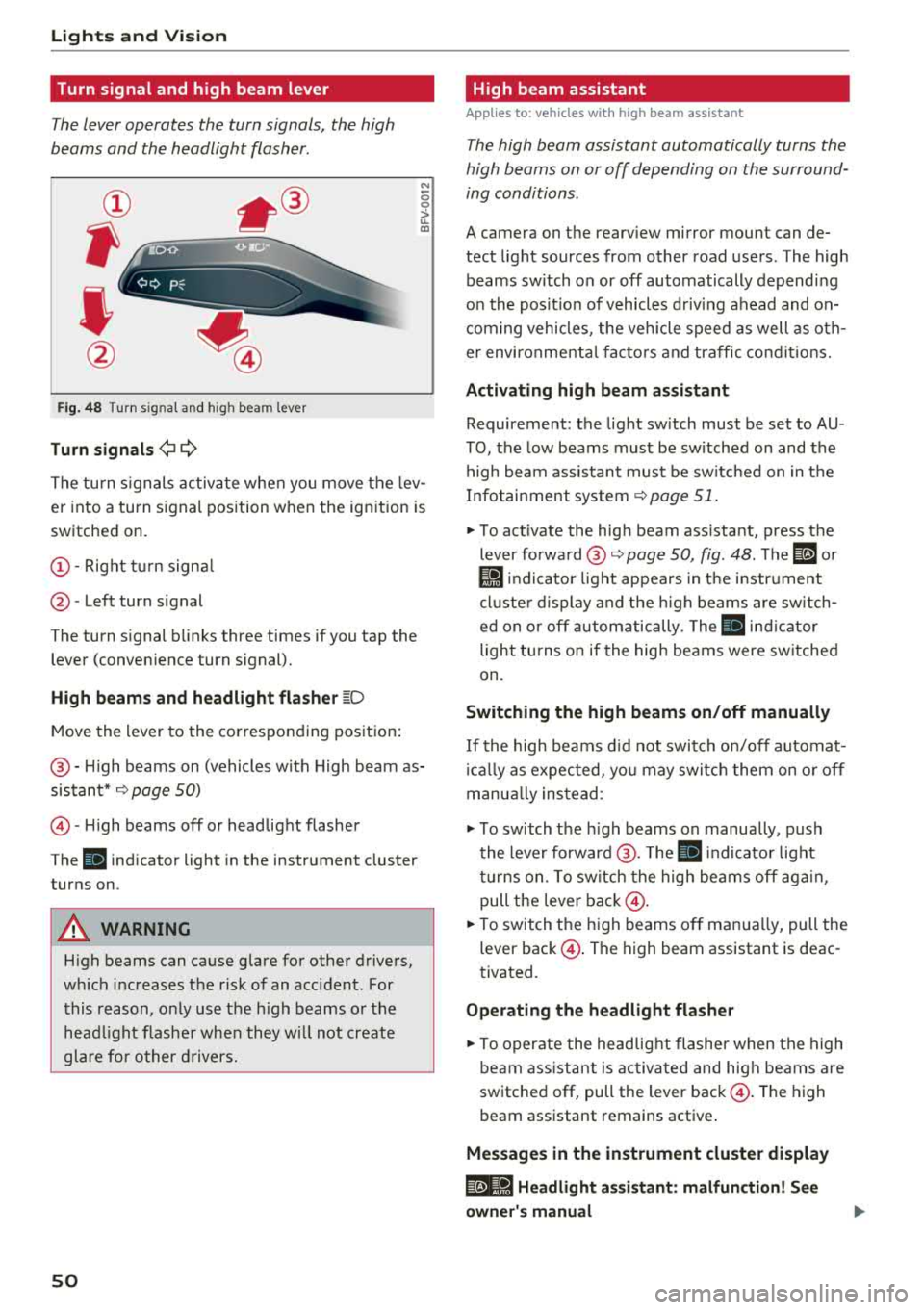
The lever operates the turn signals, the high
beams and the headlight flasher .
®
,
I
@
Fig . 48 Turn s ig nal and hig h bea m le ver
Tu rn signals ¢i Q
N
0 0
> u. a,
The turn s ignals activa te whe n you move the lev
er into a turn signal position w hen the ignition is
switched on.
(D -Right tu rn signa l
@-Left turn signal
The turn signal b links three times if you tap the
lever (conven ience turn signal).
High b eams and h eadlight flash er ~D
M ove the lever to the corresponding position :
@-High beams on (vehicles w ith High beam as
sistant*
9 page 50)
© -High beams off or headlight flasher
The
ii indicator light in the instrument cluster
turns on .
A WARNING
High beams can cause g lare for other drivers,
w hi ch increases the risk of an accident . For
this reason, o nly use the high beams or the
head light flashe r whe n they w ill not create
glare fo r other d rivers.
so
High beam assistant
App lies to : vehicles wit h high bea m ass istant
The high beam assistant automatically turns the
high beams on or off depending on the surround
ing conditions .
A camera on the rearv iew mirror mou nt can de
tect light sources from other road users . The high
beams sw itch on or off automatically depend ing
on the pos it ion of vehicles d riving ahead and on
com ing vehicles , the veh icle speed as well as o th
e r environme nta l fac to rs and traffic co ndit io ns.
Activating high beam assistant
Requirement: the light sw itch must be set to AU
TO, the low beams must be sw itched on and the
high beam assistant must be sw itched on in t he
Infotai nment system
9 page 51.
"" To act ivate the hig h beam ass istant, press the
lever forward @
9 page 50, fig. 48 . The ID or
Ji1 indicator light appears in t he i nstr ument
cl uste r d isplay and the h igh beams are sw itch
ed on o r off autom atically. The
ii ind icator
light tu rns on if the high beams were sw itched
on.
Switching the high beams on /off manually
If the high beams d id not swi tch on/off automat
i ca lly as expected, yo u may switc h them on o r off
manua lly ins tead :
""To switch the h igh beams on manually, push
the lever forward @. T he
ii indicator light
tu rns on. To sw itch the high beams off aga in ,
pull the leve r
back@.
""To switch t he high beams off man ua lly, pull the
lever
back @. The high beam assistant is deac
tivated .
Operating the headlight flasher
""To operate the headlig ht flashe r when the high
beam ass istant is activated and hig h beams a re
switched off, pull the lever
back @. The high
beam assistant remains active .
Messages in the instrument cluster display
@e-8·1 Headlight assistant : malfun ction! See
owner' s manual
Page 54 of 404
Lights and Vision
turn signal lever. The emergency flashers stop
temporarily .
The emergency flashers also wo rk when the igni
tion is turned off.
Interior lighting
Front interior lighting
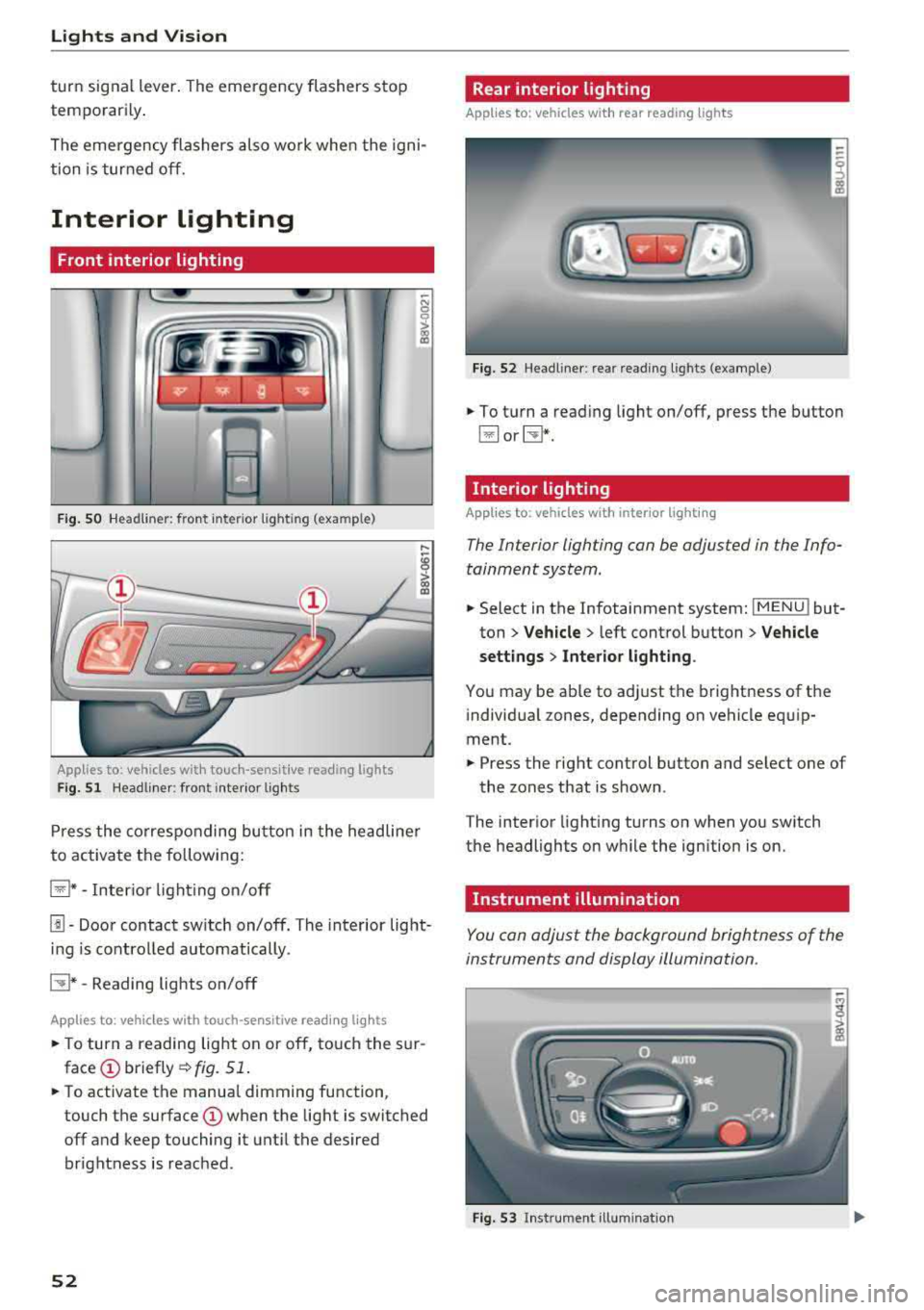
F ig . SO Headl iner: fr ont inte rior lig htin g (exa mple)
:ti ?
Applies to: vehicles with touch-sensitive reading lights
F ig. 51 Headli ner: front inte rior lig hts
Pr ess the co rres ponding bu tton in the he adline r
to activate the following:
~ * -Inter io r li ght ing o n/off
[!] -Door contact sw itch on/off. The interior light
i n g is controlled automatically.
CTI* -Reading lights on/off
App lies to: veh icles with touch-sensitive reading lights
.. T o turn a reading lig ht on or off, to uch the s ur
face (!) briefly ¢fig. 51 .
.. To activate the manua l dimming function ,
touch the
surface (!) when the light is switched
off and keep touching it unt il the desired
brightness is reached .
52
Rear interior lighting
Applies to: vehicles with rear reading lights
Fi g. 52 Headli ne r: re ar reading l ights (example)
.. To t urn a read ing light on/off, press the button
~ or~ *-
Interior lighting
Applies to: vehicles with interior lighting
The Interior lighting can be adjusted in the Info
tainment system .
.. Select in the Infotainment system: IMENU ! but
ton
> Vehicle > l eft cont rol button > Vehicle
settings
> Inte rior light ing .
You may be ab le to ad just the brightness of the
i ndivid ua l zones, depending on vehicle eq uip
ment .
.. Press the right control button and se lect one of
the zones that is shown .
The inter ior light ing turns on when you sw itch
the headlights on w hile the ign ition is on.
Instrument illumination
You can adjust the background brightness of the
instruments and display illumination.
Fi g. 53 In st ru m en t ill uminat ion
Page 60 of 404
Lights and Vision
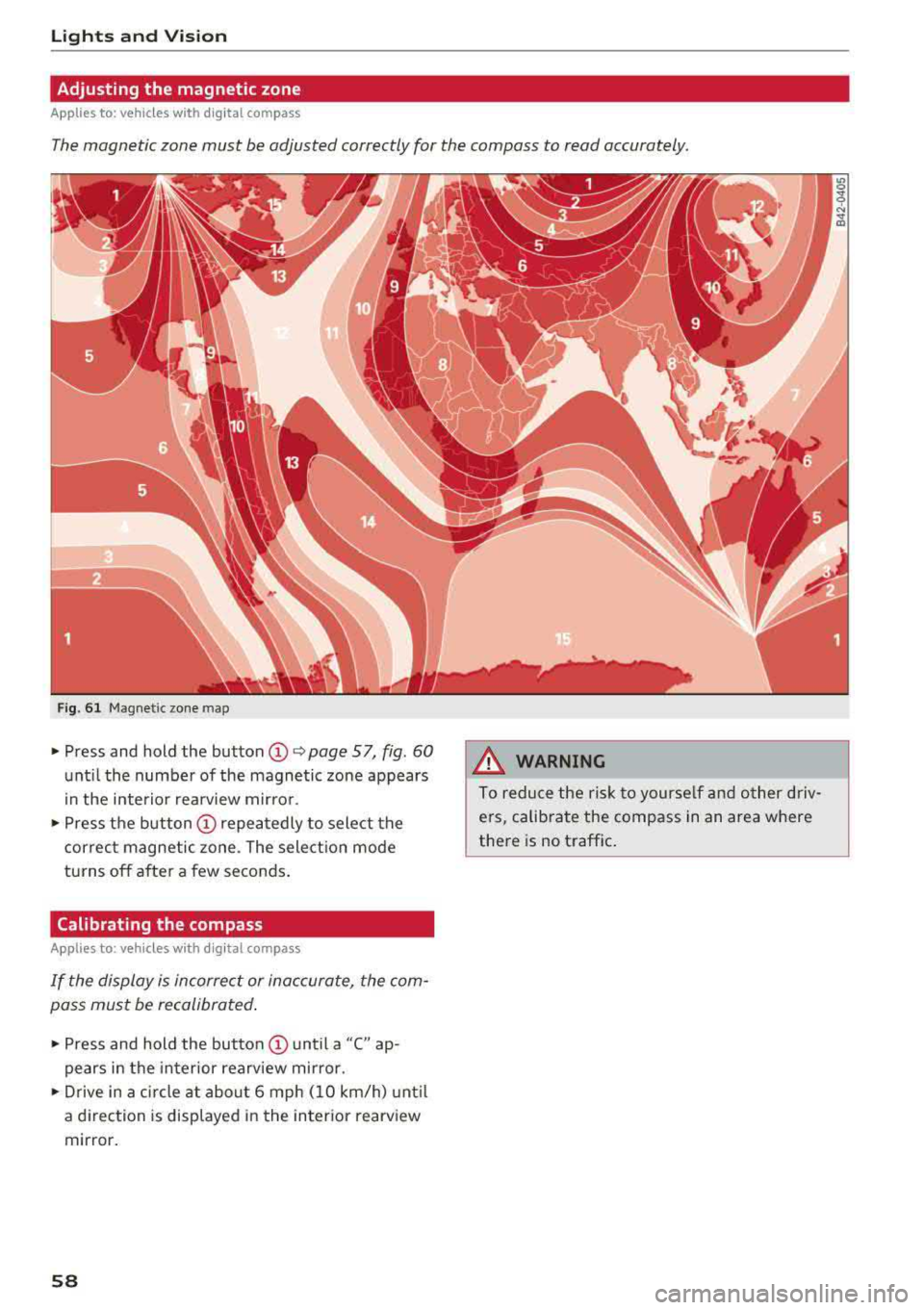
Adjusting the magnetic zone
Applies to: ve hicles w ith d ig ital compass
The magnetic zone must be adjusted correctly for the compass to read accurately.
Fig. 61 Magnetic zone map
~ Press and hold the button CD~ page 57, fig . 60
until the number of the magnetic zone appears
in the interior rearview mirror.
~ Press the button CD repeatedly to select the
correct magnetic zone . The selection mode
turns off after a few seconds.
Calibrating the compass
A pp lies to: ve hicles w ith d ig ital compass
If the display is incorrect or inaccurate, the com
pass must be recalibrated.
~ Press and hold the button CD until a "C" ap
pears in the interior rearview mirror.
~ Drive in a circle at about 6 mph (10 km/h) until
a dir ection is displayed in the in terior rearview
mirror.
58
A WARNING
To reduce the risk to yourself and other driv·
ers, calibrate the compass in an area where
there is no traffic.
Page 71 of 404
Warm and cold
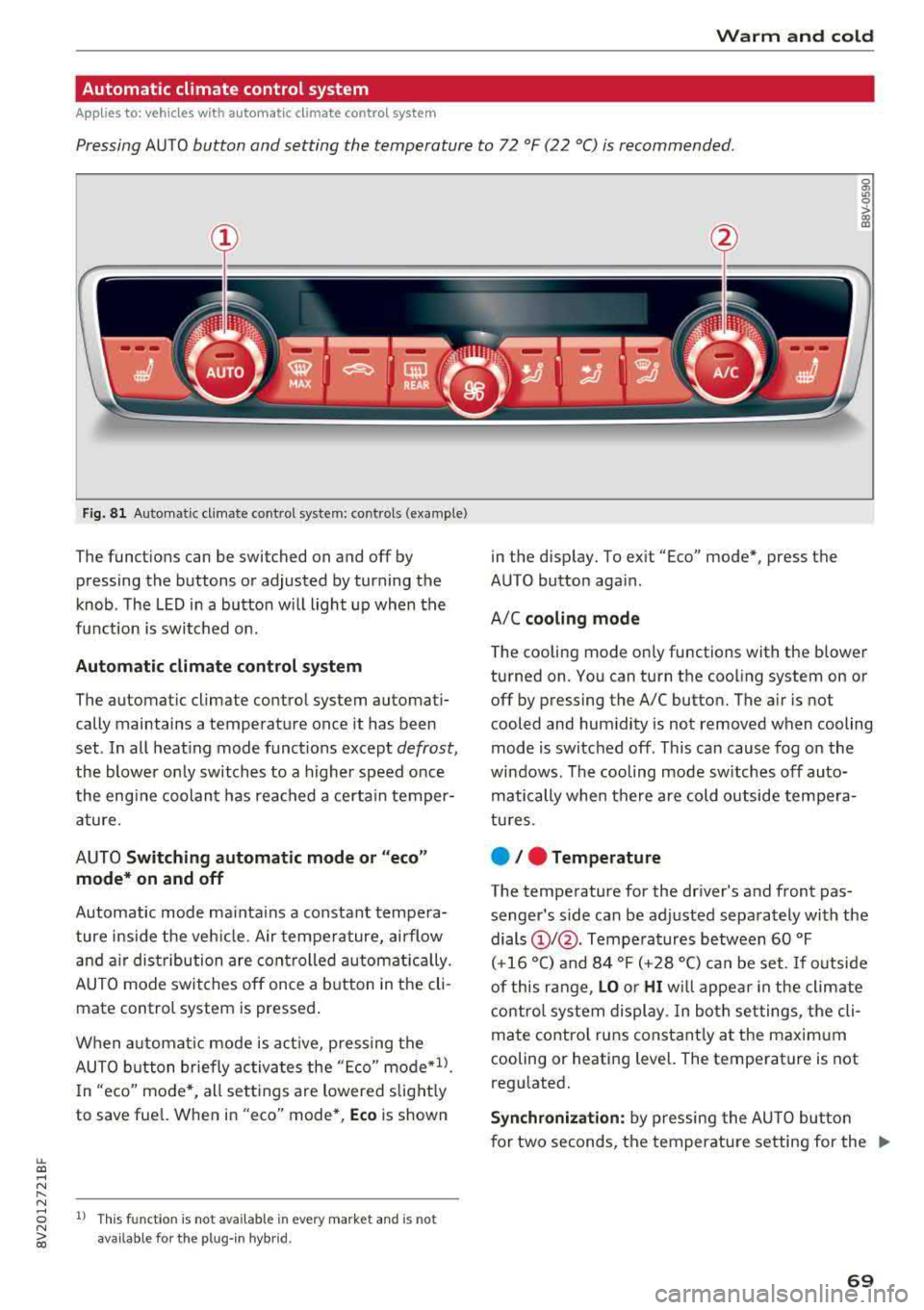
Automatic climate control system
Applies to: ve hicles with a utomat ic climate contro l system
Pressing AUTO button and setting the temperature to 72 °F (22 °C) is recommended.
LL co .... N
" N
Fig. 8 1 Automatic climate control system: controls (example)
The funct ions can be switched on and off by
pressing the buttons or adjusted by turning the
knob. The LED in a button w ill light up when the
f u nction is switched on.
Automatic climate cont rol system
The automat ic climate control system automati
cally maintains a temperature once it has been
set . In all heat ing mode funct ions except
defrost,
the blower on ly switches to a higher speed once
the eng ine coolant has reached a certain temper
ature.
AUTO
Switching aut omatic mode or "ec o"
mode * on and off
Automatic mode ma inta ins a constant tempera
ture ins ide the veh icle. Air tempe rature, airflow
and a ir distribution are controlled a utomatically.
AUTO mode switches off once a b utton in the cli
mate control system is pressed.
When a utomat ic mode is act ive, pressing the
AUTO b utton briefly activa tes the
" E co" mode*1l.
In "eco" mode *, all sett ings are lowered slight ly
to save fuel. When in
"eco" mode*, Eco is shown
8 1l This fu nct ion is not available in every market and is not N ii'i available for the plug- in hybr id.
in the display. To ex it "Eco" mode*, press the
AUTO button aga in.
A/C
cooling mod e
The cooling mode on ly functions with the blower
turned on. You can turn the cooling system on or
off by pressing the A/C button. The air is not
cooled and humidity is not removed when cooling
mode is switched off. This can cause fog on the
windows . The cooling mode sw itches off auto
matically when there are cold outside tempera
tu res.
e / e Temperature
The temperature for the driver's and front pas
senger's s ide can be adjusted separately with the
dials
(D I@ . Tempera tures between 60 °F
(+16 °() and 84 °F (+28 °() ca n be set. If outside
of this range,
LO or HI w ill appea r in the climate
contro l system display. In both settings, the cli
mate contro l runs constant ly at the maxim um
cooling or heating level. The temperature is not
regulated.
S ynchr oniza tion : by pressing the AU TO butto n
for two seconds, the temperature setting for the
..,.
69