key AUDI A3 SEDAN 2018 User Guide
[x] Cancel search | Manufacturer: AUDI, Model Year: 2018, Model line: A3 SEDAN, Model: AUDI A3 SEDAN 2018Pages: 404, PDF Size: 62.3 MB
Page 40 of 404
Opening and closing
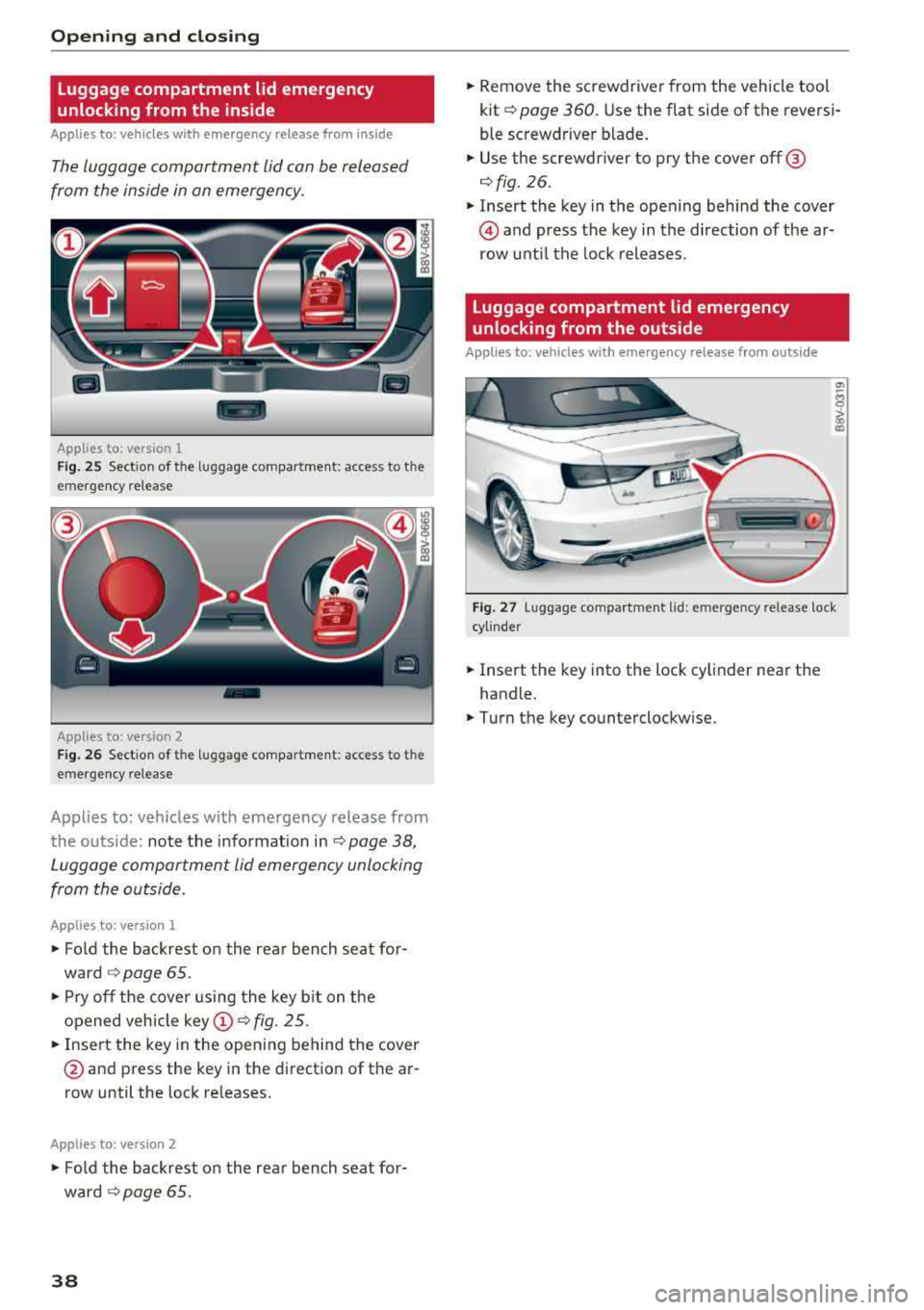
Luggage compartment lid emergency
unlocking from the inside
Applies to: vehicles with emergency release from ins ide
The luggage comportment lid con be released
from the inside in on emergency.
-
Applies to: version 1
Fig. 25 Section of the luggage compartment : access to the
emergency release
Applies to: version
2
Fig. 26 Section of the luggage compartm ent: access to the
emergency release
Applies to: vehicles with emergency release from
the o utside: note the information
in¢ page 38,
Luggage comportment lid emergency unlocking
from the outside.
Applies to: vers ion 1
.,. Fold the backrest on the rear bench seat for
ward
¢ page 65 .
.,. Pry off the cover using the key bit on the
opened vehicle
k ey (!) ¢ fig. 25 .
.,. Insert the key in the opening behind the cover
@ and press the key in the direction of the ar
row until the lock releases.
Applies to: ve rs ion 2
• Fo ld the backrest on the rear bench seat for
ward ¢
page 65.
38
.,. Remove the screwdriver from the vehicle tool
kit ¢
page 360. Use the flat side of the reversi
ble screwdriver blade.
.,. Use the screwdr iver to pry the cover off @
¢fig. 26.
.,. Insert the key in the opening behind the cover
@ and press the key in the direction of the ar
row until the lock releases .
Luggage compartment lid emergency
unlocking from the outside
Applies to: vehicles with emergency release from outside
Fig. 27 Luggage compartment lid: emergency release lock
cylinder
.,. Insert the key into the lock cylinder near the
handle .
.,. Turn the key counterclockwise.
Page 41 of 404
Child safety lock
Applies to: veh icles wit h mechanica l child safety locks
The child safety lock prevents the rear doors
from being opened from the inside and the rear
power windows from be operated .
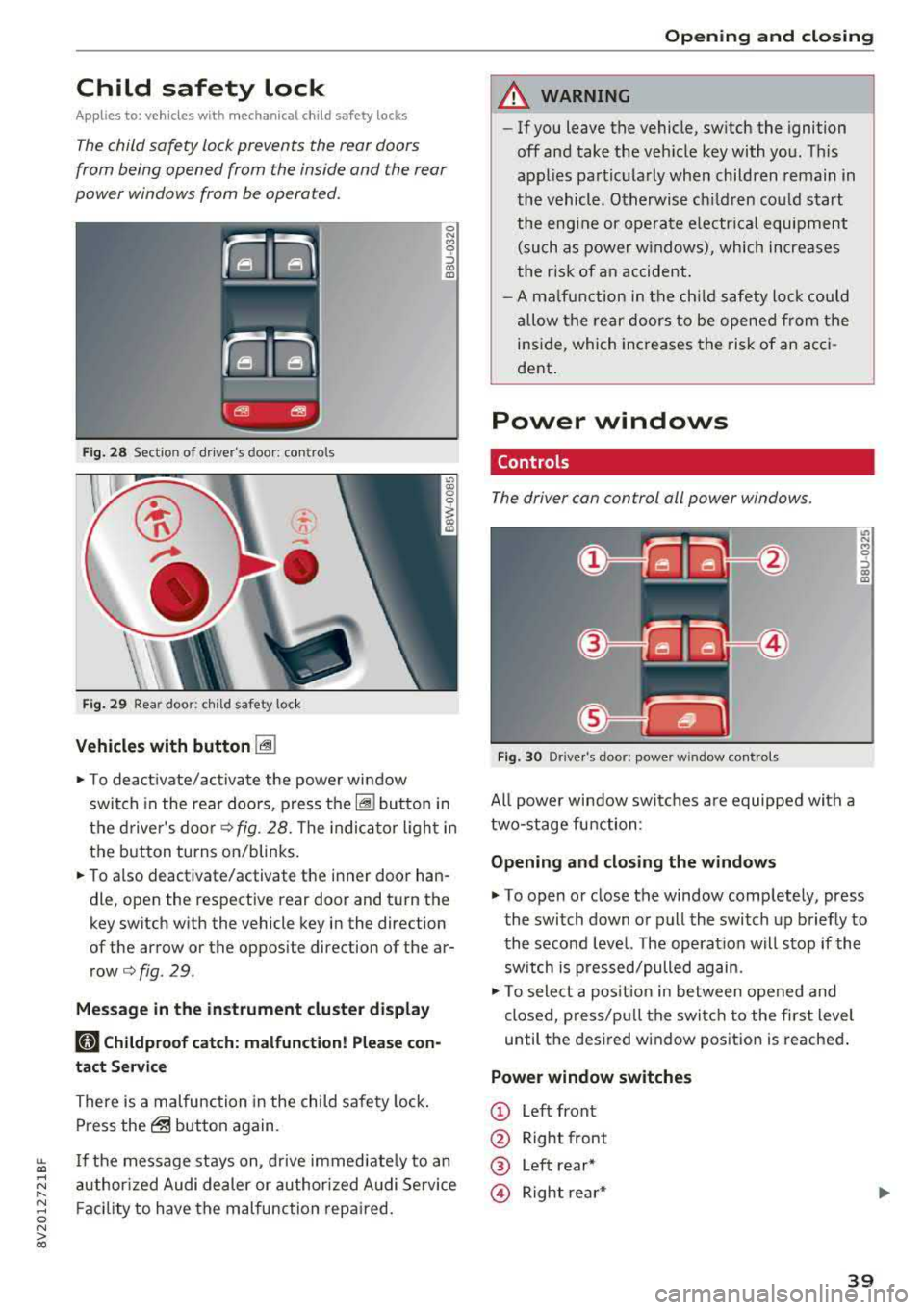
Fig . 2 8 Section of d river's door: co ntro ls
Fi g. 29 Rea r door: chil d safety lock
Vehicles with button [@]
0 N M 0 ::, a,
"'
.,. To deact ivate/activate the powe r wi ndow
swit ch in the rea r doo rs, p ress the[@] bu tton in
the d rive r's doo r
¢fig. 28. The indica to r ligh t in
the button turns on/blinks.
.,. To also deactivate/activate the i nner door han
dle, open the respective rear door and t urn the
key switch w ith the vehicle key in the direction
of the arrow or the opposite direction of the ar
row¢ fig. 29.
Mes sage in the instrument clu ster di splay
181 Childproof catch: malfunction! Please con
tact Service
There is a malfunction in the child safety lock .
Press
the@ but ton again.
~ If the message stays on, d rive immedia tely to an
;:::: a uthor ized Audi dealer or author ized A udi Se rvice
" ~ F aci lity to have the malfunc tion repa ired. 0 N > co
Opening and closing
A WARNING
- If you leave the vehicle, sw itch the ignition
off and take the veh icle key with you . T his
applies partic ularly when children remain in
the vehicle. Otherwise ch ildren cou ld st art
t he eng ine or opera te e lectr ical equi pme nt
(such as power w indows), which increases
t he r isk of an accident .
- A m alfu nction in the ch ild safety lock cou ld
al low the rear doors to be ope ned from the
i n side, which incre ases the risk of an acci
dent .
Power windows
Controls
The driver can control all power windows.
Fig. 30 Drive r's door: power w indow controls
All powe r win dow swi tches a re equipped with a
two-stage fu nction:
Opening and closing the w indows
.,. To open or close the window comp letely, press
the switch down or pull the switch up briefly to
the second level. The operat ion w ill stop if the
sw itch is p ressed/pulled again.
.,. To select a pos it ion in between opened and
cl osed, pres s/p ull th e switch t o the first level
until the des ired w indow position is reache d.
Power window switches
© Left front
@ Right front
® Left rear*
@ Right re ar *
39
Page 42 of 404
Opening and clo sin g
® Central switc h* for opening or closing all side
windows at the same t ime
A WARNING
- If you leave the vehicle, switch the ignit ion
off and take the vehicle key with you . This
applies particularly when children remain in
the vehicle. Otherwise the children could
start the engine or operate electr ical equip
ment such as power windows.
- Pay careful attention when closing the win
dows . Pinching could cause serious injuries.
- When locking the vehicle from outside, the
vehicle must be unoccupied since the win dows can no longer be opened in an emer
gency .
@ Tips
After turning the ignition off you can still
open and close the windows for approximate-
ly 10 seconds. The power w indows do not
sw itch off until the dr iver's door or front pas
senger's door has been opened.
Convenience opening/closing
App lies to: ve hicles w ith conve nience opening/clos ing
All of the windows and the panorama glass roof*
can be opened/closed at the same time.
For power top conven ience opening/closing, refer
to the information in
Q page 43 .
Convenience opening feature
.. Press and hold the open button Im on the re
mote con trol key until all w indows and the pan
orama glass roof* have reached the desired po
s ition . Or
.,. Hold t he key in the d river's door lock unt il all
windows and the panorama g lass roof* have
reached the desired pos ition.
Convenience closing feature
.. Press the Im button on the remote control key
u nt il all windows and the panorama glass roof *
are closed
¢ _&.. . Or
.,. Applies to: vehicles wi th conven ience key: touch
the sensor on one of the fro nt door hand les and
continue touching it until a ll of the w indows
40
and the panorama glass roof* are closed . Do
not p lace your hand in th e door hand le when
doing this.
.. Ho ld the key in the dr iver 's door lock in the lock
position unti l all windows and the panorama
glass roof* are closed
¢ _&.. .
The funct ion can be switched on/off in the Info
ta inment system
Q page 35.
A WARNING
- Never close the w indows or panorama glass
roof* ca relessly or in an uncontrolled man
ne r, because this increases the risk of in jury.
- For secur ity reasons, the windows and the
panorama g lass roof* can only be opened
and closed with the remote control key at a
maxim um distance of app roximately 6.5
feet (2 m) away from the vehicle . Always
pay atten tion when using
t he ~ button to
close the windows and the panorama g lass
roof* so that no one is pi nched. The closing
process w ill stop immediately when
the ~
button is re leased.
Correcting power window malfunctions
You can reactivate the one-touch up/down func
tion if it malfunctions.
.. Pull the power wi ndow switch until the window
is completely raised .
.. Release the sw itch and pu ll it up again for at
least one second .
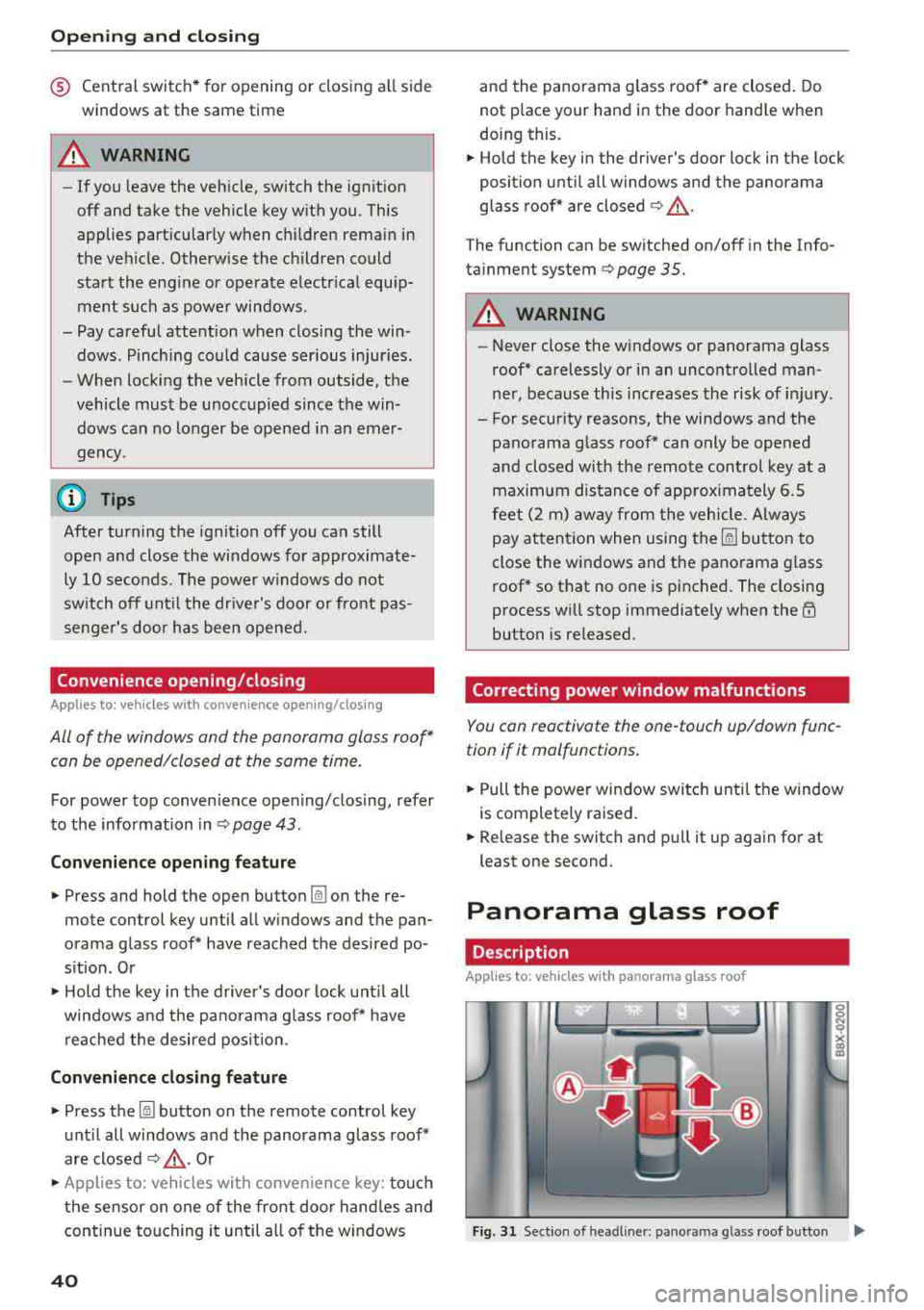
Panorama glass roof
Description
Applies to: vehicles with panorama glass roof
Fig. 31 Sect ion o f headl iner: pan orama glass roof button IJ,>
Page 45 of 404
LL co .... N
" N .... 0 N > co
-Visibility to the r ear is limited when operat
ing the power top. Avoid operating the top
while driving in reverse .
(D Note
-To prevent damage to the power top:
- do not store any objects in the power top
storage compartment .
- make sure there is enough space above
the vehicle when opening or closing the
power top .
- To reduce the risk of damage, make sure
there are no sensit ive objects in the power
top storage compartment's range of
mo
tion.
(D Tips
- To prevent the vehicle battery from draining unnecessari ly, do not open or close the
pow
er top repeatedly when the engine is switch
ed off.
- A message will appear in the instrument cluster if there is a malfunction in the power
top
¢ page 44 .
-The powe r top can also be operated manual
l y temporari ly if there is a malfunction
¢ page 46, Power top emergency opera
tion .
An authorized A udi dealer or author
ized Audi Service Facility should diagnose
and correct the cause of the ma lfunction as
soon as possible.
- If the vehicle is parked with the power top
open, the vehicle interior is not protected
from damaging weather or unauthorized ac
cess. lock any items you leave behind in the
luggage compartment. Close the power top
before leaving the vehicle .
- The side windows automat ically lower
slight ly when opening or closing the power
top .
Powe r top
Power top convenience opening/closing
Applies to : veh icles w it h power top
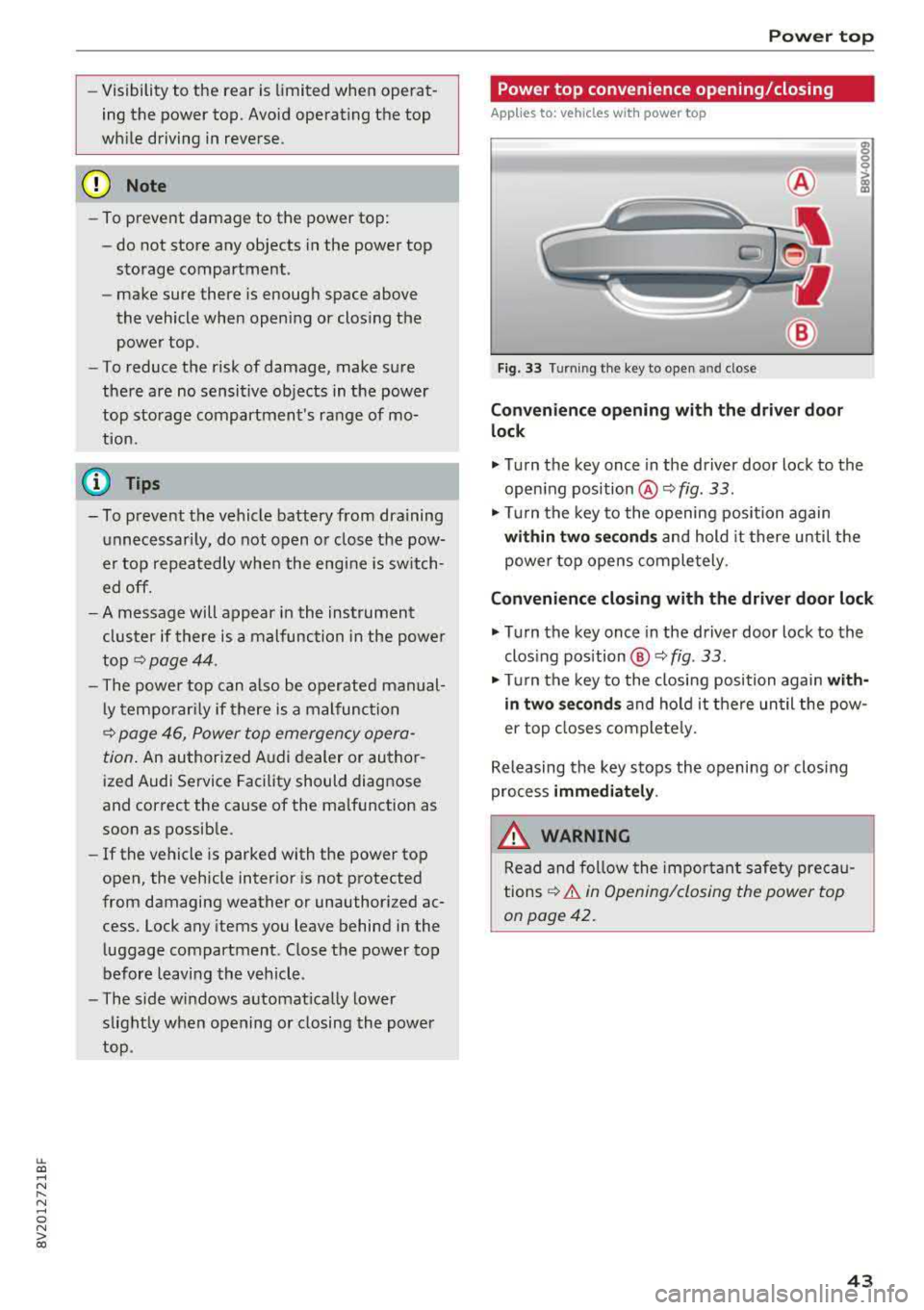
Fig. 33 Turnin g the key to open and close
Conven ien ce opening with the dri ver do or
lock
.,. Turn the key once in the driver door lock to the
open ing position
@ ¢fig . 33 .
.,. Tur n the key to the opening position again
within tw o second s and hold it there until the
power top opens comple tely .
Conven ienc e closing with the driver door lock
.,. Turn the key once in the driver door lock to the
clos ing position @¢
fig. 33.
"Tu rn the key to the closing position again w it h
in two se co nd s and hold it there until the pow
er top closes completely.
Releasing the key stops the opening or clos ing
process
immediat ely .
.&_ WARNING
Read and follow the important safety pre ca u
tions
¢ & in Opening/closing the power top
on page 42.
43
Page 55 of 404
LL co ..... N
" N ..... 0 N > co
~ Press the knob to release it.
~ Turn the knob toward "-"or"+" to reduce or in
crease the brightness.
~ Press the knob again to return it to its original
position.
(l') Tips
Depending on vehicle equipment, the instru
ment illumination (needles and gauges) may
turn on when the lights are off and the igni
tion is sw itched on . The illumination for the
gauges reduces automat ica lly and eventually
turns off as brightness outside increases. This
function reminds the driver to turn the low
beams on at the appropriate time.
Vision
Adjusting the exterior mirrors
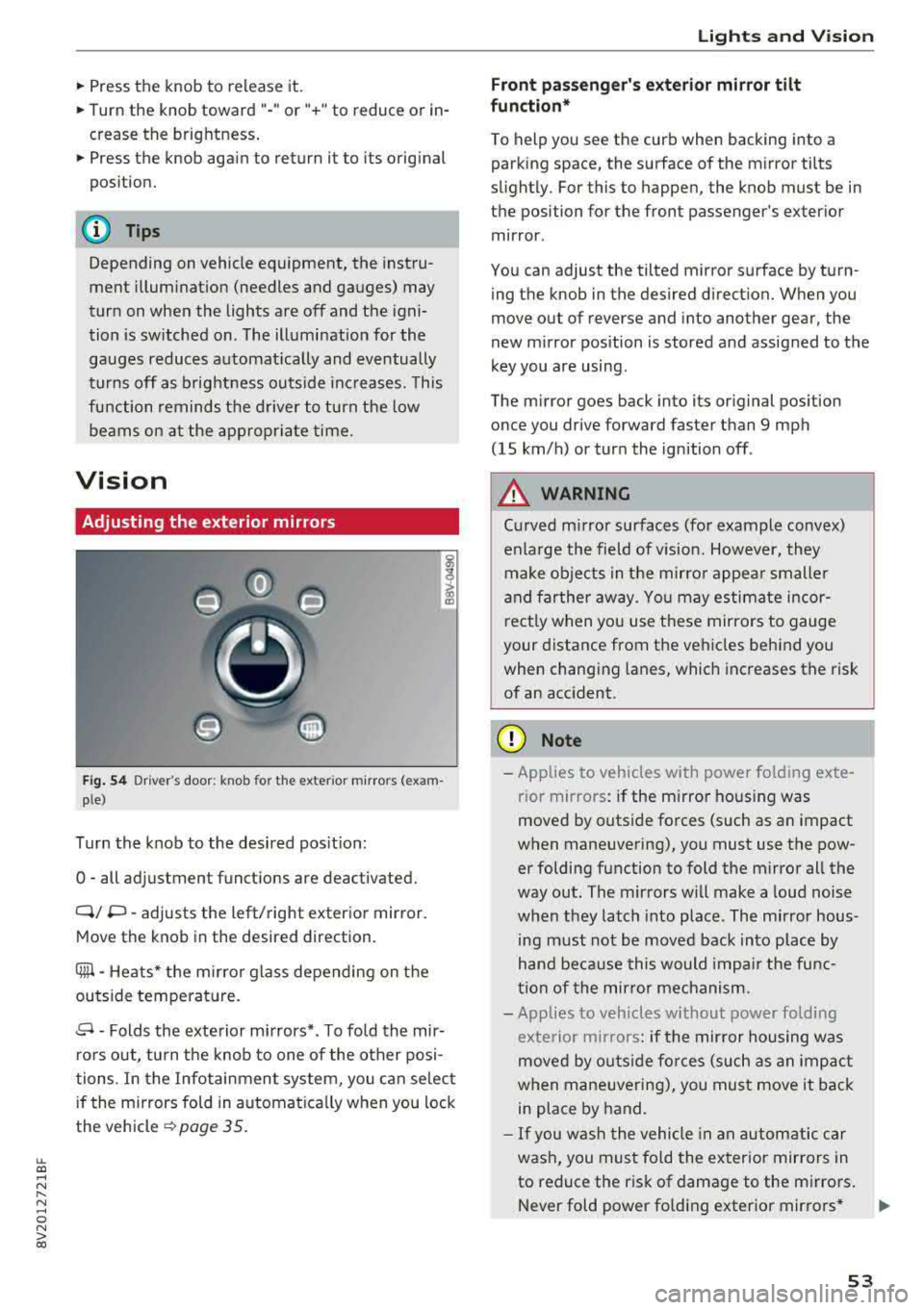
Fig. 54 Driv er's door: k n ob for the ex ter ior mirrors (exam
p le)
Turn the knob to the desired position:
0
-all adjustment functions are deactivated.
Q/ P -adjusts the left/right exterio r mirror.
Move the knob in the desired direction .
Cilll -Heats* the mirro r glass depending on the
outside temperature.
.9 -Folds the exterior mirrors* . To fold the mir
rors out, turn the knob to one of the other posi
tions . In the Infotainment system, you can select
if the mirrors fold in automat ically when you lock
the vehicle
~ page 35.
Lights and Vision
Front passenger 's exterior mirror tilt
function*
To help you see the curb when backing into a
parking space, the surface of the mirror tilts
slightly. For this to happen, the knob must be in the position for the front passenger's exterior
mirror .
You can adjust the tilted mirror surface by turn ing the knob in the desired direction. When you
move out of reverse and into another gear, the
new mirror position is stored and assigned to the
key you are using.
The mirror goes back into its original position
once you drive forward faster than 9 mph
(15 km/h) or turn the ignition off .
A WARNING
Curved mirror surfaces (for example convex)
enlarge the field of v is ion. However, they
make objects in the mirror appear smaller
and farther away . You may estimate incor
rectly when you use these mirrors to gauge
your distance from the vehicles behind you when changing lanes, which increases the risk
of an accident .
(D Note
-Applies to vehicles with power fo lding exte
r ior mirrors : if the mirror hous ing was
moved by outside forces (such as an impact
when maneuvering), you must use the pow er folding function to fold the mirror all the
way out. The mirrors will make a loud noise
when they latch into place. The mirror hous
ing must not be
moved back into place by
hand because this would impair the func
tion of the mirror mechanism.
- Applies to veh icles without power folding
exterior mirrors : if the mirror housing was
moved by outside forces (such as an impact
when maneuvering), you must
move it back
in place by hand.
- If you wash the vehicle in an automatic car
wash, you must fold the exterior mirrors in
to reduce the risk of damage to the mirrors .
Never fold power fo lding exterior mirrors*
.,.
53
Page 62 of 404
Seats and stor age
A WARNING
- To reduce the risk of an accident, on ly adjust
the front seats when the vehicle is station
ary.
- The power adjustment for the front seats al
so works w ith the ignition switched off or
with the ignition key removed . T o reduce
the risk of injury, chi ld ren should never be
left unattended in the vehicle for this rea
son.
- Exercise caution when adjusting the seat
height. Uns uperv ised or careless seat ad
justment can p inch f ingers or hands, wh ich
increases the risk of injury.
- T he front seat backres ts m ust not be re
clined too far back when driving, because
this impairs the effectiveness of the safety
belts and airbag system, which increases
the risk of injury.
(D Tips
The massage function* switches off a utomat i
cally after approximately 10 min utes.
Easy seat entry
Applies to: veh icles with entry assistance
En try assistance makes it easier for the rear pas
sengers to enter and leave the vehicle.
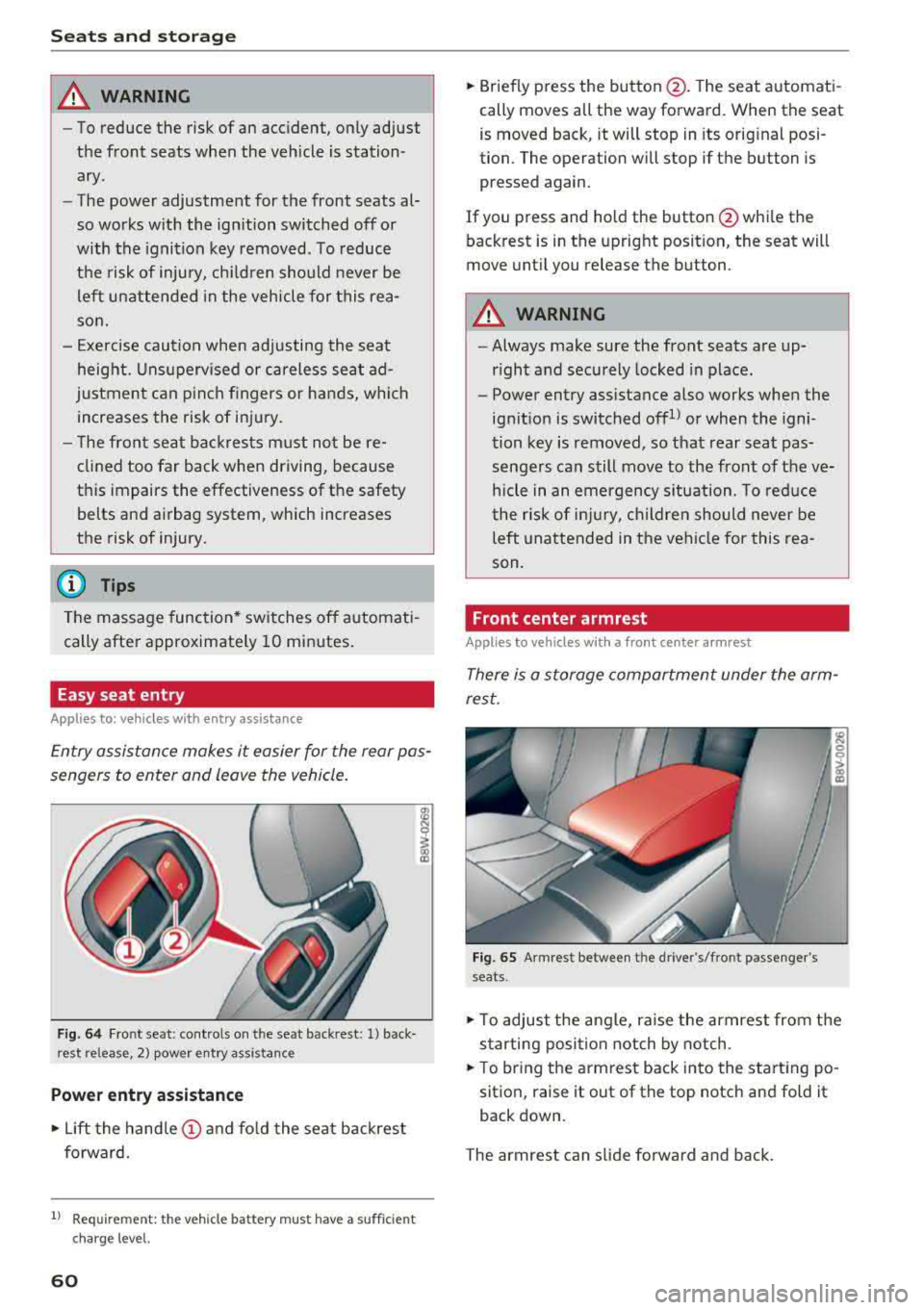
F ig . 64 Fr ont se at: cont ro ls on t he sea t back res t: 1) back
rest release , 2) power entry a ssistance
Power entry assistance
.,. Lift the hand le (!) and fo ld the seat backrest
forward.
1) Requ irem en t: the ve hicle battery m ust have a suff ic ie n t
c ha rg e le v e l.
60
.,. Briefly p ress the button @. T he seat a utomati
cally moves all the way forward. When the seat
is moved back, it will stop in its orig inal posi
tion. The operation will stop if the button is
pressed again .
If you press and ho ld the button @whi le the
back rest is in the upright posit ion, the seat will
move unt il you release the button .
A WARNING
-Always make sure the front seats are up
r ight and securely locked in place.
-
- Power entry assistance also works when the
ign it ion is switched offll or when the igni
tion key is removed , so that rear seat pas
senge rs can still move to the front of the ve
hicle in an emergency s ituation. To reduce
the r isk of injury, childre n should never be
left unattended in the vehi cle for this rea
son.
Front center armrest
Applies to vehicles with a front center armrest
There is a storage compartment under the arm
rest.
Fig. 65 Armrest between t he dr ive r's/fro nt passenger 's
seats .
.,. To adjust the angle, raise the armrest from the
s tarting posi tion notch by notch .
.,. To br ing the armrest back in to the start ing po
sition, raise it out of the top notch and fold it
back down .
The armrest can slide forwa rd and ba ck .
Page 64 of 404
Seats and stor age
shou ld not be able to pu ll the head restraint
out of the backrest.
~ Fo ld the backrest down until it latches securely
c:> .& in Increasing the cargo area on
page 65.
.,&. WARNING
-Always read and fo llow the applicable warn
ings
c:> page 252, Proper adjustment of
head restraints .
-Only remove the rear seat head restraints
when necessary in order to install a child
sa fety seat ¢
page 294, Child safety. In
stall t he head res tra int aga in immed iately
once the child safe ty seat is removed . Dr iv
ing with the head restraints removed or not
in the upright position increases the risk of
serious injury.
Power sources
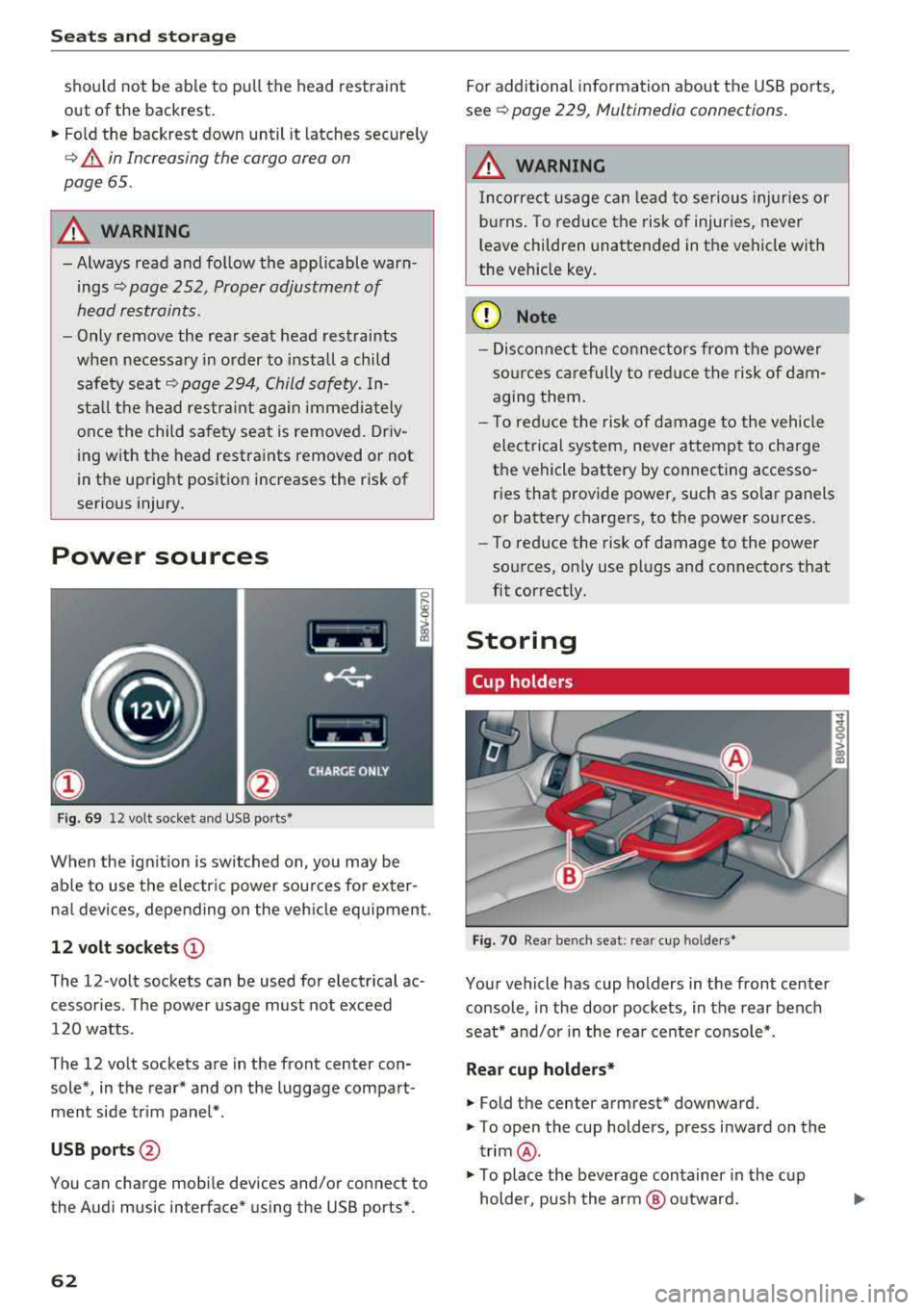
F ig . 69 12 volt socket and USB ports•
When the ign it ion is swit ched on , you may be
ab le to use the e lectr ic power sou rces for exter
nal devices, depending on the veh icle equipment .
12 volt sockets(!)
The 12-volt sockets can be used for electrical ac
cessories . The power usage must not exceed
120 watts .
The 12 volt sockets are in the front center con sole*, in the rear* and on the luggage compart
men t side tr im panel* .
USB ports @
You can charge mobile devices and/or connect to
the Audi music interface* us ing the USB ports*.
62 For additional information about the USB ports,
se e¢
page 229, Multimedia connections .
.,&. WARNING
Incorrect usage can lead to se rious injuries or
b ur ns. To reduce the risk of injuries, never
l eave children una ttended in the vehicle with
the vehicle key .
(D Note
-Disconnect the connectors from t he power
so urces carefully to reduce the risk of dam
agi ng them .
- T o red uce the risk of damage to the vehicle
electrical system, never attempt to charge
the vehicle battery by connecting accesso
ries that provide power, such as solar panels
or battery chargers , to the power sources.
- To reduce the risk of damage to the power
so urces, on ly use plugs and connectors that
fit correctly.
Storing
Cup holders
Fig . 70 Rear benc h seat : rea r cup holder s•
Your vehicle has cup holders in the front center
console, in the door pockets, in the rear bench
seat* and/or in the rea r cente r console*.
Rear cup holders*
~ Fold the center armrest* downward.
~ T o open the cup holders, press inward on the
trim @.
~ To place the beverage container in the c up
holder, pus h the arm @ outward.
Page 65 of 404
~ Then push the arm against the beverage con
tainer so that the arm lies closely against it.
~ To close the cup holders, push them back into
the slot.
A WARNING
-
- Do not put any hot beverages in the cup
holder while the vehicle is moving . Hot bev
erages could spill, wh ic h increases the risk
of injury.
- Do not use any breakable beverage contain
ers (for example, made out of glass or por celain). You cou ld be injured by them in the
event of an accident .
CD Note
Beverage containers in the cup holders should
always have a lid. If not, beverages could sp ill
and cause damage to vehicle equipment, such
electronics or seat covers.
Other storage
Applies to: sedan
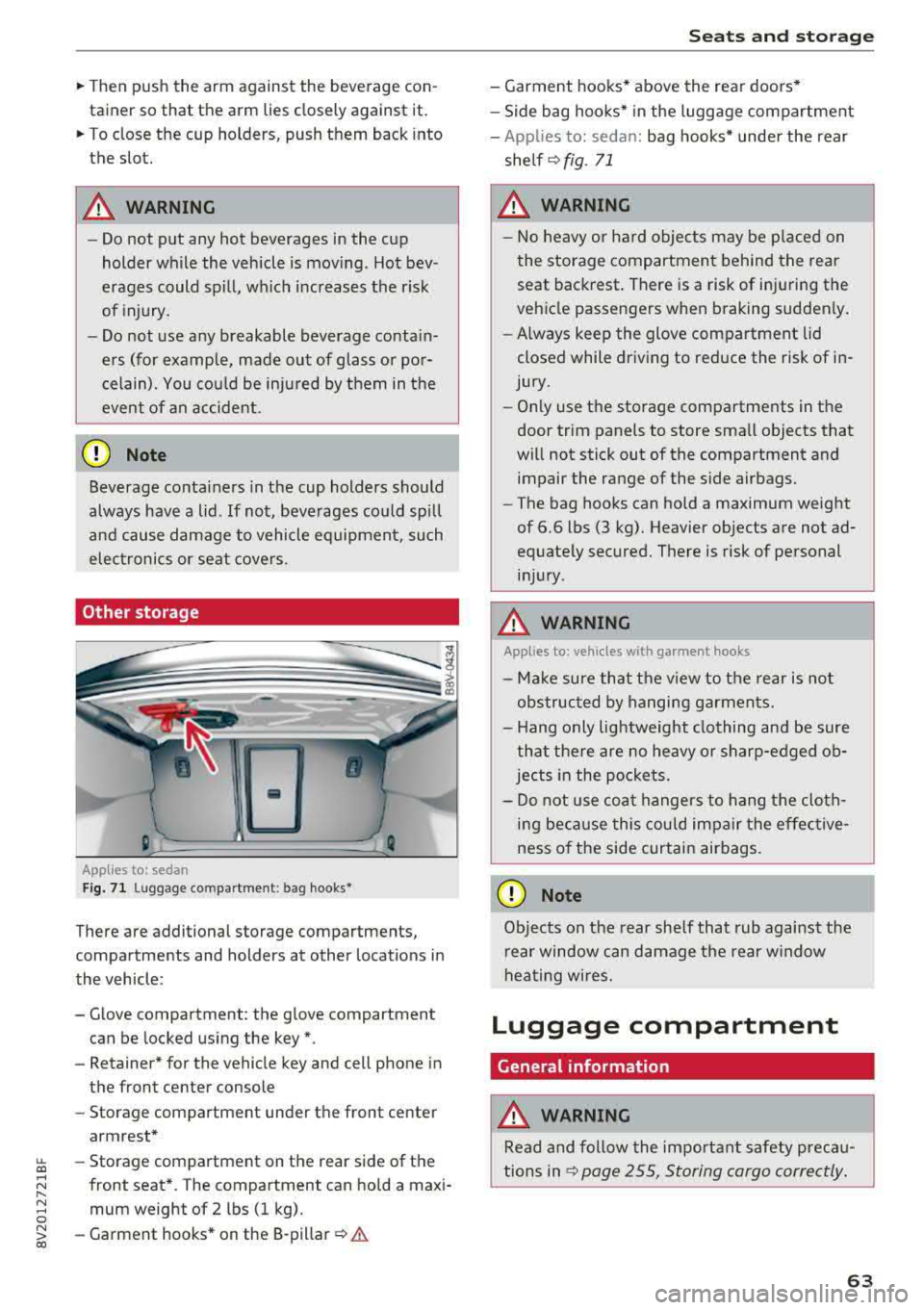
F ig. 7 1 Lugg age comp artment : bag hooks*
There are additional storage compartments,
compartments and holders at other locations in
the vehicle :
- Glove compartment : the glove compartment
can be locked us ing the key*.
- Retaine r* for the vehicle key and cell phone in
the front center console
- Storag e compartment under th e front center
armrest*
~ - Storage compartment on the rear side of the
.... ~ front seat* . The compartment can hold a maxi -
8 mum weight of 2 lbs (1 kg).
~ -Garment hooks * on the 8-pillar ¢ .& co
S eats and storag e
- Garment hooks* above the rea r doo rs *
- Side bag hooks* in the luggage compartment
- App lies to: sedan: bag hooks* unde r the rear
shelf ¢
fig. 71
A WARNING
-No heavy or hard objec ts may be p laced on
the storage compartment behind the rear seat backrest . There is a risk of injuring the
veh icle passengers when braking sudden ly .
- Always keep the glove compartment lid
closed while dr iv ing to red uce the risk of in
jury.
- On ly use the storage compartments in the
door trim panels to store sma ll objects that
will not stick out of the compartment and impair the range of the side airbags.
- The bag hooks can ho ld a maximum weight
of 6.6 lbs (3 kg). Heavier objects are not ad
equate ly secured. There is risk of personal
in jur y.
A WARNING ,_
Applies to: vehicles with garment hooks
- Ma ke sure that t he view to the rear is not
obs truc ted by hanging ga rments.
- H ang only lightweight clothing and be sure
that the re are no heavy o r sharp-edged ob
jec ts in the po ckets.
- Do not use coat hangers to hang t he cloth
i n g beca use this could impair the effective
ness o f the side curtain airbags .
CD Note
Objects on the rear she lf that rub against the
r ear window can d amage the rear w indow
hea ting wires.
Luggage compartment
General information
.&, WARNING
Read and follow the impo rtant s afety preca u
tions in
~ page 255, Storing cargo correctly .
63
Page 70 of 404
Warm and cold
Warm and cold Climate control system
Description
The climate control system circulates , warms or
coo ls, and removes humid ity from the air in the
veh icle interior . It is the most effective when the
windows and panorama g lass roof* or power top*
are closed. If there is a build-up of heat inside
the vehicle, ventilation can help to speed up the
coo ling process.
Pollutant filter
The pollutant filter removes pollutants such as
dust and po llen from the air.
Key recognition
Various sett ings are stored and ass igned to the
remote control key being used.
These settings are different when the power top* is open or closed .
Presetting
Several functions can be preset in the Infotain
ment system.
Select in the Infotainment system:
IMENU ! but
ton
> Vehicle > left control button > Air condi
tioning
A WARNING
Poor visibility can lead to accidents.
- For safer driving, keep all windows free of
ice, snow and fog.
- Become familiar with the correct use and
function of the climate control system as
quickly as poss ible, espec ia lly with the de
frosting and defogging functions.
- When the temperature is below freezing, only use the windsh ield washer system after
68
the windshield has been warmed by the cli
mate control system. The washer fluid could
freeze on the windshie ld and impair visib ili
ty .
@ Note
-If you suspect that the climate contro l sys
tem is damaged, switch the system off to
prevent further damage and have it checked
by an authorized Aud i dealer or authorized
Audi Serv ice Facility.
- Repa irs to the Aud i climate control system
require special technical knowledge and
special tools . See an authorized Aud i dealer
o r authorized Aud i Serv ice Facility .
@ For the sake of the environment
-To save fuel, turn off the climate control
system cooling mode by press ing the A/C
button. This w ill also reduce emissions . The
climate control system is off when the LED
in the button turns off.
- In vehicl es w ith the efficie ncy prog ram*,
yo u can find other consumpt ion information
and more economy tips ¢ page 19.
© Tips
- To prevent int erference with the heat ing
and cooling output and to prevent the win
dows from fogging over, the air intake in
front of the windshie ld must be free of ice,
snow or leaves.
- Condensation from the cooling system* can
drip and form a pudd le of water under the
vehicle . This is normal and does not mean
there is a leak.
- Th e energy management system may tem
porarily switc h off certain functions, such as
the seat heating* or rear window defogger.
These systems are ava ilable again as soon
as the energy supply has been restored.
Page 73 of 404
LL co .... N
" N .... 0 N > co
_& WARNING
-You should not use the recirculation mode
for an extended period of time, because no
fresh a ir is drawn in and the windows can
fog when coo ling mode is sw itched off. This
increases the risk of an accident .
-Individuals with reduced sensitivity to pain
o r temperature could develop burns when
using the seat heating function. To reduce
the risk of injury, these indiv iduals should
not use seat heating.
(D Note
To avoid damage to the heat ing elements in
the seats, do not kneel on the seats or place
heavy loads on a small area of the seat.
@ Tips
-The setting for the seat heating on the driv
er's side is ass igned to the key that is in use .
-If the front passenger's seat heating is
turned on, it will not turn on again automat
icall y if more than 10 minutes have passed
between switching the ign ition off and
switching it on again.
Adjusting the air vents
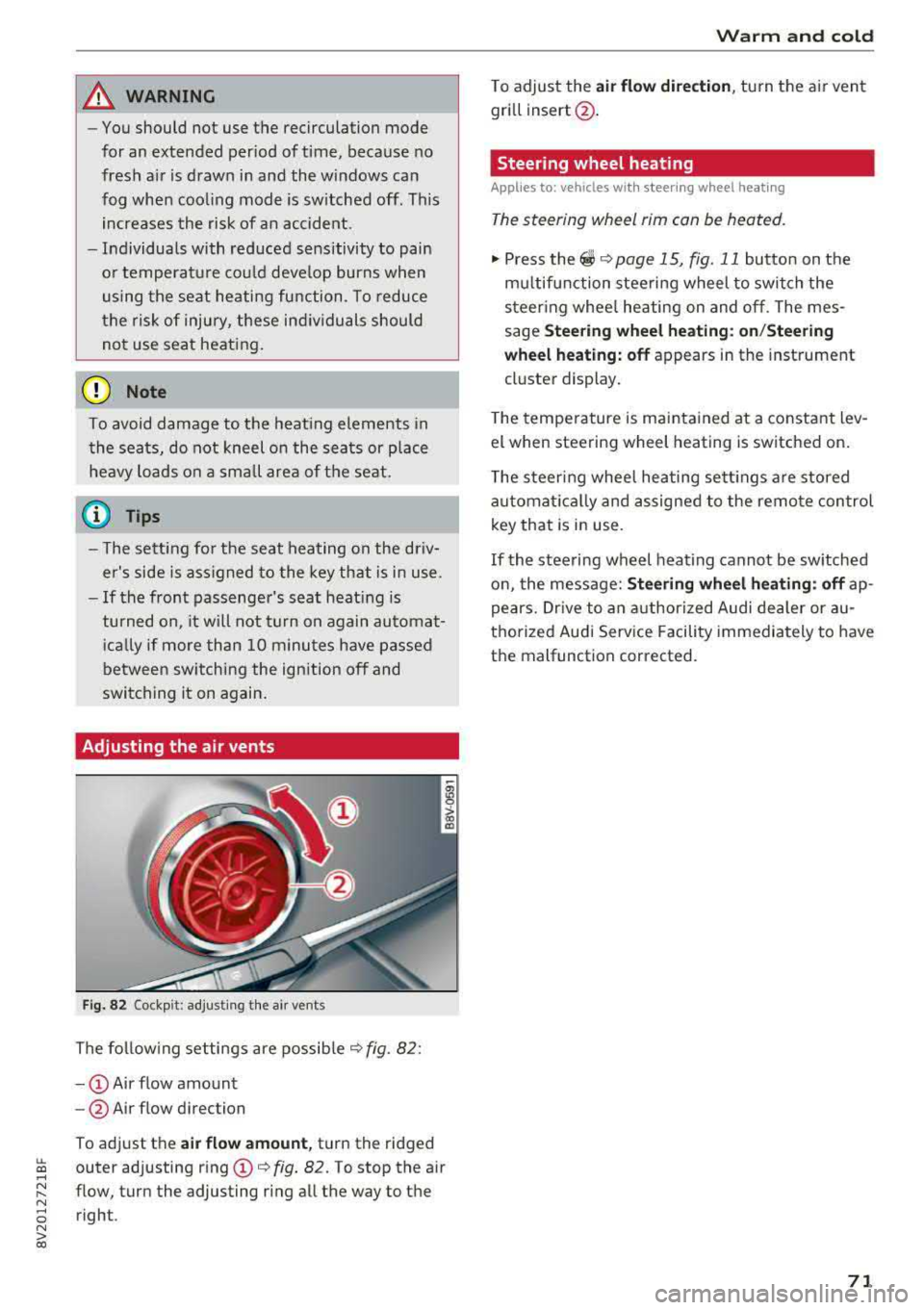
Fig. 82 Cockp it: adjust ing the a ir vents
The following settings are possible ¢ fig. 82 :
-CD Air flow amount
- @ Air flow direction
To adjust the
air flow amount, turn the ridged
outer adjusting ring
CD ¢ fig. 82. To stop the air
flow, turn the adjusting ring all the way to the right .
Warm and cold
To adjust the air flow dire ction , turn the air vent
gri ll insert @.
Steering wheel heating
Applies to: veh icles w ith steering whee l heating
The steering wheel rim can be heated.
"' Press the ~ ¢ page 15, fig. 11 button on the
mu ltifunction steering wheel to switch the
steering whee l heating on and off. The mes
sage
Steering wheel heating: on/Steering
wheel heating: off
appears in the instrument
cluster display.
T he temperature is maintained at a constant lev
el when steering wheel heating is switched on .
The steering wheel heating sett ings are stored
automat ically and assigned to the remote control
key that is in use .
If the steering wheel heating cannot be switched
on, the message:
Steering wheel heating : off ap
pears. Drive to an authorized Audi dealer or au
thorized Audi Service Facility immediately to have
the malfunction corrected.
71