fuel AUDI A3 SEDAN 2018 Owner's Manual
[x] Cancel search | Manufacturer: AUDI, Model Year: 2018, Model line: A3 SEDAN, Model: AUDI A3 SEDAN 2018Pages: 404, PDF Size: 62.3 MB
Page 105 of 404
LL co ..... N
" N ..... 0 N > co
~ When you fill coolant in t he expansion tank @,
please refer
to ¢ page 324, Cooling system.
~ Do not drive any fart her if t he coo lant leve l in
the expansion tank @ is low . Contact an au
t h orized Audi dea ler or authorized Audi Service
Facility
immed iate ly ¢ .&, .
A WARNING
-Read and follow t he war nings in
¢ page 318, Working in the e ngine com
partme nt
before ope ning t he hood an d
ch ecking t he co ola nt level.
- T he e xp ansion ta nk @ may only be opened
a nd filled by an authoriz e d Aud i de aler or
au thorize d Au di Service Fac ility.
- Co olan t can en ter the ins ide of the hig h
volt age b attery w hen filling t he expa nsion
tank @ and cause a s hort c ircui t, which in
c reases the risk of fire.
Refueling
Opening the fuel filler door
App lies to: vehicles with p lug-in hybrid drive
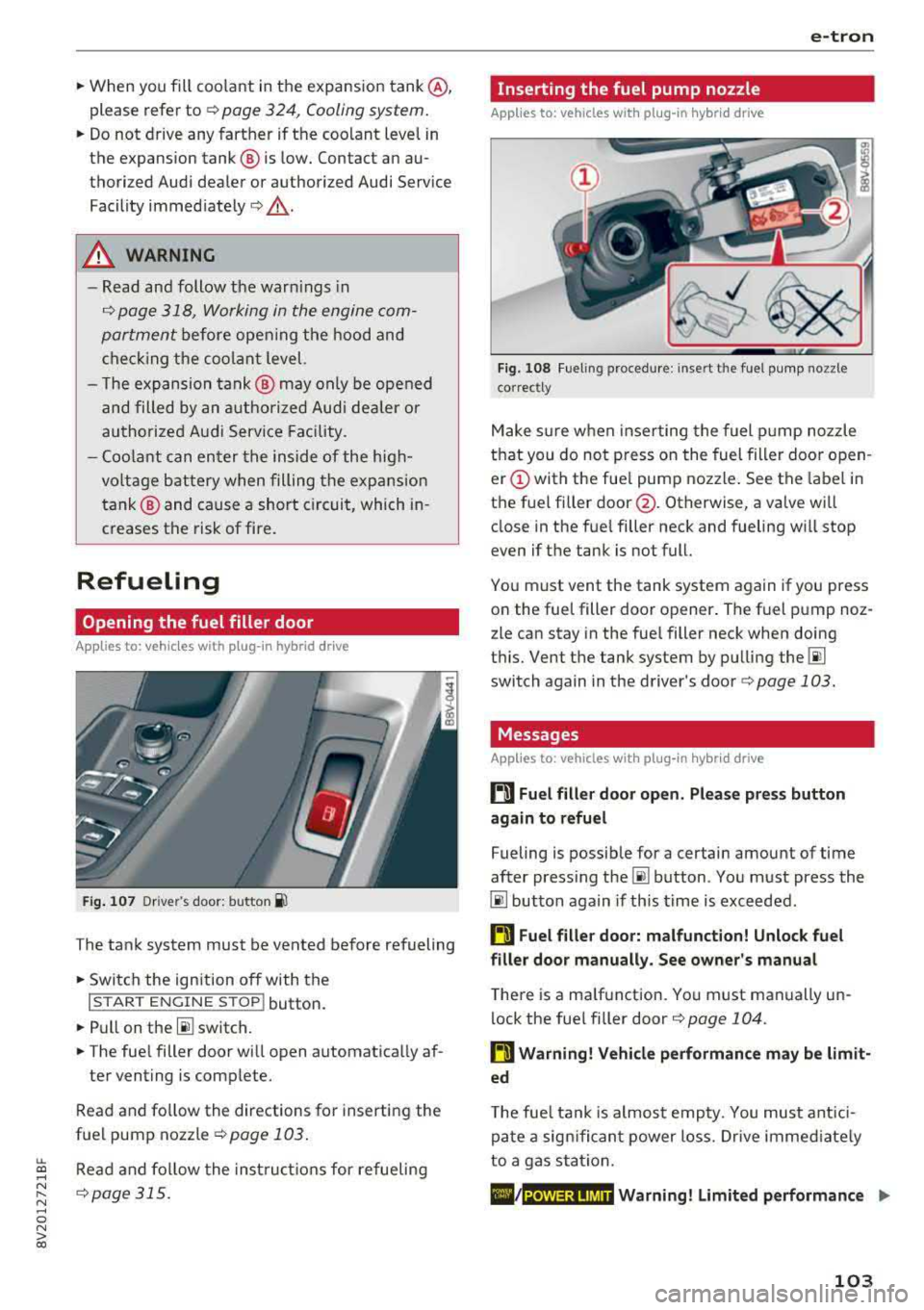
F ig. 10 7 Drive r's door: butto n ii
The tank system must be vented be fore refueling
~ Swi tch the ign ition off with the
I S T AR T EN GINE ST OP ! button .
~Pullon th e~ switch.
~ The fue l filler door will open automat ica lly af-
te r venting is comp lete.
R ead and fo llow the directions for inserti ng the
f u e l pump nozzle
¢ page 103 .
Read and fo llow the inst ru ct io n s for re fueling
¢ page 315.
e-tron
Inserting the fuel pump nozzle
Applies to: vehicles with plug -in hybrid drive
Fig. 108 Fueling proced ure: in sert t he fue l p ump nozz le
correct ly
M ake s ure w hen inserting the fuel pump noz zle
t h at you do no t press o n the fuel filler door o pen
er (!) with the fue l pump nozzle . See the label in
the fue l fi ller
door @. Otherwise, a valve wi ll
close in the fue l filler neck and fueling w ill stop
even if t he tank is not full.
Yo u m ust vent the tank system again if you press
o n the fue l filler doo r opener . The fuel p ump noz
zle can stay in the fuel filler neck when doing
t hi s. Vent the tank system by pu lling the
00
switch again in the d river's doo r¢ page 103.
Messages
Applies to: vehicles with plug-in hybrid drive
ti Fuel filler door open_ Please press button
again to refuel
Fueling is possib le for a certain amount of time
after press ing
the~ button . Yo u m ust press the
00 button aga in if th is time is exceeded .
ti Fuel filler door: malfunction! Unlock fuel
filler door manually. See owner's manual
T he re is a ma lfunction. Yo u must manually un
lock the fue l fi ller door
<=> page 104.
ti Warning! Vehicle performance may be limit
ed
T he fue l tank is almos t emp ty. You must ant ici
pa te a sig nificant power lo ss. Dr ive imme diate ly
to a gas sta tion.
./ Warning! Limited performance .,. POWER LIMIT
103
Page 106 of 404
e-tron
The gaso line engine is no longer ava ila b le be
cause there is not enough fue l. Drive immediate ly
to a gas station.
Fuel filler door emergency release
A pp lies to : ve hicles w ith plug- in hybrid drive
You must use the emergency re lease to open the
fue l filler door when there is a malfunct io n
c::;, page317 .
The tank is not vented. You can only f ill a small
amount of fuel in the tank.
~ Fill only unti l the automatic fue l pump nozzle
turns off for the first time when it is operated correctly.
Drive to an a utho rized Aud i de aler or a uth o rized
Audi Service Facility immediately to have the
malfunctio n corrected .
(D Tips
Pressure can escape if you open the tank ca p
after using the emergency release . This can
create noises.
Charging
General information
A pp lies to: ve hicles w ith plug -in hybrid drive
Two options are ava ilab le for cha rging the vehi
cle:
- Charge at a p ublic charging stat ion w ith a spe
c ia l charging cable*
c::;, page 106 .
-Charge with ho useho ld and industrial power
sockets using the Audi e-t ron c harg ing system
¢ page 106.
Environmental condition s when using the
Audi e-tron charging system
- Operat ing temperatu re : -13 °F (-25 °C) to 95 °F
(+35 °C)
- Humidity: 5% to 95%, non-co ndensing
- 13,000 feet (4,000 meters) maximum above
sea leve l
- Protected against dust and spray (IP54 (USA:
enclosure 3 R))
104
Warnings when using the charging system
&
Surfaces ca n become very hot when
i n d irect su nlight .
&~
Incorrect use increases the risk of
electric shock.
~¼
Do not use any extens ions co rds o r
c abl e reels.
~
Do not use any travel adapters.
~~
Do not use any power str ips.
~~~
Do not use any charg ing cables with
damage to the electronics or the
con necti ng w ires .
.&_ WARNING -
Sockets that are inst alled incorrect ly can
cause elect ric shock or fire when charging the
h igh -vo ltage battery using the vehicle charg
ing connection .
- Installation and set up of the household con
nection for the Audi e-tron charging system
may only be performed by a qualified e lec
trician. The q ualified electrician is thereby
fully responsib le for adhering to applicable
standards and regu lations.
- Make sure that the selected charg ing con
nection is suitable for drawing 16 amps .
- Make sure that the household soc ket is
grounded and shielded from water.
- The A udi e-tron charging system may only
be used with a prope rly grounded power
network. It cannot be used with non
gro unded power networks (s uch as IT net
wo rks) .
- Please follow the safety precautions in the
assembly instr uctions for the A udi cha rging
dock* or the Audi cha rging clips* .
.&_ WARNING
If you are not fam il iar with the socke t or the
e lectr ica l installation or it has not been
checked by qualified e xperts, never use i t fo r
cha rging. Even very low ch arg ing cu rrents can
cause ser ious damage and in particular fires if
the socket or electrical installation is in bad
Ill>
Page 118 of 404
e-tron
Applies to: vehicles with Audi virtual cockpit mt
Incompatible ch arging s ystem . Please check
c harging system
Applies to: vehicles with analog instrument clus
ter:
mt AC charging : currentl y not po ssible
This message appea rs whe n the charg ing system
is incomp atib le. O nly charge usi ng the charg ing
system tha t is designed fo r you r vehi cle.
mt AC charg ing sy stem: malfunction! Pl ease
c ontact Service
This message appears if there is a ma lfunction in
the charg ing system . H ave the problem corrected
immed iate ly by an authorized Aud i dealer or au
thor ized Audi Se rvice Facility.
Charging unit cover
emergency release
Applies to: vehicles with plug-in hybrid drive
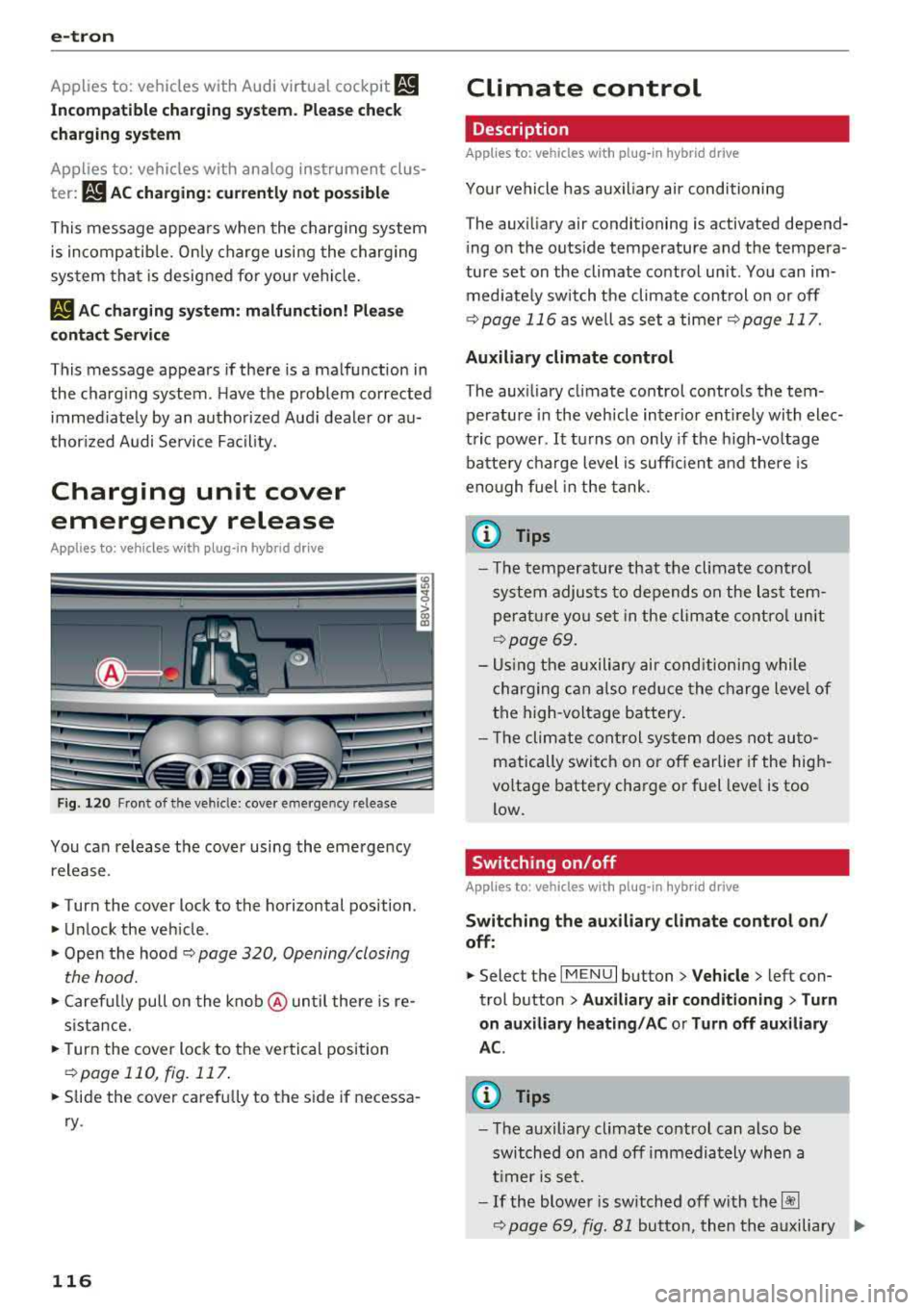
Fig . 120 Fron t of th e ve hicle: cover e merge ncy re lease
You can release the cover using the eme rgency
release.
• Turn the cover lock to the horizontal position .
• Unlock the vehicle .
• Open the hood ~ page 320, Opening/closing
the hood.
• Caref ully pull on the k nob @ until there is re
s ista nce.
• T urn the cover lock to the ver tical position
~ page 110, fig. 117 .
• Slide the cover carefu lly to the s ide if necessa
ry .
116
Climate control
Description
Applies to: vehicles with plug-in hybrid drive
Your vehicle has aux iliary air conditioning
T he aux iliary air conditioning is activated depend
i ng on the outside temperature and the tempera
ture set on the climate control unit. You can im
med iate ly switch the climate cont rol on or off
¢ page 116 as well as set a timer r::;,page 117.
Auxiliary climate control
The aux iliary climate contro l contro ls the tem
perature in the veh icle inter ior ent irely with elec
tric power .
It turns o n on ly if the h igh-vo ltage
batte ry cha rge level is suff ic ient a nd there is
eno ugh fuel in the tank .
@ Tips
- The temperature that the climate control
system adjus ts to depends on the last tem
perat ure yo u se t in the climate contro l unit
¢ page 69.
- Us ing the auxiliary air cond itioni ng while
charging can also red uce the c harge leve l of
the high-voltage battery .
- T he clim ate cont rol sys tem does no t au to
matically switc h on o r off earlier if the hig h
voltage battery cha rge or fuel leve l is too
low.
Switching on/off
Applies to: vehicles with plug-in hybrid drive
Switching the auxiliary climate cont rol on /
off :
• Select the I MENU I button> Vehicle > left con
trol b utton >
Auxiliary air conditioning > Turn
on auxiliary heating / AC or Turn off auxiliary
A C.
(D Tips
- T he auxiliary climate contro l can also be
switched on and off immedia tely wh en a
t imer is se t.
-If the blower is switched off w ith t he~
~ page 69, fig. Bl button, then the auxiliary .,..
Page 120 of 404
Trail er to wing
Trailer towing
Driving with a trailer
General information
Your veh icle is primari ly intended for transport
ing peop le and luggage. Howeve r, if you dr ive
with a tra iler , follow the techn ica l requirements ,
the operation and driving tips, and the lega l reg
ulations.
Dr iving w ith a trailer affects the vehicle 's fuel
consumpt ion, performance and wear. It a lso re
quires higher concentration from the driver .
A WARNING
Do not transport any people in a trailer due to
the risk of fatal injury .
Technical requirements
Certain requirements must be met when towing
a trailer.
Trailer hitch
Only use a trailer hitch with a removab le ball
h itch mount and ball h itch. The tra ile r hitc h must
be pe rm it t ed for the vehicle, the tra iler and the
permitted tota l weight of the trailer being
pu lled . Above all, it must be secure ly and safe ly
attached to the vehicle trailer.
Never mo unt a t rai ler hitch on the bumper. The
trai ler hitc h must be mounted in a way that does
not impair the function of the bumper. Do not
make any changes to the exhaust system and the
brake system.
Check regu larly if the trai ler hitc h is securely
mounted . A lways follow the instructions given by
the trai ler hitch manufacturer .
Trailer brakes
If t he tra ile r has its own bra ke system, then fol
low the manufacturer specifica tions. Howeve r,
the brake system on the trai ler must never be
connected to the vehicle brake system.
118
Engine cooling system
D riving w ith a tra ile r means a higher load on t he
engine and the cooling sys tem. The coo ling sys
tem must be designed for additiona l load and
contain enoug h
coolant ¢@ .
@ Note
Longer incl ines cannot be driven wi tho ut a
suitab le cooling system, especia lly if the out
side temperatures are high . ot herwise, this
i ncreases the risk of eng ine damage.
Operating instructions
Several things must be noted when towing a
trailer.
Towing capacity
Yo ur vehicle can only be ope ra ted with class 1 or
class 2 trai le rs.
Load distribution
Poor cargo load and distr ib ution can negatively
i mpact vehicle handling . T o have the lowest im
pact as poss ible, load the tra ile r according to
t h ese cr ite ria :
- Store objects preferably in the vehicle luggage
compartment . The vehicle should a lways carry
the heaviest poss ib le load and the trailer
should have t he lig htest poss ible load .
- Dist ribute the load in the t railer so that the
heavy objects a re as close to the axle as poss i
ble.
- Secu re objects from s lid ing o ut of place.
- Ut il ize the maximum permitted tongue we ight
if poss ible .
Tire s
Set the tire pressure on your vehicle for a "full
load"; see the tire pressure
st icker ¢ page 341.
If necessary, also adjust the t ire pressure on the
trailer acco rding to the manufactu rer's recom
mendat ion.
Winter tires should be mounted on the vehicle and on the trailer during w inter temperatures .
Page 171 of 404
LL
"' ..; N ,.... N ..; 0 N > a,
Voice recognition system
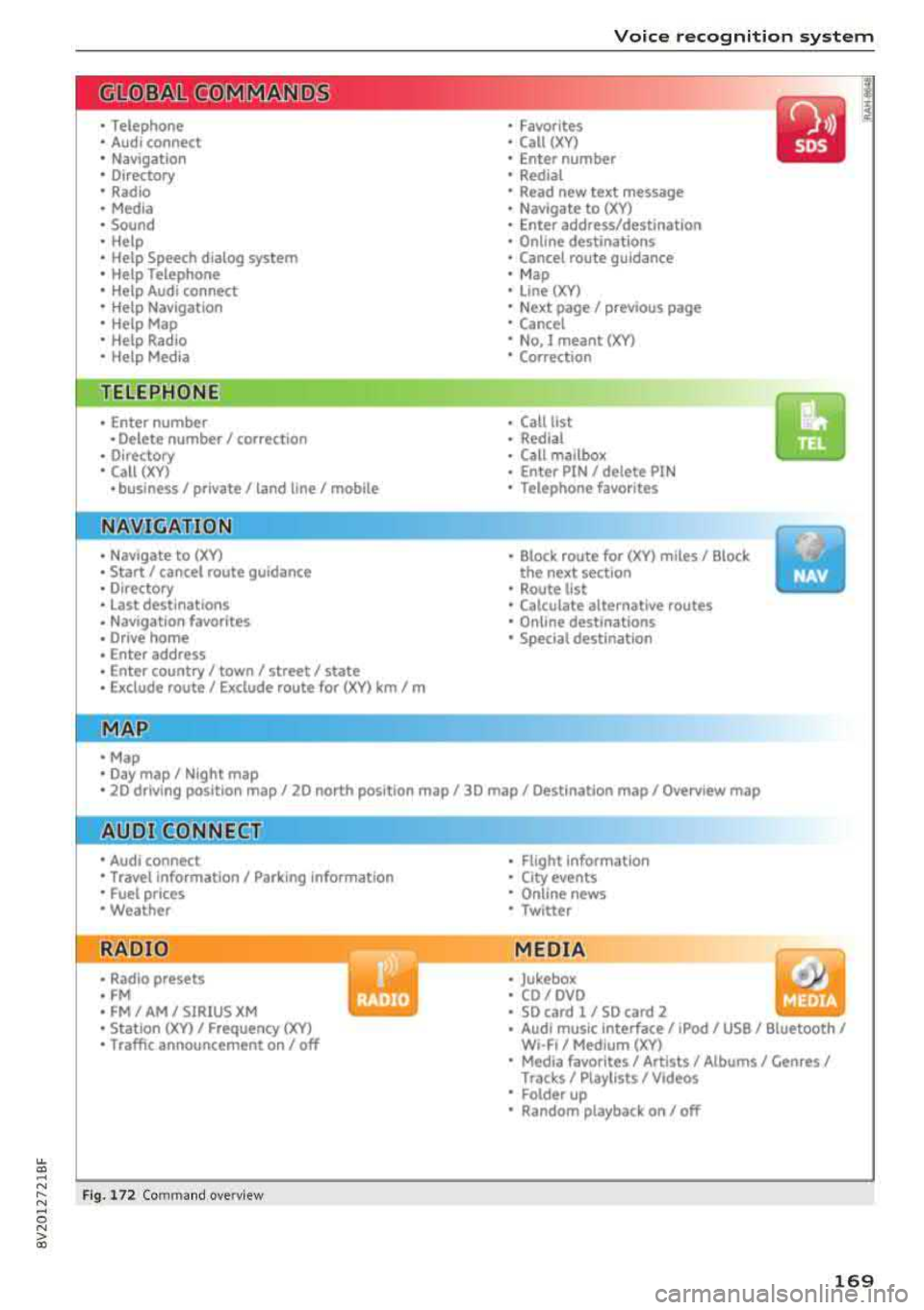
• Telephone
• Audi connect •
Favorites
• Call (XY)
• Navigation
• Directory
• Radio
• Media
• Sound •
Enter number
• Redial
• Read new tex t message
• Navigate to
(XY)
• Enter address/destination
• Help • Online destinations
• Help Speech dia log system
• Help Telephone •
Cancel route guidance
• M ap
• Help Audi connect •
Line (XY)
• Help Navigation
• Help Map
• Help Radio
• Help Media • N
ext page/ previous page
• Cancel
• N o. I meant
()(Y)
• Correction
TELEPHONE
• Enter number • Call list
• Delete number/ correc tion
• Redial
•
Directory
• Call (XY) •
Call
mailbox
• Enter PIN/ delete PI N
· business/ private/ land line/ mobile • Telephone favori tes
NAVIG:ATI0N
• Navigate to (XY)
• Start/ cancel route guidance
• Directory
• Last destinations •
Bloc k route for (XYJ miles/ Block
the next section
• Route list
• Calcul.ate alternative routes
• Navigation favorites
• Drive home
• Enter address •
Online destinations
• Special destination
• Enter country
I town/ street/ state
• Exclude route
I Exclude route for (XV) km / m
M~P
• Map
• Day map/ Night map
• 20 driving position map/ 20 north posi tion map/ 30 map/ Destination map/ Overview map
Al!JDI G ONNECT
• Audi connect
• Travel Information/ Parking Information
• Fuel prices
• Weather
RADIO
• Radio presets
• FM
• FM/ AM/ SIRIUS XM
• Station (XYJ / Frequency
(XYJ
• Traffic announcement on/ off
Fig. 172 Com mand ove rview
• Flight Information
• City events
• Online news
• Twitter
MEDIA
• Jukebo x
• CO/ DVD
• SD card l / SD card 2
• Audi music Interface/ 1Pod
I use / Bluetooth /
WI-Fl/ Medium
(XY)
• Media favorites/ Artists/ Albums/ Genres I
Tracks/ Playllsts / Videos
• Folder up
• Random playback on / off
169
Page 174 of 404
Voice recognition s ystem
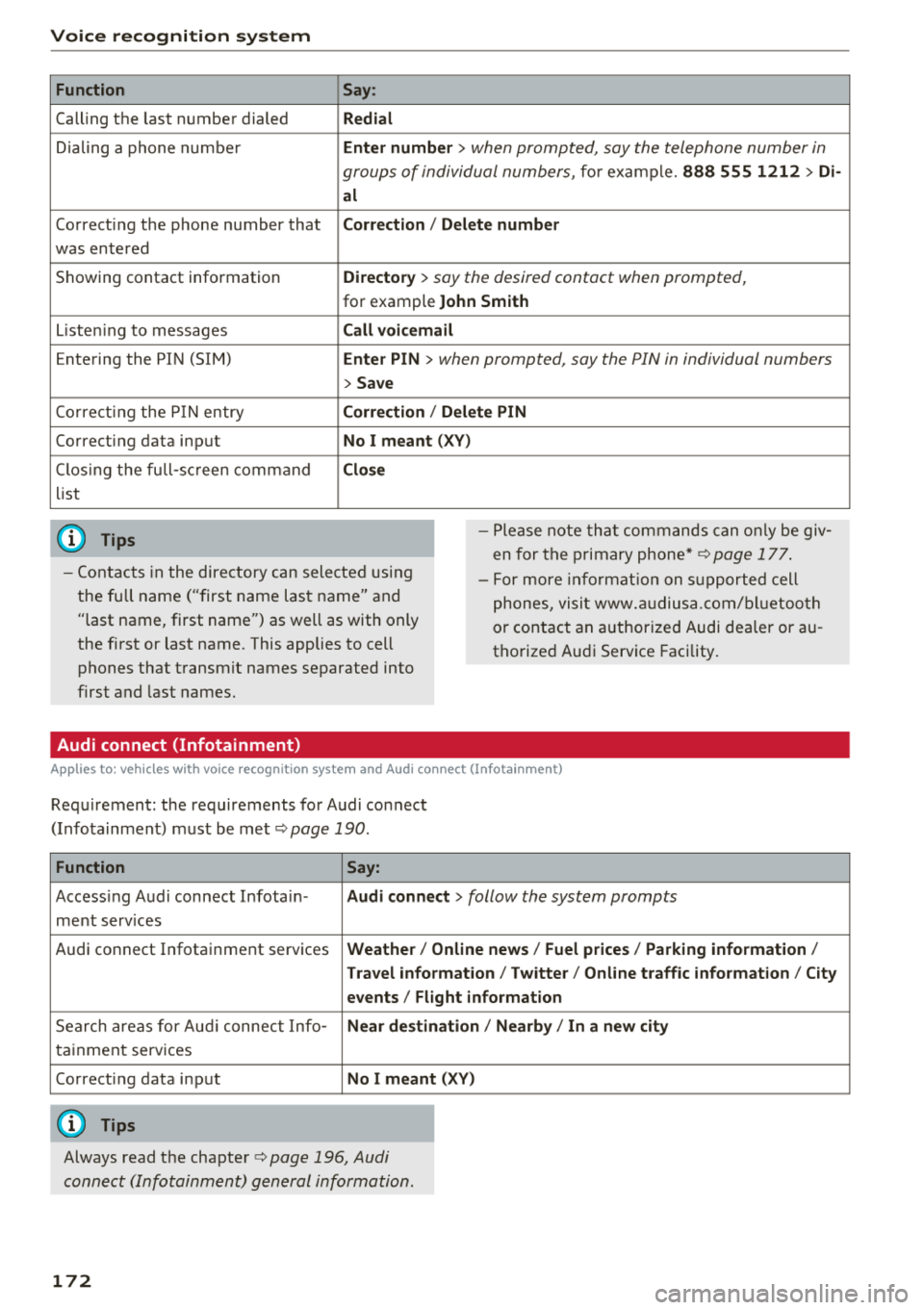
Function
Calling the last number dialed
Dialing a phone numbe r
Correcting the phone number that
was entered
Showing contact information
L isten ing to messages
Entering the PIN (SIM)
Co rrect ing the P IN entry
Correcting data input
C los ing the full-sc reen command
list
(D Tips
Say :
R edi al
Enter number
> when prompted, say the telephone number in
groups of individual numbers,
for example. 888 555 1212 > Di -
al
C orr ect ion / Delet e numb er
Di rector y
> say the desired contact when prompted,
for example John Sm ith
C all voic emai l
Ente r PIN
> when prompted , say the P IN in individual numbers
> S av e
Corr ection
I Delete PIN
No I meant ( XV)
Clos e
-Please note tha t commands can on ly be giv
en for the primary
phone*¢ page 177 .
-Contacts in the directory can selected using
the full name ("first name last name" and "last name, first name") as well as with only
the first or last name . This applies to cell
phones that transmit names separated into
first and last names. -
For more informat ion on s upported cell
phones, visit www.a udiusa.com/ bluetoo th
or contact an authorized Audi dealer or au
thorized Audi Service Facility .
Audi connect (Infotainment)
Applies to: vehicles with voice recognition system and Audi connect (Infotainment)
Requirement: the requirements for Audi connect
(Infotainment) must be met
¢ page 190 .
Function Say:
Accessing Audi connect Infota in -Audi connect > follow the system prompts
ment services
Audi connect Infotainment services
Weather / Online news / Fuel p rice s/ Parking info rmation /
T rav el info rmat ion / Tw itte r/ Online traffic info rmation / City
e v ents / Fl ight informat ion
Search areas for Aud i connect Info-N ear de stination / Nearb y/ In a new city
tainment serv ices
Correcting data input
No I m eant (XV)
(D Tips
Always read the chapter ¢ page 196, Audi
connect (Infotainment) general information.
172
Page 179 of 404
u. 00 .-< N l' N .-< 0 N > 00
Telephone Introduction
Applies to: vehicles with telephone
To make phone coils in your vehicle using the
MMI, connect your cell phone to the MMI via
Bluetooth.
Handsfree
After you have connected your ce ll phone to the
MMI via Bluetooth, you can use the handsfree
system and operate telephone functions through
your MMI. You can make calls using the antenna
on your cell phone.
A WARNING
-Medical experts warn that cell phones can
interfere w ith the funct ion of pacemakers .
Always ma inta in a m inimum distance of
about 8 inches (20 cm) between the cell
phone antenna and the pacemake r.
-Do not carry the cell phone in a pocket di
rectly over the pacemaker when the phone
is switched on.
-Sw itch the cell phone off immediately if
you suspect it may be interfering w ith the
pacemaker.
-Do not use the voice recognition system*
¢ page 170 in emergencies because your
voice may change in stressful situations. It
may take longer to dial the number or the
system may not be able to dial it at all. Dial
the emergency number manually.
-Switch your cell phone off in areas where
there is a risk of an exp losion. These loca
t ions are not always clearly marked. This
may include gas stations, fuel and chemical
storage facilities or transport vehicles, or lo
cations where fue l vapors (such as propane
or gasoline vapor in vehicles or bui ldings),
chem icals or large quantities of dust parti
cles (such as flour, sawdust or metal) may
be present in the air. Th is also applies to all
ot her locations where you would normally
turn your vehicle engine off.
-The demands of traffic require your full at
tention. Always read the chapter
¢ page 154, Traffic safety information.
-
Telephone
@ Note
Always fo llow the information found in Q@ in
Wi -Fi hotspot on page 195.
(D Tips
-The Bluetooth connection range is limited
to inside the vehicle . It can a lso be affected
by loca l conditions and interference with
other devices.
-T o learn which Bluetooth connections and
which of the functions in your cell phone are
supported, check with your cell phone serv
ice provider or the database for mobile devi
ces at www .aud iusa .com/bluetooth.
Setup
Connecting a cell phone using Bluetooth
Applies to: vehicles with telephone
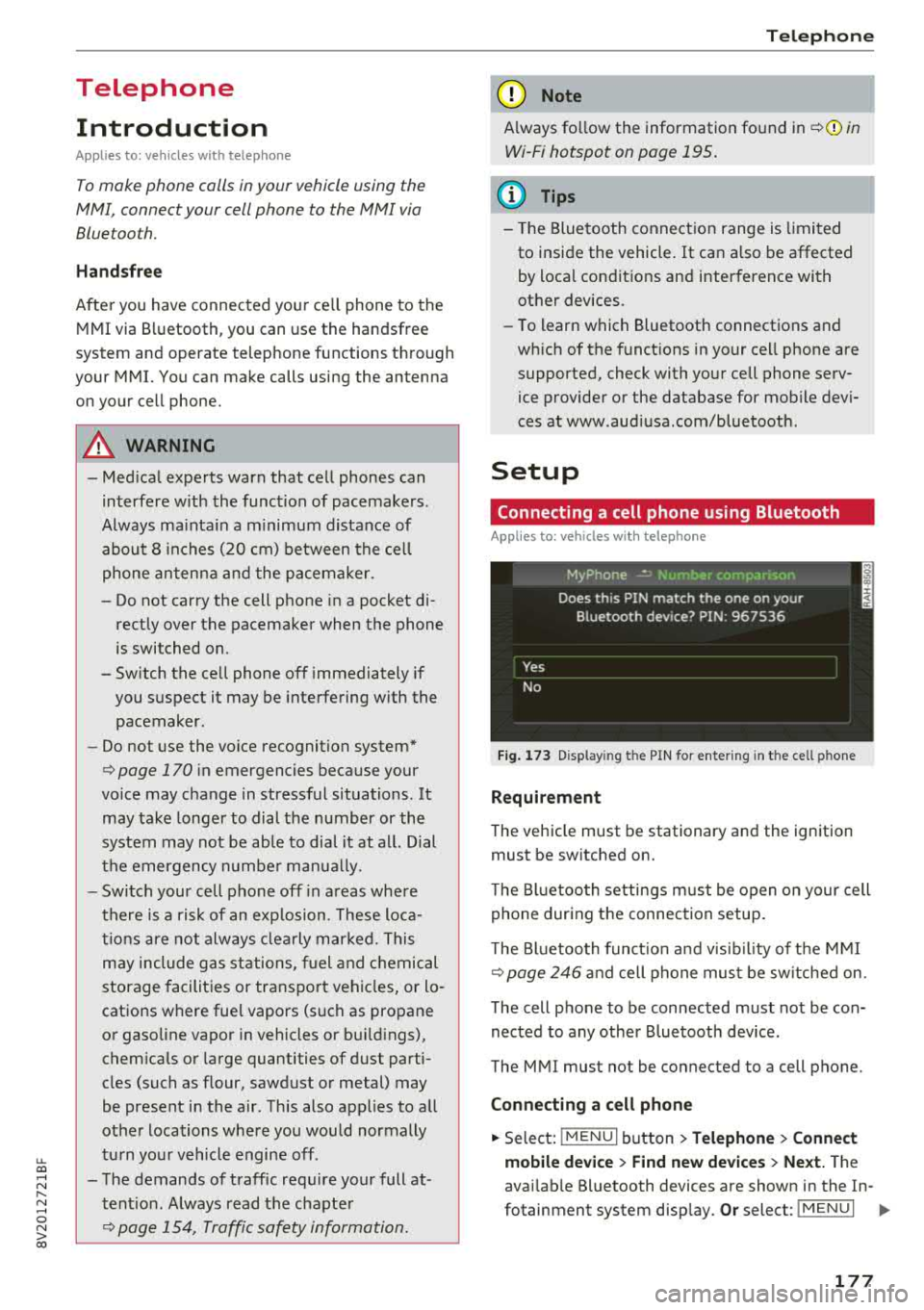
Fig. 173 Display in g t he PIN for enter ing in t he cell p hone
Requirement
T he vehicle must be stationary and the ignition
must be switched on.
T he Bl uetoo th settings must be open on your cell
phone during the connection setup .
T he Bluetooth funct io n and v is ibilit y of the MMI
Q page 246 and cell phone must be switched on.
The cell phone to be connected must not be con
nected to any other Bluetooth device.
The MMI must not be connected to a cell phone.
Connecting a cell phone
.,. Select: IMENU I button> Telephone> Connect
mobile device > Find new devices > Next.
The
avai lab le Bluetooth devices are shown in the In-
fotainment system display.
Or select: I MENU I II>-
177
Page 194 of 404
Audi connect (Infotainment)
Closing Audi connect Infotainment services
Regardless of the function selected, you can
close an Audi connect Infotainment service at any
time and return to the home screen
r=;,poge 191,
fig.181 .
Parking information
Applies to: vehicles with parking informa tion
Information on parking locations and fees in the
selected search area (for example
Nearby ).
~ Select and confirm Park ing information.
You can use the right control button to sort the
parking locations
By distance or By availability.
Travel information
Applies to: vehicles with travel informa tion
Information on attractions in the selected search
area.
~ Select and confirm Travel information .
~ Select and confirm an attraction to display the
details .
Fuel prices
Applies to: vehicles with fuel prices
Information on gas stations with the lowest fuel
prices for your vehicle in the selected search area.
~ Se lect and confirm Fuel prices.
You can use the right control button to sort the
fue l pr ices
By price or By distance .
Weather
Applies to: vehicles with weather information
Information on current weather conditions as
well as weather forecasts for the selected search area .
~ Select and confirm Weather.
You can a lso display the current weather condi
tions on the map, for examp le .
~ Se lect : left control button > on entry.
192
Flight information
Applies to: vehicles with flight informat ion
Information on flights a nd cur rent arr ival/depar
ture times in the selected sea rch area.
~ Select and confirm Flight information.
City events
Applies to: vehicles with City events
Information on events in var ious categories in
the desired search area.
~ Select City Events> left control button > cate
gory .
Online news
Applies to: vehicles with on line news
You can check the current headlines of your fa
vo rite publications in the MMI.
Requirement: your myAud i account must be sub
scribed to newsfeeds and your veh icle must be
connected to myAudi
r=;,page 190.
~ Select: Online news > desired newsfeed > a
headline .
The entire news article w ill be dis
played .
(D Tips
If you have not subscribed to a ny personal
newsfeeds in your myAudi account, pre-con
figured newsfeeds will be disp layed.
Twitter
Applies to: vehicles with Twitter
You con access the most important functions in
your Twitter account through your MMI .
Requirement:
You m ust have connected your myAudi account
with Twitter. You can find additional information
for th is on line at www.audiusa.com/myaud i.
You must have connected your vehicle with myAudi
r=;, poge 190 .
~ Select Twitter > left cont rol button > desired
function
(for examp le, Trends ).
Page 211 of 404
u. 00 .-< N l' N .-< 0 N > 00
- Traffic congestion along the ro ute including
time delays
The route that was calcu lated acco rding to the
ro ute criter ia you sele cted is shown on the over
view map . The special propert ies of the route are
a lso
displayed @~ fig. 187 and given as a spo
k en message.
Using the contro l knob , you can se lect t he possi
b le routing for the alternative routes and show
them on map Select and confirm the desired ro ute that you would like to use for route guid
ance.
Additional settings
Navigation settings
Applies to: vehicles with navigation system
.,. Press the I NAV /MAPI but ton repe ated ly un til
the
Enter de stination menu is displayed
¢ page 201, fig.182 .
.,. Select : rig ht contro l button > Navigation set-
tings .
Depending on the se lected function, the follow ·
ing settings can be se lected :
Show alternative routes
Up to three suggested ro utes are shown on the
map whe n this funct ion is switched
on~
~ page 208, Alternative routes.
Low fuel warning
A message is disp layed if the fuel gauge goes be
l ow the reserve mar king when this funct ion is
sw itched
on~-Co nfirm ing th is m essage displays
a lis t of gas stations in the area. When a gas sta
t ion is selec ted, route g uidance from the c urren t
ve hicl e position is calc ulated .
Trailer mode*
Tra iler mode is sw itched off at the factory .
When the function is switched
on~. the maxi
mum permitted speed for vehicles with trailers is
i ncorporated into the route guidance and the cal
culated arr ival time is adjusted acco rding ly . T rail
e r mode is d isp layed using symbols
-Pe' in the side
menu on the m ap .
Na vigation
Personal route as sistance*
Persona l rou te ass istance is swi tched off at the
f actory.
You r trips a re recorded and dest inations a re s ug
gested by the M MI w hen th is fu nction is sw itched
o n ~¢ page 206.
Notification when nearby*
The not ification when nearby is switched off at
the factory .
The MM I not ifies you when you are approaching
selected points of interest when t his function is
switched
on~ -You can also have a Notification
tone .
Presentation mode
The Presentation mode he lps you to effectively
plan a tr ip and fo llow the planned route without
moving the vehicle . You can use
Select starting
point
when you wou ld like to calculate a ro ute
sta rt ing from a location othe r than the ve hicle
pos it ion, for examp le. Sta rt
Presentation mode
to s imula te rou te g uidance .
Route criteria
Applies to: vehicles with navigation system
Jl
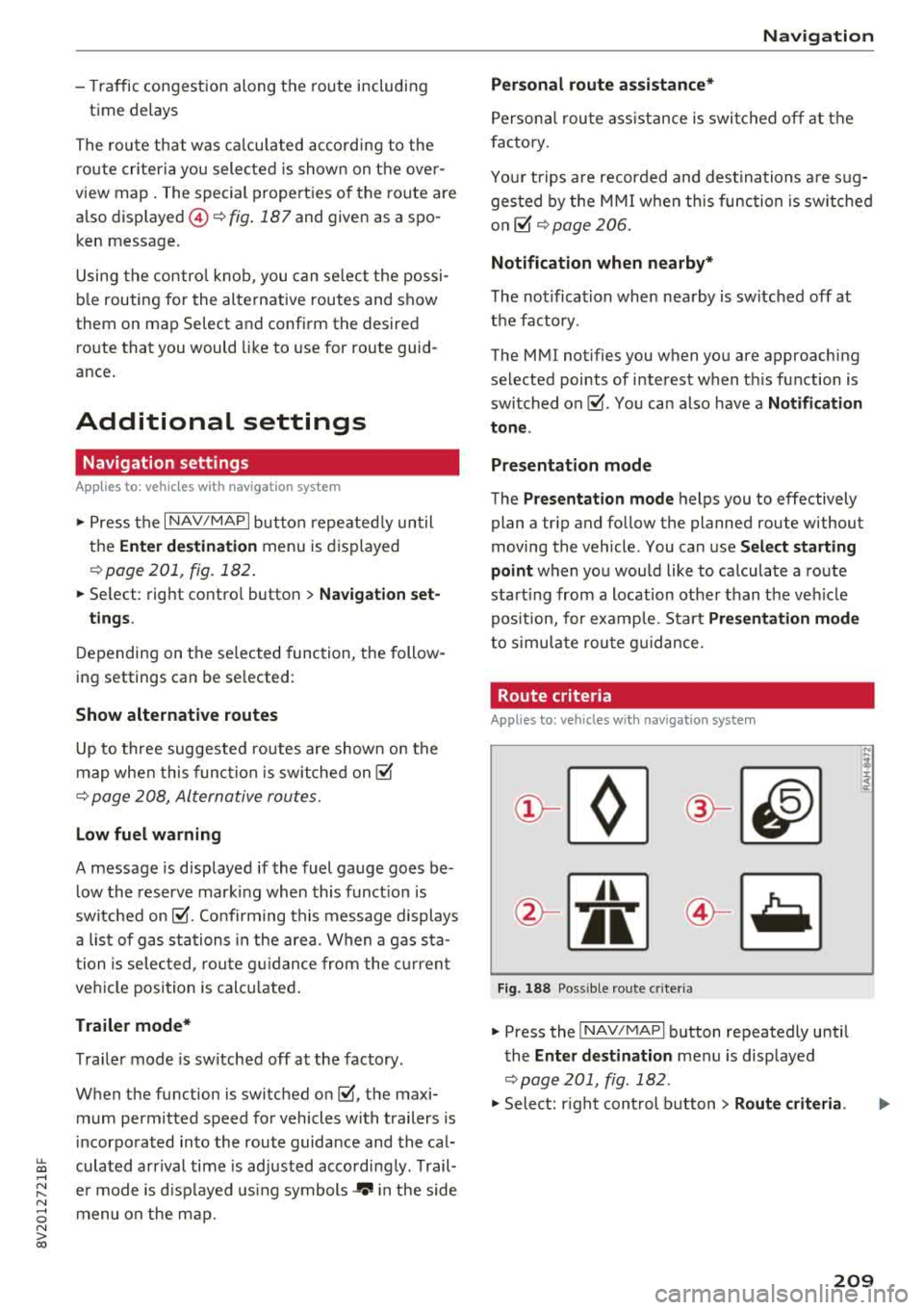
Fig. 18 8 Possible ro ute c rit e ri a
.,. Press the INAV/MAPI button repeatedly unti l
the
Enter destination men u is displayed
¢page 201, fig . 182 .
.,. Select: r ight cont rol b utton> Route criteria .
209
Page 245 of 404
u. 00 .-< N l' N .-< 0 N > 00
System settings
Setting the date and
time
You can set the clock time manually or using the
CPS* .
.. Select : IMENUI button> Settings> left control
button >
MMI settings > Date & time.
.. Or : select : IMENUI button> Vehicle> left con-
trol button >
Vehicle settings > Date & time .
Automatic setting
When this function is switched on g, the time
and date are automatically set.
Time
Requirement: the Automatic setting must be
switched
off .
Press the control knob. You can set the Time
manually by turning and pressing the control
knob.
Date
Requirement: the Automatic setting must be
switched
off.
Press the control knob . You can set the Date
manually by turning and press ing the control
knob.
Time zone
When selecting the appropriate time zone, a
sampling of countries in this zone will be listed .
Automatic time zone*
When this function is switched on g, the time
will automatically adjust to the corresponding
time zone.
Automatic daylight saving time*
When this function is switched on g, the time
will automatically switch to daylight saving time .
Time format
If you select 24h, the clock will display, for ex
ample,
13:00 . If you select AM/PM , the clock
will disp lay, for examp le,
1:00 PM .
System settings
Date format
If you select DD.MM.YYYY , the date display will
show, for example ,
31.08.2017. If you select
MM/DD/YYYY , the date display will show, for ex
amp le,
08/31/2017. If you select YYYY-MM
DD ,
the date display will show, for example,
2017-08-31 .
MMI settings
.. Select: !MENU I button> Settings> left control
button >
MMI settings .
Language
You can change the display language as well as
the language for the voice guidance* and voice
recognition system*.
T he number of languages available depends on
the market.
Measurement units
The following measurement units can be set de
pend ing on availability:
Speed , Distance , Tem
perature , Fuel consumption , Volume , Pressure.
Tool tips
When this funct ion is switched on g, your MMI
shows you tips for input . The frequency of how
often it displays decreases with time.
Speech dialog system
Applies to : vehicles wit h voice recog nitio n system
Depend ing on veh icle equipment, the following
funct ions may be ava ilable:
Command display : when this function is switch
ed on
g, the MMI will show you the possible
commands for voice input in the respective
menu.
Short dialog : when this function is switched on
g, a shorter form of the prompts is used .
Command during voice output*: thi s function is
switched on at the factory . W hen this function is
switched on
g, you can say new commands dur-
ing announcements. You do not need to wait for
the signal tone (beep) dur ing an announcement.
When the funct ion is swi tched off
0, you need to Iii>
243