radio AUDI A3 SEDAN 2018 Owner's Manual
[x] Cancel search | Manufacturer: AUDI, Model Year: 2018, Model line: A3 SEDAN, Model: AUDI A3 SEDAN 2018Pages: 404, PDF Size: 62.3 MB
Page 229 of 404
u. 00 ... N l' N ... 0 N > 00
The media is started and operated through the
mobile device or the
MMI, depending on the de
vice being used.
(D Tips
-Check for any connection requests on your
Bluetooth device.
-Multiple Bluetooth audio players can be
connected to the
MMI, but only one mobile
device can be active.
-Bluetooth protocols AVRCP (1.0/1.3/1.4)
and A2DP are supported.
-Note the volume setting on your Bluetooth
device. Audi recommends setting your mo
bile device to the maximum volume when
using it as a Bluetooth audio player.
-The supported media functions (such as
shuffle) depend on the Bluetooth device be
ing used.
-For more information on the supported de
vices, visit www.audiusa.com/bluetooth or
contact an authorized Audi dealer or author ized Audi Service Facility.
Wi-Fi audio player
Appl ies to: ve hicles with Wi-F i audio playe r
Using the Wi -Fi audio player media source on the
MMI, you can connect and operate your Wi-Fi-ca
pable media player (such as a smartphone) to
wirelessly play music from your media player
li
brary. The media player is connected through the
vehicle's Wi-Fi hotspot. A UPnP Server opp or an
integrated UPnPIDLNA server on your media
player is required to access your media player
li
brary.
Requirement: the Wi-Fi function on your media
player must be switched on. The
Audi MMI con
nect
app or a UPnP server app must be installed
on your media player .
Or: you must be using a
media player with an integrated UPnP/DLNA
server.
-Connecting a media player: press the I MEDIA !
button. Press the left control button until the
sources overview
c::;, page 232 is displayed. Se
lect and confirm
Wi-Fi audio player 0
c::;,page 232, fig . 209 .
Media
-If necessary, select and confirm Wi-Fi turned
off> Turn on Wi-Fi
to activate Wi-Fi in the
MMI. Select
Wi-Fi settings, if necessary. Select
the same settings on the wireless media player
that are used for the Wi-Fi hotspot.
-Starting the Wi-Fi audio player: start the Audi
MMI connect
app or a UPnP server app, or set
media permissions on your media player.
Operating the media player: the media player is
operated through the MMI.
-Press the left control button repeatedly until
the
Folders menu item appears. Select and con
firm
Folders.
-Playing music from the media player: select
and confirm
Media center .
Web radio:
see c::;, page 228 .
A WARNING
-
-As the driver, do not allow usage of the Wi
Fi hotspot to distract you from driving, as
this could increase the risk of an accident.
-It is only safe to use tablets, laptops, mo
bile devices and other similar devices when
the vehicle is stationary because, like all
loose objects, they could be thrown around
the inside of the vehicle in a crash and cause
serious injuries. Store these types of devices
securely while driving.
-Do not use any wireless devices on the front
seats within range of the airbags while driv
ing. Also read and follow the warnings in
c::;, page 2 73, Front airbags.
@ Note
Always follow the information found in ¢@ in
Wi-Fi hotspot on page 195.
(D Tips
-Always read the chapter c::;, page 196, Audi
connect (Infotainment) general informa
tion.
-Please note that a Wi-Fi connection does
not automatically make it possible to use
the Internet. For additional information,
see
c::;, page 190.
227
Page 230 of 404
Media
- To avoid interruptions during playback, de
activate the power saving function on the
media player or connect it to a charger.
- The loading times for the audio data depend
on the media player used and the number of
files that it contains.
- A maximum of 2,000 entries per directory
are displayed in the MMI.
- Songs downloaded for offline use using mu
sic streaming services are stored on your mobile device (such as a smartphone) and
may be DRM protected. The Wi-Fi audio
player will not play ORM protected files.
- Contact an authorized Audi dealer or au thorized Audi Service Facility for additional
information on the Wi-Fi audio player .
Online media and
Internet radio
A pp lies to veh icles with A udi co nnect (Infotainment)
You con playback and operate various online me
dia services and Internet radio using the MMI.
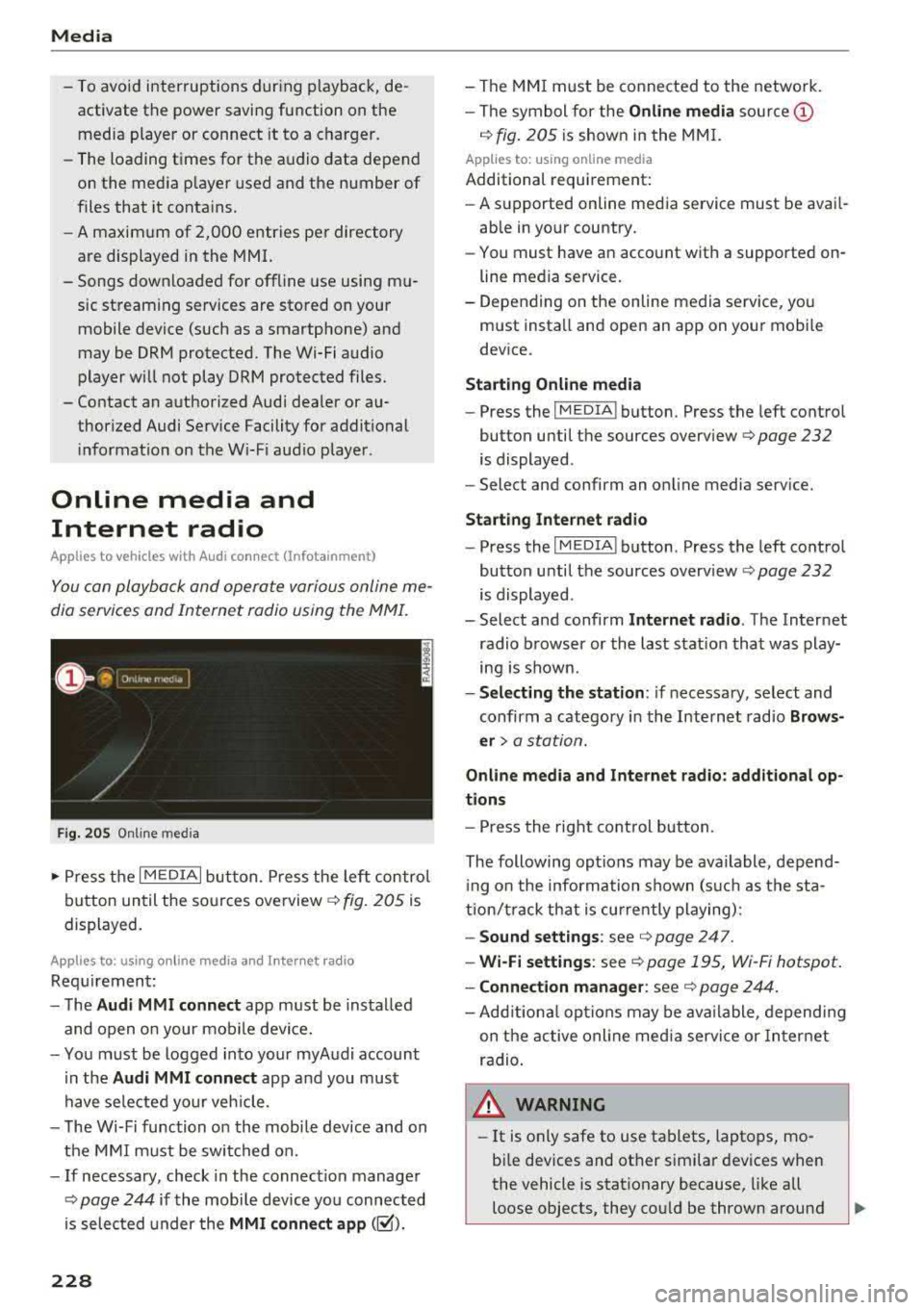
Fig. 205 Online media
.,. Press the I MEDIAi button. Press the left control
button until the sources
overview ¢ fig. 205 is
displayed.
A ppl ies to: using o nline me dia an d Internet radi o
Requirement:
- The
Audi MMI connect app must be installed
and open on your mobile device.
- You must be logged into your myAudi account
in the
Audi MMI connect app and you must
have selected your veh icle.
- The Wi-Fi function on the mobile device and on
the MMI must be switched on.
- If necessary, check in the connection manager
¢
page 244 if the mobile device you connected
is selected under the
MMI connect app (~).
228
-The MMI must be connected to the network.
- The symbol for the
Online media source @
¢ fig. 205 is shown in the MMI.
Applies to: usin g on line media
Additional requirement:
- A supported online media service must be avail
able in your country.
- You must have an account with a supported on
line media service.
- Depending on the online media service, you
must install and open an app on your mobile
device.
Starting Online media
-Press the IM EDIA I button . Press the left control
button until the sources
overview ¢ page 232
is displayed .
- Select and confirm an online media service.
Start ing Internet radio
-Press the IM EDIA I button . Press the left control
button until the sources
overv iew ¢ page 232
is displayed .
- Select and confirm
Internet radio. The Internet
radio browser or the last station that was play
ing is shown .
-Selecting the station : if necessary, select and
confirm a category in the Internet radio
Brows
er>
a station.
Online media and Internet radio: additional op
tions
- Press the right control button.
The following options may be available , depend
i ng on the information shown (such as the sta
tion/t rack that is currently playing):
-Sound settings: see ¢ page 247 .
-Wi-Fi settings: see ¢ page 195, Wi -Fi hotspot.
- Connection manager: see ¢ page 244.
-Add itional options may be available, depending
on the active online media service or Internet
radio .
,&. WARNING
-It is on ly safe to use tablets, laptops, mo
bile devices and other similar devices when
the vehicle is stationary because, like all
loose objects, they could be thrown around
-
Page 231 of 404
LL co .... N
" N .... 0 N > co
the inside of the vehicle in a crash and cause
serious injur ies. Store these types of devices
securely whi le driving.
- Do not use any w ireless devices on the front
seats w ith in range of the a irbags while driv
ing. Also read and follow the warnings in
¢ page 2 73 , Front airbags .
CD Note
-Always fo llow the information found in i::> @
in Wi-Fi hotspot on page 195 .
- Please note that there genera lly are addi
tiona l costs when using an online media
se rvice account, especially when it is used
i nternationally .
(D Tips
-Depending on the Internet connection and
network traffic, a connection loss can occur
duri ng p layback of on line media serv ices .
-Online media and Internet radio usage de
pends on the serv ice availab ility of the third
party provider .
- Audi AG simply makes the access to online
media services possible through the MMI
and does not take any respons ibility for the
contents of the online med ia services .
- Always read the chapter
¢ page 196, Audi
connect (Infotainment) general informa
tion .
- Dependi ng on the mobile device used, the re
may be interruptions during media playback
and whe n using the
Audi MMI connect app.
To avoid i nterruptions when usi ng a mob ile
device , do no t lock the s cree n on you r mo
bile device and keep the
Audi MMI connect
app in the foreground .
- Cont act an a uthorized Audi dea ler or au
thorized Audi Service Facili ty for additional
i nformat ion about online media .
Media
Multimedia connections
USB adapter for Audi music interface
You can connect your mobile devices (such as a
smartphone or MP3 player) to the Audi music in
terface and charge them using a special USB
adapter .
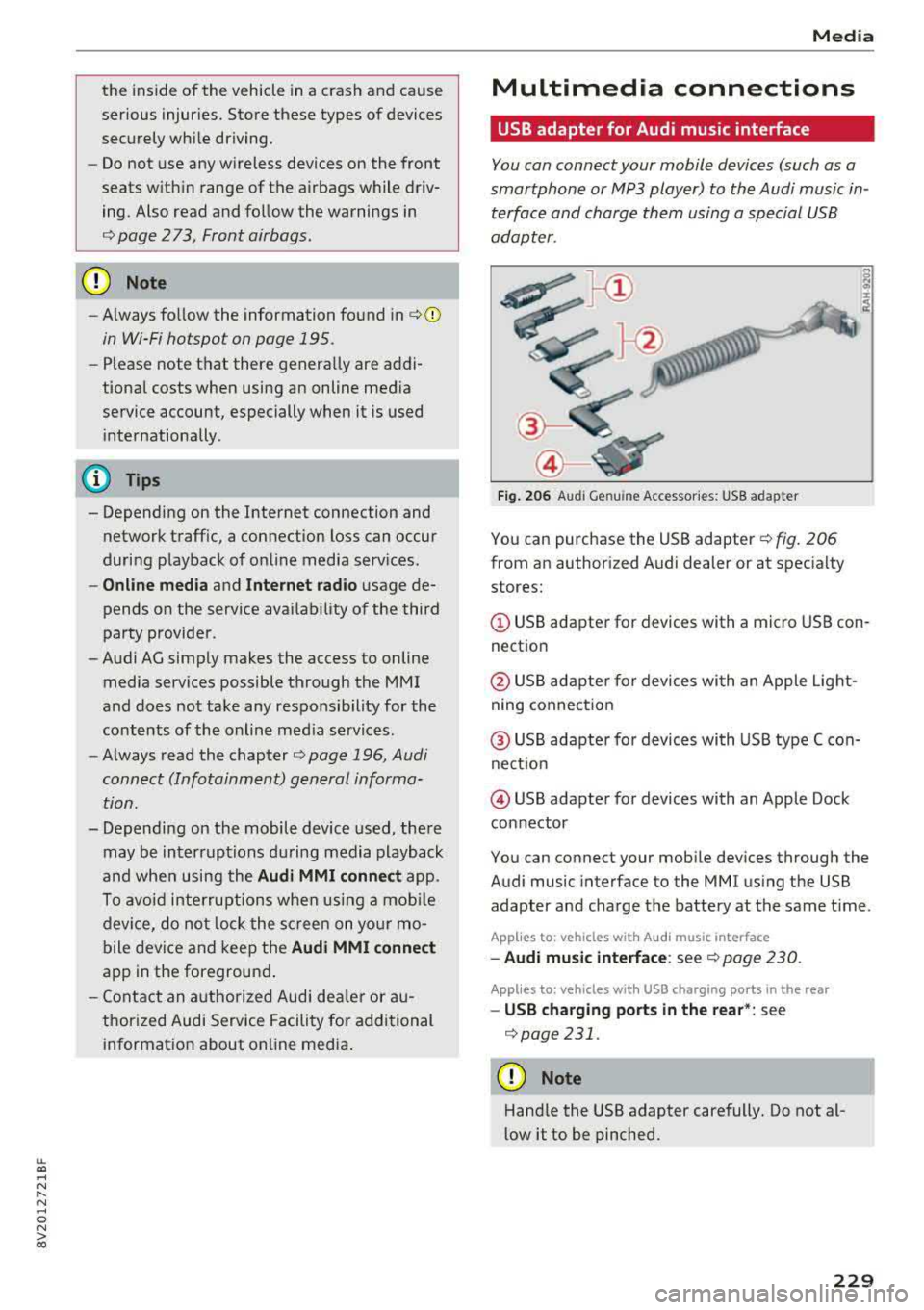
Fig. 206 Audi Genuine Acces sorie s: USB a dap ter
You can purchase the USB adapter ¢ fig. 206
from an author ized Audi deale r or at spec ialty
stores:
© USB adapter for devices with a micro USB con
nect ion
@ USB adapte r for devices with an Apple Light
ning conne ct ion
@ US B adapte r for devices wi th USB type C con
ne ct io n
@ USB adapter for devices with an Apple Dock
connector
You can connect your mob ile dev ices through the
Audi music interface to the MMI us ing the USB
adapter and cha rge the battery at the same t ime .
App lies to : vehicles wit h Audi music interface
-Audi mu sic interfa ce : see c;> page 230 .
Applies to: vehicles wi th USB charging ports in the rear
-USB cha rging ports in the rear *: see
¢page 231 .
CD Note
Hand le the USB adapter carefully. Do not al
low it to be pinched.
229
Page 234 of 404
Media
been connected by a USB adapter . They may
impair the functionality.
- USB hubs a re not supported .
- Refer to the man ufactu rer's operating man-
ua l for important informat ion regarding the
ope ration of your mob ile dev ice .
- Co rrect funct ion of all mobile devices can
not be guaranteed .
- The vehicle ba tte ry dra ins when mobile de
v ices are turned on b ut the engine is off.
Playing media
Accessing media
You con start and op erat e various med ia
t hrough the
MM I control panel.
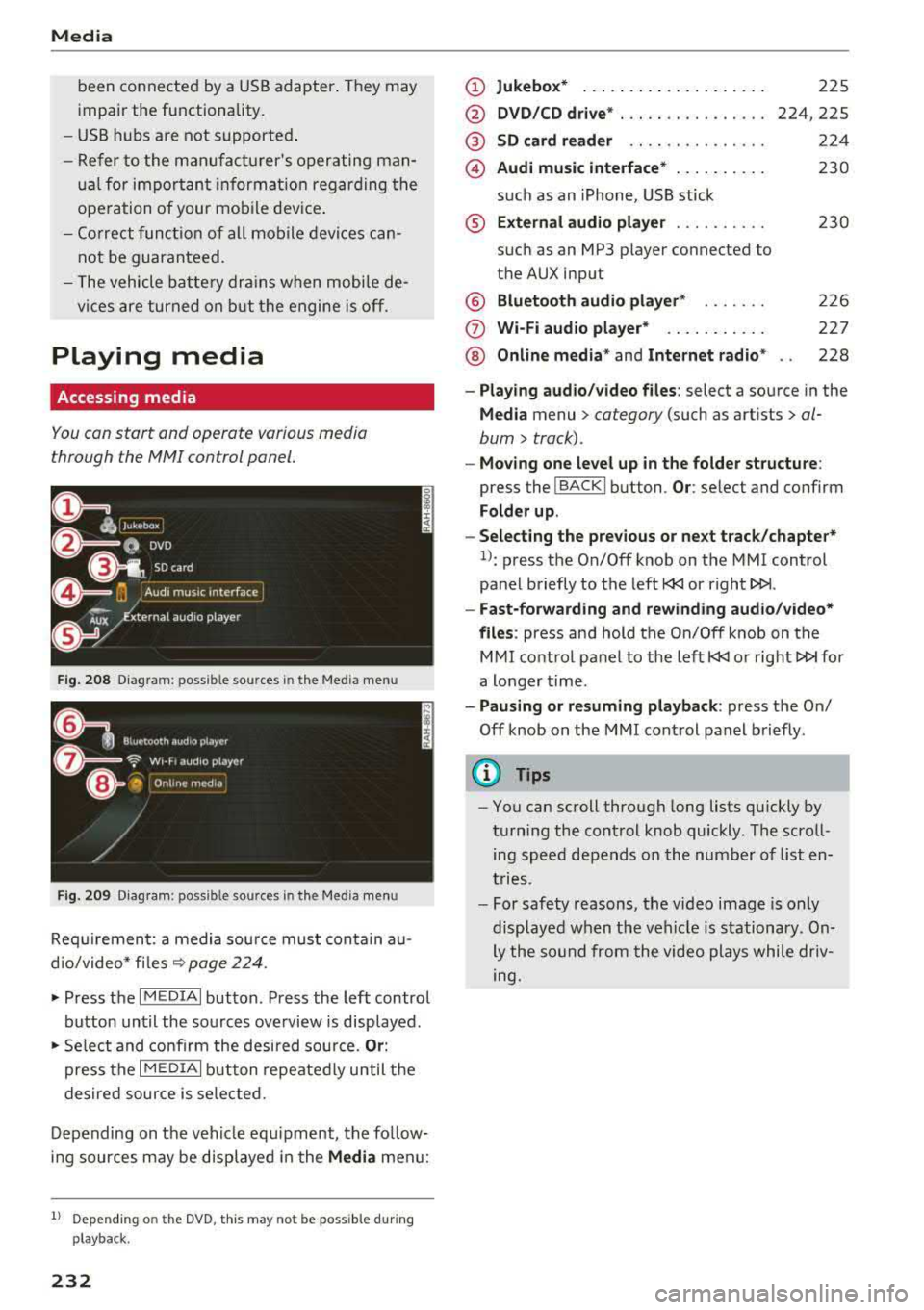
F ig . 208 Diagram : poss ible so ur ces in the Medi a men u
Fi g. 209 Diag ram : p ossible s our ces in the M ed ia m enu
Req uirement: a media sou rce must contain au
d io/video* fi les
9 page 224 .
• Press the I MEDIAi button. Press the left control
button until the sources overview is disp layed.
• Se lect and confirm the desired source. Or :
press the I MEDI Ai button repeatedly until t he
desired source is selected.
Depending on the vehi cle equ ipment, the follow
ing sources may be disp layed in the
Media men u:
1) Depe ndin g o n th e DVD , th is m ay not be poss ib le dur ing
p la y ba ck.
232
(D Jukebo x* ... .. .. .. ... .. ..... .
@ DVD/CD drive * ... .. ...... .... .
@ SD card re ader .. .. .. .... .... .
@) Audi music interface * .. .. ..... .
su ch as an iPhone, USB stick
® External audio p la y er ......... .
such as an MP3 pl ayer connected to
the AUX input
@ Bluetooth audio player * ...... .
(J) Wi-Fi audio pl ayer* ... .. ..... .
@ Online m edia * and Internet radio *
225
224,225
224
230
230
226
227
228
- Playi ng audio /video files : select a source in the
Media menu> ca tegory (such a s art ists> al
bum> track) .
-Moving one level up in the folder structure :
press the I BACKI button. Or: selec t and confirm
Folder up .
- Selec ting the p re v ious or ne xt track /chapter*
1>: press the On/Off knob on the MMI control
panel briefly to the left
l
- Fa st-for warding and rew inding audio /video *
fil es :
press and hold the On/Off knob on the
MMI control pa nel to the left
l
a longer time .
-Paus ing or re suming pla yback : press the On/
Off knob on the MMI control panel b riefly .
(@ Tips
-You can scroll through long lis ts quickly by
turning the cont rol knob quickly . The scroll
ing speed depends on the number of list en
t ries .
- For safety reasons, the video image is only
displayed when t he vehicle is stationary. On
ly the so und from the video plays while driv
ing.
Page 235 of 404
LL co .... N
" N .... 0 N > co
Media center
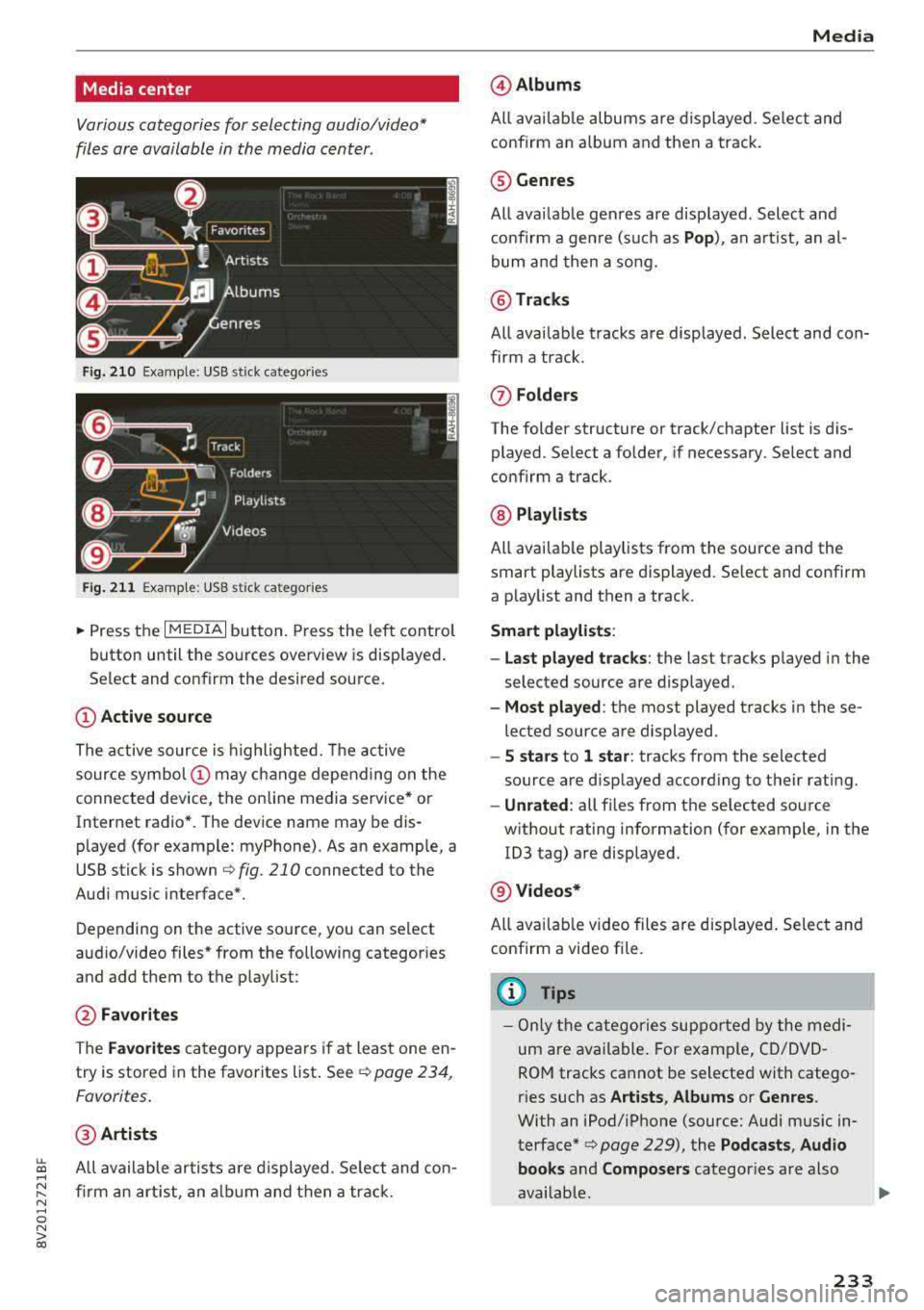
Various categories for selecting audio/video*
files are available in the media center .
Fig. 210 Example: USB stick catego ries
Fig . 211 Examp le: USB stick categories
~ Press the I MEDIAi button. Press the left control
button until the sources overview is displayed .
Se lect and confirm the desired source.
(!) Active source
The active source is highlighted. The active
source
symbol @ may change depending on the
connected device, the online media service* or
Internet radio*. The device name may be dis
p layed (for example: myPhone). As an examp le, a
USB stick is shown
c:> fig . 210 connected to the
Audi music interface*.
Depending on the active source , you can select
audio/video files* from the following categor ies
and add them to the p laylist :
@Favorites
The Favorites category appears if at least one en
try is stored in the favorites list . See
¢ page 234 ,
Favorites.
@ Artists
All available artists a re displayed . Se lect and con
firm an artist, an album and then a track.
Media
@ Albums
All available albums are displayed . Select and
confirm an album and then a track .
® Genres
All available genres are displayed . Select and
confirm a genre (s uch as
Pop), an artist, an al
bum and then a song.
@ Tracks
All available tracks are displayed . Select and con
firm a track .
(J) Folders
The folder structure or track/chapter list is dis
played . Select a folder, if necessary . Select and
confirm a track .
@ Playlists
All available playlists from the source and the
smart playlists are displayed. Se lect and confirm
a playlist and then a track.
Smart playlists :
- Last played tracks :
the last tracks played in the
selec ted source are displayed .
-Most played : the most played tracks in these
lected source are displayed .
-5 stars to 1 star: tracks from the selected
source are displayed accord ing to their r ating.
- Unrated: all files from t he se lected source
w ithout rating information (for example, in the
103 tag) are displayed.
@ Videos*
All avai lable video files are displayed. Select and
confirm a video file.
(D Tips
-Only the categories supported by the medi
um are available . For example, CD/DVD
ROM tracks cannot be selected with catego
r ies such as
Artists , Albums or Genres .
With an iPod/iPhone (source: Audi music in
terface*
c> page 229), the Podcasts , Audio
books
and Composers categor ies are also
available.
233
Page 241 of 404
u. 00 .-< N l' N .-< 0 N > 00
Media
-Specia l characte rs (such as those in 10 3 tag
i nformat ion) d isp lay different ly depending o
n the sys tem lan guage an d cannot always
be guaranteed.
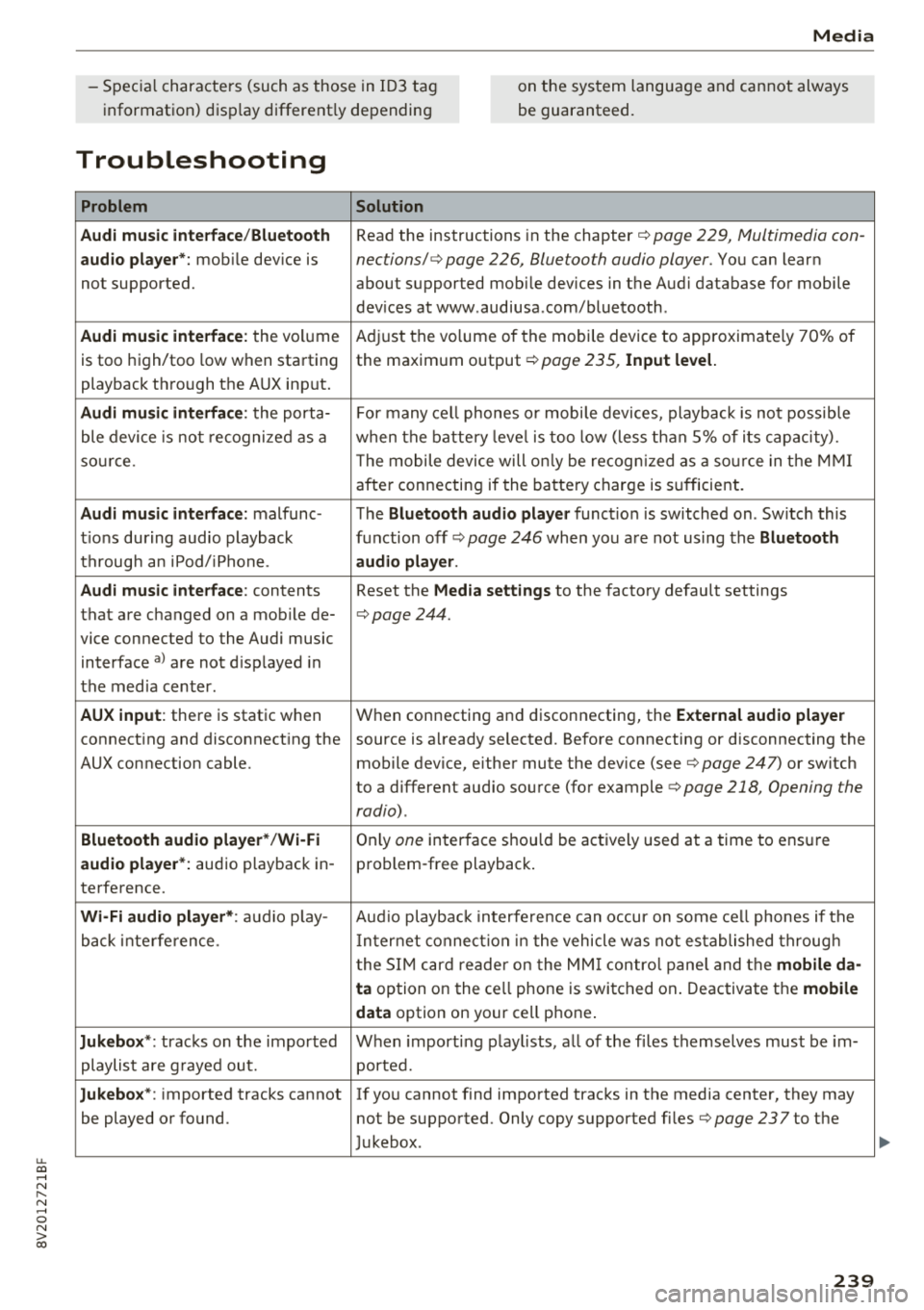
Troubleshooting
Problem Solution
Audi music interface /Bluetooth
Read the instructions in the chapter ¢ page 229, Multimedia con -
audio player*: mobile dev ice is nections/ ¢ page 226, Bluetooth audio player. You can lear n
not supported. about supported mobile devices in the Aud i database for mobile
dev ices at www .audiusa .com/bluetooth .
Audi music interface : the volume A
dju st the volume of the mobile device to approximate ly 70% of
is too high/too low when sta rt ing the maxim um output ¢
page 235, Input level.
playback th rough the AUX inp ut.
Audi music interface : the porta- For many ce ll phones o r mobi le devices, playback is not possib le
ble device is no t recogni ze d a s a when t he batt ery leve l is to o low (less th an 5% of its cap aci ty).
so urce . The mobile de·vice will on ly be recog nized as a so urce in t he MM I
afte r con necting if the ba tte ry charge is s ufficient.
Audi music interface : malfunc-The Bluetooth audio player function is switched on . Sw itch this
t ions during audio playback function off
ca> page 246 when yo u are not using the Bluetooth
t h rough an iPod/ iPhone. audio player .
Audi music interface :
contents Reset the Media settings to the factory defau lt settings
that are c hanged on a mob ile de-
¢page 244.
vice connected to the Audi music
interface
a ) a re not d isp layed in
t he med ia center .
AUX input : there is stat ic when W
hen connecting a nd disconnecting, the External audio player
connect ing and disconnect ing the source is a lready selected. Before connecting or disconnecting the
AUX connection cable. mobile device, eithe r mute the dev ice (see
¢ page 247) or switch
to a different audio so urce (fo r example
<=> page 218 , Opening the
radio) .
Bluetooth audio player * /Wi-Fi On ly one interface s hou ld be ac tively used at a time to ens ure
audio player *: audio playback in- p ro blem -free playback .
te rfe rence.
Wi -Fi audio player* : audio p lay- Aud io playb ac k i nterfe re nce can o ccur on some ce ll phones if the
back inte rference . In ter net connect ion in t he vehicle was not es tablished throug h
t he S IM ca rd reade r on the MM I contro l pane l and the
mobile da-
ta
option on the ce ll phone is swi tc h ed on . Deactiva te t he mobile
data
option on your cell p hone .
Jukebox *: tracks on the impo rted W hen import ing p lay lists, a ll of the fi les themse lves mus t be im-
playlist are g raye d ou t. ported.
Jukebox*: imported tracks cannot I f yo u cannot find imported trac ks in the media center, they may
be played o r found. not be supported . Only copy supported fi les
¢ page 237to the
J ukebox .
239
Page 246 of 404
System settings
wait for the sig nal t one (bee p) to say a new
command.
Volume : you can a djust th e vol ume of th e
p romp ts by turning the con tro l k no b.
Individual speech training (on ly when the v ehi
cle is s ta ti onary): yo u ca n ad apt the vo ice recog
ni tion sy ste m to your voic e or pro nunciati on in
or der to im prove the sys tem's a bili ty to re co gni ze
your speec h. Indivi dua l speech train ing is com
p rised of 20 s peech ent ries t hat consist o f com
mands and sequences of numbers . You can de
lete the p rogrammed voice t rain ing with the
Re
set individual speech training
function.
Display brightness
You can a djust the brigh tness o f the Info tain
ment system disp lay by t urning the cont ro l knob.
Factory settings
D epe ndi ng on t he ve hicle eq uipme nt, th e fo llow
i ng fu nctio ns ca n b e rese t to factory se ttings :
-Sound settings
- Radio
- Media settings
- Jukebox *
- Directory
-Telephone
- Bluetooth and Wi-Fi*
- Navigation settings*
- Navigation and online memory *
- Speech dialog system*
- Message settings *
-Apps*
- Tool tips
- Audi connect*
- Audi smartphone interface *
You can select the des ired functions individually
or all at once with the option
Select all entries .
Select and confirm Restore factory settings .
(D Tips
-Make s ure that n ot on ly t he settings we re
d eleted but also the stored data, if ap plica
b le.
- Pleas e note t hat the vo ice reco gnit io n sys
te m* is not availab le in Cabr io lets .
244
Connection manager
Introduction
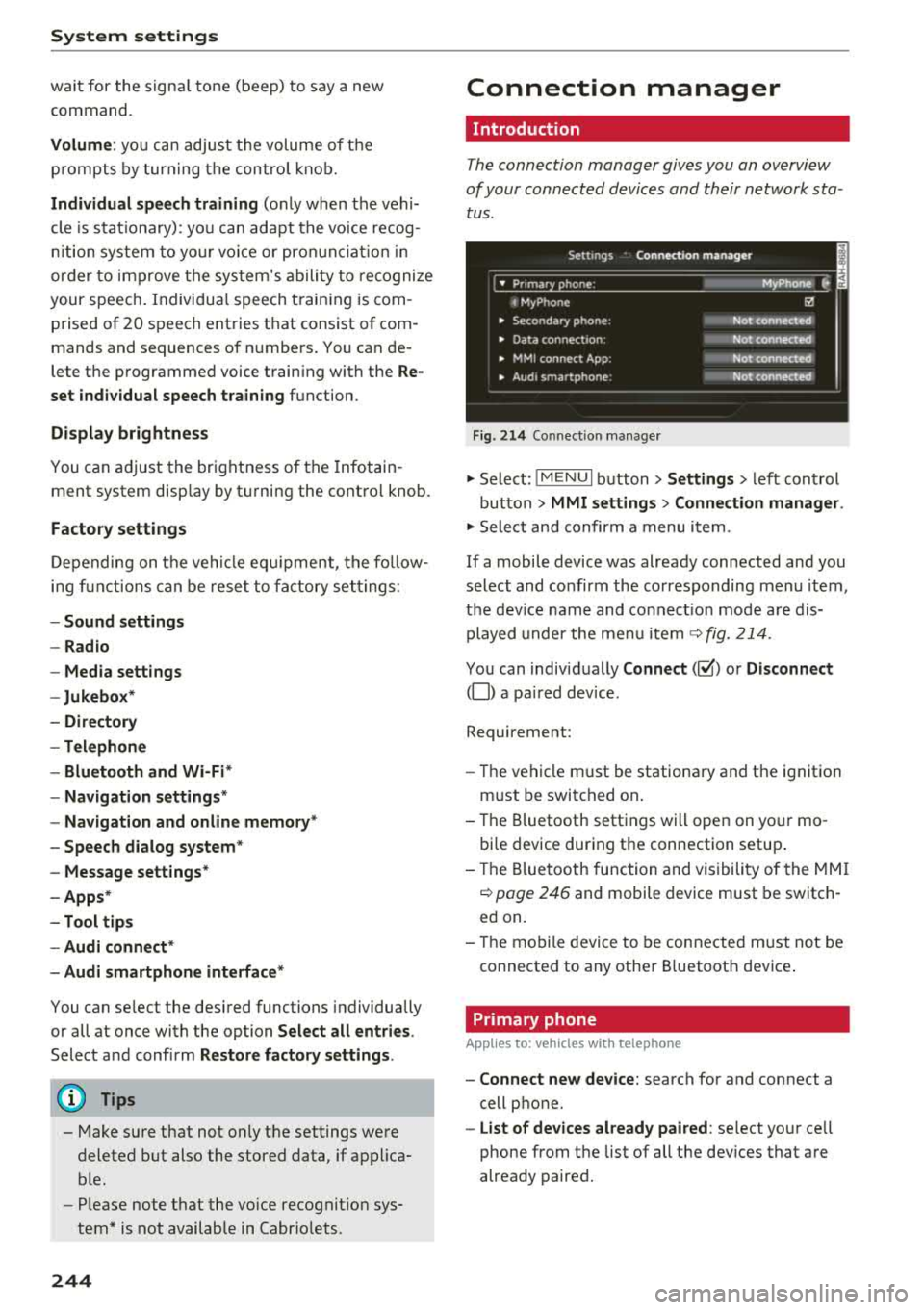
The connection manager gives you an overview
of your conn ected devic es and th eir network sta
tus .
Settings Conne -ction manager I
-====- ,.· • Prima hone: MyPhone .,.
c M yPhone
• Second ary phone :
• Data conn ection :
• MM I connect App :
• Audi smartphone:
Fig. 214 Co nnec tion man ag er
Ii'!
Not connected
Not
conn.,ct.,d
Not connected
Not
conn..cted
"' Select : !ME NUI bu tton> Settings > left con trol
bu tton >
MMI settings > Connection manager .
"'Sele ct a nd confirm a menu item.
If a mobile device was already connected and you
select and co nfirm the co rresponding menu item,
t h e dev ice name and co nnect ion mode a re dis
p layed under the menu i tem
r:!;> fig. 214 .
You can indiv id ually Connect (~ ) or Disconnect
(0) a pa ired device .
Requirement:
- The ve hicl e m ust be statio na ry and the ignit io n
m ust be switc hed on .
- Th e Bluetooth sett ings will open on yo ur mo
bi le device dur ing the connection setup .
- T he Blue tooth func tion and v is ibili ty of the MMI
c:!;> page 24 6 and mobile device must be switc h
ed on.
- T he mo bile device to be con nected m ust not be
connected to any othe r Bluetoot h dev ice .
Primary phone
App lies to: vehicles wit h telepho ne
- Connect new device: search for and connect a
cell p hone.
- List of devices already paired : select yo ur cell
phone from the list of all the dev ices that a re
already paired.
Page 286 of 404
Airbag syste m
seat into its rearmost position in the seat's
fore and aft adjustment range, as far away
from the airbag as possible. The backrest must be adjusted to an upright posit ion .
Make sure that the
P A SSEN GER AIR BAG
OFF
light comes on and stays on all the t ime
whenever the ignition is sw itched on.
A WARNING
- If the PASSENGER AIR BAG OFF light does
not go o ut w hen an ad ult is sitting on the
front passenger seat after taking the steps
described above, make sure the adu lt is
properly seated and restrained at one of the
rear seating positions .
- Have the airbag system inspected by your
Audi dealer before transporting anyone on
the front passenger seat .
(D Tips
If the capacitive passenge r detection system
determines that the front passenger seat is
empty, the fronta l airbag on the passenger
side w ill be turned off, and the
PA SSE NGER
AIR BAG OFF light will stay on.
Repair , care and disposal of the airbags
Parts of the a irbag system are installed at many
d ifferent places on your Aud i. Install ing , remov
ing, servic ing or repa iring a part in an area of the
ve hicle can damage a pa rt of an airbag system
and p revent that system from working properly
in a co llision .
There are some important th ings you have to
know to make sure that the effect iveness of the
system w ill not be impaired and th at discarded
components do not cause injury or pollute the
environment .
A WARNING
Improper care, servicing and repair proce
dures can increase the r isk of personal injury
and death by preventing an airbag from de
ploying when needed or dep loying an airbag
unexpectedly:
284
-
- Never cover, obstruct, or change the steer
ing wheel horn pad or airbag cover or the in
strument panel or modify them in any way.
- Never attach any objects such as cup ho lders
or telephone mountings to the surfaces cov
ering the a irbag un its .
- For cleaning the horn pad or instrument panel, use only a soft, dry cloth or one mois
tened w it h plai n water . Solvents or cleaners
could damage the airbag cover or change
the st iffness or strength of the material so
that the ai rbag cannot deploy and p rotect
p roperly.
- Never repair, ad just, o r change any parts of
the airbag system.
- All work on the steer ing wheel, inst rument
pa nel, front seats o r electr ica l system ( in
cl uding the insta llation of a udio eq uipment,
cell ular te lephones and CB radios, etc.)
m ust be performed by a qualified techn ician
who has the training and specia l equipment
necessary.
- For any work on the airbag system, we
strong ly recommend that you see yo ur a u
thorized A udi dealer or qualified workshop .
- Never modify the front b umper or parts of
the vehicle body.
-Always make sure that the side airbag can inf late wit hout interference:
- Never install seat covers or replacement upholstery ove r the front seatbacks that
have not bee n specifica lly approved by
A udi .
- Never use additional seat c ushi ons that
cover the areas where the side airbags in
flate.
- Damage to the orig inal seat cove rs or to
t h e seam in the area of the s ide a irbag
module mus t always be repai red immedi
ate ly by an authorized Aud i dealer.
- The airba g sys tem can deploy o nly on ce. Af
t er an airbag has been dep loyed, i t m ust be
replaced with new replaceme nt parts de
signed and approved especia lly for your
Aud i mode l version . Rep lacement of com
plete airbag systems or airbag components
must be performed by qua lified workshops
only . Make sure t hat any airbag service
Page 318 of 404
Checking and Filling
~ After the fuel pump has switched off, wait five seconds before removing it to allow the rest of
the fuel to finish dripping into the fuel tank.
~ Turn the fue l cap clockwise until you hear it
lock.
~ Close the fuel filler door and then press on the
left side until it latches .
The correct fuel type for your vehicle can be
found on a label located on the inside of the fuel
filler door. For additional information on fuel,
see
Qpage 314 .
For the tank capacity in your vehicle, refer to the
Technical Data
Qpage 382.
To reduce the risk of fuel leaking out or vapors
escaping, make sure that the fuel tank is closed
correctly. Otherwise
thP ¢..iff indicator light will
turn on.
If the centra l locking system malfunctions, the
fuel filler door may emergency release
Qpage317.
A WARNING
An improper fueling procedure and improper
handling of fuel can lead to explosions, fires,
severe burns and other injuries.
-Do not smoke and keep away from open
flames.
-The ignition must be switched off when re
fueling.
-Cell phones, radio devices and other radio
equipment should always be switched off
when refueling. Electromagnetic rays could cause sparks and start a fire.
-If you do not insert the fuel pump nozzle all
the way into the filler tube, then fuel can
leak out. Spilled fuel can ignite and start a
fire.
-Never get into the vehicle when refueling. If
there is an exceptional situation where the
vehicle must be entered, close the door and
touch a metal surface before touching the
fuel pump nozzle again. This will reduce the
risk of electrostatic discharge that can cause
flying sparks. Sparks can start a fire when
refueling.
316
A WARNING
We recommend that you do not transport any
fuel containers in the vehicle. Fuel could leak
out of the container and ignite, especially dur
ing an accident. This can cause explosions,
fires and injuries.
-If you must transport fuel in a fuel contain
er, please note the following:
-Always place a fuel container on the
ground before filling. Never fill the fuel
container with fuel while it is in or on the
vehicle. Electrostatic charge can occur
while refueling and the fuel vapors could
ignite .
-For fuel containers made of metal, the
fuel pump nozzle must always maintain
contact with the container to reduce the
risk of static charge.
-Insert the fuel pump nozzle as far as pos
sible into the filler opening while refuel
ing.
-Follow legal requirements when using,
storing and transporting fuel containers.
-Make sure that the fuel container meets
the industry standards, for example ANSI
or ASTM F852-86.
@ Note
-Remove fuel that has overflowed onto any
vehicle components immediately to reduce
the risk of damage to the vehicle.
-Never drive until the fuel tank is completely
empty. The irregular supply of fuel that re
sults from that can cause engine misfires.
Uncombusted fuel will enter the exhaust
system and increase the risk of damage to
the catalytic converter.
@I For the sake of the environment
Do not overfill the fuel tank, otherwise fuel
can leak out when the vehicle is warming up.
© Tips
The fuel filler door on your vehicle does not lock if you lock the vehicle from the inside us-
ing the central locking switch.
II>-
Page 335 of 404
u. a, ... N
" N ... 0 N > a:,
Glossary of tire and loading
terminology
Accessory weight
means the combined weight ( in
excess of those standard items
which may be replaced) of auto matic transmission , power steer
ing, power brakes, power win
dows, power seats, radio, and
heater, to the extent that these
items a re available as factory- in
stalled equipment (whether i n
stalled or not) .
Aspect ratio
means the ratio of the height to
the width of the tire in percent .
Numbers of 55 or lower indicate a
low s idewall for improved steer
ing response and better overall
handling on dry pavement.
Bead
means the part of the tire that is
made of steel wires, wrapped or
reinforced by ply cords and that is
shaped to fit the rim .
Bead separation
means a breakdown of the bond
between components in the bead .
Wheel s
Cord
means the strands forming the
plies in the tire .
Cold tire inflation pressure
means the tire pressure recom
mended by the vehicle manufac
turer for a tire of a designated
size that has not been driven for
more than a couple of miles (kilo
meters) at low speeds in the
three hour period before the tire pressure is measured or adjusted .
Curb weight
means the weight of a motor ve
hicle with standard equipment in
cluding the maximum capacity of
fuel, oil , and coolant, air condi
tioning and additional weight of
optional eq uipm ent .
Extra load tire
means a tire designed to operate
at higher loads and at highe r in
flation pressures than the corre
sponding standard tire . Extra load
tires may be identified as "X L",
"xl", "EXTRA LOAD", or "RF" on
the sidewall.
.,.
333