reset AUDI A3 SEDAN 2018 Owner's Manual
[x] Cancel search | Manufacturer: AUDI, Model Year: 2018, Model line: A3 SEDAN, Model: AUDI A3 SEDAN 2018Pages: 404, PDF Size: 62.3 MB
Page 233 of 404
u. co ... N l' N
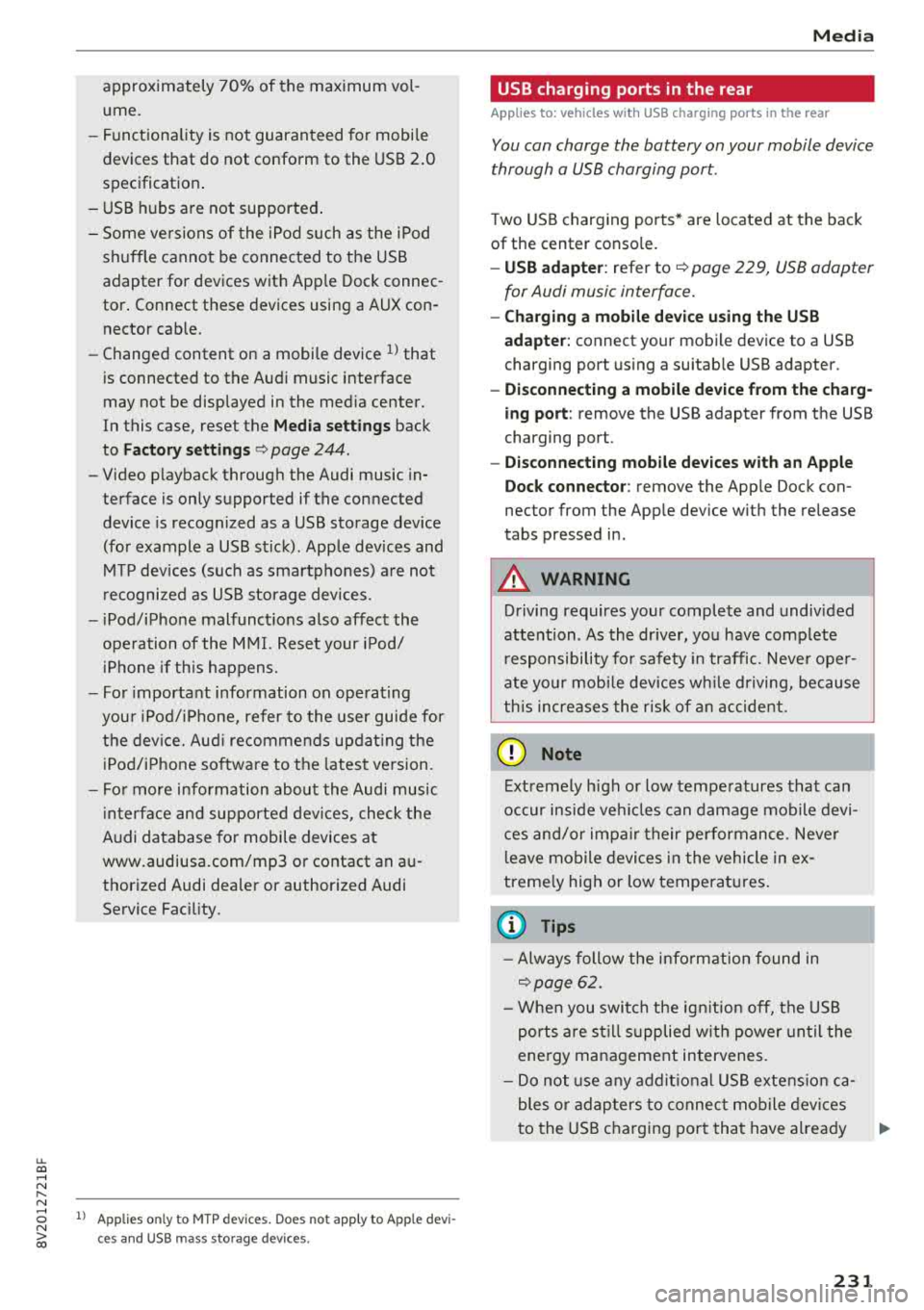
approximately 70% of the maximum vol
ume.
- Functionality is not guaranteed for mobile
devices that do not conform to the USB
2.0
specification.
- USB hubs are not supported.
- Some versions of the iPod such as the iPod
shuffle cannot be connected to the USB
adapter for devices with Apple Dock connec
tor. Connect these devices using a AUX con
nector cable.
- Changed content on a mobile device
l) that
is connected to the Audi music interface
may not be displayed in the media center.
In this case, reset the
Media settings back
to
Factory settings c> page 244.
- Video playback through the Audi music in
terface is only supported if the connected
device is recognized as a USB storage device
(for example a USB stick). Apple devices and
MTP devices (such as smartphones) are not
recognized as USB storage devices .
- iPod/iPhone malfunctions also affect the
operation of the MMI. Reset your iPod/
iPhone if this happens.
- For important information on operating
your iPod/iPhone, refer to the user guide for
the device. Audi recommends updating the
iPod/iPhone software to the latest version.
- For more information about the Audi music
interface and supported devices, check the
Audi database for mobile devices at
www.audiusa.com/mp3 or contact an au
thorized Audi dealer or authorized Audi
Service Facility.
8 l ) A pp lies o nly to MTP device s. Does not apply to App le dev i
"' &j ces and USB mass storage d ev ices.
Media
USB charging ports in the rear
App lies to : vehicles wit h USB charging ports in the rear
You can charge the battery on your mobile device
through a USB charging port.
Two USB charging ports* are located at the back
of the center console.
- USB adapter: refer to c> page 229, USB adopter
for Audi music interface.
- Charging a mobile device using the USB
adapter: connect your mobile device to a USB
charging port using a suitable USB adapter.
- Disconnecting a mobile device from the charg
ing port:
remove the USB adapter from the USB
charging port .
-Disconnecting mobile devices with an Apple
Dock connector :
remove the Apple Dock con
nector from the Apple device with the release
tabs pressed in.
A WARNING
-
Driving requires your complete and undivided
attention . As the driver, you have complete
responsibility for safety in traffic. Never oper
ate your mobile devices while driving, because
this increases the risk of an accident.
((D) Note
Extremely high or low temperatures that can
occur inside vehicles can damage mobile devi
ces and/or impair their performance . Never
leave mobile devices in the vehicle in ex
tremely high or low temperatures.
(D Tips
- Always follow the information found in
c>page 62 .
-When you switch the ignition off, the USB
ports are still supplied with power until the
energy management intervenes.
- Do not use any additional USB extension ca
bles or adapters to connect mobile devices
to the USB charging port that have already
liJo-
231
Page 239 of 404
u. 00 ... N l' N ... 0 N > 00
Picture for-
mat
4: 3
16 :9
(D Tips Description
The image is fixed
in the 4:3 pie-
ture format. Black bars are shown
on the sides of the Infotainment
system d isplay.
The image is fixed in the 16 :9 pie -
ture format . B lack bars are shown
in the upper and lower edges of the
Infotainment system disp lay.
Media
-T he p rotection levels for the Parental con
t rol
are based on the US standards from the
Motion P icture Associat ion of America
(MPAA). Note that the age levels fo r video
DVDs in European countr ies may differ.
-Password ent ry fo r Parental control will be
locked for approx imately one m inute if you
enter the incorrect password three t imes in
a row. The password can o nly be reset by an
au thori zed A udi dealer.
-Not a ll video DVDs have parental control.
Supported media and file formats
Overview
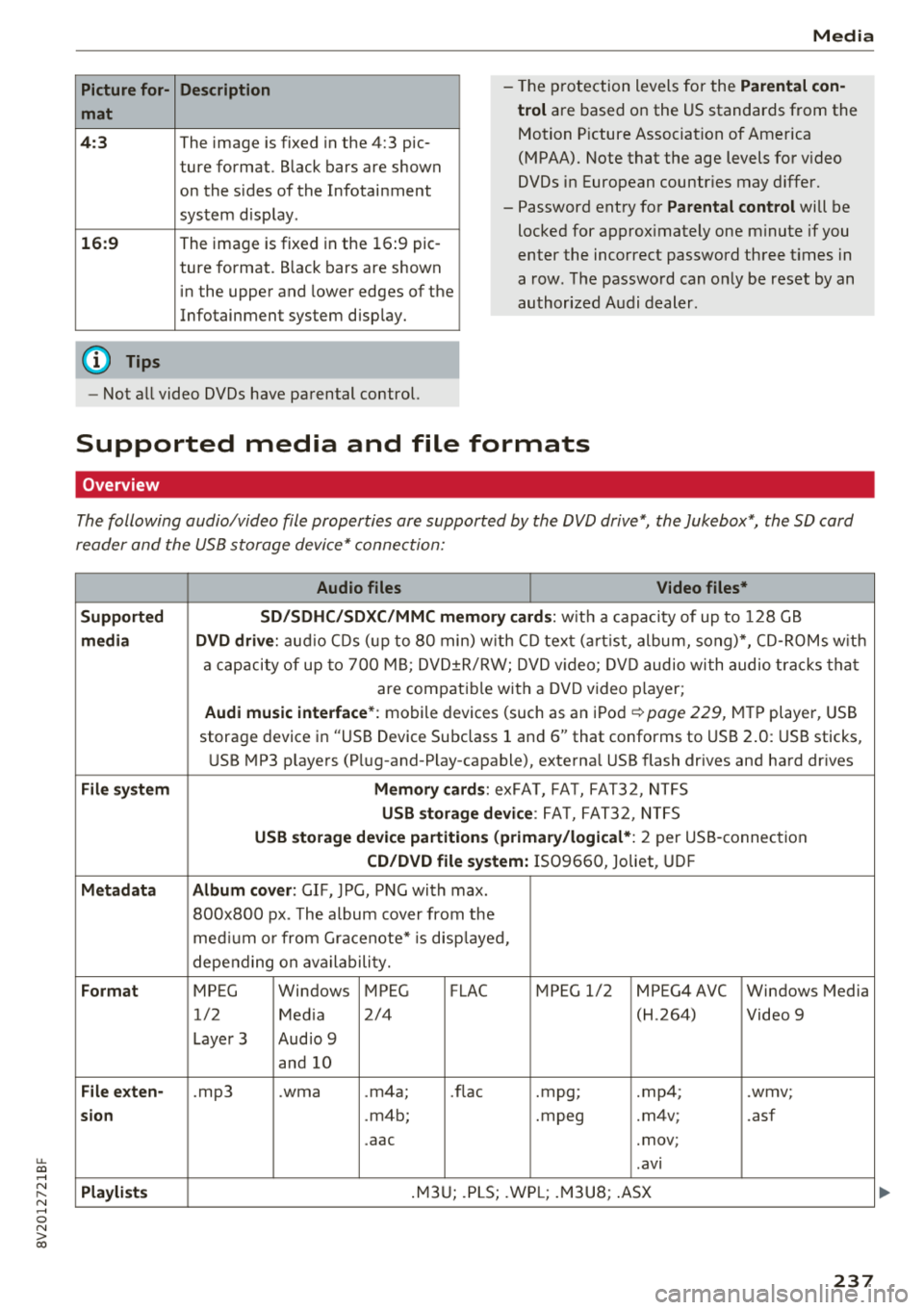
The following audio/video file properties are supported by the DVD drive*, the Jukebox*, the SD card
reader and the USB storage device* connection:
Audio files Video files*
Supported SD/SDHC /SDXC /MMC m emory cards :
with a capacity of up to 128 GB
media DVD drive : audi o CDs ( up to 80 min) w ith CD tex t (a rt ist, album, so ng)*, CD -R O Ms w ith
a ca pacity of up to 70 0 M B; D V D± R/RW; DVD video; DV D audio wi th audio t ra ck s tha t
are compatible with a DVD video p layer;
Audi music interface *: mobile devices (such as an i Pod i::> page 229, M TP playe r, USB
storage device in "USB Device Subclass 1 and
6" that conforms to USB 2 .0: USB sticks,
U SB MP3 p laye rs (P lug-and-P lay-capable), external USB flash drives and ha rd dr ives
File system Memory cards : exFA T, FA T, FAT32, NTFS
USB storage device : FA T, FA T32 , NTFS
USB storage device partition s (primary/logical* : 2 per USS-connec tion
CD/DVD file sy stem: IS09660, Joliet, UDF
Metadata Album cover : GIF, )PG, P NG with max.
800x800 px . The album cover from the
me diu m o r from Gracenote* is disp layed,
depe nding on ava ilabili ty.
Format MPEG Windows MPEG FLAC MPEG 1/2 MPEG4 AVC Windows Media
1/2 Med ia 2/4 (H
.264)
Video 9
Laye r 3 Aud io 9
and 10
File e xten-.mp3 .wma .m4a; .nae .mpg; .mp4; .wmv;
sion .m4b; .mpeg .m4v; .asf
.aac .mov;
.avi
Pla ylists .M3 U; .PLS; .WP L; .M3 U8; .ASX
237
Page 241 of 404
u. 00 .-< N l' N .-< 0 N > 00
Media
-Specia l characte rs (such as those in 10 3 tag
i nformat ion) d isp lay different ly depending o
n the sys tem lan guage an d cannot always
be guaranteed.
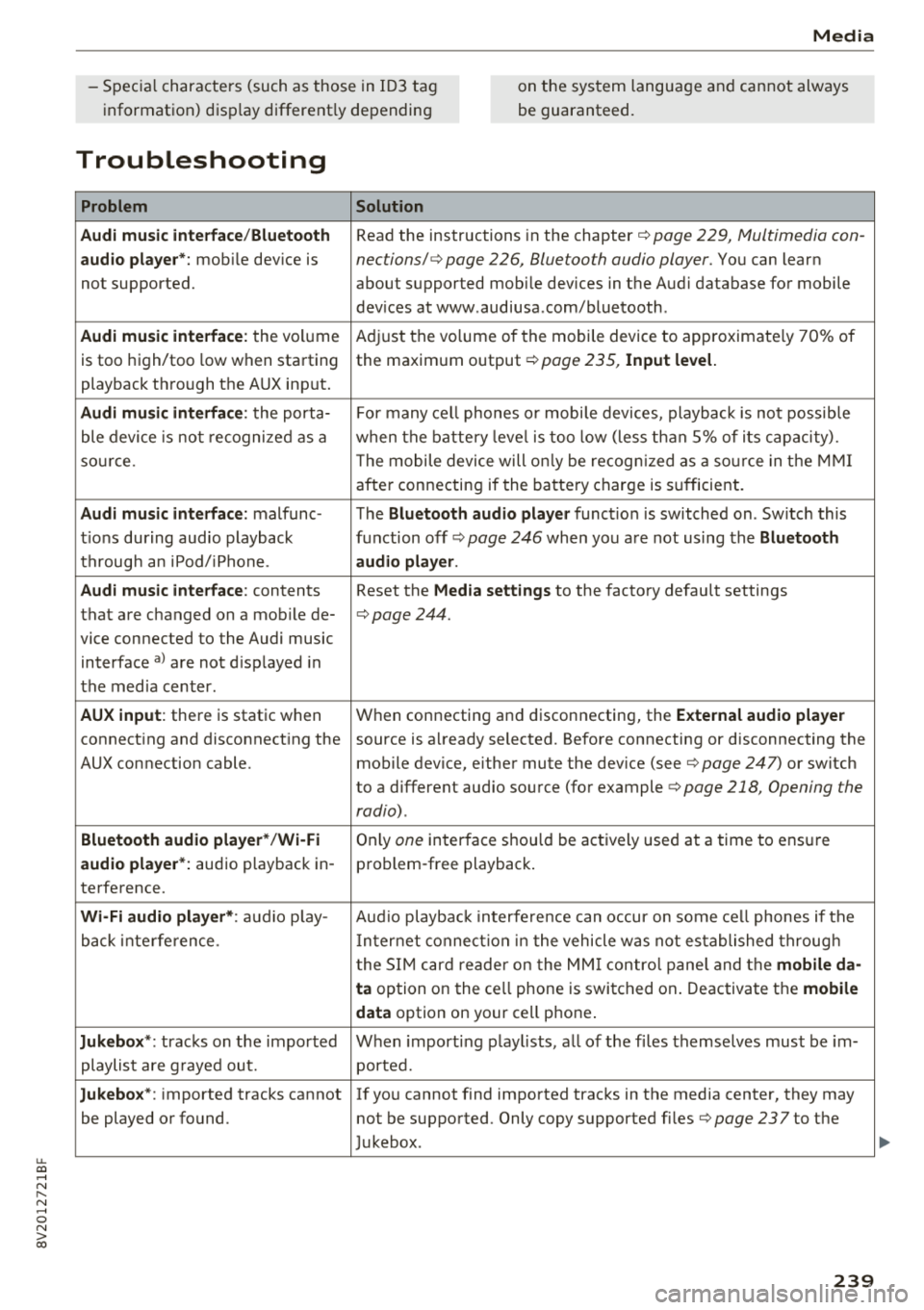
Troubleshooting
Problem Solution
Audi music interface /Bluetooth
Read the instructions in the chapter ¢ page 229, Multimedia con -
audio player*: mobile dev ice is nections/ ¢ page 226, Bluetooth audio player. You can lear n
not supported. about supported mobile devices in the Aud i database for mobile
dev ices at www .audiusa .com/bluetooth .
Audi music interface : the volume A
dju st the volume of the mobile device to approximate ly 70% of
is too high/too low when sta rt ing the maxim um output ¢
page 235, Input level.
playback th rough the AUX inp ut.
Audi music interface : the porta- For many ce ll phones o r mobi le devices, playback is not possib le
ble device is no t recogni ze d a s a when t he batt ery leve l is to o low (less th an 5% of its cap aci ty).
so urce . The mobile de·vice will on ly be recog nized as a so urce in t he MM I
afte r con necting if the ba tte ry charge is s ufficient.
Audi music interface : malfunc-The Bluetooth audio player function is switched on . Sw itch this
t ions during audio playback function off
ca> page 246 when yo u are not using the Bluetooth
t h rough an iPod/ iPhone. audio player .
Audi music interface :
contents Reset the Media settings to the factory defau lt settings
that are c hanged on a mob ile de-
¢page 244.
vice connected to the Audi music
interface
a ) a re not d isp layed in
t he med ia center .
AUX input : there is stat ic when W
hen connecting a nd disconnecting, the External audio player
connect ing and disconnect ing the source is a lready selected. Before connecting or disconnecting the
AUX connection cable. mobile device, eithe r mute the dev ice (see
¢ page 247) or switch
to a different audio so urce (fo r example
<=> page 218 , Opening the
radio) .
Bluetooth audio player * /Wi-Fi On ly one interface s hou ld be ac tively used at a time to ens ure
audio player *: audio playback in- p ro blem -free playback .
te rfe rence.
Wi -Fi audio player* : audio p lay- Aud io playb ac k i nterfe re nce can o ccur on some ce ll phones if the
back inte rference . In ter net connect ion in t he vehicle was not es tablished throug h
t he S IM ca rd reade r on the MM I contro l pane l and the
mobile da-
ta
option on the ce ll phone is swi tc h ed on . Deactiva te t he mobile
data
option on your cell p hone .
Jukebox *: tracks on the impo rted W hen import ing p lay lists, a ll of the fi les themse lves mus t be im-
playlist are g raye d ou t. ported.
Jukebox*: imported tracks cannot I f yo u cannot find imported trac ks in the media center, they may
be played o r found. not be supported . Only copy supported fi les
¢ page 237to the
J ukebox .
239
Page 248 of 404
System settings
Delete Bluetooth device*
The se lecte d cell p ho ne/mo bile dev ice is dis con
nected from t he M MI and is removed from the
list of all devices that are alrea dy paire d.
Show Bluetooth profiles*
You can Connect or Disconnect the Handsfree ,
Me ssages *, Dire ctory /contacts
an d Bluetooth
audio player
pro files sep arately.
Bluetooth settings*
- Bluetooth :
select and confirm a set ting for the
B luetoot h connec tion v is ibility . Select
Visible
fo r th e MM I to be vis ib le to o ther dev ices. Se
l ec t
Invisible fo r th e M MI to not be v is ible t o
othe r devi ce s. H oweve r, it is still possib le to es
tab lish a Bl uetoo th con nection with pai red de
vices when the v is ibi lity is switched off. Se lect
Off to t urn visibi lity off . Then a B luetooth con
nect ion is not possible .
-Bluetooth audio player : when this function is
switc hed
on ~' the Bluetooth audio player is
available as a so urce in t he
Media menu .
-Bluetooth name : the MMI B luetooth name (for
example "AUDI MMI") is d isp layed and ca n be
c h anged.
Online settings*
- Data usage counter :
the amount of data pack
ets that a re sent a nd received throug h the MMI
is d isp layed. You can reset the data usage infor
mation to zero using the
Reset data counter
option.
- Network status : the mobile netwo rk p rovider
fo r data se rvice as well as the netwo rk status
are disp layed .
Wi-Fi settings*
See ¢ page 195, Wi -Fi hotspot.
Storing as a default telephone
Applies to: vehicles with telephone
Requir emen t: a cell phone must be connected to
t he MM I
¢page 17 7.
As soon as t he cell phone is i n range and the
B lue tooth func tion on the ce ll phone and in the
MM I is swi tched o n, this ce ll phone is g iven pr io r
ity ove r th e ot her Blue tooth devices and is c on-
246
necte d dir ectly to the M MI. The connec ted ce ll
p hone is d is pl ayed first in t he dev ice li st .
Network settings*
- Login :
you can chose an automatic log in to
your cell p ho ne servi ce pro vider 's ne twor k, or
you can ch oose a
manual log in from t he list of
avai la bl e netwo rks .
-Network selection : availabl e netwo rks in t he
presen t loca tion can be sele cte d unde r network
select io n. This f unction is on ly avai la bl e for the
Manual log in setting.
Apple CarPlay sound settings/ Android Auto
sound settings
Applies to: vehicles with Audi smartphone interface
See q page 24 7.
About Apple CarPlay/ About Android Auto
Applies to: vehicles with Audi smartphone interface
Here you w ill find l ega l informa tion regarding
t h e use o f A pple Car Play o r And ro id Aut o and in
fo rmat ion a bout device -s p eci fic d ata exch ange.
Delete Apple CarPlay device/Delete Android
Auto device
Applies to: vehicles with Audi smartphone interface
Require ment: yo ur cell phone must not be con
n ect ed to the Au di music interf ace wi th a USB
adap ter.
Se lec t:
Audi smartphone > a dev ice from t he lis t
> r igh t con trol b utto n.
To remove your cell p ho ne from the list, se lect
and co nfirm
Delete Apple CarPlay device or De
lete Android Auto device .
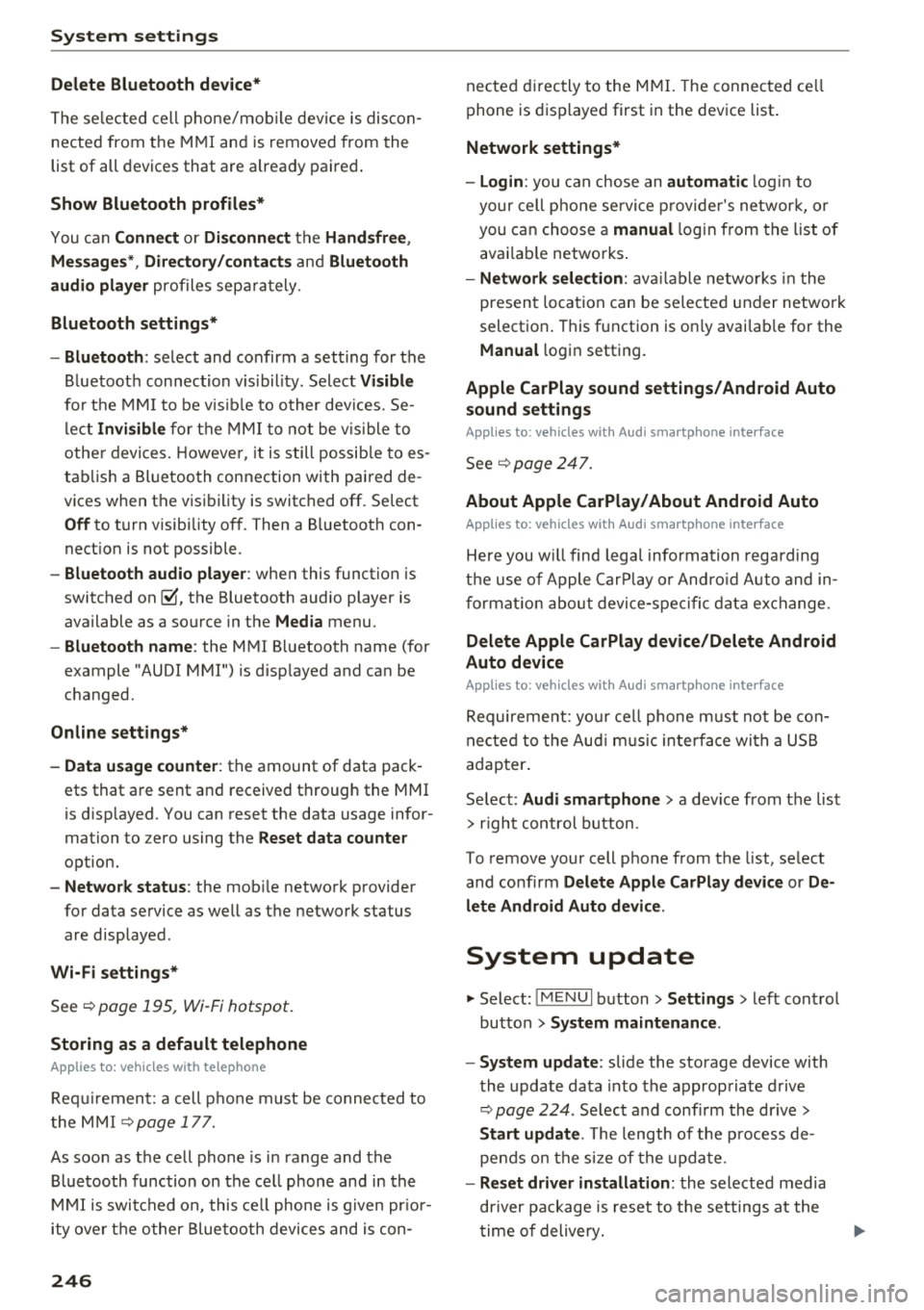
System update
"'Select : !ME NUI bu tton> Settings > left control
bu tton >
System maintenance.
- System update :
slide the storage device with
t he update da ta into the a pprop ria te drive
¢ page 224 . Selec t and conf irm the dr ive>
Start update . The length of the p rocess de
pe nds on the s ize of the upd ate.
- Reset driver installation: the selected media
dr iver p ackage is rese t to t he se ttings a t the
t im e of delivery .
Page 250 of 404
System settings
Adjusting the system volume
.,. Select : I MENU I button> Sound> left control
button.
Telephone
Applies to: vehicles with telephone
Mute telephone: messages and ringtones are set
to mute.
Ringtone : see c::> page 188, Ringtone and volume
settings .
Ringtone volume:
you can adjust the volume of
the selected ringtone by turning the contro l
knob.
Message volume: you can adjust the volume of
the notification for an incoming text message by
turning the control knob.
Microphone input level : you can adjust the call
volume during a phone call by turning the control
knob.
Navigation
Applies to: vehicles with navigation system
Voice guidance: see c::>page 210.
Voice guidance during phone call: see
c::> page 210.
Voice guidance volume: you can adjust the vo ice
gu idance volume by turning the control knob.
Or:
you can adjust the vo ice guidance volume during
active route guidance by turning the On/Off
knob .
Entertainment fader : the volume of audio play
back can be temporarily lowered when the park
ing system or vo ice gu idance is active .
Voice recognition system
Applies to: vehicles with voice recognition system
Command display : see c::> page 243.
Short dialog : see c::> page 243.
Volume : see c::> page 243 .
Individual speech training : see c::> page 243.
1> Not availa ble in all vehicl es.
248
Parking aid*
You can adjust the volum e of the signal tone by
turning the control knob.
-Adjusting the Front volume: select and con
firm
High , Medium or Low .
- Adjusting
the Rear volume : select and confirm
High , Medium or Low .
MMI touch*
Turn the control knob to adjus t the volume of the
spoken prompts from the
MMI touch* .
Restarting the MMI
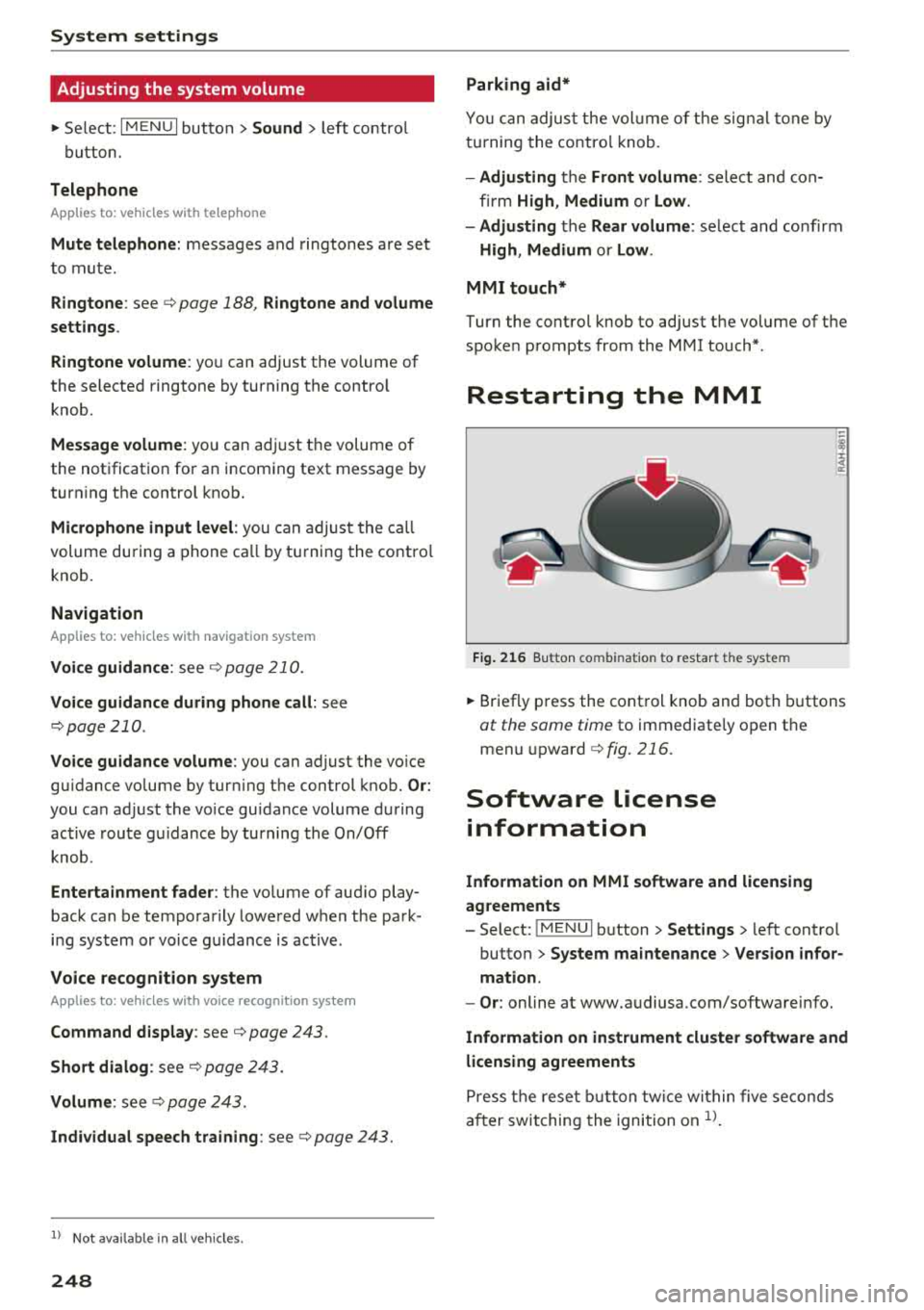
Fig. 216 Button co mbinatio n t o restar t th e sys te m
.,. Briefly press the control knob and both buttons
at the same time to immediately open the
menu upward
c::> fig. 216.
Software license
information
Information on MMI software and licensing
agreements
- Select: ~
I M~E=N~U~ I button >Settings > left control
button>
System maintenance > Version infor
mation.
- Or : online at www.audiusa.com/softwareinfo.
Information on instrument cluster software and
licensing agreements
Press the reset button twice within five seconds
after switching the ignition on
ll.
Page 331 of 404
u. 00 .-< N l' N .-< 0 N > 00
-Inspection or oil change reminder: after a cer
tain distance driven, a message appears in the i nst rument cluste r display each time the ign i
t ion is switched on or off. The rema ining dis
tance or time is displayed briefly .
-Inspection or oil change due: if your vehicle
has reached an inspection or o il change interval
or bot h intervals at t he same time, the mes
sage
Inspection due! or Oil change due! or Oil
change and in spection due!
appears briefly a f
te r swi tc h ing t he ignition on/off.
Checking service intervals
You can check the rema ining distance or time un
til the nex t oil change o r next inspection in the
Info tainmen t sys tem. Select in the Infotainmen t
sys tem: th e
I MENU I button > Vehicle > left con
tro l button
> Service & checks > Service inter
vals .
Resetting the indicator
An author ized A udi dealer or author ized A udi
Serv ice Fac ility will reset the serv ice inte rval dis
p lay after pe rforming serv ice .
If you have changed t he oil you rself, you must re
set t he oil change interva l.
To reset the display, se lect in the Infotainment
system: the
I MENU I button > Vehicle > left con
tro l button
> Service & checks > Service intervals
> Reset oil change interval.
@ Note
- Only reset the oil c hange indicato r if the oil
was c hanged.
- Fo llow ing the service inte rvals is c ritical to
maintai ning the fu nction, serv ice li fe, and
va lue of yo ur ve hicle , es pecially the eng ine.
Eve n if th e m ile ag e on the v ehicle is low, do
not exc eed t he ti me f or th e next ser vic e.
Checking and Filling
329
Page 398 of 404
Index
Vehicle tool kit . . . . . . . . . . . . . . . . . . . . . . 101
Vehicle transport . . . . . . . . . . . . . . . . . . . . 102
Point of interest . . . . . . . . . . . . . . . . . . . . . . 204
Point of interest search . . . . . . . . . . . . . . . . 204
also refer to Point of interest . . . . . . . . . . 204
Polishing . . . . . . . . . . . . . . . . . . . . . . . . . . . . 356
Pollen filter
refer to Pollutant filter . . . . . . . . . . . . . . . . 68
Pollut ant fil ter . . . . . . . . . . . . . . . . . . . . . . . . 68
Power entry assistance
re fer to Seats . . . . . . . . . . . . . . . . . . . . . . . . 60
Power meter . . . . . . . . . . . . . . . . . . . . . . . . . . 95
Power seat adjustment . . . . . . . . . . . . . . . . . 59
Power sources ................. 62 ,230,231
Power top . . . . . . . . . . . . . . . . . . . . . . . . . . . . 42
Cleaning . . . . . . . . . . . . . . . . . . . . . . . . . . . 356
Power windows . . . . . . . . . . . . . . . . . . . . . . . . 39
Child safety lock . . . . . . . . . . . . . . . . . . . . . . 39
Malfunction . . . . . . . . . . . . . . . . . . . . . . . . . 40
Pregnant women Special consid erations when w earing a safe-
ty belt . . . . . . . . . . . . . . . . . . . . . . . . . . . . . 265
p re sense
refer to Audi pre sense . . . . . . . . . . . . . . . 130
Presentation mode . . . . . . . . . . . . . . . . . . . . 209
Presets (radio) . . . . . . . . . . . . . . . . . . . . . . . 221
Pressure Tire pressure monitoring system . . . . . . . 350
Tires . . . . . . . . . . . . . . . . . . . . . . . . . . . . . . 341
Program guide
Radio . . . . . . . . . . . . . . . . . . . . . . . . . . . . . 219
Proper occupant seating positions . . . . . . . 250
Proper safety belt position . . . . . . . . . . . . . . 265
Proper seating position Front passenger . ... .. ..... ... .. .. .. . 251
Occupants . . . . . . . . . . . . . . . . . . . . . . . . . . 250
Rear passengers . . . . . . . . . . . . . . . . . . . . . 252
Q
quattro (all wheel drive) . . . . . . . . . . . . . . . . 152
Select ive whee l torque control . . . . . . . . . 148
Question What happens to unbelted occupants? . . 261
396
R
Radio . . . . . . . . . . . . . . . . . . . . . . . . . . . . . . . 218
Additional station information . . . . . . . . . 220
Presets . . . . . . . . . . . . . . . . . . . . . . . . . . . . 221
Radio text. .. .. .. .. .. ............. .. 219
Station list
Radio Standards Specification (RSS)
Rain/light sensor 218
386
Automatic headlights . . . . . . . . . . . . . . . . . 49
Switching the rain sensor on/off. . . . . . . . . 55
Random
refer to Shuffle . . . . . . . . . . . . . . . . . . . . . 235
Range (tank level) . . . . . . . . . . . . . . . . . . . 17, 18
Reading lights . . . . . . . . . . . . . . . . . . . . . . . . . 52
Rear Cleaning the rear window . . . . . . . . . . . . . . 55
Luggage compartment lid . . . . . . . . . . . . . . 37
Rear fog lamp(s) . . . . . . . . . . . . . . . . . . . . . . . 49
Rear lid Escape latch . . . . . . . . . . . . . . . . . . . . . . . . 360
Rearview camera . . . . . . . . . . . . . . . . . . . . . . 145
Rear window defogger
Automatic climate contro l system . . . . . . . 70
Recirculation mode
Automat ic climate control system . . . . . . . 70
Recuperation . . . . . . . . . . . . . . . . . . . . . . . . . 17
Refresh station list (radio) . . . . . . . . . . . . . . 221
Refueling... .. .. .. .. .. ............. .. 315
Plug- in hybrid drive . . . . . . . . . . . . . . . . . . 103
Remote control
refer to Remote control key . . . . . . . . . . . . 32
R emote control key . . . . . . . . . . . . . . . . . . . . 32
Repair manuals . . . . . . . . . . . . . . . . . . . . . . . 383
Repairs Airbag system . . . . . . . . . . . . . . . . . . . . . . 284
Replacement key . . . . . . . . . . . . . . . . . . . . . . 32
Replacing Light bulbs .. .. .. .. .. ............. .. 373
Replacing wiper blades . . . . . . . . . . . . . . . . . 57
Reporting Safety Defects . . . . . . . . . . . 258, 259
Reset
refer to Restart (MMI) . . . . . . . . . . . . . . . . 248
Reset button (trip odometer) . . . . . . . . . . . . 12
Resetting the trip odometer . . . . . . . . . . . . . 12
Restart (MMI) . . . . . . . . . . . . . . . . . . . . . . . . 248