engine oil AUDI A3 SEDAN 2018 Owners Manual
[x] Cancel search | Manufacturer: AUDI, Model Year: 2018, Model line: A3 SEDAN, Model: AUDI A3 SEDAN 2018Pages: 404, PDF Size: 62.3 MB
Page 13 of 404
u. 00 .-<
@ Left additional display (divided in
two sections in the enhanced view)
There may be addi tional indicato r lights in the
tachomete r@ , the speedome ter
(i) , th e sta tus
line ® and, depending on the instrument clus
ter, above or below the central
area @.
The fo llow ing pages will primar ily show ill ustra
tions of the mu lti-co lor ana log ins trumen t clus
ter* . The display and/o r posit ion of t he e lement
shown may vary in monochrome instrument cl us
ters or in the A udi v irtual cockpit* .
(D Tips
-Depending on vehicle equipment, the in
str ument ill umination (need les and gauges)
may t urn on when the lights are off and the
i gnition is sw itched on. The illumination for
t h e gauges reduces automat ica lly and even
tua lly turns off as br ightness outside in
creases . This func tion rem inds the dr iver to
tu rn t he low beams on at the app ropr iate
t im e.
-You can select the units used for tempe ra
tu re, speed and othe r measureme nts in t he
Infotainment system
¢page 2 43 .
Coolant temperature indicator
The coolant temperatu re display (D ¢ page 10,
fig. 4
or ¢ page 10, fig . 3 only functions when
the ignition is switc hed on . To prevent engine
damage, please observe the following notes
about the temperature ranges.
Cold rang e
If onl y the L EDs at the bottom o f th e ga uge tu rn
on, the engine has not reached operating tem
pe rature yet. Avoid high engine speeds, full ac
celerat ing and heavy engine loads .
Normal range
The engine has reached its oper ating temper a
ture once the LEDs up to the center o f th e ga uge
turn on. If
the . indicator lig ht in the instru
ment cluster display turns on, the coolant tern -
~ perature is too high ¢ page 25 .
N .-< 0 N > 00
Coc kpit o ver view
Vehicles without a coolant temperature
indicat or
T he . indicator light t urns on when the coolant
temperat ure is h igh
¢ page 25. Refer to ¢(!) .
(W} Note
-Aux iliary headlights and ot her accesso ries in
fro nt of t he coo ling-air intake impa ir th e
cooling effect o f the coo lant. This increases
the risk of the engine overheating dur ing
hig h outside temperat ures and heavy en
gine load .
-The front spoi ler a lso helps to distribute
cooling a ir correctly while driv ing. If the
spoiler is damaged, the coo ling effec t w ill
be impa ired a nd the r isk of the eng ine ove r
heating w ill increase. See an autho riz ed
Aud i dea ler or a uthor ized Audi Se rvice Fa
ci lity for assis tan ce .
-Vehicles without a coolant temperature dis
play: to promote a lo ng e ngine serv ice li fe,
a voiding h igh engine spee ds, full acce lera
tion and heavy engine loads during app rox i
mate ly the first 15 minutes when the en
gine is cold is recommended. The amount of
t ime that the eng ine is co ld depends on the
outside temperature.
Tachometer
The tachometer displays the engine speed in rev
olutions per minute (RPM).
T he beginning of t he red zone in the tachometer
indicates the maxim um permissible engine speed
for all gea rs once the engine has bee n broken in
and when it is warmed up to operating tempera
ture . Before reach ing the red zone, you sho uld
sh ift into the next h igher gear, choose the "D" or
" S" se lecto r lever pos it io n, or remove yo ur foot
from the ac cele ra tor ped al.
Applies to: vehicles with plug-in hybrid drive
Depend ing on the vehicle equipment, there a re
diffe rent display fo rmats
available ¢ page 95. ...,
11
Page 21 of 404
u. 00 .-< N l' N .-< 0 N > 00
-Lon g-term memory fJ
- En gine o il temper ature*
The sho rt-term memo ry co llects driving informa
tion from the t ime the ignition is sw itched on un
til it is switched off. If yo u cont inue dr iv ing wi th
in two ho urs after sw itching the ign ition off, t he
new val ues a re in clu ded when calculat ing the cur
rent trip information .
Unlike the s hort-term memo ry , the long -te rm
memory is not e rased a utoma tically. Yo u ca n se
l ect the time period fo r eval uat ing trip informa
tion yo urself .
(D Tips
The date, time of d ay and time and d ate fo r
mat can be set in the Infotainment system
r::!) page 2 43 .
Efficiency program
Applies to: vehicles with efficiency program
Resetting values to zero
~ T o reset the va lues in t he respective memory to
zero, press and hold the left thumbwhee l on
the m ultif unct ion steer ing whee l for one sec
ond.
The efficiency program can help you to use less
f u el. It evaluates driving informat ion in reference
to fuel consumption and shows other equipment i n fluencing consumption. Economy t ips provide
adv ice for efficient driving .
T he efficiency program receives distance and con
sumpt ion data from the short-term memory. If
the data in the effic iency program is deleted, the
va lues in the s hort -term memory are also reset .
T he fo llow ing additional displays may be availa
b le in the efficiency program, depending on vehi
cle equipment:
- Other equipment : other equipment that is cur
rently affecting fue l consumption is listed in
the efficiency program. The d isp lay shows up to
t h ree other equipment items. The equipmen t
us ing the most power is listed first . If more
than three items us ing power are switched on,
the equ ipment that is currently using the most
Coc kpit o ver view
powe r is d isp layed. A chart also shows you the
current total of all other consumers.
- Economy tip s: in ce rtain s ituations, economy
tips appea r automatically for a s hort time in
the efficiency prog ram . If you follow these
economy tips, you can reduce yo ur vehicle's fue l
consumption. To turn an economy message off immed iate ly after it appears, press any button
on the multifunct io n steer ing wheel.
Engine oil temperature display and boost
indicator
Applies to: vehicles with engine oil temperature display/boost
indicator
Engine oil temperature ind icator
Applies to: vehicles with analog instrumen t cl uste r
The eng ine o il temperature is o nly show n in the
lap timer display
<:!) page 122 .
Applies to: vehicles with Audi virtual cockpit
The engine oi l temperat ure is on ly shown i n the
enhanced view or in the sport
view* ¢ page 14.
When eng ine o il temperatures are low, the dis
play--- °F (--- °C) appea rs in the instr ument clus
te r.
The eng ine has reached its operating tempera
ture whe n the eng ine oil temperat ure is between
176 °F (80 °C) and 248 °F (120 °C) unde r no rma l
driv ing cond it ions. The e ng in e o il tempe rature
may be hig he r i f t here is heavy engine load and
high tempe ra tures o utsid e. This is no t a cause fo r
conce rn as long as
the .¢ page 25 or Ell
¢ page 28 indicator lights do not t urn on.
Boost indicator
Applies to: vehicles with Audi virtual cockpit
The boost ind ic a tor is o nly show n in t he en
hanced view or in the spo rt view*
r::!) page 14.
The current engine load (meaning the current
boost pressure) is ind icated by a bar.
19
Page 24 of 404
Cockpit overv ie w
22
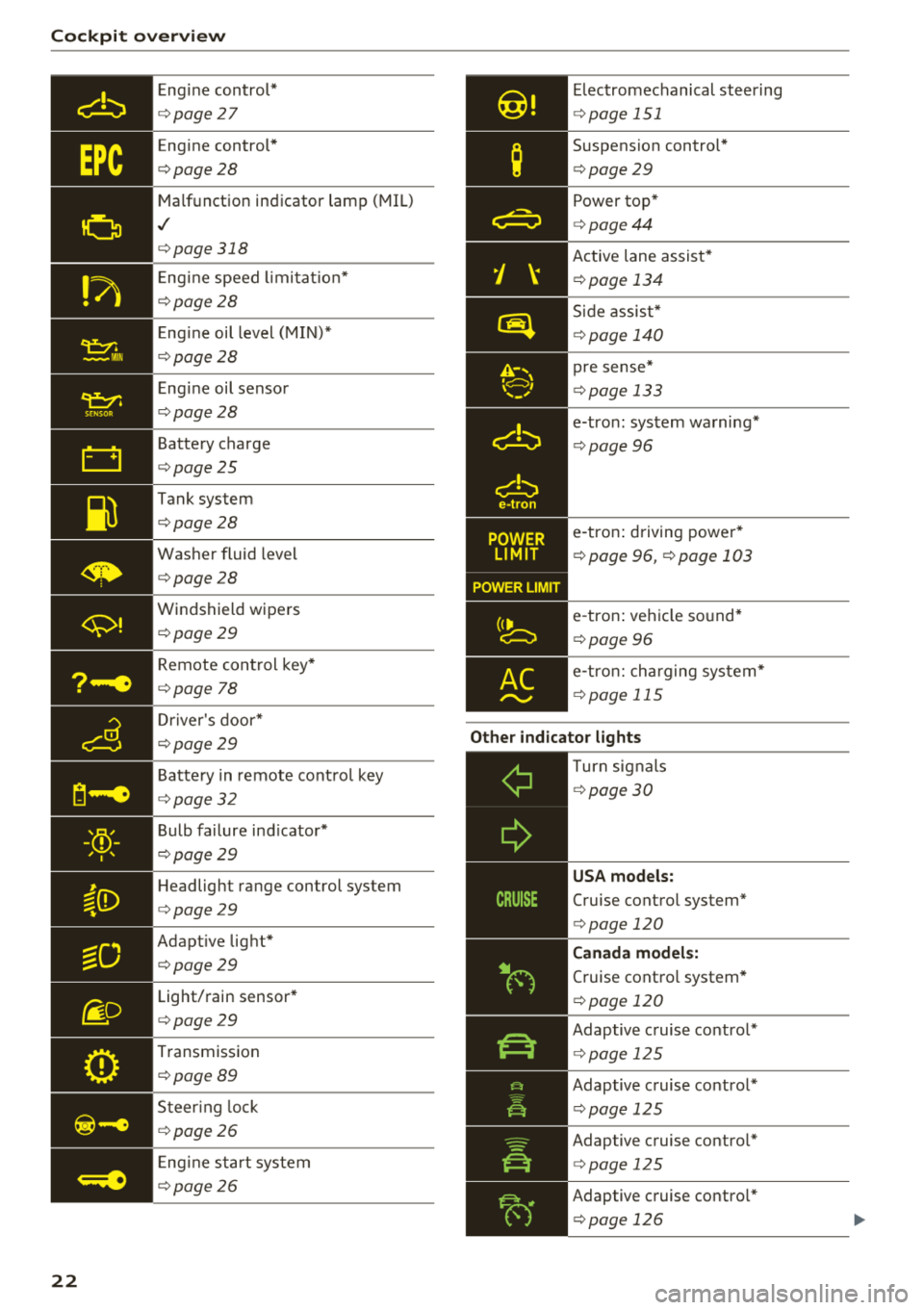
Eng ine control*
¢ page 27
Engine control *
¢page28
Malfunction indicator lamp (MIL)
,I
¢page318
Eng ine speed limi tat io n*
¢page28
Eng ine oil level (MIN)*
¢page28
E ng ine oil sensor
¢ page28
Battery charge
¢page25
Tank system
¢page28
Was her fluid level
¢page28
Windshield wipers
¢page29
Remote con trol key*
¢ page 78
Dr iver's door*
¢ page29
Battery in remote cont rol key
¢ page32
Bulb failure ind icator*
¢ page29
Headlight range control system
¢page29
Adaptive lig ht*
¢page29
Light/rain sensor*
¢page29
Transmission
¢ page 89
Steer ing lock
¢ page26
Eng ine start system
¢ page26
Elec tromechanical steering
¢ page 151
Suspension control*
¢page 29
Power top *
¢page44
Active lane assist*
¢page 134
Side assis t*
¢ page 140
pre sense*
¢page 133
e-tron : system wa rning*
¢ page 96
e-tron : driving power*
¢ page 96, ¢ page 103
e-tron : ve hicle so und*
¢ page 96
e-tro n: cha rging sys tem*
¢ page 115
Other indicator lights
--------------Turn sig nals
¢ page 30
USA models:
Cruise control system*
¢page 120
Canada model s:
Cruise contro l system*
¢ page 120
Adaptive c ruise contro l*
¢ page 125
Adaptive cruise control *
<=>page 125
Adaptive cruise contro l*
<=> page 125
Adaptive cruise contro l*
<=> page 126
Page 27 of 404
![AUDI A3 SEDAN 2018 Owners Manual u. 00 .-< N l N .-< 0 N > 00
~ (USA models) / 6] (Canada mod
els ) Pa rking brake auto release una vailable
If t his message appea rs, press the brake pedal
fi rst and then relea](/img/6/57548/w960_57548-26.png "AUDI A3 SEDAN 2018 Owners Manual u. 00 .-< N l N .-< 0 N > 00
~ (USA models) / 6] (Canada mod
els ) Pa rking brake auto release una vailable
If t his message appea rs, press the brake pedal
fi rst and then relea")
u. 00 .-< N l' N .-< 0 N > 00
~ (USA models) / 6] (Canada mod
els ) Pa rking brake auto release una vailable
If t his message appea rs, press the brake pedal
fi rst and then release the pa rking bra ke.
~ll. PARK BRAKE (USA model s) / [<~) ( Can ada mod
e ls) Parking brake : caution! V ehicle park ed too
s tee p
If the indicator light blinks and the message ap
pea rs, the re is not enough brak ing power to se
cure the veh icle . T he brakes have ove rheated. The
ve hicl e co uld ro ll away even on a small incli ne.
@ Tips
For addit iona l information on the park ing
b rake, see¢
page 81.
- L Cooling system
• Turn off engine and che ck coo lant le vel! See
o wner 's manual
• Stop v ehicl e and check coolant le ve l! S ee
owner 's manual
The coolant level is too low .
Do not cont inue driving and switch the engine
off. Check the coolant level ¢
page 324.
Plug-in hybrid drive *: refer to ¢page 102.
- If the coolant level is too low, add coolant
¢page 325. O nly cont inue dr iv ing o nce the in
dicato r light turns off .
• Coolant temp eratur e too high! Let engine
run with vehicle stationar y
Let the eng ine run at idle for a few minutes to
cool off, until the ind icator light turns off.
- If the indicator light does not turn off, do not
continue driving the vehicle. See an authorized
Audi dealer or authorized Audi Service Facility
for assistance .
A WARNING
-Never open the hood if you ca n see o r hear
steam o r coolant escap ing fro m the eng ine
compartment. This inc reases the risk of
Coc kpit o ver view
burns. Wait until yo u no longer see o r hear
steam or coo lant escaping.
- The engine compartment in any vehicle can
be a dangerous area. Stop the engine and
allow it to cool before working in the eng ine
compartment. Always follow the informa
tion found in
¢ page 318, Working in the
engine comportment .
@ Note
Do not continue dr iv ing if the . indicator
light turns on as this increases the risk of en
gine damage.
Stop the engine and do not continue driving.
Check the eng ine oi l level ¢
page 322 .
-If the engine oi l level is too low, add engine oil
¢
page 321 . Only continue driving once the in
dicator light turns off.
- If the engine o il level is correct and the indica
tor light still turns on, turn the engine off and
do not cont inue driving. See an authorized Audi
dealer or authorized Audi Service Facility for as
sistance .
(D Tips
The oil pressure warni ng is not a n oil leve l in
d icator. Always check the oil level regularly .
1:::1 Generator/Vehicle battery
• Electrical system: malfunction! Batt ery is
not charging
There is a malfunction in the alternator or the ve
hicle electr ical system .
Drive to an authorized Audi dealer or authorized
Audi Service Facility immed iate ly. Turn off a ll un
necessary electrical equipment because it will
dra in the battery . See an author ized Audi dealer
o r authorized Aud i Serv ice Facility if the battery
c h arge leve l is too low.
(•] F.lectrical sy stem: malfunction! Re start not
po ssible . Plea se cont act Ser vice
.,.
25
Page 30 of 404
Cockpit overv ie w
Drive s low ly to an authorized A udi dealer or au
thorized Audi Service Facility to have the engine
checked.
EPC Engine control
Applies to: vehicles with gasoline engines
If the ~ indicator light turns on if there is a
malfunct io n in the engine control.
Drive s low ly to an authorized Audi dealer or au
thor ized Audi Service Facility to have the engine
checked.
! ?' Engine speed limitation
Applies to: vehicles with engine speed limitation
(II M ax imum engine sp eed: XXXX rpm
The engine speed is automatica lly limited to the
speed d isplayed in the instrument cluster. Th is
protects the engine from overheating.
The engine speed limitation deactivates once the
engine is no longer in the critical temperature range and you have released the acce lerator ped
al once.
If the engine speed limitation was activated by
an engine contro l ma lfunction, the
II or ~ in
d icator light also turns on. Make sure the eng ine
speed does not go above the speed displayed, for
example when downsh ift ing . Drive to an author
ized Aud i dealer or authorized Aud i Serv ice Fac ili
ty immediately to have t he malfunct ion correct
ed.
'!=:?' ., Engine oil level (MIN)
Applies to: vehicles with oil level warning
Ill Check oil level
You may continue d riving for the t ime be ing .
C heck the engine oil leve l as soon as possib le
¢ page 321.
-If the engine oil level is too low, add engine o il
¢ page 322 , Checking the engine oil level .
-If the engine oil level is correct and the indica
tor light st ill turns on, drive at low eng ine
speed to an authorized Aud i dealer o r autho r
ized Audi Se rvice Facility.
28
tact Service
The sensor to check the eng ine o il level has
failed . D rive to an author ized Audi dealer or au
t h orized Aud i Serv ice Facility immediately to have
t h e malfunct ion cor re cted.
(Llj) Note
Refer to the descr ipt ion in the Owne r's Man
u a l
¢ page 322, Checking the engine oil lev
el.
ju Tank system
Vehicles with p lug -in hybrid dr ive *: ¢ page 103.
ll'J Pleas e refuel
The first t ime the indicator light turns on and the
message appears, there are approx imately 1.8
gallons
(7 liters) of fuel in the tank o n front
whee l dr ive vehicles, or app roxi mately
2. 2 ga l
l ons
(8.5 lite rs) of f uel in the ta nk on a ll wheel
d rive ve hicles.
ll') Please refuel immediatel y
If the indicato r light turns on the message ap
pears, the fuel tank is a lmost empty . Refue l the
vehicle immediately .
ll') Tank system: malfunction! Please cont act
Ser vice
There is a ma lfunction in the f uel tank system .
D rive to an au thor ized A udi dealer or au tho riz ed
Audi Se rvice Fa cility immed iate ly to have the
malfunction correc ted.
(D Tips
F o r more info rmation on f ueli ng, see
¢ page 315.
,. Washer fluid level
If the C·w$ indicator light turns on, the washer flu
id is almost out. Fill the washer fl uid for the
winds hield washer system and the headlight
..,.
Page 154 of 404
Intelligent Technology
All wheel drive (quattro)
Applies to: vehicles with all wheel drive
In oil wheel drive, oil four wheels ore powered.
General information
In all wheel drive, the driving power is divided be
tween all four wheels. This happens automatical
ly depending on your driving behavior as well as
the current road conditions. Also see
c:> page 148, Electronic Stabilization Control
(ESC) .
The a ll wheel drive concept is designed for high
engine power. Your vehicle is exceptionally pow
erful and has excellent driving characteristics
both under normal driving conditions and on
snow and ice. Always read and follow safety pre
cautions
c:> & .
Winter tires
By using all wheel drive, your vehicle has good
forward motion with standard tires in winter con
ditions. However, using winter or all season tires
on
oil four wheels in the winter is recommended,
because this will improve the
broking effect.
Snow chains
If there are snow chain laws, snow chains must
also be used on vehicles with all wheel drive
c:> page 346, Snow chains.
Replacing tires
For vehicles with all wheel drive, only whee ls with
the same rolling circumference shou ld be used.
Avoid using tires with different tread depths
c:> page 33 7, New tires or wheels.
Offroad vehicle?
Your Audi is not an offroad vehicle -there is not
enough ground clearance. For this reason, avoid
difficult terrain.
A WARNING
-Also, in vehicles with a ll wheel drive, adapt
your driv ing style to the current road and
traff ic conditions. Do not let the increased
safety provided tempt you into taking risks,
152
because this increases the risk of an acci
dent.
- The braking ability of your vehicle is limited
to the traction of the whee ls. In this way, it
is not different from a two wheel drive vehi
cle. Do not be tempted to accelerate to a high speed when the road is slippery, be
cause this increases the risk of an accident.
- Note that on wet streets, the front wheels
can "hydroplane" if driv ing at speeds that
are too high . Unlike front wheel drive
vehicles, the engine does not rev higher sud
denly when the vehicle begins hydrop laning .
Fo r this reason, adapt your speed to the
road conditions to reduce the risk of an acci
dent.
Energy management
Your vehicle is equipped with an intelligent ener
gy management system for distributing electrici
ty. Thi s significantly improves the starting ability
and increases the vehicle battery life.
(D Tips
-If you drive short distances frequently, the
vehicle battery may not charge enough
whi le driving. As a result, convenience func
t ions for electrical equipment may be tem
porarily unavailable.
- The vehicle battery w ill gradually drain if
the vehicle is not driven for long per iods of
t ime, or if electrical equipmen t is used
when the engine is not running. To ensure
that the vehicle can still be started, the
electrical equipment will be reduced or
switched off.
Notice about data
recorded by the Event
Data Recorder and
vehicle control modules
Event Data Recorder
This vehicle is equipped with an Event Data Re-
corder (EDR). The ma in purpose of an EDR is to
.,.
Page 179 of 404
u. 00 .-< N l' N .-< 0 N > 00
Telephone Introduction
Applies to: vehicles with telephone
To make phone coils in your vehicle using the
MMI, connect your cell phone to the MMI via
Bluetooth.
Handsfree
After you have connected your ce ll phone to the
MMI via Bluetooth, you can use the handsfree
system and operate telephone functions through
your MMI. You can make calls using the antenna
on your cell phone.
A WARNING
-Medical experts warn that cell phones can
interfere w ith the funct ion of pacemakers .
Always ma inta in a m inimum distance of
about 8 inches (20 cm) between the cell
phone antenna and the pacemake r.
-Do not carry the cell phone in a pocket di
rectly over the pacemaker when the phone
is switched on.
-Sw itch the cell phone off immediately if
you suspect it may be interfering w ith the
pacemaker.
-Do not use the voice recognition system*
¢ page 170 in emergencies because your
voice may change in stressful situations. It
may take longer to dial the number or the
system may not be able to dial it at all. Dial
the emergency number manually.
-Switch your cell phone off in areas where
there is a risk of an exp losion. These loca
t ions are not always clearly marked. This
may include gas stations, fuel and chemical
storage facilities or transport vehicles, or lo
cations where fue l vapors (such as propane
or gasoline vapor in vehicles or bui ldings),
chem icals or large quantities of dust parti
cles (such as flour, sawdust or metal) may
be present in the air. Th is also applies to all
ot her locations where you would normally
turn your vehicle engine off.
-The demands of traffic require your full at
tention. Always read the chapter
¢ page 154, Traffic safety information.
-
Telephone
@ Note
Always fo llow the information found in Q@ in
Wi -Fi hotspot on page 195.
(D Tips
-The Bluetooth connection range is limited
to inside the vehicle . It can a lso be affected
by loca l conditions and interference with
other devices.
-T o learn which Bluetooth connections and
which of the functions in your cell phone are
supported, check with your cell phone serv
ice provider or the database for mobile devi
ces at www .aud iusa .com/bluetooth.
Setup
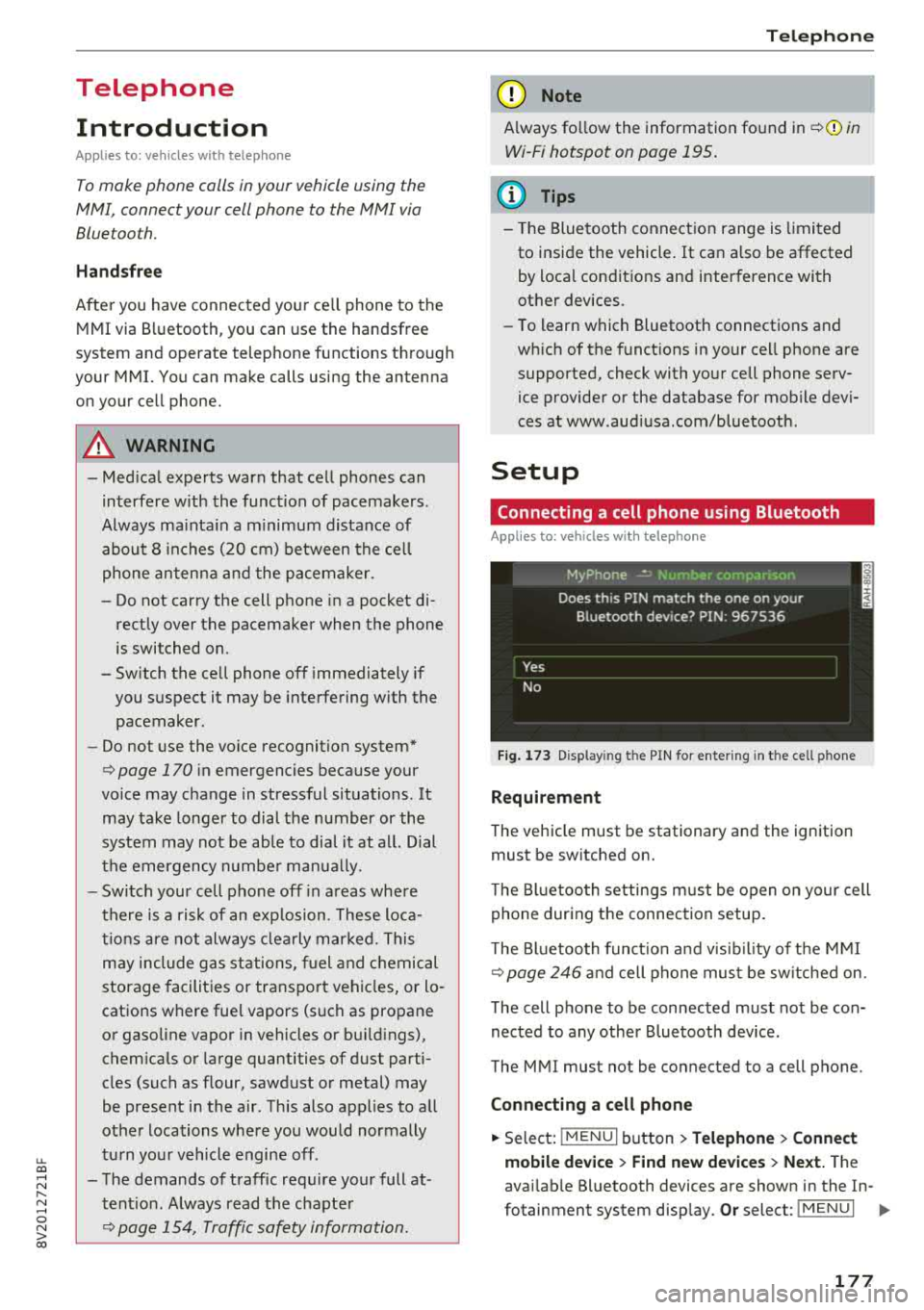
Connecting a cell phone using Bluetooth
Applies to: vehicles with telephone
Fig. 173 Display in g t he PIN for enter ing in t he cell p hone
Requirement
T he vehicle must be stationary and the ignition
must be switched on.
T he Bl uetoo th settings must be open on your cell
phone during the connection setup .
T he Bluetooth funct io n and v is ibilit y of the MMI
Q page 246 and cell phone must be switched on.
The cell phone to be connected must not be con
nected to any other Bluetooth device.
The MMI must not be connected to a cell phone.
Connecting a cell phone
.,. Select: IMENU I button> Telephone> Connect
mobile device > Find new devices > Next.
The
avai lab le Bluetooth devices are shown in the In-
fotainment system display.
Or select: I MENU I II>-
177
Page 323 of 404
LL co .... N
" N .... 0 N > co
Checking and Filling
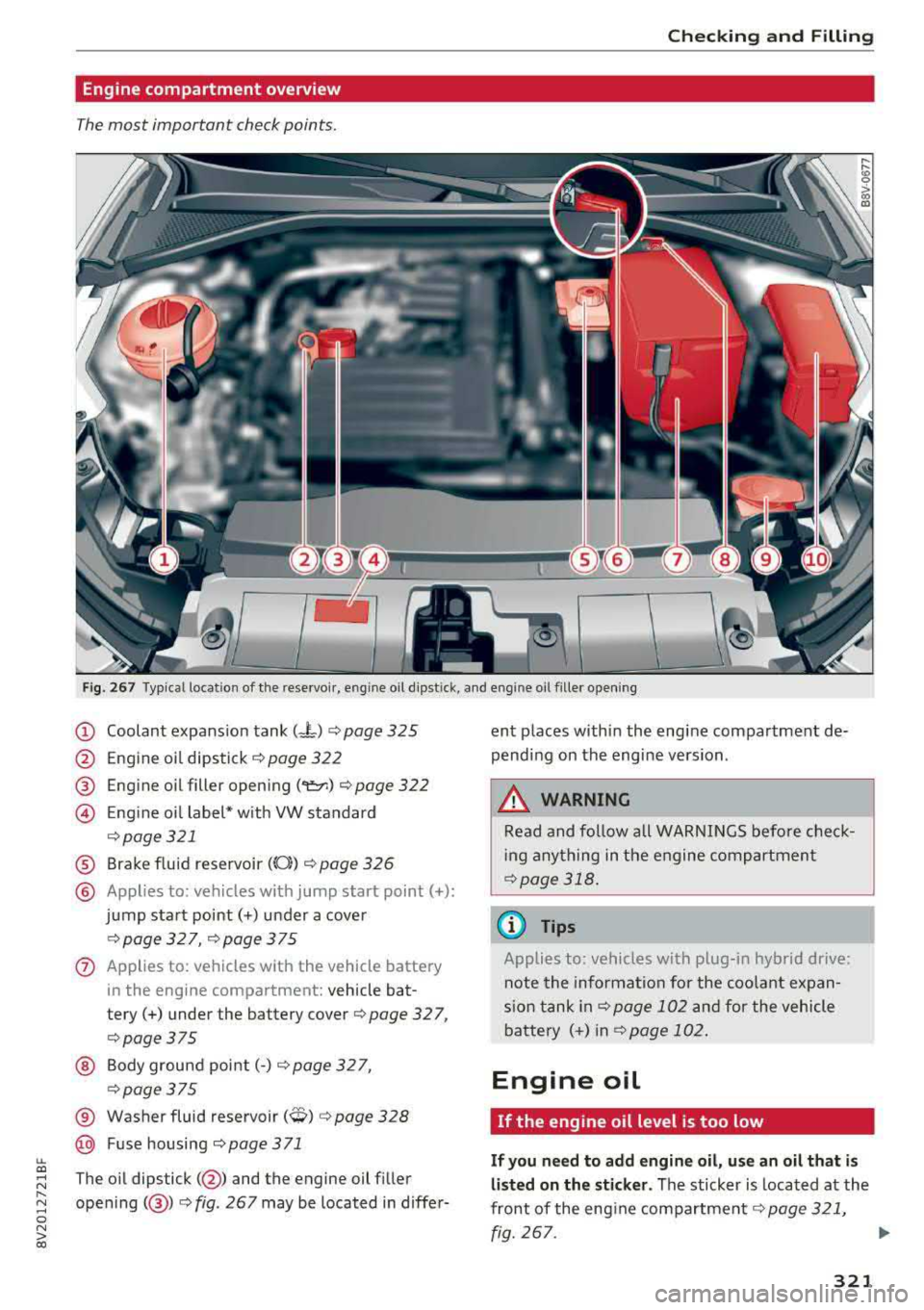
Engine compartment overview
The most important check points .
Fig . 267 Typical location of the reservoi r, engine oil d ipst ick, and engine oil f iller open ing
(D Coolant expans ion tank (-L) ¢ page 325
@ E ngine oi l dipstick¢ page 322
® Engine oil filler opening ("e::r.) ¢ page 322
@ Eng ine oi l label* w ith VW standard
¢ page 321
® Brake fluid reservoir (0}) ¢ page 326
@ Applies to: vehicles w ith jump start point(+):
jump start point(+) under a cover
¢page 327, ¢page 375
0 Applies to: vehicles with the vehicle battery
in the engine compartment: vehicle bat
tery(+) under the battery
cover¢ page 327,
¢page375
@ Bodygroundpoint(-) ¢page327,
¢ page375
® Washer fluid reservoir (0) ¢ page 328
@ Fuse housing ¢ page 3 71
The oil dipstick( @) and the engine oil fi ller
opening( @)¢ fig. 267 may be located in differ- ent places within the engine compartment de
pending on the engine version .
,8. WARNING
Read and follow a ll WARNINGS before check
i ng anything in the engine compartment
¢page 318 .
(D Tips
Applies to: vehicles with p lug-in hybrid dr ive:
note the informa tion for the coo lant expan
s io n t ank
in¢ page 102 and for the vehicle
batte ry (+) in
¢page 102 .
Engine oil
If the engine oil level is too low
If you need to add engine oil, use an o il that i s
listed on the st icker .
The sticker is located at the
front of the eng ine
compartment ¢ page 321,
fig. 267.
321
Page 324 of 404
Checking and Filling
If the recommended engine oil is not available,
in an eme rg enc y you may add a maximum of 1
quart(! liter) of ACEA C3 or API SN engine oil
one tim e until the next oil change.
F or more information on the correct engine oil
for your vehicle, contact an authorized Audi dea l
er or authorized Audi Service Facility . Have the oil
changed by an authori zed Audi dealer o r author
ized Service Fac ility .
Audi re commend s
((#Castrol I llt/li{:t;'{g Frtw.:;-..·-..d.f'/,'JAL
Audi r ecommends using th e Lon g Lif e high
perf orm ance eng in e oil from Audi Genu in e
Parts .
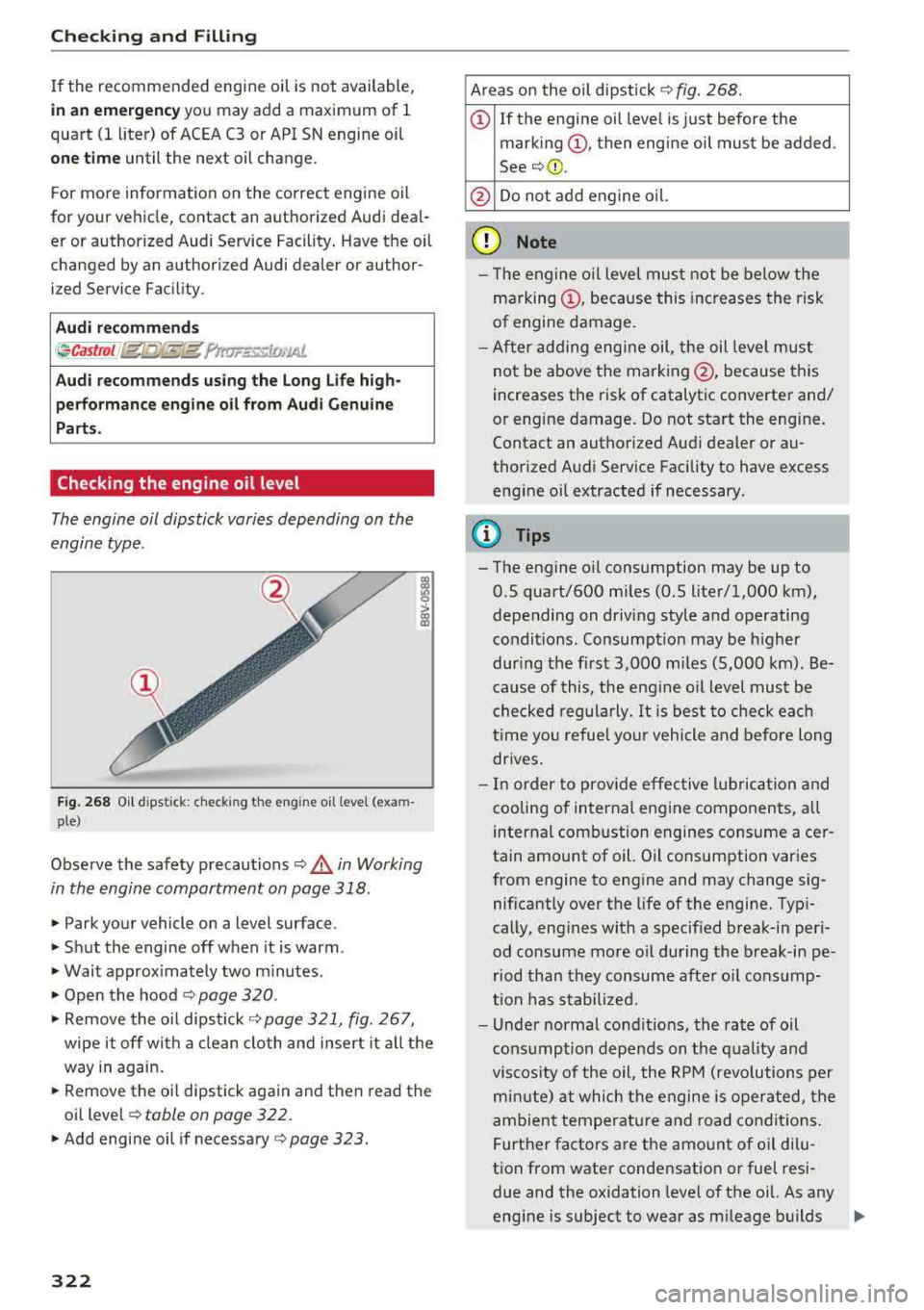
Checking the engine oil level
The engine oil dipstick varies depending on the
engine type .
Fig . 268 Oil d ipsti ck: checking th e engine oil le vel (exa m
p le )
Observe the safety precaut ions ¢.& in Working
in the engine compartment on page 318 .
.. Park your vehicle on a level surface.
.. Shut the engine off when it is warm .
.. Wait approx imately two m inutes .
.. Open the hood ¢ page 320 .
.. Remove the oi l dipstick¢ page 321, fig. 267,
wipe it off with a clean cloth and insert it a ll the
way in again .
.. Remove the o il dipstick again and then read the
oil
level ¢ table on page 322.
.. Add engine oil if necessary c:> page 323.
322
Areas on the o il dipstick 9 fig . 268 .
(D If the engine oil leve l is just before the
mark ing
(D , then engine oil must be added .
See¢@.
@ Do not add engine oil.
(D Note
- T he engine o il level must not be below the
ma rking
(D , because this increases the risk
of engine damage.
- After add ing engine oil, the oil leve l must
not be above the marking @, because this
increases the risk of catalytic converter and/
or engine damage . Do not start the engine .
Contact an authorized Audi dealer or au
thorized Audi Service Facility to have excess eng ine oil extracted if necessary .
(D Tips
- The engine oil consumption may be up to
0.5 quart/600 miles (0.5 liter/1,000 km),
depending on driving style and operating
conditions. Consumpt io n may be h igher
dur ing the fi rst 3,000 mi les (5,000 km) . Be
c ause of this , the eng ine o il level must be
che cked regularly.
It is best to check each
t ime you refuel your vehicle and before long
drives .
- In order to prov ide effective l ubrication and
cooling of interna l engine components, a ll
internal combustion engines consume a cer
tain amount of oil. O il consumption varies
from engine to engine and may change sig nificantly over the life of the engine. Typi
cally, eng ines with a specif ied break-in peri
od consume more oil during the break-in pe
riod than they consume after o il consump
t ion has stabilized .
- Under normal condit ions, the rate of oil
cons umption depends on t he quality and
viscosity of the oil, the RPM (revo lutions per
mi nute) at which the engine is ope rated, the
ambien t temperature and road conditions .
Further factors are the amount of oi l dilu
tion from water condensation or fuel resi due and the oxidation level of the oil. As any
eng ine is subject to wear as m ileage builds
Ii>-
Page 325 of 404
u. 00 .-< N l' N .-< 0 N > 00
up, the oil consumption may increase over
time unti l replacement of worn components
may become necessary .
- With a ll these variab les coming into p lay,
no standard rate of oil consumption can be
estab lished or specified. There is no alterna
tive to checking the o il level regu larly and
frequently.
- If you have the impression your engine con
sumes excessive amounts of oil, we recom mend that you consult an authorized Aud i
dealer to have the cause of your concern properly d iagnosed . Keep in mind that the
accu rate measurement of oil consumption
r equ ires gre at ca re and may take some
time. An a uthorized Audi dea ler has instruc
tions about how to measure oil consump
tion acc urately.
- You can find information on engine oi l and
engine oil capacities for the USA at
www.audiusa.com/help/maintenance, or
for Canada at www.audi.ca/ca/web/en/
customer-area/ ca re-and-ma i ntena nee/ a ud
i
service-sched u les. html, or ca ll
800-822-2834.
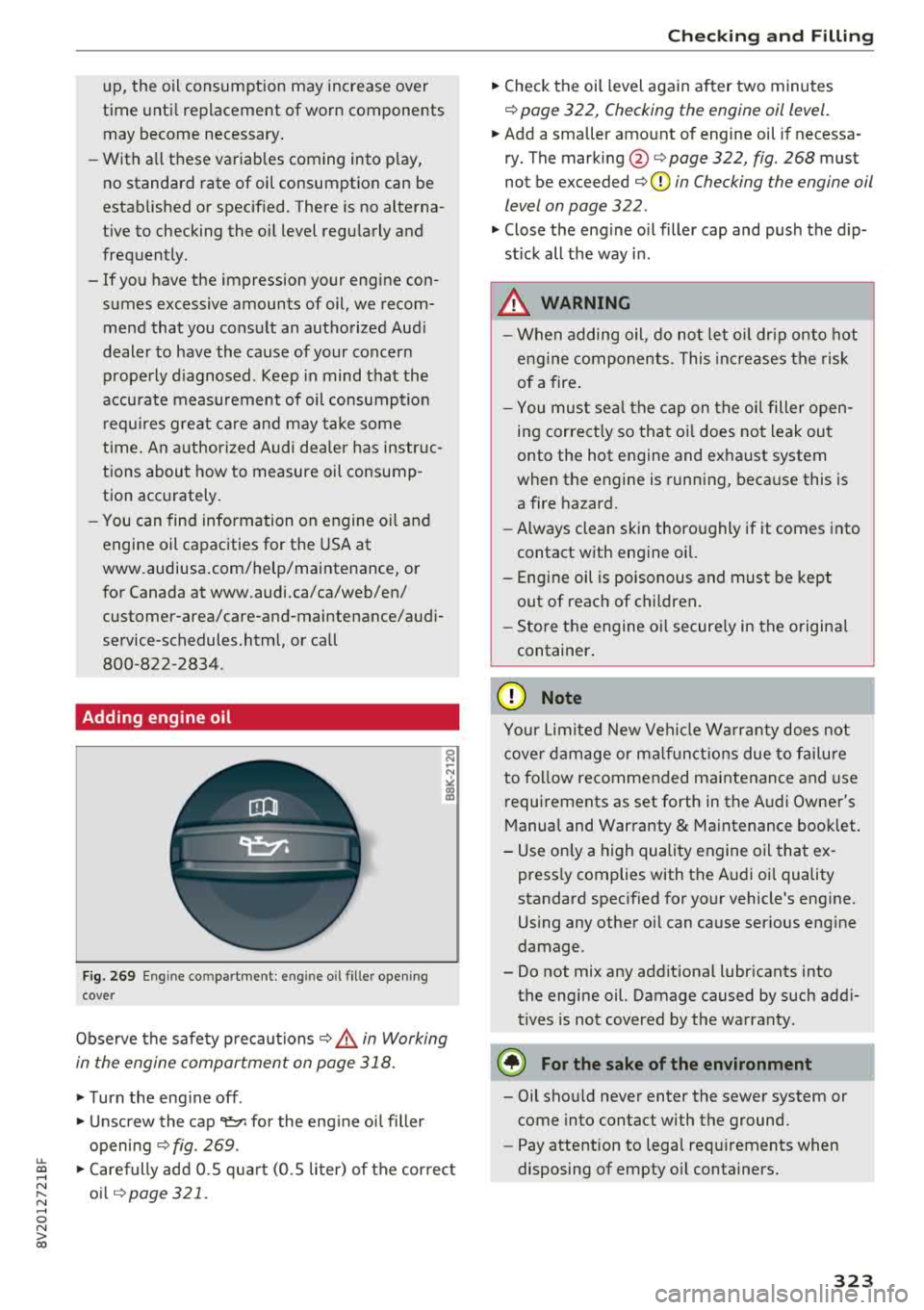
Adding engine oil
F ig. 269 Eng ine co mpartment : engin e oil fille r open ing
cover
Obse rve the safety p recautions i::> &. in Working
in the engine compartment an page 318.
.,. T urn the eng ine off .
.,. Unscrew the cap~ for the eng ine oi l filler
opening
i::> fig. 269 .
.,. Care fully add 0.5 qua rt ( 0.5 liter) of the cor rect
o il
q page 321.
Ch eck ing and F illing
.,. Check the oi l level again a fter two minutes
i::> page 322 , Checking the engine oil level .
.,. Add a smaller amo unt of engine oil if necessa
ry. The
marking @i::>page 322, fig. 268 must
not be exceeded
i::> @ in Checking the engine oil
level on page 322 .
.,. Close the engine o il filler cap and push the d ip
stick all the way i n.
.8, WARNING
-W hen adding oil, do not let o il dr ip onto hot
e ng ine components. This in cr eases the risk
of a fire .
- You mus t se al the c ap on the o il filler open
ing correct ly so tha t oi l does not leak ou t
onto the hot engine and ex haust system
when the engine is running, beca use this is
a fire hazard.
- Always clean skin thoro ughly if it comes into
contact with engine oi l.
- Engine oil is poisonous and must be kept
out of reac h of children .
- Sto re t he engine oi l secure ly in the o rigina l
container .
(Llj) Note
You r Lim ited New Veh icle Wa rra nty does no t
cove r damage or m alfu nct io ns due to f ailure
to fo llow recommended maintenance and use
requirements as set forth in the A udi Owner's
M anua l and War ranty
& Maintenance boo klet.
- Use on ly a high quality engine oil that ex -
press ly complies with the A udi oi l quality
standard spec ified for yo ur vehicle's eng ine.
Us ing any othe r oi l can cause ser ious eng ine
damage.
- Do not mix any addit iona l lubr icants into
the engine oil. Damage caused by such add i
t ives is not covered by the wa rranty.
@ For the sake of the environment
- Oil sho uld never enter the sewer system or
come into contact with the ground .
- Pay attention to lega l req uirements when
disposing of empty o il conta iners.
323