set AUDI A4 1998 B5 / 1.G Engine Oil Level Checking User Guide
[x] Cancel search | Manufacturer: AUDI, Model Year: 1998, Model line: A4, Model: AUDI A4 1998 B5 / 1.GPages: 111, PDF Size: 1.26 MB
Page 74 of 111
73
Passenger's side headlight, alignment
- Move Beamsetter to the passenger side of the
vehicle and follow the same procedures to align
the Beamsetter box to the headlamp.
- Align headlight low beam, check high beam and
align fog lamp.
Note:
Make sure to reset the Beamsetter "Scaled
wheel" to the proper setting each time you
change from low beam to high beam or to fog
lamp.
- Ensure that headlights and vehicle body are
clean and free of fingerprints.
Pa
ge 74 of 111 Descri
ption of wor
k
11/20/2002 htt
p://127.0.0.1:8080/audi/servlet/Dis
play?action=Goto&t
yp
e=re
pair&id=AUDI.B5.ME01.01.6
Page 75 of 111
74
Headlight cleaning system nozzles,
adjusting
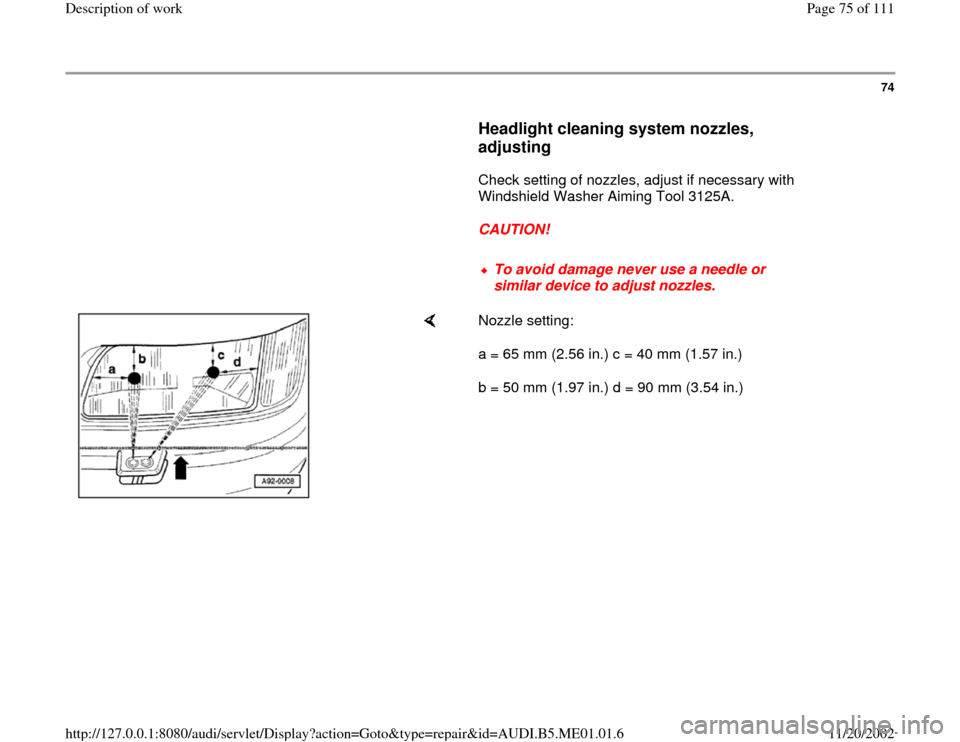
Check setting of nozzles, adjust if necessary with
Windshield Washer Aiming Tool 3125A.
CAUTION!
To avoid damage never use a needle or
similar device to adjust nozzles.
Nozzle setting:
a = 65 mm (2.56 in.) c = 40 mm (1.57 in.)
b = 50 mm (1.97 in.) d = 90 mm (3.54 in.)
Pa
ge 75 of 111 Descri
ption of wor
k
11/20/2002 htt
p://127.0.0.1:8080/audi/servlet/Dis
play?action=Goto&t
yp
e=re
pair&id=AUDI.B5.ME01.01.6
Page 79 of 111

78
Adjusting wiper arms
- Bring wiper arms into park position.
- Remove wiper blade.
- Place wiper arm -2- in 3358 B windshield wiper adjuster and lock in
place with stop screw -3-.
- Place 24 mm open end wrench -1- onto adjusting device as shown and
set wiper arm -2- to specified value (arrow)
Specified values Page 77
.
- Loosen stop screw -3- and remove wiper arm -2- from adjusting device.
- Again place wiper arm -2- into windshield wiper adjuster and again lock
in place with stop screw -3-.
- Compare displayed angle with specified value.
Specified values Page 77
.
- If necessary, repeat setting and checking procedure until specified
value is attained.
- Remove adjusting device and install wiper blade.
Pa
ge 79 of 111 Descri
ption of wor
k
11/20/2002 htt
p://127.0.0.1:8080/audi/servlet/Dis
play?action=Goto&t
yp
e=re
pair&id=AUDI.B5.ME01.01.6
Page 81 of 111
80
Service Reminder Indicator (SRI),
resetting
Vehicles up to model year 1997
If service date has been reached, service event
which is due appears as a flashing display after
ignition is turned ON. Flashing continues for a
few seconds after engine is started.
The following displays are possible:
OIL Engine oil change
In 1 Inspection service
In 2 Inspection service with additional work
A service event which is due is already displayed
1000 km (620 mi.) or 10 days before.
Service Reminder Indicator (SRI) must be
matched during Delivery Inspection or during
each Inspection Service to the km and time
specifications until next service event with help of
Scan Tool (ST) VAG 1551.
- Select adaptation channels individually and
enter relevant specified values.
Pa
ge 81 of 111 Descri
ption of wor
k
11/20/2002 htt
p://127.0.0.1:8080/audi/servlet/Dis
play?action=Goto&t
yp
e=re
pair&id=AUDI.B5.ME01.01.6
Page 89 of 111
88
Resetting service interval display
Vehicles from model year 1998 The service interval display must be reset as part
of the Pre-Delivery Inspection and also after
every Oil Change Service and Inspection
Service.
Delivery inspection
The service interval display can be reset using
one of two methods:
Using the adjustment buttons for the trip
recorder and clock on the instrument cluster
- Reset "service OIL" and "service INSP" Page 92
or
Using VAG 1551 Scan Tool
- Select adaptation channel 02 and enter
adaptation value "00000" Page 89
Pa
ge 89 of 111 Descri
ption of wor
k
11/20/2002 htt
p://127.0.0.1:8080/audi/servlet/Dis
play?action=Goto&t
yp
e=re
pair&id=AUDI.B5.ME01.01.6
Page 90 of 111
89
Oil Change Service and Inspection Service
When a service is due, the type of service
required will be indicated by a flashing message
on the trip recorder display when the ignition is
switched on. The message will continue to flash
for up to 60 seconds after the engine has been
started.
Display
Type of service due
service OEL Oil Change Service
service INSP Inspection Service
When a service is due, this will be indicated
either 1,000 km or 10 days in advance.
Resetting service interval display with VAG
1551
- Connect VAG 1551 Page 83
.
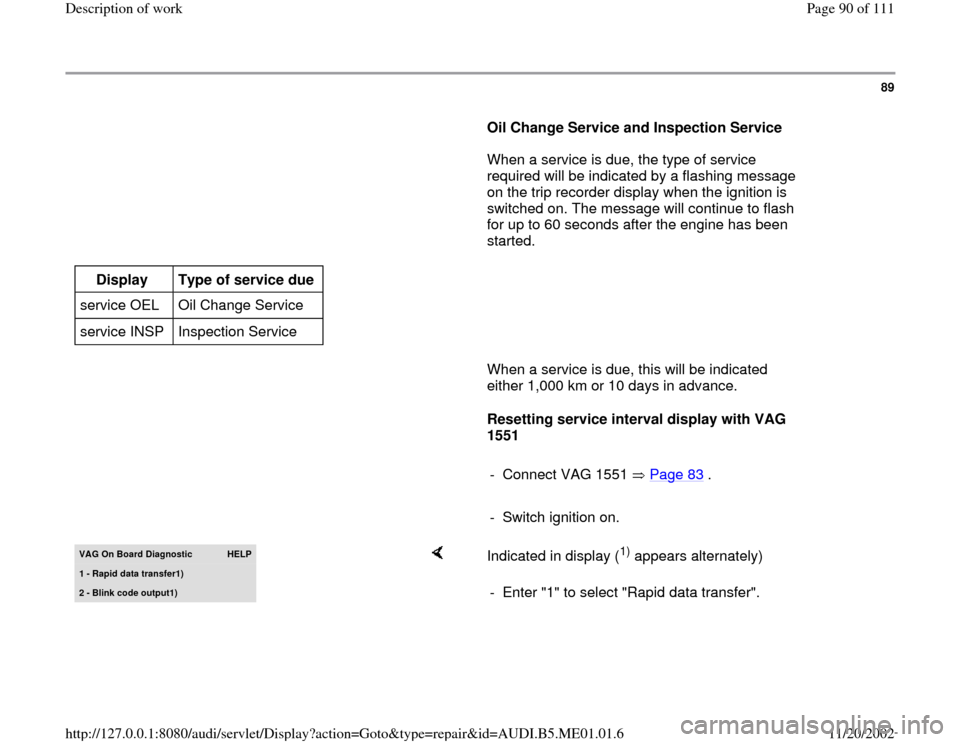
- Switch ignition on.VAG On Board Diagnostic
HELP
1 - Rapid data transfer1
)
2 - Blink code output1
)
Indicated in display (
1) appears alternately)
- Enter "1" to select "Rapid data transfer".
Pa
ge 90 of 111 Descri
ption of wor
k
11/20/2002 htt
p://127.0.0.1:8080/audi/servlet/Dis
play?action=Goto&t
yp
e=re
pair&id=AUDI.B5.ME01.01.6
Page 93 of 111
-
Press key to terminate resetting of service interval display.
Pa
ge 93 of 111 Descri
ption of wor
k
11/20/2002 htt
p://127.0.0.1:8080/audi/servlet/Dis
play?action=Goto&t
yp
e=re
pair&id=AUDI.B5.ME01.01.6
Page 94 of 111
92
Resetting service interval display with
adjustment buttons for trip recorder and
clock.
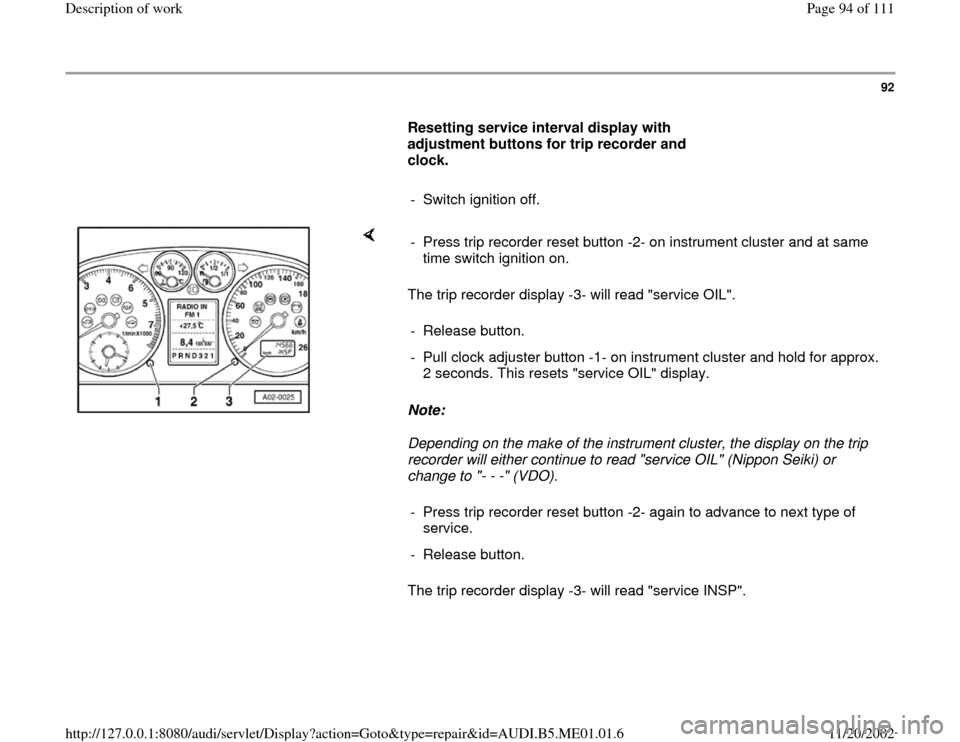
- Switch ignition off.
The trip recorder display -3- will read "service OIL".
Note:
Depending on the make of the instrument cluster, the display on the trip
recorder will either continue to read "service OIL" (Nippon Seiki) or
change to "- - -" (VDO).
The trip recorder display -3- will read "service INSP". - Press trip recorder reset button -2- on instrument cluster and at same
time switch ignition on.
- Release button.
- Pull clock adjuster button -1- on instrument cluster and hold for approx.
2 seconds. This resets "service OIL" display.
- Press trip recorder reset button -2- again to advance to next type of
service.
- Release button.
Pa
ge 94 of 111 Descri
ption of wor
k
11/20/2002 htt
p://127.0.0.1:8080/audi/servlet/Dis
play?action=Goto&t
yp
e=re
pair&id=AUDI.B5.ME01.01.6
Page 95 of 111
93
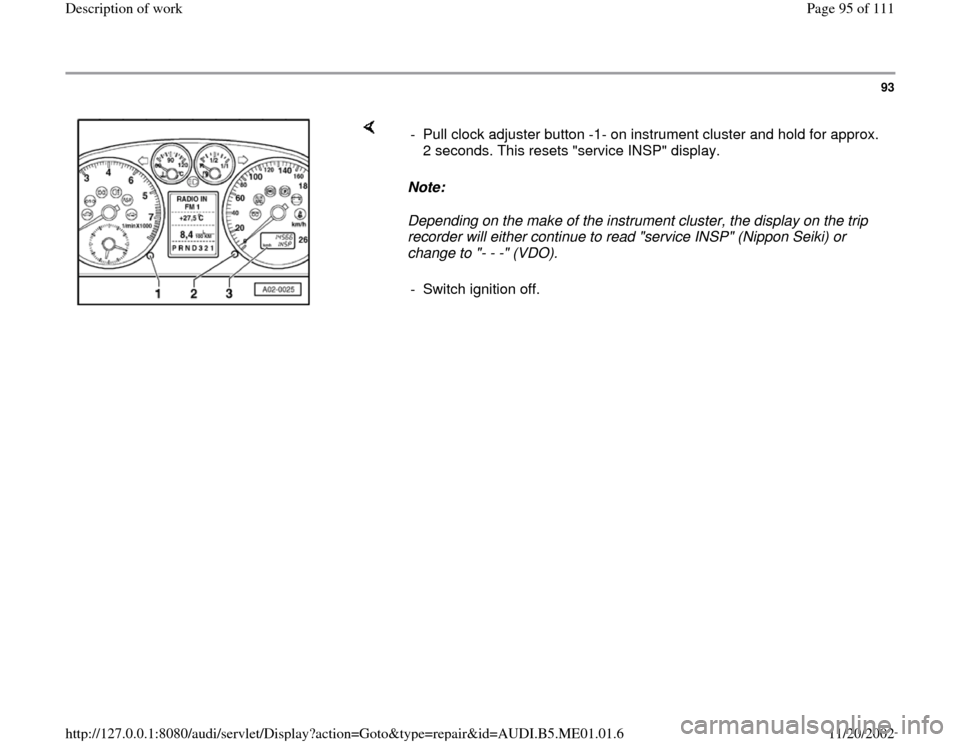
Note:
Depending on the make of the instrument cluster, the display on the trip
recorder will either continue to read "service INSP" (Nippon Seiki) or
change to "- - -" (VDO). - Pull clock adjuster button -1- on instrument cluster and hold for approx.
2 seconds. This resets "service INSP" display.
- Switch ignition off.
Pa
ge 95 of 111 Descri
ption of wor
k
11/20/2002 htt
p://127.0.0.1:8080/audi/servlet/Dis
play?action=Goto&t
yp
e=re
pair&id=AUDI.B5.ME01.01.6
Page 96 of 111
94
Clock, setting
Clock is included in tachometer display. To set
time, pull out instrument panel light dimmer
switch.
When switch is pulled out briefly, hands will
advance a minute at a time. Pulled out and held,
hands will advance slowly at first, then rapidly.
Pa
ge 96 of 111 Descri
ption of wor
k
11/20/2002 htt
p://127.0.0.1:8080/audi/servlet/Dis
play?action=Goto&t
yp
e=re
pair&id=AUDI.B5.ME01.01.6