Arm AUDI A4 2008 B8 / 4.G User Guide
[x] Cancel search | Manufacturer: AUDI, Model Year: 2008, Model line: A4, Model: AUDI A4 2008 B8 / 4.GPages: 342, PDF Size: 13.14 MB
Page 84 of 342
Seats and storage 82
CautionWhen returning the backrest to an upright position, make sure that
the seat belts for the outer rear seats are in their guides so that they
cannot be caught up and damaged in the catches for the backrest.Storage shelf
The storage shelf behind the rear backrest should only be
used to store light articles of clothing.
WARNING
Do not store any heavy or hard objects on the storage shelf. They
could cause injury if the brakes are applied suddenly.
Caution
Please note that hard objects could chafe against the wires of the
heating element in the rear window and cause damage.
Note
Make sure that the slots between the rear window and the storage
shelf are kept clear to ensure unimpaired ventilation.
Applies to vehicles: with load-through hatchLoad-through hatch with transport bag
You can use the load-through hatch and the removable
ski bag to transport skis or other extra-long objects safely
inside the vehicle without soiling or damaging the uphol-
stery.Loading
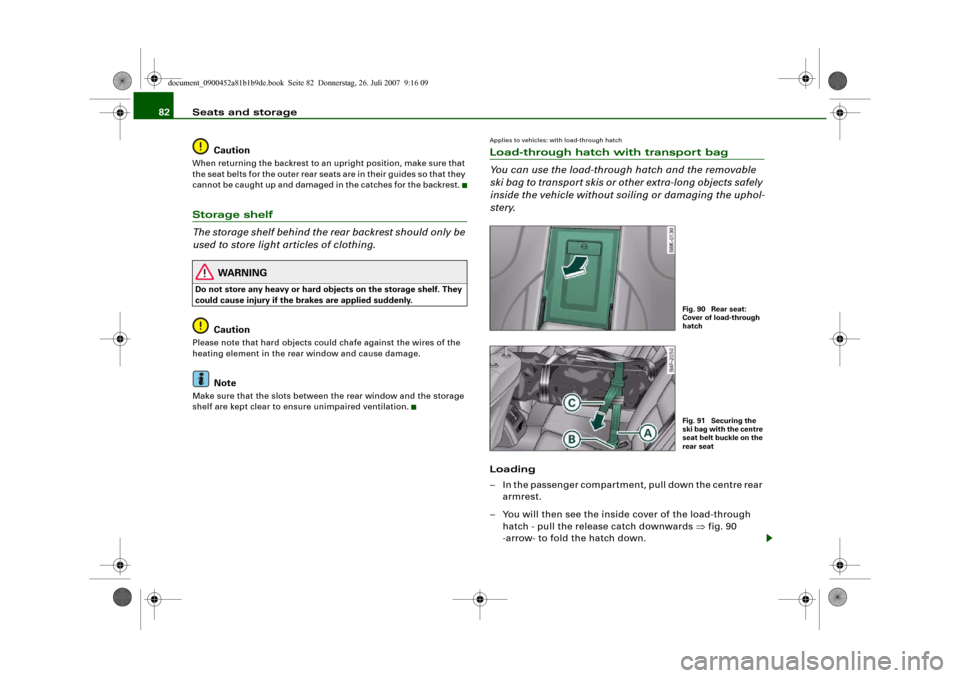
– In the passenger compartment, pull down the centre rear
armrest.
– You will then see the inside cover of the load-through
hatch - pull the release catch downwards ⇒fig. 90
-arrow- to fold the hatch down.
Fig. 90 Rear seat:
Cover of load-through
hatchFig. 91 Securing the
ski bag with the centre
seat belt buckle on the
rear seat
document_0900452a81b1b9de.book Seite 82 Donnerstag, 26. Juli 2007 9:16 09
Page 87 of 342
Seats and storage85
Controls
Safety
Driving tips
General maintenance
Self-help
Technical data
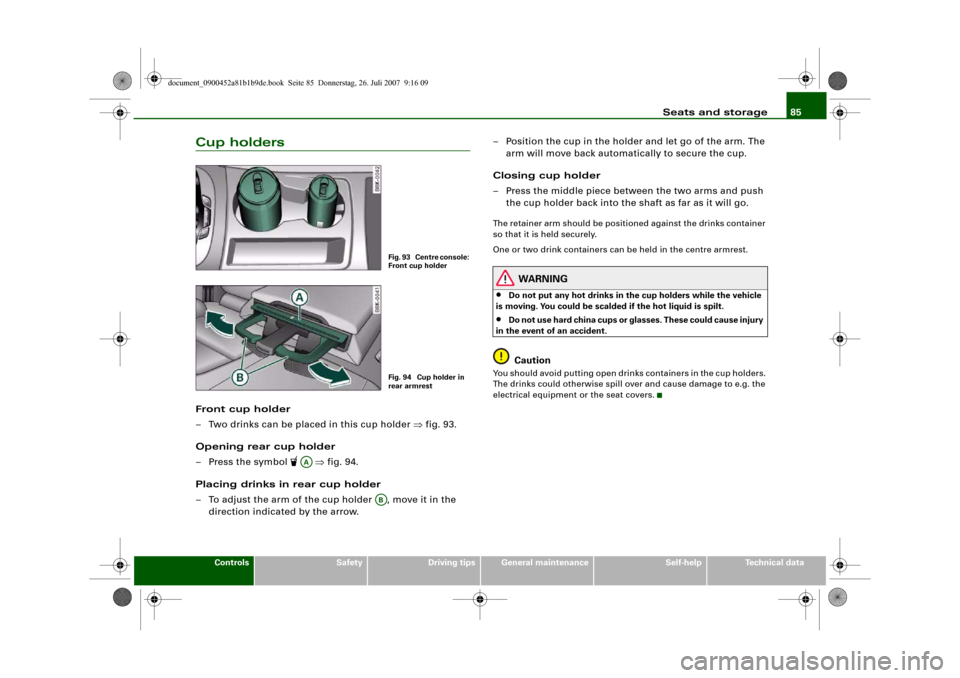
Cup holdersFront cup holder
– Two drinks can be placed in this cup holder ⇒fig. 93.
Opening rear cup holder
– Press the symbol
⇒fig. 94.
Placing drinks in rear cup holder
– To adjust the arm of the cup holder , move it in the
direction indicated by the arrow.– Position the cup in the holder and let go of the arm. The
arm will move back automatically to secure the cup.
Closing cup holder
– Press the middle piece between the two arms and push
the cup holder back into the shaft as far as it will go.
The retainer arm should be positioned against the drinks container
so that it is held securely.
One or two drink containers can be held in the centre armrest.
WARNING
•
Do not put any hot drinks in the cup holders while the vehicle
is moving. You could be scalded if the hot liquid is spilt.
•
Do not use hard china cups or glasses. These could cause injury
in the event of an accident.Caution
You should avoid putting open drinks containers in the cup holders.
The drinks could otherwise spill over and cause damage to e.g. the
electrical equipment or the seat covers.
Fig. 93 Centre console:
Front cup holderFig. 94 Cup holder in
rear armrest
AA
AB
document_0900452a81b1b9de.book Seite 85 Donnerstag, 26. Juli 2007 9:16 09
Page 92 of 342
Seats and storage 90•
If the power drawn by the connected appliances is above 150 W,
the inverter in the socket will get warm. The inverter will trip out if
the temperature exceeds a certain limit. The inverter can trip out on
hot days even when an appliance with a suitable power rating is
used. The inverter will switch on again automatically after it has
cooled down. Appliances which are already connected and
switched on will be activated again automatically ⇒.
•
Do not connect lamps which contain a neon tube. For technical
reasons, this may damage the lamp.
•
Do not connect 115 Volt appliances to the 230 Volt Euro socket.
This may cause irreparable damage to the appliance. Check the type
plate on the appliance if you are unsure of the voltage rating.
•
With some power supplies (e.g. on laptop computers), the inte-
grated surge suppressor prevents the equipment from being
switched on because the starting current is too high. If this
happens, please disconnect the power supply unit from the load
and wait for about 10 seconds before re-connecting.Note
•
Unshielded equipment can cause interference on the radio, TV
and vehicle's electrical system.
•
The Euro socket has an integrated child safety device. There is no
power at the socket until the Euro connector is fully inserted.
•
Some appliances may not function normally due to the lower
power rating (wattage).
•
The socket can be operated with 115 Volt power supplies, as is
the case in certain countries. In this case, a different type of inverter
must be installed in the vehicle. Retrofit kits are available from your
Audi dealer. Do not connect 115 Volt appliances to the 230 Volt Euro
socket.
•
Interference can occur on the radio's AM waveband if electrical
appliances are used near the rear window aerial.
Storage compartmentsOverview
There are several storage compartments at various points
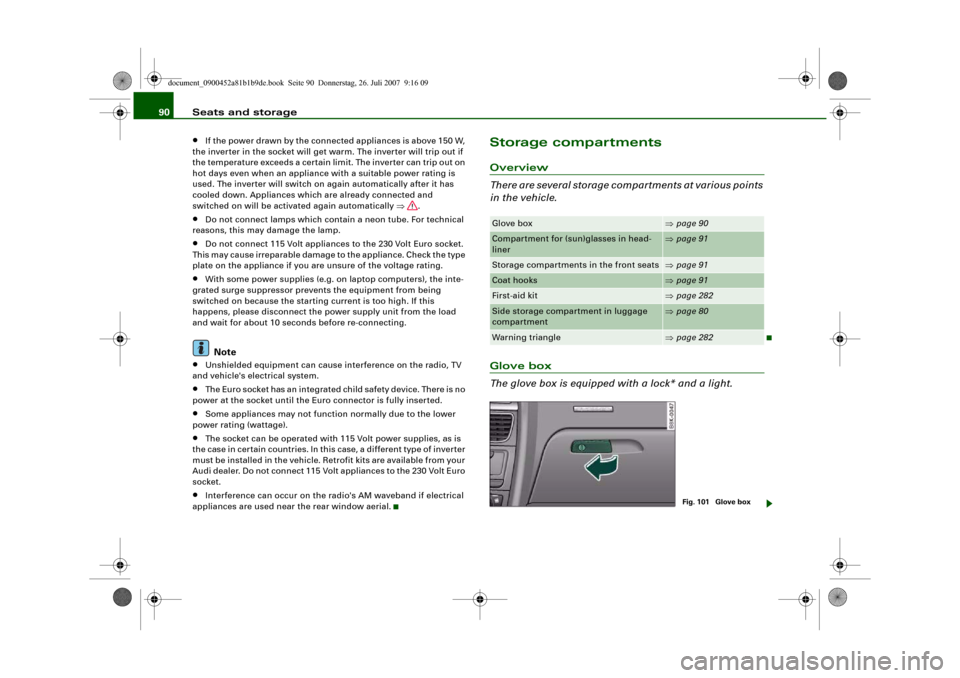
in the vehicle.Glove box
The glove box is equipped with a lock* and a light.Glove box
⇒page 90
Compartment for (sun)glasses in head-
liner
⇒page 91
Storage compartments in the front seats
⇒page 91
Coat hooks
⇒page 91
First-aid kit
⇒page 282
Side storage compartment in luggage
compartment
⇒page 80
Warning triangle
⇒page 282
Fig. 101 Glove box
document_0900452a81b1b9de.book Seite 90 Donnerstag, 26. Juli 2007 9:16 09
Page 95 of 342
Heating and cooling93
Controls
Safety
Driving tips
General maintenance
Self-help
Technical data
Heating and coolingDeluxe automatic air conditionerApplies to vehicles: with deluxe automatic air conditionerDescription
The air conditioner can be used to set a comfortable inte-
rior temperature in the vehicle.The air conditioner provides heating and ventilation and also cools
and dehumidifies the air inside the vehicle.
The air conditioner is fully automatic and will maintain the desired
temperature at a constant level. To achieve this, the temperature of
the air supplied to the interior, the blower speed (volume of air
delivery) and the air distribution are regulated automatically. The
system also allows for the effect of strong sunlight, so there is no
need for manual adjustment. For these reasons it is advisable to use
the automatic mode for the comfort of all the passengers in virtually
all conditions throughout the year ⇒page 95.
Please note:
The humidity of the air is automatically reduced when the system
cools the interior of the vehicle. This helps to prevent condensation
on the windows.
If the humidity and temperature outside the vehicle are high,
condensation can drip off the evaporator in the air cooling system
and form a pool underneath the vehicle. This is normal and does not
indicate a leak.
If the outside temperature is low, the blower normally only switches
to a higher speed once the coolant has warmed up sufficiently (this
does not apply to the defrost setting).
In order to achieve maximum engine power, the air conditioner
compressor is temporarily switched off when pulling away from a
standstill with full throttle.The compressor also switches off if the coolant temperature is
excessively high, to ensure adequate engine cooling under extreme
loads.
Pollution filter
The pollution filter (a particle filter) serves as a barrier against impu-
rities in the outside air, including dust and pollen, and odours. The
air is also filtered when the air recirculation mode is activated.
For the air conditioner to work with maximum efficiency, the pollu-
tion filter element must be replaced at the intervals specified in the
Service Schedule.
If the vehicle is driven in areas with a high level of air pollution and
the filter is no longer fully effective, it may be necessary to change
the filter element more frequently.
Key-coded settings
The currently selected air conditioner settings are automatically
stored and assigned to the remote control key.
Power management
To prevent the battery from becoming discharged and to maintain
the necessary power level, the system will temporarily shut off the
electrical components that are using a lot of power, or reduce the
current they are consuming ⇒page 226. Heating systems in partic-
ular use a large amount of electrical power. If you notice, for
instance, that the rear window heater is not working, it may have
been temporarily switched off by the power management function,
or regulated to a lower heat output. These systems will be available
again as soon as sufficient electrical power is available.
WARNING
For safety reasons it is important that all the windows are kept
free of ice, snow and condensation. These can cause poor visibility
document_0900452a81b1b9de.book Seite 93 Donnerstag, 26. Juli 2007 9:16 09
Page 103 of 342
Heating and cooling101
Controls
Safety
Driving tips
General maintenance
Self-help
Technical data
Applies to vehicles: with diesel engineSupplementary heater– Set the Supplementary heater to auto or off.Models with a diesel engine are equipped with a supplementary
heater to help warm up the interior more quickly. At outside temper-
atures below about +5 °C the supplementary heater is switched on
(and off) automatically when the engine is running, depending on
the coolant temperature, the temperature in the vehicle interior and
the temperature the heater is set to.Deluxe automatic air conditioner plusApplies to vehicles: with deluxe automatic air conditioner plusDescription
The air conditioner is designed to keep the passenger
compartment at the temperature you find most comfort-
able at all times of the year.The air conditioner provides heating and ventilation and also cools
and dehumidifies the air inside the vehicle.
The air conditioner is fully automatic, and will maintain the desired
temperature at a constant level. To achieve this, the temperature of
the air supplied to the interior, the blower speed (volume of air
delivery) and the air distribution are regulated automatically. The
system also allows for the effect of strong sunlight, so there is no
need for manual adjustment. For these reasons it is advisable to use
the automatic mode for the comfort of all the passengers in virtually
all conditions throughout the year ⇒page 103.
Please note:
The humidity of the air is automatically reduced when the system
cools the interior of the vehicle. This helps to prevent condensation
on the windows.If the humidity and temperature outside the vehicle are high,
condensation can drip off the evaporator in the air cooling system
and form a pool underneath the vehicle. This is normal and does not
indicate a leak.
If the outside temperature is low, the blower normally only switches
to a higher speed once the coolant has warmed up sufficiently (this
does not apply to the defrost setting).
In order to achieve maximum engine power, the air conditioner
compressor is temporarily switched off when pulling away from a
standstill with full throttle.
The compressor also switches off if the coolant temperature is
excessively high, to ensure adequate engine cooling under extreme
loads.
Pollution filter
The pollution filter (a combined particle filter and activated charcoal
filter) serves as a barrier against impurities in the outside air,
including dust and pollen, and against unpleasant smells. The air is
also filtered when the air recirculation mode is activated.
For the air conditioner to work with maximum efficiency, the pollu-
tion filter element must be replaced at the intervals specified in the
Service Schedule.
If the vehicle is driven in areas with a high level of air pollution and
the filter is no longer fully effective, it may be necessary to change
the filter element more frequently.
Key-coded settings
The currently selected air conditioner settings are automatically
stored and assigned to the remote control key.
Power management
To prevent the battery from becoming discharged and to maintain
the necessary power level, the system will temporarily shut off the
electrical components that are using a lot of power, or reduce the
current they are consuming ⇒page 226. Heating systems in partic-
ular use a large amount of electrical power. If you notice, for
document_0900452a81b1b9de.book Seite 101 Donnerstag, 26. Juli 2007 9:16 09
Page 112 of 342
Heating and cooling 110The synchronisation is cancelled as soon as any adjustments are
made on the front passenger's side.Applies to vehicles: with diesel engineSupplementary heater– Set the Supplementary heater to auto or off.Models with a diesel engine are equipped with a supplementary
heater to help warm up the interior more quickly. At outside temper-
atures below about +5 °C the supplementary heater is switched on
(and off) automatically when the engine is running, depending on
the coolant temperature, the temperature in the vehicle interior and
the temperature the heater is set to.Auxiliary heating and auxiliary
ventilationApplies to vehicles: with auxiliary heating - under development at the time of printingDescription
The auxiliary heating and ventilation systems heat and
cool the interior independently of the engine.The auxiliary heating
works in conjunction with the air condi-
tioner system, but does not rely on heat from the engine. Instead of
this, the system burns fuel. The system's main function is to warm
up the interior of the vehicle and to defrost the windows in cold
weather.
The auxiliary heating system can be used both when the vehicle is
stationary and when driving (to provide extra heat while the engine
is warming up).The auxiliary ventilation
also operates independently of the
engine. This feature can be used to cool the interior with the blower
when the vehicle is left parked in the sun.
The system will automatically activate either the auxiliary heating or
the auxiliary ventilation mode, depending on the actual tempera-
ture measured inside the car and the temperature you have set with
the air conditioner controls. It is possible to alter the temperature
setting while the auxiliary heating/ventilation is running.
Switching on and off
There are two different ways of switching on the auxiliary
heating/ventilation system.
•
Immediate start: You can switch the auxiliary heating/ventilation
on and off at any time via the sound system or MMI ⇒page 111. You
can also switch the system on and off using the remote control
⇒page 113.
•
Switching on via timer: You can programme various start times
using the timers ⇒page 111. However you must first activate the
timer before the auxiliary heating/ventilation system will switch on
automatically.
The auxiliary heating/ventilation will switch itself off at the end of
the programmed running time. The running time can be set to 15,
30, 45 or 60 minutes ⇒page 112.
WARNING
•
The auxiliary heating must not be allowed to run when the
vehicle is in a confined space because it can give off toxic fumes.
•
To avoid any possible fire risk, never have the auxiliary heating
switched on when refuelling the vehicle.
•
Because of the high temperatures which occur when the auxil-
iary heating is running, make sure when parking the car that the
exhaust outlet under the car is not obstructed in any way and that
the exhaust gases do not come into contact with flammable mate-
rials (fire risk).
document_0900452a81b1b9de.book Seite 110 Donnerstag, 26. Juli 2007 9:16 09
Page 116 of 342
Heating and cooling 114Transmitting range
The range of the remote control transmitter is about 600 metres.
However, this can be greatly reduced by obstacles (buildings, etc.)
between the remote control transmitter and the vehicle. Hold the
aerial upright when using the remote control.
You should not normally use the remote control at a distance of less
than 3 metres from the vehicle. If you are closer than this, or if you
use the remote control inside the vehicle, this can cause signal over-
load.
For the sake of the environment
Please dispose of old batteries in the proper manner so that they do
not harm the environment.Seat heatingApplies to vehicles: with front seat heating/ventilationSeat heating / ventilation
The seat cushions and backrests of the front seats can be
heated and ventilated* electrically.
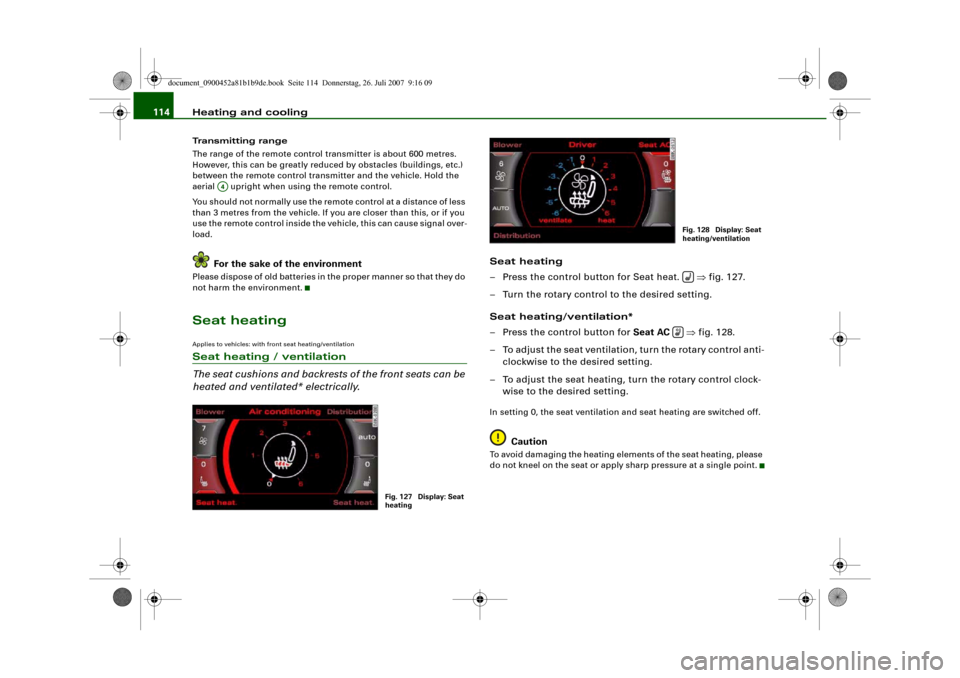
Seat heating
– Press the control button for Seat heat. ⇒fig. 127.
– Turn the rotary control to the desired setting.
Seat heating/ventilation*
– Press the control button for Seat AC ⇒fig. 128.
– To adjust the seat ventilation, turn the rotary control anti-
clockwise to the desired setting.
– To adjust the seat heating, turn the rotary control clock-
wise to the desired setting.In setting 0, the seat ventilation and seat heating are switched off.
Caution
To avoid damaging the heating elements of the seat heating, please
do not kneel on the seat or apply sharp pressure at a single point.
A4
Fig. 127 Display: Seat
heating
Fig. 128 Display: Seat
heating/ventilation
document_0900452a81b1b9de.book Seite 114 Donnerstag, 26. Juli 2007 9:16 09
Page 119 of 342
Driving117
Controls
Safety
Driving tips
General maintenance
Self-help
Technical data If you press in the key without pressing the clutch or brake pedal,
the ignition will be switched on or off. The steering lock is released
when the ignition is switched on. Diesel engines continue to be
automatically preheated.
The key can be removed only when the ignition is off. The key has to
be pressed in briefly to switch off the ignition. On vehicles with an
automatic gearbox, the selector lever has to be in position P.
Electrical components with a high power consumption are switched
off temporarily while you start the engine.
When starting from cold the engine may be a little noisy for the first
few seconds until oil pressure has built up in the hydraulic tappets.
This is quite normal and no cause for concern.
If the engine fails to start immediately, the starter will be switched
off automatically after a few seconds. Try to start the engine again.
Driver message in the instrument cluster display
Press brake pedal to start engine
This message appears on vehicles with an automatic gearbox if you
try to start the engine without first pressing the brake pedal.
Press clutch pedal to start engine
This message appears on vehicles with a manual gearbox if you try
to start the engine without first pressing the clutch pedal.
Engage N or P to start engine
This message will appear if you try to start the engine when the
selector lever of the automatic gearbox is not in P or N.
Shift to P, otherwise vehicle can roll away. Doors do not lock if lever
is not in P. or Please move selector lever to position P. Vehicle
cannot be locked.
For safety reasons, this message will appear and a warning buzzer
will sound if the selector lever of the automatic gearbox is not in
position P after you switch off the ignition. Put the selector lever in
position P; otherwise the vehicle can roll away. If the lever is not in position P you will not be able to lock the vehicle using the exterior
locking switch on the door handle or the remote control key.
Steering lock
The steering is locked when the key is not in the ignition. The
steering lock acts as a theft deterrent.
WARNING
•
Always take the key with you when you leave the vehicle.
Otherwise the engine can be started or power-operated equip-
ment such as the electric windows can be used. This could result
in serious injury.
•
Never leave children or disabled people alone in the car. The
doors could be locked with the remote control key and the occu-
pants could become trapped in the vehicle. The vehicle occupants
could be exposed to extremely high or low temperatures,
depending on the time of year.
•
Never remove the key from the ignition while the vehicle is
moving. The steering lock could engage suddenly, and you would
not be able to steer the car.Caution
•
If a malfunction occurs in the electronic ignition lock, a flashing
symbol and the message Ignition lock defective will appear in the
instrument cluster display.
•
Avoid high engine speeds, full throttle and extreme load condi-
tions until the engine has reached its normal operating tempera-
ture, otherwise this can damage the engine.For the sake of the environment
Do not warm up the engine by running it with the car stationary. You
should drive off immediately whenever possible. This will help avoid
unnecessary exhaust emissions.
document_0900452a81b1b9de.book Seite 117 Donnerstag, 26. Juli 2007 9:16 09
Page 137 of 342
adaptive cruise control (ACC)135
Controls
Safety
Driving tips
General maintenance
Self-help
Technical data Target speed
The target speed set by the driver is indicated by a red diode in the
speedometer.
If the speed setting is between two graduations on the speedom-
eter dial, the two closest diodes will both light up ⇒fig. 143.
It is only possible to set target speeds ranging from 30 to 200 km/h.
This speed range is illuminated slightly by the diodes on the speed-
ometer dial.
Indicator lamp (symbol)
•
No vehicle in front: The green indicator lamp ⇒page 134,
fig. 144 shows that the adaptive cruise control system is in cruise
mode and that there is no vehicle in front. It maintains the stored
target speed.
•
Vehicle in front: The green indicator lamp shows that the
system has detected a vehicle in front. The speed is adapted to the
vehicle in front. The adaptive cruise control system accelerates and
brakes the vehicle automatically.
•
Driver intervention prompt: When the red indicator lamp
flashes , this is a warning for the driver to intervene. The driver
has to brake the vehicle with the foot brake. This warning lamp will
always appear when the adaptive cruise control system alone is not
able to brake the vehicle sufficiently to maintain a safe distance to
a vehicle in front. An audible alarm (warning tone) will also sound
when the lamp starts to flash. For further information on the driver
intervention prompt ⇒page 138.Note
•
If you exceed the target speed by using the accelerator, the
driver intervention prompt will not be accompanied by a warning
tone. The indicator lamp shown in the speedometer will also switch
off if the target speed is exceeded.
•
You can change the volume of the warning tone on the sound
system or MMI* ⇒page 139, “Setting the warning tone volume and
driving program”.
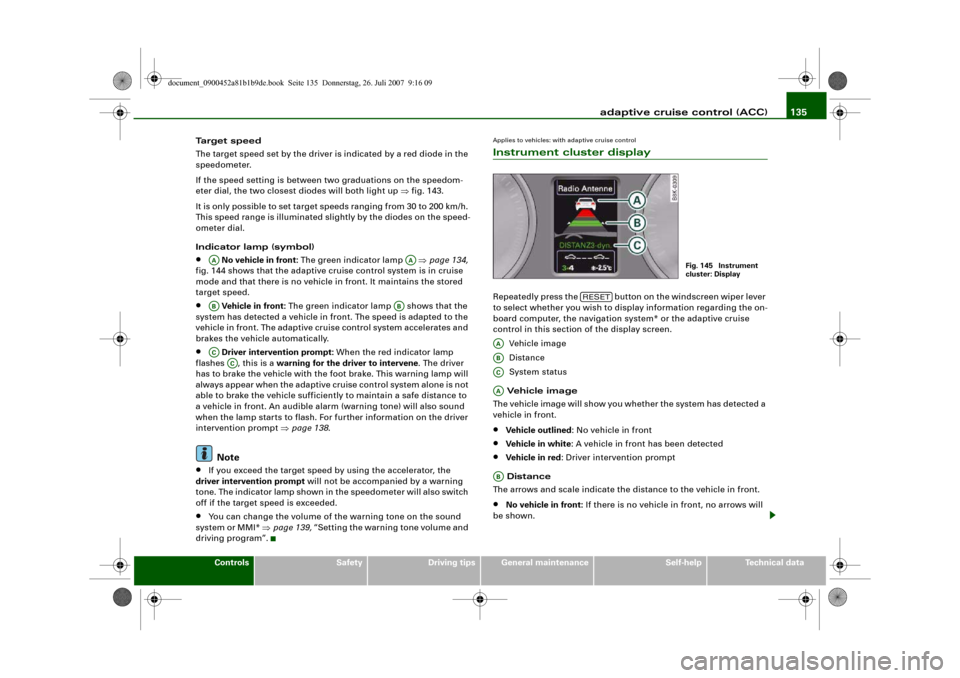
Applies to vehicles: with adaptive cruise controlInstrument cluster displayRepeatedly press the button on the windscreen wiper lever
to select whether you wish to display information regarding the on-
board computer, the navigation system* or the adaptive cruise
control in this section of the display screen.
Vehicle image
Distance
System status
Vehicle image
The vehicle image will show you whether the system has detected a
vehicle in front.•
Vehicle outlined: No vehicle in front
•
Vehicle in white: A vehicle in front has been detected
•
Vehicle in red: Driver intervention prompt
Distance
The arrows and scale indicate the distance to the vehicle in front.
•
No vehicle in front: If there is no vehicle in front, no arrows will
be shown.
AA
AA
AB
AB
AC
AC
Fig. 145 Instrument
cluster: Display
RESET
AAABACAAAB
document_0900452a81b1b9de.book Seite 135 Donnerstag, 26. Juli 2007 9:16 09
Page 175 of 342
Parking aid173
Controls
Safety
Driving tips
General maintenance
Self-help
Technical data
•
Moisten the lens using a commercially available, alcohol-based
glass cleaning agent and clean the lens with a dry cloth ⇒.
•
Use a small brush to remove snow and a de-icer spray to remove
ice ⇒.
WARNING
•
The parking aid cannot replace the full concentration of the
driver. The driver is always responsible for safety during parking
and other manoeuvres.
•
Always keep a close watch on the area around the vehicle and
make full use of the rear-view mirrors.
•
Do not allow the camera images in the MMI display to distract
you from watching the traffic.
•
For safety reasons, you should not use the system if the posi-
tion and installation angle of the camera have been changed, e.g.
in a rear-end collision. Have it checked by a qualified workshop.Caution
•
Please note that low obstacles detected by the system may no
longer be registered by the sensors as the car moves closer, so the
system will not give any further warning. Certain kinds of obstacles
(such as wire fences, chains, thin painted posts or trailer draw bars,
etc.) may not always be detected by the system, so take care not to
damage the vehicle in such cases.
•
Never remove snow and ice from the lens of the reversing
camera using warm or hot water - danger of cracks appearing on the
lens.
•
Never use abrasive cleaning agents on the lens.
Applies to vehicles: with Audi parking system advancedSwitching on/off
The reversing camera is automatically switched on
together with the acoustic signals and graphic display
when you select reverse gear.Switching on
– Switch on the MMI system.
– Engage reverse gear, or
– Press the switch
in the centre console ⇒page 170,
fig. 185. You will hear a brief acknowledgement tone and
the diode in the switch will light up.
Switching off
– Drive forwards faster than 10 km/h, or
– Press the switch
, or
– Switch off the ignition.
Changing display via MMI
– Press the control button for Graphic ⇒page 174, fig. 192
to show the graphic display on the screen.
– Press the control button for Rear View to display the
picture from the reversing camera.
WARNING
•
Some objects (e.g. narrow posts or bars), recesses in the
ground or protruding parts on other vehicles may not be displayed
in a satisfactory manner or may not be displayed at all on the MMI
screen.A5
document_0900452a81b1b9de.book Seite 173 Donnerstag, 26. Juli 2007 9:16 09