belt AUDI A4 2008 B8 / 4.G User Guide
[x] Cancel search | Manufacturer: AUDI, Model Year: 2008, Model line: A4, Model: AUDI A4 2008 B8 / 4.GPages: 342, PDF Size: 13.14 MB
Page 84 of 342
Seats and storage 82
CautionWhen returning the backrest to an upright position, make sure that
the seat belts for the outer rear seats are in their guides so that they
cannot be caught up and damaged in the catches for the backrest.Storage shelf
The storage shelf behind the rear backrest should only be
used to store light articles of clothing.
WARNING
Do not store any heavy or hard objects on the storage shelf. They
could cause injury if the brakes are applied suddenly.
Caution
Please note that hard objects could chafe against the wires of the
heating element in the rear window and cause damage.
Note
Make sure that the slots between the rear window and the storage
shelf are kept clear to ensure unimpaired ventilation.
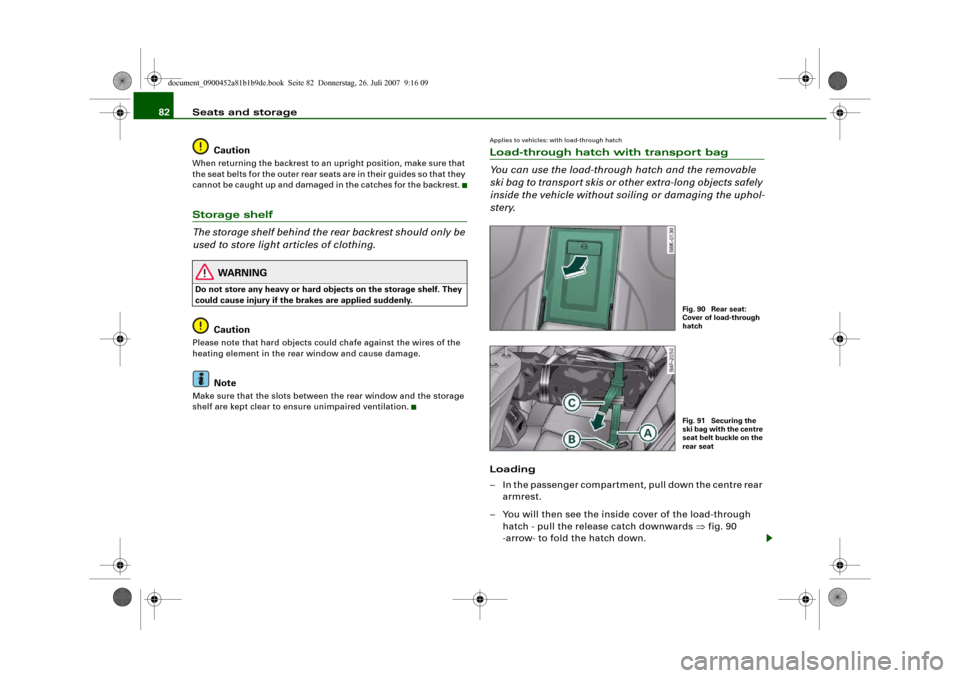
Applies to vehicles: with load-through hatchLoad-through hatch with transport bag
You can use the load-through hatch and the removable
ski bag to transport skis or other extra-long objects safely
inside the vehicle without soiling or damaging the uphol-
stery.Loading
– In the passenger compartment, pull down the centre rear
armrest.
– You will then see the inside cover of the load-through
hatch - pull the release catch downwards ⇒fig. 90
-arrow- to fold the hatch down.
Fig. 90 Rear seat:
Cover of load-through
hatchFig. 91 Securing the
ski bag with the centre
seat belt buckle on the
rear seat
document_0900452a81b1b9de.book Seite 82 Donnerstag, 26. Juli 2007 9:16 09
Page 85 of 342
Seats and storage83
Controls
Safety
Driving tips
General maintenance
Self-help
Technical data
– Open the boot lid.
– Open out the ski bag and fill it with the items you wish to
transport.
– Push the ski bag from the luggage compartment into the
passenger compartment through the opening in the
backrest ⇒.
Securing
– Insert the fastening belt ⇒page 82, fig. 91 of the ski
bag into the centre seat belt buckle .
– Pull the free end of belt to tighten.
Storage
– Pull the ski bag towards the rear through the opening in
the backrest.
– Close the cover of the load-through hatch in the
passenger compartment.
–Fold up the ski bag.
WARNING
The ski bag must be secured in place with the fastening belt after
it has been loaded.
Note
Allow the ski bag to dry before folding it up.
Roof carrierApplies to vehicles: with roof carrier: Under development at the time of printDescription
Additional loads can be transported using the roof carrier.Note the following points if you intend to carry loads on the roof:•
The rain channels are moulded into the roof as part of the aero-
dynamic roof design. It is therefore not possible to mount conven-
tional roof luggage racks. We recommend using the carrier units
from the range of Audi Genuine accessories.
•
These carrier units form the basic elements of a complete roof
carrier system. Special fixtures must then be added in order to
safely transport luggage, bicycles, skis, surf boards or boats on the
roof. All the elements of this system are available from Audi dealers.Caution
Any damage to the vehicle caused by the use of other types of roof
rack or incorrect installation will not be covered by the factory
warranty. The roof carrier system must therefore be installed exactly
according to the instructions provided.
AA
AB
AC
document_0900452a81b1b9de.book Seite 83 Donnerstag, 26. Juli 2007 9:16 09
Page 125 of 342
Driving123
Controls
Safety
Driving tips
General maintenance
Self-help
Technical data braking force of the parking brake is only released when there is
enough power at the wheels to make the vehicle move in the desired
direction.
Note
For safety reasons the parking brake will only release automatically
if the driver's seat belt is engaged in its buckle.Driving away when towing a trailer
Please note the following points to prevent the vehicle
from rolling back unintentionally on a gradient.– Pull and hold the parking brake switch and press the
accelerator. The parking brake will remain engaged and
prevent any tendency to roll back down the slope.
– You can release the parking brake switch as soon as the
engine is delivering enough power to the wheels.Depending on the weight of the vehicle and trailer and the steep-
ness of the slope, there may be a tendency to roll back downhill
when driving away from a standstill. You can prevent this by pulling
out the parking brake switch as you press the accelerator (in the
same way as with a conventional handbrake).Emergency braking function
This feature enables you to stop the vehicle if the main
brake system should fail or if the pedal is obstructed.– Pull out and hold the parking brake switch to stop the
vehicle with the parking brake in an emergency.
– The brakes will be released immediately if you release the
switch or press down the accelerator.
If you pull out and hold the parking brake switch at a road speed
above about 8 km/h, this will initiate an emergency brake applica-
tion. The brakes are then applied hydraulically at all four wheels.
The effect is the same as an emergency stop (full brake application)
⇒
To prevent the emergency braking function from being used acci-
dentally, a warning buzzer sounds when the switch is operated. The
brakes are released immediately when you release the switch or
press down the accelerator.
WARNING
You should only use the emergency braking function in a real
emergency, for example if the brake system should fail or if the
brake pedal is obstructed. If you use the emergency braking func-
tion by activating the parking brake switch, the effect is similar to
a full brake application (emergency stop). Please remember that
the ESP (with its combined ABS, EDL and traction control func-
tions) is still subject to certain physical limits. In a corner or in bad
road or weather conditions an emergency stop can cause the
vehicle to skid or lose steering control.Driver messages in the instrument cluster displayCaution: Vehicle parked too steep
This message can appear when you apply the parking brake if the
car is parked on a gradient steeper than about 30%.
In this case the parking brake may not be strong enough to prevent
the vehicle from rolling back accidentally.
Please release parking brake
However, please remember that, for safety reasons, the parking
brake will only release automatically if the driver's seat belt is
buckled.
document_0900452a81b1b9de.book Seite 123 Donnerstag, 26. Juli 2007 9:16 09
Page 126 of 342
Driving 124Press brake pedal to release parking brake
This message may appear when you press the switch to release the
parking brake. The parking brake can only be released, if you
depress the brake pedal and simultaneously press the switch or if
you use the parking brake auto release function ⇒page 122. Parking brake malfunction !
This message will appear together with the yellow symbol
if a
malfunction should occur in the parking brake.
Fault in parking brake auto release
This driver message will appear in the event of a malfunction of the
parking brake auto release. The automatic release of the parking
brake when moving off from a standstill is not functioning correctly.
The parking brake must be released manually by pressing the
switch. Have the fault rectified by a qualified workshop.
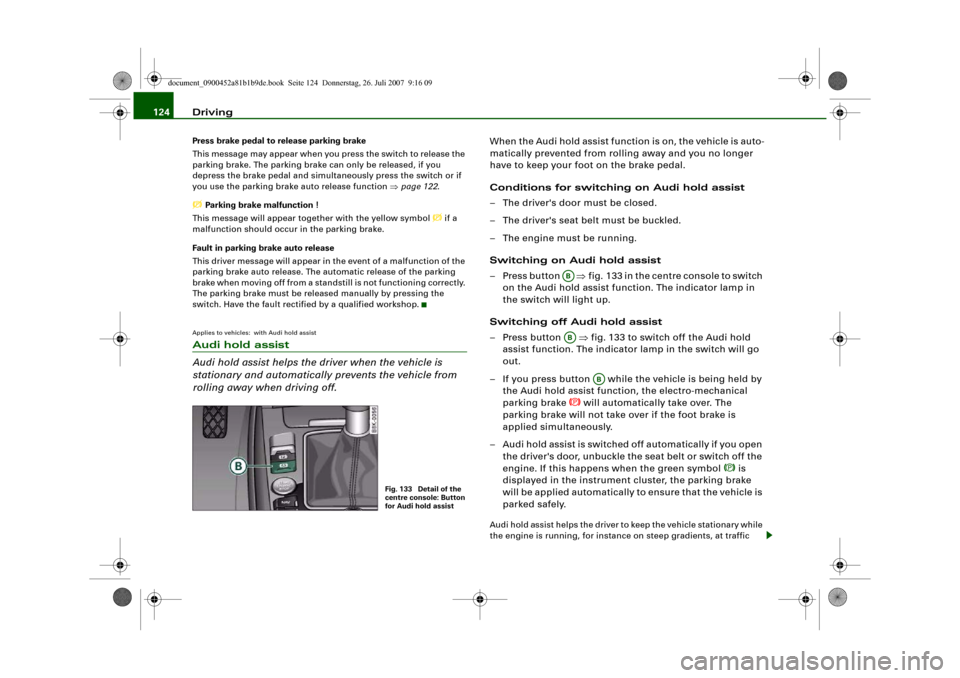
Applies to vehicles: with Audi hold assistAudi hold assist
Audi hold assist helps the driver when the vehicle is
stationary and automatically prevents the vehicle from
rolling away when driving off.
When the Audi hold assist function is on, the vehicle is auto-
matically prevented from rolling away and you no longer
have to keep your foot on the brake pedal.
Conditions for switching on Audi hold assist
– The driver's door must be closed.
– The driver's seat belt must be buckled.
– The engine must be running.
Switching on Audi hold assist
– Press button ⇒fig. 133 in the centre console to switch
on the Audi hold assist function. The indicator lamp in
the switch will light up.
Switching off Audi hold assist
– Press button ⇒fig. 133 to switch off the Audi hold
assist function. The indicator lamp in the switch will go
out.
– If you press button while the vehicle is being held by
the Audi hold assist function, the electro-mechanical
parking brake
will automatically take over. The
parking brake will not take over if the foot brake is
applied simultaneously.
– Audi hold assist is switched off automatically if you open
the driver's door, unbuckle the seat belt or switch off the
engine. If this happens when the green symbol
is
displayed in the instrument cluster, the parking brake
will be applied automatically to ensure that the vehicle is
parked safely.
Audi hold assist helps the driver to keep the vehicle stationary while
the engine is running, for instance on steep gradients, at traffic
Fig. 133 Detail of the
centre console: Button
for Audi hold assist
ABAB
AB
document_0900452a81b1b9de.book Seite 124 Donnerstag, 26. Juli 2007 9:16 09
Page 127 of 342
Driving125
Controls
Safety
Driving tips
General maintenance
Self-help
Technical data lights or in stop-and-go traffic. When the Audi hold assist function
is on, you don't have to keep your foot on the brake to prevent the
vehicle from accidentally rolling away. Once it detects that the
vehicle is stopped, Audi hold assist keeps the vehicle stationary. The
green symbol
in the instrument cluster indicates that the func-
tion is activated. You can now take your foot off the brake pedal.
As soon as you drive off in the normal way, the parking brake will
automatically be released and the vehicle will start moving.
If the conditions for Audi hold assist change and the function is
switched off as a result, the parking brake will be applied automati-
cally to ensure that the vehicle is parked safely. The diode in the
button will go out when the Audi hold assist function is switched
off.
WARNING
The intelligent technology in Audi hold assist cannot defy the laws
of physics. Do not let the extra convenience provided by Audi hold
assist tempt you into taking a safety risk.•
Audi hold assist cannot keep the vehicle stationary in all condi-
tions on a gradient (e.g. if the road is slippery or icy).
•
Audi hold assist must be switched on again each time the
engine is started – Risk of accident!
•
Never get out of the vehicle when the engine is running and
Audi hold assist is switched on – Risk of accident!
•
Always ensure that the vehicle is stopped properly and safely
to avoid injury to yourself and others.Caution
Switch off the Audi hold assist function before driving the vehicle
into a car wash.
Note
•
Audi hold assist can be switched on only when the driver's door
is closed, the driver's seat belt is buckled and the engine is running.
•
Audi hold assist prevents automatic vehicles from creeping
forwards when the brake pedal is released with the car in gear.
•
When the vehicle has been stationary for an extended period,
Audi hold assist will automatically apply the parking brake. In this
case, the green symbol
in the instrument cluster display will
change to red
.
Cruise control systemApplies to vehicles: with cruise control systemSwitching on
The cruise control system allows you to drive at a
constant speed of 30 km/h or higher.
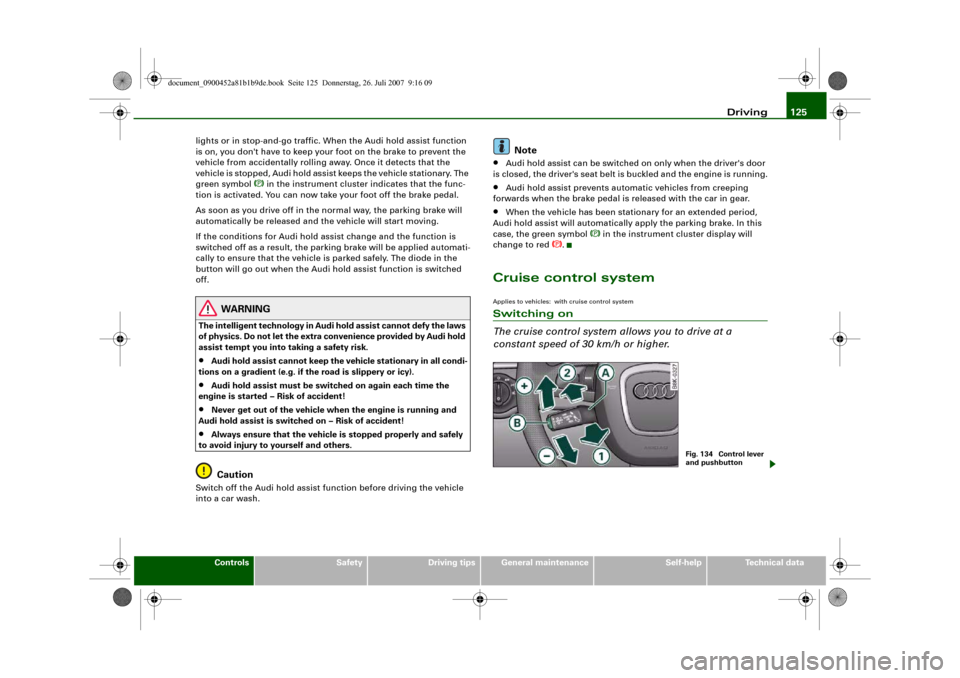
Fig. 134 Control lever
and pushbutton
document_0900452a81b1b9de.book Seite 125 Donnerstag, 26. Juli 2007 9:16 09
Page 188 of 342
Safe driving 186Safe drivingGeneral notesSafety is the first priority
Your safety is our first priority.This chapter contains important information, tips, sugges-
tions and warnings that you should read and observe for
your own safety and the safety of your passengers.
WARNING
•
The information in this chapter is important for the driver of
the vehicle and all passengers. The other chapters in this manual
(and, where applicable, in the other literature supplied with the
vehicle) contain further important notes which you should read
and observe for your own safety and that of your passengers.
•
Ensure that the complete vehicle wallet is always in the vehicle.
This is especially important when you lend or sell the vehicle to
others.
Safety features
The safety features listed here are part of the vehicle's
occupant restraint system. They work together to help
reduce the risk of injury in a wide variety of accident situ-
ations.Your safety and the safety of your passengers should not be left to
chance. In the event of an accident, the safety features incorporated
in your vehicle are capable of reducing the risk of injury. These are
just a few of the safety features in your Audi:•
Optimised three-point seat belts for all seats,
•
Belt force limiters for the front seats,
•
Belt pre-tensioners for the front seats,
•
Head restraints for all seats,
•
Optimised protection against injuries of the cervical vertebrae,
•
Front airbags,
•
Side airbags in the front seat backrests and on the outer rear
seats*,
•
Head-protection airbags (sideguard system),
•
“ISOFIX” mountings* for “ISOFIX” child safety seats on the rear
seats,
•
Height-adjustable head restraints on the seats,
•
Adjustable steering column.
These individual safety features are harmonised to provide you and
your passengers with the best possible protection in accident situ-
ations. However, they can only be effective if you and your passen-
gers sit in the correct position and adjust and use the safety equip-
ment properly.
For these reasons, this chapter explains why these safety features
are so important, how they can protect you, what you need to
remember when using them, and how you and your passengers can
gain the most benefit from them. There are also a number of impor-
tant safety warnings which you and your passengers should always
observe in order to minimise the risk of injury.
Safety is everyone's responsibility!
document_0900452a81b1b9de.book Seite 186 Donnerstag, 26. Juli 2007 9:16 09
Page 189 of 342
Safe driving187
Controls
Safety
Driving tips
General maintenance
Self-help
Technical data
Before every trip
The driver is responsible for the safety of the passengers
and the safe operation of the vehicle at all times.For your own safety and the safety of your passengers,
always note the following points before every trip:
– Make sure that all lights and turn signals are working
properly.
– Check the tyre pressures.
– Make sure that all windows are clean and give good visi-
bility to the outside.
– Secure all luggage and other items carefully ⇒page 79.
– Make sure that no objects can interfere with the pedals.
– Adjust the front seat, head restraint and mirrors
correctly.
– Make sure that the head restraints for all passengers are
adjusted to the correct position.
– Make sure that children are protected with suitable
safety seats and properly worn seat belts ⇒page 210.
– Sit in the correct position in your seat and make sure that
your passengers do the same. ⇒page 73.
– Fasten your seat belt correctly. Make sure that your
passengers do the same ⇒page 194.
What affects driving safety?
Safety on the road is directly related to how you drive, and
can also be affected by the passengers in the vehicle.The driver is responsible for the safety of the vehicle and all
its occupants. If your ability to drive is impaired in any way,
you endanger yourself and other road users ⇒. There-
fore:
– Do not let yourself be distracted by passengers or by
using a mobile phone, etc.
– Never drive when your driving ability is impaired (by
medication, alcohol, drugs, etc.).
– Obey all traffic regulations and speed limits and always
maintain a safe distance to the vehicle in front.
– Always adjust your speed to suit the road, traffic and
weather conditions.
– Take frequent breaks on long trips. Do not drive for more
than two hours without a stop.
– If possible, avoid driving when you are tired or stressed.
WARNING
•
Distractions while driving or any kind of impairment to your
driving ability increase the risk of accident and injury.
•
Do not store loose objects on the dashboard. These objects
could fly around the interior when the vehicle is moving (under
acceleration or whilst cornering) and distract the driver – this
could lead to an accident.
document_0900452a81b1b9de.book Seite 187 Donnerstag, 26. Juli 2007 9:16 09
Page 190 of 342
Safe driving 188Correct sitting positionsCorrect sitting position for driver
The correct driving position is important for safe and
fatigue-free driving.For your own safety, and to reduce the risk of injury in the
event of an accident, we recommend the following driving
position.
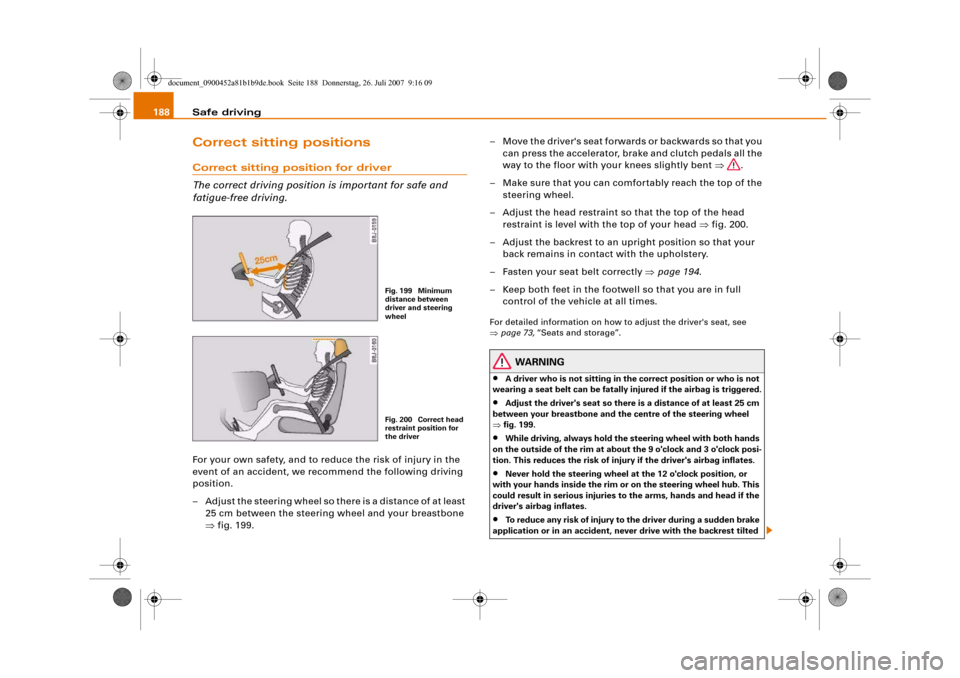
– Adjust the steering wheel so there is a distance of at least
25 cm between the steering wheel and your breastbone
⇒fig. 199.– Move the driver's seat forwards or backwards so that you
can press the accelerator, brake and clutch pedals all the
way to the floor with your knees slightly bent ⇒.
– Make sure that you can comfortably reach the top of the
steering wheel.
– Adjust the head restraint so that the top of the head
restraint is level with the top of your head ⇒fig. 200.
– Adjust the backrest to an upright position so that your
back remains in contact with the upholstery.
– Fasten your seat belt correctly ⇒page 194.
– Keep both feet in the footwell so that you are in full
control of the vehicle at all times.
For detailed information on how to adjust the driver's seat, see
⇒page 73, “Seats and storage”.
WARNING
•
A driver who is not sitting in the correct position or who is not
wearing a seat belt can be fatally injured if the airbag is triggered.
•
Adjust the driver's seat so there is a distance of at least 25 cm
between your breastbone and the centre of the steering wheel
⇒fig. 199.
•
While driving, always hold the steering wheel with both hands
on the outside of the rim at about the 9 o'clock and 3 o'clock posi-
tion. This reduces the risk of injury if the driver's airbag inflates.
•
Never hold the steering wheel at the 12 o'clock position, or
with your hands inside the rim or on the steering wheel hub. This
could result in serious injuries to the arms, hands and head if the
driver's airbag inflates.
•
To reduce any risk of injury to the driver during a sudden brake
application or in an accident, never drive with the backrest tilted
Fig. 199 Minimum
distance between
driver and steering
wheelFig. 200 Correct head
restraint position for
the driver
document_0900452a81b1b9de.book Seite 188 Donnerstag, 26. Juli 2007 9:16 09
Page 191 of 342
Safe driving189
Controls
Safety
Driving tips
General maintenance
Self-help
Technical data too far back. The airbag system and seat belts can only provide
proper protection when the backrest is in an upright position and
the driver is wearing the seat belt in the correct position. The
further the backrest is tilted back, the greater the risk of injury due
to incorrect positioning of the belt webbing or an incorrect sitting
position.
•
Adjust the head restraint properly so that it can give maximum
protection.
Correct sitting position for front passenger
The front seat passenger must sit at least 25 cm away
from the dash panel so that the airbag has enough room
to inflate and give maximum protection in an accident.For your own safety and to reduce the risk of injury in the
event of an accident, we recommend adjusting the front
passenger's seat as follows:
– Move the front passenger's seat as far back as possible
⇒.
– Adjust the backrest to an upright position so that your
back remains in contact with the upholstery.
– Adjust the head restraint so that the top of the head
restraint is level with the top of your head ⇒page 190.
– Keep both feet in the footwell in front of the seat.
– Fasten your seat belt correctly ⇒page 197.In exceptional cases you can disable the front passenger's airbag
via the key-operated switch* ⇒page 208.
For detailed information on how to adjust the front passenger's
seat, see ⇒page 73, “Seats and storage”.
WARNING
A passenger who is not sitting in the correct position or who is not
wearing a seat belt can be fatally injured if the airbag is triggered.•
Adjust the front passenger's seat so there is a distance of at
least 25 cm between your breastbone and the dash panel.
•
Always keep your feet on the floor when the vehicle is moving;
never rest them on the instrument panel, out of the window or on
the seat. If you sit in an incorrect position, you increase your risk
of injury in the event of sudden braking or an accident. If the airbag
is triggered, you could sustain potentially fatal injuries by sitting
out of position.
•
To reduce the risk of injury to the front passenger in the case of
sudden braking or an accident, the passenger should never travel
in a moving vehicle with the backrest reclined. The airbag system
and seat belt can only provide proper protection when the back-
rest is in an upright position and the passenger is wearing the seat
belt in the correct position. The further the backrest is tilted back,
the greater the risk of injury due to incorrect positioning of the belt
webbing or an incorrect sitting position.
•
Always adjust the head restraints properly for maximum
protection.
Correct sitting position for passengers in the rear
Rear seat passengers should sit upright with both feet on
the floor and wear their seat belts properly whenever the
vehicle is moving.To reduce any risk of injury in the event of sudden braking
or an accident, passengers in the rear seats must observe
the following:
WARNING (continued)
document_0900452a81b1b9de.book Seite 189 Donnerstag, 26. Juli 2007 9:16 09
Page 192 of 342
Safe driving 190
– Adjust the head restraint so that the top of the head
restraint is level with the top of your head ⇒page 190.
– Keep both feet in the footwell in front of the rear seat.
– Fasten your seat belt correctly ⇒page 197.
– Use appropriate child restraint systems for children trav-
elling in the vehicle ⇒page 210.
WARNING
Rear passengers sitting out of position can suffer severe injuries.•
Always adjust the head restraints properly for maximum
protection.
•
Seat belts only offer maximum protection when the backrest is
in an upright position and the passengers are wearing the seat
belts properly. By not sitting upright, rear passengers increase the
risk of injury due to incorrect positioning of the seat belt
webbing.
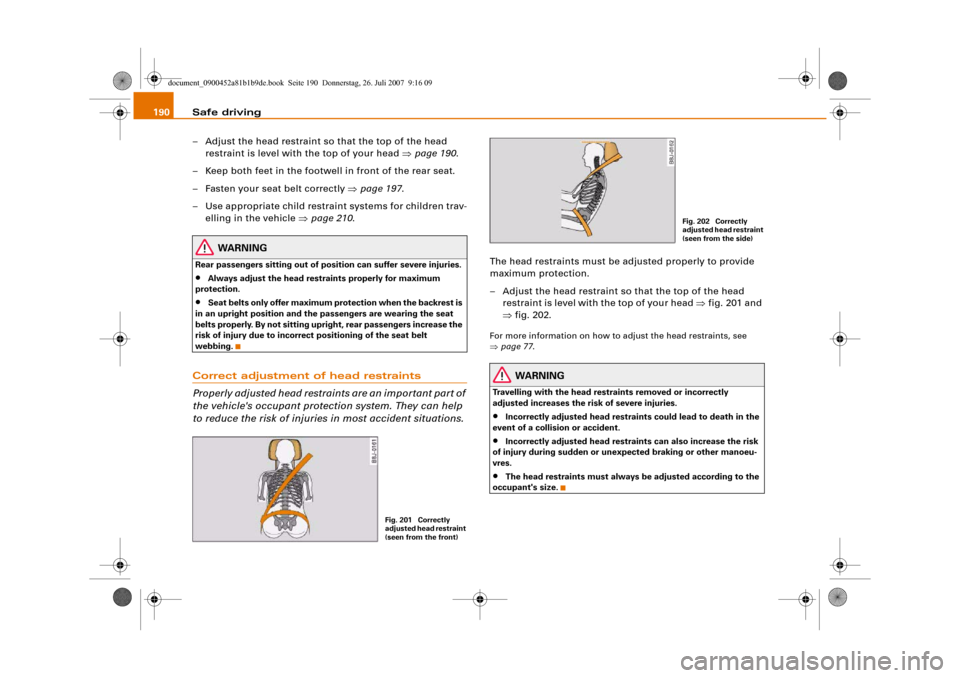
Correct adjustment of head restraints
Properly adjusted head restraints are an important part of
the vehicle's occupant protection system. They can help
to reduce the risk of injuries in most accident situations.
The head restraints must be adjusted properly to provide
maximum protection.
– Adjust the head restraint so that the top of the head
restraint is level with the top of your head ⇒fig. 201 and
⇒fig. 202.For more information on how to adjust the head restraints, see
⇒page 77.
WARNING
Travelling with the head restraints removed or incorrectly
adjusted increases the risk of severe injuries.•
Incorrectly adjusted head restraints could lead to death in the
event of a collision or accident.
•
Incorrectly adjusted head restraints can also increase the risk
of injury during sudden or unexpected braking or other manoeu-
vres.
•
The head restraints must always be adjusted according to the
occupant's size.
Fig. 201 Correctly
adjusted head restraint
(seen from the front)
Fig. 202 Correctly
adjusted head restraint
(seen from the side)
document_0900452a81b1b9de.book Seite 190 Donnerstag, 26. Juli 2007 9:16 09