brake AUDI A4 2008 B8 / 4.G Owner's Manual
[x] Cancel search | Manufacturer: AUDI, Model Year: 2008, Model line: A4, Model: AUDI A4 2008 B8 / 4.GPages: 342, PDF Size: 13.14 MB
Page 123 of 342
Driving121
Controls
Safety
Driving tips
General maintenance
Self-help
Technical data start running again after some time if the coolant temperature rises
due to a build-up of heat, or if the engine is hot and the engine
compartment is heated up further by direct sunlight.
Electro-mechanical parking brakeOperation
The electro-mechanical parking brake replaces the hand-
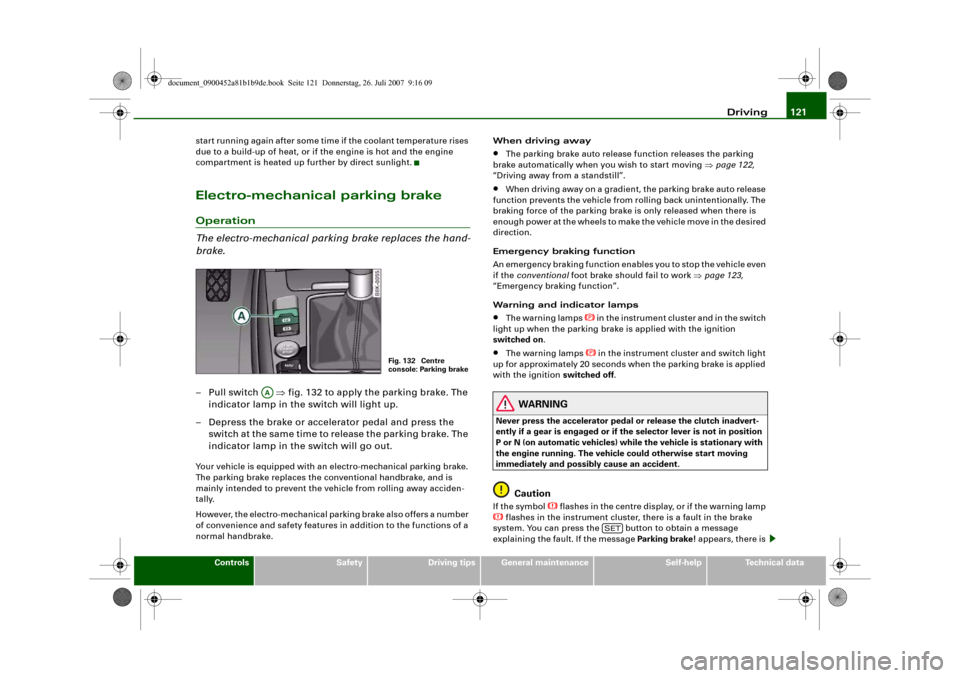
brake.– Pull switch ⇒fig. 132 to apply the parking brake. The
indicator lamp in the switch will light up.
– Depress the brake or accelerator pedal and press the
switch at the same time to release the parking brake. The
indicator lamp in the switch will go out.Your vehicle is equipped with an electro-mechanical parking brake.
The parking brake replaces the conventional handbrake, and is
mainly intended to prevent the vehicle from rolling away acciden-
tally.
However, the electro-mechanical parking brake also offers a number
of convenience and safety features in addition to the functions of a
normal handbrake.When driving away
•
The parking brake auto release function releases the parking
brake automatically when you wish to start moving ⇒page 122,
“Driving away from a standstill”.
•
When driving away on a gradient, the parking brake auto release
function prevents the vehicle from rolling back unintentionally. The
braking force of the parking brake is only released when there is
enough power at the wheels to make the vehicle move in the desired
direction.
Emergency braking function
An emergency braking function enables you to stop the vehicle even
if the conventional foot brake should fail to work ⇒page 123,
“Emergency braking function”.
Warning and indicator lamps
•
The warning lamps
in the instrument cluster and in the switch
light up when the parking brake is applied with the ignition
switched on.
•
The warning lamps
in the instrument cluster and switch light
up for approximately 20 seconds when the parking brake is applied
with the ignition switched off.
WARNING
Never press the accelerator pedal or release the clutch inadvert-
ently if a gear is engaged or if the selector lever is not in position
P or N (on automatic vehicles) while the vehicle is stationary with
the engine running. The vehicle could otherwise start moving
immediately and possibly cause an accident.
Caution
If the symbol
flashes in the centre display, or if the warning lamp
flashes in the instrument cluster, there is a fault in the brake
system. You can press the button to obtain a message
explaining the fault. If the message Parking brake ! appears, there is
Fig. 132 Centre
console: Parking brake
AA
SET
document_0900452a81b1b9de.book Seite 121 Donnerstag, 26. Juli 2007 9:16 09
Page 124 of 342
Driving 122a fault in the parking brake. Have the fault repaired by a qualified
workshop without delay ⇒page 32.
Note
•
The parking brake can be applied at any time - even when the
ignition is switched off. However, the ignition must be switched on
before the parking brake can be released.
•
Any slight noise which may be heard when the parking brake is
applied or released is quite normal and no cause for concern.
•
The parking brake runs an automatic test cycle at regular inter-
vals when the vehicle is parked. This may also cause a slight noise,
which is normal.
Parking
Please note the following points to ensure there is no risk
of the car rolling away accidentally after it is parked.Parking t he c ar
– Use the foot brake to stop the vehicle.
– Pull the switch to apply the parking brake.
– Automatic gearbox: Move the selector lever to P.
– Switch off the engine ⇒.
– Manual gearbox: Engage the first gear.
When parking on slopes
– Turn the steering wheel so that the vehicle would roll into
the kerb if it did start to move accidentally.
WARNING
•
Always take the key with you when leaving the vehicle – even
if you only intend to be gone for a short time. This is especially
important if children are left in the car. They might otherwise be
able to start the engine, release the parking brake or use power-
operated equipment such as the electric windows - this could lead
to injuries.
•
Do not leave anyone (especially children) in the vehicle when it
is locked. Locked doors could delay assistance in an emergency,
potentially putting lives at risk.
Driving away from a standstill
The parking brake auto release function releases the
parking brake automatically when you wish to start
moving.Applying the parking brake when stopping
– Pull the switch to apply the parking brake.
Releasing the parking brake when driving away
– Drive off in the normal way: the parking brake will be
released automatically and the vehicle will start moving.On vehicles with automatic gearbox, you can apply the parking
brake when stopping at traffic lights, etc. Then you do not have to
hold the car with the footbrake, as the parking brake will stop it
creeping forward while a gear is engaged in the automatic transmis-
sion. When you drive off in the normal way, the parking brake will be
released automatically and the vehicle will start moving.
Driving away on a slope
When driving away on a gradient, the parking brake auto release
function prevents the vehicle from rolling back unintentionally. The
document_0900452a81b1b9de.book Seite 122 Donnerstag, 26. Juli 2007 9:16 09
Page 125 of 342
Driving123
Controls
Safety
Driving tips
General maintenance
Self-help
Technical data braking force of the parking brake is only released when there is
enough power at the wheels to make the vehicle move in the desired
direction.
Note
For safety reasons the parking brake will only release automatically
if the driver's seat belt is engaged in its buckle.Driving away when towing a trailer
Please note the following points to prevent the vehicle
from rolling back unintentionally on a gradient.– Pull and hold the parking brake switch and press the
accelerator. The parking brake will remain engaged and
prevent any tendency to roll back down the slope.
– You can release the parking brake switch as soon as the
engine is delivering enough power to the wheels.Depending on the weight of the vehicle and trailer and the steep-
ness of the slope, there may be a tendency to roll back downhill
when driving away from a standstill. You can prevent this by pulling
out the parking brake switch as you press the accelerator (in the
same way as with a conventional handbrake).Emergency braking function
This feature enables you to stop the vehicle if the main
brake system should fail or if the pedal is obstructed.– Pull out and hold the parking brake switch to stop the
vehicle with the parking brake in an emergency.
– The brakes will be released immediately if you release the
switch or press down the accelerator.
If you pull out and hold the parking brake switch at a road speed
above about 8 km/h, this will initiate an emergency brake applica-
tion. The brakes are then applied hydraulically at all four wheels.
The effect is the same as an emergency stop (full brake application)
⇒
To prevent the emergency braking function from being used acci-
dentally, a warning buzzer sounds when the switch is operated. The
brakes are released immediately when you release the switch or
press down the accelerator.
WARNING
You should only use the emergency braking function in a real
emergency, for example if the brake system should fail or if the
brake pedal is obstructed. If you use the emergency braking func-
tion by activating the parking brake switch, the effect is similar to
a full brake application (emergency stop). Please remember that
the ESP (with its combined ABS, EDL and traction control func-
tions) is still subject to certain physical limits. In a corner or in bad
road or weather conditions an emergency stop can cause the
vehicle to skid or lose steering control.Driver messages in the instrument cluster displayCaution: Vehicle parked too steep
This message can appear when you apply the parking brake if the
car is parked on a gradient steeper than about 30%.
In this case the parking brake may not be strong enough to prevent
the vehicle from rolling back accidentally.
Please release parking brake
However, please remember that, for safety reasons, the parking
brake will only release automatically if the driver's seat belt is
buckled.
document_0900452a81b1b9de.book Seite 123 Donnerstag, 26. Juli 2007 9:16 09
Page 126 of 342
Driving 124Press brake pedal to release parking brake
This message may appear when you press the switch to release the
parking brake. The parking brake can only be released, if you
depress the brake pedal and simultaneously press the switch or if
you use the parking brake auto release function ⇒page 122. Parking brake malfunction !
This message will appear together with the yellow symbol
if a
malfunction should occur in the parking brake.
Fault in parking brake auto release
This driver message will appear in the event of a malfunction of the
parking brake auto release. The automatic release of the parking
brake when moving off from a standstill is not functioning correctly.
The parking brake must be released manually by pressing the
switch. Have the fault rectified by a qualified workshop.
Applies to vehicles: with Audi hold assistAudi hold assist
Audi hold assist helps the driver when the vehicle is
stationary and automatically prevents the vehicle from
rolling away when driving off.
When the Audi hold assist function is on, the vehicle is auto-
matically prevented from rolling away and you no longer
have to keep your foot on the brake pedal.
Conditions for switching on Audi hold assist
– The driver's door must be closed.
– The driver's seat belt must be buckled.
– The engine must be running.
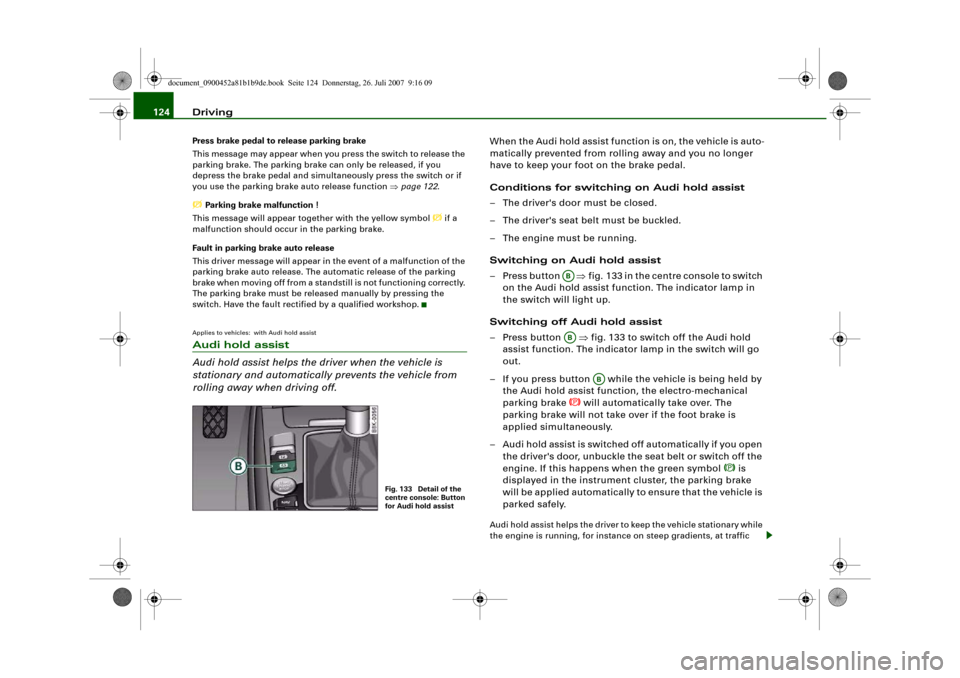
Switching on Audi hold assist
– Press button ⇒fig. 133 in the centre console to switch
on the Audi hold assist function. The indicator lamp in
the switch will light up.
Switching off Audi hold assist
– Press button ⇒fig. 133 to switch off the Audi hold
assist function. The indicator lamp in the switch will go
out.
– If you press button while the vehicle is being held by
the Audi hold assist function, the electro-mechanical
parking brake
will automatically take over. The
parking brake will not take over if the foot brake is
applied simultaneously.
– Audi hold assist is switched off automatically if you open
the driver's door, unbuckle the seat belt or switch off the
engine. If this happens when the green symbol
is
displayed in the instrument cluster, the parking brake
will be applied automatically to ensure that the vehicle is
parked safely.
Audi hold assist helps the driver to keep the vehicle stationary while
the engine is running, for instance on steep gradients, at traffic
Fig. 133 Detail of the
centre console: Button
for Audi hold assist
ABAB
AB
document_0900452a81b1b9de.book Seite 124 Donnerstag, 26. Juli 2007 9:16 09
Page 127 of 342
Driving125
Controls
Safety
Driving tips
General maintenance
Self-help
Technical data lights or in stop-and-go traffic. When the Audi hold assist function
is on, you don't have to keep your foot on the brake to prevent the
vehicle from accidentally rolling away. Once it detects that the
vehicle is stopped, Audi hold assist keeps the vehicle stationary. The
green symbol
in the instrument cluster indicates that the func-
tion is activated. You can now take your foot off the brake pedal.
As soon as you drive off in the normal way, the parking brake will
automatically be released and the vehicle will start moving.
If the conditions for Audi hold assist change and the function is
switched off as a result, the parking brake will be applied automati-
cally to ensure that the vehicle is parked safely. The diode in the
button will go out when the Audi hold assist function is switched
off.
WARNING
The intelligent technology in Audi hold assist cannot defy the laws
of physics. Do not let the extra convenience provided by Audi hold
assist tempt you into taking a safety risk.•
Audi hold assist cannot keep the vehicle stationary in all condi-
tions on a gradient (e.g. if the road is slippery or icy).
•
Audi hold assist must be switched on again each time the
engine is started – Risk of accident!
•
Never get out of the vehicle when the engine is running and
Audi hold assist is switched on – Risk of accident!
•
Always ensure that the vehicle is stopped properly and safely
to avoid injury to yourself and others.Caution
Switch off the Audi hold assist function before driving the vehicle
into a car wash.
Note
•
Audi hold assist can be switched on only when the driver's door
is closed, the driver's seat belt is buckled and the engine is running.
•
Audi hold assist prevents automatic vehicles from creeping
forwards when the brake pedal is released with the car in gear.
•
When the vehicle has been stationary for an extended period,
Audi hold assist will automatically apply the parking brake. In this
case, the green symbol
in the instrument cluster display will
change to red
.
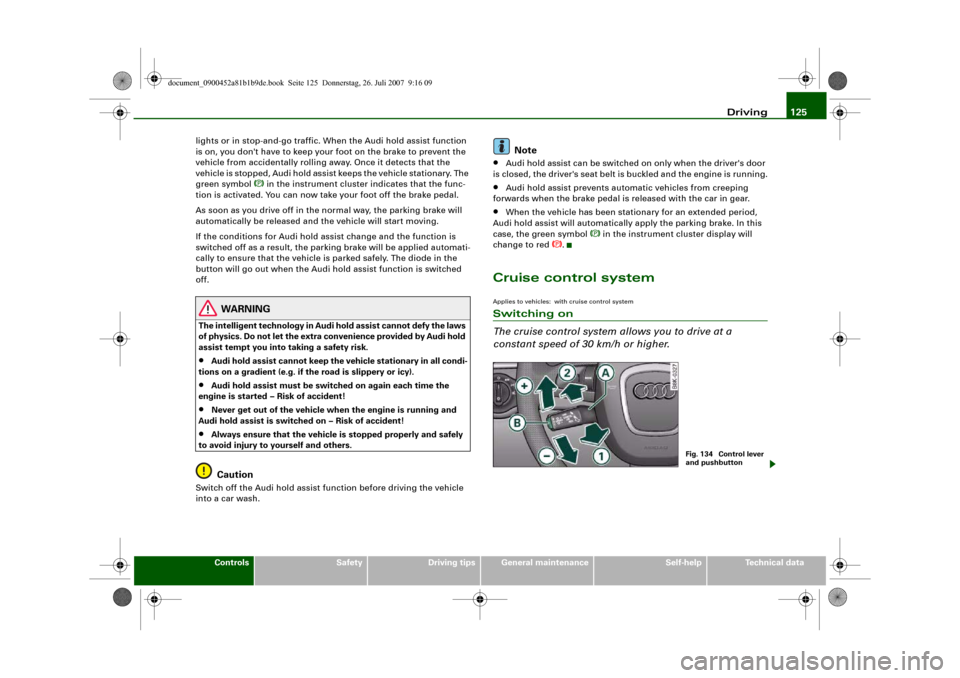
Cruise control systemApplies to vehicles: with cruise control systemSwitching on
The cruise control system allows you to drive at a
constant speed of 30 km/h or higher.
Fig. 134 Control lever
and pushbutton
document_0900452a81b1b9de.book Seite 125 Donnerstag, 26. Juli 2007 9:16 09
Page 128 of 342
Driving 126
– Pull the lever to position ⇒page 125, fig. 134 to
switch on the system.
– Drive at the speed you wish to set the system to.
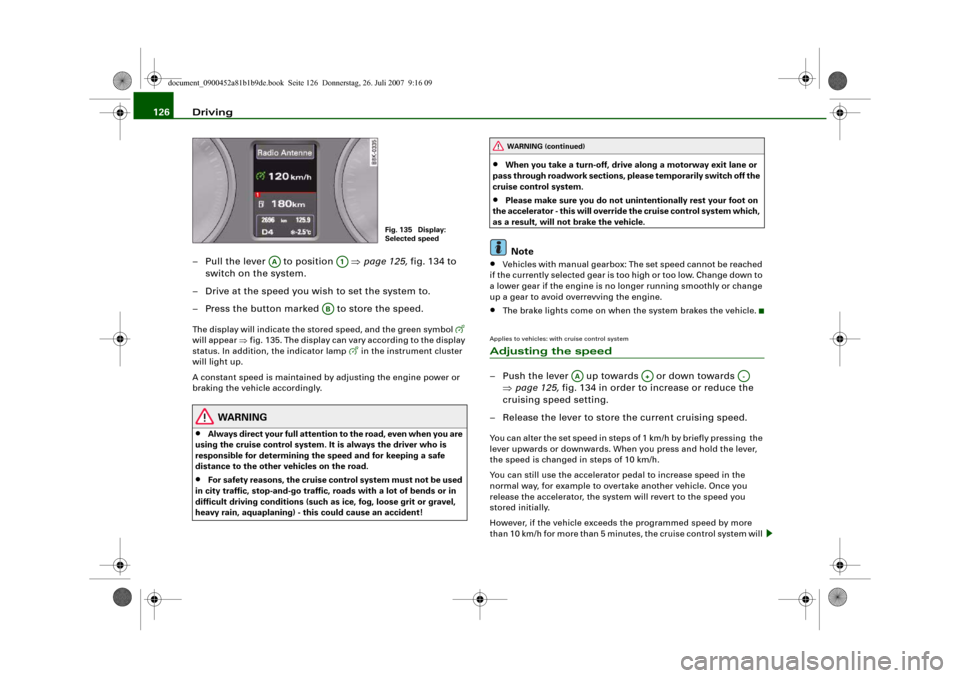
– Press the button marked to store the speed.The display will indicate the stored speed, and the green symbol
will appear ⇒fig. 135. The display can vary according to the display
status. In addition, the indicator lamp
in the instrument cluster
will light up.
A constant speed is maintained by adjusting the engine power or
braking the vehicle accordingly.
WARNING
•
Always direct your full attention to the road, even when you are
using the cruise control system. It is always the driver who is
responsible for determining the speed and for keeping a safe
distance to the other vehicles on the road.
•
For safety reasons, the cruise control system must not be used
in city traffic, stop-and-go traffic, roads with a lot of bends or in
difficult driving conditions (such as ice, fog, loose grit or gravel,
heavy rain, aquaplaning) - this could cause an accident!
•
When you take a turn-off, drive along a motorway exit lane or
pass through roadwork sections, please temporarily switch off the
cruise control system.
•
Please make sure you do not unintentionally rest your foot on
the accelerator - this will override the cruise control system which,
as a result, will not brake the vehicle.Note
•
Vehicles with manual gearbox: The set speed cannot be reached
if the currently selected gear is too high or too low. Change down to
a lower gear if the engine is no longer running smoothly or change
up a gear to avoid overrevving the engine.
•
The brake lights come on when the system brakes the vehicle.
Applies to vehicles: with cruise control systemAdjusting the speed– Push the lever up towards or down towards
⇒page 125, fig. 134 in order to increase or reduce the
cruising speed setting.
– Release the lever to store the current cruising speed.You can alter the set speed in steps of 1 km/h by briefly pressing the
lever upwards or downwards. When you press and hold the lever,
the speed is changed in steps of 10 km/h.
You can still use the accelerator pedal to increase speed in the
normal way, for example to overtake another vehicle. Once you
release the accelerator, the system will revert to the speed you
stored initially.
However, if the vehicle exceeds the programmed speed by more
than 10 km/h for more than 5 minutes, the cruise control system will
Fig. 135 Display:
Selected speed
AA
A1
AB
WARNING (continued)
AA
A+
A-
document_0900452a81b1b9de.book Seite 126 Donnerstag, 26. Juli 2007 9:16 09
Page 129 of 342
Driving127
Controls
Safety
Driving tips
General maintenance
Self-help
Technical data be deactivated temporarily. The green symbol in the display will
change to white but the stored speed will be retained.
Applies to vehicles: with cruise control systemPre-selecting a speed
You can pre-select a desired speed while the vehicle is
stationary.– Switch on the ignition.
– Pull the lever to position 1 ⇒page 125, fig. 134.
– Push the lever up towards or down towards in
order to increase or reduce the cruising speed setting.
– Release the lever to store the cruising speed setting
displayed.This function allows you to enter the desired cruise control setting
speed ahead of time, for example before joining a motorway. Once
you are on the motorway, you can activate the cruise control system
by pulling the lever to position .Applies to vehicles: with cruise control systemSwitching off the cruise control systemSwitching off temporarily
– Press the brake pedal, or
– Manual gearbox: Press the clutch pedal for a relatively
long period, or
– Push lever to position (click stop not engaged)
⇒page 125, fig. 134, or– Drive more than 10 km/h faster than the stored speed
over a period of more than 5 minutes.
Switching off completely
– Press the lever to position (click stop engaged), or
– Switch off the ignition.
The speed setting will remain stored after the system is temporarily
deactivated. To resume the programmed cruising speed, release the
clutch or brake pedal and pull the lever to position .
The stored speed will be deleted once the ignition is switched off.
WARNING
Do not resume the programmed cruising speed if this is too high
for the traffic conditions - this can cause accidents.
AA
A+
A-
A1
AA
A2
AA
A2
A1
document_0900452a81b1b9de.book Seite 127 Donnerstag, 26. Juli 2007 9:16 09
Page 131 of 342
adaptive cruise control (ACC)129
Controls
Safety
Driving tips
General maintenance
Self-help
Technical data
•
Adaptive cruise control will not react when approaching a
stationary obstacle, e.g. the end of a traffic jam or a broken-down
vehicle, or if a vehicle should come towards you in the same lane.
•
Please make sure you do not unintentionally rest your foot on
the accelerator - this will override the adaptive cruise control
system which, as a result, will not automatically brake the vehicle.Note
•
For safety reasons, the speed setting will be deleted when the
ignition is switched off.
•
Switching on the adaptive cruise control automatically activates
the Electronic Stabilisation Program (ESP) and the traction control
system (ASR). These two systems cannot be deactivated while the
adaptive cruise control is switched on.
•
Damage caused by impacts (e.g. if the vehicle is damaged when
parking) can affect the radar sensor settings. This can cause the
system to malfunction or switch off completely.
•
The radar sensor is heated. However, in winter conditions, you
should make sure that the radar sensor is free of ice and snow
before you set off. If necessary, carefully clean the cover of the radar
sensor and the surrounding area ⇒page 128, fig. 136.
•
To make sure that the radar sensor is fully operative, do not
attach any objects (e.g. stickers, add-on parts or other accessories)
to the area surrounding the radar sensor. Do not paint the area
surrounding the radar sensor.
Applies to vehicles: with adaptive cruise control and manual gearboxVehicles with manual gearbox
The driver of a vehicle with a manual gearbox of course
has to change gears as appropriate, even when the adap-
tive cruise control is activated.The adaptive cruise control is available from the second to the sixth
gear (when driven in normal engine speed range).
When the adaptive cruise control is activated, the driver must press
the clutch pedal as normal in order to change gear. When changing
gear or pressing the clutch pedal (for up to 20 seconds), the adap-
tive cruise control will remain activated.
When changing gear, the driver does not have to accelerate after
engaging a gear as the engine torque will be coordinated by the
adaptive cruise control.
The following situations may lead to an automatic deactivation of
the adaptive cruise control:•
pressing the clutch pedal too long (longer than approx.
20 seconds)
•
incorrect changing of gears and/or use of the clutch pedalNote
•
The adaptive cruise control cannot be activated while changing
gears.
WARNING (continued)
document_0900452a81b1b9de.book Seite 129 Donnerstag, 26. Juli 2007 9:16 09
Page 132 of 342
adaptive cruise control (ACC) 130Applies to vehicles: with adaptive cruise controlHow does the distance control work?
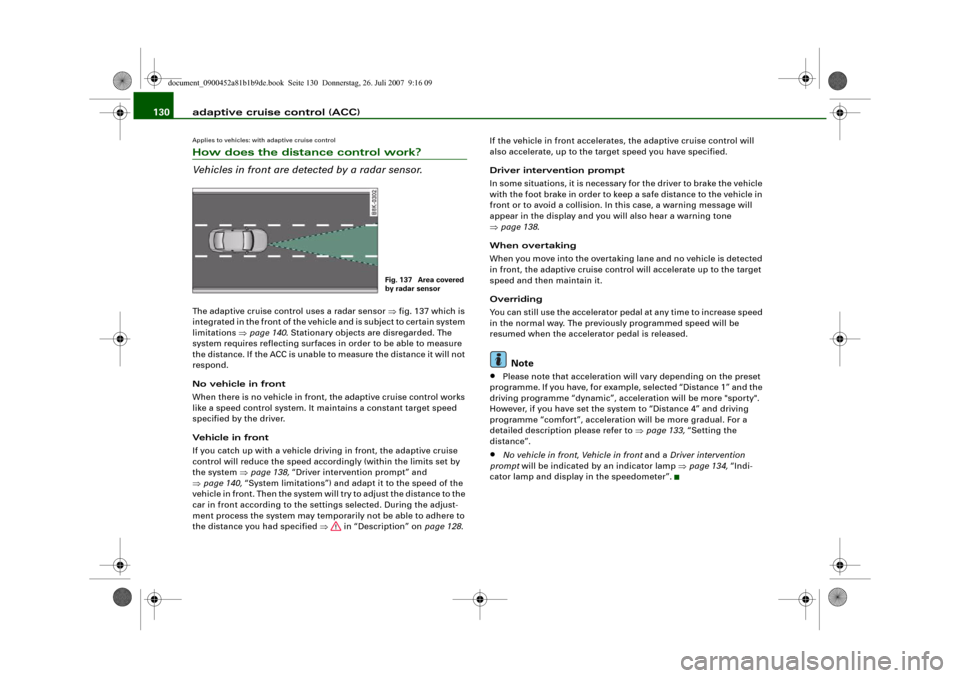
Vehicles in front are detected by a radar sensor.The adaptive cruise control uses a radar sensor ⇒fig. 137 which is
integrated in the front of the vehicle and is subject to certain system
limitations ⇒page 140. Stationary objects are disregarded. The
system requires reflecting surfaces in order to be able to measure
the distance. If the ACC is unable to measure the distance it will not
respond.
No vehicle in front
When there is no vehicle in front, the adaptive cruise control works
like a speed control system. It maintains a constant target speed
specified by the driver.
Vehicle in front
If you catch up with a vehicle driving in front, the adaptive cruise
control will reduce the speed accordingly (within the limits set by
the system ⇒page 138, “Driver intervention prompt” and
⇒page 140, “System limitations”) and adapt it to the speed of the
vehicle in front. Then the system will try to adjust the distance to the
car in front according to the settings selected. During the adjust-
ment process the system may temporarily not be able to adhere to
the distance you had specified ⇒ in “Description” on page 128.If the vehicle in front accelerates, the adaptive cruise control will
also accelerate, up to the target speed you have specified.
Driver intervention prompt
In some situations, it is necessary for the driver to brake the vehicle
with the foot brake in order to keep a safe distance to the vehicle in
front or to avoid a collision. In this case, a warning message will
appear in the display and you will also hear a warning tone
⇒page 138.
When overtaking
When you move into the overtaking lane and no vehicle is detected
in front, the adaptive cruise control will accelerate up to the target
speed and then maintain it.
Overriding
You can still use the accelerator pedal at any time to increase speed
in the normal way. The previously programmed speed will be
resumed when the accelerator pedal is released.
Note
•
Please note that acceleration will vary depending on the preset
programme. If you have, for example, selected “Distance 1” and the
driving programme “dynamic”, acceleration will be more "sporty".
However, if you have set the system to “Distance 4” and driving
programme “comfort”, acceleration will be more gradual. For a
detailed description please refer to ⇒page 133, “Setting the
distance”.
•
No vehicle in front, Vehicle in front and a Driver intervention
prompt will be indicated by an indicator lamp ⇒page 134, “Indi-
cator lamp and display in the speedometer”.
Fig. 137 Area covered
by radar sensor
document_0900452a81b1b9de.book Seite 130 Donnerstag, 26. Juli 2007 9:16 09
Page 133 of 342
adaptive cruise control (ACC)131
Controls
Safety
Driving tips
General maintenance
Self-help
Technical data
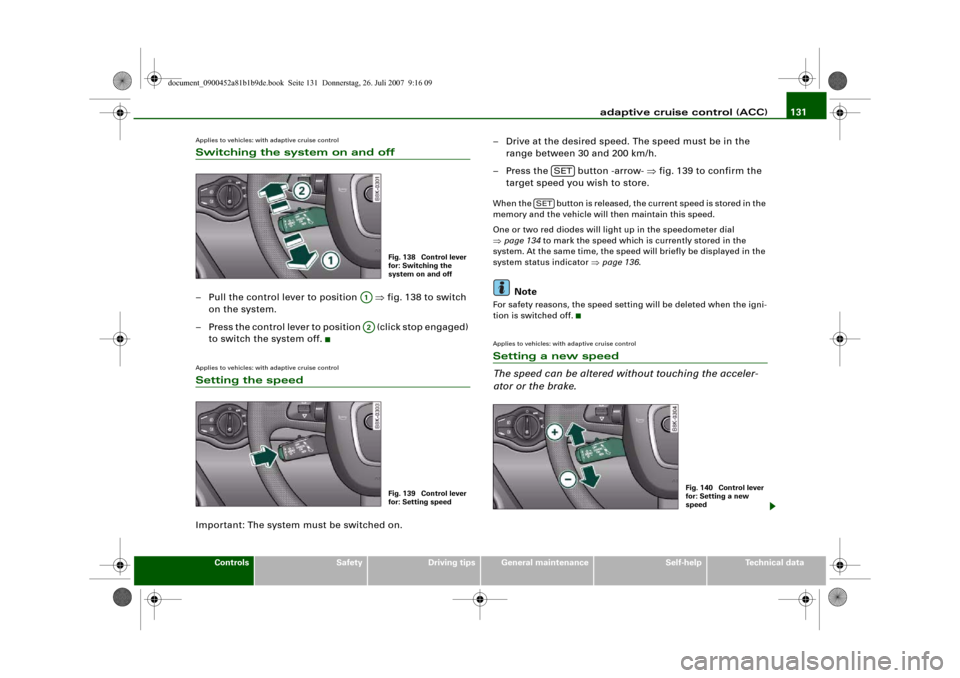
Applies to vehicles: with adaptive cruise controlSwitching the system on and off– Pull the control lever to position ⇒fig. 138 to switch
on the system.
– Press the control lever to position (click stop engaged)
to switch the system off.Applies to vehicles: with adaptive cruise controlSetting the speedImportant: The system must be switched on.– Drive at the desired speed. The speed must be in the
range between 30 and 200 km/h.
– Press the button -arrow- ⇒fig. 139 to confirm the
target speed you wish to store.
When the button is released, the current speed is stored in the
memory and the vehicle will then maintain this speed.
One or two red diodes will light up in the speedometer dial
⇒page 134 to mark the speed which is currently stored in the
system. At the same time, the speed will briefly be displayed in the
system status indicator ⇒page 136.
Note
For safety reasons, the speed setting will be deleted when the igni-
tion is switched off.Applies to vehicles: with adaptive cruise controlSetting a new speed
The speed can be altered without touching the acceler-
ator or the brake.
Fig. 138 Control lever
for: Switching the
system on and off
A1A2
Fig. 139 Control lever
for: Setting speed
SET
SET
Fig. 140 Control lever
for: Setting a new
speed
document_0900452a81b1b9de.book Seite 131 Donnerstag, 26. Juli 2007 9:16 09