brake AUDI A4 2008 B8 / 4.G Service Manual
[x] Cancel search | Manufacturer: AUDI, Model Year: 2008, Model line: A4, Model: AUDI A4 2008 B8 / 4.GPages: 342, PDF Size: 13.14 MB
Page 165 of 342
Automatic gearbox163
Controls
Safety
Driving tips
General maintenance
Self-help
Technical data
– To prevent the vehicle from rolling away, apply the
parking brake before moving off on steep gradients
⇒.
– As soon as you accelerate as normal, the parking brake
will automatically be released and the vehicle will start
moving.
Pa rking the c ar
– Press and hold the brake pedal ⇒.
– Apply the parking brake.
– Press and hold the interlock button, move the selector
lever to P and release the interlock button.The engine c an only be started when the selector lever is at P or N.
On level ground it is sufficient to move the selector lever to P. On a
gradient the parking brake should be applied first and the selector
lever should be moved to P. This reduces the load on the locking
mechanism and makes it easier to move the selector lever out of
position P.
Vehicles with multitronic® gearbox: Your vehicle is equipped with
the hill hold assist function which makes it easier to drive away on
a slope. The system is activated when you press and hold the brake
pedal for a few seconds. When you release the brake pedal the
braking force will be maintained for a moment in order to prevent
the vehicle rolling back when you drive away.
WARNING
•
Do not press the accelerator while selecting a gear with the
vehicle stationary and the engine running, as this could cause an
accident.
•
Please note that some power will still be transmitted when you
stop temporarily with the selector lever in position D, S or R. For this reason, to avoid risking an accident, apply the footbrake firmly
when stopping to prevent the vehicle rolling away.
•
Never move the selector lever to R or P when driving, as this
could cause an accident.
•
Vehicles with multitronic® gearbox: Please note that some
power will still be transmitted when you stop temporarily with the
selector lever in position D, S or R. For this reason, to avoid risking
an accident, apply the footbrake firmly when stopping to prevent
the vehicle rolling away.
Applies to vehicles: with multitronic® or tiptronicSelector lever positions
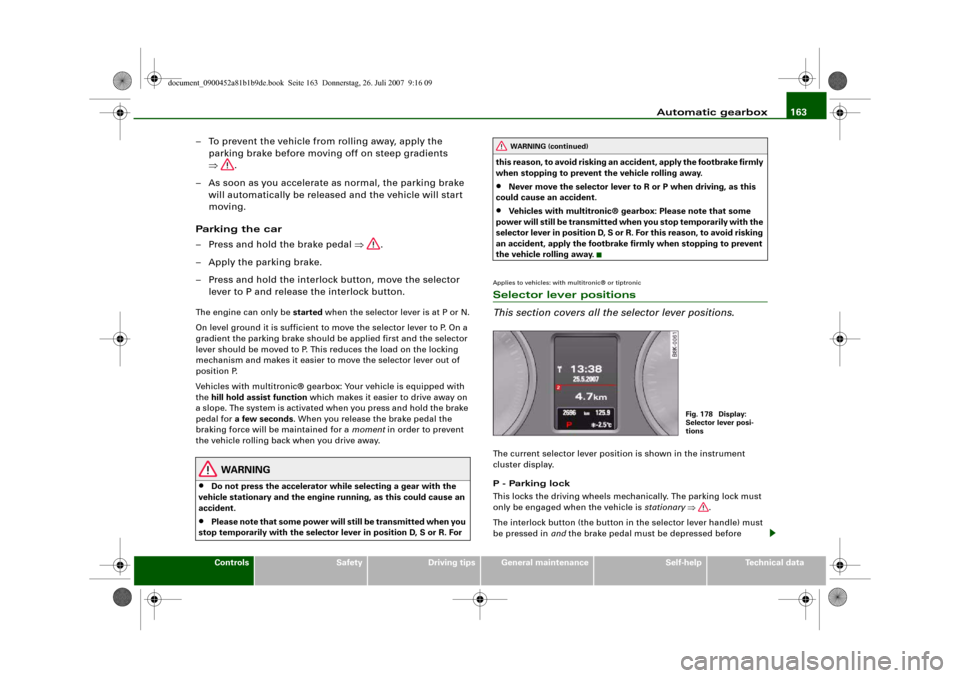
This section covers all the selector lever positions.The current selector lever position is shown in the instrument
cluster display.
P - Parking lock
This locks the driving wheels mechanically. The parking lock must
only be engaged when the vehicle is stationary ⇒.
The interlock button (the button in the selector lever handle) must
be pressed in and the brake pedal must be depressed before
WARNING (continued)
Fig. 178 Display:
Selector lever posi-
tions
document_0900452a81b1b9de.book Seite 163 Donnerstag, 26. Juli 2007 9:16 09
Page 166 of 342
Automatic gearbox 164moving the selector lever either in or out of position P. The lever can
only be moved out of position P when the ignition is on.
R - Reverse gear
When reverse gear is engaged the gearbox automatically selects the
lowest gear ratio.
Reverse gear must only be engaged when the vehicle is stationary
and the engine is idling ⇒.
To move the selector lever to position R, press in the interlock
button and at the same time press the brake pedal. Depending on
the model, one or two reversing lights will come on in selector lever
position R (when ignition is switched on).
N - Neutral
In this position the gearbox is in neutral ⇒.
D - Drive (forwards)
In this position the gearbox automatically selects the best gear
ratio. This depends on the engine load, the road speed and the
dynamic gear control program (DCP).
Press the brake pedal when moving the selector lever from N to D if
the vehicle is stationary or at speeds below 5 km/h ⇒.
In some situations (such as on mountain roads or when towing a
trailer or caravan) it can be advantageous to switch temporarily to
tiptronic mode ⇒page 166, so that the gear ratios can be selected
manually to suit the driving conditions.
S - Sport position
Select this position if you wish to take full advantage of the car's
performance. This setting makes use of the engine's maximum
power output. When accelerating the gear shifts will be noticeable.
Press the brake pedal when moving the selector lever from N to S if
the vehicle is stationary or at speeds below 5 km/h ⇒.
WARNING
•
Never move the selector lever to R or P when driving, as this
could cause an accident.
•
In selector position D or S the vehicle must always be held with
the foot brake when the engine is running. This is because an auto-
matic gearbox still transmits power even at idling speed, and the
vehicle tends to “creep”. The throttle must on no account be
opened inadvertently (for instance by hand from the engine
compartment) when a gear is engaged with the vehicle stationary.
The vehicle could otherwise start moving immediately (in some
cases even if the parking brake is engaged) and possibly cause an
accident.
•
To avoid accidents, apply the parking brake and put the
selector lever in position P before opening the bonnet and working
on the vehicle with the engine running. Please observe the impor-
tant safety warnings ⇒page 255, “Working on components in the
engine compartment”.Note
You can select the sport program for gear changes on vehicles with
Audi drive select* by activating the DYNAMIC mode. There is no S
position on the selector lever.•
Applies to vehicles with tiptronic gearbox:
•
If the lever is moved accidentally to N when driving, release the
accelerator and let the engine speed drop to idling before selecting
D or S again.
•
For the sake of fuel economy (and the environment), the gearbox
ratios on some models are designed so that maximum speed is only
obtained when the selector lever is at position S.
document_0900452a81b1b9de.book Seite 164 Donnerstag, 26. Juli 2007 9:16 09
Page 167 of 342
Automatic gearbox165
Controls
Safety
Driving tips
General maintenance
Self-help
Technical data
Applies to vehicles: with multitronic® or tiptronicSelector lever lock
The selector lever lock prevents gears from being
engaged inadvertently, so that the vehicle is not set in
motion unintentionally.The selector lever lock is released as follows:
– Switch on the ignition.
– Press the brake pedal and at the same time press in the
interlock button.Automatic selector lever lock
The selector lever is locked in the P and N positions when the igni-
tion is on. The brake pedal must be depressed before the lever can
be moved out of either of these positions. The following message
appears in the instrument display as a reminder for the driver when
the selector lever is in position P or N:
WHEN STATIONARY APPLY FOOTBRAKE WHILE SELECTING GEAR.
The selector lever lock only works if the vehicle is stationary or
driving at speeds up to 5 km/h. At higher speeds the selector lever
lock in the N position is disengaged automatically.
The selector lever lock is not engaged if the selector lever is moved
quickly through position N (e.g. when shifting from R to D). This makes it possible, for instance, to “rock” the vehicle backwards and
forwards if it is stuck in snow or mud. The selector lever lock
engages automatically if the brake pedal is not depressed and the
lever is in position N for more than about a second.
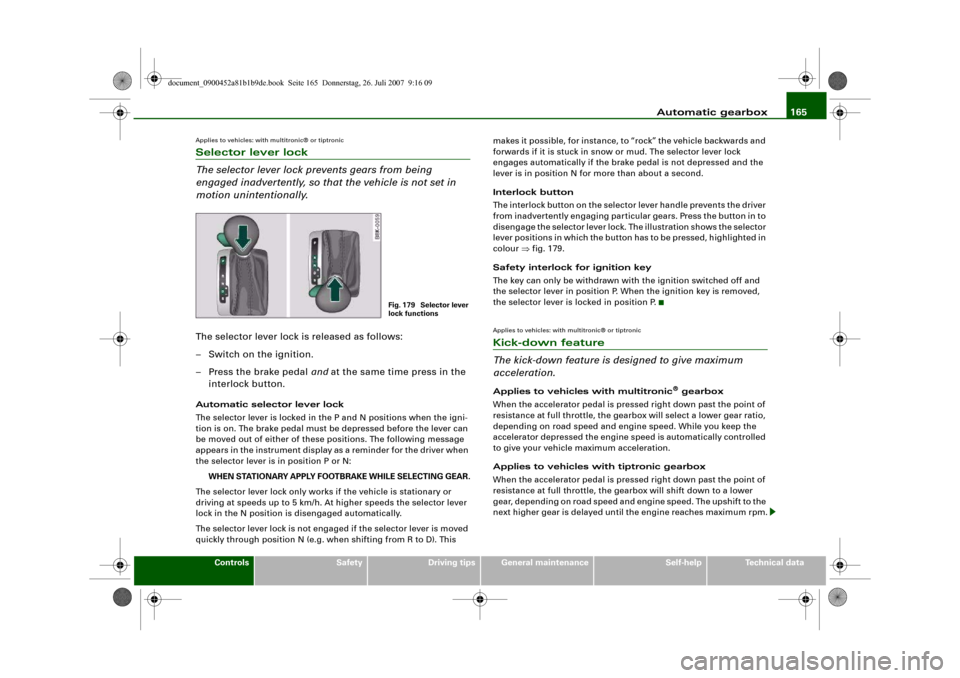
Interlock button
The interlock button on the selector lever handle prevents the driver
from inadvertently engaging particular gears. Press the button in to
disengage the selector lever lock. The illustration shows the selector
lever positions in which the button has to be pressed, highlighted in
colour ⇒fig. 179.
Safety interlock for ignition key
The key can only be withdrawn with the ignition switched off and
the selector lever in position P. When the ignition key is removed,
the selector lever is locked in position P.
Applies to vehicles: with multitronic® or tiptronicKick-down feature
The kick-down feature is designed to give maximum
acceleration.Applies to vehicles with multitronic
® gearbox
When the accelerator pedal is pressed right down past the point of
resistance at full throttle, the gearbox will select a lower gear ratio,
depending on road speed and engine speed. While you keep the
accelerator depressed the engine speed is automatically controlled
to give your vehicle maximum acceleration.
Applies to vehicles with tiptronic gearbox
When the accelerator pedal is pressed right down past the point of
resistance at full throttle, the gearbox will shift down to a lower
gear, depending on road speed and engine speed. The upshift to the
next higher gear is delayed until the engine reaches maximum rpm.
Fig. 179 Selector lever
lock functions
document_0900452a81b1b9de.book Seite 165 Donnerstag, 26. Juli 2007 9:16 09
Page 168 of 342
Automatic gearbox 166
WARNING
Please note that if the road surface is slippery or wet, the kick-
down feature could cause the driving wheels to spin, which could
result in skidding.Applies to vehicles: with multitronic® or tiptronicDynamic gear control program (DCP)
The automatic gearbox is controlled electronically.The vehicle is equipped with an electronically controlled gearbox.
The gear ratios are selected automatically according to preset gear-
shift programmes.
When you drive at moderate speeds the gearbox will select the most
economical shift programme. It will then change up early and delay
the downshifts to give better fuel economy.
If you drive at higher speeds with heavy acceleration, if you open the
throttle quickly, or if you use the kick-down or the car's maximum
speed, the gearbox will automatically select the more “sporty” shift
programmes.
The gearbox is self-adapting, and continuously selects the most
suitable shift programme. At the same time, the driver can also
make the gearbox switch to a more "sporty" programme by pressing
the accelerator quickly. Depending on road speed, this makes the
gearbox shift down early into a lower gear ratio for more rapid accel-
eration (for instance to pass another vehicle), without having to
press the accelerator all the way down into the kick-down position.
After the gearbox has shifted back up it returns to the original
programme, depending on your style of driving.
Vehicles with multitronic® gearbox: The gearbox continuously
adapts the gear ratios on uphill gradients. If the brake pedal is
pressed on a downhill gradient the gearbox automatically shifts to
a lower gear ratio. This increases the engine braking effect.Vehicles with tiptronic gearbox: The gearbox adapts the gearshifts
for uphill and downhill gradients. This prevents the gearbox from
shifting up and down unnecessarily on uphill gradients.
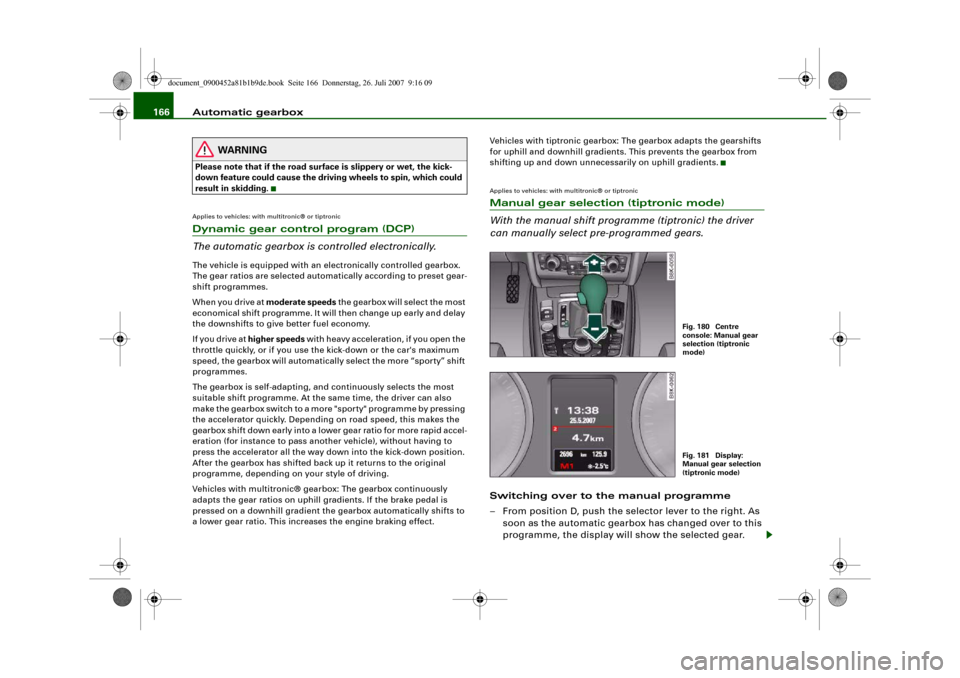
Applies to vehicles: with multitronic® or tiptronicManual gear selection (tiptronic mode)
With the manual shift programme (tiptronic) the driver
can manually select pre-programmed gears.Switching over to the manual programme
– From position D, push the selector lever to the right. As
soon as the automatic gearbox has changed over to this
programme, the display will show the selected gear.
Fig. 180 Centre
console: Manual gear
selection (tiptronic
mode)Fig. 181 Display:
Manual gear selection
(tiptronic mode)
document_0900452a81b1b9de.book Seite 166 Donnerstag, 26. Juli 2007 9:16 09
Page 190 of 342
Safe driving 188Correct sitting positionsCorrect sitting position for driver
The correct driving position is important for safe and
fatigue-free driving.For your own safety, and to reduce the risk of injury in the
event of an accident, we recommend the following driving
position.
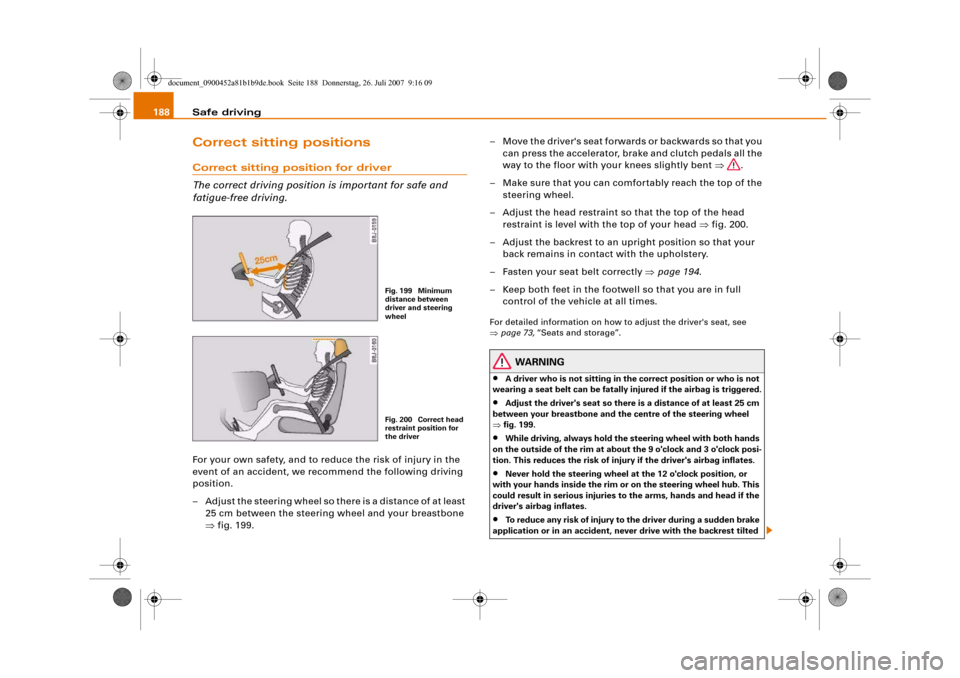
– Adjust the steering wheel so there is a distance of at least
25 cm between the steering wheel and your breastbone
⇒fig. 199.– Move the driver's seat forwards or backwards so that you
can press the accelerator, brake and clutch pedals all the
way to the floor with your knees slightly bent ⇒.
– Make sure that you can comfortably reach the top of the
steering wheel.
– Adjust the head restraint so that the top of the head
restraint is level with the top of your head ⇒fig. 200.
– Adjust the backrest to an upright position so that your
back remains in contact with the upholstery.
– Fasten your seat belt correctly ⇒page 194.
– Keep both feet in the footwell so that you are in full
control of the vehicle at all times.
For detailed information on how to adjust the driver's seat, see
⇒page 73, “Seats and storage”.
WARNING
•
A driver who is not sitting in the correct position or who is not
wearing a seat belt can be fatally injured if the airbag is triggered.
•
Adjust the driver's seat so there is a distance of at least 25 cm
between your breastbone and the centre of the steering wheel
⇒fig. 199.
•
While driving, always hold the steering wheel with both hands
on the outside of the rim at about the 9 o'clock and 3 o'clock posi-
tion. This reduces the risk of injury if the driver's airbag inflates.
•
Never hold the steering wheel at the 12 o'clock position, or
with your hands inside the rim or on the steering wheel hub. This
could result in serious injuries to the arms, hands and head if the
driver's airbag inflates.
•
To reduce any risk of injury to the driver during a sudden brake
application or in an accident, never drive with the backrest tilted
Fig. 199 Minimum
distance between
driver and steering
wheelFig. 200 Correct head
restraint position for
the driver
document_0900452a81b1b9de.book Seite 188 Donnerstag, 26. Juli 2007 9:16 09
Page 193 of 342
Safe driving191
Controls
Safety
Driving tips
General maintenance
Self-help
Technical data
Examples of incorrect sitting positions
Occupants can suffer severe or fatal injuries injuries if
they sit in an incorrect position while the vehicle is
moving.Seat belts can only provide maximum protection if the belt
webbing is positioned correctly. Sitting out of position
greatly reduces the effectiveness of the seat belts and
increases the risk of injury since the belt webbing is not
worn in the position for which it is designed. The driver is
responsible for the safety of all vehicle occupants, espe-
cially for children.
– Never allow anyone to sit out of position while the
vehicle is moving ⇒.The following list shows just some examples of incorrect sitting
positions which can be dangerous to all occupants. The list is not
complete, but will help to make you aware of possible dangers
which can be avoided.
Therefore, whenever the vehicle is moving:•
never stand up in the vehicle,
•
never stand on the seats,
•
never kneel on the seats,
•
never travel with the backrest reclined too far,
•
never lean against the dash panel,
•
never lie down on the rear seat,
•
never sit on the front edge of a seat,
•
never sit sideways,
•
never lean out of the window,
•
never put your feet out of the window,
•
never put your feet on the dash panel,
•
never put your feet on the seat cushion,
•
never ride in the footwell,
•
never travel on a seat without wearing the seat belt,
•
never climb into the luggage compartment.
WARNING
Sitting out of position increases the risk of severe injuries.•
Sitting out of position exposes the occupants to potentially
fatal injuries: if the airbags inflate they can strike any occupant
who is not in one of the designed seat positions.
•
Before starting a trip, sit in the correct position and stay in this
position as long as the vehicle is moving. Before every trip, make
sure all passengers are sitting in the correct positions and remain
correctly seated at all times ⇒page 73, “Seats and storage”.
Pedal are aPedal s
The pedals must always be free to move and must never
be obstructed by floor mats or any objects in the footwell.– Make sure that the accelerator, brake and clutch pedals
are not obstructed and can be pressed all the way down
to the floor.
– Make sure that all pedals are able to return freely to their
original positions.Only use floor mats which leave the pedal area free and can be
securely fastened in the footwell.
If one of the brake circuits should fail, increased brake pedal travel
will be required to bring the vehicle safely to a stop.
document_0900452a81b1b9de.book Seite 191 Donnerstag, 26. Juli 2007 9:16 09
Page 196 of 342
Seat belts 194Seat beltsWhy is it so important to use seat
belts?Seat belts provide effective protection
The common belief that passengers can brace their
weight with their hands in a minor collision is false.It is an established fact that seat belts provide good protection in
accidents. Therefore wearing a seat belt is required by law in most
countries.
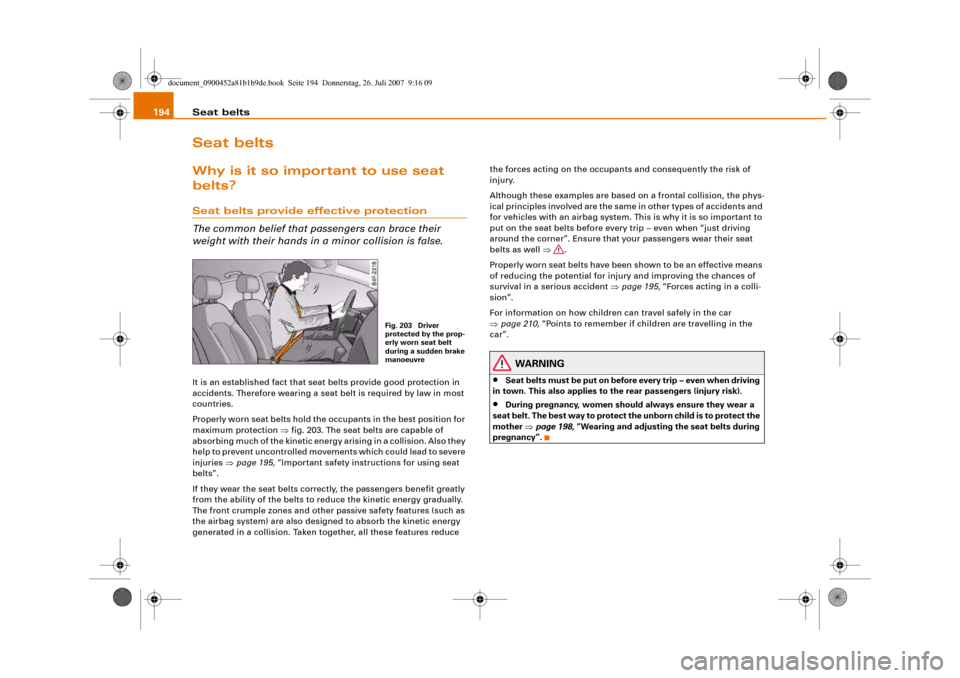
Properly worn seat belts hold the occupants in the best position for
maximum protection ⇒fig. 203. The seat belts are capable of
absorbing much of the kinetic energy arising in a collision. Also they
help to prevent uncontrolled movements which could lead to severe
injuries ⇒page 195, “Important safety instructions for using seat
belts”.
If they wear the seat belts correctly, the passengers benefit greatly
from the ability of the belts to reduce the kinetic energy gradually.
The front crumple zones and other passive safety features (such as
the airbag system) are also designed to absorb the kinetic energy
generated in a collision. Taken together, all these features reduce the forces acting on the occupants and consequently the risk of
injury.
Although these examples are based on a frontal collision, the phys-
ical principles involved are the same in other types of accidents and
for vehicles with an airbag system. This is why it is so important to
put on the seat belts before every trip – even when “just driving
around the corner”. Ensure that your passengers wear their seat
belts as well ⇒.
Properly worn seat belts have been shown to be an effective means
of reducing the potential for injury and improving the chances of
survival in a serious accident ⇒page 195, “Forces acting in a colli-
sion”.
For information on how children can travel safely in the car
⇒page 210, “Points to remember if children are travelling in the
car”.
WARNING
•
Seat belts must be put on before every trip – even when driving
in town. This also applies to the rear passengers (injury risk).
•
During pregnancy, women should always ensure they wear a
seat belt. The best way to protect the unborn child is to protect the
mother ⇒page 198, “Wearing and adjusting the seat belts during
pregnancy”.
Fig. 203 Driver
protected by the prop-
erly worn seat belt
during a sudden brake
manoeuvre
document_0900452a81b1b9de.book Seite 194 Donnerstag, 26. Juli 2007 9:16 09
Page 224 of 342
Intelligent technology 222Intelligent technologyElectronic stabilisation program (ESP)DescriptionESP increases the car's stability. It reduces the tendency to skid and
improves the stability and roadholding of the vehicle. ESP detects
critical handling situations, such as understeer, oversteer and
wheelspin on the driven wheels. It stabilises the vehicle by braking
individual wheels or by reducing the engine torque. The warning
lamp
in the instrument cluster starts flashing as soon as the ESP
intervenes.
The ESP incorporates the functions of the anti-lock brake system
(ABS), the traction control system (ASR), the electronic differential
lock (EDL) and the dynamic steering*.
Anti-lock brake system (ABS)
ABS prevents the wheels from locking up under braking until the
vehicle has reached a virtual standstill. You can continue to steer the
vehicle even when the brakes are on full. Keep your foot on the brake
pedal and do not pump the brakes. You will feel the brake pedal
pulsate while the anti-lock brake system is working.
Brake assist system
The brake assist system can speed up the braking process and
shorten the braking distance. It automatically boosts the braking
force if you press the brake pedal quickly in an emergency. On vehi-
cles with adaptive cruise control*, the brake assist system will build
up a small amount of pressure in the hydraulic brake system if it
senses that you are too close to the vehicle in front.
Traction control system (ASR)
In the event of wheelspin, the traction control system reduces the
engine torque to match the amount of grip available. This helps the
car to start moving, accelerate or climb a gradient.Electronic differential lock (EDL)
When the EDL detects wheelspin, it brakes the spinning wheel and
directs the power to the other driven wheel (or wheels on quattro*
versions). This function is active up to about 100 km/h.
To prevent the disc brake of the braked wheel from overheating, the
EDL cuts out automatically if subjected to excessive loads. The
vehicle can still be driven. The EDL will switch on again automati-
cally when the brake has cooled down.
Dynamic steering*
On vehicles with dynamic steering*, the ESP can also intervene in
the steering to stabilise the vehicle in critical situations.
WARNING
•
The grip provided by the ESP, ABS, ASR, EDL and dynamic
steering* systems is still subject to the physical limits of adhesion.
Always bear this in mind, especially on wet or slippery roads. If
you notice the systems cutting in, you should reduce your speed
immediately to suit the road and traffic conditions. Do not let the
extra safety provided tempt you into taking any risks when driving
– this can cause accidents.
•
Please remember that the accident risk always increases if you
drive fast, especially in corners or on a slippery road, or if you
follow too close behind the vehicle in front of you. Please bear in
mind that even ESP, ABS, brake assist, EDL, ASR and dynamic
steering* cannot compensate for the increased accident risk.
•
When accelerating on a uniformly slippery surface (for instance
all four wheels on ice or snow), press the accelerator gradually and
carefully. The driven wheels may otherwise start to spin (in spite
of the integrated control systems), which would impair the car's
stability and could lead to an accident.
document_0900452a81b1b9de.book Seite 222 Donnerstag, 26. Juli 2007 9:16 09
Page 226 of 342
Intelligent technology 224
WARNING
You should switch off the ESP only if your driving ability and traffic
conditions allow you to do so safely. Please note that, when the
ASR and ESP are switched off, the driven wheels may start to spin,
causing the vehicle to lose grip, in particular on slippery or wet
roads - danger of skidding!
Note
The ASR and ESP cannot be switched off when the adaptive cruise
control (ACC)* is on.BrakesNew brake pads
New brake pads do not give full braking effect for the first 400 km,
they must first be “bedded in”. However, you can compensate for
the slightly reduced braking effect by applying more pressure on
the brake pedal. Avoid placing a heavy load on the brakes during the
running-in period.
We ar
The rate of wear on the brake pads depends a great deal on how you
drive and the conditions in which the vehicle is operated. Negative
factors are, for instance, city traffic, frequent short trips or hard
driving with abrupt starts and stops.
Wet roads; road salt
When you are driving at a speed higher than 80 km/h and have the
windscreen wipers switched on the brake pads are very briefly
brought into contact with the brake discs. This automatic process
which goes unnoticed by the driver is carried out at regular intervals
and is intended to improve braking response in wet conditions.In certain conditions, such as in heavy rain, or after washing the car
or driving through water, the full braking effect can be delayed by
moisture (or in winter by ice) on the discs and brake pads. The
brakes should be “dried” by pressing the pedal to restore full
braking effect.
The effectiveness of the brakes can also be temporarily reduced if
the car is driven for some distance without using the brakes when
there is a lot of salt on the road in winter. The layer of salt that accu-
mulates on the discs and pads can be removed with a few cautious
brake applications.
Corrosion
There may be a tendency for dirt to build up on the brake pads and
corrosion to form on the discs if the car is used infrequently, or if
you only drive low mileages without using the brakes very much.
If the brakes are not used frequently, or if corrosion has formed on
the discs, it is advisable to clean off the pads and discs by braking
firmly a few times from a moderately high speed ⇒.
Faults in the brake system
If the brake pedal travel should ever increase suddenly, this may
mean that one of the two brake circuits has failed. Drive immedi-
ately to the nearest qualified workshop and have the fault rectified.
On the way to the dealer, be prepared to use more pressure on the
brake pedal and allow for longer stopping distances.
Low brake fluid level
Malfunctions can occur in the brake system if the brake fluid level is
too low. The brake fluid level is monitored electronically.
Brake servo
The brake servo amplifies the pressure you apply to the brake pedal.
It only works when the engine is running.
document_0900452a81b1b9de.book Seite 224 Donnerstag, 26. Juli 2007 9:16 09
Page 227 of 342
Intelligent technology225
Controls
Safety
Driving tips
General maintenance
Self-help
Technical data
WARNING
•
When applying the brakes to clean off deposits on the pads and
discs, select a clear, dry road. Be sure not to inconvenience or
endanger other road users; do not risk an accident.
•
Never let the car coast with the engine switched off (this can
cause accidents).Caution
•
Never let the brakes “drag” by leaving your foot on the pedal
when you do not really intend to brake. This overheats the brakes,
resulting in longer stopping distances and greater wear.
•
Before driving down a long, steep gradient, it is advisable to
reduce speed and move the selector lever to a lower gear. In this
way you will make use of the engine braking effect and relieve the
load on the brakes. If you still have to use the brakes, it is better to
brake firmly at intervals than to apply the brakes continuously.Note
•
If the brake servo is out of action due to a malfunction, or if the
car has to be towed, you will have to press the brake pedal consid-
erably harder to make up for the lack of servo assistance.
•
If you wish to equip the car with accessories such as a front
spoiler or wheel covers, it is important that the flow of air to the
front wheels is not obstructed, otherwise the brakes can overheat.
Power steering (servotronic)The power steering assists the driver when turning the
steering wheel (with the engine running).The power steering assists the driver by reducing the force needed
to turn the steering wheel. The degree of power assistance is
adapted electronically, depending on the speed.If a fault should occur in the servotronic system the power steering
will still operate. The degree of power assistance will, however, no
longer adapt to different speeds. If the electronic regulating system
is not working properly, this is most noticeable when turning the
steering wheel at low speeds (for instance when parking) – more
effort will be required than usual. The fault should be corrected by
a qualified workshop as soon as possible.
The power steering does not function when the engine is switched
off. In this case the steering wheel is very hard to turn.
If the steering is held at its turning limit when the car is stationary,
this will place an excessive load on the power steering system. In
this case, the power steering system will make noises. It will also
reduce the idling speed of the engine.
Caution
Do not keep the steering in the full-lock position for longer than
15 seconds when the engine is running – this could cause damage
to the power steering system.
Note
•
If the power steering should fail at any time or the engine is
switched off (for instance when being towed), the car can still be
steered. However, more effort will be required to turn the steering
wheel.
•
If the system is leaking or malfunctioning, please take the car to
a qualified workshop as soon as possible.
•
The power steering requires a special hydraulic fluid. The fluid
reservoir is located at the front of the engine compartment on the
left ⇒page 256. The correct fluid level in the reservoir is important
for the power steering to function properly. The hydraulic fluid level
is checked at the Inspection Service.
document_0900452a81b1b9de.book Seite 225 Donnerstag, 26. Juli 2007 9:16 09