cruise AUDI A4 2008 B8 / 4.G Owner's Manual
[x] Cancel search | Manufacturer: AUDI, Model Year: 2008, Model line: A4, Model: AUDI A4 2008 B8 / 4.GPages: 342, PDF Size: 13.14 MB
Page 141 of 342
adaptive cruise control (ACC)139
Controls
Safety
Driving tips
General maintenance
Self-help
Technical data
•
An acoustic warning will also sound (unless it has been deacti-
vated in the sound system or MMI* settings).Note
•
Pressing the brake pedal will switch off the adaptive cruise
control system. The speed set at that point will, however, remain
stored until the adaptive cruise control is activated again.
•
To resume the programmed cruising speed, release the brake
pedal and pull the control lever towards you ⇒page 132,
“Switching off the system (with speed memory function) and reacti-
vating it”.
•
If you exceed the target speed by pressing the accelerator, the
driver intervention prompt will not be accompanied by a warning
tone. The indicator lamp shown in the display will also switch off
when the target speed is exceeded.
•
If the adaptive cruise control triggers a braking operation the
hydraulic brake system is under pressure. This is why brake pedal
travel will be shorter and the pedal will feel “harder”.
Applies to vehicles: with adaptive cruise controlSetting the warning tone volume and driving program
You can change the adaptive cruise control settings on
the sound system or MMI* to suit your individual driving
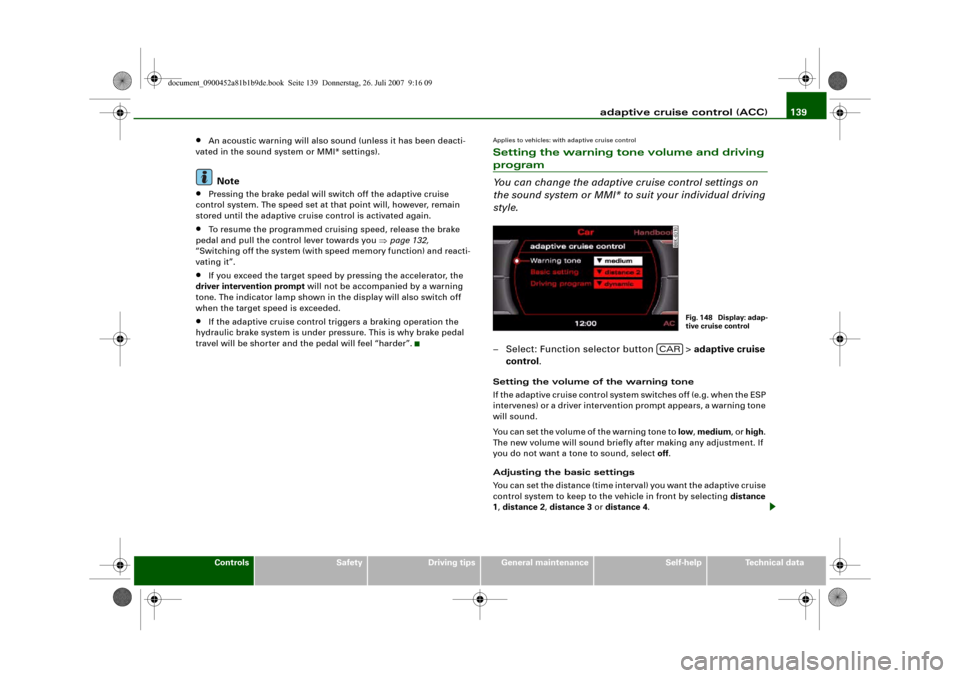
style.– Select: Function selector button > adaptive cruise
control.Setting the volume of the warning tone
If the adaptive cruise control system switches off (e.g. when the ESP
intervenes) or a driver intervention prompt appears, a warning tone
will sound.
You can set the volume of the warning tone to low, medium, or high.
The new volume will sound briefly after making any adjustment. If
you do not want a tone to sound, select off.
Adjusting the basic settings
You can set the distance (time interval) you want the adaptive cruise
control system to keep to the vehicle in front by selecting distance
1, distance 2, distance 3 or distance 4.
Fig. 148 Display: adap-
tive cruise control
CAR
document_0900452a81b1b9de.book Seite 139 Donnerstag, 26. Juli 2007 9:16 09
Page 142 of 342
adaptive cruise control (ACC) 140Setting the driving program
In the Driving program menu you can select either dynamic,
standard or comfort according to your personal preferences.
Note
•
We recommend you to leave the warning tone switched on. Even
when the warning tone is switched off, not every warning tone will
be deactivated.
•
When you pass the key on to somebody else please remember to
make the other driver aware of the ACC settings.
•
We recommend a minimum distance setting of DISTANCE 3
(factory default setting).
•
When the ignition is switched off, the distance setting reverts to
the factory default DISTANCE 3. A qualified workshop can cancel
this function. In this case a default distance setting defined on the
sound system or MMI* is applied each time the engine is started.
System limitationsApplies to vehicles: with adaptive cruise controlGeneral notes
The following situations could impair the function of the
radar sensor.The adaptive cruise control is subject to given physical limits and
also has certain limits determined by the system itself. Under
certain circumstances the driver may feel that the ACC system is
responding unexpectedly or belatedly. For this reason, please
always give your full attention to road traffic and if necessary take
action yourself:•
When driving through bends ⇒page 140.
•
When vehicles in front are not in line with your vehicle
⇒page 141.
•
When other vehicles change lanes ⇒page 141.
•
When other vehicles are not clearly discernible ⇒page 141
•
When vehicles are stationary ⇒page 142.
WARNING
The radar sensor's "field of vision" can be impaired by rain, snow
or a lot of water on the road. This results in vehicles in front not
being properly recognised or, in some circumstances, not being
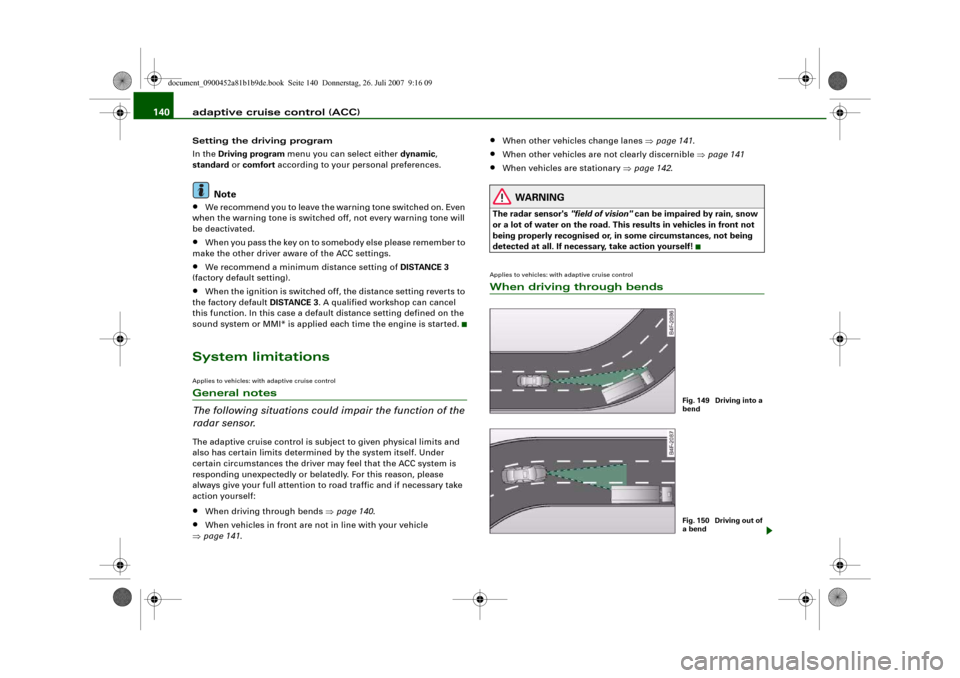
detected at all. If necessary, take action yourself!Applies to vehicles: with adaptive cruise controlWhen driving through bends
Fig. 149 Driving into a
bendFig. 150 Driving out of
a bend
document_0900452a81b1b9de.book Seite 140 Donnerstag, 26. Juli 2007 9:16 09
Page 143 of 342
adaptive cruise control (ACC)141
Controls
Safety
Driving tips
General maintenance
Self-help
Technical data Driving into a bend
When you are driving into a bend, the ACC system may react to a
vehicle travelling in the other lane and therefore brake the vehicle
⇒page 140, fig. 149. You can override the braking effect by pressing
the accelerator.
Driving out of a bend
When you are driving out of a long bend, the ACC system may - in
the course of its calculation of the lane ahead - react to a vehicle
travelling in the other lane and therefore brake the vehicle
⇒page 140, fig. 150. You can override the braking effect by pressing
the accelerator.
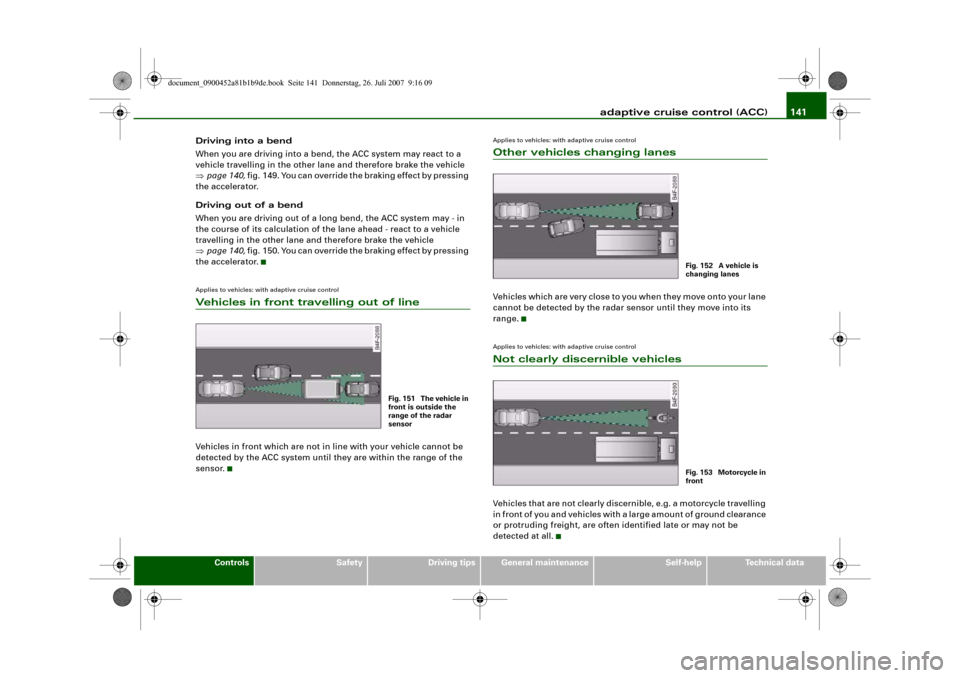
Applies to vehicles: with adaptive cruise controlVehicles in front travelling out of lineVehicles in front which are not in line with your vehicle cannot be
detected by the ACC system until they are within the range of the
sensor.
Applies to vehicles: with adaptive cruise controlOther vehicles changing lanesVehicles which are very close to you when they move onto your lane
cannot be detected by the radar sensor until they move into its
range.Applies to vehicles: with adaptive cruise controlNot clearly discernible vehiclesVehicles that are not clearly discernible, e.g. a motorcycle travelling
in front of you and vehicles with a large amount of ground clearance
or protruding freight, are often identified late or may not be
detected at all.
Fig. 151 The vehicle in
front is outside the
range of the radar
sensor
Fig. 152 A vehicle is
changing lanesFig. 153 Motorcycle in
front
document_0900452a81b1b9de.book Seite 141 Donnerstag, 26. Juli 2007 9:16 09
Page 144 of 342
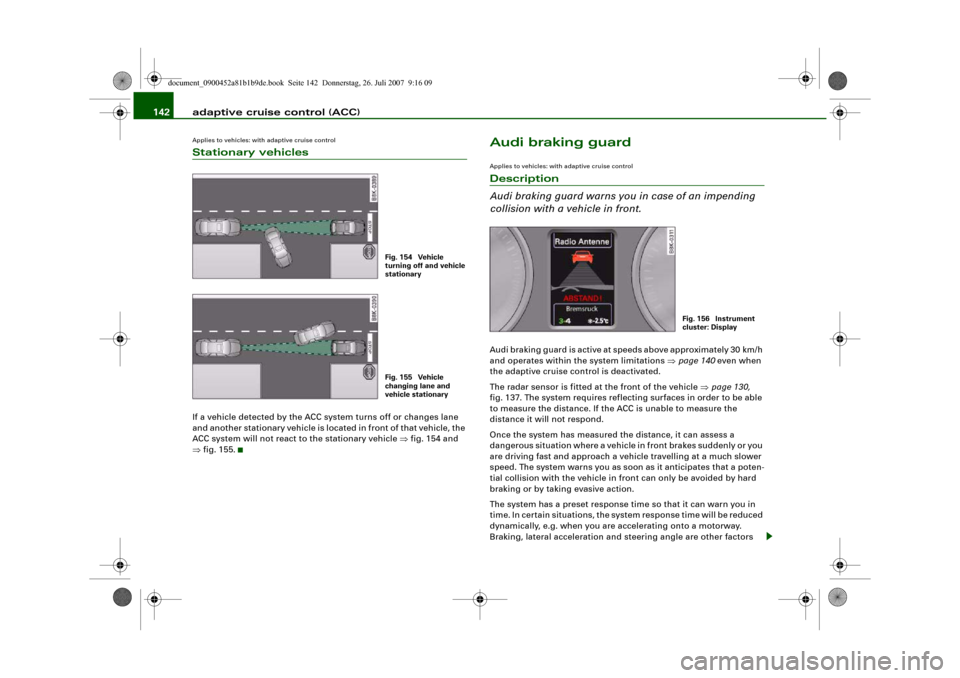
adaptive cruise control (ACC) 142Applies to vehicles: with adaptive cruise controlStationary vehiclesIf a vehicle detected by the ACC system turns off or changes lane
and another stationary vehicle is located in front of that vehicle, the
ACC system will not react to the stationary vehicle ⇒fig. 154 and
⇒fig. 155.
Audi braking guardApplies to vehicles: with adaptive cruise controlDescription
Audi braking guard warns you in case of an impending
collision with a vehicle in front.Audi braking guard is active at speeds above approximately 30 km/h
and operates within the system limitations ⇒page 140 even when
the adaptive cruise control is deactivated.
The radar sensor is fitted at the front of the vehicle ⇒page 130,
fig. 137. The system requires reflecting surfaces in order to be able
to measure the distance. If the ACC is unable to measure the
distance it will not respond.
Once the system has measured the distance, it can assess a
dangerous situation where a vehicle in front brakes suddenly or you
are driving fast and approach a vehicle travelling at a much slower
speed. The system warns you as soon as it anticipates that a poten-
tial collision with the vehicle in front can only be avoided by hard
braking or by taking evasive action.
The system has a preset response time so that it can warn you in
time. In certain situations, the system response time will be reduced
dynamically, e.g. when you are accelerating onto a motorway.
Braking, lateral acceleration and steering angle are other factors
Fig. 154 Vehicle
turning off and vehicle
stationaryFig. 155 Vehicle
changing lane and
vehicle stationary
Fig. 156 Instrument
cluster: Display
document_0900452a81b1b9de.book Seite 142 Donnerstag, 26. Juli 2007 9:16 09
Page 145 of 342
adaptive cruise control (ACC)143
Controls
Safety
Driving tips
General maintenance
Self-help
Technical data which can shorten the system response time. The warning will be
deactivated if you press the accelerator pedal right down in order to
overtake.
The system draws the driver's attention to two different hazardous
situations:
Distance !
A distance warning will be given if you travel too close to the vehicle
in front for longer than 5 seconds. For example, if the distance is
less than 9 m at 80 km/h, a message will appear in the instrument
cluster display ⇒page 142, fig. 156.
If the vehicle in front were to brake hard, a collision would no longer
be avoidable, even if you reacted immediately. In this case, you
should leave more room between your car and the vehicle in front.
Speed
If the vehicle in front of you is travelling in the same lane at a much
slower speed or if it brakes hard, the Audi braking guard will calcu-
late the time at which a collision can be avoided only by emergency
braking or evasive action. When the system warns you, it is possible
to avoid a potential collision with the vehicle in front by braking or
changing lane. There are two warning levels:
•
Early warning: A message will appear in the instrument cluster
display and you will also hear a warning tone.
•
Acute warning: The second (acute) warning will be triggered if
you do not react to the advance warning. There will automatically be
a short dab of the brakes to remind you to concentrate on the traffic.
If you brake hard, the brake assist system ⇒page 222 helps you to
achieve the optimum braking effect.
WARNING
Please always direct your full attention to the road, even when the
Audi braking guard is activated. It is always you who is responsible for determining your speed and for keeping a safe distance to the
other vehicles on the road.
•
Always maintain the statutory minimum safety distance to the
vehicle in front (risk of accident).
•
Due to the system limitations, the Audi braking guard will not
react in certain situations, for example when approaching a
stationary obstacle (such as the end of a traffic jam or a broken-
down vehicle).
•
Please note that the Audi braking guard is subject to limita-
tions in tight bends on account of the radar sensor's field of vision.
This means that obstacles may not be detected in certain situa-
tions.
•
The radar sensor's "field of vision" can be impaired by rain,
snow or a lot of water on the road. This results in vehicles not
being reliably recognised or, in some circumstances, not being
detected at all. Always keep the road ahead within your field of
vision.
•
Reflecting objects, such as crash barriers or the entrance to a
tunnel, could impair the function of the radar sensor.
Applies to vehicles: with adaptive cruise controlStatus messages in the instrument cluster displaybraking guard brake jolt
This driver message appears when the brakes are dabbed due to an
acute warning.
braking guard off
This driver message appears when the system is switched off in the
MMI. The message also appears briefly after you begin driving if the
system is switched off.
WARNING (continued)
document_0900452a81b1b9de.book Seite 143 Donnerstag, 26. Juli 2007 9:16 09
Page 146 of 342
adaptive cruise control (ACC) 144The message will also appear if the system is unavailable due to an
error or if you switch the ESP off ⇒page 222. In this state, the
system no longer warns you about an impending collision.Applies to vehicles: with adaptive cruise controlSettings for Audi braking guard
The system and warning settings can be adjusted via the
sound system or MMI*.– Select: Function selector button > Audi braking
guard.•
System - The Audi braking guard system can be switched on and
off.
•
Early warning - The acoustic signals and display messages can
be switched on and off.Note
The settings are stored on the remote control key in use. When you
pass the key on to somebody else please remember to make the
other driver aware of the Audi braking guard settings ⇒page 43.
Fig. 157 Display: Audi
braking guard
CAR
document_0900452a81b1b9de.book Seite 144 Donnerstag, 26. Juli 2007 9:16 09
Page 224 of 342
Intelligent technology 222Intelligent technologyElectronic stabilisation program (ESP)DescriptionESP increases the car's stability. It reduces the tendency to skid and
improves the stability and roadholding of the vehicle. ESP detects
critical handling situations, such as understeer, oversteer and
wheelspin on the driven wheels. It stabilises the vehicle by braking
individual wheels or by reducing the engine torque. The warning
lamp
in the instrument cluster starts flashing as soon as the ESP
intervenes.
The ESP incorporates the functions of the anti-lock brake system
(ABS), the traction control system (ASR), the electronic differential
lock (EDL) and the dynamic steering*.
Anti-lock brake system (ABS)
ABS prevents the wheels from locking up under braking until the
vehicle has reached a virtual standstill. You can continue to steer the
vehicle even when the brakes are on full. Keep your foot on the brake
pedal and do not pump the brakes. You will feel the brake pedal
pulsate while the anti-lock brake system is working.
Brake assist system
The brake assist system can speed up the braking process and
shorten the braking distance. It automatically boosts the braking
force if you press the brake pedal quickly in an emergency. On vehi-
cles with adaptive cruise control*, the brake assist system will build
up a small amount of pressure in the hydraulic brake system if it
senses that you are too close to the vehicle in front.
Traction control system (ASR)
In the event of wheelspin, the traction control system reduces the
engine torque to match the amount of grip available. This helps the
car to start moving, accelerate or climb a gradient.Electronic differential lock (EDL)
When the EDL detects wheelspin, it brakes the spinning wheel and
directs the power to the other driven wheel (or wheels on quattro*
versions). This function is active up to about 100 km/h.
To prevent the disc brake of the braked wheel from overheating, the
EDL cuts out automatically if subjected to excessive loads. The
vehicle can still be driven. The EDL will switch on again automati-
cally when the brake has cooled down.
Dynamic steering*
On vehicles with dynamic steering*, the ESP can also intervene in
the steering to stabilise the vehicle in critical situations.
WARNING
•
The grip provided by the ESP, ABS, ASR, EDL and dynamic
steering* systems is still subject to the physical limits of adhesion.
Always bear this in mind, especially on wet or slippery roads. If
you notice the systems cutting in, you should reduce your speed
immediately to suit the road and traffic conditions. Do not let the
extra safety provided tempt you into taking any risks when driving
– this can cause accidents.
•
Please remember that the accident risk always increases if you
drive fast, especially in corners or on a slippery road, or if you
follow too close behind the vehicle in front of you. Please bear in
mind that even ESP, ABS, brake assist, EDL, ASR and dynamic
steering* cannot compensate for the increased accident risk.
•
When accelerating on a uniformly slippery surface (for instance
all four wheels on ice or snow), press the accelerator gradually and
carefully. The driven wheels may otherwise start to spin (in spite
of the integrated control systems), which would impair the car's
stability and could lead to an accident.
document_0900452a81b1b9de.book Seite 222 Donnerstag, 26. Juli 2007 9:16 09
Page 226 of 342
Intelligent technology 224
WARNING
You should switch off the ESP only if your driving ability and traffic
conditions allow you to do so safely. Please note that, when the
ASR and ESP are switched off, the driven wheels may start to spin,
causing the vehicle to lose grip, in particular on slippery or wet
roads - danger of skidding!
Note
The ASR and ESP cannot be switched off when the adaptive cruise
control (ACC)* is on.BrakesNew brake pads
New brake pads do not give full braking effect for the first 400 km,
they must first be “bedded in”. However, you can compensate for
the slightly reduced braking effect by applying more pressure on
the brake pedal. Avoid placing a heavy load on the brakes during the
running-in period.
We ar
The rate of wear on the brake pads depends a great deal on how you
drive and the conditions in which the vehicle is operated. Negative
factors are, for instance, city traffic, frequent short trips or hard
driving with abrupt starts and stops.
Wet roads; road salt
When you are driving at a speed higher than 80 km/h and have the
windscreen wipers switched on the brake pads are very briefly
brought into contact with the brake discs. This automatic process
which goes unnoticed by the driver is carried out at regular intervals
and is intended to improve braking response in wet conditions.In certain conditions, such as in heavy rain, or after washing the car
or driving through water, the full braking effect can be delayed by
moisture (or in winter by ice) on the discs and brake pads. The
brakes should be “dried” by pressing the pedal to restore full
braking effect.
The effectiveness of the brakes can also be temporarily reduced if
the car is driven for some distance without using the brakes when
there is a lot of salt on the road in winter. The layer of salt that accu-
mulates on the discs and pads can be removed with a few cautious
brake applications.
Corrosion
There may be a tendency for dirt to build up on the brake pads and
corrosion to form on the discs if the car is used infrequently, or if
you only drive low mileages without using the brakes very much.
If the brakes are not used frequently, or if corrosion has formed on
the discs, it is advisable to clean off the pads and discs by braking
firmly a few times from a moderately high speed ⇒.
Faults in the brake system
If the brake pedal travel should ever increase suddenly, this may
mean that one of the two brake circuits has failed. Drive immedi-
ately to the nearest qualified workshop and have the fault rectified.
On the way to the dealer, be prepared to use more pressure on the
brake pedal and allow for longer stopping distances.
Low brake fluid level
Malfunctions can occur in the brake system if the brake fluid level is
too low. The brake fluid level is monitored electronically.
Brake servo
The brake servo amplifies the pressure you apply to the brake pedal.
It only works when the engine is running.
document_0900452a81b1b9de.book Seite 224 Donnerstag, 26. Juli 2007 9:16 09
Page 279 of 342
Accessories and modifications to the vehicle277
Controls
Safety
Driving tips
General maintenance
Self-help
Technical data
Accessories and modifications to the vehicleAccessories and replacement partsAlways ask your dealer or specialist retailer for advice
before purchasing accessories and replacement parts.Your car is designed to offer a high standard of active and passive
safety. For this reason, we recommend that you ask an Audi dealer
for advice before fitting accessories or replacement parts. Audi
dealers have the latest information from the manufacturer and can
recommend accessories and replacement parts which are suitable
for your requirements. They can also answer any questions you
might have regarding official regulations.
We recommend you to use only Audi accessories and Audi Genuine
parts
®. Audi has tested these parts and accessories for suitability,
reliability and safety. Audi dealers have the necessary experience
and facilities to ensure that the parts are installed properly.
Although the market is constantly scrutinised, Audi cannot judge or
assume responsibility for the reliability, safety and suitability of
non-genuine products - even though in some instances, these parts
may have been approved by an officially recognised technical
testing authority or accompanied by an official approval certificate.
Any retro-fitted equipment which has a direct effect on the vehicle
and/or the way it is driven (e.g. cruise control system or electroni-
cally-controlled suspension) must be approved for use in your
vehicle and bear the e mark (the European Union's approval
symbol).
If any additional electrical components are fitted which do not serve
to control the vehicle itself (for instance a refrigerator box, laptop or
ventilator fan, etc.), these must bear the CE mark (manufacturer
conformity declaration in the European Union).
WARNING
Never attach accessories (such as cup holders or telephone
brackets) to the surfaces covering the airbag units or the areas
around the airbags: this could cause injury if the airbag is
triggered.ModificationsModifications must always be carried out according to
our specifications.Unauthorised modifications to the electronic components or soft-
ware in the vehicle may cause malfunctioning. Due to the way the
electronic components are linked together in networks, other
systems may be affected by the faults. This can seriously impair
safety, lead to excessive wear of components, and also invalidate
the type approval for your vehicle.
You will appreciate that your Audi dealer cannot be held liable for
any damage caused by modifications and/or work performed incor-
rectly.
We recommend that all work should be performed by an Audi work-
shop using Audi Genuine parts
®.
WARNING
Incorrectly performed modifications or other work on your vehicle
can lead to malfunctions and cause accidents.
document_0900452a81b1b9de.book Seite 277 Donnerstag, 26. Juli 2007 9:16 09
Page 306 of 342
Fuses and bulbs 304BulbsChanging bulbs
Changing bulbs requires a certain degree of practical
skill.You can change the following bulbs for exterior lights yourself:•
Halogen headlights: Bulb for dipped headlights
•
Halogen headlights: Bulb for main beam headlights
•
Bulb for fog light
•
Bulbs for rear lights in boot lid
•
Bulbs for rear lights in side panel
•
Bulbs for number plate light
The following bulbs should only be changed by a qualified work-
shop:
•
Halogen headlights: Bulb for turn signals
•
Halogen headlights: Bulb for side lights
•
Xenon headlights*: Bulb for turn signals
•
Xenon headlights*: Light source for daytime running
lights/parking lights
•
Bulb for headlights: Bi-xenon lights ⇒
•
Light source for turn signal in exterior mirror housing
•
Light source for high-level brake light
As a rule, you require a certain degree of practical skill to change
defective bulbs. This applies in particular to those bulbs which are
only accessible from the engine compartment.
If in doubt, we recommend that you have defective bulbs changed
by a qualified workshop or qualified mechanic.
If you do decide to change bulbs in the engine compartment your-
self, be aware of the safety risks involved ⇒page 255 ⇒.
Types of bulbs
You must only replace a bulb with a bulb of the same type. Informa-
tion regarding e.g. the wattage can be found on the base of the
bulb.
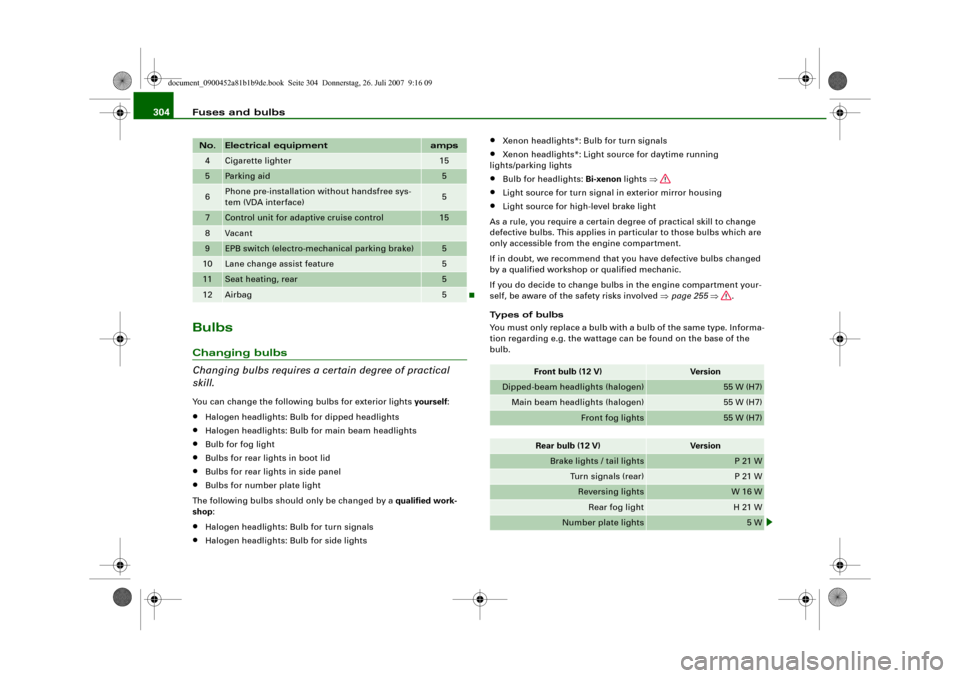
4
Cigarette lighter
15
5
Parking aid
5
6
Phone pre-installation without handsfree sys-
tem (VDA interface)
5
7
Control unit for adaptive cruise control
15
8
Vacant
9
EPB switch (electro-mechanical parking brake)
5
10
Lane change assist feature
5
11
Seat heating, rear
5
12
Airbag
5
No.
Electrical equipment
amps
Front bulb (12 V)
Vers io n
Dipped-beam headlights (halogen)
55 W (H7)
Main beam headlights (halogen)
55 W (H7)
Front fog lights
55 W (H7)
Rear bulb (12 V)
Vers io n
Brake lights / tail lights
P 21 W
Turn signals (rear)
P 21 W
Reversing lights
W 16 W
Rear fog light
H 21 W
Number plate lights
5 W
document_0900452a81b1b9de.book Seite 304 Donnerstag, 26. Juli 2007 9:16 09