warning AUDI A4 2013 Owners Manual
[x] Cancel search | Manufacturer: AUDI, Model Year: 2013, Model line: A4, Model: AUDI A4 2013Pages: 302, PDF Size: 75.61 MB
Page 121 of 302
The accuracy of the orientation lines and blue
surfaces diminis hes if:
- the rear view camera does not prov ide a re li
able image, for examp le, in poor vis ibility
conditions or if the lens is dirty,
- the image on the screen is not visible due to
sun g lare and reflection .
Caring for th e rear view came ra lens
The rear view camera is located above the rear
license plate b racket . Fo r the pa rking assist to
ope rate, the lens
,=:, fig. 131 must be kept
clean:
- Dampen the lens with a househo ld alcohol
based glass cleane r, and clean the lens with
a dry cloth
,=:, CD.
- Remove s now with a hand brush and ice
prefe rably with a de-icing spray
,=:, (D .
A WARNING
- T he pa rking aid cannot repla ce the dr iv
er's attention . The driver a lone is respon
sible for parking and similar driving ma
neuvers .
- Always keep your eyes on the vehicle's
su rroundings, using the rear view mirror
as well.
- Do not a llow yourse lf to be d istracted
from traffic by the rear view camera pic
tures.
- If the position and the installation ang le
of the camera has changed, fo r example,
after a rear end collision, do not continue
to use the system for safety reasons. Have it checked by a qua lified dealership.
(D Note
- Low obstacles already signaled by a
warning can disappear from the system's
detection range as they are approached
and will not continue to be signaled . Ob
jects such as barrier cha ins, trailer draw
bars, thin pa inted ve rtical po les o r fe n
ces may not be detected by t he system,
pos ing risk of damage .
- Never use warm or hot water to remove
s n ow or ice from the rear view camera
.
P ark a ssis t 119
lens -dange r of crack format ion on the
lens !
- When cleani ng the lens, never use prod
ucts that a re ab rasive.
Switching on/off
Applies to vehicles: with parking system (rear, with rear
view camera)
The rear view camera switches on automati
cally together with the acoustic park assist
when you put the vehicle in reverse.
Switching on
"' Put the veh icle in reverse gear, the acoust ic
parking system with rear view camera is ac
tivated automat ica lly. Act ivat ion of the
acoust ic par king system is confirmed by a
brief ac knowledgement sou nd.
Switching off
"' Drive faster than 9 mph (15 km/h) , or
"' take the vehicle out of reverse gear . The
acoust ic park ing system is immediate ly de
activated, and the rea r view came ra p icture
is deact ivated a utomat ically afte r a pe riod
o f abo ut 1 5 seconds , or
"' switch off the ignition.
T he de lay in deact ivat ing the camera prov ides
an unin terrup ted view beh ind the ve hicle es
pe cially when mane uver ing in tig ht park ing
spaces and prevents the picture from t urning
off th e ev ery time you shift out of reverse .
If the wa rning mess age ap pears in the dis play
but not the rea r view came ra p icture, read and
confirm the warni ng message . T he acoustic
distance signal is always active .
If you press a fu nction button on the M MI
control console, the rea r view came ra p icture
disappears . The rear view camera picture reap
pears the next time yo u pa rk.
Fur the r in forma tion on the warning mess age
and the MMI con tro l conso le can be found in
the MMI instruction book let.
Ill-
Page 122 of 302
120 Park ass is t
@ Tips
- The rear view camera picture is avai lable
as soon as the MMI Display or the MMI is
switched on, or the start-up phase is
completed.
- Keep the sensors in the rear bumper and the rear view camera lens clean and free
of snow and ice, so that the parking sys
tem can work properly . Please follow the
additional notes on
~ page 122.
Reverse Park ing
App lies to vehicles: with parking system (rear, wit h rear
view came ra)
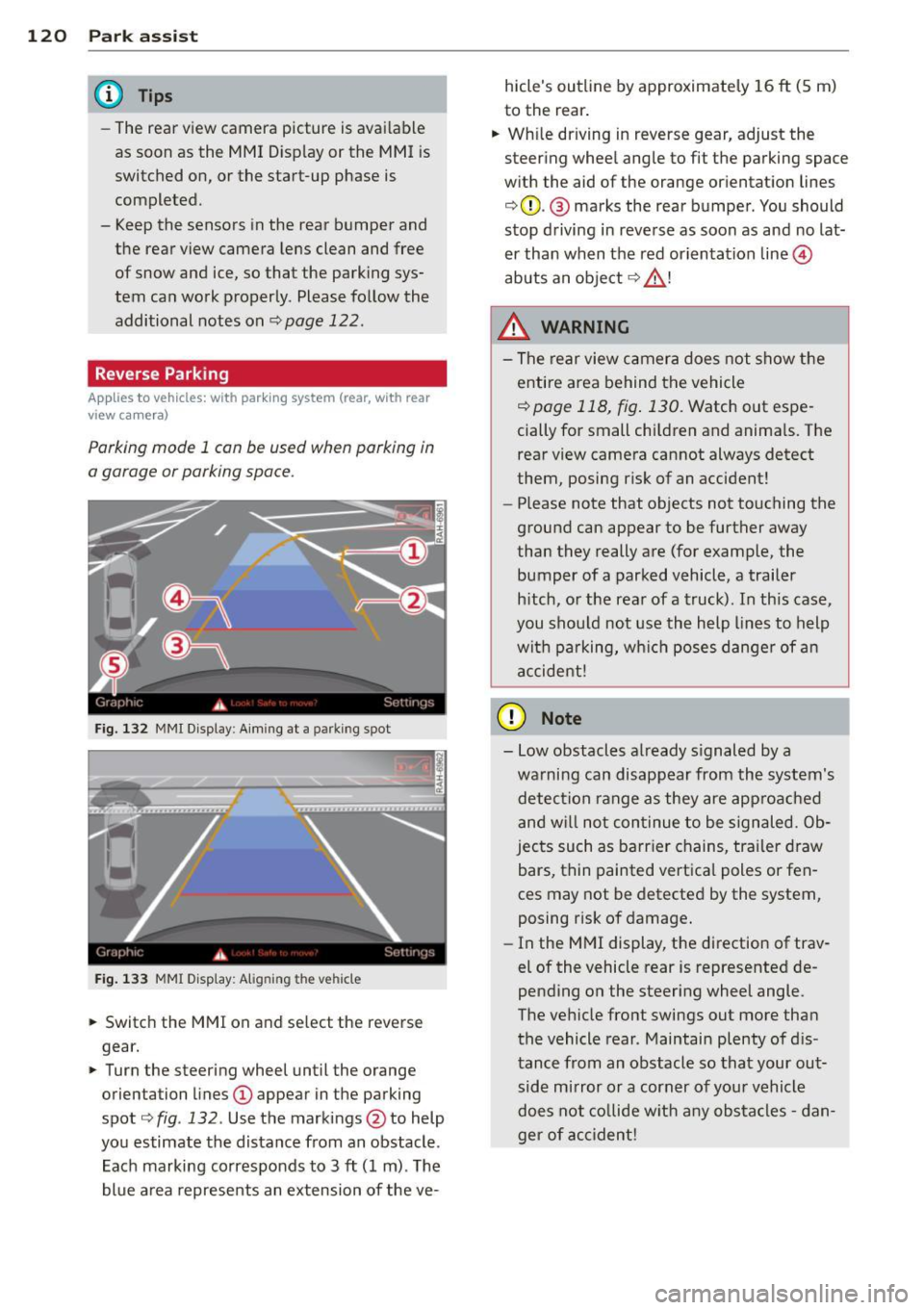
Parking mod e 1 can be used when parking in
a garage or parking space.
F ig. 132 MMI Display : Aim ing at a p arkin g spot
Fig . 133 MMI Disp lay: Ali gning th e vehi cle
"' Switch the MMI on and se lect the reverse
gear.
"' Turn the steering wheel until the orange
orienta tion lines
(D appear in the parking
spot ¢
fig. 132 . Use the mark ings @to help
yo u estimate the distance from an obstacle .
Each marking corresponds to 3
ft (1 m) . T he
blue a rea represents an extension of the ve- hicle's outline by approximate
ly 16
ft (5 m)
to the rear .
"' Wh ile driving in reverse gear, adjust the
steering whee l angle to fit the parking space
w ith the aid of the orange or ientation lines
¢ 0 . @ marks the rear bumper . You should
stop d riving in reve rse as soon as and no lat
er than when the red orientation line©
abuts an object ¢ _&. !
_& WARNING
-The rear view c amera does not show t he
e ntire area behind t he vehicle
¢ page 118, fig . 130. Watch out espe
cially for small children and anima ls. The
rear view camera cannot always detect
them, posing risk of an accident!
- Please note that objects not touching the
ground can appear to be further away
than they really a re (for example, the
bumper of a parked vehicle , a trailer
h itch, o r the rear of a truck). In this case,
you shou ld not use the h elp lines to help
wit h pa rking, wh ich poses danger of an
a ccident!
(D Note
- Low obstacles a lready s ignaled by a
wa rning can disappear from th e system's
detec tion range as they are approac hed
and w ill not con tinue to be signaled. Ob
jec ts such as barr ier chains, tr ailer draw
bars, thin painted vertica l poles or fen
ces may not be detecte d by the system,
posing risk of damage.
- In the MMI display, t he direction of trav
el of the vehicle rear is represented de
pending on the steering wheel angle.
The ve hicle fro nt swings out more tha n
the vehicle rear . Maintain plenty of d is
tance from an obstacle so that your out side mirror o r a corner of you r vehicle
does not co llide w it h any obs ta cl es -d an
ger of ac cident!
Page 123 of 302
Parallel Parking
Applies to vehicles: with parking system (rear, with rear
view ca mera)
Use parking mode 2 to help you pork on the
edge of o street.
F ig. 134 MMI Display : bl ue s urface in the park ing spot
Fig. 135 MMI Display: Blue curve on t he cur b
The following steps apply only when there is
no obstacle (such as a wall) near the parking
spot. Otherwise, please read the "Tips on
Parking Next to Obstacles".
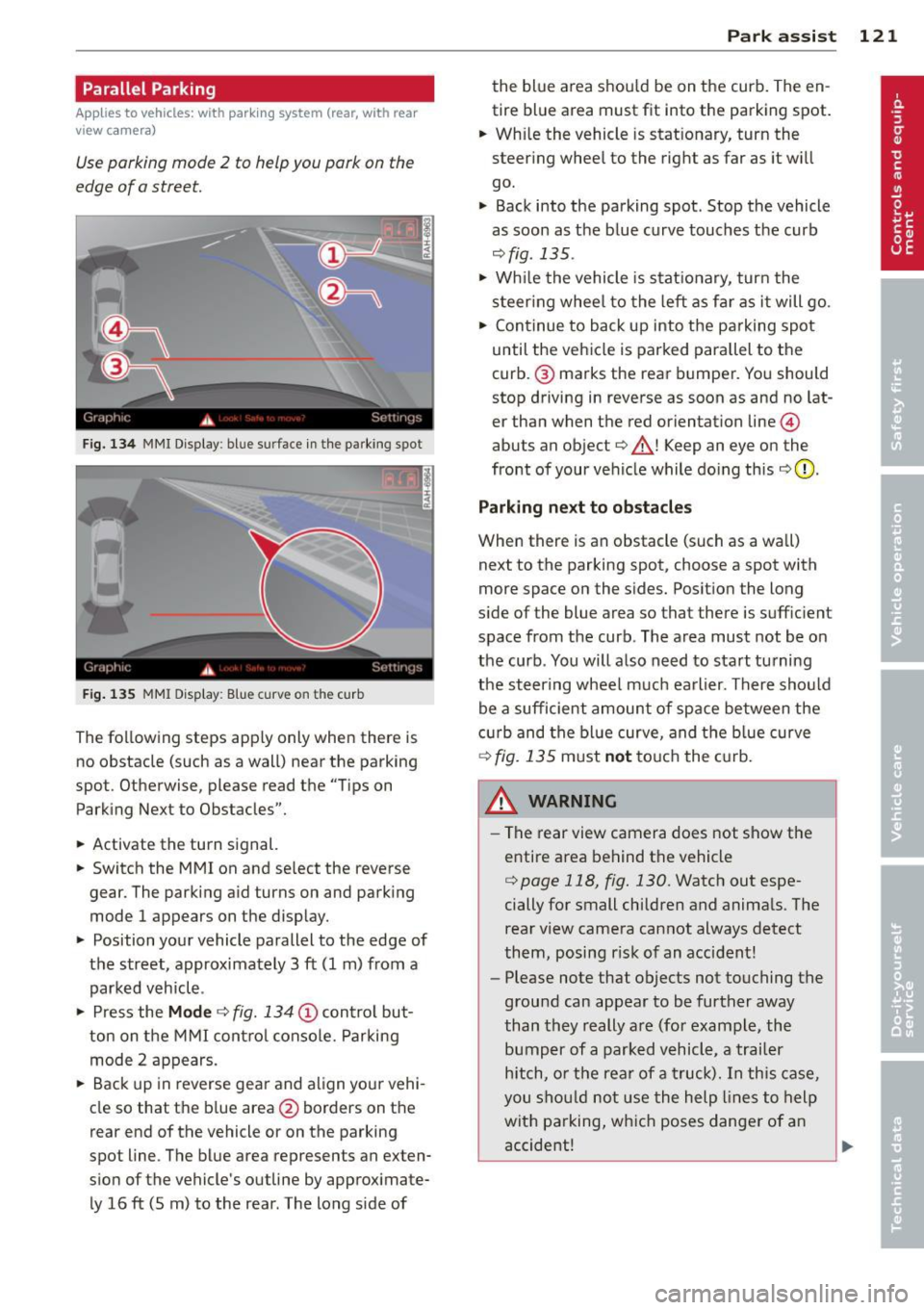
• Activate the turn signal.
• Switch the MM I on and se lect the reverse
gear. The parking aid turns on and parking
mode 1 appears on the display.
• Position your vehicle parallel to the edge of
the street, approximately 3 ft (1 m) from a parked vehicle .
• Press the
Mode ¢ fig. 134 (D control but
ton on the MMI control console. Parking
mode 2 appears.
• Back up in reverse gear and align your vehi
cle so that the blue area
@ borders on the
rear end of the vehicle o r on the parking
spot line . The blue area represents an exten
sion of the vehicle's outline by approximate ly 16 ft (5 m) to the rear . The long s ide of
Park assist 121
the blue area shou ld be on the curb. The en
tire blue area must fit into the parking spot.
• Wh ile the vehicle is stat ionary, turn the
steer ing whee l to the right as far as it wi ll
go.
• Back into the parking spot . Stop the vehicle
as soon as the blue curve touches the curb
¢ fig . 135 .
• Wh ile the vehicle is stationary, turn the
steering wheel to the left as far as it will go.
• Continue to back up into the parking spot
until the vehicle is parked parallel to the
curb .@ marks the rear bumper. You should
stop driving in reverse as soon as and no lat
er than when the red orientation line@
abuts an object¢_& ! Keep an eye on the
front of your vehicle while doing this
¢ 0 .
Parking next to obstacles
When there is an obstacle (such as a wall)
next to the parking spot, choose a spot with
more space on the sides. Posit ion the long
s ide of the blue area so that there is suff ic ient
space from the curb. The area must not be on
the curb . You will also need to start tu rning
the steering wheel much earlier. There should
be a sufficient amount of space between the
c urb and the blue curve, and the blue curve
¢ fig. 135 must not touch the curb.
&_ WARNING
- The rear view camera does not show the
entire area behind the vehicle
¢ page 118, fig. 130. Watch out espe
cially for small children and animals. The
rear view camera cannot always detect
them, posing risk of an accident!
- Please note that objects not touching the
ground can appear to be further away
than they really are (for example, the
bumper of a parked vehicle, a trailer
hitch, or the rear of a truck). In this case,
you should not use the help lines to help
with parking, which poses danger of an
accident!
.__ _____________ _J ...
Page 124 of 302
122 Park assist
In the MMI display, the direction of travel
of the vehicle rear is represented depending on the steering wheel angle. The vehi
cle front swings out more than the vehicle
rear. Maintain plenty of distance from an
obstacle so that your outside mirror or a
corner of your vehicle does not collide with
any obstacles -danger of accident!
@ Tips
The left or right orientation lines and sur
faces will be displayed, depending on the turn signal being used.
Adjusting the display and warning tones
Applies to vehicles: with parking system (rear, with rear
view camera)
The display and warning tones are adjusted in
the radio or MM!*.
"' Select: I CARI function button > Parking sys·
tern.
Or
"' Select: ~I C~A~RI function button > Car sys
tems*
control button > Driver assist > Park·
ing aid.
Display
- Off -when the parking system is switched
off, only audible signals are given.
- On -when the parking system is switched
on, the picture from the rear view camera is
displayed.
Warning tones
- Rear volume -
rear sensor volume
-Rear frequency -rear sensor frequency
-Music volume while parking -when the
parking system is switched on, the volume
of the active audio source is lowered.
The newly adjusted value is briefly heard from
the signal generator. The settings are auto
matically stored and assigned to the remote
control key.
A WARNING
- Always make sure that the volume and
frequency of the warning tones is adjust
ed so that you can easily hear the acous
tic distance signal even if the radio is
playing, the air-conditioner blower is on
High or there is a high level of outside
noise.
- Check the settings whenever someone
else has driven the vehicle before you.
@ Tips
- The warning tones can also be adjusted
directly from the rear view camera im
age. Simply press the Settings* control
button.
- Changed settings are activated when
parking assist is switched on again.
Error messages
Applies to vehicles: with parking system (rear, with rear
view camera)
-
If a warning tone is audible for about five sec
onds when you turn on the ignition, there is a
malfunction in the system. Have the problem
corrected by your authorized Audi dealer.
Keep the sensors in the rear bumper clean and
free from ice so that the acoustic park assist system can function properly.
Page 125 of 302

Homelink®
Universal remote
control
Description
Applies to vehicles: with Home link
The HomeLink universal remote control con
be programmed with the remote control for
devices that ore already present.
With Home Link, you can control devices such
as the garage door, secu rity systems, ho use
lights , etc. comfortably from the inside of you
vehicle .
H omelink makes it poss ible for you to rep lace
three different remote controls from dev ices
i n your home with one universal remo te. Th is
featu re works for most garage door and exte
rior door motor signals. Programming the in
d ividual remote control for your remote con
trol takes p lace near the center of the radiator
grille. There is a control module attached at
this location .
A one-t ime programm ing of the sensor must
be performed before you are able to use sys
tems with Homelink. If the system does not activate after performing the one-t ime pro
gramming, check whether the system uses a rolling code ¢
page 126 for vehicles without
the MMI*.
,& WARNING
-
-Never use the Homelink ® transmi tter
with any garage door opener that does have not the sa fety stop and reverse fea
ture as requ ired by federa l safety stand
ards. Th is includes any garage door open
er mode l manufactured before April 1,
1982.
- A garage door opener which cannot de
tect an object, signaling the door to stop
and reverse does not meet current feder
al safety standards . Us ing
a garage door
opener without these features increases
risk of serious injury or death.
Homelink ® 123
-For safety reasons never re lease the
parking brake or start the eng ine while
anyone is standing in front of the vehicle .
- A garage door or an estate gate may
sometimes be set in motion when the Homelink ® remote control is being pro
grammed. If the device is repeatedly ac
tivated, th is can overstrain motor and
damage its e lectrical components -an
overheated mo to r i s
a fire hazard!
- To avoid possib le injuries or property
damage, please always make abso lutely
certain that no person s or objects are lo
cated in the range of motion of any
equ ipment being operated .
(D Tips
-If you would like more information on
Homelink ®, where to purchase the
Home link ® compatib le products, or
would like to purchase the Homelink ®
Home Lighting Package, please ca ll toll
free: l-800-355-3515.
- For Declaration of Compliance to United
States FCC and Industry Canada reg ula
tions¢
page 283.
- For security reasons, we recommend that
you clear the programmed b uttons be
fore selling the veh icle.
Operation
App lies to vehicles : with Homeli nk
~~''' r ·O : O ·) 1111
~
®
Fig . 1 36 Head li ner: controls
Req uirement : The buttons must be program-
med
<:!)page 124 or ¢page 125. ..,_
Page 129 of 302
Driving Safely
General notes
Safe driving habits
Please remember -safety first!
This chapter contains important information,
tips, instructions and warnings that you need
to read and observe for your own safety, the
safety of your passengers and others . We have
summarized here what you need to know
about safety belts, airbags, child restraints as
well as child safety. Your safety is for us
priori
ty number 1.
Always observe the information
and warnings in this section - for your own
safety as well as that of your passengers.
The information in this section applies to all
model versions of your vehicle . Some of the
features described in this sections may be
standard equipment on some models, or may
be optional equipment on others. If you are
not sure, ask your authorized Audi dealer.
A WARNING
- Always make sure that you follow the in
structions and heed the WARNINGS in
this Manual. It is in your interest and in
the interest of your passengers.
- Always keep the complete Owner's Liter
ature in your Audi when you lend or sell
your vehicle so that this important infor
mation will always be available to the
driver and passengers.
- Always keep the Owner's literature handy
so that you can find it easily if you have
questions.
Safety equipment
The safety features are part of the occupant
restraint system and work together to help
reduce the risk of injury in a wide variety of
accident situations .
Your safety and the safety of your passengers
should not be left to chance. Advances in
technology have made a variety of features
available to help reduce the risk of injury in an
Driving Safely 127
accident. The following is a list of just a few of
the safety features in your Audi :
- sophisticated safety belts for driver and all
passenger seating positions,
- belt force limiters for the front seats,
- belt pretensioners for the seats,
- head restraints for each seating position,
- front airbags,
- side airbags in the front seats,
- side curtain airbags ,
- special LATCH anchorages for child re-
straints,
- adjustable steering column.
These individual safety features, can work to
gether as a system to help protect you and
your passengers in a wide range of accidents.
These features cannot work as a system if
they are not always correctly adjusted and cor
rectly used.
Safety is everybody's responsibility!
Important things to do before driving
Safety is everybody's job! Vehicle and occu
pant safety always depends on the informed and careful driver.
For your safety and the safety of your passen
gers,
before driving always:
"' Make sure that all lights and signals are op
erating correctly .
"' Make sure that the tire pressure is correct .
"' Make sure that all windows are clean and
afford good visibility to the outside.
"' Secure all luggage and other items carefully
qpage 64.
"' Make sure that nothing can interfere with
the pedals.
"' Adjust front seat, head restraint and mir
rors correctly for your height.
"' Instruct rear seat passengers to adjust the
head restraints according to their height.
"' Make sure to use the right child restraint
correctly to protect children
q page 166,
and~~fy. ~
•
•
Page 130 of 302
128 Driving Safel y
• Sit properly in your seat and make sure that
yo ur passengers do the same¢
page 58,
Seats and storage.
• Fasten your safety belt and wear it properly.
Also instruct your passenge rs to fasten their
safety belts properly ¢
page 13 7.
What impairs driving safety?
Safe driving is directly related to the condi
t ion of the vehicle, the driver as well as the
driver's ability to concentrate on the road
without being distracted .
The driver is responsible for the safety o f the
vehicle and all of its occupants . If your ability
to drive is impa ired, safety r isks for everybody
in the vehicle increase and you also become a
hazard to everyone else on the road
9 .&, .
Therefore:
• Do not let yourself be dist racted by passen
gers or by us ing a cellular telephone.
• NEVER drive when your dr iv in g ability is im
paired (by medicat ions, alcohol, dr ugs, etc.).
• Observe all traffic laws, rules of the road
and speed limits and plain common sense.
• ALWAYS adjust your speed to road, traffic
and weather condit ions .
• Take frequent breaks on long trips. Do not
drive for more than two hours at a stretch.
> Do NOT drive when you are t ired, under
pressure or when you are stressed .
A WARNING
Impaired driving safety increases the risk
of serious personal injury and death when
ever a veh icle is being used.
Proper occupant
seating positions
Proper seating position for the driver
The proper driver seating position is impor
tant for safe, relaxed driving.
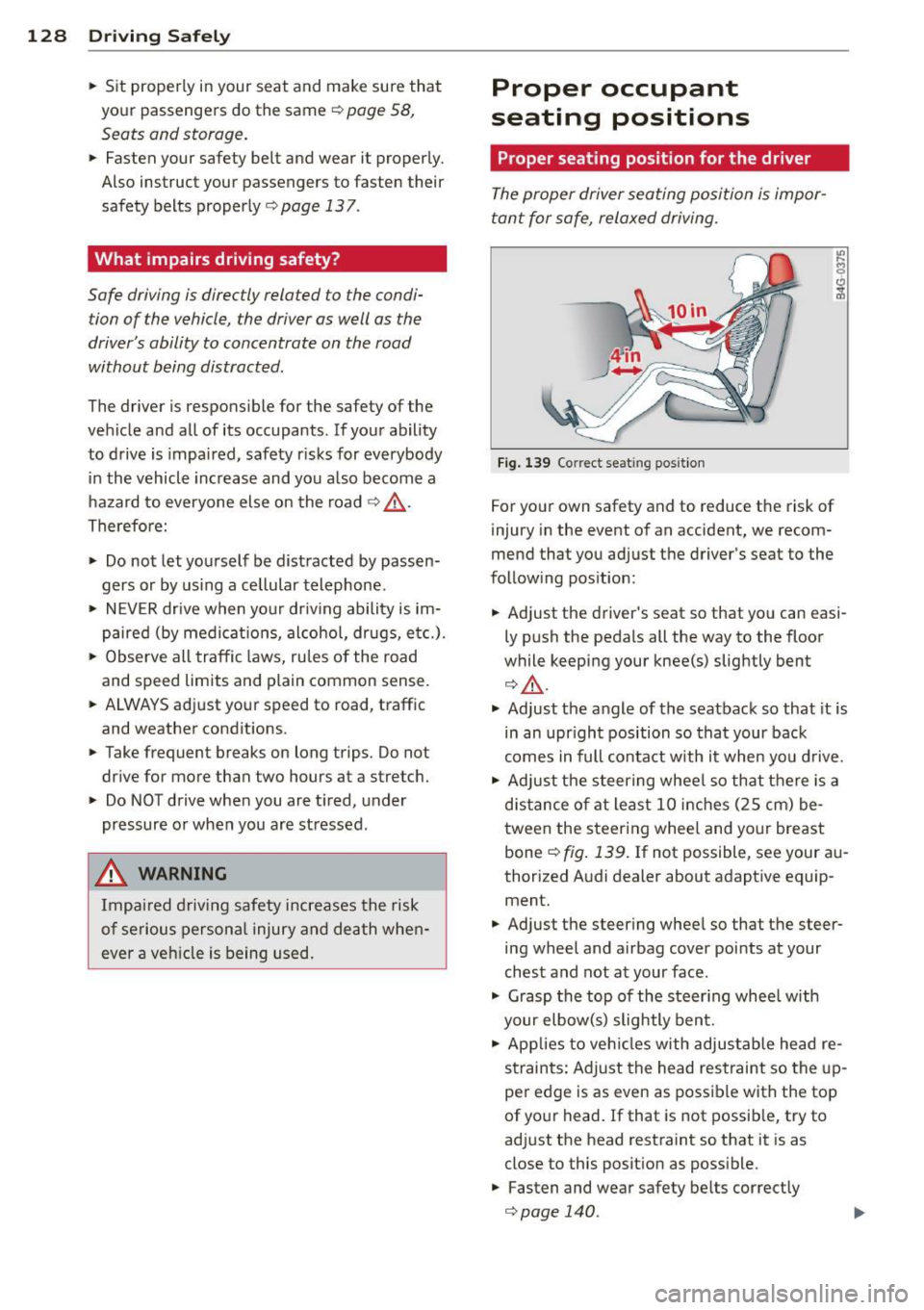
Fig. 139 Correc t seat ing posit ion
For your own safety and to reduce the risk of
injury in the event of an accident, we recom
mend that you adjust the driver's seat to the
following position:
• Adjust the driver's seat so that you can easi
ly push the pedals all the way to the floor
while keeping your knee(s) slightly bent
¢.&_ .
• Adjust the angle of the seatback so that it is
in an upr ight position so that your back
comes in full contact with it when you drive .
• Adjust the steer ing whee l so that there is a
distance of at least 10 inches (25 cm) be
tween the steering wheel and your breast
bone ¢
fig. 139. If not possible, see your au
thorized Audi dealer about adaptive equip ment.
• Adjust the steering wheel so that the steer
ing wheel and airbag cover points at your
chest and not at your face .
• Grasp the top of the steer ing whee l with
your elbow(s) slightly bent.
• Applies to veh icles with adjustable head re
straints: Adjust the head restraint so the up
per edge is as even as possible with the top
of your head. If that is not possible, try to
adjust the head restraint so that it is as
close to this posit ion as possible.
• Fasten and wear safety belts correctly
¢page 140.
Page 131 of 302
~ Always keep both feet in the footwell so
that you are in control of the vehicle at all
times.
For detailed information on how to adjust the
driver's seat, see
c:;, page 60.
A WARNING
Drivers who are unbelted, out of position
or too close to the airbag can be seriously
injured by an airbag as it unfolds. To help
reduce the risk of serious personal injury:
- Always adjust the driver's seat and the
steering wheel so that there are at least
10 inches (25 cm) between your breast
bone and the steering wheel.
- Always hold the steering wheel on the
outside of the steering wheel rim with
your hands at the 9 o'clock and 3 o'clock positions to help reduce the risk of per
sonal injury if the driver's airbag inflates.
- Never hold the steering wheel at the
12 o'clock position or with your hands at
other positions inside the steering wheel
rim or on the steering wheel hub. Hold
ing the steering wheel the wrong way
can cause serious injuries to the hands,
arms and head if the driver's airbag de
ploys.
- Pointing the steering wheel toward your
face decreases the ability of the supple
mental driver's airbag to protect you in a
collision .
- Always sit in an upright position and nev
er lean against or place any part of your
body too close to the area where the air
bags are located.
- Before driving, always adjust the front
seats and head restraints properly and
make sure that all passengers are prop
erly restrained.
- Never adjust the seats while the vehicle
is moving . Your seat may move unexpect
edly and you could lose control of the ve
hicle.
- Never drive with the backrest reclined or
tilted far back! The farther the backrests
are tilted back, the greater the risk of in-
Driving Safely 129
jury due to incorrect positioning of the
safety belt and improper seating posi
tion .
- Children must always ride in child safety
seats
c:;, page 166. Special precautions
apply when installing a child safety seat
on the front passenger seat
c:;, page 145 .
Proper seating position for the front
passenger
The proper front passenger seating position
is important for safe, relaxed driving .
For your own safety and to reduce the risk of
injury in the event of an accident, we recom
mend that you adjust the seat for the front
passenger to the following position :
~ Move the front passenger seat back as far
as possible. There must be a minimum of 10 inches (25 cm) between the breastbone
and the instrument panel
c:;, &, .
~ Adjust the angle of the seatback so that it is
in an upright position and your back comes
in full contact with it whenever the vehicle is
moving.
~ Applies to vehicles with adjustable head re
stra ints: Adjust the head restraint so the up
per edge is as even as possible with the top
of your head. If that is not possible, try to
adjust the head restraint so that it is as
close to this position as possible .
~ Keep both feet flat on the floor in front of
the front passenger seat .
~ Fasten and wear safety belts correctly
c:;, page 140.
For detailed information on how to adjust the
front passenger's seat, see
c:;, page 58.
A WARNING
-
Front seat passengers who are unbelted,
out of position or too close to the airbag
can be seriously injured or killed by the air
bag as it unfolds. To help reduce the risk of
serious personal injury:
•
•
Page 132 of 302
130 Driving Saf ely
- Passengers must always sit in an upright
posit ion and never lean against or place
any part of their body too close to the
area where the airbags are located.
- Passengers who are unbelted, out of po
sit ion or too close to the airbag can be
seriously injured by an airbag as it un
folds with g reat force in the blink of an
eye.
-Always make sure that there are at least 10 inches (25 cm) between the front
passenge r's breastbone and the inst ru
ment pane l.
- Each passenger must always s it on a seat
of the ir own and properly fasten and
wea r the safety belt be long ing to that
seat.
- Before driv ing, a lways adjust the front
passenge r seat and head restra int prop
er ly .
- Always keep your feet on the f loor in
front of the seat . Never rest them on the
seat, instrument pane l, out of the win
dow, etc . The airbag system and safety
belt w ill not be ab le to protect you prop
erly and can even increase the risk of in
jury in a crash .
- Never drive with the backrest recl ined or
t ilted far back! The farther the backrests
are t ilted back , the greater the risk of in
jury due to incorrect positioning of the
safety belt and improper seating posi
t ion.
- Children must always ride in child safety
seats ¢
page 166 . Special precautions
apply when installing a child safety seat
on the front passenge r seat ¢
page 145.
Proper seating positions for passengers
in rear seats
Rear seat passengers must sit upright with
both feet on the floor consistent with their
physical size and be properly restrained whenever the vehicle is in use.
To reduce the risk of injury caused by an incor
rect seating position in the event of a s udden
braking maneuver or an accident, your pas- sengers on the rear bench seat must always
observe the following:
.. Make s ure that the seatback is secure ly
la tched in the up right pos ition ¢
page 69.
.. If there is a passenger on the rear center
seating position, slide the center head re
straint upward at least to the next notch .
.. Keep both feet flat in the footwell in front
of the rear seat.
.. Fasten and wear safety be lts properly
¢ page 140 .
.. Make sure that children are always properly
restrained in a child rest raint that is appro
priate fo r the ir s ize and age¢
page 166.
& WARNING ~ -
Passengers who are improperly seated on
the rear seat can be seriously injured in a
crash .
- Each passenger must always sit on a seat of their own and properly fasten and
wear the safety belt belonging to that seat .
- Safety belts only offer maximum protec
tion when the seatback is sec urely latch
ed in the upright position and the safety belts are properly posit ioned on the
body . By not sitting upright, a rear seat
passenger increases the risk of personal
injury from improperly positioned safety
be lts!
- Always adjust the head restraint properly
so that it can give maximum protection.
Page 133 of 302
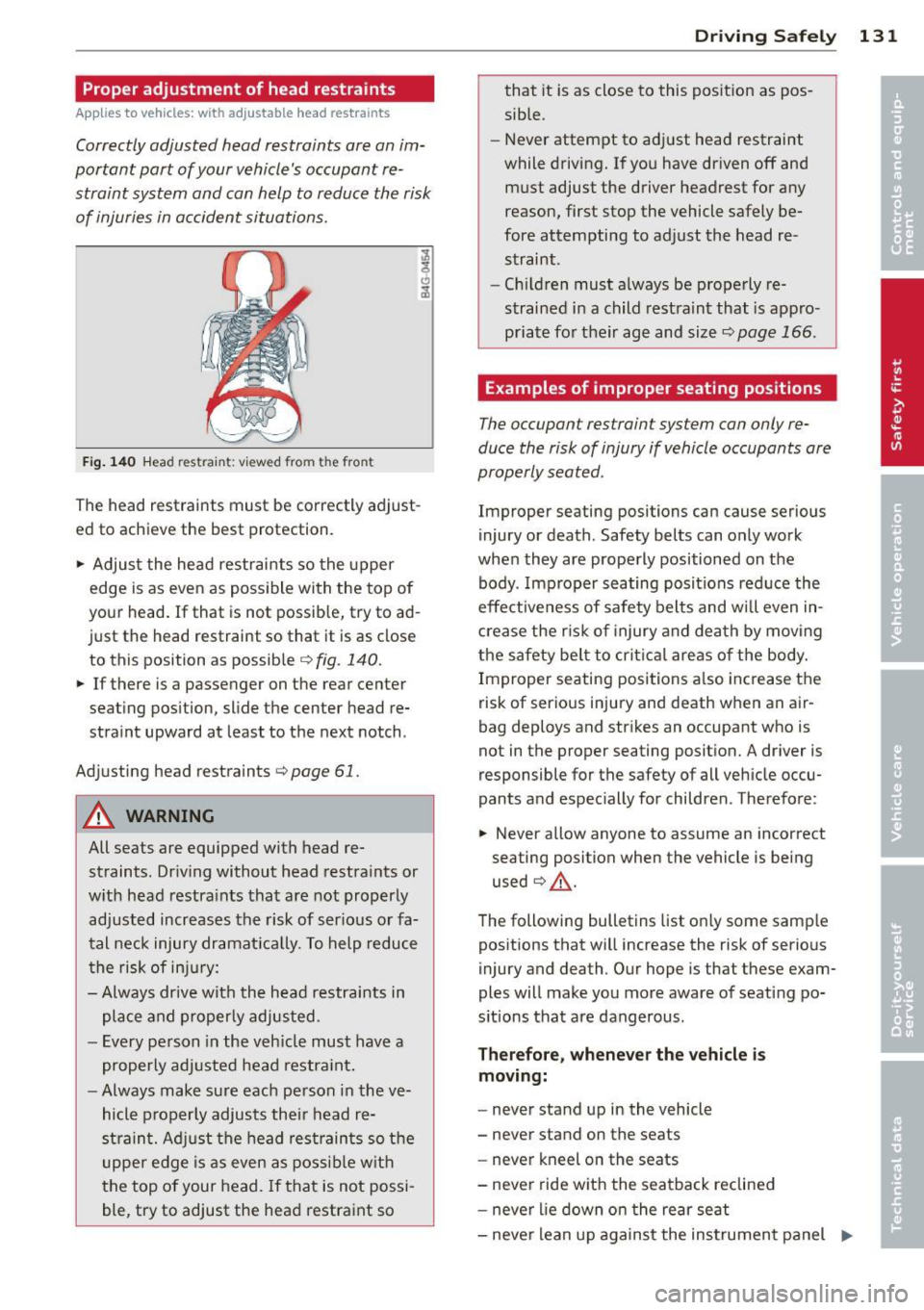
Proper adjustment of head restraints
Applies to vehicles: with adj ustable head restraints
Correctly adjusted head restraints ore on im
portant port of your vehicle's occupant re
straint system and con help to reduce the risk of injuries in occident situations.
F ig . 140 H ead re str ain t: v ie w ed fro m the front
The head restraints must be correctly adjust
ed to achieve the best protection .
.,. Adjus t the head restraints so the upper
edge is as even as possible with the top of
your head. If that is not possib le, try to ad
just the head restraint so that it is as close to this position as possible
r::> fig . 140.
.,. If there is a passenger on the rear center
seating position, slide the center head re
straint upward at least to the next notch .
Adj usting head restraints
c:;, page 61.
A WARNING
All seats are equipped with head re
straints. Driv ing without head restraints or
w ith head restra ints that are not properly
adjusted increases the risk of ser ious or fa
tal neck injury dramat ica lly. To help reduce
the risk of in ju ry:
- Always drive with the head restraints in
place and properly adjusted.
- Every pe rson in the veh icle must have a
properly adj usted head restra int.
- Always make sure each person in the ve
hicle properly adjusts their head re
strain t. Adj ust the head restrain ts so the
upper edge is as even as poss ib le w ith
the top of your head .
If that is not possi
ble, try to adjust the head restraint so
Dr ivin g Sa fely 131
that it is as close to this posit ion as pos
sible.
- Never attempt to adj ust head restraint
while driving. If you have driven off and
must adjust the driver headrest for any
reason, first stop the vehicle safely be
fore attempting to adjust the head re straint .
- Ch ildren must a lways be properly re
strained i n a child rest raint that is appro
priate for their age and size
c:;, page 166 .
Examples of improper seating positions
The occupan t restraint system con only re
duce the risk of injury if vehicle occupants ore
properly seated .
Improper seating positions can cause serious
injury or death . Safety belts can only work
when they are properly positioned on the body . Imp roper seating positions red uce the
effe ct iveness of safety belts and wi ll even in
c rease the r is k of injury and dea th by moving
the safety be lt to crit ica l areas o f the body.
Improper seating positions a lso increase the
risk of serious injury and death when an air
bag deploys and strikes an occupant who is
not in the proper seating posit ion. A driver is
responsible for the safety of all veh icle occu
pants a nd espec ially for children . Therefo re :
.,. Never allow anyone to assume an incorrect
seating position when the vehicle is being
used
c:;, .&, .
The following bulletins list on ly some samp le
positions that will increase the risk of serious
injury and death . Our hope is that these exam
ples will make you more aware of seat ing po
s itions that are dangerous .
Therefore , whenever the vehicle is
moving:
- never stand up in the vehicle
- never stand on the seats
- never kneel on the seats
- neve r ride wit h the seatback reclined
- never lie down on the rear seat
- neve r lean up aga inst the instrumen t panel ..,_