display AUDI A4 2013 User Guide
[x] Cancel search | Manufacturer: AUDI, Model Year: 2013, Model line: A4, Model: AUDI A4 2013Pages: 302, PDF Size: 75.61 MB
Page 28 of 302
26 Driver in formation d isplay
¢fig . 10 . The data from the single -trip mem
ory (memory leve l 1) is being displayed if a
D
appears in the display . If a II is shown, then
the data from the total -trip memory is being
d isplayed (memory leve l 2). The fuel pump
nozzle
iii indicates the efficiency program*
¢ page 27.
Single-tr ip m emory (Trip computer 1 )
The single-trip memory stores the trip infor
mat ion from the time the ignition is turned o n
until it is turned off. If the trip is continued
w ithin 2 hours from the t ime the ignition was
turned off, the new data will be included in
the calcu lation of the current trip i nfo rma
tion .
If the t rip is inte rrupted fo r more than 2
hours the memory is reset automati ca lly.
Total -trip memory (Trip computer 2)
Unlike the sing le-trip memory, the tota l- tr ip
memory is not reset automatically . Th is per
mits you to evaluate your d riving data for the
enti re pe riod be tween manual rese ts.
Efficiency program*
The effic iency program can help you to use
less fuel ¢
page 2 7.
Operation
App lies to vehicles: with trip computer
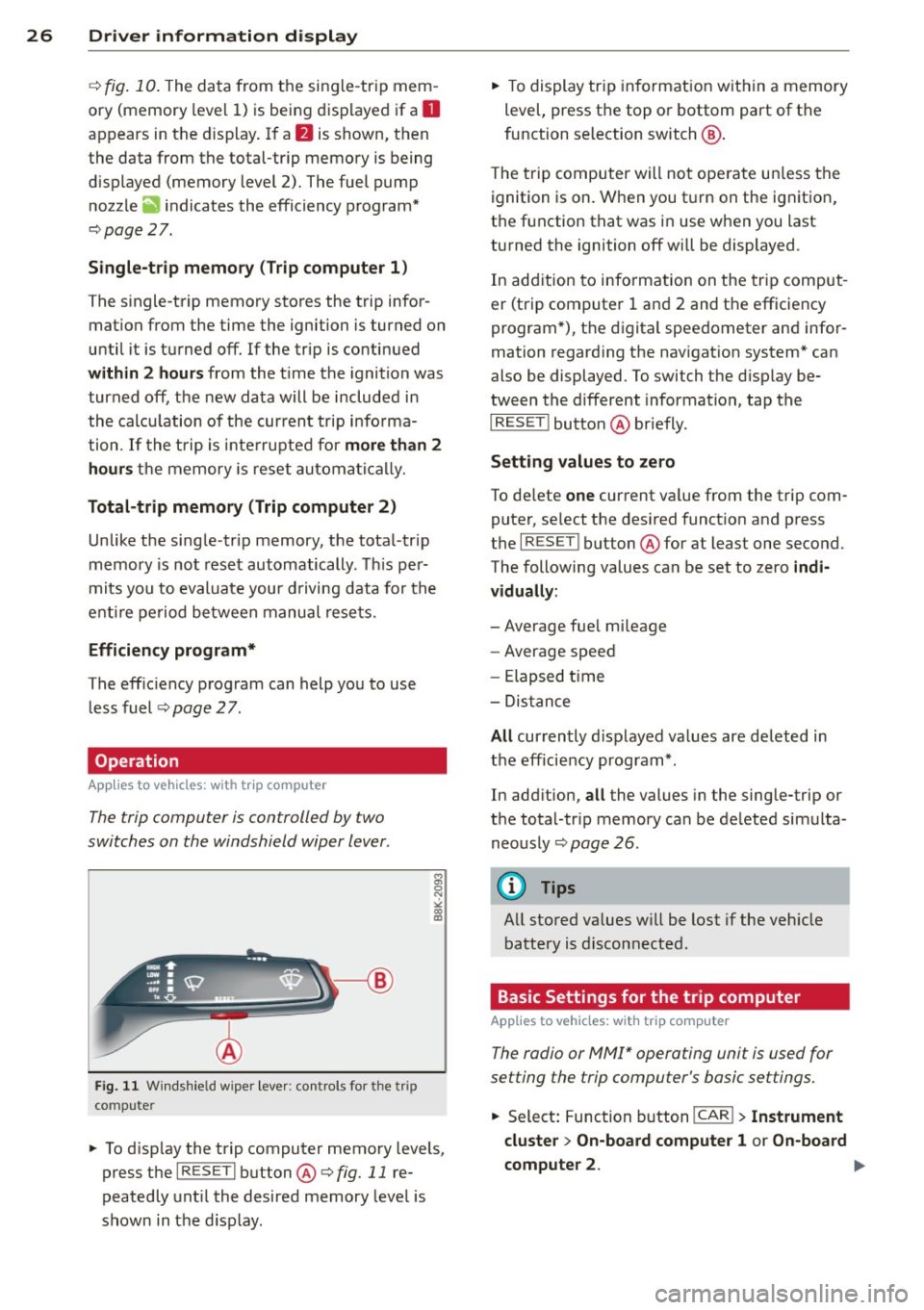
The trip computer is controlled by two
switches on the windshield wiper lever .
Fig. 11 W indsh ie ld wipe r leve r: co ntrols for the tri p
co mpute r
M
"' 0 N
"' co a:,
~ To d isp lay the trip computer memory levels ,
press the
I RES ET I button @¢ fig. 11 re
peatedly unt il the desired memory leve l is
shown in the d isplay .
~ To display tr ip in format ion wit hin a memory
level, press the top or bottom part of the
function se lection switch @.
T he trip computer will not ope rate un less the
ignition is on. W hen you t urn on the ignition,
the function that was in use when you last
turned the ignition off will be displayed .
In add ition to info rmation on the trip comput
er (trip computer 1 and 2 and the efficiency
program *), t he digital spee dometer and infor
mation regard ing the nav igat ion system* can
also be displayed. To switch the d isp lay be
tween the different information, tap the
I RESET ! button@ briefly.
Sett ing values to zero
To de lete one current va lue from the trip com
puter, se lect the des ired funct ion and press
t h e
I RES ET I button @for at least one second.
The following values can be set to zero
indi
vidually :
- Average fue l mi leage
- Average speed
- Elapsed t ime
- Dis tance
All cur rently d isplayed va lues are deleted in
the eff iciency program*.
In add it ion,
all the values in the single-trip or
the total-tr ip memory can be de leted simulta
neously ¢
page 26.
(D Tips
All stored va lues w ill be lost if the veh icle
battery is discon nected .
Basic Settings for the trip computer
Applies to vehicles: with trip computer
The radio or MMI* operating unit is used for
setting the trip computer's basic settings.
~ Select: Function b utton ICAR ! > Instrument
cluster > On -board computer 1 or On-board
computer 2 . .,.
Page 29 of 302
The values in the single-trip or the total-trip
memory can a ll be reset to zero at the same
time under
Re set in the menu .
I n addition, you can determine what informa
tion from the trip computer should be shown in the instrument cluster display. If one of the
p ieces of driver information is turned
Off , that
driver information w ill not be shown in the
display. The information will con tinue to be
calculated by the trip computer and can be
turned back
On at any t ime .
(D Tips
-This function is not avai lab le on all
vehicles.
- The driving information in the efficiency
program is also reset to zero with the
s ingle-trip memory .
Gearshift Indicator
Appl ies to vehicles: with manu al transmis sion a nd gea r·
shi ft indica tor
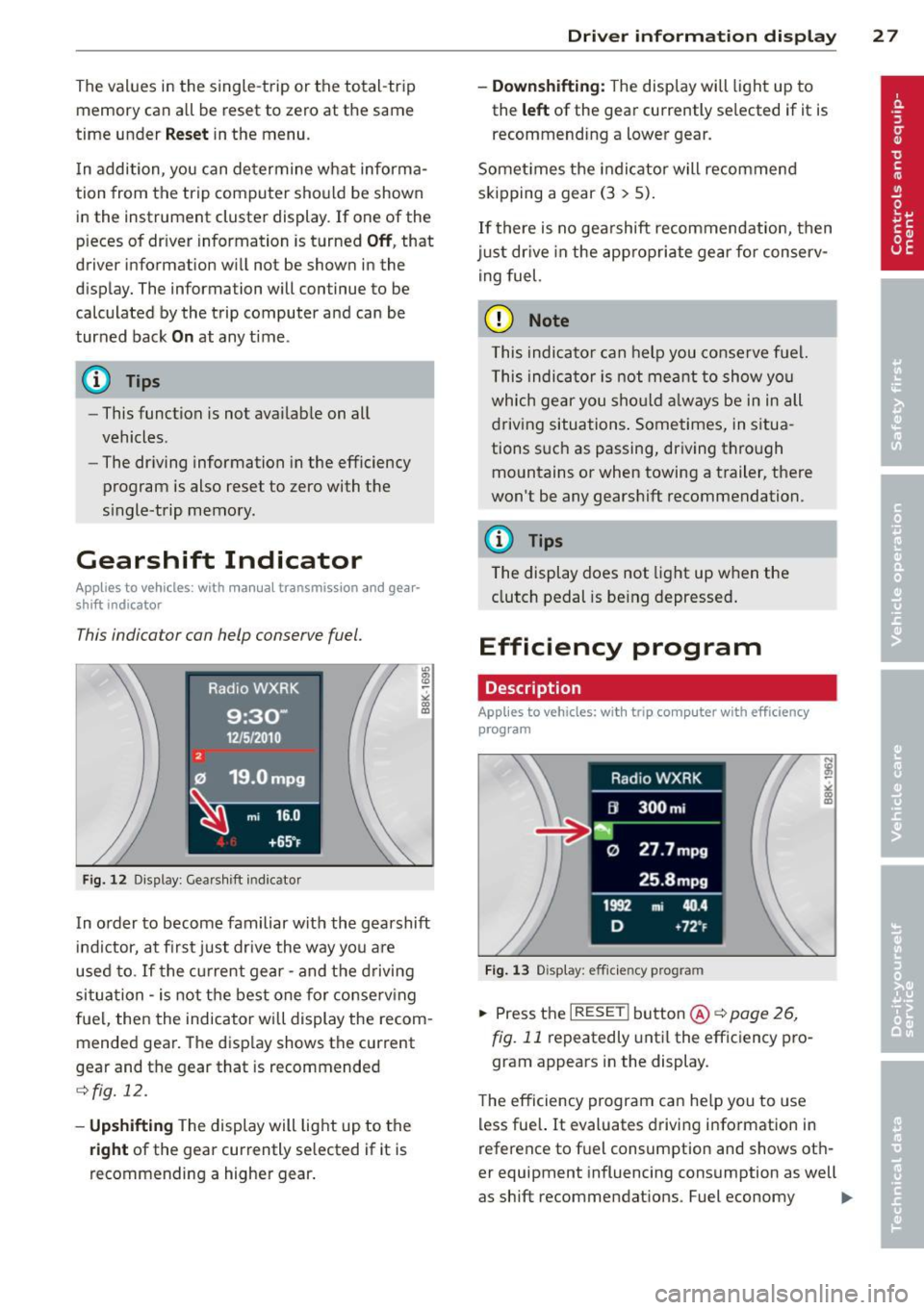
This indica tor con help conserve fuel.
~~~------------~~ ~.;;-
Fig. 12 Disp lay : Gea rs hi ft indicator
m ~ ~ a, a,
In order to become familiar with the gearshift
indictor, at first just drive the way you are
used to.
If the current gear -and the d riving
situa tion -is not the best one for conse rv ing
fuel, then the indicator will display the recom
mended gear. The disp lay shows the current
gear and the gear that is recommended
¢ fig. 12.
-Up shifti ng The display will light up to the
right of the gear currently selected if it is
recommending a higher gear .
Driver inform ation di spl ay 2 7
- Down shifting:
The display will light up to
the
left of the gear currently se lected if it is
recommending a lower gear.
Somet imes the indicator will recommend
skipping a gear (3
> 5).
If there is no gearshift recommendation, then
just dr ive in the app rop riate gear for conserv
ing fuel.
(D Note
This indicator can help you conse rve fuel.
This indica tor is not meant to show you
which gear you sho uld a lways be in in all
driving situations . Sometimes, in situa
tions s uch as passing, driving thro ugh
mountains or when towing a trailer, there
won't be any gearshift recommendation.
(D Tips
The display does not light up when the
clutch pedal is be ing depressed .
Efficiency program
Description
Applies to vehic les: wi th trip co mp uter with efficiency
prog ram
Fig . 13 Display : eff icie ncy pro gram
.. Press the I RESE TI button @¢ page 26 ,
fig . 11
repeatedly until the efficiency p ro
gram appears in the display .
The efficiency program can he lp you to use
less fue l. It evaluates driving information in
reference to f uel consumption and shows oth
er equipment influencing consumption as well
as shift recommendations . Fuel economy ...,
Page 30 of 302
28 Drive r in form ation d ispl ay
messages ¢ page 29 provide tips for effi
cient driving .
The effic iency program uses distance and con
sumption data from tr ip computer
1. If the
data are deleted in the efficiency program,
those values are also reset in trip computer
1.
Enhanced shift indicator
Applies to vehicles: with manual transmission and trip
computer with efficiency program
Fig. 14 Display: enhanced shift indicator
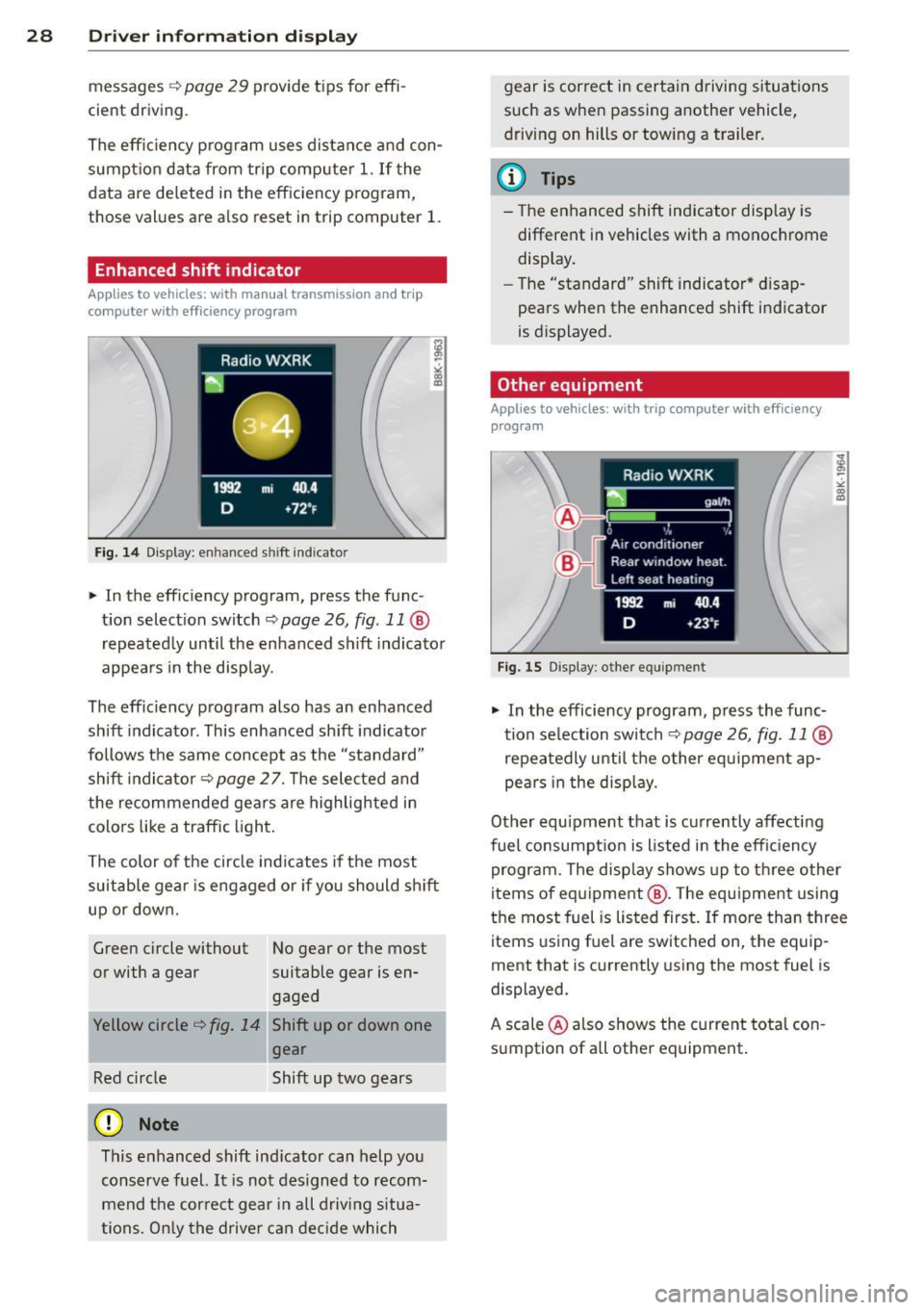
" In the effic iency program, press the func
t ion select ion switch ¢
page 26, fig. 11 @
repeated ly until the enhanced shift indicato r
appea rs in the display.
The eff ic iency program also has an enhanced
shift indicator . This enhanced shift indicator
follows the same concept as the "standard"
shift indicator¢
page 27. The selected and
the recommended gears are highlighted in
colo rs like a traffic light.
The color of the circle indicates if the most
suitable gear is engaged or if you should sh ift
up or down.
Green circle without No gear or the most
or with a gear suitable gear is en gaged
Yellow circle¢
fig. 14 Shift up or down one
gear
Red circle Shift up two gears
(D Note
This enhanced shift ind icator can help you
conserve fuel.
It i s not des igned to recom
mend the correct gear in all driving situa
tions. O nly the drive r can decide which gear is correct in certain driving situations
such as when passing another vehicle,
driving on hills or towing a trailer.
(D Tips
- T
he enhanced shift indicator display is
different in vehicles with a monochrome
disp lay.
- The "standard" sh ift indicator* d isap
pears when the enhanced shift indicator
is displayed.
Other equipment
Applies to vehicles: with trip computer with efficiency program
F ig. 15 Display: other equipment
" In the efficiency program, press the func
tion selection switch¢
page 26, fig. 11@
repeatedly until the other equipment ap
pea rs in the display.
Other equ ipment that is currently affecting
fuel consumpt ion is listed in the eff iciency
program. The disp lay shows up to three other
items of equipment @. T he equipment using
the most fuel is listed first. If more than three
items using fuel are switched on, the equip
ment that is currently using the most fuel is
displayed.
A scale @also shows the current tota l con
sumption of all other equipment.
Page 31 of 302
Fuel economy messages
Applies to vehicles: with trip computer w ith efficiency
program
Fig . 16 Display: fuel eco nomy me ssage
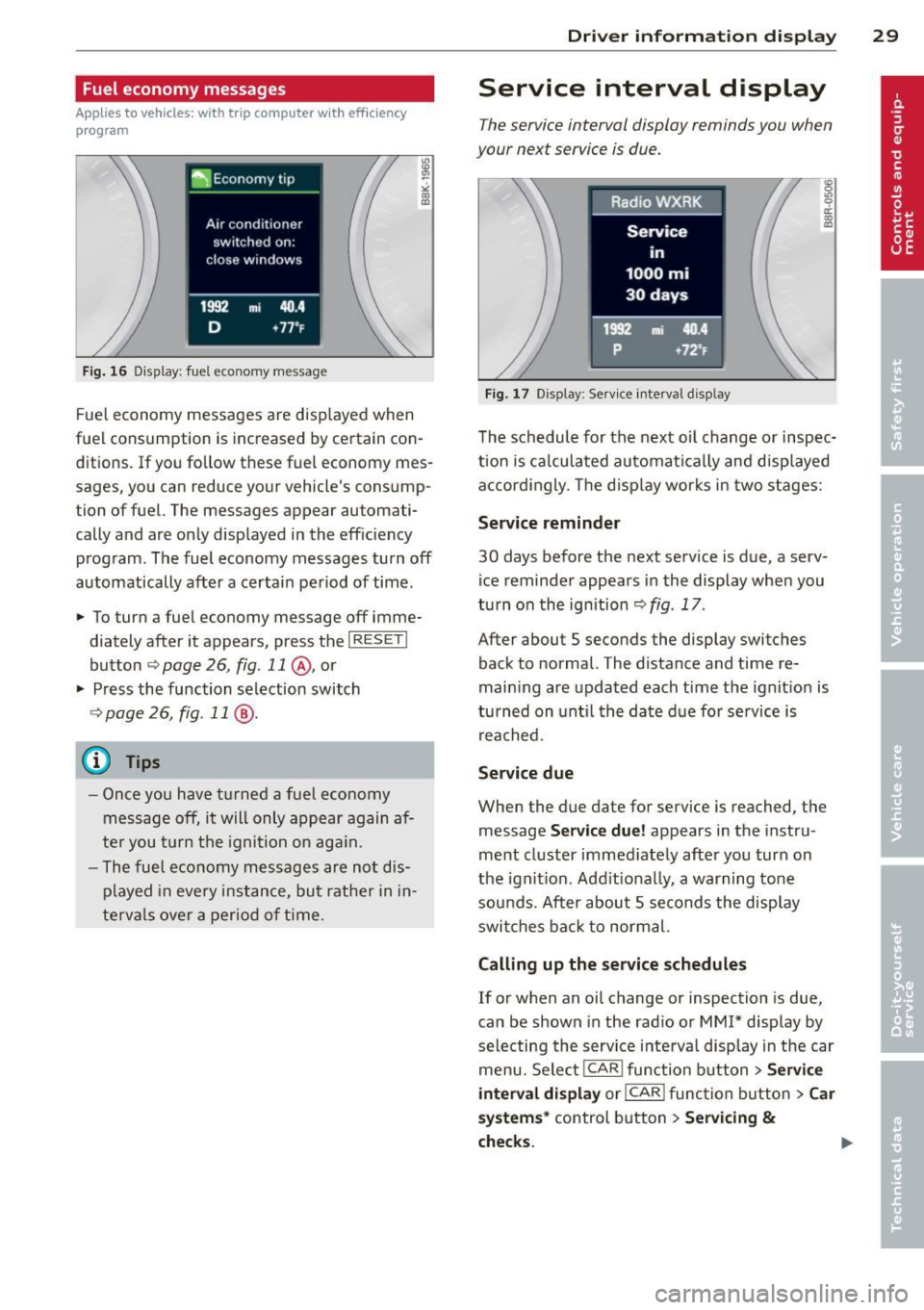
F ue l economy messages are disp layed when
fuel consumption is increased by certa in con
ditions. If you follow th ese fu el economy mes
sages, you can reduce your vehicle's consump
tion of fuel. The messages appear automati
cally and are only displayed in the eff ic iency
program . The fuel economy messages turn off
automatically after a certain period of time .
• To turn a fuel economy message off imme
diately after it appear s, press the
I RES ET I
button ¢ page 26, fig . 11 @ , or
• Press the function selection switch
¢ page 26, fig. 11 @ .
(D Tips
- Once you have turned a fuel economy
message off, it will only appear again af
te r you turn the ignition on aga in.
- The fuel economy messages are not dis
played in every instance, but rathe r in in
te rva ls over a period of time .
Driver inform ation di spl ay 29
Service interval display
The service interval display reminds you when
your next service is due .
Fig. 17 Disp lay: Se rvice i nterval d is pl ay
The schedule for the next oi l change or inspec
tion is ca lculated automatica lly and disp layed
accord ingly. The d isp lay works in two stages:
Service reminde r
30 days before the next service is due, a serv
ice reminder appears in the display whe n you
turn on the ignition ¢
fig. 17 .
After about S seconds the display switches
back to normal. The distance and time re
main ing are updated each time the ignit ion is
tu rned on unt il th e date due for service is
reached.
Service due
When the due da te for service is reached , the
message
Ser vice due! appears in the in stru
ment cluster immed iately after you turn on
the ignit ion. Add it iona lly, a warning tone
sou nds . After about S seconds the disp lay
switches bac k to normal.
Calling up the service schedule s
If or when an oil change or inspection is due,
can be shown in the rad io or
MMI* disp lay by
selecting the service interva l display in the car
menu. Select !CAR ! func tion button>
Servic e
interval d ispl ay
o r! CAR ! function button> C ar
sys te m s*
control button > Serv icing &
check s.
Page 32 of 302
30 Driver information display
Resetting the service interval display
Your authorized Audi dealer will reset the cor
responding service schedule after performing
the appropriate service on yo ur vehicle . Yo u
also have the possibility to reset the oil
change schedule after having performed an
oil change according to Audi specifications.
Select
I CAR I function button > Service interval
display > Reset oil change interval
or ICARI
function button> Car systems* control but
ton
> Servicing & checks > Reset oil change
interval.
(D Note
If you disconnect the battery terminals, no
calculations can be made for the serv ice
interval display during this time and no
service rem inder wi ll appear. Remember
that observing the proper service intervals
is vitally important to extend ing the life of
your vehicle, particu larly the eng ine, and
maintaining its value. Even if the mileage
driven is low, the maximum period of one
yea r from one service to the next must not
be exceeded .
@ Tips
-Do not reset the display between oil
changes, otherwise the display will be in
correct.
- The information in the Service Reminder
r ema ins stored even when the vehicle
battery is disconnected.
On-Board Diagnostic
system (OBD)
Malfunction Indicator Lamp (MIL)
The Malfunction Indicator Lamp (MIL) (4 i n
the instrument cluster is part of the On-Board
Diagnostic (OBD II) system.
The warning/indicator light illuminates when
the ignition is switched on and goes out after
the engine starts and the idle has stabilized .
This indicates that the MIL is working proper
ly.
If the light does not go out after the engine
is started, or illuminates while you are driv
ing, a malfunction may exist in the eng ine sys
tem . If the light illuminates, the catalytic con
verter could be damaged .
Continue driving
with reduced power (avoid
ing sustained high speeds and/or rapid accel
erations) and have the cond ition corrected.
Contact your authorized Audi dealer.
If the light illuminates, the electronic speed
limiter may also be malfunct ioning. For more
information
c:> page 31 , Electronic speed
limiter.
An improperly closed fuel filler cap may also
cause the
MIL light to illuminate
c:>page 217.
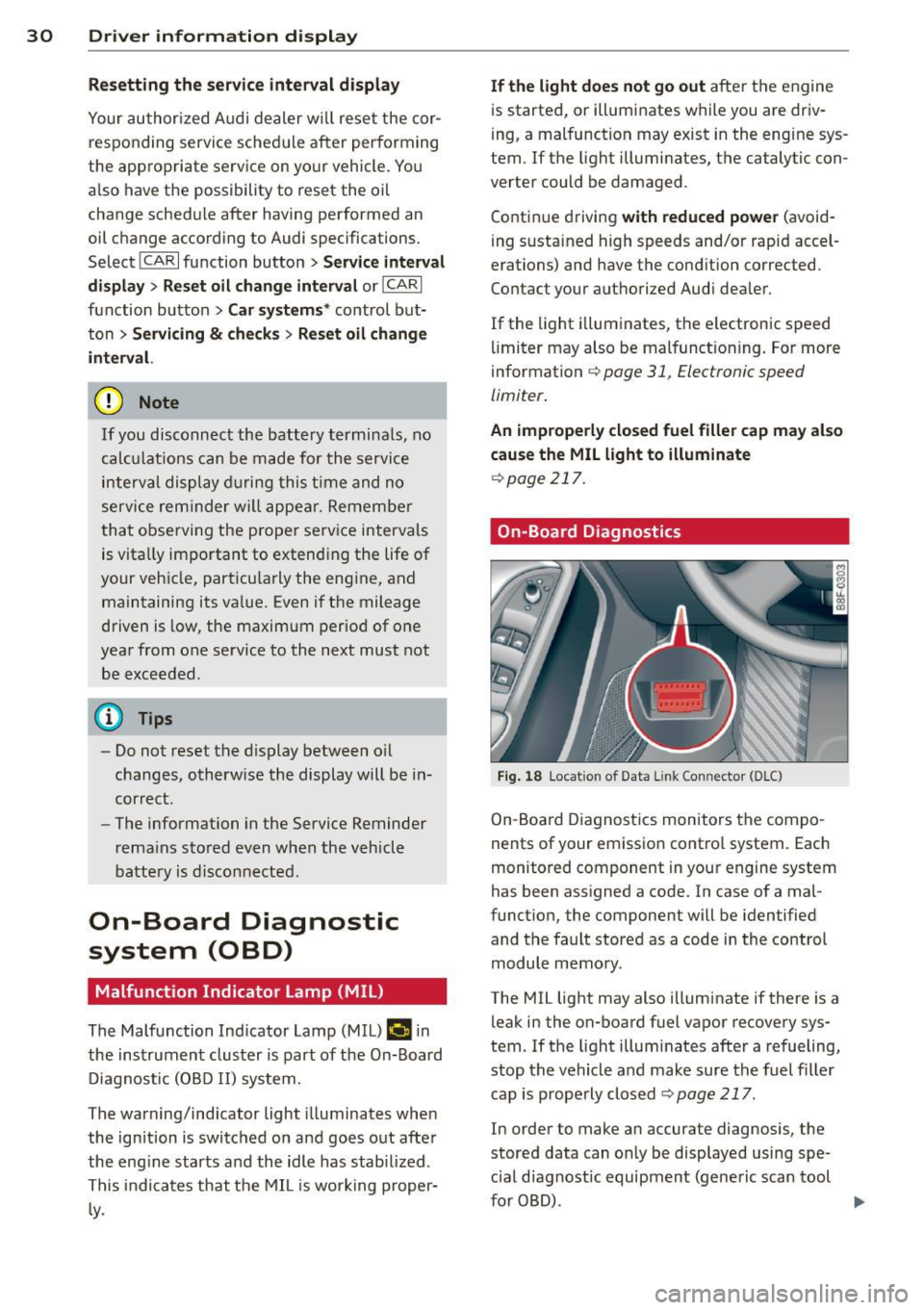
On-Board Diagnostics
Fig. 18 Locat io n of Data Link Con nector (D LC)
On-Board Diagnostics monitors the compo
nents of your emission control system . Each
monitored component in your engine system
has been assigned a code. In case of a mal
function, the component will be identified
and the fault stored as a code in the control
module memory.
The MIL light may also illuminate if there is a leak in the on-board fuel vapor recovery sys
tem. If the light illuminates after a refueling,
stop the vehicle and make sure the fuel filler
cap is properly closed
c:> page 217.
In order to make an accurate diagnosis, the
stored data can on ly be displayed using spe
c ial diagnostic equipment (generic scan tool
furOBD) .
~
Page 36 of 302
34 Openin g and clo sing
keys. Unguarded access to the keys pro
vides children the opportunity to start the engine and/or act ivate vehicle sys
tems such as the power w indows etc . Un
supervised operation of any veh icle sys
tem by ch ildren can res ult in serious in
Jury.
- Do not remove the key from the ignition
lock until the vehicle has come to a com
plete stop. Otherwise the steering col
um n loc k co uld suddenly e ngage -caus
ing the risk of an accident.
@ Tips
- The operation of the remote contro l key
c a n be tempo rarily disrupted by in terfer
ence from tran smi tters in t he v ici nity of
the veh icle work ing in the same frequen
cy ra nge (e.g . a ce ll phone, radio equip
ment).
- Fo r security reasons, replacement keys
are on ly available from Aud i dea le rs .
- Fo r De clarat ion o f Compliance to United
States FCC and Industry Canada regu la
tions
¢ page 283.
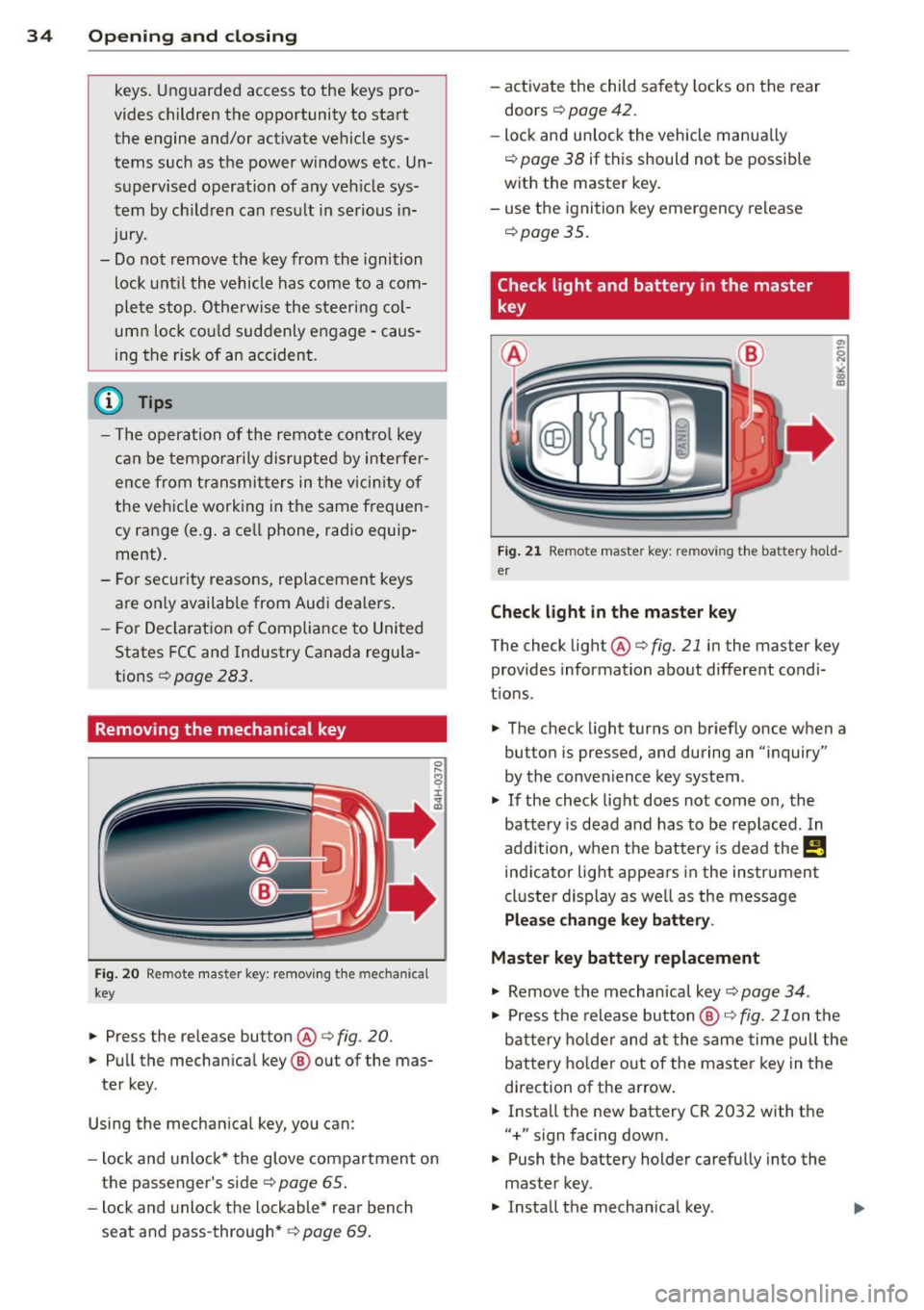
Removing the mechanical key
Fig . 20 Remot e ma ste r key: re mov ing the mec hanic al
key
.. Press the release button @¢ fig. 20.
.. Pu ll the mecha nical key @ out of the mas
te r key .
Using the mechan ica l key, you can :
- l ock and unlock* the glove compartmen t on
the passenger's s ide
¢ page 65 .
-lock and unlock t he lockable* rear bench
seat and pass-through* ¢
page 69. -
activate the child sa fety locks on the rear
doors ¢
page 42.
-lock and unlock the vehicle manua lly
~ page 38 if this should not be possible
w ith the master key.
- use t he ignition key emergency release
~ page 35.
Check light and battery in the master
key
Fig. 21 Rem ote mas ter key: re m ov ing th e ba ttery h old
e r
Check light in the ma ster key
The check light @¢ fig. 21 in the mas ter key
provides information about different condi
t ions .
.. The check light turns on br iefly once when a
button is pressed, and during an "inquiry"
by the convenience key system .
.,. If the check light does not come on, the
battery is dead and has to be replaced . In
add it io n, w hen t he battery is dead
the m
indicator light appea rs in the instrument
cl uster display as we ll as the message
Please change key battery .
Master key battery replacement
.,. Remove the m echan ical key ~ page 34.
.,. Press t he release button @~
fig. 21 on the
b attery ho lde r and at the same time pull the
battery holder o ut o f the master key in the
direction of the arrow .
.. Insta ll the new battery CR 2032 with the
"+ " sign facing down.
.,. Push the battery holder carefully into the
master key .
.,. Insta ll the mechanical key .
Page 48 of 302
46 Opening and closing
• Leave the master key with the service per
sonnel for parking and keep the mechanica l
key with you.
The following buttons are deactivated when
the valet parking function is switched on:
- I a I button in the driver's door
-I a I button on the master key
- Handle in the rear lid
When the va let parking feature is activated,
the message
Valet parking activated appears
in the instrument cluster display when you
switch the ignition on.
Page 51 of 302
The leavin g home function i lluminates the
area around the vehicle when unlock ing it.
T his function can be switched on and off.
The
c o ming h om e and lea ving home func
tions on ly operate when it is dark and the
light switch is in the AUTO posit ion
¢ page 47 , fig. 40 .
Auto headlight s*
When the light switch is in the A UTO
¢
page 47 posi tion, the switch-on po int of the
lights can be changed in the automatic driving
light function.
Daytime running lights
USA m odel s:
You can switch the dayt ime run
ni ng lights
on and o ff .
Canada mod els:
The function cannot be
turned off .
It is activated a utomat ica lly each
time the ignition is switched on.
Travel mode*
T he headlig ht beam is asymmetrical. This pro
v ides stronger illum ination on the s ide of the
road on wh ich you are driving .
If you are driv
i ng in a count ry that d rives on the opposite
side of the road from your own country, th is
will cau se glare for on coming dr ivers. To pre
vent glare:
- Trave l mode must be selected in vehicles
with Xenon headlights*.
- In veh icles with halogen headlights, ce rtain
areas of the head light lenses must be cov
ered w ith wate rproof adhesive covers that
prevent light from passing thro ugh. Fo r
more informat ion, please see your author
i z ed Audi dea ler or author ized repa ir faci lity .
(D Tips
When trave l mode is activated, a display in
the dr iver information system in dicates
this each time you switch the ignit io n on.
Clear vi sion 49
Emergency flashers
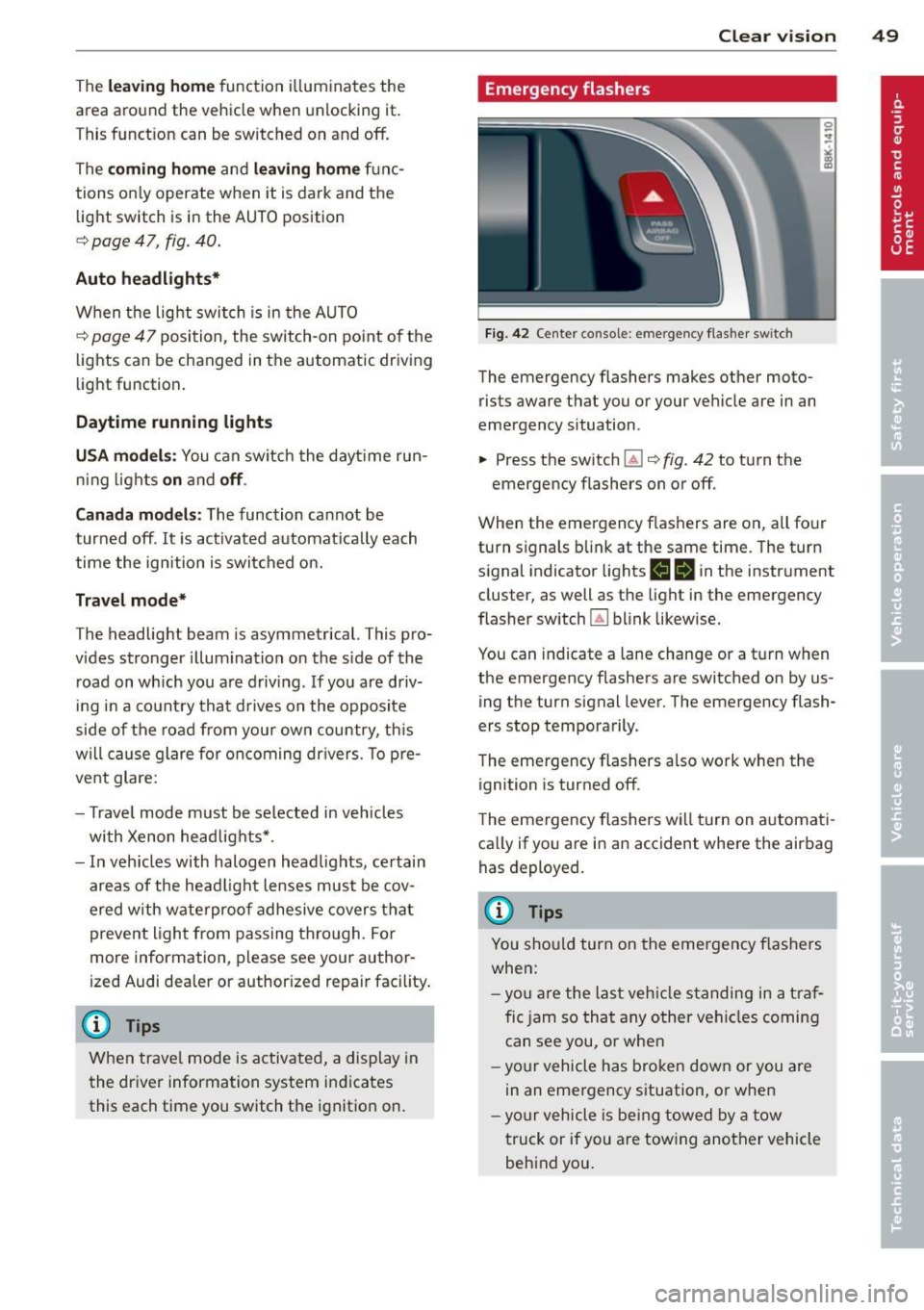
Fi g. 42 Center co n sole : em erge ncy flasher sw itc h
The emergency flashers makes other moto
rists aware that you or your vehicle are in an
emergency situation .
.,. Press the switch~¢
fig. 42 to turn the
emergency flashers on or off .
When the emergency f las hers are on, all four
turn s ignals b link at the same time. The turn
s ignal indicator lights
1111 in the instr ument
cluster, as well as the light in the emergency
fla sher switch ~ blink likewise.
You can indicate a lane change or a t urn w hen
the emergency flashers are switched on by us
ing the turn signal lever. The emergency flash
ers stop temporarily .
T he emergency flashers a lso work when the
ign ition is turned off .
T he emergency flashers wi ll turn on a utomat i
ca lly if yo u are in an accident where the airbag
has deployed.
(D Tips
You sho uld turn on the emergency f las hers
when:
- yo u are the last veh icle standing in a t ra f
fic jam so that any other vehi cles coming
can see you , or whe n
- your vehicle has bro ken down or you are
in an eme rgency s ituation, o r when
- yo ur vehicle is be ing towed by a tow
truck or if you are tow ing another vehicle
beh ind you .
Page 52 of 302
50 Clear vis ion
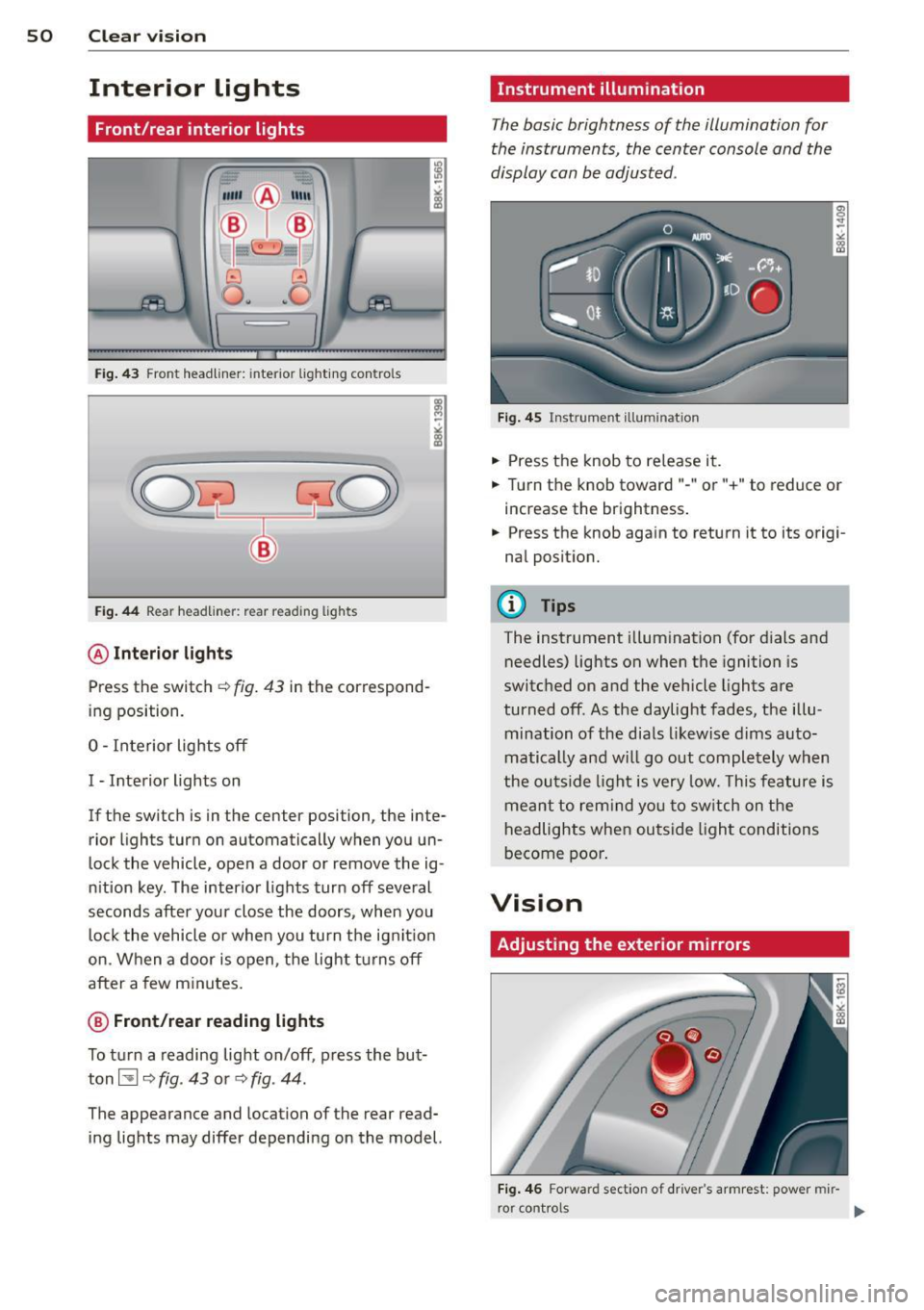
Interior lights
Front /rear interior lights
Fig . 43 Fro nt headliner : interior lig htin g con tro ls
Fig. 44 R ear headlin er: r ear rea ding lights
@ Interio r ligh ts
Press the switch ~ fig. 43 in the correspond
ing position.
0 -Interior lights off
I -Interior lights on
If the switch is in the cente r position, the inte
rior l ights turn on automatically when you un
lock the vehicle, open a door or remove the ig
n ition key . The interior lights turn off several
seconds after your close the doors , when you
lock the vehicle or when you turn the ign it ion
on. When a door is open, the light tu rns off
after a few m inutes.
@ Fr ont /rear r eading lights
To turn a reading light on/off , press the but
ton~
c::> fig . 43 or c::> fig . 44.
The appearance and location of the rear read
ing lights may differ depending on the model.
Instrument illumination
T he basic brightness of the illumination for
the instruments, the center console and the
display can be adjusted .
Fig . 45 Ins trum ent ill umin atio n
.,. Press the knob to re lease it .
.,. Turn the knob toward " -" or"+" to reduce or
increase the brightness .
.,. Press the knob aga in to return it to its origi
nal posit ion.
(!') Tips
The instrument illumination (for dials and
needles) lights on when the ignition is
switc hed on and the vehicle lights are
turned off . As the daylight fades, the illu
mination of the dia ls likewise dims auto
matically and wi ll go out completely when
the ou tside light is very low. This feature is
meant to rem ind yo u to sw itch on the
headlights when ou tside light conditions
become poo r.
Vision
Adjusting the exterior mirrors
Fig . 4 6 Forwar d sect io n of drive r's armr est: powe r mir
r o r contro ls
Page 58 of 302
56 Clear vis ion
Attach ing th e wiper blade
.,. Press the wiper blade holder in the arrow d i
rection ¢
fig. 55 into the mount.
.,. Fo ld the windshield wiper arm back onto
the windsh ie ld .
A WARNING
- If the windshield wipers smear the wind
shield, clean the w iper blades with w ind
shield washer fluid. If the wiper blades are extremely d irty, you can also clean
them w ith a soft sponge or cloth.
- For safety reasons, the windsh ield wiper
blades should be replaced once or twice
each year.
Digital compass
Switching the compass on and off
Applies to vehicles: with digita l compass
The compass direction is shown in the rear
view mirror.
NI--I
Fig. 56 Rearview mirro r: D ig ital compass act ivated
.,. To sw itch the compass on or off, press and
hold the button @ until the compass dis
play in the mirror ¢
fig. 56 appears or d isap
pears .
The digital compass only works when the igni
tion is on . The directions are indicated with
abbreviations :
N (north), NE (northeast), E
(east), SE (southeast), S (south), SW (south
west),
W (west), NW (no rthwest).
(D Tips
To prevent inaccurate compass readings,
do not bring any remote controls, elect ri- ca
l devices or metallic objects near the
mirror .
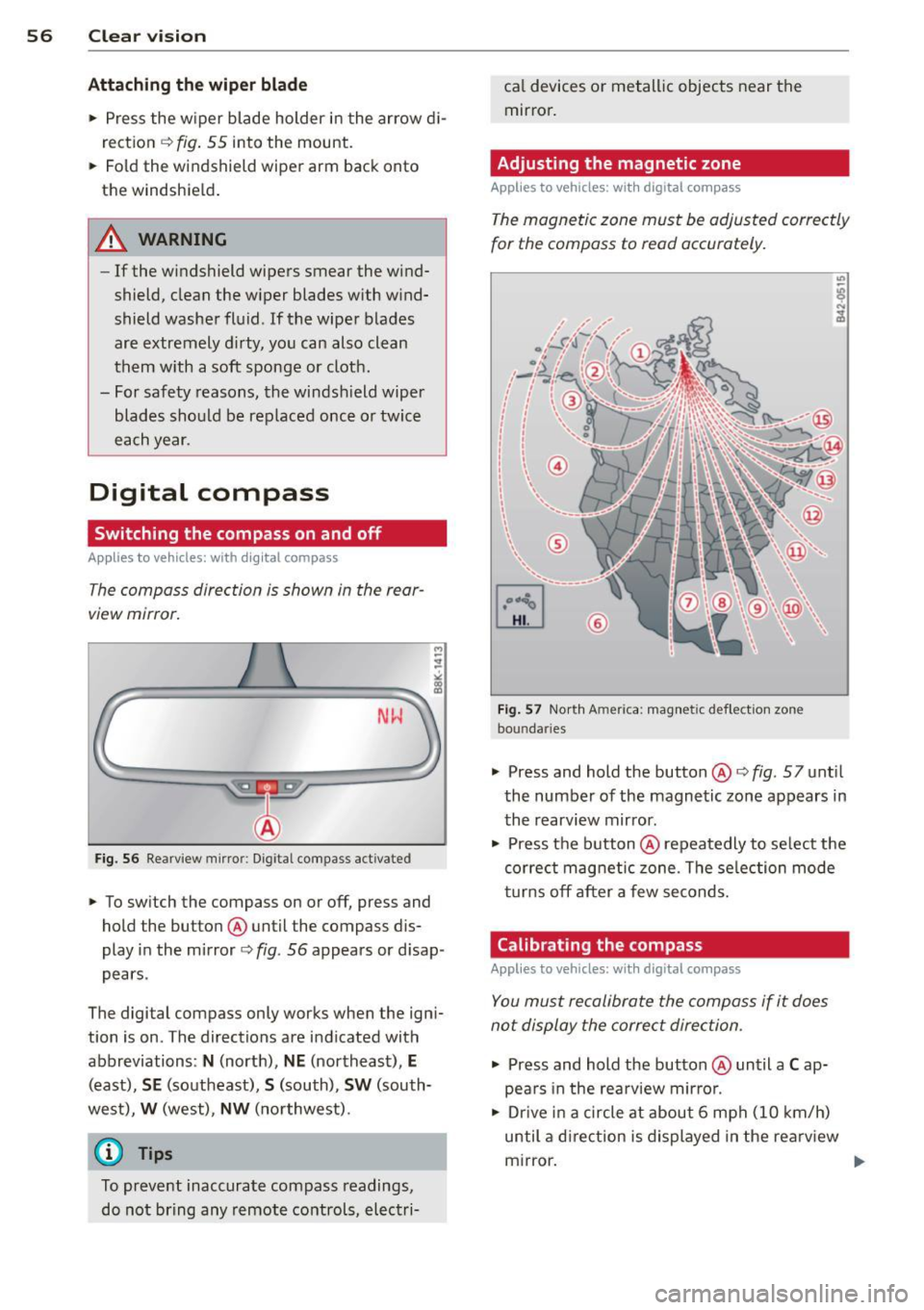
Adjusting the magnetic zone
Applies to vehicles: with digital compass
The magnetic zone must be adjusted correctly
for the compass to read accurately.
F ig . 5 7 Nor th A merica : magn etic d ef le ction zo ne
bo un daries
"'
.,. Press and hold the button @¢fig. 57 unt il
the number of the magnetic zone appears in
the rearview mirror .
.,. Press the button @repeatedly to se lect the
correct magnetic zone . The se lec tion mode
t u rn s off after a few seconds .
Calibrating the compass
Applies to vehicles: with digital compass
You must recalibrate the compass if it does
not display the correct direction .
.,. Press and hold the button @ until a Cap
pears in the rea rv iew mirro r.
.,. Drive in a c ircle at about 6 mph (10 km/h)
until a d irection is displayed in the rea rv iew
mirror.
II>-