key AUDI A4 2015 Owner's Manual
[x] Cancel search | Manufacturer: AUDI, Model Year: 2015, Model line: A4, Model: AUDI A4 2015Pages: 304, PDF Size: 74.86 MB
Page 52 of 304
50 Clear vis ion
@ Tips
- The light sensor* for headlight control is
located in the rear view m irror mount.
You should therefore not apply any st ick
ers to the windsh ield in this area in order
to prevent malfunctions or failures.
- Some exterior lighting functions can be
adjusted
c> page 50.
- When you remove your key from the igni
tion while the vehicle's lights are turned
on, a buzzer sounds as long as the driv
er's door is open .
- In cool or damp weather, the ins ide of
the headlights, turn signals and tail lights can fog over due to the tempera
ture difference between the inside and
outside. They will clea r shor tly after
switching them on. This does not affect
the service life of the lighting.
- In the even t of a light sensor malfunc
tion, the driver is no tified in the instru
ment cluster disp lay¢
page 22.
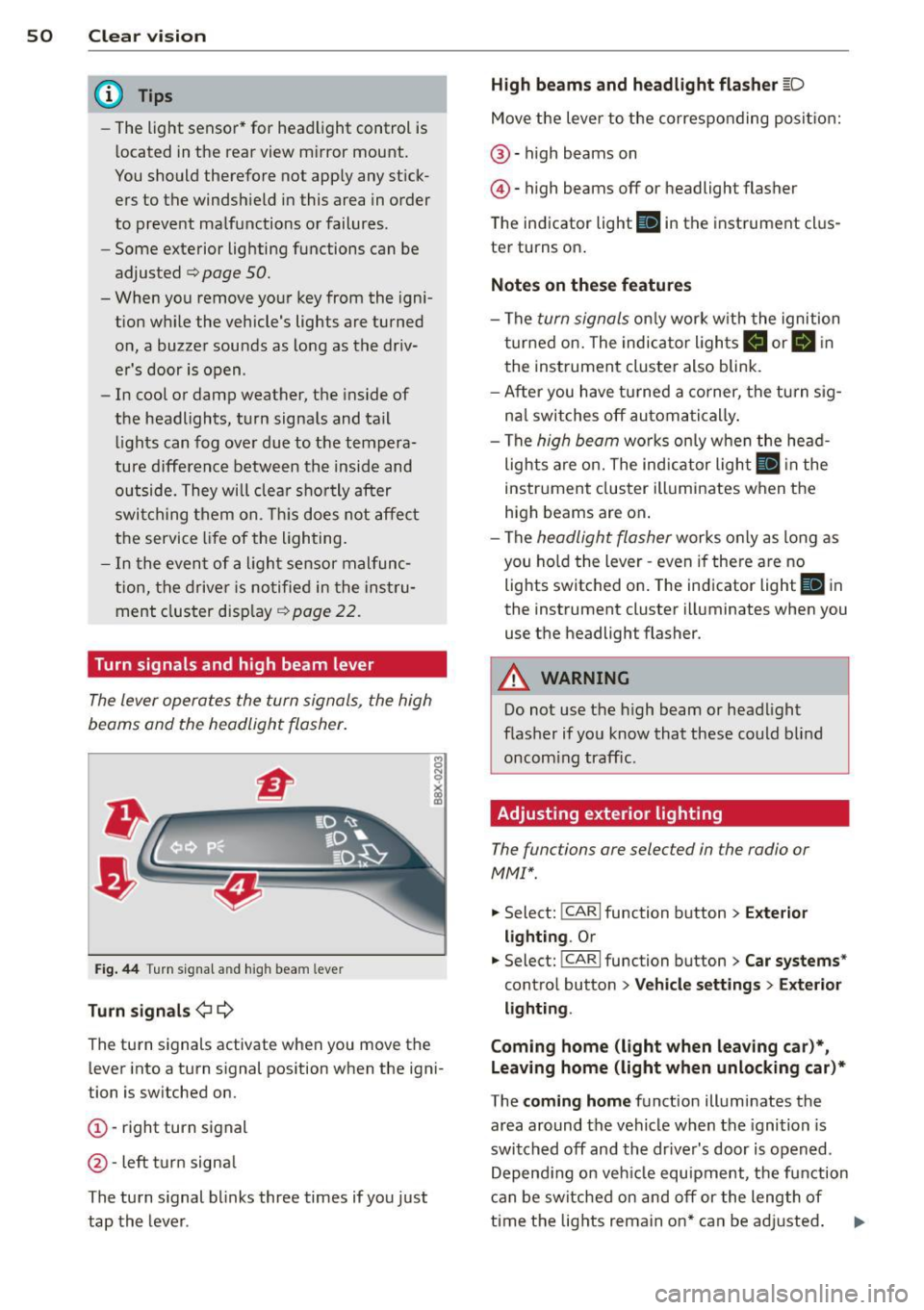
Turn signals and high beam lever
The lever operates the turn signals, the high
beams and the headlight flasher .
Fig. 44 Tu rn s ig na l and hig h beam lever
Turn sign als ¢i ¢
The turn signals activate when you move the
l ever into a turn s ignal pos ition when the ign i
tion is switched on.
(D -right turn signal
@-left tur n signa l
The turn s ignal blinks three times if you just
tap the lever .
High be ams and headlight flasher [D
Move the lever to the correspon ding posit io n:
@ -high beams on
@ -high beams off or headlight flasher
The indicator light
ii in the instrument cl us
te r turns on .
Notes on thes e features
-The turn signals on ly wor k w ith the ignition
t ur ned on. The indicator ligh ts
Ct or a in
the instrument cluster also blink.
- After you have turned a co rner, the turn s ig
na l switches off au toma tically .
- The
high beam works on ly w hen the head
lights a re on. The ind icator ligh t
II in the
instrument cluster illuminates when the
high beams are on .
- The
headlight flasher works o nly as long as
you ho ld the lever -even if there a re no
lights switched on . The indicator light
II in
the instrument cluster illuminates when you
use the headlight flasher.
A WARNING
--
Do not use the h igh beam or headlight
flasher if you know that these could blind
oncom ing traffic.
Adjusting exterior lighting
The functions ore selected in the radio or
MMI" .
.,. Select: !CARI function button> Exte rior
light ing .
Or
.,. Select: !CARI function button > Car systems *
control button > Vehicle s etting s> Exterior
lighting .
Coming home (light when leav ing car }*,
Leav ing home (light when unlocking car )*
The coming home function illuminates the
area around the vehicle when the ignition is
switched off and th e dr ive r's door is open ed.
Depend ing on veh icle equ ipment, the function
can be switched on and off or the length of
time the lig hts remain on* can be ad justed . ..,.
Page 55 of 304
M N
~ co
rl I.O
"' rl
"' rl
Turn the knob to the desired position:
Q/ P -In th is position , you can adjust the
d river's and front passenger's ex ter io r mir ro rs
by turning the knob in the des ired direc tion.
(ijjl -The mirrors are heated depending on the
outside temperature.
8 -The exterior m irrors fold in* . You can ad
just whethe r or not the mirrors fold in auto
mat ica lly when locking the vehicle using the
r adio/M M I* <=;>
page 36.
Passenger exter io r mirro r tilt function*
To help yo u see the curb when backing into a
parking space, the surface of the mirror t ilts
slightly . The knob m ust be in the
P posit ion
for this to happen .
You ca n adjus t the tilted mirror sur face by
turn ing the knob in the des ired direction .
When you move out of reverse and into anoth
e r gear, the new mirror posit ion is stored and
assigned to the key you are using.
T he mirror goes back into its origina l posit io n
once yo u drive forward faster than 9 mph
(15 km/h) or switch the ignition off .
_& WARNING
Curved mirror sur faces (convex or sphe ri
c al *) incre ase yo ur field of v iew. Remem
ber that vehicles or o ther objects will ap
pear smaller and farther away than w hen
seen in a flat m irror. If you use this mirror
to estimate distances of following veh icles
w hen changing lanes, you co uld estimate
incorrectly and ca use an accide nt.
(D Note
- If the mirro r ho using is moved u ninten
tiona lly (for example, whi le park ing your
vehicle), then you must first fo ld the mir
ror electrically. Do not readjust the m ir
ror ho using manually . You could da mage
the motor wh ich controls the m irror .
- If you wash t he vehicle in an automatic
ca r wash, yo u m ust fold the exte rior m ir
r ors in to reduce the r is k of damage to
the mirrors. Never fold power folding ex-
.
Clear vi sion 5 3
terior mirrors* by hand. Only fo ld them
in and o ut using the power controls.
a) Tips
- Th e ex te rior m irror set tings are stored
w ith the memory function*
~ page 64 .
-If there should be a malfunc tio n i n the
elec trical sys tem, you ca n still ad just the
exterio r mirrors by pressing the edge of
the mir ro r.
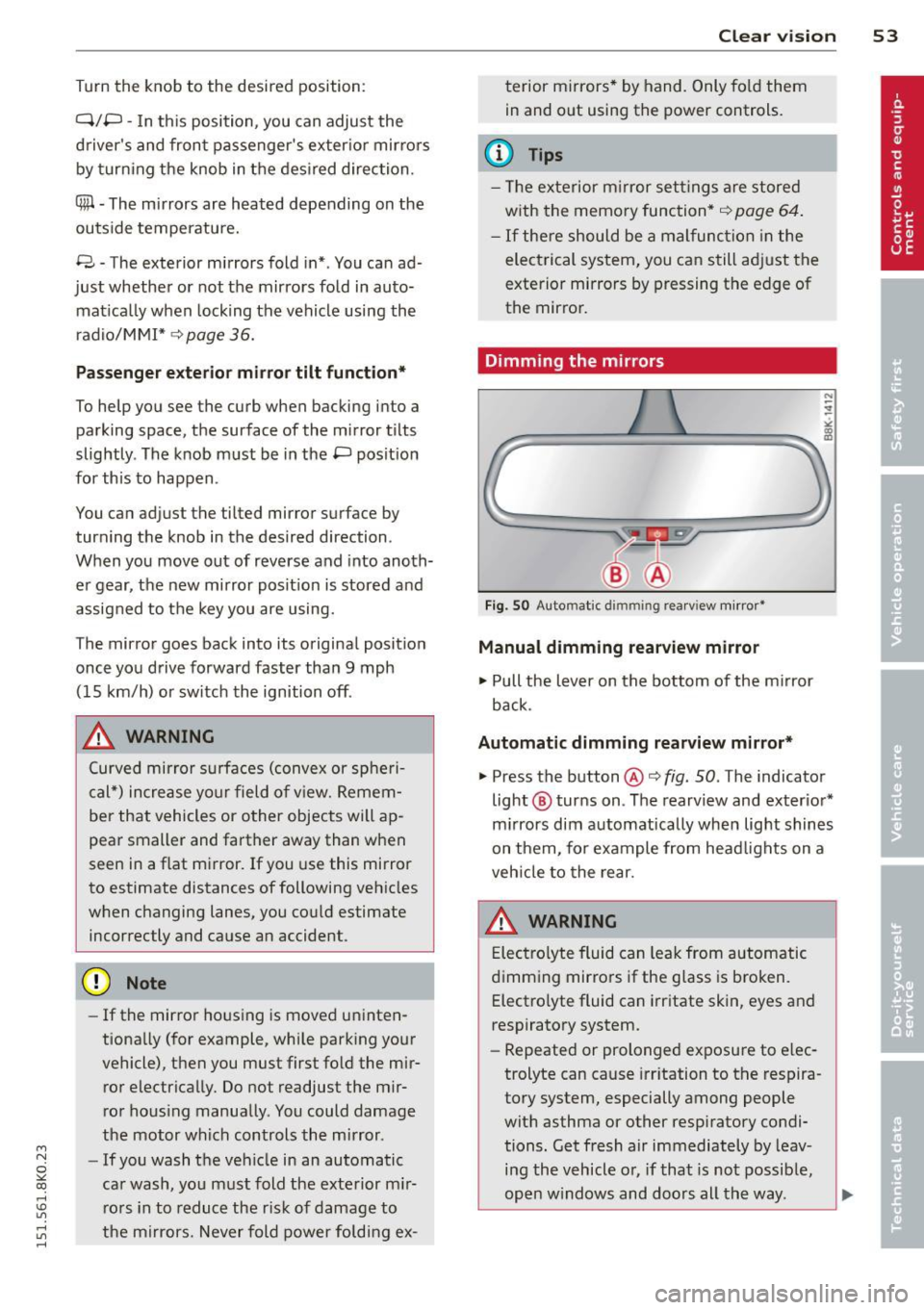
Dimming the mirrors
Fig . SO Auto mat ic dimmin g rea rv iew mirror •
Manual dimming rearview mirror
11>-Pull the lever on the bottom of the m irror
back .
Automatic dimming rearview mirror*
.,. Press the button@¢ fig. SO . The indicator
light @ turns on . The rearv iew and exter io r*
m irrors dim a utomatically when lig ht shines
on them, for example from head lights on a
veh icle to the rear.
A WARNING
E lec tro lyte fluid can lea k from automatic
d imm ing mir ro rs if the g lass is b ro ken .
Electro lyte fluid can i rritate skin, eyes and
respiratory system .
- Repeated or prolonged exposu re to e lec
trolyte can cause irr itation to t he respira
to ry system, especially among people
wit h asthma or other resp iratory condi
tions . Get fresh air immediately by leav
i n g the vehicle o r, if that is no t possib le,
ope n w indows and doors all th e way . .,..
Page 57 of 304
M N
~ co
rl I.O
"' rl
"' rl
Rear window sun shade
Applies to vehicles: with rear window s un shade
Q;l I n<11• ' ~---
,, ,,-, 7~~, I , .,,,-~;'j ·,
· . .. , a., , . , , . ~ ..
l . -~ '_I ~~ V
l ---..--~IIJl!I.II &iii.a
Fig. 53 W ith MMI : Button for re ar window sun shade
Fig . 54 W ithout MMI: B utto n for rear wi ndow s un
s hade
.. To extend/retract the sun shade, press the
rn button ~ fig. 53 or ~ fig. 54.
You can adjust the settings for the rear sun
shade so the shade ret racts automat ically
when you se lect the reve rse gear. To do this,
selec t the
!CARI function button> Window s>
R ear blind > automati c> on
or ICAR I fu nction
button >
Car systems * contro l button > Vehi
cle setting s > Autom atic rear blind
> On. The
current setting is automatically stored and as
signed to the remote key. The sun shade is ex
tended again as soon as the vehicle is travel
ing forward at a speed greater than 9 mph
(15 km/h) if the ign ition has not been switch
ed off in the meant ime .
A WARNING
When lowe ring or raising the sunshade,
ma ke s ure t he re is no thing in i ts way and
t ha t it has a free path to trave l. This could
cause persona l injury .
Clear vi sion 55
@ Tips
- Pressing the button rn severa l t imes
consecutive ly can trigger t he over load
protect ion. The sun shade can only be ex
tended/retracted aga in after a brief wait
ing period.
- The rear window sun shade only func
tions when the vehicle interior is warmer
than
14°F (-10°() .
Wiper and washer
system
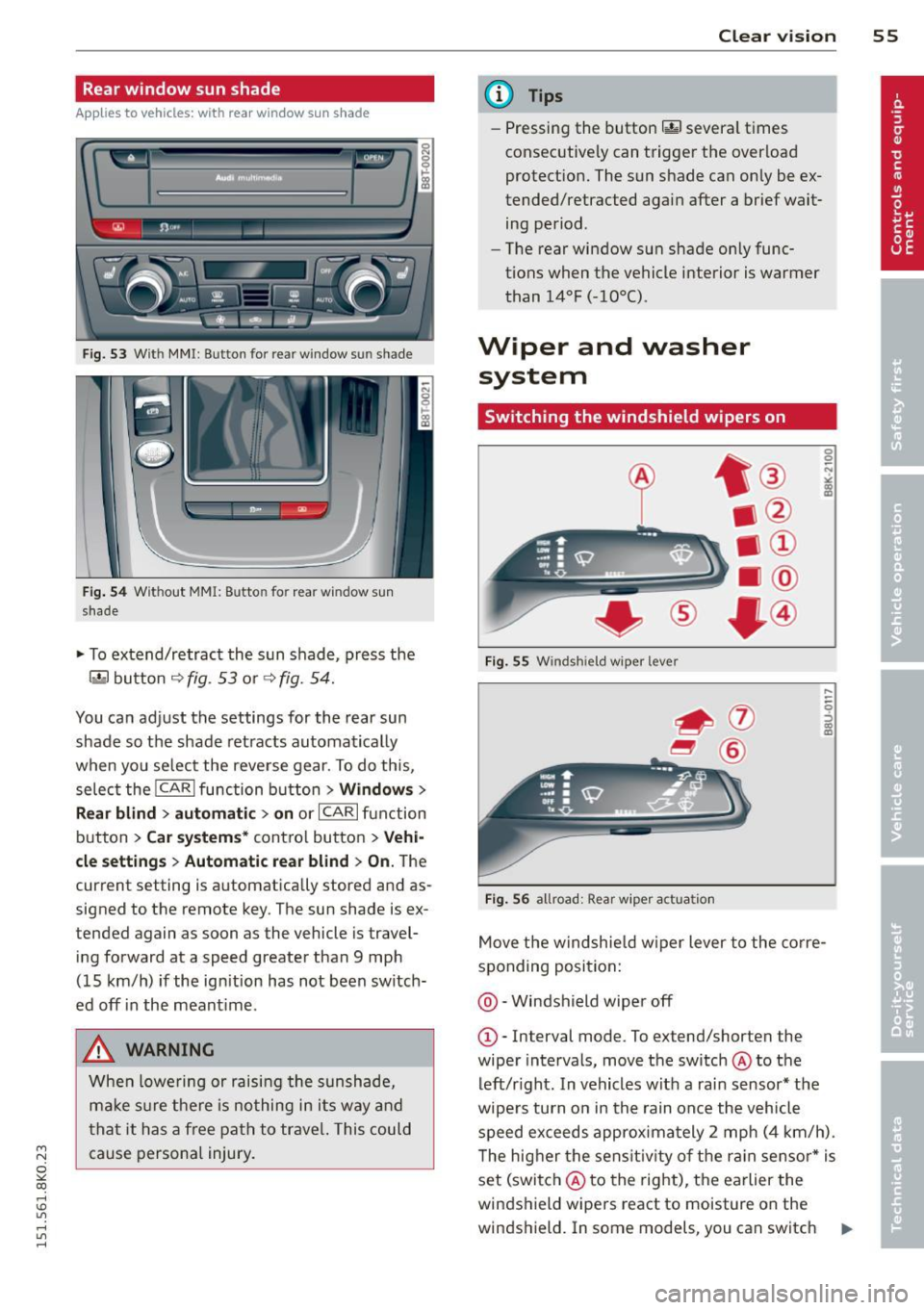
Switching the windshield wipers on
F ig . 55 W indshiel d wiper lever
Fig . 56 all road: Rear wiper ac tu ati on
0 0 N
"' :8
....
-
-0 ::, a) m
Move t he windshie ld w iper lever to the co rre
sponding posi tion:
@ -Windshield wiper off
G)-Interval mode. To ex tend/shorten the
wiper intervals, move the switch @to the
left/r ight. In vehicles w it h a rai n sensor* the
wipe rs turn on in the rain once the vehicle
speed ex ceeds approxima tely 2 mph (4 km/h) .
T he hig her the sens it iv ity of the r ain sensor * is
set (switch @to the right), the earlier the
windshield wipers react to moisture on the
w indshield. In some models, you can switch ..,.
Page 64 of 304
62 Seats and storage
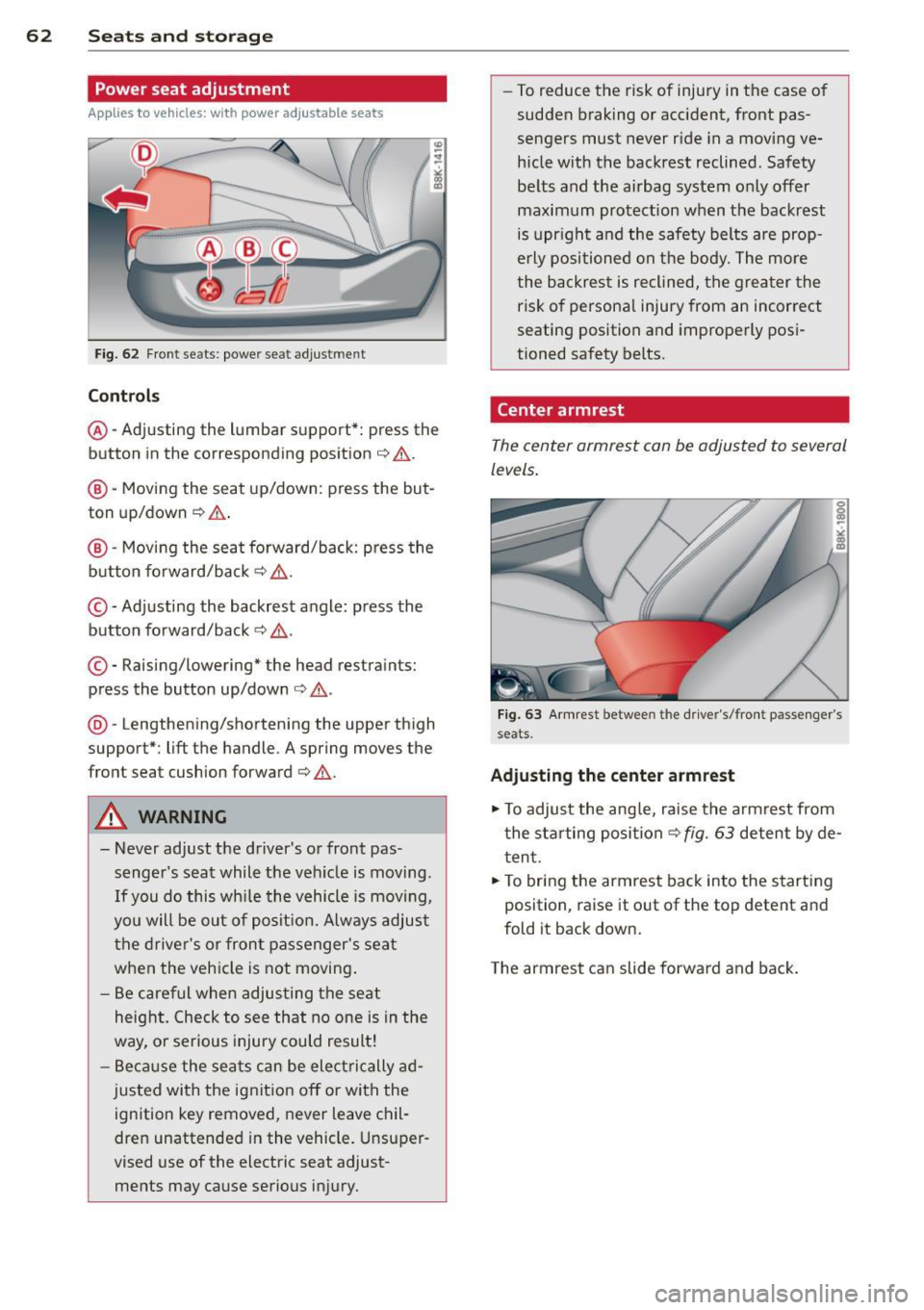
Power seat adjustment
App lies to vehicles: with power adjustable seats
Fig. 62 Front seats: powe r seat adjust men t
Contr ols
@ -Adj usting the lumbar support*: press the
button in the corresponding position ¢.&. .
@ -Moving the seat up/down: press the but
ton up/down ¢.&. .
@ -Moving the seat forward/back: p ress the
button fo rward/back
¢ & .
©-Adjusting the backrest angle: press the
button fo rward/back
¢ & .
©-Raising/lowering* the head restraints:
press the button up/down ¢ .&. .
@ -Lengthening/shortening the upper thigh
support*: lift the handle. A spring moves the
front seat cushion forward¢& .
A WARNING
- Never adjust the d river's or front pas
senger 's seat while the veh icle is moving .
If you do this wh ile the vehicle is movi ng,
yo u will be out of posit ion. Always adjus t
the drive r's or front passenger's seat
when the vehicle is not moving .
- Be care ful when adjus ting the seat
heig ht. Check to see that no one is in the
way, o r serious injury could result!
- B eca use the sea ts can be elec trically ad
justed with the ignit ion off or with the
ignition key removed, never leave chil
dren unattended in the vehicle. Unsuper
vised use of the electric seat adjust ments may cause serious injury. -
To reduce the risk of injury in the case of
sudden braking or accident, front pas
sengers must never r ide in a moving ve
hicle with the backrest reclined . Safety
be lts and the airbag system only offer
maximum protection when the backrest is upr ight and the safety belts are prop
e rly po sit ioned on the body. The more
the backres t is reclined, the grea ter the
risk of persona l injury from an incorrect
seating position and imprope rly posi
tioned safety belts.
Center armrest
The center armrest can be adjusted to several
levels .
Fig . 63 A rm rest betwee n the d rive r's/front passenger's
seats.
Ad ju sting the center armrest
"" To adjus t the ang le, raise the armrest from
the starting position
¢ fig. 63 detent by de
t en t.
.,. To bring the armrest back into the starting
position, raise it out of the top detent and
fold it back down.
T he armrest can slide forwar d and back .
Page 65 of 304
M N
~ co
rl I.O
Head restraints
Front head restraints
Applies to vehicles: with adj ustable head restraints
Head restraints that are adjusted according
to body size, along with the seat belt , offer
effective protection .
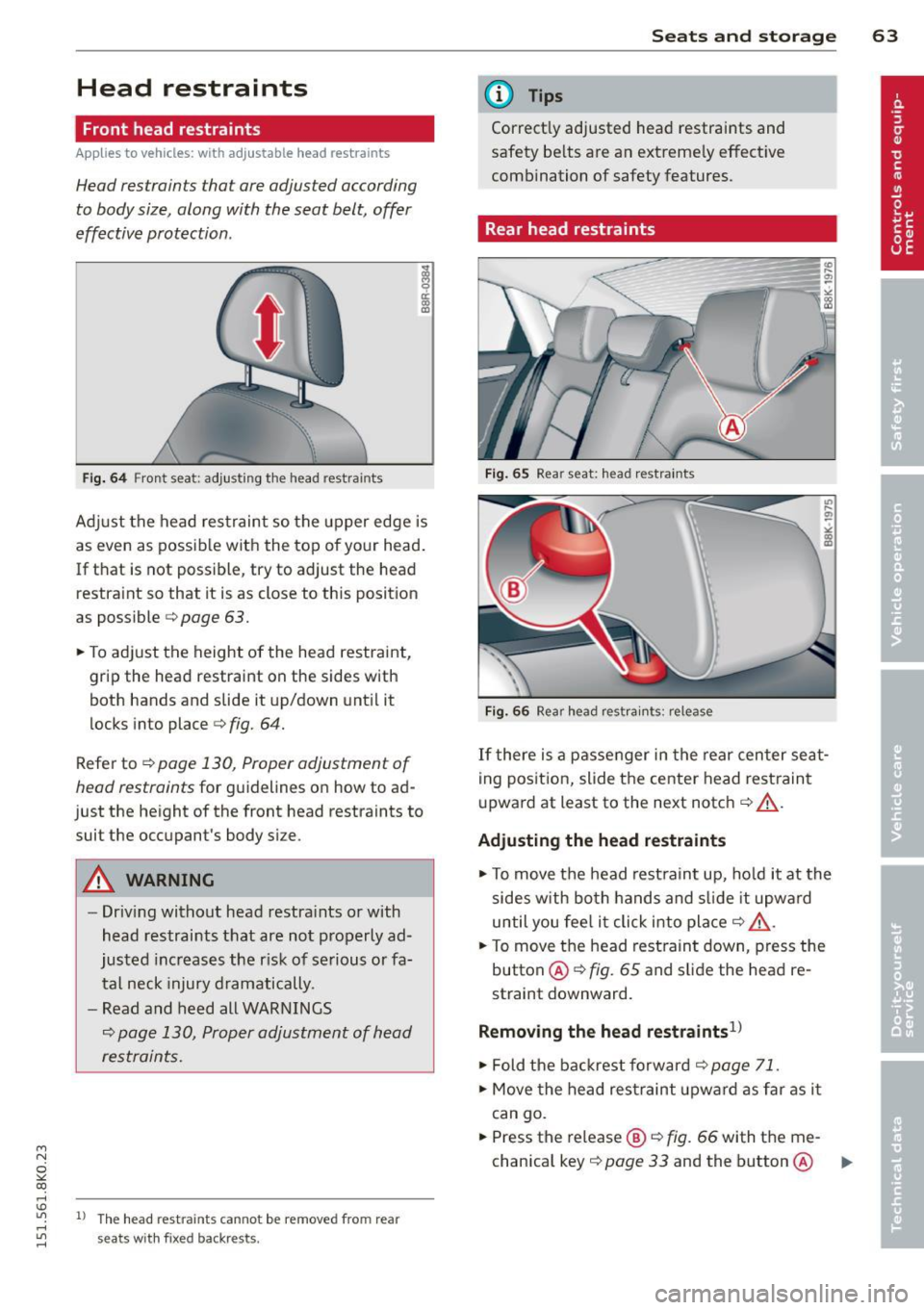
Fig. 64 Fron t seat: adjusting the head rest ra in ts
Ad just the head restraint so the upper edge is
as even as possible with the top of your head.
If that is not poss ible, try to adjust the head
restraint so that it is as close to this position
as possible
¢ page 63.
~ To adjust the height of the head restraint,
grip the head restraint on the sides with
both hands and slide it up/down until it
locks into place
¢fig. 64.
Refer to ¢ page 130, Proper adjustment of
head restraints
for guidelines on how to ad
just the height of the front head restraints to
suit the occupant's body size .
A WARNING
-Driving without head restra ints or with
head restraints that are not properly ad
justed increases the r isk of serious or fa
tal neck injury dramatically.
- Read and heed all WARNINGS
¢ page 130, Proper adjustment of head
restraints.
-
"' l) The head restra ints cann ot be re move d fro m rear rl
~ seats with fixe d backr ests.
Seats and storage 63
@ Tips
Correctly adjusted head restraints and
safety be lts are an extreme ly effective
combination of safety features.
Rear head restraints
Fig. 65 Rear seat: head restraints
Fig. 66 Rear head res train ts : re lease
If there is a passenger in the rear center seat
ing position, slide the center head restraint
upward at least to the next notch¢&_ .
Adjusting the head restraints
~ To move the head restraint up, hold it at the
sides with both hands and slide it upward
until you feel it click into place¢&_ .
~ To move the head restraint down, press the
button @¢
fig. 65 and slide the head re
straint downward .
Removing the head restraints1>
~ Fold the backrest forward¢ page 71.
~ Move the head restraint upwa rd as far as it
can go.
~ Press the release@¢ fig. 66 with the me-
chanical key ¢
page 33 and the button @ ..,.
Page 66 of 304
64 Seats and storage
¢ fig. 65. Pull the head restraint out of the
backrest at the same time¢,&. .
Installing the head restraints
.. Slide the posts on the head restraint down
into the guides until you feel the posts click
i nto place.
.. Press the button@¢
fig. 65 and slide the
head restraint all the way down. You should
not be able to pull the head restraint out of
the backrest.
So that the driver can have a better view to
the rear, the head restraints should be pushed
down completely when the rear seats are not
occupied .
A WARNING ,.
- Read and heed all WARNINGS
¢ page 130, Proper adjustment of head
restraints .
- Only remove the rear seat head restraints
when necessary in order to install a child
seat¢
page 173. Install the head re
straint again immediately once the child
seat is removed. Driving without head re
straints or with head restraints that are
not properly adjusted increases the risk
of serious or fatal neck injury dramatical
ly.
@ Tips
Correctly adjusted head restraints and
safety belts are an extremely effective
combination of safety features .
Seat memory
Description
Applies to vehicles: with memory function
The memory function allows you to quickly
and easily store and recall personal seating
profiles for the dr iver . The memory function is
operated through the master key and the memory buttons in the driver's door.
The driver's seating profi le is stored and as
signed to the master key each time the vehicle
is locked. When you open the door, the seat profile is
automatically recalled.
If two people
use one vehicle, it is recommended that each
person always uses "their own" master key.
Up to 2 seat profiles can be stored in the
memory buttons in the driver's door. Once
they are stored, these seat profiles can be se
lected at any time .
In addition to the driver's seat settings, you
can also store and access the exterior mirror
adjustment settings* using the remote con
trol key or memory button.
Remote control key
Applies to vehicles: wit h seat memory
To assign the driver's seat settings to the re
mote control key when locking the vehicle, the
function must be activated in the rad io or
MMI*
.. Select: !CAR I function button> Seat adjust
ment
> Driver's seat > Remote control key >
on.Or
.. Select: !CARI function button> Car systems*
control button > Vehicle settings > Seats >
Driver' s seat> Remote control key> On .
(i) Tips
If you do not want another driver's set
tings to be assigned to the remote key,
switch off the memory function using the
radio or MMI* or the
IOFFI button
¢page 64.
Memory buttons
Applies to vehicles: with seat memory
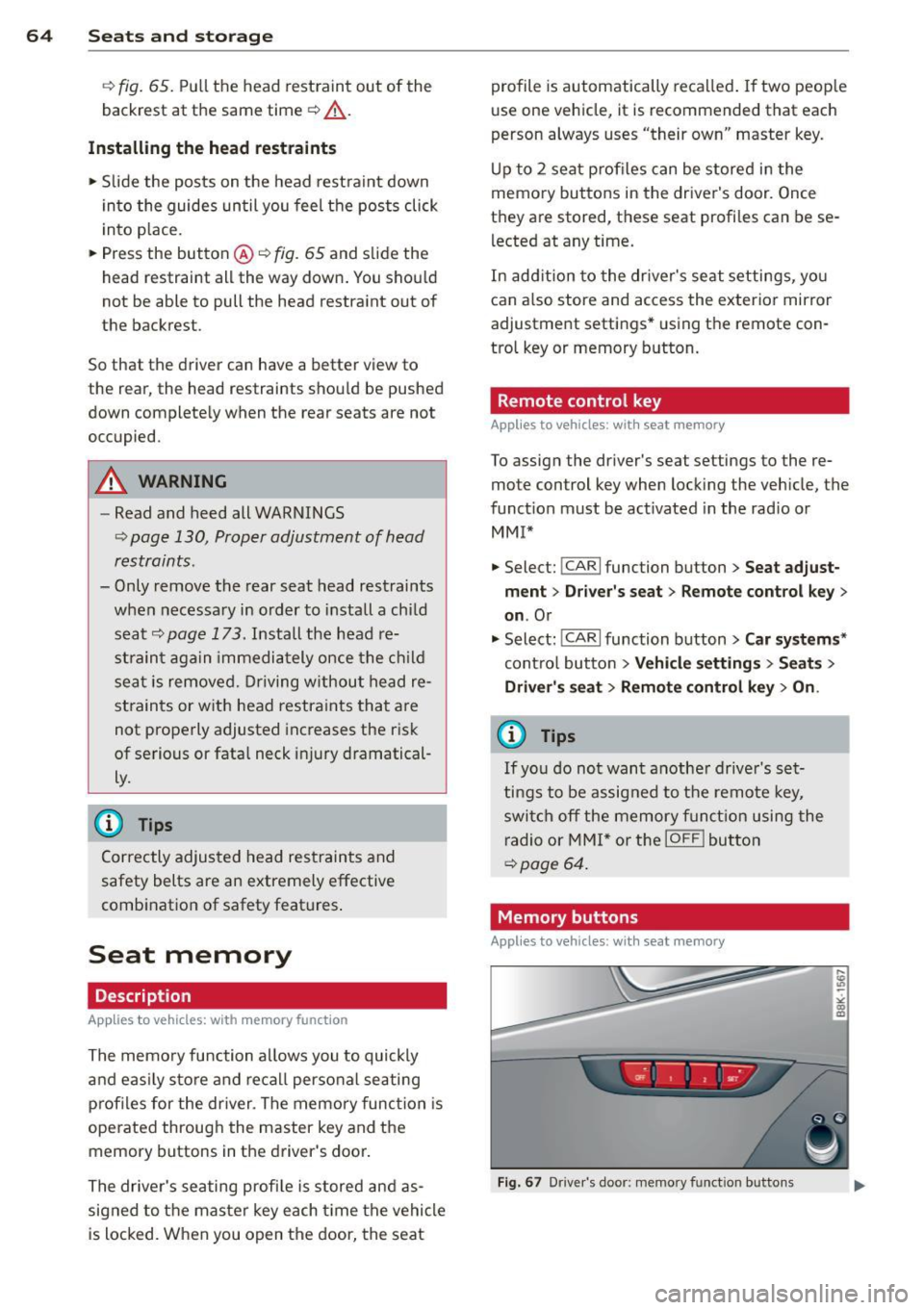
Fig. 67 Dr iver's door: memo ry fu nct ion buttons
Page 69 of 304
M N
~ co
rl I.O
"' rl
"' rl
(upholder
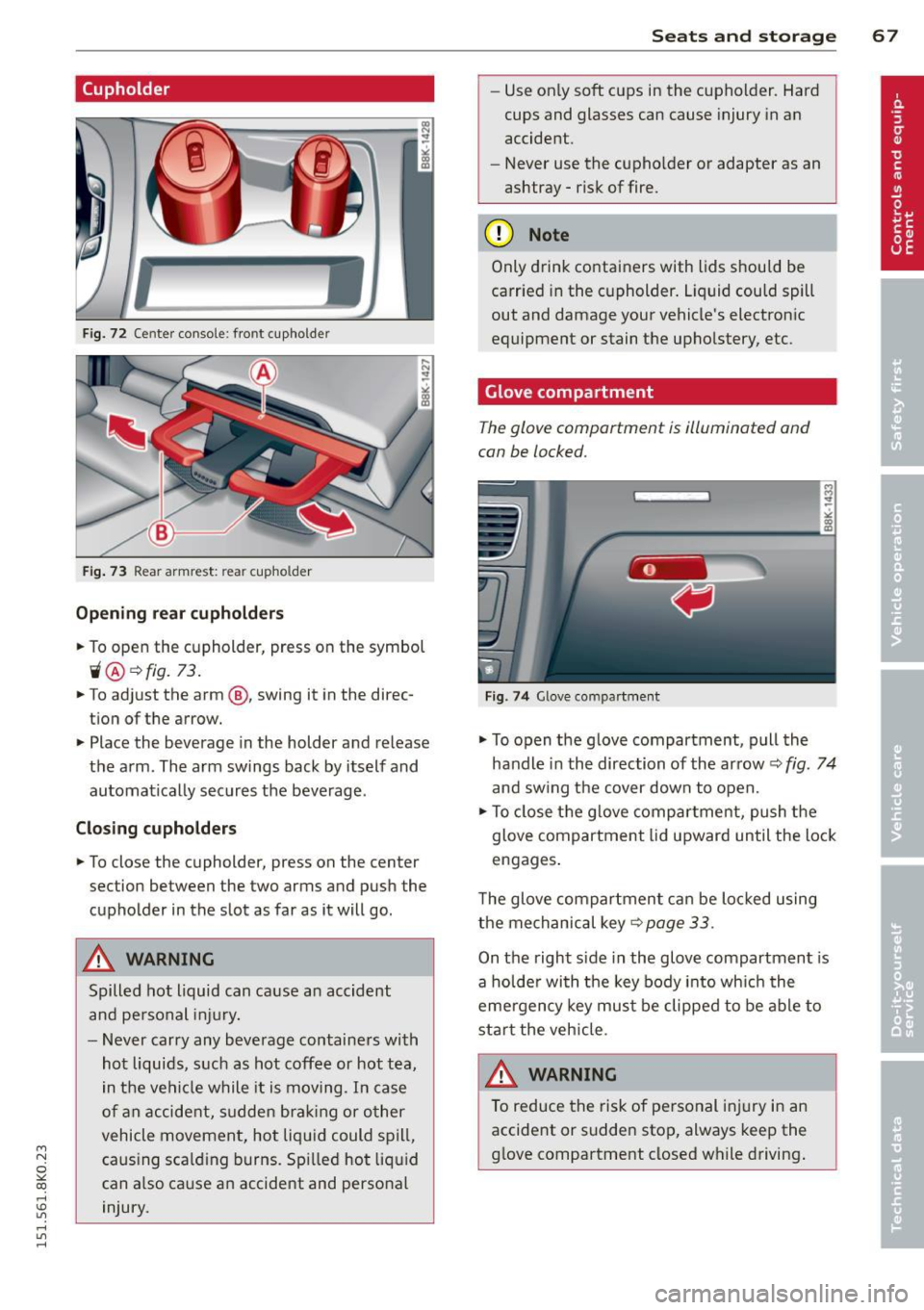
Fig. 72 Ce nter console: front cupholder
Fig. 73 Rear armrest: rea r cupho lder
Opening rear cupholders
~ To open the cupholder, press on the symbol
"® ~fig. 73.
~ To ad just the arm @, swing it in the direc
tion of the arrow.
~ Place the beverage in the holder and release
the arm. The arm swings back by itself and
automatically secures the beverage .
Closing cupholders
~ To close the cupholder, press on the center
section between the two arms and push the
cupholder in the slot as far as it will go.
A WARNING
Spilled hot liquid can cause an accident
and personal injury.
- Never carry any beverage containers with
hot liquids, such as hot coffee or hot tea,
in the vehicle while it is moving . In case
of an accident, sudden braking or other
vehicle movement, hot liquid could spill,
caus ing scald ing burns . Spilled hot liquid
can also ca use an accident and personal
injury.
Seats and storage 67
-Use on ly soft cups in the cupholder. Hard
cups and glasses can cause injury in an
accident.
- Never use the cupho lder or adapter as an
ashtray -risk of fire.
(D Note
Only drink containers with lids should be
carried in the cupholder. Liquid could spill
out and damage your vehicle's electronic
equipment or stain the upholstery, etc.
Glove compartment
The glove compartment is illuminated and
can be locked.
Fig . 74 Glove compar tment
~ To open the glove compartment, pull the
handle in the direction of the arrow~
fig. 74
and swing the cover down to open.
~ To close the glove compartment, push the
glove compartment lid upward until the lock
engages .
T he glove compartment can be locked using
the mechanical key~
page 33.
On the right side in the glove compartment is
a holder with the key body into which the
eme rgency key must be clipped to be able to
start the veh icle.
&_ WARNING
To reduce the risk of personal injury in an
accident or sudden stop, always keep the
glove compartment closed while driving.
-
Page 73 of 304
M N
~ co
rl I.O
"' rl
"' rl
Luggage compartment cover
Applies to vehicles: with luggage compartment cover
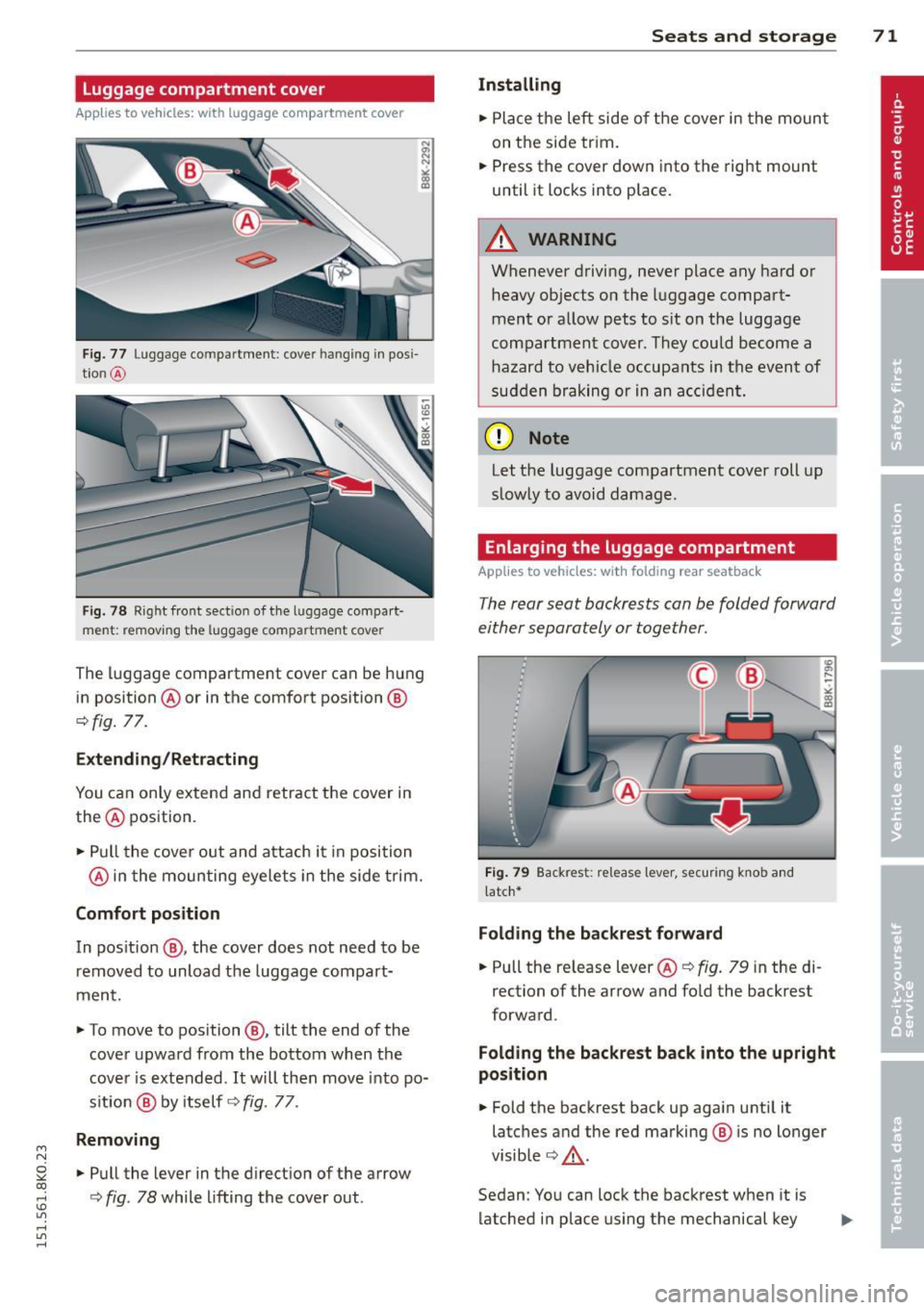
Fig. 77 Luggage compartment: cover hanging in pos i
t ion @
Fig. 78 R ight front section of the luggage compart
ment: remov ing the luggag e compartment cover
The luggage compartment cover can be hung
in position @or in the comfort position @
¢fig. 77.
Extending/Retracting
You can only extend and retract the cover in
the @ position .
• Pull the cover out and attach it in position
@ in the moun ting eyelets in the side trim.
Comfort position
In pos ition @, the cover does not need to be
removed to unload the luggage compart·
ment.
• To move to position @, tilt the end of the
cover upward from the bottom when the
cover is extended. It will then move into po·
s ition @ by itself ¢
fig. 77 .
Removing
• Pull the lever in the direction of the arrow
¢
fig . 78 while lifting the cover out .
Seats and storage 71
Installing
• Place the left side of the cover in the mount
on the side trim.
• Press the cover down into the rig ht mount
until it locks into place.
A WARNING
=
Whenever driving, never place any hard or
heavy objects on the luggage compart·
mentor allow pets to sit on the luggage
compartment cover . They could become a
hazard to vehicle occupants in the event of
sudden braking or in an accident.
ffi Note
Let the luggage compartment cover roll up
slow ly to avoid damage.
Enlarging the luggage compartment
Applies to vehicles: wit h fo lding rear seatback
The rear seat backrests can be folded forward
either separately or together.
Fig. 79 Backrest : relea se lever, securing knob and
l a tc h*
Folding the backrest forward
• Pull the release lever @¢ fig. 79 in the di
rection of the arrow and fold the backrest
forward.
Folding the backrest back into the upright
position
• Fold the backrest back up again until it
latches and the red marking @ is no longer
visible ¢
_&..
Sedan: You can lock the backrest when it is
latched in place using the mechanical key
Page 78 of 304
76 Seats and storage
Loading
.,. Fold the rear seat center armrest down .
.,. Fold the pass-through cover
¢
fig. 90 -arrow -down.
.,. Slide the ski sack from the luggage com
partment through the pass-through with
the z ipper at the rear ¢.&. -
Securing
.,. Insert the ski sack strap @ ¢fig. 91 in the
center buckle @.
.,. Pull the safety belt taut on the free end of
the belt @.
A WARNING
-The ski sack is intended only for the
transportation of skis and other light ob
jects . To reduce the risk of serious per
sonal injury, never transport heavy or
pointed objects in the ski sack.
- When braking rapidly or during an acci
dent, the load could be displaced and
cause injury to occupants.
- Sharp edges on the load must be covered
for protection. Always fasten the belt
tightly around the sack and its contents
¢fig. 91.
- For safety reasons, do not transport
more than two pairs of skis in the ski
sack.
- You must secure the ski sack with the
strap after loading.
- Make sure that all objects you are trans
porting in the pass-through are secured.
Otherwise they could slide around during
sudden braking maneuvers and cause in
juries.
(D} Tips
- Never stow the ski sack away when it is
still wet or damp (for example, snow
melting from skis). Allow it to dry com
pletely before stowing it away.
- When transporting skis or snowboards,
tighten the securing strap between the
bindings. -
Position skis in the ski sack with the
pointed ends facing the front and ski
poles with the pointed ends facing the
rear.
- Sedan: You can lock or unlock the pass
through using the mechanical key. This
prevents any access to the luggage com
partment from the vehicle inte rior.
Reversible cargo area floor (dirt
collecto r)
Applies to vehicles: with reversible cargo area floor
You con transport dirty or damp objects in the
reversible cargo area floor
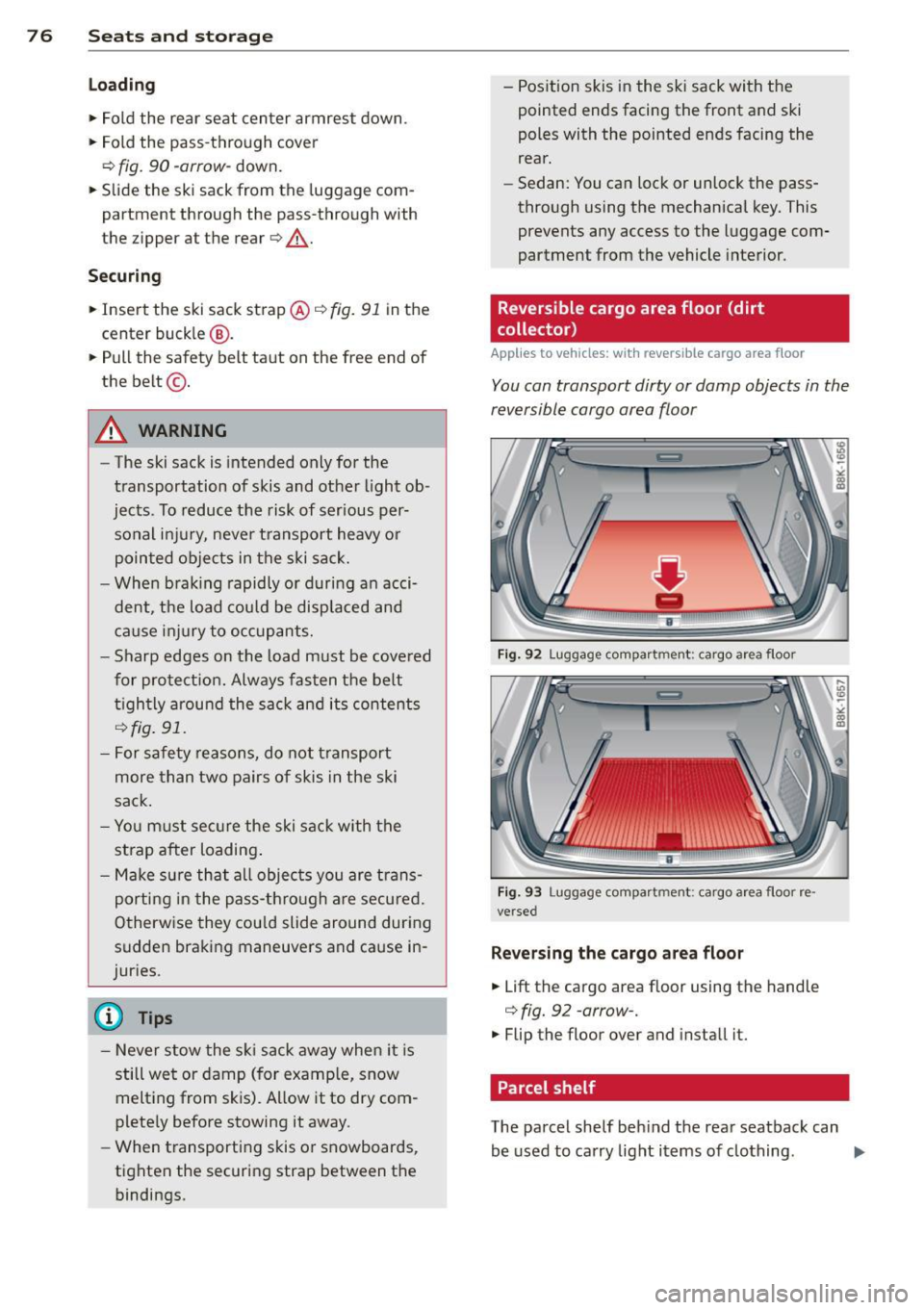
Fig. 92 Luggage compart ment : cargo area floor
Fig. 93 Luggage compartment: cargo area floor re·
versed
Reversing the cargo area floor
.,. Lift the cargo area floo r using the handle
¢ fig. 92 -arrow- .
.,. Flip the floor over and install it.
Parcel shelf
., U1 .,
-><
~
The parcel shelf behind the rear seatback can
be used to carry light items of clothing .
ll>-
Page 80 of 304
78 Warm and cold
Warm and cold Climate controls
Description
The climate control system warms, cools and
adds humidity to the air in the vehicle interior.
It is the most effect ive when the windows and
sunroof are closed . If there is a build-up of
heat inside the vehicle, ventilation can help to
speed up the cooling process.
I n all heating mode functions except
defrost,
the blower on ly switches to a higher speed
once the engine coolant has reached a certain
temperature.
Condensat ion from the cooling system can
drip and form a puddle of water under the ve
hicle. This is normal and does not mean there
is a leak.
Pollutant filter
The pollutant filter removes pollutants s uch
as dust and pollen from the air.
The air pollutants filter must be changed at
the intervals spec ified in you r Warranty
&
Maintenance booklet, so that the air condi
tioner can properly work.
If you drive your vehicle in an area with h igh
a ir po llution, the fi lter may need to be
changed more frequent ly than specified in
your Aud i Wa rranty
& Ma intenance booklet. If
in doubt, ask your authorized Audi Service Ad
visor for advice .
Key coded settings
The climate control settings are automat ically
stored and assigned to the remote control key
that is in use.
A WARNING
Reduced visibility is dangerous and can
cause accidents.
-
- For safe driving it is very important that
all windows be free of ice, snow and con
densation.
- Comp letely familiarize yourself with the
proper use and function of the heating
and ventilation system and especially how to defog and defrost the windows.
- Never use the windshield wiper/washer
system in freez ing weather unt il you
have warmed the windshield first, using
the heating and ventilation system. The
washer solution may freeze on the wind shie ld and reduce visib ility.
(D Note
- If you suspect that the air conditioner
has been damaged, switch the system
off to avoid further damage and have it
inspected by a qualified dealership.
- Repairs to the Audi air conditioner re
quire special technical know ledge and
special tools. Contact an authorized Aud i
dea ler fo r assistance.
@ For the sake of the environment
By reducing the amount of fuel you use,
you also reduce the amount of pollutants
emitted into the air.
(D Tips
-Keep the air intake s lots (in fro nt of the
w indshield) free from ice, snow and de
bris in order to maintain the proper func
tion of the climate control system.
- T he energy management system may
switch the seat heating* or rear window
defroster off temporarily . These systems
are available again as soon as the energy
balance has been restored.
- Air escapes through vents under the rear
window. When placing items of clothing
on the luggage compartment cover, en
sure that the openings are not covered.