door lock AUDI A4 2016 User Guide
[x] Cancel search | Manufacturer: AUDI, Model Year: 2016, Model line: A4, Model: AUDI A4 2016Pages: 278, PDF Size: 70.26 MB
Page 40 of 278

Opening and clo sin g
Open ing th e re ar lid
.. Press the b utton cs on the remote control
master key for at least one second. The rear lid
unlocks and op ens slight ly. Or
.. Pr ess th e handle on th e rear lid¢
fig. 26. Or
.. Sedan : Pull the rele ase button
cs in the driv
er 's doo r ¢
fig. 2 7
Cl osi ng the rear lid
.. Pu ll th e rear lid down at th e grip on the inside
and allow it to drop gently to close it¢ ,&. .
A WARNING
-After closing the rear lid, always pull up on
it to make sure that it is properly closed .
Otherwise it could open suddenly when the
vehicle is mov ing .
- To help prevent poisonous exhaust gas from
being drawn into the vehicle, always keep
the rear lid closed while driving . Never
transport objects larger than those which fit
comple tely into t he luggage area, because
then the rear lid cannot be fully closed.
- Never leave yo ur vehicle unatte nded espe
c ia lly with the rea r lid left open . A chi ld
c ould cra wl into the car thro ugh the luggage
compartment and pull the lid shut, becom
ing trapped and unable to get out. To re
duce the r isk of persona l injury, never let
children p lay in or around your veh icle . Al
ways keep the rear lid as well as the vehicle
doors closed when not in use.
- Always ensure that no one is within range of
th e rear lid when it is moving, in particular
close to the hinges -fingers or hands can be
pinched .
(D Tips
When the vehicle is locked, the rear lid can be
opened separately by pressing the button
cs
on the master key. When you close the rear
lid again, it locks automatically .
38
Power opening/closing rear lid
Applies to vehicles: with automatic rear lid operat ion
The open posi tion can be adjusted .
Fig. 2 8 Dri ver 's doo r: U nlocki ng th e rear lid
-
Fig . 29 Lock ing switc h in t he rear lid
Opening rear lid
.. Press the bu tton cs on the remote key for at
least one second . Or
.. Pull the unloc k button
cs in the dr iver 's door
¢ fig. 28. Or
.. Press the hand le on the rear lid
¢ page 37,
fig . 26.
Closing rear lid
.. Press the close bu tton in the open rear lid
<=:> fig. 29 . T he rear lid moves to the closed posi
tion by itself and soft close locks it automati
cally
c::> ,&. .
Saving the opening angle of the rear lid
.. Br ing the luggage compar tment lid into the de
sired open position. The posi tion can only be
stored w hen the lid is above a certain height .
.. Press and hold the
c::> fig . 29 button for at least
fou r seconds unt il the lights blink to store the
desired open pos ition.
Page 41 of 278
..... N
0 ::..:: co .....
compartment lid upward .
~ Press and hold the¢ fig. 29 button again for at
least four seconds and this will store the new
open position .
T he settings in the radio or
MM!* determine if
the rear lid can be opened using the handle
¢ page 36.
Opening will be stopped immediately when :
- You press the~ button on the remote control
master key for at least one second, or
- You press the~ button in the rear lid, or
- You push the handle in the rear lid, or
- You pull the~ button in the driver's door, or
- When something blocks the rear lid o r makes it
difficult for the lid to move .
If you press one of the buttons~ now, the rear
lid will either open or close, depending on its an
gle.
If yo u pull light ly on its handle, the rear lid will
close.
C lo sing will be stopped immediately when:
- You press the~ button in the rear lid, or
- You push the handle in the rear lid, or
- You release the~ button on the driver's door,
or
- When something blocks the rear lid or makes it
difficult for the lid to move.
If you press one of the buttons~ now, the rear
lid will either close or open, depending on its an
gle.
If you pull light ly on its handle, the rear lid will
close.
You can manually stop the a utomat ic opening/
closing of the luggage compartment lid. The au
tomatic closing process begins if you push down
on the rear lid.
A WARNING
- Never close the rear lid inattentively or with
out checking first . Although the closing
Op ening and cl osing
force of the rear lid is limited, you can still
seriously injure yourself or others.
- Always ensure that no one is within range of
the rear lid when it is moving, in particu lar
close to the hinges and the upper and lower
edges - fingers or hands can be pinched.
- To help prevent poisonous exhaust gas from
be ing drawn into the vehicle, a lways keep
the rear lid closed while dr iving. Never
transport objects larger than those which fit
comp letely into the luggage area, because
then the rear lid cannot be fully closed.
- Never leave your veh icle unattended espe
cially with the rear lid left open. A child
could crawl into the car through the luggage
compartment and pull the lid shut, becom
ing trapped and unab le to get out. To re
duce the risk of personal in jury, never let
children play in or around your vehicle . Al
ways keep the rear lid as we ll as the veh icle
doors closed when not in use .
- If there is a luggage rack or bicycle rack
mounted on the rear lid, it may not be able
to open comp letely or an opened rear lid
may close by itself because of the added
weight . So the open rear lid must be sup
ported or the we ight must be removed from
the l uggage rac k first.
(!) Tips
- When the vehicle is locked, the rear lid can
be unlocked separately by pressing the but
ton~ on the master key . When the rear lid
is closed again, it locks automatically.
- The following applies to vehicles equ ipped
w ith the convenience key* feature : if the re
mote contro l key is left in the luggage com
partment , luggage compartment will auto
matically unlock itse lf after you lock the ve
hicle. This prevents you from unintentiona l
ly locking your key in the luggage compart
ment.
- If the vehicle battery charge drops below a
certain level, you can still open or close the
rear lid manually, however, you will need to
app ly more force to close it.
39
Page 43 of 278
,....,
N
0
""' CX) ,....,
I.Cl U"I ,....,
I.Cl ,....,
Child safety lock
Child safety locks in the rear doors
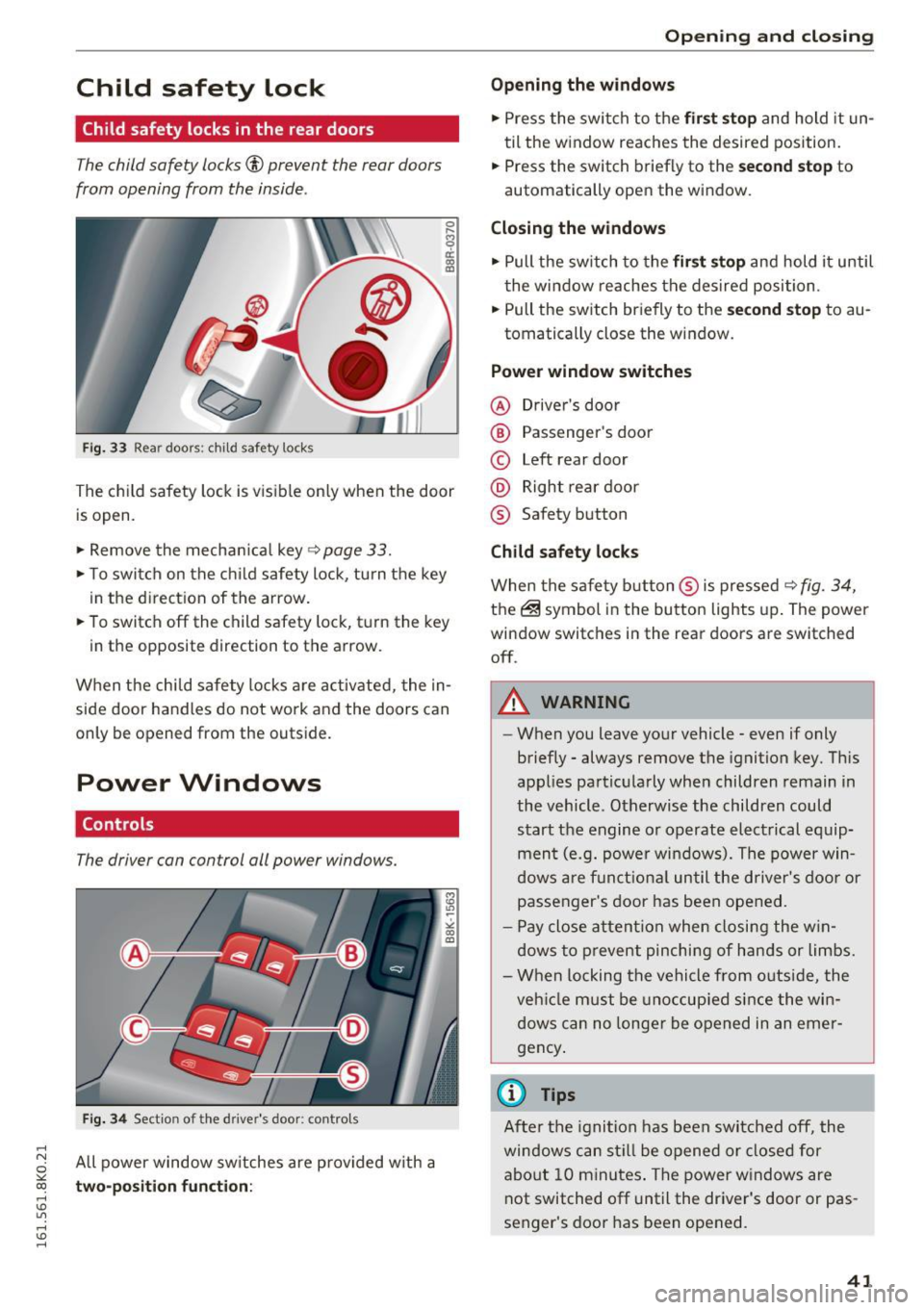
The child safety locks© prevent the rear doors
from opening from the inside .
Fig. 33 Rear doors: child safety locks
0 ,.._ O') 0
i a,
The child safety lock is visible on ly when the door
is open .
.,. Remove the mechanical key
~ page 33.
.,. To switch on the child safety lock, tu rn the key
in the direction of the arrow.
.,. To switch off the child safety lock, t urn the key
in the opposite direction to the arrow.
When the child safety locks are activated, the in
side door handles do not work and the doors can
only be opened from the outside.
Power Windows
Controls
The driver can control all power windows.
Fig. 34 Section of the driver's door: contro ls
All power window switches are provided with a
two-position function:
Open ing and closing
Opening the windows
.,. Press the switch to the first stop and hold it un
til the window reaches the desired position.
.,. Press the switch briefly to the
second stop to
automatically open the window.
Closing the windows
.,. Pull the switch to the first stop and hold it until
the window reaches the desired position .
.,. Pull the switch briefly to the
second stop to au-
tomatically close the window.
Power window switches
@ Driver's door
@ Passenger's door
© Left rear door
@ Right rear door
® Safety button
Child safety locks
When the safety button ® is pressed ~ fig. 34,
the@symbol in the button lights up. The power
window switches in the rear doors are switched off .
A WARNING
--When you leave your vehicle - even if only
briefly - always remove the ignition key. This
applies particularly when children remain in
the vehicle. Otherwise the children could
start the engine or operate electrical equip
ment (e.g. power windows). The power win
dows are funct ional until the driver's door or
passenger's door has been opened.
- Pay close attention when closing the win
dows to prevent pinching of hands or limbs.
- When locking the vehicle from outside, the
veh icle must be unoccupied since the win
dows can no longer be opened in an emer
gency .
(0 Tips
After the ignition has been switched off, the
windows can still be opened or closed for
about 10 minutes. The power windows are
not switched off until the driver's door or pas
senger's door has been opened.
41
Page 44 of 278
Opening and clo sin g
Convenience opening /clos ing
The windows and the power sunroof can be
opened and closed with the mechanical key or
the emergency key.
®
'
l
® '
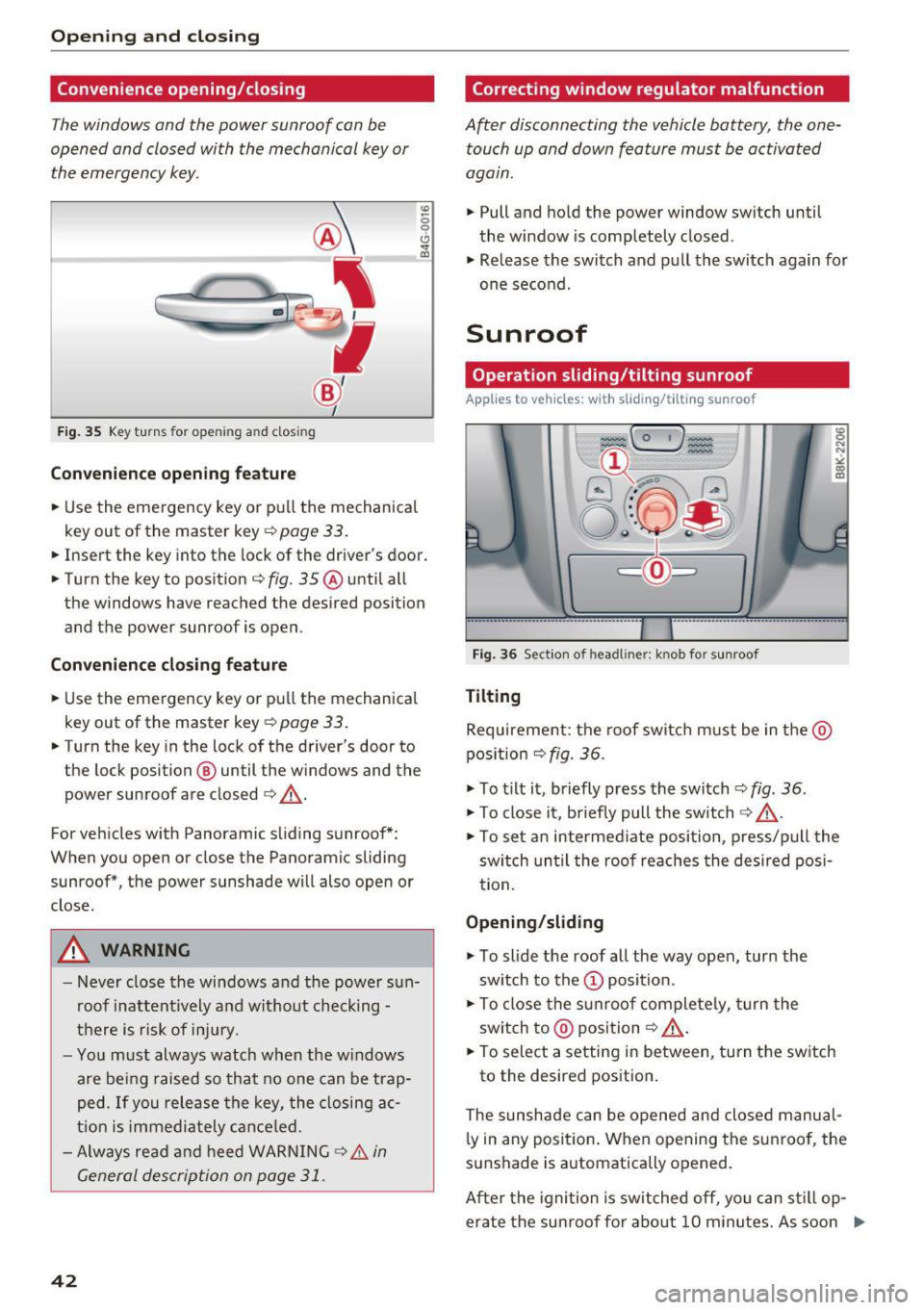
Fig . 35 Key turns for opening an d clos ing
Convenienc e opening f eature
.,. Use the eme rgency key or pu ll the mechanical
key out of the master key
¢ page 33 .
.,. Insert the key into the lock of the driver's door .
.,. Turn the key to position ¢
fig. 35 ® until all
the windows have reached the desired position
and the power sunroof is open .
Convenience cl osing fea tur e
.,. Use the emergency key or pull the mechanical
key out of the master key
q page 33.
.,. Turn the key in the lock of the driver's door to
the lock position @ until the windows and the
power sunroof are closed
q _&..
For vehicles with Panoramic sliding sunroof*:
When you open or close the Panoramic sliding
sunroof*, the power sunshade will also open or
close.
A WARNING
- Never close the windows and the power s un
roof inattent ively and without checking -
there is risk of injury.
- Yo u m ust always watch when the w indows
are be ing raised so that no one can be trap
ped. If you release the key, the closing ac
t ion is immediately cance led.
- Always read and heed WARNING
9 & in
General description on page 31 .
42
Correcting window regulator malfunction
After disconnecting the vehicle battery, the one
touch up and down feature must be activated
agam .
... Pull and hold the power window sw itch until
the window is completely closed .
... Release the switch and pull the switch again for
one second.
Sunroof
Operation sliding /tilting sunroof
Applies to vehicles: with sliding/tilt ing sunroof
Fig . 36 Section of headliner: knob for sunroof
Tilting
Requirement: the roof switch m ust be in the @
pos ition
q fig. 36 .
... To t ilt it, briefly press the switch ¢ fig . 36.
... To close it, b riefly pull the switch 9 _&. .
:g N
N
•
" CD m
... To set an intermed iate position, p ress/p ull the
sw itch un til the roof reaches the desired posi
tion.
Opening /slid ing
... To slide the roof all the way open, tur n the
sw itch to the
(D position.
... To close the s unroof complete ly, turn the
sw itch to @ position
<=? _&..
... To select a setting in between, turn the sw itch
to the desired position.
The sunshade can be opened and closed manual l y in any position . W hen opening the sunroof , the
sunshade is a utomatically opened.
After the ignition is switched off, yo u can st ill op
erate the su nroof fo r abo ut 10 m inutes. As soon .,.
Page 46 of 278
Opening and clo sin g
Valet parking
Applies to vehicles: with folding and lockable rear seatbacks
The valet parking feature protects the luggage
comportment from unauthorized access .
-
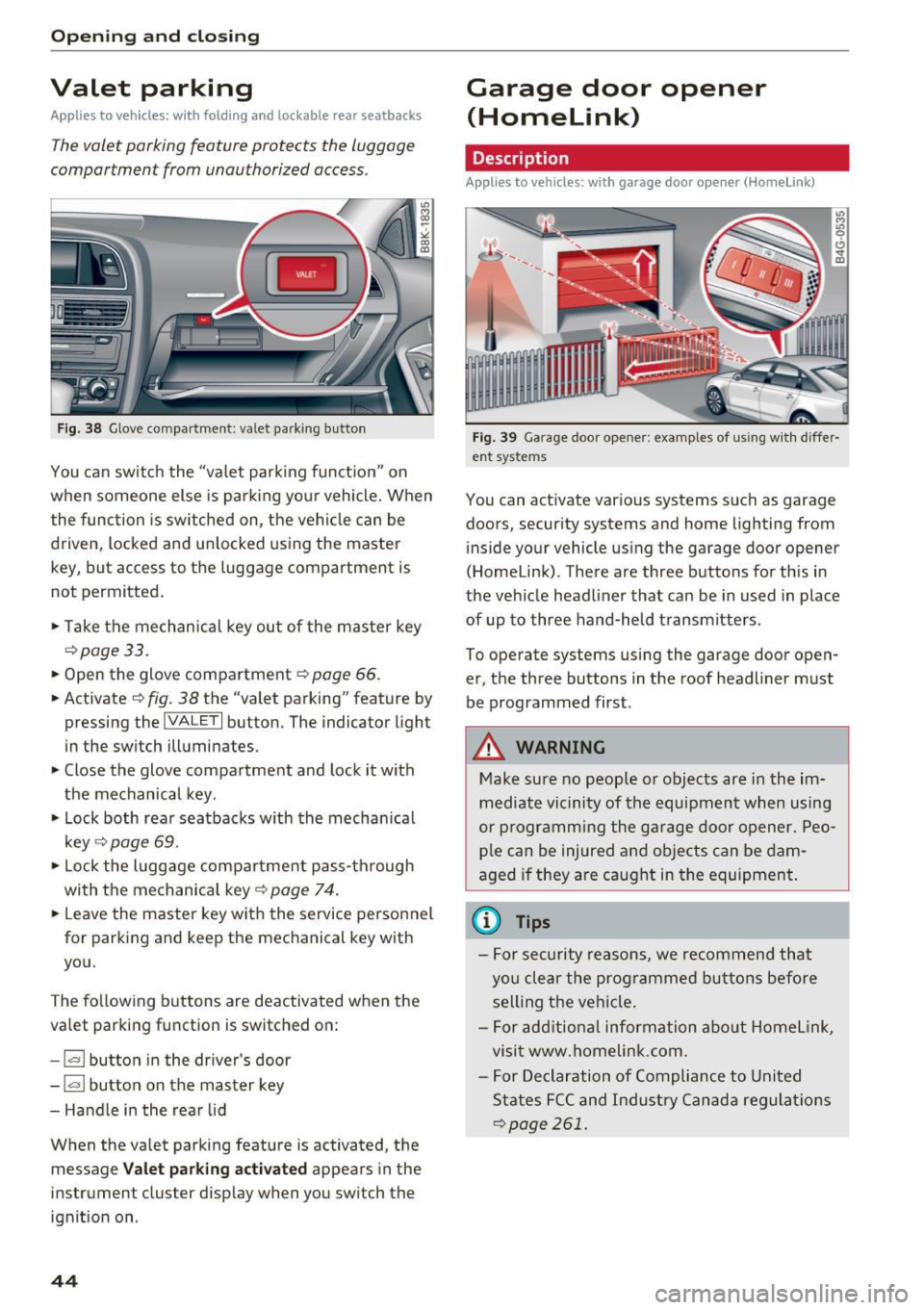
Fig. 38 Glove compartment: valet park ing button
You can sw itch the "va let park ing funct ion" on
when someone else is pa rk ing you r vehicle. When
the function is sw itched on, the vehicle can be
driven, locked and un locked using the master
key, but access to the luggage compartment is
not permitted .
• Take the mechanical key ou t of the master key
<=> page 33.
• Open the glove compartment r::!> page 66 .
• Activate
¢ fig. 38 the "valet parking" feature by
pressing the
! VALET I button. The indicator light
in the switch illuminates.
• Close the glove compartment and lock it with
the mechanical key.
• Lock both rea r seatbacks w ith the mechan ica l
key
¢ page 69.
• Lock the luggage compar tment pass-through
with the mechanical key<=>
page 74 .
• Leave the master key with the service personnel
for parking and keep the mechanical key with
you.
The fo llowing buttons are deactivated when the
valet parking function is switched on:
- 1""' 1 bu tton in the dr iver's door
- I a I button on the master key
- Handle in the rear lid
When the valet parking feature is activated, the message
V alet park ing activ ated appears in the
instrument cluster display when you switch the ignit ion on .
44
Garage door opener
(Homelink)
Description
Applies to vehicles: with garage door opener (Horne Link)
Fig. 3 9 Garage doo r opene r: exa mples of using w it h d iffer·
ent syste ms
You can act ivate vario us systems suc h as garage
doors, secur ity systems and home lighting from
inside your vehicle using the garage door opener
(Homelink) . There are three buttons for th is in
the veh icle headliner that can be in used in place
of up to three hand-held transmitters.
To operate systems using the garage door open
er, the three buttons in the roof headliner must be programmed first .
A WARNING
Make sure no people or objects are in the im
mediate vi cinity of the equipment when using
or p rogramm ing the ga rage door opener. Peo
pl e can be injured and ob jects can be dam
aged i f they are caught in the equipment.
(D Tips
- For sec urity reasons, we recommend that
yo u clear the prog rammed but tons before
sell ing t he ve hicl e.
- For add itiona l information about HomeL ink,
visit www.homelink .com .
- For Declaration of Compliance to United
States FCC and Indust ry Canada regulat ions
<=>page 261.
Page 51 of 278

.... N
0
""' CX)
.... I.Cl U"I
.... I.Cl ....
the windshield in this area in order to
prevent malfunctions or failures.
- Some exterior lighting functions can be ad
justed
c:, page 49.
- When you remove your key from the igni
tion while the vehicle's lights are turned on,
a buzzer sounds as long as the driver's door
is open.
- In cool or damp weather, the inside of the
headlights, turn signals and tail lights can
fog over due to the temperature difference
between the inside and outside. They will
clear shortly after switching them on. This does not affect the service life of the light
ing .
- In the event of a light sensor malfunction,
the driver is notified in the instrument clus
ter display
c:, page 21.
Turn signals and high beam lever
The lever operates the turn signals, the high
beams and the headlight flasher.
Fig. 43 Turn signal and high beam lever
Turn signals¢¢
g N
0
~ CD
The turn signals activate when you move the lev
er into a turn signal position when the ignition is
switched on.
@ -right turn signal
@-left turn signal
The turn signal blinks three times if you just tap
the lever.
High beams and headlight flasher ~D
Move the lever to the corresponding position:
@-high beams on
Light and Vision
@-high beams off or headlight flasher
The indicator light
II in the instrument cluster
turns on.
Notes on these features
- The turn signals only work with the ignition
turned on. The indicator lights. or
II in the
instrument cluster also blink.
- After you have turned a corner, the turn signal
switches off automatically.
- The
high beam works only when the headlights
are on. The indicator light
II in the instrument
cluster illuminates when the high beams are
on.
- The
headlight flasher works only as long as you
hold the lever -even if there are no lights
switched on . The indicator light
II in the in
strument cluster illuminates when you use the
headlight flasher.
WARNING
Do not use the high beam or headlight flasher
if you know that these could blind oncoming
traffic.
Adjusting exterior lighting
The functions are selected in the radio or MMI* .
.,. Select: !CAR I function button> Exterior light
ing .
Or
.,. Select: 1-C~A ~ R-.l function button > Car systems*
control button > Vehicle settings > Exterior
lighting.
Coming home (light when leaving car)*,
Leaving home (light when unlocking car)*
The coming home function illuminates the area
around the vehicle when the ignition is switched
off and the driver's door is opened. Depending on
vehicle equipment, the function can be switched on and off or the length of time the lights remain
on* can be adjusted .
The
leaving home function illuminates the area
around the vehicle when unlocking it. This func-
tion can be switched on and off.
ll>
49
Page 54 of 278
Light and Vision
Q/P -Adjusting the left/right exter ior mir ror.
Move th e knob in the des ired direction.
(@. -Heat ing the m irro r glass depending on the
ou tside temperat ure*.
.9 -Folding exterior mirrors* . In the Infotain
men t system, you can select if the mirrors fold in
automatically when you lock the vehicle
¢ page 36.
Front passenger's exterior mirror tilt
function*
To help you see the curb when ba cking in to a
pa rking space , the surface of the mirror tilts
slightly. For this to happen, the knob must be in
the posit ion for the front passenger's outs ide
mirror.
You can adjust the ti lted mi rror sur fa ce by turn
ing the knob in the desired direction. When you
move out of reverse and into another gear, the
new mirror position is sto red and assigned to the
key yo u are using.
The mirror goes back into its o riginal position
once yo u drive forward faster than 9 mph
(15 km/h) or tu rn the ignition off .
A WARNING
Curved mirror surfaces (convex or spherical *)
increase your f ield of view. Remember that
vehicles or other objects will appear smaller
and fa rther away than when seen in a flat mir
ror. If you use t his mirro r to est imate distan
ces of following vehicles whe n cha ng ing
lanes, yo u co uld estimate incor rectly and
c ause an accident .
(D Note
-If the mir ror housing was moved by outs ide
fo rces (such as an impac t when maneuver
in g), y ou must use the powe r fo ldi ng func
tion to fold the mirro r all the way out . The
mirror housing must not be moved back in
to place by hand beca use this would impa ir
the function of the m irror mechanism.
- If you wash the ve hicle in an automatic car
wash, yo u m ust fold the exte rior m irrors i n
to reduce the risk of damage to the mirrors.
52
N ever fold power fold ing ex terior mirrors *
by hand . On ly fold them in and out using
the power controls .
(D Tips
-If the power adjusting function malfunc
tions, the glass in both mirrors can be ad
justed by p ressing on the edge of it by hand .
- The exte rior m irro r settings are sto red w it h
the memory function* ¢
page 63.
Dimming the mirrors
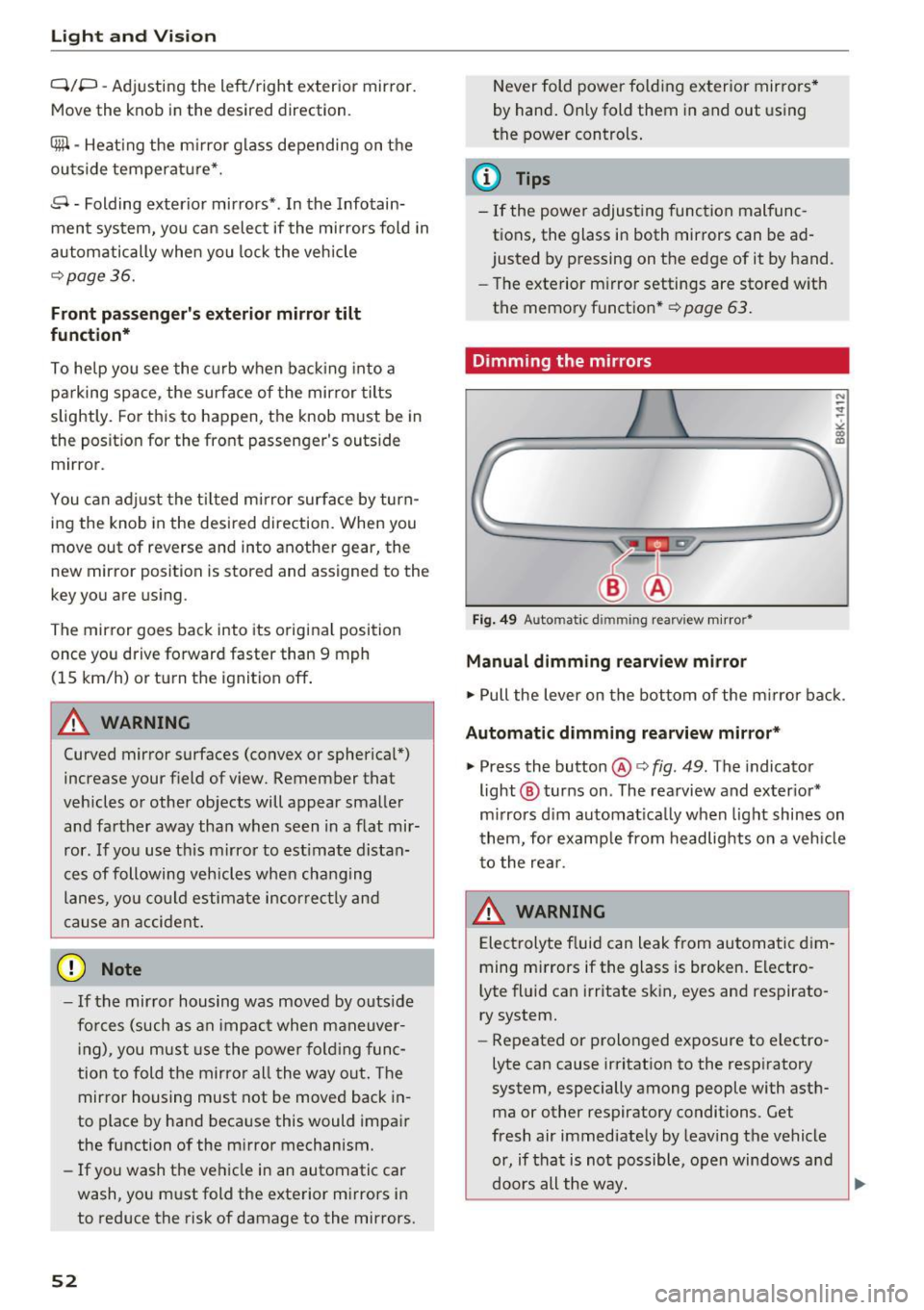
Fig. 49 Automat ic d immin g rear view m irro r•
Manual dimming rearview mirror
.,. Pull the lever on the bottom of the m irror ba ck .
Automatic dimming rearview mirror *
.,. Press the button@¢ fig. 49. The indicator
light @ turns on . The rearview and ex ter ior*
m irrors d im au tomat ica lly when light shines on
t hem, for e xamp le from headlig hts on a veh icle
to the re ar.
A WARNING
Electrolyte f luid can leak from automa tic di m
ming mi rrors if the glass is broken . Electro
lyte fl uid can irritate s kin, eyes and respirato
ry system.
- Repeated or prolonged exposure to electro
lyte ca n cause irritation to the respiratory
system, especially among people with asth ma or other respiratory conditions . Get
fresh air immediately by leaving the vehicle
or, if that is not possible, open windows a nd
doors all the way. ..,.
Page 65 of 278
..... N
0 ::..:: co .....
Correctly adjusted head restraints and safety
belts are an extremely effective combination
of safety features .
Memory function
Description
Applies to vehicles: with memory function
The memory function allows you to quickly and
easi ly store and recall personal seating profiles
for the driver. The memory function is operated
through the master key and the memory buttons
in the driver 's door.
The driver's seating profile is stored and assigned
to the master key each time the vehicle is locked .
When you open the door , the seat profile is auto
matica lly recalled. If two people use one vehicle,
it is recommended that each person always uses
" t heir own" master key .
Up to 2 seat profi les can be stored in the memory
buttons in the driver's doo r. Once they are stor
ed, these seat profiles can be se lected at any
time.
In addition to the driver's seat settings, you can
also store and access the exterior mirror adjust ment settings* using the remote control key or
memory but ton.
Remote control key
Applies to vehicles: with seat memory
To assign the driver's seat settings to the remote
control key when locking the vehicle, the function
must be activated in the radio or MMI*
~ Select: I CARI function button > Seat adjust
ment > Driver's seat > Remote control key
>
on.Or
~ Select: ICARI function button> Car systems*
control button > Vehicle settings> Seats >
Driver's seat> Remote control key > On .
@ Tips
If you do not want another driver's settings to
be assigned to the remote key, switch off the
Seats and storage
memory function using the radio or MMI* or
the
I OF Fl button c:::> page 63.
Memory buttons
Applies to vehicles: with seat memory
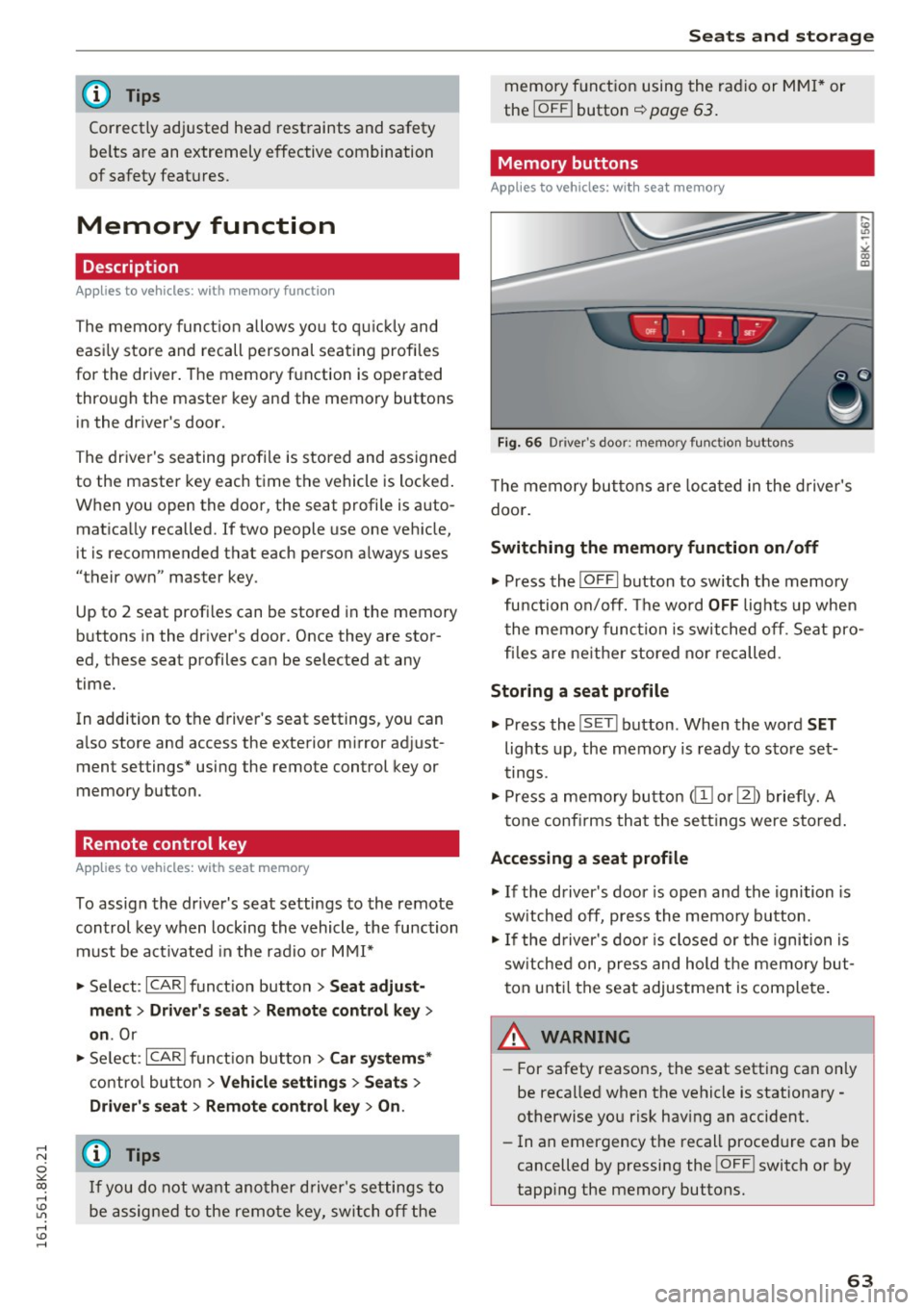
Fig. 66 Dri ver's door: memo ry func tion b uttons
The memory buttons are located in the driver's
doo r.
Switching the memory function on/off
~ Press the I OFFI button to switch the memory
fu nction on/off. The wo rd
OFF lights up when
the memory function is switched off. Seat pro
files are ne ither stored nor recalled .
Storing a seat profile
~ Press the IS E T I button . When the word SET
lights up, the memory is ready to store set
tings .
~ Press a memory button @or [Ii) briefly. A
tone confirms that the settings were stored.
Accessing a seat profile
~ If the driver's door is open and the ignition is
sw itched off, press the memory button .
~ If the driver's door is closed or the ignition is
sw itched on, press and hold the memory but
ton until the seat adjustment is complete.
.&_ WARNING
-For safety reasons, the seat setting can only
be recalled when the vehicle is stationary
otherwise you risk having an accident.
- In an emergency the recall procedure can be
cancelled by pressing the
! O FF ! switch or by
tapp ing the memory buttons.
63
Page 83 of 278
..... N
0 ::..:: co .....
peda l and move the se lector lever to the P or N
pos ition .
~ Press the key c::> fig. 96 - the engine will start.
Switchi ng the ignition on /off
If you wou ld like to switch the ig nition on with
out starting the engine, fo llow these steps :
~ Insert the key into the ignition lock.
~ Press t he key briefly withou t pressing the
clutch peda l (for manual transmissions) or the
brake pedal (for automatic transmissions).
~ To switch the ignition off, press the key again .
When start ing t he engine, major elec trical loads
are switched off tempora rily.
You can on ly remove the key with the ignition
switched off.
If the engine should not start immed iately, the
starting process is automat ically stopped after a
short time. Repeat sta rting procedu re .
_& WARNING
- Never allow the e ngine to ru n in confined
spaces - danger of asp hyxiation.
- Never remove the ign it io n key from the ig ni
t ion look while the vehicle is moving. O ther
wise, the stee ring lock cou ld suddenly en
gage and you would not be able to steer t he
vehicle.
- Always take the key wi th you whenever you
leave your vehicle . Otherwise, the engine
cou ld be started or electrical equipment
such as the power windows cou ld be operat
ed. This can lead to serious injury.
- Never leave children or persons requiring as
sistance unattended in the vehicle. The
doors can be locked using the remote trans
mitter, preventing people from escap ing
from the vehicle on the ir own in the event of
an eme rgency. Depend ing on the t ime of
year, peop le inside the vehicle can be ex
posed to very hig h or very low tempera
tures .
-
D riv ing
(D Note
Avoid high engine rpm, full throttle and heavy
engine loads unti l the engine has reached op
erating temperature - otherwise you risk en
gine damage.
@ For the sake of the environment
Do not let the engine run w hile parked to
warm up. Beg in driving immed iate ly. Th is re
duces unnecessary emissions.
(D Tips
- If the key cannot be removed from the ign i
tion lock, you have to pull the mechanical
key out of the master key in order to be able
to lock the vehicle c::>
page 34.
-Some noise after starting the engine is nor
mal and is no cause for concern.
- If you leave the vehicle w ith the ignition
switched on, the ignit ion w ill switch off af
ter a certain per iod of t ime. Please note that
electrical equipment such as exterior lights
w ill switch off as we ll w hen that happens.
8 1
Page 84 of 278
Driving
Starting the vehicle with the emergency
key
Applies to veh icles: w ith ig ni tio n lock
You can use the emergency key as an ignition key
in an emergency.
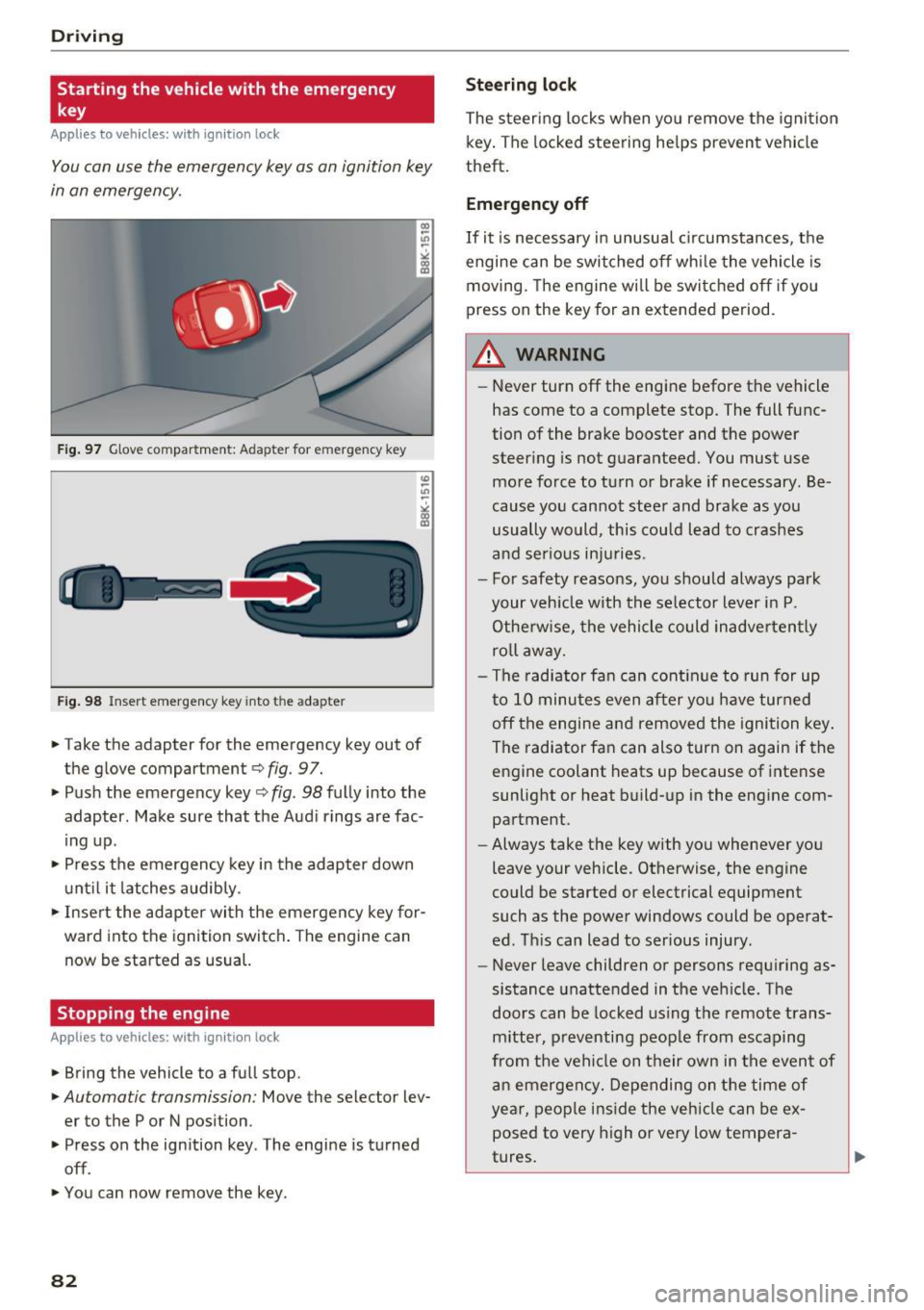
Fig. 97 Glove compartment: Adapter for e mergen cy key
Fig. 98 Insert emergency key into t he adapte r
.,. Take the adapter for the emergency key out of
the glove compartment ¢
fig. 97.
.,. Push the emergency key¢
fig. 98 fully into the
adapter. Make sure that the Audi rings are fac
ing up.
.,. Press the emergency key in the adapter down
until it latches audibly.
.,. Insert the adapter with the emergency key for
ward into the ignition switch. The engine can
now be started as usual.
Stopping the engine
App lies to veh icles: w ith ig ni tio n lock
.,. Bring the vehicle to a full stop.
.,. Automa tic transmission: Move the selector lev
er to the P or N position .
.,. Press on the ignition key . The engine is turned
off .
.,. You can now remove the key .
82
Steering lock
The steering locks when you remove the ignition
key. The locked steering helps prevent vehicle
theft.
Emergency off
If it is necessary in unusual circumstances, the
engine can be switched off while the vehicle is
moving. The engine will be switched off if you
press on the key for an extended period .
A WARNING
-Never turn off the engine before the vehicle
has come to a complete stop. The full func
tion of the brake booster and the power
steering is not guaranteed. You must use
more force to turn or brake if necessary . Be
cause you cannot steer and brake as you
usually would, this could lead to crashes
and serious injuries .
- For safety reasons, you should always park
your vehicle with the selector lever in P .
Otherwise, the vehicle could inadvertently
roll away.
- The radiator fan can continue to run for up
to 10 minutes even after you have turned
off the engine and removed the ignition key .
The radiator fan can also turn on again if the
engine coolant heats up because of intense
sunlight or heat build-up in the engine com
partment .
- Always take the key with you whenever you
leave your vehicle . Otherwise, the engine
could be started or electrical equipment
such as the power windows could be operat
ed. This can lead to serious injury .
- Never leave children or persons requiring as
sistance unattended in the vehicle. The
doors can be locked using the remote trans
mitter, preventing people from escaping
from the vehicle on their own in the event of
an emergency. Depending on the time of
year, people inside the vehicle can be ex
posed to very high or very low tempera
tures.