ignition AUDI A4 2016 User Guide
[x] Cancel search | Manufacturer: AUDI, Model Year: 2016, Model line: A4, Model: AUDI A4 2016Pages: 278, PDF Size: 70.26 MB
Page 25 of 278
,....,
N
0
""' CX) ,....,
I.Cl U"I ,....,
I.Cl ,....,
Driver information
system
Introduction
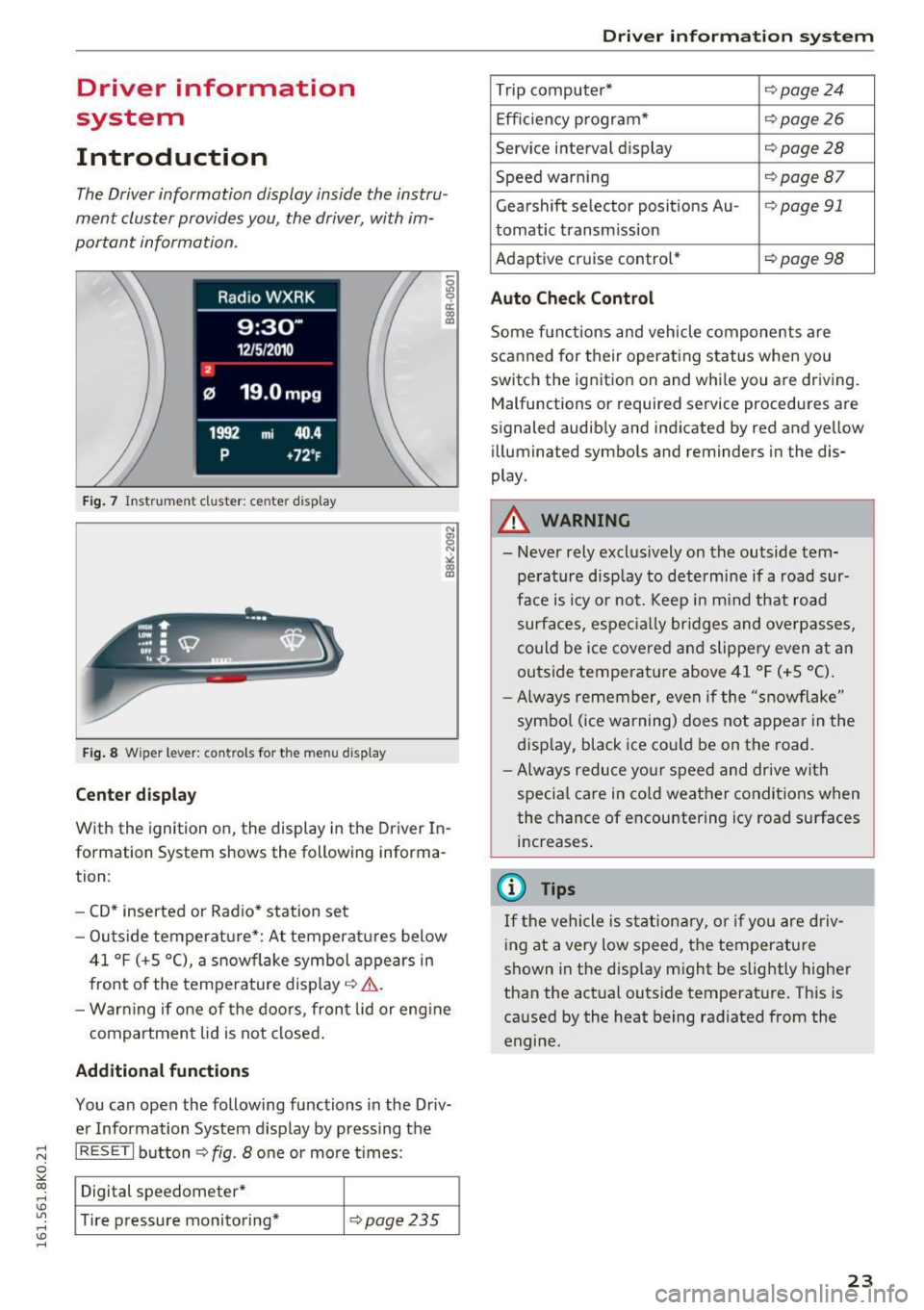
The Driver information display inside the instru
ment cluster provides you, the driver, with im
portant information.
Fig. 7 Instrument cluster: ce nter display
Fig. 8 Wipe r lever: contro ls for the menu display
Center display
With the ignition on, the display in th e Driver In
formation System shows the following informa
tion :
- CD* inserted or Radio* station set
- Outs ide temperature*: At temperatures below
41 °f (+S
0
(), a snowflake symbol appears in
front of the temperature display¢ ,1,. .
- Warning if one of the doors, front lid or engine
compartment lid is not closed.
Additional functions
You can open the following functions in the Driv
er Information System display by pressing the
I RESETI button¢ fig. 8 one or more t imes :
Digital speedometer*
Tire pressure monitoring*
¢pag e235
Driver in forma tion system
Trip computer* ¢page24
Efficiency program* ¢page26
Service interval display ¢page28
Speed warning ¢page Bl
Gearshift selector posit ions Au -i=>page 91
tomatic transm ission
Adaptive cruise control*
¢ page 98
Auto Check Control
Some functions and vehicle components are
scanned for their operating status when you
switch the ignition on and while you are driving. Malfunctions or required service procedures are
signaled audibly and indicated by red and yellow
illum inated symbols and reminders in the dis
play.
A WARNING
--
- Never rely exclus ively on the outside tem
pe rature display to determine if a road sur
face is icy or not. Keep in m ind that road
surfaces, especially bridges and overpasses,
could be ice covered and slippery even at an
outside temperat ure above 41 °f (+S °C).
- Always remember, even if the "snowflake"
symbol (ice warning) does not appear in the
display, black ice could be on the road.
- Always reduce your speed and dr ive with
specia l care in cold weather conditions when
the chance of encountering icy road surfaces
increases.
(j) Tips
If the vehicle is stationary, or if you are driv
ing at a very low speed, the temperature
shown in the disp lay might be slightly higher
than the actual outside temperature. This is
caused by the heat being radiated from the
engine.
23
Page 27 of 278
..... N
0 ::..:: co .....
data from the tota l-trip memory is being dis
p layed (memory level 2). The fuel pump nozzle
ii indicates the efficiency program*
¢page 26.
Single-trip memory (Trip computer 1)
The single-trip memory stores the trip informa
tion from the time the ignition is turned on until
it is turned off.
If the trip is continued within 2
hours
from the time the ignition was turned off,
the new data w ill be included in the calculat ion of
the current tr ip inf ormat ion . If the trip is inter
rupted fo r
more than 2 hours the memory is re
set automat ica lly.
Total-trip memory (Trip computer 2)
Unlike the single-trip memory, the total-trip
memory is not reset automatically. This permits
you to evaluate your driving data for the entire period between manual resets.
Efficiency program*
The efficiency program can help you to use less
fuel¢
page 26.
Operation
App lies to vehicles: with trip computer
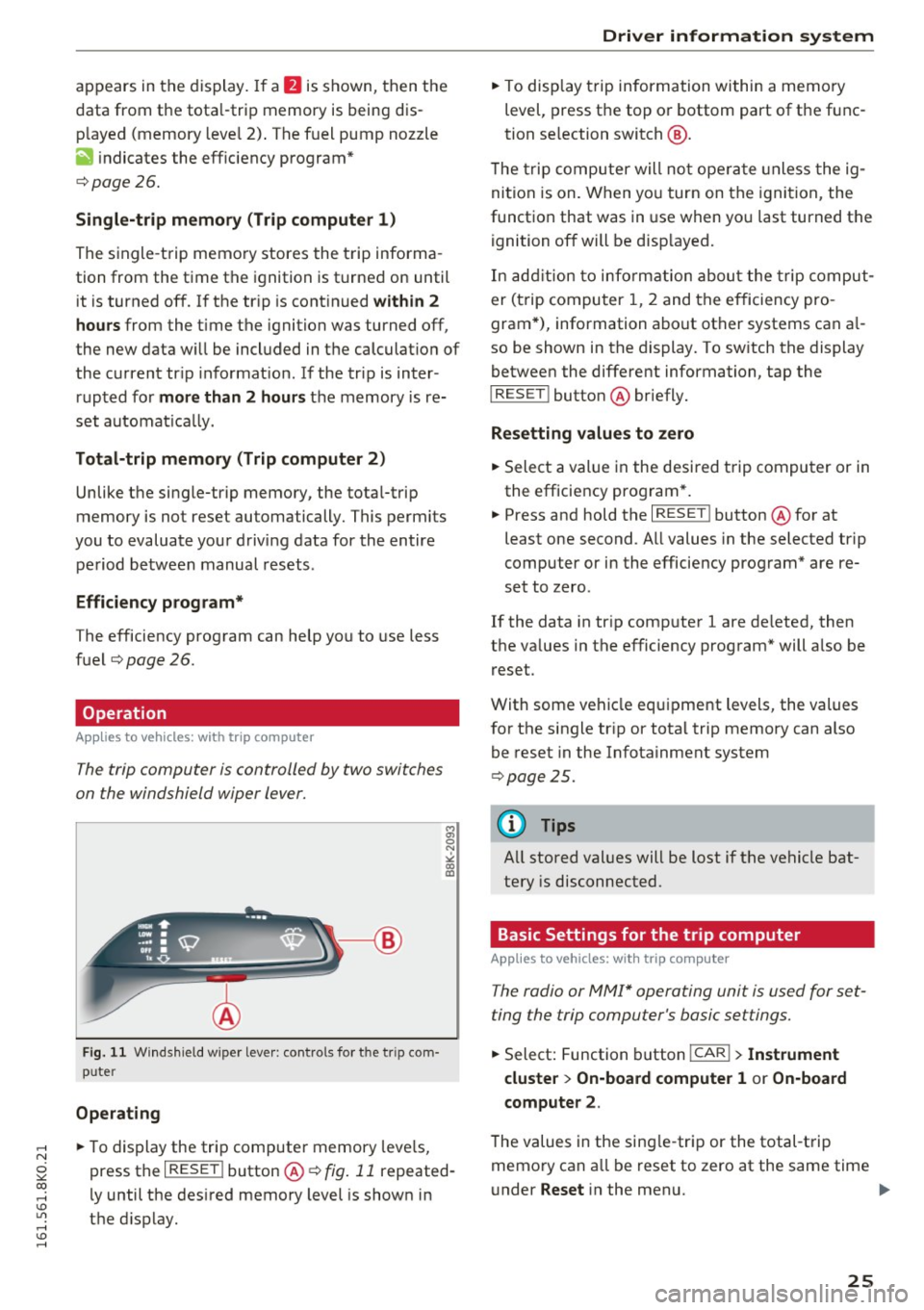
The trip computer is controlled by two switches
on the windshield wiper lever.
F ig. 11 W indsh ield w iper lever: controls for t he tr ip com·
puter
Operating
• To display the trip computer memory levels,
press the
I RESET ! button@¢ fig. 11 repeated
ly until the desired memory level is shown in
the display.
Driver information system
• To display trip information within a memory
level, press the top or bottom part of the func
tion se lection switch @.
T he trip computer will not ope rate un less the ig
nition is on. When you turn on the ignition, the
function that was in use when you last turned the
ignition off will be disp layed.
In addition to information about the trip comput
er (trip computer 1, 2 and the efficiency pro
gram*), information about other systems can a l
so be shown in the display. To sw itch the display
between the different information, tap the
I RESET I button @ briefly.
Resetting values to zero
• Select a value in the desired trip computer or in
the efficiency program *.
• Press and hold the
I RESET ! button @for at
least one second . All values in the selected trip
computer or in the efficiency program* are re
set to zero.
If the data in trip computer 1 are de leted, then
the va lues in the efficiency program* will a lso be
reset.
With some vehicle equipment levels, the values
for the single trip or total trip memory can also
be reset in the Infotainment system
¢ page 25.
(0 Tips
All stored values will be lost if the vehicle bat
tery is disconnected.
Basic Settings for the trip computer
Applies to vehicles: with trip computer
The radio or MMI* operating unit is used for set
ting the trip computer 's basic settings.
• Select: Function button !CAR !> Instrument
cluster
> On-board computer 1 or On-board
computer 2.
The values in the sing le-trip or the total-trip
memory can a ll be reset to zero at the same time
under
Reset in the menu. .,..
25
Page 30 of 278
Driver information s ystem
Fuel economy messages
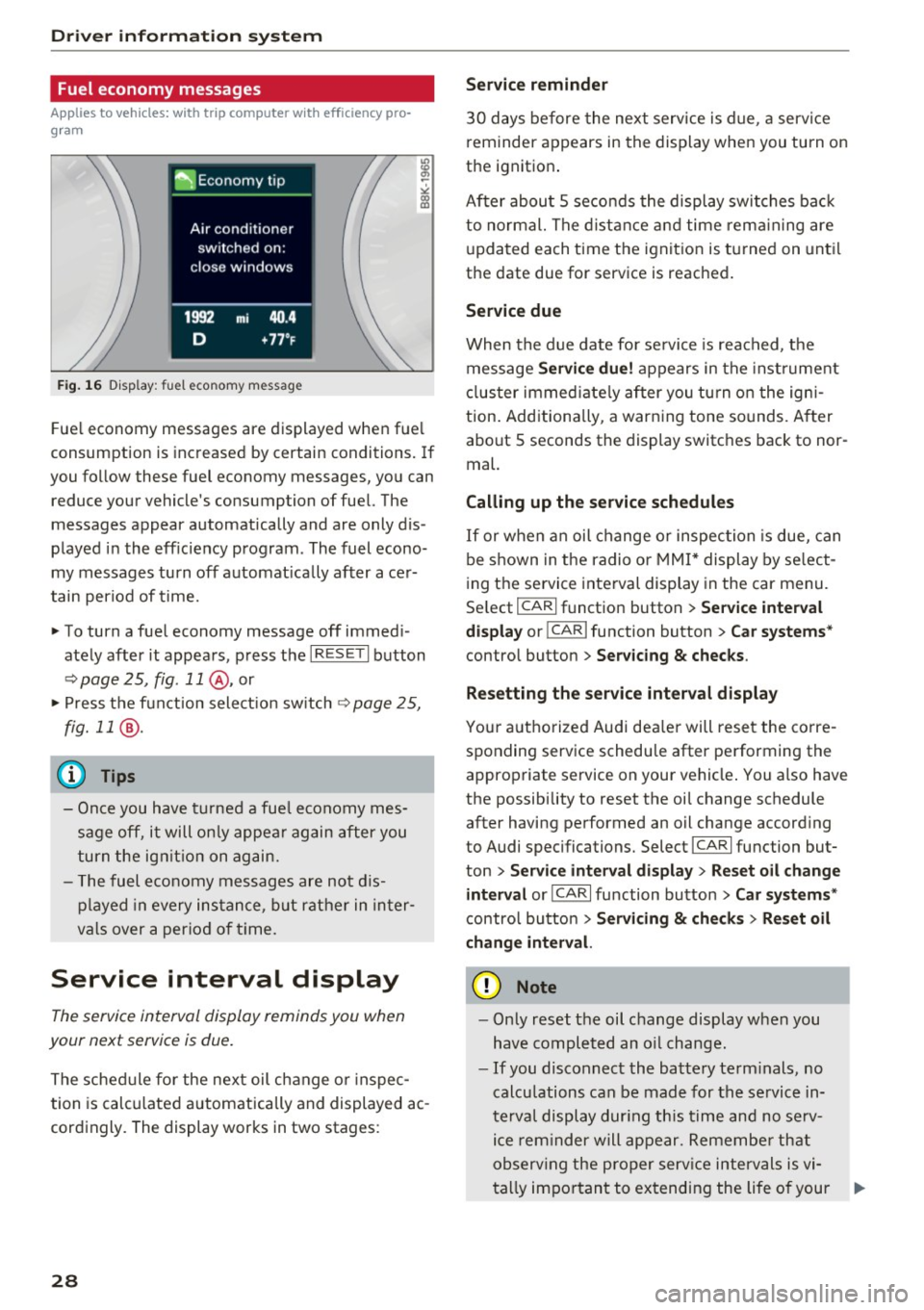
Applies to vehicles: with trip computer with efficiency pro
gram
F ig. 16 D isplay: fuel eco nomy message
Fue l economy messages are displayed when fue l
consumption is inc reased by certain conditions. If
you follow these fuel economy messages, you can reduce your vehicle's consumption of fuel. The
messages appear automatically and are only dis
p layed in the eff iciency program . The fuel econo
my messages turn off automat ica lly afte r ace r
tain period of t ime.
"' To turn a fuel economy message off immed i
ate ly after it appears , press t he I R ESE T I button
¢ page 25, fig. 11 @ , or
"' Press t he f unct ion sele ct io n sw itch
~ page 2 5,
fig. 11
® ·
(D Tips
- Once you have t urned a fue l economy mes
sage off, it will on ly appea r again after you
turn the ig nition on ag ain.
- T he fuel economy messages a re not d is
p layed in every ins tance, but rather in in ter
v al s over a per io d of t ime.
Service interval display
The service interval display reminds you when
your next service is due .
The schedule for the next oil change o r inspec
tion is calc ulated a utomatically and displayed ac
cord ingly. The display works in two stages:
28
Service reminder
3 0 days before the next service is due , a servi ce
r eminder appears in the display when you turn on
the ignition .
After abou t
5 seconds the display swit ches bac k
to normal. The dist ance a nd time rem aining are
u pda ted each time the ignit ion is turned on unt il
the date due for service is reached.
Service due
Whe n the d ue date for se rvice is rea ched, the
message
Service due! appears in the inst rument
cl uster immed iate ly after you tu rn o n the igni
tion . Add itiona lly, a warn ing tone sounds. A fter
about
5 seconds the display switches back to nor
mal.
Calling up the service schedules
I f or w hen an oil change o r inspec tion is due, can
be shown in the radio or MMI * display by se lect
i ng the service interval display in the car menu.
Se lect
I CAR I fu nction button > Se rvice interval
display
or ! CAR I function button > Car systems *
control button > Ser vicing & checks .
Resetting the s ervice interval display
Yo ur a utho rized Aud i dea ler will rese t the corre
sponding service schedu le after performing the
approp riate service on your vehicle . You also have
the possibility to reset t he oi l change schedule
after having pe rformed an oil change accord ing
to Audi specifications. Select
I CA R I fu nction but
ton
> Service interval display > Re set oil change
interval
or ICA RI fu nction button > Car systems *
control button > Servicing & check s > Reset oil
change interval.
(D Note
- Only reset the oil c hange display when you
h ave completed an o il change.
- If you disconnect the battery term inals, no
calcu lations can be made for the se rvice in
te rv al display dur ing th is time and no se rv
i c e rem inder will appear. Remembe r th at
ob serv ing the pro per serv ice intervals is vi-
ta lly im po rt an t to extending the life o f your .,.
Page 31 of 278
,....,
N
0
""' CX) ,....,
I.Cl U"I ,....,
I.Cl ,....,
vehicle, particularly the engine, and main
taining its value. Even if the mileage driven
is low, the maximum period of one year
from one service to the next must not be ex
ceeded.
@ Tips
The informat ion in the Service Rem inder re
mains stored even when the vehicle battery is
disconnected.
On Board Diagnostic
System (OBD)
Malfunction Indicator Lamp (MIL)
The Malfunction Indicator Lamp (MIL) ¢..ift in the
instrument cluster is part of the On-Board Diag
nostic (OBD II) system .
The warning/indicator light illuminates when the
ignition is switched on and goes out after the en
gine starts and the idle has stabilized. This indi
cates that the MIL is working properly .
If the light does not go out after the engine is
started, or illuminates while you are driving, a malfunction may exist in the engine system.
If
the light illuminates, the catalytic converter
could be damaged.
Continue driving
with reduced power (avoiding
sustained high speeds and/or rapid accelera
tions) and have the condition corrected. Contact
your authorized Audi dealer.
If the light illuminates, the electronic speed limiter may also be malfunctioning. For more infor
mation
¢ page 29, Electronic speed limiter.
An improperly closed fuel filler cap may also
cause the MIL light to illuminate ¢
page 200.
Driver in forma tion system
On-Board Diagnostics
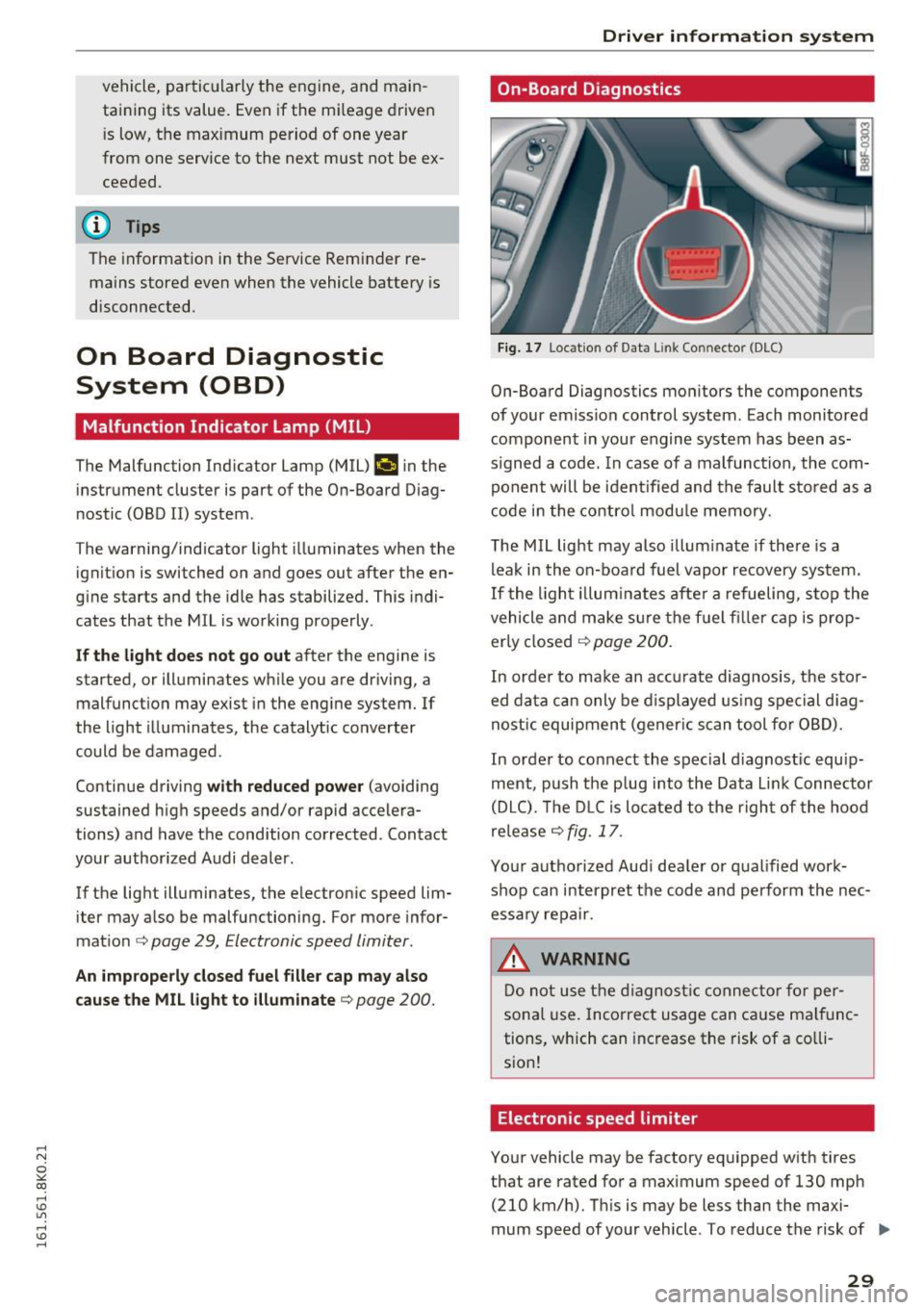
Fig. 17 Loca tion of Data Link Connector (DLC)
On-Board Diagnostics monitors the components
of your emission control system. Each monitored
component in your engine system has been as
s igned a code. In case of a malfunction, the com
ponent will be identified and the fault stored as a
code in the control module memory.
The MIL light may also illuminate if there is a
leak in the on-board fuel vapor recovery system.
If the light illuminates after a refueling, stop the
vehicle and make sure the fuel f iller cap is prop
erly closed
¢ page 200.
In order to make an accurate diagnosis, the stor
ed data can only be displayed using special diag
nostic equipment (gener ic scan tool for OBD).
In order to connect the special d iagnost ic equip
ment, push the p lug into the Data L ink Connector
(DLC). The DLC is located to the right of the hood
release
¢ fig. 17.
Your authorized Audi dealer or qualified work
shop can interpret the code and perform the nec
essary repair.
.&, WARNING
Do not use the diagnostic connector for per
sonal use. Incorrect usage can cause malfunc
tions, which can increase the risk of a co lli
sion!
Electronic speed limiter
Your vehicle may be factory equipped with tires
that are rated for a maximum speed of 130 mph (210 km/h). This is may be less than the maxi
mum speed of your vehicle . To reduce the risk of .,.
29
Page 33 of 278
..... N
0 ::..:: co .....
Central locking
General description
The power locking system locks or unlocks all
doors and the rear lid simultaneously.
You can lock and unlock the vehicle centrally. You have the following choices:
- Remote master key ¢
page 34,
-Door handles with convenience key*
O?page 34,
-Lock cylinder at the dr iver's door¢ page 36,
or
- Power lock ing switch ins ide¢
page 35.
Automatic lo cking
The automat ic locking feature locks all the vehi
cle doors and the rear lid when you drive faster
than 9 mph ( 15 km/h) .
The car is unlocked again once the ignition key is
removed . In addition, the vehicle can be unlocked
if the opening function in the power locki ng sys
tem sw itch or at one of the door levers is actuat
ed. The A uto Lock funct io n can be tu rned on and
off in the rad io or MM I* ¢
page 36.
Addit ionally, in the event of a crash with airbag
deployment the doors are automatically un
l ocked to allow access to the veh icle.
Selective unlocking
When you lock the vehicle, the power locking sys
tem will lock the doors and the rear lid . When
unlocking, yo u can set in the rad io or MMI*
whether
only the d river 's doo r o r the entire vehi
cle shou ld be un loc ked
¢ page 36.
Anti-theft alarm w arning system
If the anti-theft alarm warning system detects a
break-in into the vehicle, acoust ic and visual
warn ing s ignals a re triggered.
The anti-theft warning system is activated auto
mat ically when you lock the vehicle. It is deact i
vated when unlocking using the remote key, with the mechanical key, and w hen you switch o n the
i gnit ion .
Op ening and cl osing
The alarm also t urns off when the alarm cycle has
expi red.
Turn signals
When you unlock the veh icle, the turn s ignals
flash twice, when yo u lock it once. If they do not
flash, one of the doors, the l uggage compa rt
ment lid or the hood is not locked or the ignition
is still switched on.
Unintentionally locking yourself out
In the following cases there safeguards to p re
ven t you locking your remo te mas te r key in the
vehicle:
- The vehicle does not loc k w ith the power lock
ing sw itch ¢
page 35 if the d river 's doo r is
open.
- On veh icles with co nvenience key*, if the most
re cent ly used master key is in the l uggage com
pa rtment, the rear lid is a utomatically unlocked
aga in after it is closed.
Do not lock your veh icle w ith the remote master
key or conven ience key* until all doors and the
rea r lid are closed . In this way yo u avoid loc king
yoursel f out acc identally .
A WARNING
=
-When you leave the vehicle, always remove
the ignition key and take it with you. This
will prevent passengers (children, fo r exam
ple) from accidentally being locked in the
veh icle should they accidentally press the
power locking sw itch in the front doors.
- Do not leave children ins ide the veh icle un
supervised . In an emergency it would be im
possible to open the doors from the outside
without the key.
(D Tips
- In the event of a crash wit h airbag dep loy
ment all locked doors will be automatically
unlocked to give access to the vehicle occ u
pants from the o utside.
- If the power locking system sho uld mal
function, you can lock the driver's door us ing the mechan ica l key ¢
page 36.
31
Page 34 of 278

Opening and clo sin g
- If the power locking system should fail, you
can still open the fuel tank flap in an emer
gency ¢
page 202.
-You are well advised not to keep val uables
inside an unatte nded vehicle, v is ible or not.
Even a properly locked vehicle cannot pro
v ide the security of a safe.
- If the LED in the upper edge of the driver's
door panel comes on for about 30 seconds
after t he vehicle is locked, there is a mal
funct ion in the power lock ing or the anti
theft warning system . Have the malf unct io n
cor rected by an authorized Audi dealership
or q ualified repair facility.
Key set
F ig . 18 Key set
m 0 ±
~
@ Remote control key with mechanical key
You can centrally lock and unlock your veh icle
and start the engine w it h the master key with re
mote cont rol. A mecha nical key is i nteg rated in
the master key ¢
page 33.
@ Eme rgency key
The emergency key is not intended for constant
use . It shou ld only be used in an emergency, for
example, in place of the ign ition key
¢
page 82 . Keep it in a safe place and do not
car ry it on yo ur key r ing.
Key replacement
If you lose a key, contact your author ized Audi
dealer immediately to have the
lost key disab led .
Be s ure to bring all your keys with you .
32
Number of keys
You can chec k the number of assigned keys to
your vehicle
r=;, page 11 . This a llows yo u to make
sure yo u have received all of the keys when you
purchase a used vehicle .
Data in the master key
During driving, serv ice and maintenance-re levan t
da ta is cont inuo usly stored on your master key.
You r A udi service adviser can read out this data
and te ll yo u about the work you r vehicle needs.
This applies also to veh icles with convenience
key* .
Personal comfort settings
If two people use one vehicle, it is recommended
that each person always uses "their own" maste r
k ey . W hen the ignit ion is turned off or when the
vehicle is loc ked, personal conven ience settings
for the following systems are stored and as
signed to the remote master key.
- Climate control
- Power locking system
- Sea t memory *
- Park ing system*
-Adaptive cr uise control*
- Side assist*
- Drive select*
The stored settings are a utomat ica lly rec alled
when you unlock t he vehicle, when yo u ope n the
doo rs or when yo u turn on the ignition.
A WARNING
- Do not leave you r vehicle unattended with
the key in the ignition lock. Entry by una u
thor ized persons could endanger you or re
sult i n theft o r damage the vehicle .
- Do not leave childre n unattended i n the ve
hicle, especially with access to vehicle keys .
Ungua rded access to the keys provides chil
dren t he oppor tunity to start the engine
an d/or activa te ve hicl e sys tems s uch as the
powe r windows etc. Unsupervised ope ration
of any vehicle system by children c an res ult
in ser ious injury.
.
Page 35 of 278
,....,
N
0
""' CX) ,....,
I.Cl U"I ,....,
I.Cl ,....,
-Do not remove the key from the ignition
lock until the vehicle has come to a com
plete stop . Otherwise the steer ing column
lock could suddenly engage -causing the
risk of an accident .
(D Tips
-The operation of the remote control key can
be temporarily d isrupted by interference
from transmitters in the vicinity of the vehi
cle work ing in the same frequency range
(e .g. a cell phone, radio equipment).
- For security reasons, replacement keys are
only available from authorized Aud i dea ler .
- For Declaration of Compliance to Un ited
States FCC and Industry Canada regulations
<::;> page 261.
Removing the mechanical key
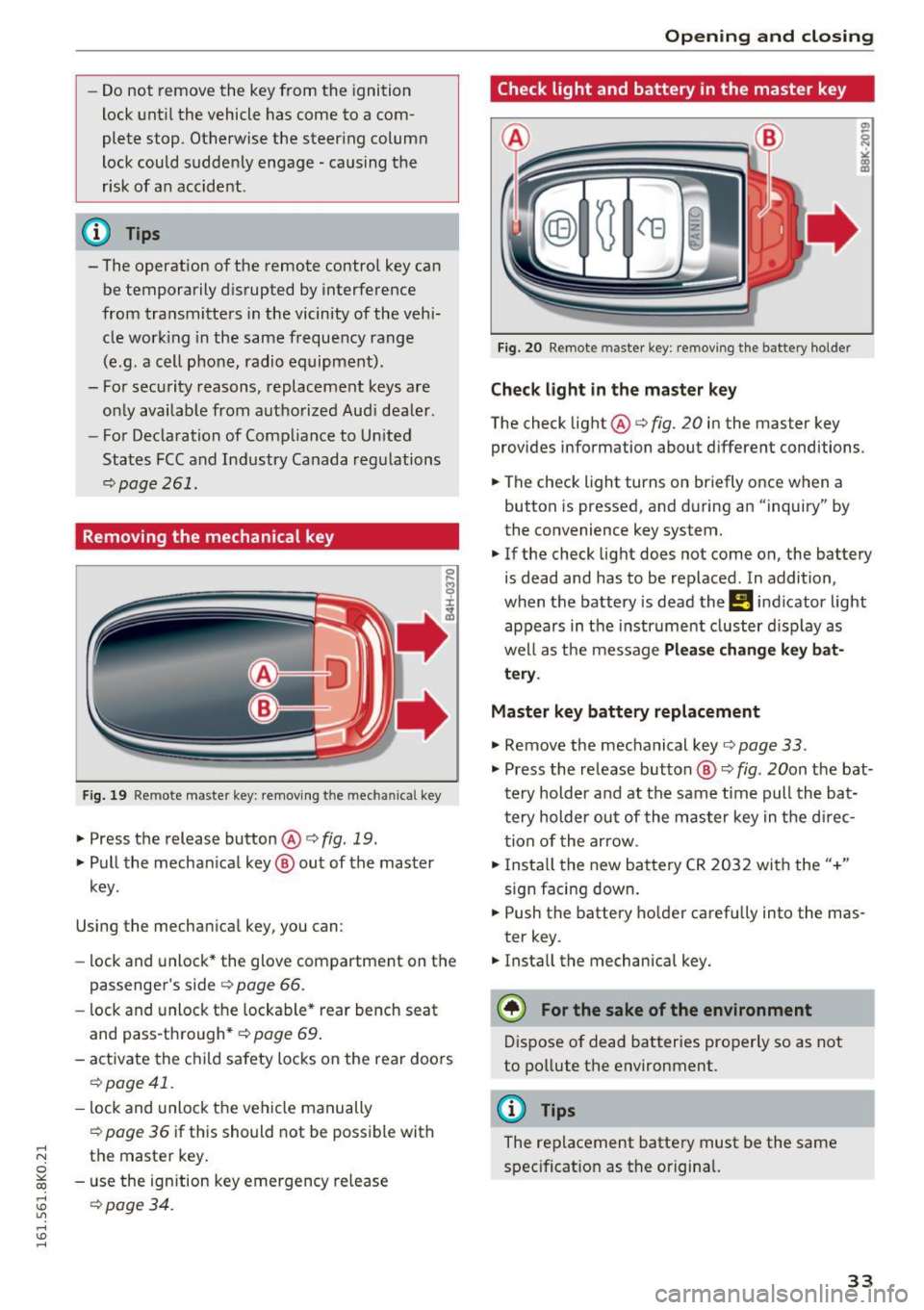
Fig. 19 Remote master key: removing t he m ec hani ca l key
.,. Press the release button@o fig. 19.
.,. Pull the mechan ical key ® out of the master
key.
Using the mechan ical key, you can :
- lock and unlock* the glove compartment on the
passenger's side o
page 66.
-lock and unlock the lockable* rear bench seat
and pass-through* o
page 69.
-activate the child safety locks on the rear doors
o page 41.
-lock and unlock the vehicle manually
opage 36 if this should not be possible with
the master key.
- use the ign ition key emergency release
o page 34.
Open ing and closing
Check light and battery in the master key
Fig. 20 Remote master key: re moving the bat tery holder
Check light in the master key
The check light@o fig. 20 in the master key
provides information about d ifferent conditions .
.,. The check light turns on briefly once when a
button is pressed, and during an "inquiry" by
the convenience key system.
.,. If the check light does not come on, the battery
is dead and has to be replaced . In addition,
when the battery is dead the
Ill indicator light
appears in the instr ument cluster display as
well as the message
Please change key bat
tery .
Master key battery replacement
.,. Remove the mechanical key o page 33 .
.,. Press the re lease button ® o fig. 20on the bat
t ery holder and at the same time pull the ba t
tery holder out of the master key in the d irec
tion of the arrow .
.,. Insta ll the new battery CR 2032 with the"+"
sign facing down .
.,. Push the battery holder carefully into the mas
ter key .
.,. Install the mechanical key.
@) For the sake of the environment
Dispose of dead batteries properly so as not
to pollute the environment.
@ Tips
The replacement battery must be the same
specificat ion as the original.
33
Page 36 of 278
Opening and clo sin g
Emergency unlocking of the ignition key
In the event of malfunctions in the electrical sys
tem, it may happen that you cannot remove the
ignition key.
.,. Remove the mechanical key¢ page 33.
.,. Lock the vehicle using the mechanical key
¢page 36.
.,. Have the electrical system inspected by an au
thorized Aud i dea le rship.
Locking and unlocking the vehicle with the
remote control
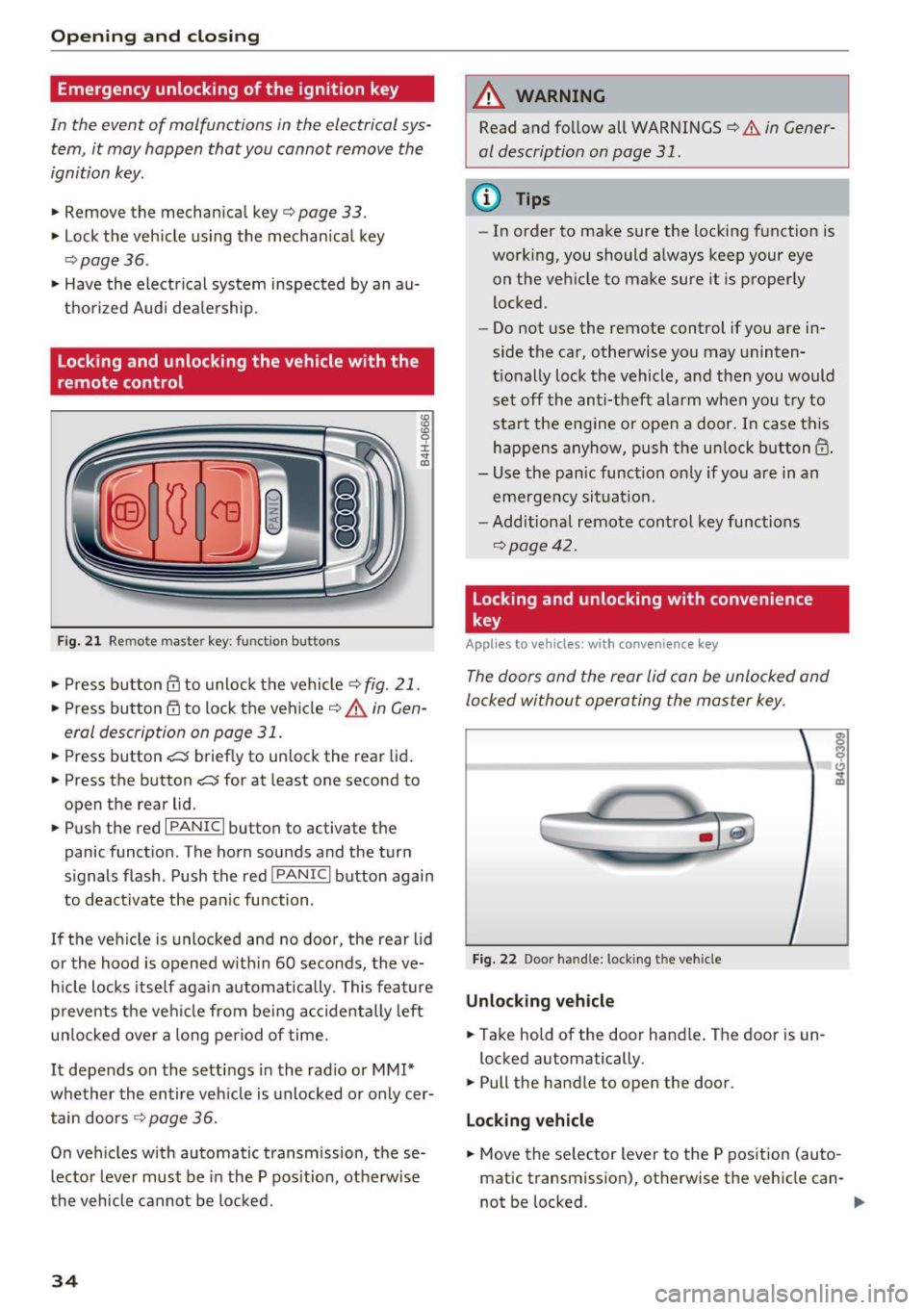
F ig . 21 Remote mas ter key: function buttons
:8
"' 0 ±
"' OJ
.,. Press bu tton III to unlo ck the vehicle ¢ fig. 21.
.,. Press button 6:'.i to lock the vehicle¢.&. in Gen
eral description on page 31 .
.,. Press button~ briefly to unlock the rear lid .
.,. Press the button
~ for at least one second to
open the rear lid .
.,. Push the red
I PANIC I button to activate the
panic function. The horn sounds and the turn
s ignals flash . Push the red
I PANIC I button again
to deactivate the pan ic fu nction .
If the vehicle is unlocked and no door, the rear lid
or the hood is opened w ith in 60 seconds, the ve
h icle locks itse lf aga in automatica lly . This feature
prevents the vehicle from being accidentally left
un locked ove r a long period of time.
It depends o n the settings in the radio or MM!*
whether the entire veh icle is unlocked or only cer
tain doo rs ¢
page 36 .
On vehicles with automatic transmission, these
lector lever must be in the P pos ition, otherwise
the vehicle cannot be locked.
34
A WARNING
Read and fo llow all WARNINGS¢ & in Gener
al description on page 31.
(D Tips
- In order to make sure the locking function is
work ing, you should always keep your eye
on the vehicle to make sure it is properly
locked .
- Do not use the remote control if you are in
side the car, otherwise you may uninten
t ionally lock the vehicle, and then you would
set off the anti-theft a larm when you t ry to
sta rt the eng ine or open a door. I n case this
happens anyhow, push the un lock button@.
- Use the pan ic function on ly if you a re in an
emerge ncy sit uat io n.
- Additional remote control key functions
¢page 42.
Locking and unlocking with convenience
key
Applies to veh icles: with conven ience key
The doors and the rear lid con be unlocked and
locked without operating the master key .
Fig. 22 Door handle: locking the vehicle
Unlocking v ehicle
.,. Take hold of the door hand le . The door is un -
locked automatically.
.,. Pull the handle to open the door.
Locking vehicl e
.,. Move the se lector lever to the P position (auto
matic transmission), otherwise the vehicle can-
not be locked. ..,.
Page 39 of 278
,....,
N
0
""' CX) ,....,
I.Cl U"I ,....,
I.Cl ,....,
.. Pull the cover cap out of the opening q fig. 25 .
.. Insert the key in the inside slot and turn it all
the way to the right (right door) or left (left
door).
Once the front passenger's door/rear doors* have been closed, you cannot open them again from
the outside. The door can be opened from the in
side by pulling the door handle. If the child safe
ty lock in a rear door* is activated, you must f irst
pull the door handle on the inside . Then you can
open the door from the outside .
A WARNING
Read and follow all WARN INGS q .&. in Gener
al description on page 31.
@ Tips
After the ign ition is switched on, the power
locking system sw itch and the unlocking but
ton fo r the rear lid
c:5 in the door are ena
bled.
Electronic immobilizer
The immobilizer prevents your vehicle from being
started by unauthorized persons .
Inside the key there is a computer chip . This chip
automatically activates/deact ivates the electron
i c immob ilizer.
Applies to vehicles with ignition lock :
The electronic immobilizer deactivates automati
cally when you insert the remote control key into
the ignition lock .
It activates again automatically
when you remove the remote control key from
the ignition lock .
Applies to vehicles with convenience key:
If the remote control key is located inside the ve
h icle and you press the
I START ENGINE STOPI
button, the electronic immobilizer deactivates
automatically . If you switch the ignition off and
remove the remote control key from the vehicle,
the electronic immobi lizer act ivates again auto
matica lly.
Open ing and closing
A WARNING
-
Always take the key with you when you leave
the vehicle . The key can d isarm the electronic
engine immobilizer and permit an unauthor
iz ed person to start the engine and enable op
e ration of the vehicle systems such as power
window or power s unroof leading to serio us
personal injury .
{t) Tips
-The vehicle cannot be started if an unau
thorized key is used. The vehicle may not
start if another radio device such as a key
for another vehicle or a transponder is lo
cated on the key ring.
- For Declaration of Compliance to United
States FCC and Industry Canada regulations
~page 261.
Luggage compartment
lid
Opening /closing rear lid
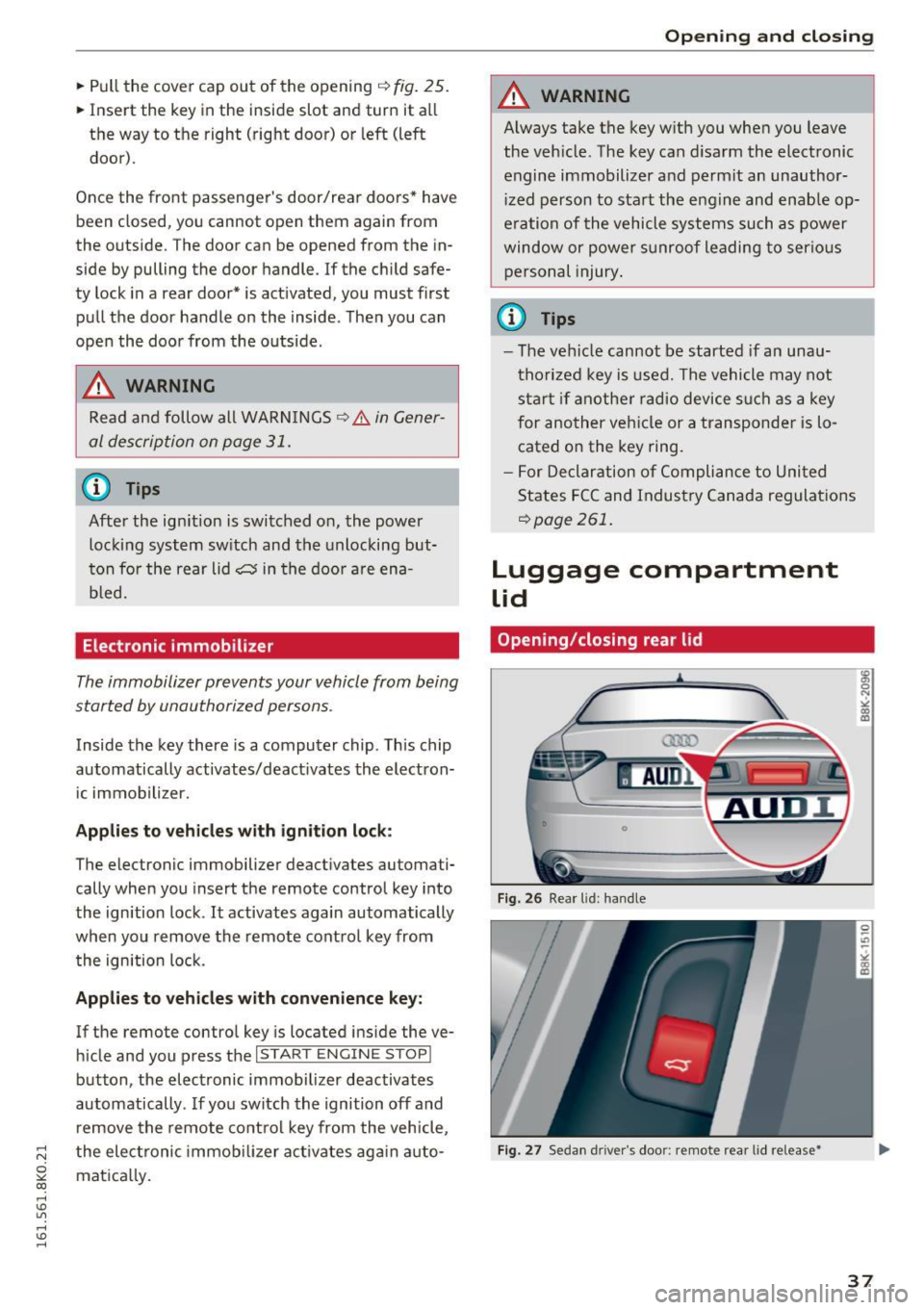
Fig. 26 Rear lid: handle
Fig. 27 Sedan d rive r's doo r: remote rear lid release•
37
Page 43 of 278
,....,
N
0
""' CX) ,....,
I.Cl U"I ,....,
I.Cl ,....,
Child safety lock
Child safety locks in the rear doors
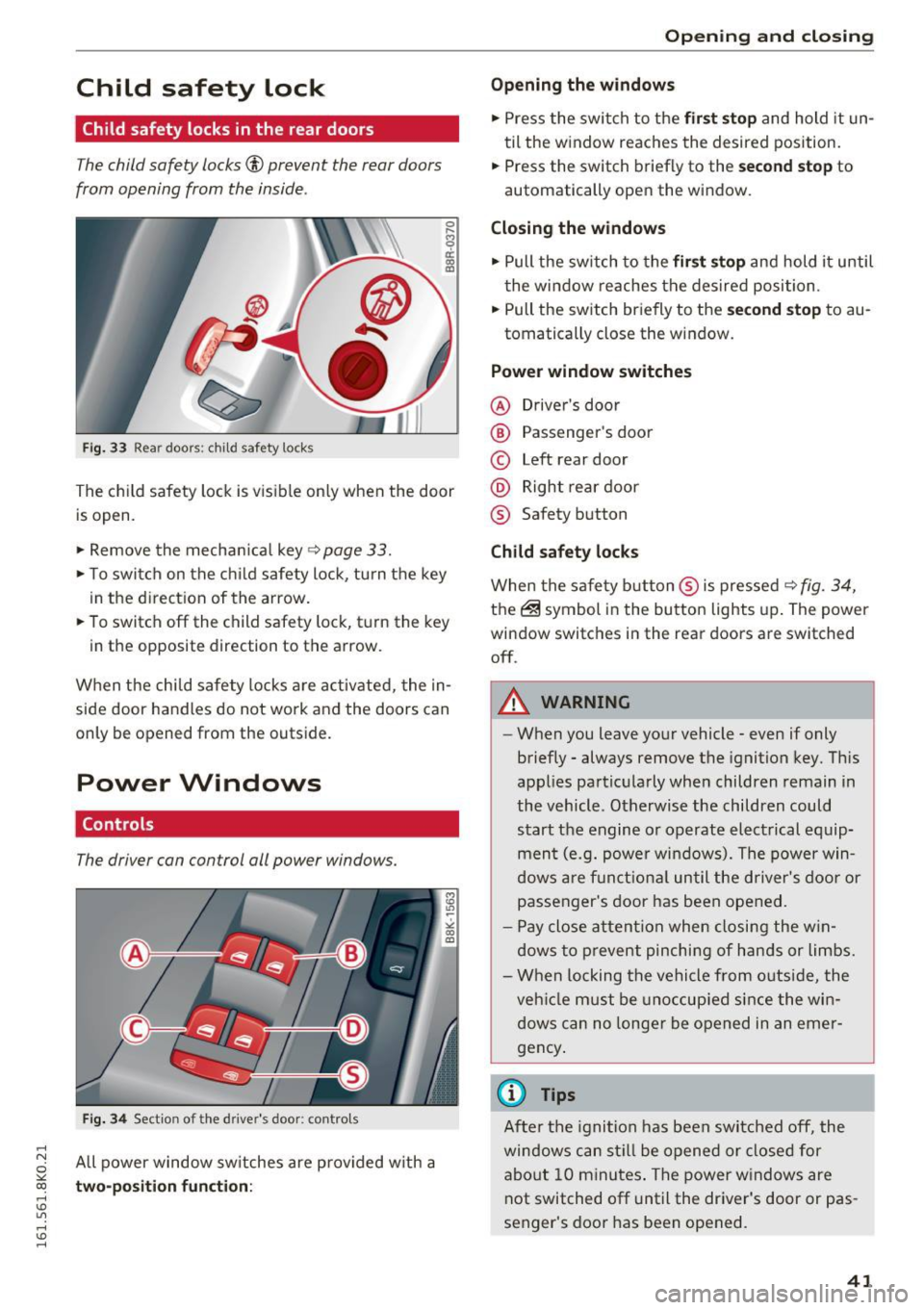
The child safety locks© prevent the rear doors
from opening from the inside .
Fig. 33 Rear doors: child safety locks
0 ,.._ O') 0
i a,
The child safety lock is visible on ly when the door
is open .
.,. Remove the mechanical key
~ page 33.
.,. To switch on the child safety lock, tu rn the key
in the direction of the arrow.
.,. To switch off the child safety lock, t urn the key
in the opposite direction to the arrow.
When the child safety locks are activated, the in
side door handles do not work and the doors can
only be opened from the outside.
Power Windows
Controls
The driver can control all power windows.
Fig. 34 Section of the driver's door: contro ls
All power window switches are provided with a
two-position function:
Open ing and closing
Opening the windows
.,. Press the switch to the first stop and hold it un
til the window reaches the desired position.
.,. Press the switch briefly to the
second stop to
automatically open the window.
Closing the windows
.,. Pull the switch to the first stop and hold it until
the window reaches the desired position .
.,. Pull the switch briefly to the
second stop to au-
tomatically close the window.
Power window switches
@ Driver's door
@ Passenger's door
© Left rear door
@ Right rear door
® Safety button
Child safety locks
When the safety button ® is pressed ~ fig. 34,
the@symbol in the button lights up. The power
window switches in the rear doors are switched off .
A WARNING
--When you leave your vehicle - even if only
briefly - always remove the ignition key. This
applies particularly when children remain in
the vehicle. Otherwise the children could
start the engine or operate electrical equip
ment (e.g. power windows). The power win
dows are funct ional until the driver's door or
passenger's door has been opened.
- Pay close attention when closing the win
dows to prevent pinching of hands or limbs.
- When locking the vehicle from outside, the
veh icle must be unoccupied since the win
dows can no longer be opened in an emer
gency .
(0 Tips
After the ignition has been switched off, the
windows can still be opened or closed for
about 10 minutes. The power windows are
not switched off until the driver's door or pas
senger's door has been opened.
41