ignition AUDI A4 2016 Owner's Manual
[x] Cancel search | Manufacturer: AUDI, Model Year: 2016, Model line: A4, Model: AUDI A4 2016Pages: 278, PDF Size: 70.26 MB
Page 44 of 278
Opening and clo sin g
Convenience opening /clos ing
The windows and the power sunroof can be
opened and closed with the mechanical key or
the emergency key.
®
'
l
® '
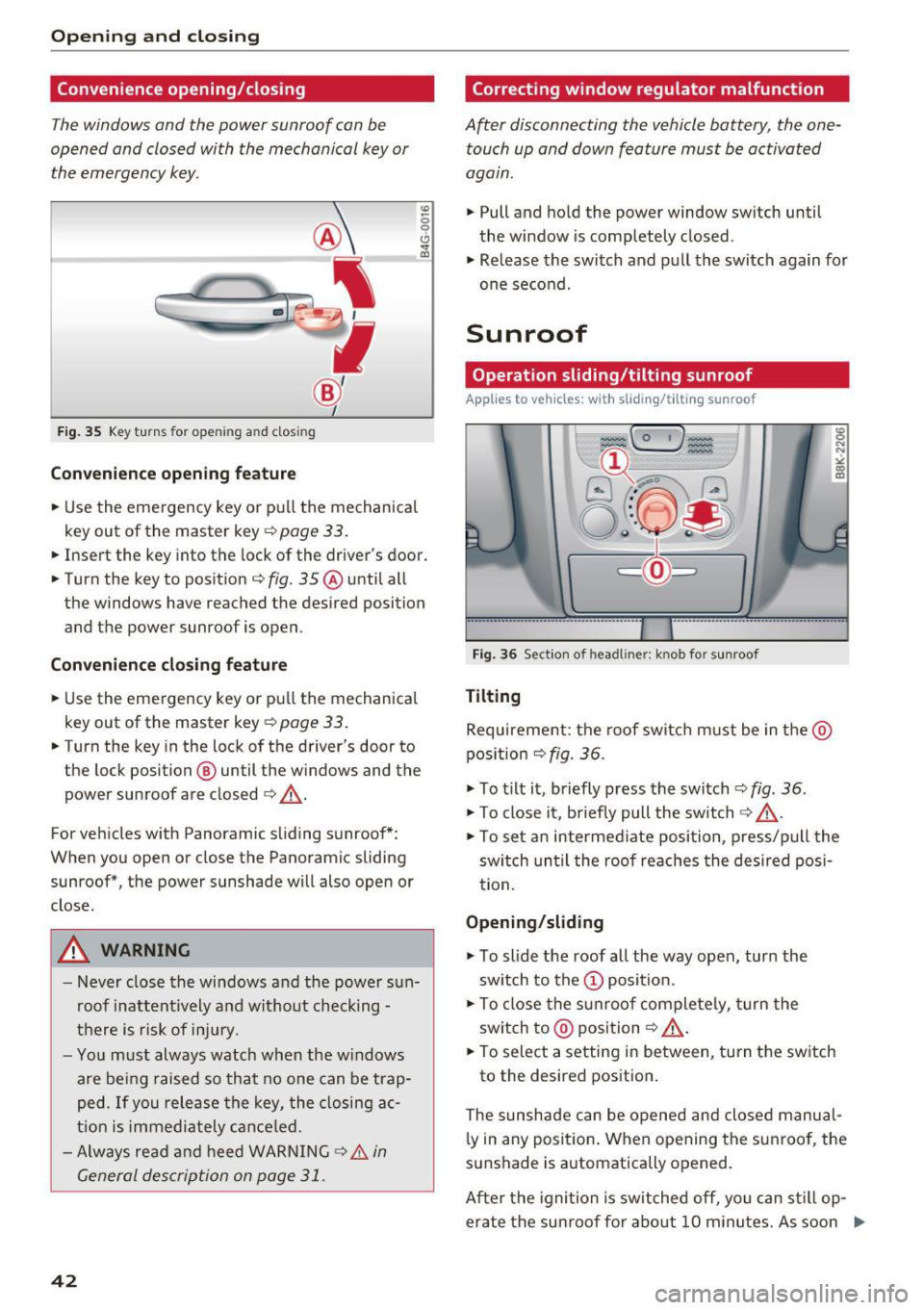
Fig . 35 Key turns for opening an d clos ing
Convenienc e opening f eature
.,. Use the eme rgency key or pu ll the mechanical
key out of the master key
¢ page 33 .
.,. Insert the key into the lock of the driver's door .
.,. Turn the key to position ¢
fig. 35 ® until all
the windows have reached the desired position
and the power sunroof is open .
Convenience cl osing fea tur e
.,. Use the emergency key or pull the mechanical
key out of the master key
q page 33.
.,. Turn the key in the lock of the driver's door to
the lock position @ until the windows and the
power sunroof are closed
q _&..
For vehicles with Panoramic sliding sunroof*:
When you open or close the Panoramic sliding
sunroof*, the power sunshade will also open or
close.
A WARNING
- Never close the windows and the power s un
roof inattent ively and without checking -
there is risk of injury.
- Yo u m ust always watch when the w indows
are be ing raised so that no one can be trap
ped. If you release the key, the closing ac
t ion is immediately cance led.
- Always read and heed WARNING
9 & in
General description on page 31 .
42
Correcting window regulator malfunction
After disconnecting the vehicle battery, the one
touch up and down feature must be activated
agam .
... Pull and hold the power window sw itch until
the window is completely closed .
... Release the switch and pull the switch again for
one second.
Sunroof
Operation sliding /tilting sunroof
Applies to vehicles: with sliding/tilt ing sunroof
Fig . 36 Section of headliner: knob for sunroof
Tilting
Requirement: the roof switch m ust be in the @
pos ition
q fig. 36 .
... To t ilt it, briefly press the switch ¢ fig . 36.
... To close it, b riefly pull the switch 9 _&. .
:g N
N
•
" CD m
... To set an intermed iate position, p ress/p ull the
sw itch un til the roof reaches the desired posi
tion.
Opening /slid ing
... To slide the roof all the way open, tur n the
sw itch to the
(D position.
... To close the s unroof complete ly, turn the
sw itch to @ position
<=? _&..
... To select a setting in between, turn the sw itch
to the desired position.
The sunshade can be opened and closed manual l y in any position . W hen opening the sunroof , the
sunshade is a utomatically opened.
After the ignition is switched off, yo u can st ill op
erate the su nroof fo r abo ut 10 m inutes. As soon .,.
Page 45 of 278
.... N
0
""' CX)
.... I.Cl U"I
.... I.Cl ....
as the driver's or passenger's door is opened, the
switch is inoperative .
A WARNING
Pay careful attention when closing the sun
roof -otherwise serious injury could result!
For this reason, always remove the ignition
key when leaving the vehicle.
CD Note
Always close your sunroof when leaving your
vehicle. Sudden rain can cause damage to the interior equipment of your vehicle, particular
ly the electronic equipment .
(D Tips
-Information on convenience opening/clos
ing
c:> page 42.
Operation panorama sunroof
Appl ies to vehicles: with pa nora ma sunroof
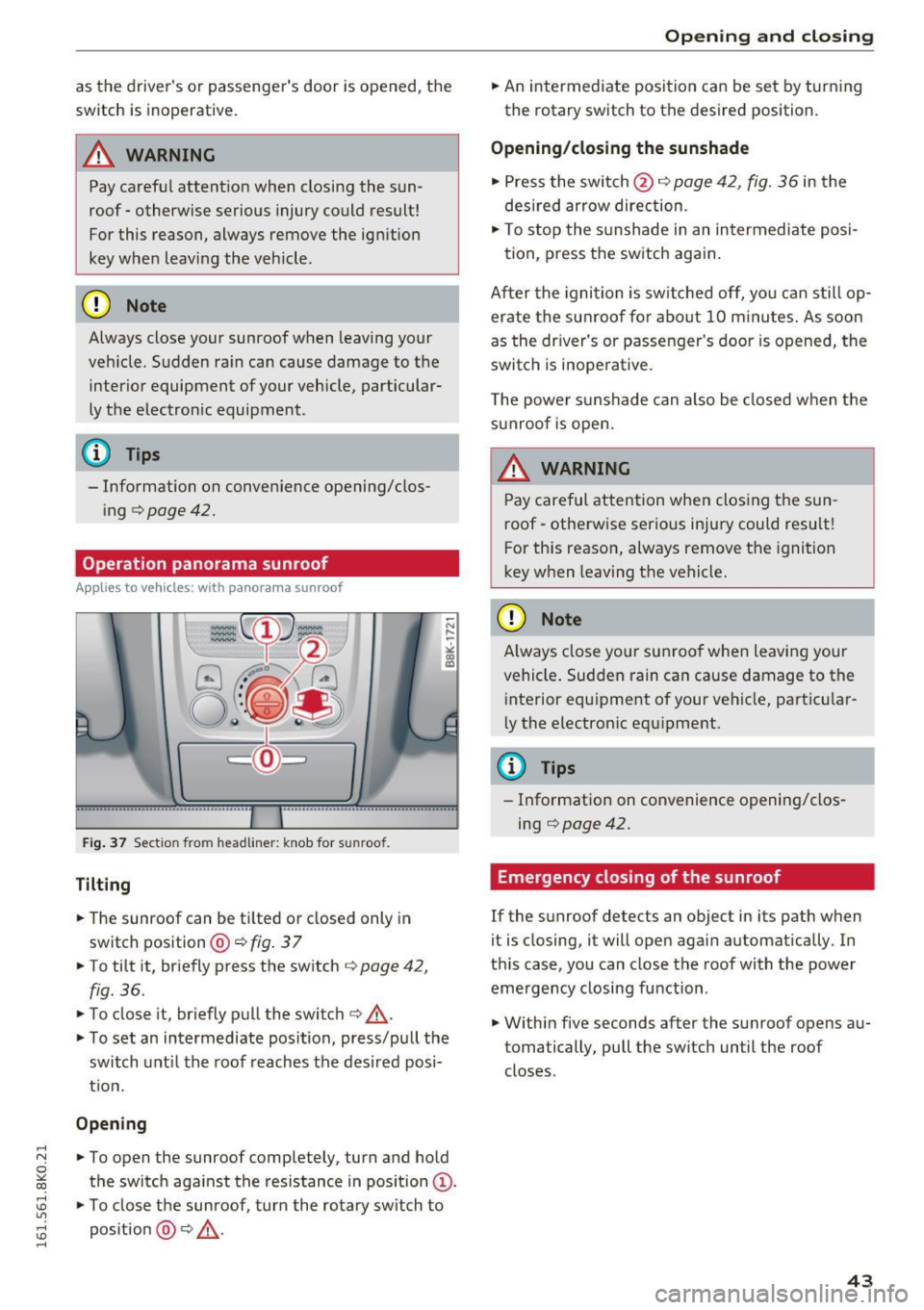
Fig . 37 Sectio n fro m headliner: knob for sunroof.
Tilting
• The sunroof can be ti lted or closed only in
switch position @c:>
fig. 37
• To tilt it, briefly press the switch c:> page 42,
fig. 36.
• To close it, briefly pull the switch c:> &_ .
• To set an intermediate position, press/pull the
switch unt il the roof reaches the desired posi
t ion.
Opening
• To open the sunroof completely, turn and hold
the switch against the resistance in position
Q) .
• To close the sunroof, tur n the rotary sw itch to
pos ition @~&_ .
Open ing and closing
• An intermediate position can be set by turn ing
the rotary switch to the desired position.
Opening/closing the sunshade
• Press the switch @c:> page 42, fig. 36 in the
desired arrow direction.
• To stop the sunshade in an intermediate posi-
tion, press the switch again.
After the ignition is sw itched off, you can still op
erate the sunroof for about 10 minutes. As soon
as the driver's or passenger's door is opened, the
switch is inoperative.
The power sunshade can also be closed when the
sunroof is open.
A WARNING ~ ~
Pay careful attention when closing the sun
roof -otherwise serious inju ry could result!
For this reason, always remove the ignition
key when leaving the vehicle.
CD Note
Always close your sunroof when leaving your
vehicle . Sudden rain can cause damage to the
interior equipment of your vehicle, particular
ly the electronic equ ipment.
({D Tips
- Information on convenience opening/clos
ing c:>
page 42.
Emergency closing of the sunroof
If the sunroof detects an object in its path when
it is closing, it will open again automatically. In
th is case, you can close the roof with the power
emergency closing function .
• Within five seconds after the sunroof opens au
tomatically, pull the sw itch until the roof
closes.
43
Page 47 of 278
.... N
0
""' CX)
.... I.Cl U"I
.... I.Cl ....
Operation
Applies to vehicles: with garage door opener (Homelink)
·-
~ •• r ·O : o ··) ,,;~
®
~ (_ 0_1 J c:cc
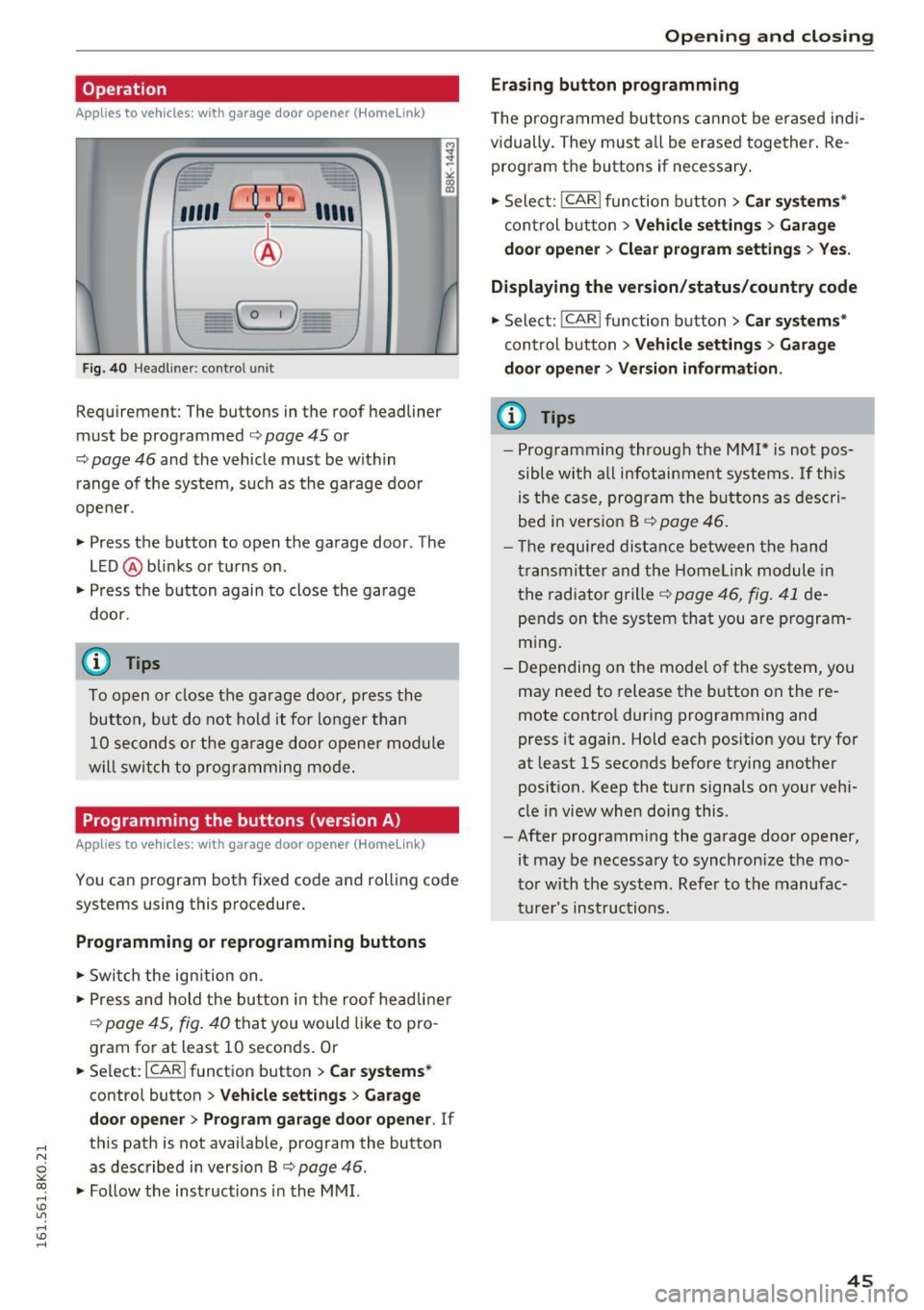
F ig. 40 Headl iner: c on tro l uni t
Requirement: The buttons in the roof headliner
must be programmed
c:> page 45 or
c::> page 46 and the vehicle must be within
range of the system, such as the garage door
opener.
" Press the button to open the garage door . The
LED @blinks or turns on .
" Press the button again to close the garage
door .
@ Tips
To open or close the garage door, press the
button, but do not hold it for longer than
10 seconds or the garage door opener module
w ill switch to programming mode.
Programming the buttons (version A )
Applies to vehicles: with garage door opener (Homelink)
You can program both fixed code and rolling code
systems using this procedure .
Programming or reprogramming buttons
"Switch the ignition on.
"P ress and hold the button in the roof headliner
c::> page 45, fig. 40 that you would like to pro
gram for at least 10 seconds. Or
.. Select:
I CAR I function button > Car systems*
contro l button > Vehicle settings > Garage
door opener> Program garage door opener . If
th is path is not available, program the button
as described in version B
c::> page 46 .
"Fol low the instructions in the MMI.
Open ing and closing
Erasing button programming
The programmed buttons can not be erased ind i
vidually . They must all be erased together. Re
program the buttons if necessary.
" Select:
!CAR ! function button> Car systems*
control button > Vehicle settings > Garage
door opener > Clear program settings > Yes.
Displaying the version/status/country code
" Select: !CAR ! function button> Car systems*
cont rol button > Vehicle settings > Garage
door opener > Version information .
(D Tips
-Programming through the MMI* is not pos
sible with all infotainment systems. If this
is the case, program the buttons as descri
bed in version B
c::> page 46.
- Th e required distance between the hand
transmitter and the Homelink module in
the radiator grille
c::> page 46, fig. 41 de
pends on the system that you are program
ming.
- Depending on the model of the system, you
may need to release the button on the re
mote control during programming and
press it again. Hold each position you try for
at least 15 seconds before trying another
posit ion . Keep the turn s ignals on your vehi
cle in view when doing this.
- After programming the garage door opener,
it may be necessary to synchronize the mo
tor with the system. Refer to the manufac
turer's instructions.
45
Page 48 of 278
Opening and clo sin g
Programming the buttons (version B)
Applies to vehicles: with garage door opener (Homelink)
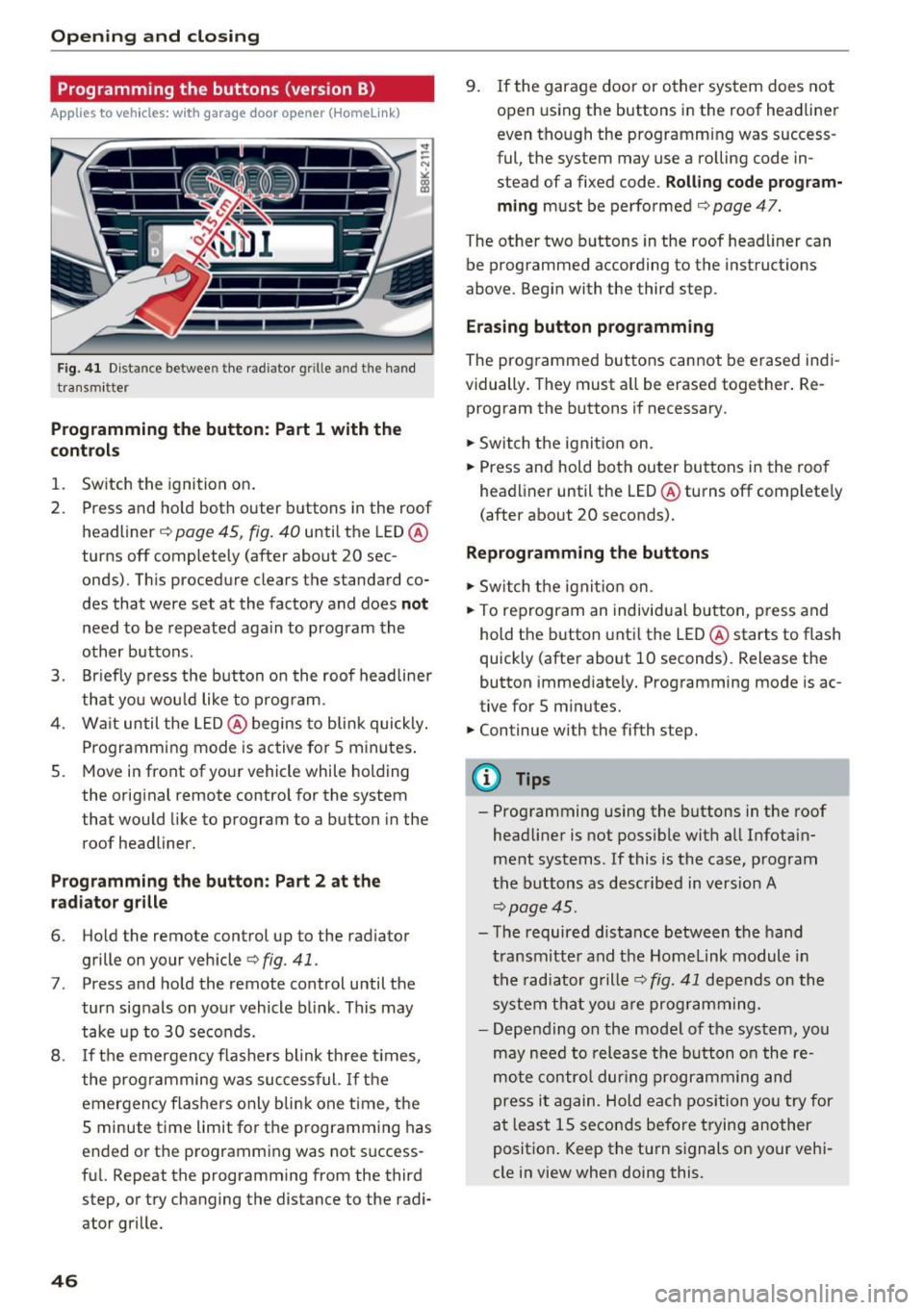
Fig. 41 Dist an ce betwee n th e rad iator g rille an d th e hand
tra nsm itt er
Programming the button : Part 1 with the
contr ols
1. Switch the ignition on.
2. Press and ho ld both outer b uttons in the roof
headliner ~
page 45, fig. 40 until the LED @
turns off completely (after about 20 sec
onds). This procedure clears the s tandard co
des that were set at the factory and does
not
need to be repeated again to program the
other buttons .
3. Br iefly p ress the b utton o n the roof headliner
that you wou ld like to program .
4. Wa it until the LED @ begins to blink quickly .
Programming mode is active for 5 minutes .
5. Move in front of yo ur vehicle while holding
the original remote control for the system
t hat would like to program to a button in the
roof headliner.
Prog ramming th e butt on : Part 2 at the
r a d iat or gr ille
6. Ho ld the remote control up to the radiator
grille on your vehicle¢
fig. 41 .
7. Press and hold the remote control until the
turn signals on your vehicle blink . This may
take up to 30 seconds.
8 .
If the emergency flashers blink th ree t imes,
the programming was suc cessful.
If th e
emergency flashers only b lin k one t ime , the
5 minute time limit for t he p rogramming has
ended or the programm ing was not success
fu l. Repeat the programming from the third
step, or try changing the distance to the radi
ator grille.
46
9 . If the garage door or other system does not
op en using the buttons in the roof headliner
even though the programming was success
ful , the system may use a ro lling code in
s tead of a fixed code .
Rolling code prog ram
m ing
must be performed ¢ page 47.
The other two b uttons in the roof head liner can
be programmed according to the instruct ions
above . Begin with the third s tep .
Era sing button prog ramm ing
The prog rammed buttons cannot be erased indi
vidually . They must a ll be erased tog ether . Re
program the buttons if necessary .
.. Switch the ignit io n on.
.. Press and hold both outer bu ttons in the roof
headliner until the LED @turns off comp lete ly
( after about 20 seconds).
Reprogramm ing the buttons
.. Switch the ignit io n on .
.. To reprogram an individual button, press and
hold the button unti l the LED @starts to flash
quickly (after about 10 seconds) . Release the
button immed iately. Programming mode is ac
tive for 5 m inu tes.
.. Continue with the fifth step.
@ Tips
- Programming using the buttons in the roof
headliner is not possible with all Infotain
ment systems . If this is the case, program
the buttons as descr ibed in version A
¢ page 45 .
- The required distance between the hand
transm itte r and the Homelink module in
the radiator grille~
fig. 41 depends o n the
system that you are prog ramming.
- Depending on the mode l of the system, you
may need to release the b utton o n the re
mote contro l dur ing programm ing and
press it again. Hold each position yo u try for
a t least 15 seconds before trying another
posit ion . Keep the turn s ignals on your vehi
cle in view when doing this .
Page 51 of 278

.... N
0
""' CX)
.... I.Cl U"I
.... I.Cl ....
the windshield in this area in order to
prevent malfunctions or failures.
- Some exterior lighting functions can be ad
justed
c:, page 49.
- When you remove your key from the igni
tion while the vehicle's lights are turned on,
a buzzer sounds as long as the driver's door
is open.
- In cool or damp weather, the inside of the
headlights, turn signals and tail lights can
fog over due to the temperature difference
between the inside and outside. They will
clear shortly after switching them on. This does not affect the service life of the light
ing .
- In the event of a light sensor malfunction,
the driver is notified in the instrument clus
ter display
c:, page 21.
Turn signals and high beam lever
The lever operates the turn signals, the high
beams and the headlight flasher.
Fig. 43 Turn signal and high beam lever
Turn signals¢¢
g N
0
~ CD
The turn signals activate when you move the lev
er into a turn signal position when the ignition is
switched on.
@ -right turn signal
@-left turn signal
The turn signal blinks three times if you just tap
the lever.
High beams and headlight flasher ~D
Move the lever to the corresponding position:
@-high beams on
Light and Vision
@-high beams off or headlight flasher
The indicator light
II in the instrument cluster
turns on.
Notes on these features
- The turn signals only work with the ignition
turned on. The indicator lights. or
II in the
instrument cluster also blink.
- After you have turned a corner, the turn signal
switches off automatically.
- The
high beam works only when the headlights
are on. The indicator light
II in the instrument
cluster illuminates when the high beams are
on.
- The
headlight flasher works only as long as you
hold the lever -even if there are no lights
switched on . The indicator light
II in the in
strument cluster illuminates when you use the
headlight flasher.
WARNING
Do not use the high beam or headlight flasher
if you know that these could blind oncoming
traffic.
Adjusting exterior lighting
The functions are selected in the radio or MMI* .
.,. Select: !CAR I function button> Exterior light
ing .
Or
.,. Select: 1-C~A ~ R-.l function button > Car systems*
control button > Vehicle settings > Exterior
lighting.
Coming home (light when leaving car)*,
Leaving home (light when unlocking car)*
The coming home function illuminates the area
around the vehicle when the ignition is switched
off and the driver's door is opened. Depending on
vehicle equipment, the function can be switched on and off or the length of time the lights remain
on* can be adjusted .
The
leaving home function illuminates the area
around the vehicle when unlocking it. This func-
tion can be switched on and off.
ll>
49
Page 52 of 278
Light and Vision
The coming home and leaving h ome functions
only operate when it is dark and t he light switch
is in the AUTO position
~ page 48, fig. 42.
Auto headlights*
W hen the light swi tch is in the A UTO ~ page 48
position, the sw itch-on po int of the lights can be
cha nged in the automatic driving light function.
Daytime running lights
USA models :
You can switch the daytime r unning
lights
on and off .
Canada models: The funct ion cannot be tu rned
off .
It is activated automatically each t ime the ig
n ition is switched on.
Tra vel mode*
The headlight beam is asymmetrical. This pro
vides stronger illumination on the side of the
road on which you are driving.
If you are driving
in a cou ntry that dr ives on the opposite side of
the road from you r own country, this will cause
g lar e fo r oncom ing dr ive rs . To p revent glare:
- Travel mode must be selected in veh icles w ith
Xenon headlights* .
- In vehicles with halogen headlights, certain
areas of the headlight lenses must be cove red
with waterproof adhesive covers that prev ent
l ight from passing through. For more informa
tion, ple ase see you r auth orized Audi dea le r or
a uthorized repair fa ci lity .
When travel mode is ac tiva ted, a disp lay in
t he dr ive r inf orm ation sys tem in dicates this
e ach t ime yo u sw itch the ignition on .
50
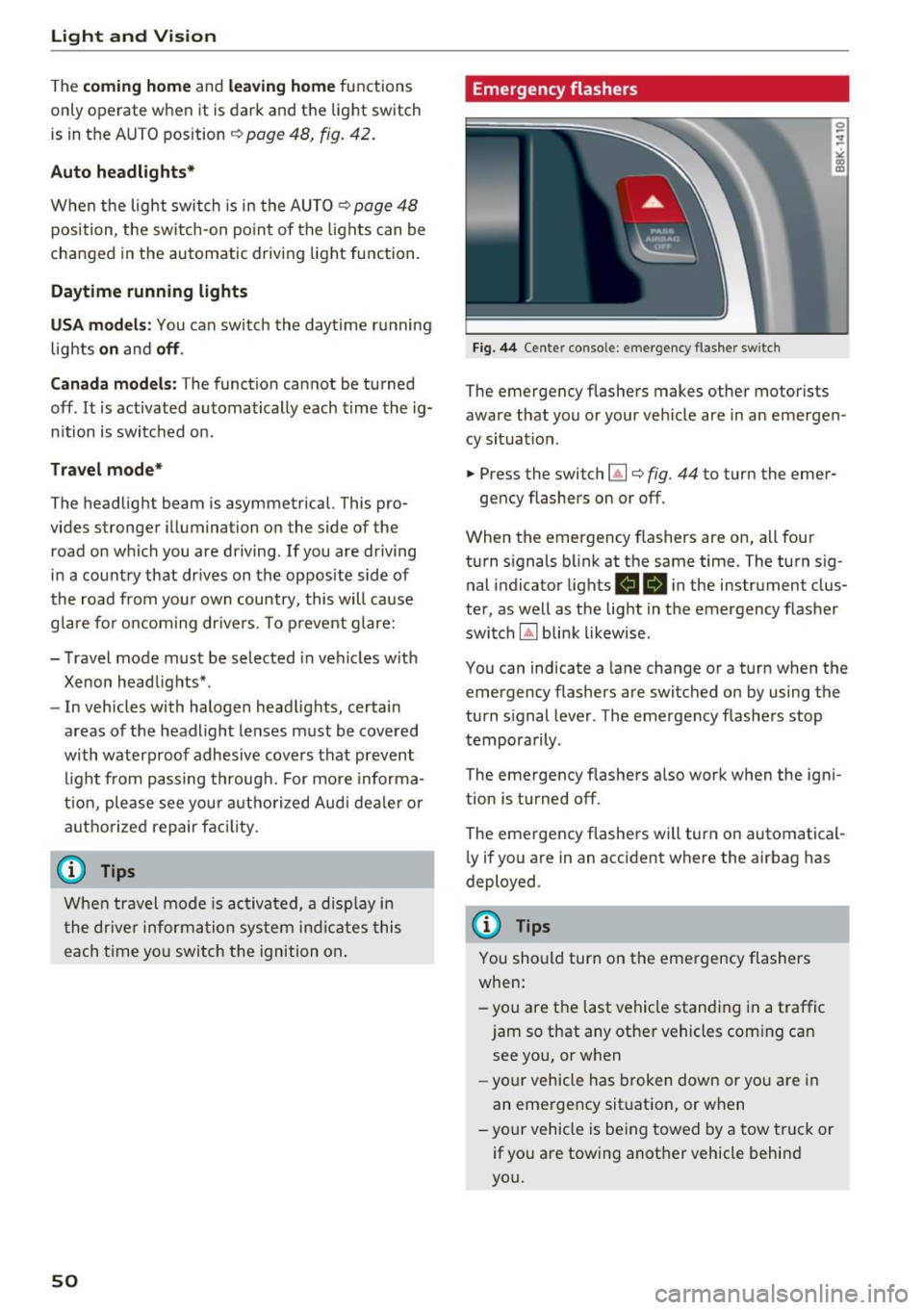
Emergency flashers
Fig. 44 Center console: emergency flashe r switc h
The emergency flashers makes other motorists
aware that you or your ve hicle are in an emergen
cy situat io n .
.. Press the switch~¢
fig. 44 to turn the emer-
gency flashers on or off .
When the emergency flashers are on, all four
turn s ignals b link at the same time. The turn sig
nal indicator lights
RB i n the instrument clus
ter, as well as the light in t he emergency flasher
switch
IA] blink likewise .
You can indicate a lane change or a turn when the
emergency flashers are switched on by using the
turn signal lever . The emergency flashers stop
tempora rily .
The emergency flashe rs a lso wor k when the ign i
tion is turned off.
The emergency flashers will turn on automatical
l y if you a re in an accident where the airbag has
deployed .
@ Tips
You should turn on the emergency flashers
when:
-you are the last vehicle standi ng in a traffic
jam so that any other vehicles com ing can
see yo u, or when
- yo ur ve hicle has broken down or yo u are in
an eme rge ncy sit uat ion, or w hen
-your vehicle is be ing towed by a tow tru ck or
if yo u are towing another vehicle behin d
you.
Page 53 of 278
..... N
0
""' CX)
..... I.Cl U"I
..... I.Cl .....
Interior Lighting
Front/rear interior lights
(• ' .,;,I
~~~
8 8
O. ~O
l
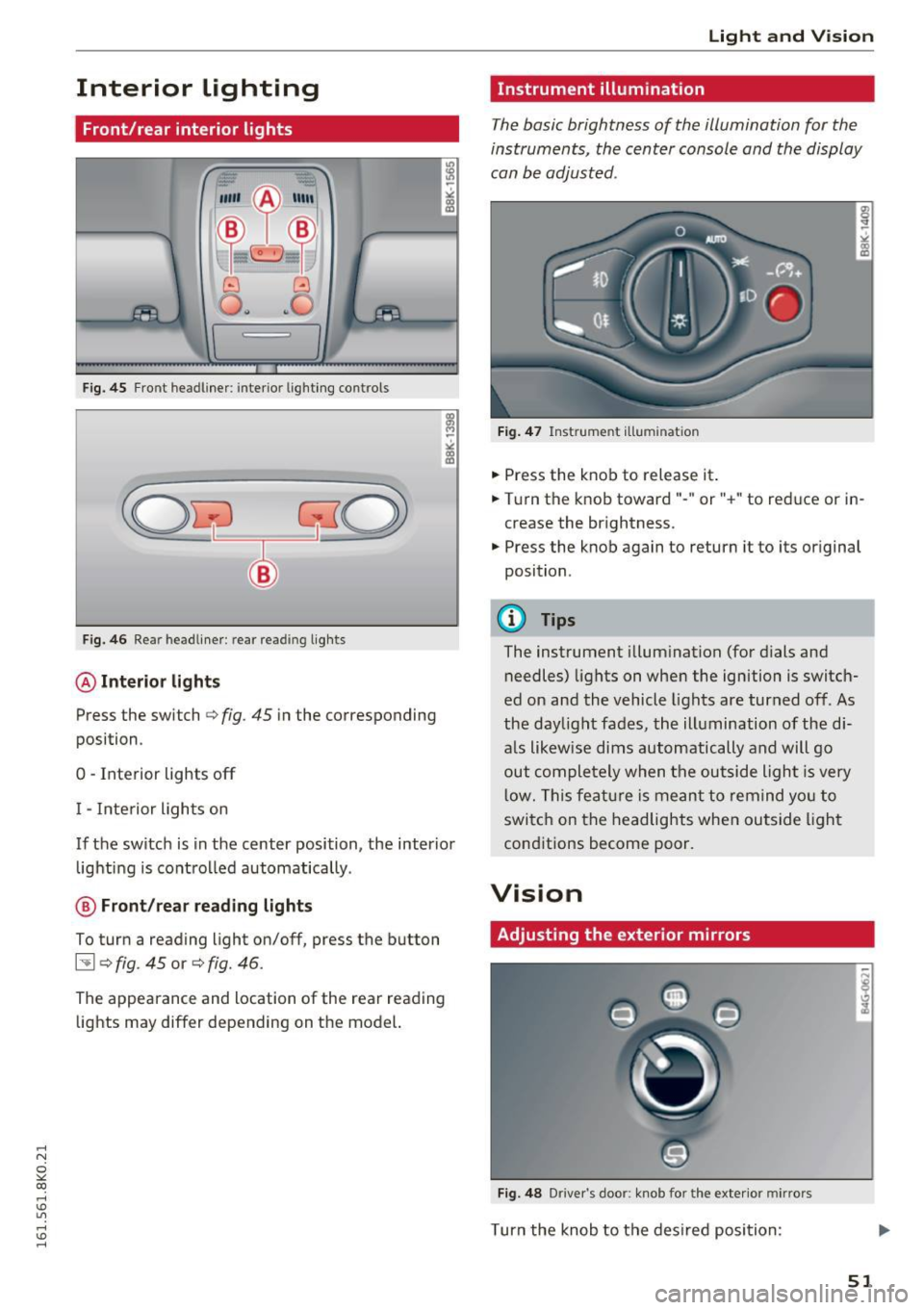
Fig. 45 Front headl iner : interio r lighting co ntrols
Fig. 46 Rear headliner : rear re ading lights
@Interior lights
Press the switch Qfig . 45 in the corresponding
position .
0 -Interior lights off
I - Interior lights on
If the switch is in the center position, the interior lighting is controlled automatically .
@ Front/rear re ading lights
To turn a reading light on/off, press the button
~ Q fig. 45 or Q fig. 46.
The appearance and location of the rear reading
lights may differ depending on the model.
Light and Vision
Instrument illumination
The basic brightness of the illumination for the
instruments, the center console and the display
can be adjusted .
Fig. 47 Instrume nt illumin atio n
• Press the knob to release it .
• Turn the knob toward"- " or"+" to reduce or in
crease the brightness .
• Press the knob again to return it to its o riginal
position .
@ Tips
The instrument illumination (for dials and
needles) lights on when the ignition is switch
ed on and the vehicle lights are turned off. As
the daylight fades, the illumination of the di
a ls likewise dims automatically and will go
out completely when the outside light is very
low. This feature is meant to remind you to
switch on the headlights when outside light
conditions become poor.
Vision
Adjusting the exterior mirrors
Fig. 48 Driver 's doo r: kno b fo r the exterio r mirrors
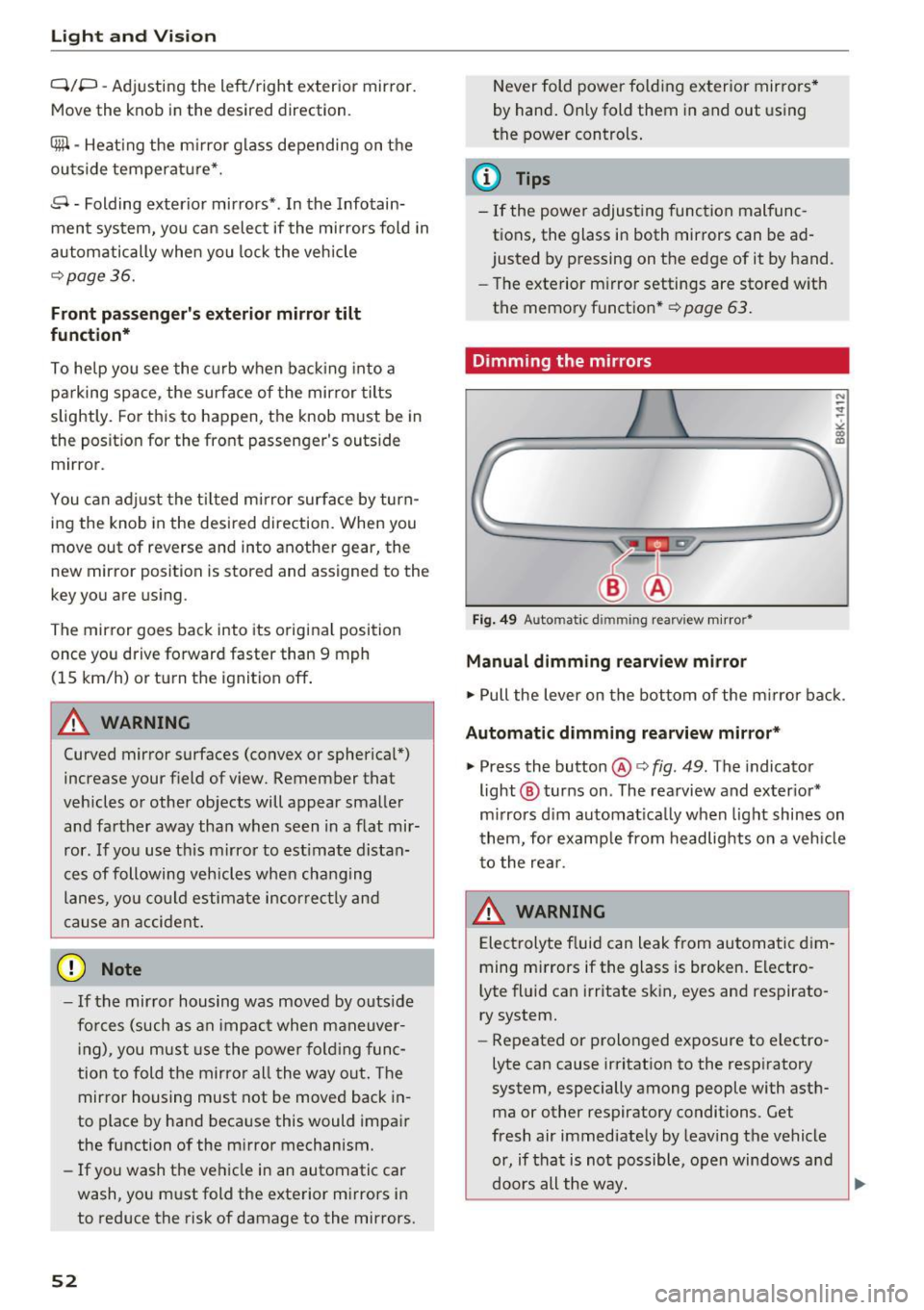
Turn the knob to the desired position :
51
Page 54 of 278
Light and Vision
Q/P -Adjusting the left/right exter ior mir ror.
Move th e knob in the des ired direction.
(@. -Heat ing the m irro r glass depending on the
ou tside temperat ure*.
.9 -Folding exterior mirrors* . In the Infotain
men t system, you can select if the mirrors fold in
automatically when you lock the vehicle
¢ page 36.
Front passenger's exterior mirror tilt
function*
To help you see the curb when ba cking in to a
pa rking space , the surface of the mirror tilts
slightly. For this to happen, the knob must be in
the posit ion for the front passenger's outs ide
mirror.
You can adjust the ti lted mi rror sur fa ce by turn
ing the knob in the desired direction. When you
move out of reverse and into another gear, the
new mirror position is sto red and assigned to the
key yo u are using.
The mirror goes back into its o riginal position
once yo u drive forward faster than 9 mph
(15 km/h) or tu rn the ignition off .
A WARNING
Curved mirror surfaces (convex or spherical *)
increase your f ield of view. Remember that
vehicles or other objects will appear smaller
and fa rther away than when seen in a flat mir
ror. If you use t his mirro r to est imate distan
ces of following vehicles whe n cha ng ing
lanes, yo u co uld estimate incor rectly and
c ause an accident .
(D Note
-If the mir ror housing was moved by outs ide
fo rces (such as an impac t when maneuver
in g), y ou must use the powe r fo ldi ng func
tion to fold the mirro r all the way out . The
mirror housing must not be moved back in
to place by hand beca use this would impa ir
the function of the m irror mechanism.
- If you wash the ve hicle in an automatic car
wash, yo u m ust fold the exte rior m irrors i n
to reduce the risk of damage to the mirrors.
52
N ever fold power fold ing ex terior mirrors *
by hand . On ly fold them in and out using
the power controls .
(D Tips
-If the power adjusting function malfunc
tions, the glass in both mirrors can be ad
justed by p ressing on the edge of it by hand .
- The exte rior m irro r settings are sto red w it h
the memory function* ¢
page 63.
Dimming the mirrors
Fig. 49 Automat ic d immin g rear view m irro r•
Manual dimming rearview mirror
.,. Pull the lever on the bottom of the m irror ba ck .
Automatic dimming rearview mirror *
.,. Press the button@¢ fig. 49. The indicator
light @ turns on . The rearview and ex ter ior*
m irrors d im au tomat ica lly when light shines on
t hem, for e xamp le from headlig hts on a veh icle
to the re ar.
A WARNING
Electrolyte f luid can leak from automa tic di m
ming mi rrors if the glass is broken . Electro
lyte fl uid can irritate s kin, eyes and respirato
ry system.
- Repeated or prolonged exposure to electro
lyte ca n cause irritation to the respiratory
system, especially among people with asth ma or other respiratory conditions . Get
fresh air immediately by leaving the vehicle
or, if that is not possible, open windows a nd
doors all the way. ..,.
Page 56 of 278

Light and Vision
Rear window sun shade
Applies to vehicles: with rear window sun shade
Fig. 52 With MMI: Button for rear window sun shade
F ig. 53 Withou t MMI: Button for rear window sun shade
• To extend/retract the sun shade, press the [iii)
button ¢ fig. 52 or ¢ fig. 53.
You can adjust the settings for the rear sun shade
so the shade retracts automatically when you se
lect the reverse gear. To do th is, select the
I CAR !
function button>
Window s> Rear blind > auto
matic > on
or! CAR ! function button> C ar sy s
tem s*
control button > Vehicle settings > Auto
matic rear blind > On .
The current se tting is au
tomatically stored and assigned to t he remo te
key. The sun shade is extended again as soon as
the vehicle is traveling forward at a speed greater
than 9 mph (15 km/h) if the ignition has not
been switched off in the meant ime.
A WARNING
Whe n lowering or ra is ing the sunshade, make
sure there is nothing in its way and that it has
a free path to travel. This could cause person
al injury.
54
@ Tips
- Pressing the button~ several times con
secut ive ly can t rigger the overload protec
t ion. The sun shade can only be extended/
retracted again after a brief wait ing per iod .
- The rear window sun shade o nly functions
when the veh icle inter ior is warmer than
14°F (-10°C).
Windshield wipers
Switching the windshield wipers on
f
• ®
• @
·®
• @
•®
Fi g. 54 Windshield wiper lever
* (!) ~ @
Fig. 55 allroa d: Rear wipe r actuat ion
Move the windshie ld w iper lever to the co rre
sponding posi tion:
@ -Windshie ld w iper off
0
0
~
"'
"
i ntervals, move the switch @ to the left/right. In
vehicles with a rain sensor* the wipers turn o n in
the rain once the vehicle speed exceeds approx i
mately 2 mph (4 km/h). The higher the sensitivi-
ty of the rain senso r* is set (sw itch @ to the
r ight), t he earlier the wi ndshield wipe rs reac t to
moist ure on the w indshield. In some models, yo u ..,.
Page 57 of 278

..... N
0 ::..:: co .....
mi ttent mode on in the MMI*. Select: I CARlfunc
tion button
> Ca r sys te m s* control button > Driv·
er a ssist
> Ra in se nsor . In interm ittent mode,
you c an adju st the interva l time u sing the @
switch .
@-Slow wiping
@-Fast wiping
© -Sing le wipe
® -Clean the windshield . To elimina te w ater
droplets, the windshield wiper performs one af
terwipe operat ion after several seconds while
driving . You can sw itch this function off by mov
i ng the lever to position ® within
10 seconds of
the afterwipe operat ion. The afte rw ipe funct io n
is reactivated the next t ime the ignit io n is switch
ed on.
allroad: The rear wiper automatically switches on
when the reverse gear is engaged and the fro nt
windsh ie ld w ipers are on and in operation .
C lean ing the headlights* . The headlight washer
system* ope rates on ly when t he headlights a re
on .
If you move t he leve r to pos ition ®· the
h eadligh ts a re washed in intervals.
@ -allroad: Wipe the rear window . The rear wip
e r moves about every 4 seconds.
(J) -allroad: Clean the rear window . The number
of wip ing operations depends on how long the
lever is held in posit ion
(J) .
A WARNING
- T he rain senso r is only intended to assist the
dr iver. The driver is still responsib le for
man ua lly switching the wipers on accord ing
to the visibility conditions.
- T he windshie ld may not be treated wi th wa
ter -repell ing windsh ield coa ting agents . Un
favorable conditions, s uch as wetness, dark
ness, low sun, can result in increased glare.
Wiper blade chatter is also possible .
- Properly function ing windshield wiper
blades are required for a clear view and safe
dr iv ing ¢
page 56, Replacing windshield
wiper blades .
Light and Vision
(D Note
-In the case of frost, check whether the
w indshield wiper blades are frozen to the
w indshield. Switching on the w indshield
w ipers can damage the w iper blades!
- Pr ior to using a car wash, the w indshield
w iper system must be sw itched off (lever in
position @). This helps to prevent un inten
tional switch ing on and damage to the
w indshield wiper system .
(D Tips
-The windshie ld w ipers are switched off
when the ig nit ion is turned off . Act ivate the
w indshield wipers after the ignition is
switched back on by moving the w indshield
w iper lever to a ny position.
- Worn or dirty windshie ld w iper blades resu lt
in st reaking. This can affect the rain sensor*
function. Che ck your w indshield w iper
blades reg ularly.
- T he washer f luid noz zles of the w indshie ld
washer system a re heated at low tempera
t u res when the ign ition is on .
- When s topping tempo rar ily, (e .g . at a t raf
fic ligh t) the set speed of the winds hield
wipers is a utomatically reduced by one
speed .
Cleaning windshield wiper blades
Clean the windshie ld wipe r blades when they be
gin to leave st reaks. Use a soft cloth and gla ss
cleaner to clean the windshield wiper blades.
Front wip er
.,. Place the windshie ld wiper arms in the service
position. R efe r to
c::> page 56 .
.,. Lift the w iper a rm away from the front window.
Rear wiper*
.,. Lift the w iper arm away from the rear w indow .
A WARNING p.----
Dirty windshie ld wiper blades can impair yo ur
v iew. This can lead to accidents .
55