radio AUDI A4 2016 User Guide
[x] Cancel search | Manufacturer: AUDI, Model Year: 2016, Model line: A4, Model: AUDI A4 2016Pages: 278, PDF Size: 70.26 MB
Page 51 of 278

.... N
0
""' CX)
.... I.Cl U"I
.... I.Cl ....
the windshield in this area in order to
prevent malfunctions or failures.
- Some exterior lighting functions can be ad
justed
c:, page 49.
- When you remove your key from the igni
tion while the vehicle's lights are turned on,
a buzzer sounds as long as the driver's door
is open.
- In cool or damp weather, the inside of the
headlights, turn signals and tail lights can
fog over due to the temperature difference
between the inside and outside. They will
clear shortly after switching them on. This does not affect the service life of the light
ing .
- In the event of a light sensor malfunction,
the driver is notified in the instrument clus
ter display
c:, page 21.
Turn signals and high beam lever
The lever operates the turn signals, the high
beams and the headlight flasher.
Fig. 43 Turn signal and high beam lever
Turn signals¢¢
g N
0
~ CD
The turn signals activate when you move the lev
er into a turn signal position when the ignition is
switched on.
@ -right turn signal
@-left turn signal
The turn signal blinks three times if you just tap
the lever.
High beams and headlight flasher ~D
Move the lever to the corresponding position:
@-high beams on
Light and Vision
@-high beams off or headlight flasher
The indicator light
II in the instrument cluster
turns on.
Notes on these features
- The turn signals only work with the ignition
turned on. The indicator lights. or
II in the
instrument cluster also blink.
- After you have turned a corner, the turn signal
switches off automatically.
- The
high beam works only when the headlights
are on. The indicator light
II in the instrument
cluster illuminates when the high beams are
on.
- The
headlight flasher works only as long as you
hold the lever -even if there are no lights
switched on . The indicator light
II in the in
strument cluster illuminates when you use the
headlight flasher.
WARNING
Do not use the high beam or headlight flasher
if you know that these could blind oncoming
traffic.
Adjusting exterior lighting
The functions are selected in the radio or MMI* .
.,. Select: !CAR I function button> Exterior light
ing .
Or
.,. Select: 1-C~A ~ R-.l function button > Car systems*
control button > Vehicle settings > Exterior
lighting.
Coming home (light when leaving car)*,
Leaving home (light when unlocking car)*
The coming home function illuminates the area
around the vehicle when the ignition is switched
off and the driver's door is opened. Depending on
vehicle equipment, the function can be switched on and off or the length of time the lights remain
on* can be adjusted .
The
leaving home function illuminates the area
around the vehicle when unlocking it. This func-
tion can be switched on and off.
ll>
49
Page 58 of 278
Lig ht a nd Visio n
Replacing windshield wiper blades
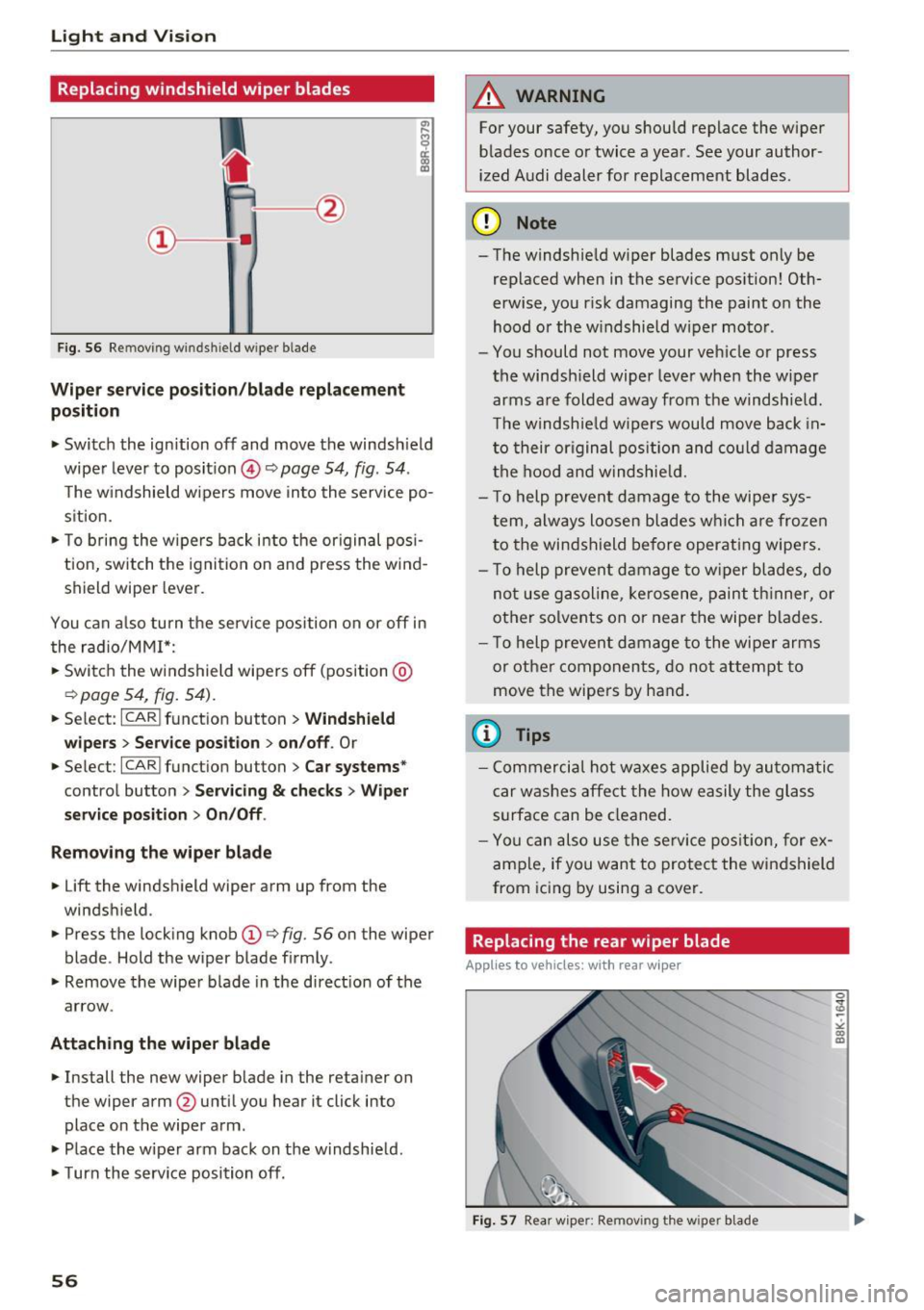
Fig. 56 Re mov ing w indshi eld w iper blade
Wiper service po siti on/b la de r eplac em ent
po sit ion
• Switch the ignition off and move the windsh ield
wiper lever to position @
Q page 54, fig. 54 .
The w indshield wipers move into the service po
sition.
• To bring the wipers back into the or iginal pos i
tion, switch the ignition on and press the wind
shield w iper lever.
You can a lso turn the service position on or off in
the radio/MM!*:
• Switch the windshield wipers off (position @
Qpage 54, fig. 54) .
• Select : ICARI function button > Windshi eld
wi pers > Servic e posit ion > on/off .
Or
• Select :
I CARI funct ion button > C ar syst ems*
control button > Servici ng & ch ecks > W ip er
se rvic e po sition
> O n/Off .
R emo ving th e wiper blad e
• Lift the w indshield w iper arm up from the
windshield.
• Press the locking knob
(D Q fig. 56 on the wiper
blade . Hold the wiper blade firmly .
• Remove the wiper b lade in the direct ion of the
arrow.
Attaching th e wiper blade
• Install the new wiper blade in the reta iner on
the wiper arm @untilyou hear it click into
place on the wiper arm .
• Place the w iper arm back on the w indshie ld.
• Turn the service position off.
56
A WARNING
For your safety, you should replace the wiper
blades once or twice a year . See your author
ized A udi dealer for replacement blades.
(D Note
- The windshield w iper blades must only be
replaced when in the service pos ition! Oth
erwise, you r isk damaging the paint on the
hood or the w indshield wiper motor .
- You should not move your vehicle or press
the windsh ield wiper lever when the wiper
arms are folded away from the windshie ld.
T he windshield w ipers would move back in
to their original pos ition and co uld damage
the hood and windshie ld.
- T o help prevent damage to the wiper sys
tem, always loosen blades which a re froze n
to the windshield before operat ing wipers.
- T o help prevent damage to w iper blades, do
not use gasoline, ke rosene, paint th inner, or
other solvents on or near the wiper blades.
- T o help prevent damage to the wiper arms
or othe r componen ts, do no t at tempt to
move the wipers by hand.
(l} Tips
- Commercia l hot waxes applied by automatic
car washes affect the how easily the glass
surface can be cleaned.
- You can also use the service pos it ion, for ex
ample, if you want to protect the windshield
from icing by using a cover .
Replacing the rear wiper blade
Applies to vehicles: with rear wipe r
Fig . 57 Rear wipe r: Remov ing t he w ipe r blade
Page 65 of 278
..... N
0 ::..:: co .....
Correctly adjusted head restraints and safety
belts are an extremely effective combination
of safety features .
Memory function
Description
Applies to vehicles: with memory function
The memory function allows you to quickly and
easi ly store and recall personal seating profiles
for the driver. The memory function is operated
through the master key and the memory buttons
in the driver 's door.
The driver's seating profile is stored and assigned
to the master key each time the vehicle is locked .
When you open the door , the seat profile is auto
matica lly recalled. If two people use one vehicle,
it is recommended that each person always uses
" t heir own" master key .
Up to 2 seat profi les can be stored in the memory
buttons in the driver's doo r. Once they are stor
ed, these seat profiles can be se lected at any
time.
In addition to the driver's seat settings, you can
also store and access the exterior mirror adjust ment settings* using the remote control key or
memory but ton.
Remote control key
Applies to vehicles: with seat memory
To assign the driver's seat settings to the remote
control key when locking the vehicle, the function
must be activated in the radio or MMI*
~ Select: I CARI function button > Seat adjust
ment > Driver's seat > Remote control key
>
on.Or
~ Select: ICARI function button> Car systems*
control button > Vehicle settings> Seats >
Driver's seat> Remote control key > On .
@ Tips
If you do not want another driver's settings to
be assigned to the remote key, switch off the
Seats and storage
memory function using the radio or MMI* or
the
I OF Fl button c:::> page 63.
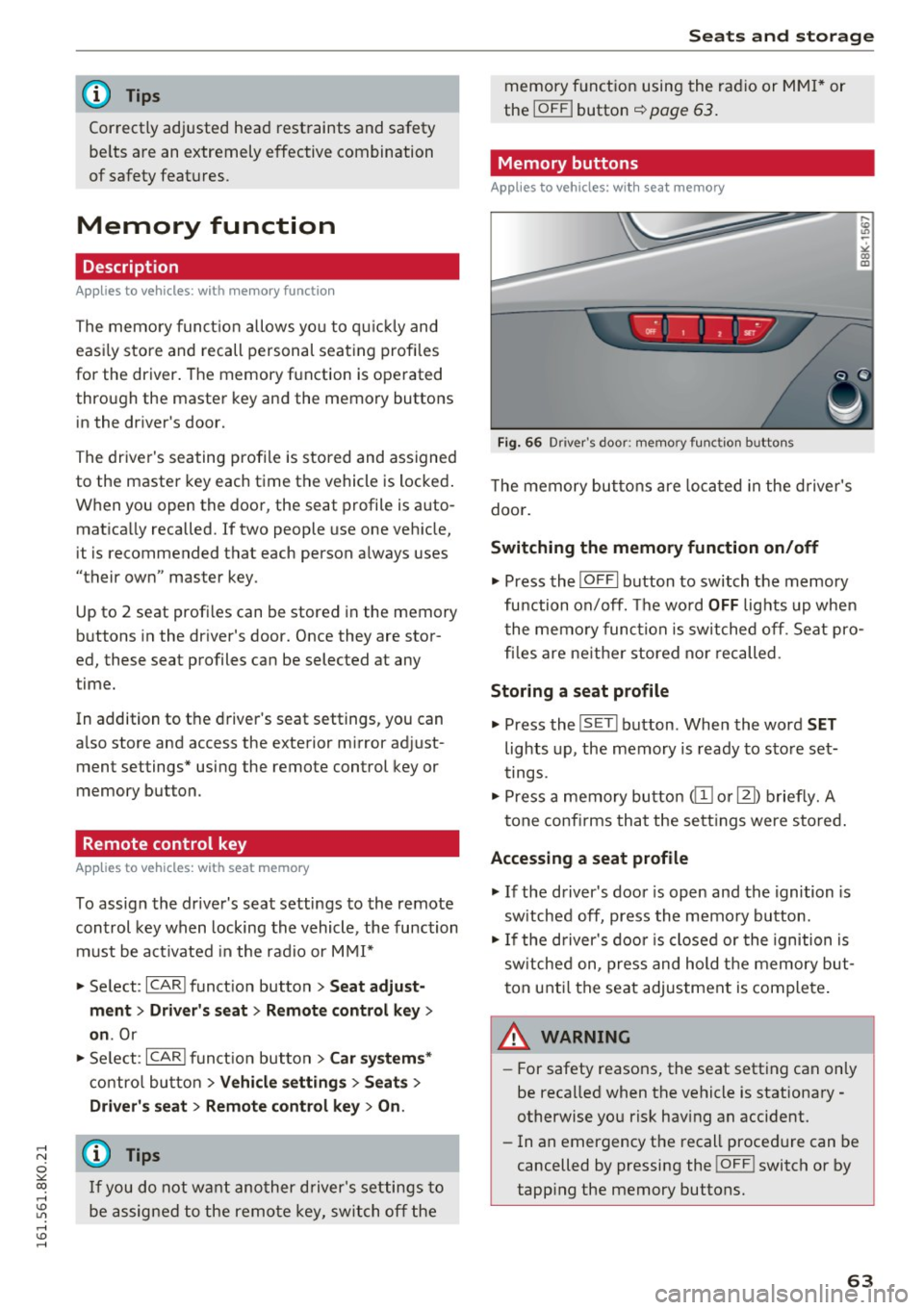
Memory buttons
Applies to vehicles: with seat memory
Fig. 66 Dri ver's door: memo ry func tion b uttons
The memory buttons are located in the driver's
doo r.
Switching the memory function on/off
~ Press the I OFFI button to switch the memory
fu nction on/off. The wo rd
OFF lights up when
the memory function is switched off. Seat pro
files are ne ither stored nor recalled .
Storing a seat profile
~ Press the IS E T I button . When the word SET
lights up, the memory is ready to store set
tings .
~ Press a memory button @or [Ii) briefly. A
tone confirms that the settings were stored.
Accessing a seat profile
~ If the driver's door is open and the ignition is
sw itched off, press the memory button .
~ If the driver's door is closed or the ignition is
sw itched on, press and hold the memory but
ton until the seat adjustment is complete.
.&_ WARNING
-For safety reasons, the seat setting can only
be recalled when the vehicle is stationary
otherwise you risk having an accident.
- In an emergency the recall procedure can be
cancelled by pressing the
! O FF ! switch or by
tapp ing the memory buttons.
63
Page 79 of 278
Warm and cold
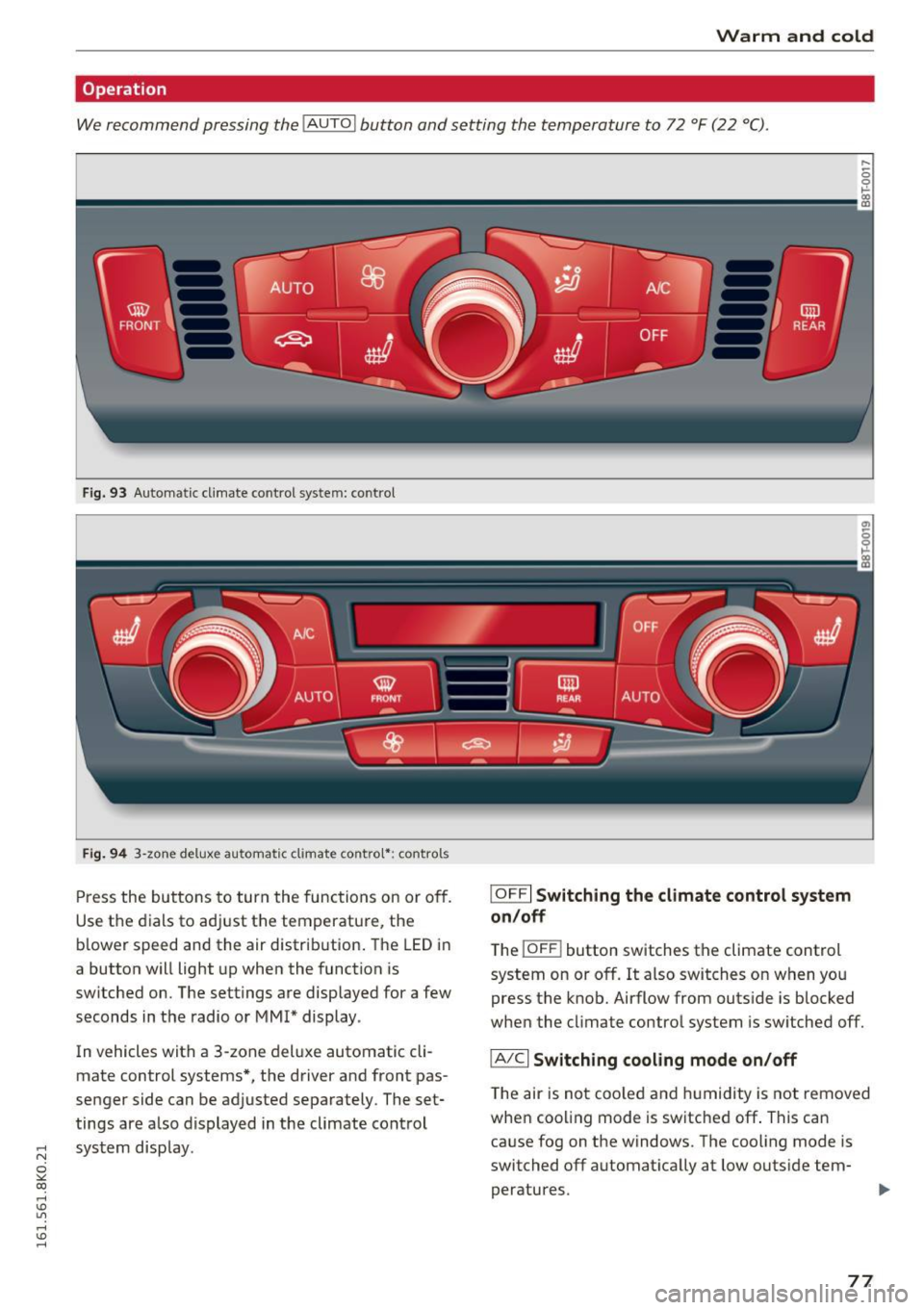
Operation
We recommend pressing the !AUTO ! button and setting the temperature to 72 °F (22 °C).
Fig. 93 Automatic climate control system: contro l
Fig. 94 3-zone deluxe automatic climate contro l*: controls
Press the buttons to turn the functions on or off.
Use the dials to adjust the temperature, the
b lower speed and the air distrib ution . The LED in
a button will light up when the function is
switched on. The settings are displayed for a few
seconds in the radio or MM!* display.
In vehicles with a 3-zone deluxe automatic cli
mate control systems*, the driver and front pas
senger side can be adjusted separately. The set
tings are a lso displayed in the climate control
~ system display.
0
""' CX)
rl I.Cl U"I
rl I.Cl rl
I OFFI Switching the climate control system
on/off
T he iOFF i button switches the climate control
system on or off.
It also switches on when you
press the knob. Airflow from outside is blocked
when the cl imate control system is switched off.
IA/C l Switching cooling mode on/off
The air is not coo led and humidity is not removed
when cooling mode is switched off . This can
cause fog on the windows. The cooling mode is
switched off automat ically at low outside tem-
peratures.
IJl,,
77
Page 81 of 278

..... N
0 ::..:: co .....
The basic climate control settings can be adjust
ed in the radio or
MMI* .
11-Select : I CARI function button > A/C control but
ton. Or
11-Select: ~I C~ A~R~ I funct ion button > Car systems*
control button > AC.
Automatic recirculation*
When switched on, automatic recirculation con
trols the recirculation mode automatically .
If the
windows fog up, press the
I@ FRON T I button.
Synchronization*
When synchronization is switched on, the same
settings are applied to both the driver and front
passenger, except for the seat heating/venti la
tion*. Synchronizat ion switches off when you ad
just the settings on the front passenger's side.
You can a lso switch synchronization on by press
ing and holding the knob on the driver's side.
Supplementary heater
The supplementary heater warms the interior of
vehicles with flexible fuel engines more quickly.
The supplementary heater is controlled automat
ically in the
Auto setting .
Warm and cold
79
Page 86 of 278
Driving
oil pressure must first build up in the hy
draulic valve adjusters. This is normal and not a cause for concern.
- If you leave the vehicle with the ignition
switched on, the ignition will switch off af
ter a certain period of time. Please note that
electrical equipment such as exterior lights
will switch off as well when that happens .
Switching engine off
Applies to veh icles: w ith conven ience key
" Bring your vehicle to a complete stop .
" Automatic transmission: Move the selector lev
er to the P or N position.
"Press the
I STA RT ENG INE S TOPI button
~ page 83, fig. 99.
Steering lock
The steering locks when you turn the engine off
using the
I START E NGINE STOP ! button and
open the driver's door. The locked steering helps
prevent vehicle theft.
Emergency off
If necessary, the engine can be switched off with
the selector lever in the R or D/S positions . The
engine stops if you press and hold the
I STAR T ENGIN E STOPI button at speeds below
6 mph (10 km/h) and press the brake pedal.
A WARNING
-Never turn off the engine before the vehicle
has come to a complete stop. The full func
tion of the brake booster and the power
steering is not guaranteed. You must use
more force to turn or brake if necessary. Be
cause you cannot steer and brake as you
usually would, this could lead to crashes
and serious injuries.
- For safety reasons, you should always park
your vehicle with the selector lever in P.
Otherwise, the vehicle could inadvertently
roll away .
- The radiator fan can continue to run for up
to 10 minutes even after you have turned
off the engine and removed the ignition key.
The radiator fan can also turn on again if the
84
engine coolant heats up because of intense
sunlight or heat build-up in the engine com
partment.
- Always take the key with you whenever you
leave your vehicle . Otherwise, the engine
could be started or electrical equipment
such as the power windows could be operat
ed. This can lead to serious injury.
(D Note
If the engine has been under heavy load for
an extended period, heat builds up in the en
gine compartment after the engine is switch
ed off - there is a risk of damaging the engine .
Allow the engine to run at idle for about two
minutes before switching it off.
Driver messages
Ignition is on
This message appears and a warning tone sounds
if you open the driver's door when the ignition is
switched on .
No key identified
This message appears when the
I STAR T ENGINE ST OP ! button is pressed if there
is no master key inside the vehicle or if the sys
tem does not recogni ze it. For example, the mas
ter key cannot be recognized if it is covered by an
object (e .g . aluminum brief case) which
screens
the radio signal. Electronic devices such as cell
phones can also interfere with the radio signal.
Press brake pedal to start engine
This message appears if you do not press the
brake pedal to start the engine in a vehicle with
an automatic transmission.
Press clutch pedal to start engine
This message appears if you do not press the
clutch pedal to start the engine in a vehicle with
a manual transmission.
Shift to N or P to start engine
This message appears when attempting to start
the engine if the selector lever for the automatic
transmission is not in the P or N position . The .,_
Page 90 of 278

Driving
Speed warning 1: setting a speed limit
Warning threshold 1 is set by the I SET I button .
Fig. 1 01 SET button in t he in str ume nt cluster
Storing the maximum spe ed
• Drive at the desired maximum speed.
• Press the
!SE TI but ton in the ins trumen t panel
display ~fig.101 for 1 second .
Resetting the maximum speed
• Drive the vehicle at a speed of at least 3 mph
(5 km/h)
• Press the
-IS-E T-I button for more than 2 seconds .
The . (USA models)
I. (Canada models)
speed warn ing symbol will appear briefly in the
d isp lay when yo u release the
!SE TI button to indi
ca te that the max imum speed has been stored
successfully .
The max imum speed remains stored until it is
changed by pressing the
I S ETI button again brief
ly or unt il it is deleted by a lengthy p ush on the
button.
Speed warning 2: setting a speed limit
Applies to veh icles: w ith tr ip computer
The radio or MMI* control unit is used to set,
change or delete warning threshold
2 .
• Se lect: !CARI funct ion button > In strument
clu ste r
> Spe ed warning . Or
• Se lect : !CARI funct ion button> Car system s*
contro l button > Dri ver a ssist > Speed warnin g.
Wa rning threshold 2 can be set in the speed
range starting from 20 mph to 150 mph (30 km/
h to 240 km/h) . Settings can each be adjusted in
intervals of 5 mph (10 km/h).
88
Cruise control system
Switching on
The cruise control system makes it possible to
drive at a constant speed starting at 20 mph (30
km/h) .
0
f
®l
0
Fig. 102 Co ntrol leve r w it h p ush-but ton
Fig . 103 Disp lay: Selected speed
• Pull the lever to position (D c:> fig . 102 to
switch the system on.
• Drive at the speed to be controlled.
• Press button @to set that speed .
The stored speed and the green symbol
g M 0 ±
~
Q)
~ ci: Q) m
[lj;(IJM4 (US model)/ El (Canadian model) are
shown in the d isplay
c:> fig. 103 . The display may
vary, depending on the type of display in your ve
hicle .
The speed is kept constant by modifying engine power or through an active brake intervention.
A WARNING
- Always pay attention to the traffic around
you when the cruise control is in operation .
You are always respons ible for your speed
and the distance between your veh icle and
other veh icles .
-
Page 105 of 278
,....,
N
0
""' CX) ,....,
I.Cl U"I ,....,
I.Cl ,....,
Audi adaptive cruise control and braking guard
~--- ~-Di stance 3: This setting corresponds
to a distance of 164 feet/SO meters when travel
ing at 62 mph (100 km/h), or a time interval of
1.8 seconds.
~ ---- ~ Distance 4: This setting corresponds
to a distance of 210 feet/64 meters when travel
ing at 62 mph (100 km/h), or a time interval of
2 .3 seconds.
A WARNING
Following other vehicles too closely increases
the risk of collisions and ser ious personal in
jury.
- Setting short distances to the traffic ahead
reduces the time and distance available to
br ing your vehicle to a safe stop and makes
it even more necessary to pay close atten
tion to traffic.
- Always obey applicable traffic laws, use
good judgment, and select a safe following
distance for the traffic, road and weather
conditions.
¢j) Tips
- Distance 3
is set automatically each time
you switch the ignition on.
- Your standard sett ings are automat ically
stored and assigned to the remot e control
k ey be ing used.
Setting the driving program
Applies to vehicles: with Audi adaptive cruise control
Depending on the selected dr iv in g program and
d istance, driving behav ior when accelerating w ill
vary from dynamic to comfortable.
Setting the driving program for vehicles
without Audi drive select*
~ In the radio/MM!*, select: !CARI function but
ton >
Adaptive cruise control > Driving prog. >
comfort, standard or dynamic . Or
~ Select: ICARI function button> Car systems*
contro l button > Driver ass ist > Adaptive cruise
control > Driving program* > Comfort, Stand
ard or Dynamic . Setting the driving mode for vehicles with
Audi drive select*
Refer to c!:>poge 112 .
(D Tips
Your settings are automatically stored and as
s ig ned to the remote control key being used.
Request for driver intervention
Applies to vehicles: with Audi adapt ive cruise control
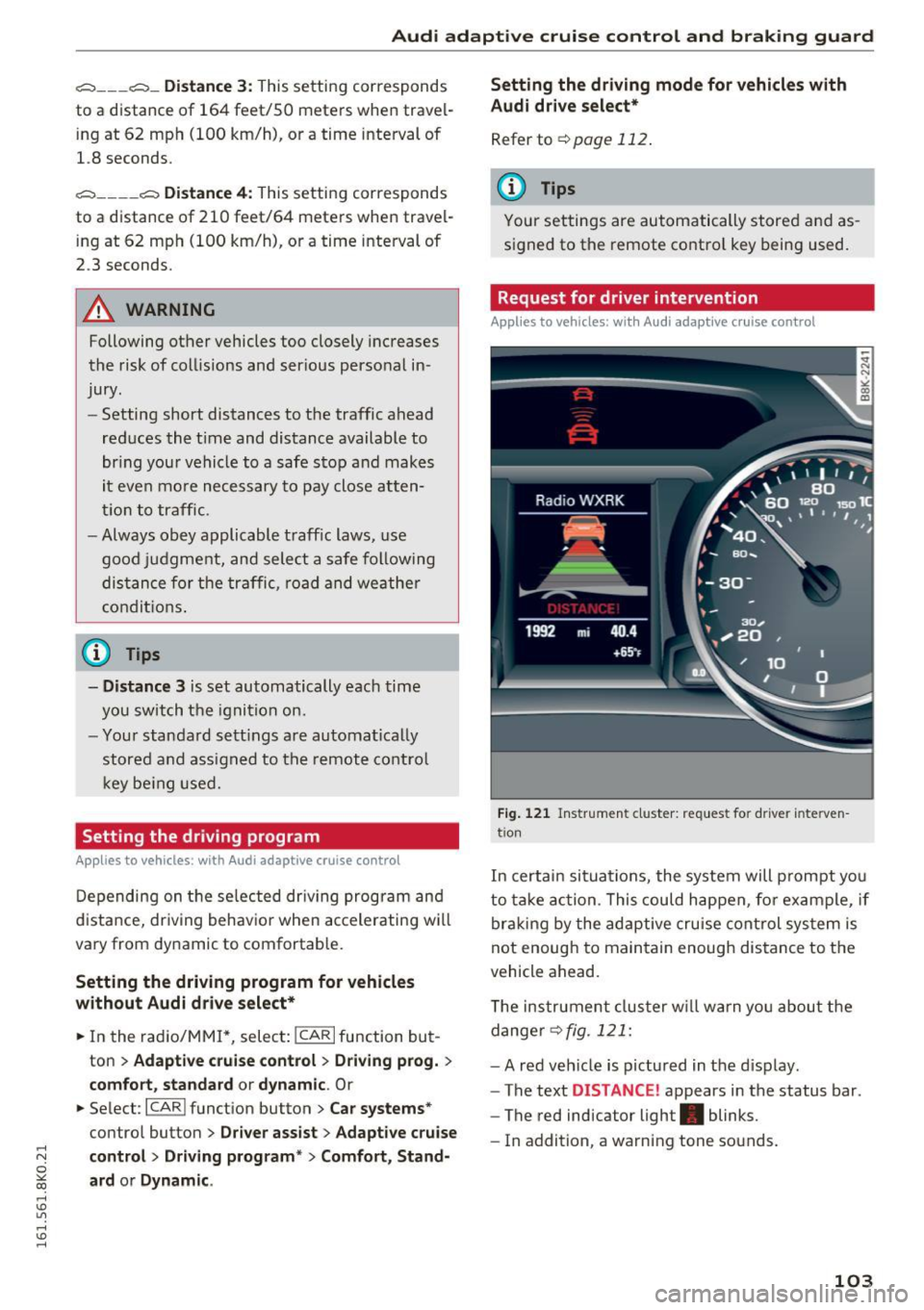
Fig. 121 Ins trumen t cluster: request for driver interve n
tio n
In certain situa tions, the system will prompt yo u
to take action . This could happen, for example, if
braking by the adaptive cruise control system is
not enoug h to maintain enough dis tance to the
vehicle ahead.
T he instrument cluster will warn you about the
danger
c!:> fig. 121:
-A red vehicle is pictured in the display.
- The text
DISTANCE ! appears in the status bar.
- The red indicator light. blinks.
- In addition, a warning tone sounds.
103
Page 106 of 278

Audi adaptive cruise control and braking guard
Audi braking guard
Description
Applies to vehicles: with Audi adaptive cruise contro l
Fig. 122 In strument cluste r: appro ach warning
Braking guard uses a radar sensor. It also func
tions within the limits of the system when adap
tive cruise control is switched off .
What can Audi braking guard do?
When detected in time, the system can assess
si tuation s when a veh icle ahead brakes suddenly
or if your own vehicle is traveling at a high speed
and approaching a vehicle up ahead that is mov
ing more slowly . Braking guard does not react if
it cannot detect the situat ion.
The system advises you of variou s situations:
- The
distance warning is given if you are too
close to the vehicle ahead for a long time. If the
vehicle ahead brakes sharply, you will not be
able to avoid a collision. The indicator light .
in the display comes on.
- The
approach warning is given when a detected
vehicle up ahead in your lane is moving much
more slowly than you are or if it brakes sharply .
When this warning is given, it may only be pos
s ib le to avo id a collision by swerving or braking
sharply. The indicator light . and indicator in
the d isplay will warn you about the danger
¢fig. 122. You will also hear an acoustic signal.
If you do not react fast enough or do not react at
a ll to the situation, Braking guard will intervene
by braking and the message
braking guard inter
vention
will appear.
l) This is no t a vail able in som e coun trie s.
104
- If a collision is imminent , the system will first
provid e an
acute warning by briefly and sharply
app lying the b rakes.
- If you do not react to the acute warning, brak
ing guard can brake within the limits of the sys
tem . This reduces the vehicle speed in the event
of a collision.
- At speeds under 20 mph (30 km/h), the system
can initiate a complete deceleration shortly be
fore a collision ll.
- If the braking gua rd senses that you are not
braking hard enough when a collision is immi
nent, it can increase the braking force.
Which functions can be controlled?
You can switch braking guard and the distance/
approach warning on or off in the radio or MMI
¢page 105, Settings in the radio/MM!.
A WARNING
Lack of attent ion can cause collisions, other
accidents and ser ious personal injuries . The
braking guard is an assist system and cannot
prevent a collision by itself . The driver must
always inte rvene. The driver is always respon
sible for braking at the correct time .
- Always pay close attention to traffic, even
when the braking guard is switched on. Be
ready to intervene and be ready to take
complete control whenever necessary. Al
ways keep the safe and legal distance be
tween your vehicle and vehicles up ahead .
- Braking guard works within limits and will
not respond outside the system limits, for
example when approach ing a stopped vehi
cle or stationary obstacle (end of a traffic
jam or vehicle that has broken down in traf
fic) .
- Always remember that the radar sensor for
the braking guard works only within defined
detection and range limits that may prevent
the proper detection of other vehicles.
- The radar sensor's function and range can
be reduced by rain, snow and heavy spray.
Moving vehicles up ahead may not be
-
Page 107 of 278

..... N
0 ::..:: co .....
promptly detected or may not be detected
at all.
- Reflective surfaces including crash barriers
or tunnel entrances may impair the function
of the radar sensor.
(D Tips
- You can cancel the braking that is initiated
by the system by braking yourse lf, by accel
erating noticeably or by swerving.
- Braking guard error messages ~page
105 .
-Keep in mind that braking guard can brake
unexpected ly. Always secure any cargo or
objects that you are transporting to reduce
the risk of damage or injury.
Settings in the radio/MM!
A ppl ies to vehicles: with Audi adaptive cruise co ntro l
... Se lect : I CARI funct ion button > C ar s ystem s*
control button > Driver a ssi st > Audi brak ing
guard .
Or
... Select:
~I C-A-R~I funct ion button > A udi braking
g uard .
S ystem -
Switch Audi braking guard On and Off.
When you sw itch the ignition on, the message
Audi bra king gua rd off appears if the system is
switched off.
Ea rly warn ing -The distance and approach warn
ings in the display can be switched
On /Off .
(D Tips
-Your settings are automatically stored and
ass igned to the remote control key being
used at the times the sett ings are made.
- If you restrict or sw itch off the ESC, the
braking guard also sw itches itself off
~ page
178 .
- Switch braking guard off when you are load
ing the veh icle onto a vehicle ca rr ier, train,
sh ip or other type of transportation . This
can p revent undesired warnings from the
braking gua rd system .
Messages
Applies to vehicles: wi th Aud i adapt ive c ruise control
Braking guard : Off
This dr iver message appears if the system is
tu rned off via the radio/MM I*. O therwise, if the
system is turne d off, the information appears ev
ery time shortly after t he start o f the trip .
T he driver message a lso appea rs if the system is
not avai lab le due to a ma lfunction o r if the ES C i s
not switched on¢ page
178 . If th is is the case,
the system wi ll not provide warnings about a
possib le collision .
Braking guard : A ctivated
This dr iver message appears if sharp brake pres
su re was applied due to an acute warning .
•••
Three white dots appear if a setting cannot be se
l ected with the operating lever. For example, this
happens if you want to raise/lower the speed
even though there was no previously saved
speed .
ACC: Deacti vation
The driver message appears in vehicles wi th ma n
u al transmission. If the clutch pedal was pressed
down for too long , the adaptive cr uise control
tu rns off. A chime sounds as a reminder.
ACC : Sen sor blocked
This message appears if the senso r view is ob
structed, for examp le by leaves, snow, heavy
spray or dirt. Clean the sensor¢ page
98,
fig. 112 .
ACC : not availa ble
The driver message appears if there is a malfunc
tion. The adaptive cruise control turns off . A
chime so unds as a reminder . Have the system
c h ecked by an author ized Audi dealer or au thor
ized Audi Service Facili ty.
A CC: una vailable
The driver message appears if, for examp le, the
brake temperature is too high. The adapt ive .,.
105