radio AUDI A4 2016 Owner's Manual
[x] Cancel search | Manufacturer: AUDI, Model Year: 2016, Model line: A4, Model: AUDI A4 2016Pages: 278, PDF Size: 70.26 MB
Page 111 of 278

.... N
0
""' CX)
.... I.Cl U"I
.... I.Cl ....
-Improper reliance on the side assist system
can cause collisions and serious personal in
jury:
- Never rely only on side assist when chang
ing lanes.
- Always check rear view mirrors to make
sure that it is safe to change lanes.
- Side assist cannot detect all vehicles under
all conditions- danger of accident!
- Please note that side assist indicates there
are approaching vehicles, or vehicles in your
blind spot, only after your vehicle has
reached a driving speed of at least 19 mph
(30 km/h).
- In certain situations, the system may not
function or its function may be limited. For
example:
- if vehicles are approaching or being left
behind very quickly. The display may not
turn on in time.
- in poor weather conditions such as heavy
rain, snow or heavy mist.
- on very wide lanes, in tight curves or if
there is a rise in the road surface. Vehicles
in the adjacent lane may not be detected
because they are outside of the sensor
range.
(D Note
The sensors can be displaced by impacts or
damage to the bumper, wheel housing and
underbody. This can affect the system. Have
your authorized Audi dealer or authorized
Audi Service Facility check their function.
(D Tips
-If the window glass in the driver's door or
front passenger's door has been tinted , the
display in the exterior mirror may be misin
terpreted.
- For Declaration of Compliance to United
States FCC and Industry Canada regulations
¢page 261.
Audi side assist
Activating and deactivating
Applies to vehicles: with A udi side ass ist
Fig. 127 Driver 's do or: Sid e assis t button
.,. Press the button ¢ & in General information
on page 108
to switch the system on/ off . The
LED in the button turns on when side assist is
switched on .
Adjusting the display brightness
Applies to vehicles: with Audi side assist
The signal brightness can be set in the radio or
MM!*.
.,. Select: !CAR ! function button> Audi side assist .
.,. Select: I CAR I function button > Car systems*
control button > Driver assist > Audi side as
sist.
The display brightness adjusts automatically to
the brightness of the surroundings, both in the
information and in the warning stage . In very
dark or very bright surroundings, the display is
already set to the minimum or maximum level by
the automatic adjustment. In such cases, you
may notice no change when adjusting the bright
ness, or the change may only be noticeable once
the surroundings change.
Adjust the brightness to a level where the display
in the information stage will not disrupt your
view forward. If you change the brightness, the
display in the exterior mirror will briefly show the
brightness level in the information stage. The
brightness of the warning stage is linked to the
brightness in the information stage and is adjust
ed along with the information stage adjustment.
Ill>
109
Page 117 of 278

,....,
N
0
""' CX) ,....,
I.Cl U"I ,....,
I.Cl ,....,
,&_ WARNING
-Sensors have dead spaces in which objects
cannot be detected. Be especia lly alert for
small children and animals, since they are not always detected by the sensors.
- The acoustic parking system is not a substi
tute for the dr iver's own caution and alert
ness. Ultimate respons ibility always remains
with the driver during parking and sim ilar
maneuvers . Always watch where you are
dr iv ing .
- You should always adjust the volume and
frequency of the warning tones so that you
can eas ily hea r the acoustic distance wa rn
ing even if the radio is p lay ing, the air-cond i
tioner blower is on High or there is a high
level of ou ts ide no ise .
- Check the settings whenever anyone e lse
has driven the vehicle before you.
(D Note
- Remember that low obstacles for which a
warning has already been issued may "dive"
below the system's sensing zone if the vehi
cle is being backed up closer. In this case,
the war ning sound shutting off does
not in
dicate that you have cleared the obstacle.
Instead, impact is imm inent.
- Objects such as tra iler hitches, chains, nar
row posts or fences cove red by a th in laye r
of pa int may not always be detected by the
system. They can still damage your vehicle
wi thout warn ing.
{O) Tips
Keep the senso rs in the rear bumper clean
and free of snow and ice so that t he acous tic
parking assist sys tem can f unction properly.
Adjusting the warning tones
A pp lies to vehicles: with pa rk in g system (rear)
The warning tones can be adjusted in the MMI*.
• Select: ICARI funct ion button> Parking syst em .
Or
• Se lect :
I CARI funct ion button > Car systems *
co ntro l button > Driver a ssist > Parking aid .
Parking S ystem
-Rear volume -rear sensor volume
-Rear fr equ ency -rear sensor frequency
-Mu sic volume while parking -when the park-
ing system is switched on, the vo lume of the
active audio source is lowered.
The newly adjusted value is briefly heard from
the signal generator. The settings are automati ca lly stored and assigned to the master key with
remote cont rol.
Rear parking system
with rearview camera
Introduction
Applies to vehicles: wi th parking system (rear, w ith rear v iew
camera}
F ig. 1 30 Parking mode 1: reverse park ing
F ig . 1 31 Parking mode 2: parallel parking
Vehicles with the park ing system are equipped
with a
rear view ca mera in addition to the acous
tic parking system.
You can choose between two modes to assist you
with parking. For example, you can use "parking mode
l" when parking in a parking space or ga
rage¢
fig. 130 . When you want to park parallel
to the edge of the street, select "parking mode
2" ¢ fig. 131. II>-
115
Page 122 of 278

Parking System
swings out more than the vehicle rear. Main
tain plenty of distance from an obstacle so
that your outside mirror or a corner of your
vehicle does not collide with any obstacles -
danger of accident!
(D Tips
The left or right orientation lines and surfaces
will be displayed, depending on the turn sig
nal being used.
Adjusting the display and warning tones
Applies to vehicles: w ith parking system (rear, with rear view
camera)
The display and warning tones ore adjusted in
the radio or MMI*.
.,. Select: ICARlfunction button> Parking system.
Or
.. Select: ICARI function button> Car systems*
control button > Driver assist > Parking aid.
Display
- Off -when the parking system is switched on,
only audible signals are given.
-On -when the parking system is switched on,
the picture from the rear view camera is dis
played.
Warning tones
- Rear volume -
rear sensor volume
-Rear frequency -rear sensor frequency
-Music volume while parking -when the park-
ing system is switched on, the volume of the
active audio source is lowered.
The newly adjusted value is briefly heard from
the signal generator. The settings are automati
cally stored and assigned to the remote control
key.
A WARNING
- Always make sure that the volume and fre quency of the warning tones is adjusted so
that you can easily hear the acoustic dis
tance signal even if the radio is playing, the
air-conditioner blower is on High or there is
a high level of outside noise.
120
- Check the settings whenever someone else
has driven the vehicle before you.
@ Tips
-The warning tones can also be adjusted di
rectly from the rear view camera image.
Simply press the Settings* control button.
- Changed settings are activated when park
ing assist is switched on again.
Error messages
Applies to vehicles: with parking system (rear, with rear view
camera)
If a warning tone is audible for about five sec
onds when you turn on the ignition, there is a
malfunction in the system. Have the problem
corrected by your authorized Audi dealer .
Keep the sensors in the rear bumper clean and
free from ice so that the acoustic park assist sys
tem can function properly.
Page 153 of 278
..... N
0 ::..:: co .....
If the weight-sensing mat in the front passen
ger seat detects an empty seat, the front air
bag on the passenger side will be turned off,
and
P ASS ENGER AIR B AG OFF will stay on.
Repair , care and disposal of the airbags
Parts of the a irbag system are installed at many
d ifferent p laces on your Aud i. Installing, remov
ing, servicing o r repa iring a part in an area of the
vehicle can damage a pa rt of an airbag system
and prevent that system from working properly in a co llision.
There are some importa nt things you have to
know to make sure that the effectiveness of the
system w ill not be impaired and that discarded
components do not cause injury or pollute the
environment.
A WARNING
Improper care, serv icing and repair proce
dures can increase the r isk of personal injury
and death by preventing an airbag from de
ploying when needed or deploying an airbag
unexpectedly :
-
-Never cover, obstruct, or change the steer
ing wheel horn pad or a irbag cover or the in
strument panel or mod ify them in any way .
- Never attach any objects such as cupholders
or telephone mountings to the surfaces cov
er ing the airbag units .
- For cleaning the horn pad or instrument panel, use only a soft, dry cloth or one mois
tened with plain water. Solvents or cleaners
cou ld damage the a irbag cover or change
the stiffness or strength of the mater ial so
that the airbag cannot dep loy and protect
properly.
- Never repair, adjust, or change any parts of
the airbag system.
- All wo rk on the stee ring wheel, instr ument
pane l, front seats or electrical system (in
cluding the installation of audio equipment,
cellu lar telephones and CB radios, etc .)
must be performed by a qualified technician
Airb ag sys tem
who has the training and special equ ipment
necessary.
- For any wo rk on the airbag system, we
strong ly recommend that you see your au
thorized Audi dealer or qualified workshop .
- Never modify the front bumper or parts of
the vehicle body.
- Always make sure that the side a irbag can
inflate without interference:
- Never install seat covers or replacement
upholstery ove r the front seatbacks that
have not been specifica lly approved by
Audi .
- Never use addi tional seat c ushions that
cove r the areas where the side airbags in
flate.
- Damage to the orig inal seat cove rs or to
the seam in the area of the s ide airbag
module must a lways be repaired immedi
ate ly by an authorized Aud i dealer.
- The airbag system can be activated only
once . A fter an airbag has inflated, it must
be replaced by an authorized Audi dealer or
qualified technic ian who has the technical
information, t raining and spec ial equ ipment
necessary.
- The airbag system can be deployed only
once . After an airbag has been deployed, it
must be replaced with new rep lacement
parts des igned and approved especially for
your Aud i model version. Replacement of
comp lete airbag systems or airbag compo
nents must be performed by qualified work
shops only. Ma ke sure that any airbag serv
ice act ion is en tered in your Aud i Wa rranty
& Maintenance booklet under AIRBAG RE
PLACEMENT RECORD.
- In accidents when an airbag is dep loyed, the
vehicle battery separates the alternator and
the starter from the veh icle electrical sys
tem for safety reasons w ith a pyrotechnic
circu it interrupter.
- Wo rk on the pyrotechnic c ircuit inte rrupt
er must on ly be performed by a qu alified
dealer -risk of an acc ident!
- If the vehicle or the circuit interr upter is
scrapped, all applicable safe ty p recautions
must be followed .
151
Page 217 of 278
..... N
0 ::..:: co .....
~ Open the cover on the positive pole~ fig. 186 .
~ Connect the charger connectors accord ing to
the instructions to the
ju mp st a rt b olts . (Bolts
under the cover= "positive", Bo lts with hex
head = "negative") .
~ Only now plug the mains lead for the charging
equipment into the wall outlet and turn it on
~ & -
~ Ma ke s ure t he c harging rate i s not ov er
30 amp s/14 .8 Vo lt.
~ When the battery is fu lly charged: Turn the
charging equipment off and remove the mains
lead from the wall outlet.
~ Now remove the clamps for the charging equip-
ment.
~ Close the cover on the posit ive pole .
~ Close the hood ~ page 203.
A discharged battery can freez e at temperatures
of only 32 °F (0 °C) . Allow a frozen battery to
thaw completely before attempt ing to charge it
~ _& . However, we recommend not us ing a
thawed batte ry again because the battery casing
can be cracked due to ice format ion and can leak
battery acid.
Battery charg ing (Maximum charging rate of
30 amps /14.8 Volt )
When cha rging at low vo ltages (e .g . with a tric k
l e char ger ),
the battery cables do not have to be
disconnected first. The battery caps should
not
be opened when charging a battery.
It is not necessary to remove the batte ry from
the luggage compartme nt.
F a st cha rging the battery (charg ing rate
above 14.8 Volt s)
For techn ical reasons do not use a battery charg
e r that uses voltage greate r than 14 .8 Volts to
charge your vehicle 's battery.
A WARNING
Charging a battery can be dangerous .
- Always follow the operating instructions
provided by the battery charger manufactur
er when charging your battery .
Check ing and Filling
-Never charge a frozen battery . It may ex
plode because of gas trapped in the ice. Al
low a frozen battery to thaw out first.
- Do not reuse batteries which were frozen.
The battery hous ing may have cracked and
weakened when the battery froze.
- Charge the battery in a well ventilated area. Keep away from open flame or electrical
spark. Do not smoke . Hydrogen gas generat
ed by the battery is explos ive.
- To reduce the danger of explosion, never
connect or disconnect charger cables while
the charger is operating .
- Fast charg ing a battery is dangerous and
should only be attempted by a competent
technician w ith the proper equipment.
- Battery acid that may spill during charging should be washed off w ith a solution of
warm water and baking soda to neutralize
the acid .
@ Note
Never use a fast charger as a booster to start
the engine . This will seriously damage sensi
tive electronic components, such as control units, re lays, radio, etc., as well as the battery
cha rge r.
Battery replacement
The new battery must have the same specifica
tions and dimensions as the original equipment
battery.
Intelligent energy management in your vehicle is
r esponsib le for distr ibut ing the e lectrical energy
t hr oughou t your vehicle ~
page 182. The intelli
gent energy management system will keep the
engine battery charged better then vehicles with
out this system. To make sure the additional
electrical energy is available once again after you
have changed the battery, we recommend that
you install batteries of the same type and manu
facture only (the same as those installed at the
t ime your vehicle was delivered) . Specifications
are listed on the battery housing . Your author
ized Audi dealer must code the battery in the en-
ergy managemen t system to enable you to use
ll>
215
Page 221 of 278
be happy to provide more infor
mation.
® Mud and snow capability
"M/5 " or "M+S" indicates the tire
has character istics that make it
suitable for driving on mud and
snow .
& indicates a winter tire .
@Composition of the tire cord
and materials
The number of plies indicates the
number of rubberized fabric lay
ers in the tire. In general: the
more layers , the more weight a
tire can carry . Tire manufacturers
must also specify the materials
used in the tire. These inc lude
steel, nylon, polyester and other
materials.
@ Maximum permitted load
This number indicates the max i
mum load in kilograms and
pounds that the tire can carry.
@ Uniform tire quality grade
standards for treadwear,
traction and temperature resistance
Treadwear, traction and tempera
ture ranges
c::> page 234 .
;;: @ Running direction
\:i ~ ...
'° V, ....
'° ....
The arrows indicate the running
direction of unidirectional tires .
Wheels
You must always follow the speci
fied runn ing d irect ion
c::> page 244 .
@ Maximum permitted
inflation pressure
This number ind icates the maxi
mum pressure to which a tire can
be inflated unde r normal operat
ing condit ions.
Glossary of tire and loading
terminology
Accessory weight
means the comb ined weigh t (in
excess of those standard items
which may be replaced) of auto
matic transm ission, power steer
ing , power brakes, power win
dows, power seats, radio, and
heater, to the extent that these
items are available as facto ry-in
stalled equipment (whether in
stalled or not) .
Aspect ratio
means the ratio of the heigh t to
the width of the tire in percent .
Numbers of 55 or lowe r indicate a
low sidewa ll for improved steer
ing response and better overall
handling on dry pavement. .,.
219
Page 250 of 278
Fuses and bulbs
Fuse panel @ (black )
No. Consume r
5 Steering column switch module
7 Term inal 15 diagnostic connec to r
8 Gateway (Databus diagnostic interface)
9 S upplementary heater
Fuse panel @ (brown)
No. Consumer
1 C D/D VD p laye r
2 Wi-Fi
3 M MI/Radio
4 Instrument cluster
5
Ga teway (instrument cluster cont rol mod -
ule)
6 Ignition lock
7 Ligh t swi tch
8 Climate control system blower
9 Steering col umn lock
10 Climate control system
1 1 Te
rm inal 30 diagnos tic connec to r
12 Steer ing column sw itch module
248
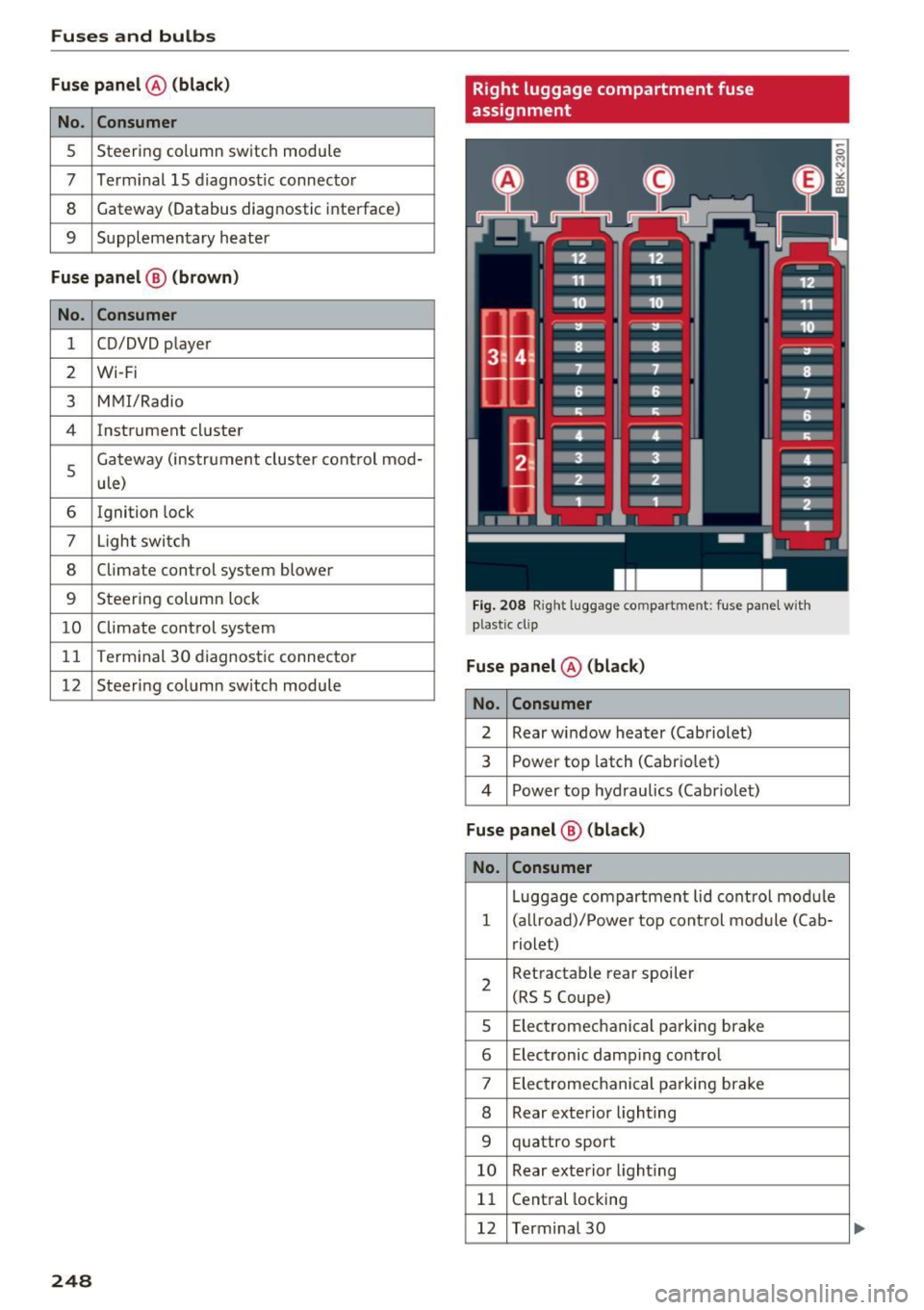
Right luggage compartment fuse
assignment
Fig. 2 08 Right lu ggage compartment: fuse panel wit h
plast ic cl ip
Fuse panel @ (black)
No . Consumer
2 Rear wi ndow heater (Cabriolet)
3 Power top latch (Cabr io let)
4 P ower top hyd raulics (Cabr io let)
Fuse panel @ (black)
No . Consumer
Luggage compartment lid cont rol mo dule
1 ( allroad)/ Power top cont rol mod ule (Ca b-
r iolet)
2 Retractable rear
spoiler
(RS 5 Coupe)
5 E
lec tromec hanical p arking brake
6 Electronic damping contro l
7 Elec tromec hanical pa rking brake
8 Rear exte rior light ing
9 q uattro sport
10 Rear exterior lighting
1 1 Cent
ral locking
12 Terminal 30
...
Page 251 of 278
..... N
0 ::..:: co .....
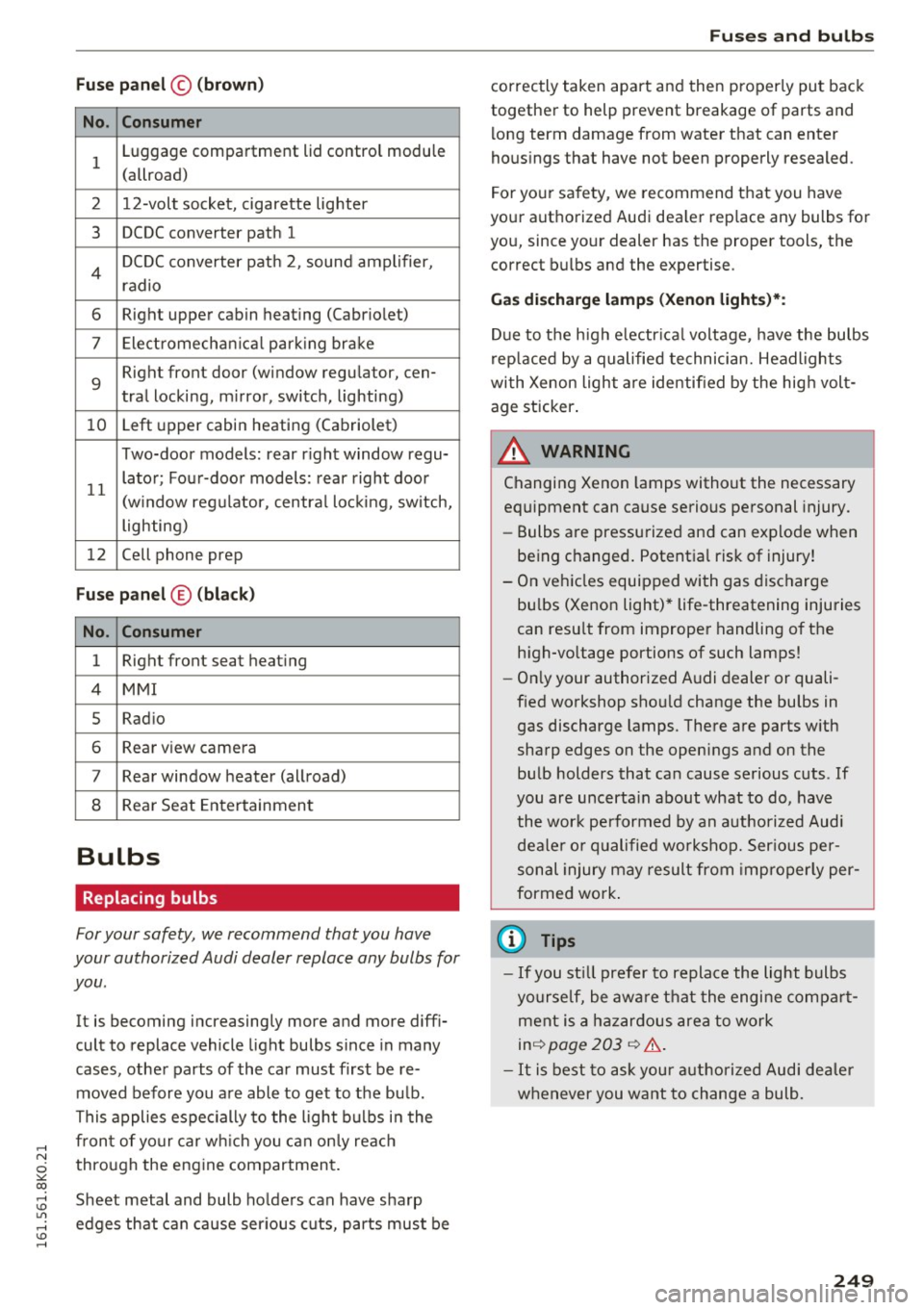
No . Consumer
1 Luggage compartment lid control module
(allroad)
2 12-volt socket, cigarette lighter
3 DCDC converter path 1
4 DCDC converter path 2, sound amplifier,
radio
6 Right upper cabin heating (Cabriolet)
7 Elect romechan ical park ing brake
9
Right front door (window regulator, cen-
tral locking, m irror, switch, lighting)
10 Left
upper cabin heating (Cabriolet)
Two-door models: rear r ight window regu-
11 lator; Four-door models:
rear right door
(w indow regulator, central locking, switch,
lighting)
12 Cell phone prep
Fuse panel ® (black )
No . Consumer
1 Right front seat
heating
4 MMI
5 Radio
6 Rear view camera
7 Rear window heater (allroad)
8 Rear Seat Entertainment
Bulbs
Replacing bulbs
For your safety, we recommend that you have
your authorized Audi dealer replace any bulbs for
you .
It is becoming increasingly more and more diffi
cult to replace vehicle light bulbs since in many
cases, other parts of the car must first be re
moved before you are able to get to the bu lb.
This applies especially to the light bulbs in the
front of your car which you can only reach
through the eng ine compartment.
Sheet metal and bulb ho lders can have sharp
edges that can cause serious cuts, parts must be
Fuses and bulbs
correctly taken apart and then properly put back
together to help prevent breakage of parts and
long term damage from water that can enter
hous ings that have not been properly resealed.
For your sa fety, we recommend that you have
your authorized Audi dea ler replace any bulbs for
you, since your dealer has the proper tools, the
correct bulbs and the expertise.
Gas discharge lamps (Xenon lights)*:
Due to the high e lectr ica l voltage, have the bulbs
replaced by a qualified technician. Headlights
with Xenon light are identified by the high volt
age sticker .
A WARNING
Changing Xenon lamps without the necessary
equipment can cause serious personal injury.
- Bulbs are pressurized and can explode when
being changed . Potential risk of injury!
- On vehicles equipped with gas discharge
bu lbs (Xenon light)* life-threatening injuries
can resu lt from improper handling of the
high -vo ltage portions of such lamps!
- Only your authorized Audi dealer or quali
fied workshop shou ld change the bulbs in
gas discharge lamps. There are parts w ith
sharp edges on the openings and on the bulb holders that can cause serious cuts . If
you are uncerta in about what to do, have
the wor k performed by an authorized Audi
dealer or qualified workshop. Serious per
sonal injury may result from improperly per
formed work.
(D Tips
- If you st ill prefer to replace the light bulbs
yourself, be awa re that the engine compa rt
ment is a hazardous area to work
inq page 203 q &,.
- It is best to ask your authorized Audi dealer
whenever you want to change a bulb.
249
Page 252 of 278
Emergency situations
Emergency situations
General
This chapter is intended for trained emergency crews and working personnel who have the nec
essary tools and equipment to perform these
operations.
Starting by pushing or
towing
CD Note
Vehicles with an automatic transmission
cannot be started by pushing or towing.
Starting with jumper
cables
If necessary, the engine con be started by con
necting it to the battery of another vehicle.
If the engine should fail to start because of a dis
charged or weak battery, the battery can be con
nected to the battery of
another vehicle, using a
pair of jumper cables to start the engine.
Jumper cables
Use only jumper cables of sufficiently largecross
section
to carry the starter current safely. Refer
to the manufacturer's specifications.
Use only jumper cables with
insulated terminal
clamps which are distinctly marked :
plus(+) cable in most cases colored red
minus(-) cable
in most cases colored black.
A WARNING
Batteries contain electricity, acid, and gas.
Any of these can cause very serious or fatal in
jury. Follow the instructions below for
safe
handling of your vehicle's battery.
-Always shield your eyes and avoid leaning
over the battery whenever possible.
-A discharged battery can freeze at tempera
tures just below 32 °F (0 °C). Before con
necting a jumper cable, you must thaw the
250
frozen battery completely, otherwise it could explode.
- Do not allow battery acid to contact eyes or
skin. Flush any contacted area with water immediately.
- Improper use of a booster battery to start a
vehicle may cause an explosion.
- Vehicle batteries generate explosive gases.
Keep sparks, flame and lighted cigarettes
away from batteries.
- Do not try to jump start any vehicle with a
low acid level in the battery.
- The voltage of the booster battery must also
have a 12-Volt rating. The capacity (Ah) of
the booster battery should not be lower
than that of the discharged battery. Use of
batteries of different voltage or substantial
ly different "Ah" rating may cause an explo
sion and personal injury.
- Never charge a frozen battery. Gas trapped in the ice may cause an explosion.
- Never charge or use a battery that has been
frozen . The battery
case may have be weak
ened .
- Use of batteries of different voltage or sub
stantially different capacity (Ah) rating may
cause an explosion and injury. The capacity
(Ah) of the booster battery should not be
lower than that of the discharged battery.
- Before you check anything in the engine
compartment, always read and heed all
WARNINGS
~page 203.
CD Note
-Applying a higher voltage booster battery
will cause expensive damage to sensitive
electronic components, such as control
units, relays, radio, etc.
- There must be no electrical contact between
the vehicles as otherwise current could al
ready start to flow as soon as the positive
(+) terminals are connected.
@ Tips
The discharged battery must be properly con-
nected to the vehicle's electrical system. .,..
Page 257 of 278
.... N
0
""' CX)
.... I.Cl U"I
.... I.Cl ....
Technical data
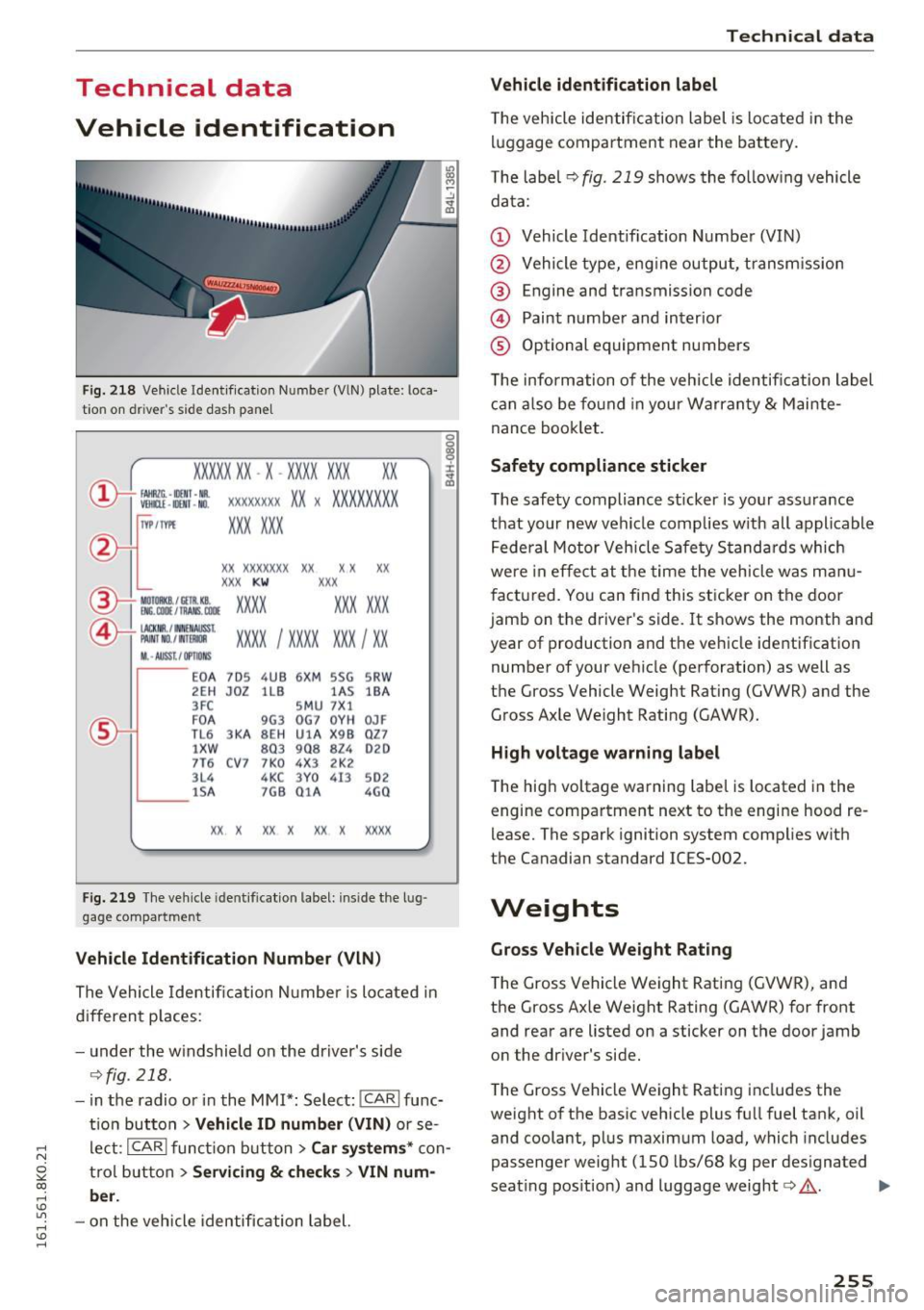
Vehicle identification
F ig . 2 18 Vehi cle Ident if icatio n Number (VlN) plate : loca·
t ion on dr iver 's side dash pane l
XXXXX XX -X -XX XX X XX XX
CD+ ~t :1:: xxxxxxxx xx x xx xxx xxx
TVP/fffl XXX XXX
XX XXXXXXX XX X X xx
XXX KW XXX
®i ~:J ·f lfils~~ XXXX XXX XXX
®-+ ~ N:a=i~l xxxx ; xxxx xx x ; xx
II. · AUSS, I OPTIONS
,__ __
EO A 7D 5
2E H J0Z
3FC
F O A
TL 6 3KA
lXW
7T6 C V7
3L4 lS A
4UB 6XM 5SG
llB lA S
S M U 7Xl
9G3 OG7 0YH
SE H UlA X 98
803 908 824
7 K0 4 X3 2K2
4KC 3Y0 413
7G8 01 A
5RW
18A
0JF
QZ7
020
502
4G0
XX . X XX X XX X XXXX
Fig. 219 Th e ve hicle ident ifica tion label: ins ide the l ug·
gage co mpartment
Veh icle Identification Number (VlN )
The Vehicle Identific ation N umbe r is lo cate d in
d if f eren t places:
- u nder the w indshield on the dr iver's side
~ fig. 218.
-in the radio or i n the MMI*: Select: !CAR! func
t io n but ton
> Vehicle ID number (VIN) or se
l e ct:
I CAR ! funct ion button > Car system s* con
t rol but ton
> Servicing & checks > VIN num
ber .
-on the vehicle identific ation label.
Technical data
Vehicle identification label
T he vehicle identi fica tion label is lo cate d in t he
l uggage compa rtment near the ba tte ry.
T he labe l
~ fig. 219 shows the fo llow ing vehicle
da ta:
(D Vehicle Identification Number (VIN)
@ Vehicle type, eng ine output, transm ission
@ Engine and transmission code
@ Paint numbe r and interior
® Optional equipment numbers
T he information of the veh icle identification label
c an also be fo und in your Warran ty
& Mainte
nance booklet.
Safety compliance sticker
The safety compliance sticker is yo ur ass urance
t h at your n ew vehi cle complies w ith all appli cable
Fede ral Motor Vehicle Safety Stand ard s which
we re in effe ct at the time the veh icle w as m anu
fac tured. Yo u ca n fi nd this sticker on the door
jamb on the driver 's side. It shows the month and
year of production and t he ve hicle identification
number of your ve hicle (perforation) as well as
t h e Gross Vehicle Weight Rat ing (GVWR) and the
G ross Axle We ight Rati ng (GAWR).
H igh vo ltage warning label
T he hig h voltage warning label is located in the
engine compa rtment ne xt to the engine hood re
lease. The spark ignition system complies with
the Canadian standard ICES-002.
Weights
Gross Vehicle W eight Rating
The Gross Vehicle Weight Rating (GVWR), and
the Gross Axle Weight Rating (GAWR) for front
and rear a re listed on a sticker on the door jamb
o n the dr iver 's side .
T he Gross Vehicle Weight Rating includes the
weight o f the basic vehicle plus fu ll fuel tank, oil
and coolant, p lus maxim um load, which includes
passenger weight (150 lbs/68 kg per des ignated
seat ing pos ition) and luggage weight
c:> .&, . .,.
255