light AUDI A4 2017 Owners Manual
[x] Cancel search | Manufacturer: AUDI, Model Year: 2017, Model line: A4, Model: AUDI A4 2017Pages: 386, PDF Size: 96.32 MB
Page 319 of 386
Wheels
Wheels and tires
General information
.,.Check your tires regularly for
damage (punctures, cuts, cracks
and bulges). Remove foreign ob
jects from the tire tread.
.,. If driving over curbs or similar
obstacles, drive slowly and ap
proach the curb at an angle.
.,.Have faulty tires or rims re
placed immediately.
"'Protect your tires from oil,
grease and fue l.
.,.M ark tires before removing
them so that the same running
direction can be maintained if
they are reinstalled.
"'Lay tires flat when storing and
store them in a cool, dry location
with as little exposure to light as
possible.
(D Note
-Please note that summer and
winter tires are designed for
the conditions that are typical in those seasons. Audi recom
mends using winter tires dur
ing the winter months. Low
temperatures significantly de crease the elasticity of summ
er tires, which affects traction
Wheels
and braking ability. If summer
tires are used in very cold
temperatures, cracks can form
on the tread bars, resulting in
permanent tire damage that
can cause loud driving noise
and unbalanced tires.
-Burn ished, polished or
chromed rims must not be
used in winter driving condi
tions. The surface of the rims
does not have sufficient corro
sion protection for this and
could be permanently dam aged by road salt or similar
substances.
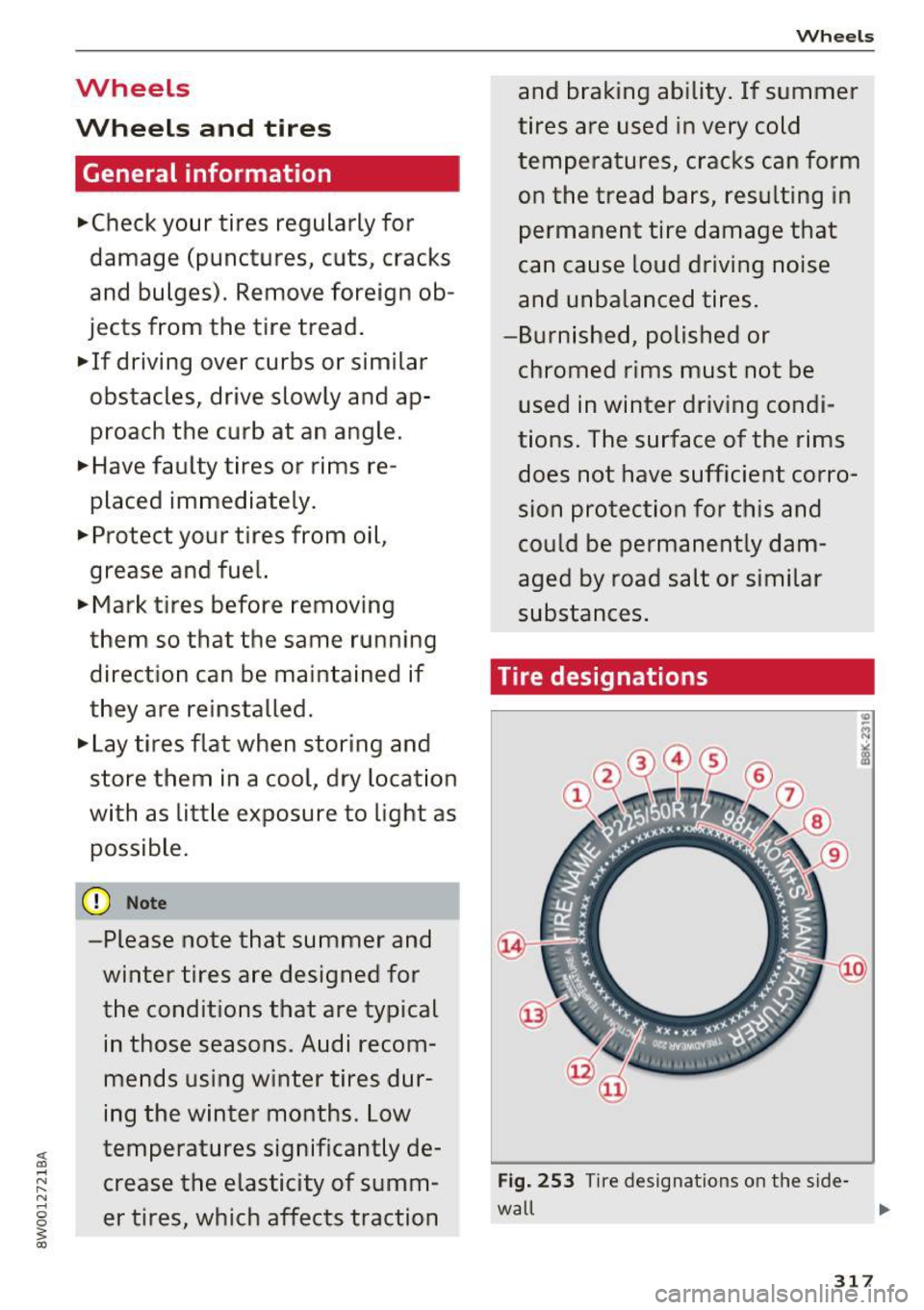
Tire designations
Fig. 253 T ir e designations on the side -
wall Ill>
317
Page 337 of 386
<( a, .... N ,....
N .... 0 0
3 a,
significantly under-inflated tire causes the tire to
overheat and can lead to tire failure. Under-infla
tion also reduces fue l eff ic iency and tire tread
life, and may affect the vehicle's hand ling and
stopping ab ility.
Please note that the TPMS is not a substitute for
proper tire ma intenance, and it is the driver's re
sponsib ility to ma intain correct tire pressure,
even if under-inflation has not reached the leve l
to tr igger illum inat io n of the TPMS low tire p res
sure telltale .
Your veh icle has also been equ ipped w ith a TPMS
malfunct ion indicator to indicate when the sys
tem is not operat ing properly. The TPMS mal
function ind icator is combined w ith the low tire
p ressure tellta le. Whe n the system detects a
malfunct ion, the te lltale will flash fo r approxi
mate ly one m inute and then remain cont inuo usly
illum inated. This sequence will continue upon
subseq uent ve hicle start -ups as long as the ma l
function exists.
When t he mal funct io n ind icator is ill umin ated,
the system may not be ab le to detec t or signal
l ow tire pressure as intended. TPMS ma lfunctions
may occur for a variety of reasons, incl uding the
installation of replacement or alternate t ires or
wheels on the vehicle that prevent the TPMS from functioning properly. Always check the
TPMS malfunction telltale after rep lacing one or
more t ires or whee ls on your ve hicle to ensu re
that the replacement or alte rnate ti res and
wheels a llow the TPMS to con tinue to func tion
p roperly.
If the Tire Pressure Monitoring System
indicator appears
The tire pressure indicator in the instrument
cluster informs you if the tire pressure is too low
or if there is a system mo/function.
Using the ABS sensors, the tire pressure mo nitor
ing system compa res the tire tread circ umfe r
ence an d vib ration cha racteristics of the individ u
a l tires. If the pressure changes in one or more
tires, this is ind icated in the instrument cluster
d isp lay with an
RE indicator light and a message.
Wh eel s
If only one tire is affected, the location of that
t ir e will be indicated.
T he tire press ures mus t be store d in the Infot ain
ment system again each t ime the pressures
change (switching between partia l and full load
pressure) or after changing or replacing a tire on
yo ur vehicle ¢
page 336 . The tire p ressure mon i
toring indicator only monitors the t ire press ure
you have sto red. Refer to the tire pressure labe l
for the recommended tire press ure for your vehi
cle
¢page 327, fig. 256 .
Tire tread circumference and vibration cha racter
istics can change and cause a tire pressu re warn
i ng if:
- the t ire pressure in one or more tires is too low.
- the ti res have structure damage .
- t he t ire w as rep lace d or the t ire pressu re
changed and it was no t store d aga in
¢page 336.
-only partially used tires a re rep laced w it h new
tires .
Indicator lights
RE-Loss of pressu re in at leas t one tire¢ &.
Check the tires and repla ce or repair if necessary.
C heck/co rrect the pressures on all fou r tires and
store the pressure again in the Infotainment sys
tem ¢
page 336 .
m (T ire Pressure Moni tor ing Sys tem) Tire
pres sure: malfunction! See owner' s manual.
If
m appea rs a fter swi tching the ignition on or
whi le driving and the
RE indicator light in the in
strument cl uster b links for app roximately one
minute and then stays on, the re is system ma l
funct ion. Try to store the correct tire pressu res
¢
page 336. In some cases, yo u m ust dr ive fo r
severa l m inu tes after s toring the pressu res unt il
the indicator lig ht turns off . If the indica tor light
does not turn off or turns on agai n afte r a short
per io d of t ime, dr ive to a n author ized Audi dealer
o r auth o rized Aud i Serv ice F acili ty immedia tely to
have the mal func tion cor rected.
IJI.
335
Page 339 of 386
<( a, .... N ,....
N .... 0 0
3 a,
Care and cleaning
General information
Regular, proper care helps to maintain your vehi
cle's value.
It can a lso be a requirement when
submitting warranty claims for corrosion damage
and paint defects on the body.
The required cleaning and care products can be
obtained from an authorized Audi dealer or au
thoriz ed Service Facility. Read and follow th e in
structions for use on the packaging .
A WARNING
-Us ing clean ing and care products incorrectly
can be dangerous to your health.
- Always store clean ing and care products out
of reach of children to reduce the r isk of po i
soning .
@ For the sake of the environment
- Preferably buy environmentally-friendly
products when buying cleaning agents.
- Do not dispose of leftover cleaning and care
products with household trash.
Car washes
The longer that deposits such as insects, bird
droppings, tree sap or road salt remain on the ve
h icle, the more the surface can be damaged. High
temperatures such as those caused by sunlight
i ncrease the damag ing effect .
Before washing, r inse off heavy depos its with
p lenty of water.
Stubborn deposits such as bird droppings or tree
sap are best removed with plenty of wate r and a
microfiber cloth.
Also, wash the underside of your vehicle once road sa lt stops being used for the season .
Pressure washers
When washing your ve hicles w ith a pressure
washer, always follow the ope ra ting inst ructions
p rovided w ith the pressure washe r. This is espe
cially important in regard to the pressure and
spraying distance. Do not aim the spray directly
Ca re and cleaning
at seals on side w indows, doo rs, the hood, the
lu ggage compartment lid or the sunroof* or at
t ires, rubber hoses, insulating material, sensors *
or camera lenses*. Keep a distance of at least 16
in
(40 cm).
Do not remove snow and ice with a pressure
washer.
Never use rota ry nozzles or high pressure noz
zles .
T he wate r temperatu re must not be above
140 °F
(60 °() .
Automat ic car washe s
Spray off the vehicle before washing .
Make s ure that the windows and roof * are closed
and the windsh ield wipers are off. Follow instruc
t ions from the car wash operator, especially if
there are accessories attached to your vehicle.
If possible, use car washes that do not have
brushes.
Washing by hand
Clean the ve hicl e starting from the top and work
ing down using a soft sponge or cleaning br ush .
U se solvent-free cleaning products.
Washing vehicles with matte finish paint by
hand
To avoid damaging the paint when washing, first
remove d ust and large particles from your vehi
cle. Insects, grease spots and f ingerprints are
best removed w ith a special cleaner for matte
finish paint.
Apply the product using a microfiber cloth . To
avo id damag ing the pa int surface, do not use too
much pressure .
Rinse the vehicle thorough ly with water. Then
clean using a neutra l shampoo and a soft mic ro
fiber cloth.
Rinse the ve hicl e thorough ly agai n and let it air
dry. Remove any water residue using a sham my.
IIIJ,,
337
Page 340 of 386
Care and cleaning
& WARNING
-Only wash the vehicle when the ignition is
off or follow the instruct ions from the car
wash operator to reduce the risk of acci dents.
- To reduce the risk of cuts, protect yourself from sha rp metal components when wash
ing the underbody or the inside of t he wheel
hous ings.
- After was hing the vehicle, the braking effect
may be delayed due to mo isture on the
bra ke rotors o r ice i n the winte r. This in
c reases the risk of an a cciden t. The bra kes
must be dried first with a few care ful brake
applications .
@ Note
-If you wash the ve hicle in an automa tic car
wash, yo u must fold the exterior m irrors in
to reduce the risk of damage to the mirrors.
Power folding exterior mirrors * must on ly
be fo lded in and out us ing the power folding
funct ion.
- To reduce the risk of damage to the rims
and tires, compare the width between the
whee ls on your vehicle w ith the distance be
tween t he gu ide rai ls in the car wash. -
To red uce the risk of damage, compare the
heig ht and width of your vehicle with the
heig ht and w idth of the inside of the car
wash.
- To prevent paint damage, do not wash the
vehicle in direct sunlight.
- To reduce the risk of damage to the surface,
do not use insect removing sponges, k itchen
sponges or s imilar items.
- Matte finish painted vehicle components:
- To reduce the r isk of damage to the sur-
face, do not use polishing agents or hard
wax.
- Never use protective wax. It can destroy
the matte finish effect.
- Do not place any stickers or magnetic signs on vehicle parts pain ted with matte
finish paint. The paint could be damaged
when the stickers or magne ts are re
moved.
@ For the sake of the environment
Only wash the veh icle in facilities spe cially de
signed for that pu rpose. This will reduce the
r isk of dirty wate r contamina ted with o il from
entering the sewer system .
Cleaning and care information
When cleaning and caring for individual vehicle
components, refer to the fo llowing tables. The
information conta ined there is s imply recom
mendations . For quest io ns or for components that are not
listed, consult an authorized Aud i
dealer or authorized Audi Service Facility . Also
follow the information found in c> & .
Exter io r cleaning
Component Situation Solution
Wind shi eld wip er
Deposits c> page 5 7, Cleaning windshield wiper blades
blades
Headlights /
Deposits Soft sponge with a mild soap solutiona>
Tail light s
S ensor s/
Deposi ts Sensors: soft cloth w ith solven t-free cleaning sol ution
Camera lenses Camera lenses: soft cloth with alcohol -free cleaning so lu-
tion
Snow/ice Hand brush/solvent-free de-icing spray
338
Page 342 of 386
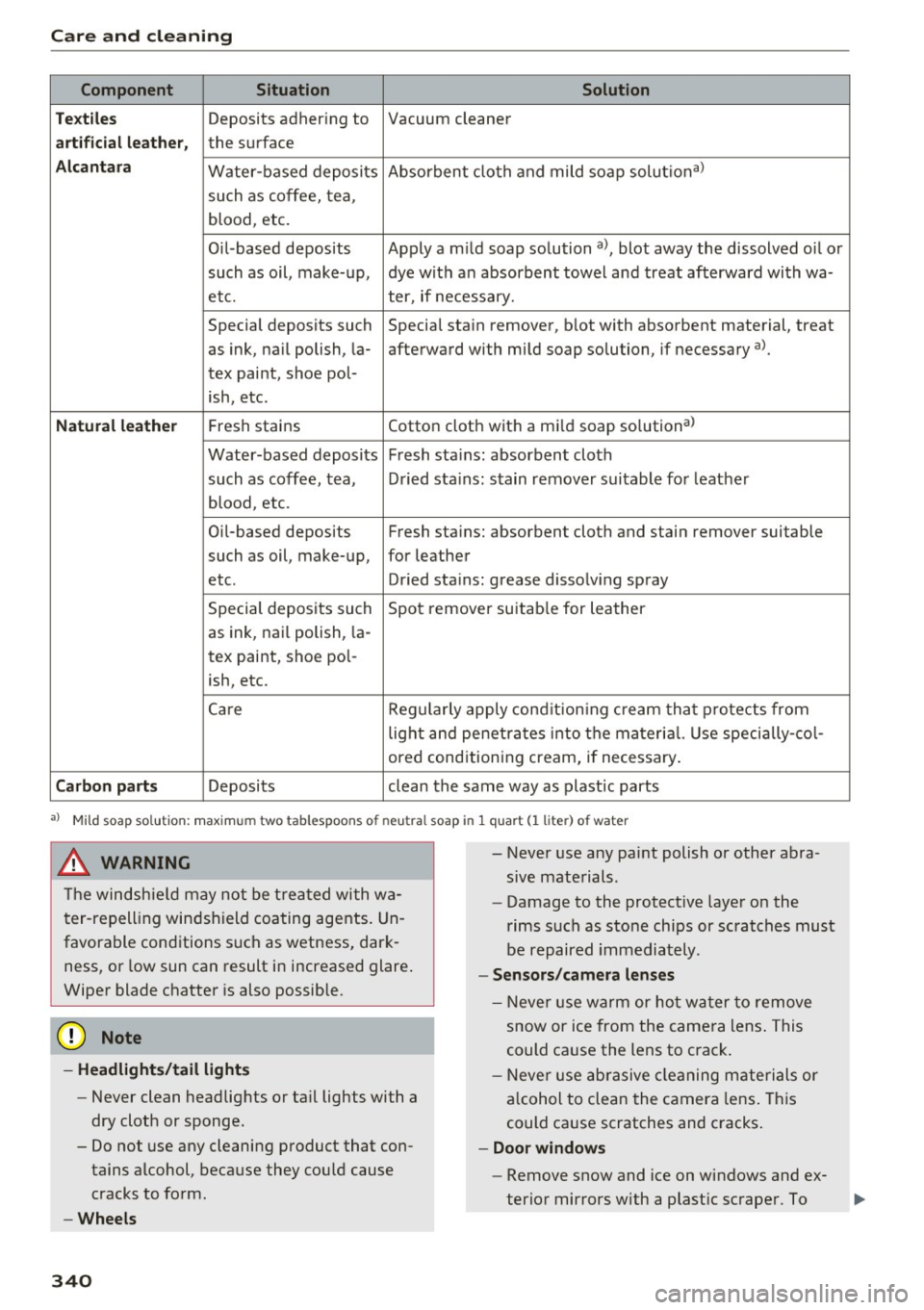
Care and cleaning
Component Situation Solution
Te xtil es
Deposits adhering to Vacuum cleaner
a rt ifici al le ather , the surface
Alcant ara Water-based deposits Absorben
t cloth and mild soap solutiona>
such as coffee, tea,
blood, etc.
O il-based deposits Apply a m ild soap solution a), blot away the dissolved oil or
such as oil, make-up, dye with an absorbent towel and treat afterward with wa-
etc. ter, if necessary.
Special deposits such Special stain remover, b lot with absorbent material, treat
as ink, na il polish, la- afterward with mild soap solution, if necessary a).
tex paint, shoe pol-
ish, etc.
Natural leather Fresh stains Cotton cloth with a mi
ld soap solutiona>
Water-based deposits Fresh sta ins : absorbent cloth
such as coffee, tea, Dried sta ins: stain remover suitable fo r leather
blood, etc.
Oil-based deposits Fresh stains: absorbent cloth and stain remover suitable
such as oil, make-up, for leather
etc. Dried sta ins : grease dissolv ing spray
Special deposits such Spot remover suitab le for leather
as ink, nai l polish, la -
tex paint, shoe pol-
ish, etc.
Ca re Regularly apply cond ition ing cream that protects from
light and penet rates into the materia l. Use specia lly-co l-
ored conditioning cream, if necessary.
Carbon parts Deposits clean the same way as plastic parts
a) Mild soap solution: maximum two tablespoons of neutral soap in 1 quart (l liter) of water
_& WARNING
The windshie ld may not be trea ted with wa
ter-repelling windshield coating agents. Un
favorable conditions s uch as wetness, dark
ness, or low sun can result in increased glare .
Wiper blade chatter is also possible.
(D Note
- Headlights/tail light s
-Never clean headlights or tail lights with a
dry cloth or sponge.
- Do not use any cleaning product that con
tains alcohol, because they could cause
cracks to form.
- Wheels
340
-
- Never use any paint polish or other abra
sive materials.
- Damage to the protect ive layer on the
rims such as stone chips or scratches must
be repaired immediately.
- Sensors /camera lenses
- Neve r use wa rm or ho t wa ter to remove
snow or ice from the camera lens . This
could cause the lens to crack .
- Neve r use ab rasive cleaning materials or
a lcohol to clea n the camera lens . This
could cause scratches and cracks .
-Doo r window s
-Remove snow and ice on windows and ex-
terior mirrors with a plast ic scraper. To
Page 343 of 386
<( a, .... N ,....
N .... 0 0
3 a,
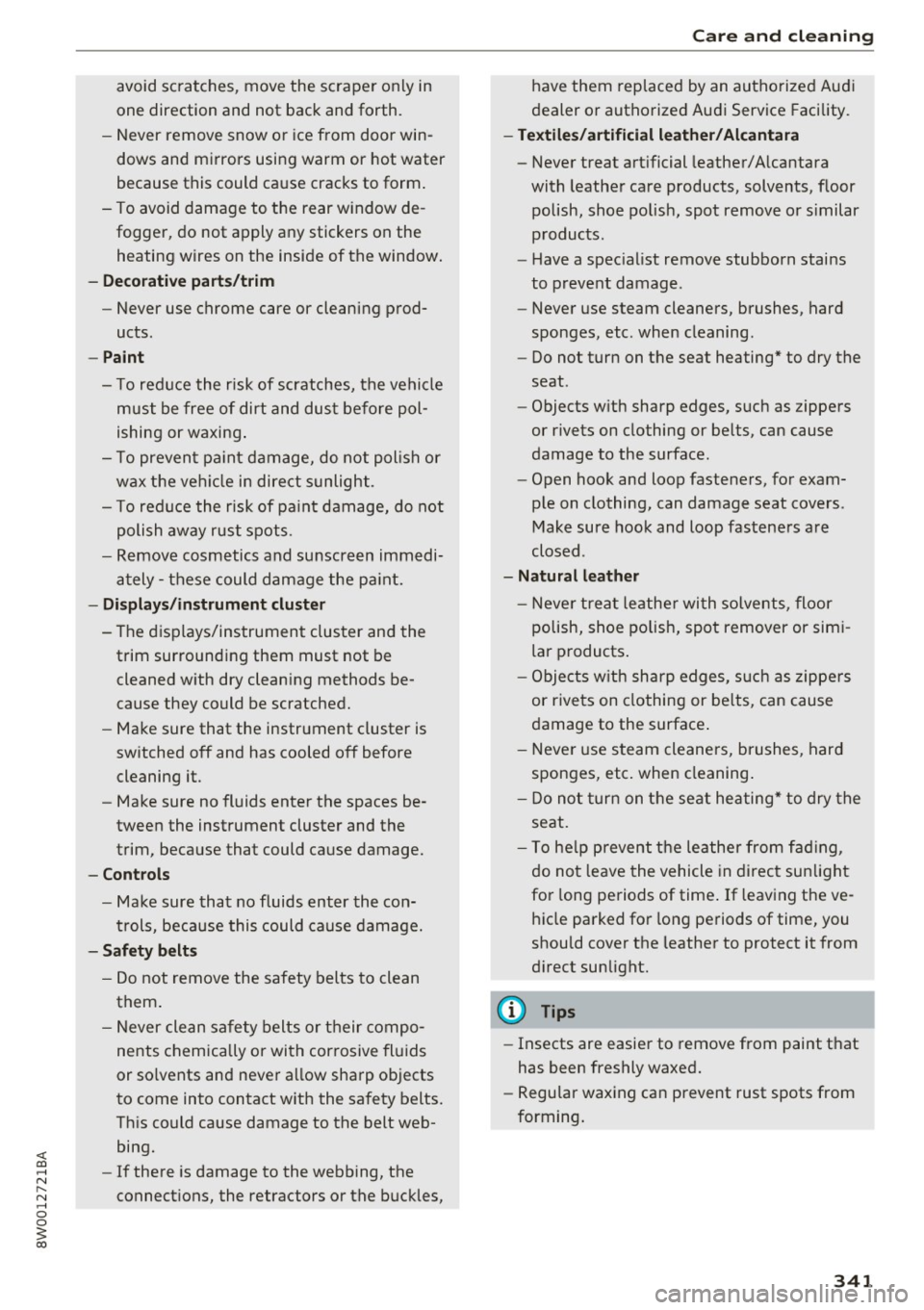
avoid scratches, move the scraper only in
one direction and not back and forth.
- Never remove snow or ice from door win
dows and mirrors using warm or hot water
because this could cause cracks to form.
- To avoid damage to the rear window de
fogger, do not apply any stickers on the
heating wires on the inside of the window.
- Decorative part .s/trim
- Never use chrome care or cleaning prod-
ucts .
- Paint
- To reduce the risk of scratches, the vehicle
must be free of dirt and dust before pol
ishing or waxing .
- To prevent paint damage, do not polish or
wax the vehicle in direct sunlight .
- To reduce the risk of paint damage, do not
polish away rust spots.
- Remove cosmetics and sunscreen immedi
ately- these could damage the paint.
- Displays/instrument cluster
- The displays/instrument cluster and the
trim surrounding them must not be
cleaned with dry cleaning methods be
cause they could be scratched.
- Make sure that the instrument cluster is
switched off and has cooled off before
cleaning it.
- Make sure no fluids enter the spaces be
tween the instrument cluster and the
trim, because that could cause damage.
- Controls
- Make sure that no fluids enter the con-
trols, because this could cause damage.
- Safety belts
- Do not remove the safety belts to clean
them.
- Never clean safety belts or their compo
nents chemically or with corrosive fluids
or solvents and never allow sharp objects
to come into contact with the safety belts.
This could cause damage to the belt web bing.
- If there is damage to the webbing, the
connections, the retractors or the buckles,
Care and cleaning
have them replaced by an authorized Audi
dealer or authorized Audi Service Facility.
- Textiles/artificial leather/ Alcantara
- Never treat artificial leather/Alcantara
with leather care products, solvents, floor
polish, shoe polish, spot remove or similar
products.
- Have a specialist remove stubborn stains
to prevent damage.
- Never use steam cleaners, brushes, hard
sponges, etc . when cleaning.
- Do not turn on the seat heating* to dry the
seat .
- Objects with sharp edges, such as zippers
or rivets on clothing or belts, can cause
damage to the surface.
- Open hook and loop fasteners, for exam
ple on clothing, can damage seat covers .
Make sure hook and loop fasteners are
closed .
- Natural leather
- Never treat leather with solvents, floor
polish, shoe polish, spot remover or simi
lar products.
- Objects with sharp edges, such as zippers
or rivets on clothing or belts, can cause
damage to the surface .
- Never use steam cleaners, brushes, hard
sponges, etc. when cleaning.
- Do not turn on the seat heating* to dry the
seat.
- To help prevent the leather from fading,
do not leave the vehicle in direct sunlight
for long periods of time. If leaving the ve
hicle parked for long periods of time, you
should cover the leather to protect it from
direct sunlight.
(D Tips
- Insects are easier to remove from paint that
has been freshly waxed.
- Regular waxing can prevent rust spots from
forming.
341
Page 349 of 386
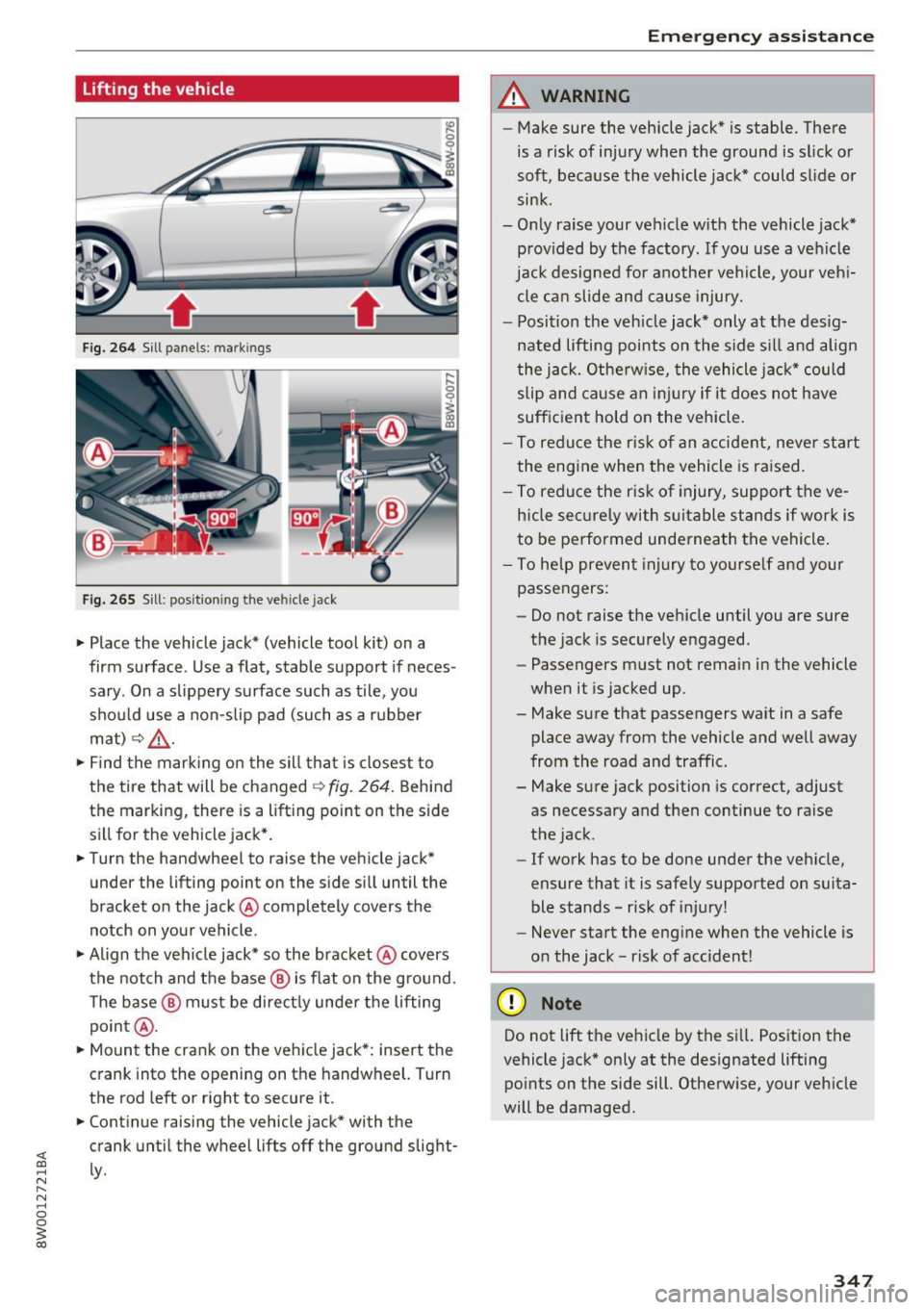
lifting the vehicle
Fig. 264 Sill p anels : m arkin gs
Fig. 265 Sill: posit io nin g th e vehicle jack
.,. Place the vehicle jack* (vehicle tool kit) on a
firm surface . Use a flat , stable support if neces
sary . On a slippery surface such as tile, you
sho uld use a non-s lip pad (such as a rubber
mat)
¢ 8, .
.,. Find the mar king on the sill that is closest to
the tire that will be changed¢
fig. 264. Behind
the marking, there is a lift ing point on the side
sill for the v ehicle jack* .
.,. Turn the handwheel to raise the veh icle jack*
under the lifting point on the s ide s ill until the
bracket on the jack @completely covers the
notch on your vehicle.
.,. Align the vehicle jack* so the bracket @covers
the notch and the base @ is flat on the gro und .
The base @ must be direct ly unde r the lifting
poin t@ .
.,. Mount the crank on the vehicle jack*: insert the
crank into the opening on the handwheel. Turn
the rod left or right to secu re it .
.,. Cont inue raising the vehicle jack* with the
crank until the wheel lifts off the ground slight
ly .
Em ergen cy a ssis tanc e
A WARNING
--Make sure the vehicle jack* is stable. There
is a risk of inju ry when the ground is slick o r
soft, because the vehicle jack* could slide or
sink .
- Only raise your vehicle w ith the vehicle jack*
provided by the factory . If you use a vehicle
jack designed for anothe r vehicle, your veh i
cle ca n slide and cause injury.
- Position the veh icle jack* only at the des ig
nated lifting points on the side s ill and align
the j ack. Othe rw ise, the vehicle jack* could
slip and cau se an i njury if it does not have
sufficient hold on the vehicle.
- To reduce the r is k of an accident, neve r start
the engine when the vehicle is raised.
- To reduce the r isk of injury, support the ve
h icle sec urely with s uitable stands if wor k is
to be performed underneath the vehicle .
- To help preven t injury to yourse lf and your
passengers:
- Do not raise the vehicle until you are sure
the jack is securely engaged .
- Passengers must not remain in the vehicle
when it is jacked up.
- Make sure that passengers wait in a safe place away from the vehicle and well away
from the road and traffic .
- Make sure jack position is correct, adjust
as necessary and then continue to raise
the jack .
- If work has to be done under the veh icle,
ensure that it is safely supported on suita
ble stands -risk of i njury!
- Never start the eng ine when the vehicle is
o n the jack -risk of accident!
(D Note
Do not lift the ve hicle by the s ill. Pos ition the
vehicle jack* only at the designated lifting po ints on the side sill. Otherw ise, your veh icle
will be damaged .
347
Page 354 of 386
Fuses and bulbs
Fuse color identification
Color Current rating
in amps
Black 1
Purple 3
Light brown 5
Brown 7.5
Red 10
Blue 15
Yellow 20
White or transparent 25
Green 30
orange 40
A WARNING
Do not repair fuses and never replace a blown
fuse with one that has a higher amp rating.
This can cause damage to the electrical sys
tem and a fire.
(D Note
If a new fuse burns out again shortly after you
have installed it, have the electrical system
checked as soon as possible by an authorized
Audi dealer or authorized Audi Service Facili
ty .
Q) Tips
-The following table does not list fuse loca
tions that are not used.
- Some of the equipment listed in the follow ing tables applies only to certain model ver
sions or certain optional equipment.
352
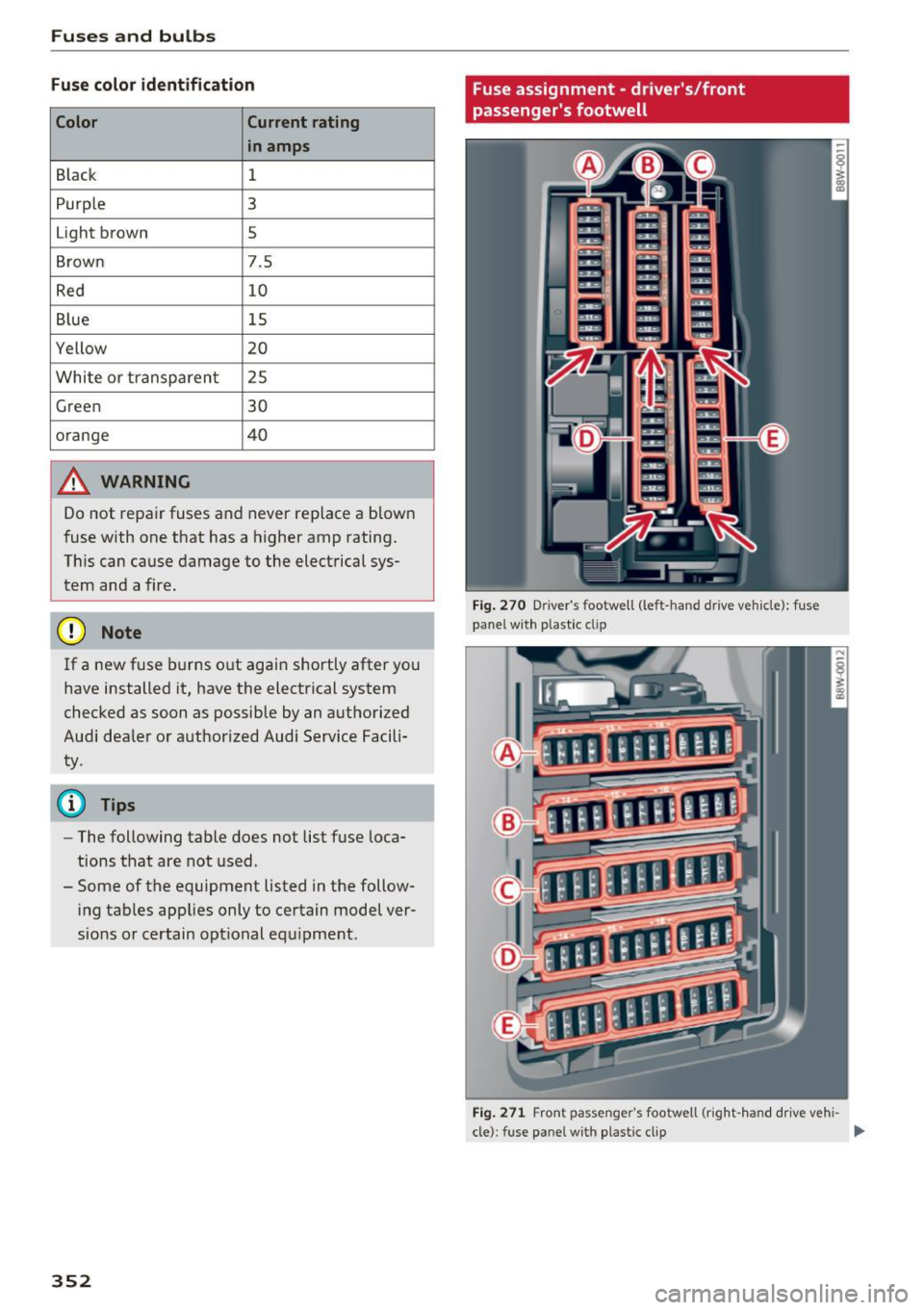
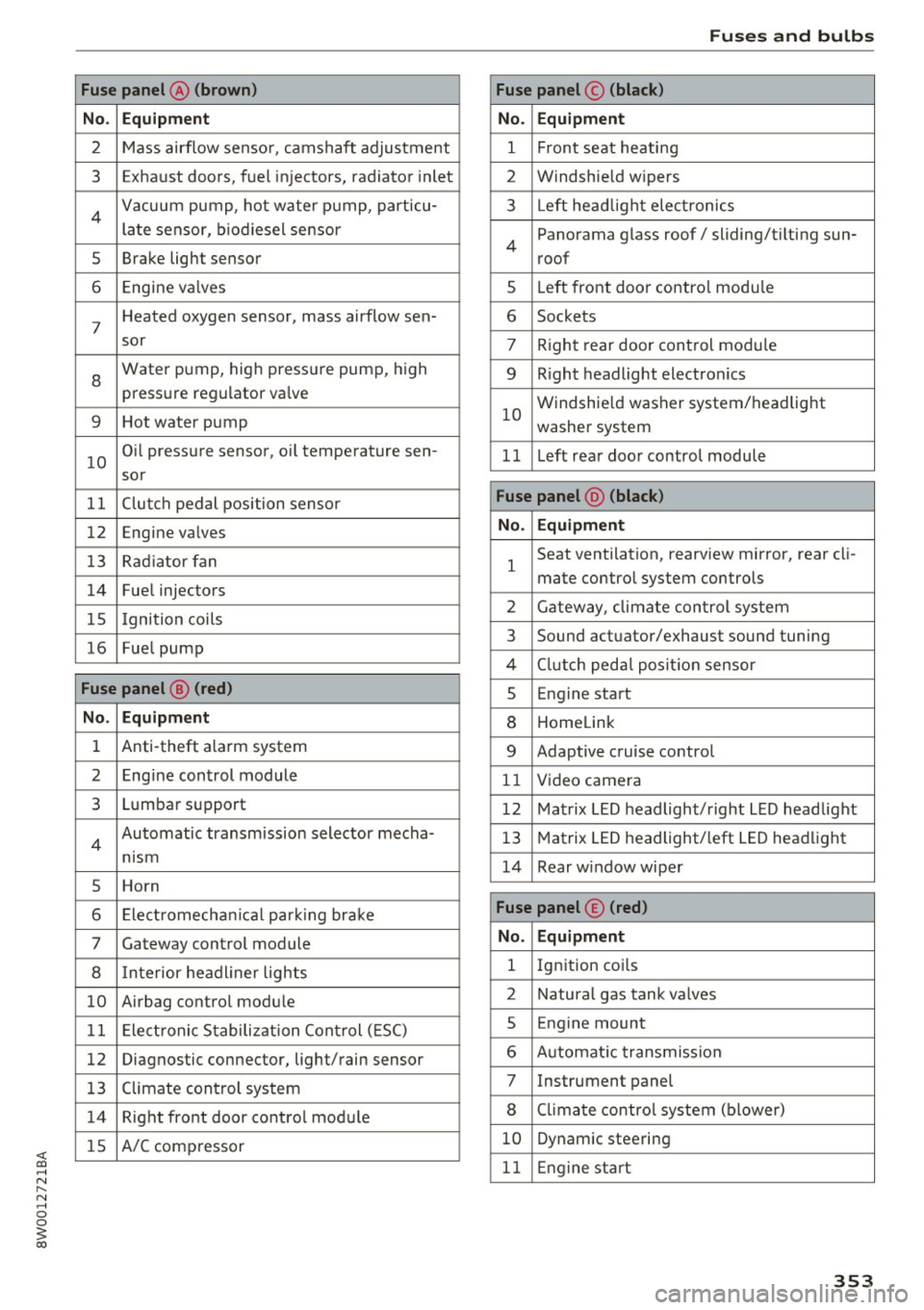
Fuse assignment - driver's/front
passenger's footwell
Fig. 270 D river 's footwell (left -hand drive vehicle) : fuse
panel w ith plastic clip
Fig. 271 Front passenger 's footwell (right -hand drive vehi-
cle) : fuse pa nel wit h plastic cl ip
Ill>
Page 355 of 386
<( a, .... N ,....
N .... 0 0
3 a,
Fuse panel @ (brown)
No . Equipment
2 Mass airflow sensor, camshaft adjustment
3 Exhaust doors, fuel in jectors, radiator inlet
4 Vacuum pump, hot water pump, particu -
late senso r, biodiesel sensor
5 Brake light sensor
6 Engine va lves
7
Heated oxygen sensor, mass airflow sen-
sor
8
Water pump, high pressure pump, high
pressure regulator va lve
9 Hot water pump
10
Oil pressure sensor, oi l temperature sen-
sor
11 Clutch pedal position sensor
12 Engine valves
13 Radiator fan
14 Fuel injectors
15 I gnition coils
16 Fuel pump
Fuse panel @ (red)
No . Equipment
1 Anti-theft alarm system
2 Engine control module
3 Lumbar support
4
Automatic transmission selector mecha-
nism
5 Horn
6 Electromechan ical park ing brake
7 Gateway control module
8 I nterior headl iner lights
10 Airbag control module
11 Electronic Stabilization Control (ESC)
12 Diagnostic connector, light/rain sensor
13 Climate control system
14 Right front door control module
15 A/C compressor
Fuses and bulbs
Fuse panel © (black)
No . Equipment
1 Front seat heating
2 Windshield w ipers
3 L eft head light electronics
4
Panorama glass roof/ sliding/t ilting sun-
roof
5 L eft front door control module
6 Sockets
7 Right rear door control module
9 Right headlight electronics
10
Windshield washer system/headlight
washer system
1 1 Left rear door control module
Fuse panel @ (black)
No . Equipment
1
Seat ventilation, rearv iew mirror, rear cl i-
mate control system controls
2 Gateway , climate control system
3 Sound actuator/exhaust sound tuning
4 Clutch pedal pos ition sensor
s Engine start
8 Homelink
9 Adaptive cruise control
11 Video camera
12 Matrix LED headlight/right LED headlight
13 Matrix LED headlight/left LED headlight
14 Rear window wiper
Fuse panel © (red)
No . Equipment
l Ignition coi ls
2 Natural gas tank valves
5 Engine mount
6 Automat ic transmission
7 Instrument panel
8 Cli mate control system (blower)
10 Dynamic steering
11 Engine start
353
Page 356 of 386
Fuses and bulbs
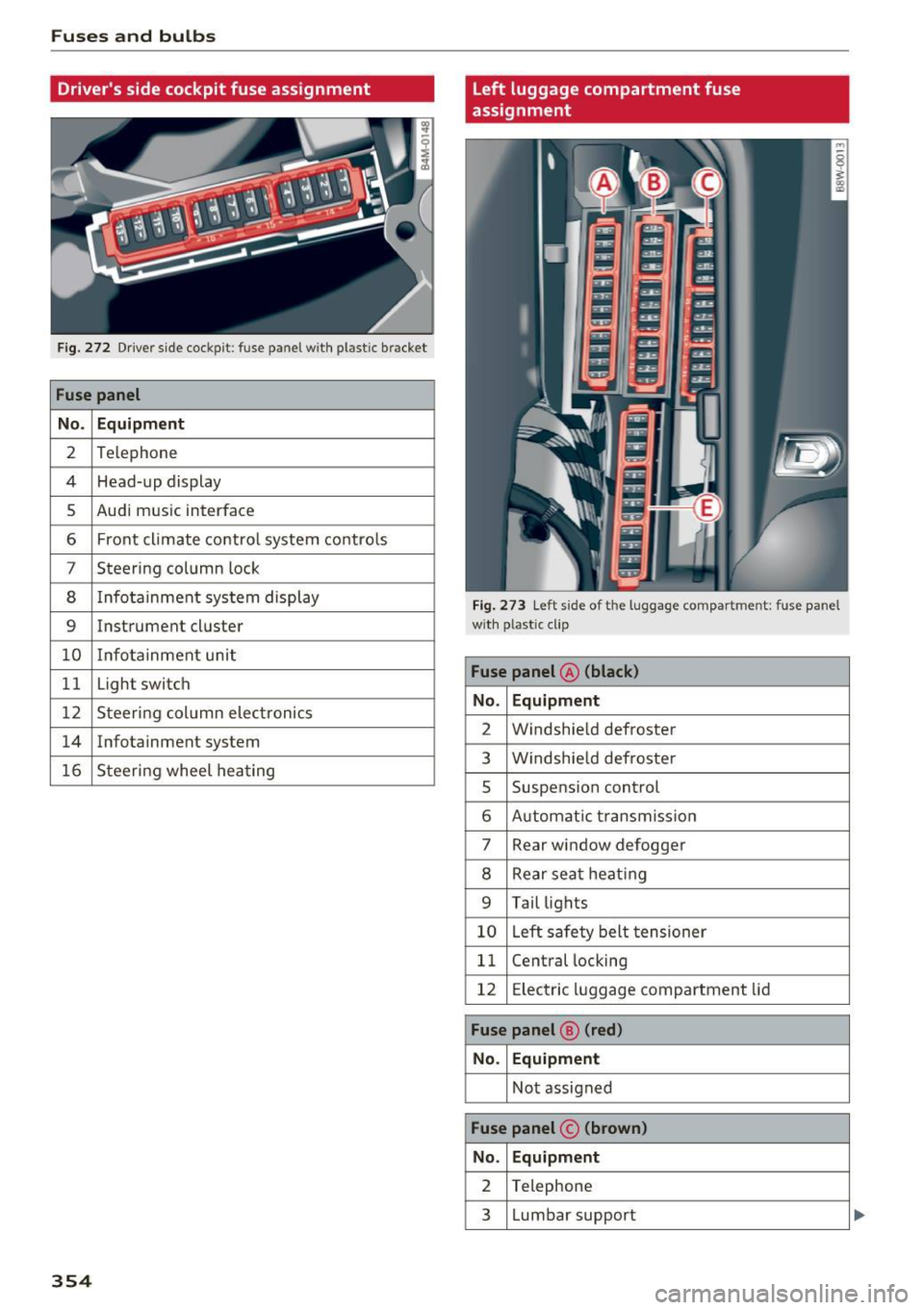
Driver's side cockpit fuse assignment
Fig . 27 2 Driver side cockpit: fuse panel with plastic bracket
Fuse panel
No . Equipment
2 Te lephone
4 Head-up display
5 Audi mus ic interface
6 Front cl imate co ntro l system co ntro ls
7 Steering column lock
8 Infota inment sys tem display
9 Instrument cl uster
10 Info ta inment unit
11 Light switch
12 Steering col umn elec tronics
14 Infotainment system
16 Steer ing wheel hea ting
354
left luggage compartment fuse
assignment
Fig. 27 3 Left side of the luggage compartment: fuse panel
w ith plastic clip
Fuse panel @ (black)
No. Equipment
2 Windshie ld defroster
3 W indshie ld defroste r
5 Suspension control
6 Automat ic t ransmiss io n
7 Rear window defogge r
8 Rear seat heat ing
9 Tail lights
10 L eft sa fety belt tensioner
11 Cent ral locking
12 E lectric luggage comp artment lid
Fuse panel ® (red)
No. Equipment
No t assigned
Fuse panel © (brown )
No. Equipment
2 Telephone
3 L umbar support