Windows AUDI A4 2017 User Guide
[x] Cancel search | Manufacturer: AUDI, Model Year: 2017, Model line: A4, Model: AUDI A4 2017Pages: 386, PDF Size: 96.32 MB
Page 112 of 386
Assist
Audi pre sense rear
Description
App lies to: ve hicles w ith Audi side assist
If the risk of a collision is detected, the following
functions can trigger:
- Reversible tensioning of the front safety belts
at the corresponding speeds .
- Closing the windows and sunroof*.
- Inflating the side bolsters* in the seat backrest
and seat surface.
- Switching on the emergency flashers with in-
creased frequency
l ).
The message Audi pre sense. ~ page 108,
fig. 104 will warn you about the danger.
Aud i drive select*: the function is not active de
pending on the mode selected.
A WARNING
- To reduce the risk of an accident, please
note that the side assist* radar sensors do
not always detect every object.
- Pre sense rear does not react to people, ani
mals or objects that are crossing the vehi
cle's path or that are difficult to detect.
- Reflective objects such as guard rails, heavy
rain and ice can impair the function of the
radar sensors and the ability to detect a col
lision risk .
(D Note
The radar sensors can be displaced by impacts
or damage to the bumper, wheel housing and
underbody. Pre sense rear can be impaired by
this . Have an authorized Audi dealer or au
thorized Audi Service Facil ity check their func
tion.
(0 Tips
- The pre sense rear functions switch off
when towing a trailer.
- The pre sense rear functions may also
switch off if there is a malfunction in the
side assist* system.
1> This is not ava ilab le in some co untri es.
110
Audi pre sense city
' Description
App lies to : vehicles wit h Audi pre sense city
Within the limits of the system, pre sense city
can warn you of impending collisions with
vehicles and pedestrians and initiate the applica
ble braking maneuver if needed. Pre sense city is
active at a speed of 6 mph (9 km/h) and higher.
A pedestrian warning can occur at speeds up to 50 mph (85 km/h), and vehicle warnings can oc
cur at speeds up to 155 mph (250 km/h). A pre
sense city braking maneuver is possible at speeds
up to 50 mph (85 km/h).
Warnings
App lies to: vehicles wit h Aud i pre sense city
The system recognizes various dangerous situa
tions. The
early warning occurs when:
- a vehicle driving ahead brakes sudden ly,
- your own vehicle approaches a sign ificantly
slower vehicle or stationary vehicle in the direc
tion of travel.
- a pedestrian is standing in the lane or is moving
into the lane.
When this warning occurs, it may only be possi
ble to avo id a collision by swerving or braking
strongly. The message
Audi pre sense.
~ page 108, fig. 104 and a warning tone will
warn you about the danger.
Additionally, a jerk on the brakes may occur as an
acute warning when there is an impend ing colli
sion . If you do not react to the acute warning, pre
sense city can brake to the point of complete de
ce leration within the limits of the system. This
reduces the vehicle speed in the event of a colli
sion. The message
Audi pre sense. also ap
pears.
The following functions are triggered in conjunc
tion with pre sense basic/rear:
- Reversible tensioning of the front safety belts .
- Closing the windows and sunroof*. ..,
Page 225 of 386

<( a, ..... N ,....
N ..... 0 0
3 a,
Media
Supported media and file formats
Overview
The Jukebox*, SD card reader and th e USB storage d evice* connection support the follo wing audio/vid
e o file prop erti es :
Supported
media
File system
Metadata
Format
File exten-
s ion
Playlists
Character is-
tic s
Number of
Files Audio files
Video files*
SD/SDHC /SDXC/MMC memory cards : with a capacity up to 12 8 GB
DVD drive : audio C Ds ( up to 80 min.) with CD tex t (art ist, album, song)*, CD-ROMs w ith
a capac ity up to 700 MB; DV D±R/RW; DVD video; DVD a udio wit h aud io tracks that are
compatib le w it h a DVD v ideo playe r
Audi music interface : mobile dev ices q page 215 such a s iPods and MTP players, US B
stor age devices in "U SB Devi ce Subclass 1 and 6" tha t conform to USB 2.0 : U SB sticks,
U SB MP3 p layers (Plug -and -Play capable), exte rna l USB flash drives and ha rd drives
Memory cards : exFAT, FAT, FAT32, NTFS
USB mass storage d evice : FAT, FAT32, NTFS
USB mass storage devic e partition s (primary /logical* ): two per US B connec tion
CD /DVD file systems : 1S0966 0, Joliet, UDF
Album cove r: GIF, JPG, PNG with max.
800x800 px. The album cover from the
med ium or from Gracenote* is disp layed,
depending on availability.
MPEG Windows MPEG
FL AC M
PEG 1/2 MPEG4 AVC
Windows Media
1/2 Media 2/4 (H.264) Video 9
Layer 3 Audio 9
and 10
. mp3 .wma .m4a; .flac .mpg; .mp4; .wmv;
.m4b; .mpeg .
m4v; .asfs
.aac .mov;
.avi
.M3 U; .PLS; .WPL; . M3U8; .ASX
up to maximum 320 kbit/s and 48 kHz up to maximum 2,000 kb it/s and
48 kHz sampling frequencies sampling 720xS76 px. at maximum 2Sfps
frequen-
cy
DVD dri ve* : max . 1,000 files per medium
Jukebo x*: approximately 10 GB memory capacity; max. 3,000 files can be imported
USB mass sto rage device and memory ca rds : max. 10,000 files per medium; max.
1,000 files per playlist/folder
may differ for aud io files with var iable b it
rate.
- The media drives do not support th e W in
dows Media Audio 9 Voice format. -
Special characters (s uch as those in 103 tag
information) display differently depend ing
on the system language a nd cannot always
be guaranteed.
-
For compressing MP3 files, Audi recom
mends a bit rate of at least 160 kb it/s. The
display showing the rema ining play t ime
223
Page 226 of 386

Media
-The manufactu rer of the storage device can
provide information about its "USB Device
Subclass" . - Some MTP player functions are not support
ed, such as rating music tracks and video
playback.
CD drive
Applies to: ve hicles w ith a CD drive
The following audio file properties are supported by the CD drive:
Audio files
Supported
Audio CDs (up to 80 min) with CD text (artist, alb um, track)*, CO-ROMs with a capaci-
media ty of up to 700 MB
File system CD file system: 1509660, Joliet, UDF
Metadata Album
cover : GIF, JPG, PNG with max . 800x800 px. The album cover from the medi-
um may be disp layed, depending on availability.
Format M PE G 1/2 Windows Media Au- MP EG 2/4 FLAC
Layer 3 dio 9 and 10
File extension .mp3 .wma
.m4a; .flac
. m4b;
. aac
Playlists .M3U; .PLS; .WPL; .M3U8; .ASX
Characteristics up to maximum 320 kbit/s and 48 kHz sampling frequenc ies 48 k Hz sampling
frequency
Number of Maximum 1,000 files per medium
Files
(D Tips
-For compressing MP3 files, Audi recom
mends a bit rate of at least 160 kb it/s. The
display showing the remaining play time
may differ for audio files with variable bit
rate . -
Special characters (such as those in 103 tag
information) display differently depending
on the system language and cannot always
be guaranteed .
Troubleshooting
Problem Solution
Audi music interface /Bluetooth
Read the instructions in the chapter ~ page 215, Multimedia con-
audio player *: mobile dev ice is nectionsl~ page 212, Bluetooth audio player . You can learn
not supported . about
supported mobi le devices in the Audi database for mobile
devices at
www.audiusa.com/bluetooth.
Audi music interface :
the volume Adjust the volume of the mobile device to approximately 70% of
is too h igh/too low when start ing the maximum output~
page 220, Input level.
playback th ro ugh the AUX input.
224
Page 238 of 386
Driving sa fe ty
Driving safety
General notes
Safe driving habits
Please remember -safety first!
This chapter contains important information,
tips, instruct ions and warn ings that you need to
read and observe for your own safety, the safety
of your passengers and others. We have summar
ized here what you need to know about safety
be lts, a irbags, child restra ints as well as child
safety. Your safety is for us
priority number 1 . Al
ways observe t he i nfo rmation and wa rn ings in
this section - for your own safety as well as tha t
of yo ur passengers.
The information i n this section applies to all
model ve rsions of your vehicle . Some of the fea
tures descr ibed in t his sec tions may be s tanda rd
eq uipment on some models, or may be optional
equipment on others. If yo u are not sure, ask
your author ized Audi dealer.
A WARNING
-Always make sure that you follow the in
structions and heed the WARNINGS in th is
manual. It is in your inte rest and in the in
te rest of your passengers .
- Always keep all of the Owner's Lite rature
manuals in your Audi when you lend o r sell
yo ur vehicle so that this important informa
t ion w ill always be availab le to the dr iver
and passenge rs.
- Always keep the Owner 's Lite rature handy
so that you can find i t easi ly if yo u have
ques tions.
Safety equipment
The safety features are part of the occupant re
straint system and work together to help reduce
the risk of injury in a wide variety of occident si t
uations.
Your safety and the safety of yo ur passenge rs
should not be left to chan ce. Advan ces in tech
nology have made a var iety of features av ail ab le
to help reduce t he risk of injury in an accident .
236
The following is a list of just a few of the sa fety
features in your Audi :
- sophis tic ated safety be lts fo r dr ive r and all pas-
senge r seat ing pos itions,
- safety belt p re tensioners,
- be lt height adjustment for the front seats,
- head restraints for each seating position,
- front airbags,
- knee airbags fo r the front seats,
- side airbags in the front seats and outboard
rear seats *,
- side curtain airbags,
- special LA TC H anchorages for the outboard rear
seats and top tether anchorages for chi ld re
straints for all of the rear seats,
- adjustab le steering col umn.
These ind iv idual safety features, can work to
gether as a system to he lp protect you and your
pa ssengers in a wide range of a cciden ts. These
fea tures canno t wo rk as a sys tem if they a re not
a lways cor rec tly ad juste d and cor rect ly used.
Safety is everybod y's responsibilit y!
Important things to do before driving
Safety is everybody's job! Vehicle and occupant
safety always depends on the informed and care
ful driver .
For your safety a nd the safety of your passen
gers,
before driving alway s:
.,. Make sure that all lights and signals are operat
ing correctly .
.,. Make sure that the tire pressure is correct .
.,. Make sure that a ll windows a re clean and afford
good v is ibility to the outs ide.
.,. Se cur e all luggage and othe r items ca refully
q page 242.
.,. Make sure that noth ing can i nter fere with the
peda ls .
.,. Adjust front seat, head restraint and mirrors
correctly for yo ur height.
.,. Instruct passengers to adjust the head re
straints according to their he ight .
.,. Make sure to use the rig ht child restraint co r
rectly to protect chi ldren
q page 2 77 , Child
safety. ..,.
Page 244 of 386

Driving safety
Storing cargo correctly
Loading the luggage compartment
All Luggage and other objects must be properly
stowed and secured in the Luggage compart
ment.
Fig. 207 Safe load positio ning: place heavy objects as low
and as far forwar d as possible.
Loose items in the luggage compartment can
shift suddenly, changing vehicle handling charac
teristics . Loose items can also increase the risk of
serious personal injury in a sudden vehicle ma
neuver or in a collision.
• Distribute the load evenly in the luggage com
partment.
• Always place and properly secure heavy items in
the luggage compartment as low and as far for
ward as possible
¢ fig. 207.
• Secure luggage using the tie-downs provided
¢ page 66.
• Make sure that the rear seatback is securely
latched in place .
A WARNING
Improperly stored luggage or other items can
fly through the vehicle causing serious per sonal injury in the event of hard braking or an
accident . To help reduce the risk of serious
personal injury:
- Always put objects, for example, luggage or
other heavy items in the luggage compart
ment.
- Always secure objects in the luggage com
partment using the tie-down eyelets and
suitable straps.
242
A WARNING
Heavy loads will influence the way your vehi
cle handles. To help reduce the risk of a loss
of control leading to serious personal injury:
- Always keep in mind when transporting
heavy objects, that a change in the center of
gravity can also cause changes in vehicle
handling:
- Always distribute the load as evenly as
possible.
- Place heavy objects as far forward in the
luggage compartment as possible.
- Never exceed the Gross Axle Weight Rating or the Gross Vehicle Weight Rating specified
on the safety compliance sticker on the
front end of the driver's door. Exceeding
permissible weight standards can cause the
vehicle to slide and handle differently.
- Please observe information on safe driving
¢page 236.
A WARNING
To help prevent poisonous exhaust gas from
being drawn into the vehicle, always keep the
rear lid closed while driving.
- Never transport objects larger than those
fitting completely into the luggage area be
cause the rear lid cannot be fully closed.
- If you absolutely must drive with the rear lid
open, observe the following notes to reduce
the risk of poisoning:
- Close all windows,
- Close the sliding sunroof*,
- Open all air outlets in the instrument pan-
el,
- Switch off the air recirculation,
- Set the fresh air fan to the highest speed.
A WARNING
-
Always make sure that the doors, all win
dows, the sliding sunroof* and the rear lid are
securely closed and locked to reduce the risk
of injury when the vehicle is not being used.
- After closing the rear lid, always make sure
that it is properly closed and locked.
Page 277 of 386
collision. It is not possible to define an airbag
triggering range that will cover every possible an
g le of impact, s ince the circumstances will vary
considerably between one collision and another.
Important factors include, for example, the na
ture (hard or soft) of the impacting object, the
angle of impact, vehicle speed, etc.
¢ page 2 75,
How side curtain airbags work .
Aside from their normal safety function, safety
be lts work to he lp keep the driver or front pas
senger in pos it ion in the event of a collision so
that the side curtain airbags can p rovide protec
tion .
The airbag system is not a substitute for your
safety belt . Rather, it is part of the overall occu
pant restraint system in your veh icle . Always re
member that the airbag system can only help to
p rotect you if you are wearing your safety bel t
and wearing it properly . This is another reason
why you should always wear your safety belts, not just because the law requires you to do so
<::;> page 245, General information.
It is important to remember that whi le the s ide
curtain airbag system is designed to he lp reduce
the likelihood of serious injuries, other injuries,
for example, swelling, bruising, friction burns and minor abrasions can also be associated with
these airbags upon deployment . Remember too,
these airbags will deploy only o nce and only in
certa in ki nds of acc idents -your safety belts are
always there to offer protection .
The side curtain airba g sy stem ba sically
consists of:
- The electronic control module and external s ide
impact senso rs
- The side curtain airbags above the w indows of
the outer seating positions with ejection miti
gation feat ures
- The airbag indicator light in the instrument
panel
The airbag system is monitored electronically to make certain it is funct ion ing properly at all
times . Each time you turn on the ignit ion, the air
bag system ind icator light will come on for a few
seconds (self d iagnost ics) .
Airb ag sys tem
The side curta in airbag is not activ ated:
- if the ignition is turned off
- in side co llisions whe n the acceleration meas-
ured by the sensor is too low
- in rear-end col lisions .
_&. WARNING
-Safe ty bel ts and the airbag system will only
provide pro tect ion when occupants are in
the proper seating position
¢ page 61,
Front seats.
- I f the airbag ind ic a tor light q page 33
comes when the veh icle is being used, have
the system inspected immediately by your
authorized Audi dealer. It is possib le that
the airbag will inflate when it is not sup
posed to, or w ill not inf late when it should.
How side curtain airbags work
Side curtain airbags con work together with side
airbags to help reduce the risk of head and upper
torso injuries for occupants who are properly re
strained .
Fig. 228 Illustration of pr incip le: Inflated s ide curta in air
bags o n the left s ide
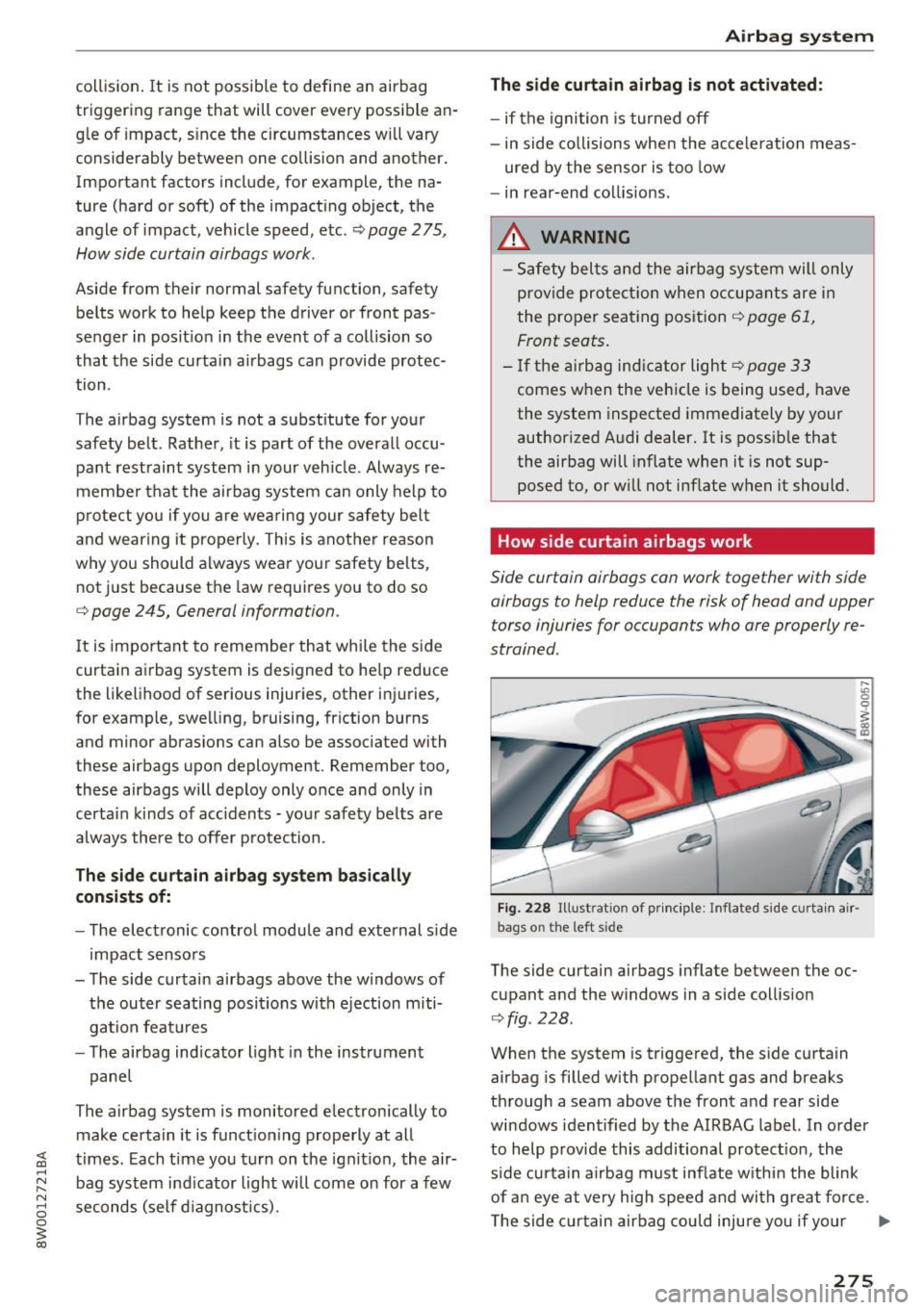
The side curtain airbags inflate between the oc
cupant and the w indows in a side collis ion
c> fig . 228 .
When the system is triggered, the side curtain
airbag is filled with propellant gas and breaks
through a seam above the front and rear side
windows identified by the AIRBAG label. In order
to help provide this additional protect ion, the
s ide curtain a irbag must inf late w ithi n the blink
of a n eye at very high speed and with g reat fo rce .
T he side c urtain airbag could injure you if yo ur
Ill>
275
Page 278 of 386
Airbag syste m
seating position is not proper or upright or if
items are located in the area where the supp le
mental side curtain airbag inflates. This applies
especially to children
c> page 2 77.
A lthough they are not a soft pillow, side curtain
airbags can "cushion" the impact and in this way
they can help to reduce the risk of in jury to the
head and the upper part of the body.
A fine dust may develop when the airbag deploys.
This is quite normal and does not mean there is a
f ire in the veh icle .
Important safety instructions on the side
curtain airbag system
Airbags are only supplemental restraints. Always
properly wear safety belts and ride in a proper
seating position.
There is a lot that yo u and your passengers must
know and do to help the safety be lts and airbags
do their job to provide supplemental protect ion.
A WARNING
Improperly wearing safety belts and improper
seating posit ions increase the risk of serious
personal inju ry and death whenever a vehicle
is being used.
- Never let occupants p lace any parts of the ir
bodies in the area from which the side cur
ta in a irbag inflate.
- Always make sure that the side curtain air
bags can inflate witho ut interferen ce.
- Use the built- in coat hooks on ly for light
weight cloth ing. Neve r leave any heavy or
sharp-edged obje cts in t he pockets that may
in terfere w ith airbag deployment and can
ca use personal injury in a collision.
- Never use hangers to hang clothes on the
hoo ks.
- Only use factory-installed s un shades or, if
shades installed after the veh icle leaves the
factory, use only genuine Aud i sun shades.
- Never swing the sun viso rs ove r to the side
windows if things such as pens, ga rage door
openers, hands-free speakers, etc . are at
tached to the sun visors. They co uld come
276
loose and cause serious injury if the side cu r
tain airbag inflates.
- A deploying airbag inflates in a fraction of a
second and with great force.
- Never attach objects to the cover or in the
deployment zone of a side curtain airbag .
- The a irbag deployment zones must be kept
clear at all times. Make s ure there are no
objects, pets, o r other persons in the space
between any vehicle occupant and any air
bag at any time.
- Do not attach any accessories to the doors.
A WARNING
- The a irbag system can deploy on ly once. If
the airbag has been triggered, the system
m ust be rep laced by an authorized A udi
dealer or qualified workshop .
- Always have work invo lv ing the side curtain
airbag system, remova l and installat ion of
the airbag components, or other repairs
pe rformed by a q ualified dealership. Other
w ise the airbag system m ay not work cor
rectly.
- Never attempt to mod ify a ny componen ts of
the airbag system in any way.
Page 339 of 386
<( a, .... N ,....
N .... 0 0
3 a,
Care and cleaning
General information
Regular, proper care helps to maintain your vehi
cle's value.
It can a lso be a requirement when
submitting warranty claims for corrosion damage
and paint defects on the body.
The required cleaning and care products can be
obtained from an authorized Audi dealer or au
thoriz ed Service Facility. Read and follow th e in
structions for use on the packaging .
A WARNING
-Us ing clean ing and care products incorrectly
can be dangerous to your health.
- Always store clean ing and care products out
of reach of children to reduce the r isk of po i
soning .
@ For the sake of the environment
- Preferably buy environmentally-friendly
products when buying cleaning agents.
- Do not dispose of leftover cleaning and care
products with household trash.
Car washes
The longer that deposits such as insects, bird
droppings, tree sap or road salt remain on the ve
h icle, the more the surface can be damaged. High
temperatures such as those caused by sunlight
i ncrease the damag ing effect .
Before washing, r inse off heavy depos its with
p lenty of water.
Stubborn deposits such as bird droppings or tree
sap are best removed with plenty of wate r and a
microfiber cloth.
Also, wash the underside of your vehicle once road sa lt stops being used for the season .
Pressure washers
When washing your ve hicles w ith a pressure
washer, always follow the ope ra ting inst ructions
p rovided w ith the pressure washe r. This is espe
cially important in regard to the pressure and
spraying distance. Do not aim the spray directly
Ca re and cleaning
at seals on side w indows, doo rs, the hood, the
lu ggage compartment lid or the sunroof* or at
t ires, rubber hoses, insulating material, sensors *
or camera lenses*. Keep a distance of at least 16
in
(40 cm).
Do not remove snow and ice with a pressure
washer.
Never use rota ry nozzles or high pressure noz
zles .
T he wate r temperatu re must not be above
140 °F
(60 °() .
Automat ic car washe s
Spray off the vehicle before washing .
Make s ure that the windows and roof * are closed
and the windsh ield wipers are off. Follow instruc
t ions from the car wash operator, especially if
there are accessories attached to your vehicle.
If possible, use car washes that do not have
brushes.
Washing by hand
Clean the ve hicl e starting from the top and work
ing down using a soft sponge or cleaning br ush .
U se solvent-free cleaning products.
Washing vehicles with matte finish paint by
hand
To avoid damaging the paint when washing, first
remove d ust and large particles from your vehi
cle. Insects, grease spots and f ingerprints are
best removed w ith a special cleaner for matte
finish paint.
Apply the product using a microfiber cloth . To
avo id damag ing the pa int surface, do not use too
much pressure .
Rinse the vehicle thorough ly with water. Then
clean using a neutra l shampoo and a soft mic ro
fiber cloth.
Rinse the ve hicl e thorough ly agai n and let it air
dry. Remove any water residue using a sham my.
IIIJ,,
337
Page 342 of 386
Care and cleaning
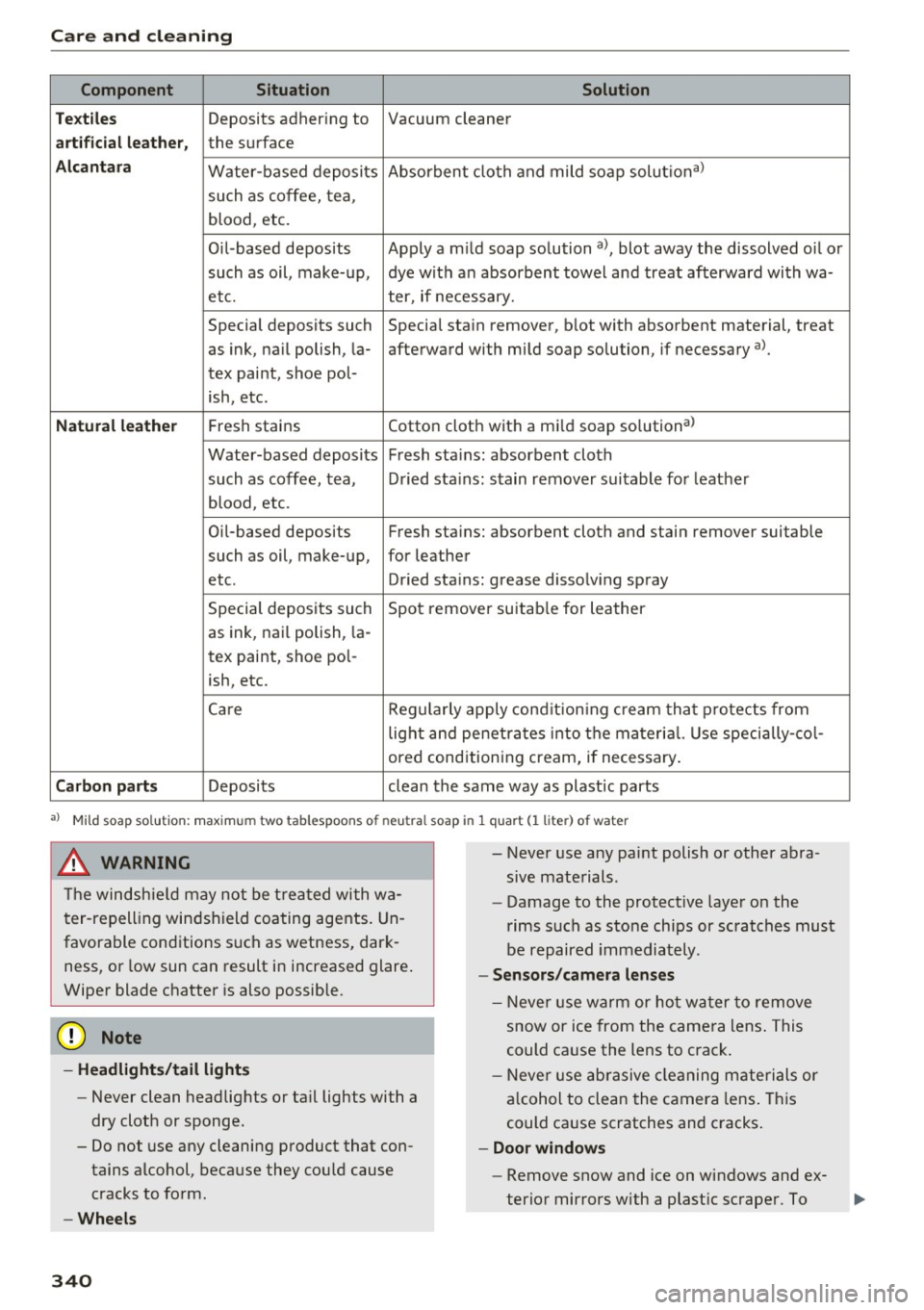
Component Situation Solution
Te xtil es
Deposits adhering to Vacuum cleaner
a rt ifici al le ather , the surface
Alcant ara Water-based deposits Absorben
t cloth and mild soap solutiona>
such as coffee, tea,
blood, etc.
O il-based deposits Apply a m ild soap solution a), blot away the dissolved oil or
such as oil, make-up, dye with an absorbent towel and treat afterward with wa-
etc. ter, if necessary.
Special deposits such Special stain remover, b lot with absorbent material, treat
as ink, na il polish, la- afterward with mild soap solution, if necessary a).
tex paint, shoe pol-
ish, etc.
Natural leather Fresh stains Cotton cloth with a mi
ld soap solutiona>
Water-based deposits Fresh sta ins : absorbent cloth
such as coffee, tea, Dried sta ins: stain remover suitable fo r leather
blood, etc.
Oil-based deposits Fresh stains: absorbent cloth and stain remover suitable
such as oil, make-up, for leather
etc. Dried sta ins : grease dissolv ing spray
Special deposits such Spot remover suitab le for leather
as ink, nai l polish, la -
tex paint, shoe pol-
ish, etc.
Ca re Regularly apply cond ition ing cream that protects from
light and penet rates into the materia l. Use specia lly-co l-
ored conditioning cream, if necessary.
Carbon parts Deposits clean the same way as plastic parts
a) Mild soap solution: maximum two tablespoons of neutral soap in 1 quart (l liter) of water
_& WARNING
The windshie ld may not be trea ted with wa
ter-repelling windshield coating agents. Un
favorable conditions s uch as wetness, dark
ness, or low sun can result in increased glare .
Wiper blade chatter is also possible.
(D Note
- Headlights/tail light s
-Never clean headlights or tail lights with a
dry cloth or sponge.
- Do not use any cleaning product that con
tains alcohol, because they could cause
cracks to form.
- Wheels
340
-
- Never use any paint polish or other abra
sive materials.
- Damage to the protect ive layer on the
rims such as stone chips or scratches must
be repaired immediately.
- Sensors /camera lenses
- Neve r use wa rm or ho t wa ter to remove
snow or ice from the camera lens . This
could cause the lens to crack .
- Neve r use ab rasive cleaning materials or
a lcohol to clea n the camera lens . This
could cause scratches and cracks .
-Doo r window s
-Remove snow and ice on windows and ex-
terior mirrors with a plast ic scraper. To
Page 371 of 386

<( a, .... N ,....
N .... 0 0
3 a,
Browser
refer to Media center . . . . . . . . . . . . . . . . . 218
Bulbs . . . . . . . . . . . . . . . . . . . . . . . . . . . . . . . 355
Buttons Control panel (MMI) . . . . . . . . . . . . . . . . . 141
Multifunction steering wheel . . . . . . . . 12, 15
C
Cable (U5B adapter/AUX connector cable) 215
California Proposition 65 Warning . . . . . . . 304
Battery specific . . . . . . . . . . . . . . . . . . . . . 314
Ca ll list . . . . . . . . . . . . . . . . . . . . . . . . . . . . . 163
Call options ................... ....... 170
Capacities AdBlue . ... .. ................ ..... . 300
Fu el tank . . . . . . . . . . . . . . . . . . . . . . . . . . . 362
Washer fluid reservoir . . . . . . . . . . . . . . . . 362
Care . . . . . . . . . . . . . . . . . . . . . . . . . . . . . . . . 337
Cargo area
refer to Loading the luggage compart-
ment .. .. ...................... ... . 242
Catalytic converter . . . . . . . . . . . . . . . . . . . . 303
CD drive (media drives) . . . . . . . . . . . . . . . . 211
Cell phone
refer to Telephone . . . . . . . . . . . . . . . . . . . 160
Center armrest . . . . . . . . . . . . . . . . . . . . . . . . 61
Cent ral indicato r lights . . . . . . . . . . . . . . . . . 26
Central locking
Central locking switch . . . . . . . . . . . . . . . . . 41
Convenience key . . . . . . . . . . . . . . . . . . . . . . 40
E mergency locking . . . . . . . . . . . . . . . . . . . . 42
Power window . . . . . . . . . . . . . . . . . . . . . . . 46
Remote control key . . . . . . . . . . . . . . . . . . . 40
Setting . . . . . . . . . . . . . . . . . . . . . . . . . . . . . 41
Central Locking . . . . . . . . . . . . . . . . . . . . . . . . 37
Certification . . . . . . . . . . . . . . . . . . . . . . . . . 366
Changing engine o il . . . . . . . . . . . . . . . . . . . 309
Changing the scale . . . . . . . . . . . . . . . . . . . . . 13
Changing wiper blades . . . . . . . . . . . . . . . . . . 58
Charging the battery (mob ile dev ices) ... . 215
Child restraints Danger of using child restraints in the front
seat . . . . . . . . . . . . . . . . . . . . . . . . . . . . . . . 254
Where can I get additional information
about child restraints and their use? . . . . 295
Child restraint system anchors ..... .. .. . 291
Index
Child safety . . . . . . . . . . . . . . . . . . . . . . . . . . 277
Im portant safety instructions for using child
safety seats . . . . . . . . . . . . . . . . . . . . . . . . 281
Installing a child restraint using the LATCH
system ....... ..................... 293
Mounting and releasing the anchorage
hook .... ... .. .. .. .... ...... ... .. .. 293
Tether anchors . . . . . . . . . . . . . . . . . . . . . . 293
T ether straps . . . . . . . . . . . . . . . . . . . . . . . 293
Child safety lock
Power window . . . . . . . . . . . . . . . . . . . . . . . 45
Rear doors . . . . . . . . . . . . . . . . . . . . . . . . . . 45
Child safety seats Booster seats . . . . . . . . . . . . . . . . . . . . . . . 287
Convertible child seats . . . . . . . . . . . . . . . 285
Danger of using child restraints in the front
seat . . . . . . . . . . . . . . . . . . . . . . . . . . . . . . . 254
How do I properly insta ll a ch ild safety seat
in my vehicle? . . . . . . . . . . . . . . . . . . . . . . . 281
Infant seats . . . . . . . . . . . . . . . . . . . . . . . . 283
LATCH system . . . . . . . . . . . . . . . . . . . . . . 293
Safety instructions . . . . . . . . . . . . . . . . . . . 281
Unus ed safety be lts on the rear seat . . . . 283
Child seats . . . . . . . . . . . . . . . . . . . . . . . . . . 283
Lower anchorages . . . . . . . . . . . . . . . . . . . 292
Securing . . . . . . . . . . . . . . . . . . . . . . . . . . . 288
Classic view . . . . . . . . . . . . . . . . . . . . . . . . . . . 14
Cleaning . . . . . . . . . . . . . . . . . . . . . . . . . . . . 33 7
Cleaning/removing ice from windows . . . . . 339
Cleaning Alcantara . . . . . . . . . . . . . . . . . . . . 340
Cl eaning artificial leather . . . . . . . . . . . . . . . 340
Cleaning carbon parts . . . . . . . . . . . . . 339, 340
Cleaning controls . . . . . . . . . . . . . . . . . . . . . 339
Cleaning decorative parts and trim . . . . . . . 339
Cleaning exhaust tail pipes . . . . . . . . . . . . . 339
Cleaning plastic parts . . . . . . . . . . . . . . . . . . 339
Cleaning textiles . . . . . . . . . . . . . . . . . . . . . . 340
Climate control system . . . . . . . . . . . . . . . . . 68
Air vents . . . . . . . . . . . . . . . . . . . . . . . . . . . . 71
Automatic recirculat ion . . . . . . . . . . . . . . . . 71
Auxiliary heater . . . . . . . . . . . . . . . . . . . . . . 71
Basic settings . . . . . . . . . . . . . . . . . . . . . . . . 71
Drive select . . . . . . . . . . . . . . . . . . . . . . . . . 121
Operat ing . . . . . . . . . . . . . . . . . . . . . . . . . . . 69
Residual heat . . . . . . . . . . . . . . . . . . . . . . . . 71
Clock . . . . . . . . . . . . . . . . . . . . . . . . . . . . 16, 229
Cockpit (overview) . . . . . . . . . . . . . . . . . . . . . . 8
369