door lock AUDI A4 2017 User Guide
[x] Cancel search | Manufacturer: AUDI, Model Year: 2017, Model line: A4, Model: AUDI A4 2017Pages: 386, PDF Size: 96.32 MB
Page 47 of 386
,&_ WARNING
After opening the luggage com partment lid
using the emergency release in vehicles with a
fixed rear seat backrest, make s ure the brack
et under the rea r bench seat loc ks sec urely in
to the mounting eyelet again.
Child safety Lock
-
The child safety lock prevents the rear doors
from being opened from the inside and the rear
power windows from be operated.
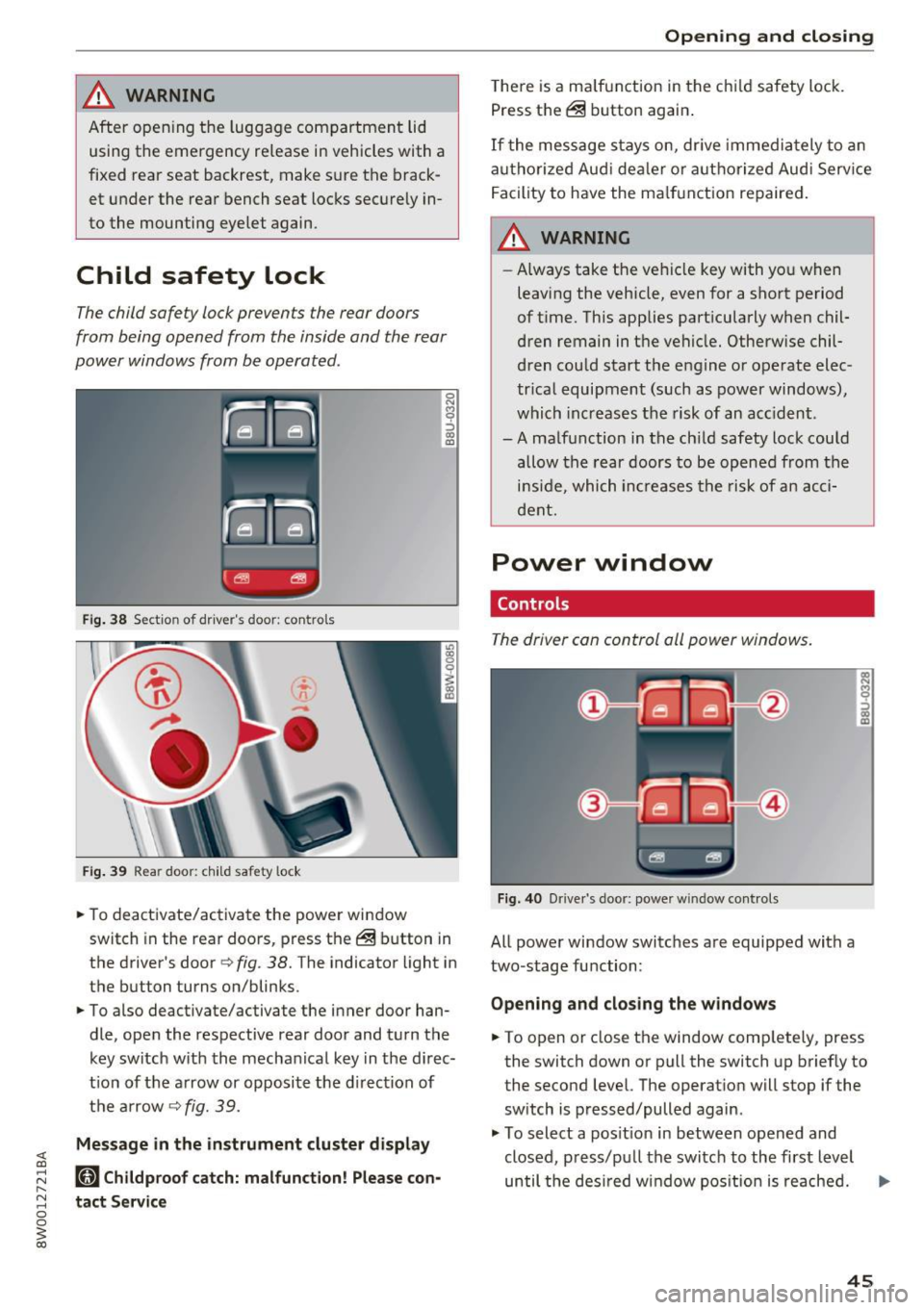
F ig. 38 Section of driver's door: co ntrols
Fi g. 39 Rear door: child safety lock
0
N
9 :::, a, a,
"'To deactivate/ac tivate the power wi ndow
switch in the rear doo rs, press the @ button in
the driver's door
r=> fig . 38. The indicator light in
the button turns on/blinks.
"' To also deactivate/activate the inner door han
dle, open the respective rear door and turn t he
key switch w ith the mecha nical key in the d irec
t ion of the a rrow or opposi te the d irec tion of
t h e ar row
r=> fig. 39.
Message in the instrument cluster display
(81 Childproof catch: malfunction! Please con
tact Service
Open ing and closing
T he re is a ma lf u nction in the c hild safety lock.
Press th e @ button again .
If the me ssage s tay s on, dr ive immedia tely to an
a uth o rized Aud i de aler o r a uth o rized Aud i Serv ice
F acility to have the ma lf u n ction repaired .
,&_ WARNING
-Always take the ve hicl e key with yo u when
leavi ng the vehicle, even for a sho rt period
of t ime. This applies part icularly when chil
dren remain in t he vehicle. Otherwise chil
d ren cou ld start t he e ngine o r operate elec
tr ica l equipment (such a s power windows) ,
which inc reas es t he risk of an ac cident.
-A ma lf u nction in the ch ild safety lock cou ld
allow the rear doors to be opened from the
i n si de, which inc reases the ris k of an acc i
d ent.
Power window
Controls
The driver can control all power windows.
Fig. 40 Drive r's door: power w indow controls
All power window switc hes are equipped with a
two-stage fu nction:
Opening and clos ing the w indows
-
"' To open or close the window comp letely, press
the switch down or pull the switch up briefly to
the second level. The operat ion will stop if the
sw itch is pressed/pulled again.
"' To select a pos it ion in between opened and
closed, p ress/p ull the switch to the first level
until the des ired w indow pos ition is reache d. ..,.
45
Page 50 of 386
Opening and clo sin g
You can switch the valet parking function on l )
when someone else is parking you r veh icle . When
the function is sw itched on, the vehicle can be
driven, locked and unlocked us ing the master
key, but access to the luggage compartment is not permitted .
.. Remove the mechan ica l key from the remote
control key¢
page 39 .
.. Open the glove compartment¢ page 64 .
.. Press the I VA LET I button to switch the valet
parking function on . The LED in t he button
turns on .
.,. lock the glove compartmen t with the mechani
ca l key .
.. For vehicles with lockable pass-thro ugh and
lockable rear seat backrests : to secure the lug
gage compartment from the veh icle interior as
well, lock the pass-through and the rear seat
backrest s using the mechanical key
¢
page 66 or¢ page 65.
.. Give your maste r key to the personnel who are
parking your ve hicle and keep the mecha nical
key.
The follow ing buttons are deactivated when the
valet parking funct ion is switched on:
- C::J button in the dr iver 's door
- C::J button on the remote control key
- Handle in the rear lid
When the valet parki ng f unction is swi tched on,
the message Valet parking a cti va te d appears in
the instrument cluster display when you switch
the ignition on .
(l) Tips
Please note that the luggage compartment
c a n sti ll be accessed from t he vehi cle interior
in vehicles with fixed rear seat backres ts or
ones t hat cannot be locked, even when the
valet parking function is switched on .
l) This fun ctio n is not a vailab le in a ll coun tries.
48
Garage door opener
(Homelink)
Description
Applies to: vehicles with garage door opene r (Horne Link)
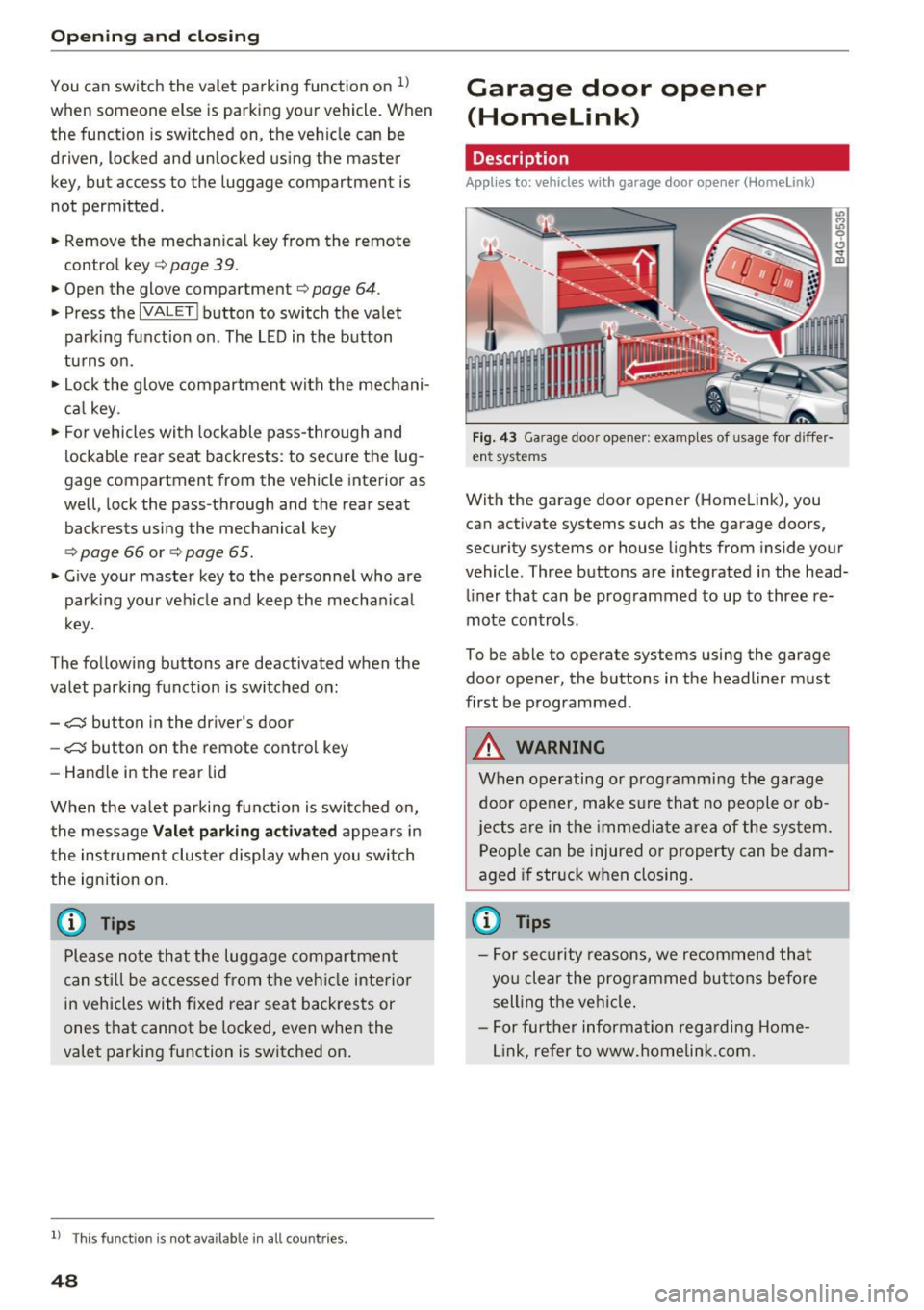
F ig. 43 Ga rage doo r opene r: exa mples of usage fo r di ffer·
en t syste ms
With the garage door op ener (Homelink) , you
can activate systems such as the garage doors,
security systems or house lights from inside your
vehicle. Three buttons are integrated i n the head
liner that can be programmed to up to three re
mote controls .
To be able to operate systems using the garage door opener, the buttons in the headliner must
first be programmed .
A WARNING
When operating or programming the garage
door opener, make sure that no people o r o b
jects a re in the immediate area of the sys tem.
P eop le can be injured or property can be dam
aged i f str uck when closing.
(D Tips
- For sec urity reasons, we recommend that
yo u clear the prog rammed but tons before
sell ing t he ve hicl e.
- For furthe r information rega rding Home
link, refer to www.homelink .com.
Page 54 of 386
Lights and Vi sion
Switching the h igh beams on/off manually
If th e h igh beams did no t swi tch on/off automat
ically as expec ted, you may sw itch them on or off
manually instead :
~ To swi tch the hig h beams o n manually, tap th e
l ever forw ard @ . The
Bl in di cator lig ht turns
on .
~ To switc h the hig h beams off manually , pull the
l ever back @. T he headlight assistant is deacti
vated.
Operating the headlight flasher
~ P ull t he leve r towar d the rear @ to ope ra te the
headlight flashers when the headlight ass ist is
activated an d the high beams a re switched off.
The head light assistant rema ins active.
Messages in the instrument cluster display
r!/1 Audi adaptive light: malfunction! See own
er's manual
Headlight assist: malfunction! See owner' s
manual
Drive to an a uth o rized Aud i dea le r or authorized
Aud i Serv ice Facility immediately to have the
malfunct io n corrected. You can still sw itc h t he
h igh beams on or off ma nually.
Headlight assist: currently unavailable. Camera
view restricted due to surroundings. See own
er' s manual
The camera view is blocked, for example by a
sticker o r debr is .
The senso r is locate d between the interior rear
view mir ror and the win dshield. Do not place any
sticke rs in th is area on the windshield.
A WARNING
Headlight assistant is only intended to assist
t he driv er. The dr iver is still r esp onsible for
cont ro llin g th e headl igh ts a nd may ne ed to
switch them on an d off manu ally depe ndin g
o n lig ht a nd visib ility con dition s.
It m ay be
necess ary to ope ra te them manually in s itu a
tions such as :
- In ad verse we ather conditi ons such as fo g,
h eavy r ain, b low in g snow or sp rayin g wa te r.
52
- On roads where oncomin g tra ffic may be
pa rtially obscured, such as expressways.
- W hen the re are roa d users that do not have
suff icient lighting, such as b icyclers or
veh icles with dirty tail lamps.
- In tig ht curves an d on steep h ills.
- In poorly li t areas.
- Wi th st ro ng ref le ctor s, such as s igns .
- If th e area of the w inds hield ne ar the sensor
is fogged over, di rty, icy or covered with a
s tick er.
Adjusting the exterior lighting
Th e functions are adjust ed in th e Infotainment
sys tem .
~ Select in the Infotainment system : IMENU! but
t on
> Vehicle > left cont rol b utton > Vehicle
settings > Exterior lighting .
Automat ic headlights
You can adjust the following sett ings in the Au
tomatic headlights
men u:
Acti vation time -you can adjust if the headlights
switch on
Early , Med or Late accord ing to the
sensit ivity of t he lig ht sensor.
Headlight assistant * -you can switch the hea d
li ght assistant * on and off.
Entry/exit lighting
Whe n it is da rk , the Entry/exit lighting ill um i
na tes the area a ro und t he vehi cle when unlo cki ng
the ve hicle an d after switc hing off the ig nitio n
and o pening the dr iver's door.
The
Entry/exit lighting only wo rks when i t is
d ar k and the light sw itch is in the
AUTO p osit io n.
Daytime running lights
USA models:
the dayti me r unning lig hts can be
swi tched on/off. Select
On or Off.
Canada models : this function ca nnot be switched
off . They act ivate automatically eac h time the ig
nit ion is switched on .
Page 57 of 386
<( a, .... N ,....
N .... 0 0
3 a,
0 - all adjustment functions ar e deactivated .
Q / P -adjust ing the left/ right exterio r mirror.
Move the knob in the desired direction .
4iil -Heat* the mirror glass depending on the out
side temperature .
8 -Folding ex terior mirro rs* . To fold the m irrors
out , turn the knob to one of the other pos itions .
In the Infotainment system, you can select if the mirro rs fo ld in automatically when you lock the
ve hicl e
r:::) page 41 .
Front pa ssenger's e xterior mirror tilt
function*
To he lp you see the curb when back ing into a
pa rking space, t he surface of the mirror tilts
slightly . Fo r th is to happen, the knob m ust be in
the posit io n for the front passenger 's ou tside
mirror.
You can adjust the t ilted m irror surface by turn
i n g the knob in the desi red direction . When you
move ou t of reverse and into another gear, the
new mirror position is sto red and assigned to the
k ey yo u are using.
The mir ror goes back into its o rig inal position
once yo u drive forward f aster than 9 mph
(15 km/h) or turn the ignition off .
A WARNING
Curved mirror surfaces (for examp le convex)
en large the f ield of vision . However, they
make objects in the mirror appear sma ller
and farther away. Your may estimate i ncor
rectly when you use these m irrors to ga uge
your dis tance from the vehicles behind you
when changing lanes, wh ich increases the r is k
of an accident.
(D Note
- Applies to vehicles with power folding out
s ide mir rors* : if the mirror housing was
moved by outside forces (such as an impa ct
whe n maneuvering), yo u m ust use the pow
e r folding func tion to fol d the mi rror a ll t he
way o ut. T he mirro rs will make a lo ud no ise
when they latc h into place . The mir ror hous
ing must not be moved back into place by
Light s and Vision
hand beca use this would impai r the func
tion of the mirror mechanism.
- Applies to veh icles withou t power folding
outside mir rors : if the m irro r ho using was
moved by outside forces (such as an impact
when maneuvering), you must move it back
in place by hand .
- If you wash the vehicle in an automatic car
was h, you must fold the exter ior mir rors in
to reduce the r isk of damage to the m irrors.
Never fold power fo ld ing exter ior mirrors*
by hand . On ly fold them in and out us ing
the power controls .
(D Tips
-If the power adjusting function malfunc
tions, the glass in both mirrors can be ad
justed by p ressing on the edge of it by hand .
- The exterior m irror settings are stored w ith
the memory funct io n*
r:::) page 63.
Dimming the mirror
Your vehicle is equipped with a manual or auto
matic* dimming rearview mirror .
Manual dimming rearview m irror
.. Pull the leve r on the bottom of the m ir r or back.
Automat ic dimming rearview mirror*
.. The inte rior a nd e xte rior m irrors d im automat i
cally when light s hines on them, for examp le
from headlig hts on a ve hicle beh ind you.
A WARNING
=
If the g lass on an a utomatic dimming m irro r
b reaks, electro lyte can leak out. T his liquid
can irritate the skin, eyes and respiratory sys
tem. If there is contact w ith the fluid, flush
i mmedia tely w ith p lenty of water. Consult a
p hysic ian if necessa ry .
- Re peated or long -term exposure to e lectro
ly te fl uid can lead to ir rita tion of the air
ways, especia lly in peopl e with ast hma o r
o ther respiratory condi tions. Take deep
b rea ths immedi ately afte r leaving the vehi
cle or, if this is not poss ible, open all of the
doors and w indows as wide as possib le .
55
Page 65 of 386
-Only remove the head restraints from the
rear seats when it is necessary for installing
a child seat¢
page 2 77, Child safety. In
stall the head restra int aga in immediately
once the child seat is removed. D riving w ith
the head restra ints removed o r not in the
upr ight position in creases the risk of ser io us
lnJUry.
Memory function
Description
Applies to: vehicles with memory function
Using the memory funct ion, you can quickly and
eas ily store a personal seat profile for the driver
and recall the settings later. The memory func
tion is controlled by the remo te control key and
the memory bu ttons in the drive r's door.
The driver's seat profile is stored again and as
signed to t he remote contro l key each time the
ve hicle is locked . Whe n you open the door, the
seat profi le is automat ically reca lled. If two peo
p le use t he vehi cle, it i s recomme nded that each
person always uses "their own" remote cont ro l
key.
Up to 2 seat prof iles can be stored in the memory
bu tto ns in the dr iver's door. O nce they are sto r
ed, these sea t profiles can be sele cted at any
time .
The fo llow ing settings are stored :
Remote con-Memory but-
trot key ton
Driver Dr iver
Seat X X
Both exterior
X X mirrors*
Remote control key
Applies to: vehicles with memory function
The driver's sea t profile can be assigned to the
remo te control key when the vehicle is locked .
.. Se lect in the Infotainment system: !MENUI b ut
ton
> Vehicle > left contro l bu tto n > Vehicle
Seats and storag e
setting s > Seats > Driver 's seat > Store set
ting s on remo te control key.
(D Tips
If you do not wish to have t he seat profi le for
another drive r assigned to the remote cont rol
key, switch the memory fu nction off in t he In
fotainment system.
Memory buttons
Applies to: vehicles with memo ry function
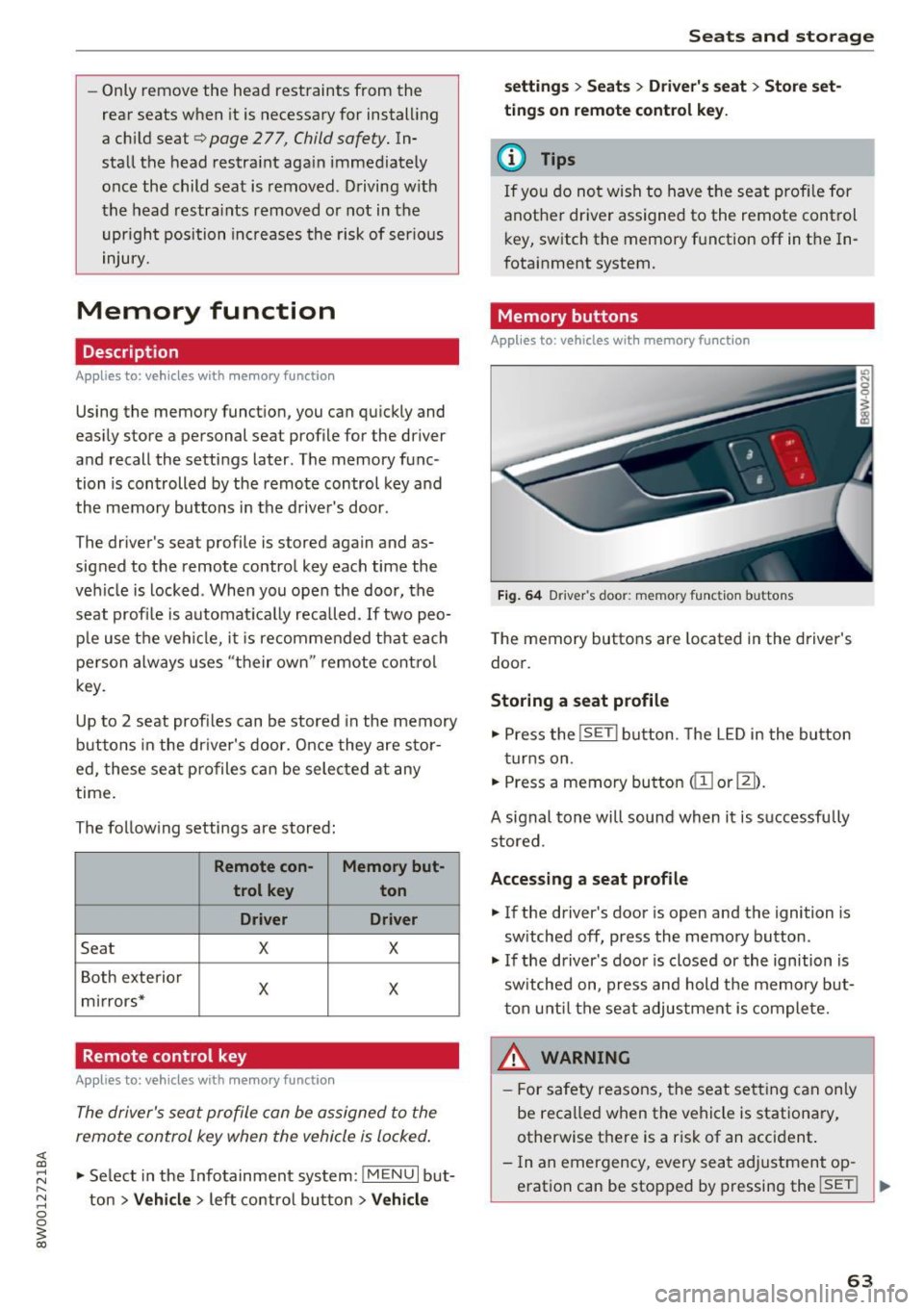
Fig. 64 Drive r's door : memory function buttons
The memory butto ns are located in the driver's
doo r.
Storing a seat profile
.. Press the !SET I button. The LED in the button
t ur ns on .
.. Press a memory bu tton
dil or~).
A signal tone will sound when it is s uccessfu lly
stored.
Accessing a seat profile
.. If the driver's door is open and the ignition is
sw itched off, press the memory button .
.. If the driver's door is closed or the ignition is
sw itched on, press and hold the memory but
t on u nti l the seat adjustment is com plete.
,&_ WARNING
- F or s afety reasons, the seat se tting can on ly
be reca lled when the vehicle is stationa ry,
otherwise t here is a risk of an accident.
- In an emergency, every sea t ad justment op
eration can be stopped by pressing the
!SET ! ..,.
63
Page 67 of 386

- Glove compartment: the glove compartment can be locked using the mechanical key
¢ page 38, Key set.
-In the door trim panels
- Storage compartment under the front center
armrest
- Storage compartment* in the rear center arm-
rest
- Storage compartment* under the light switch
- Garment hooks above the rear doors
- Nets* on the backrests of the front seats
- Nets* on the left/right luggage compartment
trim panel
A WARNING
-Always leave the lid on the glove compart
ment cover closed while driving to reduce
the risk of injury.
- Make sure that the view to the rear is not
obstructed by hanging garments.
- Hang only lightweight cloth ing and be sure
that there are no heavy or sharp-edged ob
jects in the pockets.
- Do not use clothes hangers to hang gar
ments, because this could reduce the effec
tiveness of the side curtain airbags*.
- Only use the storage compartments in the
door trim panels to store small objects that
will not stick out of the compartment and
impair the range of the side airbags.
Luggage compartment
General information
A WARNING
Read and follow the important safety precau
tions in ¢
page 242, Storing cargo correctly.
-
Seats and storage
Increasing the size of the luggage
compartment
Applies to : vehicles wit h folding backrests
The rear seat backrests can be folded forward ei
ther separately" or together.
Fig. 68 Backrest: release lever, securing knob an d lock*
Fig. 69 Backrest: fold ing in the center backrest
Folding the outer rear backrests forward and
backward
.,. Pull the release lever @in the direction of the
arrow and fold the backrest forward .
.,. Fold the backrest back up again until it latches
and the red marking @ is no longer visible
¢&, .
Folding the center rear backrest forward and
backward
.,. Pull on the upper release lever© and fold the
backrest forward@¢
fig. 69 .
.,. Fold the backrest backward until it locks into
place.
The engaged backrest can be locked © using the
mechanical key¢
page 39. This would block ac
cess into the luggage compartment from the ve
hicle interior. You can only enlarge the luggage
compartment if the backrest is not locked. .,..
65
Page 79 of 386

<( a, .... N ,....
N .... 0 0
3 a,
briefly or press and hold for longer than two sec
onds.
A WARNING
- Never t urn off the engine before the veh icle
has come to a comp lete stop.
- Please note that the brake booster and pow
er steering on ly work when the engine is
running. When the engine off, you must use
more force to steer or b rake the ve hicle. Be
cause the usual steering and brak ing capa
b ili ty is not ava ila ble, the risk of accid ents o r
injuries i ncre ases .
- For safety reasons, always park the vehicle
with the se lector lever in the P position .
Ot herwise, the re is the r is k t hat the vehicle
c o ul d roll uninten tion ally.
- After the engine h as bee n sw itched off, the
r adi ator fan c an con tinue to run for up to
1 0
m inu tes -even wi th the ig nition switche d
o ff . I t can a lso switch on again after some
t ime if the coolant temperature rises as the
result of heat buildup or if t he engine is a l
ready warm and the engine compartment is
also heated by the sun's rays.
(D Note
I f the en gine has been under heavy load for
an e xtended per io d of t ime, heat builds up in
the engine compartment after the engine is
sw itched off and there is a risk of damagi ng
the engine . For this reason, let the eng ine run
at idle fo r approximately two minu tes before
shut ting it off .
Messages
Engine running. Warning! Turn off ignition be
fore leaving car
This message appea rs and a warn ing tone sounds
i f you open t he d river's doo r when the engi ne is
ru nning.
Please press brake pedal
This message appea rs if you do not press the
brake pedal when starting the eng ine.
D riving
Ill Remote control key: key not recognized. Is
the key still in the vehicle?
T h is ind icator l igh t tu rns on and this message ap
pears if the ignition key was remove d from the
vehicle when the engi ne was running . If the ig ni
tion key is no lo nger in the vehicle, you cannot
switch on the ignition or start the engine once
you stop it . You also cannot lock the ve hicle from
the outside .
Shift to P, otherwise vehicle can roll away.
Doors can be locked in P only
T h is mess age appears for safety re asons if the
selector lever is in the N pos it ion when yo u
switch the ignition off. Move the se lector lever to
t h e P position . Othe rw ise the vehicle is not pro
tected from roll ing and it cannot be locked.
II Remote control key: hold back of key
against the de signated area. See owner' s man
ual
If t he indica to r ligh t turns on and this message
appea rs, there is a malfunction ~
page 78.
Shift to P before leaving car, otherwise vehicle
can roll away
Th is message appears if the drive r's door is
opened wh ile the ign ition is switched on an d the
t ran sm issio n has not been s hifte d to t he
P posi
t ion. Shift t he tr ansmission in to the
P p o sition
and t urn o ff the igni tion if you are leaving the ve
hicle . Otherwise the vehicle could roll. A lso refe r
to
~ page 80.
77
Page 84 of 386

Driving
A WARNING
-Always switch th e ignit ion off and take the
vehicle key with you when leav ing the veh i
cle, eve n for a short per iod of t ime . This ap
plies particularly when chi ld ren remain in
the ve hicle. Othe rwi se, children coul d sta rt
the engine, re le ase the p arki ng bra ke o r op
er ate ele ctrica l equipmen t such as power
windows, which increases the risk of an acci
dent.
- When the vehicle is loc ke d , no one -particu
larly not children -sho uld rema in in the ve
hicle . Locked doors make it more difficult
f or eme rgency workers to get into the vehi
cle, which p uts lives at risk.
Starting from a stop
The hold assist function ensures that the parking
brake releases automatically when the vehicle
starts moving .
Stopping and setting the parking brake
" Pull th@(®) switch to s@t th @ parking bra k@ .
Starting and automat ically releasing the
parking brake
" When you pr ess t he accelerator pedal, the
par king b rake is autom atically released and
yo ur vehicle begins to move.
T he parki ng b rake c an be set if you must s top the
ve hicl e at a stop lig ht or in t raff ic. Th e ve hicle
does not have to be he ld with the brake pedal.
The parking brake e liminates the tendency to
creep when a selector lever position is engaged .
The par king b rake releases automatica lly and the
ve hicle beg ins to move as soon as you press the
accelerator pedal as usual.
Starting on hills
When starting on hills, hill start assist prevents
the vehicle from un intent iona lly rolling back. The
braking force of the parking brake does not re
lease until the wheels bu ild up enoug h driving
force.
82
(D Tips
Fo r safety reasons, the par king brake only re
l eases automatically when the drive r's door is
closed.
Starting to drive with a trailer
To prevent rolling back unintentionally on a hill,
do the following:
.. Keep the(®} switch pulled and press the acce l
erator pedal. The parking brake remains set
and prevents the ve hicle from roll ing backwar d.
.. You can release the<®> switch once you a re sure
that you are giv ing enough driv ing force to the
wheels by pressing the accelerator pedal.
Depend ing on the weight of t he rig (vehicle and
trailer) and the steepness of the incline, you may
r oll backward as you start.
Emergency braking function
In the event that the standard brake system fails
or locks up.
.. To brake your veh icle in an eme rgency, pull the
<® > switch and ho ld it pulled.
.. As soon as you re lease the <®> switch or acceler-
ate, the braking stops.
P ulli ng and ho ld ing the C®l switch wh ile driving
the ve hicle activates the eme rgency brak ing func
tion. The ve hicle brakes at all four wheels by acti
vat ing the braking hydraulics . T he braking effect
i s sim ila r to mak ing a n emergency stop .
Q &
To reduce the risk of act ivat ing the emergency
braking by m istake, an audib le warning tone
(buzzer) sounds w hen the C®l switch is pulled.
Emergency b raking s tops as soon as th e<®>
switch is re leas ed or the ac celerator p eda l is
presse d.
A WARNING
Eme rgen cy braking sho uld only be used i n an
emergency, when the normal brake pedal has
failed or the brake peda l is obst ructed. Using
the park ing bra ke for emergency b raking w ill
~
Page 87 of 386

-Power is st ill transmitted to the wheels
when the eng ine is r unning at idle. To pre
vent the veh icle from "creeping", you must
keep your foot on the brake in all selector
lever posi tions (except P and N) when the
engine is ru nning.
- Before opening the hood, se lect the P selec
tor leve r pos ition and set the parking bra ke.
T his redu ces the risk of an accid ent. Always
read and fo llow the appli cable warnings
¢ page 30 4, Wor king in the engine com
partment.
@ Tips
If you accidentally se lect N wh ile d riving, take
your foot off the a ccele rat or pedal an d wait
for the engine to s low down to idle before se
lect ing Dor S.
Driving tips
Starting the engine
.,. The P or N posi tion m ust be selected .
Starting from a stop
.,. Press and hold the brake pedal.
.,. Start the engi ne ¢
page 76.
.,. Press t he lo ck ing bu tton (D on the se le ctor lev
er and select the D, E, Sor R pos ition
¢ page 83.
.,. Wait a moment unti l the transmission shifts.
Yo u w ill notice a slight movement when the
gear engages .
.,. Release the brake pedal and press the acce lera
tor pedal ¢
A,.
Stopp ing temporarily
.,. Press t he brake peda l to stop the vehicle, fo r
example at a t raff ic light. Do not press the ac
ce le rator peda l when do ing this.
.,. To prevent the vehicle from rolling when you
sta rt driving, set the park ing brake when stop
ping on steep hill s¢
A, .
.,. The park ing bra ke w ill release automatically
;;§ and the vehi cle will s tart moving on ce you press ....
~ th e accelerator pedal.
N .... 0 0
3
Stopping /parking
If the selector lever is not in the P position when
yo u open the drive r's door, the vehicle cou ld ro ll.
.,. Press and hold the b rake pe dal¢
A, .
.,. Se t the par king bra ke.
.,. To sele ct the P se lec to r lever posit io n, press the
P button @on the selector lever¢
page 83,
fig. 83.
Un der certa in conditions , such as d riv ing i n the
moun tains o r whe n towi ng a t railer, it may be
helpful to swi tch to man ua l mode tempo rari ly
and shift
manually to adapt to the driv ing condi
t ions ¢
page 86 .
On hills, ac tivate the park ing brake fi rst and then
shi ft into the P position¢
page 81 . This preven ts
too much stress from being p laced on the locking
mechan ism .
A WARNING
----The vehicle can roll even when the eng ine is
sw itched off .
- Unintended vehicle movement can lead to
serio us inju ries .
- Do not press the acce le rator pedal when
chang ing the se lector lever position while
the vehicle is stationary and the engine is r u nning . This could result in a c rash .
- To reduce the r isk of an accident, never se
lect the R o r P positions while dr iv ing .
- Do not inadvertently p ress the accelerator
pedal when the vehicle is stationary. Other
wise the veh icle wi ll start to move immedi
ately , even i f the pa rking brake is set. This
could result in a c rash .
(D Tips
For safety reasons, the park ing bra ke only re
l eases automatically when the drive r's door is
closed .
Hill descent control
The hill descent control system assists the driver
when driving down hills .
Hill descent control activates when the t ransmis-
s io n is in the Dor 5 position and you press the ..,.
85
Page 120 of 386

Ass is t
Adjusting the display brightness
Applies to: ve hicles w ith Audi side assis t
The display brightness con be adjusted in the In
fotainment system.
• Se lect in the Infotainment system : I MENU I but
ton
> Ve hicle > left control button > Dr ive r as
s is t
> Audi side a ssist .
The display brightness adjusts automatically to
the brightness of the surroundings, both in the
i n formation and in the warning stage . In very
dark or very br ight surroundings, the automat ic
ad justment will set the disp lay to the min imum
or maxim um level. In s uch cases , you may notice
no change when adjust ing the b rightness, or the
change may only be noticeable once the s ur
roundings change .
Adj ust the brightness to a level where the disp lay
in the informa tion stage w il l no t dis rup t your
view ahead. If you change the brightness, the dis
p lay in the exterior mirror will briefly show the
brightness level in the information stage . The
brightness of the warning stage is linked to the
brightness in the information stage and is adjust
ed along with the information stage.
@ Tips
- Side assist is not active wh ile you are mak
i ng the adjustment.
- Your settings are automatically stored and
assigned to the remote control key being
used.
Exit warning system
A ppl ies to: ve hicles w ith exit warning system
F ig. 11 3 Examp le display
118
F ig. 11 4 Door : warn ing str ip
When the vehicle is stationary, the exit war ning
system warns the passenge rs of a poss ible coll i
s io n when opening the doo r. Wi thin the limits of
the system, the system monitors the
areas be
hind and next to the vehicle using the radar sen
sors
¢ page 116, fig . 112. Moving objects that
are approached from behind, such as cars, are
detected
¢fig. 113.
When you open the door, the warning strip on
the affected door blinks
¢ fig. 114 if anothe r
road user is detected and the situation is classi
fied as crit ical. The d isp lay in the exterior mirror
on the affected side flashes at the same time.
If
the door is already ope n and another road user is
detected and the sit uat ion is classified as cr itica l,
then the co rresponding disp lays t urn on.
A WARNING
-
- Always pay attention to traffic and to the
area around your vehicle. The ex it wa rning
sys tem does not rep lace the attention o f the
passengers. The veh icle passengers are al
ways responsible for opening the doors and
exiting the vehicle.
- The exit warning system can be ava ilab le for
up to approximately three minutes after un
lock ing the vehicle and opening the door as
well as after switching off the ignition. Then
the system switches off w ith a br ief flashing
of the d isplays.
- The exit warning system ca nnot notify you
of every app roaching object or person, such
as joggers or pe destrians.