heating AUDI A4 2017 User Guide
[x] Cancel search | Manufacturer: AUDI, Model Year: 2017, Model line: A4, Model: AUDI A4 2017Pages: 386, PDF Size: 96.32 MB
Page 74 of 386

Warm and cold
The temperatu re is maintained at a constant lev
el when steering wheel heating is switched on.
The steering wheel heating settings are stored
automatically and assigned to the remote control
key that is in use.
72
Page 76 of 386

Driving
next traffic light is red . This produces an engine
braking effect, which helps to protect the brakes
and tires and reduces the emissions and fue l con
sumpt ion to zero (fuel shut-off during decelera
t ion).
Shift effici ently
An effective way to save fuel is to upshift earlier.
Staying in a gear too long uses fue l unnecessari
ly .
P ress down o n the acce lerator peda l slowly and
avoid "kick -down".
Avoid full acceleration
You shou ld rare ly t rave l at the maximum vehicle
speed. High speeds cause a disp roportiona tely
h igh inc rease in fuel consump tion, emissions and
traffic no ise . Slower driving saves fuel.
Reduce idling time
The Start/Stop system* he lps to reduce the idling
time automatically. In vehicles witho ut the Start/
S top system* , it is efficient to swit ch the eng ine
off when stopped at r,;1ilro,;1d crossi ngs and long
red lights . Stopping the engine for 30 -40 sec
onds already saves more fuel than the amount of
extra fuel needed to restart the engine.
It t akes a very long time in idle to war m the en
g ine up to opera ting tempera ture . Wea r and
emissions are especially high in the warm -up
p hase . Therefore, yo u should begin driving im
mediately after starting the engine. Avoid high
RPMs while do ing th is.
Have maintenance performed regularly
By having ma intenance performed regularly on
your vehicle, you can help to reduce f uel con
sumpt ion befo re yo u even start to dr ive. The
maintenance condition of your vehicle not only
affects t raffic safety and long-term value but a l
so impacts
fuel consumpt ion . A poorly main
tained engine can lead to f uel consumption that
is 10% higher than normal.
Avoid short trips
The engine and exhaust cleaning system m ust
reach the ir opt imal
operating temperature to ef
fectively reduce consumption and em iss ions.
74
A cold engine uses a d isproportionately high
amount of fue l. The engine reaches operating
temperat ure and cons umption norma lizes on ly
after approximate ly
four ki lometers.
Check the tire pres sure
To save fue l, make sure the t ires are always in
flated to the correct press ure
¢ page 32 7. The
fuel consumpt ion can increase by S% if the pres
s u re is only 0.5 bar too low. Due to the increased
roll ing resistance, low tire pressures w ill also
l ead to greater tire
wear and will affect dr iving
behavior.
Do not drive on
winter tires year-round, as this
will consume up to 10% more f uel.
Eliminate unnecessary we ight
Since eve ry kil og ram o f extra weight in creases
fuel consumption, a quick inspection of the lug
gage compartment may be worth it to avoid un
necessary we ight.
When no t be ing used, a roof rack sho uld be re
moved to decrease the wind resistance of the ve
hicle . You will save approx imately
12% of your
fuel when at speeds from 62-75 mph (100-120 km/h).
Save energy
The eng ine drives the generator, which generates
electricity; the fuel consumption also inc reases
with the demand for e lectricity. Therefore, switch
e lectrical equ ipment off when you no longer
need it. Examples of eq uipment that uses a lot of
energy are air blowers at a high setting, the rear
window defogger and seat heating* .
(D Note
Do not leave engine idling unattended after
starting . If warning lights shou ld come on to
i ndica te improper operation, they would go
unheeded . Extended idling also prod uces
h eat, w hic h could result i n overheating o r
o ther damage to the veh icle o r othe r prope r
ty .
Page 96 of 386

Ass is t
The stored speed and the [ij;ji j~i4 (USA models)/
Ill (Canada mode ls) indicator light appear in the
instrument cluster disp lay . An add itiona l indica
tor appears in the Head -up display*.
The speed is maintained by modifying engine power or through an active brake intervention.
A WARNING
- Always pay attention to the traffic around
you when the cruise control system is in op
eration. You are always responsible for your
speed and the distance between your vehi
cle and other veh icles .
- For safety reasons, cruise control should not
be used in the city, in stop-and-go traffic, on
winding roads and when road condit ions are
poo r (such as ice, fog, gravel, heavy rain and
hydroplaning), because t his increases the
risk of an accident.
- Switch the cruise cont rol off temporar ily
when d riving i n turn ing lanes, h ighway exits
or in construction zones .
- Please note tha t unconsciously "resting"
yo ur foot on the accelerator pedal prevents
the cruise control from braking. This is be
cause pressing the acce lerato r pedal ove r
rides the cruise contro l system.
- If a brake system ma lf u nction such as over
heating occurs when the cruise control sys
tem is sw itched on, the braking function in
the system may be sw itched off. The rest of
the cruise control system functions remain
active as long as the
[ij;(l)~i4 (USA models) I
i:I (Canada models) indicator light is on.
(D Note
Before driving a long d istance on a steep
downward hill, decrease your speed and se
lect a lower driving gea r. This makes use of
the engine b raking effect and relieves the
brakes.
(0 Tips
The b rake lights turn on when the brakes are
app lied automatically .
94
· Changing the speed
Applies to: vehicles with cruise control system
.,. To increase/decrease the speed in 1 mph (1
km/h) incremen ts, briefly
tap the lever toward
0 10 c::> page 93, fig . 88 to the first level.
.. To increase/decrease the speed in
S mph (10
km/h) increments, briefly tap the lever toward
0 10 to the second leve l.
.. To increase or decrease the speed qu ickly,
hold
the lever toward 0 10 to the first or second
level unt il the desired speed is reached .
Overriding the speed
Applies to: vehicles with cruise control system
You can press the acce lerator pedal down to in
c rease yo ur speed, for example if you want to
pass someone. The speed yo u sto red earl ie r w ill
r esume as soon as yo u release the acceler ator
pedal.
Howeve r, if yo u are exceedi ng the stored speed
by a considerable amount fo r a long time, the
c ruise contro l system will temporarily switch off.
The m:iJm (U SA mode ls) ! Ill (Canada models) in
dicator light in the instrument cl uster turns off
and the stored speed is retained.
Preselecting a speed
App lies to: vehicles wit h cruise control system
You can pre -select your desired speed when the
vehicle is stationary.
.,. Switch o n the ignition.
.. Pull the lever into pos ition
(I) c::> page 93,
fig. 88 .
.. To increase or decrease the speed, tap the lever
in the
0 10 direction.
This function makes it possible, for example, to
save the speed you want before driving on the highway. Once on the expressway, act ivate the
cruise contro l by pull ing the lever into posit ion
(I) .
Page 136 of 386

Intelligent Technology
Intelligent Technology
Electronic Stabilization
Control (ESC)
Description
Elect ronic Stabilization Control (ESC) suppo rts
driver safety.
It red uces the risk of slipping and
improves dr iving stability. ESC detects crit ica l sit
uations such as when the vehicle is oversteering
a nd understeering or the wheels are spinning.
The vehicle is stabilized by applying the brakes or reducing eng ine torq ue. When the ESC engages,
the
Ji) i n d icator light blinks in the instrument
cluste r.
The fo llow ing systems are integrated in the ESC :
Anti-lock braking system (ABS)
ABS p revents the whee ls from locking whe n brak
ing. The vehicle can sti ll be steered even during
hard brak ing. Apply steady press ure to the brake
pedal. Do not pump the pedal. A puls ing in t he
b rake pedal indicates that the system is acting to
s tabilize the vehicle .
Brake assist system
The brake assist system can decrease brak ing dis
tance . It increases brak ing power when the d river
presses the brake pedal q uick ly in emergency sit
uations . You must press and hold t he b rake pedal
until the dangerous sit uat io n is over . In veh icles
with adapt ive c ruise control*, the bra ke as sist
sy stem is more sensitive if t he di sta nce detec ted
t o the vehicle dr iv ing ahead is too small.
Anti-slip regulation (ASR)
ASR reduces eng ine power when the drive wheels
beg in sp inning a nd adapts the force to the road
conditions . T his makes it easie r to sta rt, acceler
a te and dr ive up h ills.
Electronic differential lock (EDL)
The EDL brakes w heels that a re spinning and
transfers the drive power to the other drive
wheel or whee ls if t he ve hicle is equipped with a ll
wheel drive*) . T his funct ion is no t av ail able at
h igher spee ds.
134
In extreme cases, EDL automat ically switches off
to keep the b rake on the bra ked whee l from over
heating. The veh icle is still working correct ly. ED L
will switc h on again automatically when condi
tions have returned to normal.
Steering recommendation
The E SC he lps to stabili ze the vehicle by changing
the steer ing torque.
I n veh icles with dyn amic steer ing *, ES C also
helps to sta bilize the s teer ing in cr it ic al situa
tions.
Selective wheel torque control
Se lective wheel to rque cont rol is used when d riv
i ng on curves. The fron t whee l on the ins ide of
t h e curve or both wheels on t he i nsi de of the
curve are braked se lective ly as needed. This al
l ows mo re precise driving in c urves.
Automatic post -collision braking system
The "a utomat ic post-collis io n braking system"
c a n help to reduce t he risk of sliding and of addi
tiona l co llisions after an acc ident. If th e airbag
contro l modu le de te cts a collision, t he ve hicle is
bra ked by the ESC.
The veh icle does not br ake automatically if:
- the dr iver presses the acce lera tor pedal, or
- the ESC, the brake system or the veh icle electri-
cal system are not functioning.
&_ WARNING
- The ESC and i ts integ ra ted systems cannot
overcome the lim its imposed by natura l
phys ical laws. This is es pec ially impo rtan t
o n s lippery or we t road s. If the sy stems be
gin ac ting to s tabilize yo ur vehicle, you
should immediately a lter your speed to
match the road and traffic conditions . Do
not let t he inc reased safety provided tempt
you into taking risks. This could increase
your r isk of a coll is ion.
- Please note the r is k of a coll is ion increases
when dr iv ing fast, especially t hrough c urves
and on sli ppery or wet roads, and when dr iv
ing too close to objects ahead . T he ESC a nd
its integrated systems cannot always
Page 141 of 386
<( a, .... N ,....
N .... 0 0
3 a,
What you should know
Maintaining the starting ability is the highest
priority.
A lot of stress is placed on the battery when driv
ing short distances, in traffic, and at cold times
of the year . A lot of energy is used but little is
generated. It is also critical when the engine is not runn ing but elect rical equipment is switched
on. I n this case, ene rgy is used but none is gener
ated.
In s ituations l ike this, energy management will
actively regu late the distribution of ene rgy.
Long pe riods without use
If you do not drive your vehicle for several days or
weeks, e lectrical equipment is gradually scaled
back or switched off . This reduces energy use and
ensu res the veh icle w ill be able to start afte r long
pe riods of time. Some convenie nce functions,
such a s in te rior lighting or powe r seat adjust
men t, may not be available under certa in c ircu m
stances . These convenience functions will be
ava ilable again once you switch the ign ition on
and start the engine .
With the engine switched off
The ba tte ry will d rai n if you use Infota inment
functions s uch as listen ing to the rad io whi le the
engine is switched off .
I f t he vehi cle's ability to start may be impaired by
the energy use, a mess age will appear in the In
fotainment system disp lay . The message indi
cates that the system will sw itch off automatica l
l y soon . If you would like to continue using the
f u nctions, yo u m ust start the eng ine.
With the engine running
A lthough elec trical energy is gene ra ted wh ile
d riving, the ba ttery can drain . This can happen
when little energy is generated, and m uch is used
and the charge leve l of the battery is not optima l.
To restore the ba lance o f energy, components
that requ ire large amo unts of energy a re tempo
rari ly sca led back or switched off. Heating sys
tems in particu lar require a great deal of energy .
If you notice, for example, that the seat heating *
Intelligent Technology
or rear window defogger is not work ing, t hen it
has been temporarily limited o r switched off.
These systems are availab le aga in as soon as the
energy supply has been restored .
In add ition, yo u may notice tha t the idle speed
has slig htly increased. That is normal and no
ca use for concern . Due to the increased id ling
speed, the additional required energy will be generated and the battery will be charged .
Notice about data
recorded by the Event
Data Recorder and
vehicle control modules
E v ent Data R eco rder
This vehicle is eq uipped with an Event Data Re
corder ( EDR) . The ma in purpose of an EDR is to
record, in certain crash or near crash-like situa
t ions, such as an airbag deployme nt or hitt ing a
road obstacle, data that w ill ass ist in understand
ing how a vehicle 's systems performed . T he EDR
is des igned to record data related to vehicle dy
nam ics and safety systems for a short per io d of
t ime, typ ic all y 30 seconds or less . T he ED R in this
vehicle is designed to record such data as:
- How va rious systems in your vehicle were oper
ating;
- Whethe r or not the d rive r and passenger safety
be lts were buckled/fas tened;
- How far (if at all) the driver was depressing the
accelerator and/or bra ke pedal; a nd ,
- How fast the vehicle was traveling .
These data can help p rovide a bette r understand
ing of the circumstances in w hich crashes and in
juries occur . NOTE: EDR data are recorded by your
vehicle on ly if a non-tr ivial crash situation occurs ;
no data are reco rded by the EDR un der no rmal
driv ing cond itions and no persona l da ta (e.g.,
name, ge nder, age, and cr ash location) are re
corded. However, ot her parties, such as law en
forcement, co uld combine the EDR data with the
type of perso nally identifying data routinely ac
quired d uring a crash investigation .
T o read d ata recorded by an EDR, special eq uip
ment is required, and access to the vehicle or the ..,.
139
Page 299 of 386

<( a, .... N ,....
N .... 0 0
3 a,
fill up at busy gas stations where the seasonal
adjustment is more likely to be made in time .
(D Note
-Methanol f uels which do not mee t these re
quirements may ca use corrosion and dam
age to plastic and rubber components in the
fuel system.
- Do not use fuels that fai l to meet the speci
fied criteria in this chapter.
- If you are unable to determine whether or not a particular fuel blend meets the speci
fications, ask your service station or its fuel
supplier.
- Do not use fuel for which the contents can
not be identif ied.
- Fuel system damage and performance prob
lems resulting from the use of fue ls differ
ent from those specified are not the respon
s ibility of Audi and are not covered under
the New Veh icle or the Emiss ion Control
System Wa rrant ies.
- If you experience a loss of fue l economy or
driveability and performance problems due
to the use of one of these fuel b lends, we
recommend that you switch to unblended
fuel.
Gasoline additives
Applies to: vehicles with gasol ine engine
A majo r concern among many auto manufactur
ers is carbon deposit build-up caused by the type
of gasoline you use.
A lthough gasoline grades d iffer from one manu
facturer to another, they have cer tain things in
common . A ll gasoline grades contain substances
that can cause deposits to collect on vita l engine
parts, such as fue l injectors and intake valves . Al
though most gasoline brands include additives to keep engine and fuel systems clean, they are not
equally effective.
Audi recommends using TOP TIER Detergent Gas
oline. For more informat ion on TOP TIER Deter
gent Gasoline, please go to the official website (www.toptiergas .com) .
Check ing and Filling
After an extended period o f using inadeq uate
fuels, bui lt-up ca rbon deposits can rob your en
gine of peak performance.
(D Note
- Damage or malfunction d ue to poor f uel
quality is no t covered by the Audi New Veh i
cle Lim ited Warranty .
- Do not add af termarket fuel addi tive prod
u cts to your fue l tank.
Diesel fuel
Applies to: vehicles with diesel engine
Always use U LSD (Ult ra Low Sulfur Diesel) No. 2.
T he ULSD No. 2 meets the AS TM 0975.
D iesel fuel w ith concentrations of b iod iesel h igh
er than 5
% such as Bl 1, B20 or B100 are st rict ly
prohib ited.
Service station fuel pumps are labeled with the
cor rect fuel i nformation for easy recogn ition by
the user. If the d iesel fue l pump is not labeled
as k t he station operator wha t fuel is being dis
pensed before fill ing up your vehi cle.
U LSD No . 2 may not be ava ilable outside the USA
and Canada. Be su re to check befo re t raveling to
othe r countr ies.
ULSD No . 2 can become thicker in very cold tem
peratures, and th is can impa ir the engine's start
ing and runn ing . Depend ing o n the season, gas
stations provide ULS D No. 2 that flows be tte r in
cold te mpe ra tures so that you can conti nue ope r
at ing your vehicle as usual.
(D Note
- Yo ur vehicle's diese l eng ine w as designed
so ley for use w ith ULS D No. 2. Therefo re,
never use gasoline, heating oil, other fuels
or flow improvers. These contain s ubstances
that will severely damage the fuel system
and the engine. Such damage will not be
covered by your New Vehicle Limited War
ranty.
- If you put any amount of incorrect fuel in
the fuel tank, do not start the engine under ..,_
297
Page 313 of 386
and have the cooling system inspected. If the
cooling system is not leaking, a loss can come
from the coolant boiling through overheating and being pushed out of the cooling system.
A WARNING
- The cooling system is under pressure. Do
not open the coolant expansion tank cap
when the engine is hot. This increases the
risk of burns .
- The coolant add itive and the coolant can be
dangerous to your health. For this reason,
keep the coolant in the original container
and away from children. There is a risk of
poisoning.
- When working in the engine compartment,
remember that the radiator fan can switch
on even if the ignition is switched off, which
increases the risk of injury.
(D Note
Do not add coolant if the expansion tank is
empty. There may be a ir in the cooling sys
tem, which increases the risk of engine dam
age . If this is the case, do not continue driv
ing . See an authorized Audi dealer or author
ized Audi Service Facility for assistance.
Brake fluid
Checking brake fluid level
The brake fluid level can be checked with a quick
glance .
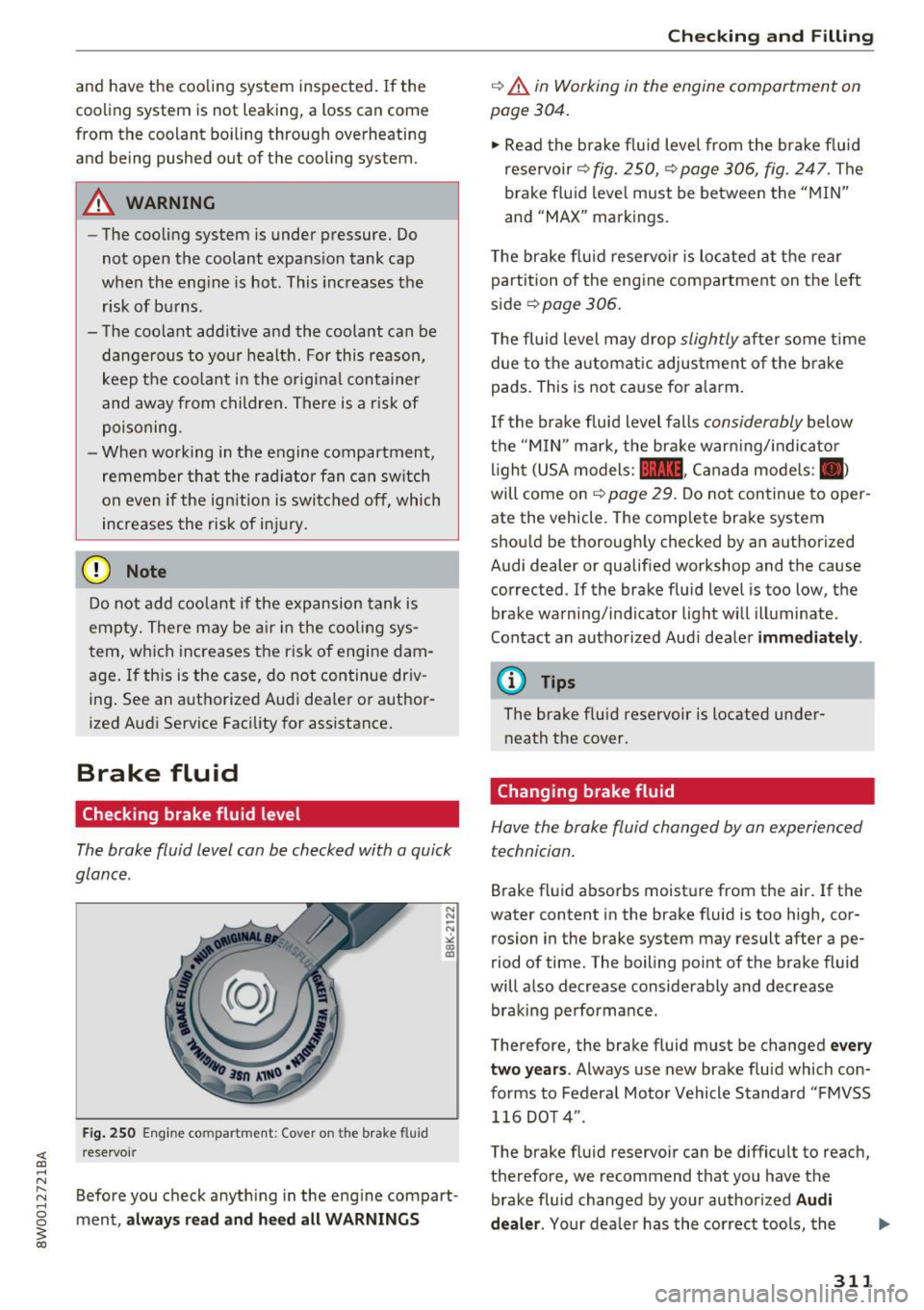
Fig. 250 Engine compa rtment: Cover o n the brake fluid
rese rvoir
Before you check anything in the eng ine compart
ment,
always read and heed all WARNINGS
Checking and Filling
c::> .&. in Working in the engine compartment on
page 304.
" Read the brake fluid level from the brake fluid
reservoir
c::> fig. 250, c::> page 306, fig. 247. The
brake fluid level must be between the "MIN"
and "MAX" markings.
The brake flu id reservoir is located at the rear
partition of the engine compartment on the left
side
~ page 306 .
The fluid level may drop slightly after some time
due to the automatic adjustment of the brake
pads . This is not cause for alarm.
If the brake fluid level falls considerably below
the "MIN" mark, the brake warning/indicato r
light (USA models:
11111 , Canada models : II>
will come on c::> page 29. Do not continue to oper
ate the vehicle. The complete brake system
should be thoroughly checked by an authorized
Audi dealer or qualified workshop and the cause
corrected . If the brake fluid level is too low, the
brake warning/indicator light will illuminate .
Contact an authorized Audi dealer
immediately .
@ Tips
The brake fluid reservoir is located under
neath the cover.
Changing brake fluid
Hove the broke fluid changed by on experienced
technician.
Brake fluid absorbs moisture from the air. If the
water content in the brake fluid is too high, cor
rosion in the brake system may result after ape
riod of time. The boiling point of the brake fluid
will also decrease considerably and decrease braking performance .
Therefore, the brake fluid must be changed
every
two years .
Always use new brake fluid which con
forms to Federal Motor Vehicle Standard "FMVSS
116 DOT 4" .
The brake fluid reservoir can be difficult to reach,
therefore, we recommend that you have the brake fluid changed by your authorized
Audi
dealer.
Your dealer has the correct tools, the
311
Page 343 of 386
<( a, .... N ,....
N .... 0 0
3 a,
avoid scratches, move the scraper only in
one direction and not back and forth.
- Never remove snow or ice from door win
dows and mirrors using warm or hot water
because this could cause cracks to form.
- To avoid damage to the rear window de
fogger, do not apply any stickers on the
heating wires on the inside of the window.
- Decorative part .s/trim
- Never use chrome care or cleaning prod-
ucts .
- Paint
- To reduce the risk of scratches, the vehicle
must be free of dirt and dust before pol
ishing or waxing .
- To prevent paint damage, do not polish or
wax the vehicle in direct sunlight .
- To reduce the risk of paint damage, do not
polish away rust spots.
- Remove cosmetics and sunscreen immedi
ately- these could damage the paint.
- Displays/instrument cluster
- The displays/instrument cluster and the
trim surrounding them must not be
cleaned with dry cleaning methods be
cause they could be scratched.
- Make sure that the instrument cluster is
switched off and has cooled off before
cleaning it.
- Make sure no fluids enter the spaces be
tween the instrument cluster and the
trim, because that could cause damage.
- Controls
- Make sure that no fluids enter the con-
trols, because this could cause damage.
- Safety belts
- Do not remove the safety belts to clean
them.
- Never clean safety belts or their compo
nents chemically or with corrosive fluids
or solvents and never allow sharp objects
to come into contact with the safety belts.
This could cause damage to the belt web bing.
- If there is damage to the webbing, the
connections, the retractors or the buckles,
Care and cleaning
have them replaced by an authorized Audi
dealer or authorized Audi Service Facility.
- Textiles/artificial leather/ Alcantara
- Never treat artificial leather/Alcantara
with leather care products, solvents, floor
polish, shoe polish, spot remove or similar
products.
- Have a specialist remove stubborn stains
to prevent damage.
- Never use steam cleaners, brushes, hard
sponges, etc . when cleaning.
- Do not turn on the seat heating* to dry the
seat .
- Objects with sharp edges, such as zippers
or rivets on clothing or belts, can cause
damage to the surface.
- Open hook and loop fasteners, for exam
ple on clothing, can damage seat covers .
Make sure hook and loop fasteners are
closed .
- Natural leather
- Never treat leather with solvents, floor
polish, shoe polish, spot remover or simi
lar products.
- Objects with sharp edges, such as zippers
or rivets on clothing or belts, can cause
damage to the surface .
- Never use steam cleaners, brushes, hard
sponges, etc. when cleaning.
- Do not turn on the seat heating* to dry the
seat.
- To help prevent the leather from fading,
do not leave the vehicle in direct sunlight
for long periods of time. If leaving the ve
hicle parked for long periods of time, you
should cover the leather to protect it from
direct sunlight.
(D Tips
- Insects are easier to remove from paint that
has been freshly waxed.
- Regular waxing can prevent rust spots from
forming.
341
Page 355 of 386
<( a, .... N ,....
N .... 0 0
3 a,
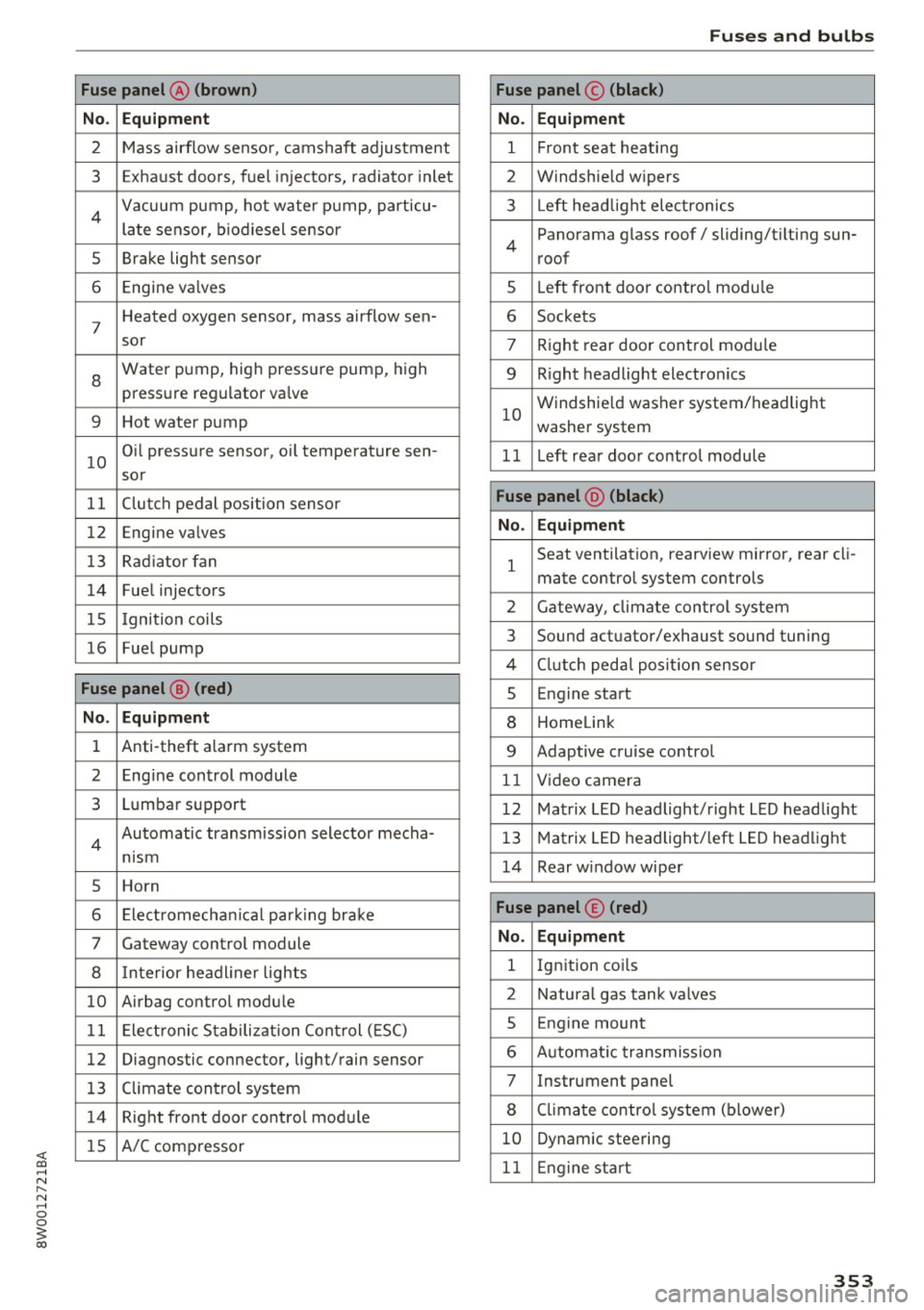
Fuse panel @ (brown)
No . Equipment
2 Mass airflow sensor, camshaft adjustment
3 Exhaust doors, fuel in jectors, radiator inlet
4 Vacuum pump, hot water pump, particu -
late senso r, biodiesel sensor
5 Brake light sensor
6 Engine va lves
7
Heated oxygen sensor, mass airflow sen-
sor
8
Water pump, high pressure pump, high
pressure regulator va lve
9 Hot water pump
10
Oil pressure sensor, oi l temperature sen-
sor
11 Clutch pedal position sensor
12 Engine valves
13 Radiator fan
14 Fuel injectors
15 I gnition coils
16 Fuel pump
Fuse panel @ (red)
No . Equipment
1 Anti-theft alarm system
2 Engine control module
3 Lumbar support
4
Automatic transmission selector mecha-
nism
5 Horn
6 Electromechan ical park ing brake
7 Gateway control module
8 I nterior headl iner lights
10 Airbag control module
11 Electronic Stabilization Control (ESC)
12 Diagnostic connector, light/rain sensor
13 Climate control system
14 Right front door control module
15 A/C compressor
Fuses and bulbs
Fuse panel © (black)
No . Equipment
1 Front seat heating
2 Windshield w ipers
3 L eft head light electronics
4
Panorama glass roof/ sliding/t ilting sun-
roof
5 L eft front door control module
6 Sockets
7 Right rear door control module
9 Right headlight electronics
10
Windshield washer system/headlight
washer system
1 1 Left rear door control module
Fuse panel @ (black)
No . Equipment
1
Seat ventilation, rearv iew mirror, rear cl i-
mate control system controls
2 Gateway , climate control system
3 Sound actuator/exhaust sound tuning
4 Clutch pedal pos ition sensor
s Engine start
8 Homelink
9 Adaptive cruise control
11 Video camera
12 Matrix LED headlight/right LED headlight
13 Matrix LED headlight/left LED headlight
14 Rear window wiper
Fuse panel © (red)
No . Equipment
l Ignition coi ls
2 Natural gas tank valves
5 Engine mount
6 Automat ic transmission
7 Instrument panel
8 Cli mate control system (blower)
10 Dynamic steering
11 Engine start
353
Page 372 of 386
Index
Collision avoidance assist . . . . . . . . . . . . . . . 108
Command (voice recognition system) . . . . . 153
Compartments . . . . . . . . . . . . . . . . . . . . . . . . 64
Compass in the mirror . . . . . . . . . . . . . . . . . . 58
Compliance . . . . . . . . . . . . . . . . . . . . . . . . . . 366
Connection manager 230
Connections refertoMedia .. ............. ... 209,217
Consumer information . . . . . . . . . . . . . . . . . 363
Consumer Information . . . . . . . . . . . . . . . . . 243
Consumption (fuel) . . . . . . . . . . . . . . . . . . . . 16
Contacting NHTSA . . . . . . . . . . . . . . . . . . . . 243
Contacts .. .. . .
.... ........... .... ... 168
Additional directory .............. .... 231
importing/exporting . . . . . . . . . . . . . . . . . 169
Memory capacity . . . . . . . . . . . . . . . . . . . . 170
Storing as destination . . . . . . . . . . . . . . . . 194
Control buttons (operating the MMI) . . . . . 143
Control knob with joystick function
(MMI op
eration) . . . . . . . . . . . . . . . . . . . . . . . . . . . . . 146
Convenience key Switching the ignition on . . . . . . . . . . . . . . 76
Unlocking/locking . . . . . . . . . . . . . . . . . . . . 40
Convenience opening/closing . . . . . . . . . . . . 46
Convertible child safety seats . . . . . . . . . . . 285
Convertible locking retractor
Activating . . . . . . . . . . . . . . . . . . . . . . . . . . 290
Deactivating . . . . . . . . . . . . . . . . . . . . . . . . 291
Using to secure a child safety seat . . . . . . 290
Cooling mode (climate control system) 69, 70
Cooling system Coolant.. .. .. ... ............ .... .. . 310
Coolant temperature indicator . . . . . . . . . . 11
Indicator light . . . . . . . . . . . . . . . . . . . . . . . 31
Cornering light . . . . . . . . . . . . . . . . . . . . . . . 121
Cross hairs
189
Crossing water . . . . . . . . . . . . . . . . . . . . . . . . 73
Cruise control system . . . . . . . . . . . . . . . . . . . 93
Cup holders . . . . . . . . . . . . . . . . . . . . . . . . . . . 64
Current consumption . . . . . . . . . . . . . . . . . . . 16
D
Data connection 178
Data protection . . . . . . . . . . . . . . . . . . . 179, 209
Data recorder . . . . . . . . . . . . . . . . . . . . . . . . 139
370
Date . . . . . . . . . . . . . . . . . . . . . . . . . . . . . 16, 229
Date display . . . . . . . . . . . . . . . . . . . . . . . . . 229
Daytime running lights . . . . . . . . . . . . . . . . . SO
Declaration of compliance
Audi adaptive cruise control . . . . . . . . . . . 366
Audi side assist . . . . . . . . . . . . . . . . . . . . . 366
Cell phone package . . . . . . . . . . . . . . . . . . 366
Convenience key . . . . . . . . . . . . . . . . . . . . . 366
Electronic immobili ze r . . . . . . . . . . . . . . . . 366
Garage door opener (Homelink) . . . . . . . . 366
Remote control key . . . . . . . . . . . . . . . . . . 366
Defective light bulb
Indicator light . . . . . . . . . . . . . . . . . . . . . . . 35
Defrosting (windows) . . . . . . . . . . . . . . . . . . . 70
D EF (instrument cluster) . . . . . . . . . . . . . . . . 12
Demo mode
refer to Pr ese ntation mod e . . . . . . . . . . . . 195
Destinat ion on the map
V ia the MMI touch . . . . . . . . . . . . . . . . . . . 189
Determining correct load limit .......... 331
Diesel Diesel particulate filter . . . . . . . . . . . . . . . 303
Draining water from the fuel filter . . . . . . . 34
Indicator light . . . . . . . . . . . . . . . . . . . . . . . 34
preheating . . . . . . . . . . . . . . . . . . . . . . . . . . 76
Dies el fuel . . . . . . . . . . . . . . . . . . . . . . . . . . . 297
D igital compass . . . . . . . . . . . . . . . . . . . . . . . 58
Digital Rights Management . . . . . . . . . . . . . 209
Dimensions . . . . . . . . . . . . . . . . . . . . . . . . . . 362
Dimming the rearview m irror . . . . . . . . . . . . 55
Directory
refer to Contacts . . . . . . . . . . . . . . . . . . . . 168
Display . . . . . . . . . . . . . . . . . . . . . . . . . . . . . . 12
Cleaning . . . . . . . . . . . . . . . . . . . . . . . . . . . 339
Infotainment system display . . . . . . 142, 230
Instrument cluster . . . . . . . . . . . . . . . . . . . . 15
Multifunction steering wheel . . . . . . . . . . . 12
Versions (MMI) . . . . . . . . . . . . . . . . . . . . . . 142
Distance driven . . . . . . . . . . . . . . . . . . . . . . . . 16
Doors Emergency locking . . . . . . . . . . . . . . . . . . . . 42
Draining water from the fuel filter (Diesel) 34
Driver information system
Energy consumers . . . . . . . . . . . . . . . . . . . . 17
On-board computer . . . . . . . . . . . . . . . . . . . 16
Outside tempe rature display. . . . . . . . . . . . 10