warning lights AUDI A4 2017 User Guide
[x] Cancel search | Manufacturer: AUDI, Model Year: 2017, Model line: A4, Model: AUDI A4 2017Pages: 386, PDF Size: 96.32 MB
Page 52 of 386
Lights and Vision
Lights and Vision
Exterior lighting
Switching the lights on and off
--- --------...... ~
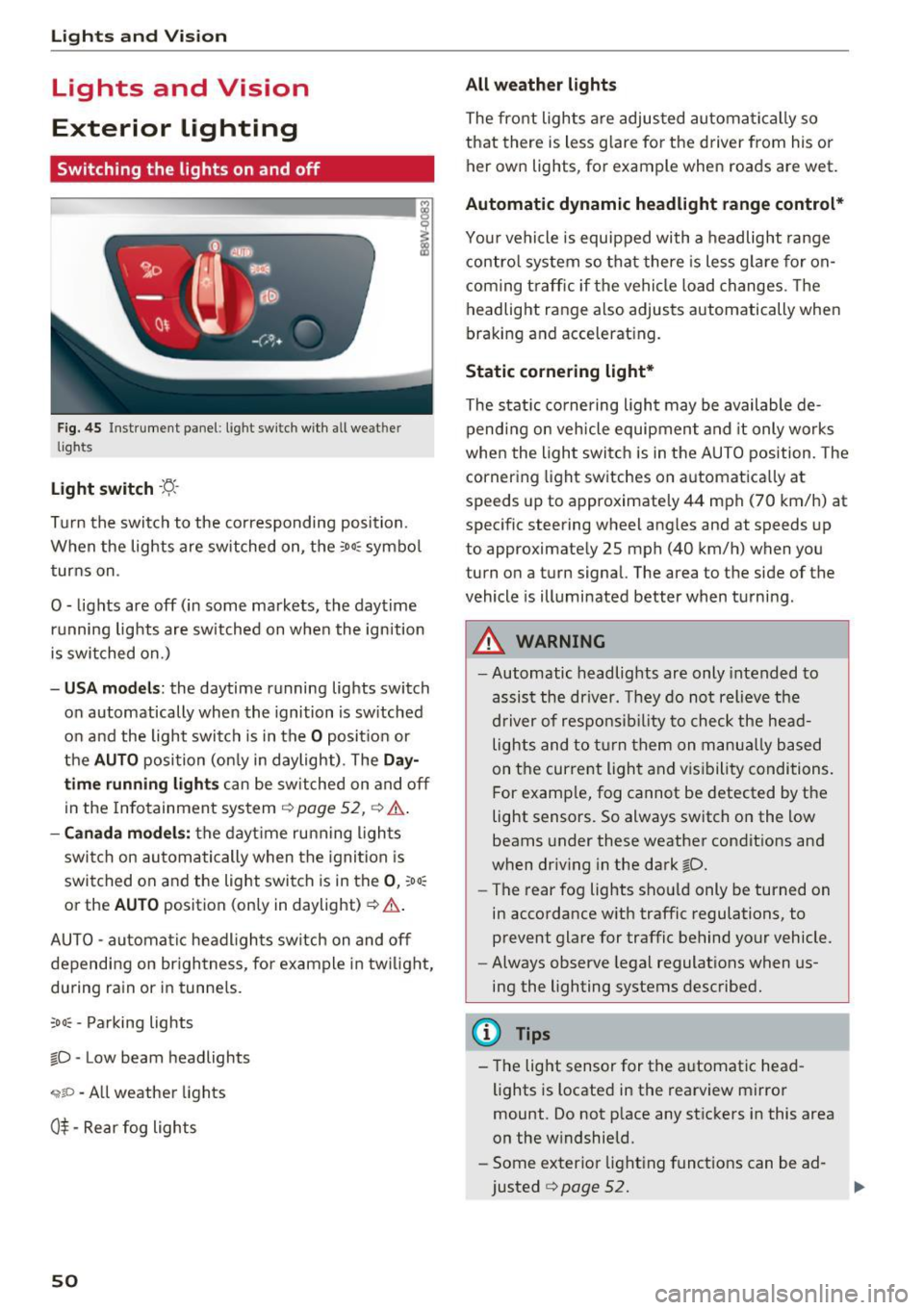
Fig. 45 Instrument panel : lig ht sw it c h with all we ath er
li gh ts
Light switch ·t:/.. ·
I
Tu rn the switch to the corresponding posi tion .
When the lights are sw itched on, the
:o o:c symbo l
turns on .
0 - lights are off (in some markets, the daytime running lights are switched on when the ignition
is switched on.)
- USA mode ls: the daytime running lights switch
on automatically when the ignition is sw itched
on and the light switch is in the
O posit ion or
the
AUTO position (on ly in daylight) . The Da y
time running lights can be switched on and off
in the Infotainment system ¢
page 52, ¢ .&..
-Canada mo del s: the dayt ime ru nning ligh ts
switch on au tomatically when the igni tion is
switched on and the light swi tch is in the
0 , :oo:
or the AU TO position (only in daylight) ¢ .&. .
AUTO -automa tic headl igh ts switch on and off
depending on br igh tness , for example in tw ilight,
du ring rain or in tunne ls.
;o o: -Pa rking lights
~D -Low beam headlights
,;;iiP -All weather lights
0$ -Rear fog lights
50
All weather lights
The front lights a re adjusted au toma tically so
that there is less g lare fo r the d river from his o r
her ow n lights , fo r example when roads are wet .
Automatic dynamic headlight range control*
Your vehicle is equipped with a headlight range
contro l system so that there is les s glare fo r on
com ing t raff ic if the vehicle load changes . Th e
headlight range also adjusts automatically when
braking and accelerat ing.
Static cornering light *
The static co rnering light may be available de
pend ing on veh icle equipment and it only works
whe n the light swi tc h is in the AUTO position. The
cornering light switches on automatica lly at
spe eds up to approximately 44 mph (70 km/h) at
spec ific steering wheel ang les and at speeds up
to approximate ly 25 mph (40 km/h) when you
turn on a turn signal. The a rea to the side of the
vehicle is illuminated better when turni ng.
_& WARNING
- Automatic headlights are only intended to
assis t the driver. They do not relieve the
d river of respo nsib ility to chec k the he ad
lights and to t urn them on m anu ally based
on t he cur re nt ligh t and v is ib ility condi tions.
F or e xamp le, fog cannot be detected by t he
light sensors . So always switch on the low
beams under these weather condit ions and
when dr iv ing in the dark
~D.
- The rear fog lights sho uld only be turned on
in accordance w ith traffic regulations, to
prevent glare for traffic behind your vehicle.
- Always observe lega l regulat ions when us
ing the lighting systems desc ribed.
(D Tips
- The lig ht sensor for the a utomat ic head
lights is located in the rearview mi rror
mount. Do not p lace any st ic kers in this area
on the w indshield.
- Some exter ior light ing funct io ns can be ad
justed
¢ page 52.
Page 53 of 386
-If you turn off the ignition while the exterior
lights are on and open the door, a warning
tone sounds.
- In cool or damp weather, the inside of the
headlights , turn signals and tail lights can
fog over due to the temperature difference between the inside and outside. They will
clear shortly after switching them on. This
does not affect the service life of the light
ing .
Turn signal and headlight lever
The lever operates the turn signals, the high
beams and the headlight flasher.
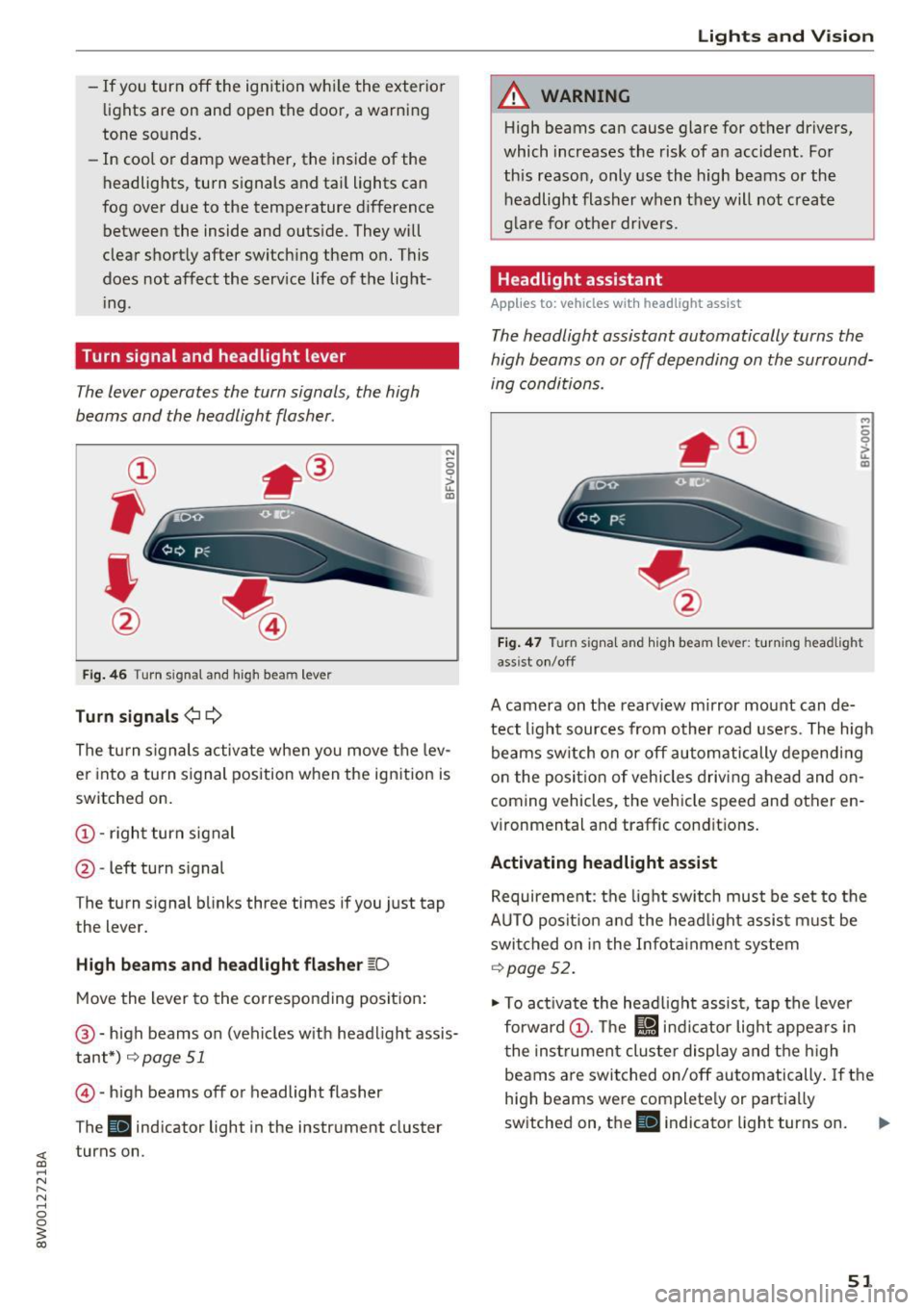
Fig. 46 T urn signal and high beam lever
Turn signals¢¢
N
0 0
> u. IXl
The turn signals activate when you move the lev
er into a turn signal position when the ignition is
switched on.
@ -right turn signal
@ -left turn signal
The turn signal blinks three times if you just tap
the lever.
High beams and headlight flasher ~D
Move the lever to the corresponding position:
@-high beams on (vehicles with headlight assis
tant*)
r=;, page 51
© -high beams off or headlight flasher
The
Ill indicator light in the instrument cluster
turns on.
Lights and Vision
A WARNING
-High beams can cause glare for other drivers,
which increases the risk of an accident . For
this reason, only use the high beams or the
headlight flasher when they will not create
glare for other drivers.
Headlight assistant
Applies to: vehicles wit h headlight assist
The headlight assistant automatically turns the
high beams on or off depending on the surround
ing conditions .
..,
0 0
it m
Fig. 47 Turn signal and high beam lever: turning headlig ht
ass ist on/off
A camera on the rearview mirror mount can de
tect light sources from other road users. The high
beams switch on or off automatically depending
on the position of vehicles driving ahead and on
coming vehicles, the vehicle speed and other en
vironmental and traffic conditions.
Activating headlight assist
Requirement: the light switch must be set to the
AUTO position and the headlight assist must be switched on in the Infotainment system
r=;, page 52.
"'To activate the headlight assist, tap the lever
forward @. The
l!J indicator light appears in
the instrument cluster display and the high
beams are switched on/off automatically. If the
high beams were completely or partially
switched on, the
Ill indicator light turns on. Ill>
51
Page 54 of 386
Lights and Vi sion
Switching the h igh beams on/off manually
If th e h igh beams did no t swi tch on/off automat
ically as expec ted, you may sw itch them on or off
manually instead :
~ To swi tch the hig h beams o n manually, tap th e
l ever forw ard @ . The
Bl in di cator lig ht turns
on .
~ To switc h the hig h beams off manually , pull the
l ever back @. T he headlight assistant is deacti
vated.
Operating the headlight flasher
~ P ull t he leve r towar d the rear @ to ope ra te the
headlight flashers when the headlight ass ist is
activated an d the high beams a re switched off.
The head light assistant rema ins active.
Messages in the instrument cluster display
r!/1 Audi adaptive light: malfunction! See own
er's manual
Headlight assist: malfunction! See owner' s
manual
Drive to an a uth o rized Aud i dea le r or authorized
Aud i Serv ice Facility immediately to have the
malfunct io n corrected. You can still sw itc h t he
h igh beams on or off ma nually.
Headlight assist: currently unavailable. Camera
view restricted due to surroundings. See own
er' s manual
The camera view is blocked, for example by a
sticker o r debr is .
The senso r is locate d between the interior rear
view mir ror and the win dshield. Do not place any
sticke rs in th is area on the windshield.
A WARNING
Headlight assistant is only intended to assist
t he driv er. The dr iver is still r esp onsible for
cont ro llin g th e headl igh ts a nd may ne ed to
switch them on an d off manu ally depe ndin g
o n lig ht a nd visib ility con dition s.
It m ay be
necess ary to ope ra te them manually in s itu a
tions such as :
- In ad verse we ather conditi ons such as fo g,
h eavy r ain, b low in g snow or sp rayin g wa te r.
52
- On roads where oncomin g tra ffic may be
pa rtially obscured, such as expressways.
- W hen the re are roa d users that do not have
suff icient lighting, such as b icyclers or
veh icles with dirty tail lamps.
- In tig ht curves an d on steep h ills.
- In poorly li t areas.
- Wi th st ro ng ref le ctor s, such as s igns .
- If th e area of the w inds hield ne ar the sensor
is fogged over, di rty, icy or covered with a
s tick er.
Adjusting the exterior lighting
Th e functions are adjust ed in th e Infotainment
sys tem .
~ Select in the Infotainment system : IMENU! but
t on
> Vehicle > left cont rol b utton > Vehicle
settings > Exterior lighting .
Automat ic headlights
You can adjust the following sett ings in the Au
tomatic headlights
men u:
Acti vation time -you can adjust if the headlights
switch on
Early , Med or Late accord ing to the
sensit ivity of t he lig ht sensor.
Headlight assistant * -you can switch the hea d
li ght assistant * on and off.
Entry/exit lighting
Whe n it is da rk , the Entry/exit lighting ill um i
na tes the area a ro und t he vehi cle when unlo cki ng
the ve hicle an d after switc hing off the ig nitio n
and o pening the dr iver's door.
The
Entry/exit lighting only wo rks when i t is
d ar k and the light sw itch is in the
AUTO p osit io n.
Daytime running lights
USA models:
the dayti me r unning lig hts can be
swi tched on/off. Select
On or Off.
Canada models : this function ca nnot be switched
off . They act ivate automatically eac h time the ig
nit ion is switched on .
Page 59 of 386
<( a, .... N ,....
N .... 0 0
3 a,
(!)-Rain sensor mode. The windshield wipers
switch on once the vehicle speed exceeds approx imately 2 mph (4 km/h) and it is ra ining. The
higher the sensitivity of the rain sensor that is set
(switch @ to the right), the earlier the wind
shield wipers react to moisture on the wind
sh ield . You can deactivate the rain sensor mode
in the Infota inment system, which switches the
intermittent mode on. To do th is, select:
! MENU !
button > Vehicle > left control button > Dri ver
a ss is ta nc e
> Rain sen sor. In intermittent mode ,
you can adjust the interva l time using the switch
@ .
@ -slow wip ing
@ -fast wip ing
© -sing le wipe If you hold the lever in this posi
tion longer, the wipers switch from slow wiping
to fast w iping.
® -clean the windsh ie ld The wipers wipe one
time after several seconds of dr iving to remove
water droplets. You can switch this function off
by moving the lever to position ® within
10 sec
onds of the after-wipe . The after-wipe function is
react ivated the next time you switch the ign ition
on.
C leaning the headlights*. The headlight washer
system* operates only when the low beam head lights are sw itched on . If you move the lever into
position @, the headlights will be cleaned at
fixed intervals.
A WARNING
- T he rain sensor is only intended to assist the
driver. The driver may still be responsible
for manually switching the w ipers on based
on v is ibility conditions.
- The w indshie ld may not be treated with wa
ter -repelling windshield coating agents. Un
favorable conditions, s uch as wetness, dark
ness or low sun, can result in increased
glare, which increases the risk of an acc i
dent . Wiper blade chatter is also poss ible.
- Properly functioning windsh ield wiper
blades are required for a clear view and safe
dr iv ing to red uce the risk of an accident
Light s and Vision
c::> page 58, Changing windshield wiper
blades.
@ Note
- If there is frost, make sure the windshield
wiper blades are not frozen to the wind
shield. Switching on the windshield wipers
when the blades are frozen to the wind
shield can damage the w iper blades.
- Prior to using a car wash, the windshield
wiper system must be sw itched off (lever in
position
0). This prevents the wipers from
switching on unintentionally and caus ing
damage to the windsh ield wiper system.
@ Tips
- The windshield wipers switch off when the
ign ition is switched off. You can activate the
w indshield wipers after the ignition is
switched back on by moving the w indshield
w iper lever to any position.
- Wor n or dirty w indshie ld w iper blades resu lt
in st reaking. T his can affect the rain senso r
function. Check your windshield wiper
blades reg ularly.
- The washer fluid nozz les for the windshield
washer system are heated a t low tempera
tures when the ignition is on .
- Whe n stopping tempo rar ily, such as at a
t raffic lig ht, the speed of the windshield
wipers automatically reduces by one level.
Cleaning windshield wiper blades
Clean the wiper b lades when you see wiper
streaks. Use a soft cloth and a g lass cleaner.
Wind shi eld wiper
... Place t he w indsh ie ld w iper arms in the service
position
c::> page 58 .
... Fold the windshie ld wiper arms away from the
windshie ld.
A WARNING
D irty windshie ld wiper blades can impa ir vi
sion, wh ic h increases the risk of an accident.
57
Page 60 of 386
Lights and Vision
Changing windshield wiper blades
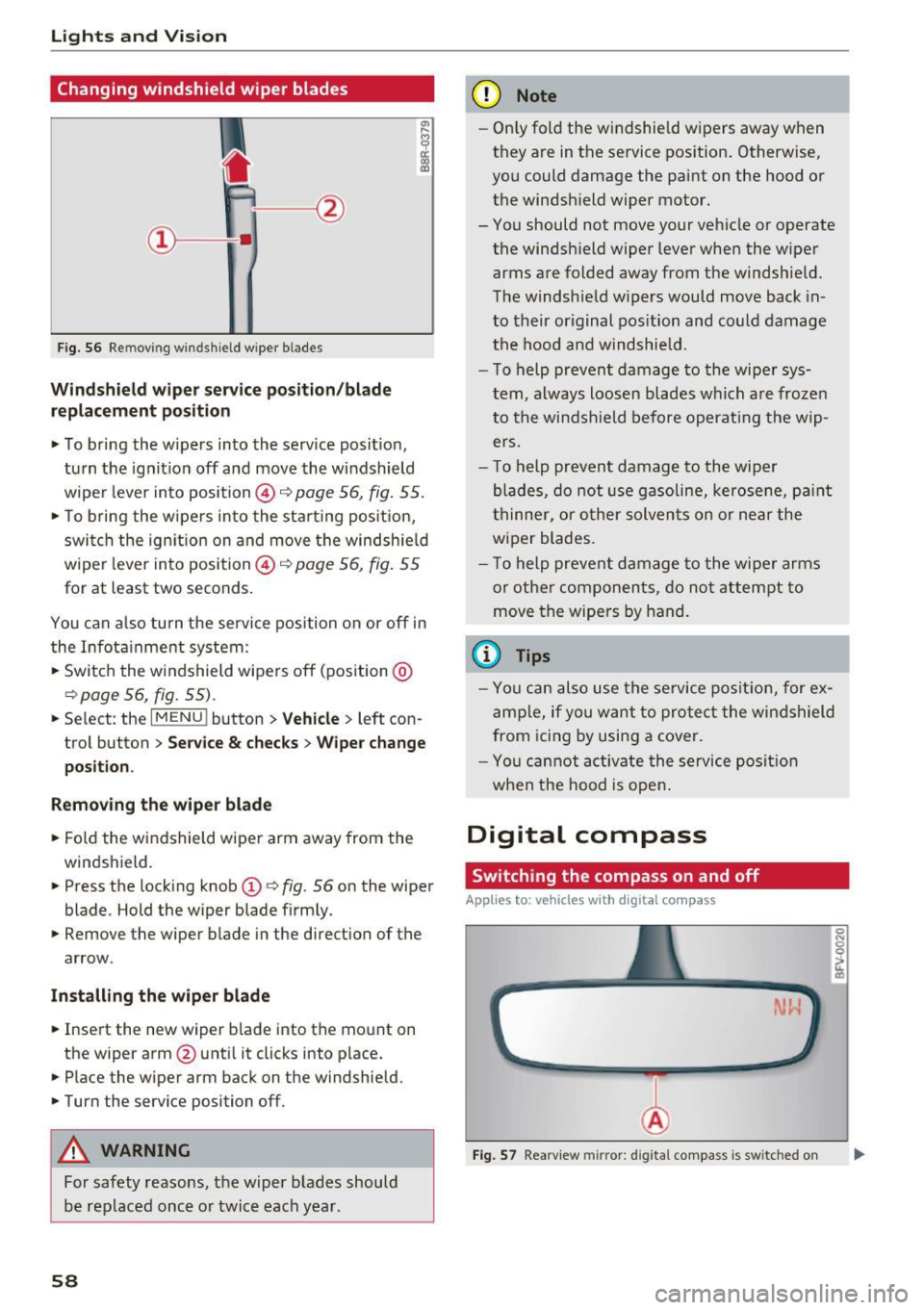
Fig. 56 Remov ing w indshi eld w iper blades
Windshield wiper service position/blade
replacement position
• To bring the wipers into the service position ,
turn the ignition off and move the windshield
wiper lever into position @~
page 56, fig. 55.
• To bring the wipers into the starting position,
switch the ignition on and move the windshield
wiper lever into position @~
page 56, fig. 55
for at least two seconds .
You can also turn the service position on or off in
the Infotainment system :
• Switch the windshield wipers off (position @
~page 56, fig. 55).
• Select : th e IMENU i button> Vehicle> left con
trol button >
Service & checks > Wiper change
position .
Removing the wiper blade
• Fold the windshield wiper arm away from the
windshield.
• Press the locking knob
(D ~ fig. 56 on the wiper
blade . Hold the wiper blade firmly.
• Remove the wiper blade in the direction of the
arrow .
Installing the wiper blade
• Insert the new wiper blade into the mount on
the wipe r arm @until it clicks into place.
• Place the wiper arm back on the windshield.
• Turn the service position off.
A WARNING
For safety reasons, the wiper blades should
be replaced once or twice each year .
58
-
(D Note
-Only fold the windshield wipers away when
they are in the service position. Otherwise,
you could damage the paint on the hood or
the windshield wiper motor.
- You should not move your vehicle or operate the windshield wiper lever when the wiper
arms are folded away from the windshield.
The windshield wipers would move back in
to their original position and could damage
the hood and windshield.
- To help prevent damage to the wiper sys
tem, always loosen blades which are frozen
to the windshield before operating the wip
ers.
- To help prevent damage to the wiper
blades, do not use gasoline, kerosene, paint
thinner, or other solvents on or near the
wiper blades.
- To help prevent damage to the wiper arms
or other components, do not attempt to
move the wipers by hand.
{l) Tips
-You can also use the service position, for ex
ample, if you want to protect the windshield
from icing by using a cover.
- You cannot activate the service position
when the hood is open.
Digital compass
Switching the compass on and off
App lies to: vehicles with digital compass
Fig. 57 Rearview mirror: d ig ital compass is sw itched on
Page 62 of 386

Lights and Vi sion
A WARNING
To reduce the risk to yourself and other dr iv
ers, calibrate the compass in an area where
t here is no traffic .
60
Page 76 of 386

Driving
next traffic light is red . This produces an engine
braking effect, which helps to protect the brakes
and tires and reduces the emissions and fue l con
sumpt ion to zero (fuel shut-off during decelera
t ion).
Shift effici ently
An effective way to save fuel is to upshift earlier.
Staying in a gear too long uses fue l unnecessari
ly .
P ress down o n the acce lerator peda l slowly and
avoid "kick -down".
Avoid full acceleration
You shou ld rare ly t rave l at the maximum vehicle
speed. High speeds cause a disp roportiona tely
h igh inc rease in fuel consump tion, emissions and
traffic no ise . Slower driving saves fuel.
Reduce idling time
The Start/Stop system* he lps to reduce the idling
time automatically. In vehicles witho ut the Start/
S top system* , it is efficient to swit ch the eng ine
off when stopped at r,;1ilro,;1d crossi ngs and long
red lights . Stopping the engine for 30 -40 sec
onds already saves more fuel than the amount of
extra fuel needed to restart the engine.
It t akes a very long time in idle to war m the en
g ine up to opera ting tempera ture . Wea r and
emissions are especially high in the warm -up
p hase . Therefore, yo u should begin driving im
mediately after starting the engine. Avoid high
RPMs while do ing th is.
Have maintenance performed regularly
By having ma intenance performed regularly on
your vehicle, you can help to reduce f uel con
sumpt ion befo re yo u even start to dr ive. The
maintenance condition of your vehicle not only
affects t raffic safety and long-term value but a l
so impacts
fuel consumpt ion . A poorly main
tained engine can lead to f uel consumption that
is 10% higher than normal.
Avoid short trips
The engine and exhaust cleaning system m ust
reach the ir opt imal
operating temperature to ef
fectively reduce consumption and em iss ions.
74
A cold engine uses a d isproportionately high
amount of fue l. The engine reaches operating
temperat ure and cons umption norma lizes on ly
after approximate ly
four ki lometers.
Check the tire pres sure
To save fue l, make sure the t ires are always in
flated to the correct press ure
¢ page 32 7. The
fuel consumpt ion can increase by S% if the pres
s u re is only 0.5 bar too low. Due to the increased
roll ing resistance, low tire pressures w ill also
l ead to greater tire
wear and will affect dr iving
behavior.
Do not drive on
winter tires year-round, as this
will consume up to 10% more f uel.
Eliminate unnecessary we ight
Since eve ry kil og ram o f extra weight in creases
fuel consumption, a quick inspection of the lug
gage compartment may be worth it to avoid un
necessary we ight.
When no t be ing used, a roof rack sho uld be re
moved to decrease the wind resistance of the ve
hicle . You will save approx imately
12% of your
fuel when at speeds from 62-75 mph (100-120 km/h).
Save energy
The eng ine drives the generator, which generates
electricity; the fuel consumption also inc reases
with the demand for e lectricity. Therefore, switch
e lectrical equ ipment off when you no longer
need it. Examples of eq uipment that uses a lot of
energy are air blowers at a high setting, the rear
window defogger and seat heating* .
(D Note
Do not leave engine idling unattended after
starting . If warning lights shou ld come on to
i ndica te improper operation, they would go
unheeded . Extended idling also prod uces
h eat, w hic h could result i n overheating o r
o ther damage to the veh icle o r othe r prope r
ty .
Page 82 of 386
Driving
Engine automatically r esta rt s
The standard Start/Stop mode will be canceled
during a stop phase in the follow ing situations.
The engine restarts without any action by the driver .
- The vehicle rolls, for examp le while on a slope.
- The inter io r temperatu re differs from the tem-
perature se lected in the A/C system.
- The w indshield is being defrosted.
- The brake pedal is pressed several t imes in a
row .
- The battery charge level becomes too low .
- Power consumption is high .
The engine can turn off again when the condi
tions for Start/Stop mode are met .
Ignition is swit ched off aut omaticall y
To prevent the battery from dra ining, the ignition
will sw itch off
aut omati cally under the following
conditions:
- T he Sta rt/Stop system has stopped the engine.
- The vehicle must be stationary .
- You left the veh icle and the engine was not re-
started within approximately 30 seconds.
If this happens, you will see the message
I gni
tion turn s off automatically in the instrument
cluster and the activated low beams are replaced
by the parking light. The parking lights will
sw itch off after approximately 30 minutes or
when you lock the vehicle .
The ignition also switches off when you lock the
veh icle from the outs ide dur ing a stop phase.
If the Start/Stop system has not turned off the
engine or if you have sw itched the Start/Stop sys
tem off manually, the ignition will not be auto
mat ically switched off and the engine w ill cont in
ue to run~& .
.&, WARNING
To red uce the risk of poisoning, neve r allow
t he engine to r un in confined spaces.
80
-
@ Tips
-If you leave the ve hicle with the D/S or R se
lector lever position engaged, the parking
brake is automatically set.
- If you select the D or N selector lever posi
tion after shifting into reverse, the vehicle must be driven faster than 6 mph (10 km/h)
in order for the engine to switch off again.
Manually switching the Start/Stop system
off/on
App lies to: vehicles wit h Start -Stop system
If you do not wish to use the system, you can
switch it off manually.
- -
. !.. r' '!. .:-,/'"~ ~
tJ .,. -,J
-----::::I
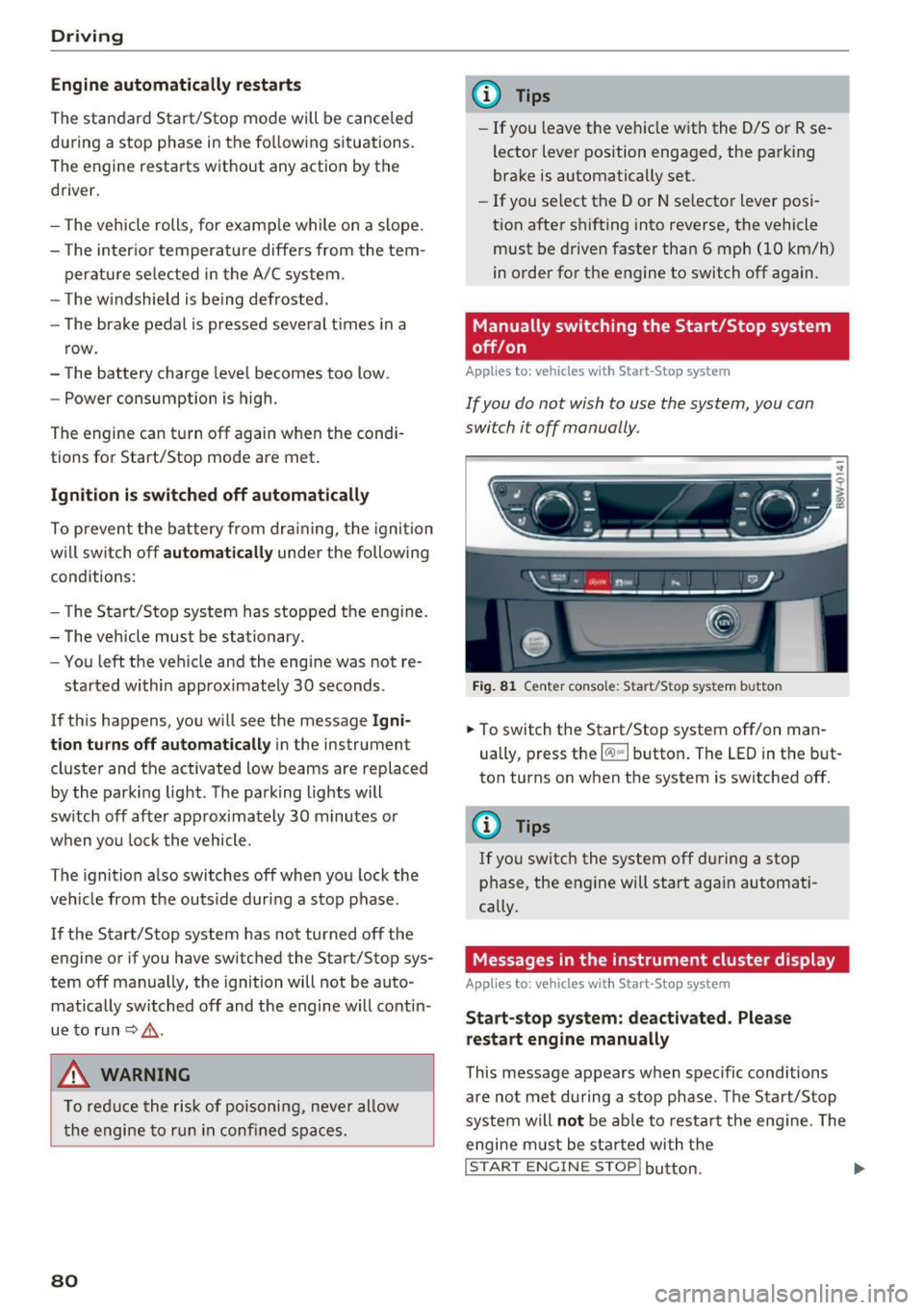
F ig . 81 Cen te r conso le: S tart/Stop system butto n
..
.,. To switch the Start/Stop system off/on man
ually, press the
l (A) "'I button . The LED in the but
ton turns on when the system is switched off.
(l} Tips
If you switch the system off during a stop
phase, the engine will start again automati
cally.
Messages in the instrument cluster display
App lies to: vehicles wit h Start-Stop system
St art- stop system: de activated . Please
restart engin e manually
This message appears when spec ific conditions
a re not met during a stop phase . The S tart/Stop
system will
not be ab le to res tart the eng ine . The
engine m ust be sta rted with t he
I STAR T ENGINE STOP! button. ....
Page 92 of 386

Trailer towing
Trailer towing
Driving with a trailer
General information
Your Audi was designed primarily for passenger
transportation.
If you plan to tow a trailer, please remember that
the additional load will affect durability, economy and performance.
Trailer towing not on ly places more stress on the
ve hicle, it also ca lls for more concentration from
the dr iver.
F or this reason, always follow the operating and
driving instructions provided and use common
sense.
Technical requirements
Trailer hitch
Use a weight-carrying hitch conforming to the
gross tra iler weight. The hitch must be suitab le
for your veh icle and tra iler and must be mounted
securely on the vehicle's chassis at a technically
sound
locat ion . Use on ly a trailer hitch with a re
movable ba ll mount . Always che ck with the t rail
er hitch man ufac tur er to make s ure t hat you are
using the co rrect hi tc h.
Do not use a bumper hitch.
The hitch must be installed in such a way that it
does not interfere with the impact -absorbing
bumper system. No mod ificat ions should be
made to the vehicle exhaust and b rake systems .
Fr om t ime to t ime, che ck that all hitch mo unti ng
bol ts rem ain securely f aste ned.
W hen you are not tow ing a tra iler, remove the
tra ile r hitc h ba ll mount . This prevents the hit ch
from caus ing damage s hou ld your veh icle be
s truck from be hind ¢
,&..
Trailer brakes
If you r trailer is equipped with a brak ing system,
check to be su re that it conforms to all regula
tions .
90
The t rai ler hydraulic bra ke system must not be
directly connected to the vehicle's hydraulic
bra ke system ¢&. .
Safety chains
Always use s afety chains be tween you r vehi cle
and t he tra ile r.
Trailer lights
Traile r lights must meet all regula tions . B e s ure
to check w ith your author ized Audi dealer for cor
r ec t wir ing, swi tches and relays.
Mirrors
If you are unable to see t he traffic behind you us
i ng t he regular outs ide mirrors, then yo u
must in
stall ex tended mirrors . It is impo rtant that you
al ways have clear vision to the rear.
.&_ WARNING
Afte r remov ing the tra ile r hi tc h, do not s tore
it i n y our vehicle. In case o f su dden brak ing,
the hitch could fly fo rward and injure you or
your passengers.
Operating instructions
Maximum trailer weight
A tra iler f or yo ur vehicle is lim ite d to a typical
class 1 or class 2 trailer.
Trailer load distribution
Be sure the load in the t rai le r i s he ld se curely in
pla ce to p reve nt i t from shi fting forwar d, bac k
ward or si deways.
Never allow a passenger to ride in a trailer ¢ &.
in Driver messages on page 91.
Engine cooling system
Towi ng a tra iler makes the engine work harder. It
is important that the cooling system's perform
ance is up to the additional load . Make sure tha t
the coo ling system has enoug h fluid.
Tire pressure
When towing a trailer, inflate the tires of your
vehicle to the cold tire p ressure listed under "Full
load" on the t ire press ure label. The t ire pressure
1111-
Page 93 of 386

label is located on the driver's side B-pillar. In
f late trai ler tires to trailer and tire manufactur
ers' specifications.
Lights
The headlight settings should be checked with
the trailer attached before driving off. Check to
make sure both vehicle and trailer lights are
working properly.
Safety chains
Be sure trailer safety chains are properly connect
ed from the tra iler to the hitch on the vehicle.
L eave enough slack in the chains to permit turn
ing corners. When you install safety chains, make
sure they wi ll not drag on the road when you are
driving.
The chains shou ld cross under the trailer tongue
to prevent it from dropping in case of separation
from the hitch.
Driver messages
Driving with a trailer requires extra caution .
Weight distribution
Towing a loaded trailer w ith an empty car results
in a high ly unstable dist ribution of weight . If this
cannot be avo ided, drive at very low speeds only
to avoid the risk of losing steering control.
A "balanced" rig is easier to operate and cont rol.
This means that the tow vehicle should be loaded
to the extent possible and permissible, while
keeping th e trailer as light as possib le under the
circumstances . Whenever possib le, transfer
some cargo to the luggage compartment of the
tow vehicle whi le observing tong ue load require
ments and vehicle loading considerations.
Speed
The higher the speed, the more difficult it be
comes for the driver to contro l the rig. Do not
drive at the maximum permissible speed. Reduce
your speed even more if load, weather or wind
<( conditions are unfavorable -particularly when a,
;::; going downhill. ,....
N .... 0 0
3 a,
Trailer towing
Reduce vehicle speed immediately if the trailer
shows the slightest sign of swaying.
Do not try
to stop the swaying by accelerating.
Observe speed limits. In some areas, speeds for
vehicles towing trailers are lower than for regular
vehicles .
Always apply brakes early. When driving down
hill, shift into a lower gear to use the eng ine
braking effect to slow the vehicle . Use of the
brakes alone can cause them to overheat and fail.
Coolant temperature
T he coolant temperature gauge~ page 11 must
be obse rved carefully. The coolant temperature
can increase if you drive on long inclines in a low
gear at high engine speeds . Reduce your speed
immediately if the LEDs in the top part of the dis
play turn on.
For more information about indicator lights, re
fer to.
~ page 31 .
A WARNING
= -
Anyone not properly restrained in a moving
vehicle is at a much greater risk in an acci
dent. Never let anyone ride in your car who is
not properly wearing the restraints provided
by Aud i.
Trailer towing
information
Important to know
Your vehicle handles differently when towing a
trailer because of the addit ional weight and dif
ferent weight distribution . Safety, performance
and economy will greatly depend on how careful
ly you load your trailer and operate you r rig.
Before you actually tow your trailer, pract ice
turning, stopping and backing up in an area away
from traffic . Keep pract ic ing until you have be
come complete ly familiar w ith the way your vehi
cle-trailer combination behaves and responds.
91