brake light AUDI A4 2017 Owner's Guide
[x] Cancel search | Manufacturer: AUDI, Model Year: 2017, Model line: A4, Model: AUDI A4 2017Pages: 386, PDF Size: 96.32 MB
Page 138 of 386

Intelligent Technology
- The re is no vehicle stabilizat ion when ESC/
ASR are switched off.
Braking
New brake pads
New b rake pads do not achieve the ir full braking
effect during the first 250 miles (400 km) . They
must be "broken in" first . However, you can com
pensate for the slightly reduced brak ing force by
pressing firmly on the brake pedal. Avoid heavy
braking dur ing the break-in per iod.
W ear
Brake pad wear depends largely on the way the
vehicle is driven and on operating conditions.
This is especially true if you are driving frequently
in the c ity and on curves or with a sporty driving
style .
Operating noise
Noises may occur when braking depending on the
speed, b raking force and outside conditions such
as tempe rature and humidity.
W et conditions or road salt
In certain s ituations, for example after dr iving
through water, in heavy rain or after washing
your car, the brak ing effect may be reduced due
to mo isture or ice on the brake rotors and brake
pads. The brakes must be "dr ied" first wit h a few
careful brake applications.
At higher speeds and with the windshie ld wipers
turned on, the brake pads press against the brake
rotors for a short amount of time. Th is action,
which is not felt by the driver, happens at regular
i n tervals a nd ensu res a better reaction time for
the bra kes in wet weather .
The braking effect can also be reduced if you are
driving on salted roads and you do not apply the
brakes fo r long periods of time . The laye r of salt
on the brake rotors and pads must be wo rn off
fi rst when the b rakes are app lied.
Corrosion
Leaving the vehicle parked for long periods of
time, low mi leage and avo iding heavy brak ing
136
can con trib ute to corros ion on t he b rake roto rs
and to dirty brake pads .
I f you usu all y avoid he avy br aking or if there is
corrosion present, occasiona l heavy brak ing at
high speeds is recommended to clean the brake
rotors and pads~.&. .
Brake system malfunction
if you not ice that the b rake peda l t ravel has sud
denly gotten larger, t hen a b rake c ircuit in the
dual-c ircuit brake system may have failed. Drive
to an authorized Audi dea ler o r authorized Audi
Se rvice Facility immediate ly to have the prob lem
corrected . On the way there, dr ive with reduced
speed and keep in mind tha t you w ill need a lon
ger distance to stop and you will need to press
the brake pedal harder.
l o w brake fluid level
When the brake fluid level is low, malfunctions in
the brake system may occur. The brake fluid level
i s electronically monitored.
Brake booster
The bra ke boos ter amp lifies the p ressure yo u ap
ply to the brake pedal. It only wor ks when the en
gine is running .
A WARNING
- Only app ly the bra kes for the purpose o f
cleaning the brake system w hen road and
traffic conditions permit. You must not en
danger other road users. This i ncreases the
r is k of an accident.
-
- Never let the ve hicle roll while the engine is
s to pped because t his i ncreases the ris k of an
acciden t.
Q) Note
- Never let the brakes "rub" by pressing the
peda l lightly when braking is not actually
necessary . This causes t he b rakes to over
heat and incr eases brak ing distanc e and
c a u ses we ar.
- Before driving a long d istance o n a steep
d ownward hill, decrease your speed a nd se-
le ct a lo wer driving gear. This m akes use of
1111>
Page 139 of 386

<( a, .... N ..... N .... 0 0
3 a,
the engine braking effect and relieves the brakes.
If you need to brake additionally,
brake in interva ls and not continuously .
(D Tips
-If the brake booste r is no t working, you
must p ress the brake pedal with much more
fo rce than norma l.
- If you retrofit you r vehicle with a front spoil
er, whee l covers or s imilar items, make sure
that the air flow to the front whee ls is not
i nterr upted. Otherw ise the brake system
can become too hot .
Electromechanical power
steering, dynamic
steering
The electrom echanical steering supports th e
driver's steering movements.
P ower steering adapts electronically based on
the vehicle speed.
Indicator lights and messages
• Steering : malfunction! Plea se stop vehicle
If th is ind icator lig ht turns on and stays on and
this message appears, the power steer ing may
h ave fa iled.
Stop the vehicle in a safe locat io n as soon as pos
sib le . Do
not continue dr iving . See an a uthor ized
Aud i deale r or autho rized Aud i Serv ice Faci lity fo r
assistance .
':r-ij Steering: malfunction! You may continue
driving
If the indicator lig ht t urns on and the message
appears, the steering w heel may be mo re diffi
cult to move or more sensitive than usual. The
steer ing whee l may also be at an angle when
d riving s tra ight.
Drive s low ly to an author iz ed Audi dealer or au
thor ized Audi Service Facility to have the ma l
f u nction corrected .
~ Dynamic steering: correcting steering wheel
position
Intellig ent Technology
If the indicator ligh t turns on and this message
appears, the dynamic steering* is re init ializing.
The steeri ng whee l will be easy to move after
start ing the engine. Reinitiali zation might be
necessary if the steering wheel was moved whi le
the engine was sw itched off . The disp lay turns
off if the initializat ion was successf ul.
(D Tips
- If the . or ':r-ij indicato r light only stays on
for a sho rt time, you may cont inue drivi ng.
- The dynamic steering stability systems
c:.> page 134 are not ava ilable in the event of
a system malfunc tion.
- Fo r add itiona l information on dynamic
steeri ng, refer to
c:.> page 121.
ALL wheel drive (quattro)
App lies to : vehicles wit h all w heel drive
In all wheel drive, all four wheels are pow ered.
General information
In all wheel dr ive, the dr iving power is divi ded be
tween all four wheels . T h is happens aut omatical
ly depending on your dr iv ing behav ior as we ll as
the cur rent road condit ions . A lso refer to
c:.> page 134 , Electronic Stabilization Control
(ESC) .
A center d ifferential d istributes the driving powe r
var iably to the front and rea r axle .
It works to
ge ther w it h selec tive whee l to rque contro l, w hich
activates when driving thro ugh curves
c:.> page 134.
The all wheel dr ive concept is des igned for high
engi ne power . Yo ur vehicle is exce ptionally pow
erfu l and has excell ent driv ing cha rac teristics
bot h unde r normal d riving conditions and o n
sn ow and ice. A lways rea d and follow s afety pre
ca utions
c:.> &. .
Winter tires
By using all wheel dr ive, your ve hicle has good
forward mot ion w it h standard ti res in win ter con
di tions. However, i n w in te r, we re co m men d using
winter or all sea so n t ires on
all four whee ls, be-
c au se this will improve the
braking effec t. ..,.
137
Page 313 of 386
and have the cooling system inspected. If the
cooling system is not leaking, a loss can come
from the coolant boiling through overheating and being pushed out of the cooling system.
A WARNING
- The cooling system is under pressure. Do
not open the coolant expansion tank cap
when the engine is hot. This increases the
risk of burns .
- The coolant add itive and the coolant can be
dangerous to your health. For this reason,
keep the coolant in the original container
and away from children. There is a risk of
poisoning.
- When working in the engine compartment,
remember that the radiator fan can switch
on even if the ignition is switched off, which
increases the risk of injury.
(D Note
Do not add coolant if the expansion tank is
empty. There may be a ir in the cooling sys
tem, which increases the risk of engine dam
age . If this is the case, do not continue driv
ing . See an authorized Audi dealer or author
ized Audi Service Facility for assistance.
Brake fluid
Checking brake fluid level
The brake fluid level can be checked with a quick
glance .
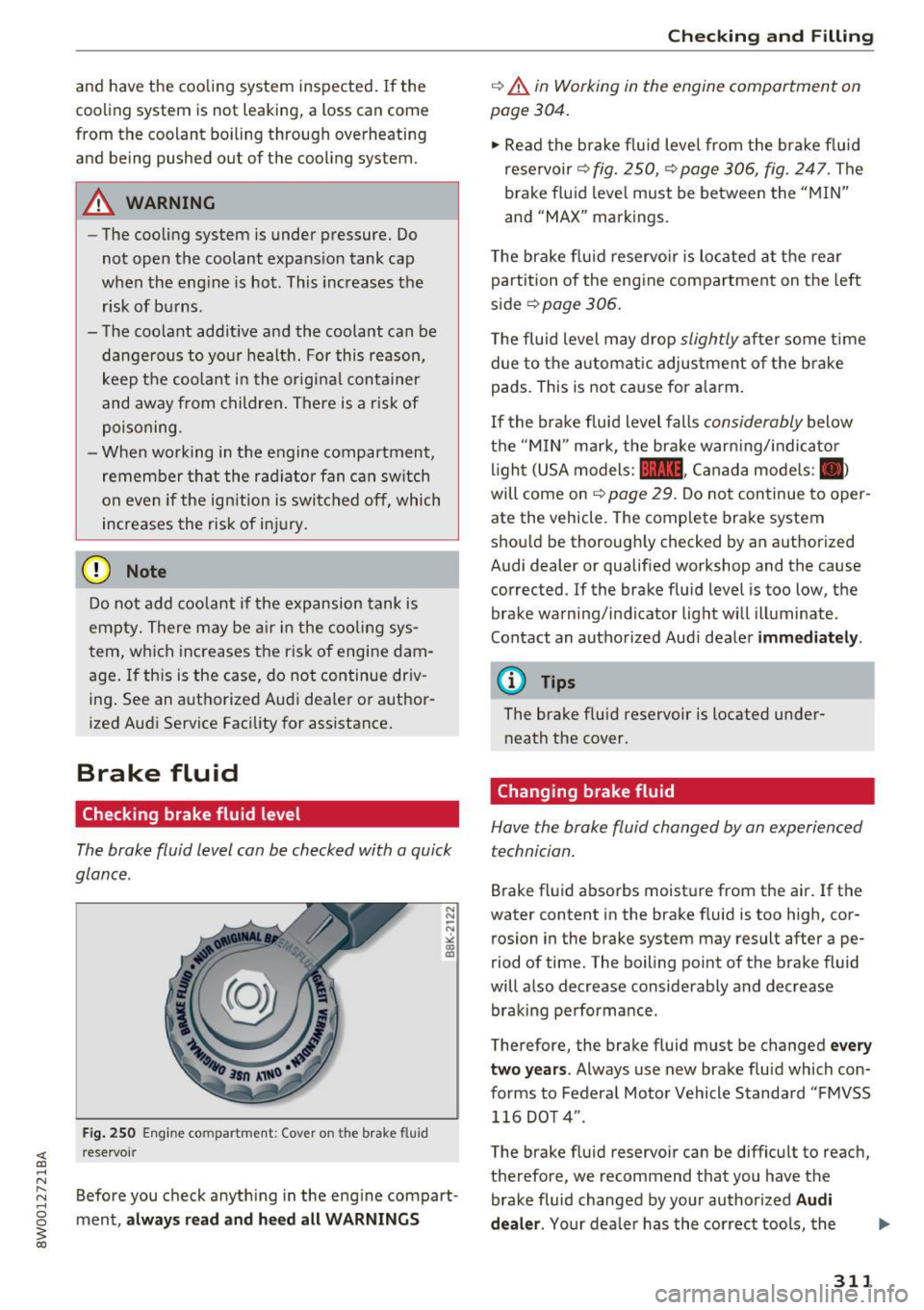
Fig. 250 Engine compa rtment: Cover o n the brake fluid
rese rvoir
Before you check anything in the eng ine compart
ment,
always read and heed all WARNINGS
Checking and Filling
c::> .&. in Working in the engine compartment on
page 304.
" Read the brake fluid level from the brake fluid
reservoir
c::> fig. 250, c::> page 306, fig. 247. The
brake fluid level must be between the "MIN"
and "MAX" markings.
The brake flu id reservoir is located at the rear
partition of the engine compartment on the left
side
~ page 306 .
The fluid level may drop slightly after some time
due to the automatic adjustment of the brake
pads . This is not cause for alarm.
If the brake fluid level falls considerably below
the "MIN" mark, the brake warning/indicato r
light (USA models:
11111 , Canada models : II>
will come on c::> page 29. Do not continue to oper
ate the vehicle. The complete brake system
should be thoroughly checked by an authorized
Audi dealer or qualified workshop and the cause
corrected . If the brake fluid level is too low, the
brake warning/indicator light will illuminate .
Contact an authorized Audi dealer
immediately .
@ Tips
The brake fluid reservoir is located under
neath the cover.
Changing brake fluid
Hove the broke fluid changed by on experienced
technician.
Brake fluid absorbs moisture from the air. If the
water content in the brake fluid is too high, cor
rosion in the brake system may result after ape
riod of time. The boiling point of the brake fluid
will also decrease considerably and decrease braking performance .
Therefore, the brake fluid must be changed
every
two years .
Always use new brake fluid which con
forms to Federal Motor Vehicle Standard "FMVSS
116 DOT 4" .
The brake fluid reservoir can be difficult to reach,
therefore, we recommend that you have the brake fluid changed by your authorized
Audi
dealer.
Your dealer has the correct tools, the
311
Page 314 of 386

Check ing and F illing
right brake fluid and the know -how to do this for
you.
A WARNING
- Brake fluid is poisonous. It must be stored
only in the closed orig inal container out of
the reach of chi ldren!
- B rake failure can resu lt from old or inappro
pr iate brake flu id. Observe these precau
t ions:
- Use on ly brake fluid that mee ts SA E speci
fi cation) 17 0 3 and confo rms to Fede ral
Motor Ve hicle Standard 116. Always check
wit h your authorized Audi dealer to make
sure you are using the correct brake fluid.
The cor rect type o f brake fluid is a lso indi
cated on the brake fluid reservoir.
- The brake fluid must be new. Heavy use of
the brakes can cause a vapor lock if the
brake flu id is left in the system too long.
This ca n ser iously affect t he efficiency of
the bra kes as well as your safety. This
could result in an acc ident.
{U) Note
Brake fluid w ill damage the pa int of yo ur vehi
cle.
@ For the sake of the environment
Because of the prob lem of proper disposal of
brake flu id as we ll as the special tools re
quired and the necessary expertise, we rec
ommend tha t you have the brake fluid
changed by your author ized Audi d ealer.
Battery
General information
Unde r normal operating conditions, the battery
i n your Audi does not need any maintenance.
W ith
high outs ide temperat ures o r long da ily
d rives we recommend that you have the electro
lyte leve l checked by an a uth orized Audi dea le r or
qua lified wor kshop. The e lectroly te leve l should
a lso be checked each time the batte ry is ch a rged
¢ page 314.
312
Have t he battery chec ke d when yo u take yo ur ve
hicle in for service . You are we ll advised to re
place a battery that is o lder than 5 yea rs .
With ce rta in types o f airbag deployment, t he
b atte ry is disconnected from the veh icle elect ri
ca l system for safety reasons ¢.&
in Repair, care
and disposal of the airbags on page 268.
Disconnecting the battery terminals
Some ve hicl e fu nctions (power window regula
tors, for examp le) are lost if the batte ry te rm i
nals a re disconnected . These f unc tions have to be
relearned after the battery term inals are con
nected again . To p revent this, the battery should
o nl y be disconnected from the vehicle electrical
system when absolute ly necessary for repairs.
Vehicles not driven for long periods
If you do not d rive yo ur vehicle ove r a period of
severa l days o r weeks, electr ica l components are
grad ua lly cut back or switched of f. T his reduces
energy consumpt ion and maintains start ing ca
pability over a longer period ¢
page 138.
Some of the convenience functions may not oper
ate, such as the inter ior lights or the power seat
adjustment . The convenience functions will be
available again w hen you turn on the ignit io n and
start the eng ine .
Winter operation
Dur ing the winte r months, battery capacity tends
to decrease as tempe ratures drop. This is be
ca use more power is also consumed while start
i ng, and t he headlights, rear w indow defogger,
etc ., are used more often.
Avo id unnecessary powe r consumption, partic u
l a rly in city traffic or when traveling o nly short
distances . Let your author ized Audi dealer check
the capacity of the vehicle battery before win ter
sets in ¢
page 314 . A well charged battery will
n ot only p reve nt sta rting prob lems when the
we ather is co ld , but will also last longer.
@ Tips
I f yo ur vehicle is left sta nding for several
weeks at extreme ly low te mpera tures, th e ve-
h icl e b att ery should be re mo ved and store d
II>-
Page 340 of 386
Care and cleaning
& WARNING
-Only wash the vehicle when the ignition is
off or follow the instruct ions from the car
wash operator to reduce the risk of acci dents.
- To reduce the risk of cuts, protect yourself from sha rp metal components when wash
ing the underbody or the inside of t he wheel
hous ings.
- After was hing the vehicle, the braking effect
may be delayed due to mo isture on the
bra ke rotors o r ice i n the winte r. This in
c reases the risk of an a cciden t. The bra kes
must be dried first with a few care ful brake
applications .
@ Note
-If you wash the ve hicle in an automa tic car
wash, yo u must fold the exterior m irrors in
to reduce the risk of damage to the mirrors.
Power folding exterior mirrors * must on ly
be fo lded in and out us ing the power folding
funct ion.
- To reduce the risk of damage to the rims
and tires, compare the width between the
whee ls on your vehicle w ith the distance be
tween t he gu ide rai ls in the car wash. -
To red uce the risk of damage, compare the
heig ht and width of your vehicle with the
heig ht and w idth of the inside of the car
wash.
- To prevent paint damage, do not wash the
vehicle in direct sunlight.
- To reduce the risk of damage to the surface,
do not use insect removing sponges, k itchen
sponges or s imilar items.
- Matte finish painted vehicle components:
- To reduce the r isk of damage to the sur-
face, do not use polishing agents or hard
wax.
- Never use protective wax. It can destroy
the matte finish effect.
- Do not place any stickers or magnetic signs on vehicle parts pain ted with matte
finish paint. The paint could be damaged
when the stickers or magne ts are re
moved.
@ For the sake of the environment
Only wash the veh icle in facilities spe cially de
signed for that pu rpose. This will reduce the
r isk of dirty wate r contamina ted with o il from
entering the sewer system .
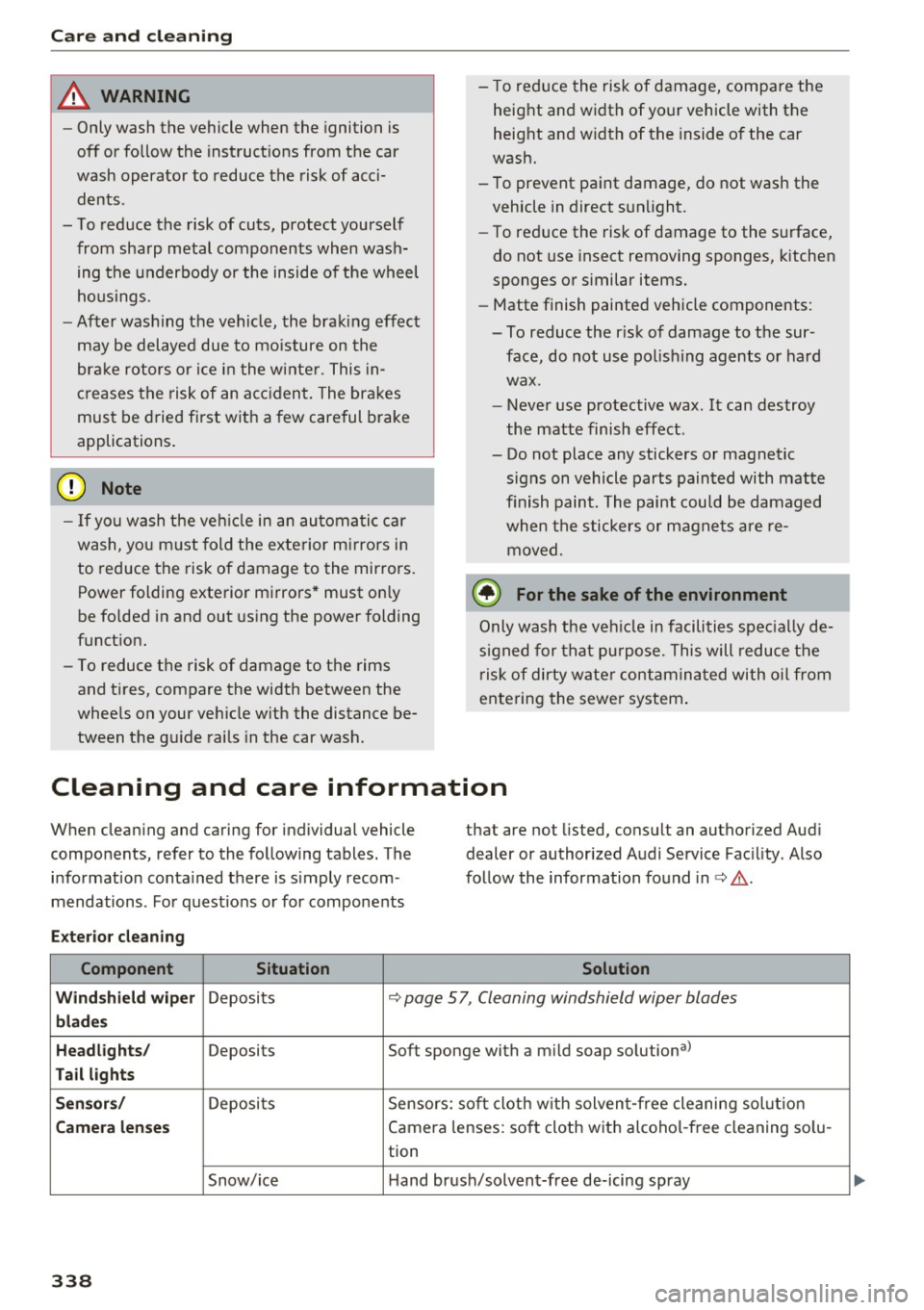
Cleaning and care information
When cleaning and caring for individual vehicle
components, refer to the fo llowing tables. The
information conta ined there is s imply recom
mendations . For quest io ns or for components that are not
listed, consult an authorized Aud i
dealer or authorized Audi Service Facility . Also
follow the information found in c> & .
Exter io r cleaning
Component Situation Solution
Wind shi eld wip er
Deposits c> page 5 7, Cleaning windshield wiper blades
blades
Headlights /
Deposits Soft sponge with a mild soap solutiona>
Tail light s
S ensor s/
Deposi ts Sensors: soft cloth w ith solven t-free cleaning sol ution
Camera lenses Camera lenses: soft cloth with alcohol -free cleaning so lu-
tion
Snow/ice Hand brush/solvent-free de-icing spray
338
Page 355 of 386
<( a, .... N ,....
N .... 0 0
3 a,
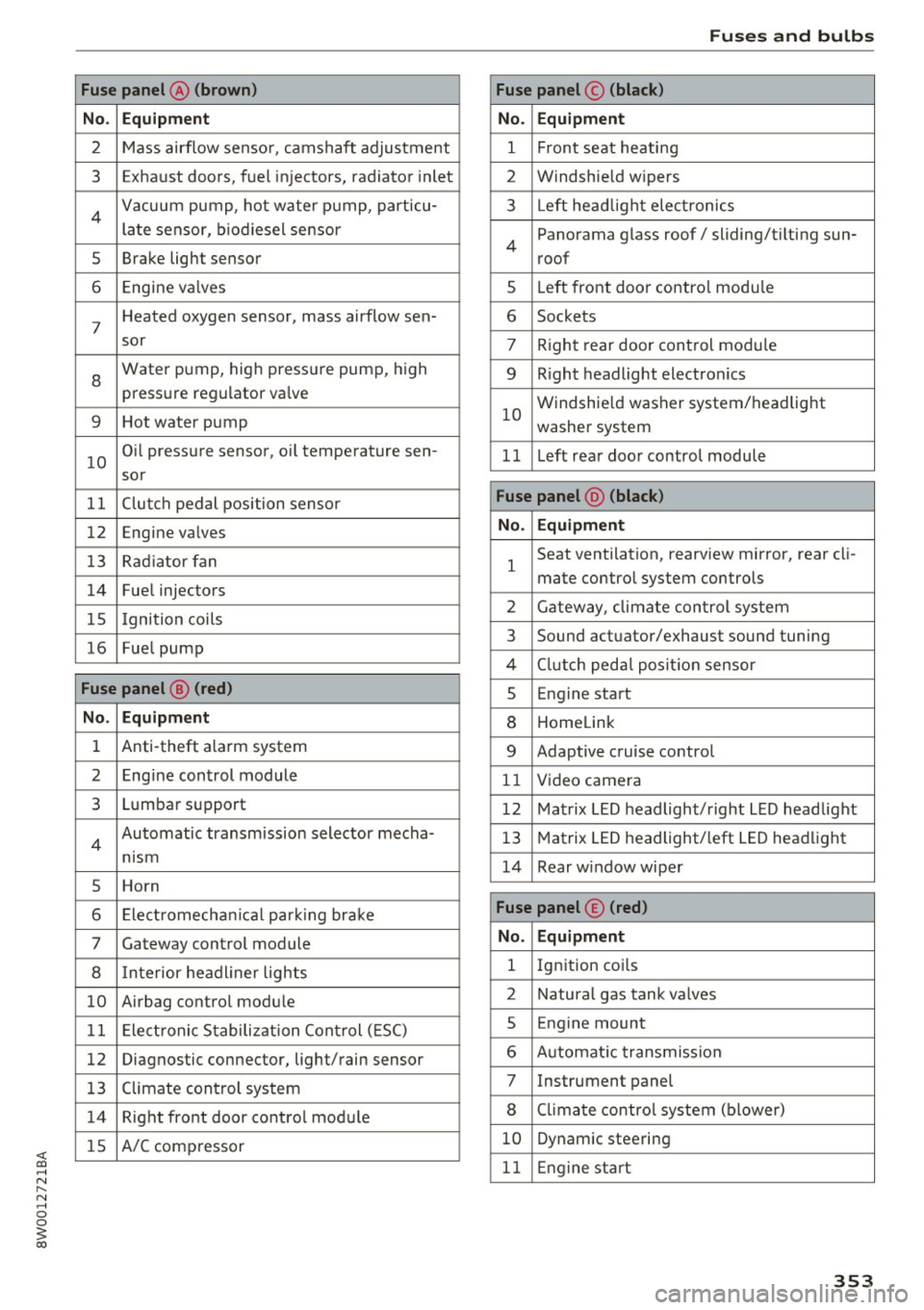
Fuse panel @ (brown)
No . Equipment
2 Mass airflow sensor, camshaft adjustment
3 Exhaust doors, fuel in jectors, radiator inlet
4 Vacuum pump, hot water pump, particu -
late senso r, biodiesel sensor
5 Brake light sensor
6 Engine va lves
7
Heated oxygen sensor, mass airflow sen-
sor
8
Water pump, high pressure pump, high
pressure regulator va lve
9 Hot water pump
10
Oil pressure sensor, oi l temperature sen-
sor
11 Clutch pedal position sensor
12 Engine valves
13 Radiator fan
14 Fuel injectors
15 I gnition coils
16 Fuel pump
Fuse panel @ (red)
No . Equipment
1 Anti-theft alarm system
2 Engine control module
3 Lumbar support
4
Automatic transmission selector mecha-
nism
5 Horn
6 Electromechan ical park ing brake
7 Gateway control module
8 I nterior headl iner lights
10 Airbag control module
11 Electronic Stabilization Control (ESC)
12 Diagnostic connector, light/rain sensor
13 Climate control system
14 Right front door control module
15 A/C compressor
Fuses and bulbs
Fuse panel © (black)
No . Equipment
1 Front seat heating
2 Windshield w ipers
3 L eft head light electronics
4
Panorama glass roof/ sliding/t ilting sun-
roof
5 L eft front door control module
6 Sockets
7 Right rear door control module
9 Right headlight electronics
10
Windshield washer system/headlight
washer system
1 1 Left rear door control module
Fuse panel @ (black)
No . Equipment
1
Seat ventilation, rearv iew mirror, rear cl i-
mate control system controls
2 Gateway , climate control system
3 Sound actuator/exhaust sound tuning
4 Clutch pedal pos ition sensor
s Engine start
8 Homelink
9 Adaptive cruise control
11 Video camera
12 Matrix LED headlight/right LED headlight
13 Matrix LED headlight/left LED headlight
14 Rear window wiper
Fuse panel © (red)
No . Equipment
l Ignition coi ls
2 Natural gas tank valves
5 Engine mount
6 Automat ic transmission
7 Instrument panel
8 Cli mate control system (blower)
10 Dynamic steering
11 Engine start
353
Page 359 of 386
When jump starting or charging the battery,
never connect the negative ground cable to
the battery negative post because the battery
manager system must be able to detect the
battery's state of charge . Always connect the
negative ground cable to the negat ive ground
post of the battery manager control unit .
Using the jump start
cable
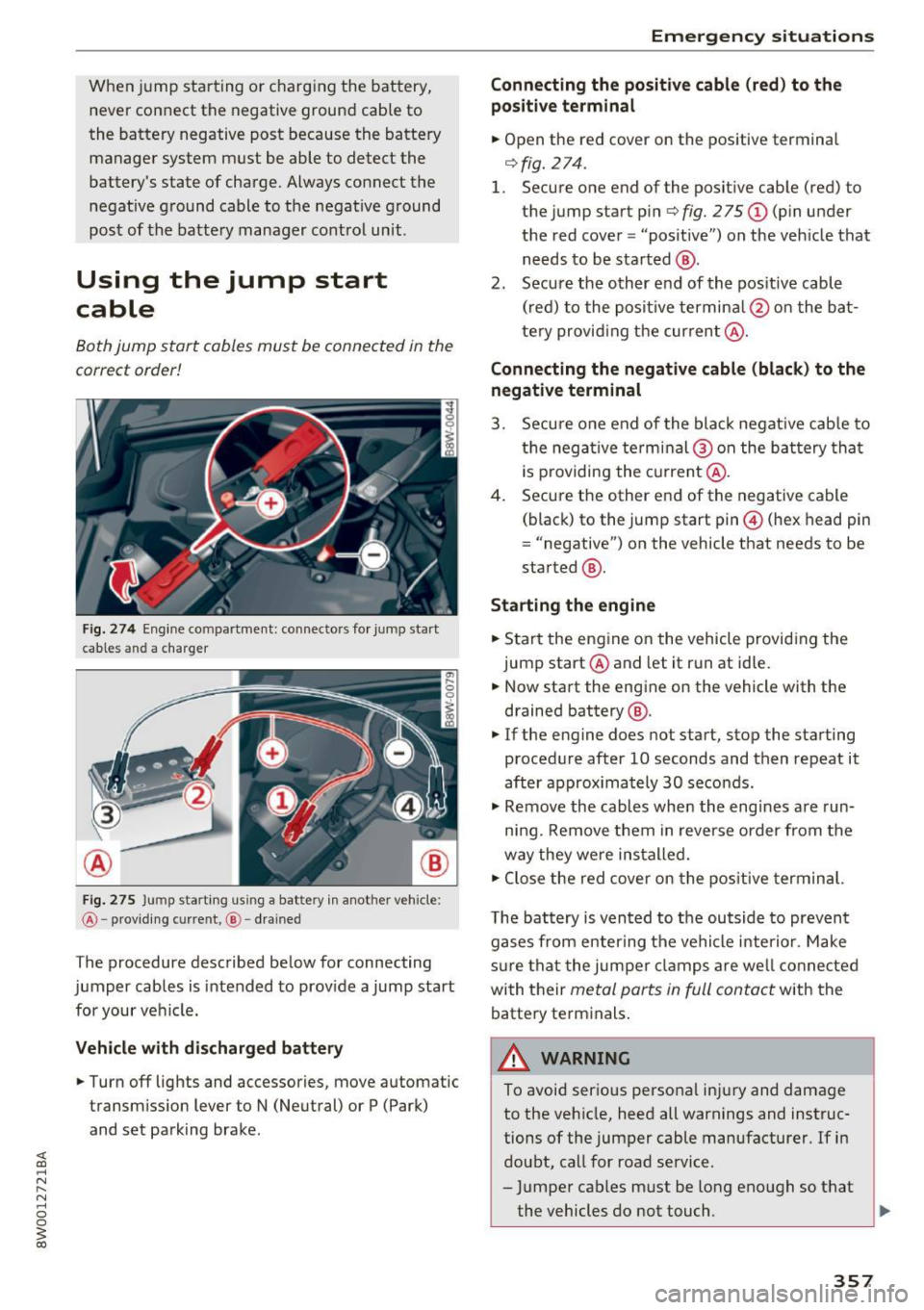
Both jump start cables must be connected in the
correct order!
Fig. 274 Engine co mpa rtment: connecto rs for jump start
cables and a charger
@
Fig. 275 Ju mp sta rting us ing a battery in another vehicle:
@ -providing cu rre nt, @ - drained
The procedure described below for connecting
jumper cables is intended to provide a jump start
for your vehicle.
Vehicle with discharged battery
.. Turn off lights and accessories, move automatic
transmission lever to N (Neutral) or P (Park)
and set parking brake .
Emergency situations
Connecting the positive cable (red) to the
po sitive terminal
.. Open the red cover on the positive terminal
r=>fig.274 .
1. Secure one end of the positive cable (red) to
the jump start pin
r=> fig. 275 (D (pin under
the red cover = "posit ive") on the vehicle that
needs to be started @.
2. Secure the other end of the pos itive cable
(red) to the positive termina l@ on the bat
tery provid ing the current @.
Connecting the negative cable (black) to the
negative terminal
3. Secure one end of the black negat ive cab le to
the negative terminal @on the battery that
i s p roviding the current@.
4. Secure the other end of the negative cable
(black) to the jump start pin@ (hex head pin
= "negative") on the vehicle that needs to be
started @.
Starting the engine
.. Start the engine on the vehicle providing the
jump start @and let it run at idle .
.. Now start the engine on the vehicle with the
drained battery @ .
.. If the engine does not start, stop the starting
procedure after 10 seconds and then repeat it
after approx imately 30 seconds .
.. Remove the cables when the engines are run
ning. Remove them in reverse order from the
way they were installed.
.. Close the red cover on the positive terminal.
T he battery is vented to the outside to prevent
gases from enter ing the vehicle interior . Make
s ur e that the jumper clamps are well connected
with their
metal ports in full contact with the
battery terminals.
_& WARNING
-To avoid serious personal injury and damage to the vehicle, heed all warnings and instruc
tions of the jumper cable manufacturer. If in
doubt, call for road service.
- Jumper cables must be long enough so that
the vehicles do not touch . ..,_
357
Page 370 of 386
Index
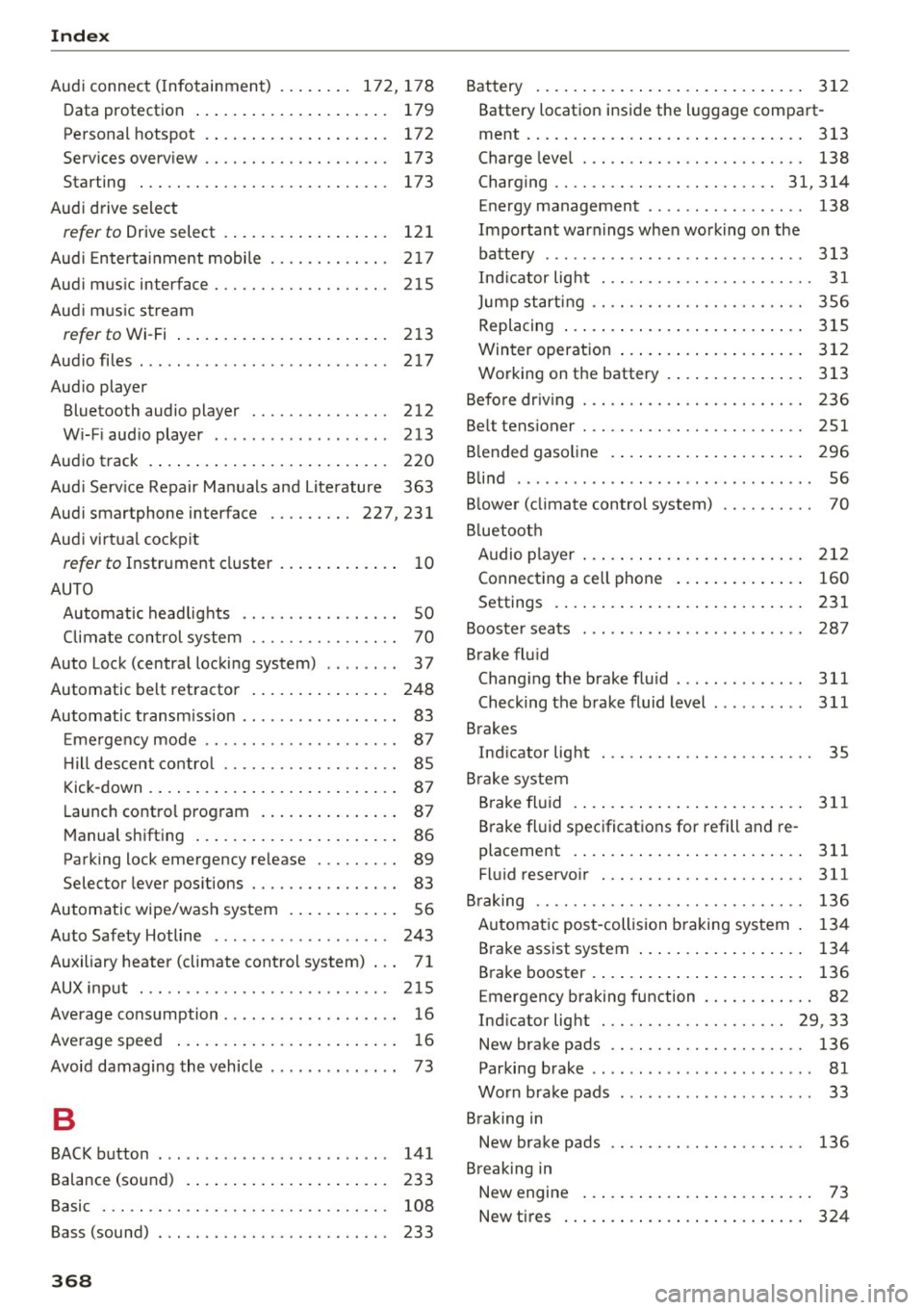
Audi connect ( Infotainment) .. ... .. . 172, 178
Data protection
Pe rsonal hotspot 179
172
Services overv iew . . . . . . . . . . . . . . . . . . . . 173
Starting . . . . . . . . . . . . . . . . . . . . . . . . . . . 173
Aud i d rive select
refer to Drive select . . . . . . . . . . . . . . . . . . 121
Aud i Enterta inment mobi le ...... .... .. . 217
Aud i mus ic interface ............ .... .. . 215
Aud i m usic s tream
refer to Wi -Fi . . . . . . . . . . . . . . . . . . . . . . . 213
Aud iofi les ..... .. ................ ... . 217
Aud io player
Bluetooth audio pl ayer . . . . . . . . . . . . . . . 212
W i-F i aud io player . . . . . . . . . . . . . . . . . . . 213
Audio track 220
Aud i Serv ice Repair Man uals and Lite rature 363
Aud i smar tphone interface ...... ... 227,231
Aud i virtual cockp it
refer to Instr ument cluster . . . . . . . . . . . . . 10
AUTO Automatic headlights . . . . . . . . . . . . . . . . . SO
Climate con trol system . . . . . . . . . . . . . . . . 70
Auto Lock (central locking system) . . . . . . . . 3 7
Automatic belt ret ractor . . . . . . . . . . . . . . . 248
Automatic transm ission . . . . . . . . . . . . . . . . . 83
E me rgency mode . . . . . . . . . . . . . . . . . . . . . 87
H ill descent contro l . . . . . . . . . . . . . . . . . . . 85
Kick -down . . . . . . . . . . . . . . . . . . . . . . . . . . . 87
Launch contro l program . . . . . . . . . . . . . . . 87
Manual sh ifting . . . . . . . . . . . . . . . . . . . . . . 86
Parking lock emergency re lease . . . . . . . . . 89
Selector lever pos itions . . . . . . . . . . . . . . . . 83
Automatic wipe/wash system . . . . . . . . . . . . 56
Auto Safety Hotline . . . . . . . . . . . . . . . . . . . 243
Auxiliary heater (climate control system) . . . 71
AUX inp ut . .. .. .. ............. .... .. . 215
Average consumption . . . . . . . . . . . . . . . . . . . 16
Average speed . . . . . . . . . . . . . . . . . . . . . . . . 1 6
Avoid damaging the vehicle . . . . . . . . . . . . . . 73
B
BACK button
Balance (sound)
Basic
Bass (sound)
368
141
233 108
233 Battery .
... .. .. .. .. .. ... . .. .... ... .. 312
Battery location inside the luggage compart-
ment . . . . . . . . . . . . . . . . . . . . . . . . . . . . . . 313
Charge leve l . . . . . . . . . . . . . . . . . . . . . . . . 138
Charging . . . . . . . . . . . . . . . . . . . . . . . . 31, 314
E nergy management . . . . . . . . . . . . . . . . . 138
Impo rtant warnings when working on the
batte ry . . . . . . . . . . . . . . . . . . . . . . . . . . . . 313
Ind icator lig ht . . . . . . . . . . . . . . . . . . . . . . . 31
Jump start ing . . . . . . . . . . . . . . . . . . . . . . . 356
Replacing . . . . . . . . . . . . . . . . . . . . . . . . . . 315
Winter operation ... .. ... . .. .... ... . .
Working on the battery . ... .. .... ... . .
Befo re dr iv ing
Be lt tens ioner
. .. .. .. .. ............. ..
B lended gasoline . ... .. .. .. .. .... ... . .
Blind
......... ... ... ............. ....
3 12
313
236
251
296
56
B lower (climate control system) . . . . . . . . . . 70
B luetoot h
Audio p layer . . . . . . . . . . . . . . . . . . . . . . . . 2 12
Connecting a cell phone . . . . . . . . . . . . . . 160
Settings . . . . . . . . . . . . . . . . . . . . . . . . . . . 231
Booster seats
Brake flu id 28
7
Changi ng the brake flu id .. ... .... ... .. 311
Check ing the brake fluid level ......... . 311
Brakes Ind icator light . . . . . . . . . . . . . . . . . . . . . . . 35
B rake system
B rake flu id
311
Brake fl uid spec ifications for refill and re
placement . . . . . . . . . . . . . . . . . . . . . . . . . 311
Fluid reservo ir . .. .. .. ............. .. 311
B raking . . . . . . . . . . . . . . . . . . . . . . . . . . . . . 136
A utomat ic post-collision braking system . 134
Brake assist system . . . . . . . . . . . . . . . . . . 134
Brake booster . . . . . . . . . . . . . . . . . . . . . . . 136
E me rgency braking function . . . . . . . . . . . . 82
Ind icator light . . . . . . . . . . . . . . . . . . . . 29, 33
New brake pads . . . . . . . . . . . . . . . . . . . . . 136
Parking brake . . . . . . . . . . . . . . . . . . . . . . . . 81
Wo rn brake pads . . . . . . . . . . . . . . . . . . . . . 33
Braking in New brake pads 136
B re aking in
New engine . . . . . . . . . . . . . . . . . . . . . . . . . 73
New ti res . . . . . . . . . . . . . . . . . . . . . . . . . . 324
Page 373 of 386
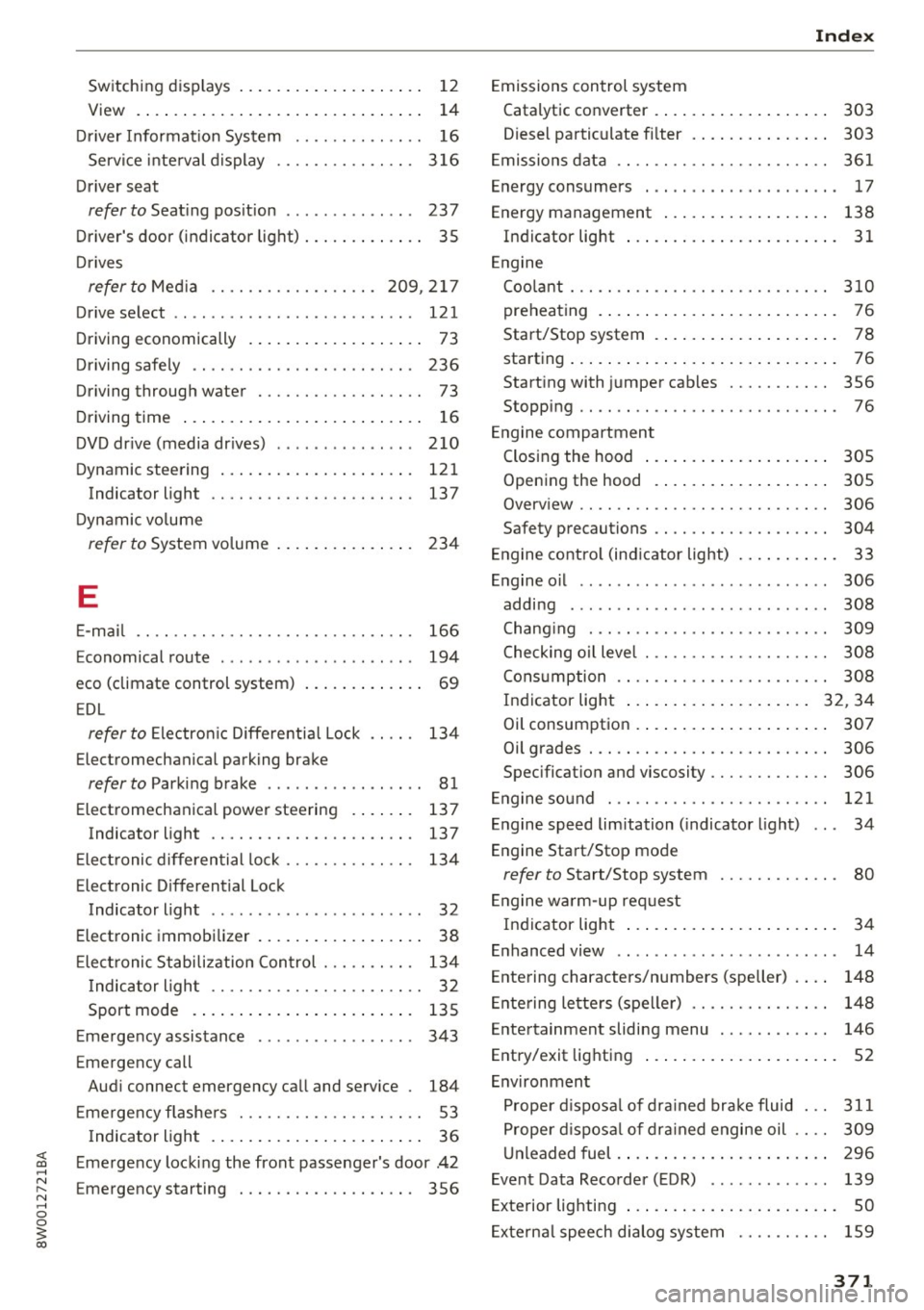
Switching displays . . . . . . . . . . . . . . . . . . . . 12
View . . . . . . . . . . . . . . . . . . . . . . . . . . . . . . . 14
Driver Information System . . . . . . . . . . . . . . 16
Service interval display ...... .. .. .... . 316
Driver seat
refer to Seating position . . . . . . . . . . . . . . 237
Driver's door (indicator light) . . . . . . . . . . . . . 35
Drives
refertoMed ia ............... .. .
209,217
Drive select . . . . . . . . . . . . . . . . . . . . . . . . . . 121
Driving economically . . . . . . . . . . . . . . . . . . . 73
Driving safely . . . . . . . . . . . . . . . . . . . . . . . . 236
Driving through water . . . . . . . . . . . . . . . . . . 73
Driving time . . . . . . . . . . . . . . . . . . . . . . . . . . 16
DVD drive (media dr ives) . ..... ... ... .. . 210
Dynamic steering
Indicator light
Dynamic volume 121
137
refer to System volume . . . . . . . . . . . . . . . 234
E
E-mail
E . l conom1ca route ............ ... ... .. .
166
194
eco (climate control system) . . . . . . . . . . . . . 69
EDL
refer to Electronic Differentia l Lock . . . . . 134
Electromechanical parking brake
refer to Parking brake . . . . . . . . . . . . . . . . . 81
Electromechanical power steering . . . . . . . 137
Indicator light . . . . . . . . . . . . . . . . . . . . . . 13 7
E lectronic differential lock . . . . . . . . . . . . . .
134
Electronic Differential Lock
Indicator light . . . . . . . . . . . . . . . . . . . . . . .
32
Electronic immobilizer . . . . . . . . . . . . . . . . . . 38
Electronic Stabilization Control . . . . . . . . . . 134
Indicator light . . . . . . . . . . . . . . . . . . . . . . . 32
Sport mode . . . . . . . . . . . . . . . . . . . . . . . . 135
Emergency assistance . . . . . . . . . . . . . . . . . 343
Emergency call
Audi connect emergency call and service .
184
Emergency flashers . . . . . . . . . . . . . . . . . . . . 53
Indicator light . . . . . . . . . . . . . . . . . . . . . . . 36
<( ~ Emergency locking the front passenger's door .42
N ~ Emergency starting . . . . . . . . . . . . . . . . . . . 356
.... 0 0
3
Emissions control system
Catalytic converter . . . . . . . . . . . . . . . . . . .
303
Diesel particulate filter . . . . . . . . . . . . . . . 303
Emissions data . . . . . . . . . . . . . . . . . . . . . . . 361
Energy consumers . . . . . . . . . . . . . . . . . . . . . 17
Energy management . . . . . . . . . . . . . . . . . . 138
Indicator light . . . . . . . . . . . . . . . . . . . . . . . 31
Engine
Coolant . . . . . . . . . . . . . . . . . . . . . . . . . . . .
310
preheating . . . . . . . . . . . . . . . . . . . . . . . . . . 76
Start/Stop system . . . . . . . . . . . . . . . . . . . . 78
starting . . . . . . . . . . . . . . . . . . . . . . . . . . . . . 76
Starting with jumper cables . . . . . . . . . . . 356
Stopping . . . . . . . . . . . . . . . . . . . . . . . . . . . . 76
Engine compartment
Closing the hood . . . . . . . . . . . . . . . . . . . .
305
Opening the hood . . . . . . . . . . . . . . . . . . . 305
Overv iew . . . . . . . . . . . . . . . . . . . . . . . . . . . 306
Safety precautions . . . . . . . . . . . . . . . . . . . 304
Engine control (indicator light) . . . . . . . . . . . 33
Engine oil . . . . . . . . . . . . . . . . . . . . . . . . . . . 306
adding . . . . . . . . . . . . . . . . . . . . . . . . . . . . 308
Chang ing . . . . . . . . . . . . . . . . . . . . . . . . . . 309
Checking oil leve l . . . . . . . . . . . . . . . . . . . . 308
Consumption . . . . . . . . . . . . . . . . . . . . . . .
308
Indicator light . . . . . . . . . . . . . . . . . . . . 32, 34
Oil consumption . . . . . . . . . . . . . . . . . . . . . 307
Oil grades . . . . . . . . . . . . . . . . . . . . . . . . . . 306
Specification and viscosity . . . . . . . . . . . . . 306
Engine sound . . . . . . . . . . . . . . . . . . . . . . . . 121
Engine speed limitation (indicator light) 34
Engine Start/Stop mode
refer to Start/Stop system . . . . . . . . . . . . . 80
Engine warm-up request
Indicator light . . . . . . . . . . . . . . . . . . . . . . .
34
Enhanced view .. .. .. ... ....... ... .. .. . 14
Entering characters/numbers (speller) ... . 148
Entering letters (speller) . . . . . . . . . . . . . . . 148
Entertainment sliding menu . . . . . . . . . . . . 146
Entry/exit lighting . . . . . . . . . . . . . . . . . . . . . 52
Environment
Proper disposal of drained brake fluid ...
311
Proper disposal of drained engine oil . . . . 309
Unleaded fuel . . . . . . . . . . . . . . . . . . . . . . . 296
Event Data Recorder (EDR) . . . . . . . . . . . . . 139
Exterior lighting . . . . . . . . . . . . . . . . . . . . . . . 50
External speech dialog system . . . . . . . . . . 159
371
Page 377 of 386
<( a, .... N ,....
N .... 0 0
3 a,
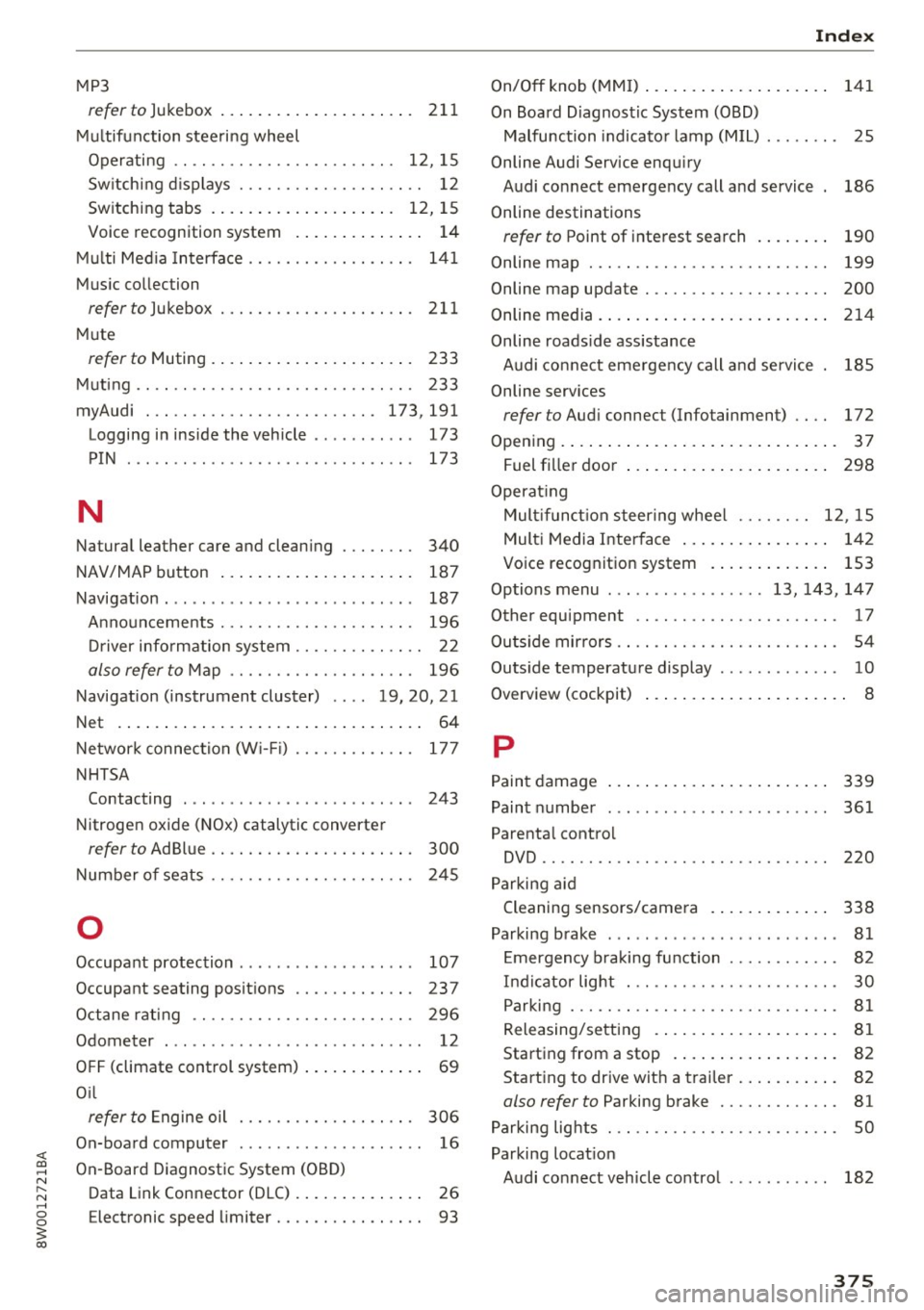
MP3
refer to Jukebox . . . . . . . . . . . . . . . . . . . . . 211
Multifunction steering wheel
Operating .. .. .. ........... .. .. ... 12, 15
Sw itching displays . . . . . . . . . . . . . . . . . . . . 12
Switching tabs . . . . . . . . . . . . . . . . . . . . 12, 15
Voice recognition system . . . . . . . . . . . . . . 14
Multi Media Interface . . . . . . . . . . . . . . . . . . 141
Music collec tion
referto)ukebox ... .. .. ....... .. .. .. . 211
Mute
r e fer to Muting . . . . . . . . . . . . . . . . . . . . . . 233
Muting .. .. .. .. ............. .. .. .. .. . 233
myAudi . .. .. .. ............... .. . 173,191
Logging in inside the vehicle . . . . . . . . . . . 173
PIN . . . . . . . . . . . . . . . . . . . . . . . . . . . . . . . 173
N
Natural leather care and cleaning . . . . . . . . 340
NAV/MAP button . . . . . . . . . . . . . . . . . . . . . 187
Navigation . . . . . . . . . . . . . . . . . . . . . . . . . . . 187
Announcements . . . . . . . . . . . . . . . . . . . . . 196
Driver information system . . . . . . . . . . . . . . 22
also refer to Map . . . . . . . . . . . . . . . . . . . . 196
Navigation (instrument cluster) .... 19, 20, 21
Net . . . . . . . . . . . . . . . . . . . . . . . . . . . . . . . . . 64
Network connection (W i-F i) . . . . . . . . . . . . . 177
NHTSA Contacting . . . . . . . . . . . . . . . . . . . . . . . . . 243
Nitrogen oxide (NOx) catalytic converter
re fer to Ad Blu e . . . . . . . . . . . . . . . . . . . . . . 300
Number of seats . . . . . . . . . . . . . . . . . . . . . . 245
0
Occupant protection . . . . . . . . . . . . . . . . . . . 107
Occupant seating positions . . . . . . . . . . . . . 237
Octane rating . . . . . . . . . . . . . . . . . . . . . . . . 296
Odometer . . . . . . . . . . . . . . . . . . . . . . . . . . . . 12
OFF (climate control syst em) . . . . . . . . . . . . . 69
O il
refer to Engine oil . . . . . . . . . . . . . . . . . . . 306
On-board computer . . . . . . . . . . . . . . . . . . . . 16
On-Board Diagnostic System (OBD)
Data Link Connector (DLC) . . . . . . . . . . . . . . 26
E lectronic speed limiter. . . . . . . . . . . . . . . . 93
Index
On/Off knob (MMI) . . . . . . . . . . . . . . . . . . . . 141
On Board Diagnostic System (OBD) Malfunction indicator lamp (MIL) . . . . . . . . 25
Online Audi Service enquiry Audi connect emergency call and service 186
Online destinations
refer to Point of interest search . . . . . . . . 190
Online map . . . . . . . . . . . . . . . . . . . . . . . . . . 199
Online map upd ate . . . . . . . . . . . . . . . . . . . . 200
Online media. ..... .. ................ . 214
Online roads ide assistance
Audi connect emergency call and service 185
Online services
refer to Audi connec t (Info tainment) . . . . 172
Opening..... ..... .. ................ .. 37
Fuel filler door . . . . . . . . . . . . . . . . . . . . . . 298
Operat ing
Mult ifunct ion steering wheel . . . . . . . . 12, 15
Multi Media Interface . . . . . . . . . . . . . . . . 142
Voice recognition system . . . . . . . . . . . . . 153
Options menu ..... .. .......... 13, 143, 147
Other equipment . . . . . . . . . . . . . . . . . . . . . . 17
Outs ide mirrors . . . . . . . . . . . . . . . . . . . . . . . . 54
Outside temperature display . . . . . . . . . . . . . 10
Overvi ew (cockpit) . . . . . . . . . . . . . . . . . . . . . . 8
p
Paint damage
Paint number
Parental control 339
361
DVD .. .... .. .. .. .. ............... .. 220
Parking aid
Cleaning sensors/camera . . . . . . . . . . . . . 338
Parking brake . . . . . . . . . . . . . . . . . . . . . . . . . 81
Emergency braking function . . . . . . . . . . . . 82
Indicator light . . . . . . . . . . . . . . . . . . . . . . . 30
Parking . . . . . . . . . . . . . . . . . . . . . . . . . . . . . 81
Releasing/setting . . . . . . . . . . . . . . . . . . . . 81
Starting from a stop . . . . . . . . . . . . . . . . . . 82
Starting to drive w ith a trailer . . . . . . . . . . . 82
also refer to Parking brake . . . . . . . . . . . . . 81
Parking lights . . . . . . . . . . . . . . . . . . . . . . . . . 50
Parking location Audi connect vehicle control . . . . . . . . . . . 182
375