light AUDI A4 2017 Workshop Manual
[x] Cancel search | Manufacturer: AUDI, Model Year: 2017, Model line: A4, Model: AUDI A4 2017Pages: 386, PDF Size: 96.32 MB
Page 95 of 386

Assist Electronic speed limiter
Your vehicle may be factory equipped with t ires
that are rated for a maximum speed of 130 mph (210 km/h). This is less than the maximum speed
of your vehicle. To reduce the risk of sudden tire
failure and loss of control if the vehicle is operat
ed at excessive speeds, your vehicle also has an
electronic speed limiter . The electronic speed
limiter prevents your vehicle from going faster
than the t ire speed rating. For mo re information
¢page 317.
If the engine control unit receives faulty vehicle
road speed s ignals, the Malfunction Indicator
L amp (M IL)
¢..ij will illuminate. If this occurs,
contact the nearest autho rized Audi dealer for
assistance.
_& WARNING
Always observe the posted speed limits and
adjust you r speed to suit prevailing road, traf
fic and weather condit ions. Never drive your
vehicle faster than the max imum speed rating
of the tires installed.
Speed warning system
Introduction
Applies to: vehicles with speed warning system
The speed warning system helps you to stay un
der a specified maximum speed. -
The
speed warning system warns you if you are
exceeding the maximum speed that you have
stored . You will hear a warning tone when yo ur
speed exceeds the sto red va lue by approximate ly
3 mp h (3 km/h). The indi cator light also tur ns on
in the instrument cluster display
Eel (USA mod
e ls)/
Hll (Canada mode ls) as well as the message
Manually set speed limit XXX mph (km /h ) ex
c eeded .
The ind icator light [01 / (OJ turns off
when the speed decreases below the stored max
imum speed.
Sett ing a threshold is recommended if you would
like to be reminded when you reach a certain
maximum speed. Situations where you may want
A ss ist
to do so include driving in a co untry with a gener
al speed limit or if there is a specified maximum
speed for winte r tires.
(D Tips
Regardless of t he speed warning system, you
s h ou ld always monitor your speed using the
speedometer and make s ure yo u are fo llow ing
the lega l speed limit.
Setting the warning threshold
Appl ies to : vehicles with speed warni ng system
You can set, change and delete the warning
threshold in the Infotainment system.
.,. Sele ct in the Infotai nment system: I MENU ! but
ton
> Vehicle > left control b utton > Driver as
sistance
> Speed warning > Manu al.
You can set a ny thresho ld between 20 mp h
(30 km/h) and lS0 mph (240 km/h) . Settings
can eac h be adjusted in increments of 5 mph (10
km/h).
Cruise control system
Switching on
Applies to: vehicles with cruise control system
The cruise control system makes it possible to
drive at a constant speed starting at 15 mph (20kmlh).
0
f
~
0
Fig. 88 Operating lever: cru ise control system
.,. To switch t he system on, pull the lever into po
sition
(D ¢ fig. 88.
.,. Drive at the speed to be maintained.
.,. To store the speed, press the button @.
93
Page 96 of 386

Ass is t
The stored speed and the [ij;ji j~i4 (USA models)/
Ill (Canada mode ls) indicator light appear in the
instrument cluster disp lay . An add itiona l indica
tor appears in the Head -up display*.
The speed is maintained by modifying engine power or through an active brake intervention.
A WARNING
- Always pay attention to the traffic around
you when the cruise control system is in op
eration. You are always responsible for your
speed and the distance between your vehi
cle and other veh icles .
- For safety reasons, cruise control should not
be used in the city, in stop-and-go traffic, on
winding roads and when road condit ions are
poo r (such as ice, fog, gravel, heavy rain and
hydroplaning), because t his increases the
risk of an accident.
- Switch the cruise cont rol off temporar ily
when d riving i n turn ing lanes, h ighway exits
or in construction zones .
- Please note tha t unconsciously "resting"
yo ur foot on the accelerator pedal prevents
the cruise control from braking. This is be
cause pressing the acce lerato r pedal ove r
rides the cruise contro l system.
- If a brake system ma lf u nction such as over
heating occurs when the cruise control sys
tem is sw itched on, the braking function in
the system may be sw itched off. The rest of
the cruise control system functions remain
active as long as the
[ij;(l)~i4 (USA models) I
i:I (Canada models) indicator light is on.
(D Note
Before driving a long d istance on a steep
downward hill, decrease your speed and se
lect a lower driving gea r. This makes use of
the engine b raking effect and relieves the
brakes.
(0 Tips
The b rake lights turn on when the brakes are
app lied automatically .
94
· Changing the speed
Applies to: vehicles with cruise control system
.,. To increase/decrease the speed in 1 mph (1
km/h) incremen ts, briefly
tap the lever toward
0 10 c::> page 93, fig . 88 to the first level.
.. To increase/decrease the speed in
S mph (10
km/h) increments, briefly tap the lever toward
0 10 to the second leve l.
.. To increase or decrease the speed qu ickly,
hold
the lever toward 0 10 to the first or second
level unt il the desired speed is reached .
Overriding the speed
Applies to: vehicles with cruise control system
You can press the acce lerator pedal down to in
c rease yo ur speed, for example if you want to
pass someone. The speed yo u sto red earl ie r w ill
r esume as soon as yo u release the acceler ator
pedal.
Howeve r, if yo u are exceedi ng the stored speed
by a considerable amount fo r a long time, the
c ruise contro l system will temporarily switch off.
The m:iJm (U SA mode ls) ! Ill (Canada models) in
dicator light in the instrument cl uster turns off
and the stored speed is retained.
Preselecting a speed
App lies to: vehicles wit h cruise control system
You can pre -select your desired speed when the
vehicle is stationary.
.,. Switch o n the ignition.
.. Pull the lever into pos ition
(I) c::> page 93,
fig. 88 .
.. To increase or decrease the speed, tap the lever
in the
0 10 direction.
This function makes it possible, for example, to
save the speed you want before driving on the highway. Once on the expressway, act ivate the
cruise contro l by pull ing the lever into posit ion
(I) .
Page 100 of 386
Assist
(D Note
The sensors can be displaced by impacts or
damage to the bumper , whee l housing and
underbody. This can impair the adaptive
cruise control. Have an authorized Audi dea ler
or authorized Audi Service Fac ility check their
function .
In curves
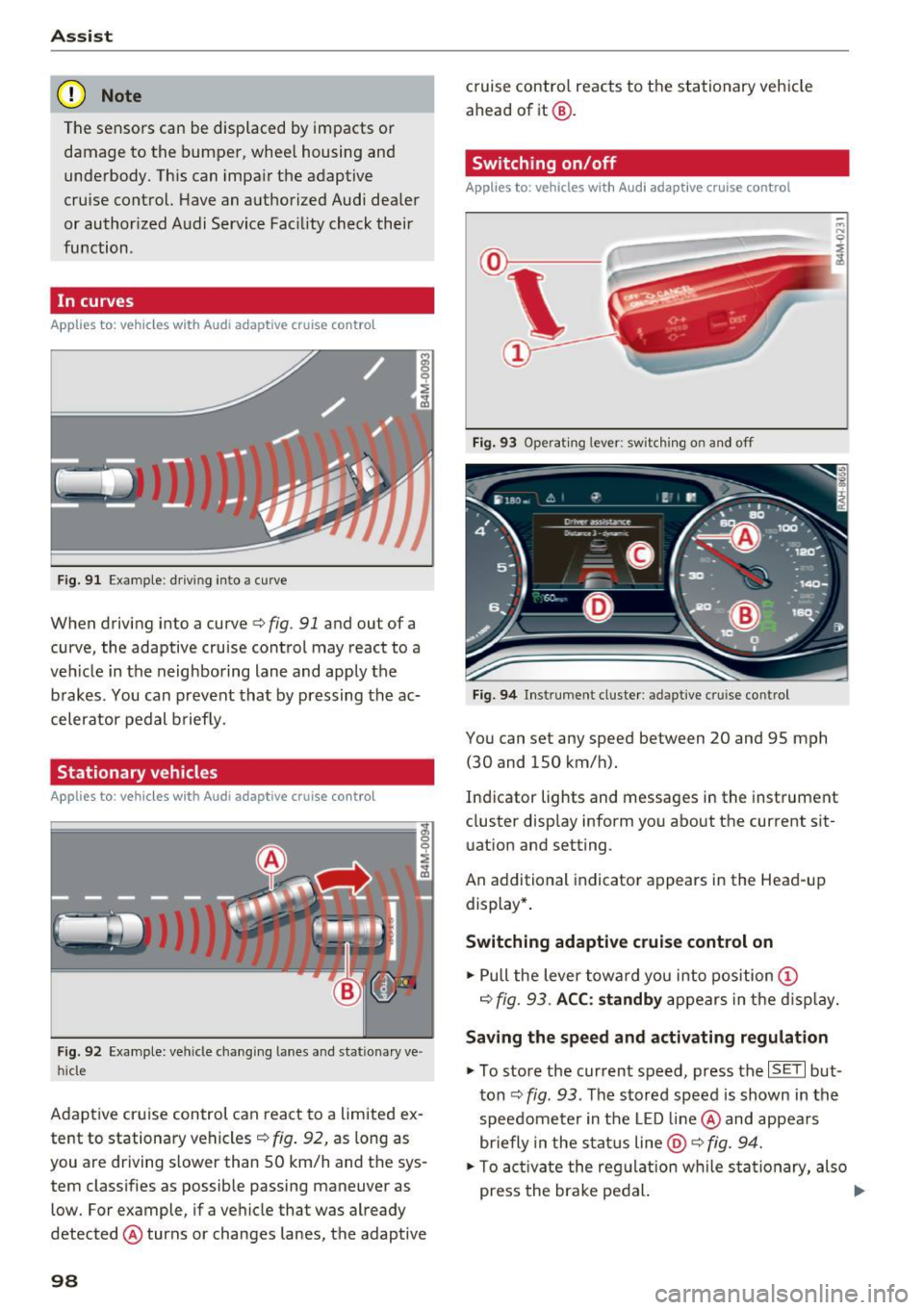
Applies to: vehicles with Audi adaptive cruise control
Fig . 9 1 Exa mple: drivin g in to a curve
When driving into a curve<=> fig. 91 and ou t of a
curve, the adaptive cruise control may react to a
veh icle in the neighboring lane and apply the
brakes . You can prevent that by pressing the ac
celerator pedal b rief ly.
Stationary vehicles
Applies to : vehicles with Aud i adaptive cruise contro l
Fig. 92 Example: vehicl e chang ing lane s and sta tiona ry ve
hi cle
Adaptive cruise control can react to a limited ex
tent to stationary vehicles
c:> fig . 92, as long as
you are driving slow er than SO km/h and the sys
tem classifies as possible passing maneuver as
low . For example, if a vehicle that was already
detected @turns or changes lanes, the adaptive
98
cruise contro l reacts to the stationary vehicle
ahead of it@ .
Switching on/off
Applies to: vehicles with Audi adaptive cruise control
Fig. 93 Operating lever : sw itc hin g on and off
Fig. 94 Inst rument cluster : adap tive cr uise cont rol
You can set any speed between 20 and 9S mph
(30 and lSO km/h).
Indicator lights and messages in the instrument
cluster display inform you about the cu rrent sit
uation and setting .
An add itional indicator appears in the Head-up
display *.
Switching adaptive cruise control on
.. Pull the lever toward you into position (D
c=> fig. 93. ACC: standby appears in the display.
Saving the speed and activating regulation
.. To store the current speed, press the ISE TI but
ton
c:> fig . 93 . The stored speed is shown in the
speedometer in the LED line@ and appears
briefly in the status line
@ c:> fig. 94.
.. To activate the regulation while sta tionary, also
press the brake pedal. .,.
Page 101 of 386

Switching adaptive cruise control off
• Push the lever away from you into position @
unti l it clicks into place. The message
ACC: off
appears.
@ Indicato r lights
I'll -adaptive cru ise control is switched on. No
vehicles are detected ahead. The stored speed is
maintained.
• -A vehicle driving ahead was detected. The
adapt ive cr uise control system regulates the
speed and distance to the vehicle dr iv ing ahead
and accelerates/brakes automatically.
• -adaptive cru ise cont rol is switched on . Ave
h icle was detected ahead. Yo ur vehicle is stat ion
ary and will not star t driving automatically.
(-j -adaptive cru ise control is switched on . No
vehicles we re detected ahead . Your vehicle is sta
tionary and will not start dr iving automati cally.
• -T he automatic brak ing is not enough to
maintain a sufficient distance to a veh icle dr iving
ahead . You must intervene
¢ page 102, Request
for driver intervention.
© In strum ent cluster display
If Dr ive r assis t is not shown in the instrument
cluster display, you can open it using the multi
function steering wheel buttons
¢ page 12.
Based on the graphic display, you can determine
if the system is maintaining a distance to the ve
h icle dr iving ahead and what that distance is .
No vehicle -no vehicle was detected driving
ahead .
Silver vehicle -a vehicle was detected driv ing
ahead.
Red vehicle -request for the dr iver to take action
¢page 102.
The five distance bar s on the gauge© rep resent
the set d istance (refer to
~ page 101 for infor
mat io n on how to change the dis tance) . If you
fa ll below the se lected distance, the distance
bars become red from the bottom upward.
A ss ist
A WARNING
If you press the !SET ! button when driv ing at
speeds below 20 mph (30 km/h), the veh icle
accelerates automatically up to 20 mph (30
km/h), wh ich is the minim um speed that can
be set.
@ Tips
- If you switch the ignition or the adaptive
cruise cont rol sys tem off, the set speed is
erased for safety reasons.
- The e lectronic stabilization control (ESC)
and the an ti-slip-regula tion (ASR) are auto
matically switched on when the adap tive
cruise cont rol is swit ched on.
Changing the speed
Appl ies to: vehicles wit h Aud i ada ptive cru ise control
0
f
'
0
Fi g. 95 Operat ing lever: changing the speed
"'To increase/decrease the speed in 1 mph (1
km/h) increments, b riefly
t a p the lever toward
0 10 ¢ fig. 95 to the firs t level.
• To increase/dec rease the speed in 5 mph
(5 km/h or 10 km/h) increments, brief ly
tap
the lever toward 0 10 to the second level.
• To increase or decrease the speed quick ly,
hold
the lever toward 0 10 up to the first or second
level unt il the red LED@ reaches the desired
speed¢
page 98, fig . 94 .
You can also preselect the speed when adaptive
cruise contro l is not act ive by moving the lever in
the des ired direction
0 10 . Activate the previ
ously selected speed by pulling the lever into po
sition
(D ¢ page 98, fig . 93 .
After every adjustment, the new stored speed ap
pears briefly in the status line ¢
page 98, fig. 94 ..,.
99
Page 102 of 386
Ass is t
@ . The B indicator light also turns on when
adaptive cruise control is active and the
Ill indi
cator light turns on when adaptive cruise contro l
is not active .. In the Audi v irtual cockpit*, the
II
indicator light appears instead.
Driving in stop-and-go traffic
Applies to: vehicles with Aud i adapt ive cruise contro l
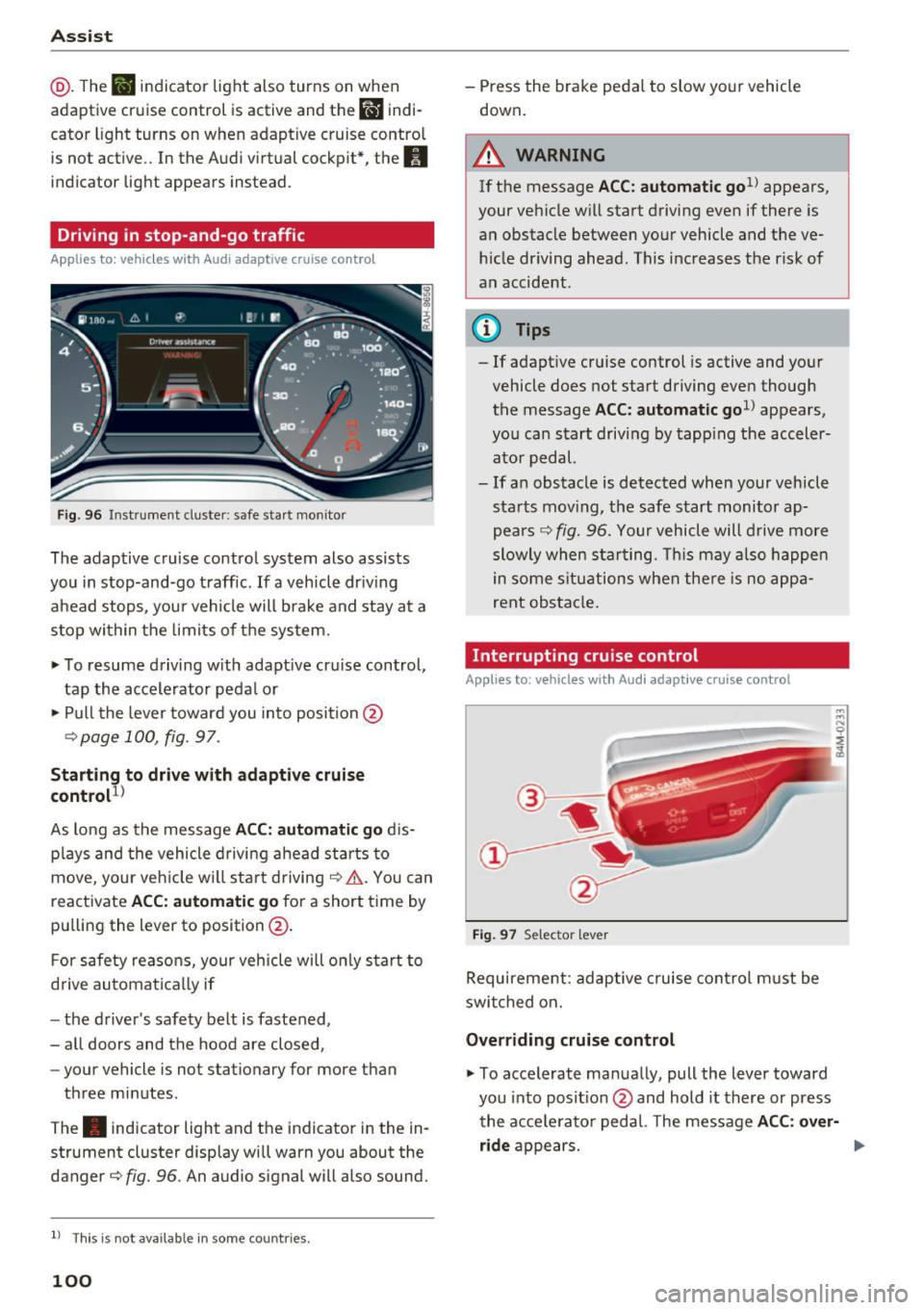
Fig. 96 Instru ment cluste r: safe sta rt mo nito r
The adaptive cruise control system also assists
you in stop-and-go traff ic.
If a vehicle dr iv ing
ahead stops, your vehicle will brake and stay at a
stop within the limits o f the system.
• To resume d riving w ith adapt ive cr uise control,
tap the accelerator peda l or
• Pull the lever toward you in to position @
¢page 100, fig . 97.
Starting to drive w ith adaptive cruise
control
1 )
As long as the message ACC: automatic go d is
p lays and the vehicle d rivi ng ahead starts to
move, your veh icle w ill sta rt driving ¢& . You can
reactivate
ACC: automatic go for a short time by
pu lling the lever to position @.
F or safety reaso ns, your vehicle will only start to
d rive automatically if
- the driver's safety belt is fastened,
- all doors and the hood are closed,
- your vehicle is not stationary for more than
three minutes .
The . indicator light and the indicator in the in
strument cluster display wi ll warn you about the
danger¢
fig. 96 . An audio signal will also sound.
l) Thi s is no t a vail able in so me c oun tries.
100
- Press the brake pedal to slow yo ur vehicle
down.
A WARNING
If the message ACC: automati c go1l appears ,
your vehicle w ill start driving even if there is
a n obstacle between your vehicle and t he ve
hi cle dr iving ahead. This increases the ris k of
an accident .
¢j) Tips
- If adaptive cruise control is active and your
vehicle does not start driving even though
the message
ACC: automatic go1> appears,
you ca n start driving by tapp ing the acceler
ato r pedal.
- If an obstacle is detected when your veh icle
sta rts mov ing, the safe s tart monitor ap
pea rs ¢
fig. 96. Yo ur vehicle will drive more
slowly when sta rting. This may a lso happe n
in some s itu ations when the re is no a ppa
rent obstacle .
Interrupting cru ise control
Applies to: vehicles wit h Audi adaptive c ruise control
Fig. 97 Selector leve r
Requirement : adaptive cruise cont rol m ust be
swi tched on.
Overriding cruise control
• To accelerate manua lly, pull the lever toward
you into posit ion @ and hold it there or press
the acce lerato r pedal. The message
ACC : over
ride
appears. ...
Page 105 of 386
<( a, .... N ,....
N .... 0 0
3 a,
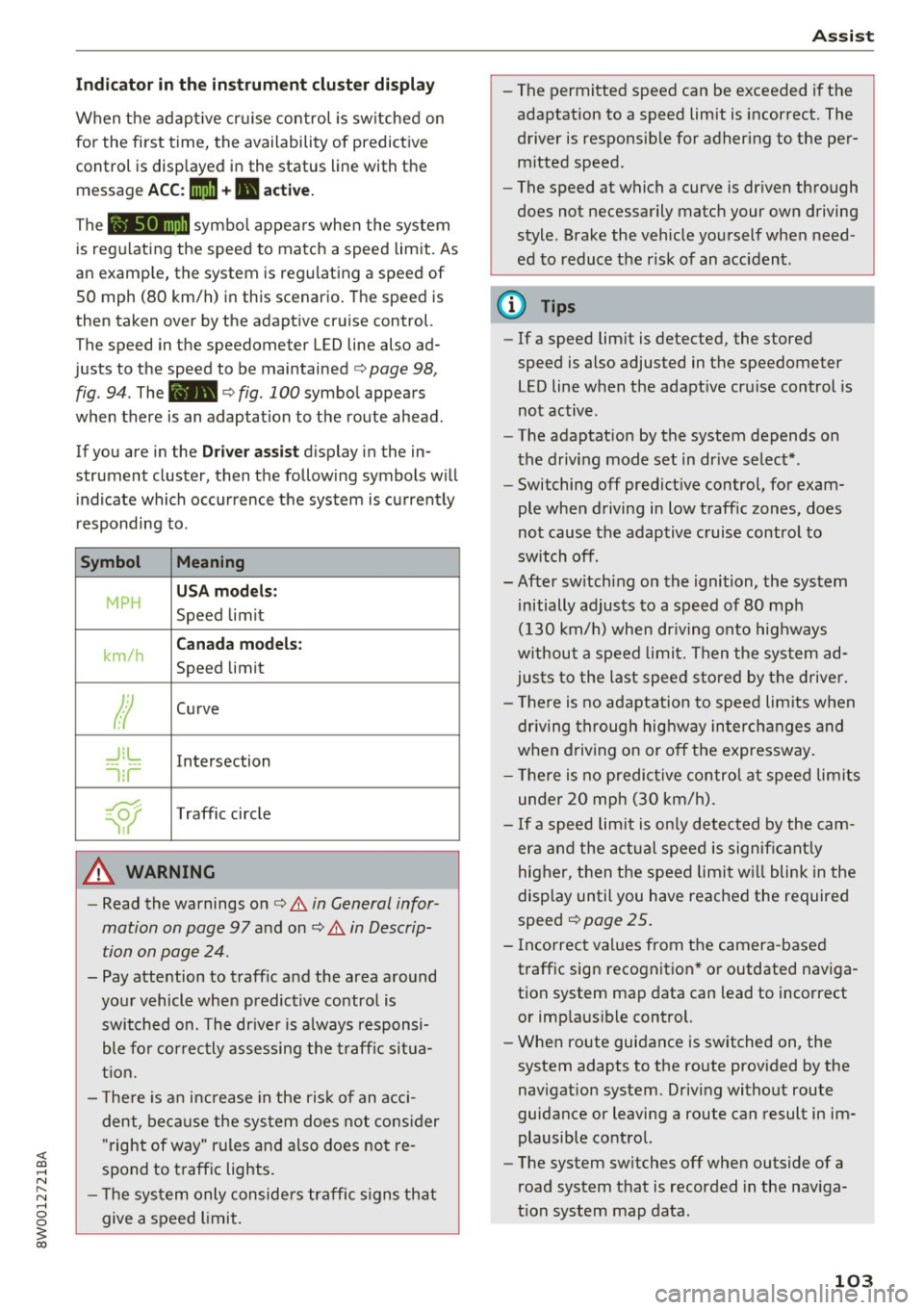
Indicator in the instrument cluster display
When the adaptive cruise control is switched on
for the first time, th e availability of predictive
control is displayed in the status line with the m essage
ACC: 1111 + B active.
The symbol appears when the system
is regulating the speed to match a speed limit. As
an example, the system is regulating a speed of
50 mph (80 km/h) in this scenario. The speed is
then taken over by the adaptive cruise control.
The speed in the speedometer LED line also ad
justs to the speed to be maintained
c::> page 98,
fig .
94. The 111B c::> fig . 100 symbol appears
when there is an adaptation to the route ahead .
If you are in the
Driver assist display in the in
strument cluster, then the following symbols will indicate which occurrence the system is currently
responding to .
Symbol Meaning
MPH
USA models:
Speed limit
km/h
Canada models:
Speed limit
Ir
Curve
_J!L
-1:r
Intersection
~
Traffic circle
A WARNING
- Read the warnings on c::> & in General infor
mation on page 97
and on c::> & in Descrip
tion on page 24 .
- Pay attention to traffic and the area around
your vehicle when predictive control is switched on. The driver is always responsi
ble for correctly assessing the traffic situa
tion.
- There is an increase in the risk of an acci
dent, because the system does not consider
"right of way" rules and also does not re
spond to traffic lights .
- The system only considers traffic signs that
give a speed limit.
Assist
- The permitted speed can be exceeded if the
adaptation to a speed limit is incorrect. The
driver is responsible for adhering to the per
mitted speed.
- The speed at which a curve is driven through
does not necessarily match your own driving
style . Brake the vehicle yourself when need
ed to reduce the risk of an accident.
(D Tips
-If a speed limit is detected, the stored
speed is also adjusted in the speedometer
LED line when the adaptive cruise control is
not active.
- The adaptation by the system depends on
the driving mode set in drive select* .
- Switching off predictive control, for exam
ple when driving in low traffic zones, does
not cause the adaptive cruise control to
switch off .
-After switching on the ignition, the system
initially adjusts to a speed of 80 mph
(130 km/h) when driving onto highways
without a speed limit. Then the system ad
justs to the last speed stored by the driver.
- There is no adaptation to speed limits when
driving through highway interchanges and
when driving on or off the expressway.
- There is no predictive control at speed limits
under 20 mph (30 km/h).
- If a speed limit is only detected by the cam
era and the actual speed is significantly
higher, then the speed limit will blink in the
display until you have reached the required
speed
c::> page 25.
- Incorrect values from the camera-based traffic sign recognition* or outdated naviga
tion system map data can lead to incorrect
or implausible control.
- When route guidance is switched on, the
system adapts to the route provided by the
navigation system. Driving without route
guidance or leaving a route can result in im
plausible control.
- The system switches
off when outside of a
road system that is recorded in the naviga
tion system map data.
103
Page 106 of 386

Assist Switching predictive control on and off
Applies to: ve hicles w ith Aud i adapt ive cruise co ntro l and pre
di ctive eff iciency assist
• Select in the Infotainment system: I MENU I but
ton
> Vehicle > left control button > Driver as
sist
> Audi adaptive cruise control.
Set speed limit
When th is function is sw itched on, the system re
sponds to the speed limits. This can also be done
with at tolerance, if desired . In this scenar io, you
may fall below or exceed the set speed in
favor of
increased efficiency.
Adaptation to route ahead
When this function is sw itched on, the adapta
tion to the route ahead (such as a reduction in
speed at curves) activates.
Congestion assist
Description
A pp lies to: ve hicles with Aud i adapt ive cruise co ntrol
Congestion assist supports the driver when driv
ing in traffic jams or in heavy traffic.
Fig. 101 Turn signal lever: congestion ass ist button
Fig . 102 Inst rument cluster: congestion assist
104
In a speed range under 40 mph (65 km/h), con
gestion assist can he lp to keep the vehicle within
a lane calculated by the system. Within the limits
of the system, the system controls the steering
automat ica lly when adaptive cruise contro l is
switched on. Since congest ion assist is only a n
ass ist system, the driver must always keep his or
her hands on the steering wheel and be ready to
stee r. The driver can override the control at any
time by actively steering.
The system is designed for driving on express
ways and highways .
Switching congestion assist on and off
• Press the <=) fig . 101 button to switch the sys
tem on and off.
• To turn the system off completely, select in the
Infotainment system:
I MENU I button> Vehicle
> left control button > Driver assist > Conges
tion assist .
If congestion assist was deactivated through the
Infotainment system, you can continue operating
the active lane assist using the
Q fig. 101 button
Q page 113. The congestion assist functions are
no longer available.
Requirements for using congestion assist:
-Congestion assist must be switched o n in the
Infota inment system.
- Adaptive cru ise control must be switched on
and active ¢
page 98.
Always switch off congestion assist in the
following situations:
-When increased attention is needed from the
driver .
- In poor weather conditions such as snow or
heavy ra in.
- When driving on roads in poor cond ition.
- In construction zones.
- In city driving.
Congestion assist availability:
When you are in the Driver assist view in the in
strument cluster display, the indicator light turns
on
iii and the message Congestion assist availa
ble
appears if a traffic jam situation was detect-
ed. You can open up the
Driver assist display .,.
Page 107 of 386
using the multifunction steering wheel buttons
¢
page 12. To activate congestion assist, you
must press the¢
fig. 101 button and switch on
the adaptive cruise control¢
page 98.
Indicator lights
11'1 and•-congestion assist is switched on .
Veh icles driving ahead were detected. Your vehi
cle adapts while driving
¢ fig. 102 .
•-Congestion ass ist switches off if the dr iver
does not take ove r stee ring after multip le driver
intervention requests . The system brakes the ve
hicle until it is stationary .
.&_ WARNING
Always keep your hands on the steering whee l
so you can be ready to steer at any time. The
driver is always responsib le for staying in a
lane and for assessing traffic situations cor
rectly . Read and follow the warnings on¢.&
in General information on page 97 . Never use
conge stion assist in the following si tuations
or yo u will increase t he ris k of an a cci den t.
- Drivi ng offroad or on unpaved roads. Con-
gestio n assist is only designed for use on
paved roads.
- In city dr ivi ng or in co nst ru ct ion zones.
- On curving stretches of road .
- In narrow lanes.
- In unclear traffic situations s uch as at inter-
sections or toll stations.
@ Tips
You are not necessarily g uided to the center
of yo ur lane.
A ss ist
Distance indicator and
distance warning
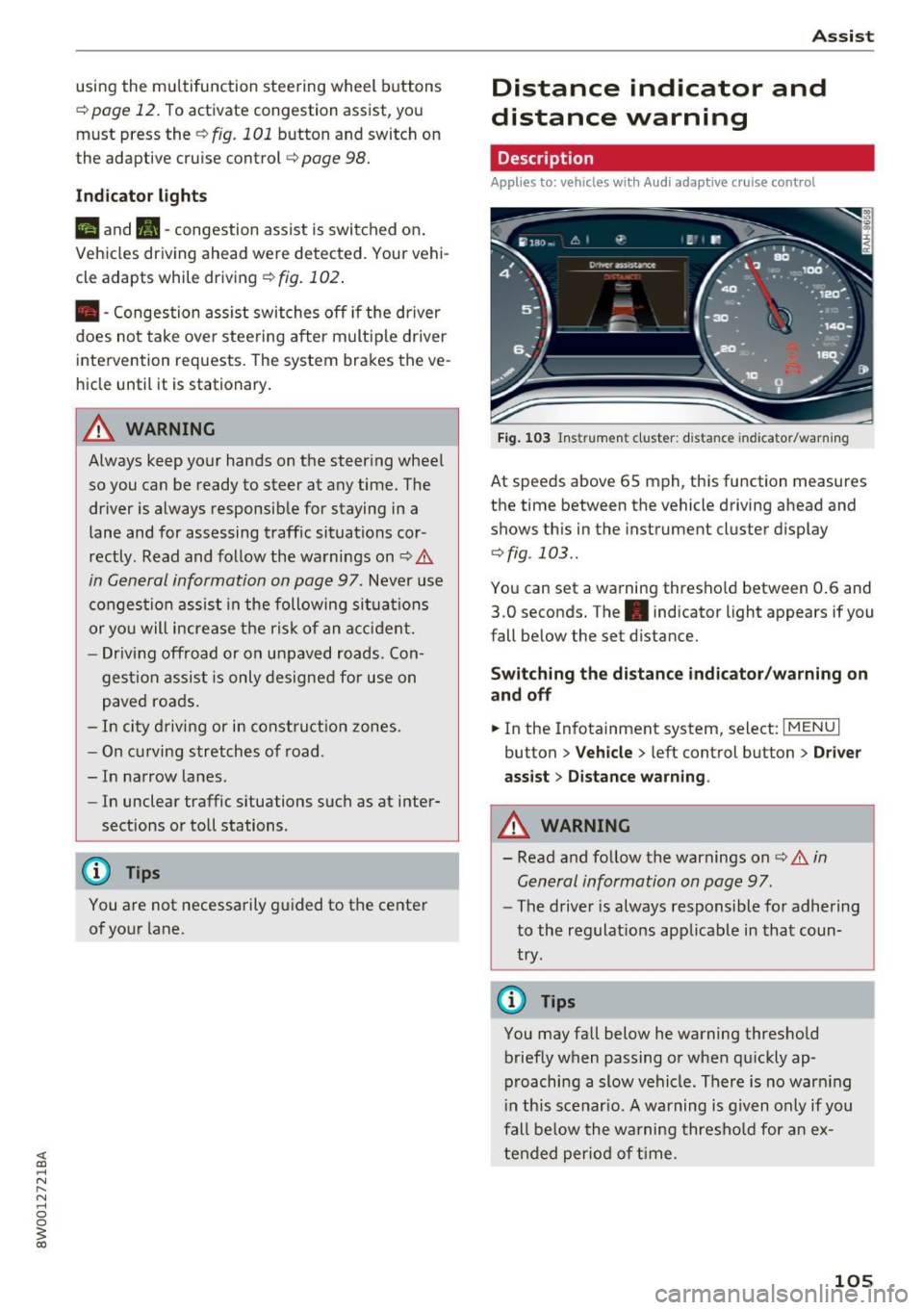
Description
Applies to: vehicles with Audi adaptive cruise control
Fig . 1 03 Instrumen t cl uster: dist ance indicato r/warn ing
At speeds above 65 mph , this function measures
the time between the vehicle driving ahead and
shows th is in the instrument cluster display
¢ fig . 103 ..
You can set a wa rning thresho ld between 0 .6 and
3.0 seconds. The . indicator light appears if you
fall be low the set d istance.
Switching the distance indicator /warning on
and off
.. In the Infotainment system, select: I MENU I
button > Veh icle > left control button > Driver
ass ist> Distan ce warning .
.&_ WARNING
-
- Read and fo llow the warnings on¢.& in
General information on page
97.
-
- The drive r is always responsible fo r adhering
to the regulat ions app licab le in that coun
try .
@ Tips
You may fall below he warning thresho ld
briefly when passing or when q uickly ap
p roaching a slow vehicle. There is no war ning
i n this scenar io. A warning is g iven only if you
fall be low the warning thresho ld for a n ex
tended per io d of t ime.
105
Page 108 of 386
Assist
Messages
Applies to: vehicles with Audi adaptive cruise control
II ACC with Conge stion assist: unavailable. See
owner 's manual
Th e system c annot guarantee that it w ill detec t
ve hicl es co rre ctly and it h as swit ched
off. T he ra
dar senso rs have s hifted o r are faul ty . D rive to an
authorized Audi dealer or authorized Audi Se rvice
Facility immediately to have t he mal function cor
rected.
II ACC with Congestion assist: currently un
available. Sensor v ision restricted due to sur
roundings. See owner 's manual
T hi s message appears if the radar sensor view is
obs truc ted, for example by leaves, snow, heavy
spray or dirt. C lean the sensors ~
page 97,
fig . 90.
IIJ ACC with Congestion assist : currently un
available. Gradient too steep
T he road exceeds the maximu m possib le grade
for safe ope ra tion. The systems c annot be swi tch
e d on.
IIJ ACC with Congestion assist: only available in
D, Sor M
Select the D/S o r M selector lever position .
Bl ACC with Congestion assist: currently un·
a vailable . Parking brake applied
The systems sw itch off if yo u set the pa rk in g
brake. The systems a re availab le again after you
release the pa rking brake .
IIJ ACC with Congestion assist : currently un
available. Stabilization control (ESC ) input
This message appea rs if the Ele ct ro nic St abiliza
tion Cont rol (ESC) is ta king a ction to s tabilize the
ve hicl e. The sys tems sw itch
o ff in this s cenar io.
IIJ ACC with Congestion assist: manual control!
This message appea rs if the veh icle rolls bac k
when starting on a slight incl ine , even thoug h the
sys tems are ac tive . P ress the b rake pedal to pre
ve nt the vehicle from rolling o r sta rting to move.
106
ilJ ACC with Congestion a ssist: currently un
available. Downhill assist activated
Y ou canno t activ ate the sys te m when hill hold as
s ist is active.
tei ACC with Congestion assist: manual control!
This message appears if the driver does not take
over steering after multiple driver i ntervention
r equests and the system sw itches
o ff . The veh icle
brakes un til it is sta tionary .
tei Congestion assist: unava ilable . See owner's
manual
The system can no longer ensu re that the vehicle
will stay in t he lane and switches
off. Have your
vehicle checked by an authorized Audi dealer o r
aut horize d Aud i Serv ice Facility if the ma lf u nc
t ion is continuous .
II Congestion assist: Please take over steering!
This message app ears as soon as t he system
stops detect ing steering act iv ity when the system
li mits a re reached . Always keep your hands o n
t h e steer ing whee l so you can be ready to steer at
any t ime.
@ Conge stion assist: currently unavailable.
Please fasten seat belt
The system swi tches off when the drive r's safety
b elt is unfas tene d.
II ACC: efficiency as sist not available in thi s
country
The adaptation to speed lim its and rou tes ahead
i s not available in this co unt ry .
ii ACC: efficiency assist currently unavailable .
See owner's manual
The adaptation to speed lim its and routes ahead
switches off at speed limits under 20 mph
(30 km/h).
The message can also appear if the adaptation to speed limits and routes ahead has a temporary
failure. Have your vehicle checked by an a uthor
i zed Audi dealer or author ized Audi Se rvice Facili
ty if the malfunction is cont inuous.
Distance warning: malfunction! Please contact
Service
...
Page 110 of 386
Ass is t
- Note that the reversible belt tensioner on
the front passenger's side deactivates when
the front passenger's a irbag is deactivated.
- Switch the pre sense off when you are not
using public streets or when loading the ve
hicle onto a vehicle carrier, train, ship or
other type of transportation. This can pre
vent an undes ired intervention from the pre
sense system .
Audi pre sense basic
Description
Applies to: vehicles with Aud i pre sense basic
The pre sense basic functions are activated at a
speed of approximately 20 mph (30 km/h) or
h igher.
The fo llowing functions can be triggered unde r
certain conditions within the limits of the sys
tem:
- Tensioning of the safety belts (for example,
during heavy braking): the front sa fety belts
have reversible belt tensioners . If a collision
does not occur, the safety belts loosen slightly
and are ready to trigger again.
- The emergency flashers activate
1) , the win
dows and the sunroof* close (for example when
under- or oversteering) : the clos ing process for
the windows and the sunroof* in itiates.
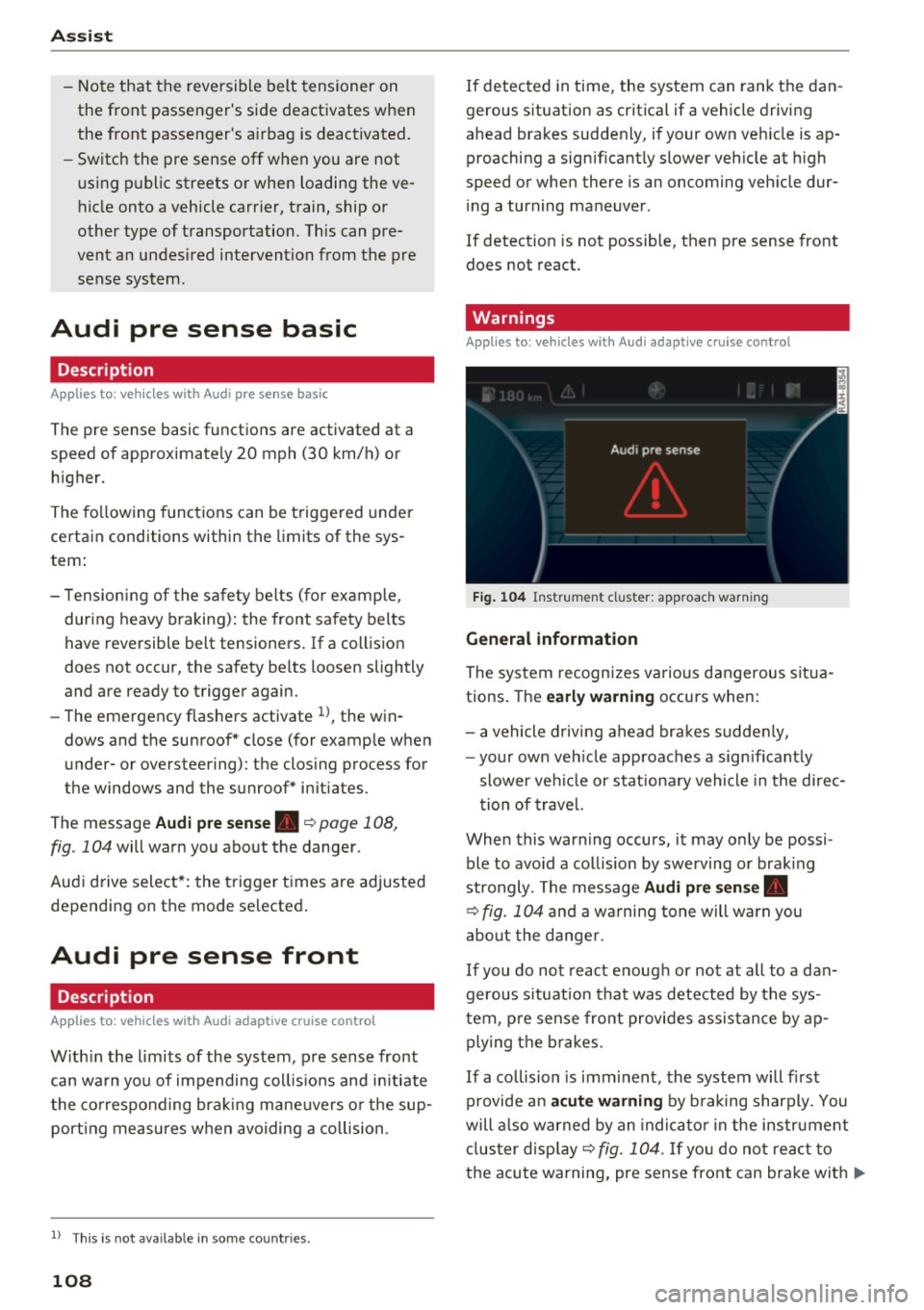
The message
Audi pre sen se. ~ page 108,
fig. 104 will warn you abo ut the danger.
Aud i drive select*: the trigger times are adjusted
depending on the mode selected .
Audi pre sense front
Description
Applies to: vehicles with Audi adapt ive cruise control
W ith in the lim its of the system, pre sense front
can wa rn you of impending coll is ions and initiate
the co rresponding brak ing mane uvers o r the sup
port ing measures when avoiding a collision .
1> This is not ava ilab le in some co untri es.
108
If detected in time, the system can rank the dan
gerous situation as critical if a vehicle driving
ahead brakes suddenly, if your own veh icle is ap
proaching a significant ly slower veh icle at h igh
speed or when there is an oncoming veh icle dur
i ng a turning maneuver .
If detection is not possible, then pre sense front
does not react.
Warnings
Applies to: vehicles with Audi adapt ive cru ise control
F ig . 104 Instrument cl uster : approach warning
G eneral information
The system recognizes various dangerous situa
tions. The
early w arning occurs when:
- a vehicle d riving ahead bra kes sudde nly,
- your own veh icle approaches a sign ificant ly
slower ve hicle or stationa ry vehicle in the direc
tion of trave l.
When this warn ing occurs, it may o nly be possi
ble to avo id a collision by swerving or braking
strongly. The message
Audi pre sen se.
~ fig. 104 and a wa rning tone will warn you
abo ut the dange r.
If you do not react enough or no t at all to a dan
gerous s ituation that was detected by the sys
tem, p re sense front provides assis tance by ap
ply ing the b rakes .
If a collision is imminent, the system will fi rst
provide an
a cute warning by b raking sharply. You
will a lso warned by an indica to r in the instrument
cl us ter disp lay ~
fig. 104. If yo u do not react to
the acute warning, pre sense front can brake with
IJ>-