warning AUDI A4 2017 Workshop Manual
[x] Cancel search | Manufacturer: AUDI, Model Year: 2017, Model line: A4, Model: AUDI A4 2017Pages: 386, PDF Size: 96.32 MB
Page 84 of 386

Driving
A WARNING
-Always switch th e ignit ion off and take the
vehicle key with you when leav ing the veh i
cle, eve n for a short per iod of t ime . This ap
plies particularly when chi ld ren remain in
the ve hicle. Othe rwi se, children coul d sta rt
the engine, re le ase the p arki ng bra ke o r op
er ate ele ctrica l equipmen t such as power
windows, which increases the risk of an acci
dent.
- When the vehicle is loc ke d , no one -particu
larly not children -sho uld rema in in the ve
hicle . Locked doors make it more difficult
f or eme rgency workers to get into the vehi
cle, which p uts lives at risk.
Starting from a stop
The hold assist function ensures that the parking
brake releases automatically when the vehicle
starts moving .
Stopping and setting the parking brake
" Pull th@(®) switch to s@t th @ parking bra k@ .
Starting and automat ically releasing the
parking brake
" When you pr ess t he accelerator pedal, the
par king b rake is autom atically released and
yo ur vehicle begins to move.
T he parki ng b rake c an be set if you must s top the
ve hicl e at a stop lig ht or in t raff ic. Th e ve hicle
does not have to be he ld with the brake pedal.
The parking brake e liminates the tendency to
creep when a selector lever position is engaged .
The par king b rake releases automatica lly and the
ve hicle beg ins to move as soon as you press the
accelerator pedal as usual.
Starting on hills
When starting on hills, hill start assist prevents
the vehicle from un intent iona lly rolling back. The
braking force of the parking brake does not re
lease until the wheels bu ild up enoug h driving
force.
82
(D Tips
Fo r safety reasons, the par king brake only re
l eases automatically when the drive r's door is
closed.
Starting to drive with a trailer
To prevent rolling back unintentionally on a hill,
do the following:
.. Keep the(®} switch pulled and press the acce l
erator pedal. The parking brake remains set
and prevents the ve hicle from roll ing backwar d.
.. You can release the<®> switch once you a re sure
that you are giv ing enough driv ing force to the
wheels by pressing the accelerator pedal.
Depend ing on the weight of t he rig (vehicle and
trailer) and the steepness of the incline, you may
r oll backward as you start.
Emergency braking function
In the event that the standard brake system fails
or locks up.
.. To brake your veh icle in an eme rgency, pull the
<® > switch and ho ld it pulled.
.. As soon as you re lease the <®> switch or acceler-
ate, the braking stops.
P ulli ng and ho ld ing the C®l switch wh ile driving
the ve hicle activates the eme rgency brak ing func
tion. The ve hicle brakes at all four wheels by acti
vat ing the braking hydraulics . T he braking effect
i s sim ila r to mak ing a n emergency stop .
Q &
To reduce the risk of act ivat ing the emergency
braking by m istake, an audib le warning tone
(buzzer) sounds w hen the C®l switch is pulled.
Emergency b raking s tops as soon as th e<®>
switch is re leas ed or the ac celerator p eda l is
presse d.
A WARNING
Eme rgen cy braking sho uld only be used i n an
emergency, when the normal brake pedal has
failed or the brake peda l is obst ructed. Using
the park ing bra ke for emergency b raking w ill
~
Page 85 of 386
slow your vehicle down as if you had made a
full braking maneuver. ESC and the associat
ed components (ABS, ASR, EDL) cannot over
come the laws of physics . In corners and
when road or weather conditions are bad , a
full brake application can cause the vehicle to skid or the rear end to swerve, which increas
es the risk of an accident.
Hill hold assist
Hill hold assist makes it easier to start on hills .
The system is activated when the brake pedal is pressed for a
few seco nds. The vehicle must be in
an uphill direction of travel.
After releasing the brake pedal , the brake power
is held for a
brief moment to prevent the vehicle
from rolling back when starting. During this
time , you can easily begin to
move your vehicle.
& WARNING
- If you did not begin moving immediately af
ter releasing the brake pedal, the vehicle
could begin to roll backward under certain
conditions . Press the brake pedal or set the
parking brake immediately .
-If the engine stalls, press the brake pedal or
set the parking brake immediately.
- To prevent the vehicle from rolling back un
intentionally when starting in stop-and-go
traffic, keep the brake pedal pressed for a
few seconds before you start driving.
- Switch the ignition off when you leave the
vehicle, even for a short period of time. Also
set the
parking brake to prevent the vehicle
from rolling unintentionally . This applies
particularly when children remain in the
ve
hicle, because there is the risk of an acci
dent .
Automatic transmission
Introduction
The automati c transmission is controlled elec
tronically . The transmission shifts up or down au
tomatically depending on which drive program is
selected .
Driving
When a moderate driving style is used, the
transmission selects the most economical driving
mode. The transmission shifts up at a lower RPM
and shifts down at a higher RPM to improve fuel
efficiency.
The transmission switches to a sporty mode after
a kick-down or when the driver uses a
sporty
driving style
characteri zed by quick accelerator
pedal movements, heavy acceleration, frequent
changes in speed and t raveling at the maximum
speed .
If desired, the driver can also select the gears
manually (tiptronic mode) ¢ page 86.
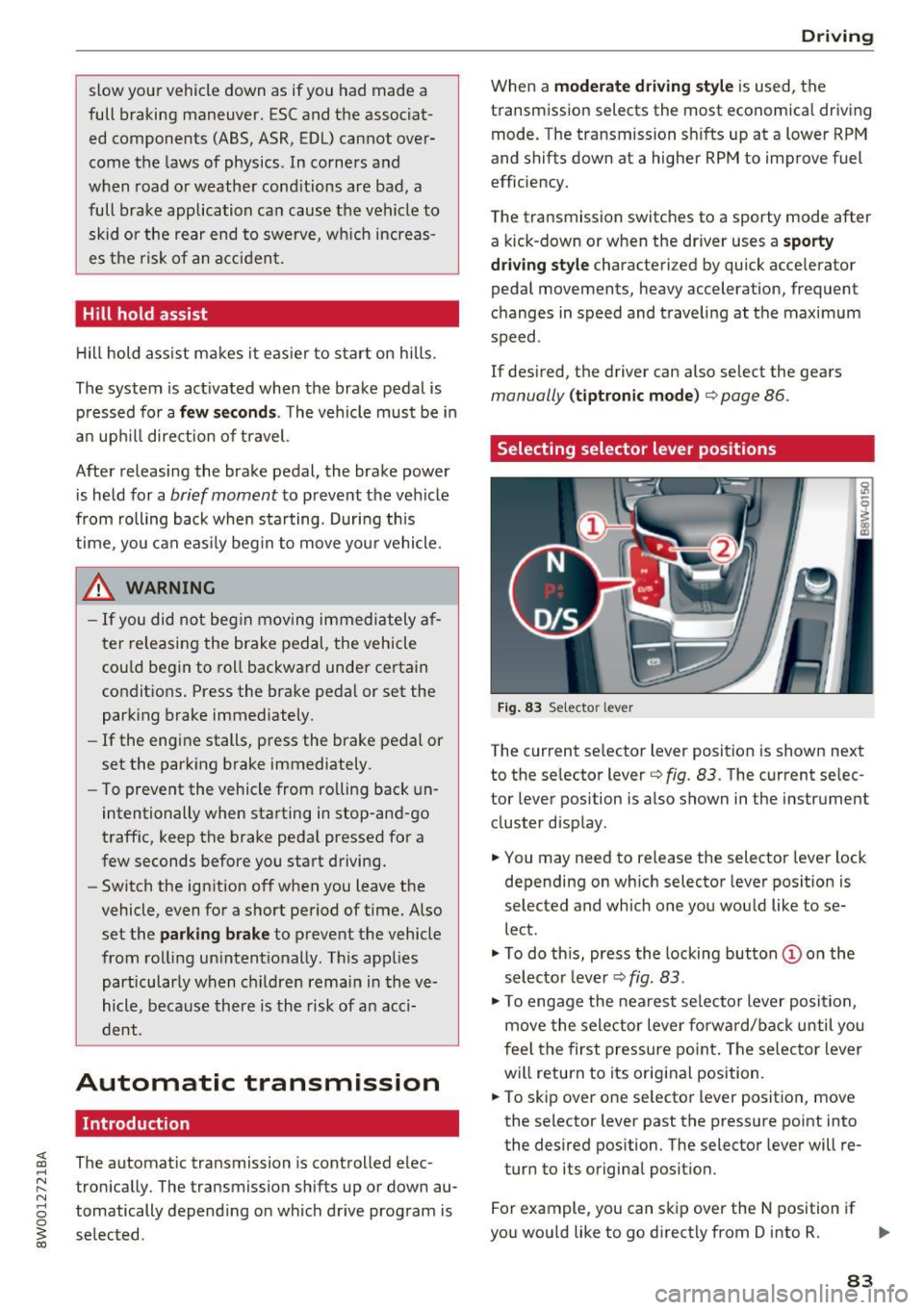
Selecting selector lever positions
Fig. 83 Selecto r lever
The current selector l ev e r pos ition is shown next
to the selector lever¢
fig. 83 . The current selec
tor lever position is also shown in the instrument
cluster d isplay .
.,. You may need to release the selector lever lock
depending on which selector lever position is
selected and which one you would like to se
lect .
.,. To do this, press the locking button (Don the
selector lever¢
fig. 83.
.,. To engage the nearest se lector lever position,
move the selector lever forward/back until you
feel the first pressure point. The selector lever
will return to its original position.
.,. To skip
over one selector lever position, move
the selecto r lever past the pressure point into
the desired position . The selector lever will re
turn to its original position.
For example, you can skip
over the N position if
you would like to go directly from D into R. ..,.
83
Page 86 of 386
Driving
Sel ector l ev e r lo ck
The se lector lever lock prevents you from se lect
ing a position unintentionally, causing the vehicle
to ro ll. When engaging some selector lever posi
tions, you must press the locking button
CD on
the selector lever and/or press the brake pedal
¢fig. 83.
You must press the brake pedal to engage a se
lector lever position when the engine is running
and the vehicle is stationary.
You do not have to press the brake peda l if you
shift from D to R within one second. This allows
you to "rock" the vehicle to free it when it is stuck.
P -Pa rk
The whee ls are loc ked in this pos it ion. On ly shift
into park when the veh icle is stationary ¢&. . T o
select the P selector lever position, press the P
button @on the selector lever ¢
fig. 83. Pap
pears next to the se lector lever.
You can only shift out of park when the engine is running and you are press ing the b rake pedal. To
release the parking lock, press the brake peda l,
press the locking button
CD on the selector lever
and select the desired pos it ion ¢
fig. 83.
P engages automat ically if you switch the engine
off while the selector lever is in D, E, Sor R.
If yo u sw itch the engine off when the N position
is selected, the transmission remains in N for ap
proximate ly 30 minutes and then Pis engaged .
You must use the par king loc k emergency release
before towing the vehicle¢
page 89.
R -Reverse
The reverse gear is engaged in this pos ition. Only
select reverse when the vehicle is stationa ry and
the engine is ru nning at id le speed ¢.&. . T o en
gage the R selector lever position, press the b rake pedal, press the lock ing button
CD on the
selecto r lever and select the R position ¢
fig. 83.
A confirmation tone wi ll sound when the reve rse
gear is engaged.
84
N -Neutral (idle )
The t ransmission is in idle in th is position. To en
gage the N selector lever position, press the lock
i ng button
CD on the se lector lever and shift into
the N position ¢
fig. 83.
If you switch the engine off when the N posit io n
i s selected, the transmission remains in N for ap
prox imately 30 minutes and then P is engaged.
You cannot se lect t he N pos ition when the ig ni
tion is swi tched off. When dr iv ing th rough an au
tomat ic car wash, fi rst select the N position and
then turn the eng ine off.
Fo r safety reasons, the veh icle canno t be loc ked
whe n the t ransmiss io n is in the N pos it ion.
D IS -Driving forward
When the transm iss ion is in the D/S posit ion, it
can be operated either in the norma l D mode or
i n the S sport mode. Move the selector lever bac k
to engage the S sport mode. You ca n only se lect
the S se lector lever position when the Dor E pos i
tion is se lected . To select the Dor E position
again when S is engaged, move the selector lever back ¢&. . To sh ift from N to D when traveling at
speeds below 1 mph (2 km/h), press the brake pedal and shift into the D position¢&. .
In the
normal mode D, the transmission auto
matically selects the suitable gear ratio. It de
pends on engine load, vehicle speed and driving
style.
Se lect the
sport mode S fo r sporty driving . The
vehicle makes f ull use of the engine 's power.
Sh ift ing may become noticeable when accelerat
i ng .
The S selector lever posit ion engages automati
ca lly when you select
dynamic mode in drive se
l ect*.
A WARNING
Read and follow all WARNINGS.
-The vehicle can roll even if the ignit ion is
sw itched off.
Page 87 of 386

-Power is st ill transmitted to the wheels
when the eng ine is r unning at idle. To pre
vent the veh icle from "creeping", you must
keep your foot on the brake in all selector
lever posi tions (except P and N) when the
engine is ru nning.
- Before opening the hood, se lect the P selec
tor leve r pos ition and set the parking bra ke.
T his redu ces the risk of an accid ent. Always
read and fo llow the appli cable warnings
¢ page 30 4, Wor king in the engine com
partment.
@ Tips
If you accidentally se lect N wh ile d riving, take
your foot off the a ccele rat or pedal an d wait
for the engine to s low down to idle before se
lect ing Dor S.
Driving tips
Starting the engine
.,. The P or N posi tion m ust be selected .
Starting from a stop
.,. Press and hold the brake pedal.
.,. Start the engi ne ¢
page 76.
.,. Press t he lo ck ing bu tton (D on the se le ctor lev
er and select the D, E, Sor R pos ition
¢ page 83.
.,. Wait a moment unti l the transmission shifts.
Yo u w ill notice a slight movement when the
gear engages .
.,. Release the brake pedal and press the acce lera
tor pedal ¢
A,.
Stopp ing temporarily
.,. Press t he brake peda l to stop the vehicle, fo r
example at a t raff ic light. Do not press the ac
ce le rator peda l when do ing this.
.,. To prevent the vehicle from rolling when you
sta rt driving, set the park ing brake when stop
ping on steep hill s¢
A, .
.,. The park ing bra ke w ill release automatically
;;§ and the vehi cle will s tart moving on ce you press ....
~ th e accelerator pedal.
N .... 0 0
3
Stopping /parking
If the selector lever is not in the P position when
yo u open the drive r's door, the vehicle cou ld ro ll.
.,. Press and hold the b rake pe dal¢
A, .
.,. Se t the par king bra ke.
.,. To sele ct the P se lec to r lever posit io n, press the
P button @on the selector lever¢
page 83,
fig. 83.
Un der certa in conditions , such as d riv ing i n the
moun tains o r whe n towi ng a t railer, it may be
helpful to swi tch to man ua l mode tempo rari ly
and shift
manually to adapt to the driv ing condi
t ions ¢
page 86 .
On hills, ac tivate the park ing brake fi rst and then
shi ft into the P position¢
page 81 . This preven ts
too much stress from being p laced on the locking
mechan ism .
A WARNING
----The vehicle can roll even when the eng ine is
sw itched off .
- Unintended vehicle movement can lead to
serio us inju ries .
- Do not press the acce le rator pedal when
chang ing the se lector lever position while
the vehicle is stationary and the engine is r u nning . This could result in a c rash .
- To reduce the r isk of an accident, never se
lect the R o r P positions while dr iv ing .
- Do not inadvertently p ress the accelerator
pedal when the vehicle is stationary. Other
wise the veh icle wi ll start to move immedi
ately , even i f the pa rking brake is set. This
could result in a c rash .
(D Tips
For safety reasons, the park ing bra ke only re
l eases automatically when the drive r's door is
closed .
Hill descent control
The hill descent control system assists the driver
when driving down hills .
Hill descent control activates when the t ransmis-
s io n is in the Dor 5 position and you press the ..,.
85
Page 88 of 386
Driving
brake pedal. The transmission automatically se
lects a gear that is suitable for the hill. Hi ll de
scent contro l tries to mainta in the speed ach
ieved at the time of b raking, within physical and
technical limitations. If may sti ll be necessary to
adjust the speed with the brake pedal.
H ill descent contro l switches off once the hill lev
els out or you press the accelerator peda l.
When operating the c ruise contro l system *
c::> page 93, hill descent control is also activated
when the speed is set.
A WARNING
H ill descent control cannot overcome p hys ica l
limitations, so it may not be able to maintain
a constant speed under all condit ions. Always
be ready to apply the brakes.
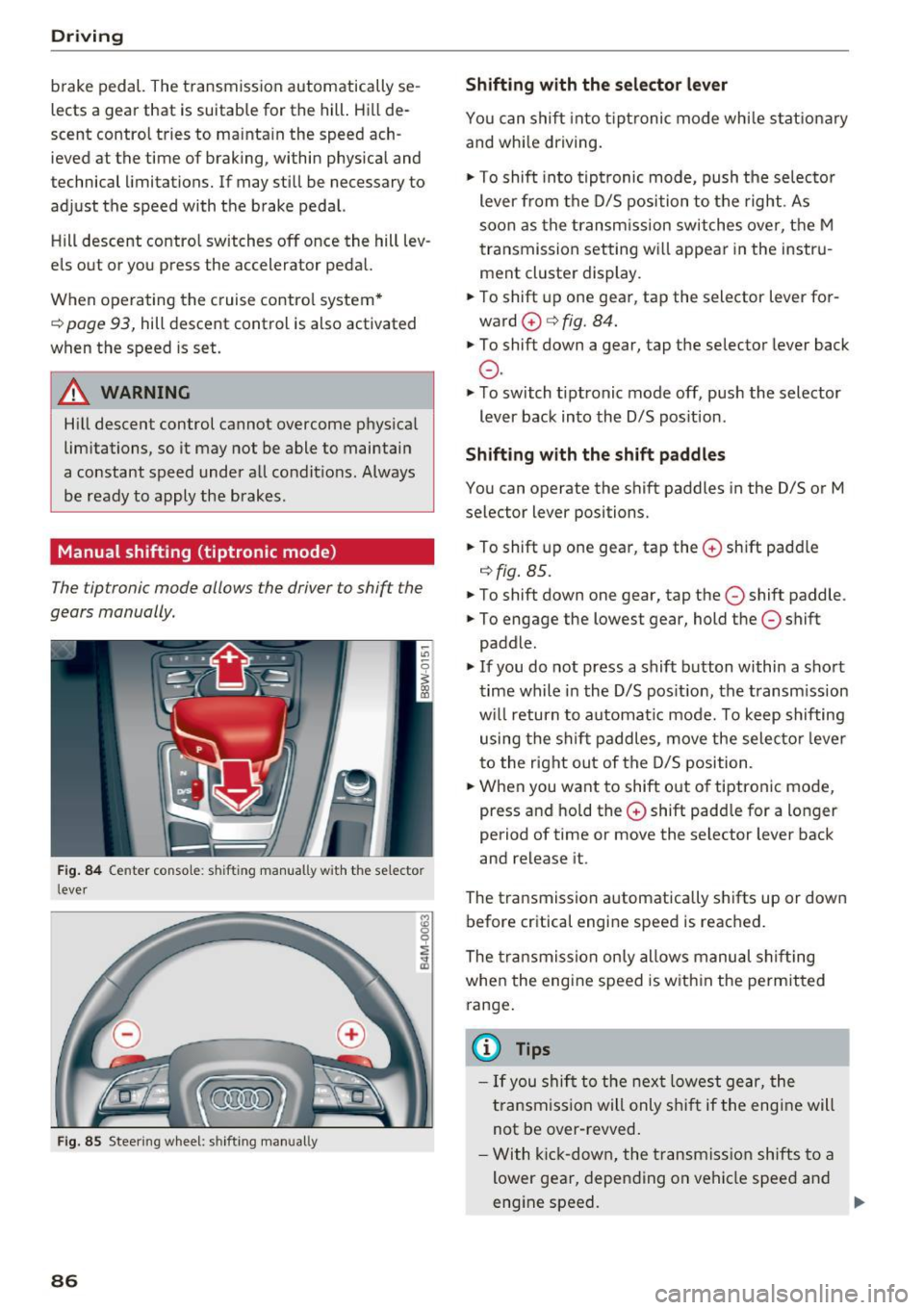
Manual shifting (tiptronic mode)
The tiptronic mode allows the driver to shift the
gears manually.
F ig. 84 Ce nte r conso le: shifting manua lly w it h th e se lector
l ever
F ig . 85 Steer ing w heel: shift ing man ually
86
Shifting with the selector lever
Yo u can shift into tipt ronic mode whi le s tat io na ry
and whi le driving.
.,. To shift into tip tronic mode, push the selec to r
lever from the D/S position to the right . As
soon as the tran sm ission switche s ove r, t he M
t ransmission setting w ill appear in the instru
ment cl uster display .
.,. To shift up one gea r, tap the selector lever for
ward
0 c:> fig. 84.
.,. To shift down a gear, tap the selector lever back
0 -
... To switch t iptronic mode off, push the selector
lever back into the D/S pos ition .
Shifting with the shift paddles
You can operate the s hif t paddles in the D/S or M
selector lever positions .
.. To shift up one gea r, tap the
0 sh ift padd le
<=> fig. 85 .
"'"To shift down one gear, tap the 0 shift paddle .
"'" To engage the lowest gear, hold the
0 shift
paddle .
.,. If you do not press a shift b utton within a sho rt
t ime wh ile in t he D/S pos it io n, the transm ission
w ill return to automa tic mode. To keep shifting
using the sh ift paddles , move the selecto r leve r
to the right out of the D/S position .
.. Whe n you want to shift o ut o f tiptronic mode,
press and ho ld the
0 shift padd le for a lo nger
period of time or move the selector lever back
and release it .
The transmission automatica lly shifts up or down
before critical engine speed is reac hed.
The transmission on ly allows manu al s hift ing
whe n the engi ne speed is w ith in the perm it ted
range .
@ Tips
- If you shi ft to the nex t lowe st ge ar, the
t ransmi ss ion will only s hift if the eng ine will
not be over -revved .
- With kick-down, the transmis sion shifts t o a
lower gear, depen ding on vehi cle spee d and
eng ine speed. .,.
Page 89 of 386

<( a, .... N ,....
N .... 0 0
3 a,
-tiptronic does not work if the transmission
is running in emergency mode.
Kick-down
Kick-down enables maximum acceleration.
When you press the accelerator pedal down be
yond the resistance point, the automatic trans
mission shifts down into a lower gear and the en
gine utilizes its full power, depending on vehicle
speed and engine RPM. It shifts up into the next
higher gear once the maximum specified engine
RPM is reached .
A WARNING
Please note that the wheels could spin on
slick or slippery roads when kick-down is ac
tive.
Launch control program
The launch control program provides the best
possible acceleration when starting from a stop.
Requirement: The engine must be at operating
temperature and the steering wheel must not be
turned .
~ Deactivate the Start/Stop system* ¢ page 80.
The LED in the 10 ml button turns on.
~ With the engine running, press the ~l.i; -o~FF =! but
ton briefly ¢
page 135. The II indicator light
turns on and the message
Stabilization control
(ESC): Sport. Warning! Restricted stability
ap
pears in the instrument cluster display.
~ Pull the selector lever back out of the D/S posi
tion briefly to select the S position or select the
Dynamic driving mode in drive select*
¢page 122.
~ Press the brake pedal firmly with your left food
and hold it all the way down for at least 1 sec
ond.
~ At the same time, press the gas pedal all the
way down with your right foot until the engine
reaches and stays at a high RPM level.
~ Remove your foot from the brake pedal within
S seconds ¢
,&..
Driving
A WARNING
-Always adapt your driving to the traffic flow.
- Only use the Launch control program when
road and traffic conditions allow it and oth
er drivers will not be endangered or both
ered by your driving and the vehicle's accel
eration.
- Please note that the drive wheels can spin
and the vehicle can break away when sport
mode is switched on, especially when the
road is slippery.
- Once the vehicle has started moving, press
the
1 .$ OFFI button briefly to turn the sport
mode off.
(D Tips
- The transmission temperature may increase
significantly after using the launch control
program. If that happens, the program may
not be available for a few minutes. It will be
available again after a cool-down period.
- When accelerating using the launch control
program, all vehicle parts are subject to
heavy loads. This can lead to increased
wear.
Transmission malfunction
• Transmission: too hot. Please stop vehicle
Do not continue driving . Select the P selector lev
er position and contact an authorized Audi dealer
or authorized Audi Service Facility for assistance.
• Transmission: malfunction! Please stop ve
hicle and shift to P
Do not continue driving . Select the P selector lev
er position and contact an authorized Audi dealer
or authorized Audi Service Facility for assistance.
@] Selector lever: malfunction! You may contin
ue driving. Please contact Service
There is a system malfunction in the transmis
sion. Drive to an authorized Audi dealer or au
thorized Audi Service Facility immediately to have
the malfunction corrected .
[O] P button: malfunction! Auto P when engine
off. Please contact Service ..,.
87
Page 91 of 386
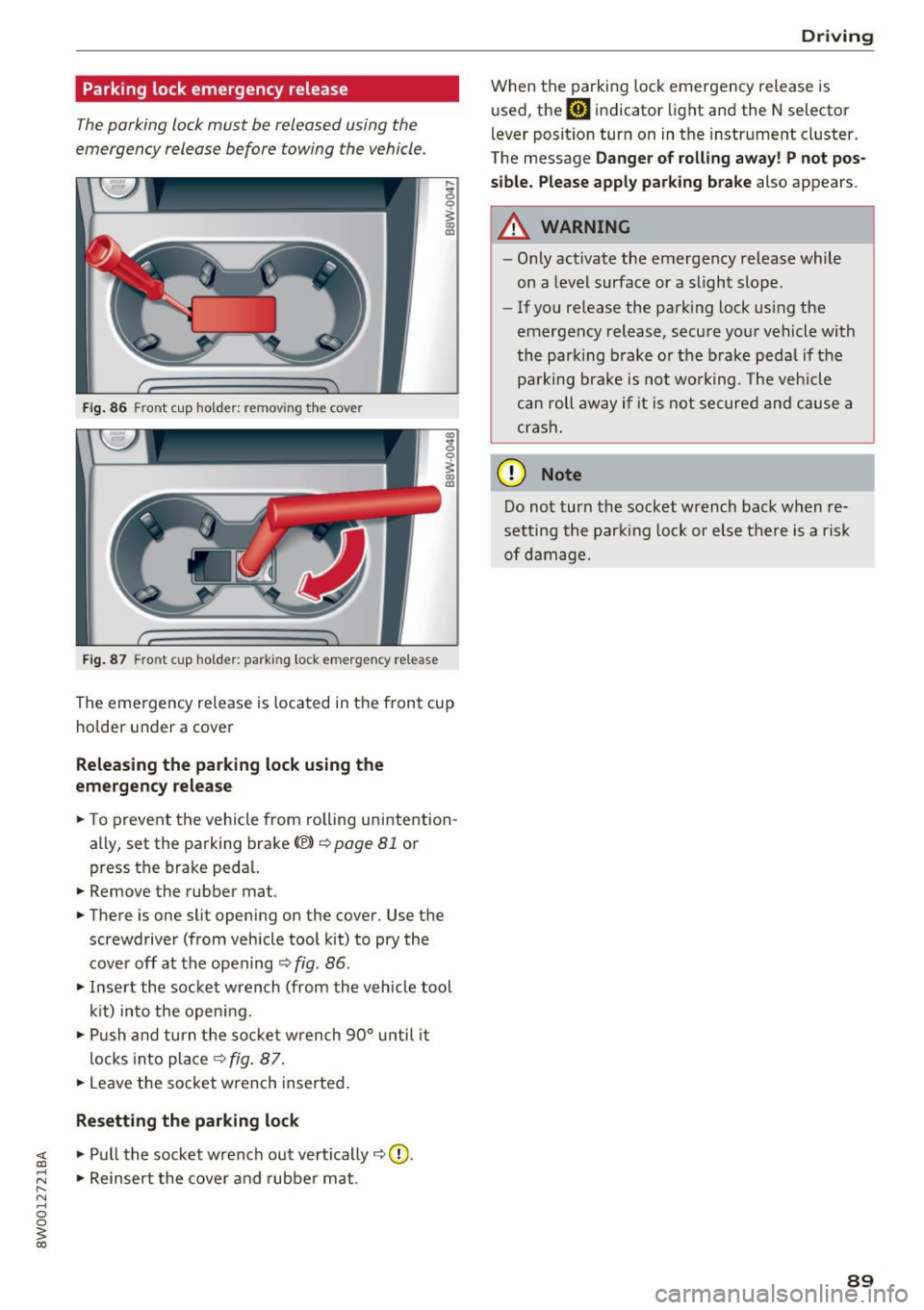
Parking lock emergency release
The parking lock must be released using the
emergency release before towing the vehicle .
Fig. 86 Front cup holder: removing the cover
Fig. 87 Front cup holder : parking lock eme rge ncy release
~ 0
~ a, ID
The eme rgency re lease is located in the fron t cup
ho lde r under a cover
Releasing the parking lock using the
em ergency r ele ase
.. To prevent the vehicle from rolling unintention
ally, set the parking brake<®>
c::>page 81 or
press the brake peda l.
.. Remove the rubber mat.
.. There is one slit open ing on the cover . Use the
screwdriver (from vehicle tool kit) to pry the
cove r off at the opening
c::> fig . 86 .
.. Inse rt the socket wrench (from the vehicle tool
k it) into the opening .
.,. Push and turn t he so cket w rench 90° until it
locks into place
c::> fig. 87 .
.. Leave the socket wrench inserted .
Resetting the parking lock
~ .. Pull the socket wrench out ve rtically c::> 0.
;:::: .. Reinsert the cover and rubber mat . ...... N ..... 0 0
~ co
Drivi ng
When the parking lock emergency release is
used, the
mJ indicator light and the N selector
l ever posit ion turn on in the instrument cluster .
The message
Da nger of rolli ng away ! P not po s
sible. Please apply park ing bra ke
also appears.
A WARNING
-- Only activate the emergency release while
on a level surface or a slight slope.
- If you release the park ing lock us ing the
emergency release, secu re your vehicle with
the park ing b rake or the brake pedal if the
pa rking brake is not wo rking . T he veh icle
c a n roll away if it is not se cure d and cause a
crash.
(D Note
Do not tur n the socket wrench back when re
setting the parking lock or else there is a risk
of damage.
89
Page 92 of 386

Trailer towing
Trailer towing
Driving with a trailer
General information
Your Audi was designed primarily for passenger
transportation.
If you plan to tow a trailer, please remember that
the additional load will affect durability, economy and performance.
Trailer towing not on ly places more stress on the
ve hicle, it also ca lls for more concentration from
the dr iver.
F or this reason, always follow the operating and
driving instructions provided and use common
sense.
Technical requirements
Trailer hitch
Use a weight-carrying hitch conforming to the
gross tra iler weight. The hitch must be suitab le
for your veh icle and tra iler and must be mounted
securely on the vehicle's chassis at a technically
sound
locat ion . Use on ly a trailer hitch with a re
movable ba ll mount . Always che ck with the t rail
er hitch man ufac tur er to make s ure t hat you are
using the co rrect hi tc h.
Do not use a bumper hitch.
The hitch must be installed in such a way that it
does not interfere with the impact -absorbing
bumper system. No mod ificat ions should be
made to the vehicle exhaust and b rake systems .
Fr om t ime to t ime, che ck that all hitch mo unti ng
bol ts rem ain securely f aste ned.
W hen you are not tow ing a tra iler, remove the
tra ile r hitc h ba ll mount . This prevents the hit ch
from caus ing damage s hou ld your veh icle be
s truck from be hind ¢
,&..
Trailer brakes
If you r trailer is equipped with a brak ing system,
check to be su re that it conforms to all regula
tions .
90
The t rai ler hydraulic bra ke system must not be
directly connected to the vehicle's hydraulic
bra ke system ¢&. .
Safety chains
Always use s afety chains be tween you r vehi cle
and t he tra ile r.
Trailer lights
Traile r lights must meet all regula tions . B e s ure
to check w ith your author ized Audi dealer for cor
r ec t wir ing, swi tches and relays.
Mirrors
If you are unable to see t he traffic behind you us
i ng t he regular outs ide mirrors, then yo u
must in
stall ex tended mirrors . It is impo rtant that you
al ways have clear vision to the rear.
.&_ WARNING
Afte r remov ing the tra ile r hi tc h, do not s tore
it i n y our vehicle. In case o f su dden brak ing,
the hitch could fly fo rward and injure you or
your passengers.
Operating instructions
Maximum trailer weight
A tra iler f or yo ur vehicle is lim ite d to a typical
class 1 or class 2 trailer.
Trailer load distribution
Be sure the load in the t rai le r i s he ld se curely in
pla ce to p reve nt i t from shi fting forwar d, bac k
ward or si deways.
Never allow a passenger to ride in a trailer ¢ &.
in Driver messages on page 91.
Engine cooling system
Towi ng a tra iler makes the engine work harder. It
is important that the cooling system's perform
ance is up to the additional load . Make sure tha t
the coo ling system has enoug h fluid.
Tire pressure
When towing a trailer, inflate the tires of your
vehicle to the cold tire p ressure listed under "Full
load" on the t ire press ure label. The t ire pressure
1111-
Page 93 of 386

label is located on the driver's side B-pillar. In
f late trai ler tires to trailer and tire manufactur
ers' specifications.
Lights
The headlight settings should be checked with
the trailer attached before driving off. Check to
make sure both vehicle and trailer lights are
working properly.
Safety chains
Be sure trailer safety chains are properly connect
ed from the tra iler to the hitch on the vehicle.
L eave enough slack in the chains to permit turn
ing corners. When you install safety chains, make
sure they wi ll not drag on the road when you are
driving.
The chains shou ld cross under the trailer tongue
to prevent it from dropping in case of separation
from the hitch.
Driver messages
Driving with a trailer requires extra caution .
Weight distribution
Towing a loaded trailer w ith an empty car results
in a high ly unstable dist ribution of weight . If this
cannot be avo ided, drive at very low speeds only
to avoid the risk of losing steering control.
A "balanced" rig is easier to operate and cont rol.
This means that the tow vehicle should be loaded
to the extent possible and permissible, while
keeping th e trailer as light as possib le under the
circumstances . Whenever possib le, transfer
some cargo to the luggage compartment of the
tow vehicle whi le observing tong ue load require
ments and vehicle loading considerations.
Speed
The higher the speed, the more difficult it be
comes for the driver to contro l the rig. Do not
drive at the maximum permissible speed. Reduce
your speed even more if load, weather or wind
<( conditions are unfavorable -particularly when a,
;::; going downhill. ,....
N .... 0 0
3 a,
Trailer towing
Reduce vehicle speed immediately if the trailer
shows the slightest sign of swaying.
Do not try
to stop the swaying by accelerating.
Observe speed limits. In some areas, speeds for
vehicles towing trailers are lower than for regular
vehicles .
Always apply brakes early. When driving down
hill, shift into a lower gear to use the eng ine
braking effect to slow the vehicle . Use of the
brakes alone can cause them to overheat and fail.
Coolant temperature
T he coolant temperature gauge~ page 11 must
be obse rved carefully. The coolant temperature
can increase if you drive on long inclines in a low
gear at high engine speeds . Reduce your speed
immediately if the LEDs in the top part of the dis
play turn on.
For more information about indicator lights, re
fer to.
~ page 31 .
A WARNING
= -
Anyone not properly restrained in a moving
vehicle is at a much greater risk in an acci
dent. Never let anyone ride in your car who is
not properly wearing the restraints provided
by Aud i.
Trailer towing
information
Important to know
Your vehicle handles differently when towing a
trailer because of the addit ional weight and dif
ferent weight distribution . Safety, performance
and economy will greatly depend on how careful
ly you load your trailer and operate you r rig.
Before you actually tow your trailer, pract ice
turning, stopping and backing up in an area away
from traffic . Keep pract ic ing until you have be
come complete ly familiar w ith the way your vehi
cle-trailer combination behaves and responds.
91
Page 95 of 386

Assist Electronic speed limiter
Your vehicle may be factory equipped with t ires
that are rated for a maximum speed of 130 mph (210 km/h). This is less than the maximum speed
of your vehicle. To reduce the risk of sudden tire
failure and loss of control if the vehicle is operat
ed at excessive speeds, your vehicle also has an
electronic speed limiter . The electronic speed
limiter prevents your vehicle from going faster
than the t ire speed rating. For mo re information
¢page 317.
If the engine control unit receives faulty vehicle
road speed s ignals, the Malfunction Indicator
L amp (M IL)
¢..ij will illuminate. If this occurs,
contact the nearest autho rized Audi dealer for
assistance.
_& WARNING
Always observe the posted speed limits and
adjust you r speed to suit prevailing road, traf
fic and weather condit ions. Never drive your
vehicle faster than the max imum speed rating
of the tires installed.
Speed warning system
Introduction
Applies to: vehicles with speed warning system
The speed warning system helps you to stay un
der a specified maximum speed. -
The
speed warning system warns you if you are
exceeding the maximum speed that you have
stored . You will hear a warning tone when yo ur
speed exceeds the sto red va lue by approximate ly
3 mp h (3 km/h). The indi cator light also tur ns on
in the instrument cluster display
Eel (USA mod
e ls)/
Hll (Canada mode ls) as well as the message
Manually set speed limit XXX mph (km /h ) ex
c eeded .
The ind icator light [01 / (OJ turns off
when the speed decreases below the stored max
imum speed.
Sett ing a threshold is recommended if you would
like to be reminded when you reach a certain
maximum speed. Situations where you may want
A ss ist
to do so include driving in a co untry with a gener
al speed limit or if there is a specified maximum
speed for winte r tires.
(D Tips
Regardless of t he speed warning system, you
s h ou ld always monitor your speed using the
speedometer and make s ure yo u are fo llow ing
the lega l speed limit.
Setting the warning threshold
Appl ies to : vehicles with speed warni ng system
You can set, change and delete the warning
threshold in the Infotainment system.
.,. Sele ct in the Infotai nment system: I MENU ! but
ton
> Vehicle > left control b utton > Driver as
sistance
> Speed warning > Manu al.
You can set a ny thresho ld between 20 mp h
(30 km/h) and lS0 mph (240 km/h) . Settings
can eac h be adjusted in increments of 5 mph (10
km/h).
Cruise control system
Switching on
Applies to: vehicles with cruise control system
The cruise control system makes it possible to
drive at a constant speed starting at 15 mph (20kmlh).
0
f
~
0
Fig. 88 Operating lever: cru ise control system
.,. To switch t he system on, pull the lever into po
sition
(D ¢ fig. 88.
.,. Drive at the speed to be maintained.
.,. To store the speed, press the button @.
93