warning AUDI A4 2017 Manual PDF
[x] Cancel search | Manufacturer: AUDI, Model Year: 2017, Model line: A4, Model: AUDI A4 2017Pages: 386, PDF Size: 96.32 MB
Page 109 of 386
<( a, .... N ,....
N .... 0 0
3 a,
The system cannot guarantee that it will detect
vehicles correctly and it has switched off. The ra
da r senso rs have sh ifted o r are faulty . Drive to an
author iz ed Audi dealer or author iz ed Audi Se rvice
Faci lity immediately to have the malfunction cor
rected .
Distance warning : currently una vailable . Sensor
v iew restricted due to surroundings. See own
er's manual
This message appears if the radar sensor view is
obstructed, for example by leaves, snow, heavy
spray or dirt . C lean the sensors ¢
page 97,
fig. 90 .
Distance warning: currently unavailable. See
owner 's manu al
This message appea rs if the sys tem has a tempo
rary fai lure. If this occ urs mult iple times, d rive to
an authorized Audi dealer or authorized A udi
Service Facility immediately to have the malfunc
tion corrected.
ACC: Please fa sten seat belt
The system is no t comp lete ly available if the d riv
e r' s sea t belt is u nfastened .
Stationary object ahead
This message appears if you would like to switch
the system o n and there is a stationary object di
rect ly in front of your vehicle.
Door open
The system is no t availab le when the door is
open .
Audi pre sense
Introduction
Applies to: ve hicles with Audi pre sense
W ith in the lim its of the system, t he pre sense
f u nctions can init iate measures in part icularly
dangerous sit uat ions to protect t he ve hicle pas
sengers and ot her road users.
- Because different veh icle systems such as the
ESC are i nterconnected , the
pre sense b asic in
t roduces p reempt ive safety meas ures for the
Assist
passengers i f an unstable driving si tuation is
detected.
- The
pre sen se front system uses the data from
the adaptive cruise contro l* radar sensors and
the camera to ca lculate the probability of a co l
lision . With in the lim its of the system, an im
pending co llision with vehicles can be detected
in both urba n and rural speed ranges. In t his
case, the system warns the driver visua lly,
acoust ica lly and w ith a jerk on the brakes if nec
essary. If needed, i t can in itiate a partia l o r fu ll
dece lerat ion to reduce the collision speed or to
avoid the collision under certa in circumstances.
I n conjunction with pre sense basic/rear, the
front safety belts are a lso reve rsibly tens ioned
when needed . The pre sense front is a lso active
when adaptive cruise control* is sw itched off.
- Pre sense rear contains pre sense basic func
tions. It uses the data from the side assist* ra
dar sensors and ca lculates within the limits of
the system the probability of a rear end colli
sion with t he vehicle behind you. Pre sense rear
is also act ive when side assist* is sw itched off .
- Within the limits of the system,
pre sense city
uses the camera data and can detect an im
pe nding collision with vehicles and pedestrians.
I n th is case , the system warns the driver visua l
ly , acous tic ally and wit h a jerk on the b rakes if
necessary. If needed, it c an initi ate a full dece l
erat io n to reduce the collis io n speed or to avoid
the collision under certain circumstances . In
conjunction with pre sense basic/rear, the front
safety belts are a lso reversibly tens ioned when
needed .
A WARNING
-
Read the genera l information on¢.&. in Gen -
eral information on page
97, c::> .&. in General
information on page 117 .
@ Tips
-Certa in pre sense funct ions sw itch off when
dr iving in reverse.
- The pre sense funct ions may not be availa
ble if there is a malfunct ion in the ESC sys
tem or t he a irbag control module .
107
Page 110 of 386
Ass is t
- Note that the reversible belt tensioner on
the front passenger's side deactivates when
the front passenger's a irbag is deactivated.
- Switch the pre sense off when you are not
using public streets or when loading the ve
hicle onto a vehicle carrier, train, ship or
other type of transportation. This can pre
vent an undes ired intervention from the pre
sense system .
Audi pre sense basic
Description
Applies to: vehicles with Aud i pre sense basic
The pre sense basic functions are activated at a
speed of approximately 20 mph (30 km/h) or
h igher.
The fo llowing functions can be triggered unde r
certain conditions within the limits of the sys
tem:
- Tensioning of the safety belts (for example,
during heavy braking): the front sa fety belts
have reversible belt tensioners . If a collision
does not occur, the safety belts loosen slightly
and are ready to trigger again.
- The emergency flashers activate
1) , the win
dows and the sunroof* close (for example when
under- or oversteering) : the clos ing process for
the windows and the sunroof* in itiates.
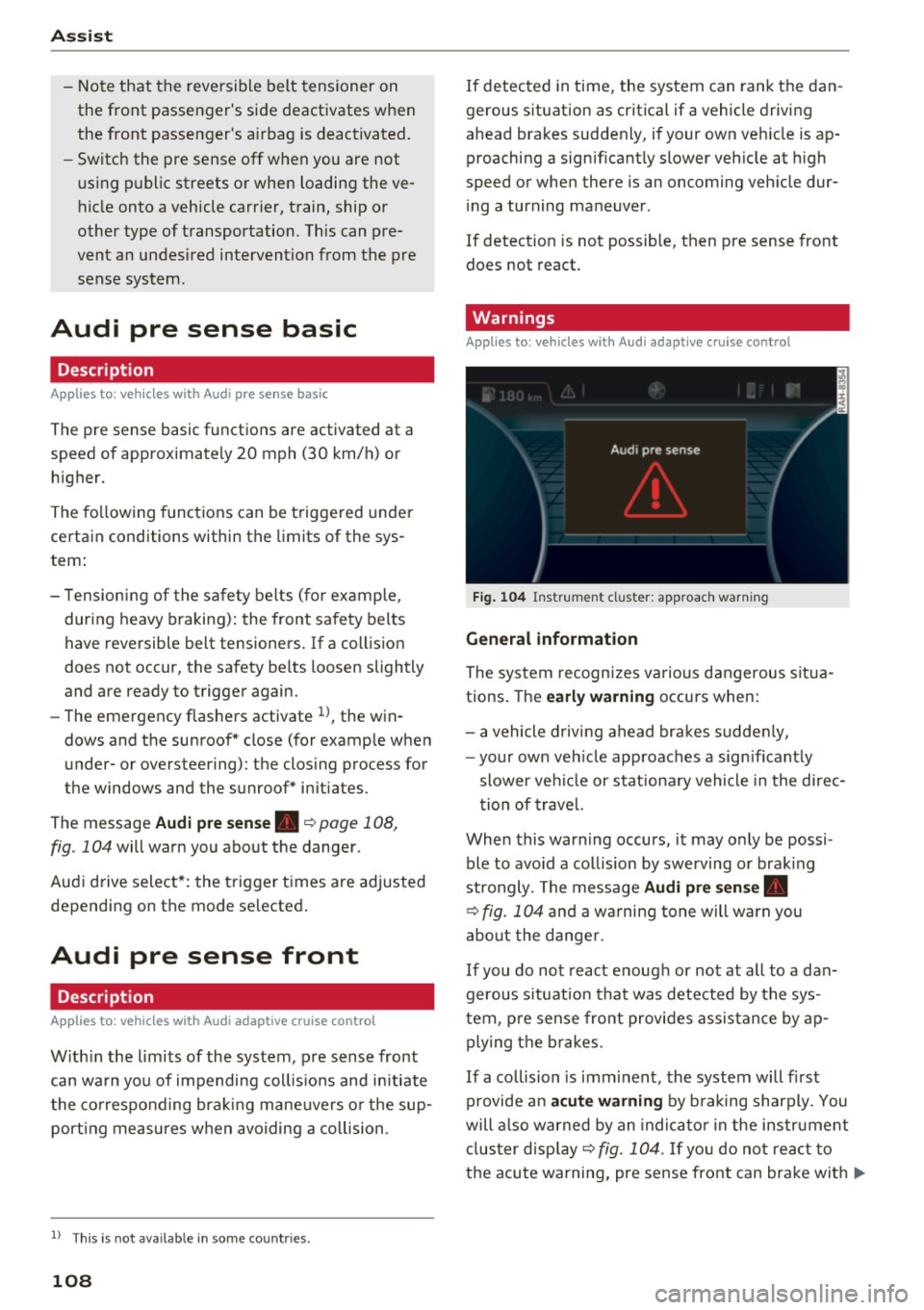
The message
Audi pre sen se. ~ page 108,
fig. 104 will warn you abo ut the danger.
Aud i drive select*: the trigger times are adjusted
depending on the mode selected .
Audi pre sense front
Description
Applies to: vehicles with Audi adapt ive cruise control
W ith in the lim its of the system, pre sense front
can wa rn you of impending coll is ions and initiate
the co rresponding brak ing mane uvers o r the sup
port ing measures when avoiding a collision .
1> This is not ava ilab le in some co untri es.
108
If detected in time, the system can rank the dan
gerous situation as critical if a vehicle driving
ahead brakes suddenly, if your own veh icle is ap
proaching a significant ly slower veh icle at h igh
speed or when there is an oncoming veh icle dur
i ng a turning maneuver .
If detection is not possible, then pre sense front
does not react.
Warnings
Applies to: vehicles with Audi adapt ive cru ise control
F ig . 104 Instrument cl uster : approach warning
G eneral information
The system recognizes various dangerous situa
tions. The
early w arning occurs when:
- a vehicle d riving ahead bra kes sudde nly,
- your own veh icle approaches a sign ificant ly
slower ve hicle or stationa ry vehicle in the direc
tion of trave l.
When this warn ing occurs, it may o nly be possi
ble to avo id a collision by swerving or braking
strongly. The message
Audi pre sen se.
~ fig. 104 and a wa rning tone will warn you
abo ut the dange r.
If you do not react enough or no t at all to a dan
gerous s ituation that was detected by the sys
tem, p re sense front provides assis tance by ap
ply ing the b rakes .
If a collision is imminent, the system will fi rst
provide an
a cute warning by b raking sharply. You
will a lso warned by an indica to r in the instrument
cl us ter disp lay ~
fig. 104. If yo u do not react to
the acute warning, pre sense front can brake with
IJ>-
Page 111 of 386
<( a, .... N ,....
N .... 0 0
3 a,
increasing force within the limits of the
system
l)_ This reduces the vehicle speed in the
event of a collision. At low vehicle speeds, pre
sense front can initiate a complete deceleration
shortly before a collision with a vehicle driving
ahead
1>. If pre sense front determines that you
are not braking strongly enough when a collision
is imminent, it can increase the braking force .
The following functions trigger in conjunction
with pre sense basic/rear at corresponding vehi
cle speeds :
- Reversible tensioning of the front safety belts.
- Closing the windows and sunroof*.
- Inflating the side bolsters* in the seat backrest
and seat surface.
Audi drive select*: the reversible belt tensioner,
the closing of the windows and sunroof* as well
as the inflating of the side bolste rs* on the seat
backrest and seat surface are not active depend
ing on the mode selected .
Collision avoidance assist
Collision avoidance assist helps you to steer the
vehicle around an obstacle in a critical situation.
If you avoid an obstacle after the acute warning,
then the collision avoidance supports you by ap plying slight steering adjustment to correct your
steering wheel angle as long as you are actively
steering. Collision avoidance assist is available at
speeds between approximately 20 mph (30 km/
h) and 90 mph (150 km/h).
Turn assist
When starting to drive and up to speeds of maxi
mum 6 mph (10 km/h), the turn assist uses a
braking intervention to prevent your vehicle from
colliding with an oncoming vehicle when turning left or right (available in certain countries) . The
braking intervention causes your vehicle to stay
in its lane.
.8, WARNING
-Pre sense front cannot overcome the laws of
physics.
It is a system designed to assist and
1) This is not availa ble in some co untries.
Assist
it cannot prevent a collision in every circum
stance. The driver must always intervene.
The driver is always responsible for braking
at the correct time. Do not let the increased
safety provided tempt you into taking risks .
This could increase your risk of a collis ion.
- The system can deploy incorrectly due to
system-specific limits.
- Please note that the sensors and the camera
do not always detect all objects or lane
markings . This increases the risk of an acci
dent.
- Pre sense front does not react to people, an
imals or objects that are crossing the vehi
cle 's path or that are difficult to detect
c> &..
in General information on page 97.
-Reflective objects such as guard rails or the
entrance to a tunnel, heavy rain and ice can
affect the function of the radar sensors and
the system's ability to detect a collision risk.
(D Note
The sensors can be displaced by impacts or
damage to the bumper, wheel housing and
underbody. Pre sense front can be impaired
by this. Have an authorized Audi dealer or au
thorized Audi Service Facility check their func
tion.
(D Tips
- You can cancel the braking with increasing
force that is initiated by the system by brak
ing yourself, by accelerating noticeably or
by swerving.
- Keep in mind that pre sense front can brake
unexpectedly. Always secure any cargo or
objects that you are transporting to reduce
the risk of damage or injury.
- Certain pre sense front functions are switch
ed off when the ESC is limited or switched
off
c> page 135 .
109
Page 112 of 386
Assist
Audi pre sense rear
Description
App lies to: ve hicles w ith Audi side assist
If the risk of a collision is detected, the following
functions can trigger:
- Reversible tensioning of the front safety belts
at the corresponding speeds .
- Closing the windows and sunroof*.
- Inflating the side bolsters* in the seat backrest
and seat surface.
- Switching on the emergency flashers with in-
creased frequency
l ).
The message Audi pre sense. ~ page 108,
fig. 104 will warn you about the danger.
Aud i drive select*: the function is not active de
pending on the mode selected.
A WARNING
- To reduce the risk of an accident, please
note that the side assist* radar sensors do
not always detect every object.
- Pre sense rear does not react to people, ani
mals or objects that are crossing the vehi
cle's path or that are difficult to detect.
- Reflective objects such as guard rails, heavy
rain and ice can impair the function of the
radar sensors and the ability to detect a col
lision risk .
(D Note
The radar sensors can be displaced by impacts
or damage to the bumper, wheel housing and
underbody. Pre sense rear can be impaired by
this . Have an authorized Audi dealer or au
thorized Audi Service Facil ity check their func
tion.
(0 Tips
- The pre sense rear functions switch off
when towing a trailer.
- The pre sense rear functions may also
switch off if there is a malfunction in the
side assist* system.
1> This is not ava ilab le in some co untri es.
110
Audi pre sense city
' Description
App lies to : vehicles wit h Audi pre sense city
Within the limits of the system, pre sense city
can warn you of impending collisions with
vehicles and pedestrians and initiate the applica
ble braking maneuver if needed. Pre sense city is
active at a speed of 6 mph (9 km/h) and higher.
A pedestrian warning can occur at speeds up to 50 mph (85 km/h), and vehicle warnings can oc
cur at speeds up to 155 mph (250 km/h). A pre
sense city braking maneuver is possible at speeds
up to 50 mph (85 km/h).
Warnings
App lies to: vehicles wit h Aud i pre sense city
The system recognizes various dangerous situa
tions. The
early warning occurs when:
- a vehicle driving ahead brakes sudden ly,
- your own vehicle approaches a sign ificantly
slower vehicle or stationary vehicle in the direc
tion of travel.
- a pedestrian is standing in the lane or is moving
into the lane.
When this warning occurs, it may only be possi
ble to avo id a collision by swerving or braking
strongly. The message
Audi pre sense.
~ page 108, fig. 104 and a warning tone will
warn you about the danger.
Additionally, a jerk on the brakes may occur as an
acute warning when there is an impend ing colli
sion . If you do not react to the acute warning, pre
sense city can brake to the point of complete de
ce leration within the limits of the system. This
reduces the vehicle speed in the event of a colli
sion. The message
Audi pre sense. also ap
pears.
The following functions are triggered in conjunc
tion with pre sense basic/rear:
- Reversible tensioning of the front safety belts .
- Closing the windows and sunroof*. ..,
Page 113 of 386
<( a, .... N ,....
N .... 0 0
3 a,
-Inflating the side bolsters* in the seat backrest
and s eat surfac e.
Aud i drive select*: the function is not active de
pending on the mode selected.
A WARNING -,..___
-Pre sense city cannot overcome the laws of
physics. It is a system designed to assist and
it cannot prevent a collision in every circum
stance. The driver must always intervene.
The driver is always responsible for braking at the correct time . Do not let the increased
safety provided tempt you into taking risks.
This could increase your risk of a collision .
- The system can deploy incorrectly due to
system-specific limits.
- To reduce the risk of an accident, please
note that the camera does not always detect
every object .
- Pre sense city does not react to animals,
crossing or oncoming vehicles, objects such
as bars, railings or railcars, and objects that
are difficult to detect~&.
in General infor
mation on page 97.
A WARNING
Pre sense city may be restricted or not availa
ble in the following example situations:
- in heavy fog, rain, spray or snow.
- when there are visual obstructions, such as
glare, reflections or var iations in light.
- when it is dark .
- if the camera window or the windshield is
dirty, iced over, damaged or covered .
- when driving on snow, ice or loose ground .
- on sharp curves.
- if the ESC was restricted or switched off .
- when towing a trailer.
- when the driver's seat belt is unfastened.
- up to ten seconds after sw itching on the ig-
nition.
1 ) Thi s is no t avail able in some c oun tries.
Assist
(D Note
Impacts or damage to the camera mount on
the windshield can displace the sensor . Pre
sense city can be impaired by this. Have an au
thorized Audi dealer or authorized Audi Serv
ice Facility check their function .
(i) Tips
-You can cancel the system braking interven
tion if you accelerate considerably or swerve
away .
- Keep in mind that pre sense city can brake
unexpectedly. Always secure any cargo or
objects that you are transporting to reduce
the risk of damage or injury.
- When there is a malfunction in the camera,
the pre sense city functions also switch off.
Settings in the
Infotainment system
Applies to: vehicles with Aud i pre sense
.,. Select in the Infotainment system: I MEN U! but
ton
> Vehicle > left control button > Driver as
s ist > Audi pre sense.
Audi pre sense-
switch On/Off. You can switch
the pre sense functions on and off with th is.
If the system is switched off, it switches on again
automatically once the ignition is switched on
again
l ).
Early warning1
) -the early warning can be
switched off or the pre sense city/front warning
point
( Early /Mediu m/La te) can be set .
Driver messages
Applies to: vehicles with Aud i pre sense
fll Audi pre sense currently restricted. Restrict
ed sensor vision due to surroundings. See own
er's manual
This message appears if the radar sensor and
camera view is obstructed, for example by leaves,
snow, heavy spray or dirt . If necessary , clean the .,..
111
Page 114 of 386
Assist
sensors and the area around the camera
~ page 97, fig. 90 or~ page 116, fig . 112.
Ill Audi pre sense: malfunction! Please contact
Service
This message appears when the pre sense func
tion is affected. For examp le, this could be
caused by a faulty sensor. Dr ive to an authorized
Aud i dealer or a utho rized Aud i Serv ice Facility im
mediately to have the malfunction cor rected.
Ill Audi pre sense: currently restricted. Towing
mode
Pre sense rear and the pre sense city braking in
tervent ions sw itch off automatically when the
electrical connector in the factory-installed trail
er hitch is connected. There is no gua rantee the
f unct ions will swi tch off when using a re trofitted
trai ler hitch .
Ill Audi pre sense: currently restricted
This message appears if the ESC is restr icted or
sw itched off, for example.
Ill Audi pre sense: currently restricted. See
owner's manual
This message appears when there is a temporary
fa ilur e in a subsystem, such as the ESC. If this
message appears repeated ly, dr ive to an author
ized Audi dealer or authorized Audi Se rvice Facili
ty to have the malfunction corrected .
Ii] Audi pre sense: emergency braking system
off
This message appears if the pre sense functions
are switched off through the Infotainment sys
tem or if th e system is not ready.
Audi active Lane assist
Description
Applies to: veh icles w ith Audi active lane assist
Active lane assist (lane departure warning) de
tects lane ma rker lines withi n the l imits of the
system using a camera in the windshield. If you
are approaching a detected lane marker line and it appears likely that you will leave the lane, the
system will warn you w ith corrective stee ring .
You can override this steering at any time . If you
112
pass over a line, the steering wheel will vibrate
lightly. In order for this warning vibration to oc
cur, it must first be switched on in the Infotain
ment system. Active lane ass ist is ready for oper
a tion when the lane marker line is detected on at
least one side of the vehicle .
T he system is des igned for driving on express
ways and highways and therefore on ly activates
a t speeds above approximately 40 mph (65 km/
h) .
Applies to vehicles with s ide ass ist*: if you acti
vate a turn signa l when active lane assist is ready
a nd it classifies a lane change as critical bec ause
of veh icles traveling a longside you or approach
i ng you, there will be noticeable corrective steer
i ng shortly before you leave the lane. This will at
tempt to keep your vehicle in the lane.
Applies to vehicles without side assist* : the sys
tem does not warn when it is ready if you act ivate
the turn signal before crossing the lane marker
lin e. In this case, it assumes that you are chang
in g lanes intent ionally.
Applies to vehicles with adaptive cruise contro l*:
there is no corrective steer ing or warnings if the
system recognizes a distinct passing maneuver.
If the conditions are met, congestion assist
switches on at speeds under approximately
40 mph (65 km/h)
¢page 104.
_& WARNING
-The system warns the driver that the vehicle
is leaving the lane using correct ive steering.
The driver is always responsible for keeping
the vehicle within the lane.
- The system can help you keep the vehicle in
the lane, but it does not drive by itself. Al
ways keep your hands on the steering
wheel.
- Corrective steering may not occur in certain
situations, such as during heavy braking .
- There may be cases where the camera does
not recognize all lane marker lines. Correc
tive steering can only take place on the side
of the vehicle where lane marker lines are
detected.
Page 115 of 386

-Other road structures or objects could possi
bly be identified unintentionally as lane
marker lines. As a result, corrective steering
may be unexpected or may not occur .
- The camera view can be restr icted, for ex
amp le by vehicles driving ahead or by rain,
snow, heavy spray or light shining into the
camera. This can result in act ive lane assist
not detecting the lane marke r lines or de
t ecting them incorrectly.
- In certa in situations where v is ibility is low,
th e vehicle may swi tc h from an "early" to
" la te" steering co rrection .
- Under certa in conditions s uch as ruts in the
road, an inclined roadway o r crosswinds, the
c o rrective steering a lone m ay not be eno ugh
to keep the vehicle i n the middle of the lane .
- For safe ty re asons, active la ne as sis t m ust
not be used when the re are poor road and/
o r weathe r cond itions such as slippery
roads, fog, grave l, heavy rain, snow and the
potent ial for hydroplaning . Using active lane
assist under these conditions may increase
the risk of a crash.
Switching on and off
App lies to: veh icles with Audi active lane assist
Fig. 10 5 Turn s ig n al lever: b utton for ac tive lane ass is t
F ig. 106 Winds hield: ca mera window for act ive lane ass is t
A ss ist
.,. Press the r=;, fig . 105 button to switch the sys
tem on and off. The indicator light in the in
strument cluster turns on or off .
Analog instru- Audi virtual Meaning on
ment cluster cockpit /Head- the corre-
up display* sponding s ide
Green li ne(s) Green line(s) Active lane as-
(left or rig ht) (left or r ight) sist is activat-
-J '/ ed and ready
to provide
warnings .
-Red line Active lane as-
(left or r ight) sist warns you
'/ be fore leaving
a lane. In addi -
tion, the steer-
i ng whee l vi-
bra tes light ly.
Yellow line(s) Gray
Li ne(s) Active lane as-
(left or right) (left or r ight) sist is activat-
-J ed, but is not
r eady to give
warning
If the system is switched on but is not ready to
provide warn ings, one of the following could be
t h e cause:
- There is no lane marker line .
- The relevant lane marker lines are not detected
(for examp le , markings in a construction zone
or because they a re obst ructed by snow, dirt,
wate r o r li ght ing).
- The vehicle speed is be low the activation speed
of approximately 40 mph (65 km/h).
- The lane is narrower than approximately 8 feet
(2 .5 m) or w ider than approximately 15 feet
(4.5 m) .
-The curve is too narrow.
- The driver 's hands are not on the steering
wheel.
@ Tips
- Make sure the camera window c::> fig. 106 is
not covered by stickers or anything else. For
information on cleaning, refer to
c::> page 33 7.
113
Page 116 of 386

Assist
-In certain countries: if the system is switch
ed on, it will remain operable each time the ig nition is switched on.
Lane assist display in the instrument
cluster
A pp lies to: ve hicles with Audi active lane a ssist
F ig . 107 Instrument cl uster (multi -color d isplay): active
lane assist is switched on and rea dy to provide warnings
Fig . 108 Inst rument cluster (monochrome display): active
lane assist is sw itched on
You can open up the Driver assist display for the
active lane ass ist using the mult ifunction steer
ing wheel buttons
r:::> page 12.
An additiona l indicator appears in the Head -up
d isp lay* .
Multi-Color Display
Refer tor:::> fig. 107
114
Driver assist display Meaning on the corre-
in the instrument sponding side
cluster
Green line(s) Active lane assist is acti-
(left or right) vated and ready to pro-
vide warnings .
Red line Active lane assist warns
(left or right)
you before leaving a lane.
In addit ion, the steering
wheel vibrates lightly.
Gray line(s) Active lane assist is acti-
(left or right)
vated, but is not ready to
give warning
Monochrome display
Refer to r:::> fig. 108
Driver assist display Meaning on the corre-
in the instrument
sponding side
cluster
Light gray line(s) Active lane assist is acti-
(left or right) vated and ready to pro-
vide warnings.
Blinking line(s)
Active lane assist warns
(left or right)
you before leaving a lane.
In addition, the steering
wheel vibrates lightly.
Dark gray line(s) Active lane assist is act i-
(left or right) vated, but is not ready to
. . give warning
Messages in the instrument cluster display
If the active lane assist sw itches off automatical
ly , the indicator light in the display turns off and
one of the follo wing messages appears:
rl1 Audi active lane assist: currently unavaila
ble . Camera view restricted due to surround
ings. See owner's manual
This message appears if the camera is unable to
detect the lines. This could happen if:
- The camera window
¢page 113, fig. 106 is
dirty or covered in ice. Clean this area on the
windshield
r:::> page 337 .
-The camera fie ld of view is fogged over. Wait
until the fog has cleared before switching the
active lane assist on aga in.
Page 117 of 386

-Th e system has been unable to detect the lanes
for an extended period of time due to road con
ditions . Sw itch act ive lane assist back on when
the lines are more visible .
rm Audi active lane assist: currently unavaila
ble. See owner's manual
There is a temporary active lane assist malfunc
tion . Try sw itching the active lane assist on again
later .
• Audi active lane assist: malfunction! See
owner's manual
Drive to an authorized Aud i dealer or authorized
Audi Service Facility immediately to have the
malfunction corrected.
rm Audi active lane assist: Please take over
steering!
This message appears if you are not steering by
yourself. Active lane assist is activated, but is not ready to give warning
Adjusting the steering time and vibration
warning
Applies to: vehicles with Audi active lane assist
You can adjust individual active lane assist set
tings in the Infotainment system .
... Select in the Infotainment system: !MENUI but
ton
>Ve hicle > left control button > Driver as
sist
> Audi active lane assist .
Steering time Early:
in this setting, the correct ive steering hap
pens continuously to help keep the vehicle in the
center of the lane.
Late: in this setting, the system provides correc
tive steering just before a vehicle whee l goes over
a detected lane marker line.
Vibration warning
You can switch the additional vibration warning
in the steering wheel on or
off.
A WARNING
-
With the vibration warning switched off,
there will also be no visual warning in the in-
Assist
strument cluster disp lay when crossing a lane
marker line.
(D Tips
In certain countries: your settings are stored
automatica lly and assigned to the remote
control key in use.
Audi side assist
Description
Applies to: vehicles with Audi side assist
Fig. 109 Sensor detection range
Fig. 110 Disp lay on th e exterio r m irror
Side assist (lane change assist) helps you mon itor
your blind spot and traffic behind your vehicle .
Within its lim its, the system warns you about
vehicles that are coming closer or that are travel
ing within your sensor range
(D <=?fig. 109. If a
lane change is classified as critical, the display@
turns on in the exterio r mirror
<=? fig. 110 .
The display in the left exterior mirror p rovides as
s istanc e when making a lane change to the left,
wh ile th e display in the rig ht exterior m irro r pro
vides ass istance when making a lane change to
the right. ..,.
115
Page 118 of 386

Assist
Information stage
As long as you do not activate the turn signal,
side assist
informs you of the vehicles that are
detected and classified as critical. The display in
the mirror turns on, but is dim .
The display remains dim in the information stage
so that your view toward the front is not distur
bed.
Warning stage
I f the display in a mirror blinks br ight ly when you
ac tivate a turn signal, side assist is
warning you
about detected ve hicles that it has classified as
critical. If this happens, check traffic by glancing
in the exterior mirror and over your shoulder
q &.
in General information on page 117.
Appl ies to vehi cles w ith active lane ass ist*: the
disp lay in the mirror can also blink if you have not
activated a turn signal: if you are approaching a
detected lane marker line and it appears you will
be leaving the lane, side assist will warn you
about detected vehicles that it has classified as
cr itical.
(D Tips
You can adjust the brightness of the display in
the rearview mirror
q page 118.
116
General information
Applies to: vehicles w ith Audi side assist
®
®
©
Fig. 111 Driving s it u ations
~ AUDI
•
Fig. 112 Rear of the ve hicle: position of the se nsors
Side assist functions at speeds above approxi
mately 9 mph (15 km/h).
@ Vehicles that are approaching
0
I
In certain cases, a veh icle w ill be classified as
critical for a lane change even if it is st ill some
what far away. The faster a vehicle approaches,
the sooner the display in the exterior m irro r will
turn on.
@ Vehicles traveling with you
Vehicles traveling with you are indicated in the
exterior mirror if they are classified as cr itica l for
a lane change. A ll vehicles detected by side ass ist ..,.