transmission AUDI A4 2017 Owners Manual
[x] Cancel search | Manufacturer: AUDI, Model Year: 2017, Model line: A4, Model: AUDI A4 2017Pages: 386, PDF Size: 96.32 MB
Page 4 of 386
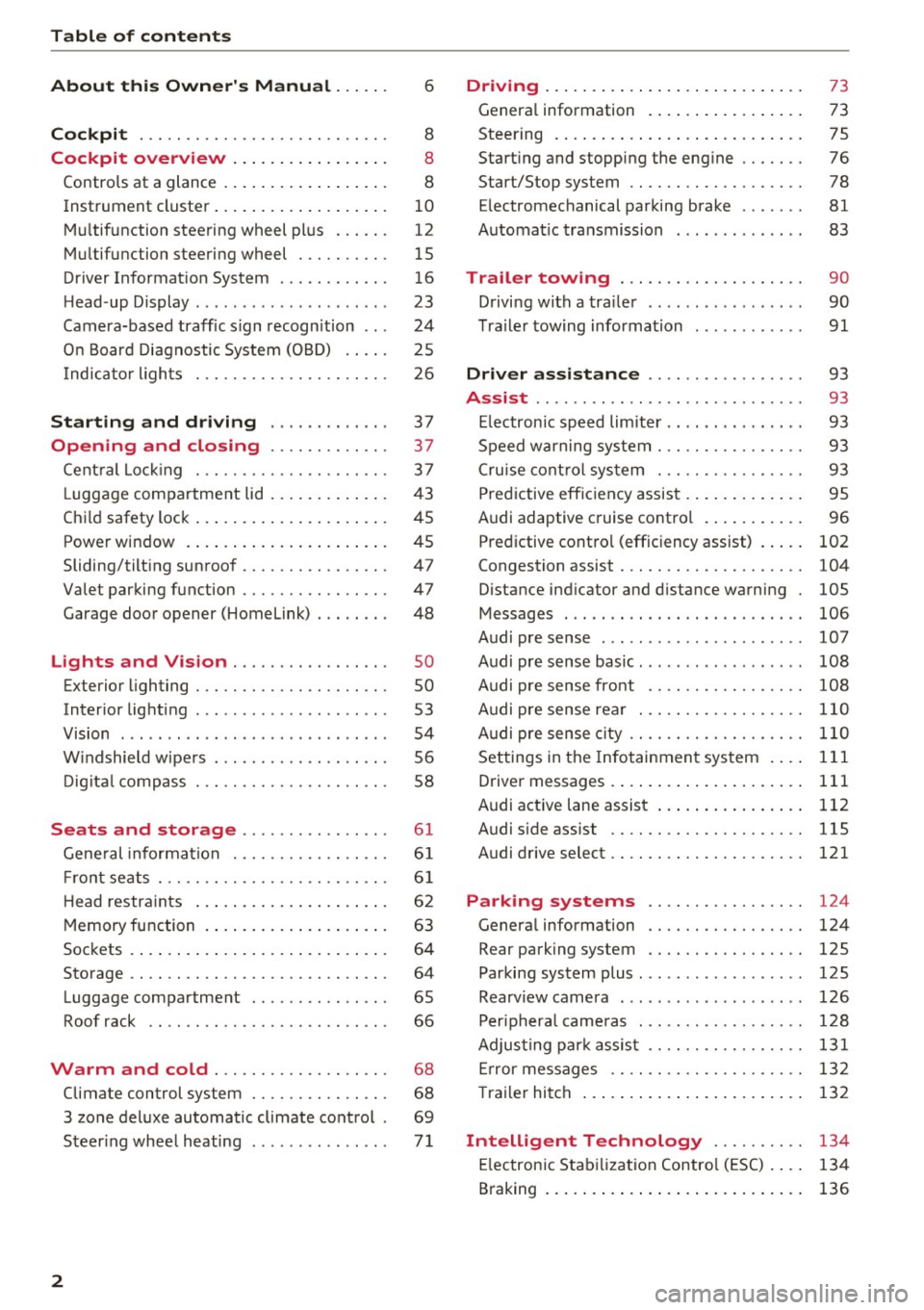
Table of contents
About this Owner's Manual ... .. .
Cockpit ... .. ............... .... .. .
Cockpit overview ................ .
Controls at a glance ... .......... .. .. .
Instrument cluster .. .......... .. .. .. .
Multifunction steering wheel plus ... .. .
Multifunction steering wheel ......... .
Driver Informat ion System ..... .. .... .
H ead-up Display .... .. .. ..... ... .. .. .
Camera-based traff ic sign recognition .. .
O n Board Diagnostic System (OBD) .... .
I ndicator l ights .............. .... .. .
Starting and driving
Opening and closing Cent ral Lock ing .............. .... .. .
L uggage compa rtment lid ... ..... .. .. .
Child safety lock .... .......... .. .. .. .
Power window ... .. .......... .. .. .. .
Sliding/tilting sunroof ......... .... .. .
Valet parking function ............. .. .
Garage door opener (Homelink) . .. .. .. .
L ights and Vision .............. .. .
Exterior lighting . .. . .......... .. .. .. .
Interior lighting ...... ........... ... .
V1s1on ....... .. ................ ... .
Windshield wipers . ... .... .... .. .. .. .
Digital compass . ............. .... .. .
Seats and storage ............ ... .
General information .......... .. .. .. . 6
8
8
8
10
12
15
16
23
24
25
26
37
37
3 7
43
45
45
47
47
48
so so
53
54
56
58
6 1
61
Front seats . . . . . . . . . . . . . . . . . . . . . . . . . 61
H ead restraints . . . . . . . . . . . . . . . . . . . . . 62
Memory function . . . . . . . . . . . . . . . . . . . . 63
Sockets . . . . . . . . . . . . . . . . . . . . . . . . . . . . 64
Storage . . . . . . . . . . . . . . . . . . . . . . . . . . . . 64
Luggage compartment . . . . . . . . . . . . . . . 65
Roof rack . . . . . . . . . . . . . . . . . . . . . . . . . . 66
Warm and cold . . . . . . . . . . . . . . . . . . . 68
Climate control system . . . . . . . . . . . . . . . 68
3 zone deluxe automatic climate control . 69
Steer ing whee l heating . . . . . . . . . . . . . . .
7 1
2
Driving ..... .. .. .. .. ... .......... . .
General information . ... ........... . .
Steering .......... .. .. . .......... . .
Start ing and stopping the eng ine ..... . .
Start/Stop system .. .. ............. . .
E le ctromechanical parking brake ...... .
Automat ic transmission
Trailer towing ... .. ... .. ..... ... . .
Driving with a trailer .. ........ ..... . .
Trailer towing information
Driver assistance .. ............ .. .
Assist ........... ... .............. .
Electronic speed limiter ... .. ... ... .. . . 73
73
75
76
78
81
83
90
90
91
93
93
93
Speed warning system . . . . . . . . . . . . . . . . 93
Cruise control system . . . . . . . . . . . . . . . . 93
Predictive efficiency assist . . . . . . . . . . . . . 95
Audi adaptive cruise control . . . . . . . . . . . 96
Predictive control (efficiency assist) . . . . .
102
Congestion assist . . . . . . . . . . . . . . . . . . . . 104
Distance ind icator and distance warning 105
Messages . . . . . . . . . . . . . . . . . . . . . . . . . . 106
Audi pre sense . . . . . . . . . . . . . . . . . . . . . . 107
Audi pre sense basic. . . . . . . . . . . . . . . . . . 108
Audi pre sense front . . . . . . . . . . . . . . . . . 108
Audi pre sense rear . . . . . . . . . . . . . . . . . . 110
Audi pre sense city . . . . . . . . . . . . . . . . . . . 110
Settings in the Infotainment system . . . . 111
Driver messages . . . . . . . . . . . . . . . . . . . . . 111
Audi active lane assist . . . . . . . . . . . . . . . . 112
Audi sid e ass ist . . . . . . . . . . . . . . . . . . . . . 115
Audi drive select . . . . . . . . . . . . . . . . . . . . . 121
Parking systems . . . . . . . . . . . . . . . . . 124
Genera l information . . . . . . . . . . . . . . . . . 124
Rear parking system . . . . . . . . . . . . . . . . . 125
Parking system plus . . . . . . . . . . . . . . . . . . 125
Rearview camera . . . . . . . . . . . . . . . . . . . . 126
Peripheral cameras . . . . . . . . . . . . . . . . . . 128
Adjusting park assist . . . . . . . . . . . . . . . . . 131
Error messages . . . . . . . . . . . . . . . . . . . . . 132
T railer hitch . . . . . . . . . . . . . . . . . . . . . . . . 132
Intelligent Technology . . . . . . . . . . 134
Electronic Stabilization Control (ESC) . . . . 134
Braking . . . . . . . . . . . . . . . . . . . . . . . . . . . . 136
Page 11 of 386
<( a, .... N ,....
N .... 0 0
3 a,
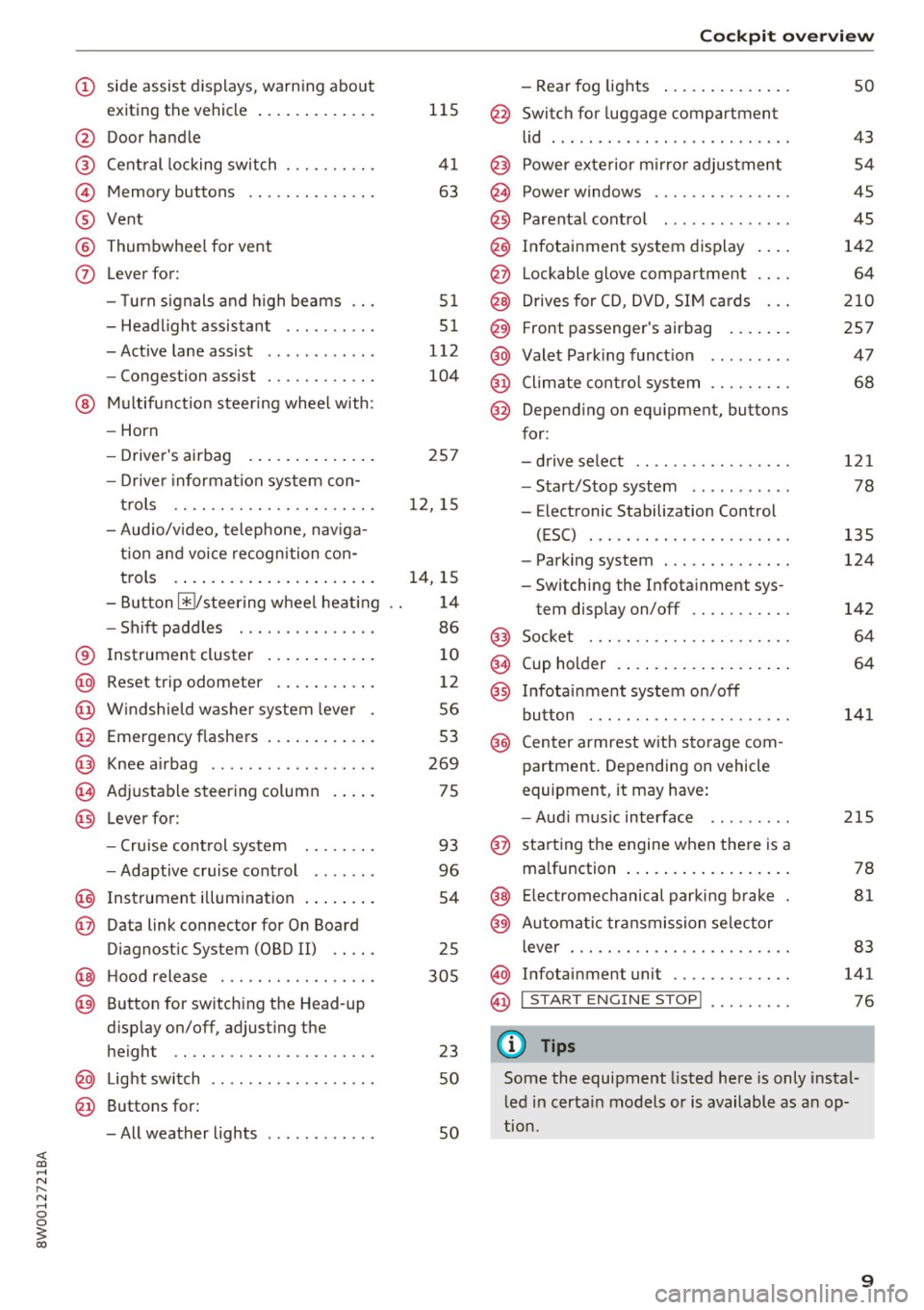
(!) side assist displays, warning abo ut
exiting the vehicle ..... ... .. .. .
@ Door handle
@ Cent ral locking switch ....... .. .
@ Memory buttons ........... .. .
® Vent
® Thumbwhee l for vent
(J) Lever for:
- T urn signals and h igh beams
- Headl ight assistant ......... .
- Active lane assist .. ..... ... . .
- Congestion assist ....... .. .. .
@ Mul tifunction steer ing wheel with:
- Horn
- Driver's airbag . ..... ... .. .. .
- Drive r information system con -
t rols .. .. ............. .. .. .
- Audio/v ideo, telephone, nav iga
t ion and voice recognition con-
trols . ... .... .. .... ... .. .. .
- Button ~/steering wheel heating
- Sh ift paddles .............. .
® Instrument cluster ....... .. .. .
@
@
@
@
~
@
Reset trip odometer ........ .. .
W indshie ld w asher system lever
Emergency flashers .... ... .. .. .
Knee a irbag ........ ... .. ... . .
Adjustable steer ing column
Lever for:
- Cruise cont rol system ..... .. .
- Adaptive cruise cont rol .. ... . .
@ Instrument i llum ination ... .. .. .
@ Data link connector for On Board
Diagnostic System (OBD II) .. .. .
@ H ood release . ........... .. .. .
@ Button for switching the Head-up
d isplay on/off, adjust ing the
height .. .. ............... .. .
@ Lig ht switch ............... .. .
@ Buttons for :
- All weather lights
llS
41
63
5 1
5 1
112
104
25 7
12, 15
14, 15
1 4
86
10
12
56
53
269
75
93
96
54
25
305
23 50
50
Coc kpit o ve rv iew
-Rear fog lights .. .. .. ..... .. .
@ Switch for luggage compartment
li d .... ... .. .. .. .... .. ... .. . .
@ Power exterior m irro r adjustment
@ Power windows .............. .
@ Parental cont rol ............. .
@ Infotainment system dis play . .. .
@ Lockable glove compartment ... .
@ Drives for CD, DVD, SI M cards .. .
@ Front passenger's airbag .... .. .
@ Valet Park ing funct ion ........ .
@ Climate cont ro l system ........ .
@ Depend ing on equ ipment, buttons
for:
- drive select .. .. ............ .
- Start/Stop system . ... ... .. . .
- Electronic Stabilization Control
(ESC) ..... .. .. ... ....... .. .
- Parking system . .... . ..... .. .
- Switching the Infota inment sys-
tem disp lay on/off .......... .
@) Socke t ... .. .. .. ............ .
@ Cup holder . ... .. .... . ..... .. .
@ Infotai nment system on/off
button ... .. .. .. .... .. ... .. . .
@ Center armrest w ith sto rage com
partment . Depending on vehicle
equipment, it may have:
- Aud i m usic interface ........ .
@ starting the engine when the re is a
ma lfunction .. ... .... . ..... .. .
@ E lectromechanical parking brake
@ Automa tic transmission se lector
lever ... .. .. . ... ............ .
@ Infotainment unit ............ .
@ I START EN GIN E STOP ! ........ .
(D Tips
50
43 54
45
45
142 64
2 10
257 47
68
121
78
135
124
142
64
64
141
215
78
81
83
141
76
Some the equipment listed here is only instal
l ed in certa in models or is available as an op-
tion .
9
Page 29 of 386
<( a, .... N ,....
N .... 0 0
3 a,
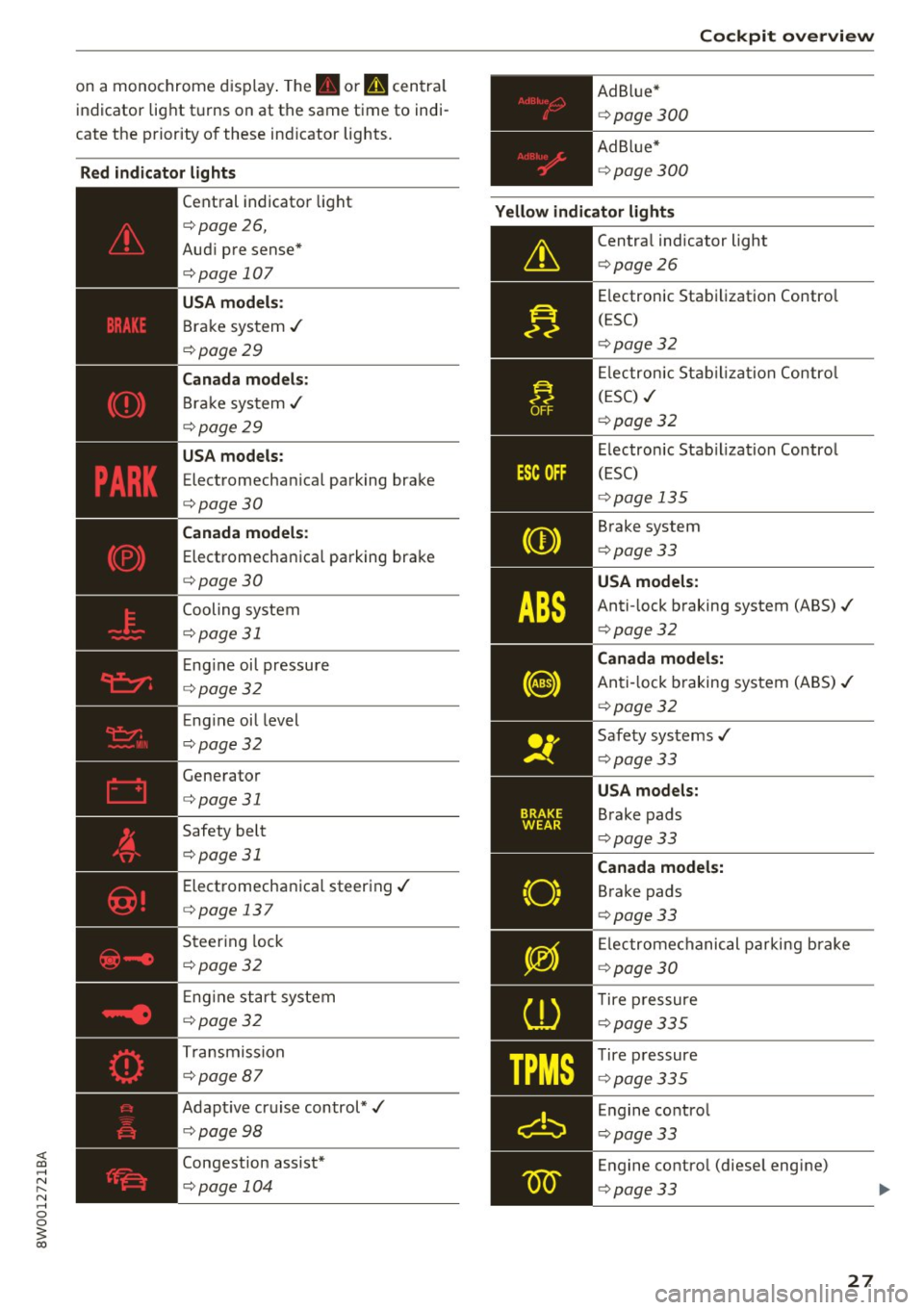
on a monochrome display. The. or u centra l
indicator light turns on at the same time to indi
cate the priority of these ind icator lights.
Red indicator lights
--------------
Central indicator light
c::> page26,
Aud i pre sense*
c::> page 10 7
USA models:
Brake system ../
c::> page 29
Canada models :
Bra ke system ../
c::> page 29
USA models:
Electromecha nical parking brake
c::> page 30
Canada models:
Electromechanica l parking brake
c::> page30
Cooling system
c::> page 31
E ng ine oi l pressure
c::> page 32
Eng ine oil level
c::> page 32
Generator
c::> page 31
Safety belt
c::> page 31
Electromechanical steering../
c::> page 13 7
Steering lock
c::> page 32
E ng ine start system
c::> page32
Transmission
c::> page 87
Adapt ive cruise control*../
c::> page 98
Congestion assist*
c::> page 104 Cockpit overview
Ad B lue*
c::> page 300
Ad Blue*
c::> page 300
Yellow indicator lights
--------------
Central indicator light
c::> page 26
E lectronic Stabilization Contro l
(ESC)
c::> page 32
El ectronic Stabilization Control
(ESC) ../
c::> page 32
Electronic Stabiliza tion Control
(ESC)
c::> page 13 5
Brake system
c::> page 33
USA models:
Anti-lock braking system (ABS)../
c::> page 32
Canada models:
Anti-lock b raking system (ABS)../
c::> page 32
Safety systems ../
c::> page 33
USA models:
Brake pads
c::> page 33
Canada models:
Brake pads
c::> page 33
El ectromechanical parking brake
c::> page 30
T ire pressure
c::> page 335
Tire pressure
c::> page 335
Engine control
c::> page 33
Engine contro l (diese l engine)
c::> page 33
27
Page 30 of 386
Cockpit over view
28
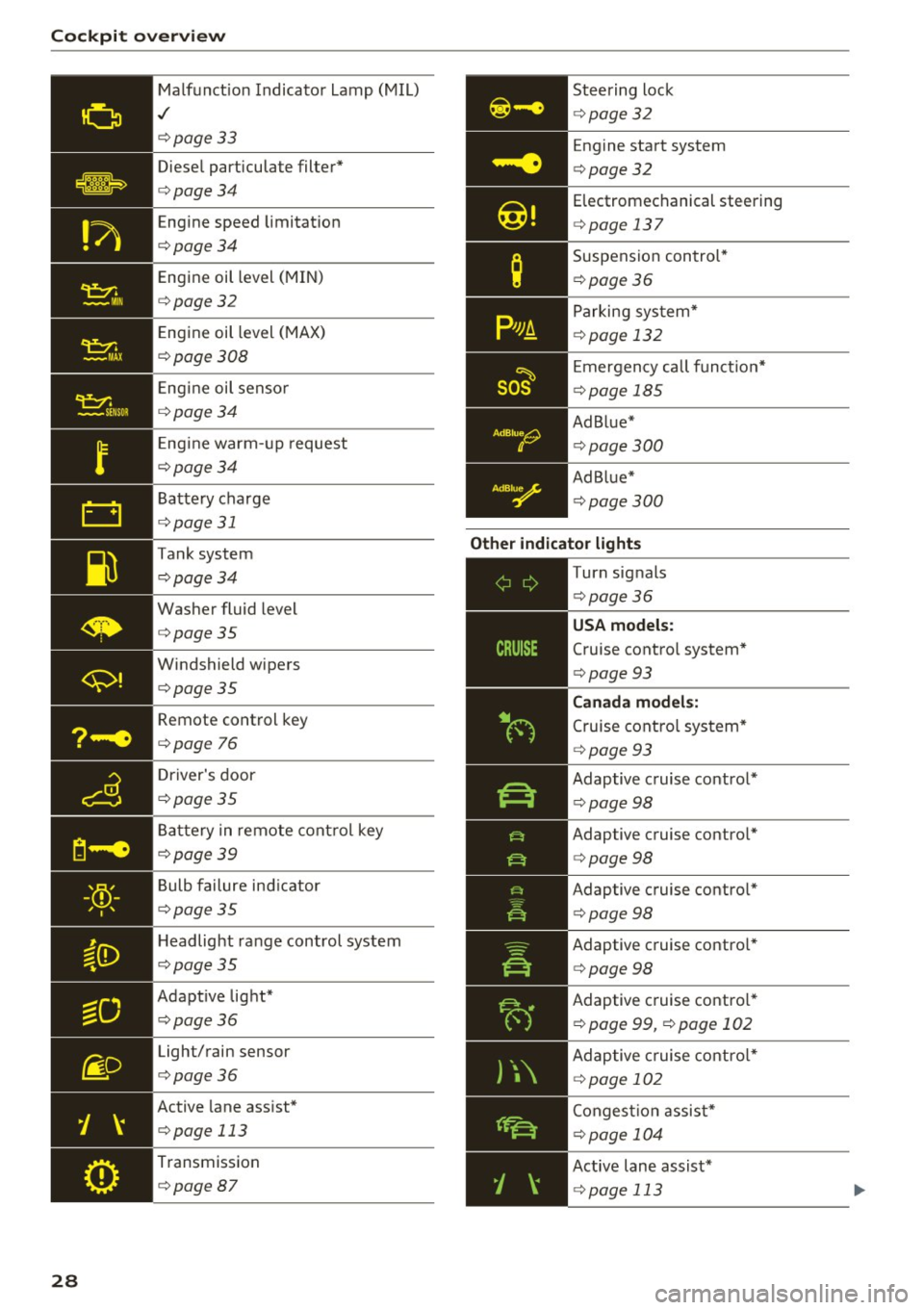
Malfunct ion Indicato r Lamp (MIL)
./
c::>page33
Diesel particulate filter*
c::>page34
Engine speed limitat ion
c::>page34
Engine oil level (MIN)
c::>page32
E ngine oil level (MAX)
c::>page308
Engine oil senso r
c::>page34
Eng ine warm -up request
c::>page34
Battery charge
<=:>page 31
Tank system
c::>page34
Washer fluid level
c::>page35
Windshield wipers
c::>page35
Remote control key
<=:>page 76
Driver's door
c::>page35
Ba ttery in remo te cont rol key
c::>page39
Bulb failure ind icator
c::>page35
H eadlight ra nge control system
c::>page35
Adapt ive lig ht*
c::>page36
Light/rain sensor
c::>page36
Active lane assist*
c::> page 113
Transmission
c::> page87
Steering lock
c::>page32
Engine start system
<=:>page 32
Electromechanical steering
c::> page 13 7
Suspension con trol*
c::> page36
Parking sys tem*
c::> page 132
E mergency call f unct io n*
<=:>page 185
Ad Blue*
c::>page300
Ad Blue*
c::>page300
Other indicator light s
--------------
Turn signals
c::> page36
Cruise contro l system*
<=:> page 93
Canad a model s:
Cruise cont rol sys tem*
<=:> page 93
Adaptive c ruise control *
¢page 98
Adaptive cruise contro l*
<=:> page 98
Adaptive cruise contro l*
¢ page 98
Adaptive c ruise contro l*
¢ page 98
Adaptive c ruise contro l*
¢ page 99, <=:>page 102
Adaptive c ruise cont ro l*
¢ page 102
Conges tion assist*
<=:>page 104
Active lane assist*
c::> page 113
Page 75 of 386
Driving
General information
Breaking in
A new vehicle must be broken in, and the break
in distance should be 1,000 mi les ( 1,500 km). Do
not drive at speeds that w ill exceed
2/3 of the
maximum permitted engine speed (RPM) for the
first 600 miles (1,000 km) , and avoid full accel
eration during this period . You may gradually
start increasing the RPM and the speed between
600 miles (1,000 km) and 1,000 miles (1,500 km).
During the first hours of use, the engine has a
higher internal friction than later on when all
moving parts have settled into place with each
other.
How the vehicle is driven during the first 1,000
miles (1,500 km) also affects the engine quality.
Drive at moderate engine speeds after the initial
break-in per iod, part icularly when running a cold
engine . This will reduce engine wear and improve
the mileage .
Do not drive at too
low of an engine speed (RPM).
Shift down when the engine no longer runs
"smoothly" . Extremely high engine speeds are
automatically reduced.
Avoid damaging the vehicle
When you are driving on poor roads, or over
curbs, steep ramps, etc., make certain that low
lying parts such as spoilers and exhaust system
parts do not bottom out and get damaged.
This is especially true for vehicles with low-slung
chassis (sports chassis)* and fully loaded
vehicles.
Driving through water on roads
Note the following to reduce the risk of vehicle
damage when driving through water, for examp le
<( on flooded roads : a, .... N
~ -The wate r must not be any higher than the bot-....
g tom of the vehicle body .
3 a,
Driving
- Do not drive faster than walking speed.
A WARNING
After driv ing through water or mud, the effec
tiveness of the brakes may be reduced due to moisture on the brake rotors and brake pads.
A few careful brake applications should dry
off the brakes .
(D Note
-Vehicle components such as the engine,
transmission, suspens ion or electrical sys
tem can be severely damaged by driving
through water .
- Always switch the Start/Stop system* off
when driving through water
r:';>page 78.
(D Tips
- Determine the depth before driving through
water.
- Do not stop the vehicle, drive in reverse or
switch the engine off when driving through
water.
- Keep in mind that oncoming vehicles may create waves that raise the water level and
make it too deep for your vehicle to drive
through safely.
- Avoid driving through salt water, because
this can cause corrosion .
Economical and environmentally-friendly
dr iving
T he amount of fuel consumpt ion, the environ
mental impact and the wear to the engine,
brakes and tires depends mostly on your driving
style. With an anticipatory and economic driving
style, fuel consumption can be reduced by ap
proximately 10-15%. The following tips will help
you conserve the environment and your money at
the same time .
Anticipatory driving
A vehicle uses the most fuel when accelerating.
When you drive with anticipation, you do not
need to brake as often and so you accelerate less .
When possible, let your vehicle coast with a
gear
engaged,
for example, when you notice that the ..,.
73
Page 85 of 386
slow your vehicle down as if you had made a
full braking maneuver. ESC and the associat
ed components (ABS, ASR, EDL) cannot over
come the laws of physics . In corners and
when road or weather conditions are bad , a
full brake application can cause the vehicle to skid or the rear end to swerve, which increas
es the risk of an accident.
Hill hold assist
Hill hold assist makes it easier to start on hills .
The system is activated when the brake pedal is pressed for a
few seco nds. The vehicle must be in
an uphill direction of travel.
After releasing the brake pedal , the brake power
is held for a
brief moment to prevent the vehicle
from rolling back when starting. During this
time , you can easily begin to
move your vehicle.
& WARNING
- If you did not begin moving immediately af
ter releasing the brake pedal, the vehicle
could begin to roll backward under certain
conditions . Press the brake pedal or set the
parking brake immediately .
-If the engine stalls, press the brake pedal or
set the parking brake immediately.
- To prevent the vehicle from rolling back un
intentionally when starting in stop-and-go
traffic, keep the brake pedal pressed for a
few seconds before you start driving.
- Switch the ignition off when you leave the
vehicle, even for a short period of time. Also
set the
parking brake to prevent the vehicle
from rolling unintentionally . This applies
particularly when children remain in the
ve
hicle, because there is the risk of an acci
dent .
Automatic transmission
Introduction
The automati c transmission is controlled elec
tronically . The transmission shifts up or down au
tomatically depending on which drive program is
selected .
Driving
When a moderate driving style is used, the
transmission selects the most economical driving
mode. The transmission shifts up at a lower RPM
and shifts down at a higher RPM to improve fuel
efficiency.
The transmission switches to a sporty mode after
a kick-down or when the driver uses a
sporty
driving style
characteri zed by quick accelerator
pedal movements, heavy acceleration, frequent
changes in speed and t raveling at the maximum
speed .
If desired, the driver can also select the gears
manually (tiptronic mode) ¢ page 86.
Selecting selector lever positions
Fig. 83 Selecto r lever
The current selector l ev e r pos ition is shown next
to the selector lever¢
fig. 83 . The current selec
tor lever position is also shown in the instrument
cluster d isplay .
.,. You may need to release the selector lever lock
depending on which selector lever position is
selected and which one you would like to se
lect .
.,. To do this, press the locking button (Don the
selector lever¢
fig. 83.
.,. To engage the nearest se lector lever position,
move the selector lever forward/back until you
feel the first pressure point. The selector lever
will return to its original position.
.,. To skip
over one selector lever position, move
the selecto r lever past the pressure point into
the desired position . The selector lever will re
turn to its original position.
For example, you can skip
over the N position if
you would like to go directly from D into R. ..,.
83
Page 86 of 386
Driving
Sel ector l ev e r lo ck
The se lector lever lock prevents you from se lect
ing a position unintentionally, causing the vehicle
to ro ll. When engaging some selector lever posi
tions, you must press the locking button
CD on
the selector lever and/or press the brake pedal
¢fig. 83.
You must press the brake pedal to engage a se
lector lever position when the engine is running
and the vehicle is stationary.
You do not have to press the brake peda l if you
shift from D to R within one second. This allows
you to "rock" the vehicle to free it when it is stuck.
P -Pa rk
The whee ls are loc ked in this pos it ion. On ly shift
into park when the veh icle is stationary ¢&. . T o
select the P selector lever position, press the P
button @on the selector lever ¢
fig. 83. Pap
pears next to the se lector lever.
You can only shift out of park when the engine is running and you are press ing the b rake pedal. To
release the parking lock, press the brake peda l,
press the locking button
CD on the selector lever
and select the desired pos it ion ¢
fig. 83.
P engages automat ically if you switch the engine
off while the selector lever is in D, E, Sor R.
If yo u sw itch the engine off when the N position
is selected, the transmission remains in N for ap
proximate ly 30 minutes and then Pis engaged .
You must use the par king loc k emergency release
before towing the vehicle¢
page 89.
R -Reverse
The reverse gear is engaged in this pos ition. Only
select reverse when the vehicle is stationa ry and
the engine is ru nning at id le speed ¢.&. . T o en
gage the R selector lever position, press the b rake pedal, press the lock ing button
CD on the
selecto r lever and select the R position ¢
fig. 83.
A confirmation tone wi ll sound when the reve rse
gear is engaged.
84
N -Neutral (idle )
The t ransmission is in idle in th is position. To en
gage the N selector lever position, press the lock
i ng button
CD on the se lector lever and shift into
the N position ¢
fig. 83.
If you switch the engine off when the N posit io n
i s selected, the transmission remains in N for ap
prox imately 30 minutes and then P is engaged.
You cannot se lect t he N pos ition when the ig ni
tion is swi tched off. When dr iv ing th rough an au
tomat ic car wash, fi rst select the N position and
then turn the eng ine off.
Fo r safety reasons, the veh icle canno t be loc ked
whe n the t ransmiss io n is in the N pos it ion.
D IS -Driving forward
When the transm iss ion is in the D/S posit ion, it
can be operated either in the norma l D mode or
i n the S sport mode. Move the selector lever bac k
to engage the S sport mode. You ca n only se lect
the S se lector lever position when the Dor E pos i
tion is se lected . To select the Dor E position
again when S is engaged, move the selector lever back ¢&. . To sh ift from N to D when traveling at
speeds below 1 mph (2 km/h), press the brake pedal and shift into the D position¢&. .
In the
normal mode D, the transmission auto
matically selects the suitable gear ratio. It de
pends on engine load, vehicle speed and driving
style.
Se lect the
sport mode S fo r sporty driving . The
vehicle makes f ull use of the engine 's power.
Sh ift ing may become noticeable when accelerat
i ng .
The S selector lever posit ion engages automati
ca lly when you select
dynamic mode in drive se
l ect*.
A WARNING
Read and follow all WARNINGS.
-The vehicle can roll even if the ignit ion is
sw itched off.
Page 87 of 386

-Power is st ill transmitted to the wheels
when the eng ine is r unning at idle. To pre
vent the veh icle from "creeping", you must
keep your foot on the brake in all selector
lever posi tions (except P and N) when the
engine is ru nning.
- Before opening the hood, se lect the P selec
tor leve r pos ition and set the parking bra ke.
T his redu ces the risk of an accid ent. Always
read and fo llow the appli cable warnings
¢ page 30 4, Wor king in the engine com
partment.
@ Tips
If you accidentally se lect N wh ile d riving, take
your foot off the a ccele rat or pedal an d wait
for the engine to s low down to idle before se
lect ing Dor S.
Driving tips
Starting the engine
.,. The P or N posi tion m ust be selected .
Starting from a stop
.,. Press and hold the brake pedal.
.,. Start the engi ne ¢
page 76.
.,. Press t he lo ck ing bu tton (D on the se le ctor lev
er and select the D, E, Sor R pos ition
¢ page 83.
.,. Wait a moment unti l the transmission shifts.
Yo u w ill notice a slight movement when the
gear engages .
.,. Release the brake pedal and press the acce lera
tor pedal ¢
A,.
Stopp ing temporarily
.,. Press t he brake peda l to stop the vehicle, fo r
example at a t raff ic light. Do not press the ac
ce le rator peda l when do ing this.
.,. To prevent the vehicle from rolling when you
sta rt driving, set the park ing brake when stop
ping on steep hill s¢
A, .
.,. The park ing bra ke w ill release automatically
;;§ and the vehi cle will s tart moving on ce you press ....
~ th e accelerator pedal.
N .... 0 0
3
Stopping /parking
If the selector lever is not in the P position when
yo u open the drive r's door, the vehicle cou ld ro ll.
.,. Press and hold the b rake pe dal¢
A, .
.,. Se t the par king bra ke.
.,. To sele ct the P se lec to r lever posit io n, press the
P button @on the selector lever¢
page 83,
fig. 83.
Un der certa in conditions , such as d riv ing i n the
moun tains o r whe n towi ng a t railer, it may be
helpful to swi tch to man ua l mode tempo rari ly
and shift
manually to adapt to the driv ing condi
t ions ¢
page 86 .
On hills, ac tivate the park ing brake fi rst and then
shi ft into the P position¢
page 81 . This preven ts
too much stress from being p laced on the locking
mechan ism .
A WARNING
----The vehicle can roll even when the eng ine is
sw itched off .
- Unintended vehicle movement can lead to
serio us inju ries .
- Do not press the acce le rator pedal when
chang ing the se lector lever position while
the vehicle is stationary and the engine is r u nning . This could result in a c rash .
- To reduce the r isk of an accident, never se
lect the R o r P positions while dr iv ing .
- Do not inadvertently p ress the accelerator
pedal when the vehicle is stationary. Other
wise the veh icle wi ll start to move immedi
ately , even i f the pa rking brake is set. This
could result in a c rash .
(D Tips
For safety reasons, the park ing bra ke only re
l eases automatically when the drive r's door is
closed .
Hill descent control
The hill descent control system assists the driver
when driving down hills .
Hill descent control activates when the t ransmis-
s io n is in the Dor 5 position and you press the ..,.
85
Page 88 of 386
Driving
brake pedal. The transmission automatically se
lects a gear that is suitable for the hill. Hi ll de
scent contro l tries to mainta in the speed ach
ieved at the time of b raking, within physical and
technical limitations. If may sti ll be necessary to
adjust the speed with the brake pedal.
H ill descent contro l switches off once the hill lev
els out or you press the accelerator peda l.
When operating the c ruise contro l system *
c::> page 93, hill descent control is also activated
when the speed is set.
A WARNING
H ill descent control cannot overcome p hys ica l
limitations, so it may not be able to maintain
a constant speed under all condit ions. Always
be ready to apply the brakes.
Manual shifting (tiptronic mode)
The tiptronic mode allows the driver to shift the
gears manually.
F ig. 84 Ce nte r conso le: shifting manua lly w it h th e se lector
l ever
F ig . 85 Steer ing w heel: shift ing man ually
86
Shifting with the selector lever
Yo u can shift into tipt ronic mode whi le s tat io na ry
and whi le driving.
.,. To shift into tip tronic mode, push the selec to r
lever from the D/S position to the right . As
soon as the tran sm ission switche s ove r, t he M
t ransmission setting w ill appear in the instru
ment cl uster display .
.,. To shift up one gea r, tap the selector lever for
ward
0 c:> fig. 84.
.,. To shift down a gear, tap the selector lever back
0 -
... To switch t iptronic mode off, push the selector
lever back into the D/S pos ition .
Shifting with the shift paddles
You can operate the s hif t paddles in the D/S or M
selector lever positions .
.. To shift up one gea r, tap the
0 sh ift padd le
<=> fig. 85 .
"'"To shift down one gear, tap the 0 shift paddle .
"'" To engage the lowest gear, hold the
0 shift
paddle .
.,. If you do not press a shift b utton within a sho rt
t ime wh ile in t he D/S pos it io n, the transm ission
w ill return to automa tic mode. To keep shifting
using the sh ift paddles , move the selecto r leve r
to the right out of the D/S position .
.. Whe n you want to shift o ut o f tiptronic mode,
press and ho ld the
0 shift padd le for a lo nger
period of time or move the selector lever back
and release it .
The transmission automatica lly shifts up or down
before critical engine speed is reac hed.
The transmission on ly allows manu al s hift ing
whe n the engi ne speed is w ith in the perm it ted
range .
@ Tips
- If you shi ft to the nex t lowe st ge ar, the
t ransmi ss ion will only s hift if the eng ine will
not be over -revved .
- With kick-down, the transmis sion shifts t o a
lower gear, depen ding on vehi cle spee d and
eng ine speed. .,.
Page 89 of 386

<( a, .... N ,....
N .... 0 0
3 a,
-tiptronic does not work if the transmission
is running in emergency mode.
Kick-down
Kick-down enables maximum acceleration.
When you press the accelerator pedal down be
yond the resistance point, the automatic trans
mission shifts down into a lower gear and the en
gine utilizes its full power, depending on vehicle
speed and engine RPM. It shifts up into the next
higher gear once the maximum specified engine
RPM is reached .
A WARNING
Please note that the wheels could spin on
slick or slippery roads when kick-down is ac
tive.
Launch control program
The launch control program provides the best
possible acceleration when starting from a stop.
Requirement: The engine must be at operating
temperature and the steering wheel must not be
turned .
~ Deactivate the Start/Stop system* ¢ page 80.
The LED in the 10 ml button turns on.
~ With the engine running, press the ~l.i; -o~FF =! but
ton briefly ¢
page 135. The II indicator light
turns on and the message
Stabilization control
(ESC): Sport. Warning! Restricted stability
ap
pears in the instrument cluster display.
~ Pull the selector lever back out of the D/S posi
tion briefly to select the S position or select the
Dynamic driving mode in drive select*
¢page 122.
~ Press the brake pedal firmly with your left food
and hold it all the way down for at least 1 sec
ond.
~ At the same time, press the gas pedal all the
way down with your right foot until the engine
reaches and stays at a high RPM level.
~ Remove your foot from the brake pedal within
S seconds ¢
,&..
Driving
A WARNING
-Always adapt your driving to the traffic flow.
- Only use the Launch control program when
road and traffic conditions allow it and oth
er drivers will not be endangered or both
ered by your driving and the vehicle's accel
eration.
- Please note that the drive wheels can spin
and the vehicle can break away when sport
mode is switched on, especially when the
road is slippery.
- Once the vehicle has started moving, press
the
1 .$ OFFI button briefly to turn the sport
mode off.
(D Tips
- The transmission temperature may increase
significantly after using the launch control
program. If that happens, the program may
not be available for a few minutes. It will be
available again after a cool-down period.
- When accelerating using the launch control
program, all vehicle parts are subject to
heavy loads. This can lead to increased
wear.
Transmission malfunction
• Transmission: too hot. Please stop vehicle
Do not continue driving . Select the P selector lev
er position and contact an authorized Audi dealer
or authorized Audi Service Facility for assistance.
• Transmission: malfunction! Please stop ve
hicle and shift to P
Do not continue driving . Select the P selector lev
er position and contact an authorized Audi dealer
or authorized Audi Service Facility for assistance.
@] Selector lever: malfunction! You may contin
ue driving. Please contact Service
There is a system malfunction in the transmis
sion. Drive to an authorized Audi dealer or au
thorized Audi Service Facility immediately to have
the malfunction corrected .
[O] P button: malfunction! Auto P when engine
off. Please contact Service ..,.
87