lock AUDI A4 2018 Owner's Manual
[x] Cancel search | Manufacturer: AUDI, Model Year: 2018, Model line: A4, Model: AUDI A4 2018Pages: 403, PDF Size: 66.81 MB
Page 50 of 403
Opening and closing
Child safety lock
The child safety lock prevents the rear doors
from being opened from the inside and the rear
power windows from be operated .
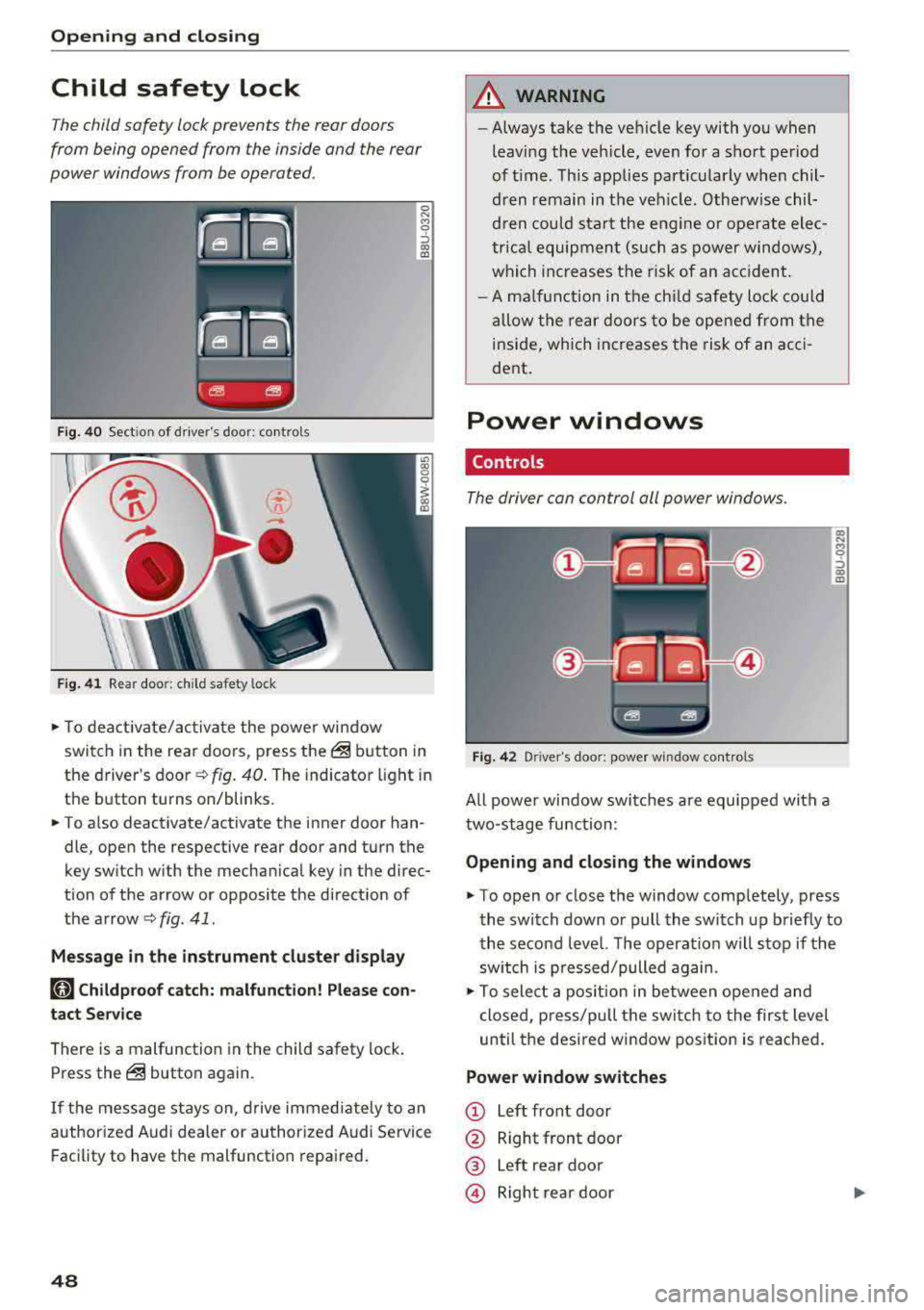
Fig. 40 Section of driver's door: co ntrols
Fig. 41 Rear door: chil d safety lock
0 N M 9 ::J co (D
• T o deactivate/activate the power window
switch in the rear doors, press the@ button in
the driver 's
door ¢ fig. 40. The indicator light in
the button turns on/blinks.
• To also deactivate/activate the inner door han
dle, open the respective rear door and turn the
key switch with the mechan ical key in the direc
tion of the arrow or opposite the direct ion of
the arrow
<=> fig. 41 .
Message in the instrument cluster display
faj Childproof catch: malfunction! Please con
tact Service
There is a malfunction in the child safety lock.
Press the@ button again.
If the message stays on, drive immediately to an
authori zed Audi dealer or authorized Audi Service
Facility to have the malfunction repaired.
48
A WARNING
-Always take the vehicle key with you when
leav ing the vehicle, even for a short period
of time . This applies part icularly when chil
dren remain in the vehicle . Otherwise chil
dren could start the engine or ope rate elec
trical equipment (such as power windows),
which increases the risk of an acc ident.
- A malfunction in the child safety lock could
allow the rear doors to be opened from the
inside, which increases the risk of an acci
dent .
Power windows
Controls '
The driver con control all power windows .
Fig. 42 Driver"s door: power w indow controls
All powe r window switches are equipped with a
two-stage function :
Opening and closing the windows
a, .... M 0 ::, (X) (D
• To open or close the window completely, press
the switch down or pull the switch up briefly to
the second level. The operat ion will stop if the
sw itch is p ressed/pulled again.
• To select a position in between opened and
closed, p ress/pu ll the switch to the first level
until the desired window position is reached.
Power window switches
CD Left front door
@ Right front door
® Left rear door
© Right rear door
Page 51 of 403

_& WARNING
-Always take the vehicle key with you when
leaving the vehicle, even for a short period
of time . This applies particularly when chil
dren remain in the vehicle . Otherwise chil
dren could start the engine or operate e lec
trical equipment (such as power windows),
which increases the risk of an accident . The
power windows continue to function until
the driver's door or front passenger's door
has been opened.
- Pay careful attent ion when closing the win
dows . Pinching could cause serious injuries .
- When locking the vehicle from outside, the vehicle must be unoccupied since the win
dows can no longer be opened in an emer
gency .
@ Tips
You can still open and close the w indows for
approximately 10 minutes after turning the
ignition
off . The power windows do not switch
off until the driver's door or front passenger's
door has been opened.
Convenience opening/closing
Applies to: vehicles with convenience key
All of the windows and the roof* con be opened/
closed at the some time .
Convenience opening feature
.. Press and hold the CD button on the remote con
trol key until all of the windows reach the de
sired position and the
roof* is tilted open.
Convenience closing feature
.. Press the @ button on the remote control key
until the roof* is closed
c::> .&,, or
.. Touch the sensor* on the door handle until a ll
of the windows and the roof* are closed. Do not
place your hand in the door handle when doing
this.
Setting convenience opening in the
Infotainment system
.. Select in the Infotainment system: !MENUI but
ton
> Vehicle > left control button > Vehicle
Open ing and closing
settings > Central locking > Long press to
open windows.
_& WARNING
- To reduce the r isk of injury, never close the
windows or the roof* carelessly or in an un
controlled manner .
- For secur ity reasons, the windows and the
roof* can only be opened and closed with
the remote control key at a maximum dis
tance of approx imately 6.5 feet (2 m) away
from the vehicle. Always pay attent ion when
using
the@ button to close the windows
and the roof* so that no one is pinched. The
closing process will stop immediately when
the@ button is released.
(D Tips
Applies to: vehicles with panorama glass roof:
the power sunshade also opens/closes when
opening/closing the roof.
Correcting power window malfunctions
You can reactivate the one-touch up/down func
tion if it malfunctions.
"' Pull the power window switch up until the win
dow is comple tely raised .
.. Release the switch and pull it up again for at
least one second.
Sliding/tilting sunroof
Operating
Applies to: vehicles with sliding/tilting sunroof
Fig. 43 Section of front head lin er: sliding/tilt ing sunroof
button
....
49
Page 53 of 403
a co .... N ,....
N .... 0 0
3 co
© Opening and clo sing th e sunshad e
"'To open the sunshade comp lete ly, slide the -:<'-'.i.
switch back briefly to the second level.
"' To close the sunshade complete ly, slide the .-;- ;, .
switch forward briefly to the second level.
"' To se lect a partially open position, slide the -:c ,,.
switch to the first level until the sunshade
reaches the desired position.
A WARNING
To reduce the risk of injury, always pay atten
tion when closing the panorama glass roof.
Always sw itch off the ignit io n when exiting
the vehicle.
(D Note
Always close the panorama glass roof when
leaving your veh icle. Rain can cause damage
to the inter ior equipment of yo ur vehicle, par
ticularly the e lectronic equipment.
@ Tips
- Fo r informat ion about convenience open
i ng/closing,
see~ page 49.
- You can still operate the panorama glass
r oof fo r abo ut 10 m inutes afte r the ig nitio n
i s sw itched off. The switch is deact ivated
once the dr ive r's or front passenger's door is
opened.
- The panorama glass roof will only open
down to -4°F (-20°) .
Panorama glass roof emergency operation
Applies to: vehicles with panorama glass roof
If an object is detected when closing, the roof
will open again automatically. In this case, yo u
can then close it with the power emergency clos ing function.
"' Within five seconds after the sunroof opens au
tomatica lly, pull the applicable button until the
roof is closed.
l ) Th is function is not available in all countr ies.
Op ening and cl osing
Valet parking function
Applies to: vehicles with valet parking function
The valet parking function protects the luggage
compartment from unauthorized access.
"'
I
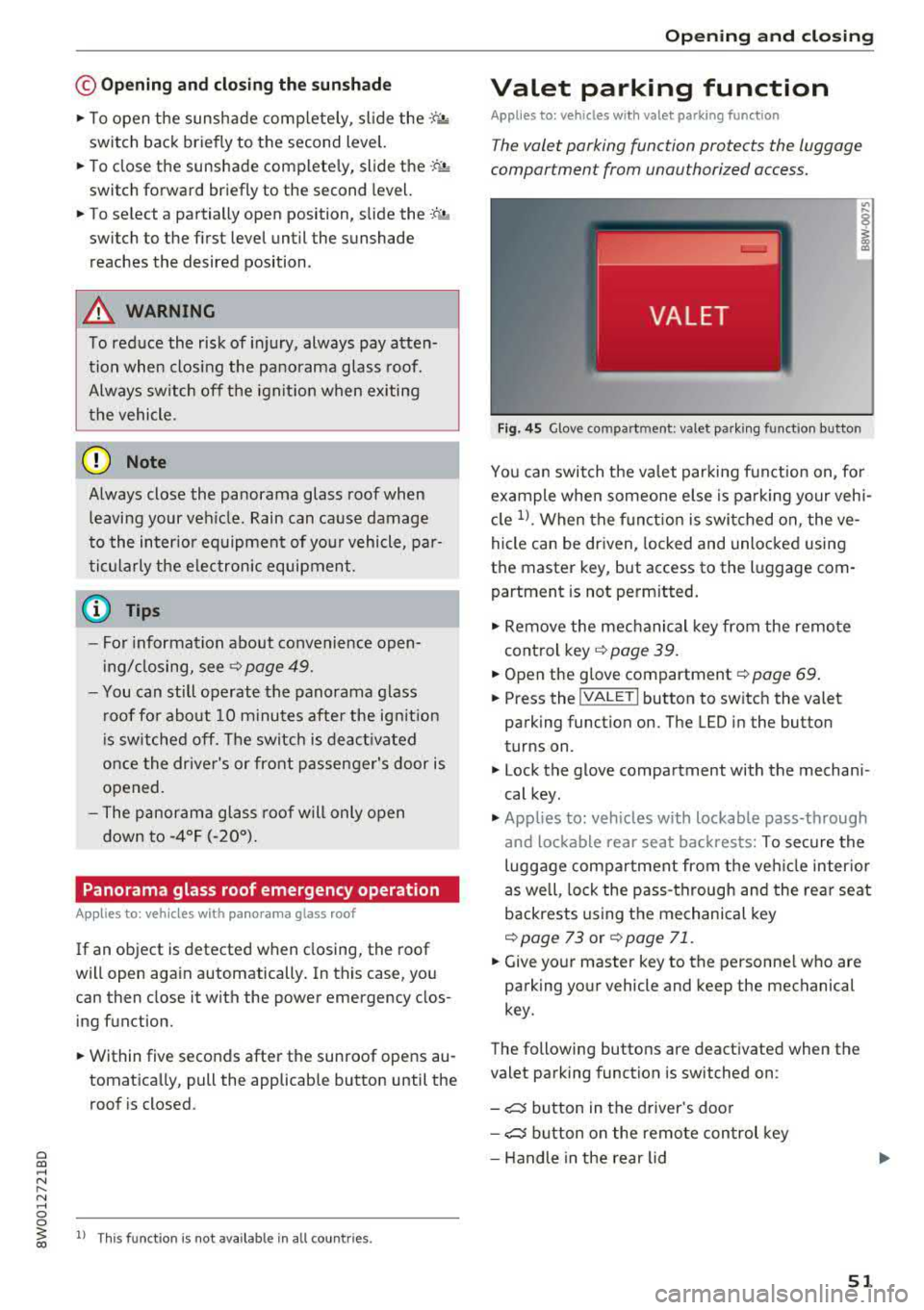
F ig . 4 5 Glove compartment: valet parking funct io n button
You can switch the valet par king function on, fo r
example when someone e lse is pa rking your vehi
cle
1> . When the f unct ion is swi tched on, the ve
hicle can be driven, locked and unlocked using
the master key, but access to the luggage com partment is not perm itted.
"' Remove the mechanical key from the remote
control key
~ page 39.
"'Open the g love compartment~ page 69 .
"'Press the !VA LET I button to switch the valet
parking function on. The LED in the button
turns on .
"' Lock the glove compartment with the mechani
cal key.
"' Applies to: vehicles with lockable pass-through
and lockable rear seat backrests: To secure the
luggage compartment from the veh icle inter io r
as well, lock the pass-through and the rear seat
backrests using the mechanical key
~page 73 or ~ page 71.
"'Give yo ur master key to the personne l who are
parking your vehicle and keep the mechanical
key.
The following buttons are deactivated when the
valet parking function is switched on :
- ,:::::::, button in the driver 's door
- ,:::::::, button on the remote con trol key
- Handle in the rear lid
51
Page 54 of 403
Opening and clo sin g
When the valet parking function is switched on,
the message
V alet pa rking acti vated appears in
the instrument cluster display when you switch
the ignition on.
(D Tips
Please note that the luggage compartment
can still be accessed from the vehicle interior
in vehicles with fixed rear seat backrests or
ones that cannot be locked, even when the
valet parking function is switched on.
Garage door opener (HomeLink)
Description
Applies to: veh icles with garage door opener (Homelink)
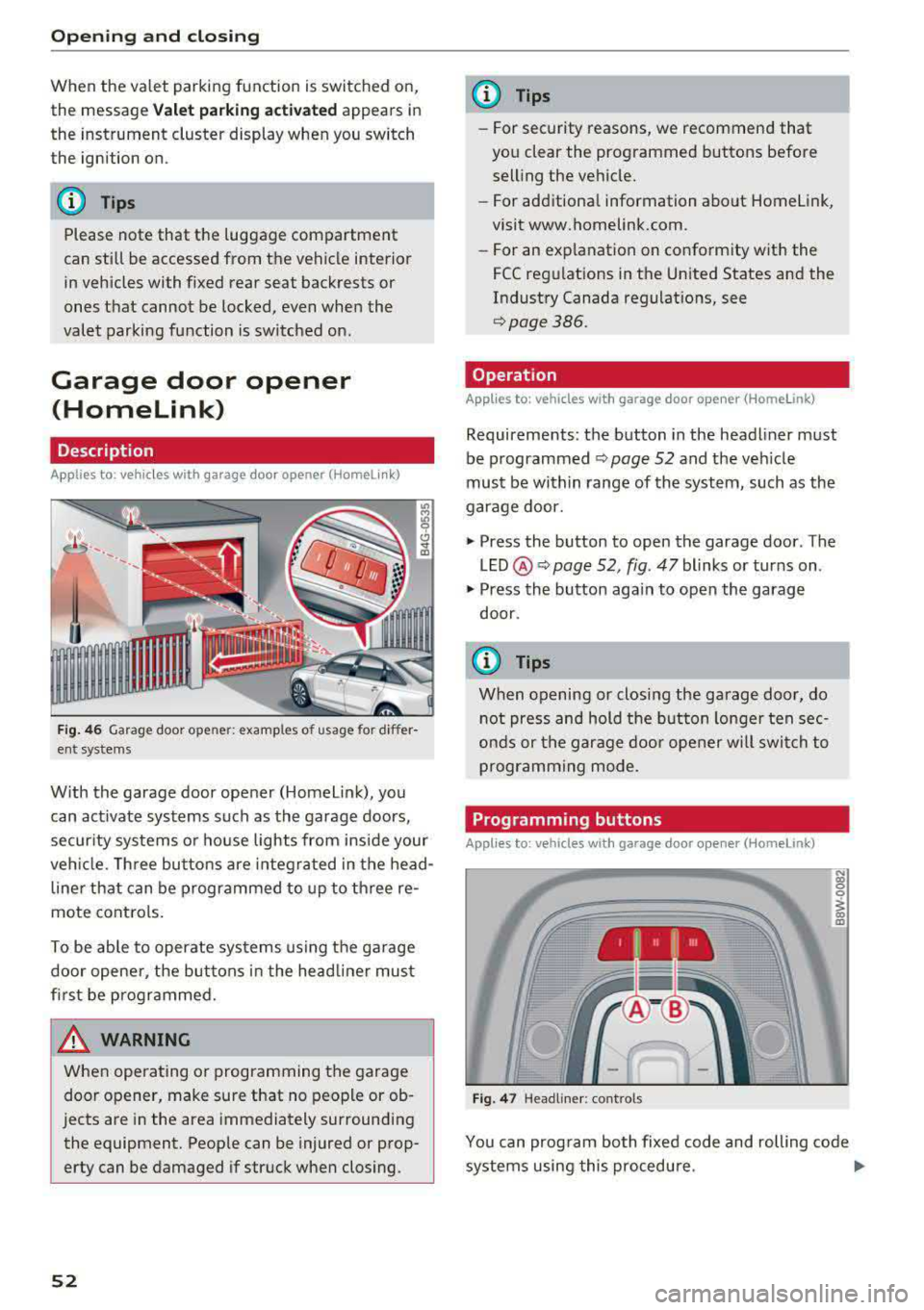
Fig. 46 Garag e door ope ner: exa mples o f usage for di ffer
ent systems
W ith the garage door opener (Homel ink), you
can act ivate systems such as the garage doors,
security systems or house lights from inside your
veh icle. Three buttons are integ ra ted in the head
line r that can be programmed to up to th ree re
mote controls.
To be ab le to operate systems using the garage
door opene r, the buttons in the head line r must
first be programmed.
A WARNING
When ope rating o r programming the garage
door opener, make sure that no people or ob
jects are in the area immediately surrounding
the equipment. Peop le can be injured or prop
erty can be damaged if struck when closing.
52
@ Tips
- For security rea.sons, we recommend that
you clear the programmed buttons before
selling the vehicle.
- For additiona l information about Homelink,
visit www.homelink.com.
- For an exp lanation on conformity w ith the
FCC regulations in the Un ited States and the
Industry Canada regulat ions, see
q page386.
Operation
Applies to : vehicles with garage door opener (Homelink)
Requirements : the button in the headliner must
be programmed ¢
page 52 and the vehicle
must be w ithin range of the system, such as the
garage door.
.,. Press the button to open the garage door . The
LED @ Q page 52, fig. 47 blinks or turns on .
.,. Press the button aga in to open the garage
door .
{D Tips
When opening or closing the garage door, do
not press and hold the button longe r ten sec
onds or the garage doo r opener w ill swi tch to
programming mode.
Programming buttons
Applies to: vehicles with garage door opener (Home link)
I 111 111
Fig. 47 Headline r: cont rols
N (0 0 0
1 m
You can prog ram bo th fixed code and rolling code
systems using this procedure .
..,.
Page 58 of 403

Lights and Vision
Ir.a Head light a ssista nt: malf unction! See own
er' s manual
Drive to an a utho rized Aud i de aler or authorized
Aud i Serv ice Facility immediately to have the
malfunction corrected . You can still switch the
high beams on or off manually .
II Headlight assi stant : currently unavail able .
Camera view re stricted due to surroundings .
See owner's manual
The camera view is b lo cked , fo r example by a
s t icker o r debr is.
The sensor is located between the interior rear
view mir ror and the windshield . Do not p lace any
stickers in th is area on the windshield .
_& WARNING
High beam assistant is only i ntended to assist
t he driver. The dr iver is still res ponsible for
cont ro lling the headlights and may need to
switch them on and off manually depend ing
on light and visib ility co nditions . It may be
necessary to ope rate them manua lly in s itua
tions such as:
- In adve rse weathe r cond itions such as fog,
heavy ra in, b low ing snow or sp raying water .
- On roads where oncoming traffic may be
partia lly obscured, s uch as exp ressways .
- When there a re road users that do not have
s uf ficient lighting, s uch as bicyclers o r
vehicles with dirty ta il lamps.
- In tight curves and o n steep hills .
- In poorly lit areas .
- Wi th stro ng reflecto rs, such as s igns.
- If the area of the windsh ield near the senso r
is fogged ove r, dirty, i cy or covere d with a
st icker .
Adjusting the exterior lighting
The functions ar e adjust ed in the Infotainm ent
system.
• Se lect in the Infotainment system: I M ENU I but
ton
> Vehi cle > left contro l button > Vehicle
setting s
> Exterior lighting .
56
Automatic headlights
You can adjus t the following se ttings in the Au
to-dimming high beam s
menu:
Activation time -you can adjust if the headlights
swi tch on
Early , Medium or Late accor ding to t he
sens itivity of t he lig ht sen sor .
Headlight assistant * -you can switch the high
bea m assis tant* on and off.
Entry/exit lighting
When it is dark, the Ent ry /exit lighting ill umi
nates the area a round the vehicle when unlocking
the veh icle and after switch ing off the ig nition
and opening the dr ive r's door .
The
Entry /e xit lighting only works when it is
dark and the light sw itch is in the
AUTO posit ion.
Daytime running lights
USA models :
the daytime r unning lights can be
switch ed on/off . S elect
On or Off.
Canada models: this f unction canno t be sw itched
off. They activate automatically each time the ig
nit ion is switched on.
Emergency flashers
-- - ---
] -~ ~-
-------
Fig. SO Ce nter conso le: emerge ncy flashe r bu tt o n
The emergen cy fl ashe rs m akes ot her d rivers
aware of your veh icle in dangerous situations.
• Press the ~ b utton to switch the emergency
flashe rs on or off .
Yo u can indicate a la ne change or a turn when the
eme rgency flashers are switched o n by using the
turn s ignal leve r. T he eme rgency f lashe rs stop
tempor arily .
ll-
Page 60 of 403

Lights and Vision
@ Tips
The setting is automatica lly stored and as
signed to the remote control key that is be ing
used.
Instrument illumination
The brightness of th e illumination for the instru
ments , display and head-up display* can be ad
jus ted.
F ig . 53 Instru ment i llumi natio n
"' Press the knob to release it.
"'T urn the knob toward"-" o r"+" to reduce or in
crease the brightness .
,,, Press the knob again to return it to its or iginal
pos ition .
(D Tips
Depending on vehicle equipment, the inst ru
ment illumination (needles and gauges) may
turn on when the lights are off and the igni
tion is switched on . The illumination for the
gauges reduces automatically and eventually
tur ns off as brightness outside increases . This
function reminds the driver to turn the low
beams on at the app ropr iate time.
58
Vision
Adjusting exterior mirrors
Fig. 54 Driver 's doo r: kno b fo r t he e xterio r mirrors
Turn the knob to the des ired position:
0
-a ll adjustment functions are deactivated.
q / P -adjus ts the left/right exter io r mirror.
Move the knob in the desired direct ion.
(@ -Heats* the mir ror glass depend ing on the
outside temperature.
8 -F olds the exterior mirrors* . To fold the m ir
rors out, turn the knob to one of the other posi
tions . In the I nfota inment system, you can select
i f the m irro rs fo ld in au tomatically when yo u lock
the
ve hicl e~ page 41 .
Front passenger's exterior mirror tilt
function *
To help you see the curb when backing into a
parki ng space, the su rface of the m irro r til ts
slight ly. For this to happen, the knob must be in
the position for the front passenger's exterior
mirror.
Yo u can adjust the tilte d mir ror s urface by t urn
i ng t he knob in the desired di rect io n. When you
move out of reverse and into another gear, the
new m irror position is stored and assigned to the
key you are using .
The m irror goes back into its or iginal pos ition
once you drive forward faster than 9 mp h
(15 km/h) or turn the ignition off.
&_ WARNING
Cu rved mi rror sur faces (for example convex)
enla rge the field of vision. However, they
Page 64 of 403
Lights and Vi sion
Replacing wiper blades
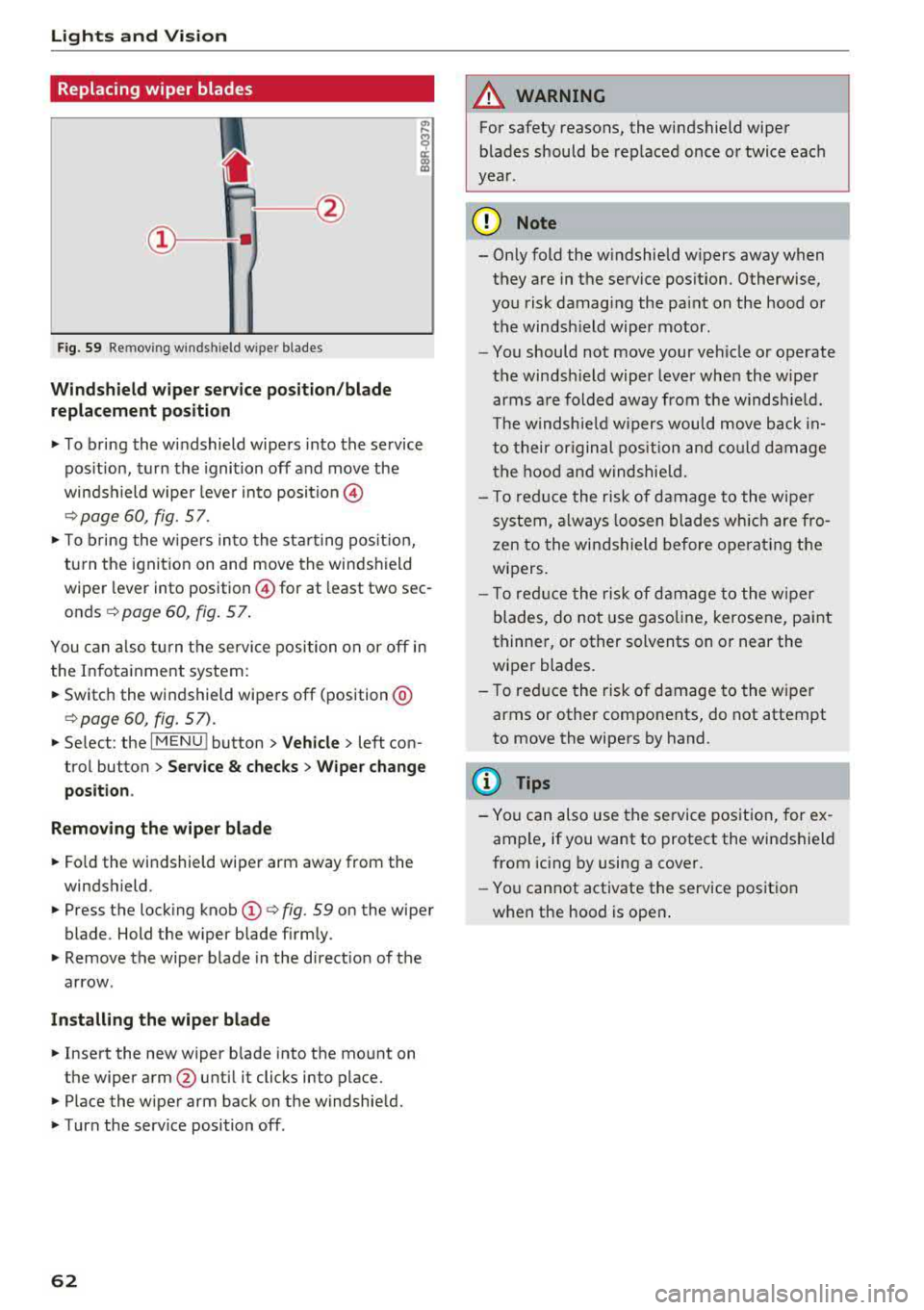
Fig. 59 Re mov ing w indshi eld w iper blades
Windshield wiper service position/blade
replacement position
.,. To bring the windshield wipers into the service
pos ition, turn the ignition off and move the
winds hield wiper leve r into position @
¢page 60, fig. 57 .
.,. To bring the wipers into the starting pos it io n,
tu rn the ignition on and move the windshield
wiper lever into position @for at least two sec
onds
¢ page 60, fig. 57 .
You can also turn the service position on o r off in
the Infota inment system :
... Switch the windshield wipers off (position @
¢page 60, fig. 57) .
.,. Select : the IMENU ! button> Vehicle> left con
trol button >
Service & checks > Wiper change
position .
Removing the wiper blade
... Fo ld the windshield wiper arm away from the
windshield .
.,. Press the locking knob (D ¢ fig. 59 on the wiper
blade . Hold the wiper blade firmly .
.,. Remove the wiper blade in the d irection of the
arrow .
Installing the wiper blade
.,. Insert the new wiper b lade into the mount on
the wiper arm
@ until it clicks into place .
.,. Place the wiper arm back on the windshield .
.,. Turn the serv ice position off .
62
A WARNING
,--
For safety reasons, the windshield wiper
blades should be replaced once or twice each
year .
(]) Note
- Only fold the w indshield w ipers away when
they are in the service pos ition. Otherwise,
you risk damaging the paint on the hood or
the windsh ield wiper motor.
- You should not move your veh icle or operate
the windsh ield wiper lever when the wiper
arms are folded away from the windshie ld.
Th e windshie ld wipers would move back
in
to their original position and could damage
the hood and windshie ld.
- To reduce the risk of damage to the wiper
system, always loosen blades which are fro
zen to the windshield before operating the
wipers.
- T o reduce the risk of damage to the wiper
blades, do not use gasoline, kerosene, pa int
thinner, or other solvents on or near the
wiper blades.
- To reduce the risk of damage to the wiper
arms or other components, do not attempt
to move the wipers by hand .
(D Tips
- You can also use the service position, for ex
ample, if you want to protect the windshield
from icing by using a cover .
- You cannot activate the service position
when the hood is open .
Page 69 of 403
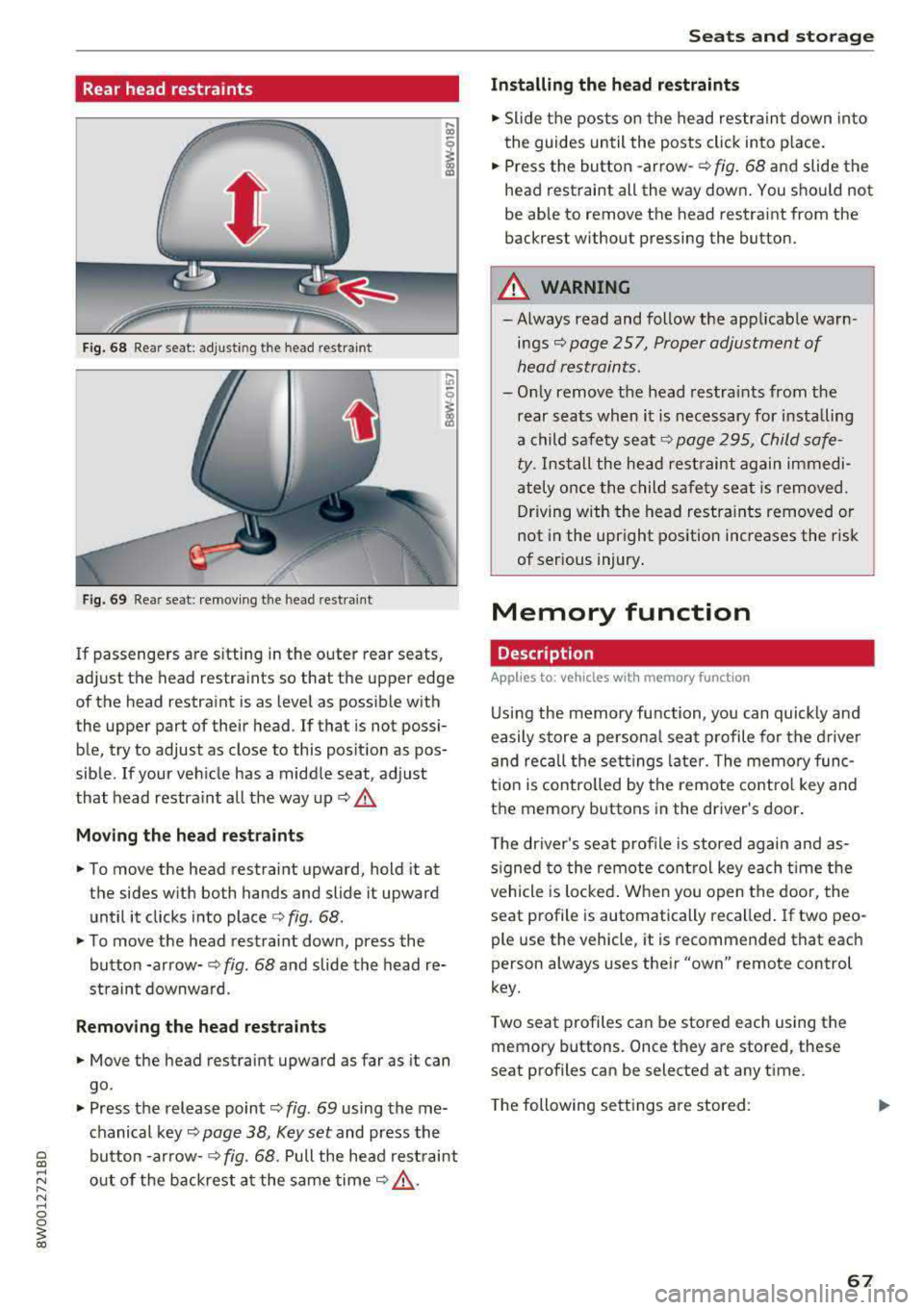
Rear head restraints
Fig. 68 Re ar seat : adjus ting the head re stra in t
Fig. 69 Re ar seat: remov ing the head rest ra in t
If passenge rs are s itting in the outer rear seats ,
ad just the head restraints so that t he upper edge
of the head restraint is as level as possib le with
the upper part of their head . If that is not possi
ble, try to adjust as close to this posit ion as pos
sible . If your ve hicle has a midd le seat, adjust
that head restraint all the way up
c:> A_
Mo ving the head rest raint s
.. To move the head restraint upward, hold it at
the sides w it h both hands and slide it upward
until it clicks into place
c:> fig . 68 .
.. To move the head restraint down, press the
button -arrow-
c:> fig . 68 and slide the head re
straint downwa rd.
Remo ving the head restraints
.. Move the head restraint upward as far as it can
go .
.. Press the release point c:> fig. 69 using the me
chanical key
c:> page 38, Key set and press the
bu tton -arrow-
c:> fig. 68. Pull the head rest raint
out of the backrest a t the same time
c:> &_ .
Seats and storag e
Installing the head restraints
.. Slide the pos ts on the head restrain t down into
the guides until the posts click into p lace .
.. Press the button -arrow-c:> fig. 68 and slide the
head rest raint all the way down . You shou ld not
be able to remove the head restraint from the
back rest without pressing the button.
_& WARNING ~
-Always read and follow the applicable warn
ings
c:> page 257, Proper adjustment of
h ead restraints .
-Only remove the head restra ints from the
rear seats when it is necessary for installing
a child safety seat
c:> page 295 , Child safe
ty .
Install the head restraint again immedi
ately once the child safety seat is removed. D riving with the head restra ints removed or
not in the upright position increases the risk
of serious injury .
Memory function
Description
Applies to: vehicles with memory function
Using the memory function, you can quickly and
easily store a persona l seat p rofile for the d river
and recall the set tings late r. The memo ry func
t ion is controlled by the remote contro l key and
the memory buttons in the driver 's door .
T he driver's se at profile is stored again and as
s igned to the remote con trol key each t ime the
vehicle is locked . W hen you open the door, the
seat profile is automatically recalled . If two peo
ple use the v ehicle , it is recommended that each
person always uses the ir
"own" remote control
key.
T wo seat p rofiles can be stored each using the
memory buttons . Once they are stored, these
seat p rofiles can be selected at any t ime .
T he following se tt ings a re stored :
67
Page 70 of 403
Seats and storage
Remote con- Memory but-
trol key ton
Driver Driver
Seat X X
Both exterior
X X mirrors*
Remote control key
Applies to: vehicles with memory function
The driver's seat profile can be assigned to the
remote control key when the vehicle is locked .
.,. Select in the Infotainment system : IMENUI but
ton >
Vehicle > left control button > Vehicle
settings > Seats > Driver's seat > Store set
tings on remote control key .
(D Tips
If you do not wish to have the seat profile for
another driver assigned to the remote control
key, switch the memory function off in the In
fotainment system.
Memory buttons
Applies to: vehicles with memory function
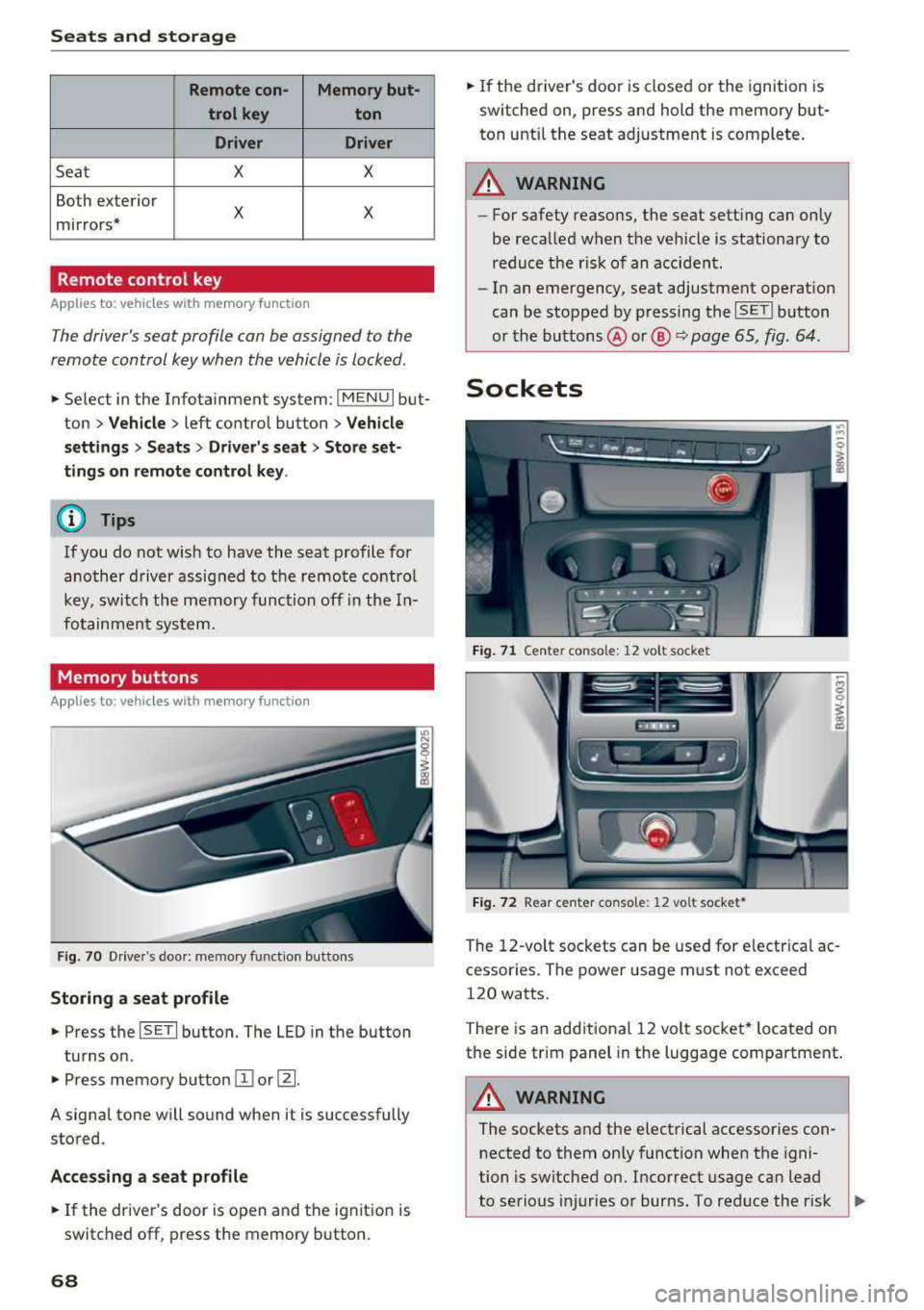
Fig. 70 Drive r's doo r: me mory function butto ns
Storing a seat profile
.,. Press the ISETI button. The LED in the button
turns on .
.,. Press memory button II] or [Ii.
A signal tone will sound when it is successfully
stored.
Accessing a seat profile
... If the driver's door is open and the ignition is
switched off, press the memory button.
68
.,. If the driver's door is closed or the ignition is
switched on, press and hold the memory but
ton until the seat adjustment is complete .
A WARNING
-For safety reasons, the seat sett ing can only
be recalled when the vehicle is stationary to reduce the r isk of an accident.
- In an emergency, seat adjustment operat ion
can be stopped by p ressing the
ISETI button
or the buttons @or@
Q page 65, fig . 64 .
Sockets
Fig. 71 Cente r conso le: 12 vo lt socke t
Fig. 72 Rear center co nso le: 12 vo lt socket *
The 12-volt sockets can be used for electrical ac
cessor ies. The power usage must not exceed
120 watts.
There is an additional 12 volt socket* located on
the side trim panel in the luggage compartment.
A WARNING
The sockets and the electrical accessories con
nected to them only function when the igni
tion is switched on. Incorrect usage can lead
to serious i njuries or burns. To reduce the r isk
,..
Page 71 of 403
of injuries, never leave children unattended in
the vehicle with the vehicle key.
(D Note
-To reduce the risk of damage to the vehicle
electrical system, never attempt to charge
the vehicle battery by connecting accesso
ries that provide power, such as solar panels
or battery chargers, to the 12 Volt sockets
or the cigarette lighter.
-To reduce the risk of damage to the sockets,
only use plugs that fit correctly.
Storage
Cup holders
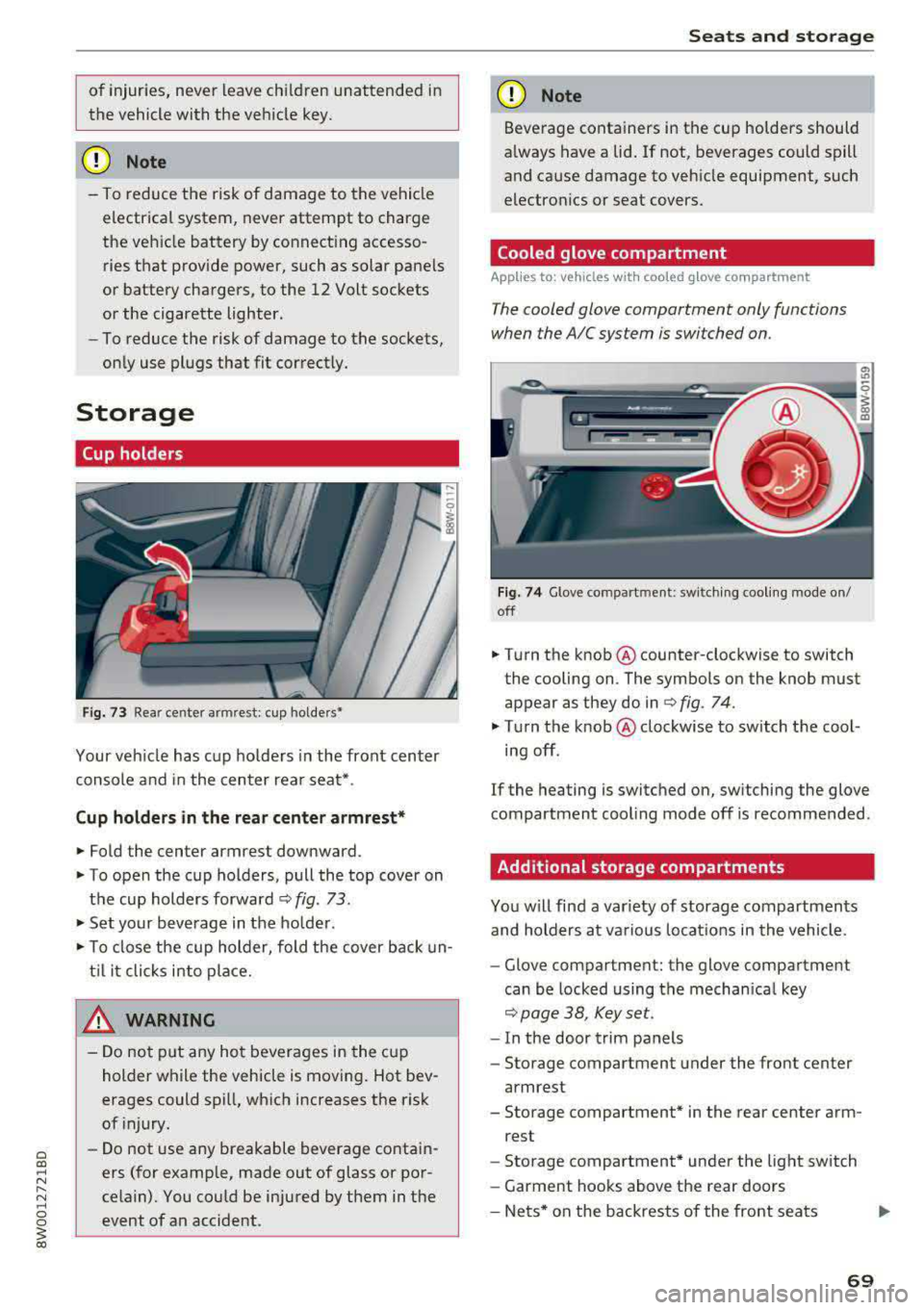
Fig. 73 Rea r cente r arm rest: cup holde rs•
Your vehicle has cup holders in the front center
console and in the center rear seat* .
Cup holders in the rear center armrest*
.,. Fold the center armrest downward.
.,. To open the cup holders, pull the top cover on
the cup holders forward
c::> fig. 73.
.,. Set your beverage in the holder .
.,. To close the cup holder, fold the cover back un
til it clicks into place.
& WARNING
-Do not put any hot beverages in the cup
holder while the vehicle is moving. Hot bev
erages could spill, which increases the risk
of injury.
-Do not use any breakable beverage contain
ers (for example, made out of glass or por
celain). You could be injured by them in the event of an accident.
Seats and storage
(D Note
Beverage containers in the cup holders should
always have a lid. If not, beverages could spill
and cause damage to vehicle equipment, such
electronics or seat covers.
Cooled glove compartment
App lies to: vehicles wit h coo led g love co mpartment
T he cooled glove compartment only functions
when the AIC system is switched on .
Fig. 74 Glove compart ment : swi tching cooling mode on/
off
.,. Turn the knob @counter-clockwise to switch
the cooling on . The symbols on the knob must
appear as they do in
r=> fig. 74.
.,. Turn the knob @clockwise to switch the cool
ing off.
If the heating is switched on, switching the glove
compartment cooling mode off is recommended .
Additional storage compartments
You will find a var iety of storage compartments
and holders at various locations in the vehicle .
-Glove compartment: the glove compartment
can be locked using the mechanical key
c::> page 38, Key set.
-In the door trim panels
- Storage compartment under the front center
armrest
- Storage compartment* in the rear center arm-
rest
- Storage compartment* under the light switch
- Garment hooks above the rear doors
-Nets* on the backrests of the front seats
69