lock AUDI A4 2018 Service Manual
[x] Cancel search | Manufacturer: AUDI, Model Year: 2018, Model line: A4, Model: AUDI A4 2018Pages: 403, PDF Size: 66.81 MB
Page 94 of 403

Driving
the desired position . The selector lever will re
turn to its original position.
F or examp le, you c an skip over the
N posit ion if
you would like to go directly from D into
R.
Selector lever lock
The se lector lever lock prevents you from se lect
i n g a position un intent ionally, causing the vehicle
to ro ll. Whe n engaging some sele ctor lever posi
tions , you must press t he locking
bu tton (!) on
the selector leve r and/or press the brake pedal
¢ fig . 98.
You mus t press the brake pedal to engage a se
lec to r l ever pos it ion when the engine is running
an d the vehicle is stationary .
You do not have to press the brake peda l if yo u
shift from D to
R with in one second. This allows
you to " roc k" the veh icle to free it when it is
s tuck .
P - Park
This se lecto r lever position p revents the vehicle
from rolling . Only s hif t in to par k w hen the veh i
cle is
s tat ionary ¢.&. . To selec t the P se lector lev
e r position, press the P bu tton @ on the selec to r
lever ¢ fig. 98 . P appears next to the selector lev
er.
Appl ies to veh icles w ith S tro nic t ra nsmission:
t he par king lock can only be released when t he
ignition is switched on and the b rake pedal is
pressed. To release the parking lock, press the
brake pedal, press the lock ing
button (!) on the
selector lever and select the desired position
¢ fig. 98. The engine must a lso be started to en
gage the Dor R se lector lever posit io n.
App lies to vehicles w ith tiptronic transm iss ion:
the park ing lock can only be released when the
engine is running and the brake pedal is pressed.
To re lease the park ing lock, press the brake ped
al, press the locking
button (!) on the selector
leve r and se lect t he des ired
posit ion ¢ fig. 98.
P engages automatically if you switch t he engine
off while the selector leve r is in D, E, S, R or man
ua l mode .
92
If you swi tc h the engine off when the N selector
l ever position is selected, the t ransm ission re
mains in
N for approx imately 30 minutes and
then Pis engaged. The vehicle is not secured
from ro lling in the
N selector lever pos ition, so
yo u need to set the parking brake
®l ¢ page 88 .
You m ust use the park ing lock emergency re lease
before towing the
vehicle ¢ page 97.
R- Reverse
The reverse gea r is engaged in th is posi tion . On ly
se lect reve rse gear when t he vehi cle is stationary
and t he engine is running at idle
speed ¢.&, . To
engage the
R se lector lever position, press the
bra ke peda l, press the locking
button (!) on the
selector lever and select the
R pos it ion ¢ fig. 98.
A confi rmation tone will sound when the reverse
gear is engaged.
N - Neutral (idle)
The transmission is in idle in th is po sit ion. To en
gage the
N selector lever position, press the lock
i ng
button (!) on the se lector lever and sh ift into
the
N pos ition ¢ fig. 98.
I f you swi tc h t he eng ine off when the N sele ctor
l eve r posit ion is sele cted, the t ransm iss ion re
mains in
N for approximately 30 minutes and
then Pis engaged.
Yo u c anno t se lec t th e N po sition w hen the ig ni
tion is swi tched off. When dr iv ing th rough an au
tomat ic car wash, fi rst select the N position and
then turn the eng ine off.
Fo r safe ty re asons , the veh icle canno t be lo cked
when the transmiss io n is in t he N pos it ion .
DIS -Driving forward
When the transm iss ion is in the D/S posit io n, it
can be ope ra ted e ither in the no rma l D mode o r
i n the S sport mo de. Move the sele ctor leve r back
to engage the S sport mode. You c an on ly se lect
t h e S selector lever position when the Dor E pos i
tion is se lected . To select the Dor E position
again w hen S is engaged, move the selector lever
back ¢.&. . To sh ift from N to D when traveling at
speeds below 1 mph (2 km/h), p ress the brake
pedal and shift into the D
position ¢.&. . .,.
Page 95 of 403

In the no rmal mode D, the transmission a uto
matica lly selects the suitab le gear ratio. It de
pends on eng ine load, vehicle speed and driving
style.
Select the
sport mode S for sporty driving. The
vehicle makes full use of the engine's power.
Shifting may become noticeable when accelerat ing.
The S selector lever position engages automati
cally when you se lect
Dynamic mode in drive se
l ect*.
A WARNING
Read and follow all WARNINGS.
-The vehicle can roll even if the ignition is
switched off.
-Power is sti ll transmitted to the wheels
when the eng ine is running at idle . To pre
vent the veh icle from "creeping", you must
keep your foot on the brake in all selector
lever positions (except P and N) when the
engine is running .
-Before opening the hood, select the P selec
tor lever position and set the parking brake.
This reduces the risk of an accident. Always
read and fo llow the applicable warnings
¢ page 323, Working in the engine com
partment.
@ Tips
If you accidentally se lect N wh ile d riving, take
your foot off the accelerator pedal and wa it
for the engine to slow down to idle before se
lect ing Dor S.
Driving tips
Appl ies to: vehicles with automatic transmissions
Starting the engine
.,. The P or N position must be selected.
Starting from a stop
.. Press and hold the brake pedal.
~ .. Start the engine ¢ page 83 .
;::; .,. Press the lock ing button @ on the selector Lev-,....
:::l er and select the D, E, So r R position 0
3 ¢page 91 .
.. Wait a moment until the transmission shifts.
You will notice a slight movement when the
gear engages .
.. Release the brake pedal and press the accelera-
tor
pedal ¢&, .
Various convenience functions are available for
start ing on h ills
¢ page 89.
Stopping temporarily
.,. Press the brake pedal to stop the vehicle, for
examp le at a traffic light. Do not press the ac
celerator pedal when doing this .
.. To prevent the vehicle from rolling when you
start driving, set the parking brake when stop
ping on steep
hills ¢&, .
.. The parking brake will release automatically
and the vehicle will start moving once you press
the accelerator pedal.
Stopping /parking
If the selector lever is not in the P position when
you open the driver's door, the vehicle could roll.
.. Press and hold the brake peda l¢ &, .
.. Set the parking brake.
.. To select the P selector lever posit ion, press the
P button
@ on the selector lever¢ page 91 ,
fig . 98 .
Under certain conditions, such as driving in the
mountains or when towing a trailer, it may be
helpful to switch to manual mode temporar ily
and shift
manually to adapt to the driv ing cond i
t ions ¢ page 94 .
On hills, activate the park ing brake first and then
shift into the P
position ¢ page 88. This prevents
too much stress from being placed on the locking
mecha nism .
A WARNING
--The vehicle can roll even when the engine is
switched off.
-Unintended vehicle movement can lead to
. . . . serious mJunes .
-To reduce the r isk of an accident, do not
press the accelerator pedal when changing
the selector lever position while the vehicle
is stationary and the engine is running.
93
Page 98 of 403

Driving
-Once the vehicle has started moving, press
the
I ~ OF F! button briefly to turn the sport
mode/offroad mode off.
(D Tips
- The t ransmiss ion temperature may increase
significantly after using t he launch control
program. If that happens, the pr ogram may
not be available for a few m inutes. It w ill be
available again after a cool-down period.
- When acce le rating using the launch control
program, all veh icle parts are subject to
heavy loads. Th is can lead to increased
wear.
Transmission malfunction
A pp lies to: ve hicles w ith a utomat ic tr an smi ssio ns
• Transmission: too hot. Plea se stop vehicle
Do not cont inue drivi ng. Select the P se lector lev
er pos ition and contact an a uthorized Audi dea ler
or author ized Audi Se rvic e Facil ity for assistance .
• Transmission: malfunction! Please stop ve
hicle and shift to P
Do not cont in ue drivi ng . Select the P se lector lev
er position and contact an a uthorized Aud i dea ler
or author ized Audi Service Facility for assistance.
[i1 Selector lever: malfunction! You may contin
ue driving. Please contact Service
T here is a system mal fun ction in t he t ransm is
sion. Drive to an au thorized A udi dealer or au
thor ized Audi Se rvice Facility immediate ly to have
the ma lfunction co rrected .
[O] P button : malfunction! Auto P when engine
off. Please contact Service
T here is a malfunc tion in the P button on these
lec to r l ever. The tran smission a utomat ic a lly en
g ag es in P when you sw itch off the e ng ine . D rive
t o an author ized Audi dealer or author ized Audi
Service Facility immediately to have the malfunc
tion corrected.
[O] Transmis sion : malfunction! Gear change on
ly possible using both paddle levers. Please con
tact Se rvice
96
There is a system malfunc tion in the transmis
s ion . You can continue dr iv ing with restricted
funct io n. The se lector lever is not work ing. Gears
can on ly be selected by tapping both s hift pad
dles at t he same time when the vehicle is stat ion
a ry
r=> page 94, fig. 100 . Pay attention to these
l ected tra nsmissio n position in t he instr ument
cl uster disp lay. The p arking lock eng ages auto
ma tic ally when yo u turn off the engi ne. Drive to
an authorized Aud i de aler or aut horized Au di
Se rvice Fa cility immedi ate ly to have the malfunc
tion corrected .
[i1 Transmission: please press brake pedal and
select gear again
Press the brake pedal and select the desired se
l ector l ever posi tion again . Yo u can then co nti nu e
dr iv ing .
[i1 Transmission: too hot . Please adapt driving
style
The transmission temperature has increased sig nificantly due to the sporty dr iv ing manner. Drive
i n a less spo rty manner unti l the temperatu re re
turns to t he norma l ra nge and t he i ndica tor lig ht
swi tches of.
[i1 Transmission: malfunction! You can contin
ue driving. See owner's manual
There is a system malfunction in the transmis
s ion. Y ou may contin ue dr iving. Dr ive t o an a u
thorized Aud i dea ler or authorized Audi Se rvice
Fac ility soon to have the ma lfunc tion corrected.
[i1 Transmission: malfunction! You can contin
ue dr iving in D until engine off
There is a system mal function in the transmis
s ion . The transm ission is switch ing to eme rge ncy
mode.
If you turn the engine of f, you w ill not be
able t o se lect any othe r se lector lever positions
after sta rting the engine aga in. Drive to an au
t h orized Aud i dea le r or authorized Audi Service
Fac il ity i mmed iate ly to have the malfu nction cor
r ected .
[i1 Transmission: malfunction! You may contin
ue driving (limited functionality ). Please con-
tact Service
..,_
Page 99 of 403

There is a system malfunction in the transmis
sion. The transmission is switching to emergency
mode. This mode only shifts into certa in gears or
will no longer shift at all. The engine may stall.
Drive to an authorized Audi dealer or authorized
Audi Service Facility immediately to have the
malfunct ion corrected.
DD Transm ission: malfunction! You may contin
ue driving. No reverse gear
There is a system malfunction in the transmis
sion. The transmission is sw itching to emergency
mode. This mode only shifts into certa in gears or
will no longer shift at all. The engine may stall.
You cannot engage the reverse gear . Drive to an
author ized Audi dealer or author ized Audi Service
Facility immediately to have the malfunction cor·
r ected.
DD Danger of rolling away! P not possible .
Please apply parking brake
- The parking lock was released using the emer gency release
c'.> page 9 7. Or
- The parking lock can no longer be engaged .
Drive to an authorized Audi dealer or author·
ized Audi Service Facility immediately to have
the malfunction corrected.
DD Move selector lever to automatic position
There is a malfunction in the tiptronic mode. End
tiptronic mode by pushing the selector lever to
the left into the D/5 position.
Driving
Parking lock emergency release
Applies to: vehicles with automatic transmissions
The parking lock must be released with the
emergency release when driving through moun tains/maneuvering.
Fig. 101 Front cup holde r: removing the cover
N
~ co m
Fig. 102 Front cup holde r: parking lock emergency release
The emergency release is located in the front cup
holder under a cover
Releasing the parking lock using the
emergency release
... To prevent the vehicle from rolling unintention
ally, set the parking
brake(®) c::> page 88 or
press the brake pedal.
.,. Remove the rubber mat .
.,. T here is one slit opening on the cover . Use the
screwdr iver (from vehicle tool kit) to pry the
cover off at the opening
c'.> fig. 101 .
.,. Insert the socket wrench (from the vehicle tool
kit) into the ope ning c'.>fig.
102 .
... Tur n the socket wre nch all the way clockwise (D
and press it downward @ until it locks into
p lace .
... Leave the socket wrench inserted c'.> A.
Resetting the parking lock
.,. Press the brake pedal and start the engine.
97
Page 100 of 403

Driving
"' Keep the brake pedal pressed and engage the
fo llowing se lector lever positions one after the
other: N, D and back to N.
"' Turn the eng ine off again .
"' Grasp the socket wrench w ith both hands and
pull it up and out carefully to remove
<=> (D .
"' Reinsert the cover and rubbe r mat.
When the parking lock emergency re lease is
used, the
mJ ind icator light and the N selector
lever position tu rn on in the instrument cluster .
The message
Dang er of rolling away! P not pos
s ible . Please apply parking brake
a lso appea rs .
.&_ WARNING
- Only activ ate the emerge ncy re le ase while
on a level s urface o r a slig ht slope.
- T he pa rking lock may only be released using
the emergency release if the parking brake
is set. If i t is not functioning, secure the ve
hicle from rolling using the brake peda l or
other s uitab le means, s uch as blocking a
front and a rear wheel. An unsec ured vehicle
may roll away, wh ich increases the r isk of an
acc ident.
- To reduce the risk of an accident, you m ust
not drive when the eme rgency re lease is ac
t ivated.
(D Note
- Read and fo llow the impo rtant instr uctions
abo ut towing<=>
page 376.
- The risk of damage increases if you do not
r emove the socket wrench carefully when
resett ing the pa rking lock.
98
-
Page 105 of 403

a co .... N ,....
N .... 0 0
3 co
operation. You are always responsible for
your speed and the distance between your
vehicle and other vehicles.
- For safety reasons, cruise control should not be used in the city, in stop-and-go traffic, on
winding roads and when road conditions are poor (such as ice, fog, gravel, heavy rain and
hydroplaning), because th is increases the
risk of an accident.
- Switch the cruise control off temporar ily
when driving in turn ing lanes, h ighway exits
o r in construction zones.
- Please note that unconsciously "resting"
your foot on the accelerator pedal prevents the cruise control from b raking. This is be
ca use p ressing the acce le ra to r peda l ove r
rides the cruise contro l system.
- If a brake system ma lf u nction such as over
heating occurs when the c ruise contro l sys
tem is switched on, the braking function in
the system may be switched off . The rest of
the cruise control system functions remain
act ive as long as the
@;\l)M~ (USA models) /
Bl (Canada models) indicator light is on.
Before driving downhill a long distance on a
steep hill, decrease your speed and select a
lower gear. Th is makes use of the eng ine
braking effect and relieves the brakes.
(D} Tips
-Applies to: vehicles with manual transmis sion: The set speed can on ly be reached if
the engaged gear permits it so that the en
gine is not over-rewed and will run smooth ly. Therefore, s hift into the higher or lower
gear in a timely manner .
- The brake lights turn on when the brakes are applied automatically.
Changing the speed
Applies to: vehicles with cruise control system
.. To inc rease/decrease the speed in 1 mph ( 1
km/h) increments, br iefly
tap the lever toward
0 10 ¢ page 102, fig. 103 to the first level.
A ss ista nce sys te m s
.. To increase/decrease the speed in 5 mph (10
km/h) increments, briefly
tap the lever toward
0 10 to the second level.
.. To increase or decrease the speed quick ly, hold
the lever toward 0 10 to the first or second
level unt il the desired speed is reached .
Overriding the speed
Applies to : vehicles with cruise control system
You can press the acce lerator pedal to increase
you r speed, fo r example if you want to pass
someone. The speed you set earl ier will resume
as soon as you release the acce lera to r pedal.
However, if you are exceeding the stored speed
by a considerable amount fo r a long time, the
c ruise contro l system will temporarily switch off.
T he
(ij;jl)~i~ (U SA mode ls) !Iii (Canada mode ls) in
dicator light in the inst rument cluste r turns off
and the stored speed is maintained.
Preselecting a speed
Applies to: vehicles with cruise control system
You can pre-select your desired speed when the
vehicle is stationary .
.. Switch the igni tion on.
.. Pull the lever i nto pos it ion (!) ¢page 102,
fig. 103 .
.. To increase or decrease the speed, tap the lever
toward
0 10 .
This function makes it possible, fo r example, to
save the speed you want before driving on the
highway. Once you are on the expressway, acti
vate the cruise contro l system by pull ing the lev
er into
position (!).
Switching off
Applies to : vehicles with cruise control system
Deact iva ting tempor aril y
.. Press the brake pedal, or
.. Press the lever toward @(not locked i nto
place)
¢ page 102, fig. 103 .
103
Page 141 of 403
Cl al ..... N
" N ..... 0 0
~ al
General information
Appl ies to: ve hicles with rearview ca mera
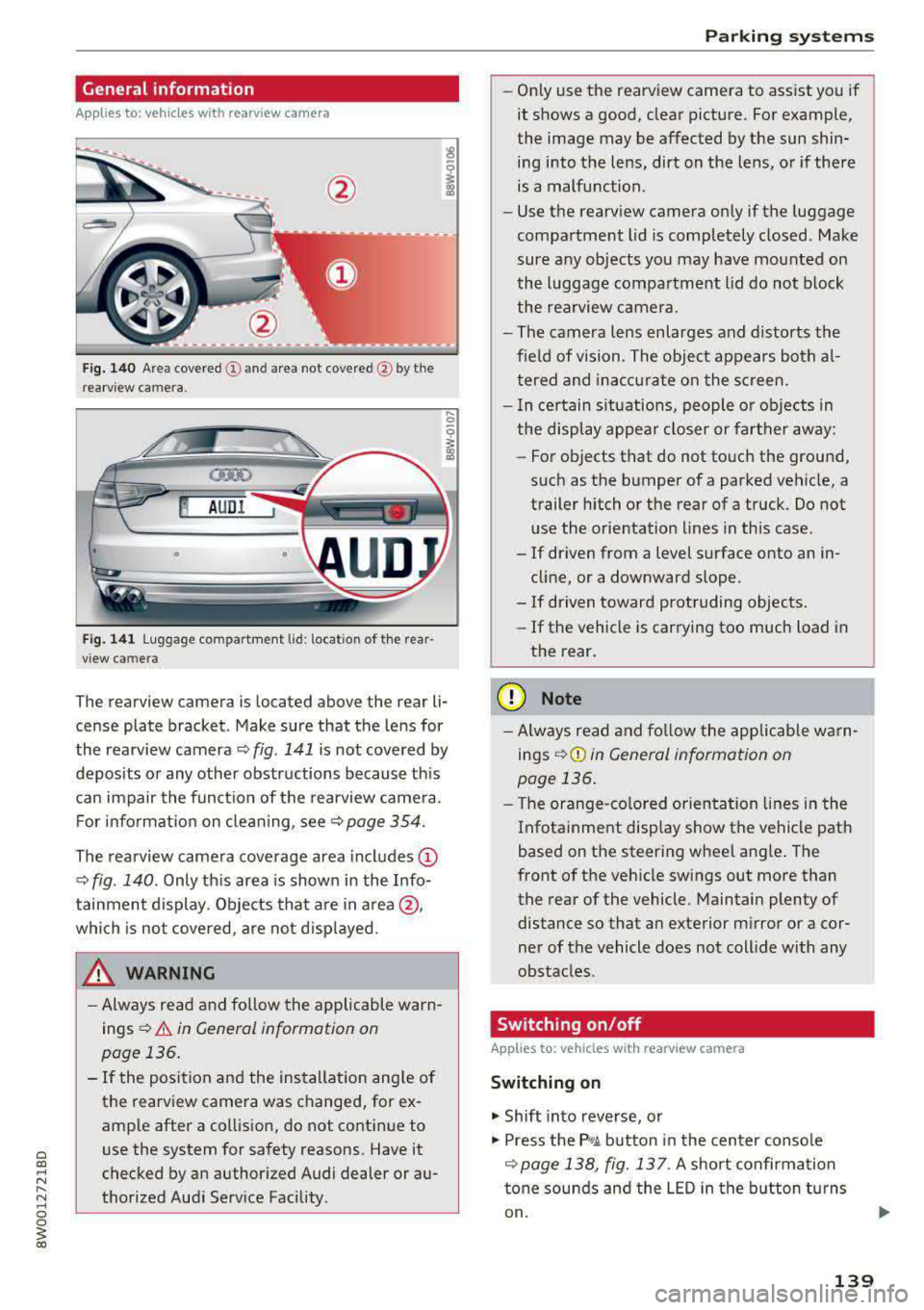
Fig . 140 Area covered (D and area not covered @by the
rea rv iew camera.
@ AUDI
•
Fig. 141 Luggage compartment lid: locatio n of the rear
view camera
..... 0
i
The rearview camera is located above the rear li
cense plate bracket. Make sure that the lens for
the rearview camera
~ fig. 141 is not covered by
deposits or any other obstructions because this
can impair the function of the rearview camera.
For information on cleaning, see<=>
page 354.
The rearview camera coverage area includes (D
~ fig. 140 . Only this area is shown in the Info
tainment display. Objects that are in area @,
which is not covered, are not displayed.
A WARNING
-Always read and follow the applicable warn
ings
<=> A in General information on
page 136.
- If the position and the installation angle of
the rearview camera was changed, for ex
ample after a collision, do not continue to
use the system for safety reasons. Have it
checked by an authorized Audi dealer or au
thorized Audi Service Facility .
Parking systems
-Only use the rearview camera to assist you if
it shows a good, clear picture. For example,
the image may be affected by the sun shin
ing into the lens, dirt on the lens, or if there
is a malfunction.
- Use the rearview camera only if the luggage
compartment lid is completely closed. Make
sure any objects you may have mounted on
the luggage compartment lid do not block
the rearview camera.
- The camera lens enlarges and distorts the
field of vision. The object appears both al
tered and inaccurate on the screen.
- In certain situations, people or objects in
the display appear closer or farther away:
- For objects that do not touch the ground,
such as the bumper of a parked vehicle, a
trailer hitch or the rear of a truck. Do not
use the orientation lines in this case .
- If driven from a level surface onto an in
cline, or a downward slope .
- If driven toward protruding objects.
- If the vehicle is carrying too much load in
the rear.
(D Note
-Always read and follow the applicable warn
ings
r::!> (D in General information on
page 136.
- The orange-colored orientation lines in the
Infotainment display show the vehicle path
based on the steering wheel angle. The
front of the vehicle swings out more than
the rear of the vehicle. Maintain plenty of distance so that an exterior mirror or a cor
ner of the vehicle does not collide with any
obstacles.
Switching on/off
App lies to : vehicles wi th rearv iew camera
Switching on
.. Shift into reverse, or
.. Press the P, qA button in the center console
r::!> page 138, fig. 13 7. A short confirmation
tone sounds and the LED in the button turns
on.
139
Page 148 of 403
Intelligent Technology
Intelligent Technology
Electronic stabilization
control (ESC)
Description
Elect ronic stabilization control (ESC) supports
driver safety.
It red uces the risk of slipping and
improves driving stability. ESC detects crit ica l sit
uations such as when the vehicle is oversteering
and understeering or the wheels are spinning.
The vehicle is stabilized by applying the brakes or reducing eng ine torq ue. When the ESC engages,
the hJ ind icator light blinks in the instrument
cluste r.
The fo llow ing systems are integrated in the ESC:
Ant i-loc k bra king system (ABS)
ABS prevents the whee ls from locking when brak
ing. The vehicle can sti ll be steered even during
hard brak ing. Apply steady pressure to the brake
pedal. Do not pump the pedal. A puls ing in the
brake pedal indicates that the system is acting to
stabilize the vehicle .
Brake assist system
The brake assist system can decrease brak ing dis
tance . It increases braking power when the driver
presses the brake pedal quick ly in emergency sit
uations . You must press and hold the b rake pedal
until the dangerous situat io n is over . In veh icles
with adapt ive cr uise control*, the bra ke assist
sys tem is more sensitive if the d ista nce detec ted
t o the vehicle dr iv ing ahead is too small.
Anti -Slip Regulation (ASR )
ASR reduces eng ine power when the drive wheels
begin sp inning a nd adapts the force to the road
conditions . This makes it easie r to start, acceler
a te and dr ive up h ills.
Electron ic differenti al lock (EDL )
The EDL applies the brakes to a wheel that starts
spinning and transfers the drive power to the
other driving wheel or wheels ( if the veh icle is
eq uipped w ith all whee l dr ive*) . T his function is
not available at higher speeds.
146 In extreme cases,
ED L automat ically switches off
to keep the brake on the braked wheel from over heating. The veh icle is still working correct ly. ED L
will switch on again automatically when condi
tions have returned to normal.
Steering r ecommendat ion
The ESC he lps to stabilize the vehicle by changing
the steering torque.
In veh icles with dynamic s teer ing*, ESC a lso
helps to stab ilize the steering in cr it ica l situa
tions.
Selective wheel torque control
Se lective whee l torque cont rol is used when d riv
i ng on curves. The front whee l on the inside of
t h e curve or both whee ls on the i nside of the
curve are braked se lectively as needed. This al
l ows more precise driving in curves.
Automatic post -collision b raking system
The "automat ic post-collis io n braking system"
can help to reduce the risk of sliding and of addi
tiona l collisions after an acc ident. If the a irbag
contro l modu le detects a collision, the ve hicle is
braked by the ESC.
The veh icle does not bra ke automatically if:
-the dr iver presses the accelerator pedal, or
-the ESC, the brake system or the veh icle electri-
cal system are not functioning.
&_ WARNING
-The ESC and its integrated systems cannot overcome the lim its imposed by natura l
phys ica l laws. This is espec ially important
on sl ippery or wet roads. If the systems be
gin acting to stabilize your vehicle, you
should immediately alter your speed to match the road and traffic conditions. Do
not let the increased safety provided tempt
you into taking risks. This could increase
your r isk of a coll is ion.
-Please note the r isk of a coll is ion increases
when dr iv ing fast, especially through curves
and on slippery or wet roads, and when dr iv
ing too close to objects ahead . The ESC and
its integrated systems cannot always
Page 150 of 403
Intelligent Technology
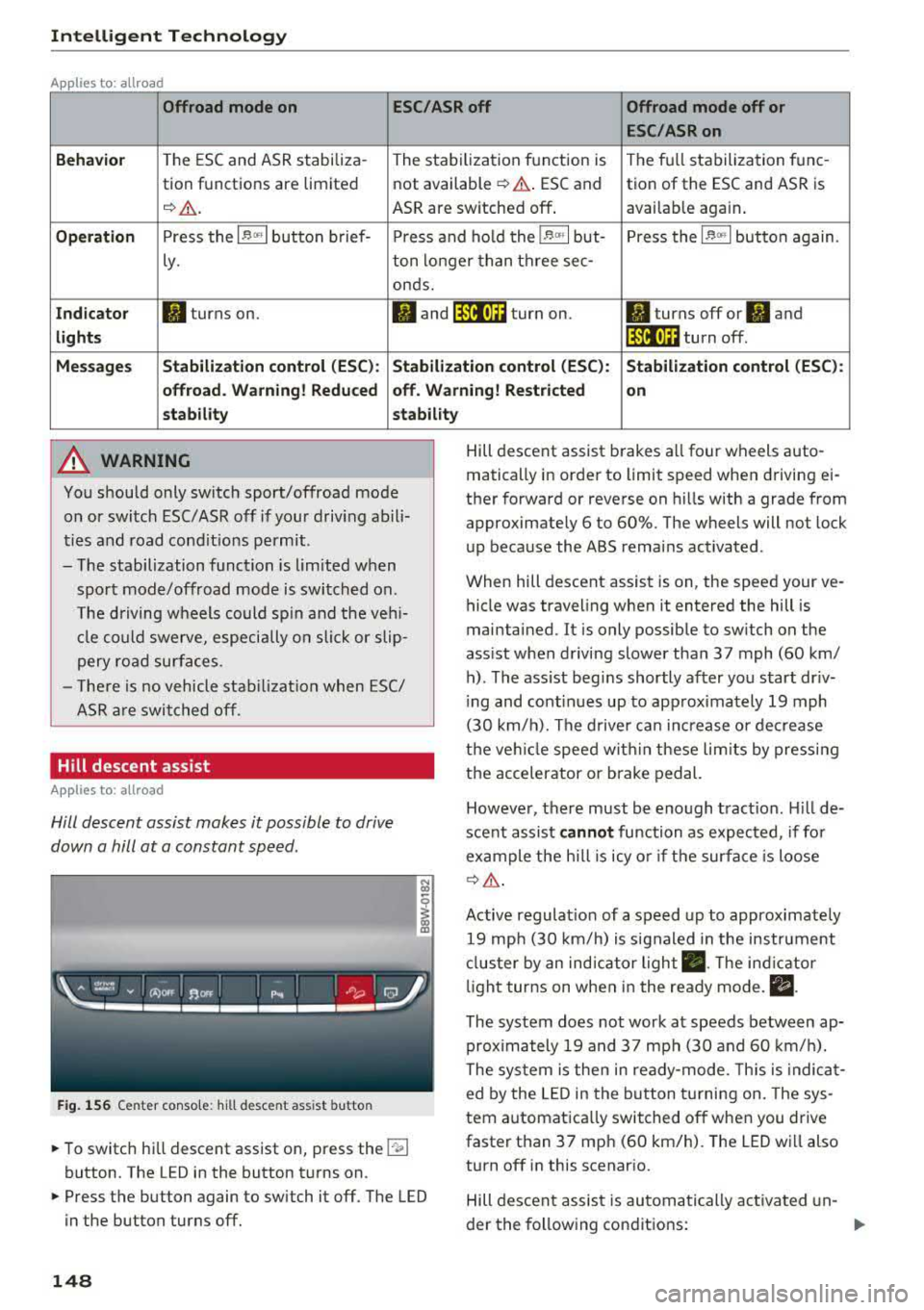
Applies to: allroad
Offroad mode on
ESC/ASR off Offroad mode off or
ESC /ASR on
Beha vior
T he ESC and ASR stabiliza -The stabi lization f unction is The f ull stabilization tune -
tion functions are limited not available
¢ .&. . ESC and tion of the ESC and ASR is
¢ & . ASR are sw itched off . available aga in .
Operation Press the l~ m l button b rief- Press an d ho ld the l~ "'' I but- Press the l~ "" I button again .
ly. ton longer than three sec-
onds.
Indicator II turns on. Iii and lf'tii•)H turn on. II turns off or II and
light s li'tii•)H turn off .
Message s Stabilization cont
rol (ESC ): Stabiliza tion control (ESC ): Stabilization cont rol (ESC ):
offroad . Warning! Redu ced off . Warning! Restricted
on
s tability stability
A WARNING
You should only switch sport/offroad mode
on or switch ESC/ASR off if you r drivi ng abili
ties and road cond it ions permit .
- The stabilization function is lim ited w hen
sport mode/offroad mode is swi tched on.
T he driving w heels could sp in and the veh i
cl e could swerve, especi ally o n slick or slip
pery road sur faces.
- T here is no vehicle sta biliz at ion when ESC/
ASR a re swi tched off.
Hill descent assist
Applies to: allroad
Hill descent assist makes it possible to drive
down a hill at a constant speed.
F ig. 1 56 Center co nso le: hil l desce nt ass ist button
~ To switc h hill descent assist on, press the !"~I
button. The LED in the button t urns on.
~ Press the button again to switch it off. The LED
in the button turns off.
148
Hill descent assist brakes a ll four wheels auto
matically in order to limit speed when d riving ei
ther forward or reverse on hills with a grade from
approximately 6 to 60%. The wheels will not lock
u p because the ABS remains activated.
When hill descent assist is on, the speed your ve
hicle was traveling when it entered the hill is
maintained. It is only possib le to sw itch on the
ass ist when driving slower tha n 37 mph (60 km/
h) . The ass ist beg ins shortly af ter you start dr iv
i ng and cont inues up to app roxima tely 19 mph
(30 km/h). The d rive r ca n in crease o r de crease
t h e ve hicle spee d wit hin these lim its by press ing
t h e accelerator or brake pedal.
However, there must be enough t ract ion . Hill de
sce nt assist
cannot function as e xpec ted, if fo r
ex ample the h ill is icy o r if t he surface is loose
¢ &.
Active regulat io n of a speed up to approximate ly
19 mp h (30 km/h) is s ignaled in the instr ument
cl us ter by an ind ic a tor light
• . The in dica tor
li gh t tur ns on when i n the ready mode.
II.
The system does not work at speeds between ap
prox imately 19 and 37 mph (30 and 60 km/ h).
The system is the n in ready-mode. This is indica t
ed by the L ED in the b utton t urnin g on. The sys
tem a utomatica lly switched o ff when you drive
faster than 37 mph (60 km/h). The LED w ill also
turn off in this scenar io.
Hill descen t assis t is au tomatically ac tiva ted un-
der the fo llowing cond itions:
.,.
Page 169 of 403
0
"' .-< N r-N .-< 0
~ CX)
Voice recognition system
• Telephone
• Audi connect •
Favorites
• Call (XY)
• Navigation
• Directory
• Radio
• Media
• Sound •
Enter number
• Redial
• Read new tex t message
• N avigate to (XV)
• Enter address/destination
• Help • Onhne destinations
• Help Speech dia log system
• Help Telephone •
Cancel route guidance
• M ap
• Help Audi connect •
Line (XY)
• Help Naviga tion
• Help Map
• Help Radio
• Help Media •
Next page/ previous page
• Cancel
• N o, l meant
()(Y)
• Correction
TELEPHONE
• Enter number • Call list
• Delete number/ correc tion
• Redial
•
Oltectory
• Call (XY) •
Call mailbox
• Telephone favorites
· business/ private/ land line/ mobile
NAVIG:ATI0N
• N avigate to CXV)
• Start/ cancel route guidance
• Directory
• Last destinations •
Bloc k route for
(XYJ miles/ Block
the next section
• Route list
• Calculate alternative routes
• Navigation favorites
• Drive home
• Enter address •
Online destinations
• Special destination
• Enter country/ town/ street/ state
• Exclude route / Exclude route for (XY)
km / m
M~P
• M ap
• Day map/ Night map
• 20 driving position map/ 20 north posi tion map/ 30 map/ Destination map/ Overview map
AllJDI G QNNECT
• Audi connect
• Travel Information/ Parking Information
• Fuel prices
• Weather
RADIO
• Radio presets
• FM
• FM/ AM/ SIRIUS XM
• Station (XY) / Frequency
(XYJ
• T raffic announcement on/ off
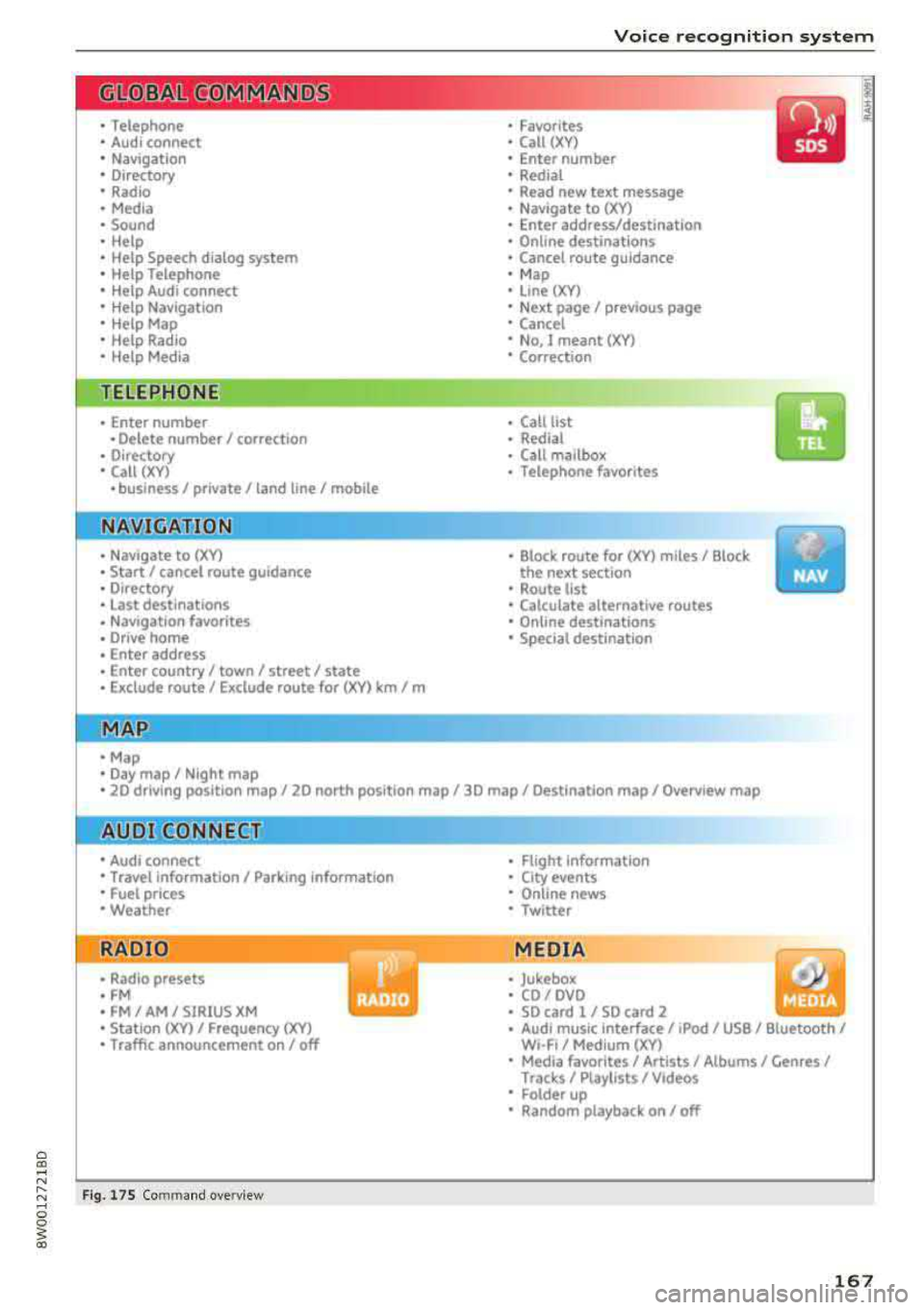
Fig . 17 S Co mmand overv ie w
• Flight Information
• City events
• Online news
• Twitter
MEDIA
• Jukebo x
• CO/ DVD .))
• SD card 1 / SD card 2
• Audi music Interface/
IPod I use / Bluetooth /
WI-Fl/ Medium ( XV)
• Media favorites/ Artists/ Albums/ Genres/
Trac ks/ Ptaylls ts / Videos
· Folder up
• Random playback on / off
167