start stop button AUDI A4 2018 Owner's Manual
[x] Cancel search | Manufacturer: AUDI, Model Year: 2018, Model line: A4, Model: AUDI A4 2018Pages: 403, PDF Size: 66.81 MB
Page 212 of 403
with all applicable personal routes will be fac
tored into the trip again only after stopping the
vehicle and switching the ignition on again .
-Ignore all messages: all personal routes are no
longer factored into the current trip. No more
messages are d isplayed . Messages for personal
routes when there is increased traffic will ap
pear aga in after the vehicle is stopped and the
ignition is sw itched on again.
As soon as you switch off persona l route assis
tance, the symbol in the status line turns off and
your tr ips are no longer recorded. Trips that were
already stored remain stored.
Deleting personal routes:
- Select the desired personal route in the Enter
destination
menu q fig. 192.
- Select : right control button > Delete destina·
tion.
Deleting all personal routes :
-Select: I MENU I button >S ettings > left control
button
> MMI settings> Factory settings .
-Select : Navigation and online memory > Re
store factory settings
c::> page 249 .
(!') Tips
-Personal routes are learned based on the ve
hicle position. The route is prioritized ac
cording to how frequently you drive to a
dest inat ion.
- A maximum of three persona l routes are
displayed in the
Enter destination menu.
Based on the current vehicle position, the
traffic situation for the route that is most
lik ely to be driven out of the three routes
will always be monitored .
- Please note that personal routes that have
already been stored will remain stored after
the ignit ion is switched off and they must
be deleted manually.
Navigation
Alternative routes
Applies to: vehicles wit h navigat ion syste m
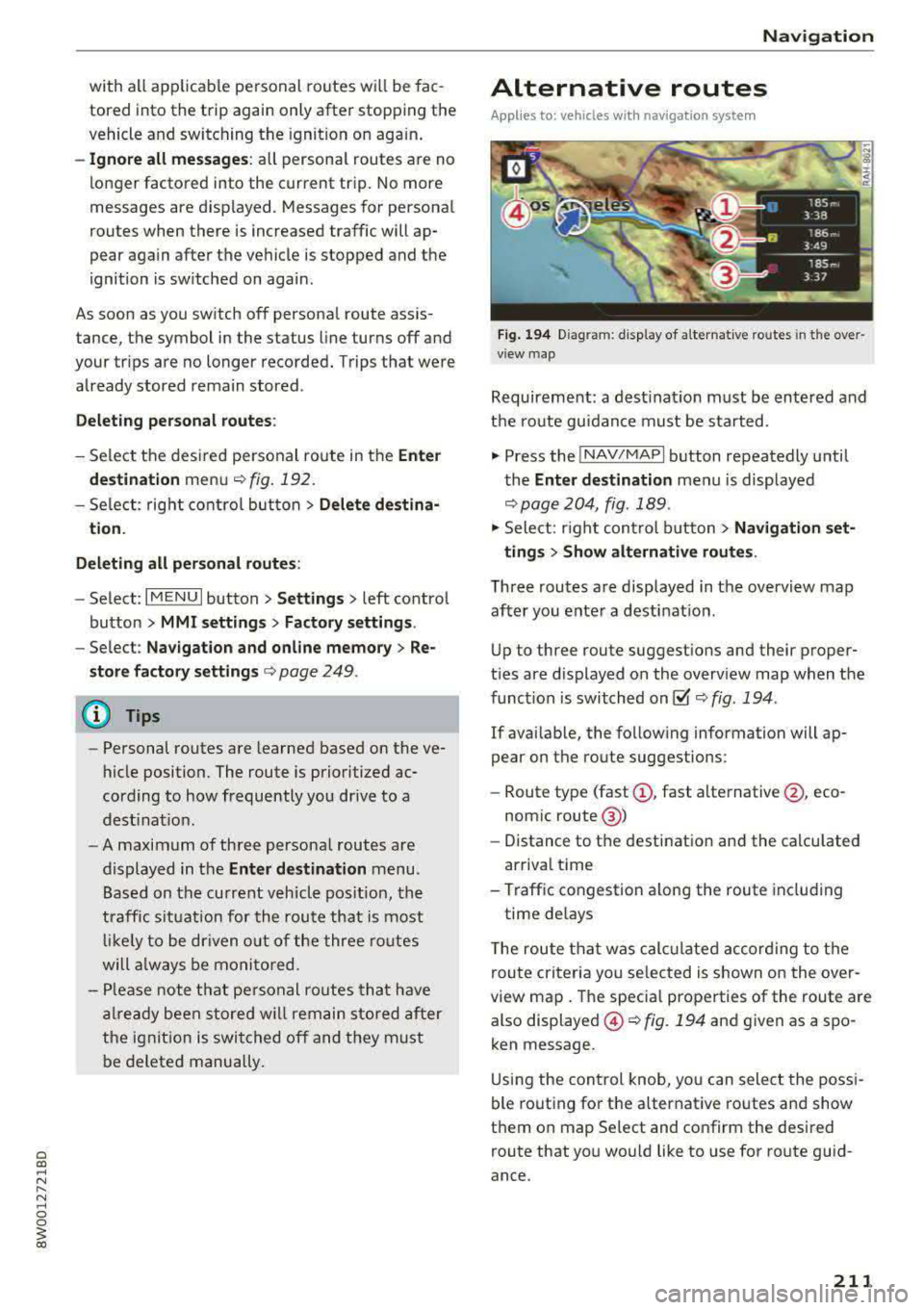
Fig. 194 Diag ra m : display of alternat ive routes in t he over
v iew map
Requirement: a destinat ion must be entered and
the route guidance must be started .
., Press the INAV/MAPI button repeatedly until
the
Enter destination men u is displayed
q page204, fig .189 .
., Select: right control button > Navigation set-
tings
> Show alternative routes .
Three routes are displayed in the overview map
after you enter a destination .
Up to three route suggest ions and their proper
t ies are displayed on the overv iew map when the
function is switched
on@' q fig. 194 .
If available, the following information will ap
pear on the route suggestions :
- Route type
(fast (!), fast alternative @, eco
nom ic route @)
- Distance to the destination and the calculated
arrival time
- Traffic congestion along the route including
time de lays
T he route that was calc ulated according to the
route criteria you selected is shown on the over
view map. The specia l properties of the route are
also displayed ©
c::> fig. 194 and given as a spo
ken message.
Using the control knob, yo u can select the possi
ble routing for the alternative routes and show
them on map Se lect and confirm the desired
route that you wou ld like to use for route guid
ance .
211
Page 219 of 403
Navigation
Online map update
Applies to: vehicles w ith a nav igatio n system a nd Audi con
n ect (I nfotainment)
Using the online map update, you can update
the map material in your navigation system di
rectly from your vehicle.
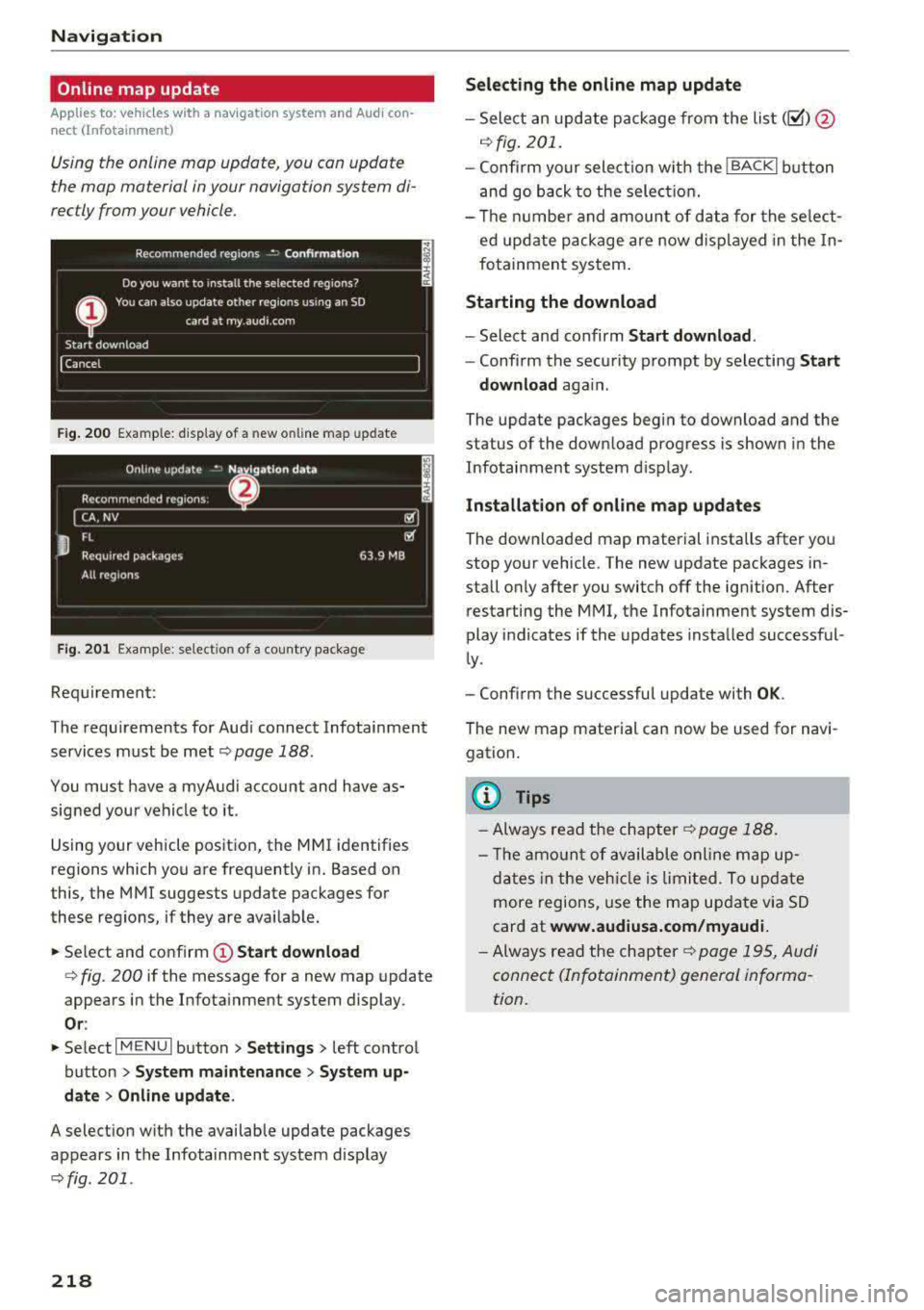
F ig. 20 0 Example: d isp lay of a new o nlin e map update
F ig . 201 Example: se lect io n of a cou ntry pac kage
Req uirement:
The requ irements for Aud i connect Infotainment
services must be met
¢ page 188.
You must have a my Audi account and have as
sig ned your ve hicle to it .
Using your vehicle pos itio n, the M MI identifies
regions which you a re frequently in. Based on
this, the MMI suggests update packages for
these regions, if they are avai lab le.
.,. Se lect and confirm (D Start download
q fig . 200 if the message for a new map update
appears i n the Infota inment system display.
Or :
.,. Se lect I MENU I button> Settings > left co ntro l
button >
System maintenance > System up
date > Online update .
A selection w ith the availab le update packages
appears in the Infotainment system disp lay
¢fig. 201 .
218
Selecting the online map update
-Sele ct an upd ate p ack age fro m the list(~ )@
.:;, fig . 201.
-Confi rm y our select io n w ith the I BACK I button
a nd go back to the sele ction.
- Th e nu mbe r and amoun t of d ata for the se le ct
ed upd ate pa ckage are n ow d is pla yed in the In
fo tainmen t sys tem .
Starting the download
-Select an d confirm Start download .
-Confi rm the secu rity p rompt by selecting Start
download
aga in .
The update packages begin to download and the
status of the down load progress is shown in the
Infotainment system d is p lay.
Installation of online map update s
The downloa ded map material installs after yo u
stop yo ur vehicle . The new update pac kages in
stall o nly after you switch
off the ign ition. After
restarting the MMI, t he Infotainment system dis
play i ndicates if the updates insta lled successf ul
l y .
- Confirm the successful update with
OK .
The new map material can now be used for navi
gation .
@ Tips
-Alw ays re ad the ch apter¢ p age 1 88.
- Th e am ount o f available onlin e m ap u p-
d at es in th e veh icle i s lim ited. To update
more regions, use the ma p up date v ia SD
card at
www.audiusa.com/myaudi.
- Always read the cha pter¢ p ag e 19 5, Au di
connect (In fo ta inment) genera l inf orma
tion .
Page 231 of 403
Media
When importing, the audio files are automatical
ly sorted into the media center categories based
on the stored addit ional information
¢ page 237. The copied video files are stored in
t he media center under the
Videos category.
Playing the Jukebox
Requirement: the Jukebox must contain audio/
video fi les
¢ page 229, Adding files to the Juke
box.
The Jukebox is accessed and operated through
the
MMl (D¢page236, fig . 215.
Displaying Jukebox memory capacity
Select: right control button > Jukebox memory
capacity .
Information about the Jukebox memory
cap acity and the number of sto red tracks is dis
p la yed.
Deleting tracks from the Jukebox1
)
Requ irement: the Jukebox must contain audio/
video fi les.
- Delet ing an entry: select an entry from the
Jukebox media center . Select: right control but
ton
> Delete from jukebox > This entry or En
tire list.
- The status of the deleting process is shown in
the MMI. Jukebox playback stops during the de
leting process and starts again automatically
once the dele tion is complete .
0 Note
Do not import aud io/video files when the en
gine is t urned off because this will drain the
veh icle battery.
(D Tips
- Tracks from aud io CDs cannot be imported
to the Jukebox for legal reasons .
- Files that have already been imported are
automat ically recognized and cannot be
copied to the Jukebox again.
- It is not possible to play audio/v ideo* files
in the CD/DVD* drive while importing them.
1> N ot i n t he Playback view.
230
- Th e Juk ebox does not provide an export
function due to legal reasons .
- Files or tracks without additional stored in
formation a re listed as
Unknown . Audi rec
ommends adding additional information
(such as ID3 tags) to audio files.
- Reset the
Jukebox to the factory defau lt
settings when selling your vehicle
¢ page 249.
Bluetooth audio player
App lies to: vehicles wi th Blue toot h audio playe r
With the Bluetoo th audio player, you can play
music wirelessly from your Bluetooth-capable
device (such as a cell phone) through the MMI .
Requirement: the vehicle must be stationary and
the Bluetooth function on your Bluetooth device
and the
Bluetooth audio player ¢ page 250 in
the
MMI must both be sw itched on .
-Connecting a Bluetooth device: press the
!MEDIA ! button. Press the left control button
until the sources overview is displayed . Select
and confirm
Bluetooth audio player @
¢page 236, fig. 216 .
-If necessary, select and confirm, Not connected
> Connect Bluetooth audio player . The Blue
tooth device search starts. Follow the instruc
tions in the MMI.
- Select and confirm the desired Bluetooth de
vice from the list. The
MMI generates a PIN for
the connection.
- Select and confirm
Yes.
-Enter the PIN for connecting on your Bluetooth
dev ice.
Or : if the PIN is already displayed on
your Bl uetoo th device , confi rm it in the Blue
tooth device and in the
MMI. The time allowed
for entering the PIN is limited to approximately
30 seconds.
The media is started and operated thro ugh the
mobile device o r the
MMI, depending on the de-
vice being used.
..,.
Page 328 of 403
a co .... N ,....
N .... 0 0
3 co
(D Note
Driving with an insufficient oil level is likely to
cause severe damage to the engine.
@ Tips
-The oil pressure warning display. is not
an indicator of the oil level. Do not rely on
it. Instead, check the oil level in your en
gine at regular intervals, preferably each
time you refuel, and always before going
on a long trip.
-If you have the impression your engine con
sumes excessive amounts of oil, we recom
mend that you consult an authorized Audi
dealer to have the cause of your concern
properly diagnosed. Keep in mind that the
accurate measurement of oil consumption
requires great care and may take some
time. An authorized Audi dealer has instruc
tions about how to measure oil consump
tion accurately.
Checking the engine oil level and adding
engine oil
The engine oil level can be checked in the Info
tainment system
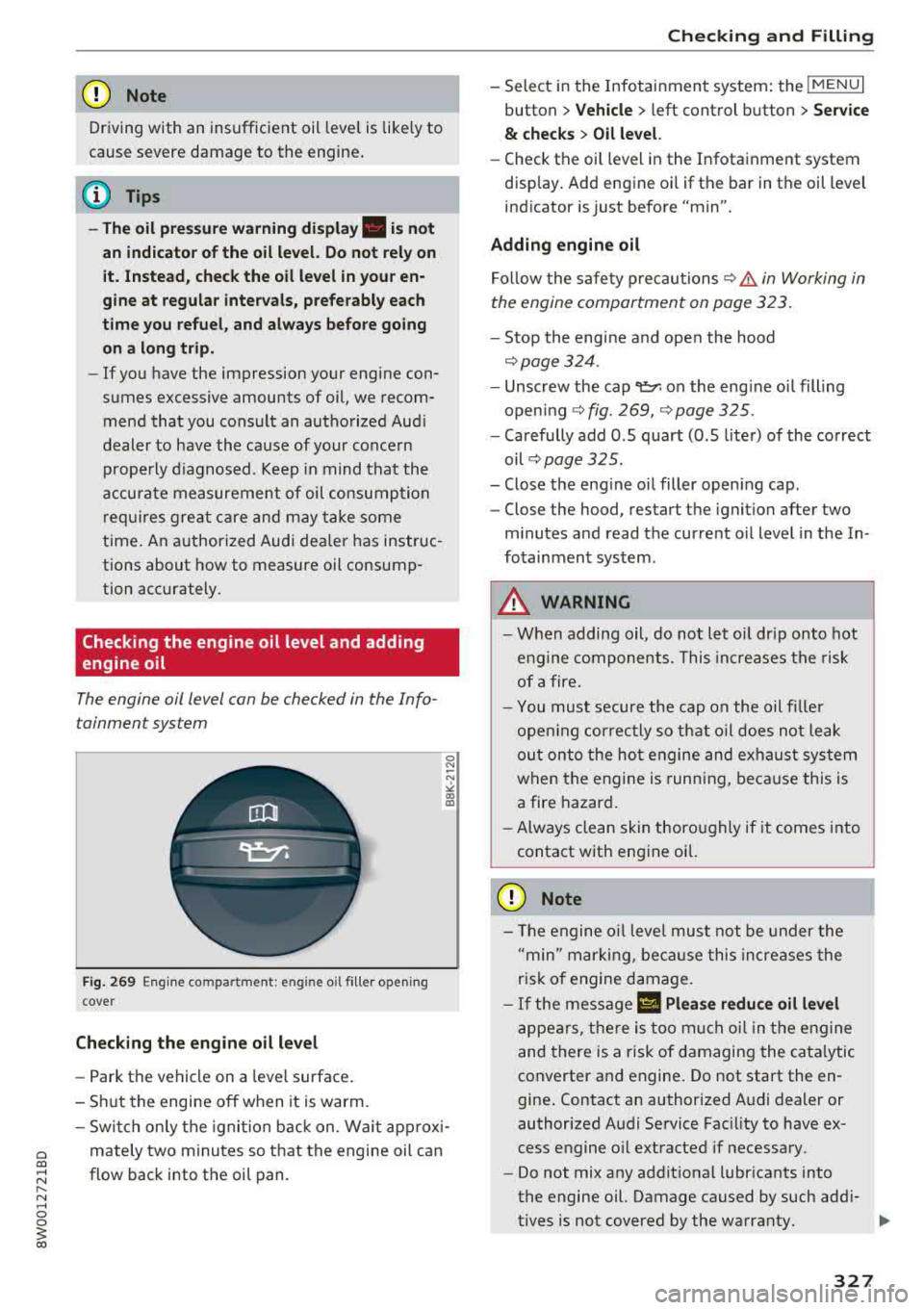
Fig. 269 Engine compa rtment: eng ine oil filler opening
cove r
Checking the engine oil level
- Park the vehicle on a level surface.
- Shut the engine off when it is warm.
0 N
-N
" 00 IX)
-Switch only the ignition back on. Wait approxi-
mately two minutes so that the engine oil can
flow back into the oil pan .
Checking and Filling
- Select in the Infotainment system: the !MENUI
button > Vehicle > left control button > Service
& checks > Oil level.
-Check the oil level in the Infotainment system
display. Add engine oil if the bar in the oil level
indicator is just before "min".
Adding engine oil Follow the safety precautions
~&. in Working in
the engine compartment on page 323.
- Stop the engine and open the hood
~page 324 .
-Unscrew the cap~ on the engine oil filling
opening
~ fig. 269, Qpage 325.
- Carefully add O .S quart (O .S liter) of the correct
oil
~ page 325.
- Close the engine oil filler opening cap.
- Close the hood, restart the ignition after two
minutes and read the current oil level in the In
fotainment system.
A WARNING ...__ --When adding oil, do not let oil drip onto hot
engine components. This increases the risk
of afire.
-You must secure the cap on the oil filler
opening correctly so that oil does not leak
out onto the hot engine and exhaust system
when the engine is running, because this is
a fire hazard.
-Always clean skin thoroughly if it comes into
contact with engine oil.
0 Note
- The engine oil level must not be under the
"min" marking, because this increases the
risk of engine damage.
- If the message II Please reduce oil level
appears, there is too much oil in the engine
and there is a risk of damaging the catalytic
converter and engine. Do not start the en
gine. Contact an authorized Audi dealer or
authorized Audi Service Facility to have ex
cess engine oil extracted if necessary.
- Do not mix any additional lubricants into
the engine oil. Damage caused by such addi-
tives is not covered by the warranty.
IJJ>
327
Page 399 of 403

Index
Speedometer . . . . . . . . . . . . . . . . . . . . . . . . . 10
Speed warning system . . . . . . . . . . . . . . . . . 102
Speller . . . . . . . . . . . . . . . . . . . . . . . . . . . . . . 162
Sport differentia l . . . . . . . . . . . . . . . . . . . . . 134
Indicator light . . . . . . . . . . . . . . . . . . . . . . . 35
Sport view . . . . . . . . . . . . . . . . . . . . . . . . . . . . 15
Stabilization program
refer to ESC . . . . . . . . . . . . . . . . . . . . 146, 147
Start/Stop system . . . . . . . . . . . . . . . . . . . . . 85
Messages . . . . . . . . . . . . . . . . . . . . . . . . . . . 88
Switching off/on . . . . . . . . . . . . . . . . . . . . . 87
S T ART ENGINE STOP button . . . . . . . . . . . . . 83
Starting to drive . . . . . . . . . . . . . . . . . . . . . . . 89
Starting (engine) . . . . . . . . . . . . . . . . . . . 83, 86
Steering Electromechanical steering . . . . . . . . . . . . 150
L ocking . . . . . . . . . . . . . . . . . . . . . . . . . . . . . 84
also refer to Electromechanical steering 150
Steering wheel Adjusting . . . . . . . . . . . . . . . . . . . . . . . . . . . 82
Shift paddles . . . . . . . . . . . . . . . . . . . . . . . . 94
Steering wheel heating . . . . . . . . . . . . . . . . 79
also refer to Multifunction
steering wheel . . . . . . . . . . . . . . . . . 13, 15, 16
Steps for determining correct load limit . . . 348
Stopover (navigation) . . . . . . . . . . . . . . . . . . 209
Stopping (engine) . . . . . . . . . . . . . . . . . . . . . . 86
Storage compartments . . . . . . . . . . . . . . . . . 69
Stored stations
refer to Favorites . . . . . . . . . . . . . . . . . . . . 225
Streaming
refer to Online media . . . . . . . . . . . . . . . . . 232
Street View . . . . . . . . . . . . . . . . . . . . . . . . . . 216
S tronic (automatic transmission) . . . . . . . . . 91
Subtitles (DVD) . . . . . . . . . . . . . . . . . . . . . . . 239
Subwoofer. . . . . . . . . . . . . . . . . . . . . . . . . . . 252
Sunshade Rear window/rear doors . . . . . . . . . . . . . . . 60
Sun visors . . . . . . . . . . . . . . . . . . . . . . . . . . . . 60
Suspension control . . . . . . . . . . . . . . . . . . . . 134
Swap call . . . . . . . . . . . . . . . . . . . . . . . . . . . . 179
Switching tabs
refer to Multifunction
steering wheel . . . . . . . . . . . . . . . . . 13, lS, 16
Switching the ignition on/off. . . . . . . . . . . . . 83
398
Symbols . . . . . . . . . . . . . . . . . . . . . . . . . . . . 16S
Navigation . . . . . . . . . . . . . . . . . . . . . . . . . 214
Traffic . . . . . . . . . . . . . . . . . . . . . . . . . . . . . 219
also refer to Indicator lights . . . . . . . . . . . . 2S
SYNC (button) . . . . . . . . . . . . . . . . . . . . . . . . . 79
System settings (MMI) . . . . . . . . . . . . . . . . . 248
System update (MMI) ... ............... 251
System volume 252
T
Tachometer . . . . . . . . . . . . . . . . . . . . . . . . 10, 12
Tail lights
Cleaning . . . . . . . . . . . . . . . . . . . . . . . . . . . 355
TOI clean diese l
refer to Ad Blue... .. .. ............... 319
Technical data ...... ... ............... 379
Technical modifications . . . . . . . . . . . . . . . . 386
Telephone . . . . . . . . . . . . . . . . . . . . . . . . . . . 175
Connecting . . . . . . . . . . . . . . . . . . . . . . . . . 175
Dialing a number . . . . . . . . . . . . . . . . . . . . 178
Options during a phone call . . . . . . . . . . . 179
Playing music . . . . . . . . . . . . . . . . . . . . . . . 230
Set tings . . . . . . . . . . . . . . . . . . . . . . . . . . . 185
Temperature display Coolant . . . . . . . . . . . . . . . . . . . . . . . . . . . . . 10
Outside temperature . . . . . . . . . . . . . . . . . . 10
Tether anchors . . . . . . . . . . . . . . . . . . . . . . . 312
Tether strap .. .. .. .. .. ............. .. 312
Text messages . . . . . . . . . . . . . . . . . . . . . . . 180
Tie-downs . . . . . . . . . . . . . . . . . . . . . . . . 73, 261
Tightening specification Wheel bolts . . . . . . . . . . . . . . . . . . . . . . . . 366
Tightening specification (wheel bolts) . . . . 366
Time ......... ... ... ............. ... 248
Tire Mobility System (tire repair set) . . . . . . 361
Tires....... .. .. .. .. .. ... .......... .. 334
Low-profile tires . . . . . . . . . . . . . . . . . . . . . 350
quattro . . . . . . . . . . . . . . . . . . . . . . . . . . . . 150
Repair set . . . . . . . . . . . . . . . . . . . . . . . . . . 361
R eplacing . . . . . . . . . . . . . . . . . . . . . . . . . . 363
Tire pressure . . . . . . . . . . . . . . . . . . . . . . . 344
Tire pressure monitoring system ... 351,352
Tire pressure table . . . . . . . . . . . . . . . . . . . 345
Tire pressure (trailer towing mode) . . . . . . 99
Unidirectional . . . . . . . . . . . . . . . . . . . 336, 366
Uniform tire quality grading . . . . . . . . . . . 351