warning light AUDI A4 2018 Workshop Manual
[x] Cancel search | Manufacturer: AUDI, Model Year: 2018, Model line: A4, Model: AUDI A4 2018Pages: 403, PDF Size: 66.81 MB
Page 123 of 403

-Activating the emergency flashers l).
The message Audi pre sense . ¢ page 121,
fig. 122 will warn you abo ut the danger.
Aud i drive select*: the trigger t imes are adjusted
depending on the mode selected.
Audi pre sense front
Description
Applies to: veh icles with Audi adaptive cruise control
Within the limits of the system, pre sense front
can warn you of impending collisions and initiate
the corresponding braking maneuvers or the sup porting measures when avoiding a collision .
If detected in time, the system can rank the dan
gerous situation as critical if a vehicle driving
ahead brakes suddenly, if your own vehicle is ap
proaching a significantly slower vehicle at high
speed or when there is an oncoming vehicle dur
in g a turning maneuver .
If detection is not possible, then pre sense front
does not react .
Warnings
Applies to: ve hicles with Audi adaptive cruise control
Fig. 122 In strument cluste r: approac h warning
General information
The system recognizes various dangerous situa
tions . The
early warning occurs if:
-a vehicle driving ahead brakes suddenly,
-your own vehicle approaches a significantly
a s lower vehicle or stationary vehicle in the direc-co
;::; tion of travel. ,....
N .... 0 0
3 1) This is not availa ble in some co untrie s. co
Assistance systems
When this warning occurs, it may only be possi
ble to avoid a collision by swerving or braking
strongly. The message
Audi pre sense.
¢ fig. 122 and a warning tone will warn you
about the danger .
If you do not react enough or not at all to a dan
gerous situation that was detected by the sys
tem, pre sense front provides assistance by ap plying the brakes .
If a collision is imminent, the system will first
provide an
acute warning by braking sharply. You
will also warned by an indicator in the instrument
cluster
display¢ fig. 122. If you do not react to
the acute warning, pre sense front can brake with i ncreasing fo rce within the limits of the
system
1>. This reduces the vehicle speed in the
event of a collision. At low vehicle speeds, pre
sense front can in itiate a complete deceleration
shortly before a collision with a vehicle driving
ahead
l). If pre sense front determines that you
are not braking strongly enough when a collision
is imminent, it can increase the braking force.
T he following functions trigger in conjunction
with pre sense basic/rear at corresponding vehi
cle speeds:
-Reversible tensioning of the front safety belts.
-Closing the windows and sunroof* .
-Inflating the side bolsters* on the seat back-
rest .
Audi drive select*: depending on the mode se lected, the reversible belt tensioner, the closing
of the w indows and sunroof*, and the inflating of
the side bolsters* on the seat backrest may not be active.
Evasive steering support
Evasive steering support helps you to steer the
vehicle around an obstacle in a critical situation .
If you avo id an obstacle after the acute warning,
then the evasive steer ing support ass ists you by
applying slight stee ring adjustment to correct
.,.
121
Page 126 of 403

Assistance systems
-when there are visual obstr uctions, such as
glare, reflections or variations in light
- when it is dark
- if the camera window or the windshie ld is
dirty, iced over, damaged or covered
- when driving on snow, ice or loose ground
- in curves
- if the ESC was restricted or switched off
- when towing a tra iler
- when the driver's seat belt is unfastened
- up to ten seconds after switching on the ig-
nition
(D Note
Impacts or damage to the camera mount on
the windshield can disp lace the sensor . Pre
sense city can be impa ired by this. Have an au
thorized Audi dealer or authorized Aud i Serv
ice Facility check the ir funct ion.
{D) Tips
- You can cancel the system braking interven
tion if you accelerate considerably or swerve
away.
- Keep in mind that pre sense city can brake
unexpectedly. Always secure any cargo or
objects that you are transport ing to reduce
the r isk of damage or injury.
- Specific pre sense city funct ions sw itch off
when the ESC is limited or switched
off
¢ page 147 or the hill descent assist* is
switched on
¢page 148.
-When there is a malfunction in the camera,
the pre sense city funct ions also switch off.
Settings in the
Infotainment system
A pp lies to: ve hicles w ith Audi p re se nse
.,. Select in the Infotainment system: IMENU I but
ton
> Vehicle > left control button > Driver as
sistance
> Audi pre sense.
Turn on/off Audi pre sense
-the pre sense func
tions can be turned on and
off.
124
If the system is switched off, it switches on again
automatica lly once the ignition is switched on
again.
Early warning -the early warning can be switch
ed
off or the pre sense city/front warning point
can be set
( Early /Medium /Late ).
Set the warning time for the early warning to
Early at first . If this causes undesi red early warn
ings to appear, then set the warning time to
Me
dium .
The Late warning time should only be set
i n spec ial circumstances, for example, when driv
i ng with a very dynamic style.
(D Tips
Your settings are automatically stored and as
signed to the remote control key being used.
Messages
Applies to: vehicles wi th Audi pre sense
II Audi pre sense: malfunction! Please contact
Service
This message appears when the pre sense func
tion is affected . For example, th is could be
ca used by a faulty sensor. Drive to an authorized
Audi dealer or authorized Audi Service Facility im mediately to have the malfunction corrected.
II Audi pre sense currently restricted . Restrict
ed sensor vision due to surroundings. See own
er 's manual
This message appears if the radar sensor and
camera view is obstructed, for example by leaves,
snow, heavy spray or dirt. If necessary, clean the
sensors and the area around the camera
¢ page 109, fig . 108 or ¢page 129, fig. 130 .
II Audi pre sense: currently restricted. Towing
mode
For vehicles wi th a trailer hitch installed at the
factory, the pre sense rear functions switch
off
when the electrical connector at the socket is
plugged in. There is no guarantee the functions
will switch
off when using a retrofitted trailer
hitch.
II Audi pre sense: currently restricted
Page 127 of 403

a co .... N ,....
N .... 0 0
3 co
This message appears if the ESC is restricted or
switched off, for examp le .
Ill Aud i pre sen se : curren tly re stri cted . See
o wner 's manu al
This message appears when there is a temporary
fa ilu re in a subsystem, such as the ESC. If th is
message appea rs repeated ly, dr ive to an a uthor
ized A udi dealer or authorized Audi Service Fac ili
ty to have the malfunction corrected.
Ill Aud i pre sen se: e merg enc y braking syste m
off
This message appears if the pre sense functions
are switched off through the Infotainment sys
tem or if the system is not ready .
Audi active lane assist
Description
Applies to: ve hicles wit h Aud i act ive lane ass ist
Active lane assist (lane departure warning) de
tects lane marker lines within the limits of the
system using a camera in the windshield . If you
are approach ing a detected lane marker line and
it appears likely that you will leave the lane, the
system w ill wa rn you w it h corre ct ive steer ing .
You can overr ide th is steering at any time . If yo u
pass over a line, the steer ing whee l wi ll vibrate
lightly. In order for this warning vibration to oc
cur, it must first be switched on in the Infotain
ment system. Active lane assist is ready for oper
ation when the lane marker line is detected on at least one side of the vehicle.
The system is designed for driving on express
ways and highways and therefore only activates at speeds above approximately 40 mph (6S km/
h).
Applies to: vehicles with side assist: if you acti
vate a turn signal when active lane assist is ready
and it classif ies a lane change as critical because
of vehicles traveling alongside you or approach ing you, there w ill be not iceable correct ive steer
i ng shortly before you leave the lane . This will at
tempt to keep your veh icle in the la ne.
Applies to: vehicles w ithout s ide ass ist : the ready
system does not warn you if you activate a turn
A ss ista nce sys te m s
signal before crossing the lane marker line. In
t h is case, it assumes that you are changing lanes
intentionally .
Applies to: vehicles wi th adap tive c ruise contro l:
there is no corrective steering or warnings if the
system recognizes a distinct passing maneuver .
If the condit ions are met, traffic jam ass ist
switches on at speeds under approximately
40 mph (65 km/h)
qpage 116.
A WARNING
=
- The system warns the driver that the vehicle
is leaving the lane using corrective steering.
The driver is always responsible fo r keeping
the vehicle within the lane.
- The system can help you keep the vehicle in
the lane, but it does not drive by itself. Al
ways keep your hands on the stee ring
wheel.
- Cor rective stee ring may not occur in certain
situations, such as during heavy b raking.
- There may be cases whe re the camera does
not recognize all lane marker lines. Cor rec
tive steering can only take place on the s ide
of the vehicle where lane marker lines are
detected.
- Other road structu res or objects could poss i
b ly be identified unintentionally as lane
marker lines . As a result, corrective steering
may be unexpected or may not occur.
- The camera view can be restricted, for ex
ample by vehicles driving ahead or by rain,
snow, heavy spray or light shining into the
camera. Th is can result in active lane ass ist
not detecting the lane marker lines or de
tect ing them incorrectly .
- In certain s ituations where visibility is low,
the vehicle may switch from an "early" to
"late" steering correct ion.
- Under certain condit ions such as ruts in the
road, an inclined roadway or crosswinds, the
correct ive steer ing alo ne may not be enough
to keep the vehicle in the middle of the lane .
- For safety reasons, act ive lane assist must
not be used when there are poor road and/
or weather conditions such as slippery roads, fog, gravel, heavy rain, snow and the
125
Page 128 of 403
Assistance systems
potential for hydroplaning . Using active lane
assist under these conditions may increase
the risk of a crash.
Switching on /off
A pp lies to: vehicl es w ith Audi active lane assist
Fig. 123 Turn signal lever: button for act ive lane ass ist
F ig . 124 Windsh ie ld: camera window for act ive lane ass ist
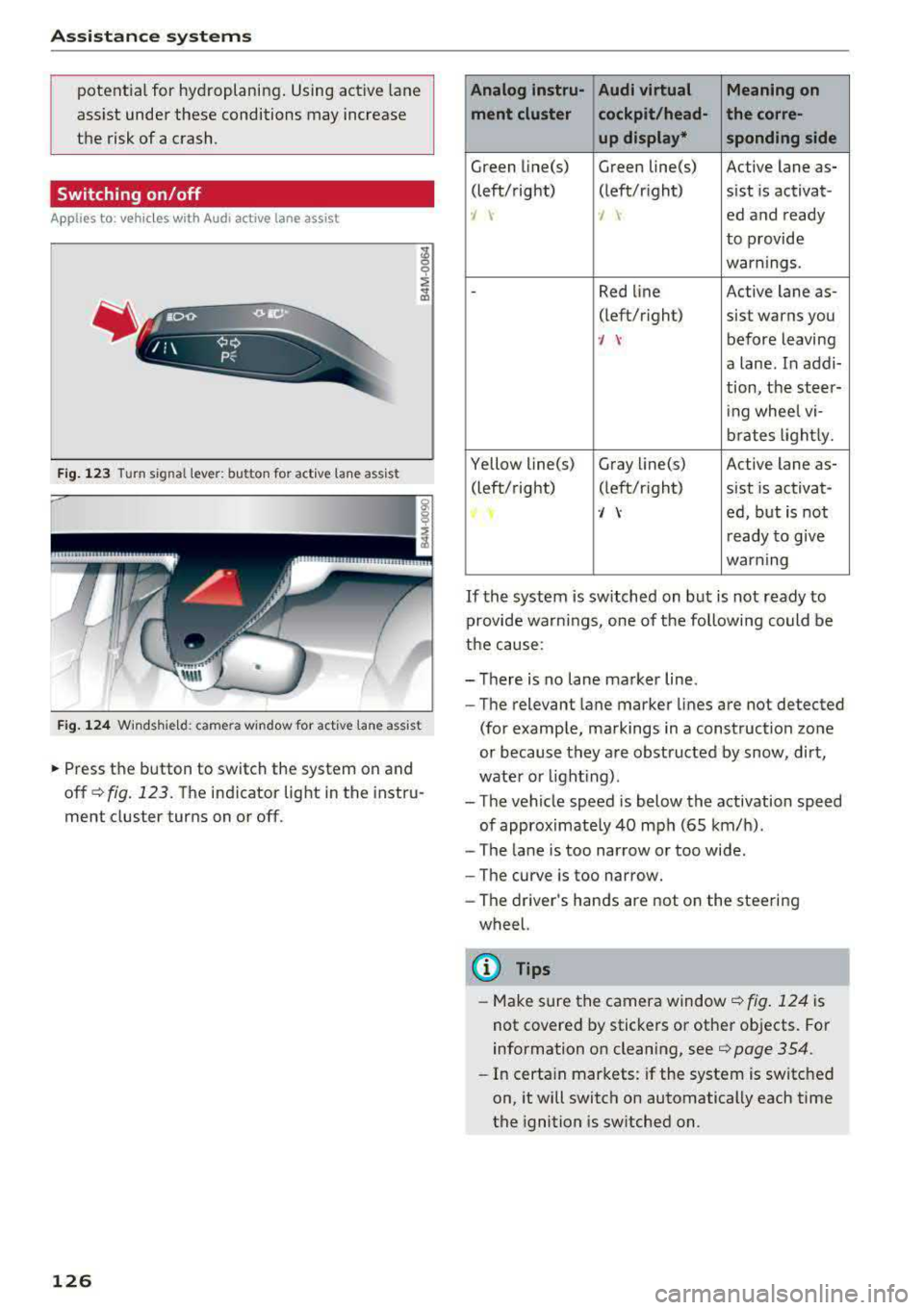
~ Press the button to switch the system on and
off
¢ fig. 123. The indicator light in the instru
ment cluster turns on or off.
126
Analog lnstru- Audi virtual Meaning on
ment cluster cockpit/head- the corre- up display* sponding side
Green line(s) Green line(s) Active lane as-
(left/right) (left/r ight) sist is activat-
-J -J ed and ready
to provide
warnings .
-Red line Active lane as-
(left/r ight)
sist warns you
·/ \-before leaving
a lane. In addi-
tion, the steer-
ing whee l vi-
brates lightly.
Yellow line(s) Gray
Li ne(s) Active lane as-
(left/right) (left/r ight) sist is activat-
·/ \-ed, but is not
ready to give
warning
If the system is switched on but is not ready to
provide wa rn ings, one of the following could be
the cause:
-There is no lane marker line .
-The relevant lane marker lines are not detected
(for example, markings in a construction zone
or because they are obstructed by snow, dirt,
wate r or lighting) .
-The vehicle speed is below the activation speed
of approximate ly 40 mph (65 km/h).
- The lane is too narrow or too wide .
- The curve is too narrow.
- The driver 's hands are not on the steering
wheel.
(D Tips
- Make sure the camera window ¢fig. 124 is
not covered by stickers or other objects. For
information on cleaning, see
¢ page 354.
- In certain markets: if the system is switched
on, it will switch on automatically each time
the ignition is switched on.
Page 129 of 403
Display in the instrument cluster
App lies to: ve hicles with Audi active lane assist
Fig. 125 Instrument cluster (multi-color display): ac tive
lane ass ist is sw itched on and ready to provide warnings
Fig. 126 Instrument cl uster (monoc hrome display): active
lane ass ist is switched on
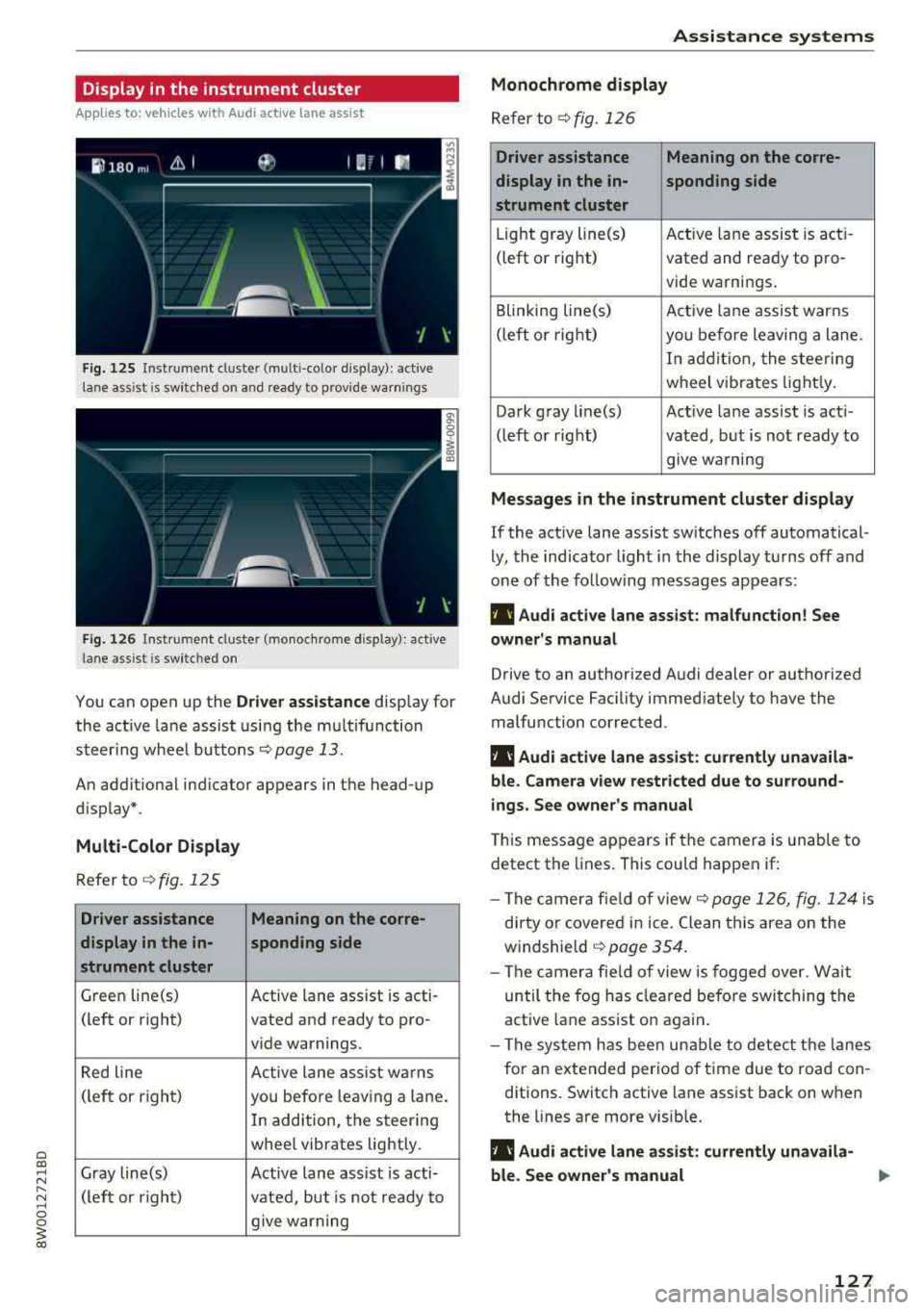
You can open up the Dr ive r assistance display for
the act ive lane assist using the multifunction
steer ing whee l buttons
c::> page 13.
An additional ind icator appears in the head-up
display*.
Multi-Color Display
Refer to¢ fig. 125
Driver assistance Meaning on the corre-
display in the in-sponding side
strument cluster
Green line(s) Active lane assist is acti -
(left or right) vated and ready to pro-
vide warnings.
Red line Active lane assist warns
(left or right) you before leav ing a lane.
In addition, the steering
whee l vibrates lightly.
Gray line(s) Active lane assist is acti-
(left or right)
vated, but is not ready to
give warning
Assistance systems
Monochrome display
Refer to¢ fig. 126
Driver assistance Meaning on the corre-
display in the in-
sponding side
strument cluster
Light gray line(s) Act ive lane assist is acti-
(left o r right) vated and ready to pro-
vide warnings .
Blinking line(s)
Active lane assist warns
(left or right)
you before leaving a lane.
In addition, the steering
wheel vibrates lightly.
Dark gray line(s) Active lane assist is acti-
(left or right) vated, but is not ready to
. . give warning
Messages in the instrument cluster display
If the active lane assist switches off automatical
ly, the indicator light in the display turns off and
one of the following messages appears:
fl! Audi active lane assist: malfunction! See
owner's manual
Drive to an authorized Audi dealer or authorized
Audi Service Facility immediately to have the
malfunction corrected.
fl! Audi active lane assist: currently unavaila
ble . Camera view restricted due to surround
ings. See owner's manual
This message appears if the camera is unable to
detect the lines. This could happen if:
- The camera fie ld of view
c::> page 126, fig. 124 is
dirty or covered in ice. Clean this area on the
windshie ld
¢ page 354.
- The camera field of view is fogged over. Wait
until the fog has cleared before switching the
active lane assist on again.
- The system has been unable to detect the lanes
for an extended period of time due to road con
ditions. Switch active lane assist back on when
the lines are more visible.
fl! Audi active lane as sist: currently unavaila
ble. See owner's manual
127
Page 138 of 403

Parking systems
Parking systems
General information
A ppl ies to: ve hicles w ith a rea r parking sys te m /pa rking sys
tem p lus/rearv iew camera/peripheral ca meras
Depending on your vehicle's equipment , various
parking aids will help you when parking and ma
neuvering.
The
rear parking system is an audible parking aid
that warns you of obstacles
behind the vehicle
¢ page 137.
The
parking system plus assists you when park
ing by audibly and visually indicating objects de
tected
in front of and behind the veh icle
¢ page 137.
The
rearview camera shows the area behind the
vehicle in the Infotainment system display . The
lines in the rearview camera image help you to
park or
maneuver ¢ page 138. The parking sys
tem plus functions are also available
¢ page 137.
The
peripheral cameras give various views to
help you when parking or maneuvering
¢ page 140. The parking system plus functions
are also available
¢page 137.
A WARNING ,..__ -
- Always look for traffic and check the area
around your vehicle by looking at it directly
as well. The parking system cannot replace
the driver's attention. The driver is always
responsible when entering or leaving a park
ing space and during similar maneuvers.
- Please note that some surfaces , such as
clothing, are not detected by the system .
- Sensors and cameras have blind spots in
which people and objects cannot be detect
ed . Be especially cautious of small children
and animals .
- Always keep your eyes on the vehicle's sur
roundings, using the rearview mirror as
well.
- The sensors can be displaced by impacts or
damage to the radiator grille, bumper,
wheel housing and the underbody. The park ing system may be impa ired as a result.
136
Have an authorized Audi dealer or author
ized Audi Service Facility check their func
tion.
(D Note
- Some objects are not detected or displayed
by the system under certain circumstances:
- objects such as barrier chains, trailer draw
bars, vertical poles or fences
- objects above the sensors such as wall ex
tensions
- objects with certain surfaces or structures
such as chain link fences or powder snow
- If you continue driving closer to a low ob
ject, it may disappear from the sensor
range. Note that you will no longer be
warned about this obstacle.
- Keep enough distance from the curb to re
duce the risk of damage to the rims.
{i) Tips
- The system may provide a warning even
though there are no obstacles in the cover
age area in some situations, such as:
- certain road surfaces or when there is tall
grass
- external ultrasonic sources such as from
cleaning vehicles
-in heavy rain, snow, or thick vehicle ex
haust
- We recommend that you practice parking in
a traffic-free location or parking lot to be
come familiar with the system . When doing
this, there should be good light and weath
er conditions.
- You can change the volume of the signals
and the display ¢
page 143.
- Please refer to the instructions for towing a
trailer located in
¢page 144.
- What appears in the infotainment display is
somewhat time-delayed.
- Th e sensors must be kept clean and free of
snow and ice for the parking aid to operate .
- Th e rearv iew camera is automatically
cleaned when cleaning the rear window*
¢ page 60 .
Page 148 of 403
Intelligent Technology
Intelligent Technology
Electronic stabilization
control (ESC)
Description
Elect ronic stabilization control (ESC) supports
driver safety.
It red uces the risk of slipping and
improves driving stability. ESC detects crit ica l sit
uations such as when the vehicle is oversteering
and understeering or the wheels are spinning.
The vehicle is stabilized by applying the brakes or reducing eng ine torq ue. When the ESC engages,
the hJ ind icator light blinks in the instrument
cluste r.
The fo llow ing systems are integrated in the ESC:
Ant i-loc k bra king system (ABS)
ABS prevents the whee ls from locking when brak
ing. The vehicle can sti ll be steered even during
hard brak ing. Apply steady pressure to the brake
pedal. Do not pump the pedal. A puls ing in the
brake pedal indicates that the system is acting to
stabilize the vehicle .
Brake assist system
The brake assist system can decrease brak ing dis
tance . It increases braking power when the driver
presses the brake pedal quick ly in emergency sit
uations . You must press and hold the b rake pedal
until the dangerous situat io n is over . In veh icles
with adapt ive cr uise control*, the bra ke assist
sys tem is more sensitive if the d ista nce detec ted
t o the vehicle dr iv ing ahead is too small.
Anti -Slip Regulation (ASR )
ASR reduces eng ine power when the drive wheels
begin sp inning a nd adapts the force to the road
conditions . This makes it easie r to start, acceler
a te and dr ive up h ills.
Electron ic differenti al lock (EDL )
The EDL applies the brakes to a wheel that starts
spinning and transfers the drive power to the
other driving wheel or wheels ( if the veh icle is
eq uipped w ith all whee l dr ive*) . T his function is
not available at higher speeds.
146 In extreme cases,
ED L automat ically switches off
to keep the brake on the braked wheel from over heating. The veh icle is still working correct ly. ED L
will switch on again automatically when condi
tions have returned to normal.
Steering r ecommendat ion
The ESC he lps to stabilize the vehicle by changing
the steering torque.
In veh icles with dynamic s teer ing*, ESC a lso
helps to stab ilize the steering in cr it ica l situa
tions.
Selective wheel torque control
Se lective whee l torque cont rol is used when d riv
i ng on curves. The front whee l on the inside of
t h e curve or both whee ls on the i nside of the
curve are braked se lectively as needed. This al
l ows more precise driving in curves.
Automatic post -collision b raking system
The "automat ic post-collis io n braking system"
can help to reduce the risk of sliding and of addi
tiona l collisions after an acc ident. If the a irbag
contro l modu le detects a collision, the ve hicle is
braked by the ESC.
The veh icle does not bra ke automatically if:
-the dr iver presses the accelerator pedal, or
-the ESC, the brake system or the veh icle electri-
cal system are not functioning.
&_ WARNING
-The ESC and its integrated systems cannot overcome the lim its imposed by natura l
phys ica l laws. This is espec ially important
on sl ippery or wet roads. If the systems be
gin acting to stabilize your vehicle, you
should immediately alter your speed to match the road and traffic conditions. Do
not let the increased safety provided tempt
you into taking risks. This could increase
your r isk of a coll is ion.
-Please note the r isk of a coll is ion increases
when dr iv ing fast, especially through curves
and on slippery or wet roads, and when dr iv
ing too close to objects ahead . The ESC and
its integrated systems cannot always
Page 149 of 403
a co .... N ,....
N .... 0 0
3 co
prevent collisions -the re is still a risk of ac
c idents!
- Press the accelerator pedal ca refully when
accelerating on smooth, slippery surfaces
such as ice and snow. The dr ive wheels can
spin even when these control systems are
installed and th is can affect driving stability
and increase the r isk of a coll is ion.
Switching on/off
Intellig ent Technology
{!) Tips
- The ABS and ASR only funct ion correct ly
when all four wheels have a sim ilar wear
condition. Different tire sizes can lead to a
reduction in engine power.
- You may hear noises when the systems de
scribed are working.
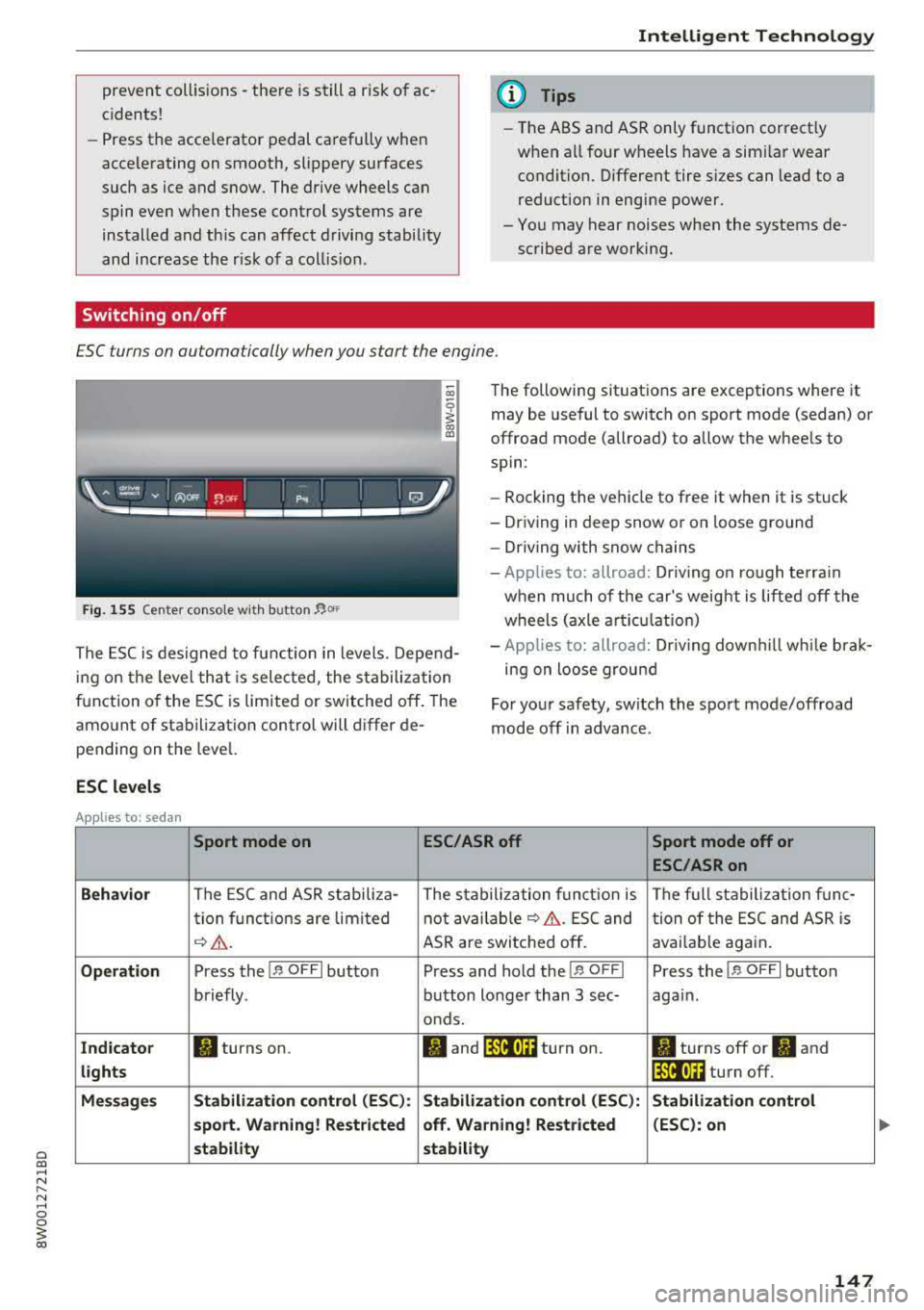
£SC turns on automatically when you start the engine.
Fig. 1 55 Cente r co nso le w it h b utton~ °"
The following sit uat ions are exceptions where it
may be useful to switch on sport mode (sedan) or
offroad mode (allroad) to allow the whee ls to
spin :
- Rocking the vehicle to free it when it is stuck
- Dr iving in deep snow or on loose ground
- Dr iving with snow chains
- App lies to: allroad: Driv ing on ro ugh te rra in
when much of the car's weig ht i s l ifte d off the
wheels ( axle articul at ion)
The ESC is designed to fu nction in levels. Depe nd
i ng o n the level that is selected , the s tabilization
f u nction o f the ESC is limited or switched off. The
amo unt of stabilization control will d iffer de
pending on t he leve l. -
App lies to: allroad: Driv ing down hill while brak
ing on loose grou nd
Fo r yo ur safety, switch the spo rt mode/offroad
mode off in advance.
ESC levels
Applies to: sedan
Sport mode on ESC/ASR off Sport mode off or
ESC /ASRon
Behavior
The ESC and ASR stab ili za- The stabilization f unct io n is The f ull stabiliza tion f un c-
t ion f un ct ions are lim ited not avai
lab le
¢ &. . ES C and
tion of the ESC and ASR is
¢ &. . ASR are swi tched off . avai
lab le aga in.
Op eration Press the !.r, O FFI button P ress and hold the j.r, O FFI Press the j.r, O FFI button
briefly . button longer than 3 sec- aga in .
o nds.
Ind icato r II turns on. fl and jf'll•)~~ turn on. II turns off or II and
lights lf'll•U~ turn off.
Me ssages Stabilization contro
l (ESC ):
Stabilization control (ESC ): Stabilization control
s port . Warning! Restricted off. Warning! Restricted (ESC
): on
stability stability
147
Page 150 of 403
Intelligent Technology
Applies to: allroad
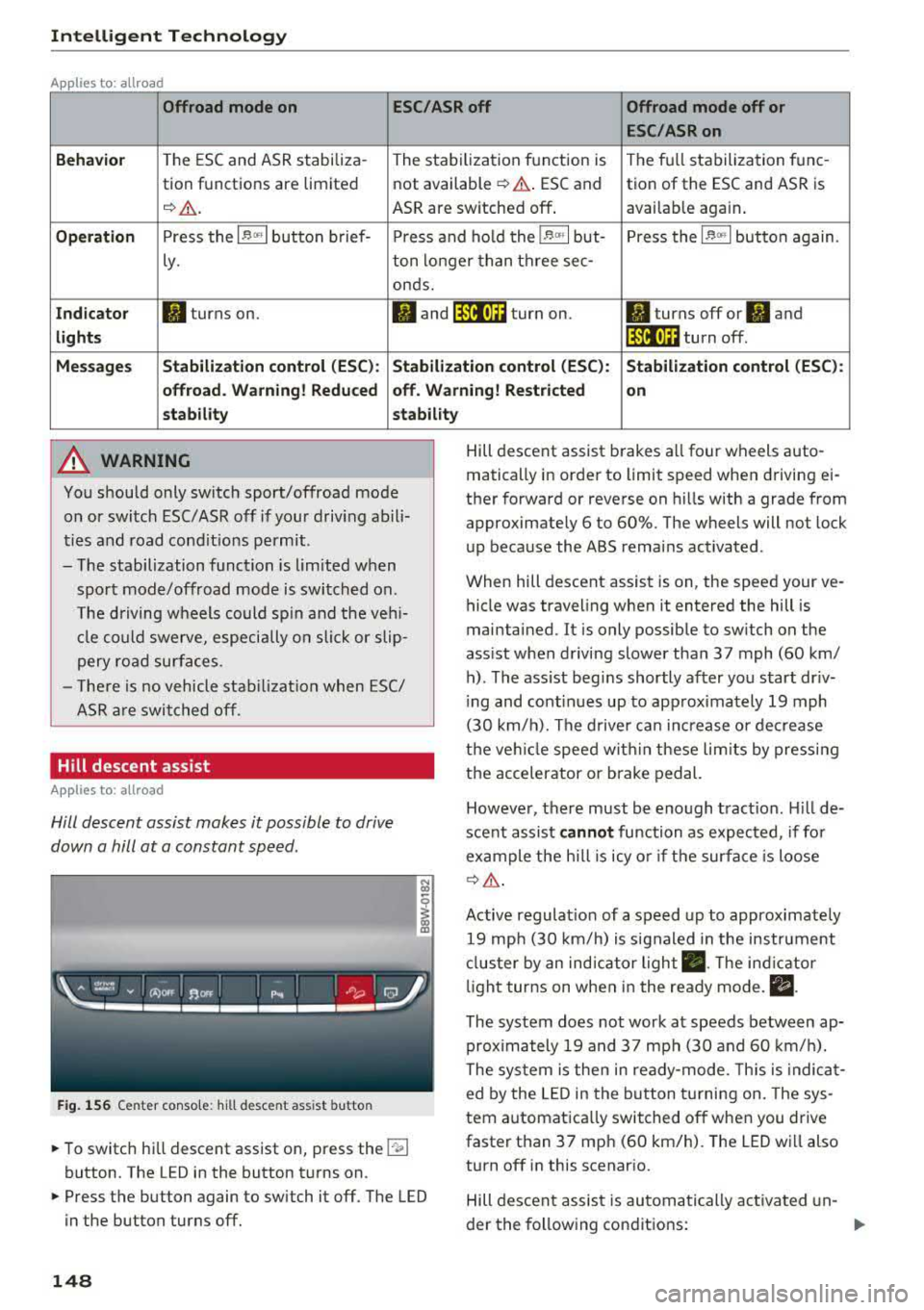
Offroad mode on
ESC/ASR off Offroad mode off or
ESC /ASR on
Beha vior
T he ESC and ASR stabiliza -The stabi lization f unction is The f ull stabilization tune -
tion functions are limited not available
¢ .&. . ESC and tion of the ESC and ASR is
¢ & . ASR are sw itched off . available aga in .
Operation Press the l~ m l button b rief- Press an d ho ld the l~ "'' I but- Press the l~ "" I button again .
ly. ton longer than three sec-
onds.
Indicator II turns on. Iii and lf'tii•)H turn on. II turns off or II and
light s li'tii•)H turn off .
Message s Stabilization cont
rol (ESC ): Stabiliza tion control (ESC ): Stabilization cont rol (ESC ):
offroad . Warning! Redu ced off . Warning! Restricted
on
s tability stability
A WARNING
You should only switch sport/offroad mode
on or switch ESC/ASR off if you r drivi ng abili
ties and road cond it ions permit .
- The stabilization function is lim ited w hen
sport mode/offroad mode is swi tched on.
T he driving w heels could sp in and the veh i
cl e could swerve, especi ally o n slick or slip
pery road sur faces.
- T here is no vehicle sta biliz at ion when ESC/
ASR a re swi tched off.
Hill descent assist
Applies to: allroad
Hill descent assist makes it possible to drive
down a hill at a constant speed.
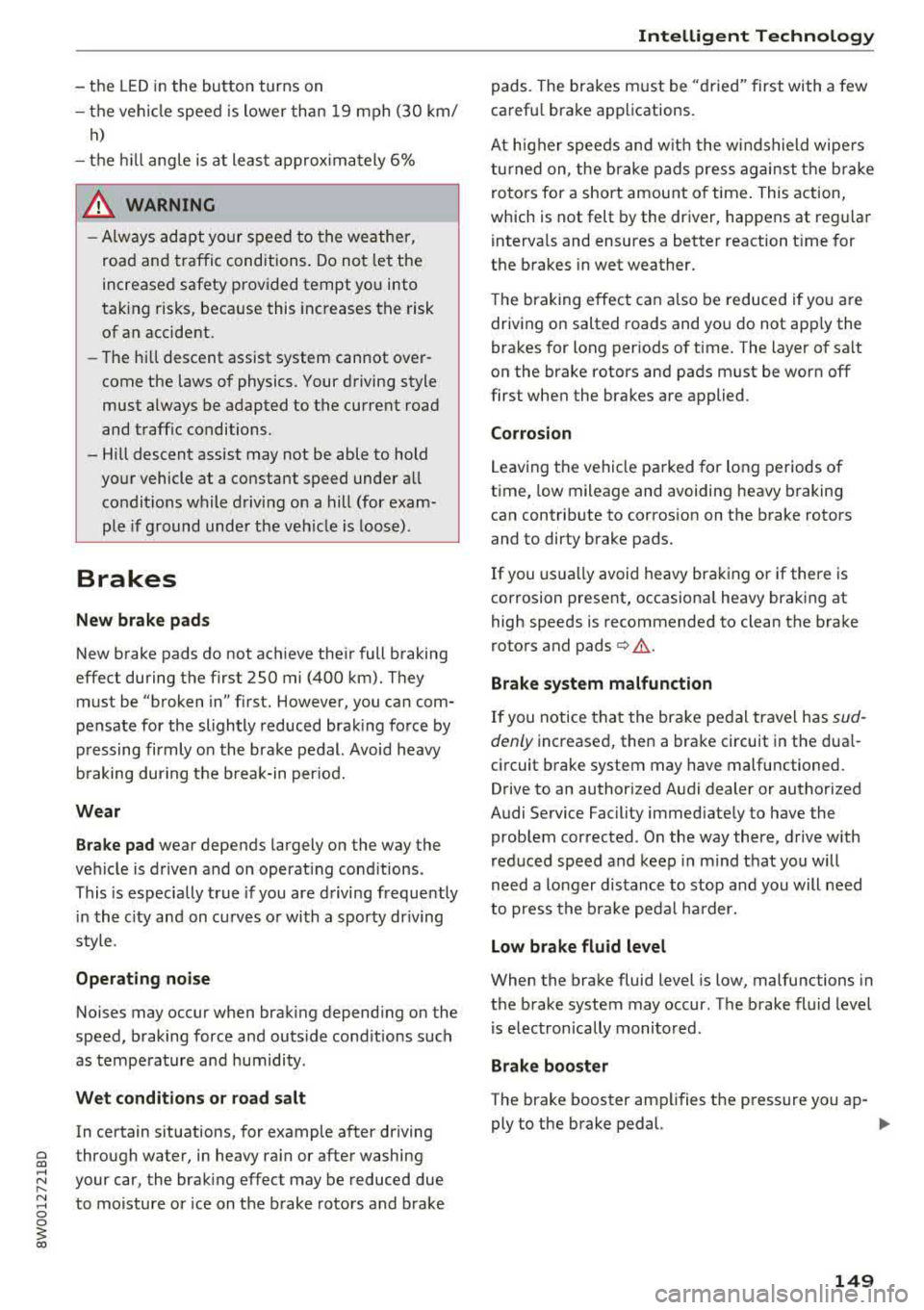
F ig. 1 56 Center co nso le: hil l desce nt ass ist button
~ To switc h hill descent assist on, press the !"~I
button. The LED in the button t urns on.
~ Press the button again to switch it off. The LED
in the button turns off.
148
Hill descent assist brakes a ll four wheels auto
matically in order to limit speed when d riving ei
ther forward or reverse on hills with a grade from
approximately 6 to 60%. The wheels will not lock
u p because the ABS remains activated.
When hill descent assist is on, the speed your ve
hicle was traveling when it entered the hill is
maintained. It is only possib le to sw itch on the
ass ist when driving slower tha n 37 mph (60 km/
h) . The ass ist beg ins shortly af ter you start dr iv
i ng and cont inues up to app roxima tely 19 mph
(30 km/h). The d rive r ca n in crease o r de crease
t h e ve hicle spee d wit hin these lim its by press ing
t h e accelerator or brake pedal.
However, there must be enough t ract ion . Hill de
sce nt assist
cannot function as e xpec ted, if fo r
ex ample the h ill is icy o r if t he surface is loose
¢ &.
Active regulat io n of a speed up to approximate ly
19 mp h (30 km/h) is s ignaled in the instr ument
cl us ter by an ind ic a tor light
• . The in dica tor
li gh t tur ns on when i n the ready mode.
II.
The system does not work at speeds between ap
prox imately 19 and 37 mph (30 and 60 km/ h).
The system is the n in ready-mode. This is indica t
ed by the L ED in the b utton t urnin g on. The sys
tem a utomatica lly switched o ff when you drive
faster than 37 mph (60 km/h). The LED w ill also
turn off in this scenar io.
Hill descen t assis t is au tomatically ac tiva ted un-
der the fo llowing cond itions:
.,.
Page 151 of 403
a co .... N ..... N .... 0 0
3 co
-the LED in the button turns on
-the vehicle speed is lower than 19 mph (30 km/
h)
-the h ill angle is at least app rox imately 6%
_& WARNING
-Always adapt yo ur speed to the weather,
road and traffic conditions. Do not let the
increased safety provided tempt you into
tak ing risks, because this increases the risk
of an accident.
-
-T he hill descent assist system cannot over
come the laws of physics. Your driving style
must a lways be adapted to the current road
and traffic conditions.
- Hill descent assist may not be able to hold your vehicle at a constant speed under a ll
condit ions while driving on a hill (for exam
ple if ground under the veh icle is loose) .
Brakes
New brake p ads
New brake pads do not ach ieve the ir full braking
effect during the first 250 mi (400 km). They
must be "broken
in" first. However, you can com
pensate for the slightly reduced brak ing fo rce by
p ressing firmly o n the brake pedal. Avoid heavy
b raking during t he b reak-in per iod.
Wear
B rake pad
wear depends largely on the way the
veh icle is driven a nd on operat ing cond itions.
This is especia lly true if you are d riving frequently
in t he c ity and on c urves or wi th a sporty driving
style.
Operating noise
Noises may occur when braking depend ing on the
speed, braking force and outs ide cond itions such
as temperature and humidity .
Wet conditions or road salt
In certain situations, for example after driving
through water, in heavy ra in or after washing
your car, the brak ing effect may be reduced due
to moisture or ice on the brake rotors and brake
Intellig ent Technology
pads. The brakes m ust be "dried" first with a few
carefu l brake app lications.
At higher speeds and w ith the win dshield wipe rs
tu rned on, the brake pads press agains t the b rake
roto rs fo r a short amount of time. This action,
which is not felt by the driver, happens at regu lar
i nterva ls and ensures a better reaction t ime for
the b rakes in wet weather.
T he brak ing effec t can a lso be reduced if yo u are
driving on salted roads and yo u do not app ly the
brakes for long per iods of t ime. The layer of sa lt
on the brake rotors and pads m ust be worn off
first whe n the brakes are applied.
Corrosion
Leaving the vehi cle parked for long periods o f
time, low mileage and avoiding heavy b raking
can contrib ute to corros ion on the brake rotors
and to dirty brake pads.
If you usu a lly avoid heavy bra king or if there is
corrosion present, occasiona l heavy braking at
high speeds is recommended to clean the brake
roto rs and
pads ¢~ -
Brake system malfunction
If you notice that the bra ke pedal trave l has sud
denly increased, then a brake circuit in the dua l
ci rcuit brake system may have malfunctioned.
Drive to an authorized Audi dealer or authorized
Audi Service Facility immed iate ly to have the
problem corrected. On the way there, drive w ith
reduced speed and keep in mind t hat you will
need a longer distance to stop and you will need
to press the bra ke ped al ha rder.
Low brake fluid level
When the bra ke fluid level is low, malfunctions in
the brake system may occur. The brake fluid level is elec tronically monitored.
Brake booster
The brake booster ampli fies the p ressure you ap-
ply to the brake pedal.
.,..
149