display AUDI A4 2019 Owners Manual
[x] Cancel search | Manufacturer: AUDI, Model Year: 2019, Model line: A4, Model: AUDI A4 2019Pages: 392, PDF Size: 99.53 MB
Page 234 of 392
Media
Ets
Hymn
as
)ThebigB
2RockE
Sola
kB
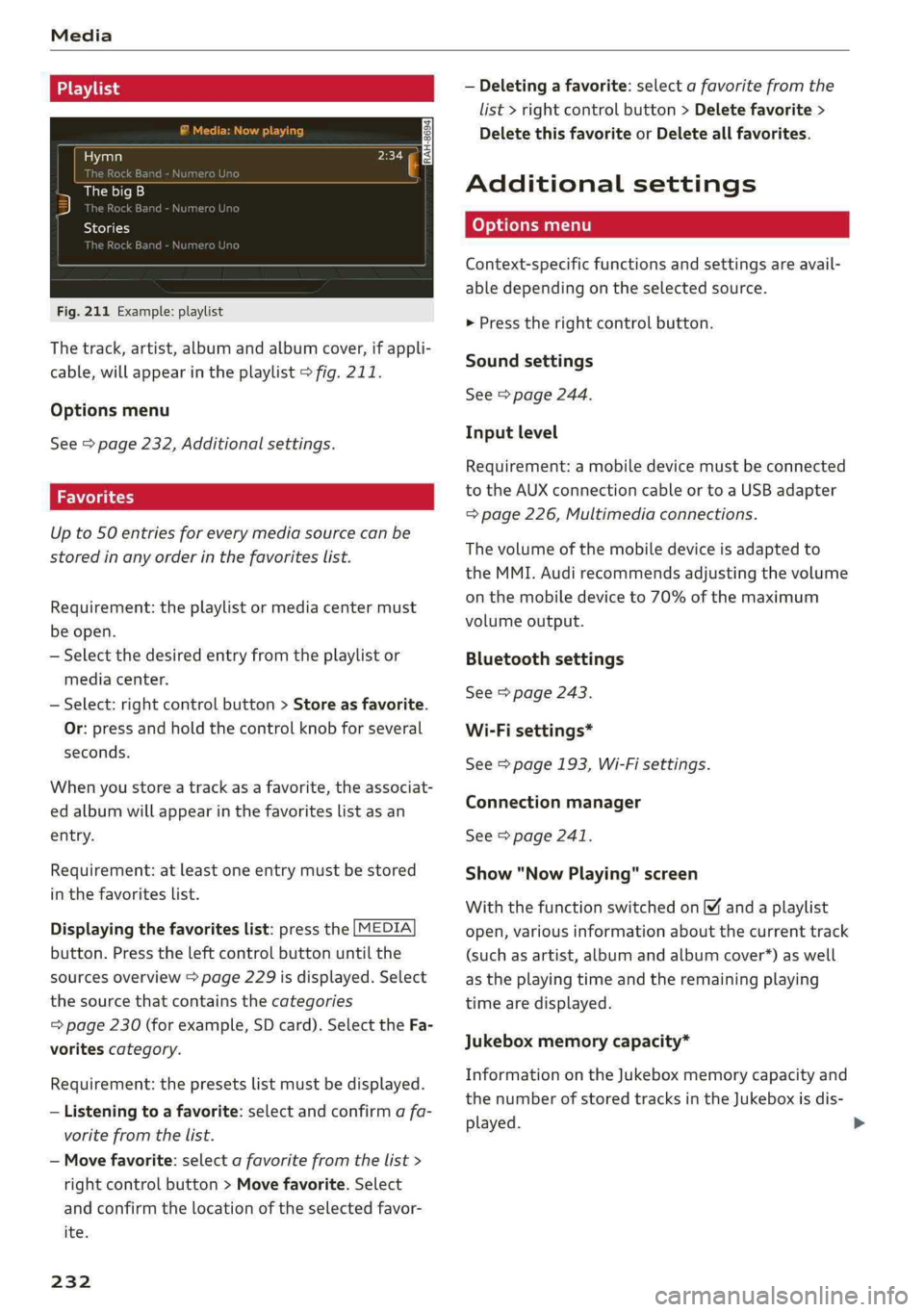
Fig.211Example: playlist
Thetrack,artist,albumandalbumcover,ifappli-
cable,willappearintheplaylist>fig.211.
Optionsmenu
See>page232,Additionalsettings.
Upto50entriesforeverymediasourcecanbe
storedinanyorderinthefavoriteslist.
Requirement:theplaylistormediacentermust
beopen.
—Selectthedesiredentryfromtheplaylistor
mediacenter.
—Select:rightcontrolbutton>Storeasfavorite.
Or:pressandholdthecontrolknobforseveral
seconds.
Whenyoustoreatrackasa favorite,theassociat-
edalbumwillappearinthefavoriteslistasan
entry.
Requirement:atleastoneentrymustbestored
inthefavoriteslist.
Displayingthefavoriteslist:pressthe[MEDIA
button.Presstheleftcontrolbuttonuntilthe
sourcesoverview>page229isdisplayed.Select
thesourcethat containsthecategories
=>page230(forexample,SDcard).SelecttheFa-
voritescategory.
Requirement:thepresetslistmustbedisplayed.
—Listeningtoafavorite:selectandconfirmafa-
voritefromthelist.
—Movefavorite:selectafavoritefromthelist>
rightcontrolbutton>Movefavorite.Select
andconfirmthelocationoftheselectedfavor-
ite.
232
—Deletingafavorite:selectafavoritefromthe
list>rightcontrolbutton>Deletefavorite>
DeletethisfavoriteorDeleteallfavorites.
Additionalsettings
Context-specificfunctionsandsettingsareavail-
abledependingontheselectedsource.
>Presstherightcontrolbutton.
Soundsettings
See>page244.
Inputlevel
Requirement:amobiledevicemustbeconnected
totheAUXconnectioncableor toaUSBadapter
=>page226,Multimediaconnections.
Thevolumeofthemobiledeviceisadaptedto
theMMI.Audirecommendsadjustingthevolume
onthemobiledeviceto70%ofthemaximum
volumeoutput.
Bluetoothsettings
See>page243.
Wi-Fisettings*
See>page193,Wi-Fisettings.
Connectionmanager
See>page241.
Show"NowPlaying"screen
Withthefunctionswitchedon¥andaplaylist
open,variousinformationaboutthecurrenttrack
(suchasartist,albumandalbumcover*)aswell
astheplayingtimeandtheremainingplaying
timearedisplayed.
Jukeboxmemorycapacity*
InformationontheJukeboxmemorycapacityand
thenumberofstoredtracksintheJukeboxisdis-
played.
Page 235 of 392
8W0012721BG
Media
Rewind/Fastforward
Turnthecontrolknobtotheleftor totheright.
Or:moveyourfingeracrosstheMMItouch
controlpad*fromlefttoright.
Shuffle)
Withthefunctionswitchedon,allfilesinthe
playlistareplayedandshowninrandomorder.
Repeattrack!)
Whenthefunctionisswitchedon ¥,thecurrent
trackrepeats.
Repeat*
Requirement:aniPod/iPhone*mustbeselected
asthemediasourceintheAudimusicinterface
=page229,Accessingmedia.
—Track:thecurrenttrackwillberepeated.
—Folder:thetracksinthecurrentfolderare
playedcontinuouslyinaloop.
—Off:thefunctionisswitchedoff.
Backto'Playback'
Theoptionsmenuisclosed.Thetrackcurrently
playingappearsintheplaylist.
Playsimilarmusic*
Thetrackcurrentlyplayingisquicklyanalyzedfor
featuressuchasartist,genres,mood,andbeat,
andasmartplaylistwithsimilartrackswillbe
shown.
Playmore...
Asmartplaylistisshownbasedonthetrackcur-
rentlyplaying.Youcanselectbetweenaplaylist
withmoretracksbythisartist,fromthisalbum
orofthisgenre.
Copytojukebox*
See>page222,AddingfilestotheJukebox.
)Thefunctionautomaticallyswitchesoffwhenthesourceis
changed.
2)Thisfunctionisnotavailableforallcellphones.
Setasringtone*”
Requirement:amobiledevicemustbeconnected
totheMMI.Thetrackcurrentlyplayingmustbe
intheJukebox*>page222.
Theselectedtrackwillbeusedastheringtone
forincomingcalls.
Gracenoteonlinedatabase*
Requirement:theMMImustbeconnectedtothe
Internet.
Dependingonavailability,variousinformation
willloadaboutthetrackcurrentlyplayingwhen
thisfunctionisswitchedon.
Favorites
See>page232.
Additionaloptions
Requirement:thevehiclemustbestationaryand
avideofile*oraDVD*mustbeplaying.
Parentalcontrol*
PlaybackofvideoDVDscanberestrictedusing
parentalcontrol.
Enterthepasswordforparentalcontrol.Pass-
wordsetatthefactory:1234.Youhavethefol-
lowingoptions:
—Protectionlevel:selectandconfirmtheprotec-
tionlevel(forexample,Level5).Eightdifferent
protectionlevelscanbesetforparentalcon-
trol.Ifyousettheparentalcontrollevelat Lev-
el 5,allDVDsfromlevels1-5canbeplayed.
VideoDVDswithahigherlevelwillnotplay.Se-
lectUnrestrictedtoremovealloftherestric-
tions.
—Changepassword:editthecurrentpassword.
Switchtofullscreen
Thevideoimageisdisplayed.Turnthecontrol
knobtodisplaytheplaylist.Or:pressthe[BACK
button.
233
Page 236 of 392
Media
Replayvideo!)
Whenthisfunctionisswitchedon¥,thecurrent
videowillreplay.
Show DVDmenu
TheDVDmainmenuopensintheInfotainment
systemdisplay.
—Selectingamenuitem:selectandconfirma
menuitem.Or:moveyourfingerontheMMI
touchcontrolpad*andpressthecontrolknob.
Audiotrack?)
Youcanmanuallysettheaudiotrack(language
andaudioformat).Thelanguageandaudiofor-
matoptionsdependonthevideoDVD.
Subtitles2)
Youcanmanuallyselectsubtitlesforplayback.
ThelanguagesavailabledependontheDVD.
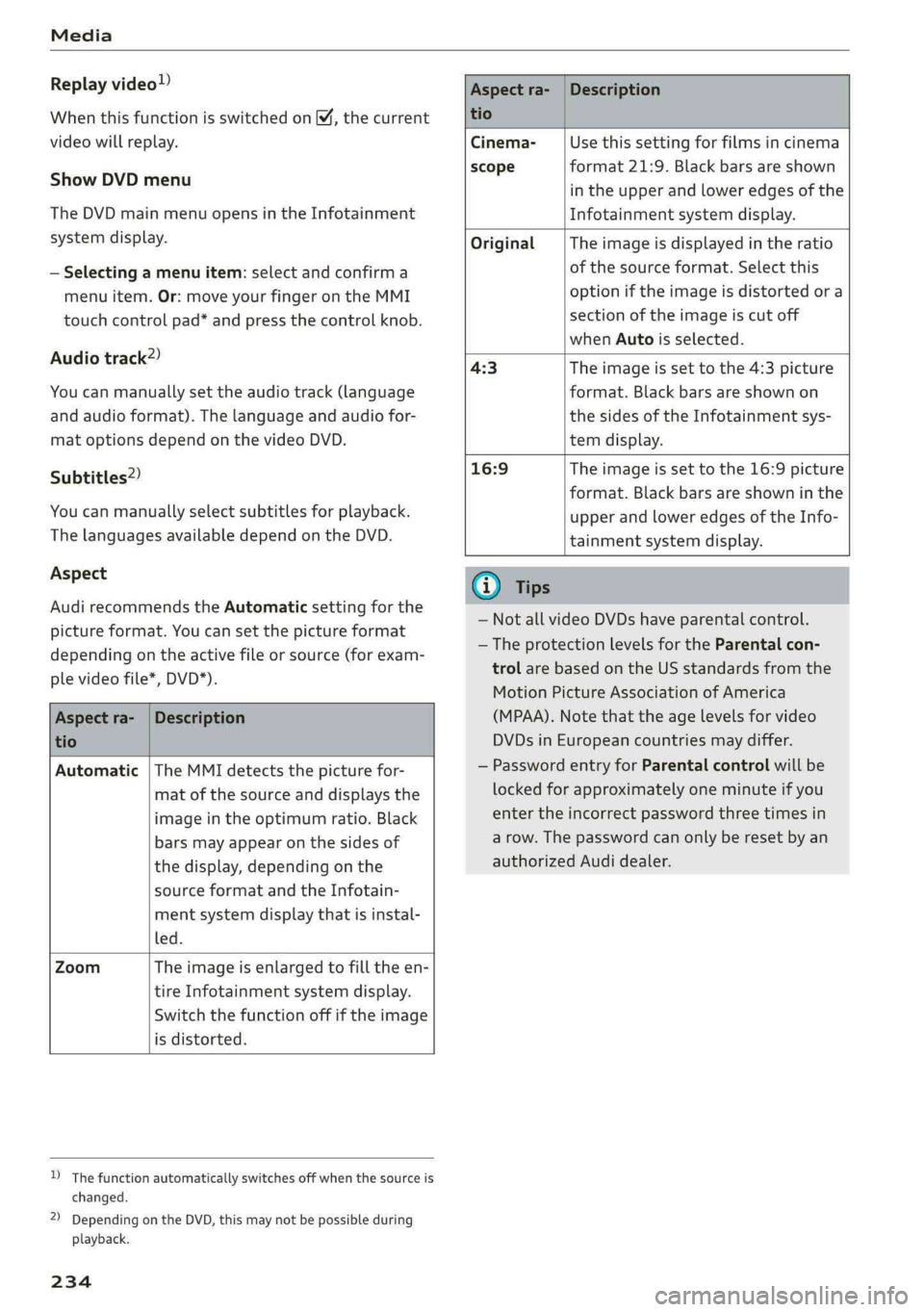
Aspect
AudirecommendstheAutomaticsettingforthe
pictureformat.Youcansetthepictureformat
dependingontheactivefileorsource(forexam-
plevideofile*,DVD*).
Aspectra-
tio
Description
Aspectra-|Description
tio
Cinema-Usethissettingforfilmsincinema
scopeformat21:9. Blackbars areshown
intheupperandloweredgesofthe
Infotainmentsystemdisplay.
OriginalTheimageisdisplayedintheratio
ofthesourceformat.Selectthis
optioniftheimageisdistorted ora
sectionoftheimageiscutoff
whenAutoisselected.
4:3Theimageissettothe 4:3picture
format.Blackbarsareshownon
thesidesoftheInfotainmentsys-
temdisplay.
16:9 Theimageissettothe16:9picture
format.Blackbarsareshowninthe
upperandloweredgesoftheInfo-
tainmentsystemdisplay.
Automatic|TheMMIdetectsthepicturefor-
matofthesourceanddisplaysthe
imageintheoptimumratio.Black
barsmayappearonthesidesof
thedisplay,dependingonthe
sourceformatandtheInfotain-
mentsystemdisplaythatisinstal-
led.
ZoomTheimageisenlargedtofilltheen-
tireInfotainmentsystemdisplay.
Switchthefunctionoffiftheimage
isdistorted.
)Thefunctionautomaticallyswitchesoffwhenthesourceis
changed.
2)DependingontheDVD,thismaynotbepossibleduring
playback.
234
(i)Tips
— NotallvideoDVDshaveparentalcontrol.
— TheprotectionlevelsfortheParental con-
trolarebasedontheUSstandardsfromthe
MotionPictureAssociationofAmerica
(MPAA).Notethattheagelevelsforvideo
DVDsinEuropeancountriesmaydiffer.
—PasswordentryforParentalcontrolwillbe
lockedforapproximatelyoneminuteifyou
entertheincorrectpasswordthreetimesin
arow.Thepasswordcanonlyberesetbyan
authorizedAudidealer.
Page 237 of 392
8W0012721BG
Media
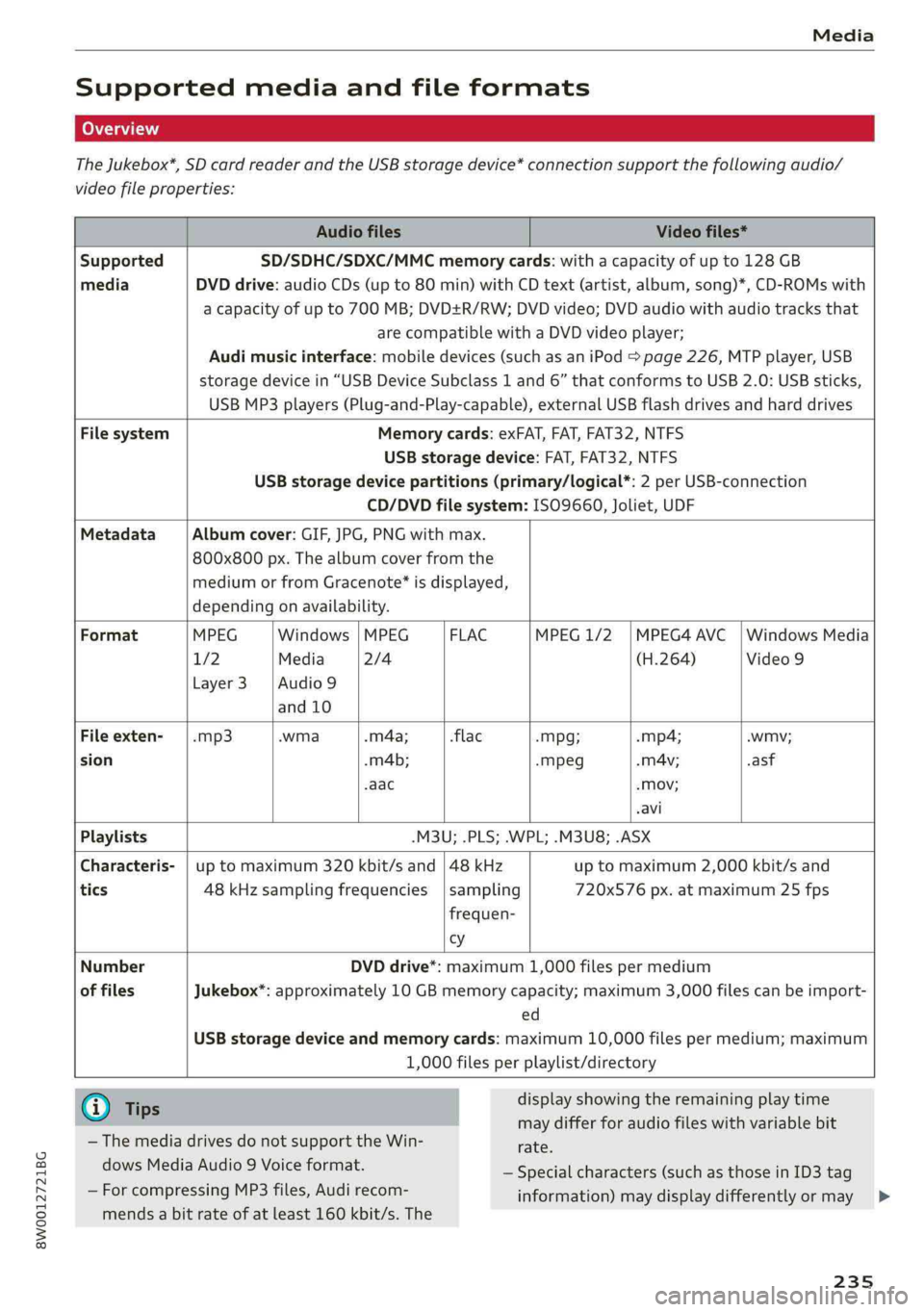
Supportedmediaandfileformats
TheJukebox*,SDcardreaderandtheUSBstoragedevice*connectionsupportthefollowingaudio/
videofileproperties:
AudiofilesVideofiles*
SupportedSD/SDHC/SDXC/MMCmemorycards:withacapacityofupto128GB
mediaDVDdrive:audioCDs(upto80min)withCDtext(artist,album,song)*,CD-ROMswith
acapacity ofupto700MB;DVD+R/RW;DVDvideo;DVDaudiowithaudiotracksthat
arecompatiblewithaDVDvideoplayer;
Audimusicinterface:mobiledevices(suchasaniPod>page226,MTPplayer,USB
storagedevicein“USBDeviceSubclass1and6” thatconformstoUSB2.0:USBsticks,
USBMP3players(Plug-and-Play-capable), externalUSBflashdrivesandharddrives
FilesystemMemorycards:exFAT,FAT,FAT32,NTFS
USBstoragedevice:FAT,FAT32,NTFS
USBstoragedevicepartitions(primary/logical*:2perUSB-connection
CD/DVDfilesystem:ISO9660,Joliet,UDF
MetadataAlbumcover:GIF,JPG,PNGwithmax.
800x800px.Thealbumcoverfromthe
mediumorfromGracenote®isdisplayed,
dependingonavailability.
FormatMPEGWindows|MPEGFLACMPEG1/2|MPEG4AVC|WindowsMedia
1/2Media2/4(H.264)Video9
Layer3 |Audio9
and10
Fileexten--mp3.wma.m4a;-flac-Mpg;-mp4;.wmv;
sion.m4b;-mpeg.mA4v;.asf
-aac-Mov;
.avi
Playlists.M3U;.PLS;.WPL;.M3U8;.ASX
Characteris-|uptomaximum320kbit/sand|48kHzuptomaximum2,000kbit/sand
tics48kHzsamplingfrequencies|sampling720x576px.atmaximum25fps
frequen-
cy
Number
offiles
DVDdrive*:maximum1,000filespermedium
Jukebox*:approximately10GBmemorycapacity;maximum3,000filescanbeimport-
ed
USBstoragedeviceandmemorycards:maximum10,000filespermedium;maximum
1,000filesperplaylist/directory
@Tips
— ThemediadrivesdonotsupporttheWin-
dowsMediaAudio9Voiceformat.
—ForcompressingMP3files, Audirecom-
displayshowingtheremainingplaytime
maydifferforaudiofileswithvariablebit
rate.
—Specialcharacters(such asthoseinID3tag
information)maydisplaydifferentlyormay
mendsabitrateofatleast160kbit/s.The
235
>
Page 238 of 392
Media
notalwaysdisplay,dependingonthesys-—SomeMTPplayerfunctionsarenotsupport-
temlanguage.ed,suchasratingmusictracksandvideo
— Themanufacturerofthestoragedevicecanplayback.
provideinformationaboutits“USBDevice
Subclass”.
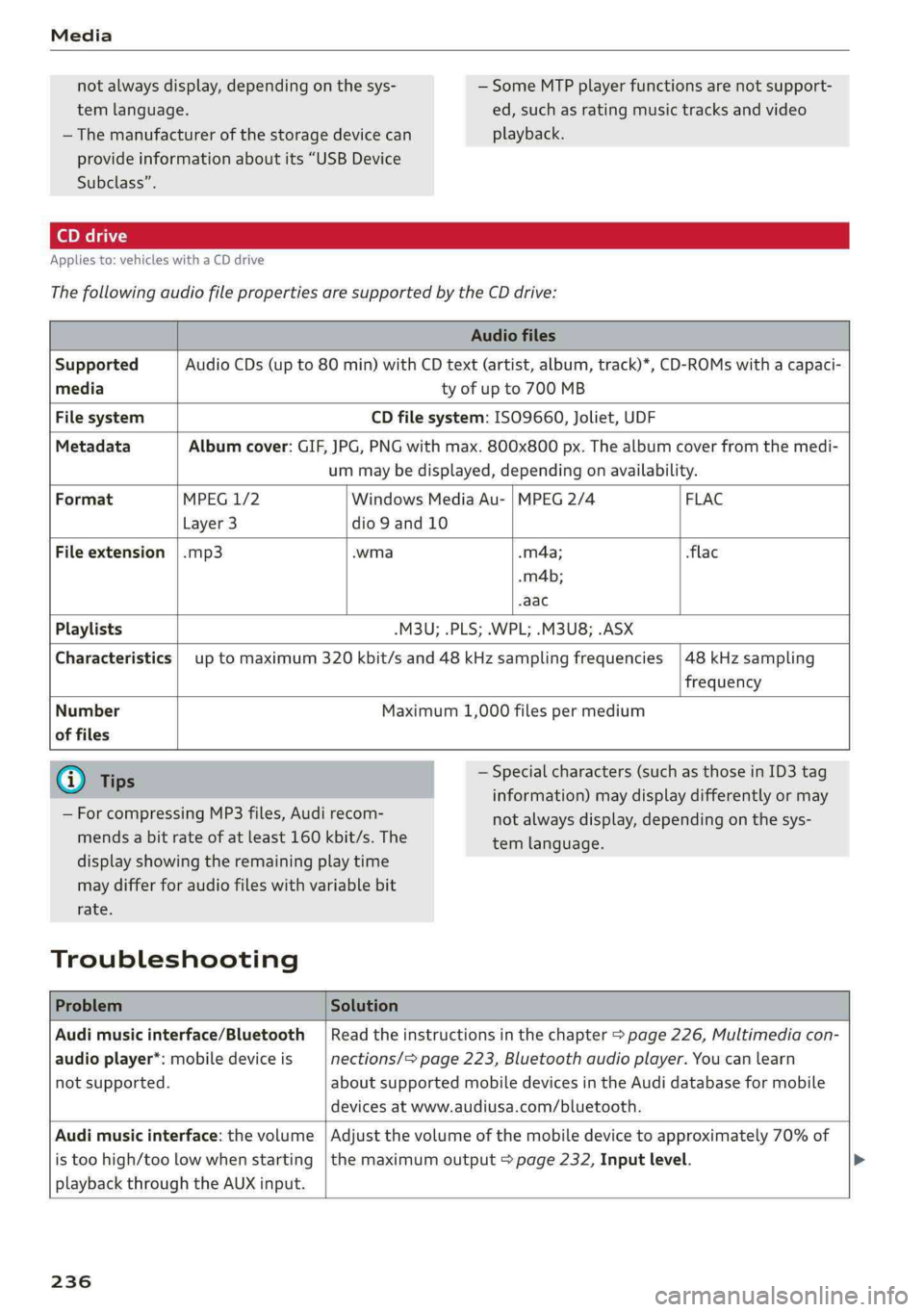
Appliesto:vehicleswithaCDdrive
ThefollowingaudiofilepropertiesaresupportedbytheCDdrive:
Audiofiles
SupportedAudioCDs(upto80min)withCDtext(artist,album,track)*,CD-ROMswithacapaci-
mediatyofupto700MB
FilesystemCDfilesystem:ISO9660,Joliet,UDF
MetadataAlbumcover:GIF,JPG,PNGwithmax.800x800px.Thealbumcoverfromthemedi-
ummaybedisplayed,dependingonavailability.
FormatMPEG1/2WindowsMediaAu-|MPEG2/4 FLAC
Layer3dio9and10
Fileextension|.mp3.wma-m4a;flac
.m4b;
-aac
Playlists-M3U;.PLS;.WPL;.M3U8;.ASX
Characteristics|uptomaximum320kbit/sand48kHzsamplingfrequencies|48kHzsampling
frequency
NumberMaximum1,000filespermedium
offiles
G)Tips—Specialcharacters(suchasthoseinID3tag
information)maydisplaydifferentlyormay
notalwaysdisplay,dependingonthesys-
temlanguage.
—ForcompressingMP3files, Audirecom-
mendsabitrateofatleast160kbit/s.The
displayshowingtheremainingplaytime
maydifferforaudiofileswithvariablebit
rate.
Troubleshooting
ProblemSolution
Audimusicinterface/Bluetooth|Readtheinstructionsinthechapter>page226,Multimediacon-
audioplayer*:mobiledeviceisnections/=page223,Bluetoothaudioplayer.Youcanlearn
notsupported.aboutsupportedmobiledevicesintheAudidatabaseformobile
devicesatwww.audiusa.com/bluetooth.
Audimusicinterface:thevolume|Adjustthevolumeofthemobiledevicetoapproximately70%of
istoohigh/toolowwhenstarting|themaximumoutput>page232,Inputlevel.
playbackthroughtheAUXinput.
236
Page 239 of 392
8W0012721BG
Media
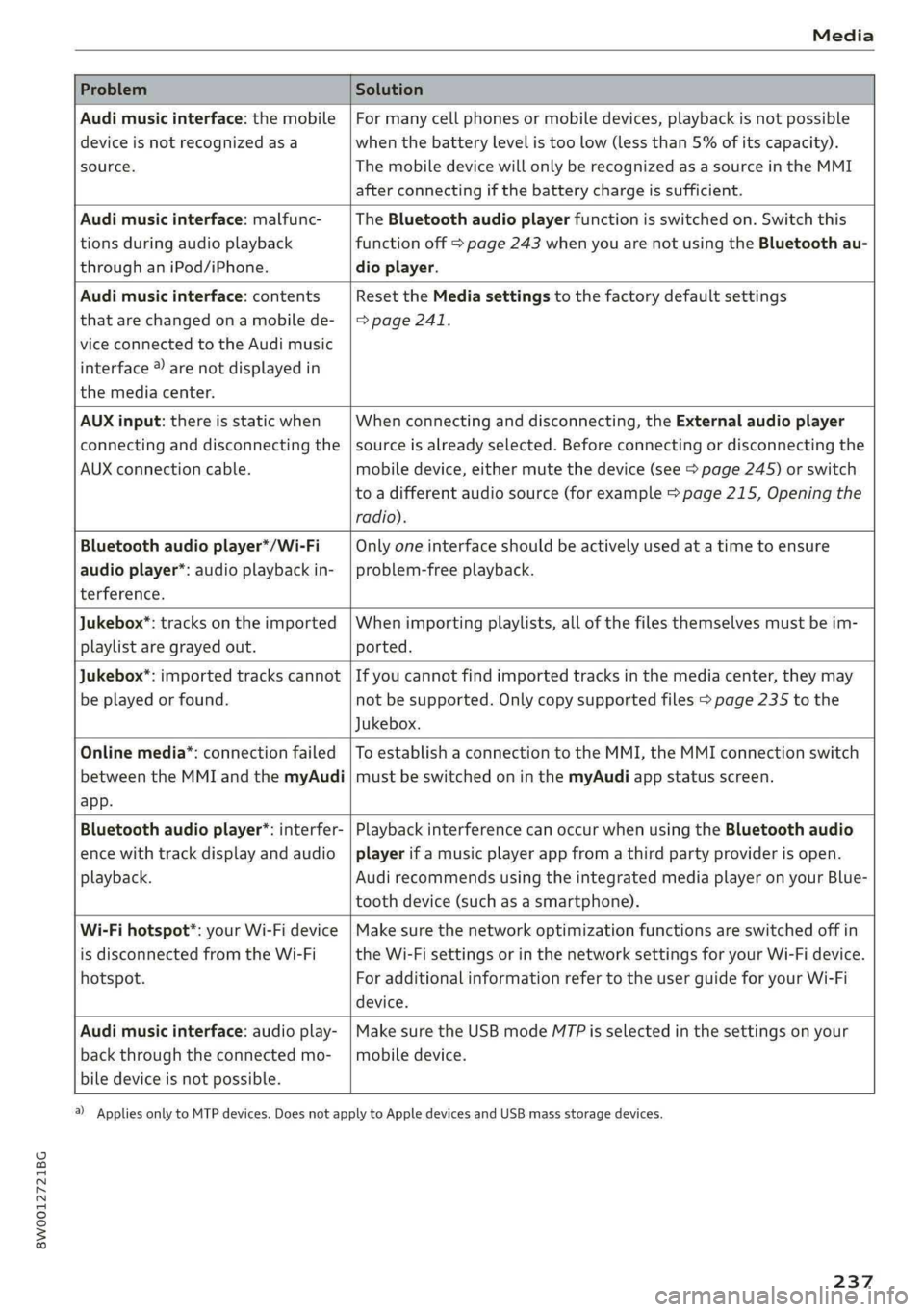
ProblemSolution
Audimusicinterface:themobile
deviceisnotrecognizedasa
source.
Formanycellphonesormobiledevices,playbackisnotpossible
when
thebatterylevelistoolow(lessthan5%ofitscapacity).
ThemobiledevicewillonlyberecognizedasasourceintheMMI
afterconnectingifthebatterychargeissufficient.
Audimusicinterface:malfunc-
tionsduringaudioplayback
throughaniPod/iPhone.
TheBluetoothaudioplayerfunctionisswitchedon.Switchthis
functionoff>page243whenyouarenotusingtheBluetoothau-
dioplayer.
Audimusicinterface:contents
thatarechangedonamobilede-
viceconnectedtotheAudimusic
interface®)arenotdisplayedin
themediacenter.
Reset theMediasettingstothefactorydefaultsettings
>page241.
AUXinput:thereisstaticwhen
connectinganddisconnectingthe
AUXconnectioncable.
Whenconnectinganddisconnecting,theExternalaudioplayer
sourceisalreadyselected.Beforeconnectingordisconnectingthe
mobiledevice,eithermutethedevice(see>page245)orswitch
toadifferentaudiosource(forexample>page215,Openingthe
radio).
Bluetoothaudioplayer*/Wi-Fi
audioplayer*:audioplaybackin-
terference.
Onlyoneinterfaceshouldbeactivelyusedatatimetoensure
problem-freeplayback.
Jukebox®*:tracks ontheimported
playlistaregrayedout.
Whenimportingplaylists,allofthefilesthemselvesmustbeim-
ported.
Jukebox*:importedtrackscannot
beplayedorfound.
Ifyoucannotfindimportedtracksinthemediacenter,theymay
notbesupported.Onlycopysupportedfiles>page235tothe
Jukebox.
Onlinemedia*:connectionfailed
betweentheMMIandthemyAudi
app.
ToestablishaconnectiontotheMMI,theMMIconnectionswitch
mustbe switchedoninthemyAudiappstatusscreen.
Bluetoothaudioplayer*:interfer-
encewithtrackdisplayandaudio
playback.
PlaybackinterferencecanoccurwhenusingtheBluetoothaudio
playerifamusicplayerappfromathirdpartyproviderisopen.
Audi
recommendsusingtheintegratedmediaplayeronyourBlue-
toothdevice(suchasasmartphone).
Wi-Fihotspot*:yourWi-Fidevice
isdisconnectedfromtheWi-Fi
hotspot.
Makesurethenetworkoptimizationfunctionsareswitchedoffin
theWi-FisettingsorinthenetworksettingsforyourWi-Fidevice.
ForadditionalinformationrefertotheuserguideforyourWi-Fi
device.
Audimusicinterface:audioplay-
backthroughtheconnectedmo-
biledeviceisnotpossible.
MakesuretheUSBmodeMTPisselectedinthesettingsonyour
mobiledevice.
2)Applies onlytoMTPdevices.DoesnotapplytoAppledevicesandUSBmassstoragedevices.
237
Page 240 of 392
Audismartphoneinterface
Audismartphone
interface
Setup
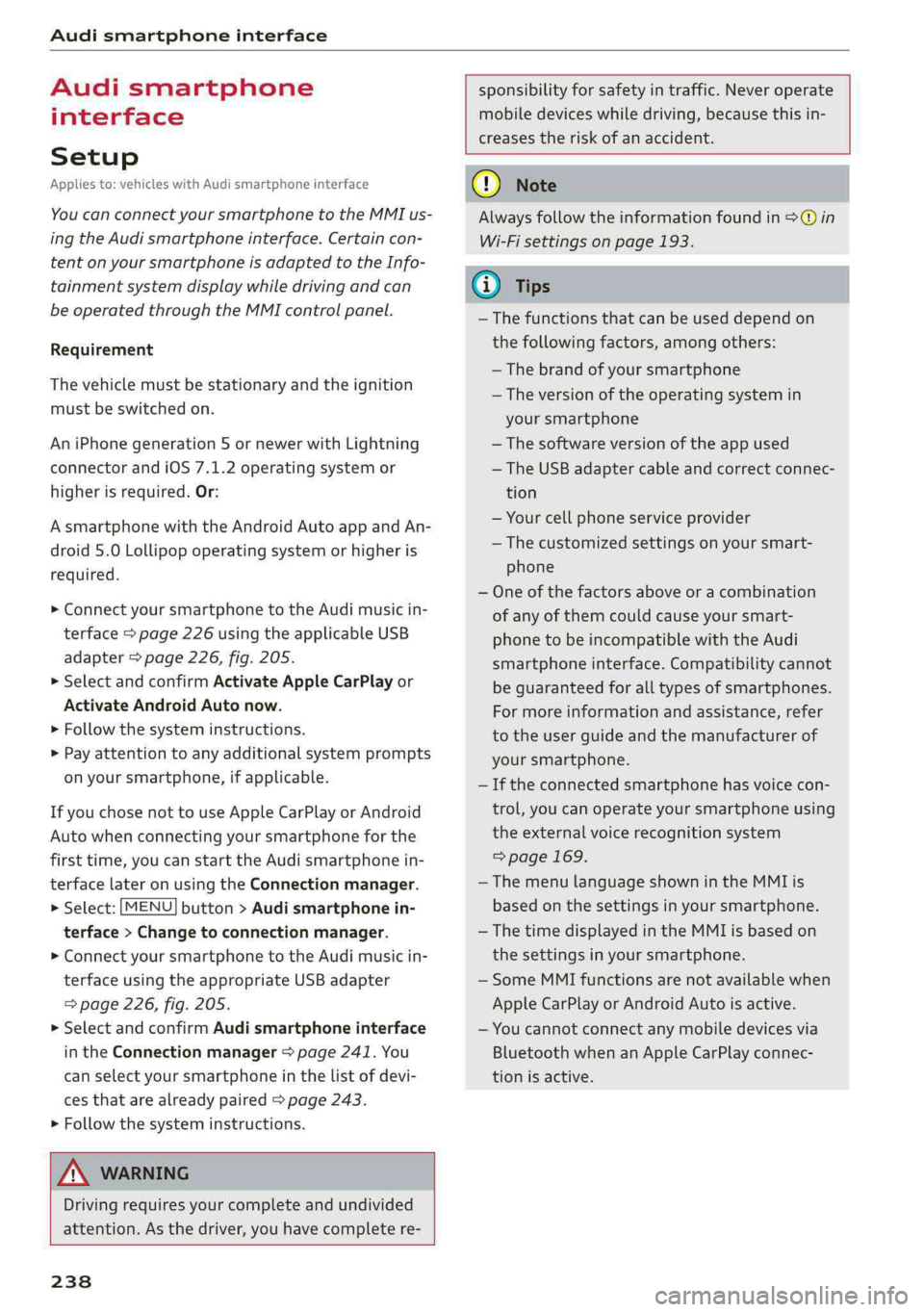
Appliesto:vehicleswithAudismartphoneinterface
YoucanconnectyoursmartphonetotheMMIus-
ingtheAudismartphoneinterface.Certaincon-
tenton yoursmartphoneisadaptedtotheInfo-
tainmentsystemdisplaywhiledrivingandcan
beoperatedthroughtheMMIcontrolpanel.
Requirement
Thevehiclemustbestationaryandtheignition
mustbe switchedon.
AniPhonegeneration5ornewerwithLightning
connectorandiOS7.1.2operatingsystemor
higherisrequired.Or:
AsmartphonewiththeAndroidAuto app andAn-
droid5.0Lollipopoperatingsystemorhigheris
required.
>ConnectyoursmartphonetotheAudimusicin-
terface>page226usingtheapplicableUSB
adapter>page226,fig.205.
> SelectandconfirmActivateAppleCarPlayor
ActivateAndroidAutonow.
>Follow thesysteminstructions.
>»Payattentiontoanyadditionalsystemprompts
onyoursmartphone,ifapplicable.
IfyouchosenottouseAppleCarPlayorAndroid
Autowhenconnectingyoursmartphoneforthe
firsttime,youcanstarttheAudismartphonein-
terfacelateronusingtheConnectionmanager.
>Select:[MENU]button>Audismartphonein-
terface>Changetoconnectionmanager.
>ConnectyoursmartphonetotheAudimusicin-
terfaceusingtheappropriateUSBadapter
=>page226,fig.205.
>»SelectandconfirmAudismartphoneinterface
intheConnectionmanager>page241.You
canselectyoursmartphoneinthelistofdevi-
cesthatarealreadypaired>page243.
>Follow thesysteminstructions.
sponsibilityforsafetyintraffic.Neveroperate
mobiledeviceswhiledriving,becausethisin-
creasestheriskofanaccident.
Z\WARNING
Drivingrequiresyourcomplete andundivided
attention.Asthedriver,youhavecompletere-
238
@)Note
Alwaysfollowtheinformationfoundin>@in
Wi-Fisettingsonpage193.
@)Tips
— Thefunctionsthatcanbeuseddependon
thefollowingfactors,amongothers:
—Thebrandofyoursmartphone
—Theversionoftheoperatingsystemin
yoursmartphone
—Thesoftwareversionoftheappused
—TheUSBadaptercableandcorrectconnec-
tion
—Yourcellphoneserviceprovider
—Thecustomizedsettingsonyoursmart-
phone
—Oneofthefactorsaboveoracombination
ofanyofthemcouldcauseyoursmart-
phonetobe incompatiblewiththeAudi
smartphoneinterface.Compatibilitycannot
beguaranteedforalltypesofsmartphones.
Formoreinformationandassistance,refer
totheuserguideandthemanufacturerof
yoursmartphone.
—Iftheconnectedsmartphonehasvoicecon-
trol,youcan operateyoursmartphoneusing
theexternalvoicerecognitionsystem
=>page169.
— ThemenulanguageshownintheMMIis
basedonthesettingsinyoursmartphone.
— ThetimedisplayedintheMMIisbasedon
thesettingsinyoursmartphone.
—SomeMMIfunctionsarenotavailablewhen
AppleCarPlayorAndroidAutoisactive.
—You cannotconnectanymobiledevicesvia
BluetoothwhenanAppleCarPlayconnec-
tionisactive.
Page 242 of 392
![AUDI A4 2019 Owners Manual Systemsettings
Systemsettings
Settingthedateand
time
Youcansettheclocktimemanuallyorusingthe
GPS*.
>Select:[MENU]button>Settings>leftcontrol
button>MMIsettings>Date&time.
>Or:select:[MENU]button](/img/6/57555/w960_57555-241.png "AUDI A4 2019 Owners Manual Systemsettings
Systemsettings
Settingthedateand
time
Youcansettheclocktimemanuallyorusingthe
GPS*.
>Select:[MENU]button>Settings>leftcontrol
button>MMIsettings>Date&time.
>Or:select:[MENU]button")
Systemsettings
Systemsettings
Settingthedateand
time
Youcansettheclocktimemanuallyorusingthe
GPS*.
>Select:[MENU]button>Settings>leftcontrol
button>MMIsettings>Date&time.
>Or:select:[MENU]button>Vehicle>leftcon-
trolbutton>Vehiclesettings>Date&time.
Automaticsetting
Whenthisfunctionisswitchedon¥,thetime
anddateareautomaticallyset.
Time
Requirement:theAutomaticsettingmustbe
switchedoff.
Pressthecontrolknob.YoucansettheTime
manuallybyturningandpressingthecontrol
knob.
Date
Requirement:theAutomaticsettingmustbe
switchedoff.
Pressthecontrolknob.YoucansettheDate
manuallybyturningandpressingthecontrol
knob.
Timezone
Whenselectingtheappropriatetimezone,a
samplingofcountriesinthiszonewillbelisted.
Automatictimezone*
Whenthisfunctionisswitchedon,thetime
willautomaticallyadjusttothecorresponding
timezone.
Automaticdaylightsavingtime*
Whenthisfunctionisswitchedon¥,thetime
willautomaticallyswitchtodaylightsavingtime.
))TheQistandardmakesitpossibletocharge yourmobile
devicewirelessly.
240
Timeformat
Ifyouselect24h,theclockwilldisplay,forexam-
ple,13:00.IfyouselectAM/PM,theclockwill
display,forexample,1:00PM.
Dateformat
IfyouselectDD.MM.YYYY,thedatedisplaywill
show,forexample,31.08.2018.Ifyouselect
MM/DD/YYYY,thedatedisplaywillshow,forex-
ample,08/31/2018.IfyouselectYYYY-MM-DD,
thedatedisplaywillshow,forexample,
2018-08-31.
MMIsettings
>Select:[MENU]button>Settings>leftcontrol
button>MMIsettings.
Language
Youcanchangethedisplaylanguageaswellas
thelanguageforthevoiceguidance*andvoice
recognitionsystem*.
Thenumberoflanguagesavailabledependson
themarket.
Measurementunits
Thefollowingmeasurementunitscanbesetde-
pendingonavailability:Speed,Distance,Tem-
perature,Fuelconsumption,Volume,Pressure.
Mobiledeviceremindersignal
Appliesto:vehicleswith Audiphonebox
Requirement:yourcellphonemustbeQi-capa-
ble)orconnectedtothe Audimusicinterface@
withaUSBadaptercable>page174,fig.172.
Whenthedeviceremindersignalisswitchedon,
youwillbenotifiedthatyourmobiledeviceisstill
intheAudiphonebox*whenyouleavethevehi-
cle.YoucanselectbetweenSpokencue,Signal
toneandOff.
Mobiledeviceremindersignalvolume:youcan
adjusttheremindersignalvolumebyturningthe
controlknob.
Page 243 of 392
8W0012721BG
Systemsettings
Switchoffpop-up:whenthefunctionisswitched
on[M,themessagesintheInfotainmentsystem
displayregardingthechargingstatusofyourcell
phoneintheAudiphonebox*arehidden.There-
mindernottoforgetyourcellphonewhenleav-
ingthevehicleisalsoswitchedoff.
Tooltips
WhenthisfunctionisswitchedonM,yourMMI
showsyoutipsforinput.Thefrequencyofhow
oftenitdisplaysdecreaseswithtime.
Speechdialogsystem
Appliesto:vehicleswithvoicerecognitionsystem
Dependingonvehicleequipment,thefollowing
functions
maybeavailable:
Commanddisplay:whenthisfunctionisswitch-
edon[M,theMMIwillshowyouthepossible
commandsforvoiceinputintherespective
menu.
Shortdialog:whenthisfunctionisswitchedon
,ashorterformofthepromptsisused.
Commandduringvoiceoutput”:thisfunctionis
switchedonatthefactory.Whenthisfunctionis
switchedon M,youcansaynewcommandsdur-
ingannouncements.Youdonotneedtowaitfor
thesignaltone(beep)duringanannouncement.
Whenthefunctionisswitchedoff|_J,youneedto
waitforthesignaltone(beep)tosayanewcom-
mand.
Volume:youcanadjustthevolumeofthe
promptsbyturningthecontrolknob.
Individualspeechtraining(onlywhenthevehi-
cleisstationary):youcanadaptthevoice recog-
nitionsystemtoyourvoiceorpronunciationinor-
dertoimprovethesystem'sabilitytorecognize
yourspeech.Individualspeechtrainingiscom-
prisedof20speechentriesthatconsistofcom-
mandsand sequencesofnumbers.Youcande-
letetheprogrammedvoicetrainingwiththeRe-
setindividualspeechtrainingfunction.
Displaybrightness
YoucanadjustthebrightnessoftheInfotain-
mentsystemdisplaybyturningthecontrolknob.
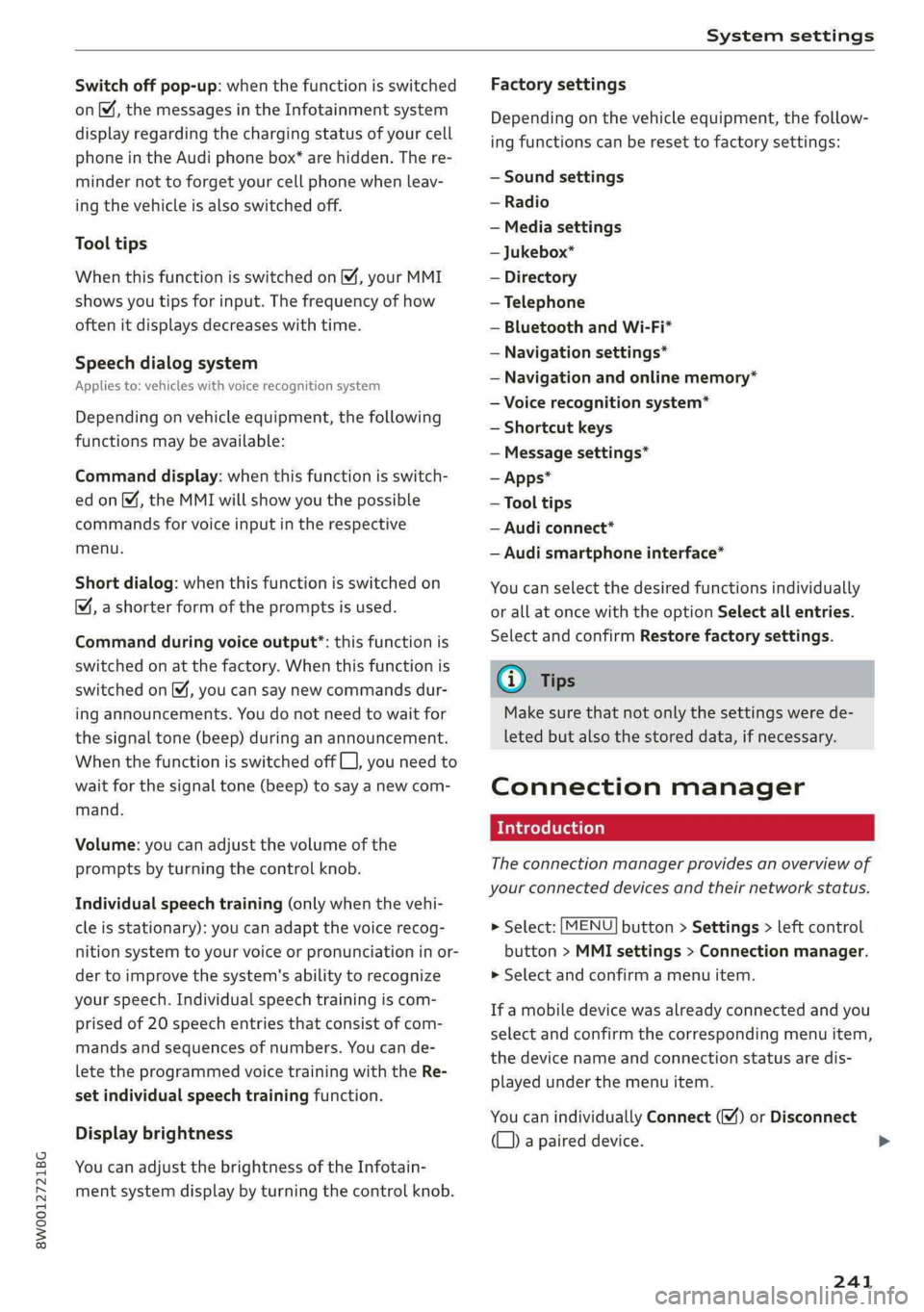
Factorysettings
Depending onthevehicleequipment,thefollow-
ingfunctionscanberesettofactorysettings:
—Soundsettings
—Radio
—Mediasettings
—Jukebox*
—Directory
—Telephone
—BluetoothandWi-Fi*
—Navigationsettings*
—Navigationandonlinememory*
—Voicerecognitionsystem*
—Shortcutkeys
—Messagesettings*
—Apps*
—Tooltips
—Audiconnect*
—Audismartphoneinterface*
Youcanselectthedesiredfunctionsindividually
orallatoncewiththeoptionSelectallentries.
Selectandconfirm Restorefactorysettings.
(i)Tips
Makesurethatnotonlythesettingswerede-
letedbutalsothestoreddata,ifnecessary.
Connectionmanager
Introduction
Theconnectionmanagerprovidesanoverviewof
yourconnecteddevicesandtheirnetworkstatus.
>Select:[MENU]button>Settings>leftcontrol
button>MMIsettings>Connectionmanager.
>Selectandconfirmamenuitem.
If amobiledevicewasalreadyconnectedandyou
selectandconfirmthecorrespondingmenuitem,
thedevicenameandconnectionstatusaredis-
playedunderthemenuitem.
YoucanindividuallyConnect()orDisconnect
(L))apaireddevice.
241
>
Page 244 of 392
Systemsettings
Requirement:
—Thevehiclemustbestationaryandtheignition
mustbe switchedon.
—TheBluetoothsettingswillopenonyourmo-
biledeviceduring theconnectionsetup.
—TheBluetoothfunctionandvisibilityoftheMMI
=>page243andmobiledevicemustbeswitch-
edon.
—Themobiledevicetobeconnectedmustnot be
connectedtoanyotherBluetoothdevice.
aaluatlevadali)
Appliesto:vehicleswithtelephone
—Connectnewdevice:searchforandconnecta
cellphone.
—Listofdevicesalreadypaired:selectyourcell
phonefromthelistofallthedevicesthatare
alreadypaired.
YoTavaeli
Appliesto:vehicleswithtelephone
—Connectnewdevice:searchforandconnecta
cellphone.
—Listofdevicesalreadypaired:selectyourcell
phonefromthelistofallthedevicesthatare
alreadypaired.
PELeMeolaal-vaalela)
Appliesto:vehicleswithAudiconnectInfotainment
—Thedataconnectionismadeusingtheembed-
dedSIMcard)>page186.Youdonotneedto
adjustanyadditionalsettings.
@)Note
Alwaysfollowtheinformationfoundin>@in
Wi-Fisettingsonpage193.
myAudiapp
Appliesto:vehicleswithAudiconnectInfotainment
Requirement:themyAudiappmustbeinstalled
andopenonyourmobiledevice.
D_SIMcardinstalledinthevehicleatthefactory.
242
—Connectnewdevice:searchforandconnecta
mobiledevice(such asasmartphone).
—Listofdevicesalreadypaired:selectyourmo-
biledevicefromthelistofallthedevicesthat
arealreadypaired.
Audioplayer
Appliesto:vehicleswithBluetoothorWi-Fiaudioplayer
Bluetoothplayer*
Requirement:theBluetoothfunctionandvisibili-
tymustbe switchedonintheMMI>page243
andontheBluetoothaudioplayer.
—Connectnewdevice:pressthecontrolknob.
SelectBluetoothaudioplayer.Searchforand
connectamobiledevice.
—Listofdevicesalreadypaired:selectaBlue-
toothdevicefromthelistofallthedevicesthat
arealreadypaired.
Wi-Fiaudioplayer*
Requirement:theWi-Fihotspot*ontheMMI
=page193andonyourWi-Fiaudioplayermust
be switchedon.
—Connectnewdevice:pressthecontrolknob.
SearchforandconnectaWi-Ficapabledevice.
—DisconnectWi-Fiaudioplayer:deactivatethe
Wi-FionyourWi-Ficapabledevice.Thedevice
willbeautomaticallyremovedfromthelist.
C)Note
Alwaysfollowtheinformationfoundin>@in
Wi-Fisettingsonpage193.
Appliesto:vehicleswithtelephone
Displaycontactsfromacellphone(oranaddi-
tionalcellphone).
Requirement:nocellphonescanbeconnectedto
theMMIusingtheHandsfreeprofile.
—Connectnewdevice:searchforandconnecta
newcellphone.