display AUDI A4 2019 Owners Manual
[x] Cancel search | Manufacturer: AUDI, Model Year: 2019, Model line: A4, Model: AUDI A4 2019Pages: 392, PDF Size: 99.53 MB
Page 182 of 392
Telephone
Telephonesettings
See>page183.
@)Tips
MessagesthataredeletedintheMMIarealso
deletedinthemobiledeviceautomatically.
Appliesto: cellphoneswithBluetoothMessageAccessProfile
(MAP)
Dependingonthetypeofmobiledevicebeing
used,youmaybeabletoreceiveandsende-
mailsthroughtheMMI.
Requirement:acellphonemustbeconnectedto
theMMIviaBluetoothMAP(MessageAccessPro-
file)>page171.Youcanfindoutifyourmobile
devicesupportsthisfunctionbycheckingyour
mobiledeviceowner'smanual.
>Select:[MENU]button>Telephone>leftcon-
trolbutton>e-mail(myPhone)/e-mail(secon-
daryphone)*.
Writenewe-mail
SelectandconfirmWritenewe-mail.
—Usingatemplate:selectandconfirmthede-
siredtemplatefromthelist.
—Writingyourowntext*:selectandconfirmDo
notusetemplate.EntertextusingtheMMI
touchcontrolpad”ortheletterspeller.
—Enteroneormorerecipients.
—SelectandconfirmSend.
Inbox
Allreceivede-mailsaredisplayed.
Sent
Allsente-mailsaredisplayed.
Outbox
Alle-mailsthatwillbesentaredisplayed.
Drafts
Allsavede-mailsthathavenotbeensentyetare
displayed.
180
CG)Note
Alwaysfollowtheinformationfoundin>@in
Wi-Fisettingsonpage193.
@Tips
—Formoreinformationonsupportedmobile
devices,visitwww.audiusa.com/bluetooth
orcontactanauthorizedAudidealerorau-
thorizedAudiServiceFacility.
—Toensurethatyoursente-mailsarere-
ceived,connectyourcellphonetotheWi-Fi
hotspot*inthevehicleso thatthe e-mail
apponyourcellphonecontinuestohaveIn-
ternetaccess.Ifyouarestillnotreceivinge-
mailseventhoughyouhaveasuccessful
connection,thencontactyoure-mailservice
provideroryourcellphoneserviceprovider.
Messageoptions
Appliesto: cellphoneswithBluetoothMessageAccessProfile
(MAP)
>Select:[MENU]button>Telephone>leftcon-
trolbutton>e-mail(myPhone)/e-mail(secon-
daryphone)*>Inbox/Sent/Outbox>right
controlbutton.
Thefollowingoptionsmaybeavailabledepend-
ingontheselectedmenu.
Storeastemplate
Tene-mailtemplatesarestoredintheMMI.You
cansaveupto10additionaltemplatesofyour
own.
—Createane-mail.
—Selectandconfirm Storeastemplate.
Resumelasteditede-mail
Thelaste-mailinprogresscanberesumed.
Reply*
Areplycanbesentfortheselectede-mailinthe
Inbox.
Replytoall*
Areplycanbesentfortheselectede-mailinthe
Inboxanditwillbesenttoalloftheenteredre-
cipients.
Page 183 of 392
8W0012721BG
Telephone
Forward
Theselectede-mailcanbeforwardedtoadiffer-
entrecipient.
Deletethismessage*
Theselectede-mailcanbedeleted.
Readout»)
YoucanhavetheMMIreadanopene-mail.
E-mailsettings*
Todisplaywhenanewe-mailisreceived,activate
theE-mailnotifications.Newe-mailsareindicat-
edwithanenvelope&intheInfotainmentsys-
temdisplaystatusline.
Connectionmanager
See>page241.
Bluetoothsettings*
See>page243.
Onlinesettings*
See>page243.
Wi-Fisettings
See>page193.
Telephonesettings
See>page183.
@)Tips
—MessagesthataredeletedintheMMIare
alsoautomaticallydeletedintheconnected
cellphone.
—You cannotreadanymessageswhiledriv-
ing.
Listeningtovoicemail
Appliesto:vehicleswithtelephone
>Select:[MENU]button>Telephone>leftcon-
trolbutton.SelectandconfirmCalllist/Direc-
tory/Favorites>Voicemail.
Notavailableinalllanguages.
—Enteringthevoicemailnumber:enterthede-
sirednumber.SelectandconfirmOK.
—Dialingthevoicemailnumber:selectandcon-
firmVoicemail.
@)Tips
—Thisservicemustbesetupandactivatedin
advancebythecellphoneserviceprovider.
Youcanobtainmoreinformationfromyour
cellphoneserviceprovider.
— Thevoicemailnumberdependsonthecell
phoneserviceprovider.
Directory
Openingthedirectory
Appliesto:vehicleswithtelephone
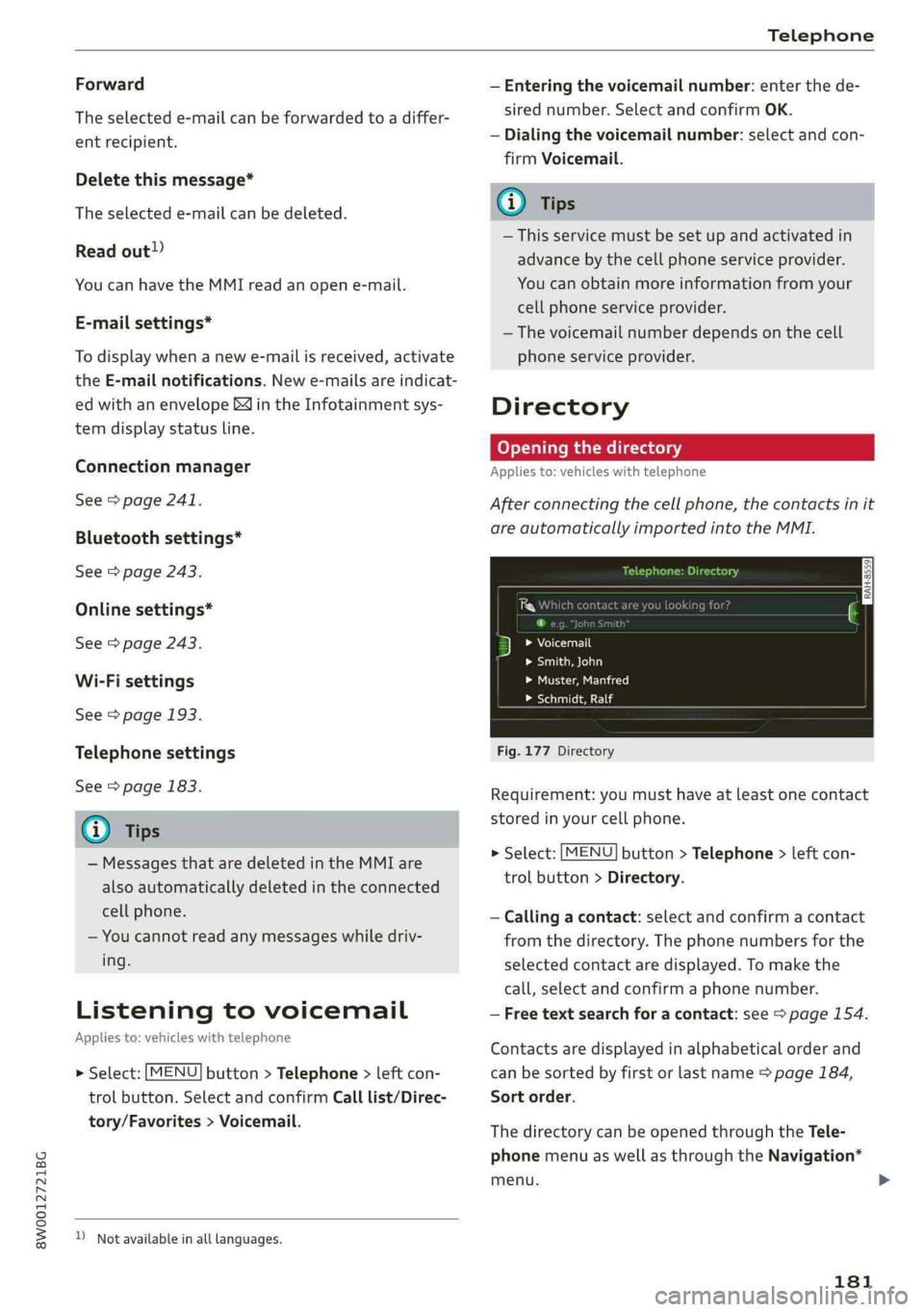
Afterconnectingthecellphone,thecontactsinit
areautomaticallyimportedintotheMMI.
Pw
FYLaolecuirls
>Smith,John
Peet)
LaLe
Fig.177Directory
Requirement:youmusthaveatleastonecontact
storedinyourcellphone.
>Select:[MENU]button>Telephone>leftcon-
trolbutton>Directory.
—Calling acontact:selectandconfirmacontact
fromthedirectory.Thephonenumbersforthe
selectedcontactaredisplayed.Tomakethe
call,selectandconfirmaphonenumber.
—Freetextsearchforacontact:see>page154.
Contactsaredisplayedinalphabeticalorderand
canbesortedbyfirstorlastname>page184,
Sortorder.
ThedirectorycanbeopenedthroughtheTele-
phonemenuaswellasthroughtheNavigation*
menu.
181
Page 184 of 392
Telephone
@Tips
—Additionalinformationonfreetextsearches
canbefoundunder>page154.
—Checkforapossiblerequesttosynchronize
onyourcellphone.Requeststosynchronize
thedirectorymustbeconfirmedso that
yourcellphonecontactscan beloadedinto
theMMI.
— ThecontactdisplayintheMMIdependson
themobiledevicebeingused.Formorein-
formationonsupportedmobiledevices,vis-
itwww.audiusa.com/bluetoothorcontact
anauthorizedAudidealerorauthorizedAu-
diServiceFacility.
—Pleasenotethatonlythedirectoryfromthe
primaryphone*isalwaysdisplayed.
— Thecontactsfromthemobiledevicemay
notbetransferredinalphabeticalorder.If
therearetoomanyentries,contactswith
differentfirstlettersmaybemissinginthe
MMI.
—ThecontactsinthelocalMMImemoryare
alwaysvisibleandcan be accessedbyother
users.
Freetextsearchforacontact
Appliesto:vehicleswithtelephone
MENU >Select:button>Telephone>leftcon-
trolbutton>Directory.
>Tolimitthesearch,entertheinitialsofthecon-
tactbeingsearchedwitheachinitialseparated
byaspaceintheinputfield.Enteradditional
lettersifnecessary.
> Selectandconfirmacontactfromthedirectory.
Thephonenumbersfortheselectedcontactare
displayed.
>Tomakethecall,selectandconfirmaphone
number.
G)Tips
—Youcanscrollthroughlonglistsquicklyby
turningthecontrolknobquickly.Thescroll-
ingspeeddependsonthenumberoflisten-
tries.
—Additionalinformationonfreetextsearches
canbefoundunder>page154.
182
Showingcontactdetails*
Appliesto:vehicleswithtelephone
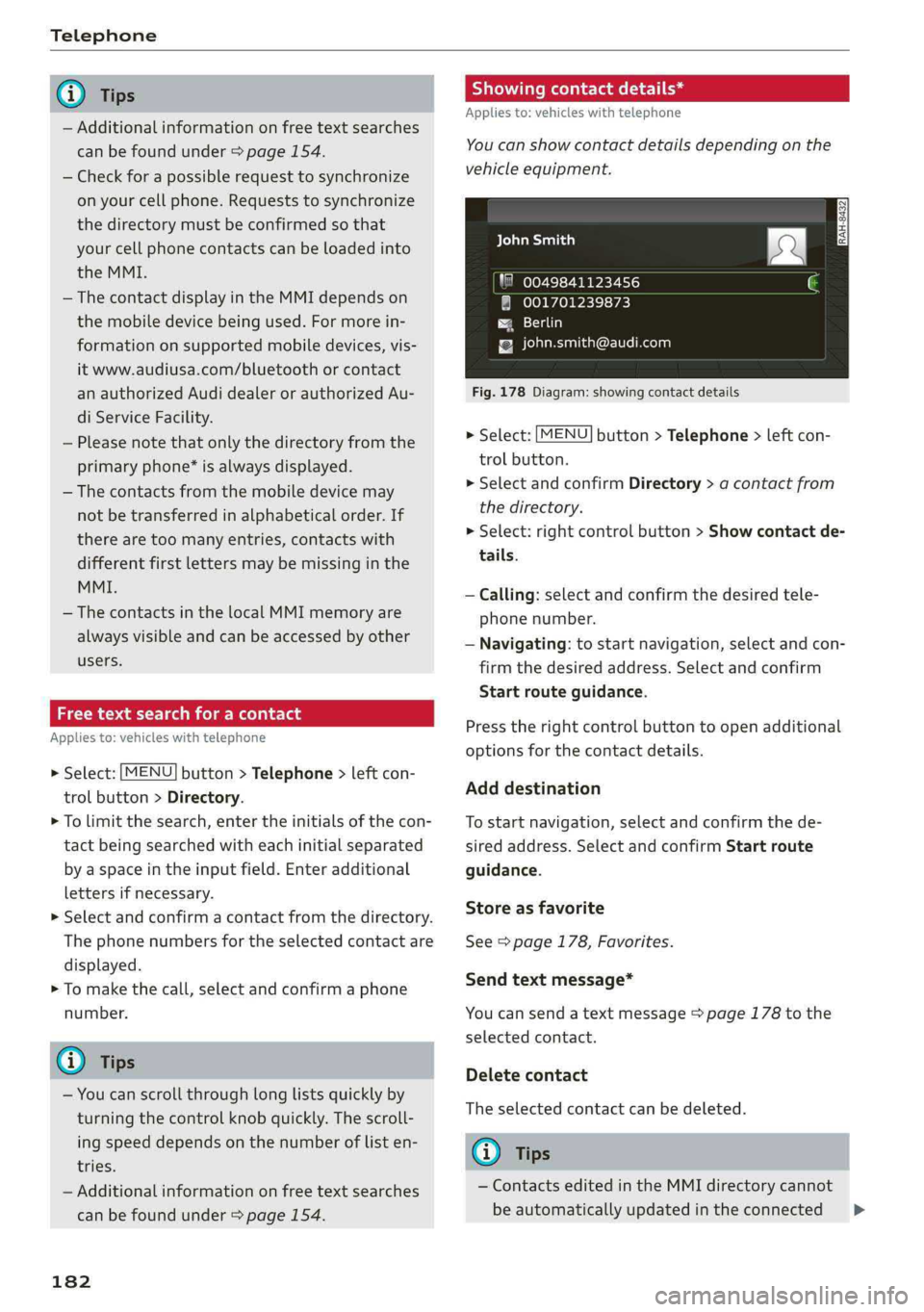
You canshowcontactdetailsdepending onthe
vehicleequipment.
aCeyealian)
"80049841123456
@001701239873
Paes)
{[email protected]
Fig.178Diagram:showingcontactdetails
>Select:[MENU
trolbutton.
>SelectandconfirmDirectory>acontactfrom
thedirectory.
>Select:rightcontrolbutton>Showcontactde-
tails.
button>Telephone>leftcon-
—Calling: selectandconfirmthedesiredtele-
phonenumber.
—Navigating:tostartnavigation,selectandcon-
firmthedesiredaddress.Selectandconfirm
Startrouteguidance.
Presstherightcontrolbuttontoopenadditional
optionsforthecontactdetails.
Adddestination
Tostartnavigation,selectandconfirmthede-
siredaddress.SelectandconfirmStartroute
guidance.
Storeasfavorite
See>page178,Favorites.
Sendtextmessage*
Youcansendatextmessage>page178tothe
selectedcontact.
Deletecontact
Theselectedcontactcan bedeleted.
Gi)Tips
—ContactseditedintheMMIdirectorycannot
beautomaticallyupdatedintheconnected>
Page 188 of 392
Audiconnect
Audiconnect
Introduction
Dependingonthecountryandthevehicleequip-
ment,thefollowing functionsmaybeavailable:
—AudiconnectInfotainment
—Audiconnectvehiclecontrol
@)Tips
—AUDIAGprovidesaccesstoservicesfrom
thirdpartyproviders.Permanentavailability
cannotbeguaranteed,becausethatde-
pendsonthethirdpartyprovider.
—Youcanalso findmoreinformationonAudi
connectonlineatwww.audiusa.com.
Audiconnect
Infotainment
Appliesto:vehicleswithAudiconnectInfotainment
WithAudiconnectInfotainmentservices,online
informationistransmitteddirectlytothevehicle.
AnInternetconnectionisrequiredtouseAudi
connectInfotainment.Dependingonthe country
andthevehicleequipment,thefollowingoptions
maybeavailable:
ZAWARNING
To reducetheriskofanaccident,onlyuseAu-
diconnectInfotainmentserviceswhenroad
andtrafficconditionspermit.Alwaysreadand
followthenotesin>page145,Trafficsafety
information.
G)Tips
— ThedataconnectionforAudiconnectInfo-
tainmentservicesispre-configuredatthe
factory.Youcanchangethedataconnection
settingsatanytimeifyouneedtochange
theconfiguration>page192.
—UseoftheLTE*mobilenetworkstandardis
notavailableineverycountry.Contactan
authorizedAudidealerorauthorizedAudi
ServiceFacilityoryourcellphoneservice
providerforadditionalinformation.
186
—AudiconnectInfotainmentservicesareonly
availablewithinthecellphonenetworkcov-
eragefromyourcellphoneserviceprovider.
—Availability,scope,providers,screendisplay,
andcostsofservicesmayvarydependingon
thecountry,model,modelyear,enddevice
andrates.
EmbeddedSIMcard
Appliesto:vehicleswithAudiconnectInfotainmentandan
embeddedSIMcard
ThedataconnectionforAudiconnectInfotain-
mentservicesismadethroughanembeddedSIM
card(eSIMcard)thatisinstalledinthevehicle.
Youcan usetheAudiconnectInfotainmentserv-
icesimmediately.
()Note
—TheconnectioncostsforAudiconnectInfo-
tainmentservicesareincludedintheprice
ofAudiconnectInfotainment.Pleasenote
thatchargesmayapplywhenusingcertain
services.Forexample,thisappliestoInter-
netradio/podcastsorforservicesthatuse
theWi-Fihotspot,suchasonlinemedia
sources.Dependingonthecountry,data
plansmayneedtobepurchasedforthese
services>page194.Foradditionalinfor-
mation,seewww.audiusa.com/myaudi.
—Incertainsituations,theWi-Fihotspotdata
connectionmaybeestablishedasareplace-
mentfortheSIMcardonyourWi-Fidevice.
Thisfeature dependsontheconfiguration
ofyourWi-Fideviceandoperatingsystem.
Thiscouldresultinfeesdepending onyour
cellphoneserviceprovider,especiallyifyou
areusingthisfeaturewhileabroad.Aflat
ratedataplanisstronglyrecommended.For
moreinformation,contactyourcellphone
serviceproviderorrefertotheowner'sman-
ualforyourWi-Fidevice.
Page 189 of 392
8W0012721BG
Audiconnect
Audiconnect
Infotainmentservices
Appliesto:vehicleswithAudiconnectInfotainment
Requirement:yourvehiclemustbeconnectedto
theInternet>page186.
SomeAudiconnectInfotainmentservicesmust
beconfiguredthroughyourpersonalmyAudiac-
countbeforeusingthemforthefirsttime.
>Registeratwww.audiusa.com/myaudi.
>AddyourvehicletoyourmyAudiaccount.
>Select:[MENU]button>Audiconnect>right
controlbutton>Login.
>LogintomyAudiinthevehicleusingyoure-
mailaddressandpassword.
@)Tips
—ForsomeAudiconnectInfotainmentserv-
ices,youmayalsohavetoenteryourmyAu-
diaccessinformationwhenaccessingserv-
icesintheMMI.
—SomeAudiconnectInfotainmentservices
mustbeactivatedatwww.audiusa.com/
myaudi.
—Regardlessofthekeyuserandadditional
users,youcanonlyconnectonemyAudiac-
count
toyourvehicle.
—Tomakeloggingineasierinthevehicle,you
willreceivean8-digitmyAudiPINasanal-
ternativetoyourmyAudipasswordafteryou
havecreatedamyAudiaccount.
—Fordetailedinformationonconfiguration,
visitwww.audiusa.com/myaudi.
NeeemerCelta
Appliesto:vehicleswithAudiconnectInfotainment
>Select:the[MENU]button>Audiconnect.
AlistofalloftheavailableAudiconnectInfotain-
mentservicesisshownontheInfotainmentsys-
temdisplay.
Youcanalsofilterthe AudiconnectInfotainment
servicesbycategory:
Notavailableinalllanguages.
>Select:[MENU]button>Audiconnect>left
controlbutton>forexample,Navigationfor
theAudiconnectInfotainmentservicesinthe
Navigationmenu.
ETtated
Appliesto:vehicleswith AudiconnectInfotainment
>Select:[MENU]button>Audiconnect>desired
AudiconnectInfotainmentservice>rightcon-
trolbutton.
DependingontheequipmentandtheAudicon-
nectInfotainmentserviceselected,thefollowing
basicfunctionsmaybeavailable:
Saveaspreview
YoucanalsoseeapreviewoftheselectedAudi
connectInfotainmentservicesontheAudicon-
nectInfotainmenthomepage.
Showonmap
Youcanshowselectedcontentsonthemapand
usethemforrouteguidance.
Login
See>page187.
Readout!)
YoucanallowtheMMItoreadouttheselected
contents.
Call
If aphonenumberwasassignedtoanentry,you
cancallthenumber,forexampletoreservetick-
ets.
Refresh
ThecontentsfortheselectedAudiconnectInfo-
tainmentservicearerefreshed.
Startrouteguidance
If alocationwassavedwithanentry,youcan use
itasthenavigationdestination.Routeguidance
startsimmediately.>
187
Page 190 of 392
Audiconnect
Changesearcharea
Thesetsearchareacanbechangedatanytime.
Additionalinformationonsearchareascan be
foundunder>page201.
ClosingAudiconnectInfotainmentservices
Regardlessofthefunctionselected,youcan
closean AudiconnectInfotainmentserviceat
anytimeandreturn tothehomescreen.
SYA(a1
Appliesto:vehicleswithAudiconnectInfotainment
Dependingonthecountryandthevehicleequip-
ment,thefollowingservicesmaybeavailable:
Weather
Informationoncurrentweatherconditionsas
wellasweatherforecastsfortheselectedsearch
area.
> SelectandconfirmWeather.
News
>Select:Onlinenews>desirednewsfeed>a
headline.
IfyouloggedintomyAudiinyourvehicle
=page187,personalizednewsfeedscanbedis-
played.
Twitter
Requirement: youmusthaveconnectedyourve-
hiclewithmyAudi>page187.Youmusthave
connectedyourmyAudiaccountwithTwitter.
YoucanonlyconnectoneTwitteraccountwith
yourmyAudiaccount.Notallsettingscan bead-
justedintheMMI.Somecanonlybeadjusted
throughtheTwitterwebsite.
>Select:Twitter>leftcontrolbutton>desired
function(forexample,Trends).
Travel(travelguide)
Requirement:themyAudiappmustbeinstalled
andopenonyourmobiledevice.Yourmobilede-
vicemustbeconnectedtothevehicleWi-Fihot-
spot>page193.
188
>Select:[MENU]button>Audiconnect> left
controlbutton>Informationcategory>Trav-
el.
Afteropeningthetravelguide,traveltipsinyour
areawillbedisplayedincludingcurrentratingsas
wellasthecorrespondingcategory.
>Toswitchcategories(forexample,bars near-
by),select:leftcontrolbutton>selectacate-
gory.
Trafficlightinformation
See>page189.
ZA\WARNING
—Itisonlysafe tousetablets,laptops,mobile
devicesandothersimilardeviceswhenthe
vehicleisstationarybecause,likeallloose
objects,theycouldbethrownaroundthein-
sideofthevehicleinacrashandcauseseri-
ousinjuries.Storethesetypesofdevicesse-
curelywhiledriving.
—Donotuseanywirelessdevicesonthefront
seatswithinrangeoftheairbagswhiledriv-
ing.Also readthewarningsinthechapter
=>page265,Frontairbags.
()Note
ReadtheinformationaboutAudiconnect,and
besuretonotetheconnectivitycostssection
=>@©inWi-Fisettingsonpage193.
Page 191 of 392
8W0012721BG
Audiconnect
Trafficlightinformation
Appliesto:vehicleswithtrafficlightinformation
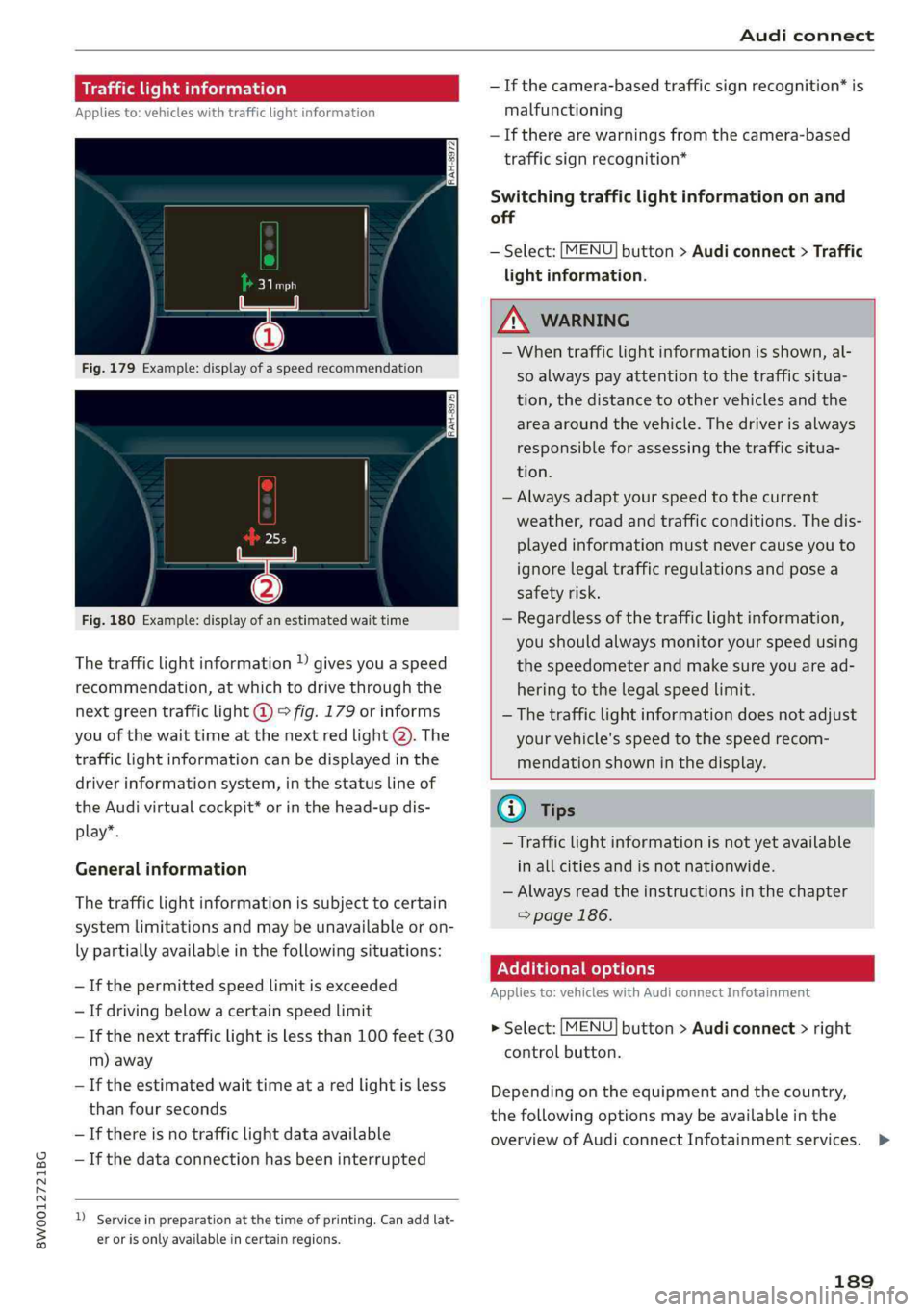
Fig.180Example:displayofanestimatedwaittime
Thetrafficlightinformation»givesyouaspeed
recommendation,atwhichtodrivethroughthe
nextgreentrafficlight@°fig.179orinforms
youofthewaittimeatthenextredlight@).The
trafficlightinformationcanbedisplayedinthe
driverinformationsystem,inthestatuslineof
theAudivirtualcockpit*orinthehead-updis-
play”.
Generalinformation
Thetrafficlightinformationissubjecttocertain
systemlimitationsandmaybeunavailableoron-
lypartiallyavailableinthefollowingsituations:
—Ifthepermittedspeedlimitisexceeded
—Ifdrivingbelowacertainspeedlimit
—Ifthenexttrafficlightislessthan100feet(30
m)away
—Iftheestimatedwaittimeataredlightisless
thanfourseconds
—If thereisnotrafficlightdataavailable
—Ifthedataconnectionhasbeeninterrupted
)Serviceinpreparationatthetimeofprinting.Can addlat-
erorisonlyavailableincertainregions.
—Ifthecamera-basedtrafficsignrecognition*is
malfunctioning
—Iftherearewarningsfromthecamera-based
trafficsignrecognition*
Switchingtrafficlightinformationonand
off
—Select:[MENU]button>Audiconnect>Traffic
lightinformation.
ZAWARNING
—Whentrafficlightinformationisshown,al-
soalways payattentiontothetrafficsitua-
tion,thedistancetoothervehiclesandthe
areaaroundthevehicle.Thedriverisalways
responsibleforassessingthetrafficsitua-
tion.
—Alwaysadaptyourspeedtothecurrent
weather,roadandtrafficconditions.Thedis-
playedinformationmustnevercauseyouto
ignorelegaltrafficregulationsandposea
safetyrisk.
—Regardlessofthetrafficlightinformation,
youshouldalwaysmonitoryourspeedusing
thespeedometerandmakesureyouaread-
hering
tothelegalspeedlimit.
—
Thetrafficlightinformationdoesnotadjust
yourvehicle'sspeedtothespeedrecom-
mendationshowninthedisplay.
@)Tips
—Trafficlightinformationisnotyetavailable
inallcitiesandisnotnationwide.
—Alwaysreadtheinstructionsinthe chapter
=>page186.
Additionaloptions
Appliesto:vehicleswith AudiconnectInfotainment
>Select:[MENU]button>Audiconnect>right
controlbutton.
Depending ontheequipmentandthecountry,
thefollowingoptionsmaybeavailableinthe
overviewofAudiconnectInfotainmentservices.>
189
Page 192 of 392
Audiconnect
AboutAudiconnect
Hereyouwillfindlegalinformationregarding
AudiconnectInfotainmentusage.
Login
See>page187.
Connectionmanager
See>page241.
Licensesubscription
Thevalidityandexpirationdateofyourlicenses
aredisplayed.
Refresh
ThecontentoftheselectedAudiconnectInfo-
tainmentserviceortheentireAudiconnectInfo-
tainmentlistisupdated.
Dataprivacy
Requirement:theignitionmustbe switchedon.
Location,vehicle,andpersonaldataaretransmit-
tedwhenusingAudiconnectservices.
Allowingsendingofdata
—SelectandconfirmActivatedataconnection.
Thedatamoduleforthe useofallAudiconnect
serviceswillbeactive.
Restrictingsendingofdata
—SelectandconfirmActivateprivacy.Thedata
connectionislimitedordeactivateddepending
ontheequipment.ThemajorityofAudiconnect
serviceswillnotbeavailable.
Thefollowinginterfacesarenotaffectedbythis
setting:Bluetooth,BluetoothLowEnergy(BLE),
Wi-Ficonnection,Audismartphoneinterface
(ASI),NearFieldCommunication(NFC),charging
communication(e-tron),ElectronicTollCollect
(ETC),ifequipped.
@)Note
Youareresponsibleforallprecautionstaken
fordataprotection,anti-virusprotection,and
protectionagainstlossofdataon mobilede-
))Dependsonthecountryand equipment. Theseservices
are availableforalimitedtime.
190
vicesthatareusedtoaccesstheInternet
throughtheWi-Fihotspot.
(i)Tips
—Ifthetransmissionofdataislimited,data
willstillbetransmittedtoverifysubscrip-
tions.
—Ifthetransmissionofdataislimited,itwill
havethefollowingeffectsontheexchange
ofdataforAudiconnectservicesandemer-
gencycalls,ifequipped:
—Theemergencycallfunctionwillremain
availablewithoutrestrictionsandwillcon-
tinuetotransmitdata.
—Ifanonlineroadsideassistancecallisini-
tiated,nodatawillbetransmitted,buta
callwillbemade.
—IftheGeofencingAlert,SpeedAlert,
and/orValetAlertserviceshavebeenacti-
vatedbythekeyuser,thentheywillre-
mainavailablewithoutrestrictionsand
continuetotransmitdata.
Audiconnectvehicle
controlservices
Appliesto:vehicleswithAudiconnectvehiclecontrol
WithAudiconnectvehiclecontrolservices)),you
canutilizevariousservicesusingthemyAudiapp
oronlineatwww.audiusa.com/myaudi.
(i)Tips
—Accessingspecificdataorcontrollingfunc-
tionsremotelydependsonthechargelevel
ofthevehiclebattery.Therefore,these
functionsonlyhavelimitedavailabilityafter
switchingofftheignition.
—AneSIMcardestablishestheInternetcon-
nectionforAudiconnectvehiclecontrol
services.Thecostsforthisareincludedin
thepriceofAudiconnectvehiclecontrol
services.Thecellphonenetwork,forexam-
ple,mustbeavailabletousetheseservices.
Page 193 of 392
8W0012721BG
Audiconnect
Appliesto:vehicleswithAudiconnectvehiclecontrol
ForsomeAudiconnectvehiclecontrolservices,
thevehicleownermustbesetupasthekeyuser.
Setkeyuser
Requirement:akeyusermustnotbesetyet.The
ignitionmustbe switchedon.
>Tosetakeyuserforthevehicle,youwillneeda
myAudiaccount.Registeratwww.audiusa.
com/myaudi.
>Linkyourvehicletotheaccountatwww.
audiusa.com/myaudiandthenverifyyour
myAudiaccountimmediatelyinordertouse
the Audiconnectvehiclecontrolservices.
»YoucanalsoverifyyourmyAudiaccountlater.
Log
inatwww.audiusa.com/myaudiwithyour
accessinformationandverifyyourmyAudiac-
countinusermanagementusingtheverifica-
tionprocessthatisgiven.
>Select:[MENU]button>Audiconnect>ifnec-
essary,Displayavailablefunctions>rightcon-
trolbutton>Audiconnectusermanagement>
Keyuser>Set keyuser.
>
EnteryourmyAudiusernameandthe10-digit
vehiclecode=page29.Thekeyuserisset.You
havetherightstouse the Audiconnectvehicle
controlservices>page191aswellastheabili-
tytomanageothervehiclefunctionsandany
otherusers.
Resettingtheprimaryuser
Ifyouremovethekeyuser,allotherusersand
theirauthorizationswillbedeleted.Itwillno
longerbepossible touse the Audiconnectvehi-
clecontrolservices.
Requirement:akeyusermustbe set.Theignition
mustbe switchedon.
Select:[MENU]button>Audiconnect>right
controlbutton>Audiconnectusermanagement
>Keyuser>Resetkeyuser.
UsingthemyAudiapp
>InstallthemyAudiapponyourmobiledevice
andloginwithyouraccessinformation.
@Tips
—Ifyousellyourvehicle,resetthekeyuser
andrestoreallsettings tothefactoryde-
faultsettings>page241.
—Itmayalsobenecessarytoenteryour4-
digitmyAudiPINwhenaccessingsomeAudi
connectvehiclecontrolservices.
—Storethevehiclecodeinasecureplace.It
maybenecessarytore-enterthevehicle
code.
—Payattentiontoupper-andlower-caselet-
terswhenenteringthevehiclecode.
—Ifyoudonot havethe10-digitvehiclecode,
contactanauthorizedAudidealerorauthor-
izedAudiServiceFacility.
Additionaloptions
Appliesto:vehicleswith Audiconnectvehiclecontrol
Licensesubscription
Thevalidityandexpirationdateofyoursubscrip-
tionsaredisplayed.Whenthisfunctionisactivat-
ed,youwillbenotifiedbeforeyoursubscription
expires.
Select:[MENU]button>Audiconnect>Display
availablefunctions>rightcontrolbutton>Li-
censesubscription.
Warninglevels
Requirement:theprimaryusermusthavesetone
ormorewarninglevels.Secondaryuserscanonly
seeifawarninglevelisactiveornot.
Select:[MENU]button>Audiconnect>right
controlbutton>Alerts.
Appliesto:vehicleswith Audiconnectvehiclecontrol
Depending onthecountryandthevehicleequip-
ment,thefollowingservicesmaybeavailable:
Remotelockingandunlocking
Requirement:thevehiclemustbeparkedandthe
ignitionmustbeswitchedoff.
Thisserviceallowsyoutounlockor lockyourve-
hicle.>
191
Page 194 of 392
Audiconnect
Vehiclestatusreport
Thisservicetransfersdriverinformationsystem
datatoaserver.Dependingonthevehicleequip-
ment,certaindatamaybeaccessed,suchasthe
remainingrangeormileage.Thevaluesmaydif-
ferfromthevaluesdisplayedinthevehicle.
Car Finder
Thisservicetransmitstheparkinglocationtoa
serverwhentheignitionisswitchedoff.Thevehi-
clelocation,yourlocation,ortheroutetoyour
vehiclecanbedisplayed.Thenewparkingloca-
tioncannotbedeterminedwiththisserviceifthe
vehicleismovedaftershuttingthevehicleoff
andwithoutswitchingtheignitiononandoff
again,forexampleifthevehicleistowedorsto-
len.
—DeactivatingandactivatingCarFinder:select:
MENU]>Audiconnect>Carfinder.
OnlineAudiservicerequest
Requirement:theservicemustbeactivatedon-
lineatwww.audiusa.com/myaudiandanauthor-
izedAudidealerorauthorizedAudiservicefacili-
tymustbeselected.
Thisservicetransmitsservice-relevantdatato
yourselectedauthorizedAudidealerorauthor-
izedAudiservicefacility.Theywillcontactyou
beforeyournextserviceappointment.
StolenVehicleLocator
Thisserviceassistsyouinlocatingyourvehicleif
itisstolen.
—Contactthepolice.YoureceiveaCaseID.
—Calltheservicehotlineandgiveyour CaseID.
Theservicehotlinewillforwardtheestablished
datatothepolice.YoureceivetheAudiService
hotlinenumberwhenyoupurchaseyourvehicle.
GeofencingAlert
Requirement:akeyusermustbesetinthevehi-
cle>page191.
Thisserviceallowsyoutosetpermittedandfor-
biddenzonesforyourvehicleaswellassettime
limitsforthesezones.Ifyourvehicleleavesa
permittedzoneorentersaforbiddenzone,you
192
willbenotifiedwithapushnotificationand/oran
e-mail.
SpeedAlert
Requirement:akeyusermustbesetinthevehi-
cle>page191.
Youcansetuptotwospeedlimitsforyourvehi-
cleusingthis service.Ifyourvehicleexceedsaset
speedlimit,youwillbenotifiedwithapushnoti-
ficationand/ore-mail.
ValetAlert
Requirement:akeyusermustbesetinthevehi-
cle>page191.
Ifyougiveyourvehicletoaparkingservice,you
cansetazoneandaspeedlimitusingthemyAu-
diapp.Ifthevehicleleavesthezoneorexceeds
thespeedlimit,youwillbenotifiedwithapush
notificationand/ore-mail.
ZA\WARNING
Donotignoremessagesandwarningorindi-
catorlightsthatturnoninthevehiclebe-
causeoftheinformationinthevehiclestatus
report.Thiscouldlead tobreakdownsinon
theroad,accidentsandseriousinjuries.
G)Tips
Forsomeservices,youcanselectifyouwould
liketobenotifiedwithapushnotification
and/orane-mail.
Settings
Cellphonenetwork
>Select:[MENU]button>Audiconnect>right
controlbutton>Connectionmanager.
>Select:rightcontrolbutton>Onlinesettings>
Dataconnectionsettings.
Dependingonthecountry,vehicleequipment,
andconnectiontype,thefollowing functionsmay
beavailable:
Dataconnectionsettings
UsingtheDataconnectionsettingsmenu,you
cansetwhenthesystemshouldconnecttothe>