audio AUDI A4 2019 User Guide
[x] Cancel search | Manufacturer: AUDI, Model Year: 2019, Model line: A4, Model: AUDI A4 2019Pages: 392, PDF Size: 99.53 MB
Page 157 of 392
![AUDI A4 2019 User Guide 8W0012721BG
MultiMediaInterface
MenusandSymbols
Q+iz]
Teareeetoda)
eeetelaseR
aac
om
Tbaseeutey
3
Colas
Fig.164Diagram:menusandsymbols
Symbol/DescriptionDescription
@SelectedtextSelecte](/img/6/57555/w960_57555-156.png "AUDI A4 2019 User Guide 8W0012721BG
MultiMediaInterface
MenusandSymbols
Q+iz]
Teareeetoda)
eeetelaseR
aac
om
Tbaseeutey
3
Colas
Fig.164Diagram:menusandsymbols
Symbol/DescriptionDescription
@SelectedtextSelecte")
8W0012721BG
MultiMediaInterface
MenusandSymbols
Q+iz]
Teareeetoda)
eeetelaseR
aac
om
Tbaseeutey
3
Colas
Fig.164Diagram:menusandsymbols
Symbol/DescriptionDescription
@SelectedtextSelectedfunction
@TMCTMC/onlinetrafficinformationreception>page212
©
Entertainmentsliding
menu
Displaysinformationaboutthemediasourcethatiscurrentlyse-
lectedorasituation(suchasanincomingcall).Dependingonvehi-
cleequipment,operationmightalsobepossibleusingtheopenen-
tertainmentslidingmenu(suchasselectingaradiostationorac-
ceptingacall)>page150.
Jukebox*importingproc-
Copyaudio/videofilestotheJukebox>page222
textisactive
Telephonesignal
strengthbars
®ess
®RepeattrackThetrackcurrentlyplayingisrepeated.>page233
Allfilesontheplaylistareplayedinrandomorder>page233,
huffl
©=Shuffle
®ArrowAccessinformationbypressingthecontrolknobwhentheselected
Telephonesignalstrength
©
Exclamationpointonthe
telephone
Indicatesmissedcalls
©
Data connectionsignal
strengthbars*
Signalstrengthfortheactivedataconnection,or
PIN:enterthePIN(SIM)
PUK:enterthePUK
Networkcoveragefortheactivedataconnection>page 192
2G:GSMnetwork
®2G/3G/LTE*3G:UMTSnetwork
LTE*:LTEnetwork
®MuteTheaudiosourceismuted>page245
@RearingOutsidethemobilenetworkfortheconnectedcellphoneorthein-
sertedSIMcard
155
Page 159 of 392
8W0012721BG
Multifunctionsteeringwheel
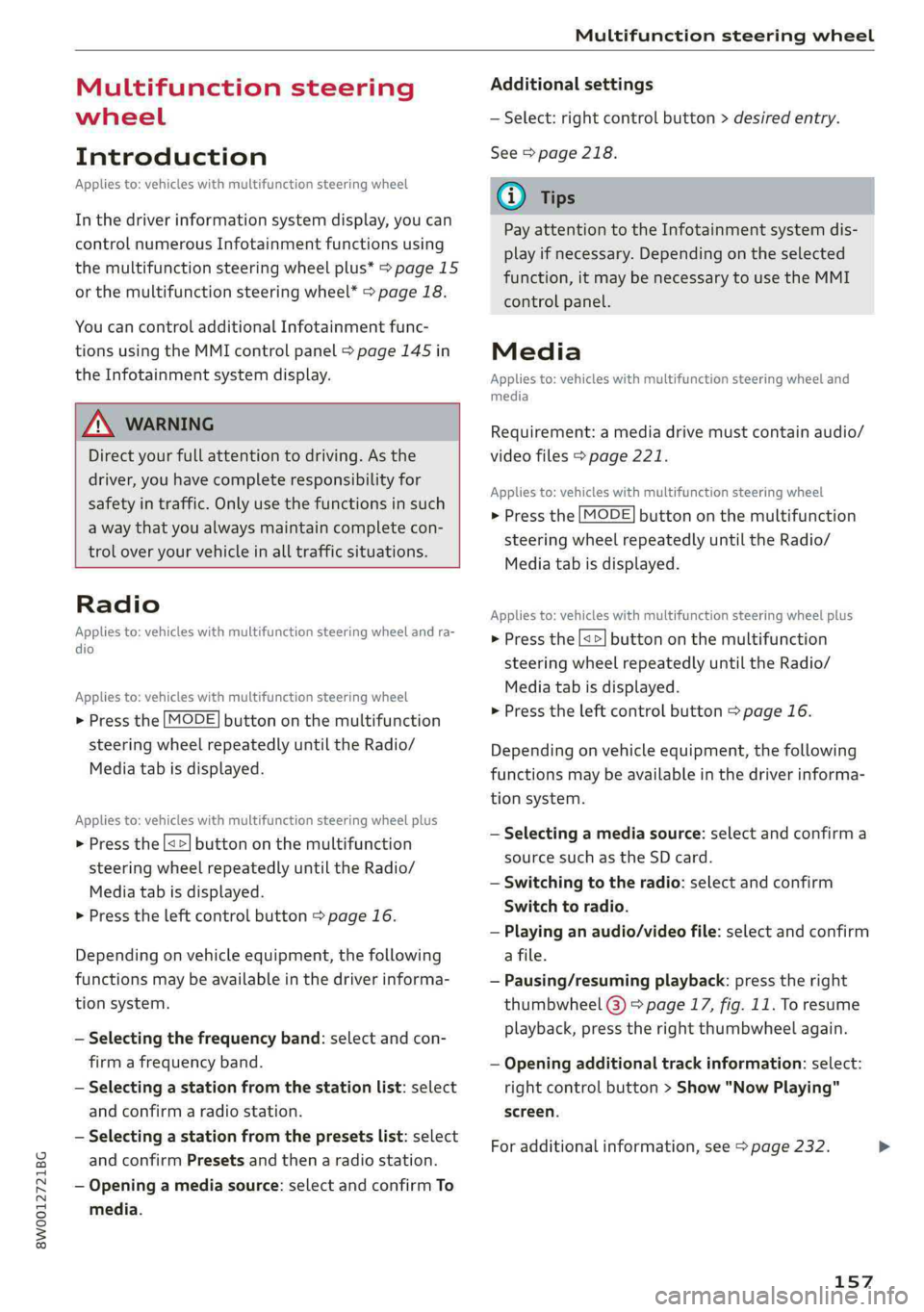
Multifunctionsteering
wheel
Introduction
Appliesto:vehicleswith multifunctionsteeringwheel
Inthedriverinformationsystemdisplay,youcan
controlnumerousInfotainmentfunctionsusing
themultifunctionsteeringwheelplus*>page 15
orthemultifunctionsteeringwheel*>page18.
Youcancontrol additionalInfotainmentfunc-
tionsusingtheMMIcontrolpanel>page145in
theInfotainmentsystemdisplay.
ZAWARNING
Directyourfullattentiontodriving.Asthe
driver,youhavecompleteresponsibilityfor
safetyintraffic.Only use thefunctionsinsuch
awaythatyoualwaysmaintaincompletecon-
troloveryourvehicleinalltrafficsituations.
Radio
Appliesto:vehicleswith multifunctionsteeringwheelandra-
dio
Appliesto:vehicleswith multifunctionsteeringwheel
>Pressthe[MODE]buttononthemultifunction
steeringwheelrepeatedlyuntiltheRadio/
Mediatabisdisplayed.
Appliesto:vehicleswith multifunctionsteeringwheelplus
>Pressthe|< >|buttononthemultifunction
steeringwheelrepeatedlyuntiltheRadio/
Mediatabisdisplayed.
>Presstheleftcontrolbutton>page16.
Dependingonvehicleequipment,thefollowing
functions
maybeavailableinthedriverinforma-
tionsystem.
—Selectingthefrequencyband:selectandcon-
firmafrequencyband.
—Selectingastationfromthestationlist:select
andconfirmaradiostation.
—Selectingastationfromthepresetslist:select
andconfirmPresetsandthenaradiostation.
—Openingamediasource:selectandconfirmTo
media.
Additionalsettings
—Select:rightcontrolbutton>desiredentry.
See>page218.
G)Tips
PayattentiontotheInfotainmentsystemdis-
playifnecessary.Dependingontheselected
function,itmaybenecessarytousetheMMI
control panel.
Media
Appliesto:vehicleswithmultifunctionsteeringwheeland
media
Requirement:amediadrivemustcontainaudio/
videofiles>page221.
Appliesto:vehicleswithmultifunctionsteeringwheel
>Pressthe[MODE]buttononthemultifunction
steeringwheelrepeatedlyuntiltheRadio/
Mediatabisdisplayed.
Appliesto:vehicleswithmultifunctionsteeringwheelplus
>»Pressthe[<>]buttononthemultifunction
steeringwheelrepeatedlyuntiltheRadio/
Mediatabisdisplayed.
>Presstheleftcontrolbutton>page16.
Depending onvehicleequipment,thefollowing
functionsmaybeavailableinthedriverinforma-
tionsystem.
—Selectingamediasource:selectandconfirma
sourcesuchastheSDcard.
—Switchingtotheradio:selectandconfirm
Switchtoradio.
—Playinganaudio/videofile:selectandconfirm
afile.
—Pausing/resumingplayback:presstheright
thumbwheel@)>page17,fig.11.Toresume
playback,presstherightthumbwheelagain.
—Openingadditionaltrackinformation:select:
rightcontrolbutton>Show"NowPlaying"
screen.
Foradditionalinformation, see>page232.>
157
Page 166 of 392
Voicerecognitionsystem
Voicerecognitionsystem
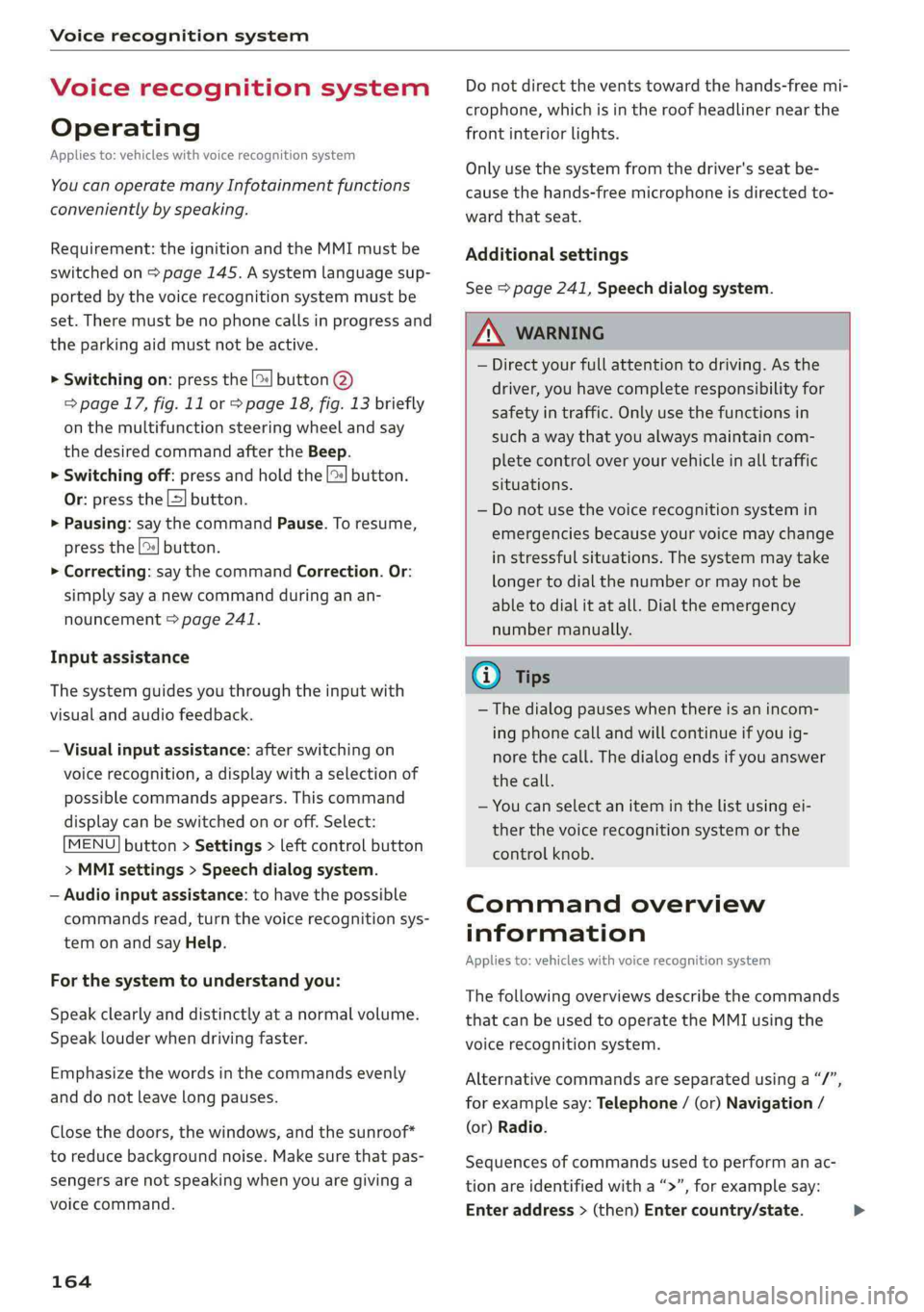
Operating
Appliesto:vehicleswithvoicerecognitionsystem
YoucanoperatemanyInfotainmentfunctions
convenientlybyspeaking.
Requirement:theignitionandtheMMImustbe
switched
on>page145.Asystemlanguagesup-
portedbythevoicerecognitionsystemmustbe
set.Theremustbenophonecallsinprogressand
theparkingaidmustnotbeactive.
>Switchingon:pressthe[%]button@
=>page17,fig.11or>page18,fig.13briefly
onthemultifunctionsteeringwheelandsay
thedesiredcommandaftertheBeep.
>Switchingoff:pressandholdthe|™]button.
Or:pressthe|5|button.
>Pausing:saythecommandPause.Toresume,
pressthe|]button.
>Correcting:saythecommandCorrection.Or:
simplysayanewcommandduringanan-
nouncement>page241.
Inputassistance
Thesystemguidesyouthroughtheinputwith
visualandaudiofeedback.
—Visualinputassistance:afterswitchingon
voicerecognition,adisplaywithaselectionof
possiblecommandsappears.Thiscommand
displaycanbe switchedonoroff.Select:
MENU]button>Settings>leftcontrolbutton
>MMIsettings>Speechdialogsystem.
—Audioinputassistance: tohavethepossible
commandsread,turnthevoicerecognitionsys-
temonandsayHelp.
Forthesystemtounderstandyou:
Speakclearlyanddistinctly atanormalvolume.
Speaklouderwhendrivingfaster.
Emphasizethewordsinthecommandsevenly
anddonotleavelongpauses.
Closethedoors,thewindows,andthesunroof*
toreducebackgroundnoise.Makesurethatpas-
sengersarenotspeakingwhenyouaregivinga
voicecommand.
164
Donotdirecttheventstowardthehands-freemi-
crophone,whichisintheroofheadlinernearthe
frontinteriorlights.
Onlyusethesystemfromthedriver'sseatbe-
causethehands-freemicrophoneisdirectedto-
wardthatseat.
Additionalsettings
See>page241,Speechdialogsystem.
ZAWARNING
—Directyourfullattentiontodriving.Asthe
driver,youhavecompleteresponsibilityfor
safetyintraffic.Onlyusethefunctionsin
suchawaythatyoualwaysmaintaincom-
pletecontroloveryourvehicleinalltraffic
situations.
—Donotuse thevoicerecognitionsystemin
emergenciesbecauseyourvoicemaychange
instressfulsituations.Thesystemmaytake
longertodialthenumberormaynotbe
abletodialitatall.Dialtheemergency
numbermanually.
Gi)Tips
— Thedialogpauseswhenthereisanincom-
ingphonecallandwillcontinueifyouig-
norethecall.Thedialogendsifyouanswer
thecall.
—Youcanselectan iteminthelistusingei-
therthevoicerecognitionsystemorthe
controlknob.
Commandoverview
information
Appliesto:vehicleswithvoicerecognitionsystem
Thefollowingoverviewsdescribethecommands
thatcan beusedtooperatetheMMIusingthe
voicerecognitionsystem.
Alternativecommandsareseparatedusinga“/”,
forexamplesay:Telephone/(or)Navigation/
(or)Radio.
Sequencesofcommandsusedtoperformanac-
tionareidentifiedwitha “>”,forexamplesay:
Enteraddress>(then)Entercountry/state.>
Page 171 of 392
8W0012721BG
Voicerecognitionsystem
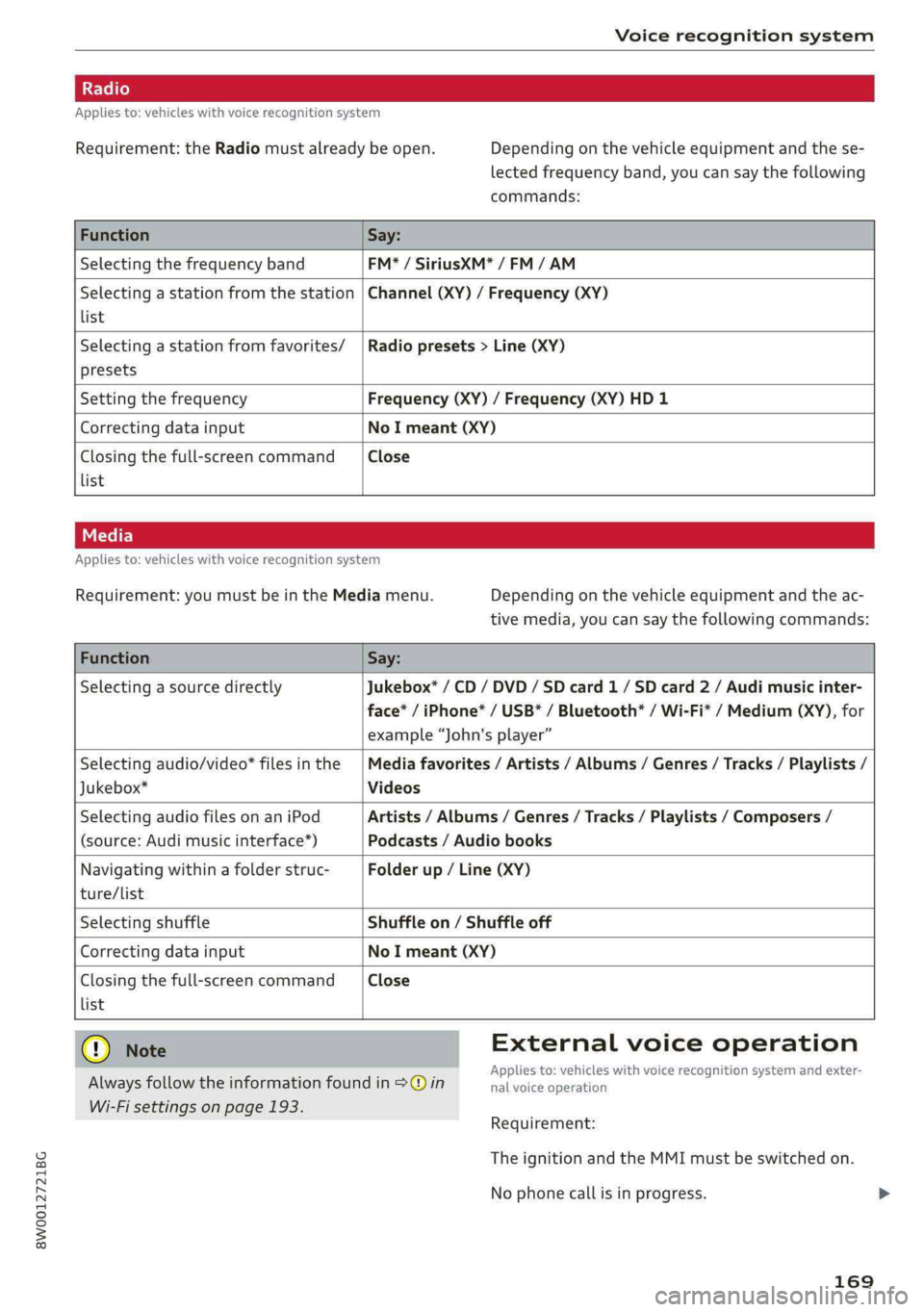
Appliesto:vehicleswithvoicerecognitionsystem
Requirement:theRadiomustalreadybeopen.Depending onthevehicleequipmentandthese-
lectedfrequencyband,youcansaythefollowing
commands:
FunctionSay:
SelectingthefrequencybandFM*/SiriusXM*/FM/AM
Selectingastationfromthestation|Channel(XY)/Frequency(XY)
list
Selectingastationfromfavorites/|Radiopresets>Line(XY)
presets
SettingthefrequencyFrequency(XY)/Frequency(XY)HD1
CorrectingdatainputNoImeant(XY)
Closingthefull-screencommandClose
list
Appliesto:vehicleswithvoicerecognitionsystem
Requirement:youmustbeintheMediamenu.Depending onthevehicleequipmentandtheac-
tivemedia,youcansaythefollowingcommands:
FunctionSay:
SelectingasourcedirectlyJukebox*/CD/DVD/SDcard1/ SDcard2/Audimusicinter-
face*/iPhone*/USB*/Bluetooth®/Wi-Fi*/Medium(XY),for
example“John'splayer”
Selectingaudio/video*filesinthe|Mediafavorites/Artists/Albums/Genres/Tracks/Playlists/
Jukebox*Videos
SelectingaudiofilesonaniPodArtists/Albums/Genres/Tracks/Playlists/Composers/
(source:Audimusicinterface*)Podcasts/Audiobooks
Navigatingwithinafolderstruc-Folderup/Line(XY)
ture/list
SelectingshuffleShuffleon/Shuffleoff
CorrectingdatainputNoImeant(XY)
Closingthefull-screencommandClose
list
Q)NoteExternalvoiceoperation
Alwaysfollowtheinformationfoundin>@inieacaeiskINNBICETSCagnHGnSySternarilexter>
Wi-Fisettingsonpage193.
Requirement:
TheignitionandtheMMImustbeswitchedon.
Nophonecallisinprogress.
169
Page 196 of 392
Audiconnect
—Appliesto:embeddedSIMcardusage:The
connectioncostsforAudiconnectInfotain-
mentservicesareincludedinthepriceof
AudiconnectInfotainment.Pleasenote
thatchargesmayapplywhenusingcertain
services.Forexample,thisapplies toInter-
netradio/podcastsorforservicesthatuse
theWi-Fihotspot,suchasonlinemedia
sources.Depending onthecountry,data
plansmayneedtobepurchasedforthese
services>page194.Foradditionalinfor-
mation,seewww.audiusa.com/myaudi.
—Youareresponsibleforallprecautionstaken
fordataprotection,anti-virusprotection,
andprotectionagainstlossofdataonmo-
biledevicesthatareusedtoaccesstheIn-
ternetthroughtheWi-Fihotspot.
@Tips
InvehicleswithoutAudiconnectInfotain-
ment,theuseoftheWi-Fihotspotisonly
possiblefortheWi-Fiaudioplayer*.Adata
connectiontotheInternetcannot beestab-
lished.
Dataplans)
Appliesto:vehicleswith dataplans
Requirement: youmusthavecreatedamyAudi
accountatwww.audiusa.com/myaudi.Yourvehi-
clemustberegisteredinyourmyAudiaccount.
Youcanpurchasedataplansatwww.audiusa.
com/myaudi.
Z\WARNING
—Asthedriver,donotallowusageoftheWi-
Fihotspottodistractyoufromdriving,as
thiscouldincreasetheriskofanaccident.
—Itisonlysafe tousetablets,laptops,mobile
devices,andothersimilardeviceswhenthe
vehicleisstationarybecause,likeallloose
objects,theycouldbethrownaroundthein-
sideofthevehicleinacrashandcauseseri-
ousinjuries.Storethesetypesofdevicesse-
curelywhiledriving.
))_Notavailableineverymarket.
194
—Donotuseanywirelessdevicesonthefront
seatswithinrangeoftheairbagswhiledriv-
ing.Also readthewarningsinthechapter
=page265,Frontairbags.
@)Note
ReadtheinformationaboutAudiconnect,and
besuretonotetheconnectivitycostssection
=>)inWi-Fisettingsonpage193.
G)Tips
—Pleasenotethatanyvehiclepassengercan
deletetheSIMowner.
— Theassociatedvehicleisnotautomatically
deletedfromthecustomerportalforthe
cellphoneserviceproviderwhenyoudelete
theSIMownerinthevehicle.Ifsellingyour
vehicle,youshoulddeletethevehiclefrom
thecustomerportalforthecellphoneserv-
iceprovidertoavoidbeingchargedforaddi-
tionalpurchases.
DataPrivacy
Appliesto:vehicleswith AudiconnectInfotainment
AUDIAGcollects,uses,storesandsharesyour
personalinformation,suchascontactdata,vehi-
cledata,usagedata,drivingdataandprecisege-
olocation,inordertoprovideyouwiththeprod-
uctsandservicesyouhavepurchasedorrequest-
ed,andforanumberofotherpurposes,forex-
ample,totrackqualityissues,toperformance
andsafety,tomeetourinternalcomplianceorle-
galrequirementsandtomarkettocustomers
andpotentialcustomers.Foramorecomplete
listofthedatawecollect,howweuseitandwith
whomweshareit,pleasevisityourAudination-
al/salesregionwebsiteatwww.audi.com.
Thecollection,useandsharingmayvarydepend-
ingonyourmodelandmodelyear,yoursubscrip-
tionstatus,ortheserviceoffering.Forexample,
collection,useandsharingmayvarybetweenAu-
diconnectservices,ifyouhavedesignatedakey
user,orifyouaredrivingamodelequippedwith
persistentdatalogging.Please reviewthe>
Page 200 of 392
![AUDI A4 2019 User Guide Navigation
Navigation
Openingnavigation
Appliesto:vehicleswithnavigationsystem
Thenavigationsystemdirectsyoutoyourdesti-
nation,aroundtrafficincidents,andonalterna-
tiveroutes,ifdesired.
[RAH-8617]](/img/6/57555/w960_57555-199.png "AUDI A4 2019 User Guide Navigation
Navigation
Openingnavigation
Appliesto:vehicleswithnavigationsystem
Thenavigationsystemdirectsyoutoyourdesti-
nation,aroundtrafficincidents,andonalterna-
tiveroutes,ifdesired.
[RAH-8617]")
Navigation
Navigation
Openingnavigation
Appliesto:vehicleswithnavigationsystem
Thenavigationsystemdirectsyoutoyourdesti-
nation,aroundtrafficincidents,andonalterna-
tiveroutes,ifdesired.
[RAH-8617]
UaColnalLele]15)
Eeehile)
Cliath}
Fig.183Diagram:Enterdestinationmenu
>Pressthe LNAV/MAP]button.
TheEnterdestinationmenuisdisplayedafter
openingnavigation.Thefollowinginformation
canbedisplayedintheInfotainmentsystemdis-
play:
@Inputfieldforfreetextsearch....198
@Homeaddress.................200
@®Lastdestinations...............199
@Storedfavorites................200
Assoonasyouselectanentryfromthelist(de-
pendingonthevehicleequipment),thecorre-
spondingdestinationdisplaysasamappreview*
©fig.183.
Ifyouhaveconnectedamobiledevicetothe
MMI,yourdirectorycontactswillalsobelistedif
they havenavigationdataassignedtothem.
TheFavorites(4)>fig.183menuitemaswellas
thedirectorycontactsareonlyshownintheEn-
terdestinationmenuifyouhaveenteredoneor
morecharactersusingtheinputfield.
Switchingbetweendestinationentryandthe
map:
—Pressthe [NAV/MAP|buttonrepeatedlyuntil
themapisdisplayed.Or:selecttheleftcontrol
button>Switchtomap.
198
ZAWARNING
— Thedemandsoftrafficrequireyourfullat-
tention.Alwaysreadthechapter
=page145,Trafficsafetyinformation.
—Obeyalltrafficlawswhendriving.
— Theroutecalculatedbythenavigationsys-
temisarecommendationforreachingyour
destination.Obeytrafficlights,stoppingre-
strictions,one-waystreets,lanechangere-
strictions,etc.
—Adjustthevolumeoftheaudiosystemso
thatsignalsfromoutsidethevehicle,such
aspoliceandfiresirens,canbeheardeasily
atalltimes.
C)Note
Ifthedrivingdirectionsconflictwithtraffic
laws,obeythetrafficlaws.
G)Tips
—SnowandobstructionsontheGPSantenna
or interferencecausedbytreesandlarge
buildingscanimpairsatellitereceptionand
affectthesystem'sabilitytodeterminethe
vehicleposition.Severaldeactivatedormal-
functioningsatellitescanalsointerruptGPS
receptionandaffectthesystem'sabilityto
determine
thevehicleposition.
—Becausestreetnamessometimeschange,
thenamesstoredintheMMImayinrare
casesdifferfromtheactualstreetname.
Enteringadestination
Freetextsearchfordestinations
Appliesto:vehicleswithnavigationsystem
Withthefreetextsearch,youcanenterthenavi-
gationdestinationdataallatonceinanyorder
usingtheMMItouchcontrolpad*ortheletter/
numberspeller(forexample,20MainSt.,Los
Angeles).Likewise,youcansearchforpointsof
interest,contacts,previousdestinationsorfa-
voritestonavigatetothedesiredaddress.
Pressthe [NAV/MAP]buttonrepeatedlyuntilthe
Enterdestinationmenuisdisplayed>page198,
fig.183.
Page 222 of 392
Media
Media
Introduction
Therearevariousmediadrivesandconnections
availableintheMMI.Forexample,youcanplay
audio/video*filesfromtheJukebox*orconnect
yourmobiledevicetotheAudimusicinterface*
andoperateitthroughtheMMI.
Notes
Mediaandformatrestrictions:theMMI(includ-
ingtheSDcardreaderandtheUSBstoragede-
viceconnection*)wastestedwithavarietyof
productsandmediaavailableinthemarket.
However,theremaybecaseswhereindividualde-
vicesormediaandaudio/video*filesmaynot be
recognized,mayplayonlywithrestrictionsor
maynotplayatall.
DigitalRightsManagement:pleasenotethat
theaudio/video*filesaresubjecttocopyright
protection.
Themediadrivesdonotplayfilesthatarepro-
tectedbyDRMandthatareidentifiedwiththe
symbolfii.
Datasecurity:neverstoreimportantdataonSD
cards,theJukebox*,CDs/DVDsormobiledevices.
AudiAGisnotresponsiblefordamagedorlost
filesandmedia.
Loadingtimes:themorefiles/folders/playlists
thatareonastoragemedium,thelongeritwill
taketo loadtheaudio/video*files.Audirecom-
mendsusingstoragemediathatonlycontainau-
dio/videofiles*.To decrease thetimeittakesto
loadaudio/videofiles*,createsubfolders(forex-
ample,fortheartistoralbum).Theloadingtime
willalsoincreasewhenimportingfiles.
Additionalinformation:whenplaying,audio
filesareautomaticallydisplayedwithanyaddi-
tionalinformationthatisstored(suchasthear-
tist,trackandalbumcover).Ifthisinformationis
notavailableonthestoragemedium,theMMI
willchecktheGracenotemetadatadatabase.
220
However,insomecases,theadditionalinforma-
tionmaynotbedisplayed.
Restrictedfunctionality:resettheMediaset-
tingstothefactorydefaultsettingsiffunctional-
ityisrestricted>page241.
Iffunctionalityisrestricted,resettheJukebox*
tothefactorydefaultsettings>page241.
Forinformationaboutthepropertiesofsupport-
edmediaandfileformats,see>page235.
@)Note
Alwaysfollowtheinformationfoundin>@in
Wi-Fisettingsonpage193.
CD/DVDoperation
CD/DVDandformatrestrictions:thefunctionali-
tyofindividualstoragemediamaybelimiteddue
tothevarietyofblankCDs/DVDsavailable and
thevariouscapacities.AudioCDsorvideoDVDs
withcopyprotection,CDs/DVDsthatdonotcon-
formtothestandard,andmultisessionCDsmay
havelimitedplaybackormaynotplayatall.Audi
recommendsfinalizingtherecordingprocess
whencreatingmultisession CDs.Multisession
DVDsarenotsupported.
UsingCDs/DVDs,theCDdrive ortheDVDdrive:
toensurecorrect,high-qualityplaybackandto
preventdamagetothedriveordiscreadinger-
rors,alwaysstoreCDs/DVDsinaprotective
sleeveand donotexposethemtodirectsunlight.
Donotuse:
—Damaged,dirtyorscratchedCDs/DVDs
—
SingleCDs/DVDswith3in(8cm)diameter
—CD/DVDsthatarenotround
—CDs/DVDswithlabels
—Protectiverings
—CleaningCDs
Thermalprotectionswitch:CD/DVDplayback
maybetemporarilyunavailableifoutsidetem-
peraturesareextremelyhotorcold.Athermal
protectionswitchisinstalledtoprotectthe
CD/DVDandthelaser.
Laserdevices:laserdevicesare dividedintosafe-
tyclasses1to4inaccordancewithDINIEC76>
Page 223 of 392
8W0012721BG
Media
(CO)6/VDE0837.Theopticalreadersthatarein-
stalledconformto safetyclass1.Lasersinthis
classareveryweakandwell-shielded,sothereis
nodangerifusedcorrectly.
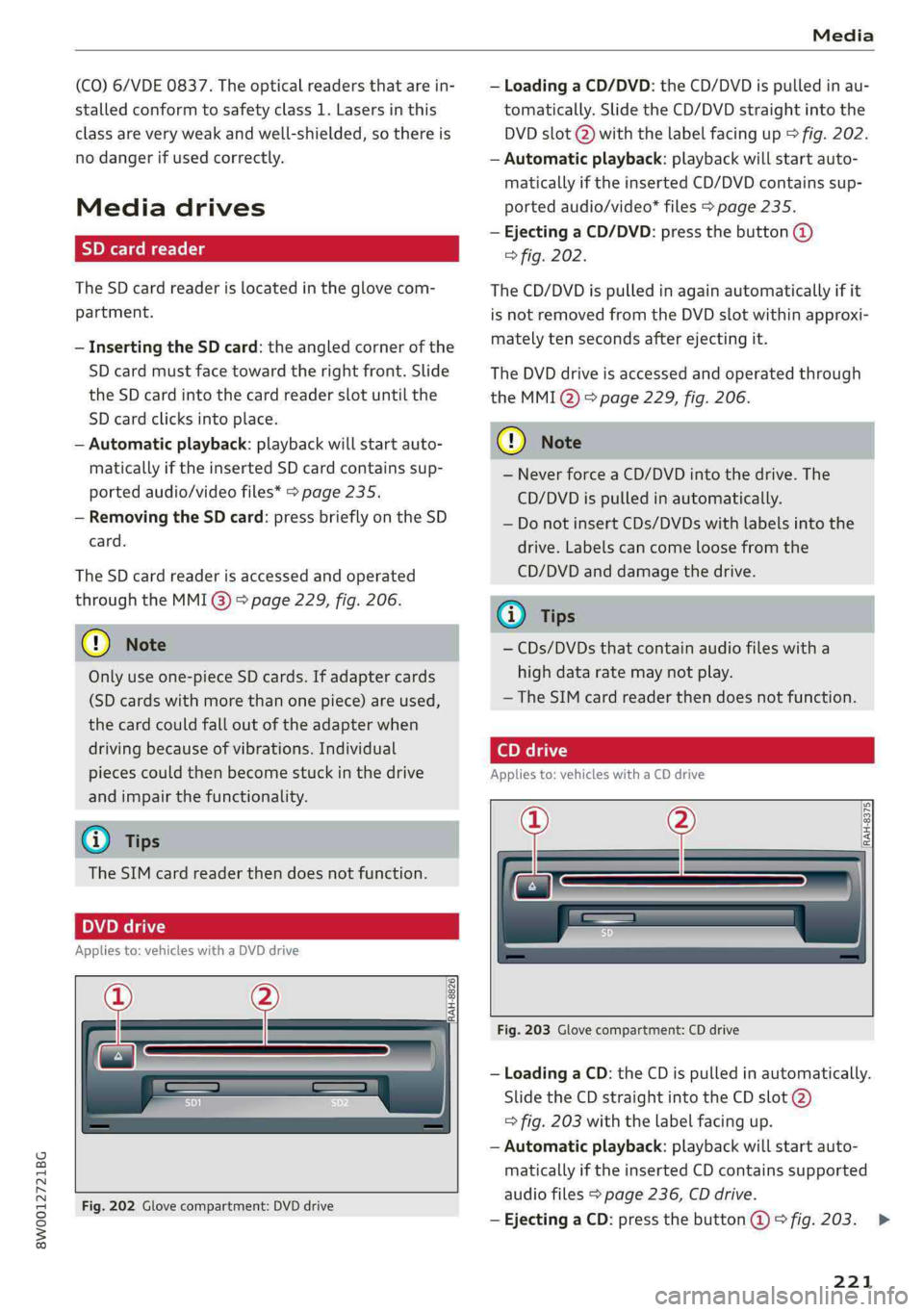
Mediadrives
SDcardreader
TheSDcardreaderislocatedintheglovecom-
partment.
—InsertingtheSDcard:theangledcornerofthe
SDcard mustfacetowardtherightfront.Slide
theSDcardintothecardreaderslot untilthe
SDcardclicksintoplace.
—Automaticplayback:playbackwillstartauto-
maticallyiftheinsertedSDcardcontains sup-
portedaudio/videofiles*>page235.
—RemovingtheSDcard: pressbrieflyontheSD
card.
TheSDcardreaderisaccessedandoperated
throughtheMMI@)>page229,fig.206.
@)Note
Onlyuseone-pieceSDcards.Ifadaptercards
(SDcardswithmorethanonepiece)areused,
thecardcouldfalloutoftheadapterwhen
driving becauseofvibrations.Individual
piecescouldthenbecomestuckinthedrive
andimpairthefunctionality.
@Tips
TheSIMcardreaderthendoesnotfunction.
peel
Appliesto:vehicleswithaDVDdrive
ee
RAH-8826|
Fig.202Glovecompartment:DVDdrive
—LoadingaCD/DVD:theCD/DVDispulledinau-
tomatically.SlidetheCD/DVDstraightintothe
DVDslot@)withthelabelfacingup>fig.202.
—Automaticplayback:playbackwillstartauto-
maticallyiftheinsertedCD/DVDcontains sup-
portedaudio/video*files>page235.
—EjectingaCD/DVD:pressthebutton@
>fig.202.
TheCD/DVDispulledinagainautomaticallyifit
isnotremovedfromtheDVDslotwithinapproxi-
matelytensecondsafterejectingit.
TheDVDdriveisaccessedandoperatedthrough
theMMIQ)>page229,fig.206.
@)Note
—NeverforceaCD/DVDintothedrive.The
CD/DVDispulledinautomatically.
—DonotinsertCDs/DVDswithlabelsintothe
drive.Labelscancomeloosefromthe
CD/DVDanddamagethedrive.
@)Tips
—CDs/DVDsthatcontainaudiofileswitha
highdataratemaynotplay.
—TheSIMcardreaderthendoesnotfunction.
Appliesto:vehicleswithaCDdrive
oe
RAH-8375|
Fig.203Glovecompartment:CDdrive
—LoadingaCD:theCDispulledinautomatically.
SlidetheCDstraightintotheCDslot@)
=>fig.203withthelabelfacingup.
—Automaticplayback:playbackwillstartauto-
maticallyiftheinsertedCDcontainssupported
audiofiles>page236,CDdrive.
—EjectingaCD:pressthebutton@©fig.203.
221
>
Page 224 of 392
Media
TheCDispulledinagainautomaticallyifit isnot
removedfromtheslotwithin tensecondsof
ejectingit.
TheCDdriveisaccessedandoperatedthrough
theMMI>page229.
@)Note
—NeverforceaCDintothedrive.TheCDis
pulledinautomatically.
—DonotinsertCDswithlabelsintothedrive.
LabelscancomeloosefromtheCDand
damagethedrive.
(i)Tips
CDplaybackcannotbeguaranteedwithaudio
filesthathaveahighdatarate.
Appliesto:vehicleswithJukebox
AfteryouhavefilledtheJukeboxwithmusic
and/orvideos,forexamplefromyourSDcard,
youcanplaythesefilesdirectlyfromtheJuke-
box.TheJukeboxmemorycapacityisapproxi-
mately10GB.
>Pressthe[MEDIA]button.Presstheleftcontrol
buttonuntilthesourcesoverview>page229is
displayed.SelectandconfirmJukebox.
AddingfilestotheJukebox
—Pressthe[MEDIA]button.Presstheleftcontrol
buttonuntilthesourcesoverview>page229is
displayed.Selectoneofthefollowingsources
tocopytotheJukebox:SDcard*,CD-ROM*,
DVD-ROM*,USBstoragedevice*.
Requirement:themediacenter(forexample,
tracks,albums)mustbe open.
—Selectinganentry:selectanentryfromthe
mediacenter.Select:rightcontrolbutton>
Copytojukebox>Thisentryor Entirelist.
Requirement:theplaylistmustbe open.See
=>page232.
—Selectingatrack:selectthetrackthatiscur-
rentlyplaying.Select:rightcontrolbutton>
NotinthePlaybackview.
222
Copytojukebox>ThistrackorEntirealbumor
Thisartist.
Requirement:avideofilemustbeplaying.
—Select:rightcontrolbutton>Copytojukebox.
Thecopyingprocessbegins.Thestatusofthe
copyingprocessisshownintheMMI.
—Hidingtheimportingprocess:selectandcon-
firm
Continuecopyinginbackground.Theim-
portingprocessishidden.
—Cancelingtheimportingprocess:selectand
confirmCancelcopying.Or:removethesource
thatisbeingimported.Filesalreadycopiedre-
main.
Requirement:thecopyingprocessmustbeactive
inthebackground.
—Showingthecopyingprocess:select:right
controlbutton>Copyinginprogress.
Whenimporting,theaudiofilesareautomatical-
lysortedintothemediacentercategoriesbased
onthestoredadditionalinformation>page230.
Thecopiedvideofilesarestoredinthemedia
centerundertheVideoscategory.
PlayingtheJukebox
Requirement:theJukeboxmustcontainaudio/
videofiles>page222,AddingfilestotheJuke-
box.
TheJukeboxisaccessedandoperatedthrough
theMMI@©page229,fig.206.
DisplayingJukeboxmemorycapacity
Select:rightcontrolbutton>Jukeboxmemory
capacity.InformationabouttheJukeboxmemory
capacityandthenumberofstoredtracksisdis-
played.
DeletingtracksfromtheJukebox!)
Requirement:theJukeboxmustcontainaudio/
videofiles.
—Deletinganentry: selectanentryfromthe
Jukeboxmediacenter.Select:rightcontrolbut-
ton>Deletefromjukebox>ThisentryorEn-
tirelist.
Page 225 of 392
8W0012721BG
Media
—Thestatusofthedeletingprocessisshownin
theMMI.Jukeboxplaybackstopsduringthede-
letingprocessandstartsagainautomatically
oncethedeletioniscomplete.
@)Note
Donotimportaudio/videofileswhentheen-
gineisturnedoffbecausethiswilldrainthe
vehiclebattery.
@)Tips
—TracksfromaudioCDscannotbeimported
totheJukeboxforlegalreasons.
—Filesthathavealreadybeenimportedare
automaticallyrecognizedandcannotbe
copiedtotheJukeboxagain.
—Itisnotpossibletoplay audio/video*files
intheCD/DVD*drivewhileimportingthem.
— TheJukeboxdoesnotprovideanexport
functionduetolegalreasons.
—Filesortrackswithoutadditionalstoredin-
formationarelistedasUnknown.Audirec-
ommendsaddingadditionalinformation
(such asID3tags)toaudiofiles.
—ResettheJukeboxtothefactorydefaultset-
tingswhensellingyourvehicle>page241.
Bluetoothaudioplayer
Appliesto:vehicleswithBluetoothaudioplayer
WiththeBluetoothaudioplayer,youcanplay
musicwirelesslyfromyourBluetooth-capable
device(suchasacellphone)throughtheMMI.
Requirement:thevehiclemustbestationaryand
theignitionmustbe switchedon.TheBluetooth
settingswillopenonyourmobiledeviceduring
theconnectionsetup.TheBluetoothfunctionand
visibilityoftheMMI>page243andmobilede-
vicemustbe switchedon.TheBluetoothaudio
player>page243mustbe switchedoninthe
MMI.
—ConnectingaBluetoothplayer:pressthe
MEDIA]button.Presstheleftcontrolbutton
untilthesourcesoverviewisdisplayed.Select
andconfirmBluetoothaudioplayer©)
>page229,fig.207.
—Ifnecessary,selectandconfirm:Notconnected
>ConnectBluetoothaudioplayer.TheBlue-
toothdevicesearchstarts.Followtheinstruc-
tionsintheMMI.
—
SelectandconfirmthedesiredBluetoothdevice
fromthelist.TheMMIgeneratesaPINforthe
connection.
—SelectandconfirmYes.
—EnterthePINforconnectingonyourBluetooth
device.Or:ifthePINisalreadydisplayedon
yourBluetoothdevice,confirmitintheBlue-
toothdeviceandintheMMI.Thetimeallowed
forenteringthePINislimitedtoapproximately
30seconds.
Themediaisstartedandoperatedthroughthe
mobiledeviceortheMMI,dependingonthede-
vicebeingused.
Gi)Tips
—Checkforanyconnectionrequestsonyour
Bluetoothdevice.
—MultipleBluetooth audioplayerscan be
connectedtotheMMI,butonlyonemobile
devicecanbeactive.
—BluetoothprotocolsAVRCP(1.0/1.3/1.4)
andA2DParesupported.
—NotethevolumesettingonyourBluetooth
device.Audirecommendssettingyourmo-
biledevicetothemaximumvolumewhen
usingitasaBluetooth audioplayer.
—Thesupportedmediafunctions(such as
shuffle)dependontheBluetoothdevicebe-
ingused.
—Formoreinformationonsupporteddevices,
visitwww.audiusa.com/bluetoothorcon-
tactanauthorizedAudidealerorauthorized
AudiServiceFacility.
223