audio AUDI A4 2019 Owner's Manual
[x] Cancel search | Manufacturer: AUDI, Model Year: 2019, Model line: A4, Model: AUDI A4 2019Pages: 392, PDF Size: 99.53 MB
Page 226 of 392
Media
Wi-Fiaudioplayer
Appliesto:vehicleswithWi-Fiaudioplayer
UsingtheWi-Fiaudioplayermediasourceonthe
MMI, youcanconnectandoperateyourWi-Fi-ca-
pablemediaplayer(suchasasmartphone)to
wirelesslyplaymusicfromyourmediaplayerli-
brary.Themediaplayerisconnectedthroughthe
vehicle'sWi-Fihotspot.AUPnPServerapporan
integratedUPnP/DLNAserveronyourmedia
playerisrequiredtoaccessyourmediaplayerli-
brary.
Requirement:theWi-Fifunctiononyourmedia
playermustbe switchedon.ThemyAudiappora
UPnPserverappmustbeinstalledonyourmedia
player.Or:youmustbeusingamediaplayerwith
anintegratedUPnP/DLNAserver.
—Connectingamediaplayer:pressthe[MEDIA
button.Presstheleftcontrolbuttonuntilthe
sourcesoverview>page229isdisplayed.Se-
lectandconfirm Wi-Fiaudioplayer(7)
>page229,fig.207.
—Ifnecessary,selectandconfirmWi-Fiturned
off>TurnonWi-Fito activateWi-Fiinthe
MMI.SelectWi-Fisettings,ifnecessary.Select
thesamesettingsonthewirelessmediaplayer
thatareusedfortheWi-Fihotspot.
—StartingtheWi-Fiaudioplayer:startthe
myAudiapporaUPnPserverapp,orsetmedia
permissionsonyourmediaplayer.
Operatingthemediaplayer:themediaplayeris
operatedthroughtheMMI.
—Presstheleftcontrolbuttonrepeatedlyuntil
theFoldersmenuitemappears.Selectandcon-
firmFolders.
—Playingmusicfromthemediaplayer:select
andconfirmMediacenter.
Webradio:see>page225.
objects,theycouldbethrownaroundthein-
sideofthevehicleinacrashandcauseseri-
ousinjuries.Storethesetypesofdevicesse-
curelywhiledriving.
—Donotuseanywirelessdevicesonthefront
seatswithinrangeoftheairbagswhiledriv-
ing.Also readandfollowthewarningsin
=page265,Frontairbags.
ZAWARNING
—Asthedriver,donotallowusageoftheWi-
Fihotspottodistractyoufromdriving,as
thiscouldincreasetheriskofanaccident.
—Itisonlysafe tousetablets,laptops,mobile
devicesandothersimilardeviceswhenthe
vehicleisstationarybecause,likeallloose
224
C)Note
Alwaysfollowtheinformationfoundin>@in
Wi-Fisettingsonpage193.
G)Tips
—Alwaysreadthechapter>page186,Audi
connect.
—PleasenotethataWi-Ficonnectiondoes
notautomaticallymakeitpossible touse
theInternet.Foradditionalinformation,
see>page186.
—Toavoidinterruptionsduringplayback,de-
activatethepowersavingfunctiononthe
mediaplayer orconnectittoacharger.
— Theloadingtimesfortheaudiodatadepend
onthemediaplayerusedandthenumberof
filesthatitcontains.
—Amaximumof2,000entriesperdirectory
aredisplayedintheMMI.
—Songsdownloadedforofflineuseusingmu-
sicstreamingservicesarestoredon your
mobiledevice(suchasasmartphone)and
maybeDRMprotected.TheWi-Fiaudio
playerwillnotplayDRMprotectedfiles.
—ContactanauthorizedAudidealeror au-
thorizedAudiServiceFacilityforadditional
informationontheWi-Fiaudioplayer.
Page 231 of 392
8W0012721BG
Media
Wecannotevaluateorendorseotherproductsin
thisway,evenifthe productisapprovedbyacer-
tifiedtestingagencyorgovernmentagency.
@Note
Onlyusedevicesthatareapprovedforthe
Rear SeatEntertainmentpreparation.Unap-
provedequipmentcan causedamagetothe
vehicleelectricalsystem.
@)Tips
—Contact anauthorizedAudidealeror au-
thorizedAudiServiceFacilityforadditional
informationonAudiEntertainmentmo-
bile.
—Alwaysreadthe chapter>page367.
— TheRear SeatEntertainmentpreparationis
notintendedtochargeexternalelectronic
devices.
Playingmedia
Youcanstartandoperatevariousmediathrough
theMMIcontrolpanel.
\LaJukeboxC)
SDcard
Audimusicinterface
Maaudioplayer
Fig.206Diagram:possiblesourcesintheMediamenu
EltarENs
eaeenley
Conant1c
Fig.207Diagram:possiblesourcesintheMediamenu
))DependingontheDVD,thismaynotbepossibleduring
playback.
Requirement:amediasourcemustcontainau-
dio/video*files>page221.
>Pressthe[MEDIA]button.Presstheleftcontrol
buttonuntilthesourcesoverviewisdisplayed.
>Selectandconfirmthedesiredsource.Or:press
the[MEDIA]buttonrepeatedlyuntilthedesired
sourceisselected.
Depending onthevehicleequipment,thefollow-
ingsourcesmaybedisplayedintheMediamenu:
G@)Jukebox®osi5easssewesiyewaes222
@DVD/CDdrive*............0.0..221,221
@SDeardreader................221
@Audimusicinterface*...........226
suchasaniPhone,USBstick
©Externalaudioplayer...........226
suchasanMP3playerconnectedto
theAUXinput
©Bluetoothaudioplayer*........223
@Wi-Fiaudioplayer*............224
Onlinemedia*andInternetradio*.225
—
Playingaudio/videofiles:selectasourceinthe
Mediamenu>Category(suchasartists>al-
bum>track).
—Movingonelevelupinthefolderstructure:
pressthe[BACK]button.Or:selectandconfirm
Folderup.
—Selectingthepreviousornexttrack/chapter*
1):presstheOn/OffknobontheMMIcontrol
panelbrieflytotheleftKMorrightDo.
—Fast-forwardingandrewindingaudio/video*
files:pressandholdtheOn/Offknobonthe
MMIcontrolpaneltotheleftKdorrightPDIfor
alongertime.
—Pausingorresumingplayback:pressthe
On/OffknobontheMMIcontrolpanelbriefly.
(i)Tips
—Youcanscrollthroughlonglistsquicklyby
turningthecontrolknobquickly.Thescroll-
ingspeeddependsonthenumberoflisten-
tries.
229
>
Page 232 of 392
Media
—For safetyreasons,thevideoimageisonly
displayedwhenthevehicleisstationary.On-
lythesoundfromthevideoplayswhiledriv-
ing.
Variouscategoriesfor selectingaudio/video*
filesareavailableinthemediacenter.
esP=
€Artists
‘fl[bums
enres
Fig.208Example:USBstickcategories
Track
(7)SNzat
Playlists
7Videos
Fig.209Example:USBstickcategories
>Pressthe[MEDIA]button.Presstheleftcontrol
buttonuntilthesourcesoverviewisdisplayed.
Selectandconfirmthedesiredsource.
@Activesource
Theactivesourceishighlighted.Theactive
sourcesymbol(@)maychangedependingonthe
connecteddevice,theonlinemediaservice”,or
Internetradio*.Thedevicenamemaybedis-
played(forexample:myPhone).Asanexample,a
USBstickisshown>fig.208connectedtothe
Audi
musicinterface*.
Dependingonthe activesource,youcanselect
audio/videofiles*fromthefollowingcategories
andaddthemtotheplaylist:
@Favorites
TheFavoritescategoryappearsifatleastoneen-
tryisstoredinthefavoriteslist.See>page232,
Favorites.
230
@Artists
Allavailableartistsaredisplayed.Selectandcon-
firmanartist,analbumandthenatrack.
@Albums
Allavailablealbumsaredisplayed.Selectand
confirm analbumandthenatrack.
©Genres
Allavailablegenresaredisplayed.Selectandcon-
firmagenre(such asPop),anartist,analbum
andthenasong.
©Tracks
Allavailabletracksaredisplayed.Selectandcon-
firm
atrack.
@Folders
Thefolderstructureortrack/chapterlistisdis-
played.Selectafolder,ifnecessary. Selectand
confirmatrack.
Playlists
Allavailableplaylistsfromthesourceandthe
smartplaylistsaredisplayed.Selectandconfirm
aplaylistandthenatrack.
Smartplaylists:
—Lastplayedtracks:thelasttracksplayedinthe
selectedsourcearedisplayed.
—Mostplayed:themostplayedtracksinthese-
lectedsourcearedisplayed.
—5starsto1star:tracksfromtheselected
sourcearedisplayedaccordingtotheirrating.
—Unrated:allfilesfromtheselectedsource
withoutratinginformation(forexample,inthe
ID3tag)aredisplayed.
@Videos*
Allavailablevideofilesaredisplayed.Selectand
confirmavideofile.
C)Note
Appliesto:vehicleswithAudiconnectInfotainmentand
useoftheradiocategorywithiPod/iPhone
Alwaysfollowtheinformationfoundin>@in
Wi-Fisettingsonpage193.
Page 233 of 392
8W0012721BG
Media
@Tips
—Onlythecategoriessupportedbythemedi-
umareavailable.Forexample,CD/DVD-
ROMtrackscannotbeselectedwithcatego-
riessuchasArtists,AlbumsorGenres.
WithaniPod/iPhone(source:Audimusicin-
terface>page226),the Podcasts,Audio
booksandComposerscategoriesarealso
available.
—Forsafetyreasons,thevideoimageisonly
displayedwhenthevehicleisstationary.On-
lythesoundfromthevideoplayswhiledriv-
ing.
—Whensynchronizingaportabledevicewith
“Cloud”services,playlistsmaydisplayincor-
rectlyintheMMI.Usethemediacenterin
thedevice.
—WithaniPod/iPhone(mediasource:Audi
musicinterface>page226),the Podcasts,
Audio booksandComposerscategoriesare
alsoavailable.
@Tips
Appliesto:iPod/iPhoneonAudimusicinterface
—AnInternetconnectionisrequiredtouse
theadditionalRadiocategory,anonline
mediaservice.Alsoseethe chapter
=>page193,Wi-Fisettings.Alsoreadthe
informationonthe Audimusicinterfaceand
thesupporteddevices>page226.
— DependingontheInternetconnectionand
networktraffic,theconnectionmaydiscon-
nectedwhenonlinemediasourcesareplay-
ing.
—Theuseofonlinemediaservicesdependson
theserviceavailabilityofthethirdparty
provider.
—AudiAGsimplymakestheaccesstoonline
mediaservicespossiblethroughtheMMI
anddoesnottakeanyresponsibilityforthe
contentsoftheonlinemediaservices.
a\eyaaytla)
Appliesto:vehicleswithfree textsearch
Youcansearchintheactivesourcebytracksand
videofiles*,forexample
(2NaeBand
£RockBand
©-RockBand
@*eee
Fig.210Inputfieldandresultslistforfreetextsearch
Youcanopenthefreetextsearchdependingon
theselectedsource.
Requirement:theplaylist>page232ormedia
center>page230mustbedisplayed.
Openingfreetextsearch
>Keepturningthecontrolknobtotheleftuntil
thefreetextsearchinputfield@©fig.210
appears.Or:pushthecontrolknobup.
Usingthefreetextsearch:see>page154,Free
textsearch.
Entriesthatcontaintheenteredsearchtermare
listedintheresultslist©)>fig.210.Youcan
searchforartists@)©fig.210,albums@)or
tracks@)aswellasgenresandvideos.
(i)Tips
—Onlyfilesintheactivesourcewillbe
searched.
—IfyouopenfreetextsearchintheFolders
category(7)>page230,fig.209orthe
Composers,PodcastsandAudiobookscat-
egories,itwillonlysearchthroughthefiles
inthatfolder.
231
Page 236 of 392
Media
Replayvideo!)
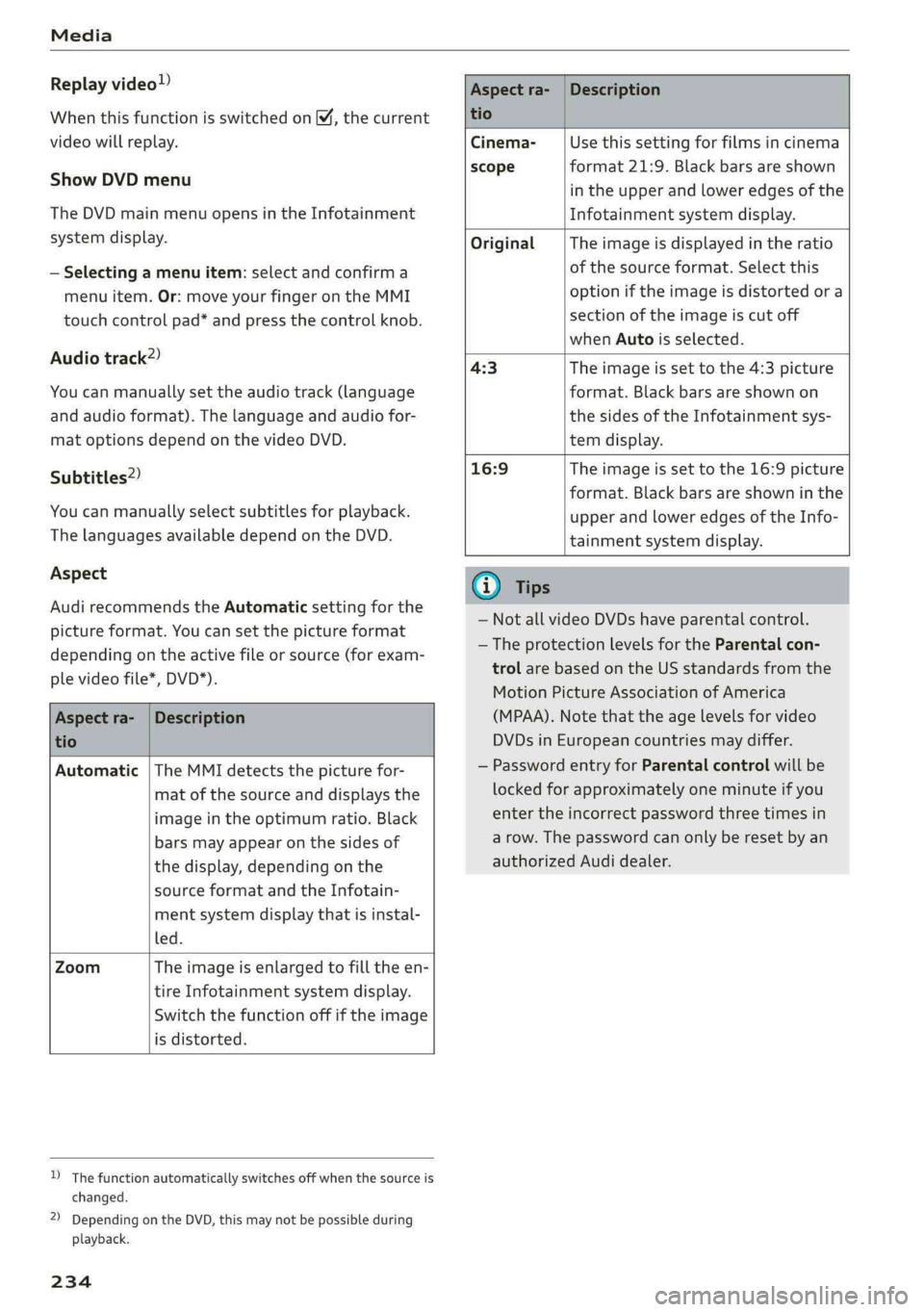
Whenthisfunctionisswitchedon¥,thecurrent
videowillreplay.
Show DVDmenu
TheDVDmainmenuopensintheInfotainment
systemdisplay.
—Selectingamenuitem:selectandconfirma
menuitem.Or:moveyourfingerontheMMI
touchcontrolpad*andpressthecontrolknob.
Audiotrack?)
Youcanmanuallysettheaudiotrack(language
andaudioformat).Thelanguageandaudiofor-
matoptionsdependonthevideoDVD.
Subtitles2)
Youcanmanuallyselectsubtitlesforplayback.
ThelanguagesavailabledependontheDVD.
Aspect
AudirecommendstheAutomaticsettingforthe
pictureformat.Youcansetthepictureformat
dependingontheactivefileorsource(forexam-
plevideofile*,DVD*).
Aspectra-
tio
Description
Aspectra-|Description
tio
Cinema-Usethissettingforfilmsincinema
scopeformat21:9. Blackbars areshown
intheupperandloweredgesofthe
Infotainmentsystemdisplay.
OriginalTheimageisdisplayedintheratio
ofthesourceformat.Selectthis
optioniftheimageisdistorted ora
sectionoftheimageiscutoff
whenAutoisselected.
4:3Theimageissettothe 4:3picture
format.Blackbarsareshownon
thesidesoftheInfotainmentsys-
temdisplay.
16:9 Theimageissettothe16:9picture
format.Blackbarsareshowninthe
upperandloweredgesoftheInfo-
tainmentsystemdisplay.
Automatic|TheMMIdetectsthepicturefor-
matofthesourceanddisplaysthe
imageintheoptimumratio.Black
barsmayappearonthesidesof
thedisplay,dependingonthe
sourceformatandtheInfotain-
mentsystemdisplaythatisinstal-
led.
ZoomTheimageisenlargedtofilltheen-
tireInfotainmentsystemdisplay.
Switchthefunctionoffiftheimage
isdistorted.
)Thefunctionautomaticallyswitchesoffwhenthesourceis
changed.
2)DependingontheDVD,thismaynotbepossibleduring
playback.
234
(i)Tips
— NotallvideoDVDshaveparentalcontrol.
— TheprotectionlevelsfortheParental con-
trolarebasedontheUSstandardsfromthe
MotionPictureAssociationofAmerica
(MPAA).Notethattheagelevelsforvideo
DVDsinEuropeancountriesmaydiffer.
—PasswordentryforParentalcontrolwillbe
lockedforapproximatelyoneminuteifyou
entertheincorrectpasswordthreetimesin
arow.Thepasswordcanonlyberesetbyan
authorizedAudidealer.
Page 237 of 392
8W0012721BG
Media
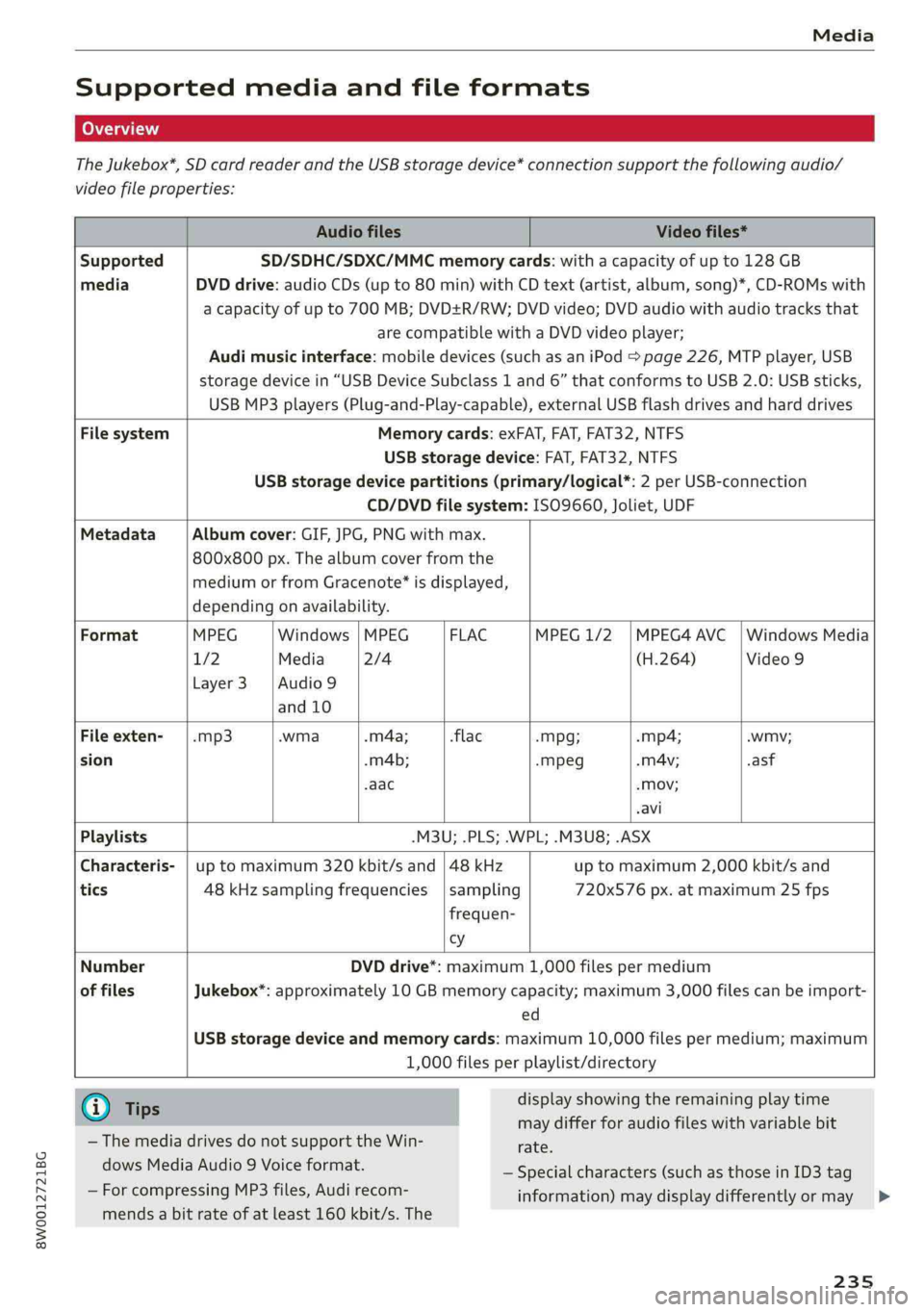
Supportedmediaandfileformats
TheJukebox*,SDcardreaderandtheUSBstoragedevice*connectionsupportthefollowingaudio/
videofileproperties:
AudiofilesVideofiles*
SupportedSD/SDHC/SDXC/MMCmemorycards:withacapacityofupto128GB
mediaDVDdrive:audioCDs(upto80min)withCDtext(artist,album,song)*,CD-ROMswith
acapacity ofupto700MB;DVD+R/RW;DVDvideo;DVDaudiowithaudiotracksthat
arecompatiblewithaDVDvideoplayer;
Audimusicinterface:mobiledevices(suchasaniPod>page226,MTPplayer,USB
storagedevicein“USBDeviceSubclass1and6” thatconformstoUSB2.0:USBsticks,
USBMP3players(Plug-and-Play-capable), externalUSBflashdrivesandharddrives
FilesystemMemorycards:exFAT,FAT,FAT32,NTFS
USBstoragedevice:FAT,FAT32,NTFS
USBstoragedevicepartitions(primary/logical*:2perUSB-connection
CD/DVDfilesystem:ISO9660,Joliet,UDF
MetadataAlbumcover:GIF,JPG,PNGwithmax.
800x800px.Thealbumcoverfromthe
mediumorfromGracenote®isdisplayed,
dependingonavailability.
FormatMPEGWindows|MPEGFLACMPEG1/2|MPEG4AVC|WindowsMedia
1/2Media2/4(H.264)Video9
Layer3 |Audio9
and10
Fileexten--mp3.wma.m4a;-flac-Mpg;-mp4;.wmv;
sion.m4b;-mpeg.mA4v;.asf
-aac-Mov;
.avi
Playlists.M3U;.PLS;.WPL;.M3U8;.ASX
Characteris-|uptomaximum320kbit/sand|48kHzuptomaximum2,000kbit/sand
tics48kHzsamplingfrequencies|sampling720x576px.atmaximum25fps
frequen-
cy
Number
offiles
DVDdrive*:maximum1,000filespermedium
Jukebox*:approximately10GBmemorycapacity;maximum3,000filescanbeimport-
ed
USBstoragedeviceandmemorycards:maximum10,000filespermedium;maximum
1,000filesperplaylist/directory
@Tips
— ThemediadrivesdonotsupporttheWin-
dowsMediaAudio9Voiceformat.
—ForcompressingMP3files, Audirecom-
displayshowingtheremainingplaytime
maydifferforaudiofileswithvariablebit
rate.
—Specialcharacters(such asthoseinID3tag
information)maydisplaydifferentlyormay
mendsabitrateofatleast160kbit/s.The
235
>
Page 238 of 392
Media
notalwaysdisplay,dependingonthesys-—SomeMTPplayerfunctionsarenotsupport-
temlanguage.ed,suchasratingmusictracksandvideo
— Themanufacturerofthestoragedevicecanplayback.
provideinformationaboutits“USBDevice
Subclass”.
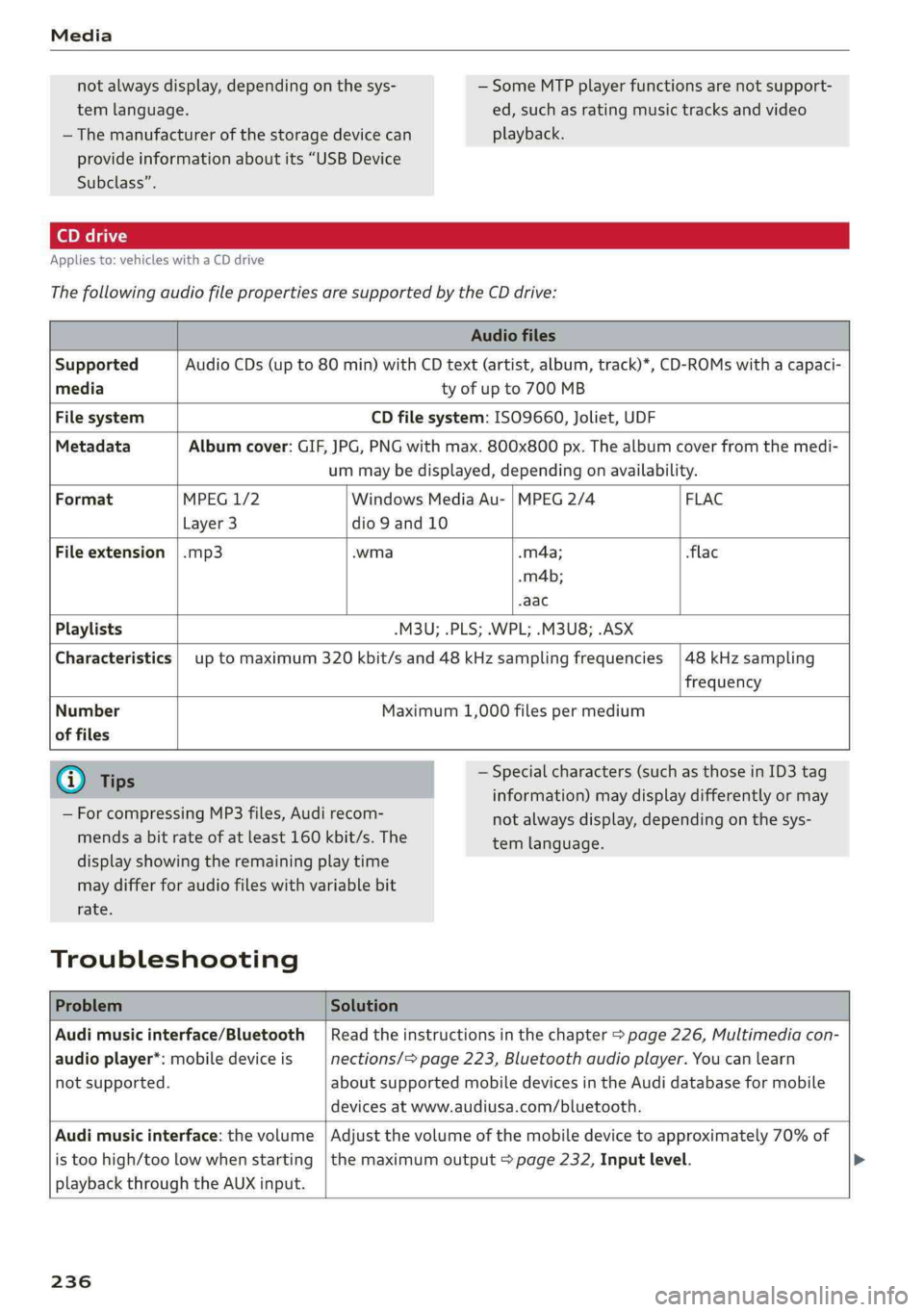
Appliesto:vehicleswithaCDdrive
ThefollowingaudiofilepropertiesaresupportedbytheCDdrive:
Audiofiles
SupportedAudioCDs(upto80min)withCDtext(artist,album,track)*,CD-ROMswithacapaci-
mediatyofupto700MB
FilesystemCDfilesystem:ISO9660,Joliet,UDF
MetadataAlbumcover:GIF,JPG,PNGwithmax.800x800px.Thealbumcoverfromthemedi-
ummaybedisplayed,dependingonavailability.
FormatMPEG1/2WindowsMediaAu-|MPEG2/4 FLAC
Layer3dio9and10
Fileextension|.mp3.wma-m4a;flac
.m4b;
-aac
Playlists-M3U;.PLS;.WPL;.M3U8;.ASX
Characteristics|uptomaximum320kbit/sand48kHzsamplingfrequencies|48kHzsampling
frequency
NumberMaximum1,000filespermedium
offiles
G)Tips—Specialcharacters(suchasthoseinID3tag
information)maydisplaydifferentlyormay
notalwaysdisplay,dependingonthesys-
temlanguage.
—ForcompressingMP3files, Audirecom-
mendsabitrateofatleast160kbit/s.The
displayshowingtheremainingplaytime
maydifferforaudiofileswithvariablebit
rate.
Troubleshooting
ProblemSolution
Audimusicinterface/Bluetooth|Readtheinstructionsinthechapter>page226,Multimediacon-
audioplayer*:mobiledeviceisnections/=page223,Bluetoothaudioplayer.Youcanlearn
notsupported.aboutsupportedmobiledevicesintheAudidatabaseformobile
devicesatwww.audiusa.com/bluetooth.
Audimusicinterface:thevolume|Adjustthevolumeofthemobiledevicetoapproximately70%of
istoohigh/toolowwhenstarting|themaximumoutput>page232,Inputlevel.
playbackthroughtheAUXinput.
236
Page 239 of 392
8W0012721BG
Media
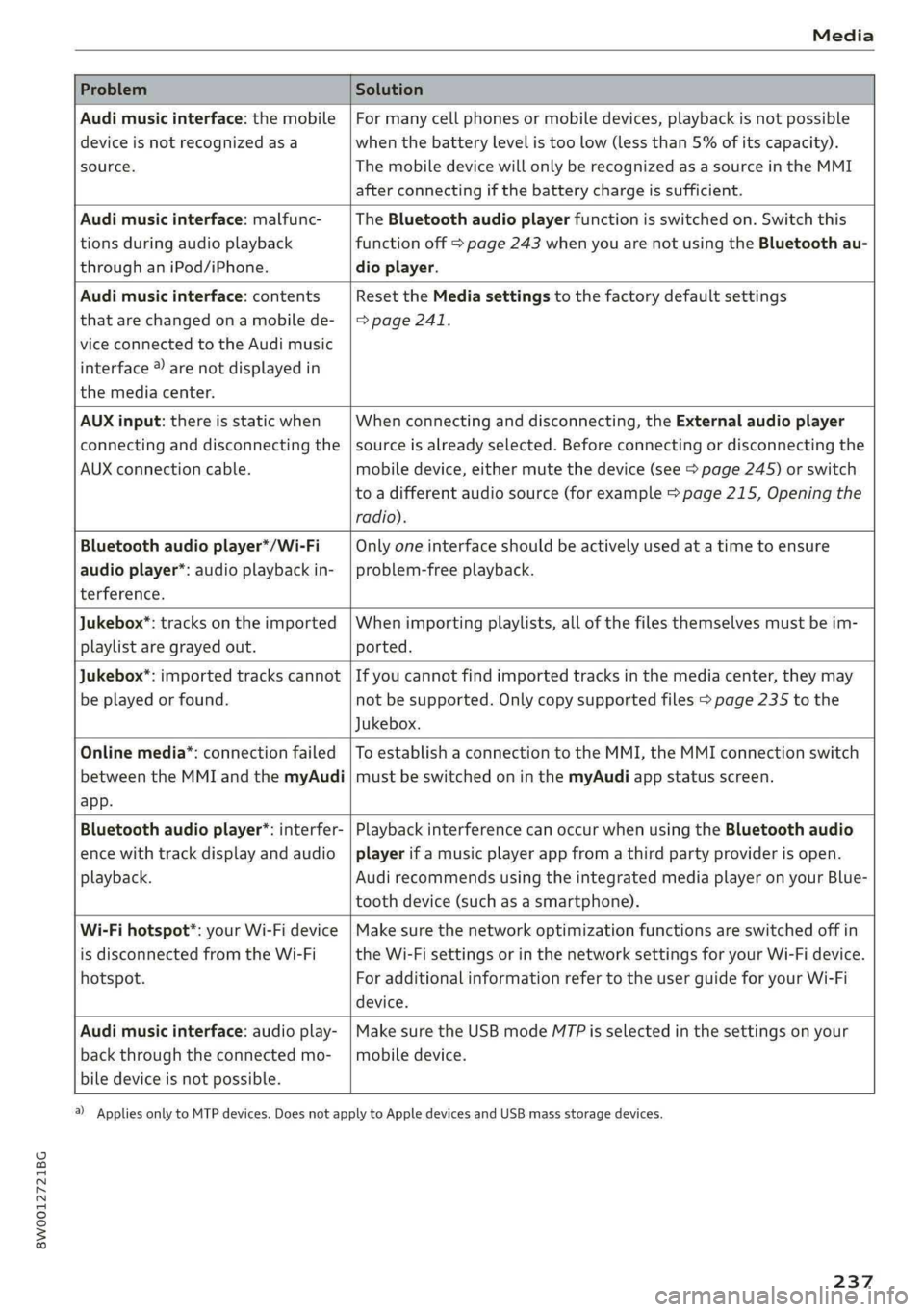
ProblemSolution
Audimusicinterface:themobile
deviceisnotrecognizedasa
source.
Formanycellphonesormobiledevices,playbackisnotpossible
when
thebatterylevelistoolow(lessthan5%ofitscapacity).
ThemobiledevicewillonlyberecognizedasasourceintheMMI
afterconnectingifthebatterychargeissufficient.
Audimusicinterface:malfunc-
tionsduringaudioplayback
throughaniPod/iPhone.
TheBluetoothaudioplayerfunctionisswitchedon.Switchthis
functionoff>page243whenyouarenotusingtheBluetoothau-
dioplayer.
Audimusicinterface:contents
thatarechangedonamobilede-
viceconnectedtotheAudimusic
interface®)arenotdisplayedin
themediacenter.
Reset theMediasettingstothefactorydefaultsettings
>page241.
AUXinput:thereisstaticwhen
connectinganddisconnectingthe
AUXconnectioncable.
Whenconnectinganddisconnecting,theExternalaudioplayer
sourceisalreadyselected.Beforeconnectingordisconnectingthe
mobiledevice,eithermutethedevice(see>page245)orswitch
toadifferentaudiosource(forexample>page215,Openingthe
radio).
Bluetoothaudioplayer*/Wi-Fi
audioplayer*:audioplaybackin-
terference.
Onlyoneinterfaceshouldbeactivelyusedatatimetoensure
problem-freeplayback.
Jukebox®*:tracks ontheimported
playlistaregrayedout.
Whenimportingplaylists,allofthefilesthemselvesmustbeim-
ported.
Jukebox*:importedtrackscannot
beplayedorfound.
Ifyoucannotfindimportedtracksinthemediacenter,theymay
notbesupported.Onlycopysupportedfiles>page235tothe
Jukebox.
Onlinemedia*:connectionfailed
betweentheMMIandthemyAudi
app.
ToestablishaconnectiontotheMMI,theMMIconnectionswitch
mustbe switchedoninthemyAudiappstatusscreen.
Bluetoothaudioplayer*:interfer-
encewithtrackdisplayandaudio
playback.
PlaybackinterferencecanoccurwhenusingtheBluetoothaudio
playerifamusicplayerappfromathirdpartyproviderisopen.
Audi
recommendsusingtheintegratedmediaplayeronyourBlue-
toothdevice(suchasasmartphone).
Wi-Fihotspot*:yourWi-Fidevice
isdisconnectedfromtheWi-Fi
hotspot.
Makesurethenetworkoptimizationfunctionsareswitchedoffin
theWi-FisettingsorinthenetworksettingsforyourWi-Fidevice.
ForadditionalinformationrefertotheuserguideforyourWi-Fi
device.
Audimusicinterface:audioplay-
backthroughtheconnectedmo-
biledeviceisnotpossible.
MakesuretheUSBmodeMTPisselectedinthesettingsonyour
mobiledevice.
2)Applies onlytoMTPdevices.DoesnotapplytoAppledevicesandUSBmassstoragedevices.
237
Page 244 of 392
Systemsettings
Requirement:
—Thevehiclemustbestationaryandtheignition
mustbe switchedon.
—TheBluetoothsettingswillopenonyourmo-
biledeviceduring theconnectionsetup.
—TheBluetoothfunctionandvisibilityoftheMMI
=>page243andmobiledevicemustbeswitch-
edon.
—Themobiledevicetobeconnectedmustnot be
connectedtoanyotherBluetoothdevice.
aaluatlevadali)
Appliesto:vehicleswithtelephone
—Connectnewdevice:searchforandconnecta
cellphone.
—Listofdevicesalreadypaired:selectyourcell
phonefromthelistofallthedevicesthatare
alreadypaired.
YoTavaeli
Appliesto:vehicleswithtelephone
—Connectnewdevice:searchforandconnecta
cellphone.
—Listofdevicesalreadypaired:selectyourcell
phonefromthelistofallthedevicesthatare
alreadypaired.
PELeMeolaal-vaalela)
Appliesto:vehicleswithAudiconnectInfotainment
—Thedataconnectionismadeusingtheembed-
dedSIMcard)>page186.Youdonotneedto
adjustanyadditionalsettings.
@)Note
Alwaysfollowtheinformationfoundin>@in
Wi-Fisettingsonpage193.
myAudiapp
Appliesto:vehicleswithAudiconnectInfotainment
Requirement:themyAudiappmustbeinstalled
andopenonyourmobiledevice.
D_SIMcardinstalledinthevehicleatthefactory.
242
—Connectnewdevice:searchforandconnecta
mobiledevice(such asasmartphone).
—Listofdevicesalreadypaired:selectyourmo-
biledevicefromthelistofallthedevicesthat
arealreadypaired.
Audioplayer
Appliesto:vehicleswithBluetoothorWi-Fiaudioplayer
Bluetoothplayer*
Requirement:theBluetoothfunctionandvisibili-
tymustbe switchedonintheMMI>page243
andontheBluetoothaudioplayer.
—Connectnewdevice:pressthecontrolknob.
SelectBluetoothaudioplayer.Searchforand
connectamobiledevice.
—Listofdevicesalreadypaired:selectaBlue-
toothdevicefromthelistofallthedevicesthat
arealreadypaired.
Wi-Fiaudioplayer*
Requirement:theWi-Fihotspot*ontheMMI
=page193andonyourWi-Fiaudioplayermust
be switchedon.
—Connectnewdevice:pressthecontrolknob.
SearchforandconnectaWi-Ficapabledevice.
—DisconnectWi-Fiaudioplayer:deactivatethe
Wi-FionyourWi-Ficapabledevice.Thedevice
willbeautomaticallyremovedfromthelist.
C)Note
Alwaysfollowtheinformationfoundin>@in
Wi-Fisettingsonpage193.
Appliesto:vehicleswithtelephone
Displaycontactsfromacellphone(oranaddi-
tionalcellphone).
Requirement:nocellphonescanbeconnectedto
theMMIusingtheHandsfreeprofile.
—Connectnewdevice:searchforandconnecta
newcellphone.
Page 245 of 392
8W0012721BG
Systemsettings
—Listofdevicesalreadypaired:selectyourcell
phonefromthelistofallthecellphonesthat
arealreadypaired.
ONTladaelMllals)
Appliesto:vehicleswithAudismartphoneinterface
—Connectyourcellphonetothe Audimusicin-
terface>page226usingaUSBadapter
=>page226,fig.205.
—Selectyourcellphonefromthelistofcell
phonesthathavealreadybeenconnected.
Additionaloptions
Dependingontheselectedfunction,youcanuse
therightcontrolbuttontoaccesstheavailable
additionaloptionsintheconnectionmanager.
DeleteBluetoothdevice*
Theselectedcellphone/mobiledeviceisdiscon-
nectedfromtheMMIandisremovedfromthe
listofalldevicesthatarealreadypaired.
ShowBluetoothprofiles*
YoucanConnectorDisconnecttheHandsfree,
Messages’,Directory/contacts,andBluetooth
audioplayerprofilesseparately.
Bluetoothsettings*
—Bluetooth:selectandconfirmasettingforthe
Bluetooth
connectionvisibility.SelectVisible
fortheMMItobevisibletootherdevices.Se-
lectInvisiblefortheMMItonotbevisibleto
otherdevices.However,itisstillpossibletoes-
tablishaBluetoothconnectionwithpairedde-
viceswhenthevisibilityisswitchedoff.Select
Offtoturnvisibilityoff.ThenaBluetoothcon-
nectionisnotpossible.
—Bluetoothaudioplayer:whenthisfunctionis
switchedon,theBluetoothaudioplayeris
availableasasourceintheMediamenu.
—Bluetoothname:theMMIBluetoothname(for
example"AUDIMMI")isdisplayedandcanbe
changed.
Onlinesettings*
—Datausagecounter:theamountofdatapack-
etsthataresentandreceivedthroughtheMMI
isdisplayed.Youcanresetthedatausageinfor-
mationtozerousingtheResetdatacounter
option.
—Networkstatus:themobilenetworkprovider
fordataserviceaswellasthenetworkstatus
aredisplayed.
Wi-Fisettings*
See>page193,Wi-Fisettings.
Storingasadefaulttelephone
Appliesto:vehicleswithtelephone
Requirement:amobiledevicemustbeconnected
totheMMI>page171.
WhenthemobiledeviceisinrangeandtheBlue-
toothfunctiononthemobiledeviceandinthe
MMLisswitchedon,thismobiledevicewillbe
givenpriorityovertheotherBluetoothdevices
andwillbeconnecteddirectlytotheMMI.The
connectedmobiledeviceisdisplayedfirstinthe
devicelist.
Networksettings*
—Login:youcanchoseanAutomaticloginto
yourcellphoneserviceprovider'snetwork,or
youcanchooseaManualloginfromthelistof
availablenetworks.
—Networkselection:availablenetworksinthe
presentlocationcan beselectedundernetwork
selection.Thisfunctionisonlyavailableforthe
Manualloginsetting.
AppleCarPlaysoundsettings/AndroidAuto
soundsettings
Appliesto:vehicleswith Audismartphoneinterface
See>page244.
AboutAppleCarPlay/AboutAndroidAuto
Appliesto:vehicleswith Audismartphoneinterface
Hereyouwillfindlegalinformationregardingthe
useofAppleCarPlayorAndroidAutoandinfor-
mationaboutdevice-specificdataexchange.
DeleteAppleCarPlaydevice/DeleteAndroid
Autodevice
Appliesto:vehicleswith Audismartphoneinterface
Requirement:yourcellphonemustnotbecon-
nectedtotheAudimusicinterfacewithaUSB
adapter.
243